MQTT
Before diving into firehose and why MQTT is used there it would to explain what MQTT is. MQTT is a machine to machine pub/sub protocol which is primarily targeted for IoT applications and sensor networks. It’s designed to be lightweight and work in environments where code size is a constraint or networking is unreliable or where bandwidth is at a premium. The protocol was originally written in 1999 and is now an ISO standard that is managed by the OASIS group.
MQTT is based on a centralized broker. Clients publish and/or subscribe to topics on the broker to send and receive messages to each other. There are a variety of different brokers both open and closed source available. On the client side there are bindings available for a lot of different languages and environments.
The interesting pieces of the MQTT protocol when it comes to firehose and similar applications running in a cloud environment are topics, quality of servicem and client persistence.
Topics
The most obvious thing that makes MQTT different from a lot of other is how topics work. All message topics in MQTT are hierarchical and dynamic. This means that a topic is only created at message publish time and are dynamically matched with any clients subscribed. When coupled with wild carding is when this gets really useful. This enables you to build applications that listens only to the subset of messages you are interested in.
For example, let’s say I was publishing messages from my laptop’s sensor I would use a topic schema like:
sensors/<hostname>/<sensor type>/<device id>
So if I wanted to publish a message with the SSD’s temperature, I would publish to a topic like:
sensors/sinanju/temperature/nvme0n1
Where sinanju is the laptop’s hostname. Now for a client subscribing you could subscribe to that exact topic and get message for just that one device. Or you could use wildcards to subscribe to multiple devices. For example, if you wanted all sensors from my laptop you would subscribe to:
sensors/sinanju/#
Which uses the multilevel wildcard ‘#’ to match any topics that start with “sensors/sinanju” in the hierarchy. Or if you wanted all temperature sensors on all devices you would subscribe to:
sensors/+/temperature/+
Which uses the single level wildcard ‘+’, which will match any field on that level of the hierarchy. You can see how powerful using a combination of a detailed hierarchy and the wildcards let you dynamically subscribe to only messages your application is interested in.
For more examples and some suggestions on building topic hierarchies these 2 links have more details:
https://www.hivemq.com/blog/mqtt-essentials-part-5-mqtt-topics-best-practices
https://mosquitto.org/man/mqtt-7.html
QoS
MQTT supports 3 levels of quality of service 0, 1, and 2. QoS level 0 means there is no guarantee on delivery, QoS level 1 means the message is guaranteed to be delivered at least once, but may be recieved more than once, and QoS level 2 means the message will be delivered once and only once. The interesting piece on QoS in MQTT is that it’s per message publish or per subscription. Meaning that when a client publishes a message that set it’s own QoS level for sending to the broker. Then when a client subscribes to a topic on a broker it sets QoS level for the subscription. These are independent from each other, meaning you can publish a message to a topic with QoS level 2 and subscribe to that topic with QoS level 0. This also means you can have an application hand pick the guarantees per message to optimize between the bandwidth and overhead for the individual messages if you need.
You can read more about QoS in MQTT here: https://www.hivemq.com/blog/mqtt-essentials-part-6-mqtt-quality-of-service-levels
Persistent Sessions
The last aspect of the MQTT protocol that really makes it useful for an application like firehose running in a cloud environment is persistent sessions. Normally when a client connects to a broker it specifies it subscribes to the topics it’s interested in, but when the client disconnects those topics are lost. However, a client can specify a clientId and when that is combined with the higher QoS levels the broker will queue up messages to ensure that even if the subscribing client disconnects it will receive those messages on reconnect. This way you can ensure a client will never miss a message even if you lose connectivity.
The details on this are quite specific and instead of rehashing them all here the hivemq blog has documented the details quite well here: https://www.hivemq.com/blog/mqtt-essentials-part-7-persistent-session-queuing-messages
Firehose
So with some background on what MQTT is and some of the strengths it brings to the table it’s time to take a look at the firehose. The OpenStack community’s infrastructure runs completely in the open to support the OpenStack community. This includes running things like the gerrit review system, the upstream CI system, and other services. It ends up being a very large infrastructure running over 40 different services on 250 servers (not counting hosts used for running tests) in OpenStack clouds which are donated by various OpenStack service providers. All of these services are managed using a combination of puppet to describe the configuration and packages and ansible to orchestrate running puppet on the different servers.
All of these services are generating events of some type, whether it’s the completion of a task, a user initiated action, a periodic status update, etc. Some of the services have native event streams but a lot of them don’t. The missing piece was a single place to handle the events from all of these different services. Right now if a service has an event stream at all it’s exposed as a separate thing implemented in it’s own way. For example, Gerrit‘s event stream is implemented as a command run via it’s ssh interface (which is inherently specific to gerrit). This is where firehose fits in, it provides a unified message bus for all the different services running in the community infrastructure. This gives both users and other applications a single place to go when they need to consume events from any infrastructure service.
We’ve documented how firehose is built and how to use it in the infra documentation: https://docs.openstack.org/infra/system-config/firehose.html. As that shows we’ve got a number of different services reporting events to the firehose and it’s pretty straightforward for anyone to subscribe to events. It’s even easy to do from JS natively in a browser like:
Which is subscribing to “#”, or all topics, and just printing the topic and payload colon separated. The code behind that is basically (just trimmed to work in my blog, the below is for a standalone page):
<!doctype html>
<html lang="en">
  <head>
    <meta charset="utf-8">
    <meta name="viewport" content="width=device-width, initial-scale=1, shrink-to-fit=no">

  </head>
  <body>
    <div id="title">
      <h1>MQTT Messages</h1>
    </div>
    <div class="content" style="height:240px;width:960px;border:1px solid #ccc;font:16px/26px Georgia, Garamond, Serif;overflow:auto;">
      <pre class="msglog" id="msglog"></pre>
    </div>
    <script src="https://code.jquery.com/jquery-3.2.1.slim.min.js" integrity="sha384-KJ3o2DKtIkvYIK3UENzmM7KCkRr/rE9/Qpg6aAZGJwFDMVNA/GpGFF93hXpG5KkN" crossorigin="anonymous"></script>
    <script src="https://cdnjs.cloudflare.com/ajax/libs/popper.js/1.12.9/umd/popper.min.js" integrity="sha384-ApNbgh9B+Y1QKtv3Rn7W3mgPxhU9K/ScQsAP7hUibX39j7fakFPskvXusvfa0b4Q" crossorigin="anonymous"></script>
    <script src="https://maxcdn.bootstrapcdn.com/bootstrap/4.0.0/js/bootstrap.min.js"
            integrity="sha384-JZR6Spejh4U02d8jOt6vLEHfe/JQGiRRSQQxSfFWpi1MquVdAyjUar5+76PVCmYl"
            crossorigin="anonymous"></script>
    <script src="https://cdnjs.cloudflare.com/ajax/libs/paho-mqtt/1.0.1/mqttws31.js"
            type="text/javascript"></script>
    <script type="text/javascript">
      var mqttHost = "firehose.openstack.org";
      var client = new Paho.MQTT.Client(mqttHost, Number("80"), "client-" + Math.random());

      // set callback handlers
      client.onConnectionLost = onConnectionLost;
      client.onMessageArrived = onMessageArrived;

      // connect the client
      client.reconnect = true;
      client.connect({onSuccess: onConnect});

      // called when the client connects
      function onConnect() {
          // Once a connection has been made, make a subscription and send a message.
          console.log("onConnect");
          client.subscribe("#");
      }

      // called when the client loses its connection
      function onConnectionLost(responseObject) {
          if (responseObject.errorCode !== 0) {
              console.log("onConnectionLost:"+responseObject.errorMessage);
          }
      }

      // called when a message arrives
      function onMessageArrived(message) {
          console.log("onMessageArrived: "+message.destinationName + " " + message.payloadString);
          var content = message.destinationName + " " + message.payloadString + "\n";
          var pre = $("#msglog");
          pre.append(content);
          pre.scrollTop( pre.prop("scrollHeight") );
      }
    </script>
  </body>
</html>
The documentation linked above has a lot of code examples in a bunch of different languages. So you can use those examples to experiment with the firehose locally.
In addition to documentation linked above we also have extensive schema documentation for the firehose. Which documents the schema for both the topics and message payloads for all the services, which can be found at: https://docs.openstack.org/infra/system-config/firehose_schema.html. This documents how messages are constructed for all the services publishing messages to the firehose. This should enable anyone to build off the messages in the firehose for anything they need.
While this provides a description of what the firehose is and gives an idea on how to use it, it’ll be valuable to also talk about how it’s constructed and take a look how well it’s working.
firehose.openstack.org
For firehose we run the mosquitto MQTT broker on a single server. It’s actually a fairly small machine with only 2 vCPUs, 2GB of RAM, and a 40GB disk. Despite being a modest machine there is no issue with handling the load from all the services reporting. For example a typically message rate is: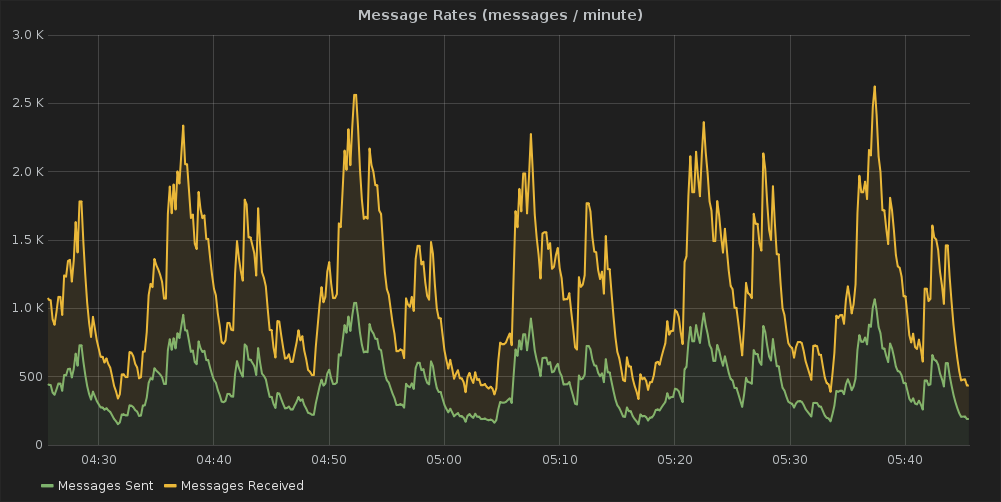 or you can see the current broker statistics at:
http://grafana.openstack.org/dashboard/db/mosquitto-status which was built using the mqtt_statsd project. Despite this message load it barely uses any resources Looking at the past month the CPU and RAM usage was minimal considering the amount of messages being published:
CPU Usage Ram Usage
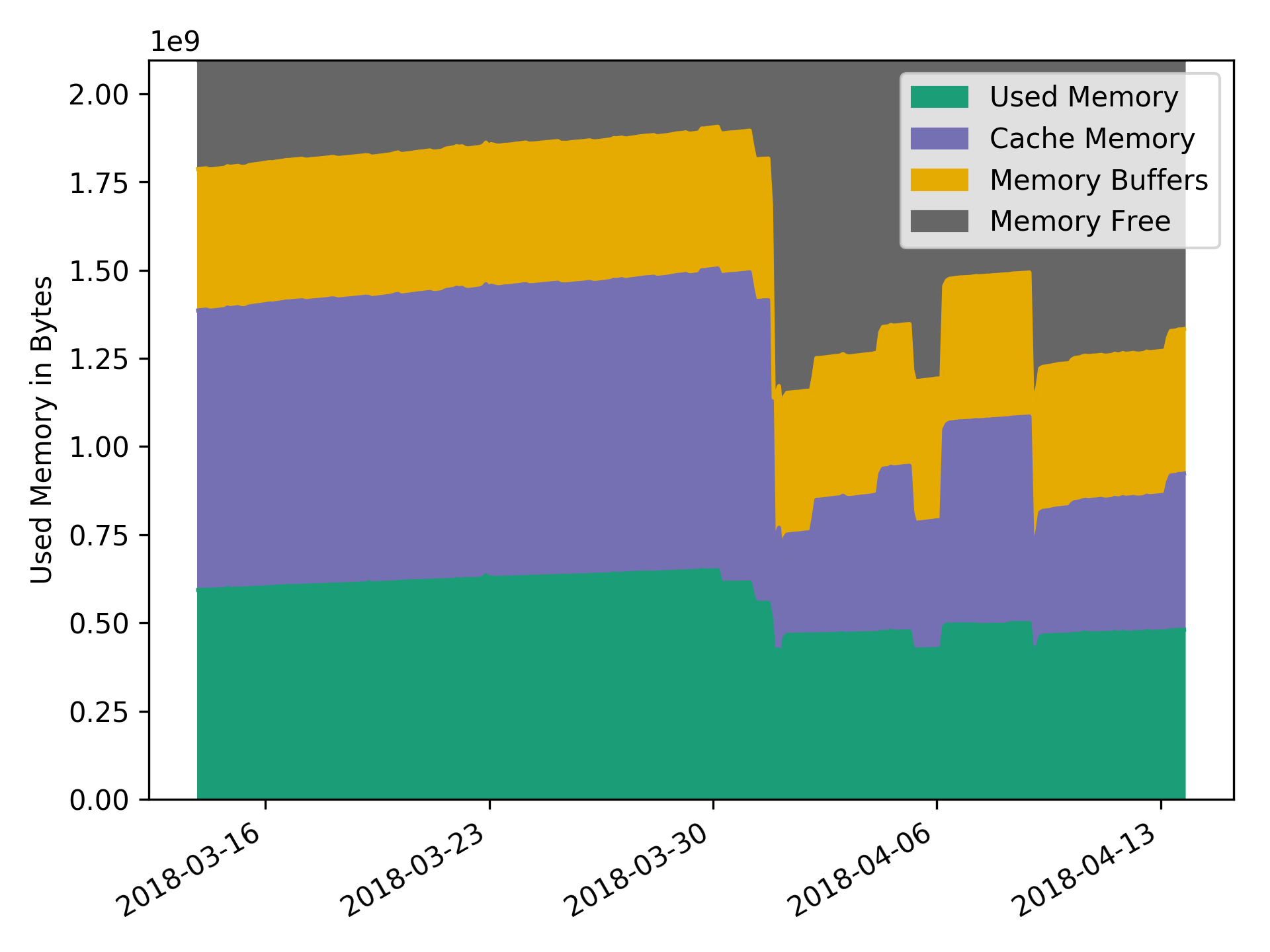 You can see the current numbers on cacti.openstack.org.
Load Testing
About a year ago when we started growing our usage of firehose we decided to do some manual load testing. We first tried to leverage the mqtt-bench project to do this, but unfortunately it’s not being actively maintained. So we ended up writing pymqttbench to do this task. When we did this load testing we were hindered by the bandwidth limitations of 200 Mbps for the server flavor we deployed. However despite hitting that hard wall limiting our testing we were able to see some interesting data.
So the first thing we looked at the total number of message we were processing during the load testing:
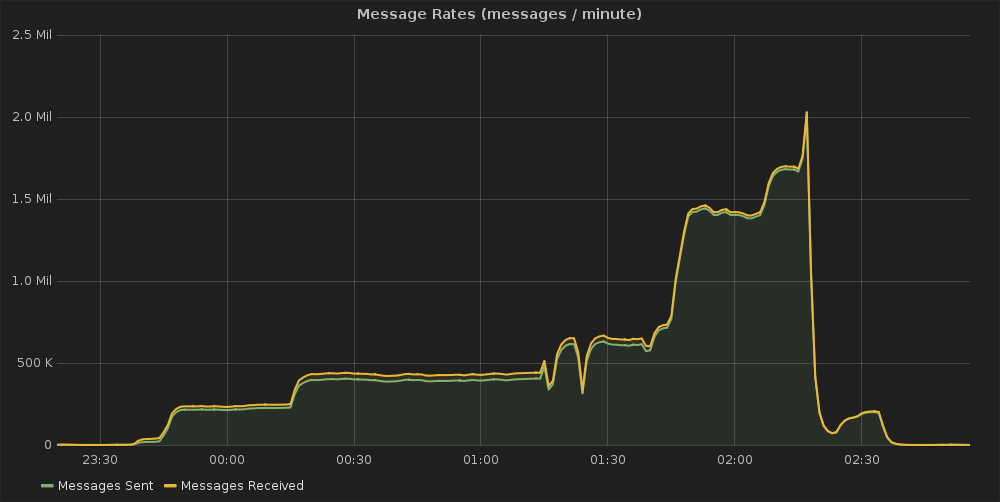 We ran the testing over the period of a few hours while slowly ratcheting up the number of messages we were and were able to peak at about 2 million messages per minute going through the broker before we realized we were hitting a bandwidth limit and stopped the testing. The interesting thing with this test was looking at the system load at the time. First the CPU usage:
 This graph shows a spike in the CPU utilization topping out at about 30-35% during the load test. The interesting thing with this though, is that spike occurred about an hour before the peak data usage of the test. Our expectation going into the test was that the load would be coupled directly to the number of messages and subscribers. But this graph clearly shows the spike was independent of either of those. Then looking at the RAM usage during the test:
 We ended up using more RAM (percentage wise) during the testing peaking at about 1.25 GB being used by Mosquitto. But the big spike corresponds to the CPU usage spike which occurred before the max message throughput. When you look at the RAM usage when we were at the max messages it was at about it’s lowest value, at between 250MB and 350MB.
At some point we’ll have to revisit the load testing experiment. All this test showed was that the small server we have deployed is able to keep up with whatever load we throw at it, and have a large amount of headroom for more messages before we hit any limits of the small server we’re using, which admittedly was the goal of our testing. But, besides that it raised more questions than it answered about what those limits actually are, which is something we still need to investigate.
Conclusion
To tie everything together what has the firehose project shown us about using MQTT for applications in the cloud. The first thing is the lightweight nature of the protocol is a great fit for the cloud. In most cloud environments you pay for your resource utilization, so the less you use the less you have to pay. What firehose has demonstrated in this regard is that by using MQTT you can get away with minimal resource utilization and still have a solution that will work with a large load. Another key aspect is MQTT’s resiliency to unreliable networking. The old adage of treat your servers in the cloud like cattle not pets holds true. You can look at other aspects of OpenStack’s community infrastructure and see all sorts of failures. For example, http://status.openstack.org/elastic-recheck/index.html#1298006 tracks a failure in the CI system where a test node can’t talk to the git servers. That graph shows how frequently we’re encountering random networking issues in a cloud. We’ve been running firehose since Autumn 2016 and I can’t recall of any instances when a service or client lost it’s connection and wasn’t able to recover seamlessly. This is including several broker restarts for service upgrades and configuration changes. The last aspect here is because MQTT has been around for 20 years there is a large ecosystem that already exists around the protocol. This means regardless of how you’re building your application, or what language it’s written in, there is likely already support for using MQTT there. This means you don’t have to spend time reinventing the wheel to add support for using MQTT or you can leverage existing projects to do common functions with MQTT.
What this whole project has demonstrated to me is that the application requirements for IoT and remote sensor networks aren’t that dissimilar from writing applications in the cloud. The next post in this series will be looking at using MQTT in applications deployed on Kubernetes.
]]>
Python unittest
Included in the python standard library is the unittest library. This provides the basic framework for writing, discovering, and running tests in python. It uses an object oriented model where tests are organized in classes (called test cases) with individual methods that represent a single test. Each test class has some standard fixtures like setUp and tearDown which define functions to return at certain phases of the text execution. These classes and their modules are combined to build test suites. These suites can either be manually constructed or use test discovery to build the suite automatically by scanning a directory.
The thing which is often misunderstood, especially given it’s name, is that Python unittest is not strictly limited to unit testing or testing python code. The framework provides a mechanism for running structured python code and treat the execution of this code as test results. This enables you to write tests that do anything in python. I’ve personally seen examples that test a wide range of things outside of python code. Including hardware testing, CPU firmware testing, and Rest API service testing.
unittest2
As unittest is a python library included in the cpython standard library it gets improvements and new features with each release of cPython. This makes writing tests that support multiple versions of python a bit more difficult, especially if you want to leverage features in newer version of python. This is where the unittest2 library comes in, it provides backports of features from newer versions of python. This enables older versions of python to leverage features from newer unittest. It was originally written to leverage features included in python 2.7 unittest with python 2.6 and older. But, it also backports features from newer versions of python 3 to older versions of python.
Testtools
Building on the unittest framework is the testtools library. Testtools provides an extension on top of unittest to provide additional features like additional assert methods and a generic matcher framework to do more involved object comparisons. While it is an extension on top of unittest testtools maintains compatibility with the upstream python standard lib unittest. So you can write tests that leverage this extra functionality and use them with any other unittest suite or runner.
One of the key things that testtools provides for the layers above it in this stack is it’s improved results stream. This includes the concept of details, which are like attachments that enable storing things like logging or stdout with test result.
Subunit
Subunit is streaming protocol for test results. It provides a mechanism for sharing test results from multiple sources in real time. It’s a language agnostic protocol with bindings for multiple languages including: python, perl, c, c++, go, js and others. I also recently learned that someone created a wikipedia page for the protocol: https://en.wikipedia.org/wiki/Subunit_(format)
The python implementation of the subunit library (the subunit library repository is multilanguage) is built by extending testtools. It builds off of testtools’s test runner and the result stream additions that testtools adds on to base unittest. This means that any unittest suite (or testtools) can simply replace their test runner with subunit’s and get a real time subunit output stream. It’s this library that enables parallel execution and strict unittest compatibility in the tools above it on the stack.
The other thing which is worth pointing out is that because of OpenStack’s usage of testr and stestr we have developed a lot of tooling in the community around consuming subunit. Including things like stackviz, subunit2sql, and subunit2html. All of which can be reused easily by anything that uses subunit. There are also tools to convert between different test result formats, like junitxml, and subunit.
Testrepository
Also known as testr, which is the command name, is a bit of a misunderstood project depending on who you talk too. Testrepository is technically a repository for storing test results, just as it’s name implies. As part of that it includes a test running mechanism to run any command which will generate a subunit results stream. It supports running those commands in parallel both locally and on remote machines. Having a repository results then enables using that data for future runs. For example, testr lets you rerun a test suite only with tests that failed in the previous run, or use the previous run to bisect failures to try and find issues with test isolation. This has proven to be a very useful feature in practice, especially when working with large and/or slow test suites.
But for several years it was the default test runner used by the OpenStack project, and a lot of people just see it as the parallel test runner used by OpenStack. Even though the scope of the project is much larger than just python testing.
ostestr
Since the OpenStack project started using testr in late 2012/early 2013 there were a lot of UX issues and complaints people had with it. People started working around these in a number of ways, there was the introduction of multiple setuptools entrypoints to expose commands off of setup.py to inovke testr. There were also multiple bash scripts floating around to run testr with an alternative UI called pretty_tox.sh. pretty_tox.sh started in the tempest project and was quickly copied into most projects using testr. However each copy tended to diverge and embed their own logic or preferences. ostestr was developed to try and unify those bash scripts, and it shows. It was essentially a bash script written in python that would literally subprocess out and call testr.
stestr
This is where stestr entered the field. After having maintained ostestr for a while I was getting frustrated with a number of bugs and quirks in testrepository itself. Instead of trying to work around them it would just be better to fix things at the source. However, given the lack of activity in the testrepository project this would have been difficult. I personally had pull requests sitting idle for years on the project. So I decided after a lot of personal deliberation to fork it.
I took the test runner UX lessons I learned from maintaining ostestr and started rewriting large chunks of testr to make stestr. I also tried to restructure the code to be easier to maintain and also leverage newer python features. testrepository was started 8 years ago and it supported python versions < 2.7 (having been started before 2.7’s release) this included a lot of code to implement things that were included standard in newer, more modern versions of the language.
The other aspect to stestr is that it’s scoped to just being a parallel python test runner. While testrepository is designed to be a generic test runner runner that will work with any test runner that emits a subunit result stream, stestr will only deal with python tests. Personally I always felt there was a tension in the project when using it strictly as a python test runner, some of the abstractions testr had to make caused a lot of extra work for people using it only for python testing. Which is why I rescoped the project to only be concerned with python testing.
Other Popular Test Runners
While I am partial to the tools described above and the way the stack is constructed (for the most part). These tools are far from the only way to run python tests. In fact outside of OpenStack this stack isn’t that popular. I haven’t seen it used in too many other places. So it’s worth looking at other popular test runners out there, and how they compare to stestr.
nosetests
nosetests at one time was the test runner used by the majority of python projects. (including OpenStack) It provided a lot of missing functionality from python unittest; especially before python 2.7 which is when python unittest really started getting more mature. However it did this by basically writing it’s own library for testing and coupling that with the runner. While you can use nosetests for running unitttest suites in most cases, the real power with nose comes from using it’s library in conjunction with the runner. This made using other runners or test tooling with a nose test suite very difficult. Having personally worked with a large test suite that was written using nose migrating that to work with any unittest runner is not a small task. (it took several months to get it so tests could run with unittest)
Currently nosetests is a mostly inactive project in maintenance mode. There is a successor project, nose2, which was trying to fix some of the issues with nose and make it up to date. But it too is currently in maintenance mode, and not really super active anymore. (but it’s more active then nose proper) Instead the docs refer people to use pytest.
pytest
pytest is in my experience by far the most popular python test runner out there. It provides a great user experience (arguably the most pleasant), is pluggable, and seems to have the most momentum as a python test runner. This is with good reason there are a lot of nice features with pytest, including very impressive failure introspection which basically will just tell you why a test failed, making debugging failures much simpler.
But there are a few things to consider when using pytest, the biggest of which is it’s not strictly unittest compatible. While pytest is capable of running tests written using the unittest library it’s not actually a unittest based runner. So things like test discovery differ in how they work on pytest. (it’s worth noting pytest supports nose test suites too)
The other things that’s missing from pytest by default is parallel test execution. There is a plugin pytest-xdist which enables this, and it has come a long way in the last several years. It doesn’t provide all of the same features for parallel execution as stestr, especially around isolation and debugging failures. But for most people it’s probably enough.
Quite frankly, if I weren’t the maintainer of stestr and if I didn’t need or want things that stestr provides like first class parallel execution support, a local results repository, strict unittest compatibility, or subunit support I’d probably just use pytest for my projects.
]]>Just a heads up this post is long! I try to cover every step of the project with all the details I could remember. It probably would have made sense to split things up into multiple posts, but I wrote it in a single sitting and doing that felt weird. If you’re just looking for a quicker overview, I recommend watching the video of my talk instead.
The Project Scope
When I was in college I had a part time job as a sysadmin at a HPC research lab in the aerospace engineering department. In that role I was responsible for all aspects of the IT in the lab, from the workstations and servers to the HPC clusters. In that role I often had to deploy new software with no prior knowledge about it. I managed to muddle through most of the time by reading the official docs and frantically google searching when I encountered issues.
Since I started working on OpenStack I often think back to my work in college and wonder if I had been tasked with deploying an OpenStack cloud back then would I have been able to? As a naive college student who had no knowledge of OpenStack would I have been successful in trying to deploy OpenStack by myself? Since I had no knowledge of configuration management (like puppet or chef) back then I would have gone about it by installing everything by hand. Basically the open question from that idea is how hard is it actually to install OpenStack by hand using the documentation and google searches?
Aside from the interesting thought exercise I also have wanted a small cloud at home for a couple of reasons. I maintain a number of servers at home that run a bunch of critical infrastructure. For some time I’ve wanted to virtualize my home infrastructure mainly just for the increased flexibility and potential reliability improvements. Running things off a residential ISP and power isn’t the best way to run a server with a decent uptime. Besides virtualizing some of my servers it would be nice to have the extra resources for my upstream OpenStack development, I often do not have the resources available to me for running devstack or integration tests locally and have to rely on upstream testing.
So after the Ocata release I decided to combine these 2 ideas and build myself a small cloud at home. I would do it by hand (ie no automation or config management) to test out how hard it would be. I set myself a strict budget of $1500 USD (the rough cost of my first desktop computer in middle school, an IBM Netvista A30p that I bought with my Bar Mitzvah money) to acquire hardware. This was mostly just a fun project for me so I didn’t want to spend an obscene amount of money. $1500 USD is still a lot of money, but it seemed like a reasonable amount for the project.
However, I decided to take things a step further than I originally planned and build the cloud using the release tarballs from http://tarballs.openstack.org/. My reasoning behind this was to test out how hard it would be to take the raw code we release as a community and turn that into a working cloud. It basically invalidated the project as a test for my thought exercise of deploying the cloud if I was back in college (since I definitely would have just used my Linux distro’s packages back then) but it made the exercise more relevant for me personally as an upstream OpenStack developer. It would give me insight as to where what we’re there are gaps in our released code and how we could start to fix them.
Building the Cloud
Acquiring the Hardware
The first step for building the cloud was acquiring the hardware. I had a very tight budget and it basically precluded buying anything new. The cheapest servers you can buy from a major vendor would pretty much eat up my budget for a single machine. I also considered building a bunch of cheap desktops for the project and putting those together as a cloud. (I didn’t actually need server class hardware for this cloud) But for the cost the capacity was still limited. Since I was primarily building a compute cloud to provide me with a pool of servers to allocate My first priority was the number of CPU cores in the cloud. This would give me the flexibility to scale any applications I was running on it. With that in mind I decided on the priority list for the hardware of:
- Number of Cores
- Amount of RAM
- Speed of CPU
The problem with building with desktop CPUs is (at the time I was assembling pieces) the core count / USD was not really that high for any of the desktop processors. Another popular choice for home clouds is the Intel NUCs, but these suffer from the same problem. The NUCs use laptop processors and while reasonably priced you’re still only getting a dual or quad core CPU for a few hundred dollars.
It turns out the best option I found for my somewhat bizarre requirements was to buy used hardware. A search of eBay shows a ton of servers from 8 or 9 years ago that are dirt cheap. After searching through my various options I settled on old Dell PowerEdge R610, which was a dual socket machine. The one I ordered came with 2 Intel Xeon E5540 CPUs in it. This gave me a total of 8 physical cores (or 16 virtual cores if you count HyperThreading/SMT) The machines also came with 32 GB of RAM and 2x 149GB SAS hard drives. The best part though was that each machine was only $215.56 USD. This gave me plenty of room in the budget, so I bought 5 of them. After shipping this ended up costing only $1,230.75. That gave me enough wiggle room for the other parts I’d need to make everything working. The full hardware specs from the eBay listing was:

Although, the best part about these servers were that I actually had a rack full of basically the same exact servers at the lab in college. The ones I had back in 2010 were a little bit slower and had half the RAM, but were otherwise the same. I configured those servers as a small HPC cluster my last year at college, so I was very familiar with them. Although back then those servers were over 10x the cost as what I was paying for them on eBay now.
The only problem with this choice was the hardware, the Xeon E5540 is incredibly slow by today’s standards. But, because of my limited budget speed was something I couldn’t really afford.
Assembling the Hardware
After waiting a few days the servers were delivered. That was a fun day, the FedEx delivery person didn’t bother to ring the door bell. Instead I heard big thud outside and found that they had left all the boxes in front of my apartment door. Fortunately I was home and heard them throw the boxes on the ground, because it was raining that day. Leaving my “new” servers out in the rain all day would have been less than an ideal way to start the project . It also made quite the commotion and several of my neighbors came out to see what was going on and watched me as I took the boxes inside.
After getting the boxes inside my apartment and unboxed, I stacked them on my living room table:

My next problem with this was where to put the servers and how to run them. I looked at buying a traditional rack, however they were a bit too pricey. (even on eBay) Just a 10U rack looked like it would cost over $100 USD and after shipping that wouldn’t leave me too much room if I needed something else. So I decided not to go that route. Then I remembered hearing about something called a LackRack a few years ago. It turns out the IKEA Lack table has a 19 inch width between the legs which is the same as a rack. They also only cost $9.99 which made it a much more economical choice compared to a more traditional rack. However, while I could just put the table on the floor and be done with it, I was planning to put the servers in my “data closet” (which is just a colorful term for my bedroom closet where I store servers and clothing) but I didn’t want to deal with having to pick up the “rack” every time I needed to move it. So I decided to get some casters and mount them to the table so I could just push the server around.
Once I got the table delivered, which took a surprisingly long time, I was able to mount he casters and rack the servers. As I put each server on the table I was able to test each of them out. (I only had a single power cable at the time, so I went one at a time) It turns out that each server was slightly different from the description and had several issues:
- 4x8GB of RAM not 8x4GB
- Memory installed in wrong slots
- Dead RAID controller battery
- Came with 15k RPM hard drives not 10k RPM
Also, the company that is “refurbishing” these old servers from whatever datacenter threw them away totally strips the servers down to the minimum possible unit. For example, the management controller was removed, as was the redundant power supply. Both of these were standard feature from Dell when these servers were new. Honestly, it makes sense, the margins on reselling old servers can’t be very high so the company is trying to make a little profit. I also really didn’t need anything they took out as long as the servers still booted. (although that management controller would have been nice)
Once I put all 5 servers on the rack: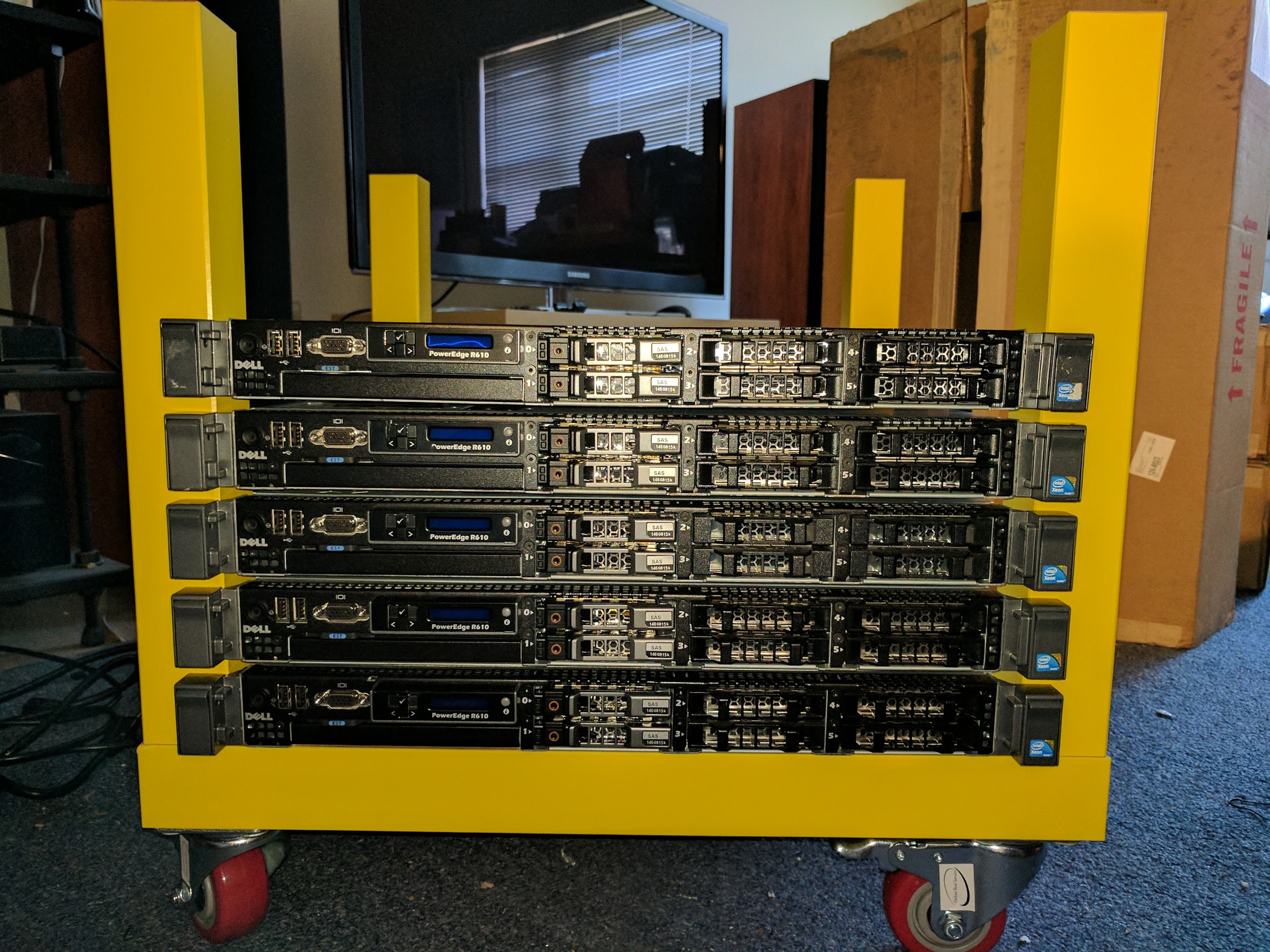
After getting everything mounted on the rack it turns out I also needed a bunch of cables and another power strip to power all 5 at once. So I placed an order with Monoprice for the necessary bits and once they arrived I wired everything up in the data closet:
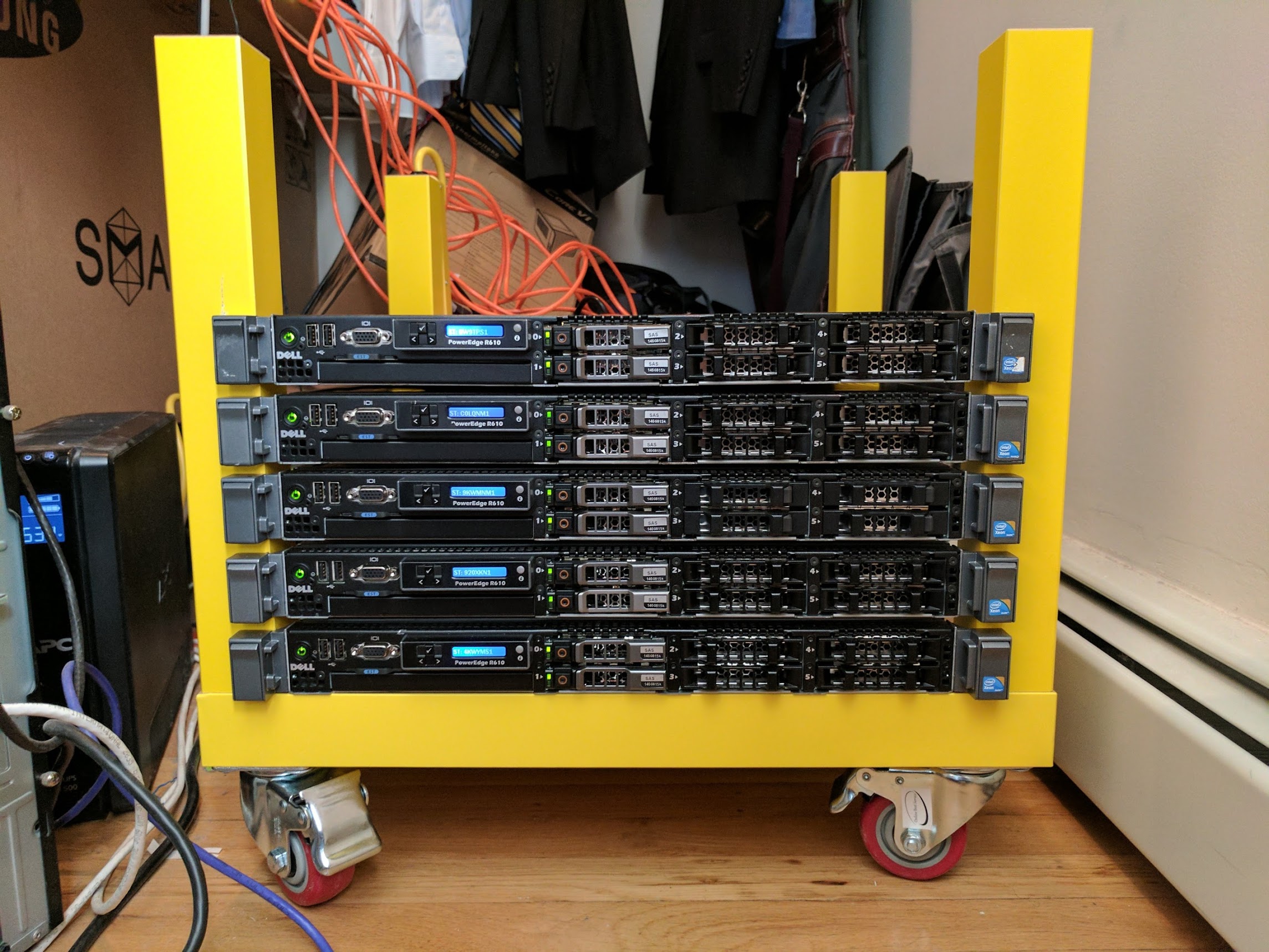
After everything was said and done the final bill of materials for all the hardware was:
| Part Name | Link | Price | Number | Shipping & Tax | Total |
|---|---|---|---|---|---|
| Dell PowerEdge R610 Virtualization Server 2.53GHz 8-Core E5540 32GB 2x146G PERC6 | http://www.ebay.com/itm/191545700823 | $215.56 | 5 | $152.95 | $1,230.75 |
| LACK Side table, yellow | http://www.ikea.com/us/en/catalog/products/40104270/#/10324278 | $9.99 | 1 | $13.65 | $23.64 |
| 6 Outlet Power Strip | https://www.monoprice.com/product?c_id=109&cp_id=10907&cs_id=1090703&p_id=13692&seq=1&format=2 | $7.90 | 1 | 10.49 | $18.39 |
| 3ft 16AWG Power Cord | https://www.monoprice.com/Product?p_id=5285 | $1.60 | 5 | 0 | $8.00 |
| FLEXboot Series Cat6 24AWG UTP Ethernet Network Patch Cable, 10ft Orange | https://www.monoprice.com/product?p_id=9808 | $1.76 | 10 | 0 | $17.60 |
| Casters | https://www.amazon.com/gp/product/B01FJ97E64/ref=od_aui_detailpages00?ie=UTF8&psc=1 | $29.99 | 1 | 0 | $29.99 |
| Grand Total: | $1,328.37 |
Installing the Operating System
After getting the working set of hardware the next step was to install the operating system on the servers. As I decided in the original project scope I was planning to follow the official install guide as much as possible. My operating system choice would therefore be dictated by those covered in the guide, the 3 Linux distributions documented were OpenSUSE/SLES, RHEL/CentOS, and Ubuntu. Of those the 3 my personal choice was Ubuntu which I personally find the easiest to deal with out of the choices. Although, looking back on it now if I were to do an install during job college I definitely would of have used RHEL. Georgia Tech had a site license for RHEL and a lot of software we had commercial licenses for only had support on RHEL. But, my preference today between those 3 options is to use Ubuntu.
I created a boot usb stick for Ubuntu Server 16.04 and proceeded to do a basic install on each server. (one at a time) The install itself just used the defaults, the only option I made sure was present was the OpenSSH server. This way once I finished the initial install I didn’t have to sit in front of the server to do anything. I would just install any other packages I needed after the install from the comfort of my home office. For the hostname I picked altocumulus because I think clouds should be named after clouds. Although, after I finished the project I got a bunch of better suggestions for the name like closet-cloud or laundry-cloud.
It’s worth pointing out that if the servers had come with the management controller installed this step would have been a lot easier. I could have just used that to mount the installer image and ran everything from the virtual console. I wouldn’t have had to sit in front of each server to start the install. But despite this it only took an hour or so to perform the install on all the servers. With the installs complete it was time to start the process of putting OpenStack on each server and creating my cloud.
Installing OpenStack
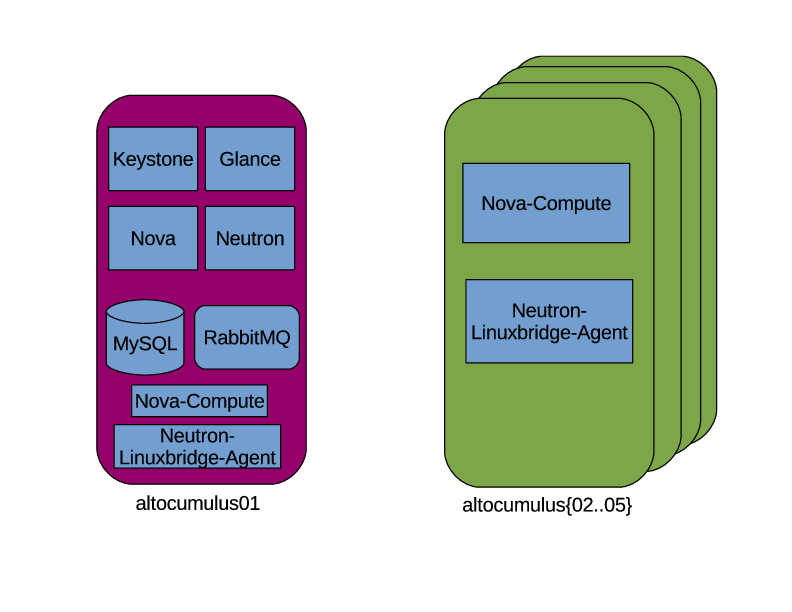
With the operating system installed it’s time to start the process of building the servers out. Given my limited hardware capacity, just 40 physical cores and 160GB of RAM, I decided that I didn’t want to sacrifice 1/5 of that capacity for a dedicated controller node. So I was going to setup the controller as a compute node as well. My goal for this project was to build a compute cloud, so all I was concerned about was installing the set of OpenStack projects required to achieve this. I didn’t have a lot of storage (the 2 149GB disks came configured out of the box with RAID 1 and I never bothered to change that) so providing anything more than ephemeral storage for the VMs wasn’t really an option.
OpenStack is a large project with a ton of different projects, (the complete list of official projects can be found here) But, I find some people have trouble figuring out exactly where to get started or for configuration X where to get started. The OpenStack Foundation actually has a page with a bunch of sample service selections by application. The OpenStack Technical Committee also maintains a list of projects needed for the compute starter kit which was exactly what I was looking for. The only potential problem is the discoverability of that information. It kinda feels like a needle in the haystack if you don’t know where to look.
It also turns out the install guide is mostly concerned with building a basic compute cloud (it also includes using cinder for block storage, but I just skipped that step) so even if I didn’t know the components I needed I would have been fine just reading the docs The overview section of the docs covers this briefly, but doesn’t go into much detail.
The basic service configuration I was planning to go with was:
With a rough idea of how I was planning to setup the software I started following the install guide on setting up the server. https://docs.openstack.org/ocata/install-guide-ubuntu/environment.html# walks you through setting up all the necessary Operating System level pieces like configuring the networking interfaces and NTP. It also goes over installing and configuring the service prerequisites like MySQL, RabbitMQ, and memcached. For this part I actually found the docs really easy to follow and very useful. Things were explained clearly and mostly it was just copy and paste the commands to set things up. But, I never felt like I was blindly doing anything for the base setup.
Installing and Configuring the OpenStack Components
After getting the environment for running OpenStack configured it was time to start installing the OpenStack components. Keystone is a requirement for all the other OpenStack services so you install this first. This is where I hit my first issue because I decided to use the release tarballs for the install. The install guide assumes you’re using packages from your Linux distribution to install OpenStack. So when I got to the second step in the Installing Keystone section of the install guide it said run “apt install keystone” which I didn’t want to do. (although it definitely would have made my life easier if I did)
Installing From Tarballs
It turns out there isn’t actually any documentation anywhere that concisely explains the steps required to installing an OpenStack component on your system from source. I started doing searching on Google to try and find any guides. The first hit was a series of blog posts on the Rackspace developer blog on installing OpenStack from source. However, a quick look at this showed this was quite out of date, especially for the latest version of OpenStack, Ocata, which I was deploying. Also, some of the steps documented there conflicted with the configuration recommended in the install guide. The other searches I found recommended that you look at devstack or use automation project X to accomplish this goal. Both of these were outside the scope of what I wanted to do for this project. So for the tarball install step I decided to ignore the premise of just following the install guide and just used my experience working on OpenStack to do the following steps to install the projects:
- Download the service tarballs. I found the releases page has a good index by project to get the latest tarball for each project. Then extract that tarball to an easy remember location. (I created a tarballs directory in my home directory to store them all)
- Create the service user for each project. I ran:
useradd -r -M $service
- Create the /etc and /var/lib directories for the service. For example on the controller node I used the following for loop in bash to do this for all the services:
for proj in keystone glance nova neutron ; do sudo mkdir /etc/$proj sudo mkdir /var/lib/$proj sudo chown -R $proj:$proj /etc/$proj /var/lib/$proj done - Install the binary package requirements for the project. This is things like libvirt for nova, or libssl. Basically anything you need to have installed to either build the python packages or to run the service. The problem here is that for most projects this is not documented anywhere. Most of the projects include a bindep.txt which can be used with the bindep project (or just manually read like I did) to show the distro package requirements on several distributions, but few projects use it for this. Instead it’s often just used for just the requirements for setting up a unit (or functional) test environment. I also didn’t find it in any of the developer documentation for the projects. This means you’re probably stuck with trial and error here. When you get to step 6 below it will likely fail with an error that a library header is missing and you’ll need to find the package and install that. Or when you run the service something it’s calling out to is missing and you’ll have errors in the service log until you install that missing dependency and restart the service.
- Copy the data files from etc/ in the tarball into /etc/$service for the project. The python packaging ecosystem does not provide a way for packages to install anything outside of the python lib/ directories. This means that to install the required configuration files (like policy.json files or api paste.ini files) have to be copied manually from the tarball.
- After you do all of those steps you can use pip to install the tarball. One thing to note here is that you want to use constraints when you run pip. This is something I forgot installing the first few services and it caused me a ton of headaches later in the process. You can avoid all of those potential problems up front by just running:
pip install -U -c "https://git.openstack.org/cgit/openstack/requirements/plain/upper-constraints.txt?h=stable/ocata" $PATH_TO_EXTRACTED_TARBALL
If you’re using a different OpenStack release just replace “ocata” at the end of the url with that release name.
I wrote down these steps after I did the install mostly based on all of the issues I had during the install process. As you read through the rest of this post most of the issues I encountered could have been completely avoided if I did all of these up front.
It’s also worth noting that all of these steps are provided by the distro packages for OpenStack. This is exactly the role that packaging plays for users, and I was just going through the motions here because I decided to use tarballs. Python packages aren’t really designed for use in systems software and have a lot of limitations beyond the basic case of: put my python code in the place where python code lives. If you want more details on this Clark Boylan gave a good talk on this topic at the OpenStack summit in Boston.
I have also been trying to make a push to start documenting these things in the project developer docs so it’s not an exercise in misery for anyone else wanting to install from source. But, I’ve been getting push back on this because most people seem to feel like it’s a low priority and most people will just use packages. (and packagers seem to have already figured out the pattern for building things)
Creating systemd unit files
One thing that isn’t strictly a requirement when installing from source is creating systemd unit files. (or init scripts if you’re lucky enough to have a distro that still supports using SysV init) Creating a systemd unit file for each daemon process you’ll be running is helpful so you don’t have to manually run the command for each daemon. When I built the cloud I created a unit file for each daemon I ran on both the controller as well as all of the compute nodes. This enabled me to configure each service to start automatically on boot, but also encode the command for starting the daemons, so I could treat it like any other service running on the system. This is another thing that distro packages provide for you, but you’ll have to do yourself when building from source.
For an example this is the contents of my nova-api systemd unit file which I put in /etc/systemd/system/nova-api.service:
[Unit]
Description=OpenStack Nova API
After=network.target

[Service]
ExecStart=/usr/local/bin/nova-api --config-file /etc/nova/nova.conf
User=nova
Group=nova

[Install]
WantedBy=multi-user.target
All the other service follow this same format, except for anything running under uwsgi (like keystone, more on that in the next section) , but you can refer to the uwsgi docs for more information on that.
Configuring Keystone
With the formula worked out for how to install from tarball I was ready to continue following the install guide. The only other issue I had was setting up running the wsgi script under apache. By default keystone ships as a wsgi script that requires a web server to run it. The install guide doesn’t cover this because the distro packages will do the required setup for you. But, because I was installing from tarballs I had to figure out how to do this myself. Luckily the keystone docs provide a guide on how to do this, and include sample config files in the tarball. The rest of configuring keystone was really straightforward, the keystone.conf only required 2 configuration options. (one for the database connection info and the other for the token type) After setting those I had to run a handful of commands to update the database schema and then populate it with some initial data. It’s not worth repeating all the commands here, since you can just read the keystone section of the install guide. In my case I did encounter one issue when I first started the keystone service. I hit a requirements mismatch which prevent keystone from starting:
2017-03-29 15:27:01.478 26833 ERROR keystone Traceback (most recent call last):
2017-03-29 15:27:01.478 26833 ERROR keystone   File "/usr/local/bin/keystone-wsgi-admin", line 51, in <module>
2017-03-29 15:27:01.478 26833 ERROR keystone     application = initialize_admin_application()
2017-03-29 15:27:01.478 26833 ERROR keystone   File "/usr/local/lib/python2.7/dist-packages/keystone/server/wsgi.py", line 132, in initialize_admin_application
2017-03-29 15:27:01.478 26833 ERROR keystone     config_files=_get_config_files())
2017-03-29 15:27:01.478 26833 ERROR keystone   File "/usr/local/lib/python2.7/dist-packages/keystone/server/wsgi.py", line 69, in initialize_application
2017-03-29 15:27:01.478 26833 ERROR keystone     startup_application_fn=loadapp)
2017-03-29 15:27:01.478 26833 ERROR keystone   File "/usr/local/lib/python2.7/dist-packages/keystone/server/common.py", line 50, in setup_backends
2017-03-29 15:27:01.478 26833 ERROR keystone     res = startup_application_fn()
2017-03-29 15:27:01.478 26833 ERROR keystone   File "/usr/local/lib/python2.7/dist-packages/keystone/server/wsgi.py", line 66, in loadapp
2017-03-29 15:27:01.478 26833 ERROR keystone     'config:%s' % find_paste_config(), name)
2017-03-29 15:27:01.478 26833 ERROR keystone   File "/usr/local/lib/python2.7/dist-packages/keystone/version/service.py", line 53, in loadapp
2017-03-29 15:27:01.478 26833 ERROR keystone     controllers.latest_app = deploy.loadapp(conf, name=name)
2017-03-29 15:27:01.478 26833 ERROR keystone   File "/usr/local/lib/python2.7/dist-packages/paste/deploy/loadwsgi.py", line 247, in loadapp
2017-03-29 15:27:01.478 26833 ERROR keystone     return loadobj(APP, uri, name=name, **kw)
2017-03-29 15:27:01.478 26833 ERROR keystone   File "/usr/local/lib/python2.7/dist-packages/paste/deploy/loadwsgi.py", line 272, in loadobj
2017-03-29 15:27:01.478 26833 ERROR keystone     return context.create()
2017-03-29 15:27:01.478 26833 ERROR keystone   File "/usr/local/lib/python2.7/dist-packages/paste/deploy/loadwsgi.py", line 710, in create
2017-03-29 15:27:01.478 26833 ERROR keystone     return self.object_type.invoke(self)
2017-03-29 15:27:01.478 26833 ERROR keystone   File "/usr/local/lib/python2.7/dist-packages/paste/deploy/loadwsgi.py", line 144, in invoke
2017-03-29 15:27:01.478 26833 ERROR keystone     **context.local_conf)
2017-03-29 15:27:01.478 26833 ERROR keystone   File "/usr/local/lib/python2.7/dist-packages/paste/deploy/util.py", line 55, in fix_call
2017-03-29 15:27:01.478 26833 ERROR keystone     val = callable(*args, **kw)
2017-03-29 15:27:01.478 26833 ERROR keystone   File "/usr/local/lib/python2.7/dist-packages/paste/urlmap.py", line 31, in urlmap_factory
2017-03-29 15:27:01.478 26833 ERROR keystone     app = loader.get_app(app_name, global_conf=global_conf)
2017-03-29 15:27:01.478 26833 ERROR keystone   File "/usr/local/lib/python2.7/dist-packages/paste/deploy/loadwsgi.py", line 350, in get_app
2017-03-29 15:27:01.478 26833 ERROR keystone     name=name, global_conf=global_conf).create()
2017-03-29 15:27:01.478 26833 ERROR keystone   File "/usr/local/lib/python2.7/dist-packages/paste/deploy/loadwsgi.py", line 362, in app_context
2017-03-29 15:27:01.478 26833 ERROR keystone     APP, name=name, global_conf=global_conf)
2017-03-29 15:27:01.478 26833 ERROR keystone   File "/usr/local/lib/python2.7/dist-packages/paste/deploy/loadwsgi.py", line 450, in get_context
2017-03-29 15:27:01.478 26833 ERROR keystone     global_additions=global_additions)
2017-03-29 15:27:01.478 26833 ERROR keystone   File "/usr/local/lib/python2.7/dist-packages/paste/deploy/loadwsgi.py", line 559, in _pipeline_app_context
2017-03-29 15:27:01.478 26833 ERROR keystone     APP, pipeline[-1], global_conf)
2017-03-29 15:27:01.478 26833 ERROR keystone   File "/usr/local/lib/python2.7/dist-packages/paste/deploy/loadwsgi.py", line 454, in get_context
2017-03-29 15:27:01.478 26833 ERROR keystone     section)
2017-03-29 15:27:01.478 26833 ERROR keystone   File "/usr/local/lib/python2.7/dist-packages/paste/deploy/loadwsgi.py", line 476, in _context_from_use
2017-03-29 15:27:01.478 26833 ERROR keystone     object_type, name=use, global_conf=global_conf)
2017-03-29 15:27:01.478 26833 ERROR keystone   File "/usr/local/lib/python2.7/dist-packages/paste/deploy/loadwsgi.py", line 406, in get_context
2017-03-29 15:27:01.478 26833 ERROR keystone     global_conf=global_conf)
2017-03-29 15:27:01.478 26833 ERROR keystone   File "/usr/local/lib/python2.7/dist-packages/paste/deploy/loadwsgi.py", line 296, in loadcontext
2017-03-29 15:27:01.478 26833 ERROR keystone     global_conf=global_conf)
2017-03-29 15:27:01.478 26833 ERROR keystone   File "/usr/local/lib/python2.7/dist-packages/paste/deploy/loadwsgi.py", line 328, in _loadegg
2017-03-29 15:27:01.478 26833 ERROR keystone     return loader.get_context(object_type, name, global_conf)
2017-03-29 15:27:01.478 26833 ERROR keystone   File "/usr/local/lib/python2.7/dist-packages/paste/deploy/loadwsgi.py", line 620, in get_context
2017-03-29 15:27:01.478 26833 ERROR keystone     object_type, name=name)
2017-03-29 15:27:01.478 26833 ERROR keystone   File "/usr/local/lib/python2.7/dist-packages/paste/deploy/loadwsgi.py", line 640, in find_egg_entry_point
2017-03-29 15:27:01.478 26833 ERROR keystone     pkg_resources.require(self.spec)
2017-03-29 15:27:01.478 26833 ERROR keystone   File "/usr/lib/python2.7/dist-packages/pkg_resources/__init__.py", line 943, in require
2017-03-29 15:27:01.478 26833 ERROR keystone     needed = self.resolve(parse_requirements(requirements))
2017-03-29 15:27:01.478 26833 ERROR keystone   File "/usr/lib/python2.7/dist-packages/pkg_resources/__init__.py", line 834, in resolve
2017-03-29 15:27:01.478 26833 ERROR keystone     raise VersionConflict(dist, req).with_context(dependent_req)
2017-03-29 15:27:01.478 26833 ERROR keystone ContextualVersionConflict: (requests 2.13.0 (/usr/local/lib/python2.7/dist-packages), Requirement.parse('requests!=2.12.2,!=2.13.0,>=2.10.0'), set(['oslo.policy']))
This was caused solely because I forgot to use pip constraints at first when I started installing the controller node (I remembered later). Pip doesn’t have a dependency solver and just naively installs packages in the order its told. This causes all sorts of conflicts if 2 packages have the same requirement with different versions. (even if there is overlap and a correct version can be figured out) Using constraints like I recommended before would have avoided this. But after resolving the conflict keystone worked perfectly and I was ready to move on to the next service.
Installing Glance
The next service to install by following the install guide is Glance. The process for configuring glance was pretty straightforward. Just as with keystone it’s not worth repeating all the steps from the install guide section on Glance. But, at a high level you just create the database in mysql, configure glance with the details for connecting to MySQL, connecting to Keystone, and how to store images. After that you run the DB schema migrations to set the schema for the MySQL database, and create the endpoint and service users in keystone. After going through all the steps I did encounter one problem in Glance when I first started it up. The glance log had this traceback:
2017-03-29 16:21:52.038 29647 ERROR glance.api.v2.image_data Traceback (most recent call last):
2017-03-29 16:21:52.038 29647 ERROR glance.api.v2.image_data   File "/usr/local/lib/python2.7/dist-packages/glance/api/v2/image_data.py", line 116, in upload
2017-03-29 16:21:52.038 29647 ERROR glance.api.v2.image_data     image.set_data(data, size)
2017-03-29 16:21:52.038 29647 ERROR glance.api.v2.image_data   File "/usr/local/lib/python2.7/dist-packages/glance/domain/proxy.py", line 195, in set_data
2017-03-29 16:21:52.038 29647 ERROR glance.api.v2.image_data     self.base.set_data(data, size)
2017-03-29 16:21:52.038 29647 ERROR glance.api.v2.image_data   File "/usr/local/lib/python2.7/dist-packages/glance/notifier.py", line 480, in set_data
2017-03-29 16:21:52.038 29647 ERROR glance.api.v2.image_data     _send_notification(notify_error, 'image.upload', msg)
2017-03-29 16:21:52.038 29647 ERROR glance.api.v2.image_data   File "/usr/local/lib/python2.7/dist-packages/oslo_utils/excutils.py", line 220, in __exit__
2017-03-29 16:21:52.038 29647 ERROR glance.api.v2.image_data     self.force_reraise()
2017-03-29 16:21:52.038 29647 ERROR glance.api.v2.image_data   File "/usr/local/lib/python2.7/dist-packages/oslo_utils/excutils.py", line 196, in force_reraise
2017-03-29 16:21:52.038 29647 ERROR glance.api.v2.image_data     six.reraise(self.type_, self.value, self.tb)
2017-03-29 16:21:52.038 29647 ERROR glance.api.v2.image_data   File "/usr/local/lib/python2.7/dist-packages/glance/notifier.py", line 427, in set_data
2017-03-29 16:21:52.038 29647 ERROR glance.api.v2.image_data     self.repo.set_data(data, size)
2017-03-29 16:21:52.038 29647 ERROR glance.api.v2.image_data   File "/usr/local/lib/python2.7/dist-packages/glance/api/policy.py", line 192, in set_data
2017-03-29 16:21:52.038 29647 ERROR glance.api.v2.image_data     return self.image.set_data(*args, **kwargs)
2017-03-29 16:21:52.038 29647 ERROR glance.api.v2.image_data   File "/usr/local/lib/python2.7/dist-packages/glance/quota/__init__.py", line 304, in set_data
2017-03-29 16:21:52.038 29647 ERROR glance.api.v2.image_data     self.image.set_data(data, size=size)
2017-03-29 16:21:52.038 29647 ERROR glance.api.v2.image_data   File "/usr/local/lib/python2.7/dist-packages/glance/location.py", line 439, in set_data
2017-03-29 16:21:52.038 29647 ERROR glance.api.v2.image_data     verifier=verifier)
2017-03-29 16:21:52.038 29647 ERROR glance.api.v2.image_data   File "/usr/local/lib/python2.7/dist-packages/glance_store/backend.py", line 453, in add_to_backend
2017-03-29 16:21:52.038 29647 ERROR glance.api.v2.image_data     verifier)
2017-03-29 16:21:52.038 29647 ERROR glance.api.v2.image_data   File "/usr/local/lib/python2.7/dist-packages/glance_store/backend.py", line 426, in store_add_to_backend
2017-03-29 16:21:52.038 29647 ERROR glance.api.v2.image_data     verifier=verifier)
2017-03-29 16:21:52.038 29647 ERROR glance.api.v2.image_data   File "/usr/local/lib/python2.7/dist-packages/glance_store/capabilities.py", line 223, in op_checker
2017-03-29 16:21:52.038 29647 ERROR glance.api.v2.image_data     raise op_exec_map[op](**kwargs)
2017-03-29 16:21:52.038 29647 ERROR glance.api.v2.image_data StoreAddDisabled: Configuration for store failed. Adding images to this store is disabled.
I forgot to create the /var/lib/glance dir, so there was no directory to store the images in. Again something else which would have been fix if I followed the steps I outlined in the installing from tarballs section. But after creating the directory everything worked.
One thing I do want to note here is that I have small issue with the verification steps for Glance outlined in the install guide. The steps there don’t really go far enough to verify the image uploaded was actually stored properly, just that glance created the image. This was a problem I had later in the installation and I could have caught it earlier if the verification steps instructed you to download the image from glance and compare it to the source image.
Installing Nova
The next service in the install guide is Nova. Nova was a bit more involved compared to Glance or Keystone, but it has more moving parts so that’s understandable. Just as with the other services refer to the install guide section for Nova for all the step by step details. There are more steps for nova in general so it’s not worth even outlining the high level flow here. One thing you’ll need to be aware of is that Nova includes 2 separate API services that you’ll be running, the Nova API and the Placement API. The Placement API is a recent addition since Newton which is used to provide data for scheduling logic and is a completely self contained service. Just like keystone, the placement API only ships as a wsgi script. But unlike keystone there was no documentation (this has changed, or in progress at least) about the install process and no example config files provided. It’s pretty straightforward to adapt what you used to keystone, but this was another thing I had to figure out on my own.
After getting everything configured according to the install guide I hit a few little things that I needed to fix. The first was that I forgot to create a state directory that I specified in the config file:
2017-03-29 17:46:28.176 32263 ERROR nova Traceback (most recent call last):
2017-03-29 17:46:28.176 32263 ERROR nova   File "/usr/local/bin/nova-api", line 10, in <module>
2017-03-29 17:46:28.176 32263 ERROR nova     sys.exit(main())
2017-03-29 17:46:28.176 32263 ERROR nova   File "/usr/local/lib/python2.7/dist-packages/nova/cmd/api.py", line 59, in main
2017-03-29 17:46:28.176 32263 ERROR nova     server = service.WSGIService(api, use_ssl=should_use_ssl)
2017-03-29 17:46:28.176 32263 ERROR nova   File "/usr/local/lib/python2.7/dist-packages/nova/service.py", line 311, in __init__
2017-03-29 17:46:28.176 32263 ERROR nova     self.app = self.loader.load_app(name)
2017-03-29 17:46:28.176 32263 ERROR nova   File "/usr/local/lib/python2.7/dist-packages/nova/wsgi.py", line 497, in load_app
2017-03-29 17:46:28.176 32263 ERROR nova     return deploy.loadapp("config:%s" % self.config_path, name=name)
2017-03-29 17:46:28.176 32263 ERROR nova   File "/usr/local/lib/python2.7/dist-packages/paste/deploy/loadwsgi.py", line 247, in loadapp
2017-03-29 17:46:28.176 32263 ERROR nova     return loadobj(APP, uri, name=name, **kw)
2017-03-29 17:46:28.176 32263 ERROR nova   File "/usr/local/lib/python2.7/dist-packages/paste/deploy/loadwsgi.py", line 272, in loadobj
2017-03-29 17:46:28.176 32263 ERROR nova     return context.create()
2017-03-29 17:46:28.176 32263 ERROR nova   File "/usr/local/lib/python2.7/dist-packages/paste/deploy/loadwsgi.py", line 710, in create
2017-03-29 17:46:28.176 32263 ERROR nova     return self.object_type.invoke(self)
2017-03-29 17:46:28.176 32263 ERROR nova   File "/usr/local/lib/python2.7/dist-packages/paste/deploy/loadwsgi.py", line 144, in invoke
2017-03-29 17:46:28.176 32263 ERROR nova     **context.local_conf)
2017-03-29 17:46:28.176 32263 ERROR nova   File "/usr/local/lib/python2.7/dist-packages/paste/deploy/util.py", line 55, in fix_call
2017-03-29 17:46:28.176 32263 ERROR nova     val = callable(*args, **kw)
2017-03-29 17:46:28.176 32263 ERROR nova   File "/usr/local/lib/python2.7/dist-packages/nova/api/openstack/urlmap.py", line 160, in urlmap_factory
2017-03-29 17:46:28.176 32263 ERROR nova     app = loader.get_app(app_name, global_conf=global_conf)
2017-03-29 17:46:28.176 32263 ERROR nova   File "/usr/local/lib/python2.7/dist-packages/paste/deploy/loadwsgi.py", line 350, in get_app
2017-03-29 17:46:28.176 32263 ERROR nova     name=name, global_conf=global_conf).create()
2017-03-29 17:46:28.176 32263 ERROR nova   File "/usr/local/lib/python2.7/dist-packages/paste/deploy/loadwsgi.py", line 710, in create
2017-03-29 17:46:28.176 32263 ERROR nova     return self.object_type.invoke(self)
2017-03-29 17:46:28.176 32263 ERROR nova   File "/usr/local/lib/python2.7/dist-packages/paste/deploy/loadwsgi.py", line 144, in invoke
2017-03-29 17:46:28.176 32263 ERROR nova     **context.local_conf)
2017-03-29 17:46:28.176 32263 ERROR nova   File "/usr/local/lib/python2.7/dist-packages/paste/deploy/util.py", line 55, in fix_call
2017-03-29 17:46:28.176 32263 ERROR nova     val = callable(*args, **kw)
2017-03-29 17:46:28.176 32263 ERROR nova   File "/usr/local/lib/python2.7/dist-packages/nova/api/auth.py", line 57, in pipeline_factory_v21
2017-03-29 17:46:28.176 32263 ERROR nova     return _load_pipeline(loader, local_conf[CONF.api.auth_strategy].split())
2017-03-29 17:46:28.176 32263 ERROR nova   File "/usr/local/lib/python2.7/dist-packages/nova/api/auth.py", line 38, in _load_pipeline
2017-03-29 17:46:28.176 32263 ERROR nova     app = loader.get_app(pipeline[-1])
2017-03-29 17:46:28.176 32263 ERROR nova   File "/usr/local/lib/python2.7/dist-packages/paste/deploy/loadwsgi.py", line 350, in get_app
2017-03-29 17:46:28.176 32263 ERROR nova     name=name, global_conf=global_conf).create()
2017-03-29 17:46:28.176 32263 ERROR nova   File "/usr/local/lib/python2.7/dist-packages/paste/deploy/loadwsgi.py", line 710, in create
2017-03-29 17:46:28.176 32263 ERROR nova     return self.object_type.invoke(self)
2017-03-29 17:46:28.176 32263 ERROR nova   File "/usr/local/lib/python2.7/dist-packages/paste/deploy/loadwsgi.py", line 146, in invoke
2017-03-29 17:46:28.176 32263 ERROR nova     return fix_call(context.object, context.global_conf, **context.local_conf)
2017-03-29 17:46:28.176 32263 ERROR nova   File "/usr/local/lib/python2.7/dist-packages/paste/deploy/util.py", line 55, in fix_call
2017-03-29 17:46:28.176 32263 ERROR nova     val = callable(*args, **kw)
2017-03-29 17:46:28.176 32263 ERROR nova   File "/usr/local/lib/python2.7/dist-packages/nova/api/openstack/__init__.py", line 218, in factory
2017-03-29 17:46:28.176 32263 ERROR nova     return cls()
2017-03-29 17:46:28.176 32263 ERROR nova   File "/usr/local/lib/python2.7/dist-packages/nova/api/openstack/compute/__init__.py", line 31, in __init__
2017-03-29 17:46:28.176 32263 ERROR nova     super(APIRouterV21, self).__init__()
2017-03-29 17:46:28.176 32263 ERROR nova   File "/usr/local/lib/python2.7/dist-packages/nova/api/openstack/__init__.py", line 243, in __init__
2017-03-29 17:46:28.176 32263 ERROR nova     self._register_resources_check_inherits(mapper)
2017-03-29 17:46:28.176 32263 ERROR nova   File "/usr/local/lib/python2.7/dist-packages/nova/api/openstack/__init__.py", line 259, in _register_resources_check_inherits
2017-03-29 17:46:28.176 32263 ERROR nova     for resource in ext.obj.get_resources():
2017-03-29 17:46:28.176 32263 ERROR nova   File "/usr/local/lib/python2.7/dist-packages/nova/api/openstack/compute/cloudpipe.py", line 187, in get_resources
2017-03-29 17:46:28.176 32263 ERROR nova     CloudpipeController())]
2017-03-29 17:46:28.176 32263 ERROR nova   File "/usr/local/lib/python2.7/dist-packages/nova/api/openstack/compute/cloudpipe.py", line 48, in __init__
2017-03-29 17:46:28.176 32263 ERROR nova     self.setup()
2017-03-29 17:46:28.176 32263 ERROR nova   File "/usr/local/lib/python2.7/dist-packages/nova/api/openstack/compute/cloudpipe.py", line 55, in setup
2017-03-29 17:46:28.176 32263 ERROR nova     fileutils.ensure_tree(CONF.crypto.keys_path)
2017-03-29 17:46:28.176 32263 ERROR nova   File "/usr/local/lib/python2.7/dist-packages/oslo_utils/fileutils.py", line 40, in ensure_tree
2017-03-29 17:46:28.176 32263 ERROR nova     os.makedirs(path, mode)
2017-03-29 17:46:28.176 32263 ERROR nova   File "/usr/lib/python2.7/os.py", line 157, in makedirs
2017-03-29 17:46:28.176 32263 ERROR nova     mkdir(name, mode)
2017-03-29 17:46:28.176 32263 ERROR nova OSError: [Errno 13] Permission denied: '/usr/local/lib/python2.7/dist-packages/keys'
This was simple to fix and all I had to do was create the directory and set the owner to the service user. The second issue was my old friend the requirements mismatch:
2017-03-29 18:33:11.433 1155 ERROR nova Traceback (most recent call last):
2017-03-29 18:33:11.433 1155 ERROR nova   File "/usr/local/bin/nova-api", line 10, in <module>
2017-03-29 18:33:11.433 1155 ERROR nova     sys.exit(main())
2017-03-29 18:33:11.433 1155 ERROR nova   File "/usr/local/lib/python2.7/dist-packages/nova/cmd/api.py", line 59, in main
2017-03-29 18:33:11.433 1155 ERROR nova     server = service.WSGIService(api, use_ssl=should_use_ssl)
2017-03-29 18:33:11.433 1155 ERROR nova   File "/usr/local/lib/python2.7/dist-packages/nova/service.py", line 311, in __init__
2017-03-29 18:33:11.433 1155 ERROR nova     self.app = self.loader.load_app(name)
2017-03-29 18:33:11.433 1155 ERROR nova   File "/usr/local/lib/python2.7/dist-packages/nova/wsgi.py", line 497, in load_app
2017-03-29 18:33:11.433 1155 ERROR nova     return deploy.loadapp("config:%s" % self.config_path, name=name)
2017-03-29 18:33:11.433 1155 ERROR nova   File "/usr/local/lib/python2.7/dist-packages/paste/deploy/loadwsgi.py", line 247, in loadapp
2017-03-29 18:33:11.433 1155 ERROR nova     return loadobj(APP, uri, name=name, **kw)
2017-03-29 18:33:11.433 1155 ERROR nova   File "/usr/local/lib/python2.7/dist-packages/paste/deploy/loadwsgi.py", line 272, in loadobj
2017-03-29 18:33:11.433 1155 ERROR nova     return context.create()
2017-03-29 18:33:11.433 1155 ERROR nova   File "/usr/local/lib/python2.7/dist-packages/paste/deploy/loadwsgi.py", line 710, in create
2017-03-29 18:33:11.433 1155 ERROR nova     return self.object_type.invoke(self)
2017-03-29 18:33:11.433 1155 ERROR nova   File "/usr/local/lib/python2.7/dist-packages/paste/deploy/loadwsgi.py", line 144, in invoke
2017-03-29 18:33:11.433 1155 ERROR nova     **context.local_conf)
2017-03-29 18:33:11.433 1155 ERROR nova   File "/usr/local/lib/python2.7/dist-packages/paste/deploy/util.py", line 55, in fix_call
2017-03-29 18:33:11.433 1155 ERROR nova     val = callable(*args, **kw)
2017-03-29 18:33:11.433 1155 ERROR nova   File "/usr/local/lib/python2.7/dist-packages/paste/urlmap.py", line 31, in urlmap_factory
2017-03-29 18:33:11.433 1155 ERROR nova     app = loader.get_app(app_name, global_conf=global_conf)
2017-03-29 18:33:11.433 1155 ERROR nova   File "/usr/local/lib/python2.7/dist-packages/paste/deploy/loadwsgi.py", line 350, in get_app
2017-03-29 18:33:11.433 1155 ERROR nova     name=name, global_conf=global_conf).create()
2017-03-29 18:33:11.433 1155 ERROR nova   File "/usr/local/lib/python2.7/dist-packages/paste/deploy/loadwsgi.py", line 710, in create
2017-03-29 18:33:11.433 1155 ERROR nova     return self.object_type.invoke(self)
2017-03-29 18:33:11.433 1155 ERROR nova   File "/usr/local/lib/python2.7/dist-packages/paste/deploy/loadwsgi.py", line 203, in invoke
2017-03-29 18:33:11.433 1155 ERROR nova     app = context.app_context.create()
2017-03-29 18:33:11.433 1155 ERROR nova   File "/usr/local/lib/python2.7/dist-packages/paste/deploy/loadwsgi.py", line 710, in create
2017-03-29 18:33:11.433 1155 ERROR nova     return self.object_type.invoke(self)
2017-03-29 18:33:11.433 1155 ERROR nova   File "/usr/local/lib/python2.7/dist-packages/paste/deploy/loadwsgi.py", line 146, in invoke
2017-03-29 18:33:11.433 1155 ERROR nova     return fix_call(context.object, context.global_conf, **context.local_conf)
2017-03-29 18:33:11.433 1155 ERROR nova   File "/usr/local/lib/python2.7/dist-packages/paste/deploy/util.py", line 55, in fix_call
2017-03-29 18:33:11.433 1155 ERROR nova     val = callable(*args, **kw)
2017-03-29 18:33:11.433 1155 ERROR nova   File "/usr/local/lib/python2.7/dist-packages/nova/wsgi.py", line 270, in factory
2017-03-29 18:33:11.433 1155 ERROR nova     return cls(**local_config)
2017-03-29 18:33:11.433 1155 ERROR nova   File "/usr/local/lib/python2.7/dist-packages/nova/api/metadata/handler.py", line 49, in __init__
2017-03-29 18:33:11.433 1155 ERROR nova     expiration_time=CONF.api.metadata_cache_expiration)
2017-03-29 18:33:11.433 1155 ERROR nova   File "/usr/local/lib/python2.7/dist-packages/nova/cache_utils.py", line 58, in get_client
2017-03-29 18:33:11.433 1155 ERROR nova     backend='oslo_cache.dict'))
2017-03-29 18:33:11.433 1155 ERROR nova   File "/usr/local/lib/python2.7/dist-packages/nova/cache_utils.py", line 96, in _get_custom_cache_region
2017-03-29 18:33:11.433 1155 ERROR nova     region.configure(backend, **region_params)
2017-03-29 18:33:11.433 1155 ERROR nova   File "/usr/local/lib/python2.7/dist-packages/dogpile/cache/region.py", line 413, in configure
2017-03-29 18:33:11.433 1155 ERROR nova     backend_cls = _backend_loader.load(backend)
2017-03-29 18:33:11.433 1155 ERROR nova   File "/usr/local/lib/python2.7/dist-packages/dogpile/util/langhelpers.py", line 40, in load
2017-03-29 18:33:11.433 1155 ERROR nova     return impl.load()
2017-03-29 18:33:11.433 1155 ERROR nova   File "/usr/local/lib/python2.7/dist-packages/pkg_resources/__init__.py", line 2301, in load
2017-03-29 18:33:11.433 1155 ERROR nova     self.require(*args, **kwargs)
2017-03-29 18:33:11.433 1155 ERROR nova   File "/usr/local/lib/python2.7/dist-packages/pkg_resources/__init__.py", line 2324, in require
2017-03-29 18:33:11.433 1155 ERROR nova     items = working_set.resolve(reqs, env, installer, extras=self.extras)
2017-03-29 18:33:11.433 1155 ERROR nova   File "/usr/local/lib/python2.7/dist-packages/pkg_resources/__init__.py", line 859, in resolve
2017-03-29 18:33:11.433 1155 ERROR nova     raise VersionConflict(dist, req).with_context(dependent_req)
2017-03-29 18:33:11.433 1155 ERROR nova ContextualVersionConflict: (pbr 1.10.0 (/usr/local/lib/python2.7/dist-packages), Requirement.parse('pbr>=2.0.0'), set(['oslo.i18n', 'oslo.log', 'oslo.context', 'oslo.utils']))
In this instance it was a pretty base requirement, pbr, that was at the wrong version. When I saw this I realized that I forgot to use constraints (because pbr is used by everything in OpenStack) and I quickly reran pip install for nova with the constraints argument to correct this issue.
The final thing I hit was a missing sudoers file:
2017-03-29 18:29:47.844 905 ERROR nova Traceback (most recent call last):
2017-03-29 18:29:47.844 905 ERROR nova   File "/usr/local/bin/nova-api", line 10, in <module>
2017-03-29 18:29:47.844 905 ERROR nova     sys.exit(main())
2017-03-29 18:29:47.844 905 ERROR nova   File "/usr/local/lib/python2.7/dist-packages/nova/cmd/api.py", line 59, in main
2017-03-29 18:29:47.844 905 ERROR nova     server = service.WSGIService(api, use_ssl=should_use_ssl)
2017-03-29 18:29:47.844 905 ERROR nova   File "/usr/local/lib/python2.7/dist-packages/nova/service.py", line 309, in __init__
2017-03-29 18:29:47.844 905 ERROR nova     self.manager = self._get_manager()
2017-03-29 18:29:47.844 905 ERROR nova   File "/usr/local/lib/python2.7/dist-packages/nova/service.py", line 364, in _get_manager
2017-03-29 18:29:47.844 905 ERROR nova     return manager_class()
2017-03-29 18:29:47.844 905 ERROR nova   File "/usr/local/lib/python2.7/dist-packages/nova/api/manager.py", line 30, in __init__
2017-03-29 18:29:47.844 905 ERROR nova     self.network_driver.metadata_accept()
2017-03-29 18:29:47.844 905 ERROR nova   File "/usr/local/lib/python2.7/dist-packages/nova/network/linux_net.py", line 606, in metadata_accept
2017-03-29 18:29:47.844 905 ERROR nova     iptables_manager.apply()
2017-03-29 18:29:47.844 905 ERROR nova   File "/usr/local/lib/python2.7/dist-packages/nova/network/linux_net.py", line 346, in apply
2017-03-29 18:29:47.844 905 ERROR nova     self._apply()
2017-03-29 18:29:47.844 905 ERROR nova   File "/usr/local/lib/python2.7/dist-packages/oslo_concurrency/lockutils.py", line 271, in inner
2017-03-29 18:29:47.844 905 ERROR nova     return f(*args, **kwargs)
2017-03-29 18:29:47.844 905 ERROR nova   File "/usr/local/lib/python2.7/dist-packages/nova/network/linux_net.py", line 366, in _apply
2017-03-29 18:29:47.844 905 ERROR nova     attempts=5)
2017-03-29 18:29:47.844 905 ERROR nova   File "/usr/local/lib/python2.7/dist-packages/nova/network/linux_net.py", line 1167, in _execute
2017-03-29 18:29:47.844 905 ERROR nova     return utils.execute(*cmd, **kwargs)
2017-03-29 18:29:47.844 905 ERROR nova   File "/usr/local/lib/python2.7/dist-packages/nova/utils.py", line 297, in execute
2017-03-29 18:29:47.844 905 ERROR nova     return RootwrapProcessHelper().execute(*cmd, **kwargs)
2017-03-29 18:29:47.844 905 ERROR nova   File "/usr/local/lib/python2.7/dist-packages/nova/utils.py", line 180, in execute
2017-03-29 18:29:47.844 905 ERROR nova     return processutils.execute(*cmd, **kwargs)
2017-03-29 18:29:47.844 905 ERROR nova   File "/usr/local/lib/python2.7/dist-packages/oslo_concurrency/processutils.py", line 400, in execute
2017-03-29 18:29:47.844 905 ERROR nova     cmd=sanitized_cmd)
2017-03-29 18:29:47.844 905 ERROR nova ProcessExecutionError: Unexpected error while running command.
2017-03-29 18:29:47.844 905 ERROR nova Command: sudo nova-rootwrap /etc/nova/rootwrap.conf iptables-save -c
2017-03-29 18:29:47.844 905 ERROR nova Exit code: 1
2017-03-29 18:29:47.844 905 ERROR nova Stdout: u''
2017-03-29 18:29:47.844 905 ERROR nova Stderr: u'sudo: no tty present and no askpass program specified\n'
Nova needs root priveleges to perform some operations. To do this it leverages a program called rootwrap to do the privelege escalation. But it needs sudo to be able to leverage rootwrap. I was able to to fix this by creating a sudoers file for nova like:
nova ALL=(root) NOPASSWD: /usr/local/bin/nova-rootwrap /etc/nova/rootwrap.conf
After correcting those 3 issues I got Nova running without any errors (at least with the verification steps outlined in the install guide)
Installing Neutron
The last service I’m installing from the install guide (I skipped cinder because I’m not using block storage) is Neutron. By far this was the most complicated and most difficult service to install and configure. I had the most problems with neutron and networking in general both during the install phase and also later when I was debugging the operation of the cloud. In the case of Neutron I started by reading the install guide section for neutron like the other services, but I also often needed to read the OpenStack Networking Guide to get a better grasp on the underlying concepts the install guide was trying to explain. Especially after getting to the section in the install guide where it asks you to pick between “Provider Networks” or “Self Service Networking”.
After reading all the documentation I decided that I wanted use provider networks because all I wanted was all my guests on a flat Layer 2 and for the guests to come on my home network with an IP address I could reach from any of my other computer I have at home. When I saw this diagram in the Networking Guide:
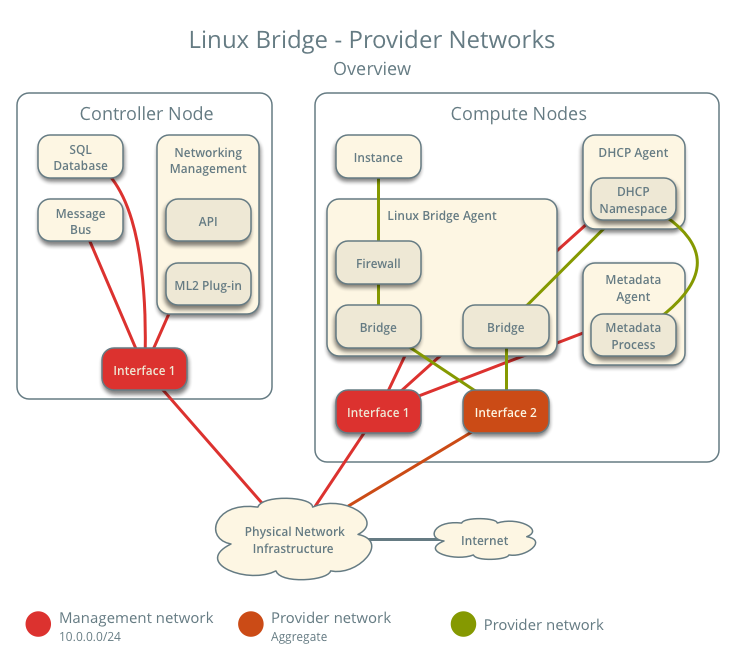 it made my decision simple. This networking topology was exactly what I wanted. I didn’t want to have to deal with creating a network, subnet, and router in neutron for each tenant to be able to access my guests. With this decision made I went about following the configuration guide lke for the previous services.
Unfortunately I hit an issue pretty early on. These were related to Neutron’s default configuration being spread across multiple files. It makes it very confusing to follow the install guide. For example, it says you want to write one set of config options into /etc/neutron/neutron.confthen a second set of config options into /etc/neutron/plugins/ml2/ml2_conf.ini and a third set of config options into /etc/neutron/plugins/ml2/linuxbridge_agent.ini, etc. This process continues for another 2 or 3 config files without any context on how these separate files are used. Then what makes it worse is when you actually go to launch the neutron daemons . Neutron itself consists of 4-5 different daemons running on the controller and compute nodes. But, there is no documentation anywhere on how all of these different config files are leveraged by the different daemons. For example, when launching linuxbridge-agent daemon which config files are you supposed to pass in? I ended up having to cheat for this and look at the devstack soure code to see how it launched neutron there. After that I realized neutron is just leveraging oslo.config‘s ability to specify multiple config files and have them be concatenated together at runtime. This means that because there are no overlapping options that none of this complexity is required and a single neutron.conf could be used for everything. This is something I think we must change in Neutron, because as things are now are just too confusing.
After finally getting everything configured I encountered a number of other issues. The first was around rootwrap, just like nova, neutron need root privileges to perform some operations, and it leverages rootwrap to perform the privilege escalation. However, neutron uses rootwrap as a separate daemon, and calls it over a socket interface. (this is done to reduce the overhead for creating a separate python process on each external call, which can slow things down significantly) When I first started neutron I hit a similar error to nova about sudo permissions. So I needed to create a sudoers file for neutron, in my case it looked like this:
neutron ALL=(root) NOPASSWD: /usr/local/bin/neutron-rootwrap /etc/neutron/rootwrap.conf *
neutron ALL=(root) NOPASSWD: /usr/local/bin/neutron-rootwrap-daemon /etc/neutron/rootwrap.conf
But it also turns out I needed to tell neutron how to call rootwrap. I found this bug on launchpad when I did a google search on my error and it told me about the config options I needed to set in addition to creating the sudoers file. These weren’t in the install documentation as I expect by default the neutron distro packages set these config options. After creating the sudoers file and setting the config flags I was able to get past this issue.
The next problem was also fairly cryptic. When I first started neutron after fixing the rootwrap issue I was greeted by this error in the logs:
2017-03-30 11:57:05.182 4158 ERROR neutron.plugins.ml2.drivers.agent._common_agent Traceback (most recent call last):
2017-03-30 11:57:05.182 4158 ERROR neutron.plugins.ml2.drivers.agent._common_agent   File "/usr/local/lib/python2.7/dist-packages/neutron/plugins/ml2/drivers/agent/_common_agent.py", line 453, in daemon_loop
2017-03-30 11:57:05.182 4158 ERROR neutron.plugins.ml2.drivers.agent._common_agent     sync = self.process_network_devices(device_info)
2017-03-30 11:57:05.182 4158 ERROR neutron.plugins.ml2.drivers.agent._common_agent   File "/usr/local/lib/python2.7/dist-packages/osprofiler/profiler.py", line 153, in wrapper
2017-03-30 11:57:05.182 4158 ERROR neutron.plugins.ml2.drivers.agent._common_agent     return f(*args, **kwargs)
2017-03-30 11:57:05.182 4158 ERROR neutron.plugins.ml2.drivers.agent._common_agent   File "/usr/local/lib/python2.7/dist-packages/neutron/plugins/ml2/drivers/agent/_common_agent.py", line 203, in process_network_devices
2017-03-30 11:57:05.182 4158 ERROR neutron.plugins.ml2.drivers.agent._common_agent     device_info.get('updated'))
2017-03-30 11:57:05.182 4158 ERROR neutron.plugins.ml2.drivers.agent._common_agent   File "/usr/local/lib/python2.7/dist-packages/neutron/agent/securitygroups_rpc.py", line 277, in setup_port_filters
2017-03-30 11:57:05.182 4158 ERROR neutron.plugins.ml2.drivers.agent._common_agent     self.prepare_devices_filter(new_devices)
2017-03-30 11:57:05.182 4158 ERROR neutron.plugins.ml2.drivers.agent._common_agent   File "/usr/local/lib/python2.7/dist-packages/neutron/agent/securitygroups_rpc.py", line 131, in decorated_function
2017-03-30 11:57:05.182 4158 ERROR neutron.plugins.ml2.drivers.agent._common_agent     *args, **kwargs)
2017-03-30 11:57:05.182 4158 ERROR neutron.plugins.ml2.drivers.agent._common_agent   File "/usr/local/lib/python2.7/dist-packages/neutron/agent/securitygroups_rpc.py", line 139, in prepare_devices_filter
2017-03-30 11:57:05.182 4158 ERROR neutron.plugins.ml2.drivers.agent._common_agent     self._apply_port_filter(device_ids)
2017-03-30 11:57:05.182 4158 ERROR neutron.plugins.ml2.drivers.agent._common_agent   File "/usr/local/lib/python2.7/dist-packages/neutron/agent/securitygroups_rpc.py", line 157, in _apply_port_filter
2017-03-30 11:57:05.182 4158 ERROR neutron.plugins.ml2.drivers.agent._common_agent     security_groups, security_group_member_ips)
2017-03-30 11:57:05.182 4158 ERROR neutron.plugins.ml2.drivers.agent._common_agent   File "/usr/local/lib/python2.7/dist-packages/neutron/agent/securitygroups_rpc.py", line 173, in _update_security_group_info
2017-03-30 11:57:05.182 4158 ERROR neutron.plugins.ml2.drivers.agent._common_agent     remote_sg_id, member_ips)
2017-03-30 11:57:05.182 4158 ERROR neutron.plugins.ml2.drivers.agent._common_agent   File "/usr/local/lib/python2.7/dist-packages/neutron/agent/linux/iptables_firewall.py", line 163, in update_security_group_members
2017-03-30 11:57:05.182 4158 ERROR neutron.plugins.ml2.drivers.agent._common_agent     self._update_ipset_members(sg_id, sg_members)
2017-03-30 11:57:05.182 4158 ERROR neutron.plugins.ml2.drivers.agent._common_agent   File "/usr/local/lib/python2.7/dist-packages/neutron/agent/linux/iptables_firewall.py", line 169, in _update_ipset_members
2017-03-30 11:57:05.182 4158 ERROR neutron.plugins.ml2.drivers.agent._common_agent     sg_id, ip_version, current_ips)
2017-03-30 11:57:05.182 4158 ERROR neutron.plugins.ml2.drivers.agent._common_agent   File "/usr/local/lib/python2.7/dist-packages/neutron/agent/linux/ipset_manager.py", line 83, in set_members
2017-03-30 11:57:05.182 4158 ERROR neutron.plugins.ml2.drivers.agent._common_agent     self.set_members_mutate(set_name, ethertype, member_ips)
2017-03-30 11:57:05.182 4158 ERROR neutron.plugins.ml2.drivers.agent._common_agent   File "/usr/local/lib/python2.7/dist-packages/oslo_concurrency/lockutils.py", line 271, in inner
2017-03-30 11:57:05.182 4158 ERROR neutron.plugins.ml2.drivers.agent._common_agent     return f(*args, **kwargs)
2017-03-30 11:57:05.182 4158 ERROR neutron.plugins.ml2.drivers.agent._common_agent   File "/usr/local/lib/python2.7/dist-packages/neutron/agent/linux/ipset_manager.py", line 93, in set_members_mutate
2017-03-30 11:57:05.182 4158 ERROR neutron.plugins.ml2.drivers.agent._common_agent     self._create_set(set_name, ethertype)
2017-03-30 11:57:05.182 4158 ERROR neutron.plugins.ml2.drivers.agent._common_agent   File "/usr/local/lib/python2.7/dist-packages/neutron/agent/linux/ipset_manager.py", line 139, in _create_set
2017-03-30 11:57:05.182 4158 ERROR neutron.plugins.ml2.drivers.agent._common_agent     self._apply(cmd)
2017-03-30 11:57:05.182 4158 ERROR neutron.plugins.ml2.drivers.agent._common_agent   File "/usr/local/lib/python2.7/dist-packages/neutron/agent/linux/ipset_manager.py", line 149, in _apply
2017-03-30 11:57:05.182 4158 ERROR neutron.plugins.ml2.drivers.agent._common_agent     check_exit_code=fail_on_errors)
2017-03-30 11:57:05.182 4158 ERROR neutron.plugins.ml2.drivers.agent._common_agent   File "/usr/local/lib/python2.7/dist-packages/neutron/agent/linux/utils.py", line 128, in execute
2017-03-30 11:57:05.182 4158 ERROR neutron.plugins.ml2.drivers.agent._common_agent     execute_rootwrap_daemon(cmd, process_input, addl_env))
2017-03-30 11:57:05.182 4158 ERROR neutron.plugins.ml2.drivers.agent._common_agent   File "/usr/local/lib/python2.7/dist-packages/neutron/agent/linux/utils.py", line 115, in execute_rootwrap_daemon
2017-03-30 11:57:05.182 4158 ERROR neutron.plugins.ml2.drivers.agent._common_agent     return client.execute(cmd, process_input)
2017-03-30 11:57:05.182 4158 ERROR neutron.plugins.ml2.drivers.agent._common_agent   File "/usr/local/lib/python2.7/dist-packages/oslo_rootwrap/client.py", line 129, in execute
2017-03-30 11:57:05.182 4158 ERROR neutron.plugins.ml2.drivers.agent._common_agent     res = proxy.run_one_command(cmd, stdin)
2017-03-30 11:57:05.182 4158 ERROR neutron.plugins.ml2.drivers.agent._common_agent   File "<string>", line 2, in run_one_command
2017-03-30 11:57:05.182 4158 ERROR neutron.plugins.ml2.drivers.agent._common_agent   File "/usr/lib/python2.7/multiprocessing/managers.py", line 774, in _callmethod
2017-03-30 11:57:05.182 4158 ERROR neutron.plugins.ml2.drivers.agent._common_agent     raise convert_to_error(kind, result)
2017-03-30 11:57:05.182 4158 ERROR neutron.plugins.ml2.drivers.agent._common_agent RemoteError:
2017-03-30 11:57:05.182 4158 ERROR neutron.plugins.ml2.drivers.agent._common_agent ---------------------------------------------------------------------------
2017-03-30 11:57:05.182 4158 ERROR neutron.plugins.ml2.drivers.agent._common_agent Unserializable message: ('#ERROR', ValueError('I/O operation on closed file',))
2017-03-30 11:57:05.182 4158 ERROR neutron.plugins.ml2.drivers.agent._common_agent ---------------------------------------------------------------------------
Which isn’t helpful at all. It turns out that this error means that neutron can’t find the ipset command, but it’s not at all clear from the traceback. I was only able to figure this out after tracing through the neutron source code (by following the calls in the traceback) I realized that this error is being emitted after neutron calls the rootwrap daemon. I had to turn debug log level on in the separate rootwrap.conf (which is something packaged in the tarball) to get the rootwrap daemon to log the error message it’s encountering, which in this case was that ipset could not be found. After installing ipset this was corrected.
After all of these headaches I finally got neutron running. But, I quickly found that my choice for provider networks was causing issues with DHCP on my home network. I only have a single 24 port unmanaged switch at home and the bridge interfaces for the guests were on the same Layer 2 network as the rest of my home infrastructure, including my DHCP server. This meant that when I created a server in the cloud the DHCP request from the guest would go out and be recieved by both the neutron DHCP agent as well as my home DHCP server because being on the same Layer 2 meant they shared a broadcast domain. Luckily neutron’s default security group rules blocked the DHCP response from my home server, but there was still a lease record being created on my home server. Also if I ever loosened the security group rules and DHCP traffic was allowed then there would be a race condition between my server and the neutron agent. It turns out there was a small note (see step 3) on this potential problem in the networking guide. So my solution for this was to disable DHCP in neutron and also stop running the DHCP agent on my cloud. This had a ripple effect in that I couldn’t use the metadata service either because it depends on DHCP to set the route for the hardcoded ip address for the metadata server. (this will come up later) Luckily I was able to leverage the force_config_drive option in Nova to make sure the metadata service wasn’t necessary.
I modified the network diagram above for what I ended up with in my cloud:
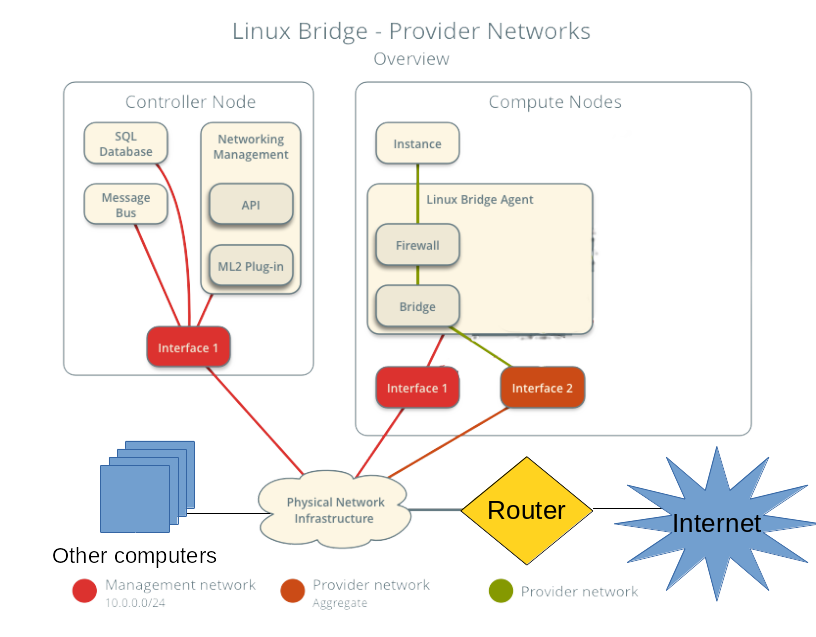 (note I’m terrible at art, so you can clearly tell where I made changes)
If all of the above didn’t make it clear I still find Neutron the roughest part of the user experience for OpenStack. Besides complexity in configuration it also has a presumption of a decent understanding of networking concepts. I fully admit networking is hard, especially for clouds because you’re dealing with a lot of different pieces, but this is somwhere I feel we need to make improvements. Especially in my use case where my requirements were pretty straightforward. I just wanted to have a server come up on my home network when it was booted so I could log into it right after it booted. In my opinion this is what the majority of cloud consumers (people using the API) care about. Just getting an IP address (v4 or v6 it doesn’t really matter) and being able to connect to that from their personal machines. After going through this process I’m pretty sure that my college student self who had a much more limited understanding of networking than I do now would have had a very difficult time figuring this out.
Booting the first server
After getting everything running on a single node it was time to boot my first server. I eagerly typed in the
openstack server create
command with all the parameters for my credentials the flavor and the image I had uploaded and waited for the server to go ACTIVE state by running:
openstack server list
a few times. Once the server went into the ACTIVE state I tried to login into the guest with ssh, and got nothing. The ssh connection just timed out and there wasn’t any indication why. Having debugged a ton of issues like this over the years my first guess was ok I screwed up the networking, let me look at the console log by running:
openstack console log show test-server
and it returned nothing. I was a bit lost as to why, the console log should show the process of booting the operating system. I figured that I made a configuration mistake in the nova, so to double check I logged into the compute node and checked the libvirt state directory and confirmed that the console log file was empty. But this left me at an impasse, why would the guest not be logging anything to the console on boot? So I just started sanity checking everything I could find. When I looked at Nova’s local image cache and saw the cirros image was 0 bytes in size. A cirros image should be about 13MB in size, so 0 bytes was clearly wrong. From there I started tracing through the glance logs to figure out where the data was getting lost (was it nova downloading the image from glance, or did glance have an empty image) when I found:
DEBUG glance_store._drivers.filesystem [req-3163a1a7-4ca9-47e8-9444-cd8b865055fb 20f283024ffd4bf4841a8d33bdb4f385 6c3fc6392e0c487e85d57afe5a5ab2b7 - default default] Wrote 0 bytes to /var/lib/glance/images/e6735636-43d9-4fb0-a302-f3710386b689 with checksum d41d8cd98f00b204e9800998ecf8427e add /usr/local/lib/python2.7/dist-packages/glance_store/_drivers/filesystem.py:706
Which was the only hint I could find in the glance logs. It wasn’t even that useful all it said was that glance wrote 0 bytes to disk for the uploaded image. Which at least confirmed that glance wasn’t storing any data from the image upload. But, I couldn’t find any other information about this. So I decided to re-upload the image to glance and use tcpdump on both my desktop and the server to make sure the data was getting sent over the wire to glance. The output of the tcpdump showed all the data being sent and received. This at least meant that the data is getting to the glance api server, but it didn’t really help me figure out where the data was going.
With no other ideas I decided to “instrument” the glance code by manually adding a bunch of log statements to the installed python code in
/usr/local/lib/python2.7/site-packages/glance
by hand to the trace the data flow through the glance code to find where the image goes from 13MB to 0 bytes. When I did this I was able to figure out that the image data was being lost outside of the glance code in one of it’s requirement libraries either webob, paste, or something like that. When I saw that I realized that I forgot to use constraints when installing glance. I quickly rushed to reinstall glance from the tarball using the constraints parameter and restarted the service. After doing this and re-uploading the image everything worked!
My only mistake in that process was in my over-eagerness to fix the problem I forgot to take notes of exactly what I reinstalled to see where the actual problem was. So all I can say for sure is that make sure you use constraints whenever you install from source, because clearly there was an issue with just using pip install by itself.
After getting glance working I was able to re-run the openstack command to create a server and this time I was able to get a console log, but ssh still didn’t work.
Networking Woes
At this point I had the servers booting, but I wasn’t able to login to them. I’ve personally had to debug this kind of issues many times, so when I saw this my first step was to ping the IP address for the guest, just to rule out that it was an issue with the ssh daemon on the server. Since the ping didn’t work I wanted to see if there were was an entry in my arp table for the ip address. Again, there was nothing on that IP after running the arp command. So this either meant there was an issue with Layer 2 connectivity to the guest from my desktop, or the guest didn’t know it’s IP address. (I’ve personally seen both failure conditions) My next step was to check the console log to see if it was setting an IP address correctly. When I got to the cloud-init section of the console log it showed that the IP address was never getting assigned. Instead the server was timing out waiting for a DHCP lease. If you remember the neutron section above I had to disable DHCP on the guests because it was conflicting with my home’s DHCP server so this clearly wasn’t right.
It turns out that cloud-init doesn’t know how to deal with static networking configuration from a config drive. (it might work with a metadata server, but I was not able to check this) So when the guest boots it just ignores the static networking information in the config drive and then tries to get a DHCP lease. This meant that cirros, the recommended image for testing and what the install guide tells you to use, wasn’t going to work. Also the majority of cloud images you can download weren’t going to work either. The only cloud image I was able to get working was the official ubuntu cloud image. This was because Nova was doing file injection to write a the networking information directly into the guest file system. I found a useful blog post on this in my searching: http://blog.oddbit.com/2015/06/26/openstack-networking-without-dhcp/ (although the translation didn’t work on RHEL like that post indicates) But, even if I got ubuntu to work, having a cloud that was only able to boot a single type of image isn’t really that useful.
Luckily the OpenStack Infrastructure team has a similar problem on some public OpenStack clouds they run things on, and they created the Glean project to be an alternative for cloud-init that can properly use the static networking information from a config drive. All I had to do was leverage the Disk Image Builder project to create the images I uploaded into my cloud with glean instead of cloud-init. While not ideal solution, because you can’t take anyone’s random pre-existing cloud image, this worked well enough for me because I can remember to do this as the primary user of my cloud.
It’s also worth pointing out that all of these networking issues would have been completely avoided if I chose self service networking back in the setting up neutron section. (because it creates a separate Layer 2 network for each tenant) But, given my goals with the cloud and the way the documentation lays out the options I had no way to know this. This connects back to my earlier complaints with neutron being too complex and presuming too much prior knowledge.
But, at this point I had a working single node cloud and could successfully boot guests. All that was left before I finished the cloud deployment was to replicate the installation on the remaining 4 servers.
Setting Up the Compute Nodes
Once I confirmed to have a working configuration and got all the services figured out on the controller node (which included nova-compute and the necessary neutron services for a compute node because it was an all in one) and got everything running there, it was time to setup the compute nodes. This was pretty straightforward and just involved configuring nova-compute and neutron services. It was pretty formulaic and basically just copy and paste. The exact procedure that I wrote down in my notes for this process was:
- add provider network interface config
- disable apparmor
- reboot
- download tarballs
- create system users
- add nova user to libvirt group
- install all binaries (libvirt, qemu, ipset, mkisofs, libssl-dev, pip)
- make service dirs /etc/ /var/lib for both neutron and nova
- copy etc dirs from tarballs to /etc
- pip install code with upper-constraints
- write config files (basically just copy from another compute node)
- set permissions on /etc and /var/lib
- create sudoers files for nova and neutron
- create systemd unit files
- start services
- run nova discover_hosts
This is basically just copying and pasting things across the remaining 4 servers. But there were a couple of lessons I learned from the initial install were reflected in these. The only one I haven’t talked about before was disabling apparmor. (or SELinux on other linux distros) I learned the hard way that the default apparmor rules on Ubuntu prevent nova and libvirt from doing the necessary operations to boot a guest. The proper way to fix this issue (especially for better security) would be to create your own apparmor rules to allow the operations being blocked. But, I have always been confused by this, especially on SELinux and didn’t even bother trying. I just disabled apparmor and moved on.
After repeating these steps across the 4 compute nodes I had a fully operational cloud. Nova was showing me the full capacity of 80 vCPUs and I could interact with the cloud and launch guests across all of them. My project was complete! (at least for the first phase)
Conclusion
So after writing all of this down I came to the realization that I likely give the impression that installing OpenStack by hand is an impossibly complex task. But, honestly it wasn’t that bad of an experience. Sure, OpenStack is complex software with a lot of moving pieces, but in total I got everything working in 2-3 days. (and I wasn’t dedicating all my time during those days either) The majority of the issues that I hit were caused solely by my insistence on installing everything from tarballs. If I actually followed my original thought experiment and just followed the install guide the only issue I probably would have hit was with networking. Once you understand what OpenStack is doing under the covers the install is pretty straightforward. After doing my first OpenStack install a few years ago I found I had a better understanding of how OpenStack works which really helped me in my work on the project. It’s something I recommend that everyone does at least once if they’re planning on working on OpenStack in any capacity. Even just in a VM for playing around. (devstack doesn’t count)
For comparison that rack of similar Dell servers I deployed back in college took me so much longer to get running. In that case I used xCAT for deployment automation. But, it still took me over a month to get the inifiband cards working with RDMA using OFED, setting up SLURM for MPI job scheduling, connecting everything to our central LDAP server, and having users able to launch jobs across all the nodes. While, it’s not entirely a fair comparison since I have almost a decade more of experience now, but I think it helps put into perspective that this is far from the most grueling experience I’ve had installing software.
After going through the whole exercise I don’t actually run this cloud 24/7, mostly because it heats up my apartment too much and I can’t sleep at night when it’s running. The power consumption for the servers is also pretty high and I don’t really want to pay the power bill. This basically means I failed the second half of the experiment, to virtualize my home infrastructure. Since I can’t rely on the cloud for critical infrastructure if it’s not always running. But I have found some uses for the cloud both for development tasks as well as running some highly parallel CPU tasks across the entire cloud at once.
Moving forward I intend to continue working on the cloud and upgrading it to future releases as they occur. Also one of my goals for this entire exercise was going back to the OpenStack community with feedback on how to improve things and submitting patches and/or bugs on fixing some of the issues. This will be an ongoing process as I find time to work on them and also encounter more issues.
]]>This is sort of building off my earlier post on using subunit2sql in the gate. A lot of what’s described in that post has been used to build the current dashboard. Also, in that post I referenced having a web ui in the future which is exactly what openstack-health is.
Architecture
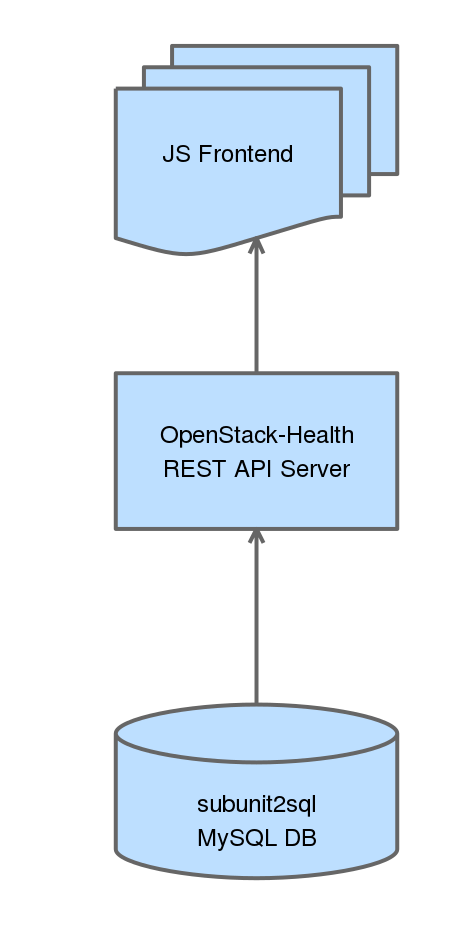
OpenStack-Health has 2 basic components a REST API server which we have deployed at http://health.openstack.org and the JS frontend which we host at http://status.openstack.org/openstack-health. Both of these components are deployed in openstack-infra using the puppet-openstack_health module. Everything is continuously deployed meaning that when a change lands in the openstack-health repository it’ll be applied in production on the next periodic puppet run.
REST API Server
The REST API server is actually very simple. It is basically a flask wrapper around the subunit2sql DB API that will perform DB queries and then perform any additional operations on the data, reformatting, and serializes it as JSON. So when a request comes in the API will dynamically query a subunit2sql db to generate it’s response. It’s also worth pointing out that there are no stability guarantees on this rest api. It’s not really intended to provide a stable interface for external consumption. So if you decide to write your own tooling using it you might end up being broken without any warning.
The API service is decoupled from subunit2sql for a couple of reasons, the biggest being that we wanted to hard encode this for OpenStack’s CI use case to a certain degree. (ie it’s not a generic subunit2sql REST API) The other reason for this to not be part of subunit2sql is that long term it’s probable that we’ll end up querying more than just a subunit2sql DB. In this case keeping the REST API in subunit2sql wouldn’t make much sense.
JS frontend
This is where the pretty stuff happens. The JS frontend is written in AngularJS (originally based on the basic setup Tim Buckley and Austin Clark used in the stackviz project) and currently uses nvd3 to do the graphing. (this will likely change to use a combination of both nvd3 and straight d3 in the future) The JS frontend is entirely client side and is just statically hosted. Everything is done in your local browser. It will send requests to the REST API server to get the data, do some local processing, which mostly consists of splitting data into different pieces for the different graphs and tables, and then renders everything.
Current capabilities
I figured it would be good to give a quick overview of the current capabilities for the dashboard. This will likely go stale very quickly because the project is continuously deployed and under active development.
The default page on the dashboard will let you look at all runs at a high level and then show grouped fail and pass rates:
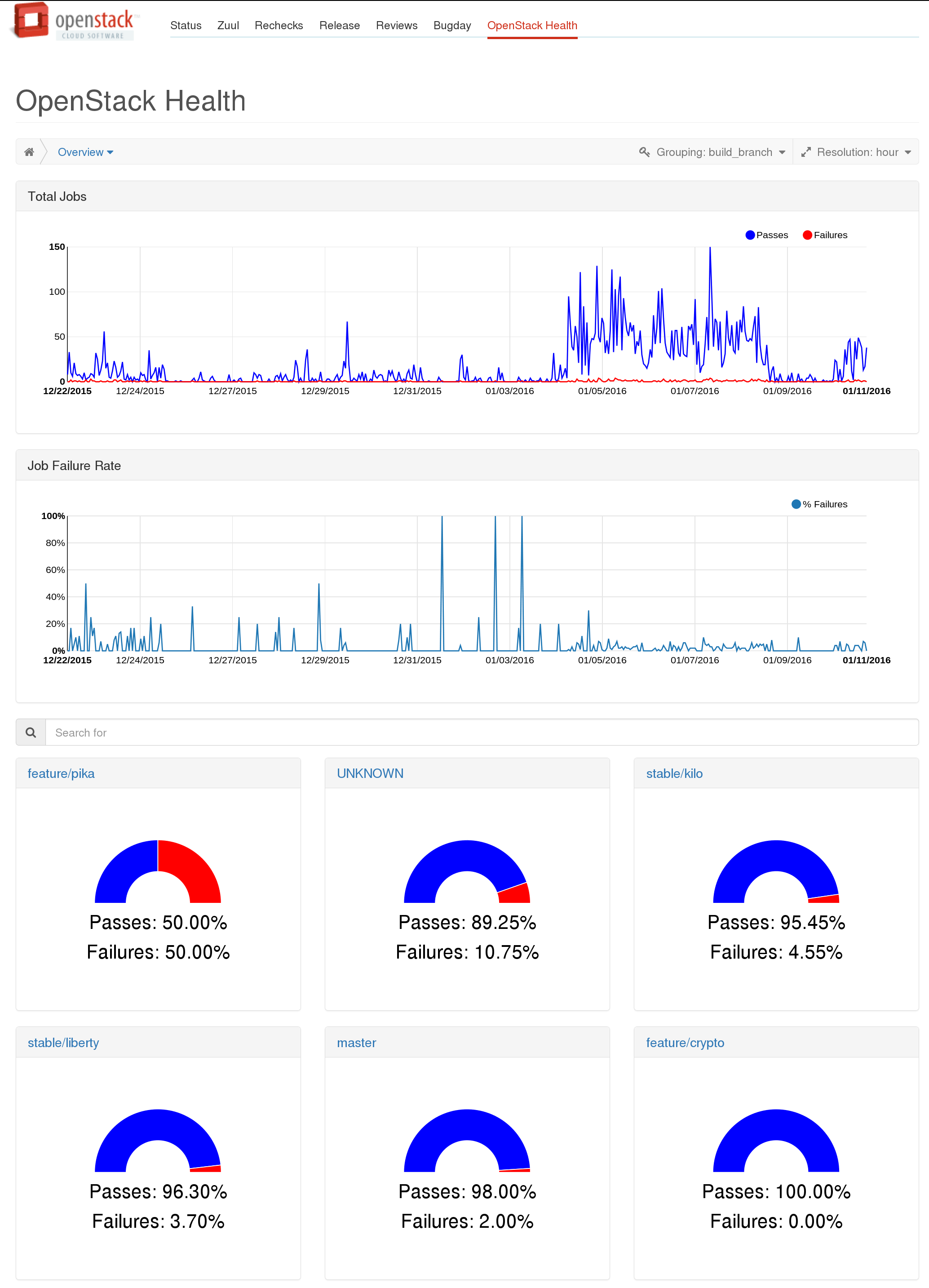
The grouped gauges will let you dive down into a top level view of runs for the selected group, which also shows high level per job statistics:
http://status.openstack.org/openstack-health/#/g/build_branch/stable%252Fkilo
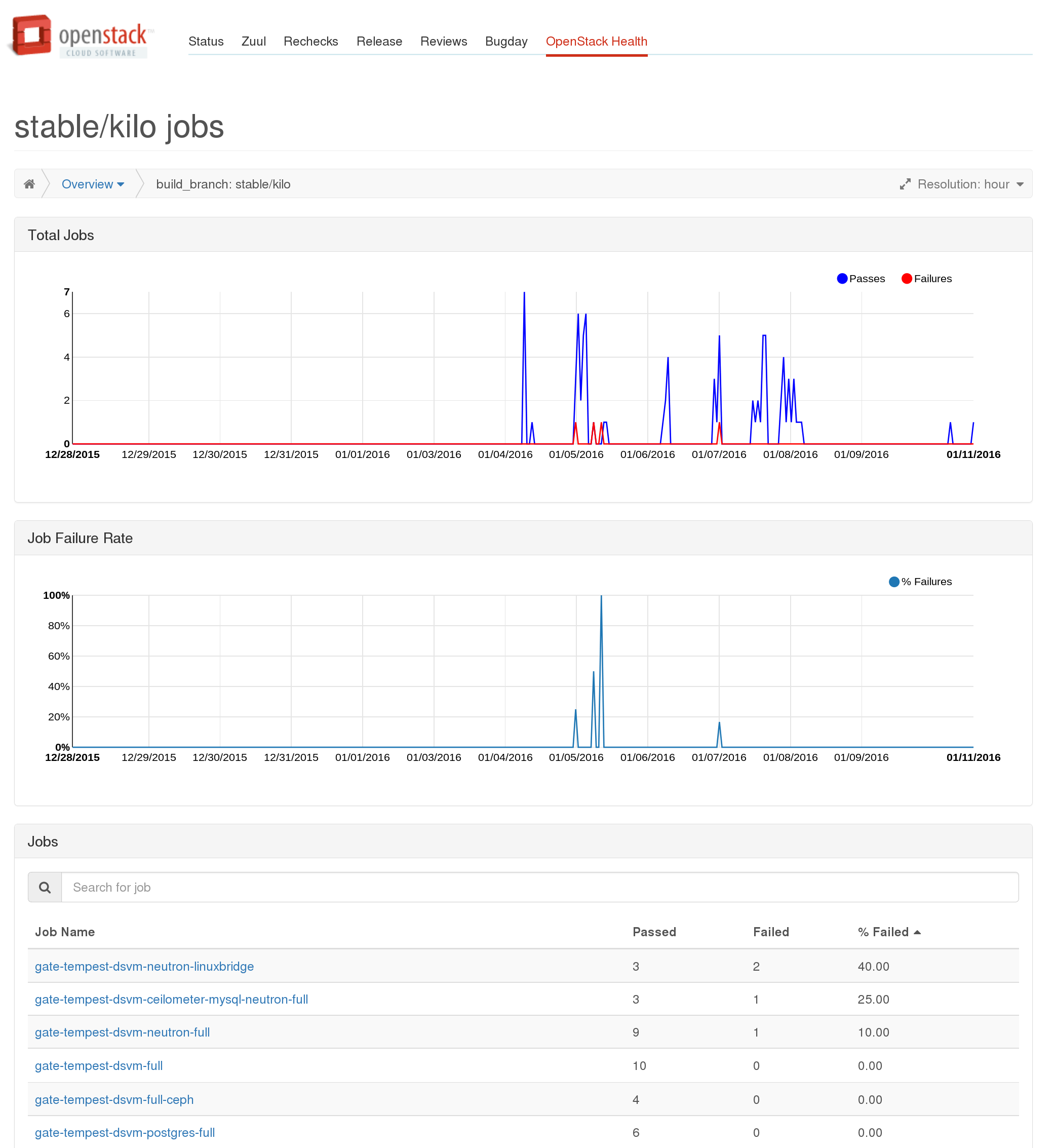
From the table you can go to a per job view, showing more detailed information about an individual job which will also show the aggregate information about all the tests which were run as part of that particular job. Note this view is not filtered by the group you came to it from. For example if you navigate to a job’s page via the stable/kilo page the results will be for all runs of that job, not just those on stable/kilo.
http://status.openstack.org/openstack-health/#/job/gate-tempest-dsvm-neutron-full
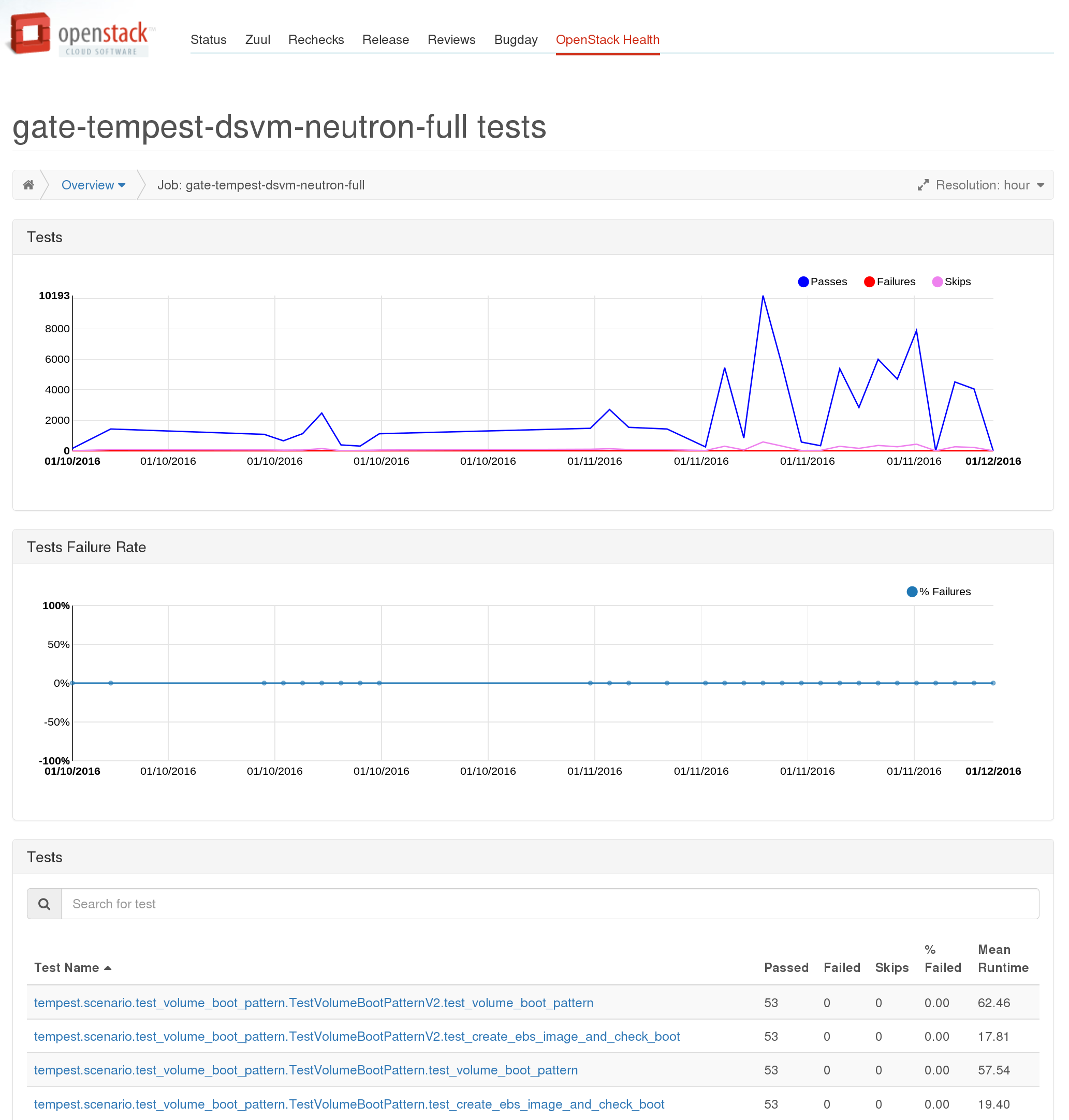
From here you can look at the run time and failure information about an individual test across all runs by selecting it from the table:
http://status.openstack.org/openstack-health/#/test/tempest.scenario.test_server_advanced_ops.TestServerAdvancedOps.test_resize_server_confirm
 You can also look at all the tests run as part of all jobs (grouped by package) showing a sortable and filterable table of high level stats for each test: http://status.openstack.org/openstack-health/#/tests This also provides an alternate path to get to the per test pages by selecting a test from these tables.

Current Limitations
Only gate and tempest runs
Right now we’re only collecting results for tempest and grenade jobs in the gate and periodic pipelines in the subunit2sql DB. This means that the results on the dashboard do not including anything from the check or experimental queues and any jobs that don’t run tempest are also missing. However, this is fully configurable and is just the current state of what we’re collecting. There are 2 primary reasons for this. First we’re leaving it as gate/periodic for data “purity”. The jobs running in these queues are coming from a known good state and are expected to pass. In the gate case the tests have already passed the check queue jobs once and have been approved by 2 core reviewers. In the case of periodic jobs it is being run with the current state of the repo which is assumed good because all changes had to pass tests to merge.
The second aspect is mostly just a historical artifact of how we originally setup the subunit2sql data collection. I originally setup the subunit2sql data collection to only collect tempest runs because that’s all I was interested in collecting when I first started the project. It also was the obvious choice since tempest dsvm jobs give us insight into how OpenStack works in practice since it fully deploys a cloud and does real work. Now that we have the openstack-health dashboard it makes sense to expand this to all test jobs. The only blocker for doing this right now is the DB size. Before we can start adding a lot more data to the DB we need to setup a pruning mechanism so we remove old data from the DB. Right now we have data for every gating tempest and grenade run since the system was first turned on in Nov. of 2014. The plan is to keep a full development cycle (which is basically 6 months) worth of data in the DB and drop the rest. The patch adding this is in progress: https://review.openstack.org/176564
I expect we’ll expand the database to results for all periodic and gate jobs in the near future. But, as for expanding it beyond gate that’s a not as clear cut. It makes tracking things like non-voting jobs much easier, but at the same time it will pollutes the data set used for anything operating at the per test level, or when looking across all runs. I think before we can start to look at expanding it to include the check queue, we’ll need to improve the DB filtering we’re using to ensure we don’t pollute the data by doing this. (an alternative I’ve had in the back of my head is to set up a second database for “dirty” results)
Failures Before Test Runs aren’t counted
If you look at the results in the subunit2sql DB they only include test runs that actually started tempest. This makes perfect sense if you look at test results get populated in the subunit2sql DB. They depend on a subunit stream being in the collected artifacts on the log server for a job. If the tests never run, like in the case that devstack or devstack-gate fails setting things up, a subunit stream isn’t generated.
We’re looking at 2 different approaches to address this issue. The first is simply to generate subunit results for non-test run phases of the job. For example, a devstack result stream which will say whether devstack (or phases of devstack) were successful or not. You can see the patches in progress for doing this here: https://review.openstack.org/#/q/topic:devstack-subunit
The second approach is to add a mysql reporter to zuul. This will store the results and execution time from from zuul in another database where we can query that instead of subunit2sql. This will require modifying the REST API to use the new database where it makes sense. You can see the patch in progress for adding the new reporter here:
https://review.openstack.org/#/c/223333/
Future Direction
Where I’d like to see the dashboard move is to be the first place everyone goes to for finding any information about gate results. I think we’ve built a good starting point and framework for eventually getting there. But there’s still a lot of work to do here. Some of the things I’d like to eventually see is to have the dashboard integrated with things like elastic-recheck and stackviz. So we can see known bugs causing failures when we’re looking at recent runs. Or have a stackviz view of an individual run dynamically generated from the dashboard.
One short term goal for me with the project is to replace the periodic job result emails that are sent to the openstack-qa ML (which is dead but hasn’t been removed so we have a place for emails) and the openstack-stable ML with the dashboard. We’re almost at the point where I feel we can do that.
For those interested in the contributing to this effort. Some helpful links are the bug tracker: https://bugs.launchpad.net/openstack-health and we also have an etherpad to track ongoing work items or features here: https://etherpad.openstack.org/p/openstack-health-tracking (although it is often stale and needs to be updated and/or pruned)
Update 02-18-2016:
The limitations I previously outlined in the post have been partially addressed and aren’t completely accurate anymore. First with: https://review.openstack.org/#/c/279299/ we’ve expanded the scope of the subunit stream collection into the subunit2sql DB to collect for all jobs in the gate or periodic pipelines. This means that openstack-health should contain information for all jobs that run in the gate as long as they export a subunit stream for the run in the proper location. However, we have yet to expand the collection to any jobs outside of gate or periodic, for the “data purity” concerns that I mentioned originally.
The other limitation of not knowing about all failures has been addressed partially by adding subunit output to devstack with: https://review.openstack.org/#/c/273096/ This means any failures that occur in devstack will be properly counted on openstack-health. Failures that occur before devstack (or any subunit output is generated in non-dsvm jobs) will still not be known because there isn’t any artifact available to populate the subunit2sql db with. The zuul mysql reporter is likely the only way to completely cover this gap, because adding subunit output for devstack-gate (or the jenkins slave scripts to run other tests) is a bit trickier to avoid duplicating result or timing data and likely not worth the effort to implement. It also likely won’t be a complete solution either
]]>I won’t go into the details too much about what subunit2sql is or some of the implementation details, I’ll save that for a follow-on post. In the meantime you can read the docs at: http://docs.openstack.org/developer/subunit2sql/ I also gave a talk earlier this year on subunit2sql for the Developer, Testing, Release and Continuous Integration Automation at LCA: https://www.youtube.com/watch?v=rGyDlExOs94 (although some of the details are a bit dated as things have evolved further since then)
At this point it’s mostly still just me contributing to the project, which is fine because I enjoy it and find it interesting. But, my time to experiment and work on this is limited and I know other people would likely be interested in contributing. I also think having diversity in contributors really helps a project come into it’s own, just by having different ideas coming to the table. I always get a little concerned whenever I’m basically the sole contributor to something. I figured I should share how the project is used today to try and drum up interest and fix this.
This is really a project I’m passionate about and if you have any interest in it or more questions, please feel free to reach out to me via email, the ML, or on irc.
[1] Note while the CLI tooling and the name imply the DB will only work with subunit v2 as a protocol for communicating test results, there actually isn’t anything inherent to subunit in the database schema or the library api provided by the package
subunit2sql in infra
Right now the subunit2sql is actively only doing 2 things, collecting test results from tempest in the gate queue and injecting results into testrepository for each tempest run.
Collecting results
Since the final day of the Paris design summit we’ve been running a subunit2sql DB in openstack-infra that collects all the test results from tempest runs in the gate queue. The mechanism behind how for all this machinery is documented at: http://docs.openstack.org/infra/system-config/logstash.html it’s under the logstash page because the way subunit streams are collected from the test runs and eventually get stored in the database is the same mechanism and architecture that Clark Boylan created to store the logs from test runs into logstash. I just added a different worker which uses subunit2sql to handle subunit and store it in a mysql database. The basic overview diagram of how this works is:
One thing to note with the data collection is that it only collects data from tempest runs in the gate queue. We don’t collect results for check because it’s really too noisy to be useful and it would generate exponentially more data. I expect we’ll likely consider changing this at some point in the future as the UI around the data improves in the future. (and when we create a web interface for visualizing the data)
Injecting results into tempest runs
If you’ve looked at the console output of a tempest run in the gate at any point in the past 6-7 months you might have noticed something like:
<span class="NONE _2015-08-11_01_04_40_171"><a class="date" href="http://logs.openstack.org/29/211129/1/gate/gate-tempest-dsvm-full/2bbaacb/console.html#_2015-08-11_01_04_40_171" name="_2015-08-11_01_04_40_171">2015-08-11 01:04:40.171</a> | Loading previous tempest runs subunit streams into testr
</span><span class="NONE _2015-08-11_01_04_40_171"><a class="date" href="http://logs.openstack.org/29/211129/1/gate/gate-tempest-dsvm-full/2bbaacb/console.html#_2015-08-11_01_04_40_171" name="_2015-08-11_01_04_40_171">2015-08-11 01:04:40.171</a> | /opt/stack/new/tempest /opt/stack/new/devstack
</span><span class="NONE _2015-08-11_01_04_40_509"><a class="date" href="http://logs.openstack.org/29/211129/1/gate/gate-tempest-dsvm-full/2bbaacb/console.html#_2015-08-11_01_04_40_509" name="_2015-08-11_01_04_40_509">2015-08-11 01:04:40.509</a> | Ran 92 tests in 193.700s
</span><span class="NONE _2015-08-11_01_04_40_509"><a class="date" href="http://logs.openstack.org/29/211129/1/gate/gate-tempest-dsvm-full/2bbaacb/console.html#_2015-08-11_01_04_40_509" name="_2015-08-11_01_04_40_509">2015-08-11 01:04:40.509</a> | PASSED (id=0, skips=37)
</span><span class="NONE _2015-08-11_01_04_40_520"><a class="date" href="http://logs.openstack.org/29/211129/1/gate/gate-tempest-dsvm-full/2bbaacb/console.html#_2015-08-11_01_04_40_520" name="_2015-08-11_01_04_40_520">2015-08-11 01:04:40.520</a> | /opt/stack/new/devstack
</span><span class="NONE _2015-08-11_01_04_40_520"><a class="date" href="http://logs.openstack.org/29/211129/1/gate/gate-tempest-dsvm-full/2bbaacb/console.html#_2015-08-11_01_04_40_520" name="_2015-08-11_01_04_40_520">2015-08-11 01:04:40.520</a> | /opt/stack/new/tempest /opt/stack/new/devstack
</span><span class="NONE _2015-08-11_01_04_40_908"><a class="date" href="http://logs.openstack.org/29/211129/1/gate/gate-tempest-dsvm-full/2bbaacb/console.html#_2015-08-11_01_04_40_908" name="_2015-08-11_01_04_40_908">2015-08-11 01:04:40.908</a> | Ran 92 tests in 180.853s (-12.847s)
</span><span class="NONE _2015-08-11_01_04_40_908"><a class="date" href="http://logs.openstack.org/29/211129/1/gate/gate-tempest-dsvm-full/2bbaacb/console.html#_2015-08-11_01_04_40_908" name="_2015-08-11_01_04_40_908">2015-08-11 01:04:40.908</a> | PASSED (id=1, skips=32)
</span><span class="NONE _2015-08-11_01_04_40_922"><a class="date" href="http://logs.openstack.org/29/211129/1/gate/gate-tempest-dsvm-full/2bbaacb/console.html#_2015-08-11_01_04_40_922" name="_2015-08-11_01_04_40_922">2015-08-11 01:04:40.922</a> | /opt/stack/new/devstack
</span><span class="NONE _2015-08-11_01_04_40_922"><a class="date" href="http://logs.openstack.org/29/211129/1/gate/gate-tempest-dsvm-full/2bbaacb/console.html#_2015-08-11_01_04_40_922" name="_2015-08-11_01_04_40_922">2015-08-11 01:04:40.922</a> | /opt/stack/new/tempest /opt/stack/new/devstack
</span><span class="NONE _2015-08-11_01_04_41_502"><a class="date" href="http://logs.openstack.org/29/211129/1/gate/gate-tempest-dsvm-full/2bbaacb/console.html#_2015-08-11_01_04_41_502" name="_2015-08-11_01_04_41_502">2015-08-11 01:04:41.502</a> | Ran 388 (+296) tests in 1579.986s (+1399.133s)
</span><span class="NONE _2015-08-11_01_04_41_502"><a class="date" href="http://logs.openstack.org/29/211129/1/gate/gate-tempest-dsvm-full/2bbaacb/console.html#_2015-08-11_01_04_41_502" name="_2015-08-11_01_04_41_502">2015-08-11 01:04:41.502</a> | PASSED (id=2, skips=32)
</span><span class="NONE _2015-08-11_01_04_41_552"><a class="date" href="http://logs.openstack.org/29/211129/1/gate/gate-tempest-dsvm-full/2bbaacb/console.html#_2015-08-11_01_04_41_552" name="_2015-08-11_01_04_41_552">2015-08-11 01:04:41.552</a> | /opt/stack/new/devstack
</span><span class="NONE _2015-08-11_01_04_41_552"><a class="date" href="http://logs.openstack.org/29/211129/1/gate/gate-tempest-dsvm-full/2bbaacb/console.html#_2015-08-11_01_04_41_552" name="_2015-08-11_01_04_41_552">2015-08-11 01:04:41.552</a> | /opt/stack/new/tempest /opt/stack/new/devstack
</span><span class="NONE _2015-08-11_01_04_41_991"><a class="date" href="http://logs.openstack.org/29/211129/1/gate/gate-tempest-dsvm-full/2bbaacb/console.html#_2015-08-11_01_04_41_991" name="_2015-08-11_01_04_41_991">2015-08-11 01:04:41.991</a> | Ran 130 (-258) tests in 295.809s (-1284.176s)
</span><span class="NONE _2015-08-11_01_04_41_991"><a class="date" href="http://logs.openstack.org/29/211129/1/gate/gate-tempest-dsvm-full/2bbaacb/console.html#_2015-08-11_01_04_41_991" name="_2015-08-11_01_04_41_991">2015-08-11 01:04:41.991</a> | PASSED (id=3, skips=17)
</span><span class="NONE _2015-08-11_01_04_42_005"><a class="date" href="http://logs.openstack.org/29/211129/1/gate/gate-tempest-dsvm-full/2bbaacb/console.html#_2015-08-11_01_04_42_005" name="_2015-08-11_01_04_42_005">2015-08-11 01:04:42.005</a> | /opt/stack/new/devstack
</span><span class="NONE _2015-08-11_01_04_42_005"><a class="date" href="http://logs.openstack.org/29/211129/1/gate/gate-tempest-dsvm-full/2bbaacb/console.html#_2015-08-11_01_04_42_005" name="_2015-08-11_01_04_42_005">2015-08-11 01:04:42.005</a> | /opt/stack/new/tempest /opt/stack/new/devstack
</span><span class="NONE _2015-08-11_01_04_42_491"><a class="date" href="http://logs.openstack.org/29/211129/1/gate/gate-tempest-dsvm-full/2bbaacb/console.html#_2015-08-11_01_04_42_491" name="_2015-08-11_01_04_42_491">2015-08-11 01:04:42.491</a> | Ran 130 tests in 304.811s (+9.002s)
</span><span class="NONE _2015-08-11_01_04_42_491"><a class="date" href="http://logs.openstack.org/29/211129/1/gate/gate-tempest-dsvm-full/2bbaacb/console.html#_2015-08-11_01_04_42_491" name="_2015-08-11_01_04_42_491">2015-08-11 01:04:42.491</a> | PASSED (id=4, skips=17)
</span><span class="NONE _2015-08-11_01_04_42_505"><a class="date" href="http://logs.openstack.org/29/211129/1/gate/gate-tempest-dsvm-full/2bbaacb/console.html#_2015-08-11_01_04_42_505" name="_2015-08-11_01_04_42_505">2015-08-11 01:04:42.505</a> | /opt/stack/new/devstack
</span><span class="NONE _2015-08-11_01_04_42_506"><a class="date" href="http://logs.openstack.org/29/211129/1/gate/gate-tempest-dsvm-full/2bbaacb/console.html#_2015-08-11_01_04_42_506" name="_2015-08-11_01_04_42_506">2015-08-11 01:04:42.506</a> | /opt/stack/new/tempest /opt/stack/new/devstack
</span><span class="NONE _2015-08-11_01_04_42_792"><a class="date" href="http://logs.openstack.org/29/211129/1/gate/gate-tempest-dsvm-full/2bbaacb/console.html#_2015-08-11_01_04_42_792" name="_2015-08-11_01_04_42_792">2015-08-11 01:04:42.792</a> | PASSED (id=5)
</span><span class="NONE _2015-08-11_01_04_42_801"><a class="date" href="http://logs.openstack.org/29/211129/1/gate/gate-tempest-dsvm-full/2bbaacb/console.html#_2015-08-11_01_04_42_801" name="_2015-08-11_01_04_42_801">2015-08-11 01:04:42.801</a> | /opt/stack/new/devstack
</span><span class="NONE _2015-08-11_01_04_42_801"><a class="date" href="http://logs.openstack.org/29/211129/1/gate/gate-tempest-dsvm-full/2bbaacb/console.html#_2015-08-11_01_04_42_801" name="_2015-08-11_01_04_42_801">2015-08-11 01:04:42.801</a> | /opt/stack/new/tempest /opt/stack/new/devstack
</span><span class="NONE _2015-08-11_01_04_43_193"><a class="date" href="http://logs.openstack.org/29/211129/1/gate/gate-tempest-dsvm-full/2bbaacb/console.html#_2015-08-11_01_04_43_193" name="_2015-08-11_01_04_43_193">2015-08-11 01:04:43.193</a> | Ran 130 (+130) tests in 346.516s
</span><span class="NONE _2015-08-11_01_04_43_193"><a class="date" href="http://logs.openstack.org/29/211129/1/gate/gate-tempest-dsvm-full/2bbaacb/console.html#_2015-08-11_01_04_43_193" name="_2015-08-11_01_04_43_193">2015-08-11 01:04:43.193</a> | PASSED (id=6, skips=22)
</span><span class="NONE _2015-08-11_01_04_43_204"><a class="date" href="http://logs.openstack.org/29/211129/1/gate/gate-tempest-dsvm-full/2bbaacb/console.html#_2015-08-11_01_04_43_204" name="_2015-08-11_01_04_43_204">2015-08-11 01:04:43.204</a> | /opt/stack/new/devstack
</span><span class="NONE _2015-08-11_01_04_43_204"><a class="date" href="http://logs.openstack.org/29/211129/1/gate/gate-tempest-dsvm-full/2bbaacb/console.html#_2015-08-11_01_04_43_204" name="_2015-08-11_01_04_43_204">2015-08-11 01:04:43.204</a> | /opt/stack/new/tempest /opt/stack/new/devstack
</span><span class="NONE _2015-08-11_01_04_43_695"><a class="date" href="http://logs.openstack.org/29/211129/1/gate/gate-tempest-dsvm-full/2bbaacb/console.html#_2015-08-11_01_04_43_695" name="_2015-08-11_01_04_43_695">2015-08-11 01:04:43.695</a> | Ran 130 tests in 299.969s (-46.548s)
</span><span class="NONE _2015-08-11_01_04_43_695"><a class="date" href="http://logs.openstack.org/29/211129/1/gate/gate-tempest-dsvm-full/2bbaacb/console.html#_2015-08-11_01_04_43_695" name="_2015-08-11_01_04_43_695">2015-08-11 01:04:43.695</a> | PASSED (id=7, skips=17)
</span><span class="NONE _2015-08-11_01_04_43_705"><a class="date" href="http://logs.openstack.org/29/211129/1/gate/gate-tempest-dsvm-full/2bbaacb/console.html#_2015-08-11_01_04_43_705" name="_2015-08-11_01_04_43_705">2015-08-11 01:04:43.705</a> | /opt/stack/new/devstack
</span><span class="NONE _2015-08-11_01_04_43_705"><a class="date" href="http://logs.openstack.org/29/211129/1/gate/gate-tempest-dsvm-full/2bbaacb/console.html#_2015-08-11_01_04_43_705" name="_2015-08-11_01_04_43_705">2015-08-11 01:04:43.705</a> | /opt/stack/new/tempest /opt/stack/new/devstack
</span><span class="NONE _2015-08-11_01_04_44_119"><a class="date" href="http://logs.openstack.org/29/211129/1/gate/gate-tempest-dsvm-full/2bbaacb/console.html#_2015-08-11_01_04_44_119" name="_2015-08-11_01_04_44_119">2015-08-11 01:04:44.119</a> | Ran 130 tests in 337.152s (+37.183s)
</span><span class="NONE _2015-08-11_01_04_44_119"><a class="date" href="http://logs.openstack.org/29/211129/1/gate/gate-tempest-dsvm-full/2bbaacb/console.html#_2015-08-11_01_04_44_119" name="_2015-08-11_01_04_44_119">2015-08-11 01:04:44.119</a> | PASSED (id=8, skips=22)
</span><span class="NONE _2015-08-11_01_04_44_129"><a class="date" href="http://logs.openstack.org/29/211129/1/gate/gate-tempest-dsvm-full/2bbaacb/console.html#_2015-08-11_01_04_44_129" name="_2015-08-11_01_04_44_129">2015-08-11 01:04:44.129</a> | /opt/stack/new/devstack
</span><span class="NONE _2015-08-11_01_04_44_129"><a class="date" href="http://logs.openstack.org/29/211129/1/gate/gate-tempest-dsvm-full/2bbaacb/console.html#_2015-08-11_01_04_44_129" name="_2015-08-11_01_04_44_129">2015-08-11 01:04:44.129</a> | /opt/stack/new/tempest /opt/stack/new/devstack
</span><span class="NONE _2015-08-11_01_04_44_509"><a class="date" href="http://logs.openstack.org/29/211129/1/gate/gate-tempest-dsvm-full/2bbaacb/console.html#_2015-08-11_01_04_44_509" name="_2015-08-11_01_04_44_509">2015-08-11 01:04:44.509</a> | Ran 130 tests in 348.047s (+10.895s)
</span><span class="NONE _2015-08-11_01_04_44_509"><a class="date" href="http://logs.openstack.org/29/211129/1/gate/gate-tempest-dsvm-full/2bbaacb/console.html#_2015-08-11_01_04_44_509" name="_2015-08-11_01_04_44_509">2015-08-11 01:04:44.509</a> | PASSED (id=9, skips=22)</span>
in the console output from the run. This is devstack-gate loading the results from 10 previous results into testrepository before we start executing tempest. This is done to give testr a chance to optimize the test grouping to make the tests run on each worker a bit more balanced. It’s honestly a half feature, because testr’s scheduler is limited and only stores the most recent execution of a test in it’s local timing dbm file and we’re unable to use the avg. execution times from the DB because of: https://bugs.launchpad.net/testrepository/+bug/1416512 To get around that bug in the meantime we just preload the nodepool images with the subunit streams of the 10 most recent runs in the database. (using sql2subunit) This actually doesn’t really affect the performance of test runs at all or really have any noticeable effect. Long term we’ll hopefully improve this a bit and make it more useful.
Elastic-recheck
A future use case in openstack-infra for subunit2sql is also to use the subunit2sql DB as a secondary data source for elastic recheck. This would enable some additional filtering or checking in e-r queries based on test results, which might be useful in certain circumstances. I have a patch up that is starting work on this here: https://review.openstack.org/209712
Playing with things on your own
Talking to the gate’s DB
This is probably a terrible idea because it’s just asking for a DOS attack on the “production” DB which runs on a tiny trove node on RAX’s public cloud, but to connect to the mysql server you can use the following public read only credentials:
- hostname: logstash.openstack.org
- username: query
- password: query
- database: subunit2sql
All of the data we’ve collected about tests since Nov. of last year is stored there. As I said before the only test data in the database is from tempest runs in the gate. (there was a brief period in where the filtering wasn’t perfect and there are some check queue jobs that got into the DB)
subunit2sql-graph
This is where we start to get into the fun part and generate some pretty pictures. subunit2sql-graph is a CLI tool for generating visualizations from the data in the DB. It’s got a few different graph types right now that mainly use pandas and matplotlib to generate a image file of a graph using data in the database. More details on the graph command can be found at the command’s doc page: http://docs.openstack.org/developer/subunit2sql/graph.html#subunit2sql-graph I’ll only cover a couple of different graphs right now but you can play around with them all using the public DB credentials.
Test Run Time
This is the first graphing I really added to subunit2sql. It lets you graph the run time of an individual test as a time series. Like:
Which is a graph I generated some time ago to test what is now the current output formatting. (although the x axis labels were still wrong back then) The light blue shading is standard deviation of the test run time. I used this as an example because it’s a good example to show off how variable the performance is for things running in the gate.
Performance analysis
However, the real advantage of generating these graphs is it lets you identify performance regressions and also verify that they were fixed. Here is a real world example,
the first line graph of run time I ever generated using subunit2sql was (which is why the format is different):
Looking at this graph there is a clear bifurcation in the data. We can see that most of the time the test takes about 150 secs. (with the normal gate variance) but a noticeable amount of times it was running considerably faster, taking < 50 sec.
So I wrote a separate tool (although this predates the plugin interface so it was just a script) that grouped the tests on arbitrary boundaries graphed them separately and then printed the metadata from the runs that made up each group:
The resulting graph shows a clear split between the bottom group and the top groups. What’s more important is the metadata showed that the bottom group, which ran considerably faster, was completely comprised of jobs running on the stable/icehouse branch (which also ran on an older ubuntu) This means that at some point during juno we introduced a change somewhere that made this test perform quite a bit slower. (or less likely there was a regression in ubuntu between precise and trusty)
It turns out we were already tracking this issue in this bug, because we’d see test failures in certain cases because volume deletes were too slow. It was eventually fixed which is actually where this gets really cool. If you run the graph command today on this test with:
$ subunit2sql-graph –start-date 2014-12-01 –database-connection=”mysql://query:query@logstash.openstack.org/subunit2sql” –title “test_rescued_vm_detach_volume” –output perf-regression.png run_time 0291fc87-1a6d-4c6b-91d2-00a7bb5c63e6
You get:
The first part of shows what the graphs above were showing, the run times clearly divided between two groups, but averaging much slower. However, in March you can clearly see where that trend flipped on it’s head and the average runtime became much faster with consistent outliers being slower. That turning point happens to match up perfectly with: http://git.openstack.org/cgit/openstack-dev/devstack/commit/?id=4bf861c76c220a98a3b3165eea5448411d000f3a which was the fix for this particular performance regression. The slow outliers after that commit are actually stable/juno runs because that’s never been backported from kilo to juno.
Run Metadata Variance Graphing:
This is a feature still in progress here: https://review.openstack.org/#/c/210569/ but I figured I share it because it helps explore one of the themes from the previous section. Mainly that one thing that subunit2sql enables you to show quantitatively is how variable performance can actually be, especially in the gate. This is honestly completely expected when you consider both OpenStack’s architecture of being a distributed asynchronous message passing system and the gate jobs are deploying and running clouds inside VMs in public clouds of various flavors. Looking at a single run (or even a small set of runs) in isolation won’t be able to ever give you real information about how things actually perform. I’m adding this graph to try and visualize how different the variability is in total run time depending on the run metadata. For example:
This was the result result of running the graph command on about a full day’s worth of runs. The missing y axis label is time in sec., although the actual number is a bit misleading, since it’s the sum of the individual test run times for the run. Which by itself has 2 issues, that it doesn’t account for setUp or tearDown, which can be quite expensive in tempest, and that it doesn’t take into account things are executed in parallel it’s basically cpu time. But for showing the variance of runs these issues should not change the effectiveness of the graph. Also, I’m biased against box and whiskers so I might try some other type of visualization before this merges. But, at the very least this enables you to see how variable performance can be based on job type at a high level.
Make your own graphs
The other aspect of subunit2sql-graph is that it has a plugin interface. This lets you write your own plugins for subunit2sql-graph to generate whatever graphs you want. There are likely cases where it’s not really possible to make a graph generic enough to be considered for upstream inclusion. (like if it depends on specific contents of metadata) So having a plugin interface makes it easy to bake it into the same tooling as the other graphs being generated and share common configuration between them.
Manually querying data
Unfortunately, the CLI tooling around interacting with a subunit2sql DB isn’t as mature I’d really like. I also think having a web interface to the data will help a lot here too. But, unfortunately this is all still pretty much nonexistent at this point. So you might have to end up manually querying the DB to get the information you’re looking for. For example one of the things missing is average run failure rates from the CLI. (you can get per test failure rates from subunit2sql-graph) You will have to query that information manually with:
$ mysql -u query --password=query --hostname logstash.openstack.org subunit2sql

MySQL [subunit2sql]> select count(id) from runs where fails>0;

+-----------+

| count(id) |

+-----------+

| 2482 |

+-----------+

1 row in set (0.09 sec)
MySQL [subunit2sql]> select count(id) from runs where passes>0 or fails>0;
+———–+
| count(id) |
+———–+
| 143127 |
+———–+
1 row in set (0.21 sec)
so in the gate queue we’ve had a average tempest run failure rate of ~1.73% which is actually higher than I thought it was. (also realize this only counts runs that failed tempest. Devstack failures, other setup and infra failures, or any other test job failures do not factor into this number) It’s also not really a fair measurement because some tempest jobs fail much more frequently than others. But it’s a simple example of what to you can do with manually querying.
Next steps for subunit2sql
There are a couple of things that I’d really like to finish over the next year with subunit2sql some are code cleanup and others are use case and feature expansion.
UI/UX
So this is honestly what I think has been the biggest barrier for getting people excited about all of this. I freely admit that this is an area I lack expertise in, a good interface for me is ncurses application with vim key bindings. (which is probably not the best way to do data visualization) This is really why most of the interfaces to subunit2sql and the data are very raw. What we really need here is a web interface which shows all the things I’ve been doing manually in a dynamic way to enable people to just look at things and not have to think too much about the underlying data model.
We’re running a gazillion of tests all the time, and we’re aren’t getting the full value from these test runs by just looking at them in a strictly binary pass fail manner. We are definitely able to extract a lot more information about OpenStack as we’re developing it. We’ve already got a very large amount of data already collected in the database (107108401 individual test executions at one point while I was writing this post) and it could really provide a great deal of value to the development community. The perfect example is the run time graphs I showed above. But, this is really one aspect that I need the most help on before I think the larger community would see any advantage to having this resource available.
testrepository integration
This has been a big priority ever since I started working on the project. Using subunit2sql as a repository type in testrepository makes a ton of sense. Once this is implemented I’m planning to work with Robert Collins to eventually make this the default repository type in testrepository. It’ll enable leveraging all of the work being done here for anyone running tests with testr, but at a minimum it’ll expose a much more rich data store for testrepository to use for it’s own operations. I actually stared hacking on an implementation for this a long time ago but things in subunit2sql weren’t really ready back then so I abandoned it before I got to far. (FWIW, it doesn’t look too difficult to do)
There are a couple of things still to accomplish before we can do this. The first, which should be fairly trivial is add support to sql2subunit (and the associated python APIs it exposes and consumes) to handle attachments in the output subunit stream. The other thing which isn’t technically a blocker to implement this, but would be a huge blocker to adoption is support for sqlite in the migrations. Dropping sqlite was one of my early mistakes in the project because at the time supporting it seemed like a burden and I didn’t really think about the implications. My plan for this is basically branch the DB migrations and compact them into a single migration which works with sqlite, this will enable to new users to setup a database with sqlite . This will be the first step of the 1.x.x release series. (I have a WIP patch up for this here: https://review.openstack.org/203252)
Testing
So the irony isn’t lost on me of being OpenStack’s QA PTL and writing a project that has basically non-existent test coverage. But, honestly it’s something I hadn’t put too much thought into for a long time, since I was more interested in getting something together and using it. But, this has definitely hurt the project in the long run because it just makes verifying new changes much more difficult. To really help the project grow we need to improve this so that we can verify changes without having to pull them locally and run them. There is a TODO file in tree which I try to keep up to date with work items that need doing. A good portion of them are testing related: https://github.com/openstack-infra/subunit2sql/blob/master/TODO.rst
]]>On the Wed. we started the sprint by briefly outlining what every person in attendance wanted to accomplish. This gave us a frame of reference for how we’d structure the work for the week. It turned out that most people had similar goals in mind and the majority of the work items for the week were already on the etherpad. We then broke off into smaller groups and started working on different things.

Devstack
On the devstack side the biggest item for the sprint was to sort out what was needed in order to make neutron the default networking stack. We devised the direction we should be taking in order to both accomplish that default switch and improve the fit of neutron setup in devstack. After some failed previous attempts at making neutron the default we realized that the existing neutron code in devstack would have to be completely re-factored. This resulted in the previous neutron code in devstack being moved to a neutron-legacy file (which I thought should have been called quantum) and starting a new lib/neutron file to re-implement things to fit in better with the rest of devstack. Additionally, progress was made on direction of using venvs in devstack. Dean has a good write up of all the devstack changes that came out of the code sprint:
http://hackstack.org/x/blog/2015/03/30/qa-code-sprint/
Tempest
For tempest we stared by resolving a longstanding bug around running tempest with multiple networks available to the tenant. Luckily, there was a patch in progress to resolve this from a number of different authors. We decided to take it over during the sprint to have a quick turnaround and prioritize landing it. This was also the first step in rationalizing and improving how tempest uses networks. Which led right into the next step for, enabling the test accounts/accounts.yaml credential provider mechanism to use a network specified in the yaml file. (which is the second half of this spec) The patches which outlined this implementation were were pushed to gerrit. While we weren’t able to land them during the sprint it puts us in a good place to close out this BP during the next couple of weeks.
We also used the week to uncover and help fix some bugs in tempest when using it outside of devstack. Chris Hoge, who’s primary focus is on the defcore and OpenStack interoperability, was able to attend for the week and provided some feedback and experience from his attempts to use tempest outside of devstack which led to several bugs being found and squashed. We managed to get the majority of the tests needed for defcore working by then end of the sprint. (with just a couple that needed to be skipped for the time being) Getting this direct feedback has been something I’ve been pushing for this cycle and it was gratifying to actually be able to sit down and debug issues with this important use case.
Additionally there was an effort around some tempest-lib improvements, driven by Igawa Masayuki, specifically to close some gaps in documentation and unit testing. This is something that’s important to ensure the library is usable long-term, but often doesn’t get the most attention because it can be somewhat tedious. At the end of the week we ended up landed a number of patches to expand our unit testing and improve the docstrings for several modules in the public tempest-lib API.
There was also an effort to consolidate and improve the Tempest CLI. There is an open spec for that effort here. (it still has to be respun based on the discussions in the sprint) David Patterson made good progress on the implementation of the new CLI for tempest which we will eventually become the one recommended method for invoking/running tempest. Hopefully a first draft branch for this effort will be up on gerrit soon so we can have enough time to iterate and land it before the Kilo release in a few weeks. (although more than likely it’ll be an early feature for Liberty)
The Rest of the Sprint
As is typical with these types of events we aren’t locking ourselves in a conference room for 24 hours each day we used the week as a good chance to interact and get to know the people we work with daily a little better. For example on Thursday evening the majority of us went to All’Onda for dinner where a good friend of mine from high school is a chef. The meal turned out to be in my opinion the best of the week. (of which there were many very good ones)

Also, on Wed. afternoon right after lunch we all took a walk on the High Line which was a good opportunity to get out of the conference room and get some fresh air. (especially since it rained on and off for the rest of the week) We also used the outdoor time to start the discussion around a plugin interface for grenade and modular testing interfaces as we move into the big tent and have many projects be more self service when it comes to leveraging QA tooling. We didn’t really reach a real conclusion on this topic and we will definitely have to pick this discussion back up at the Liberty summit in Vancouver. But, it was good to start thinking about this.
On the last day of the code sprint we again continued were we left off from the previous day. By this point we all knew what we needed to be working on and what was realistically accomplish-able in the time remaining. So soon after lunch on Friday, before the first of us had to head back home, we had a sprint retrospective to get feedback from everyone in the room on how the sprint went and if we accomplished the goals we outlined on Wed. This served as a useful conclusion to just sum up what had been done, and what was left to do after we all had returned home.
In the end we pushed out over 30 patches the majority of which landed. We also managed to fix several major bug, (and introduced a few new ones) closed a couple blueprints and large work items, and finalized a direction on most of the other outstanding efforts. This puts us in a good spot to land these other items before the release. (or soon after)
Full notes from the week’s efforts can be found here:
https://etherpad.openstack.org/p/r.7NJIpZiIcq5XVBwg
Diagnosing the root cause of the OOM failure
Unfortunately because I waited so long to follow up on my original post all the example logs have expired and been removed from the log server. So I’m unable to paste in images and links to examples like I did before. (since the issue was fixed several months ago) So I’ll only be able to explain the cause of the failures without referring to the logs. But, as before all the diagnosis was done by looking through the captured job artifacts available on the log server.
Back in September we started to see a noticeable increase in the failure frequency from elastic-recheck. This also showed it commonly occurring on non-neutron jobs too. Neutron jobs were still the most common failure but not the only ones. Because, of this increased failure frequency the OOM failures started to become a higher priority and got some extra attention. When we started to look at the memory consumption on the devstack node in general outside the context of just neutron we noticed that during an OOM failure 2 things were occuring.
First we were launching way too many api workers, nova-api alone was launching 24 workers, 8 workers each for 3 api services (osapi_compute, ec2, and metadata) The devstack gate nodes only have 8 vcpus and 8GB of ram and having >50 api workers between all the OpenStack services running on that kind of machine was a bit excessive and counterproductive. It also was consuming quite a bit of memory because even if the workers don’t do anything they still consume RAM.
The second issue was that there were unused services running which weren’t actually being installed by devstack. For example, by looking at the dstat and ps output we could see that zookeeper was installed and running but nowhere in the devstack or devstack-gate logs was this being installed. By itself zookeeper ended up being one of the top memory consumers shown by the ps log file (which gets generated at the end of the run). It turns out this was a bug in system-config leading to extra packages being installed on the slaves.
These 2 factors combined were eating ~1 GB of ram (unfortunately I don’t recall the exact breakdown, but I remember that the sum of all the extra workers was what ended up consuming the most) which is what was putting so much extra pressure on the memory constraints of the dsvm nodes.
How the issue was resolved
First Clark Boylan fixed the config side issue to ensure we didn’t install unnecessary packages (including zookeeper) on the dsvm slaves with: http://git.openstack.org/cgit/openstack-infra/system-config/commit/?id=de01e82ec099b07a1da4af0e30cfdb38b7925a84
Secondly Dean Troyer changed how we were spawning api workers in devstack for all of the services with: http://git.openstack.org/cgit/openstack-dev/devstack/commit/?id=05bd7b803d87bbdd1a6f11cfd278eec319c819ea
which also changed the default number of workers in devstack to be nproc/2 for everything, which essentially cut the numbers of workers started during the job in half.
With these 2 changes and the fixes which grew on them over time we successfully reduced the memory footprint of a running devstack so we weren’t in danger of running out of memory during a gate run anymore. Looking at a recent tempest neutron gate job the max memory consumed by a job is now just shy of 7GB. (6972MB)
The original bug I opened as part of the earlier blog post:
https://bugs.launchpad.net/neutron/+bug/1362347
was left open for a while even after the above changes were merged. This was just in case the fixes were incomplete we wanted to be able to track it for a few days to make sure. Once the logstash window of 10 days no longer showed any failures the bug was closed.
I figured I would go through what I did and why on that particular failure and use it as an example to explain my initial debug process. I do want to preface this by saying that I wasted a great deal of time debugging this failure, because I missed certain details at first, but I’m leaving all of those steps in here on purpose.
The log url for this failure is:
http://logs.openstack.org/75/116775/2/check/check-tempest-dsvm-neutron-full/ab17a70/
To start I normally look at the console file and scroll to the bottom and work my way up the file until I see the first failure traceback. (or just do a search for “output below”) The failure output from tempest (generated by subunit-trace.py) will print all the stack traces in FIFO order after the run is finished. Doing that here yielded the following:
Looking at this traceback it looks like during the setUpClass stage of the test class:
tempest.api.network.admin.dhcp_agent_schedule.DHCPAgentSchedulersTestXML
normally I would start by looking at the service logs related to that failing api call. I often need to pull up the tempest code to get context on what the API call is attempting to do when it failed. In this case the code for the setUpClass is here.
However, in this particular case I was pointed specifically to a different failure slightly further down in the file:
So I began by debugging from there first. When I saw an out of memory error, my first thought was that the kernel will log that, so I looked at the syslog for the run. Looking at the syslog file I searched for “out of memory” (because I forgot that oom-killer is the name of what kills things) around the time that job failed Doing this search yielded:
Looking at this was not helpful. The process killed here was named python and didn’t contain what was actually being run. (in retrospect I suspect it was actually the client process being started by subprocess for the cli test) So while I confirmed that a lack of memory was an issue during the run, I was no closer to identifying why we ran out of memory. The gate slaves should have plenty of ram at 8GB and if we were really pushing the limits of that we’d be seeing far more failures. So my next thought was that it could have just been a cascading issue caused by earlier failures in the run.
I also took a look at the dstat log for around that time to try and see if I could identify a process that was eating all the memory. But, nothing stood out, besides that memory usage was above 7GB for a good part of the run. Also, since the dstat log only displays the most expensive process by cpu utilization it didn’t really help with identifying what was eating all the memory.
So at this point I decided to go back to my normal process and look at the service logs for the first failure. To make it easier to parse the service logs I first collected some information from the tempest logs: the req-id for the failed request, and the approximate timestamp that the request failed. Having the timestamp is more of a backup, just in case we can’t use or find the request id then we know when in the logs to look for an issue.
Since the console output prints the traceback we know what to search for in the tempest log, since tracebacks will also be logged. Finding the traceback in the logs yielded:
This snippet shows the tempest api call, which is going to neutron (this can be determine either through the test code or the url the request is being sent to) and provides both pieces of information. The req-id: req-42bc7cf5-86a9-4bcd-a118-5d411259272c and the approximate time the request finished: 2014-08-26 04:56:41.930. The one thing to look out for when manually looking through logs is that in a gate run tempest is running in at least 4 processes at once, so the logs will be interleaved by api calls happening at the same time. This is true in all of the services logs too.
At this point for a first pass I would normally open up the neutron service log with just tracebacks being shown to see if anything stood out. To do this I would leverage one of the niceties from os-loganalyze which is filtering by log level. By appending: “?level=TRACE” to the log file url it will only display tracebacks, warnings, and errors in the logs. However, I did not do this because from experience I know that there are too many tracebacks in the neutron logs which are part of a successful run to make that worthwhile. (which is it’s own problem, and not unique to neutron)
Instead I just opened up the entire log and searched for the request-id we found from the tempest logs. There were no hits, this is because neutron doesn’t log the request ids for each api call’s request and response. It only uses them for logging context on internal operations. This is actually a large issue with openstack, the logging consistency and standards need to be improved in order to debug failures like this. So instead, using the timestamp we also pulled from the tempest log, I manually looked in the logs around the timestamp to find the 401 response being sent from neutron. (the timestamps rarely line up exactly because of the time it takes to send and receive the http traffic)
Finding this in the logs yielded an interesting result:
This snippet from the logs shows the incoming request from tempest then neutron attempting to use keystone middleware to authenticate the token that was used for the request, when subprocess returned an out of memory error. This means that the first test failure from the test run was also caused by running out of memory.
So because the first failure was also memory related I decided to go back to the syslog and look from the top instead of targeting my search around the timestamp of the other failure. Doing this was a bit more fruitful than the first time. Mostly because doing a search for oom-killer (which I was reminded of by clarkb on irc) instead of “out of memory” returned the top of the kernel dump:
 and at the bottom:

This shows that neutron-ns-meta was causing a mysqld process to be killed which explains the first failures and a lot of the other strange behavior that was going on during the run. Using this I went to logstash to see how often things were failing like this and when it was happening. I started with a simple query: tags:syslog AND message:”oom-killer” which showed this was occurring only on neutron jobs that failed. Although not very frequently, only 14 hits in the past 10 days.
At this point, I felt like there was enough to open a bug against neutron. Since further debug into the underlying cause of the memory leak would require more time than I had. The underlying failure may be in neutron, or it could be caused by something else and running with neutron is just causing it to be hit. But, the information found from the logs with the links is enough to report the issue as a bug against neutron, and we can continue the debug and investigation in the launchpad bug. Also, using the logstash query above is enough to create an elastic-recheck fingerprint to track the failure moving forward. It might turn out that the memory leak is just a symptom of a larger issue and the elastic recheck query is only capturing a piece of the issue.
Working through failures like this is a continuous and ever changing process, and the steps I outlined here probably won’t be completely valid in a couple of weeks. Additionally, everyone tackles this process in a different manner, it’s really shaped by personal experience working on OpenStack code, dealing with a running OpenStack, and debugging failures. So how I went about debugging this specific failure is probably different from anyone else, and I may have even come up with the wrong conclusion. (which would really suck after writing all of this) But, that is just part of the process, and taking the feedback from that will just make my next triage adventure more successful.
Since getting an elastic recheck query is just the first step in fixing a gate failure, I’ll probably periodically make follow on posts here with updates from working on that bug just to keep track of it’s status moving forward.
]]>Today’s the QA program :
So today in the QA program we have 3 projects, here is a high level over:
- Tempest: The OpenStack Integrated test suite, it’s concerned with just with having tests and running them
- devstack: A documented shell script to build complete OpenStack development environments.
- grenade: Upgrade testing using 2 versions of devstack to test an offline upgrade. Tempest can optionally be used after each version is deployed to verify the cloud.
Each of these projects is independent and is useful by itself. They have defined scope (which admittedly gets blurred and constantly evolves) and when used together along with external tools they can be used in different pipelines for certain goals.
Then there are several external projects which consume and use these for different configurations. Here are just a few examples:
Normal Gating Jobs:

Upgrade Test Gating Jobs:

Cloud burn-in/stress testing:

Cloud Monitoring:

These are just a few of the example use cases that I know of, and I’m sure there are more in the wild. (for example the monitoring one I only found out about in Atlanta)
My Current Vision of the Future:
Let me preface this with: This is just my personal view of where I want to see things moving long term. (at least for today, I’m sure my mind will change in the future) It’s just something that I’ve been spinning around in the back of my head. Everything here is hypothetical for the most part, except where implementation has already started.
Where I see the project list moving in the long term is something along the lines of:
- Tempest Library
- Tempest
- Devstack
- Grenade
- Subunit2sql
- Javelin2
- Stress test tool
- Analysis/post-processing utility,
The increased number of utilities, and libraries allow for more diverse configurations, and combinations besides allowing us to have more targetted development for each repository. Which should hopefully lead to a faster path to contribution for everyone by making everything simpler.
A brief overview of what all the new projects are:
- tempest library: This is my current big TODO in the next few weeks, the spec for this can be found here
- subunit2sql: this already actually exists but the basic intent is to provide a utility and library for the storage of subunit streams. One of my TODOs here is to also integrate it into testrepository so it can be used directly to store testr results in a SQL DB.
- javelin2: This will be an externalized version of this
- Stress test tool: This is will be an externalization of the current stress test framework here and it’s entry point
- Analysis/Post-processing utility: This is something that is used for both visualizing performance data from a subunit stream as well as providing some analysis and provide useful insight from larger sources of test output. (like a subunit2sql DB)
This leaves tempest to really be just the tests. The common functionality, like the unified REST client, are part of the library which allows reuse by other external tools. This allows people to use all the work we’ve been doing in tempest around building a black box integrated test suite to build their own functional test suites (which was a motivation for starting the library now) or whatever other purpose they have. As part of breaking the functionality out we make a number of small utilities that are currently in the tempest repo that were only there because they were tied to the common code in tempest. Part of the current issue we’re seeing with tempest is because a large portion of the common functionality in the tree is not really modular we have things in tree which aren’t necessarily related to integrated testing. (ie, javelin2, run_stress) Also, using tempest as a base for testing in a different repo is very difficult. I have seen a couple cases where other projects want to spin up a functional test suite similar to tempest with the hopes of converging down the road. But, this is very difficult to accomplish today because nothing in tempest is really modular or provides a stable interface.
Also, having a leaner tempest should make it a bit easier to concentrate on some of the usability gaps which have been pointed out in this thread, and things that were already on our radar which we’ve been discussing. Improving the output and results view are definitely big ones on this list. Another possibility might be creating a tempest CLI instead of just calling tox or run_tempest.sh. Which is something that we’ve discussed in the past.
Another key area were I expect to see improvements is the instrumenation of tempest. Right when it comes to metrics around performance of anything that tempest is doing we have only rough idea of the execution time. For example, through the subunit stream we know how much time a test case takes to execute, but the setUpClass is not captured in the subunit data. Or for API calls we meaure the time it takes for the tempest rest_client’s request method to finish executing. But, this doesn’t necessarily give a complete picture, especially around async requests. To use tempest as a load generator for non-functional testing fixing these issues becomes important. I expect after libification of parts of tempest, primarily the rest client, making these improvements will become simpler and be prioritized.
With this new constellation of smaller more logically split projects we have additional modularity and each component is useful on its own. In conjunction they can be used to build even more customized pipelines. It’s really just an expansion of the model we currently have, but making the logical splits a bit more clearly. I also expect that additional projects will be created and added as we move forward. Which is a major advantage with using the Unix philosophy as that things can grow organically and build off of each other.
Here are some example configurations:
Gating:

Upgrade Gating:

Then from the gating runs we can use the data stored in the database in conjunction with the analysis tool to visualize long term trends in performance data. As well as use it to track general testing trends over time. Having the data in a DB also allows to build tooling to query it to find other useful trends or information. Which is something we’re lacking today.
Cloud Burn-in/Stress testing:

Cloud Monitoring:
So, this one is basically the same, but I want to point out that in conjunction with some of the other tools this could be a bit more custom. Like using subunit2sql as I outlined for the gating examples to track trends over the lifetime of the cloud.
Local Benchmarking:

The real advantage here is the flexibility this approach allows. These configurations can either use or not use any of the other pieces to build a custom pipeline for testing depending on the requirements.
I feel that we’re not all that far off from something like this. We’re starting the first steps working towards this now. But, I do think it will probably be at least 2 cycles before we have all the pieces as I outlined here.
]]>