The post Building the simplest CRUD out there with entity management appeared first on LogRocket Blog.
]]>On some level, all applications are just nifty interfaces for databases. Just think about it — a tweet, a facebook post, an instagram comment — each of these is just a row in a database somewhere.

In the beginning there is the entity
For me as a front-end developer, learning a bit of SQL (the language used for database management) resulted in a small revelation: so this is where it ends. Each user’s journey from a login screen, through a search bar, smooth animations, dismissing a nasty popup, looking at an ad, until finally arriving at the piece of information they needed.
In the end it’s just a line like this one:
sql SELECT * FROM movies WHERE id='42';
It says: “Select all fields, from table called movies, where the field called id has value of 42”.
So what’s the result of this whole endeavor? A movie, a user, a book* We simply call it… an entity. It’s quite philosophical, isn’t it?
An entity is “a thing with distinct and independent existence”, according to a dictionary. And the management of entities, in a general form, is called CRUD.
So what is CRUD, actually?
CRUD stands for Create, Read, Update, Delete. It’s the basic set of operations needed to manage any collection of data.
Let’s have a look at how a simple set of CRUD functions might be implemented.
The data will be an array, and there’s just one requirement which every item in this array must meet — a unique id. The array might look like this:
const data = [
  {id: 1, name: 'Foo'},
  {id: 2, name: 'Bar'},
]
Let’s tackle creation first. That’s simple — it’s just adding an entity (a “row”, in database language) to the array (a “table”):
const createEntity = (entity, data) => [entity, ...data]
Nice. Next up — reading a single entity, by a given id:
const getEntity = (idToFind, data) => data.find(
  ({ id }) => id === idToFind
)
Updating an item is the most complicated of the lot:
const updateEntity = ({ id, changes }, data) => {
 const entity = getEntity(id, data)
 if (entity) {
   const dataCopy = data.slice() // in order to keep the original array intact
   const itemIndex = dataCopy.findIndex(({ id: _id }) => _id === id)
    dataCopy[itemIndex] = { ...dataCopy, ...changes }
   return dataCopy
  }
 return data
}
And lastly, deletion:
const deleteEntity = (id, data) => data.filter(
  ({ id: _id }) => _id !== id
)
The function above might seem unnatural — why is the action of removing accomplished by filtering? These examples follow a functional style in programming — they are not mutating the original data array, but returning a copy of it. Such an approach is less error-prone and more modular — each function is a self-contained operation, not relying on any external state.
This set of functions is okay, but not complete for a real-world use. There are no functions for handling multiple items in a single operation. Also, what about a function that is like updateEntity, but which will create an entity if one is not found?
Lastly, storing the data as an array is suboptimal performance-wise at larger scale. It’s as if you had all your stuff in unlabelled boxes and had to open (at most) all of them when searching for something. It’s way easier to just label the boxes — which means using an associative array, aka: an object.
Surely, someone somewhere must’ve already written an optimized functional-style CRUD toolset?
Meet createEntityAdapter
It so happens that in an (arguably) recent release of the amazing redux-toolkit, a new API was added, called createEntityAdapter.
This is great, because entity management is an area of much wheel-reinvention in frontend development. The simplification that redux-toolkit brought with this new API is like a breath of fresh air.
And if the experience of repetitively writing CRUD code is not something you relate to, then a future without it is worth installing from NPM.
Project overview
As every developer knows, the best way to learn something is to build something.
The project here will be very simple, yet it will represent the core of most web apps.
The result will look like a nice and fairly complicated web app that met a sandblaster on the way to work, but fell into a pool of fresh water so it doesn’t look too gruesome (you’ll see what I mean).
Bare-bones, pure-business-logic, brutalist learning material. Or what we might call an internal company tool in some cases.
Here’s how it looks like:
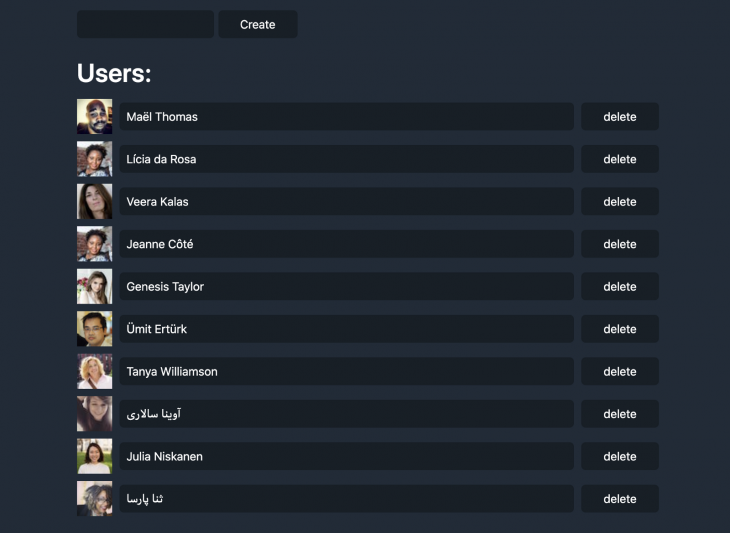
It displays a list of users (read), allows for new user creation, as well as deletion and update Simples.
Let’s get to it
The following assumes basic familiarity with Redux and React. If the former is completely new to you, it might be worth to read this part of the official docs. I’ll link to specific commits on Github, but the most relevant bits will be reprinted in this post, if cloning git repositories isn’t your thing.
Here’s the repository. For a quick start just clone it, install all that we’ll need on this short journey, and start the server:
$ git clone git@github.com:adekbadek/crude.git
$ cd crude
$ npm install
$ npm start
After this set of spells is complete, you should be able to marvel at the site at http://localhost:1234.
We’re going to go commit by commit here, so this list is as good as a table of contents.
A note on setup
Apart from our obvious friends Redux & React, parcel is used for bundling code, and water is added so that our eyes don’t fall out from looking at an un-styled website.
All this boiler-platey code is added in this commit.
Create
Now onto the important parts, which are in here. The store.js file is super small, because all the heavy lifting is outsourced to @reduxjs/toolkit — all the developer has to bring to the table are understanding and copy-pasting skills:
const usersAdapter = createEntityAdapter()
Notice that createEntityAdapter does not require any arguments.
It does not even care how how the entity’s named.
The result of calling this function is a toolbelt of CRUD functions, of which there are more than four — though in this app only the most basic will be used.
const usersSlice = createSlice({
  name: 'users',
  initialState: usersAdapter.getInitialState(),
  reducers: {
    usersAddOne: usersAdapter.addOne,
    usersAddMany: usersAdapter.addMany,
    userUpdate: usersAdapter.updateOne,
    userRemove: usersAdapter.removeOne,
  },
})
The call to createSlice is a little piece of added complexity which does not directly relate to entities. This is because createEntityAdapter returns multiple “case reducers” — which are single-action-handling reducers.
In the classic form of redux there’s usually a single reducer, with a switch statement handling multiple cases. The slices-based flavor of redux is arguably a bit simpler than classic one, and more akin to the functional paradigm in programming.
In order to create a user, the usersAddOne action has to be dispatched:
dispatch(
  actions.usersAddOne({
    id: String(Math.random()),
    name: newUserName,
  })
)
As you can see, a random id is assigned.
This is okay as long as the data is stored locally (not sent to a server). The implications of having a server and, in general, writing CRUD for a real-world application, are described in the last section of this post.
Read
Reading data is often called selecting it — remember the SQL snippet at the beginning of this post?
The entity adapter has a method called getSelectors, which has an optional argument — a function that will point it to a specific slice of the state. In our case, the state will look like this:
{
  users: {ids: [], entities: {}}
}
Hinting the selector-getting logic at the whereabouts of the users slice is quite simple. Then:
const selectors = usersAdapter.getSelectors(state => state.users)
The getSelectors method returns five selectors, most important of which, and pretty self-explanatory, are selectAll and selectById.
Our app will only make use of the former. The remaining three are selectEntities, selectTotal, selectIds, which are all pretty self-explanatory.
Update
Updating an entity is very similar to creating one. So similar in fact, that there’s a word for “update or insert if does not exist” — upsert. In theory, you can live through your whole live without ever creating entities, and instead just upserting them.But this is one of the cases where a little less brevity adds a lot of clarity. When you read code that creates an entity, you know that the entity is considered new, which might mean a lot. If there’s upserting all around, it’s harder to tell an entity’s journey in the code, and good code is readable code.
In our app, we’ll just handle the update of a single field on a single user (have a look at it here) via updateOne function, which has been mapped to the userUpdate case reducer:
dispatch(
  actions.userUpdate({
    id: user.id,
    changes: { name: newName },
  }),
)
Note the special shape of the action payload: {id, changes}.
Hey, but what if the id of entity A would be part of the changes to entity B? In this odd case, there will still be two entities, but A’s properties will be replaced by B’s. Keep in mind that updateOne performs a shallow update, which means that any nested property of the entity would have to be passed in full.This can be addressed when creating the particular case reducers — remember that you don’t have to use the CRUD functions 1:1.
There’s space for some additional logic, e.g. preventing updates under some conditions:
reducers: {
  updateUser(state, action) {
    if (!state.isDisabled) {
      usersAdapter.updateOne(state, action.payload)
    }
  }
}
Delete
The simplest operation of them all. Just one line:
dispatch(actions.userRemove(user.id))
In this simple app we don’t care about the anything that deleting a user might entail — but in larger applications in which there are relations between entities, there’s more to it. For example, when removing a user in a blogging app, what should happen to their posts? And what about posts co-created with other users?
What’s missing?
Obviously, the subject this post started with — communication with a database! All the code shown so far deals with updates to data stored only in the browser memory. And mind you, this can be perfectly all right — be it for reasons of privacy or simplicity.
Optimistic updates
Most web applications though follow a client-server model, in which the client (a browser in this case) synchronizes the data with a database stored on a server.When a user updates the data, the application sends a request to the server to update the data there.
One implication of such a flow is that there’s usually a lag between the updating action (e.g. clicking a button) and rendering the updated data on the screen.A popular approach is to disable the UI during this lag, but in this day and age Internet users expect instantaneous feedback.
For this reason many applications implement an optimistic update strategy, which is precisely what we’ve done in this example application — assuming that we know how the data will look like after the update.
Let’s render the updated data instantaneously. Then we deal with any errors and discrepancies after the response from the server comes back.
Conclusion
I hope this post explains the concept of entities and their management in web development, and that the CRUD acronym is clear as the water by now.
Thanks!
The post Building the simplest CRUD out there with entity management appeared first on LogRocket Blog.
]]>The post How to control your deployments and versioning with semantic-release & friends appeared first on LogRocket Blog.
]]>
When it comes to productivity in software development, knowledge is power. The industry of project management tools — helping a development team to know where they stand — is vast. But software developers have one underused tool that can be leveraged to provide much more information — version control.
A life of a software project is punctuated by releases. In open-source, they can be publishings to a package manager. In a software shop, typically we’re talking about deployments to a production server.
Whatever they are, the knowledge that is of great use when it comes to releases is when they have happened and what they included. In a big enough project it’s common to keep a change log and tag releases, but who has time for that with when you have to release early and release often?
Usually, it looks something like this:
The last release happened a week ago, and now that we’re done with a new, necessary feature, let’s do another one.
The question of what else changed and the size/impact of how big the overall changes remains unanswered. In essence, we simply hope that we did not forget about anything important.

So let’s just automate all that
It all starts with a commit message. Structured commit messages will be the very basis of the automation process. Another git entity as use will be a tag — which will mark each release. Based on the information in commit messages since last release, the next one will be prepared — or not, if the changes since last release won’t call for it. Neat, right?
All that follows is available in this repository:
GitHub – adekbadek/semantic-release-demo: a minimal example of using semantic-release for release/version control
a minimal example of using semantic-release for release/version control – adekbadek/semantic-release-demo
Step 1: Structured commit messages
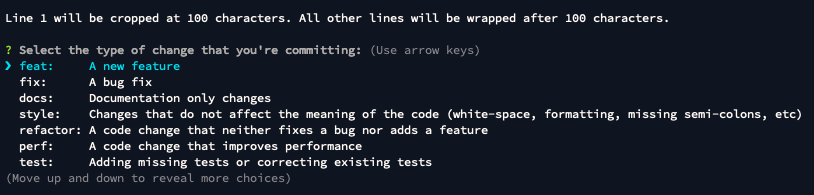
First off, a helping hand in structuring the commit messages: commitizen. Install it with $ npm i -D commitizen and then set it up to use the conventional changelog: $ npx commitizen init cz-conventional-changelog -D -E . Then add an npm script that will call git-cz (the binary for commitizen) and after staging the changes in git, run it. Now you should see this welcoming prompt:
Step 2: Ensuring compliance with git hooks
Good. But working with other people and your future self means that someone might forget to use commitizen and wreck the whole setup. Fortunately, git provides a thing called hooks! If you look into .git/hooks of a fresh repository, you’ll see a bunch of *.sample files — hooks are simply bash scripts that will fire when certain actions occur. But who codes in bash when you have npm, right? Just $ npm i -D husky and watch that hooks folder populate with scripts that you don’t have to write. Husky is a tool that does the hooks business based on config in package.json.
Now let’s get a linter for those commit messages. Firstly, install it — $ npm i -D @commitlint/{config-conventional,cli}. Then, create the commitlint.config.js config file:
module.exports = {extends: ['@commitlint/config-conventional']}
After that, provide some information for husky in package.json:
“husky”: {
  “hooks”: {
    “commit-msg”: “commitlint -E HUSKY_GIT_PARAMS”
  }
}
That’s it! Try to add the files to git staging and commit with a gibberish commit message — husky’s gonna bite!
Step 3: Continuous Integration
Now we have a guarantee that the commit messages will be meaningful (or at least formatted). Time for the main protagonist of this tutorial: enter semantic-release: $ npm i -D semantic-release . Along with that, add an npm script that will invoke it (just “semantic-release”: “semantic-release”).
This tool is by default meant to publish on npm — if that’s not in your plans then some default-config-overriding will have to be performed. Add a “release” key in package.json with the following content:
"plugins": [
  "@semantic-release/commit-analyzer",
  "@semantic-release/release-notes-generator",
  [
    "@semantic-release/npm",
    {
      "npmPublish": false
    }
  ],
  "@semantic-release/github"
]
Semantic-release will do its work in GitHub (and npm), operating from a CI server — CircleCI in this case. It will thus need access to GitHub and npm via tokens, which have to be added to CI’s settings:

As you can see, the tokens need be available as environment variables named GITHUB_TOKEN and NPM_TOKEN. Now let’s add a config for CircleCI, called .circleci/config.yml— which is a bit bloated so you may just copy it from here.
Everything is ready now! If CI sees a commit message that should trigger a release (like those starting with feat or fix), all will happen automatically. A release and tag will be published on GitHub and — unless configured differently — a new package version on npm.
Nice.
Step 4: Generating a change log
But, there is one problem. Two, actually. After a release, the version field in package.json has remained the same, and where is that change log that will be so helpful down the road? Don’t worry, it’s all two changes away:
First, install some additional packages: $ npm i -D @semantic-release/changelog @semantic-release/git. Then, add this config in “release” section of package.json:
"prepare": [
   "@semantic-release/changelog",
   "@semantic-release/npm",
   {
    "path": "@semantic-release/git",
     "assets": [
      "package.json",
      "package-lock.json",
      "CHANGELOG.md"
    ],
    "message": "chore(release): ${nextRelease.version} [skip ci]nn${nextRelease.notes}"
  }
]
This will tell semantic-release to generate a change log and then to add a commit after it’s done with the version releasing. You can tweak many more settings in this section, visit semantic-release docs for more info.
With that setup, a release will happen not on a whim, but based on the changes in code. And when it does, a change log will be generated so everyone knows what landed in the subsequent releases and when they happened.
What do these version numbers mean?
As you probably noticed, a release is marked by a version. With semantic-release, the numbers in the version follow a system called Semantic Versioning (aka SemVer). In short, these denote major, minor, and patch versions. A patch number is incremented when backwards-compatible bugfixes are added, minor: backwards-compatible features, and major: breaking changes (incompatible with the versions before).
Semantic versioning is important for your users (or a client) — this way they know what can they expect with a new release and what has changed since they last used/seen the project. If the last version someone used is 1.0.1 and the current version is 1.1.42 then they know that there were many more bug fixes than features added in the meantime.
Semantic versioning can be opposed to sentimental versioning, in which the version numbers are incremented in an incoherent manner, and in effect they don’t mean anything.
Why not?
All that setup might seem like an overkill, and for a small project maintained by a single person it might be. But I have thanked myself many times for setting it up at the beginning and I’m sure I’ll use it again whenever I can. It’s just very reassuring to have that much information in git, where it won’t become outdated and is strictly tied to the code.
As for other qualms:
I just need a glance at the git log diff and I’m good.
Well, a log is by nature not meant to be read in entirety. It has a very weak signal to noise ratio.
Structuring commit messages is just annoying!
Having an unreadable commit history is even more. Try debugging with no information whatsoever about when a bug could have been introduced.
I’m pretty used to meaningless commit messages…
Having to specify what the commit is about makes a developer think twice about the committed changes. If you’re unsure about the type of a commit, maybe the changes aren’t so clear either?
Thanks for reading!
The post How to control your deployments and versioning with semantic-release & friends appeared first on LogRocket Blog.
]]>The post React Hooks — let’s not get too attached appeared first on LogRocket Blog.
]]>
After the React team announced the proposal of a new feature called Hooks at React Conf 18, there was a strange reaction in the React community: a flurry of tutorials describing how to use it, as if it was already in React core.
What is explicitly described as “a new feature proposal” was treated by some as a feature announcement. Clearly, there’s too much hype and “let’s rewrite everything right now” attitude, as Dan Abramov of the React team remarked:
So let’s take a chill pill, not even bother with the proposed API, and ponder how React got to this point.
If you’d rather see the code and refactor your app to use Hooks right now, the official docs are an excellent starting point.
In one of the first conference talks about React, Pete Hunt uses the word hooks to refer to methods of React.Component, which allow the user to provide custom update logic — to hook into React’s internals and tweak their behaviour. The new feature proposal is introducing hooks in a similar sense — as a way of interacting with React by hooking your code into the React’s engine.
This idea of using functions instead of inheriting from classes plays well with the functional and declarative spirit of React. Because class-based components suffer from the old banana-gorilla-jungle problem, as described by Joe Armstrong:
the problem with object-oriented languages is they’ve got all this implicit environment that they carry around with them. You wanted a banana but what you got was a gorilla holding the banana and the entire jungle.
With React.Component, very often all you need is state or a ref, but what you get is a collection of methods you’ll never use and the necessity of writing the dreaded this keyword (which is an anagram for you know what). Basically, Hooks are a proposal to ditch the classes and instead of inheriting from React, hook into React.
How to React without classes
The class-based API of React has been a problem for some time now. The ES6 classes themselves are not really classes (just syntactic sugar masking prototypal inheritance), they don’t compose well, and the usage of this keyword creates binding issues, especially when performing asynchronous operations.
So the search for class-less React development was on. Maybe the most notable project — now discontinued because of the introduction of Hooks — is recompose (the first example in the docs is providing a state to a function component). However, recompose is making heavy use of the Higher Order Component pattern, which unfortunately creates a hard to read and false hierarchy in the render tree.
Another example is Reactions Component, which uses another very popular pattern for making the class components more composable — Render Prop. The problem here is that a user first has to be pretty familiar with class-based React API to make some sense of how Reactions Component is to be used.
There are also cool projects that use the new ES6 Proxies to manage state, like react-easy-state or — in a more lightweight and experimental way —react-recollect. I recommend the article about the latter, which is a nice dive into how a super-readable and self-explanatory state management can be achieved. Sadly, the support for ES6 Proxies is far from ideal.
Currently, the Hooks implementation allows for replacing almost all of class-based component’s functionality (Hook equivalents for componentDidCatch and getDerivedStateFromErrorare to be added soon), so after they’re added to React, the search can be called off. Classes in React aren’t going anywhere anytime soon, but it’s clear that React team envisions a class-free future for the library.
Just one kind of component, please
The dichotomy between class and function components is an unnecessary burden for a user. I tend to regard a function component as a kind of lightweight little brother of the full-fledged class component — also, the distinction plays nicely with the presentational and container component pattern. But when I imagine learning React now, I think it’d be a bummer that a decision about using state or not (the most basic feature of React) has to be made before even starting to write the component.
It’s a bit like synchronous vs. asynchronous functions: async/await and Promises help us escape callback hell, but why should a programmer have to care if an operation is async or not in the first place? For me at least, Hooks are a much more understandable abstraction than class Something extends React.Component— how do I know what’s lurking in the jungle that I have to bring along with the setState functionality?
Even more declarative and functional future
React prides itself on being declarative, but using lifecycle methods is quite imperative — a classic example is duplicated code in componentDidMount and componentDidUpdate methods. Using Hooks, that can be achieved with useEffect function (there’s a great example of how Hook’s declarative API beats lifecycle methods’ imperativeness in the official documentation).
With Stateless Functional Components, React moved more in the direction of functional programming. Hooks are a move even further in that territory, as they enable building full-featured React apps without the use of classes, but with functions only.
When the proposal is finalized, it will be the biggest change to how React apps are developed since the launch of the library. Today’s nifty patterns like Higher Order Components or Render Prop will seem quirky or even hacky (because they introduce a false hierarchy). The familiar class App extends React.Component with its list of lifecycle methods will be a thing of the past, and if it wasn’t for JSX syntax, a piece of code might not even look like a React component at a first glance.
But until then, let’s not get too attached to the proposed API and focus on writing code using cool, stable features.
Further reading
The post React Hooks — let’s not get too attached appeared first on LogRocket Blog.
]]>The post Simple things designers can do to make their front-end developer coworkers happy appeared first on LogRocket Blog.
]]>
When working as a front-end developer, sometimes I was handed designs created in what I’d call a print state of mind. Both printed materials and websites can be thought of as two-dimensional images that should convey a message in an aesthetically pleasing manner, but that’s where similarities end.
The tools used by designers are often the same for print and web design, which can lead to ignoring the differences between the two. In this post, I’d like to highlight a few things that designers should keep in mind when designing websites.
If you’ve been designing for the web for some time, the following might seem like simple common sense. But you’d be surprised. While I originally wrote this post mainly for designers who were just starting out or transitioning from print to web design, it never hurts for even the most experienced designers to keep their developers in mind.
Provide all the possible states
When the project requirements state that the user should be able to fill out a contact form, it’s easy to think that a couple of text inputs and a big button will do the trick.
In reality, this is just the beginning.
The obvious minimum is a success state for when the form for was submitted correctly. But the internet is a very complex thing, things can break at any moment, and users make mistakes or simply do not understand the interface. An error state, clear validation messages, and disabled states for fields and buttons of the form are a must.
Forms are a very clear example, but the designer should also be aware of a non-ideal state in any dynamic or interactive element. When designing a news feed, remember that there may not be any news items. The design should also indicate if the empty state is the result of an error or whether there are simply no items to display.
Think about user flow
Catching user flow errors just by looking at the design takes some experience. Fortunately, we humans are very good at telling and understanding stories. A good user flow is like a good story — by looking at a single view (a scene, so to speak) the user should be able to tell at which part of the process they’re at, how did they get there, and how to get back if need be.
Getting lost in a digital interface is very irritating, and coding illogical interfaces is even more vexing. Before handing off the designs, spend a moment just telling someone (it can be a rubber duck!) the story of your design. Where does the user click, why, what should happen and how does the design handle whatever should not happen.
If you want to take it up a notch, create a digital prototype or an animation. A picture may be worth a thousand words, but an animation — you guessed it — can be worth even sixty thousand words per second. Check out Principle, Figma, or if you have more time, do your own research based on this big list of prototyping tools. A clickable prototype can save a lot of development time later on, as changing the prototype will always be less time consuming than rewriting code.
Create a style guide
A style guide is one of those things that are extremely beneficial, yet very often overlooked. For a developer, it provides a clear overview of all the components used in a project, and for a designer, it’s a library that can greatly speed up ongoing development of a project.
It also helps to think about a project as a design system, not a just series of visually related views. Once a system is complete and documented in a style guide, adding new views or components is much easier. On top of that, onboarding new team members with a style guide in hand is a lot faster that walking them through all the possible views.
Check out MailChimp’s and Lonely Planet’s style guides for some quality examples.
Design for the mobile user
Your users are probably looking at your site on a phone, and very possibly on a spotty 3G connection. It’s easy to forget when sitting in an office with super-fast wifi while looking at a 27″ screen, but outside, mobile is eating the world.
There are three key points here: screen size, bandwidth, and performance.
It’s not only about the small screens, it’s about any conceivable screen, up to huge 4K screens on which most websites look just… tiny. When designing, forget about any fixed screen size. The interface should look great regardless of the screen size and it should adapt to the constraints — otherwise you’re forcing the user to adapt, and they don’t have time for that.
Remember that last time when you tried to look up some website on a terrible café or hotel wifi? That’s everyday reality for a lot of people. Think twice about high-resolution full screen background images or loading more than two custom fonts on a website.
And last but not least — performance. Your high-end computer probably has no problems dealing with those very interactive and stunning websites that win all the awards. But remember that some of them will not even load on a lousy phone that might be the only internet-connected device for someone else.
Remember that content changes
Sometimes there is this unsettling feeling after the development of a website is finished — that even though the developer did everything pixel-perfect, it just looks kinda worse than the original design. And then the developer sees that all the text on the design just aligns perfectly with everything else and that every picture has the perfect colour and composition.
You can’t blame the designer for making it pretty — after all it’s their job. But sometimes designers forget that content changes and some people have surnames that will take two lines of text. It’s best to let go of this imaginary land of perfect-length copy and create designs that will look good in any configuration. That is the real quality mark.
Stick to a grid
Technology is improving and more and more things are possible, however keeping elements aligned to a grid will not only make development much faster, but also make the site more reliable on older browsers.
And when you choose a grid size, stick to it. One of the more annoying things a designer can to to a developer is changing the grid size just for one component or page. As is the case with style guides, consistency is the key to happiness.
Keep the files organised
Design files can get messy. Nevertheless, they are documents that are the primary source of information for a developer. Named and logically grouped layers, especially when they describe different component states, are a sign that the designer respects the developer’s work.
As for the images, a good rule of thumb is that if something can be exported as vector graphics in SVG format, it should be. SVG files are way lighter than raster images, and they can be manipulated via code (e.g. icon colours).
That’s all!
I hope I haven’t hurt anyone’s feelings by suggesting that some designers are bad at their jobs — it’s not about that. Front-end is a constantly changing field, and even the programmers have a hard time following all what’s happening. It’s hard to require of designers to know all the quirks that come with modern web standards and practices. I hope this post will help to bridge the gap between the design and the code.
Additional links:
The post Simple things designers can do to make their front-end developer coworkers happy appeared first on LogRocket Blog.
]]>