The post NCAA College Football Playoff and Bowl Games ESPN, ABC, CBS, FOX appeared first on Andrew.Technology.
]]>The college football playoffs have two semi-final games. Both semi-final games take place on December 29th. First, Clemson plays Notre Dame at 4 p.m. Eastern. Then, Alabama takes on Oklahoma at 8 p.m. Eastern. The winner of those two games play in the championship game. The College Football National Championship is January 7th at 8 p.m. EST.
College Football Playoffs and National Championship Logo
The NCAA championship and semis are all shown on ESPN. You can can also stream the games using an app or service. The WatchESPN app and website let you watch the games online. You can also use streaming services like Playstion Vue and DirecTV Now to watch. Just tune into ESPN to catch the NCAA Football National Championship!
Only four teams are in the playoffs but other schools play bowl games. This single game of football will end each teams’ season. For the 2018-19 season their are forty football bowl games. The teams with the best records are picked by a selection committee. Other bowl games are hosted by cities, states, or countries. A team needs a winning record to be in a bowl game.
Bowl games start Dec 13th. Most bowl games will air on ESPN. Some bowl games will air on ABC, CBS, CBSSN, FOX, and FS1. Any game on FOX or FS1 can be streamed through the Fox Sports Go app.
The 2018-2019 season concludes with the National Championship. A full list of all postseason games is below.
College Football Playoffs and National Championship Game 2018-2019
| Bowl Name / Location | Date | Time | Network / Streaming App | Schools |
|---|---|---|---|---|
| National Championship Santa Clara, CA |
January 7th | 8 p.m. EST | ESPN WatchESPN |
(Clemson or Notre Dame) vs. (Alabama or Oklahoma) |
| Cotton Bowl Arlington, TX |
December 29th | 4 p.m. EST | ESPN WatchESPN |
#2 Clemson (13-0) vs. 3 Notre Dame (12-0) |
| Orange Bowl Miami Gardens, FL |
December 29th | 8 p.m. EST | ESPN WatchESPN |
#1 Alabama (13-0) vs. #4 Oklahoma (12-1) |
College Football Selection Committee Bowl Games 2018-2019
| Bowl Name / Location | Date | Time | Network / Streaming App | Schools |
| Sugar Bowl New Orleans, LA |
January 1st | 8:45 p.m. EST | ESPN WatchESPN |
Texas vs. Georgia |
| Fiesta Bowl Glendale, AZ |
January 1st | 1 p.m. EST | ESPN WatchESPN |
UCF vs. LSU |
| Rose Bowl Pasadena, CA |
January 1st | 5 p.m. EST | ESPN WatchESPN |
Ohio State vs. Washington |
| Peach Bowl Atlanta, GA |
December 29th | 12 p.m. EST (Noon) | ESPN WatchESPN |
Michigan vs. Florida |
Bowl Games 2018-2019
| Bowl Name / Location | Date | Time | Network / Streaming App | Schools |
| Citrus Bowl Orlando, FL |
January 1st | 1 pm EST | ABC / WatchESPN | Kentucky vs. Penn State |
| Outback Bowl Tampa, FL |
January 1st | 12 pm EST (Noon) | ESPN2 / WatchESPN | Mississippi State vs. Iowa |
| Sun Bowl El Paso, TX |
December 31st | 2 pm EST | CBS / CBS All Access | Pittsburgh vs. Stanford |
| Taxslayer Bowl Jacksonville, FL |
December 31st | 7:30 pm EST | ESPN / WatchESPN | Texas A&M vs. NC State |
| Holiday Bowl San Diego, CA |
December 31st | 7 pm EST | FS1 / Fox Sports Go | Northwestern vs. Utah |
| Liberty Bowl Memphis, TN |
December 31st | 3:45 pm EST | ESPN / WatchESPN | Missouri vs. Oklahoma State |
| Redbox Bowl Santa Clara, CA |
December 31st | 3 pm EST | FOX / Fox Sports Go | Michigan State vs. Oregon |
| Military Bowl Annapolis, MD |
December 31st | 12 pm EST (Noon) | ESPN / WatchESPN | Cincinnati vs. Virginia Tech |
| Arizona Bowl Tucson, AZ |
December 29th | 1:15 pm EST | CBSSN (Free) | Nevada vs. Arkansas State |
| Belk Bowl Charlotte, NC |
December 29th | 12:30 pm EST | ABC / WatchESPN | South Carolina vs. Virginia |
| Alamo Bowl San Antonio, TX |
December 28th | 9 pm EST | ESPN / WatchESPN | Iowa State vs. Wash. State |
| Camping World Bowl Orlando, FL |
December 28th | 5:15 pm EST | ESPN / WatchESPN | West Virginia vs. Syracuse |
| Music City Bowl Nashville, TN |
December 28th | 1:30 pm EST | ESPN / WatchESPN | Auburn vs. Purdue |
| Texas Bowl Houston, TX |
December 27th | 9 pm EST | ESPN / WatchESPN | Baylor vs. Vanderbilt |
| Pinstripe Bowl New York, NY |
December 27th | 5:15 pm EST | ESPN / WatchESPN | Miami vs. Wisconsin |
| Independence Bowl Shreveport, LA |
December 27th | 1:30 pm EST | ESPN / WatchESPN | Temple vs. Duke |
| Cheez-It Bowl Phoenix, AZ |
December 26th | 9 pm EST | ESPN / WatchESPN | TCU vs. California |
| Quick Lane Bowl Detroit, MI |
December 26th | 5:15 pm EST | ESPN / WatchESPN | Minnesota vs. Georgia Tech |
| First Responder Bowl Dallas, TX |
December 26th | 1:30 pm EST | ESPN / WatchESPN | Boston College vs. Boise State |
| Hawaii Bowl Honolulu, HI |
December 22nd | 10:30 pm EST | ESPN / WatchESPN | Hawaii vs. Louisiana Tech |
| Dollar General Bowl Mobile, AL |
December 22nd | 7 pm EST | ESPN / WatchESPN | Buffalo vs. Troy |
| Armed Forces Bowl Fort Worth, TX |
December 22nd | 3:30 pm EST | ESPN / WatchESPN | Army vs. Houston |
| Birmingham Bowl Birmingham, AL |
December 22nd | 12 pm EST (Noon) | ESPN / WatchESPN | Wake Forest vs. Memphis |
| Idaho Potato Bowl Boise, ID |
December 21st | 4 pm EST | ESPN / WatchESPN | BYU vs. West Michigan |
| Bahamas Bowl Nassau, Bahamas |
December 21st | 12:30 pm EST | ESPN / WatchESPN | Toledo vs. FIU |
| Gasparilla Bowl Tampa, FL |
December 20th | 8 pm EST | ESPN / WatchESPN | Marshall vs. South Florida |
| Frisco Bowl Frisco, TX |
December 19th | 8 pm EST | ESPN / WatchESPN | Ohio vs. San Diego State |
| Boca Raton Bowl Boca Raton, FL |
December 18th | 7 pm EST | ESPN / WatchESPN | UAB vs. North Illinois |
| New Orleans Bowl New Orleans, LA |
December 15th | 9 pm EST | ESPN / WatchESPN | Appalachian State vs. Middle Tennessee |
| Camellia BOwl Montgomery, AL |
December 15th | 5:30 pm EST | ESPN / WatchESPN | East Michigan vs. Ga. Southern |
| Las Vegas Bowl Las Vegas, NV |
December 15th | 3:30 pm EST | ABC / WatchESPN | Arizona State vs. Fresno State |
| Cure Bowl Orlando, FL |
December 15th | 1:30 pm EST | CBSSN (Free) | Tulane vs. Louisiana |
| New Mexico Bowl Albuquerque, NM |
December 15th | 2 pm EST | ESPN / WatchESPN | UNT vs. Utah State |
The post NCAA College Football Playoff and Bowl Games ESPN, ABC, CBS, FOX appeared first on Andrew.Technology.
]]>The post Install FOX Sports GO App for Fire TV and Activate appeared first on Andrew.Technology.
]]> Install and activate the FOX Sports GO app on your Fire TV to access live sports programming. Football, basketball, racing and other sports will be available to watch. The app allows you to stream FOX Sports, FS1, FS2, or your regional FOX Sports Network. You will need access to a cable or satellite subscription. Alternatively, a streaming service that supports the “TV Everywhere” apps can also activate. For example, PlayStation Vue provides this access.
There a few different ways to install the app on Fire TV. First, you could use the voice search button on the remote. Hit the search button and say “FOX Sports” to find it. Or use the Amazon download box to the left. This will directly fetch the app through your browser. It will automatically be installed to your Fire TV. Make sure you’re logged into the same Amazon account on both.
You could also manually find the app on your Fire TV. Browse to the Apps in the left menu and find the “Featured Cable Subscription Apps” category. It’s free to download the Fox Sports GO app but you must activate it! A service provider (like cable or online streaming) is required to activate Fox Spots Go.
Launch the FOX Sports GO apps by selecting the logo shown above and pressing the center button on the remote. You may also have to click “Open” if you are taken to the app’s information screen. Once it loads you’ll see a white screen with different live sports streams and a grey menu to the left. Notice the sports streams thumbnails have small lock icons next to them. If you tried selecting one now it would not work. All streaming is locked down until you activate with your subscription information.
Download FOX Sports GO app for Fire TV
Go to Settings in the left menu by hitting the down button on the remote and then center click on the remote. Now select the “Sign In” box by hitting the right button and center clicking on the box. A new screen loads up that prompts you to, “Sign in on your desktop or mobile device at https://www.foxsportsgo.com/FireTV And Enter: KC36Z..” which loads the web page to activate.
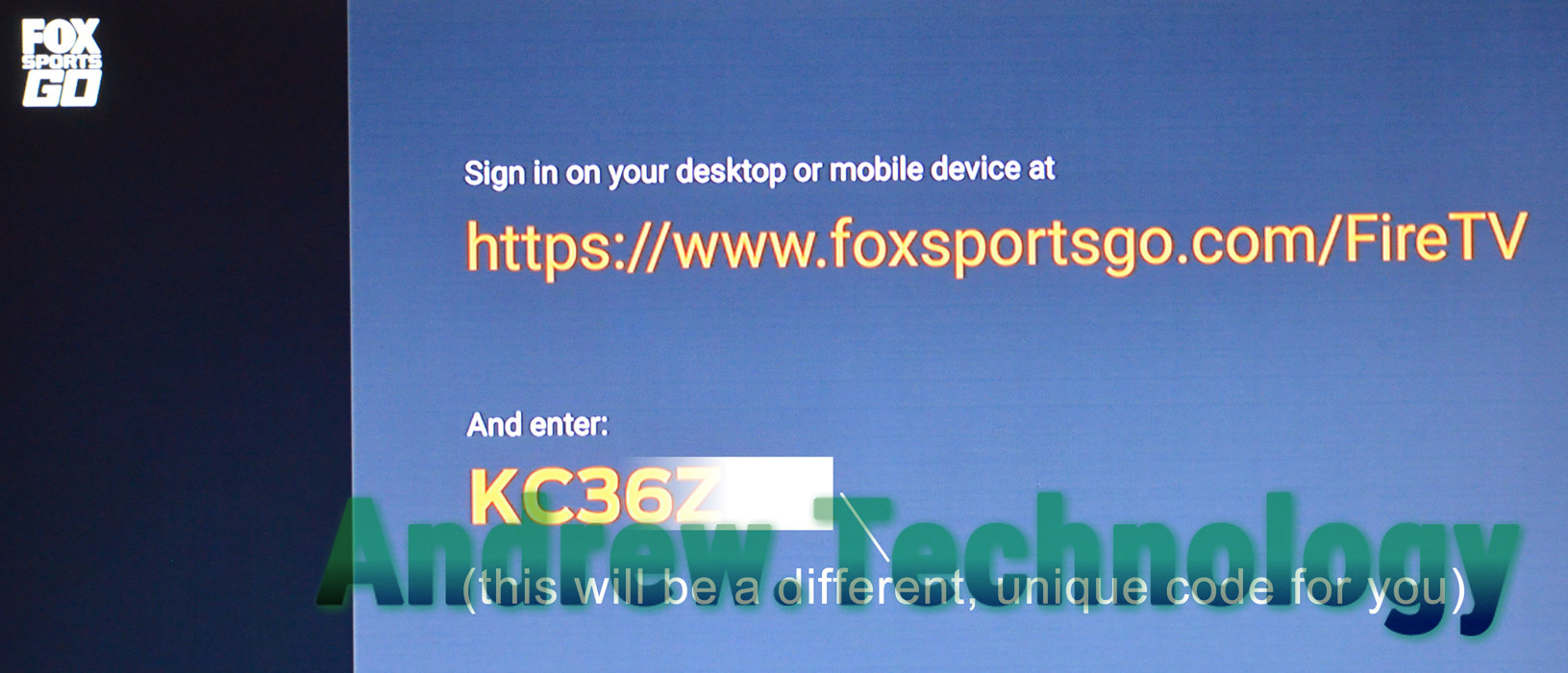
On the activate web page it tells us to, “Enter the activation code displayed on your TV screen.” My activation code started with KC36Z. Your activation code will be completely different because it’s unique to everyone. Enter your unique code shown on the Fire TV into the Activation Code box and click Submit.
Activate FOX Sports GO with your subscription information
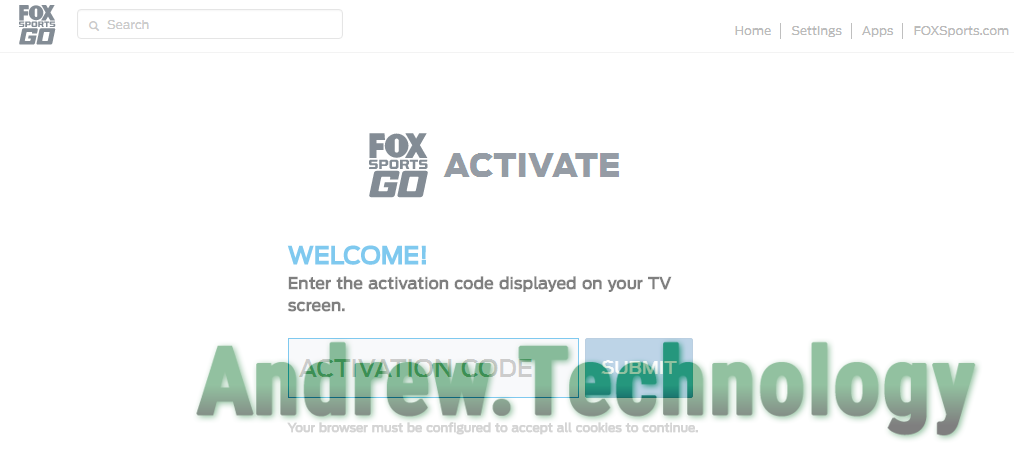
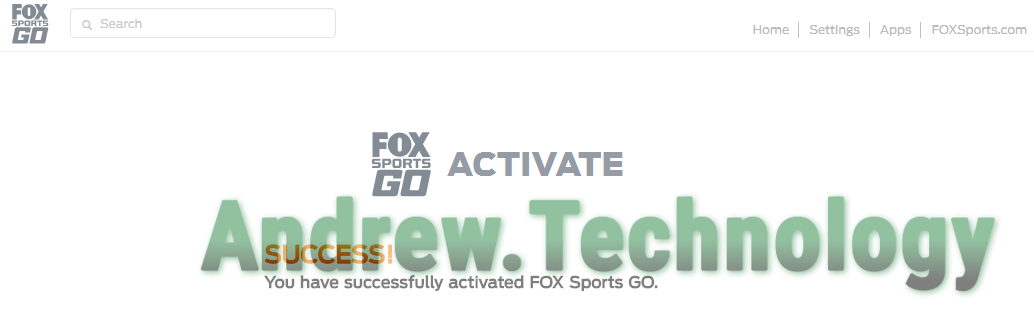
Find your cable, satellite, or streaming subscription info. Select your service provider from the logos or click “More TV Providers” to see the entire list. I was using PlayStation Vue. I had to drill down into more providers and then search a list for the name. Once you click the name it will redirect you. Every provider has their own page. It will ask you to login in through their system. Lastly, you’ll be redirected back to the FOX Sports GO Activate page where it displays the conformation message, “Success! You have successfully activated Fox Sports GO.”
Some amount of time will pass before your Fire TV updates. After a few seconds your Fire TV will automatically change screens back to the settings pages letting you know it’s been activated. Now instead of a “Sign In” box it will say “Sign Out”. That’s it for the activation! Go back to the “Live TV” option in the menu to view the live streams available. You’ll notice there are no more lock icons in the thumbnails.
The specific Fox sports channels you get depend entirely upon the subscription package from your cable, satellite, or streaming service. Generally everyone would get the national Fox Sports channels like FS1, FS2, and your local Fox affiliate. Other channels you could get include your regional FOX Sports Network, FOX Soccer Plus, FOX College Sports (FCS) or FOX Deportes. In my case I used PlayStation Vue in Austin, TX and got Fox Sports Southwest as my regional FOX Sports Network.
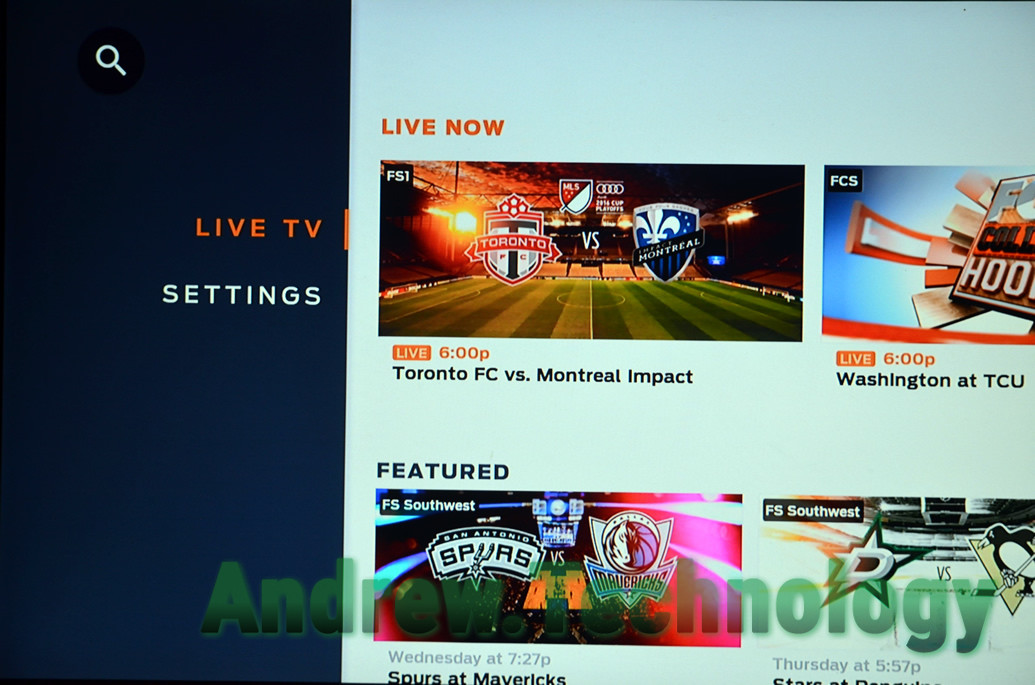
The post Install FOX Sports GO App for Fire TV and Activate appeared first on Andrew.Technology.
]]>The post Watch US Open Tennis on WatchESPN without commercials appeared first on Andrew.Technology.
]]>
WatchESPN app Featured US Open Fire TV
First off you need to have the WatchESPN app downloaded and activated; it’s a simple process that I outlined the steps to in my last post. In prior years the US Open had it’s own free steaming through their website but not anymore. Now, the website only uses ESPN and you’ve got to login through your service provider.
If you are familiar with the WatchESPN app here is the simple run-down: To watch without commercials always select the match that has the players name’s only and ESPN 3 logo! The ESPN feed that has commercials uses a generic name like “Primetime at the US Open” and will have the ESPN/ESPN 2 logo.
If you are new to the WatchESPN app then open up the app on your device. I’ve been using my Fire TV to watch so all my screenshots will be coming from there but it should look similar across the platforms. To the left is the main menu with buttons: Featured, Sports, Channel, and Settings. Featured is open by default so if you see the US Open icon you can navigate to it straight away and select it. By far this is the fastest way to view US Open matches but you could also go to Sports then Tennis or Channel and find coverage on ESPN / ESPN 2 / ESPN 3.
If you use Featured > US Open a square pops up with the label Tennis at the top and all the matches bellow it. If go through Sports > Tennis it load the matches to the right side. Either way you are in the right spot, now which steam should you select?
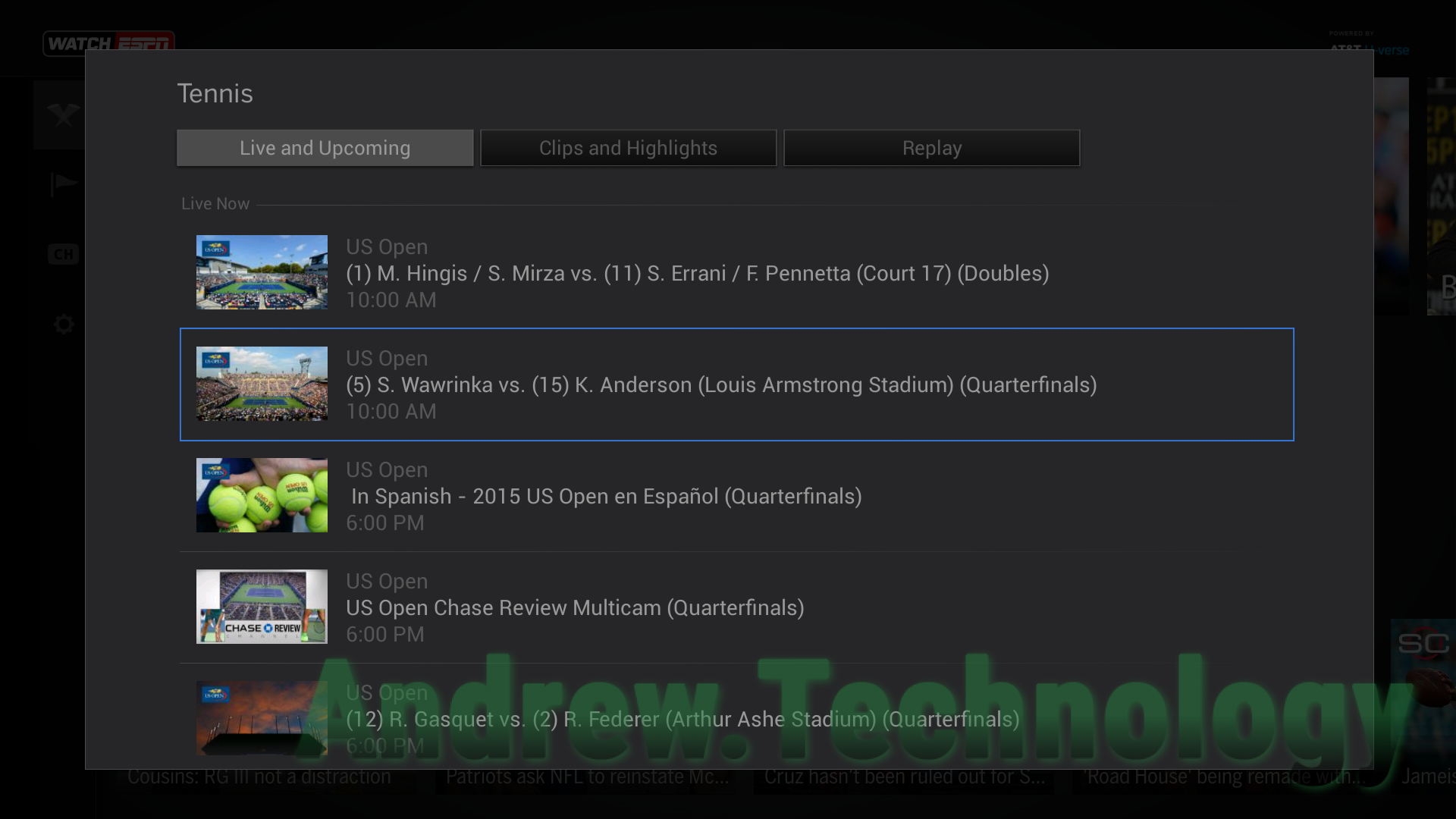
WatchESPN FireTV US Open (5) S. Wawrink vs. (15) K. Anderson (Louis Armstrong Stadium) (Quarterfinals)
You’ll notice most matches say the name of the athletes playing. In my screenshot I see “(5) S. Wawrink vs. (15) K. Anderson (Louis Armstrong Stadium) (Quarterfinals)”. Also the “US Open Chase Review Multicam (Quarterfinals)” and later matches. At the very bottom of the list is “Primetime at The US Open (Men’s Quarterfinals)”.
To watch without commercials always select the match that has the players name’s only! The ESPN feed with commercials uses the generic Primetime at The US Open name.
Using the Sports > Tennis makes it even easier because it shows the logo of the station it’s on. All the player matches have ESPN3 logos while the generic name has the ESPN2. Or use Channel > ESPN 3 to only see the individual match feeds (this option will show you non-tennis games as well).
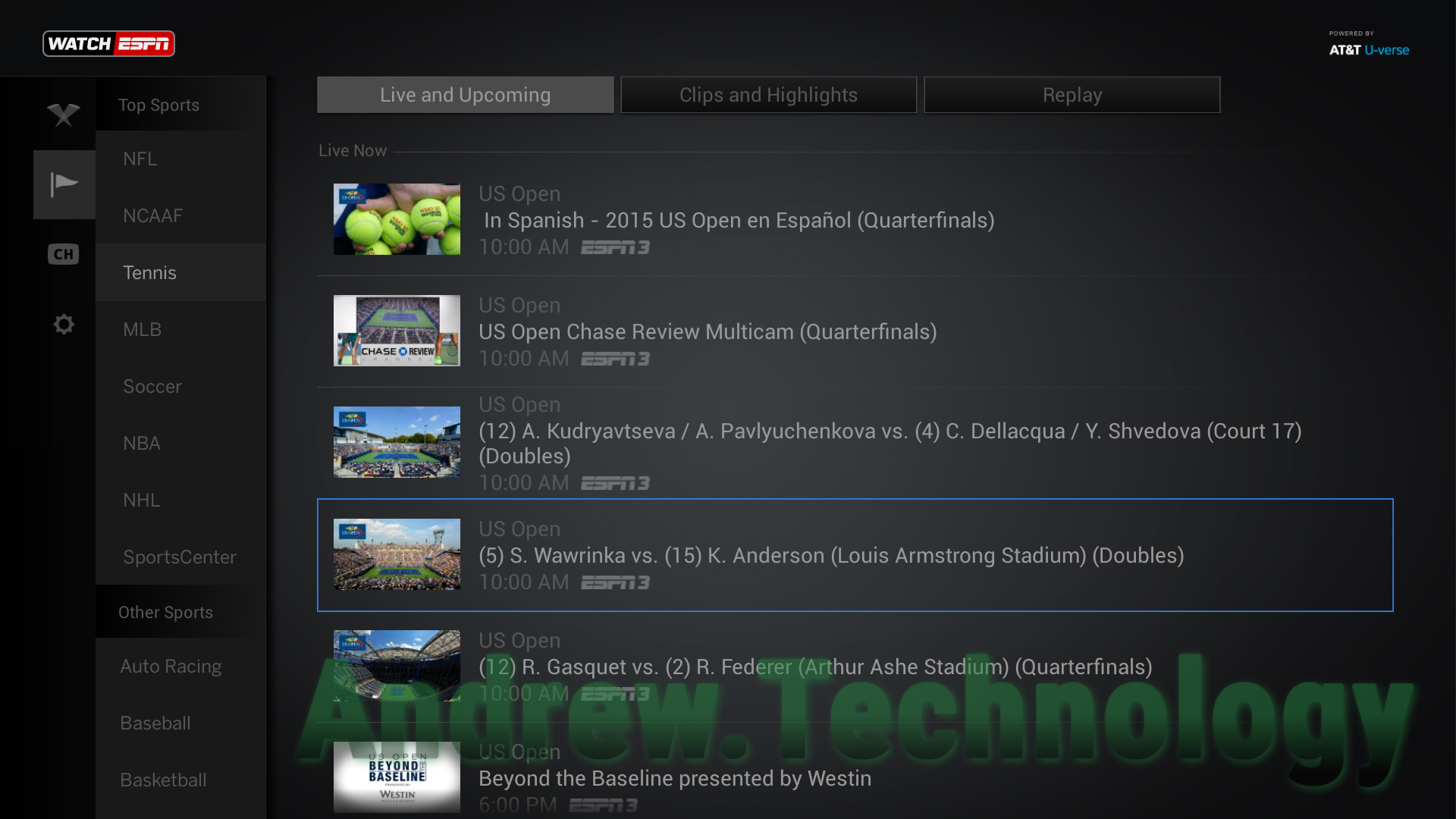
WatchESPN FireTV Sports > Tennis view of US Open matches
ESPN 3 match feeds show everything including the players sitting down munching on bananas to crowd shots and distance New York skylines. You really get to see more of the process of tennis on these continuous feeds. Occasionally you’ll hear some sound checks or off the cuff banter between broadcasters but that just adds to the charm in my opinion.
Chase Review Multicam
If you want to watch multiple matches at once you can use the “US Open Chase Review Multicam” steam. At times it will just show one match but with multiple views like on both players and the normal court (so 3 different video boxes) but in earlier rounds it would show multiple matches and go between them.
The post Watch US Open Tennis on WatchESPN without commercials appeared first on Andrew.Technology.
]]>The post Install & Activate WatchESPN for Fire TV appeared first on Andrew.Technology.
]]>
WatchESPN icon Fire TV home screen
You can install the app a few different ways. By using voice search on the remote and saying “ESPN” or through the Amazon website for the WatchESPN for Fire TV app located here or by clicking the WatchESPN Icon box to the left. It’s always free to download the app but you will have to activate after installation. The WatchESPN app will download and install creating an icon on your Home screen under Recent. Launch the WatchESPN app and the user interface will load up showing you different live games but they will all be locked until you activate.
Activate WatchESPN on Fire TV
The activation prompt should pop up if you try to select anything stating “Watch Live TV” and “Before you can view live ESPN events and shows, we will need to verify that you are a customer…” and then it gives you the steps to activate WatchESPN along with your activation code:
Step 1
Go to your computer or mobile device.
Step 2
Visit http://es.pn/firetv or http://www.espn.com/watch/activate?device=firetv
Step 3
Enter your activation code: VAV4** (your activation code will be completely different than mine)
Step 4
When complete, your program will begin playing momentarily.
Once you go to the ESPN link it redirects to https://espn.go.com/watchespn/activate?device=firetv and this is the page you select your service provider (cable or satellite subscription) and enter your activation code. Once you fill in those details click Continue and that’s it! Your Fire TV will automatically update and be activated. It will redirect to the game you wanted to watch or you can select your sport of preference and start watching!
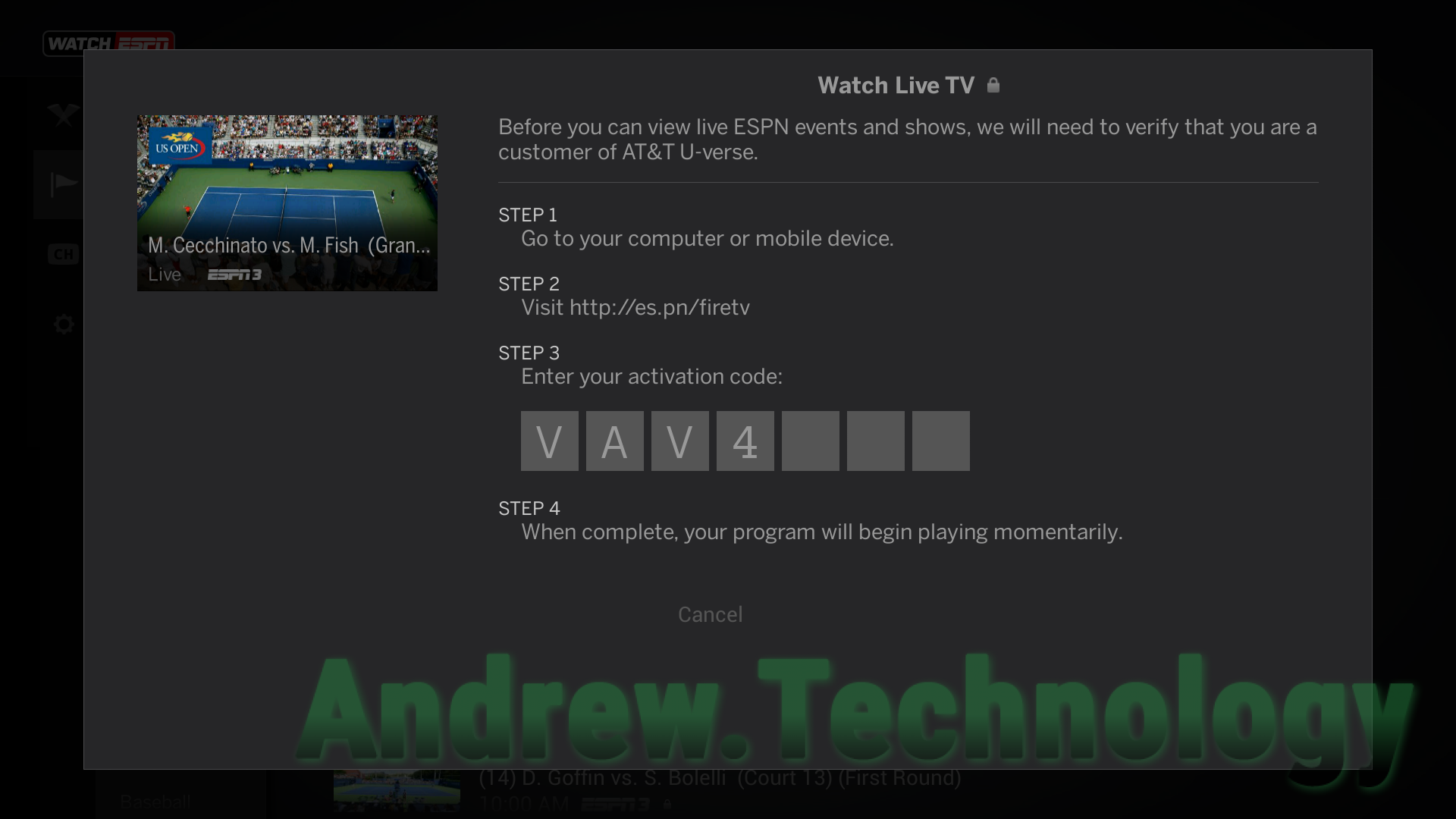
WatchESPN Fire TV Activation screen Step 3 shows the activation code starting with “VAV4” (your activation code will be completely different but in the same spot)
The post Install & Activate WatchESPN for Fire TV appeared first on Andrew.Technology.
]]>