
Wondering what is the difference between manual quote mode and auto quote mode in WooCommerce? In short, manual quote mode handles pricing offline, while auto quote mode generates an instant, system-priced quote. Both run inside WooCommerce Quotes and Orders, the a3rev extension that converts your store’s Add to Cart function into an Add to Quote function. However, the two modes suit very different sales workflows. Below, we break down how each one works and when to use it.
Quotes mode in WooCommerce Quotes and Orders
First, some context. WooCommerce Quotes and Orders lets site visitors add unlimited items to a ‘Quote’ cart and proceed through the WooCommerce Checkout to request a quote. As a result, your storefront becomes a quote request generator rather than a fixed-price shop. A dedicated Quotes payment gateway hides the usual payment options, and every request is saved as a real WooCommerce Order. From there, you choose how prices are handled: manually or automatically.

What is manual quote mode?
Manual quote mode works like a traditional, offline quotation process. The customer adds items to the quote cart, but no price is ever calculated or shown on the site. Because the Manual Quote rule hides prices everywhere, prices stay hidden even on the order email and the order details. Meanwhile, the request is created as a WooCommerce order with the ‘Quote’ status, ready for you to edit.
After the request arrives, you add the pricing yourself. Then you use a WooCommerce Order Action to send the finished quote to the customer by email from the Order edit page. This control matters when prices depend on volume, custom specs, or negotiation. For example, a B2B supplier can tailor each line item before the customer sees a single figure.
- Prices are hidden everywhere, including in quote request emails.
- The request becomes a WooCommerce Order with the ‘Quote’ status.
- You enter pricing manually in the admin, then send the quote by email.
- By default, a Manual Quote Role account is auto-created for the user.
- Guest checkout can be enabled so no account is created on request.
What is auto quote mode?
Auto quote mode automates the whole quoting process. When the customer submits the request, the system instantly generates a quote that includes itemized product prices, shipping, and taxes. Those figures appear in the WooCommerce Order Received email the customer receives. As a result, there is no waiting for a staff member to price the request by hand.
Importantly, the user still cannot see any product prices on your storefront, even after completing a quote request. They only see the prices on their quote. Better still, the customer can then open their My Account dashboard, click Pay, and complete the transaction through any active WooCommerce payment gateway. Because of this, auto quote mode doubles as a fast, self-service checkout while keeping shop prices private.
Manual quote mode and auto quote mode compared
So, what is the difference between manual quote mode and auto quote mode in WooCommerce when you put them side by side? The core split is timing and control. Manual mode gives you full pricing control but adds an offline step. Auto mode trades that hands-on step for instant, system-generated quotes and immediate payment.
- Pricing speed: manual is priced offline by you; auto is priced instantly by the system.
- Quote email: manual hides prices; auto includes product prices, shipping, and tax.
- Payment: manual is sent for offline follow-up; auto lets the customer pay via your gateways.
- Storefront prices: both keep shop prices hidden from the user.
- Best for: manual suits custom or negotiated pricing; auto suits ready-to-sell catalogs.

Which quote mode should you choose?
Choose manual quote mode when prices vary per customer or require approval. For instance, wholesalers, fabricators, and service providers often negotiate every order. Choose auto quote mode when your prices are set but you still want to hide them from the public and capture payment quickly. Either way, both quotes are saved as WooCommerce Orders and integrate fully with WooCommerce My Account.
There is also a third option for true B2B ordering. ‘Add to Order’ mode converts WooCommerce into an online ordering machine, with billing handled offline in your regular cycle. Note that you cannot run Request a Quote and Add to Order at the same time for the same role, because both rely on the Add to Cart function. To explore every mode and setting, see WooCommerce Quotes and Orders. For broader background, the official WooCommerce quote and orders documentation will be a useful resource.
Ultimately, the manual versus auto choice comes down to how much pricing control you need against how fast you want quotes delivered. Manual keeps you in the loop on every figure. Auto keeps your customers moving. With WooCommerce Quotes and Orders, you can switch between them as your store grows.
The post Manual Quote Mode vs Auto Quote Mode in WooCommerce: The Difference Explained appeared first on a3rev Software.
]]>
A WooCommerce order without payment is one of the most common situations store owners face every day. The order lands in your dashboard, but no money has changed hands yet. As a result, it sits in the Pending payment status until your gateway confirms the transaction. This is normal, and it does not always mean something went wrong. However, you do need a clear process for deciding what happens next.
In this guide, you will learn why these orders appear, how to let customers pay later, and when to cancel them. Because a tidy order list keeps your workflow smooth, knowing the right action matters.

What a WooCommerce order without payment actually means
When a customer completes checkout but the payment is not yet confirmed, WooCommerce assigns the order the Pending payment status. For example, if a shopper picks an online method like a card, PayPal or Stripe, the order usually switches to pending the moment they submit. Meanwhile, the payment processor handles the transaction in the background.
The order stays in this status until the gateway confirms a successful payment. At that point it moves to Processing or Completed automatically. However, issues such as declined cards, gateway errors or insufficient funds can leave the order stuck. In some cases, a sync delay simply means the payment went through but the status has not refreshed yet.
Why an order can stay unpaid
There are a few common reasons you end up with a WooCommerce order without payment. Knowing the cause helps you choose the right fix.
- The customer abandoned checkout before entering card details.
- A card was declined or the account had insufficient funds.
- A payment gateway error or interrupted connection stopped confirmation.
- A manual method like BACS or check was chosen, so funds arrive separately.
- A temporary delay between your site and the gateway slowed the status update.
Because the right response differs for each case, check the order notes first. If you see no notes about the payment attempt, that itself signals a problem. Missing notes often mean the gateway failed to communicate with WooCommerce.
How to let a customer pay for a WooCommerce order without payment later
Sometimes you want to give the customer a chance to complete payment. For example, a card may have failed, or you created the order manually for them. In these cases, keep the order in Pending payment or Draft and send a payment link.
WooCommerce offers a few ways to do this:
- From the Edit order screen, choose Order actions > Send order details to customer. The invoice email includes a “Pay for this order” link.
- If the customer has an account, an unpaid order shows a Pay button in the Orders tab of their My Account area.
- Copy the Customer payment page link from the order’s detail page in the admin area and share it directly.
Each order can only accept one payment, so these flows simply route the shopper back into checkout. This approach is ideal when you build quotes or invoices that customers approve before paying. If that fits your store, our guide to WooCommerce Quotes and Orders walks through the workflow in more detail.

Manual payment methods like BACS and check
Some gateways do not confirm payment automatically. Direct Bank Transfer (BACS) and check payments are the classic examples. With these methods, the order stays in Pending payment on purpose, because WooCommerce cannot detect the funds on its own.
As a result, you must verify receipt of the money yourself. Once the transfer or check clears, open the order and move it to Processing or Completed. Until then, do not ship anything. This manual step protects you from fulfilling an order that was never actually paid.
When to cancel a WooCommerce order without payment
If the payment is simply never coming, canceling the order is the recommended practice. For instance, the customer may have changed their mind without canceling themselves. Closing the order keeps your list clean and prevents workflow confusion.
Here is how to cancel an unpaid order:
- Go to WooCommerce > Orders.
- Click on the order you want to close.
- Open the status dropdown and select Canceled (or Failed).
- Click Update to save the change.
Both Canceled and Failed remove the order from your active sales flow and stop it from being processed further. Choose Failed when a payment attempt clearly broke down, and Canceled when nobody intends to pay.
Prevent unpaid orders before they pile up
You cannot eliminate every pending order, but you can reduce them. Because too many unpaid orders cause lost revenue and customer frustration, prevention is worth the effort.
- Set up automatic email notifications so customers can fix a failed payment quickly.
- Alert your admin team whenever an order enters Pending payment, so you act fast.
- Troubleshoot your gateway settings and webhooks if confirmations keep failing.
- Test your checkout regularly to confirm every payment method loads correctly.
For deeper troubleshooting of stuck payments and webhook checks, WooCommerce’s official documentation is a reliable reference. You can review it Troubleshooting Orders Documentation – WooCommerce when an order’s notes hint at a gateway problem.
Final thoughts
Handling a WooCommerce order without payment comes down to one question: will the customer pay, or not? If yes, keep the order open and send a payment link. If the method is manual, verify the funds before fulfilling. However, if the payment is clearly not coming, cancel the order to keep your store organized. With these steps, your order list stays clean and your sales flow keeps moving.
The post How to Handle a WooCommerce Order Without Payment appeared first on a3rev Software.
]]>
A well-designed WooCommerce quote to order workflow turns price negotiation into a smooth, trackable process — letting shoppers request a quote, giving you room to adjust line-item pricing, and converting an approved quote into a paid order in a single click. For B2B sellers, wholesalers, and stores with custom or made-to-order products, this workflow bridges the gap between a fixed e-commerce cart and real-world sales conversations.
In this guide you’ll learn exactly how the quote-to-order process flows from the customer’s first request to a completed order, how to manage quotes from your WordPress admin, and which settings let you tailor the experience to your business — from hiding prices to enabling mixed carts and purchase-order payments.
What the WooCommerce quote to order workflow looks like
At its core, the WooCommerce quote to order workflow replaces (or sits beside) the standard “Add to Cart” button with a “Request a Quote” option. The customer assembles the products and quantities they want, submits a short request form with an optional message, and the request lands in a dedicated quotes area in your admin. From there you review, negotiate, and convert. Here is the typical journey end to end:
- A shopper clicks “Request a Quote” — often shown alongside the normal “Add to Cart” button — and submits a form capturing products, quantities, and a message.
- The request appears in a dedicated quotes management screen in the WordPress admin.
- The shop manager reviews it, edits line-item prices, adds notes, attaches files, and sets a status such as New, Under Review, Sent, Accepted, or Expired.
- The system emails the updated quote to the customer, either manually or automatically on a fixed interval.
- The customer logs into their account to view the negotiated price and either accepts or declines.
- On acceptance, a one-click conversion creates a regular WooCommerce order with the quoted prices and can redirect the customer to checkout for payment.

Step 1: Capture the quote request
The workflow starts on the product or cart page. Enabling the request-quote form typically adds a “Request a Quote” button to single product pages so customers can submit quotation requests while still being able to buy in-stock items normally. The submitted form captures the desired products, quantities, and any customer message, giving you everything you need to prepare an accurate response.
You can also control who sees the quote option. Role-based visibility lets you show quote buttons only to specific user roles or wholesale customers, while price hiding conceals prices for items that always require a quote — useful when B2B pricing depends on quantity, requirements, or delivery date.
Step 2: Review and negotiate from the admin
Once a request comes in, all the action happens in a centralized quotes dashboard in your WordPress admin. Each entry shows the requested products, pricing, customer information, and any special requirements. From a single screen you can add or remove products, adjust quantities, set the offered price per line item, add internal or customer-facing notes, attach supporting documents, and move the quote through your chosen statuses.
Custom statuses are one of the most useful parts of the workflow. You can create status names that match how your team actually works — for example New Quote, Under Review, Sent to Customer, and Accepted — and trigger email notifications to the customer whenever a status changes. If a customer resubmits a declined quote, you can review the full quote history and re-quote with updated quantities or products.

Step 3: Send the quote to the customer
After you’ve set the final pricing, the system emails the updated quote to the customer. You can send it manually, or configure a fixed interval — from when a request is received — so the quote email goes out automatically without manual intervention once you’ve adjusted the prices. Email templates can present the line items as a quote, or include line items plus a direct link to pay, depending on how you want customers to respond.
Step 4: Convert the quote into an order
This is where the quote becomes revenue. There are two clean paths to conversion, and a good setup supports both:
- Customer-initiated: set the quote status to Accepted, and the customer converts it into an order from their My Account page and pays at the agreed price.
- Admin-initiated: you convert the quote into an order yourself at any time, using the offered price — which becomes the product price in the new order.
Either way, the conversion preserves the agreed-upon pricing, creates a standard WooCommerce order, updates the order status, and sends notification emails. Because the result is a normal order, it flows into your existing fulfillment, reporting, and HPOS-compatible order cycle just like any other sale. If you want a deeper look at how quotes and orders relate within your store, see our guide to WooCommerce Quotes and Orders.
Configuration options that shape the experience
The flexibility of the WooCommerce quote to order workflow comes from its configuration. Beyond the basic request-and-convert flow, you can tune the system to match different selling scenarios:
- Mixed cart support — allow quote-only and purchasable products together in the same cart.
- Stock-based quoting — auto-enable quotes for out-of-stock items so customers can still express intent.
- Quantity-based quoting — automatically switch to a quote when a customer requests bulk quantities, ideal for B2B.
- Category-based quoting — include or exclude products from quoting based on their category.
- Price hiding — conceal prices and the add-to-cart button for customer groups who must request a quote.
- Payment gateways — let customers pay through standard checkout, or enable a Purchase Order gateway for B2B accounts.
For those technically minded you can checkout the Nuts and Bolts of how a preium Quotes and Orders plugin works here.
Why this workflow matters for B2B and custom products
For wholesale and B2B sellers, prices often depend on order quantity, product specifications, and delivery dates — there’s no single fixed number to display. A quote-to-order workflow lets you hide prices, force a quote request for those customer groups, negotiate privately, and then convert to a paid order once both sides agree. The same applies to personalized or made-to-order products that simply can’t carry a standard price tag.
The payoff is a single, organized system: every request is tracked, every negotiated price is preserved, and every accepted quote becomes a clean WooCommerce order. Instead of juggling emails and spreadsheets, you run the entire quotation process — from request to order — inside the store you already manage.
Getting started
To build your own WooCommerce quote to order workflow, start by enabling the request-quote form, decide which products or user roles should use quotes, and set up your custom statuses and email notifications. Test a full cycle yourself — submit a request, adjust pricing in the admin, send the quote, accept it, and confirm the order is created with the agreed price. Once that loop works smoothly, you’ll have a quoting system that scales with your B2B and custom-order sales.
The post The Complete Guide to a WooCommerce Quote to Order Workflow appeared first on a3rev Software.
]]>
This is stage II of the break up of the WooCommerce Email Inquiry and Cart Options family of plugins. As you may recall Stage I was the removal of WooCommerce Quotes and Orders and rewriting it as a stand alone plugin. Having done that left us with 3 plugins in the ‘Family’.

Stage II – Discontinue WooCommerce Email Inquiry and Cart Options PRO
In stage II we have discontinued development of the WooCommerce Email Inquiry and Cart Options Pro version. This involved a 3 step process.

Step 1. Free Upgrade for all Active Subscribers
This was the most important step – upgrading all WooCommerce Email Inquiry and Cart Options Pro active Lifetime and Annual Subscriptions holders to the Woocommerce Email Inquiry Ultimate Plugin. Once that was done we then set about informing all subscription holders about the end of development of the Pro version and the upgrade to the Ultimate version. To do this we have taken the following steps.
- On a3rev customers account in the My Subscriptions section each subscriber will see that the name of their active Subscription has changed and the explanation text below it.

- Next we created a detailed Call Out from the a3 Dashboard > Manage menu with detailed steps to follow for running the final WooCommerce Email Inquiry and Cart Options Pro version 1.6.0 upgrade. See quick video of that.
Update / Upgrade Instructions
These are the instructions that show in the Call out
Free Upgrade to WooCommerce Email Inquiry Ultimate
Step 2. Move some features to the free version
The next step in the process was over a 6 week period moved some of the WooCommerce Email Inquiry and Cart Options Pro version to the Free version.
2.0.0 – 2018/06/14
This Feature upgrade adds the modal pop up tool and and Default Forms fields.
2.1.0 – 2018/07/09
This Feature Upgrade adds a new Product Page Rule, Hide Product Price
2.2.0 – 2018/07/23
This Feature Upgrade adds options between show email inquiry on front-end as a Button or Hyperlink text with full style options.
Step 3. The Final Release.
WooCommerce Email Inquiry and Cart Options Pro version 1.6.0 was released on the 23rd July 2018. This is the final release of the plugin and development and support are ceased.
What used to be a family of 4 plugins is now simplified down to just 2, a Free version and the WooCommerce Email Inquiry Ultimate Premium upgrade. Makes life simpler and better for all of our users be they Free version users or Premium version subscribers.

Read the first post in this series
WooCommerce Quotes and Orders Stand Alone Plugin
The post Free Upgrade to WooCommerce Email Inquiry Ultimate appeared first on a3rev Software.
]]>
Over the past 4 weeks we have been working on a break up of our ‘family’ of WooCommerce Quotes and Orders / Email Inquiry & Cart Options plugins. The ‘family’ of plugins has grown since the first release almost 6 years ago. This is a timeline of the growth of the family, each new release included all of the features of the previous version with more features.
WooCommerce Email Inquiry & Cart Options Pro
= 1.0.0 – 2012/06/09 = First production release
WooCommerce Email Inquiry & Cart Options Free Lite version
= 1.0.0 – 2013/03/07 = First working release
WooComerce Email Inquiry Ultimate
= 1.0.0 – 2013/05/12 = First production release
WooCommerce Quotes and Orders
= 1.0.0 – 2013/06/15 = First production release

WooCommerce Quotes and Orders – Stand Alone Plugin.
Stage 1 of the break up of the ‘family’ was removing the WooCommerce Quotes and Orders plugin from the family. This involved performing major surgery on it and relaunching it as a Stand Alone version 3.0.0. This involved a 4 step process.
Step 1. Rewrite WooCommerce Quotes and Orders as a Stand alone plugin.
WooCommerce Quotes and Orders even though it contained all of the Single Product Page Rules, Email Inquiry and Read More features has always really been a different product. In addition we have found that the Page Rules from the Email Inquiry family really restricted further Quotes and Orders development. We finally made the decision to rebuild it as a stand alone plugin. Quotes and orders was completely refactored, in doing this we removed the Product Page rules, Hide Cart and Hide price, Email Inquiry and Read more features, created new namespace, class and function names, cleaned up the code and made various coding enhancements.
Step 2. WooCommerce Email Inquiry No Conflict
Having Split the Email Inquiry Ultimate features out of Quotes and Orders we then updated both plugins so that there where no conflicts with Rules and Roles when both plugins where installed on a site. This involved adding hooks to the Email Inquiry Ultimate plugin and filters to the Quotes and Orders plugin to over ride any conflicting Product Page Rules that is set in the Email Inquiry plugin.
Step 3. Taking care of our active Subscribers.
The next step involved creating a Special WooCommerce Email Inquiry Ultimate Subscription for each active WooCommerce Quotes and Orders Lifetime and Annual subscription holder. The Special Subscription with corresponding site activations was created and added to active subscribers accounts. These special subscriptions show on a new tab on the a3rev Customers My Account Console. The special subscription also showa on the a3 Dashboard > Mange menu when the site is connected to the customers account.
Step 4. WooCommerce Quotes and Orders v 3.0.0 release.
The release of the new stand alone WooCommerce Quotes and Orders version 3.0.0 plugin was announced via email to all active subscription holders as well as a dismissable notice that shows on the sites dashboard after updating advising if the Page Rules, Email Inquiry or Read more features where in use on the site then the WooCommerce Email Inquiry Ultimate plugin was available and should be installed. We have created a function in version 3.0.0 that saved any of that data so that all that was required was to install and activate WooCommerce Email Inquiry Ultimate.

WooCommerce Quotes and Orders version 3.0.0 was released on the 7th of July ( 11 days ago ). To date there have been no reports of issues with the upgrade which is very pleasing. Customers have been able to run the update and where required install the newly created WooCommerce Email Inquiry Ultimate Special Special Subscription plugin from the a3 Dashboard > Plugins menu.
Read Stage II of this project
Free Upgrade to WooCommerce Email Inquiry Ultimate
The post WooCommerce Quotes and Orders Stand Alone Plugin appeared first on a3rev Software.
]]>
Today we are announcing that we are ceasing all development and maintenance of our WP eCommerce plugins. This announcement coincides with the release of a new version of each plugin today. The new version is a compatibility upgrade with:
* WP eCommerce version 3.12.2
* WordPress version 4.8.0
* PHP 7.0
It is the final version that we will release. Going forward where there was a Premium and Free version we have upgraded the Free version to the fully feature Pro version and the source code is full open source and available on the wordpress.org repo.
We have done this for these reasons:
* So the source code is available on a public repo
* So that all users have access to a public support forum
* So that another developer can easily take over the development and maintenance of the plugin.
History of Development
In 2012 we publicly released the WP eCommerce plugins that we had developed for using with our website clients. At that time WP eCommerce was our WordPress ecommerce plugin of choice as it was the best ecommerce available and had upwards of 1 million users at that time.
The a Free Lite version of most plugins was released on wordpress.org with a Premium upgrade available for purchase from a3rev.com. Below is a table with the history of the 10 WP eCommerce plugins we built – 6 of those had Free Lite versions.
| Premium Version | Release Date | Free Light Version |
| WP eCommerce Product Reviews | 1st August 2011 | No |
| WP eCommerce Wholesale Pricing, Views, Access | 7th November 2011 | No |
| WP eCommerce Compare Products | 28th February 2012 | FREE VERSION |
| WP eCommerce Dynamic Gallery | 18th July 2012 | FREE VERSION |
| WP eCommerce Grid View | 23rd July 2012 | FREE VERSION |
| WP eCommerce Predictive Search | 30th July 2012 | FREE VERSION |
| WP eCommerce Catalog Visibility and Email Inquiry | 23rd August 2012 | FREE VERSION |
| WP eCommerce Rewards Points | 28th November 2012 | No |
| WP eCommerce Widget Product Slideshow | 8th May 2013 | No |
| WP eCommerce Product Quick View | 5th August 2013 | FREE VERSION |
WooCommerce
We first got involved with the WooCommerce plugin just a few months after its first release in mid 2012. WooCommerce has grown since its release 5 years ago from zero users to over 3 million users today. In that same period of time WP eCommerce has lost its way and today has just 40,000 active installs with only 21% of those using the current version 3.12.
In effect we stopped developing new features to all of our WP eCommerce plugins in early 2014 and have since that time done maintenance only upgrades.
We do not use WP eCommerce in our client development work and have not done so since Early 2013.
Whats Next
As of June 2017 all the a3rev WP eCommerce plugins are compatible with the latest version of WP eCommerce (v 3.12.2), WordPress (v 4.8.0) and PHP 7.0
We would like to thanks all of our clients who have used one or more of our WP e-Commerce plugins. Time and technology wait for no one. WooCommerce is today the most popular ecommerce platform in the world (not just WordPress but all platforms). We are going with the WooCommerce superior technology and are continuing to develop our existing stable of WooCommerce and WordPress plugins whilst adding new ones.
We recommend that the few WP eCommerce plugin clients that still have an active WP eCommerce store upgrade to WooCommerce for now and the future. After this upgrade your a3rev WP eCommerce plugin will work without issue for a time, but eventually it will break down as new versions of WordPress and WP eCommerce are released.
If you want to stay with WP eCommerce then at some stage in the future you will need to find a maintained plugin that will replace the a3rev WP eCommerce plugin that you are using.
We have made this decision because it is obvious that WP eCommerce will never recapture the market from Woocommerce. Ourselves and 569 other developers are now contributing to the Woocommerce plugin development whilst just 58 developers are contributing to the WP eCommerce development. That is 10 times the number of contributors and the code quality of WooCommerce is now just streets ahead of WP eCommerce.
The post End Of WP e-Commerce Development appeared first on a3rev Software.
]]>
Upgrading your site to HTTPS
Google and industry security experts have written countless posts about upgrading your site to HTTPS from the HTTP protocol, but not many website owners have done it. Google has now gotten serious about it and has made 2 significant changes that in reality force everyone to make the change.
Google Chrome NOT SECURE ! Warning
Back in September 2016 Google announced on it’s security blog that as of January 2017 (now) that it would start warning site visitors that the site they are visiting is not secure. We are starting to see this happening now with login pages and checkouts.
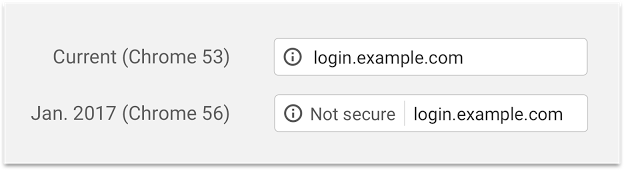
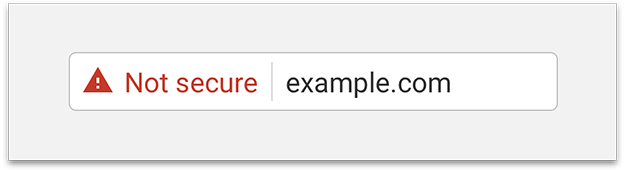
Google advises that they plan in future upgrade versions of the Chrome browser to label all HTTP pages as non-secure, and change the HTTP security indicator to the red triangle. This alone will kill any website.
This is important now because as of May 2016 Google Chrome over took Internet Explorer as the worlds most used web browser.
Google Search favours HTTPS sites over HTTP
In August 2014 Google announced that it was including HTTPS as a positive ranking signal in its search algorithm. It makes sense that Google would prefer to send users to sites that are trusted and certified.
HTTPS gives far greater security than HTTP and in addition to Google stated preference for it there are additional SEO benefits.
Increased site ranking in Google.
Google has confirmed the slight ranking boost of HTTPS sites and the value of switching to HTTPS is very likely to increase over time.
Analytics Traffic Referrer Data.
When traffic passes to an HTTPS site, the secure referral information is preserved. In HTTP sites it is stripped away and looks as though it is “direct” traffic.
Security and privacy.
HTTPS adds security for your SEO goals and website in several ways:
- It verifies that the website is the one the server it is supposed to be talking to
- It prevents tampering by third parties.
- It makes your site more secure for visitors.
- It encrypts all communication, including URLs, which protects things like browsing history and credit card numbers.
The Takeaway
Clearly while you may have been able to delay upgrading your site to HTTPS, that time has past. Upgrading now will ensure
- Website visitors are not scared off by the Google Chrome browser warnings
- You and your site are in Googles good books and keep up with them.
- Google search ranking benefits for your site
- Far greater security for your site and your visitors and customers.
It is obvious that we all want out sites to be ranked as highly as possible in Google search to bring traffic to our sites. Once they are on the site we want them to stay as long as possible so we can build trust with them.
I recommend not only upgrading your site to HTTPS secure protocol, but in fact you should be making doing this your number one priority for your website in 2017.
The post Why upgrading your site to HTTPS is a priority appeared first on a3rev Software.
]]>
Over the past 2 weeks we have been working feverishly on testing / tweaking / patching / releasing new versions all of our WooCommerce / WordPress / WP e-Commerce plugins, Responsi Framework, Responsi Plugins and Themes for full compatibility with major WordPress version 4.5
WP 4.5 RC2 is out today with 91 changes from RC1 – Use the list below to see what the status of your software is in relation to full compatibility with WordPress major Version 4.5
- 91 Plugins (Completed 22/04/2016)
- 12 Responsi Themes (Completed 11/04/2016)
- Responsi Framework (Completed 12/04/2016)

WooCommerce Plugins – Completed 11/04/2016 (22/22)
- Dynamic Gallery Premium and Free versions
- Predictive Search Premium and Free Versions
- Quotes and Orders
- Email Inquiry Ultimate
- Email Inquiry and Cart Options Premium and Free versions
- Product Sort and Display Premium and Free Versions
- Compare Products Premium and Free version
- Carousel and Slider
- Product Slider
- Widget Product Slider Premium and Free versions
- Quick View Ultimate and Free versions
- Product Card Quantity Selector
- Feature Category Widget
- Categories Ultra Widget
- WooCommerce JD Product Uploader

WordPress Plugins – Completed 21/04/2016 (33/33)
- WP Email Template Premium and Free versions
- a3 Responsive Slider Premium and Free versions
- Contact People Ultimate
- Contact Us Page – Contact People Premium and Free Versions
- a3 Portfolio
- a3 Portfolio Isotope Sort and Filter
- a3 Portfolio Dynamic Stylesheets
- a3 Portfolio Item Switcher
- a3 Portfolio Shortcodes
- a3 Lazy Load
- Page Views Count
- a3 License Manager
- a3 Rooms and Bookings
- a3 People
- a3 Sports Clubs
- a3 Sponsor and Clients Showcase
- a3 Projects
- a3 Locations
- WP User Reviews
- Content Navigation Widget
- Hotels Manager
- Restaurant Single
- Restaurant Multi
- a3 Tours Manager
- a3 Gallery
- a3 Recent Events
- AAA Tourism Rated
- a3 Demo Bar
- a3 Image Slider
- a3 bbPress Support Forum

Responsi Framework – Completed 12/04/2016 (1/1)
- Responsi Framework

Responsi Plugins – Completed 11/04/2016 (22/22)
- Responsi Premium Pack
- Responsi Developer Tools
- Responsi Home Builder
- Responsi Backgrounds
- Responsi Shortcodes
- Responsi WooCommerce Templates
- Responsi bbPress Templates
- Responsi Header Nav Bar
- Responsi Nav Bar Widgets
- Responsi Dummy Data
- Responsi Pre Launch / Maintenance Mode Page
- Responsi WP Login Page
- Responsi Custom Sidebars
- Responsi Feature Content Area
- Responsi Full Width Template
- Responsi Post Enhancer
- Responsi Social Share
- Responsi Widget Pack (5 plugins in 1)

Responsi Themes – Complete (12/12)
- Blank
- Chameleon
- Cladded
- Decor
- Dixie
- Elegance
- JD
- Glider
- Knight
- Lagoon
- Myne
- Professional
This list will be updated progressively as each plugin upgrade is completed.
WordPress major new versions required that we test every plugin, the Responsi Framework and Responsi Themes for Full Compatibility with the new version. These are what is known as Maintenance Upgrades. All WordPress Plugins and Themes are dependent on WordPress and must be constantly checked for compatibility with major new version releases.
Just doing this takes a huge amount of time – roughly about 160 hours of work or 4 weeks if one person where doing it. Last year WordPress had 4 major new versions.
The post WordPress 4.5 Compatibility Upgrades appeared first on a3rev Software.
]]>
 Building a WordPress Framework
 Building a WordPress Framework
What does it take to build a WordPress Framework? That is a question we thought long and hard about back in early 2012. Thinking that we had a fair idea we began the project in July 2012. We completed the initial work in just over 3 months. Back in May 2013 I wrote a post about that – Building a Parent Theme Framework – Getting Started and then followed that up with another post in June 2013 – Parent Theme Framework – Childs
Those 2 post took the story up to the end of 2012. Here we are 3 years and 3 months on from there and I have not posted about it since. The reason is that building a WordPress Framework is like ‘going down the rabbit hole’ – there is just no way of knowing when you will come back out.
As we draw very near to public release of what has grown into Resposni WordPress Framework the best way to explain what it takes to build a WordPress Framework is to do it by the numbers.
These numbers are tabulated from September 2012 when we first released the Framework in Beta.
173 Weeks
10,000 + Hours of work
130 – New Versions released
266 New Features
359 Code Tweaks
139 Bug Fixes
142 Live Sites running on Framework
Here is the almost 4 year timeline for building the Responsi WordPress Framework
2016
New Versions: 7
New Features: 41
Tweaks released: 60
Bug Fixes: 3
March / 2016 – 3 new versions comprising 22 new features, 38 code tweaks plus 1 bug fix. Responsi WordPress Framework versions 5.6.0, 5.6.1 and 5.7.0 …. Milestones – Complete refactor of framework code to replace static vertical gutters with Dynamic Vertical gutters. Massive resort of framework customizer menus
Feb / 2016 – 1 new version comprising 3 new features and 12 code tweaks. Responsi Framework version 5.5.0 …. Milestones – Built and Add Responsi Blank Child theme. Built in Dynamic text line height feature for all Framework, Theme and Plugins text editors.
Jan / 2016 – 2 new versions comprising 15 new features, 10 code tweaks and 2 bug fixes. Responsi WordPress Framework versions 5.3.6 and 5.4.0 …. Milestones – Removed Featured Content Area, Full Width Template, Related and Recent posts, WP Login page, and create them as Responsi Plugins. Moved other code out of Framework and built it into existing plugins. Added sidebar style options and extensive work to the Footer section.
2015
New Versions : 41
New Features: 31
Tweaks released: 70
Bug Fixes: 43
December / 2015 – 4 new versions comprising 8 code tweaks and 11 bug fixes. Responsi WordPres Framework versions 5.3.2, 5.3.3, 5.3.4 and 5.3.5 …. Milestones – Complete audit and tidy up of the framework code. Upgrade all background colour options to ON | OFF switches. Full compatibility with WordPress version 4.4.0 and WordPress responsive images
November / 2015 – 2 new versions comprising 8 new features, 3 code tweaks and 1 bug fix. Response WordPress Framework version 5.3.0 and 5.3.1 …. Milestones – Major step towards releasing the framework as open source code. Build and Release Responsi Premium Pack plugin. Built Themes and plugins menu for Premium Pack. A3 WordPress Free plugins are directly downloaded from the wordpress repository. Launched Responsi Widget Pack plugin
October / 2015 – 2 new versions comprising 10 code tweaks and 2 bug fixes. Responsi WordPress Framework versions 5.2.3 and 5.2.4 …. Milestones – Massive task – Completely rebuild all Responsi HTML customizer controls templates to js underscore templates Menu and preview load too slowly with CSS in PHP language
September / 2015 – 2 new versions comprising 5 code tweaks and 3 bug fixes.
August / 2015 – 2 new versions comprising 3 new features, 1 code tweak and 5 bug fixes. Responsi WordPress Framework versions 5.1.2 and 5.2.0 …. Milestone – Major refactor of Responsi admin panels. Complete Re Build all framework, Child themes and Responsi plugin admin panels to work on the WordPress customizer. Also full compatibility with WordPress major version 4.3.0
July / 2015 – 6 new versions comprising 3 new features, 1 code tweak and 5 bug fixes. Responsi WordPress Framework versions 5.0.1, 5.0.2, 5.0.3, 5.0.4, 5.1.0 and 5.1.1 …. Milestones – Upgraded the WordPress text editors on the framework to support all WordPress embed features – oembed and shortcodes
June / 2015 – 5 new versions comprising 13 new features, 17 code tweaks and 4 bug fixes. Responsi WordPress Framework versions 4.6.3, 4.7.0, 4.8.0, 4.9.0 and 5.0.0 …. Milestones – Removed Home Page Builder, Developer Settings, Social Share and Theme Background Tiles and Patterns, out of the framework and create each one of those as a Responsi plugin
May / 2015 – 6 new versions comprising 8 code tweaks and 3 bug fixes. Responsi WordPress Framework versions 4.5.7, 4.5.8, 4.5.9, 4.6.0, 4.6.1 and 4.6.2 …. Milestone – Continue to rebuild shortcode functions into the Shortcode plugin and remove from the framework
April / 2015 – 4 new versions comprising 6 code tweaks and 1 bug fix. Responsi WordPress Framework versions 4.5.3, 4.5.4, 4.5.5 and 4.5.6 …. Milestone – Full compatibility with WordPress major version 4.2.0 and continue moving shortcode out of the framework into the shortcode plugin.
March / 2015 – 5 new versions comprising 2 new features, 9 code tweaks and 4 bug fixes. Responsi WordPress Framework versions 4.4.8, 4.4.9, 4.5.0, 4.5.1 and 4.5.2 …. Milestones – Built Full Width Template into the Framework, Built Responsi Shortcode plugin and start to build in new shortcode features and removed shortcodes from the framework as we go.
Feb / 2015 – 1 new version comprising 2 new features and 1 bug fix. Response WordPress Framework versions 4.4.7 …. Milestone – Added post date option for blog cards
Jan / 2015 – 2 new versions with 3 bug fixes. Responsi WordPress Framework version 4.4.5 and 4.4.6
2014
New Versions: 41
New Features: 89
Tweaks released: 100
Bug Fixes: 68
December / 2014 – 9 new versions comprising 4 new features, 16 code tweaks and 13 bug fixes. Responsi Framework versions 4.2.2, 4.3.0, 4.3.1, 4.3.2, 4.4.0, 4.4.1, 4.4.2, 4.4.3 and 4.4.4 …. Milestones – Added Primary Nav Bar Alignment, Launched Responsi Header Nav Bar Add-on
Oct – Nov / 2014 – 5 new versions comprising 11 new features, 6 code tweaks and 12 bug fixes. Responsi Framework Versions 4.1.1, 4.1.2, 4.1.3, 4.2.0 and 4.2.1 …. Milestones – Major rework of framework for loading in mobile devices. Removed static boxed content padding with dynamic padding
September / 2014 – 3 new versions comprising 12 new features, 8 code tweaks and 4 bug fixes. Responsi Framework versions 4.0.4, 4.0.5 and 4.1.0 …. Milestones – Release of Responsi Custom Sidebars plugin. Added Feature Content Area feature. Built Home Page independent layout
August / 2014 – 4 new versions comprising 3 new features, 5 code tweaks and 6 bug fixes. Responsi Framework versions 4.0.0, 4.0.1, 4.0.2, 4.0.3 …. Milestones – Convert all framework admin panels CSS to Sass. Launched Responsi Nav bar widget plugin
July / 2014 – 3 new versions comprising 2 code tweaks and 2 bug fixes. Responsi Framework versions 3.2.2.3, 3.2.2.4 and 3.2.2.5 …. Milestone – Tweaks to Primary Nav Bar dropdown menu
June / 2014 – 5 new versions comprising 7 new features, 4 code tweaks and 10 bug fixes. Responsi Framework versions 3.2.1.3, 3.2.1.4, 3.2.2, 3.2.2.1 and 3.2.2.2 …. Milestones – Luanch of Responsi Pre Luanch page plugin. Add style options for wp login page.
May / 2014 – 3 new versions comprising 7 news features, 14 code tweaks and 2 Bug Fixes. Framework versions 3.2.1, 3.2.1.1 and 3.2.1.2 …. Milestone – Launch of Responsi Shortcodes plugin.
April / 2014 – 5 new versions comprising 1 new feature, 3 code tweaks and 11 bug fixes. Framework versions 3.1.1, 3.2.0, 3.2.0.1, 3.2.0.2 and 3.2.0.4 …. Milestone – Full Audit of Framework code.
Feb – March / 2014 – 2 new versions comprising 14 new features, 30 Tweaks and 2 bug fixes. Framework versions 3.0.9.1 and major Version 3.1.0 …. Milestone – Major Restructure of Framework to support complete independent style and layout options for Posts and Pages. Created main Home Page Builder menu and added Content Section Full width and Content section with sidebar. Created Responsi Developer Branding and add many new options.
Jan / 2014 – 2 new versions comprising 30 new features, 12 code tweaks and 6 bug fixes. Framework version 3.0.7 and 3.0.8 …. Milestone – Complete rebuild of Responsi Licensing, Child theme and Add-ons menu for 2 click install and activate and auto updates from those menus. Built Responsi Child theme live demos.
2013
New Versions: 35
New Features added: 100
Tweaks released: 127
Bug Fixes: 23
Nov – Dec / 2013 – 2 new versions comprising 26 new features, 19 Tweaks and 2 bug fixes. Framework versions 3.0.5 and 3.0.6 …. Milestone – Full rewrite of the Framework, Themes and Plugins admin interface – 300 hours of work in this.
October / 2013 – 3 new versions comprising 10 new features, 2 code tweaks and 1 bug fix. Framework version 3.0.3, 3.0.4 and 3.0.4.1 …. Milestone – Built full support for Facebook open graph meta tags. Built in Fix header in browser layout option and post card recent and related posts option.
September – 2013 – 3 new versions comprising 7 new features, 11 code tweaks and 2 bug fixes. Framework versions 3.0.0, 3.0.1 and 3.0.2 …. Milestone – Major refactor of the Framework – Built in Cards features – Post card and Product cards. Built in support for Google Rich Snippets and schemea.org tags. Launch Resposni bbPress Add-on
August – 2013 – 4 new versions comprising 2 new features, 8 code tweaks and 5 bug fixes. Responsi versions 2.1.5 , 2.1.6, 2.1.7 and 2.1.8 …. Milestone – Built in Framework caching for compat with IE7, IE8 and IE9. Built bbPress Responsi Templates.
July – 2013 – 2 new versions comprising 2 new features, 10 code tweaks and 1 bug fix. Framework version 2.1.3 and 2.1.4 …. Milestone – Major work on IE7,8 and 9 browser render. Added more style option.
June – 2013 – 5 new versions comprising 4 new features, 3 tweaks and 3 bug fixes. Framework versions 2.0.8, 2.0.9, 2.1.0, 2.1.1 and 2.1.2 …. Milestone – Pull all WooCommerce Template options out of the framework and created as a Responsi plugin.
May – 2013 – 5 new versions comprising 18 new features, 1 code tweak and 11 bug fixes. Responsi Framework versions 2.0.2, 2.0.3, 2.0.4, 2.0.5, 2.0.6 and 2.0.7 …. Milestone – Changed Name to Responsi Framework. Added masonry ‘modernizr’ animation to the framework plus many more style options.
April – 2013 – 1 new version comprising 7 new features, 48 Tweaks and 1 bug fix. a3rev Framework major version 2.0.1 …. Milestone – Added Independent style and layout settings for Post, Archives and pages – release of the 4 card sections on the Home Page.
March – 2013 – 1 new version comprising 7 new features, 17 tweaks and 1 bug fix. a3rev PTF Framework major version 1.1.5 …. Milestone – Released upgrade that added more style and layout options for Blog Posts, Archive pages and WooCommerce templates.
Feb – 2013 – 3 new versions comprising 1 new feature, 5 code tweaks. a3rev PT Framework versions 1.1.2, 1.1.3 and 1.1.4 …. Milestone – Added endless scroll feature to the framework and built and launched Cladded, a3rev and Dixie child themes.
Jan – 2013 – 6 new versions comprising 16 new features, 3 code tweaks and 7 bug fixes. a3rev Framework versions 1.0.6, 1.0.7, 1.0.8, 1.0.9, 1.1.0 and 1.1.1 …. Milestone – Built full interchangeability of child themes on a3rev PT framework and built and launch the Stilus and Lagoon custom child theme.
2012
New Versions: 6
New Features: 5
Tweaks released: 2
Bug Fixes: 2
Dec – 2012 – 5 new versions comprising 5 new features, 2 tweaks and 2 bug fixes. a3rev Parent Theme Framework versions 1.0.1, 1.0.2, 1.0.3, 1.0.4 and 1.0.5 …. Milestone – Build and launched Knight, Mynehire and JD Sport custom child themes and released Chameleon, Elegance, Décor and Professional Child themes.
20/09/2012 – First beta release, Private Repository created on Github
July 2012 – Commenced building the a3rev Parent Theme Framework
The post Building Responsi WordPress Framework by numbers appeared first on a3rev Software.
]]>
As mention in this post Building a WordPress Plugin Framework, last week we started the roll out the new Mobile First major upgrade to the a3 WordPress Plugin Framework that a3rev plugins are built on. So far we have upgraded the WooCommerce Product Sort and Display Pro, the WooCommerce Product Sort and Display Free Lite Version, the Page View Count Free plugin, the a3 Lazy Load Free plugin, the WP Email Template Pro and WP Email Template Free Lite version plugins.
The WordPress Plugin Framework mobile first upgrade sees the launch of admin panels with opening and closing ‘Setting Boxes’ that we have developed. The new admin panel User Interface (UI) and User Experience (UX) is exclusive to a3rev plugins and makes navigating our plugins admin settings a very simple and enjoyable task. Each settings box as a Title that tells you what section of the settings you are wanting to edit. Just click or tap the box header and the settings you are wanting show.
Here is a video showing how it works in a PC – it is just as awesome in a mobile.
WordPress Plugin Framework Roll-out
Over the coming weeks we will continue to convert all 51 plugins that we have built on the a3 WordPress Plugin Framework to the new mobile first upgrade. This is a very big task. We currently think that it will take 3 to 4 weeks to complete the upgrade. Right now we are working on converting the WordPress plugins, Contact Us Ultimate , Contact Us Page – Contact People Pro and the Contact Us Page – Contact People Free Lite version.
Editing From a Mobile Phone
The new WordPress Framework mobile first admin interface means that is you ever need to edit a plugins settings while you are on the move – doing it from any smart phone is a breeze.
Don’t forget that you can always be the first to know about new Plugin releases, Feature upgrades and general WordPress related news by following us on
If you love your new a3rev plugins mobile first admin interface (as we do) please help spread the Word about it by using the Share: icons at the top of this page to share this post to your social media contacts. You can also write a review about it on the a3rev facebook page if you wish.
The post WordPress Plugin Framework Mobile First Upgrade appeared first on a3rev Software.
]]>