As we used to say at SimpliVity, “It’s all about the data”. And we were right. But, the manner in which we talked about ‘the data’ was block based. As I’ve been seeing the changes in how business run, expand and learn from their data, I’ve seen a lot of challenges that couldn’t be addressed with just housing and moving (or not moving, in the case of SimpliVity’s DVP) the blocks of data. This year’s X is faster, bigger, cheaper than last year’s. I wanted to solve challenges with the data itself. How do we access, connect, use, protect, govern, and free the data in a world of lakes and pools (data in MSSQL, NoSQL, Parquet files in S3 buckets, Hadoop, etc.), GDPR, Cambridge Analytica, PIPL, and a whole host of data regulations. If data truly is the ‘new oil’, that’s where I wanted to be.
Enter a conversation with Immuta, Inc, a company built out of data management in the Intelligence Community, specifically as it relates to access for data scientists for analytics and ML and its intersection of highly regulated data. How can analytic models be built on data that’s so heavily gated without getting in the way of time to value? How can we guarantee privacy with specific access intent? How can this be done no matter the data source? Great questions! Some I was thinking of, many I was not. Connectedness and governance, for Data Scientists, for regulated data, for ML. Now, the big question, how can we do this without copy data management hell? Without copying, and recopying and deidentifying, and copying again, then data for the model changes and the process repeats. How can we grant time and intent based 3rd party access to our data and guarantee auditable privacy?
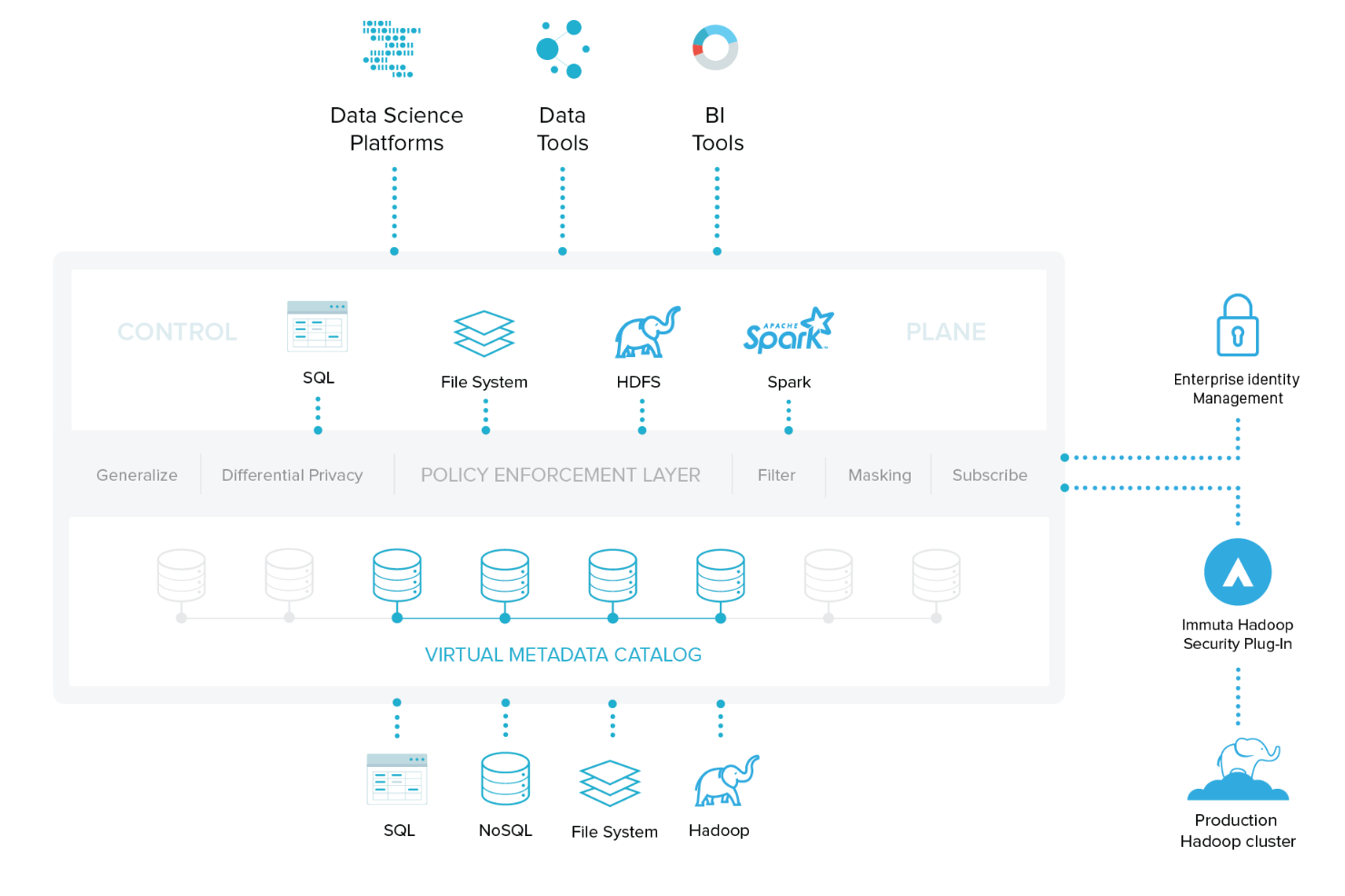
Immuta provides a common read-only data access interface. This is geared towards repeatable model training without requiring copy data management. And without having data science teams re-learn a new tool. They can use tools they already have for modeling and intelligence (e.g. Spark, Datarobot, Domino, H2O, Tableau, PostgreSQL, etc.) and join across them for cross data analytics. Data scientists get personalized access to data based on projects and subscriptions. Data owners get to grant self-service access to all their data types and services.
Then there is this amazingly rich policy engine for data governors and compliance teams, allowing them to create condition-based rules for data access through natural language filters. Data is hidden, masked, redacted, and anonymized on-the-fly in the control plane based on the attributes of the user accessing the data and the purpose under which they are acting. All of this done with granular audit controls and reporting (see the exact query by whom, when, under what access rule, etc.)
I’ve taken a role with Immuta as a Sr. Solutions Architect, tasked with helping build out their first Go to Market team. This decision didn’t come easy, as it means, mostly, farewell to the majority of my interactions with the virtualization and storage worlds. Of course, I’ve made some of my best friends there, so I’m not going away :) But it means less VMUGs, likely my last vExpert was 2018 and the like. Excited and a bit nervous of the degree of change ahead, but boy, am I looking forward to it.
]]>Please sign here x_______________________________
Storage providers (NAS, SAN, HCI, Cloud, etc.) typically have preferred block sizes for the volumes created on top of their file system. Alignment is also super critical within a VM and you can read a great post about alignment on Duncan Epping’s blog here. Applications also have some best practices around formatted volume cluster sizes (or allocation units, or block size) based on their default average IO size. For instance, for Microsoft MS SQL, Microsoft highly recommends using a block size (allocation unit, cluster size – will be used interchangeably here) of 64k on any volume containing a database. More detailed info here.
Most often, when deploying an application, you will install the binaries on the root drive (C:\) and place the data on a secondary disk. Most applications allow this, some do not. For those instances where the do not and the application has been installed on the boot drive (C:\), you’re stuck with the cluster size you chose on installation (default of 4k).
If the application cannot deal with it’s data on a different device/directory than its binaries, and the binaries cannot be moved, you’re typically stuck unless you want to re-install and migrate data.
If you want to live on the edge, you might be able to convert the boot drive’s block size using VMware’s free vSphere Converter.
This is a step-by-step for that process.
The setup:
Windows 2008 R2 SP1 – fully patched. (also tested/validated on Windows Server 2012 R2)
Single 40GB Boot volume with default 4k cluster size
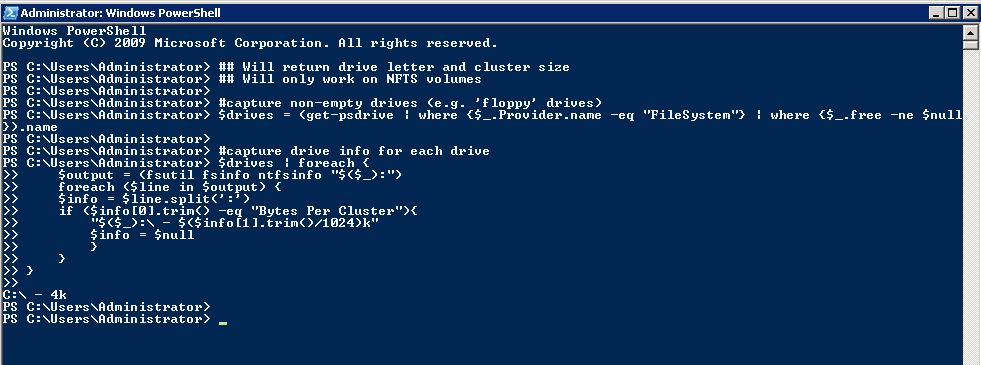
Oh, I wrote a script to be deployed to many VMs and report back the cluster size of all volumes where remote WMI wasn’t possible. This just the data gathering portion of that script.
This is most safely done with a powered off VM with VMware tools installed. This is really about making sure the boot volume of the new VM has no changes to it during the conversion.
Step 1:
Choose the powered off VM option and choose ‘VMware Infrastructure virtual machine’ from the drop down. Provide your vCenter credentials.

Step 2:
Choose your VM to convert

Step 3:
Choose the destination virtual infrastructure
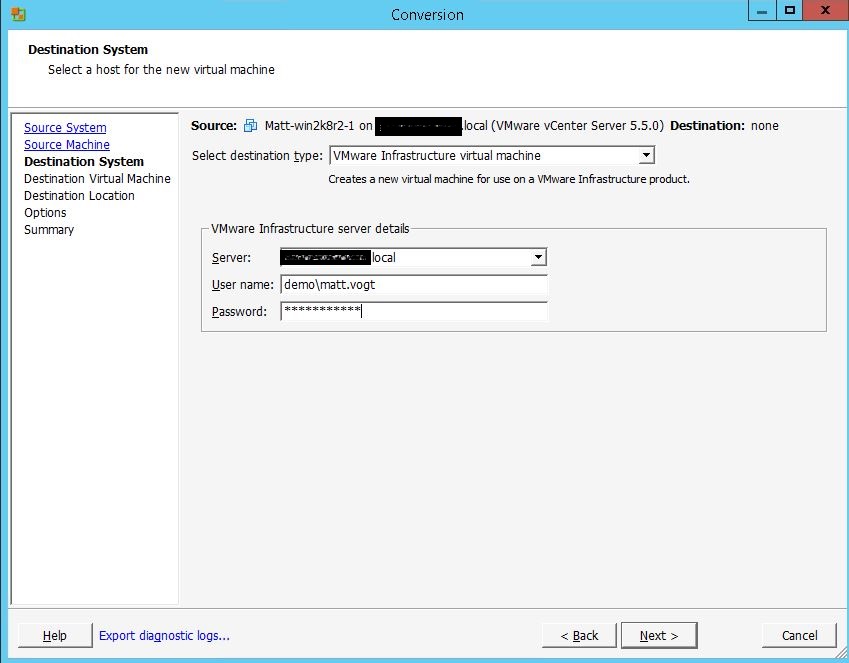
Step 4:
Name your VM (something unique, obviously)
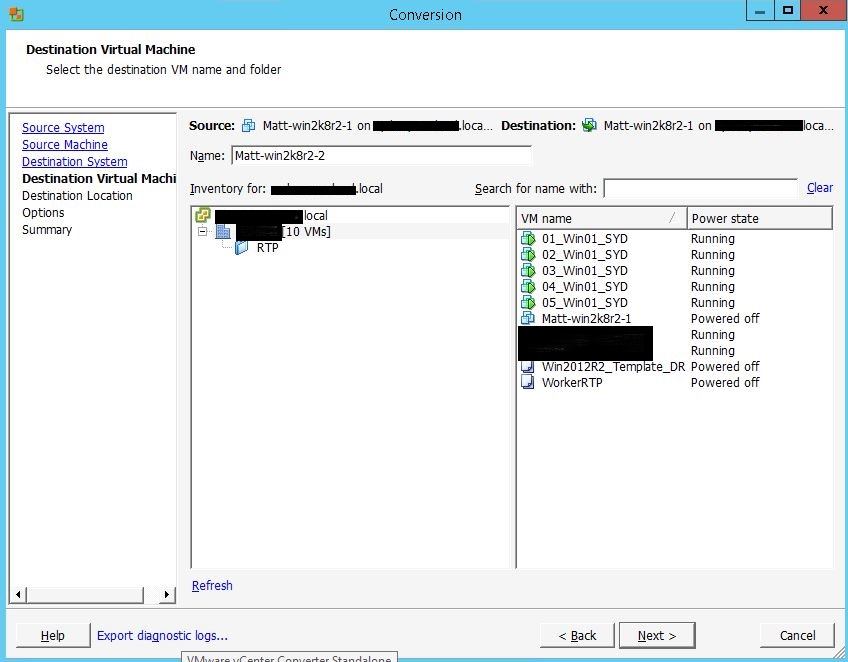
Step 5:
Choose specific destination information: Cluster/Host/Datastore/VM Hardware Version
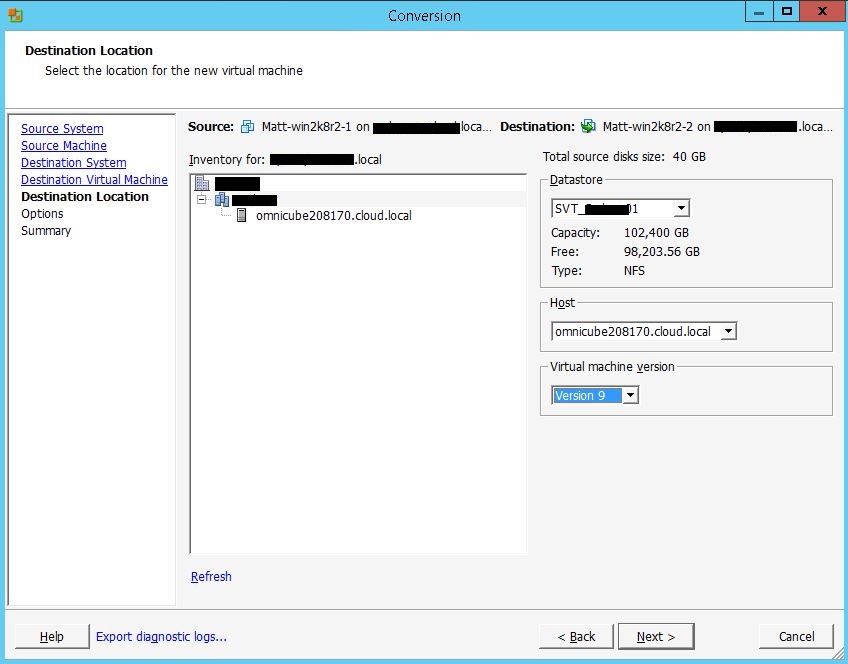
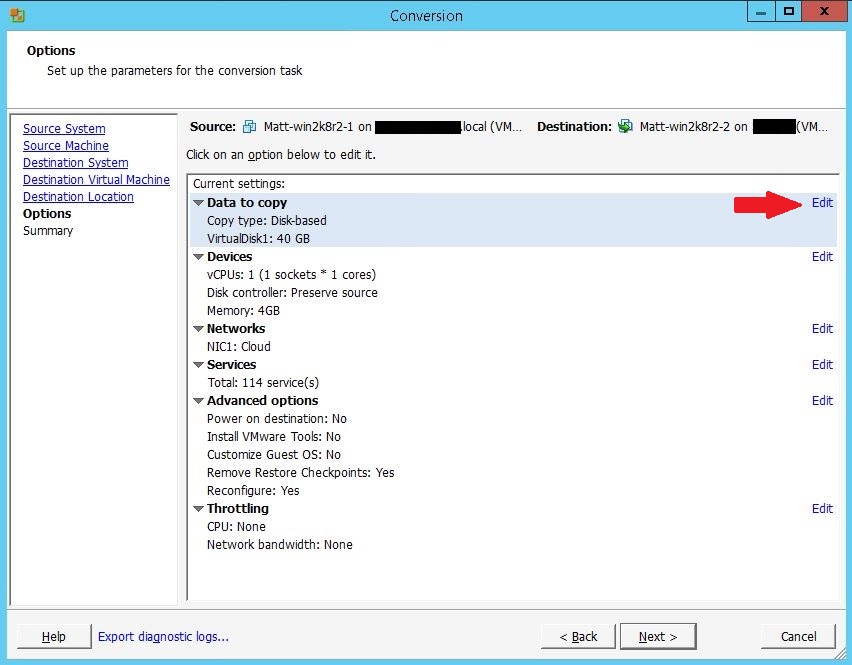
Step 6:
Options Section: Click Edit Settings next to “Data to copy”
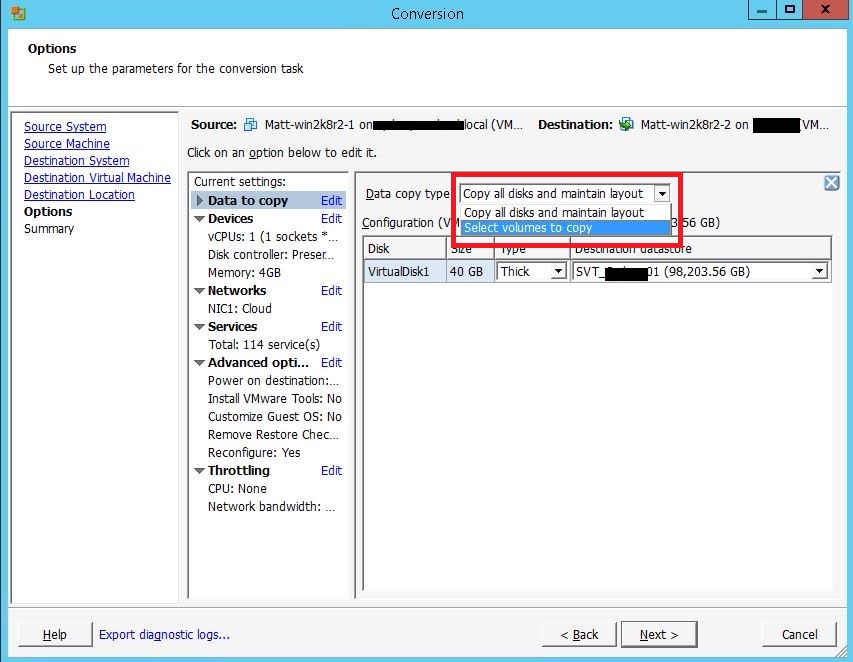
Step 7:
Choose select volumes to copy in the “Data copy type” drop down
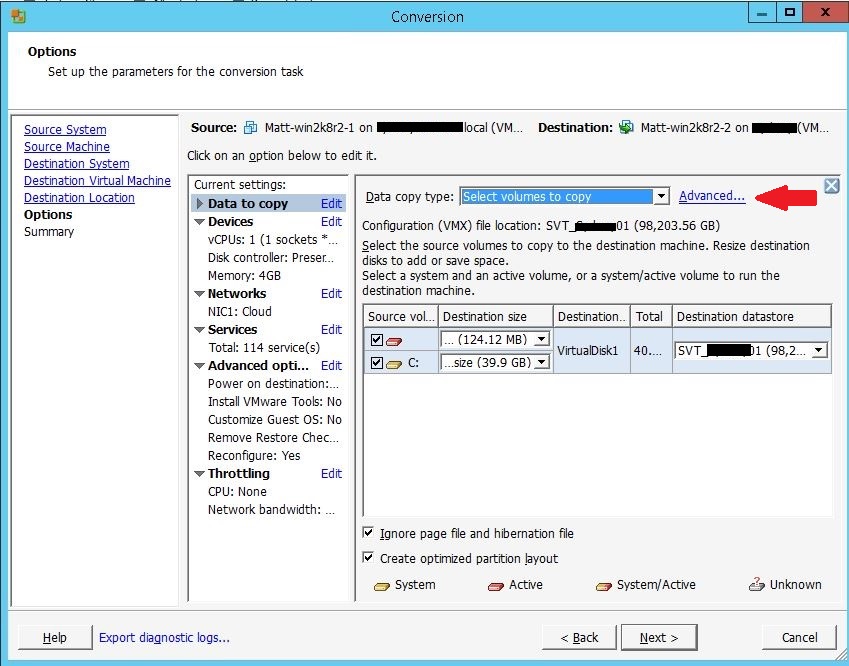
Step 8:
Click Advanced
Step 9:
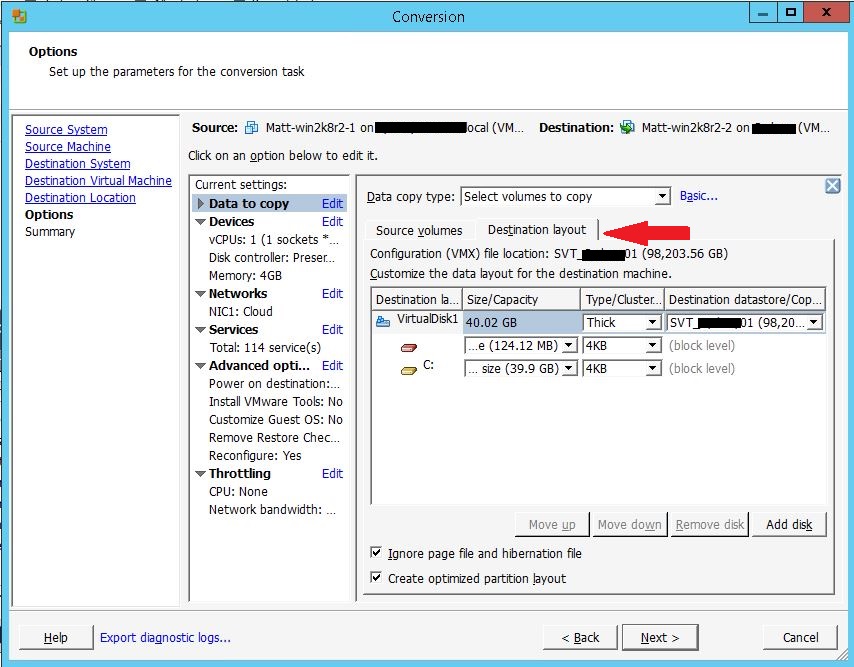
Click the Destination Layout tab
Step 10:
Choose Thick from the “Type/Cluster” drop down on the VirtualDisk1 line, even if the original disk was Thin

Step 11:
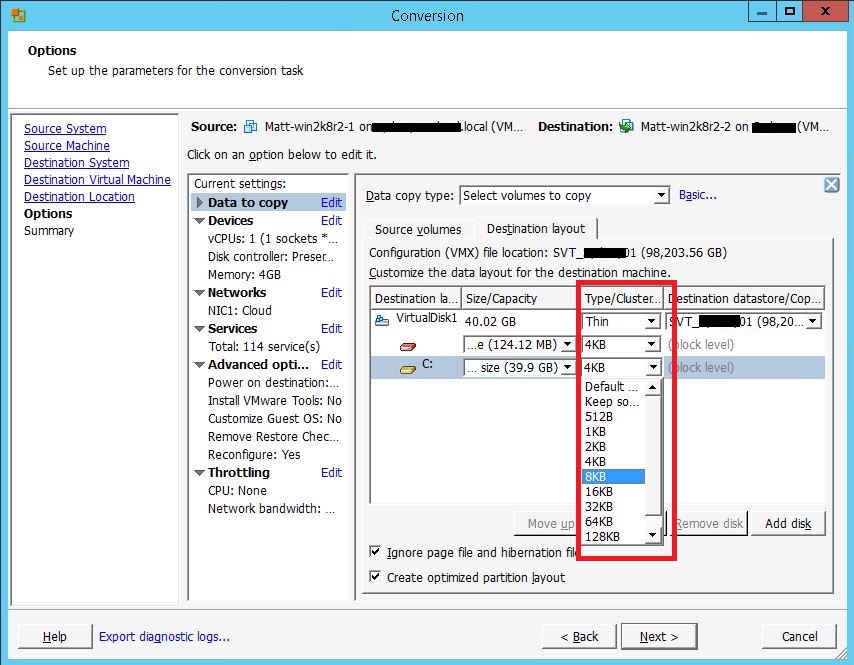
Choose 8k from the “Type/Cluster Size” drop down on the boot volume
Step 12:
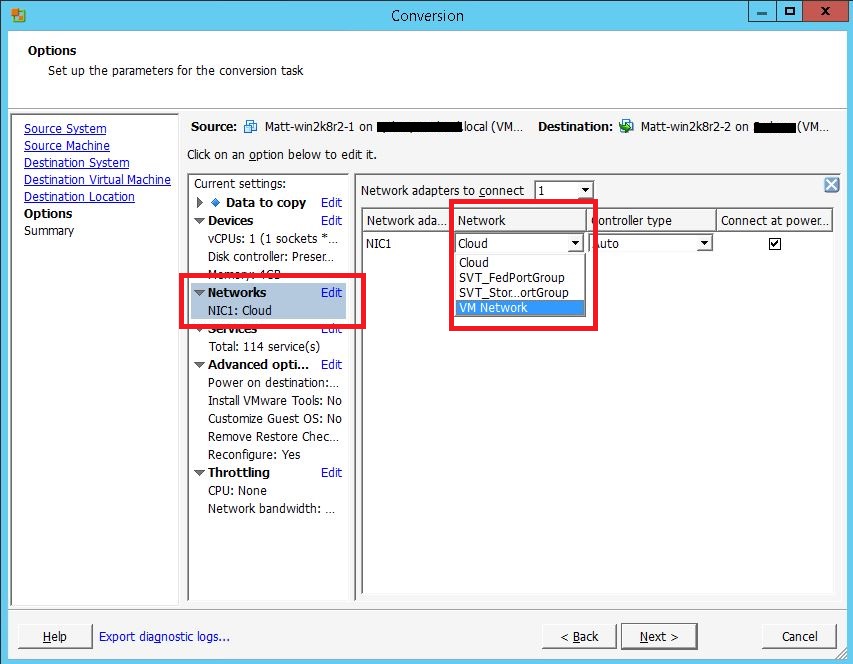
Click Edit on the “Network” section of the Current Settings pane and choose the correct destination network
Step 13:
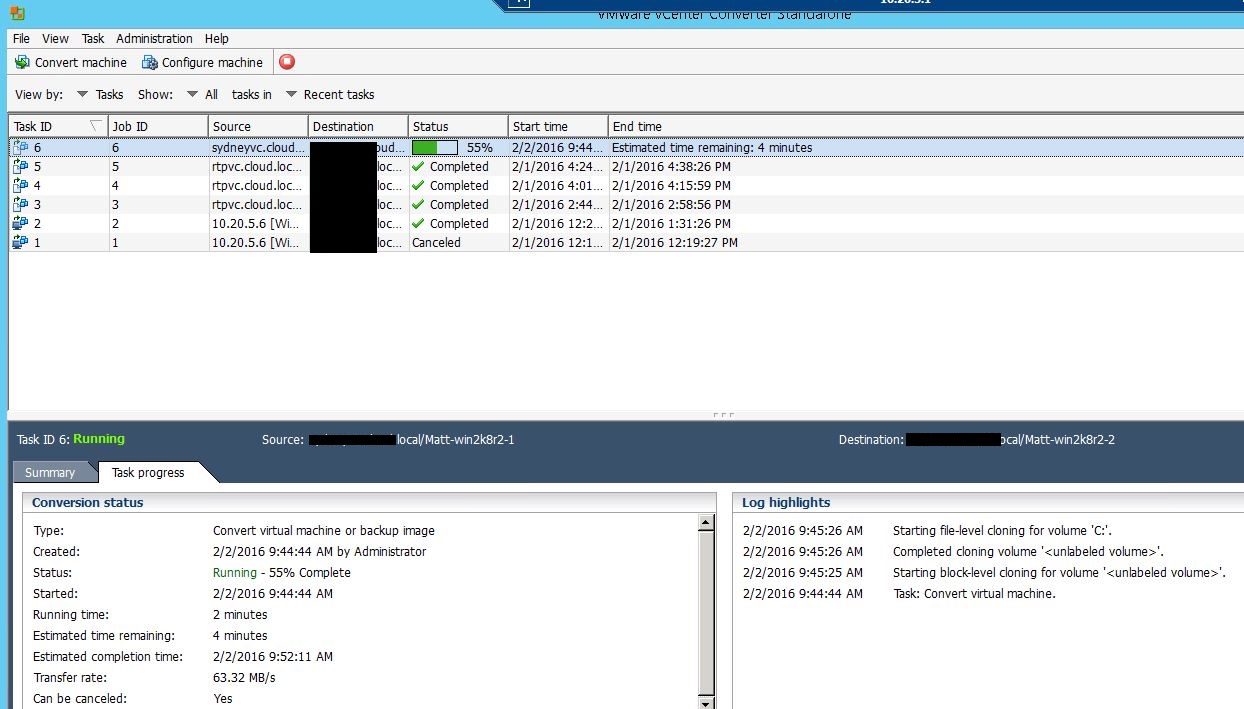
Click Next and monitor progress
Boot the VM and check the new cluster size of the boot volume.
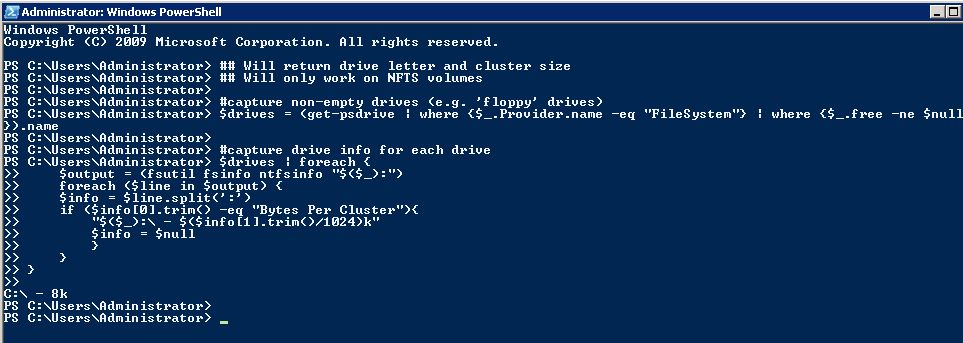
Enjoy your new file system optimized OS (and never install program data to the boot drive again).
]]>
The funding and valuation make a of couple points. First: Hyperconverged Infrastructure is a very real, and very massive market. A report from Gartner estimates that, by 2018, there will be $18B spent annually on integrated systems, of which Hyperconverged Infrastructure is a significant portion. And, depending on which research firm’s religion you subscribe to, the total addressable market is somewhere between $100B and $400B.
Second: investors believe in SimpliVity. It started out (as all young companies do) with investors believing in a vision and leadership. Well, that got us through the first couple of rounds. 9 months after the OmniCube went GA, investors started seeing the fruits and wanted to be a part of the first wave of expansion. This brought us through the C round. Now that another year has gone by, something interesting happened. Waypoint Capital began as a SimpliVity customer, seeking to simplify their datacenters and provide global management, backup and disaster recovery on a single platform. Only SimpliVity could supply this, and currently 100% of Waypoint’s IT across 5 datacenters runs on OmniStack. They were so impressed that they were compelled to lead a new round of funding, along with some previous investors. We’ve grown from funding solely by investors who buy into the vision to investors who not only believe in the vision, but whose own infrastructures have been transformed by SimpliVity’s Hyperconverged Infrastructure.
For perspective on the valuation, SimpliVity has reached the $1B mark after only 23 months of shipping product. Let that sink in. Under 2 years, making it one of the fastest growing infrastructure companies in IT, ever. We’re taking that as a hefty vote of confidence.
One of the unheralded aspects of SimpliVity is the global footprint strategy: full North America and EMEA availability, sales, and support from day one. Most companies will start in North America and spread slowly into different international regions. Since release, more than 50% of sales have been outside of the U.S., and in 2014, we expanded with resellers in 50 countries and employees in 18.
I’m excited to be a part of SimpliVity and am proud of the market and investor validations from vision to results. Don’t just take it from me, take if from our customers.
]]>
I’ve been fortunate enough in my career to be a part of a group of IT folks that have been able to take part in a Tech Field Day, a series of industry events bringing together technology purveyors, community influencers, analysts, enthusiasts, tweeter folk and grey beards (none of these are mutually exclusive of the others). It’s a place that brings new vendors with exciting visions of technology and old vendors with shiny newness, both of which provide an exciting look at the ever changing landscape of enterprise IT.
Besides my general fondness of Stephen Foskett (and his glorious peanut brittle) and Tom Hollingsworth, I’m excited to be a part of the event from the vendor perspective, getting to attend with my friends Jesse St. Laurent and Brian Knudtson from SimpliVity to give delegates (and viewers) a deeper look into how we do Hyperconverged Infrastructure and what’s possible when you do deduplication and compression in real time in-line.
But where the real action takes place is the delegates. The industry folks (admins, engineers, bloggers, analysts, friends) that come to these Field Days are the linchpin to its success and to its enjoyment. Most of the people going I’ve had the pleasure of knowing for a while and meeting in person previously, and some I’ve only interacted with online and am thrilled to finally meet in person.
This current event (Virtualization Field Day 4) will be held in Austin, TX January 14-16 and focuses on technologies and people that enable and push the virtualized datacenter forward. You can follow along with the events with the live stream on the TFD site and on twitter with the #VFD4 hashtag.
]]>The year was 2012. VMware was having this little get together (VMworld) in San Francisco and had decided to toss in a little soiree at the end to show their appreciation for their customers and partners. They rounded up this small indie east coast artist to play some music (Bon Jovi) and got some food and drinks and other miscellaneous entertainment stuffs.
While I greatly appreciated the gesture and great effort to put together said soiree, I am not a big fan of these large engagements and at the same time, not a big fan of Bon Jovi (don’t tell my 80s rock loving spouse). So after talking with several other in the same boat, Jim Millard, Matt Leib and I decided that we’d spread the word and meet somewhere local and small and have some drinks together. Without meaning any offense to VMware’s party, we called it the UNparty and invited others who felt similarly. About 50 people showed up to the Toronado that night. Many beers were consumed, laughs were had, and connections were made. Good times.
Fast forward to 2013 and VMware again (surprise!) decides to have another gathering of virtualization peeps in San Francisco. This time, the location and festivities were more elaborate (at AT&T park) with bigger, more ‘not 80s’ bands Train and Imagine Dragons. Cool! More people wanted to go to that, but there were still folks that were not into that large of an event, and to people’s surprise, not everyone wanted to hear Train or Imagine Dragons. So, again, we had an UNparty at the Chieftain. This time, about 100 people showed up and we actually had a sponsor – Computex (thanks!).
Present day machine:
VMware is (again! Man, they must really dig this stuff) bringing folks from all over the world together for a week of virtualization goodness. This time, the band for the week’s party is The Black Keys. Part of the premise of the UNparty was that I (nor my partner in crime, Jim) wanted to see the band that was lined up to play. And if it came to be that we DID want to see the band, well, someone else would likely not want to see them and they could ‘organize’ the UNparty if they wanted to. There’s never been anything tying myself or Jim to it other that it was something else to do with the community as an alternative to VMware’s party.
All that being said, I’ve been wanting to see The Black Keys for a very, very long time. And, it turns out, that Jim also would like to see them. So, the UNparty for 2014 will have to be passed on to another to organize. Or it doesn’t have to happen at all. That’s the spirit of the UNparty.
So, if you want to organize it, fly my friend, be free.
]]>Reading over the report, they used a very broad definition for Integrated Systems (read more about that at Ron Singler’s blog here), which in turn lead to them not using the term ‘converged infrastructure’. The graphic depicts Gartner’s basic qualification for inclusion in the Integrated Systems category:
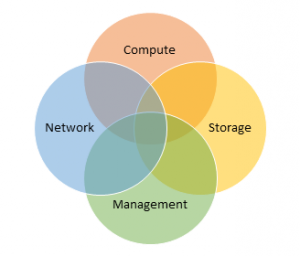
This resulted in the inclusion of everything from broad workload systems (VCE, SimpliVity, etc.) to workload specific systems like Oracle Exadata and Teradata. Equally interesting, however, was the exclusion of Pivot3, Scale, UCS, VSAN, Maxta, Atlantis ILIO, EMC ScaleIO, etc.
If you look at Gartner’s Inclusion and Exclusion Criteria section (p.s. you can download the report here), you will see that they specifically excluded software-only solutions and most ‘Server SANs’ which require customer based installations and layering and only included systems that fully integrated storage (which is why no UCS without Netapp). But just because you fall into Gartner’s definition does not mean you make it into the report (e.g. Pivot3, Scale). What does this mean for vendors in the current report that will go to a software based model in the future? Or those that may OEM their software only solution to hardware vendors? Not sure, but Gartner can certainly change their criteria at their choosing.
It’s a fascinating space with explosive growth that leads to the necessity of including vendors both new and old. Note that SimpliVity had only been GA for 5 months when the data for this report was gathered. I can’t think of such a young company being this far in the Visionary quadrant, save perhaps Amazon Web Services, and even then, they had a running start (more on that over at Gabe Chapman’s blog).
What does this mean for SimpliVity? We’re certainly not taking a ‘we’re just glad to be here’ stance. It’s great affirmation of our trajectory and we’re just getting warmed up.
]]>Enter convergence. At the base of it, convergence is about simplicity and efficiency. As Stu Miniman said, “Customers, however, are not looking to buy “convergence””, they’re looking to solve the problems of complexity, inefficiency and inflexibility. And not just solve them for one application, silo or data set, but to solve them at scale.
A number of vendors come straight to mind when talking about convergence, but one thing that’s certain is that this a change in how the business of the datacenter is done. As we know, change is not always met with open arms within an industry. As Andre Leibovici pointed out in his linking to an article about a change in an industry: “disruption will always be challenged by standards”
Belgium bans Uber, threatens €10,000 fine for each attempted pickup http://t.co/e3KpkFwitr >Disruption will always b challenged by standards
— Andre Leibovici (@andreleibovici) April 15, 2014
Traditionally, datacenter projects include deploying a storage product, a backup product, a replication product, a compute product and a virtualization product, often taking a number of days to a number of weeks to implement. Enough. Let’s change this. Let’s simplify.
For this reason, I’m excited to join an amazing team (Gabriel Chapman, Ron Singler, Dave Robertson, Mario Brum, etc.) at SimpliVity. Their take on hyperconvergence is, I feel, the most complete to date and their efficiency and simplicity of collapsing silos of datacenter technologies is refreshing. I’m excited about integrating more than just storage, compute and a hypervisor in a platform, but also fine grained policy based backup, deduplication, compression, wan optimization, replication and more in a building block architecture with one management console.
I’m extremely grateful to my friends at Computex for the opportunity to work with them helping customers along the virtualization path and I look forward to continuing conversations about simplifying datacenters. Let’s do it.

TL:DR – I’m joining SimpliVity: yay :-)
]]>- Download the .pak file My VMware

- Take a snapshot of the UI and Analytics VMs
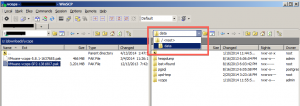
- Copy the file to the /data directory of the UI VM.
- Linux:
scp VMware-vcops-SP2-1381807.pak root@ip_address_of_webui:/data
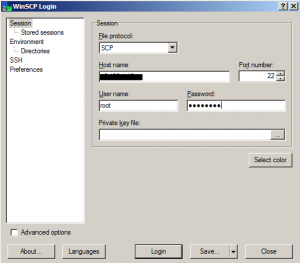
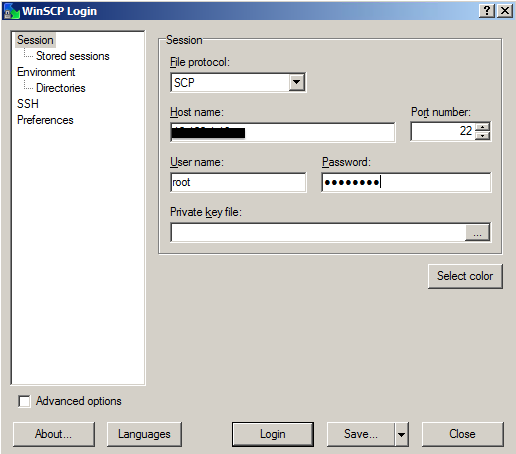
- Windows (WinSCP) (make sure to use ‘root’ and not ‘admin’)
- Linux:
- SSH or putty to the UI VM as root not as admin
- Start the upgrade with the command:
/usr/lib/vmware-vcops/user/conf/upgrade/va_sles11_sp2_init.sh /data/VMware-vcops-SP2-1381807.pak
This will:
- Stop vC Ops services
- Copy the PAK file to the Analytics VM
- Update the Analytics VM
- Update the UI VM
vcops-ui:~ # /usr/lib/vmware-vcops/user/conf/upgrade/va_sles11_sp2_init.sh /data/VMware-vcops-SP2-1381807.pak
Started applying upgrade..
Stopping vCOPs services...
VMware-vcops-SP2-1381807.pak 100% 3201MB 27.6MB/s 01:56
Starting SLES upgrade on Analytics VM
Successfully added SLES 11 SP2 repository.
Starting SLES 11 SP2 upgrade...Please wait until the upgrade is complete..
Successfully applied va_hardening component
Shutting down SSH daemon..done
Starting SSH daemon..done
Correct common-auth symlinks
Completed.
Successfully completed SLES upgrade on Analytics VM
Starting SLES upgrade on UI VM
Successfully added SLES 11 SP2 repository.
Starting SLES 11 SP2 upgrade...Please wait until the upgrade is complete..
Successfully applied va_hardening component
Shutting down SSH daemon done
Starting SSH daemon done
Correct common-auth symlinks
Completed.
Successfully completed SLES upgrade on UI VM
Completed applying upgrade..Please restart the vAPP for completion...
- Restart the vApp
- Verify that the vC Ops comes back up and runs
- Remove the snapshots – do not let the Analytics VM run on a snapshot for more than 24 hours or you’ll pay for it when you remove it.

I was also able to advise, affect and document changes in the product in regards to VMware integration (VAAI, best practices, new virtualization friendly defaults, etc.) as well as get my mind blown by some of the smartest engineers I’ve ever met.
But, all good things must come to an end and I felt it was just time to move on. I’ve been wanting to get more hands on in deploying VMware tools to help businesses make better sense of, better decisions about and protect their virtualization infrastructure.
In the midst of this desire came an opportunity from a VAR. I know, I know, going to a VAR has it’s connotations, many of which can be found on Matthew Norwood’s excellent post on VAR Life. I’ve probably read it a couple times now as I’ve weighed this decision and I think I’ll manage to avoid some of the larger issues in the role. Primarily points #1 and #2.
#1 is still true to an extent, but the advantage of deploying “add-on” tools is that it rarely needs down time or maintenance windows, so the vast majority of work should be ‘business hours’. This obviously won’t be true 100% of the time, but enough of the time where it, for me, negates this usual negative.
#2 will be taken care of because I’ll be working for a regional VAR. There shouldn’t be much travel outside of the Minneapolis metro region, so I’ll be able to spend the vast majority of nights in my own bed. My wife is a huge fan of this part :)
So, this Friday will be my last day at Nexenta and I’ll be starting at Nexus, a Stratos Company, later this month as a Sr. Systems Engineer on their Services Delivery team focusing on VMware and related products (why did I sound like Hank Hill in my head there?). As much as I love the product, leaving my team was the hardest part of this decision and am thankful to them and Nexenta for this experience.
]]>
function set-templateVmDefaultSP($templates,$sPName)
{
    foreach ($template in $templates){
        write-host "Changeing defaultStoragePofile for VMs in $template"
        $vms = $template.extensiondata.children.vm
        foreach ($vm in $vms){
            $vm.defaultstorageprofile = "$sPName"
        }
        $template.extensiondata.updateserverdata()
    }
}
This passes a list of templates and a storage profile name, iterates through the template’s VMs, changes/sets the DefaultStorageProfile and sends an XML update back to vCloud with the changes.
This was working all well and good until I ran into this error:
PowerCLI C:\scripts\vcloud> $template.extensiondata.updateserverdata()
Exception calling “UpdateServerData” with “0” argument(s): “The provided XML has too many elements: 3340. The maximum is 2,048.”
At line:1 char:41
+ $template.extensiondata.updateserverdata <<<< ()
+ CategoryInfo : NotSpecified: (:) [], MethodInvocationException
+ FullyQualifiedErrorId : DotNetMethodException
Upon inspection of this template, it has 54 VMs. The problem was where I was calling the updateserverdata() method to send the changes up stream. This method sends a refresh of all sub-extensiondata. This means that I was sending updates for:
extensiondata.AnyAttr.*
extensiondata.Children.*
extensiondata.Client.*
extensiondata.DateCreated.*
extensiondata.DefaultStorageProfile.*
extensiondata.Description.*
extensiondata.Files.*
extensiondata.GoldMaster.*
extensiondata.Href.*
extensiondata.Id.*
extensiondata.Link.*
extensiondata.Name.*
extensiondata.OperationKey.*
extensiondata.OvfDescriptorUploaded.*
extensiondata.Owner.*
extensiondata.Section.*
extensiondata.Status.*
extensiondata.Tasks.*
extensiondata.Type.*
extensiondata.VAppScopedLocalId.*
extensiondata.VCloudExtension.*
This apparently adds up to 3340 updates. And also apparently, there’s a 2048 XML element limit for a single update. I’m sure this is in the API documentation somewhere, but I couldn’t find it.
The solution was to move the UpdateServerData method call into the VM section (.extensiondata.children.vm) so it only sends the update back to vcloud the XML updates for that VM, rather than the entire template. So the function now looks like:
function set-templateVmDefaultSP($templates,$sPName)
{
    foreach ($template in $templates){
        write-host "Changeing defaultStoragePofile for VMs in $template"
        $vms = $template.extensiondata.children.vm
        foreach ($vm in $vms){
            $vm.defaultstorageprofile = "$sPName"
            $vm.updateserverdata()
        }
    }
}
]]>