Most Agile-to-Propel migrations take 3–12 months. The exact timeline depends on scope, data readiness, integrations, validation requirements, and how quickly key decisions are made.
Plan around 3–12 months for an Agile-to-Propel migration, then refine that estimate through discovery. Domain Systems’ published planning ranges run from 3–5 months for a small Agile instance to 9–12 months for a large or heavily customized deployment. They are starting points, not delivery commitments.
That gives you a number for the first budget conversation. It doesn’t give you a date to announce though.
To get there, you need to ask a second question:
What needs to be true before we can call this migration complete?
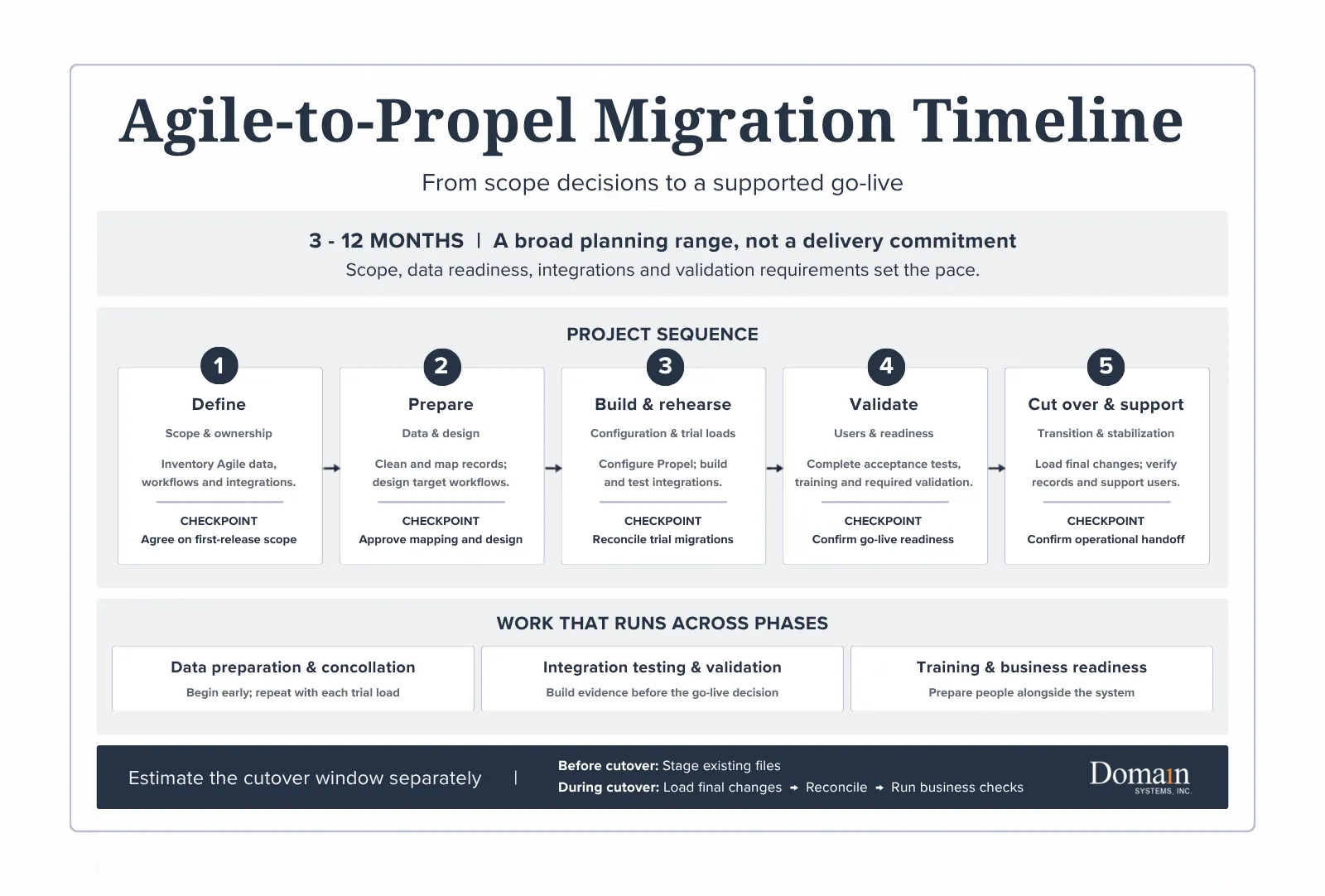
Start with a range, then define the finish line
Our Agile-to-Propel migration process overview outlines these planning ranges:
| Agile environment | Initial planning range |
| Small instance | 3–5 months |
| Mid-sized regulated environment | 6–9 months |
| Large or heavily customized deployment | 9–12 months |
An environment’s complexity matters more than its label. A smaller manufacturer may have substantial validation requirements or a business-critical custom integration. A larger company may start with one tightly defined release.
Before comparing estimates, establish their boundaries:
- Start: Does the clock include discovery and data preparation, or begin after those are complete?
- Finish: Does it end at production go-live, after stabilization, or when Agile can be retired?
- Coverage: Does it include every site and process, or only the first release?
The complete enterprise guide to Propel PLM implementation provides the broader framework, including a 3–6-month planning range for standard projects.
An Agile migration adds its own legacy-data and transition requirements. Compare the scope behind the numbers.
Why four weeks is a different animal
Domain’s Propel FastStart establishes a core PLM baseline in four weeks. Its core scope excludes data migration, customization, and QMS.
That distinction matters. A configured platform and a completed Agile migration are different milestones.
Think of it as preparing a new workshop. The benches and power can be ready before the equipment has been moved, calibrated, and cleared for production.
FastStart can serve a defined implementation need. Its four-week schedule should not become the assumed duration of the entire transition.
What actually moves the migration date?
1. Decisions that have nowhere to land
Consider a familiar situation: Engineering wants to preserve an approval step. Operations questions its purpose. Quality needs to check why it was introduced.
The configuration work may be straightforward. Reaching an approved decision takes longer.
A schedule needs room for both. Assign an owner, an approver, and a due date to each consequential decision. Reserve their time before the project starts.
“Available as needed” is difficult to put on a calendar.
2. Data that needs interpretation
Record counts and file sizes help estimate technical work. They do not tell you whether a historical revision is required, an attachment is authoritative, or an obsolete item still supports a product in service.
Those questions require business judgment.
In Engineering.com’s Developing the PLM Roadmap, Lionel Grealou identifies data cleansing and archiving as frequently underestimated planning activities. Assuming the business will sort them out later leaves real work outside the schedule.
Classify what must move, what can remain accessible in an archive, and who approves those choices. Our five questions before migrating from Agile to Propel provide a starting point.
3. Connections that must work together
An engineering change can look correct in Propel while its downstream ERP transaction still needs work.
Test the complete business sequence: release the change, transfer the intended information, confirm the receiving system’s response, and handle an exception.
Where formal validation applies, plan the required evidence and approvals early. Passing a test and completing its review are separate activities.
Preparing to Move from Agile PLM?
A migration begins long before data is transferred or workflows are configured. If you are evaluating a move from Oracle Agile PLM to Propel, our Migration Readiness Guide covers the scope, data, ownership, integration, validation, and cutover decisions that should be addressed before implementation begins.
Project duration is not the same as downtime
Here is a useful distinction.
In Propel’s data migration planning session, Jeff Nichols, VP of Professional Services at Domain Systems, describes staging file-vault content before the final migration, then transferring subsequent changes through a delta load.
The implication: a large file vault does not automatically require moving every file during the cutover window.
Think of moving a library.
Most books can be packed ahead of time; the final move must also account for what was borrowed, returned, or changed since packing began.
The approach still needs rehearsals. Measure the final load, reconciliation, business checks, and go/no-go decision in a representative trial. Those results establish a credible cutover window. The overall project estimate cannot answer that question by itself.
How to shorten the timeline without borrowing trouble
Focus on removing uncertainty before it creates rework:
- Define a complete first release. Specify the products, users, workflows, history, and integrations needed for day-one operations.
- Test representative data early. Include difficult revisions, attachments, and relationships, not just clean examples.
- Protect business-owner time. Book workshops, decisions, testing, and approvals alongside technical work.
- Plan the handoff. Set stabilization exit criteria and name the team that will own the operating system.
Ask your implementation partner which unresolved dependency currently controls the go-live date, who owns it, and what evidence will clear it.
That makes the schedule a management tool, rather than a date everyone hopes to keep.
That emphasis on ownership is reflected in ProNova Solutions’ experience moving from Agile to Propel:
“End-to-end ownership kept the transition controlled and predictable.”
— Amy Bellendir, Sr. Business Analyst, ProNova Solutions
In her account of the migration, Bellendir credits Domain Systems with coordinating the data migration, configuration, and project delivery.
Build a timeline your team can use
A useful estimate explains its assumptions, the work it includes, and the decisions that could change it.
Download the Agile-to-Propel Migration Guide for the migration phases, responsibilities, and post-go-live accountability framework. Use it to bring IT, Engineering, Operations, and Quality into the same planning conversation before committing to a date.
The post How Long Does an Agile-to-Propel Migration Take? appeared first on Domain Systems.
]]>Propel PLM implementation connects product information, processes, systems, and people. This guide explains the delivery paths, business decisions, responsibilities, data controls, integrations, testing, training, go-live preparation, and ongoing ownership required to turn the platform into a working operating environment.
Propel can be deployed faster than traditional on-premises PLM platforms. Companies do not need to purchase servers, build infrastructure, or prepare for conventional software upgrades.
That removes much of the technical weight. It does not remove the decisions.
Before users can manage product records, bills of materials, documents, changes, suppliers, and quality processes in Propel, the organization must determine how those processes should work. Existing data must be evaluated. Integrations need defined ownership. Users must understand what changes and what remains the same.
The platform may be ready before the business is.
A successful Propel PLM implementation closes that gap. By the end of this guide, readers should be able to identify the appropriate implementation path, the decisions their organization must own, the resources it must provide, and the evidence required before go-live.
What Is a Propel PLM Implementation?
A Propel PLM implementation converts business requirements into a working product lifecycle management environment. It applies the broader disciplines covered by Domain’s PLM implementation services to Propel’s Salesforce-native architecture, configuration model, data structures, and shared product record.
Propel describes this foundation as a unified product thread, where PLM, QMS, and PIM capabilities can connect engineering, quality, supply chain, sales, marketing, and service on the same platform. The implementation should include only the licensed capabilities, teams, data, and workflows approved for the first release. When AI-enabled workflows are included, data quality, permissions, validation, and process ownership remain implementation requirements.
The work normally includes:
- Defining project scope and measurable business outcomes
- Selecting the appropriate delivery model
- Designing future processes and product-data structures
- Configuring workflows, roles, permissions, and reporting
- Migrating data and connecting enterprise systems
- Testing the complete operating process
- Producing validation evidence when required
- Training users and planning the transition to support
- Establishing post-launch ownership and release management
Configuration is part of the implementation, but it is only one workstream.
Think of the platform as a well-equipped workshop. The tools may already be present, but the organization must still decide what it will build, where materials belong, who can use each tool, and how finished work will move to the next station.
Why Propel’s Architecture Changes the Implementation
Propel is built natively on Salesforce. Customers do not need to be existing Salesforce users or purchase separate Salesforce licenses because Propel is deployed using an embedded OEM license.
The Salesforce foundation provides Propel with:
- Cloud infrastructure
- Authentication and access controls
- Low-code and no-code configuration
- Workflow and reporting capabilities
- APIs and integration options
- Automatic platform updates
- Mobile access
- Access to the Salesforce application ecosystem
This architecture reduces the infrastructure and custom-development burden associated with many legacy PLM implementations. It also gives implementation teams considerable flexibility.
Flexibility creates its own requirement: governance.
If every request becomes a new field, workflow, notification, or automation, the system can accumulate complexity before users ever log in. Configuration should follow agreed business requirements, not replace the process of establishing them.
Organizations should also define how platform releases will be assessed after go-live. Vendor-managed updates reduce infrastructure work, but the Propel owner still needs a process for reviewing release impacts, testing affected configurations and integrations, communicating changes, and confirming production readiness.
For more information, see Propel’s explanation of its Salesforce-native architecture.
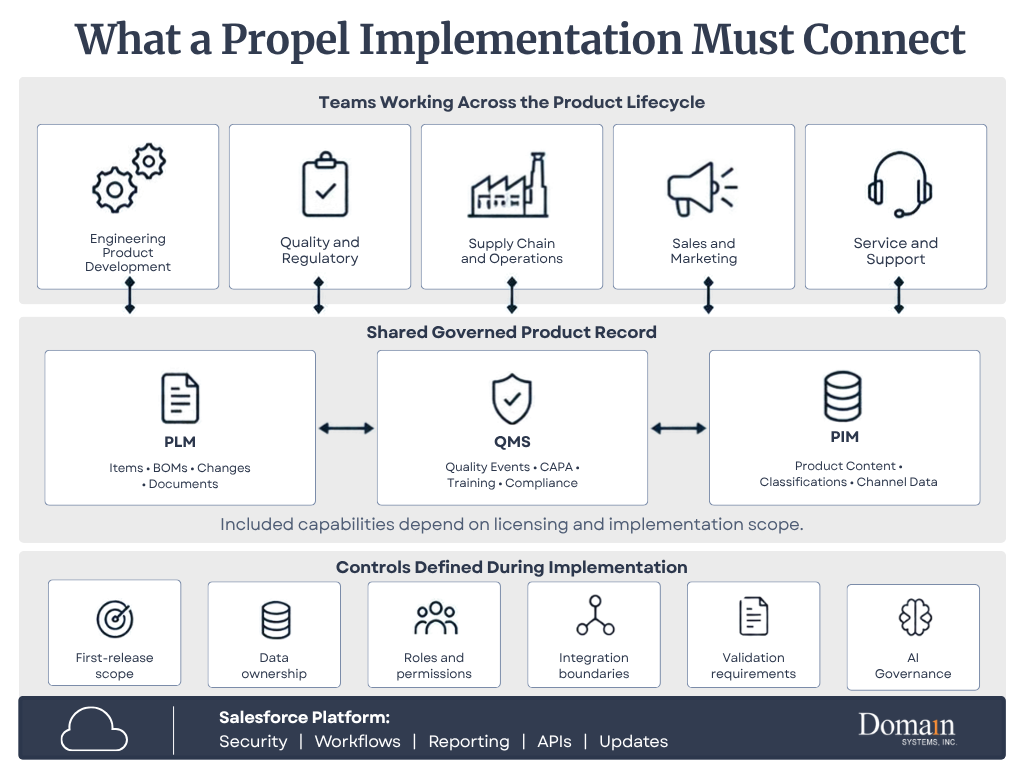
Download this infographic: What a Propel Implementation Must Connect (PDF)
Choose the Right Propel Implementation Path
A four-week implementation is a focused starting point, not a universal description of every Propel project. The correct path depends on scope, customer responsibilities, data, integrations, validation requirements, and planned extensions.
| Approach | Best fit | Initial delivery | Common extensions |
| Domain Systems Propel FastStart | Small and midsize manufacturers that can operate within standard workflows and provide a small, accountable project team | Four-week activation of core item and BOM management, change management, AMLs, lifecycle states, numbering, and categorization using standard Propel-supported configuration | Data migration, integrations, Quality, advanced configuration or workflow refinement, and ongoing support |
| Standard implementation | Organizations introducing several processes, meaningful migration, or one or more integrations | Broader design, iterative configuration, data preparation, testing, training, and cutover | Additional sites, supplier access, QMS, PIM, or phased integrations |
| Enterprise program | Multiple business units, regulated processes, complex product structures, or connected PLM and QMS | Coordinated program with governance, migration, integration, validation, change management, and phased deployment | Regional rollouts, additional product lines, analytics, supplier collaboration, and managed services |
Domain Systems’ FastStart is a four-week implementation service that establishes a production-ready core PLM baseline using standard Propel-supported configuration. The service includes Salesforce org provisioning, role-based access, standard collaboration features, and setup for up to 20 internal users.
FastStart intentionally excludes data migration, customization, and Propel QMS from its core scope. Organizations that require those capabilities, broader integrations, multiple business units, formal validation, or nonstandard process design should plan a broader implementation or phase those needs after the initial launch.
How long does a broader Propel implementation take?
Outside the defined FastStart scope, implementation duration should be established after discovery. Process scope, data condition, integrations, validation requirements, internal resource availability, and decision speed can all affect the schedule.
The following are planning ranges rather than delivery commitments:
| Implementation path | General planning range | Typical characteristics |
| Domain Propel FastStart | Four weeks | Core item and BOM management, change control, AMLs, lifecycle configuration, permissions, and up to 20 internal users |
| Standard implementation | Approximately three to six months | Multiple processes, data migration, integrations, testing, training, and broader configuration |
| Enterprise or regulated program | Established after discovery | Multiple business units, formal validation, PLM with QMS or PIM, complex integrations, or phased deployment |
These are planning ranges rather than delivery commitments. Project readiness, resource availability, data quality, and decision speed can move an implementation in either direction.
Domain Systems’ Propel services include implementation, Agile-to-Propel migration, regulated-environment delivery, application support, and post-go-live services. ProNova Solutions’ migration illustrates how these workstreams can converge within one engagement.
“A seamless PLM transition. Domain Systems led the full migration from Agile to Propel including data, configuration, and project coordination. End-to-end ownership kept the transition controlled and predictable.”
—Amy Bellendir, Sr. Business Analyst, ProNova Solutions
Who Owns What During the Implementation?
Implementation work is shared, but accountability should not disappear into a general “project team.” The exact assignments belong in the statement of work, but a typical ownership pattern looks like this:
| Workstream | Customer responsibility | Domain Systems responsibility | Propel Involvement (when included in engagement) |
| Outcomes and scope | Own business priorities, constraints, and approvals | Facilitate decisions, document scope, and identify delivery risks | Clarify product capabilities and licensed scope as needed |
| Process and configuration | Provide process owners and approve the future state | Translate requirements into Propel design and configuration | Provide product guidance or services defined in the engagement |
| Data migration | Own source data, retention requirements, and business acceptance | Assess, map, transform, load, validate, and reconcile approved data | Support product-specific questions and platform access as contracted |
| Integrations | Identify systems, owners, security requirements, and operating needs | Design and deliver interfaces included in scope | Provide platform framework, product capabilities, and partner options |
| Testing and validation | Supply scenarios, testers, approvals, and compliance ownership | Build test strategy, support execution, manage defects, and produce agreed evidence | Address product issues and contracted validation support |
| Training and adoption | Provide users, managers, communications, and attendance | Develop role-based training and practical exercises | Supply product resources or contracted administrator training |
| Go-live and support | Approve readiness and own the operating decision | Coordinate cutover, stabilization, and support transition | Provide software support and services defined by contract |
This division matters because software cannot approve the future business process, define the regulatory record-retention requirement, or decide which data the company is willing to leave behind. Those decisions remain with the customer, even when an implementation partner prepares the analysis.
The Four Stages of Propel PLM Implementation
For this guide, implementation is grouped into four connected stages:
- ALIGN
- DESIGN
- DELIVER
- IMPROVE
The stages provide decision gates, not walls. Project management, data, integration, testing, validation, training, and change management continue across more than one stage.
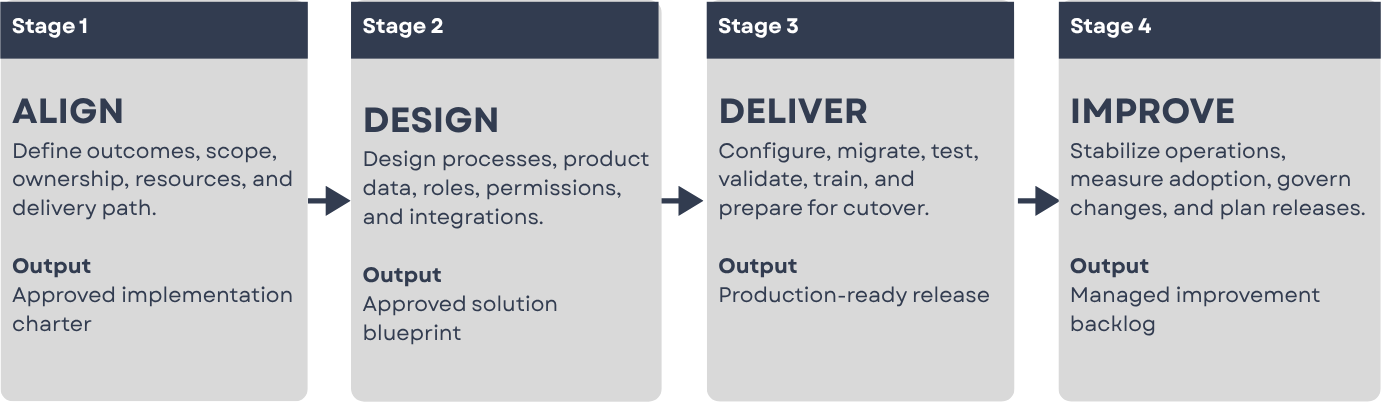
Stage 1: ALIGN
Establish what the implementation must accomplish
“Implement Propel” is not a business outcome. It is a project description.
More useful objectives include:
- Reduce engineering-change approval time
- Replace uncontrolled spreadsheets and shared drives
- Establish one approved product record
- Improve BOM accuracy
- Connect engineering and manufacturing changes
- Link product and quality information
- Improve traceability for audits
Whenever possible, record the current baseline and the expected result. “Improve change management” provides direction. “Reduce median change approval time from 14 days to seven days within six months of go-live” provides a target.
Clear outcomes create boundaries. They also give the team a way to evaluate results after launch.
Define the first-release scope
A Propel implementation does not need to include every possible process in its first release. Initial scope may include items, BOMs, documents, engineering changes, manufacturer and supplier information, product requirements, or new product introduction.
Quality processes, supplier collaboration, product information management, advanced integrations, and additional business units can be introduced at the same time or phased into later releases.
The right answer is not always the largest first release. It is the smallest release that produces a complete and useful operating process.
Establish governance and resource commitments
Every implementation needs clear decision rights.
The governance model should define:
- Who owns the business outcome
- Who approves process decisions
- Who controls scope
- Who resolves cross-functional disagreements
- Who approves migrated data
- Who accepts the system for production use
- Who owns Propel after go-live
The customer should also reserve time for process workshops, data decisions, demonstrations, test execution, training, and cutover. An implementation partner can carry delivery work, but it cannot replace the people who understand why the business operates as it does.
Without this structure, unresolved decisions collect in the implementation backlog. Configuration continues around them until testing exposes the gaps.
Stage 2: DESIGN
Design the future process before configuring it
Implementation teams commonly begin by documenting the current process. That is necessary, but the current process should not automatically become the future process.
Legacy workflows often contain steps created to compensate for software limitations, missing integrations, historical findings, informal ownership, or old custom code. Rebuilding every workaround in Propel may reproduce the limitations the organization intended to leave behind.
For each process, ask:
- What decision is being made?
- What information is needed to make it?
- Who is accountable?
- Which approvals are required?
- What evidence must be retained?
- Which steps exist only because of the previous system?
The goal is not to make the process look modern. It is to make ownership and information flow clear.
Design the Propel product-data model
The product-data model establishes how information will be organized and related in Propel.
Typical decisions include:
- Item and document categories
- Numbering conventions
- Lifecycle phases and release states
- Revision rules
- Attributes, permitted values, and BOM structures
- Manufacturer, supplier, and quality relationships
- Change types and approval rules
- User, group, and supplier access
These decisions have downstream consequences. A field that appears minor during configuration may later influence reports, integrations, approval rules, migration mapping, or regulatory evidence.
Attribute definitions should include business meaning, owner, permitted values, required conditions, source system, reporting and integration use, and correction rules. A label alone is not a definition.
Define roles, permissions, and environments
Roles should be based on responsibilities rather than job titles alone.
Two engineers with the same title may require different access because one creates records while the other approves them. The design should identify who can create, submit, approve, release, administer, view sensitive information, collaborate with suppliers, and correct data after release.
The environment strategy should also identify where configuration, testing, validation, training, and production activity will occur. Teams should confirm the deployment path between environments, refresh expectations, test-data rules, and who has authority to promote changes.
Permissions added late can disrupt workflows and testing. They should be treated as part of process design.
Create the integration blueprint
Most manufacturers operate Propel within an environment that may include ERP, CAD or PDM, CRM, MES, supplier, identity, and reporting systems.
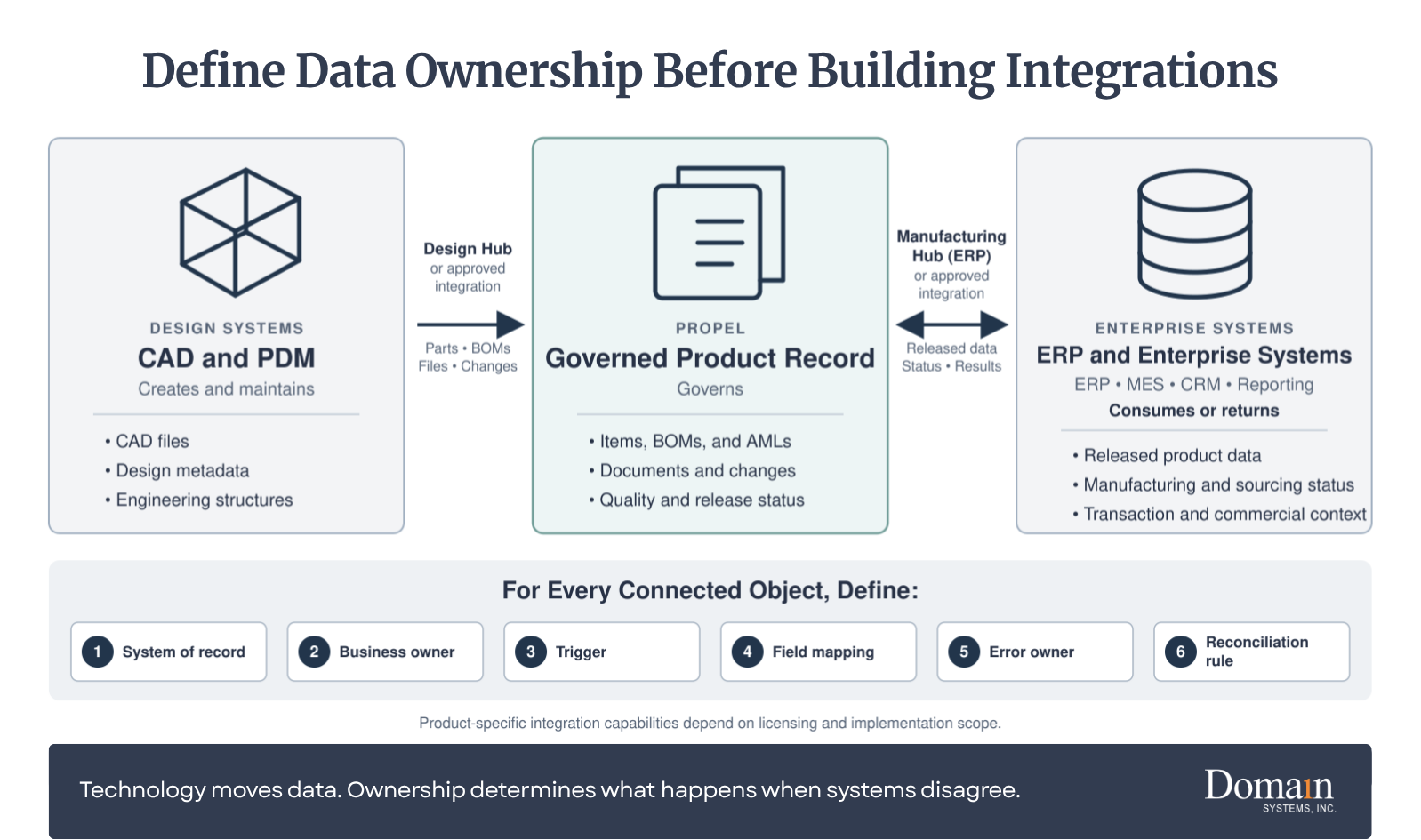
Before building an integration, define where each data object is created, where it is governed, which systems consume it, how changes move, and who corrects failed transactions.
| Information | Common governance location | Common consumer | Design question |
| Engineering item and revision | Propel | ERP, CAD/PDM, reporting | What release event authorizes distribution? |
| Production inventory and financial cost | ERP | Propel or analytics where needed | Which values return to Propel, and how often? |
| Native CAD file and rendition | CAD/PDM or governed Design Hub flow | Propel product record | Which files, structures, and revisions move? |
| Released engineering BOM | Propel | ERP and manufacturing systems | How is EBOM ownership separated from MBOM ownership? |
| Customer case or complaint | CRM or QMS, based on process | Propel PLM/QMS when product impact exists | Which events create a closed-loop quality action? |
| Approved manufacturer and supplier data | Propel or ERP, based on governance | Sourcing, ERP, and reporting | Who corrects conflicting supplier information? |
Technology connects the systems. Ownership prevents them from arguing.
Propel provides a flexible API framework and supports integrations through custom solutions and iPaaS partners such as MuleSoft and Jitterbit. See Propel’s current enterprise integration options.
Organizations should also evaluate Propel’s product-specific integration paths. When licensed and included in the implementation scope, Design Hub governs the movement of CAD, PDM, parts, BOMs, files, and related design information into the Propel product record. Manufacturing Hub supports governed PLM-to-ERP transactions, including field mapping, transformation logic, status write-back, and transaction logging.
The right design depends on the customer’s applications, licensed capabilities, data model, event volume, compliance needs, and error-recovery process.
Stage 3: DELIVER
Configure and demonstrate the approved design
Once the initial design baseline is approved, the configuration team can translate it into Propel.
Configuration may include categories, attributes, lifecycles, workflows, approvals, notifications, page layouts, reports, roles, permissions, automation, and integration endpoints.
Configuration should be demonstrated throughout the project rather than revealed at the end. Short review cycles allow process owners to confirm whether the system reflects what they approved and make misunderstandings less expensive to correct.
New requirements will still emerge. The project should distinguish clarifications, defects, and approved scope changes so iterative delivery does not become uncontrolled expansion.
“Domain’s depth of experience across companies of varying sizes and implementations was evident throughout our configuration. I was able to explore different scenarios, understand the reasoning behind configuration decisions, and go live with confidence in a system tailored to our processes.”
-Jack Poon, Sr. Design Systems and Tools Engineer, Inspiren
Prepare and migrate data through controlled cycles
Data migration is not a file-transfer exercise. It is the controlled movement of product information and relationships from one structure to another.
Depending on the source, migration may include items, documents, revisions, BOMs, manufacturer and supplier information, changes, quality records, attachments, and historical relationships. Users and groups should be handled through the approved identity, provisioning, and security design rather than assumed to be ordinary product-data records.
A structured migration generally follows this progression:
Assess -> Extract -> Cleanse -> Map -> Load -> Validate -> Reconcile
The migration plan should define:
- Which records remain operational, historical, or regulatory
- Which records will be archived or excluded
- Field mappings, transformations, default values, and exceptions
- Trial-load schedule and correction cycles
- Record, relationship, revision, and attachment reconciliation
- Error disposition, acceptance, final-load, and archive criteria
Moving everything may appear safer, but it increases mapping, validation, storage, and support requirements. Data should be moved because it has an operational, historical, or regulatory purpose, not simply because it exists.
For an Agile-specific treatment, see Before You Migrate from Agile PLM to Propel PLM: 5 Questions Every Team Should Ask and The Agile-to-Propel Migration Process. For a phase-by-phase reference covering roles, timelines, ETL, failure points, and post-go-live accountability, download Domain’s Agile-to-Propel Migration Guide.
Test the system in layers
Testing should answer different questions and produce different evidence.
| Test activity | Primary question | Typical evidence |
| Configuration review | Did the configuration match the approved design? | Demonstration record, review notes, approved decisions |
| Functional or unit testing | Does the individual function behave as intended? | Test result and defect record |
| Integration testing | Do connected systems exchange the correct data and recover from failure? | Payload, transaction result, error and retry evidence |
| Migration validation | Did the correct records, revisions, files, and relationships move? | Counts, reconciliation, sampling, and exception approval |
| Conference room pilot | Does the complete process work across functions? | End-to-end scenario results and design feedback |
| User acceptance testing | Can users perform approved business scenarios? | Executed scripts, defects, and business approval |
| Cutover rehearsal | Can the team execute the transition within the planned window? | Timed runbook, dependencies, issues, and revised plan |
User acceptance testing should not be the first time process owners see the system. At that point, the project should be confirming readiness, not discovering what the organization intended to build.
For more detail, see Conference Room Pilot vs. UAT in PLM.
Treat regulated validation as a lifecycle
For a regulated implementation, validation is not one final test after UAT. It is a controlled lifecycle that connects intended use, risk, requirements, configuration, testing, deviations, traceability, and approval.
The validation approach may include:
- Intended-use and risk assessment
- Approved requirements, specifications, and traceability
- Controlled test protocols and objective evidence
- Deviation, defect, and retest management
- Migration, integration, and electronic-record evidence as applicable
- Formal approval for production use
The organization’s quality or validation lead remains accountable for the compliance approach, even when Domain prepares agreed documentation or supports execution.
Train people for their responsibilities
Training should be organized by role.
An occasional approver does not need the same training as an administrator. A quality investigator needs different scenarios than a design engineer. Suppliers should see only the processes and information relevant to their participation.
A role-based plan may cover administrators, process owners, record creators, approvers, quality and reporting users, suppliers, and support personnel.
Training should use realistic data and scenarios whenever possible. Attendance confirms that someone entered the room. It does not confirm that the person can complete the work.
The most useful training requires users to perform the tasks they will own after launch.
Plan the Propel go-live
Go-live is a controlled operational transition.
The cutover plan should define final configuration approval, legacy-system freeze, final data extraction, delta migration, data reconciliation, integration activation, user provisioning, production validation, support coverage, escalation procedures, rollback criteria, and communication responsibilities.
The project team should also define what “ready” means. Examples include:
- Critical workflows passed testing
- Required data reconciled and approved
- High-risk defects resolved or formally accepted
- Integrations operating within agreed tolerances
- Administrators and users trained by role
- Business owners approved deployment
- Cutover rehearsal completed
- Support responsibilities assigned
A date is not a readiness criterion.
Stage 4: IMPROVE
Implementation does not end when users receive access.
The first weeks after launch reveal how the design performs under real workload. Questions increase. Reports require adjustment. Some notifications prove unnecessary. New improvement requests appear as users gain experience.
The organization should begin go-live with:
- A named Propel owner
- Defined support channels and escalation paths
- Issue classification and prioritization rules
- Daily or weekly stabilization reviews
- Integration and transaction monitoring
- A controlled configuration-change process
- An enhancement backlog
- Adoption and performance measures
- Release-impact and regression responsibilities
Not every request should become an immediate configuration change.
A stabilization period allows the team to separate defects from training questions, missing requirements, and individual preferences. Without that discipline, the environment can change faster than users can learn it.
After stabilization, ownership moves into a steady operating rhythm. Domain Systems provides Propel application support for organizations that need structured access to experienced practitioners for issue resolution, planned assistance, and informed guidance around change.
Common Propel PLM Implementation Mistakes
Treating starter scope as the final enterprise design
A rapid baseline can create value quickly, but it should be accompanied by a roadmap for migration, integrations, validation, and later processes.
Recreating the legacy system
A new platform should preserve necessary controls, not every historical workaround.
Starting configuration before the design baseline is approved
Early configuration can look like progress while unresolved requirements accumulate underneath it.
Migrating all available data
Data should be moved because it has an operational, historical, or regulatory purpose, not simply because it exists.
Designing integrations without assigning ownership
Every connected data object needs an agreed creation point, governance owner, distribution rule, and correction process.
Waiting until UAT to involve users
Late feedback usually becomes expensive feedback.
Treating validation as final-stage documentation
Regulated evidence should be planned from intended use and requirements through production approval.
Treating training as a single event
Adoption requires role-based practice, support, reinforcement, and accountable process owners.
Ending governance at go-live
Without post-launch ownership, configuration and data quality gradually drift.
How Should Implementation Success Be Measured?
Project completion measures tell you whether the implementation launched. Operational measures tell you whether it worked.
| Area | Possible measure |
| Adoption | Active users and successful task completion |
| Change management | Change-cycle and approval time |
| Data quality | Required-field completion and duplicate rates |
| BOM management | BOM errors and reconciliation exceptions |
| Integration | Failed transactions, retry rate, and correction time |
| Training | Task proficiency and repeat support requests |
| Support | Issue volume, severity, and resolution time |
| Governance | Enhancement backlog, approval time, and configuration drift |
| Business results | Rework, delays, audit findings, or release performance |
Baseline measurements should be recorded before implementation when possible. Without a starting point, improvement becomes difficult to prove.
Propel PLM Implementation Checklist
Before implementation begins, confirm that the organization has:
- Defined measurable business outcomes and baseline measures
- Selected the delivery path and first-release scope
- Distinguished contracted starter scope from planned extensions
- Named an executive sponsor and business owner
- Identified process owners and decision-makers
- Reserved internal resources for reviews and testing
- Documented critical requirements and compliance needs
- Inventoried product data, revisions, files, and relationships
- Identified data owners, retention rules, and archive needs
- Listed current integrations and assigned systems of record
- Defined security, access, identity, and environment requirements
- Established migration reconciliation and acceptance criteria
- Defined the testing and validation approach
- Established scope-control procedures
- Planned role-based training and adoption support
- Defined cutover, rollback, and stabilization responsibilities
- Assigned post-go-live ownership and release management
A “no” does not necessarily mean the project must stop. It means the associated risk should be visible, assigned, and managed.
FAQ
How long does a Propel PLM implementation take?
A focused Domain Propel FastStart implementation can establish a production baseline in four weeks when the organization remains within the defined scope and provides timely decisions and resources. A standard implementation commonly requires approximately three to six months. Enterprise and regulated programs should be estimated after discovery because data migration, integrations, validation, multiple business units, and expanded Propel QMS or PIM scope can materially change the schedule.
What is included in Domain Systems' FastStart?
Domain’s Propel FastStart is a four-week implementation service delivered by Domain Systems for organizations that can use standard Propel-supported configuration. It covers core item and BOM management, change management, AMLs, lifecycle states, numbering and categorization, Salesforce org provisioning, role-based permissions, standard collaboration, and setup for up to 20 internal users. Data migration, customization, and Propel QMS are excluded from the core scope. Integrations, advanced configuration, migration, and ongoing support can be evaluated separately.
Do we need Salesforce before implementing Propel?
No. Propel states that customers do not need to be existing Salesforce users or purchase separate Salesforce licenses. Propel is deployed with an embedded Salesforce OEM license.
Can Propel support both PLM and QMS?
Yes. Propel provides connected PLM and QMS capabilities on the same platform. Whether they should be implemented together depends on process maturity, available resources, regulatory requirements, and project scope.
What determines Propel implementation cost and effort?
The primary drivers are process scope, data volume and quality, migration history, number and complexity of integrations, validation requirements, user population, training needs, number of business units, and the amount of nonstandard configuration.
How much time must our internal team provide?
The exact commitment depends on scope, but the customer must provide decision-makers, process and data owners, subject-matter experts, testers, administrators, and business approvers. Delayed access to those resources commonly delays configuration, testing, and go-live decisions.
How many migration test loads should we expect?
The number depends on data condition and complexity. The plan should include enough trial loads to correct mappings, transformations, relationships, files, and exceptions before the final cutover load. Business owners should approve the reconciliation criteria and results.
What changes for a regulated Propel implementation?
Validation planning begins with intended use, risk, requirements, and traceability. The project must control configuration, test evidence, deviations, migration results, electronic records and signatures where applicable, and formal approval for production use.
Build the Operating Model Before the System
Propel’s architecture can shorten deployment and reduce the technical burden associated with traditional PLM platforms.
The implementation still depends on decisions about process, data, integration, ownership, testing, validation, and adoption.
Those decisions are not delays to the implementation. They are the implementation.
Domain Systems helps manufacturers plan, configure, migrate, integrate, validate, train, launch, and support Propel environments. An implementation readiness review provides a practical view of first-release scope, delivery-path fit, internal resource needs, data and integration risks, ownership gaps, and the decisions required before configuration begins.
The post Propel PLM Implementation: The Complete Enterprise Guide appeared first on Domain Systems.
]]>An Arena PLM implementation brings product data, processes, people, and connected systems into a controlled operating model. This guide explains the timeline, phases, roles, migration decisions, integrations, quality considerations, adoption work, success measures, and go-live criteria involved in an enterprise implementation.
That makes the technology easier to deploy. It does not make the business decisions automatic.
Every implementation still has to answer a handful of fundamental questions:
- What information belongs in Arena?
- Who owns each process and decision?
- Which system controls each piece of data?
- How should changes move from request to release?
- What must be migrated, integrated, tested, and validated?
- What will make people use the system correctly after go-live?
The software provides the structure. The implementation determines whether that structure reflects how the company actually designs, approves, manufactures, and supports its products.
A weak implementation can turn good software into another place employees have to update. A strong one makes Arena the trusted product record around which engineering, quality, operations, suppliers, and IT can coordinate.
What Is a Arena PLM Implementation?
An Arena PLM implementation is the process of configuring Arena by PTC to manage an organization’s product records and lifecycle processes, then preparing the data, integrations, users, and governance required to operate it successfully.
It is not simply activating a cloud subscription.
Activation gives a company access to Arena. Implementation turns Arena into a working business system.
Most enterprise implementations include six connected workstreams:
| Workstream | Central question |
| Process | How should work move through review, approval, release, and change? |
| Data | Which product records should be migrated, cleaned, structured, or archived? |
| Configuration | How should Arena represent items, BOMs, changes, files, suppliers, and quality records? |
| Integration | How should information move between Arena and CAD, PDM, ERP, MES, or other systems? |
| People | Who will own, administer, use, and support the system? |
| Governance | How will access, standards, exceptions, and future changes be controlled? |
These workstreams behave like gears. A project can polish one gear, but the machine still stalls if the others do not engage.
Arena PLM implementation versus configuration
Configuration defines how the application behaves: attributes, categories, lifecycles, approval routing, user groups, permissions, and templates.
Implementation includes configuration plus process design, migration, integration, testing, training, cutover, and governance.
Software can support a good process. It cannot decide what the process should be.
How Long Does an Arena PLM Implementation Take?
Arena states that its cloud deployment model can allow teams to get started in a matter of weeks. That is possible because companies do not have to install and maintain the underlying PLM infrastructure.
But technical availability is not the same as enterprise readiness.
| Implementation profile | Typical planning range | Common characteristics |
| Focused initial launch | 6–12 weeks | One team, standard workflows, limited migration, few integrations |
| Mid-sized enterprise implementation | 3–6 months | Multiple functions, legacy data, configured processes, one or more integrations |
| Complex or regulated program | 6–12+ months | Multiple sites, PLM and QMS scope, validation, several integrations, phased rollout |
These are planning ranges, not fixed Arena delivery promises. Scope, data condition, process complexity, integrations, validation requirements, team availability, and decision speed all affect the schedule.
A calendar can show elapsed time. It cannot show available attention.
A six-month project with engaged process owners may move faster than a three-month project in which every decision waits two weeks for the next meeting.
Arena PLM Implementation Phases
The names used for project phases vary. The work does not.
| Phase | Primary outcome |
| 1. Strategy and charter | Agreed goals, scope, leadership, measures, and decision rights |
| 2. Discovery and readiness | Documented requirements, current processes, risks, and source systems |
| 3. Solution design | Approved future processes, data model, security model, and system boundaries |
| 4. Configuration and prototyping | A working Arena environment that users can evaluate |
| 5. Migration and integration | Cleansed data and tested connections to surrounding systems |
| 6. Testing and validation | Evidence that the system supports its intended use |
| 7. Training and cutover | Prepared users, support resources, and an approved launch plan |
| 8. Go-live and improvement | Controlled launch, stabilization, and a governed backlog |
1. Strategy and charter
Every implementation starts with a decision.
Not a technology decision. A leadership decision.
What business problem is important enough to justify changing the way people work?
The charter should define objectives, scope, ownership, decision authority, resources, milestones, risks, and success measures. “Implement Arena” is not an objective. “Reduce engineering change cycle time” or “create a controlled product record” can guide real decisions.
2. Discovery and readiness
Discovery documents how work happens today, including the unofficial work occurring through spreadsheets, shared drives, email, and tribal knowledge.
The goal is not to preserve every current step. It is to understand why each step exists, who depends on it, and whether it still belongs in the future process.
3. Solution design
The project team defines record types, attributes, BOM structures, lifecycles, approvals, permissions, system boundaries, migration rules, and integration triggers.
Consultants can facilitate these decisions. Arena can enforce them. The business still has to make them.
4. Configuration and prototyping
Arena is configured and demonstrated using realistic scenarios such as creating an item, revising a BOM, approving a change, releasing files, or giving a supplier controlled access.
Prototypes make abstract requirements visible. They also expose contradictions that remain hidden in process diagrams.
5. Migration and integration
Migration moves approved information into Arena. Integration keeps selected information moving between Arena and other systems after launch.
Both require documented ownership, mappings, transformation rules, error handling, and reconciliation.
6. Testing and validation
Testing asks whether the configured system works. Validation asks whether there is documented evidence that it works for its intended use.
Good testing covers more than the happy path. It includes rejection, correction, missing data, permission boundaries, failed transfers, and other exceptions that appear in real work.
7. Training and cutover
Administrators and project members should learn the platform early. End users should train close to go-live, by role, using realistic tasks.
Readiness should be based on demonstrated competence, accepted test results, reconciled data, support preparation, and a clear go/no-go decision.
8. Go-live and improvement
Go-live is a milestone. It is not the end of implementation.
The first weeks reveal real volumes, behaviors, exceptions, and support needs. After stabilization, remaining requests should move into a governed improvement backlog.
Team Roles and Responsibilities
Arena implementation is cross-functional because the product record is cross-functional.
IT can lead the technology work. Engineering, quality, and operations must still own the decisions that affect their work.
| Role | Primary responsibility |
| Executive sponsor | Protects the business case, secures resources, and resolves major barriers |
| Business owner | Owns outcomes, scope priorities, and operating decisions |
| Project manager | Manages the plan, risks, dependencies, communication, and decisions |
| Arena solution lead | Translates requirements into scalable Arena design and configuration |
| Arena administrator | Prepares to manage users, access, configuration, and support after launch |
| Process owners | Approve decisions for engineering, quality, operations, and other functions |
| Data and integration leads | Own migration rules, mappings, system boundaries, testing, and reconciliation |
| Quality or validation lead | Defines intended use, requirements, evidence, and acceptance criteria |
| Super users | Test real scenarios, identify gaps, and support colleagues |
One person may hold several roles in a smaller organization. The responsibilities still exist.
The most dangerous role is the invisible one: the person everyone assumes will decide, but no one has formally authorized to do so.
Data Migration Planning
Data migration is not a moving-day exercise in which every box from the old house is placed in the new one.
It is a controlled decision about what the new system should trust.
Start by inventorying every source of product information, including legacy PLM or PDM, CAD, ERP, quality systems, shared drives, databases, and spreadsheets. Then profile the data for duplicates, missing values, broken BOM relationships, inconsistent names, obsolete records, and uncontrolled files.
Each record should receive one of four treatments:
| Treatment | Appropriate use |
| Migrate | Active, trusted information needed for future work |
| Transform | Useful information that must be cleaned or restructured |
| Archive | History that must remain accessible but does not need to operate in Arena |
| Retire | Duplicate, obsolete, or low-value information with no retention requirement |
The team then maps approved data into Arena, runs mock migrations, resolves exceptions, and reconciles counts, relationships, revisions, and files.
A completed load is not the same as a trusted migration.
Integrations: CAD, PDM, and ERP
CAD, PDM, and ERP Integrations
The central integration question is not “Can these systems connect?”
It’s “What should cross the boundary, when, and with whose authority?”
CAD and PDM
CAD or PDM commonly remains the working environment for mechanical or electrical design. Arena becomes the controlled location for the complete product record, cross-functional review, release, and change.
The implementation team should decide where item numbers originate, which system owns engineering attributes, how BOMs and files are published, what triggers publication, and how revisions align.
Arena supports several integration approaches. PTC provides a direct Onshape-Arena connection, while Arena Marketplace offerings such as CADTALK connect Arena with SOLIDWORKS, Creo, Autodesk Inventor, Fusion 360, Solid Edge, and other tools.
ERP
Arena commonly controls the released engineering definition and change process. ERP commonly controls purchasing, inventory, costing, production, and financial transactions.
The integration should define authoritative fields, transfer triggers, BOM rules, units of measure, supplier data, error handling, monitoring, and reconciliation.
The work is not finished when a test record reaches ERP. It is finished when the organization can detect, diagnose, correct, and reconcile failed transactions during normal operation.
Quality Management Considerations
Arena connects product and quality records within the same cloud platform. Depending on the subscribed solution and project scope, organizations can manage controlled documents, training records, CAPAs, and other quality processes in relation to the product record.
But adding QMS scope changes the implementation.
Regulated organizations should define intended use, applicable requirements, risk, validation responsibilities, procedures, training, and release criteria early. Quality representatives should participate in requirements, design, migration, testing, and go-live approval rather than reviewing the finished system shortly before launch.
The platform provides capabilities. The company remains responsible for its quality system, configuration choices, validation, and compliant use.
Change Management and User Adoption
Arena projects involve two kinds of change management.
Product change management controls how product changes are requested, evaluated, approved, released, and traced.
Organizational change management helps people move from current habits to the new operating model.
Both matter.
The best product workflow is not the one with the most gates. It is the one with enough control for the risk involved and no more friction than necessary.
The best adoption plan does more than announce a launch date. It explains what is changing, why it matters, who is affected, and how daily work will be different.
Training should be organized around roles and real tasks. An approver does not need the same training as an administrator. A supplier does not need the same training as a quality engineer.
Generic training teaches where buttons are. Task-based practice teaches how work gets done.
Common Arena Implementation Mistakes
Most implementation problems do not begin with the software.
They begin with a decision postponed, an assumption left unnamed, or a responsibility left ownerless.
| Mistake | What it causes | Better approach |
| Treating implementation as an IT project | Processes are configured without business ownership | Give engineering, quality, and operations formal decision roles |
| Recreating every current process | Existing friction is carried into Arena | Question the purpose of each step before reproducing it |
| Migrating everything | Poor data and obsolete history enter the new system | Migrate, transform, archive, or retire by rule |
| Designing integrations late | System boundaries remain unresolved | Assign data ownership during solution design |
| Overconfiguring the first release | Scope expands and testing becomes harder | Launch a governed core, then improve from evidence |
| Testing only ideal scenarios | Exceptions appear for the first time in production | Test rejection, rework, missing data, and recovery |
| Training too generically | Users cannot apply lessons to real work | Use role-based scenarios close to go-live |
| Treating go-live as the finish line | Support gaps and requests accumulate | Plan stabilization, ownership, metrics, and improvement |
Success Metrics
Success measures should connect system performance to business performance.
Start with a baseline. A percentage improvement has little meaning if the original condition was never measured.
| Outcome | Example measures |
| Faster change | Median change cycle time, approval delays, overdue tasks |
| Better data | Required-field completion, duplicate rate, BOM errors, migration exceptions |
| Stronger control | First-pass approval, released-record corrections, unauthorized workarounds |
| User adoption | Processes completed in Arena, task success, support trends, offline work |
| Better quality | Closure time, overdue CAPAs, recurrence, traceability completeness |
| Stable integrations | Transaction success, error backlog, recovery time, reconciliation variance |
Choose a small set that answers three questions:
- Is Arena being used as intended?
- Is the process becoming faster, clearer, or more reliable?
Is the result creating measurable business value?
Condensed Arena PLM Go-Live Checklist
Each item should have an owner, status, evidence, and acceptance authority.
- Business owner and executive sponsor approve launch
- Production configuration matches the approved design
- Roles, permissions, workflows, and notifications are tested
- Final migration is reconciled and exceptions are approved
- End-to-end integrations pass testing
- Integration monitoring and error recovery are ready
- Critical business scenarios pass user acceptance testing
- Required validation evidence and procedures are approved
- High-severity defects are closed or formally accepted
- Administrators, support staff, and super users are prepared
- Role-based user training is complete
- Support channels and escalation paths are published
- Cutover steps, owners, timing, and blackout periods are confirmed
- Go/no-go authority is defined
- Stabilization coverage and first-week monitoring are assigned
FAQ
How long does it take to implement Arena PLM?
A focused launch may take 6–12 weeks. A mid-sized enterprise implementation commonly requires 3–6 months. Multi-site, regulated, heavily integrated, or data-intensive programs may require 6–12 months or longer.
Is Arena difficult to implement?
Arena’s cloud architecture removes server installation and much of the infrastructure work associated with on-premises PLM. The remaining difficulty comes from process design, migration, integrations, validation, training, and governance. The software may be ready quickly. The organization must still prepare to use it.
Can Arena integrate with CAD, PDM, and ERP systems?
Yes. Arena supports integrations through direct connections, marketplace applications, APIs, middleware, and integration tools. Before selecting an approach, define ownership of item numbers, attributes, BOMs, revisions, lifecycle states, files, and transactional data.
Does Arena include quality management capabilities?
Arena offers connected PLM and QMS capabilities. Depending on scope, organizations can manage controlled documents, training, CAPAs, and other quality processes linked to product records. Regulated companies remain responsible for intended use, validation, procedures, and compliant operation.
Should Arena be implemented all at once or in phases?
A phased approach is often useful when the scope includes multiple business units, large migrations, QMS processes, or several integrations. A focused first release can establish the product record and core change process before adding further processes or sites.
Who should own the implementation?
The project should have an executive sponsor, business owner, project manager, process owners, Arena solution lead, and future administrator. IT should own or support technical architecture and integrations, while business leaders own processes and outcomes.
What are the most important success factors?
The strongest predictors are clear objectives, committed process owners, controlled scope, trusted data, explicit system boundaries, realistic testing, role-based training, and post-go-live governance. Arena supplies the platform. These disciplines determine how much value the organization receives from it.
Final Perspective
Arena is designed to make cloud PLM deployment faster and lighter than traditional on-premises systems.
That advantage is real.
It also makes it easier to mistake access for readiness.
A successful implementation gives each process an owner, each critical attribute a source, each integration a recovery path, each user a clear responsibility, and each outcome a measure.
The software becomes available at launch.
The operating discipline built around it is what makes the investment last.
Domain Systems Perspective
Domain Systems helps manufacturers plan, implement, migrate, integrate, validate, and support PLM environments, including Arena by PTC. The work begins with the decisions that shape the system: process ownership, data quality, application boundaries, user readiness, and long-term governance.
If you are preparing for an Arena implementation, migration, expansion, or recovery project, start by testing the plan before testing the software.
The post Arena PLM Implementation: The Complete Enterprise Guide appeared first on Domain Systems.
]]>Before PLM configuration begins, organizations need clear decisions about goals, ownership, processes, data, integrations, governance, and go-live readiness. This article explains what teams should define before assumptions become costly commitments.
Many PLM implementations become difficult not because the software is fundamentally flawed, but because the organization has not made the operational decisions the software depends on.
Effective PLM implementation planning begins before configuration, when the organization still has time to resolve those questions without creating rework.
Before configuration begins, leadership assumes ownership is clear. Engineering assumes everyone agrees on how work should flow. IT assumes data is ready to migrate. Project teams assume questions about scope will resolve themselves once the system takes shape.
Those assumptions rarely survive the first few weeks.
A PLM platform makes product development more structured and repeatable. In doing so, it exposes every place where ownership is unclear, processes vary, data lacks consistency, or expectations have not been agreed upon.
Software does not create those problems.
It makes them visible.
Organizations that answer the following seven questions before configuration begins are better positioned to control scope, reduce rework, and prepare users for the changes ahead.
Seven Decisions at a Glance
1
Business objective
Measurable outcomes, baselines, and success criteria
2
Ownership
Sponsor, project lead, process owners, and available resources
3
Process design
Future-state processes and permitted variations
4
Data
Migration scope, ownership, quality standards, and validation criteria
5
Integrations
Launch requirements, systems of record, and phased roadmap
6
Governance
Approval authority, escalation paths, and change control
7
Go-live
Readiness criteria, cutover plan, support model, and adoption measures
1. What Problem Are You Actually Trying to Solve?
Implementation discussions often begin with features.
The stronger conversations begin with outcomes.
Reducing engineering change cycle time. Improving product data quality. Supporting regulatory compliance. Eliminating spreadsheet-driven processes. Increasing visibility across engineering, quality, supply chain, and manufacturing.
Those objectives become the benchmark for every configuration decision that follows.
Without a shared definition of success, nearly every workflow request, customization, or scope expansion can be justified because there is nothing against which to measure it.
The objective should also be specific enough to evaluate.
“Improve change management” provides direction.
“Reduce median engineering change approval time from 14 days to seven days within six months of go-live” provides a target.
Teams should agree on the current baseline, the desired result, how progress will be measured, and who owns that measurement after launch.
Decision to document: Primary business outcomes, current baselines, target results, and measurement owners.
2. Who Owns the Implementation?
Software vendors implement software.
Your organization implements change.
Those are not the same responsibility.
Effective implementation requires clearly defined ownership before major decisions begin.
Executive sponsorship provides direction and removes organizational barriers.
Project leadership coordinates execution.
Process owners define how work should be performed.
Decision-makers resolve disagreements before they delay progress.
Subject-matter experts explain how products, data, approvals, and exceptions are handled in practice.
Those roles also need time to participate. Naming a process owner does little if that person cannot attend design sessions, test the system, review decisions, or prepare their team for the change.
Teams must also identify who will lead communication, training, and user adoption. Training teaches people how to use the system. Adoption work helps them understand why their work is changing, when it will change, and what will be expected of them.
When ownership is unclear, technical questions often become organizational debates. Teams can spend days discussing configuration when the real issue is that no one knows who has authority to decide.
Decision to document: The sponsor, project leader, process owners, subject-matter experts, adoption lead, decision authority, required time commitment, and backup for each critical role.
3. Which Processes Should Change and Which Should Not?
One of the most common implementation mistakes is attempting to reproduce every existing process exactly as it works today.
Every organization develops workarounds over time.
Some exist for good reasons.
Others exist because previous systems could not support a better approach.
Implementation provides an opportunity to evaluate both.
Not every legacy workflow deserves to survive. That does not mean changing everything. It means understanding why each process exists before deciding whether it should continue.
Teams should also determine which processes must be standardized and where legitimate variation should remain.
A global change process may need a consistent approval structure while still allowing different regulatory reviews by product line or region.
Without that distinction, organizations often choose between two bad extremes: recreating every local variation or forcing every team into a process that does not reflect operational reality.
The goal is not to preserve history.
It is to support the business going forward.
Decision to document: Approved future-state processes, required standards, permitted variations, and the reason for each exception.
Preparing to Move from Agile PLM?
A migration begins long before data is transferred or workflows are configured. If you are evaluating a move from Oracle Agile PLM to Propel, our Migration Readiness Guide covers the scope, data, ownership, integration, validation, and cutover decisions that should be addressed before implementation begins.
4. What Data Deserves to Move?
Many organizations begin data migration by asking:
“What can we migrate?”
A more valuable question is:
“What should we migrate?”
Years of duplicate records, obsolete parts, outdated documents, incomplete attributes, and inconsistent naming conventions rarely improve simply because they have been imported into a new system.
Migrating unnecessary information increases mapping and validation effort, complicates adoption, and can delay implementation.
But migration scope is only one part of the decision. Teams must also determine:
- Who owns each category of data
- Which source contains the authoritative record
- How legacy fields map to the new data model
- Which records require cleansing or transformation
- How duplicates and incomplete records will be handled
- Which historical information must remain accessible
- What level of accuracy is required for acceptance
Migration should also be rehearsed. Mock migrations expose mapping errors, missing relationships, performance issues, and unexpected data conditions before the final cutover.
Moving data is not simply loading records. It is proving that the right information arrived, remained connected, and can still support the business process it was meant to serve.
Decision to document: Migration scope, data owners, mapping rules, cleansing requirements, retention approach, reconciliation method, and acceptance thresholds.
5. Which Integrations Are Required on Day One?
Every implementation includes ideas that would improve the finished environment.
Not all of them belong in the initial launch.
ERP integration.
CAD connectivity.
Quality systems.
Supplier collaboration.
Reporting.
Automation.
Each may be valuable.
Few are equally urgent.
A required business exchange is not always the same as a required day-one integration. In some cases, a controlled manual process can support the initial launch while automation is completed in a later phase.
Teams should distinguish between:
- Capabilities that must exist at launch
- Capabilities that must be automated at launch
- Capabilities that can temporarily use an approved interim process
For each day-one integration, teams should also determine:
- Which system owns each data object
- Which direction information should move
- How quickly it must synchronize
- What happens when one system is unavailable
- Who investigates failed transactions
- How access and external connections will be secured
System ownership should be defined by data object rather than assuming one application owns every type of information. PLM may own engineering documents while ERP owns cost or inventory data.
Without those decisions, an integration may technically exchange data while still creating uncertainty about which record should be trusted or who is responsible when something fails.
Separating launch requirements from future enhancements keeps the implementation focused without limiting long-term capability.
Decision to document: Required business exchanges, day-one automation requirements, approved interim processes, systems of record by data object, data direction, synchronization expectations, security requirements, failure handling, and future phases.
6. How Will Decisions Be Made When Priorities Change?
Scope changes are normal.
Disagreements are normal.
Unexpected requirements are normal.
None of those create implementation risk by themselves.
Risk increases when no one knows how those decisions will be evaluated.
Projects benefit from defined governance before the first disagreement occurs.
Who approves additional scope?
Who resolves competing priorities?
Which decisions belong to process owners?
When should executive leadership become involved?
How quickly must decisions be made?
How will the rationale be recorded?
A practical governance model should include an escalation path, change-control process, approval thresholds, and decision log.
Not every issue needs executive review. Not every request should be resolved within a design meeting. Teams need a predictable way to move decisions to the appropriate level without allowing them to stall the project.
Without those answers, implementation teams often spend more time discussing decisions than executing them.
Decision to document: Decision authority, change-control steps, escalation thresholds, expected turnaround times, and the formal decision record.
7. What Does “Ready for Go-Live” Actually Mean?
Go-live should never be determined solely by the calendar.
Readiness is demonstrated through evidence.
Users have completed training.
Critical business processes have been tested.
Data has been validated and reconciled.
Security roles have been confirmed.
Launch-blocking defects have been resolved.
Other material defects have been corrected or formally accepted with documented workarounds and owners.
The cutover plan has been reviewed and rehearsed.
Support procedures have been established.
Acceptance criteria have been met.
Teams should also define who makes the final go/no-go decision, which unresolved issues can be accepted, and who has authority to accept the associated risk. Readiness criteria have limited value if no one is accountable for evaluating the evidence and approving the transition.
Regulated organizations may also need documented validation or assurance evidence showing that the system performs as intended and that controls have been tested according to business and compliance risk.
Readiness should extend beyond launch.
Who will answer user questions during the first few weeks?
Who will monitor integrations and migration issues?
How will defects and enhancement requests be prioritized?
When will responsibility transition from the project team to ongoing administration?
Defining hypercare, support ownership, contingency procedures, and post-launch measures prevents the project team from treating launch as the finish line.
When expectations are defined early, go-live becomes a planned transition instead of a leap of faith.
Decision to document: Testing and acceptance criteria, launch-blocking conditions, migration validation, cutover responsibilities, final go/no-go authority, risk-acceptance authority, security approval, support ownership, hypercare procedures, contingency plans, and post-launch measures.
Software Does Not Make These Decisions
Every implementation eventually reaches a point where the software needs an answer.
Who owns this process?
Should this workflow change?
Does this data belong here?
Which system should control this information?
Can this requirement wait until a later phase?
Who has authority to decide?
Those questions do not originate from the software.
They originate from the business.
Organizations that answer them before configuration begins are better positioned to control scope, reduce rework, prepare users, and build a system that reflects how the business intends to operate.
Software can support good decisions.
It cannot make them.
FAQ
What should be decided before a PLM implementation begins?
Organizations should define measurable outcomes, project ownership, future-state processes, migration scope, launch integrations, governance, and go-live criteria before configuration begins.
Who should own a PLM implementation?
Ownership normally includes an executive sponsor, project leader, process owners, subject-matter experts, adoption lead, and clearly identified decision-makers.
Should all legacy data be migrated into a new PLM system?
No. Migration scope should reflect operational, regulatory, and historical requirements. Obsolete, duplicate, or low-value data may be cleansed, archived, or excluded.
Which PLM integrations are required at launch?
Only integrations required to operate critical launch processes must be ready on day one. Other exchanges may temporarily use controlled interim processes or be delivered in later phases.
How should PLM go-live readiness be measured?
Readiness should be based on completed testing, validated data, trained users, approved security roles, resolved launch-blocking defects, rehearsed cutover procedures, and established support ownership.
Ready to Start Your Implementation on Stronger Ground?
Every successful PLM implementation begins long before configuration. A readiness review helps validate scope, clarify ownership, identify planning gaps, assess data and integration risks, and establish measurable readiness criteria before assumptions become commitments.
The post Before Your PLM Implementation Begins: 7 Decisions That Shape Everything That Follows appeared first on Domain Systems.
]]>A PLM Health Check is more than a technical assessment. It helps organizations identify the hidden friction created by years of evolving business processes, incremental customization, and expanding integrations before those issues begin affecting productivity, upgrades, or future growth.
Most PLM systems don’t fail dramatically. They fail quietly.
A slow search here. A brittle integration there. A customization that made sense three years ago but now behaves like a loose floorboard – harmless until someone steps on it the wrong way.
None of these issues feel catastrophic in isolation. But together, they create a kind of organizational drag that leaders rarely see until it’s already costing them time, money, and momentum.
And that’s the real problem: not the friction itself, but how easily teams learn to work around it.
While these patterns can emerge in almost any mature PLM environment, organizations running Oracle Agile PLM, Arena, and Propel can end up experiencing them after years of incremental customization, evolving business processes, and expanding integration requirements.
The Hidden Cost of “Good Enough”
When engineers wait ten seconds for a screen to load, they don’t file a ticket. They sigh, they adapt, and they move on.
When a workflow requires three extra clicks, no one calls a meeting. They just do the clicks.
When a customization becomes a dependency, no one questions it. They just hope the person who built it never leaves.
These micro-delays don’t show up on dashboards. They don’t trigger alerts. They don’t spark escalations.
Instead, they compound quietly over time.
In many organizations, the symptoms appear somewhere else: delayed ECO approvals, duplicate item creation, spreadsheet-based workarounds, recurring support tickets, inconsistent reporting, and increasing hesitation around upgrades or process changes.
Ultimately, what looks like a collection of small inconveniences is often a signal that the system has drifted away from the way the business actually operates.
A PLM Health Check exists for one reason: to surface the inefficiencies your teams have stopped noticing.
A Health Check Isn’t an Audit – It’s a Reality Check
Executives don’t need more reports. They need clearer sightlines.
A Health Check gives you exactly that by examining four areas that determine whether your PLM is helping you move faster – or holding you back:
1. Performance & Stability
How long does it take to load, search, save, or transition? Where are the bottlenecks? What’s degrading, and why?
2. Integrations & Data Flow
Which connections are fragile? Which ones are undocumented? Where is data being duplicated, delayed, or distorted?
Many organizations discover that critical business processes depend on integrations that were never formally documented, tested, or assigned a clear owner. Product data may pass through ERP, CAD, QMS, reporting platforms, supplier portals, or custom applications without anyone having a complete picture of the dependencies involved.
3. Customizations & Technical Debt
What’s essential? What’s outdated? What’s quietly increasing your upgrade risk?
It is not uncommon to find customizations that solved a legitimate business need years ago but now exist primarily to support processes the organization no longer uses. Over time, these customizations can increase support effort, complicate upgrades, and make future changes more difficult than they need to be.
4. Process Alignment
Are your workflows supporting how your teams actually work today, or how they worked five years ago?
Mergers, acquisitions, new product lines, regulatory requirements, and ERP changes often reshape business processes long before PLM workflows catch up.
This isn’t about blame. It’s about clarity.
Once you see the system you actually have, not the one you think you have, the path forward becomes obvious.
Thinking Beyond Optimization?
Some Health Checks confirm that targeted improvements are enough. Others reveal it’s time to begin planning for modernization. If you’re evaluating a move from Agile PLM to Propel PLM, our migration guide walks through the questions, preparation, and planning that set successful projects up for success.
Small Fixes, Big Leverage
Most organizations assume PLM improvements require massive overhauls. They don’t.
In reality, the highest-value gains usually come from:
- removing outdated customizations
- tightening integrations
- cleaning up data structures
- eliminating redundant steps
- optimizing workflows around current processes
These aren’t multi-quarter projects. They’re targeted adjustments that reduce friction, improve usability, and help teams spend less time working around the system.
Sustainable improvement rarely comes from asking teams to work harder. It comes from removing unnecessary friction from the systems and processes they rely on every day.
Why Now Is the Right Time
If your PLM has been in place for more than two years, you’re almost certainly carrying:
- invisible inefficiencies
- outdated assumptions
- inherited workarounds
- and technical debt that’s easier to fix now than later
The longer those conditions remain in place, the more likely they are to affect upgrades, user adoption, reporting accuracy, and process consistency.
A Health Check is the fastest, lowest‑risk way to understand:
- where you’re losing time
- where you’re exposed
- where you’re overspending
- and where small changes will have outsized impact
It’s not a commitment to overhaul. It’s a commitment to clarity.
And clarity is what leaders use to make the right next move.
The Bottom Line
Your PLM isn’t broken. It’s just burdened.
A Health Check gives you the visibility to remove that burden – and the confidence to move forward without guesswork, friction, or unnecessary risk.
If you want your teams to move faster, collaborate better, and spend less time fighting the system, this is where you start.
Find Out What’s Slowing Your PLM Down
Every PLM environment accumulates friction over time. A Health Check helps identify performance issues, technical debt, process misalignment, and integration risks so you can prioritize improvements based on business impact – not guesswork.
FAQ
What exactly is a PLM Health Check?
A PLM Health Check is a structured evaluation of how your system is performing today, not in theory and not on paper, but within the real workflows your teams use every day.
Typical areas reviewed include system configuration, workflow complexity, integrations, user adoption patterns, customizations, security models, reporting structures, data quality indicators, and upgrade readiness.
The objective is to identify hidden friction, technical debt, operational risk, and opportunities for improvement before they affect productivity, adoption, or future initiatives.
What kind of improvements typically come out of a Health Check?
Most organizations see gains from targeted changes such as:
- removing outdated customizations
- tightening integrations
- cleaning up data structures
- optimizing workflows
- improving reporting accuracy
- reducing upgrade risk
- simplifying administrative overhead
These typically aren’t large-scale rebuilds. They are focused improvements that help restore operational flow while making the platform easier to support and evolve over time.
How quickly do we see results?
Often immediately.
When the right bottleneck is removed, teams can feel the difference within days. Faster searches, smoother workflow transitions, cleaner data, fewer support issues, and reduced dependence on workarounds all contribute to a more responsive PLM environment.
The goal is not simply system optimization. It is helping teams spend less time managing the platform and more time moving products through the business.
The post Why Your PLM Isn’t Broken – It’s Just Slowing You Down appeared first on Domain Systems.
]]>Third-party support can reduce maintenance costs and extend the life of an Agile PLM environment. But support and strategy are not the same thing. This article explores where third-party support fits, where it falls short, and why many manufacturers view it as a bridge rather than a destination.
For many manufacturers, Agile PLM has been the backbone of product development, engineering change management, quality processes, and product record management for years.
As organizations evaluate the future of their Product Lifecycle Management (PLM) environments, some are considering third-party support providers as a way to reduce maintenance costs and extend the life of existing Agile PLM deployments.
While third-party support can offer immediate savings, it is important to recognize that cost reduction alone does not address the larger strategic challenges facing Agile PLM users.
Manufacturers that rely exclusively on third-party support may find themselves preserving a legacy system rather than preparing for the next generation of digital product development.
While third-party support can offer immediate savings, it is important to recognize that cost reduction alone does not address the larger strategic challenges facing Agile PLM users.
Manufacturers that rely exclusively on third-party support may find themselves preserving a legacy system rather than preparing for the next generation of digital product development.
The Challenge Facing Agile PLM Customers
Agile PLM remains a mission-critical platform for many organizations, but manufacturing environments have evolved significantly since many Agile implementations were first deployed.
Today’s manufacturers require tighter integration with cloud applications, enhanced supplier collaboration, real-time visibility across global operations, advanced analytics, and support for digital transformation initiatives.
The question is no longer whether Agile PLM can continue to operate. The real question is whether maintaining the status quo positions the business for future growth and competitiveness.
Third-Party Support Extends Maintenance, Not Innovation
Third-party support providers excel at helping organizations keep existing systems running. They can troubleshoot issues, provide technical assistance, and often reduce annual support costs.
What they cannot provide is a product roadmap.
Unlike Oracle, third-party providers do not develop Agile PLM, release new functionality, invest in product innovation, or create future platform enhancements.
As a result, manufacturers that move entirely to third-party support may find themselves disconnected from evolving PLM strategies and emerging technologies.
In effect, third-party support helps preserve the current state but does little to advance the business toward future objectives.
Security and Compliance Requirements Continue to Evolve
Manufacturers operate in an increasingly regulated and security-conscious environment. Product data, intellectual property, supplier information, and quality records represent some of the organization’s most valuable assets.
As cybersecurity threats evolve, organizations need access to security updates, vulnerability remediation, platform certifications, and ongoing software maintenance.
While third-party support providers can offer operational assistance, they typically cannot deliver the same level of direct product engineering support or future security enhancements available through the software vendor.
Over time, maintaining aging infrastructure without a modernization strategy can increase both security and compliance risks.
Integration Demands are Growing
Modern manufacturing ecosystems rely on seamless connectivity between PLM, ERP, MES, quality management, supply chain, and engineering applications.
As companies adopt cloud platforms and digital manufacturing initiatives, integration requirements become increasingly complex.
Legacy Agile PLM environments often require additional customization and maintenance to support these evolving business needs.
Third-party support can help sustain existing integrations, but it does not solve the broader challenge of aligning PLM technology with modern enterprise architectures.
Technical Debt Doesn’t Disappear
One of the most common misconceptions about third-party support is that it eliminates costs. In reality, it often shifts costs into the future.
By delaying modernization efforts, organizations accumulate technical debt.
Customizations become harder to maintain, infrastructure ages, specialized skills become more difficult to find, and integration complexity grows over time.
Eventually, manufacturers may face a larger and more urgent transformation project than if they had proactively planned their PLM roadmap.
A Strategic Alternative
Rather than viewing third-party support as a permanent destination, manufacturers should consider it a tactical bridge.
The goal should not simply be to keep Agile PLM running for as long as possible, but to determine how PLM can support the organization’s future business objectives.
This may involve evaluating cloud-based PLM platforms, modernizing existing processes, improving integration strategies, or developing a phased migration roadmap.
The most successful organizations use support decisions as part of a broader digital transformation strategy rather than as a standalone cost-cutting exercise.
Conclusion
Third-party support providers can offer short-term financial relief for organizations running Agile PLM, but they are not a substitute for a long-term PLM strategy.
While these providers help maintain legacy environments, they do not deliver product innovation, future platform enhancements, or a roadmap for digital transformation.
For manufacturers seeking to improve agility, strengthen security, enhance collaboration, and support future growth, the focus should be on modernization and strategic lifecycle management, not simply extending the life of legacy systems.
The organizations that gain the most value from Agile PLM will be those that use today’s support decisions to build tomorrow’s product development capabilities.
Evaluating the next chapter of your Agile PLM strategy?
Third-party support, modernization initiatives, and migration planning each solve different problems. The right approach depends on your business objectives, risk profile, and long-term roadmap.
FAQ
What's third-party support for Agile PLM?
Third-party support providers offer maintenance, troubleshooting, and operational assistance for existing Agile PLM environments outside of Oracle support agreements. Services often include issue resolution, technical guidance, and support for existing configurations and customizations.
Can organizations continue running Agile PLM using third-party support?
Yes. Third-party support can help organizations maintain stable Agile PLM environments and may provide additional time to evaluate modernization options or develop a long-term PLM strategy.
However, extending support does not eliminate the underlying planning considerations associated with aging infrastructure, evolving integration requirements, technical debt, and future business needs.
For many manufacturers, third-party support functions most effectively as a tactical bridge rather than a permanent destination.
Does third-party support include new Agile PLM features or product enhancements?
No. Third-party support providers typically do not develop new functionality, release product enhancements, or maintain a future product roadmap for Agile PLM. Their role is generally focused on maintaining and supporting existing environments.
Is third-party support a replacement for a long-term PLM strategy?
For many organizations, third-party support serves best as a tactical bridge rather than a permanent destination. Long-term planning often includes evaluating modernization initiatives, integration requirements, cloud strategies, and future business objectives.
When should organizations begin evaluating Agile PLM modernization options?
The right timeline varies by organization, but many manufacturers begin planning when infrastructure ages, integration complexity increases, support models change, or business requirements begin to outpace the capabilities of the current environment.
The post Why Third-Party Support Is Not a Long-Term Strategy for Agile PLM appeared first on Domain Systems.
]]>Migrating from Agile PLM to Propel PLM is more than a technical exercise. Before your project begins, make sure your organization can answer these five critical questions about data, workflows, integrations, quality, and business readiness.
For many Oracle Agile PLM customers, migration planning has moved from a future-state conversation to an active business priority.
Oracle’s Agile PLM roadmap shows Agile PLM A9 9.3.6 Premier Support through December 2027, followed by Sustaining Support.
Oracle’s Lifetime Support Policy describes Sustaining Support as continued access to support resources, upgrade rights, pre-existing fixes, and technical support assistance, while its benefits matrix lists software updates, security alerts and updates, and critical patch updates as “pre-existing” under Sustaining Support.
For many organizations, that timeline changes migration from a “someday” discussion into a planning and governance issue that now affects budgeting, staffing, validation strategy, and long-term operational support.
That shift makes now the right time to evaluate not only where your PLM data should go, but how that data should support the business after migration.
Migrating from Agile PLM to Propel PLM is not simply a technical conversion. It is an opportunity to improve data quality, simplify legacy processes, modernize integrations, and create a more connected product data foundation across engineering, manufacturing, quality, supply chain, regulatory, and commercial teams.
For many companies, the migration also becomes the first-time departments are forced to reconcile years of disconnected operational assumptions: duplicate ownership of data, undocumented workflows, spreadsheet-controlled approvals, or integrations that quietly became business-critical over time.
Before starting the migration, every organization should ask itself these five questions.
1. What data do we actually need to migrate?
Most Agile PLM environments contain years of accumulated product data: items, BOMs, manufacturers, suppliers, change orders, revisions, documents, attachments, quality records, compliance attributes, and historical workflow activity.
Some of that data is essential. Some is audit-relevant. Some is obsolete. Some may be better archived than migrated into the new production environment.
The first migration question should not be, “How do we move everything?” It should be, “Which data still creates business value?”
A successful migration starts with data classification.
In many environments, organizations discover that multiple departments have developed parallel methods for managing product information outside the PLM system itself. Engineering may trust Agile as the system of record while sourcing, quality, or manufacturing teams continue relying on spreadsheets, ERP-side notes, or locally maintained documentation.
Active records, open changes, released products, regulated content, customer-facing documentation, and traceability-critical history may all require careful migration. But duplicate items, inactive suppliers, outdated manufacturer parts, abandoned workflows, and legacy attributes may simply recreate old problems in a new system.
The goal is not to move the most data. The goal is to move the right data, in the right structure, with the right level of confidence.
Questions to ask:
Which product lines, business units, and lifecycle stages need to be represented in Propel on day one? Which historical ECOs, MCOs, deviations, documents, and attachments are required for compliance or traceability? Which data should be archived rather than migrated into the live operating environment?
Teams that approach migration as a large-scale archive transfer often increase complexity, validation effort, and post-go-live confusion. Disciplined migration programs prioritize operational usefulness over raw record volume.
2. Are we designing for Propel, or simply recreating Agile?
One of the biggest mistakes organizations make during PLM migration is treating the new system as a mirror of the old one.
Agile PLM and Propel PLM are different platforms. A one-to-one field mapping may be necessary in some areas, but it should not become the entire migration strategy. The better question is whether your current Agile configuration still reflects how your business wants to operate.
Over time, many Agile environments accumulate complexity: extra subclasses, redundant attributes, outdated lifecycle phases, exception-heavy workflows, workarounds, custom scripts, and approval paths that no longer match the organization. A migration is the right time to challenge those patterns.
In long-running PLM environments, it is common to find “temporary” process accommodations that quietly became permanent operating behavior over the years.
Propel’s technology ecosystem is designed to connect PLM with ERP, CAD, PDM, document management, and iPaaS environments, which means the future-state data model should support more than a replacement PLM screen. It should support the way product data moves across the enterprise.
This is where migration becomes transformation.
The strongest migration programs treat future-state design as an operational alignment exercise, not simply a technical mapping workshop.
Instead of asking, “Where does this Agile field go in Propel?” teams should also ask, “Does this field, process, or workflow still belong in our future-state PLM model?”
Questions to ask:
Which Agile workflows are still valuable, and which exist only because the legacy system required them? Should all Agile classes, subclasses, attributes, and lifecycle states be preserved? Are change processes aligned with how engineering, quality, manufacturing, and supply chain teams actually work today?
3. Where are our biggest data quality risks?
Legacy PLM data often contains issues that users have learned to work around. During migration, those issues become visible.
Duplicate item records. Inconsistent manufacturer part numbers. Missing required attributes. Broken attachment references. Incomplete BOM structures. Obsolete suppliers. Inconsistent lifecycle states. Unclear revision histories.
Data that looks acceptable in the old system may create real operational risk in the new one.
This is especially common in environments where tribal knowledge compensates for inconsistent system behavior. Users may “know” which revision is actually correct, which supplier record should be ignored, or which spreadsheet contains the latest approved values. Those assumptions rarely survive migration cleanly.
This is why data cleansing cannot be treated as a side activity. It is one of the most important risk-reduction steps in the migration program.
Data quality problems can affect engineering releases, purchasing, production planning, quality investigations, regulatory audits, and customer commitments. They can also undermine user confidence immediately after go-live. If users open Propel and see the same bad data they struggled with in Agile, adoption suffers.
That loss of confidence matters more than many teams initially expect. Users typically decide within the first weeks after launch whether the new environment feels trustworthy or whether old workarounds should remain in place.
A strong migration plan should include data profiling, exception reporting, cleansing rules, trial migrations, business validation cycles, and clear ownership for data decisions. Technical teams can identify many issues, but business owners need to decide how those issues should be resolved.
Questions to ask:
Where do users currently rely on tribal knowledge to interpret Agile data? Which fields are mandatory in theory but inconsistent in practice? Which item, BOM, AML, AVL, document, change, supplier, and manufacturer records require special validation? Who has authority to decide whether questionable data should be corrected, migrated as-is, or excluded?
4. Which integrations and downstream processes must work on day one?
Your Agile environment may exchange data with ERP, CAD, PDM, MES, QMS, CRM, reporting tools, supplier portals, custom applications, or data warehouses.
Some integrations are automated. Some are manual.
Some are hidden inside spreadsheets, scripts, or departmental workarounds.
Others may exist as scheduled exports, spreadsheet handoffs, email approvals, legacy scripts, or departmental workarounds maintained by only one or two employees.
Before migrating to Propel, companies need a clear understanding of which integrations are business-critical, which should be redesigned, and which can be retired.
This matters because integration requirements influence data mapping, object relationships, validation rules, security, testing, sequencing, and cutover planning. Propel’s developer documentation notes that ERP integration is one of the most common integration scenarios, often involving product master data, item and revision data, BOMs, AMLs, and released change order information.
That means integration planning should begin early. It should not be postponed until the end of the project.
A migration is successful only if the connected business keeps running. Engineering may be ready in Propel, but if ERP cannot consume released items, BOMs, and changes correctly, the business is not ready.
Questions to ask:
Which systems consume item, BOM, change, supplier, manufacturer, document, quality, or compliance data from Agile today? Which integrations are real-time, scheduled, manual, or spreadsheet-based? What must work at go-live, and what can be phased later? How will ERP, CAD/PDM, reporting, and downstream system owners validate that migrated data supports their processes?
5. How will we prove the migration was successful?
Record counts are not enough.
A migration is not successful simply because the same number of items, BOMs, documents, and changes appear in the target system. The real test is whether the business can operate with confidence.
Validation should include representative business scenarios. Can users create and revise items? Can they release BOMs? Can they process change orders? Can they access attachments? Do approval routes work? Are permissions correct? Are audit-critical records traceable? Do downstream systems receive the right data? Can users find what they need without relying on old Agile habits?
The most effective validation efforts test operational behavior, not just technical completeness. A BOM that technically migrated successfully still creates risk if downstream teams no longer trust its accuracy.
Cutover planning is just as important.
Teams need to define freeze windows, final extracts, reconciliation steps, defect resolution procedures, rollback criteria, communication plans, training activities, and post-go-live support.
The best migrations define success before testing begins. Engineering, quality, manufacturing, supply chain, regulatory, and IT should each have a voice in what “ready” means.
Questions to ask:
What does migration success mean for each business function? Which records and processes must be tested before go-live? Who signs off on migrated data? What happens if defects are found during user acceptance testing? What support model will be in place for the first 30, 60, and 90 days after launch?
Preparing for an Agile PLM to Propel PLM migration?
Download the Agile to Propel Migration Guide for timelines, ownership models, migration phases, validation planning, and common failure points.
Migration is more than a system change
Migrating from Agile PLM to Propel PLM is a major opportunity to modernize how product data supports the business.
The organizations that get the most value from migration are the ones that start with the right questions. They decide what data matters. They design for future-state processes. They address data quality before it becomes a go-live issue. They understand integration dependencies. And they validate the migration through real business scenarios, not just technical checklists.
At Domain Systems, we help companies plan and execute Agile PLM to Propel PLM migrations with a practical focus on data integrity, process continuity, integration readiness, and business adoption.
Planning an Agile PLM to Propel PLM migration?
Start with a migration readiness assessment.
Domain Systems helps manufacturers evaluate Agile PLM environments before migration work begins — identifying data risks, integration dependencies, workflow complexity, and operational gaps that can create unnecessary friction during transition efforts.
Our approach focuses on helping organizations:
- evaluate Agile data quality and structure
- identify migration and validation risks early
- align future-state Propel processes with operational needs
- reduce avoidable rework during testing and cutover
- establish a practical roadmap for transition and post-go-live stabilization
The earlier these questions are answered, the smoother the migration — and the stronger the foundation for what comes next.
Before You Commit to a Migration Plan
A short conversation now can help uncover data quality concerns, integration dependencies, and process issues that are easier to address before migration work begins.
FAQ
What is the biggest risk in an Agile PLM to Propel PLM migration?
The biggest risks are often not technical. Data quality issues, undocumented business processes, integration dependencies, customizations, and unclear ownership frequently create more disruption than the migration technology itself.
Should all Agile PLM data be migrated to Propel PLM?
Not necessarily. Most organizations benefit from identifying which records remain operationally valuable, compliance-relevant, or actively used before deciding what should be migrated, archived, or retired.
How long does an Agile PLM to Propel PLM migration take?
Migration timelines vary based on data volume, integrations, customizations, validation requirements, and organizational readiness. Most manufacturers should expect planning, testing, and user adoption activities to require as much attention as data migration itself.
When should integration planning begin during a migration?
Integration planning should begin early. ERP, CAD, quality systems, reporting platforms, and other downstream applications often influence data mapping, testing requirements, validation activities, and cutover planning.
How should migration success be measured?
Migration success should be measured by business readiness and operational confidence. Users should be able to perform critical tasks, access accurate data, complete workflows, and support downstream processes without relying on legacy workarounds.
The post Before You Migrate from Agile PLM to Propel PLM: 5 Questions Every Team Should Ask appeared first on Domain Systems.
]]>For many manufacturers, the decision to leave Agile PLM is already settled.
Oracle’s roadmap has narrowed options, stalled investment, and forced movement. What remains unclear is what this migration actually involves.
An Agile-to-Propel migration process is not a software swap or a data transfer. It’s a coordinated change across systems, compliance structure, data, and people. Teams that approach it like a technical upgrade often lose more than time. They lose confidence, and once confidence erodes, control follows.
This article focuses on what happens during a migration, not the preparation work that happens months before it begins.
The Agile-to-Propel Migration Process from Beginning to End
At a high level, every Agile-to-Propel migration follows the same progression:
| Phase | What Happens |
| Preparation | Scope definition, stakeholder alignment, data readiness |
| Design | Translating Agile logic into Propel’s object model |
| Configuration | Building workflows, permissions, and lifecycles |
| Data Migration | Extract, transform, load, and validate |
| Testing | Conference room pilots and user acceptance |
| Go-Live | Cutover, training, and controlled release |
| Stabilization | Issue resolution and ownership handoff |
Teams that skip or compress early phases almost always pay for it later.
Agile PLM Migration Misconception: “We’re Just Moving Data”
Data migration is only one part of the project, and rarely the hardest.
What’s really moving includes:
- Product logic embedded in workflows
- Approval paths that reflect years of tribal knowledge
- Compliance structures tied to audits and training
- Integrations that were never documented because they “just worked”
Many Agile systems rely on process extensions and custom code that accumulate over time. Propel’s cloud-era perspective on Agile process extensions explains how these patterns developed and why modern PLM approaches reduce dependency on code. When teams underestimate this, the migration stalls later, usually during validation or user acceptance testing.
Ownership Risks in an Agile-to-Propel Migration
One of the most common failure points has nothing to do with technology.
It’s ownership.
Questions that must be answered early:
- Who owns data mapping decisions?
- Who signs off on workflow changes?
- Who validates historical records?
- Who trains end users?
- Who supports the system after go-live?
If these answers are vague, the migration becomes reactive. If they’re explicit, progress stays predictable.
How Propel Changes the Way Teams Configure PLM
A shift that teams notice during migration is that Propel encourages configuration choices that are more standardized and visible across the organization.
For instance:
- Configuration replaces heavy customization
- Visibility increases across functions
- Change management becomes more transparent
- Reporting and dashboards are native rather than added later
These differences are typically advantages, but they work best when teams design with them in mind.
Agile-to-Propel Migration Timeline: What’s Realistic
There is no universal timeline, but there are realistic ranges.
| Footprint | Typical Duration |
| Small Agile instance | 3–5 months |
| Mid-sized regulated environment | 6–9 months |
| Large or heavily customized deployment | 9–12 months |
The biggest driver of schedule is decision speed.
Aligned teams move faster than teams that revisit decisions during testing.
What Breaks an Agile PLM Migration
Across dozens of transitions, the same issues show up repeatedly:
- Treating discovery as optional
- Assuming data quality is “good enough”
- Waiting too long to involve Quality or Ops
- Underestimating change management
- Planning training after go-live instead of before
None of these are technical problems. They are planning problems. For a practical phase-by-phase breakdown of exactly what teams should align on (and when), see our Agile PLM Migration Guide (2027 EOL).
The Good News
When migrations are approached deliberately, Agile-to-Propel transitions are highly controllable.
The platform is stable. The methodology is proven. The risks are known.
What separates successful teams from frustrated ones is whether they treat migration as a leadership exercise or a tooling task.
Final Thought
If your organization is preparing to leave Agile, the most valuable work happens before configuration begins.
Teams that internalize this modernize with confidence.
Go Deeper
If you’re responsible for an Agile-to-Propel migrations, the next questions are usually more detailed:
- What gets decided in each phase?
- Where do teams typically stall?
- What does “ready for migration” actually look like?
- Who owns what along the way
Our 30-page Agile-to-Propel Migration Guide expands on these with practical detail for IT, Ops, Engineering, and Quality leaders.
If this migration may land on your desk, it’s worth having as a reference.
The post Agile-to-Propel Migration Process: Phases, Risks, and Timeline appeared first on Domain Systems.
]]>Brands are important. Many factors play into why we as consumers make decisions to buy one product over another or patronize one restaurant over another. Certainly, price plays a factor, but in general, most consumers gravitate toward what they feel most comfortable with — they gravitate towards brands that their families have always used because those brands have been reliable and up to the standards that they expect.
With the methods and speed of information sharing today, consumers now have a wide and public platform to voice their concerns. So, the ability to react quickly and decisively to issues that arise is more important than ever.
The Landscape Around Quality Has Shifted
For example:
-
The FDA Food Safety Modernization Act shifted the FDA’s focus from responding to preventing contamination:
-
Facilities required to have written plans to prevent food safety problems
-
More frequent inspections of facilities, based on risk
-
Importers have responsibility to verify that their “foreign” suppliers have adequate preventive controls in place to ensure the food they produce is safe
-
Provisions exist for secure electronic data sharing and mutual recognition of inspection reports
-
-
The Global Food Safety Initiative (GFSI) was launched by international food retailers to ensure consistent standards across the world:
-
Third-party auditors frequently audit facilities to GFSI-recognized standards rather than their own (in addition to customer requirements)
-
-
J.D. Power and the Automotive Industry:
-
J.D. Power awards leading brands that consistently score highly on customer satisfaction.
-
Among the criteria judged: safety, comfort, performance, style, and quality of automobiles.
-
Automotive companies have translated the pressure to score high customer satisfaction into stricter quality requirements for their suppliers.
-
Integrating Design with Quality
As a result, retailers and manufacturers have been integrating their design with quality by pushing requirements to their suppliers, such as:
-
Documenting quality parameters into their product specifications
-
Requiring suppliers to go through a rigid qualification process
-
Tracking supplier documents and their expiration
-
Developing comprehensive supplier scorecarding as a peer approach to measuring suppliers
-
Implementing process control management at the shop floor
-
Tracking supplier auditing results in proprietary databases
-
Developing comprehensive corrective action programs, both internally and externally
Even the services industry has been trying to incorporate quality into their offering(s) by looking at the customer’s entire experience — not just the service being provided. Modern PLM platforms extend this philosophy by linking design, production, and quality data in real time, creating a continuous feedback loop between teams. As described in our post “Product and Quality Management: A Match Made in Heaven”, organizations that unify PLM and QMS gain the visibility needed to detect and resolve quality issues early, before they escalate downstream.
Quality and Performance
Effective quality process implementation is supported by numerous statistics and data, demonstrating tangible benefits in financial performance, customer satisfaction, operational efficiency, and regulatory compliance.
Companies utilize Statistical Process Control (SPC) techniques to monitor and improve their processes, identify issues, and ensure consistent quality. A strong Quality Management System (QMS) can enhance product compliance and aid in meeting regulatory requirements.
Statistics show reduced defect rates and improved on-time delivery rates for companies with established quality systems. Additionally, quality management is strongly linked to customer satisfaction.
Companies with effective systems often experience higher customer retention rates and a decrease in customer complaints. Prioritizing quality management is associated with higher employee engagement, leading to increased productivity. Companies focusing on quality practices are also more likely to see improved market share and brand reputation.
In healthcare, QMS are linked to better clinical and administrative outcomes. In manufacturing, quality systems — especially those that bring product and quality together — are able to respond collaboratively and faster when issues are identified.
Evidence from Industry Studies
Studies show a clear link between implementing quality management and positive business outcomes across different industries:
-
Increased sales and profitability: A study by the American Society for Quality (ASQ) found that companies that effectively implement quality management experienced a 9% increase in sales and a 26% increase in profitability.
-
Higher on-time delivery rates: ASQ research also revealed that organizations with mature quality management systems averaged a 92% on-time delivery rate, compared to 74% for organizations without mature systems.
-
Better customer retention: The Aberdeen Group found that companies with effective quality management systems have a 25% higher customer retention rate.
-
Higher corporate survival rates: A Harvard Business School study of ISO 9001-certified companies found they had higher rates of “corporate survival, sales, employment growth, and wage increases” than uncertified counterparts. During the 2020–23 supply chain crises, certified manufacturers were 44% less likely to fail than their peers.
PLM and QMS Integration
As important as QMS is, how the system is implemented is just as important — stand-alone or integrated with a company’s Product Lifecycle Management (PLM) solution. Arena explores this relationship in its white paper, “Does Quality Management Belong in PLM?”, which highlights why connecting product and quality data in one system accelerates compliance and reduces risk.
More than a decade earlier, the Aberdeen Group reached a similar conclusion study, “Integrating PLM and Quality Management”. Their analysis made it clear that having an integrated PLM and QMS solution drove better performance across key metrics:
Mean Performance
| Metric | With PLM-QMS Interoperability | Without Interoperability |
|---|---|---|
| Overall Equipment Effectiveness | 89% | 84% |
| Successful NPI | 87% | 79% |
| Products in Compliance | 97% | 94% |
Cost of Quality
| Cost Type | With Interoperability | Without Interoperability |
|---|---|---|
| Internal Failure Costs | 3% | 7% |
| External Failure Costs | 2% | 5% |
| Quality Assurance Costs | 7% | 8% |
| Quality Prevention Costs | 6% | 8% |
It is clear from this table that PLM and QMS interoperability results in positive impacts across a broad set of business areas. These findings remain relevant today, and as we’ve explored in our Oracle Agile PLM Q&A, companies using legacy PLM systems still face integration challenges when connecting product and quality workflows.
From Tactical to Strategic
When considering PLM and QMS interoperability, strategy and technical enablers need to be aligned. For leaders evaluating interoperability, our post “Avoid PLM Buyer’s Remorse” outlines what to look for in modules, integrations, and vendor ecosystems before expanding or replacing a PLM platform.
A large number of manufacturers have focused on strategies that are tactical in nature — minimizing scrap and increasing response time to non-conformances. Sustaining these improvements often requires proactive system care. Through PLM managed services, many organizations offload updates, monitoring, and integrations to maintain peak system performance and avoid gradual decline. These are important, but they aren’t elevating the strategic nature of quality to an organizational level.
Below are some key strategic actions that others have employed:
| Strategic Action | Integrated System | No Integrated System |
|---|---|---|
| “Build in” compliance and traceability to production processes | 62% | 54% |
| Improve visibility and control of quality across product innovation, manufacturing, and supply chain operations | 55% | 41% |
| Improve the quality performance of critical suppliers | 28% | 19% |
| Increase responsiveness to non-conformances | 14% | 20% |
| Minimize scrap, rework, returned materials, and service costs | 17% | 34% |
Conclusion
It is important for an organization to ask if they want to make quality visible across product development, manufacturing, and supply chain activities.
If the answer is “yes,” then it needs to commit to technology that supports it. That said, technology can’t be the only thing that delivers success.
The mindset toward quality — and the importance it plays in the lifecycle of products and processes — has to change. One of the best ways to enable that change is to integrate quality behavior within your PLM solution.
“Companies with PLM and Quality Management interoperability are nearly three times as likely as those without to make sure that standardized business processes are dynamically updated as best practices emerge. Establishing a standardized process is important, but it can also become a barrier to continuous improvement if these processes remain unchanged for a long period of time. Companies with PLM and Quality Management interoperability capture best practices to manage quality across the enterprise and are able to dynamically update these processes and implement them across operations. This enables the organization to be agile and flexible to changing internal (introduction of new products and processes) as well as external (government and customer regulations) needs of the manufacturing organization.”
— Aberdeen Group study
If you aren’t leveraging quality to improve your organization’s products and processes, I encourage you to look at what you have in place (or don’t) and raise the visibility and importance.
Ready to connect quality with product innovation?
Explore how leading manufacturers are aligning PLM and QMS to improve visibility, compliance, and customer satisfaction.
Talk with a Domain Systems advisor
Checked the Pulse on Your PLM and QMS Lately?
Try our 2-Minute QMS Maturity Quiz — a quick, practical way to see whether your quality system is driving continuous improvement or just keeping up appearances.
The post PLM and QMS Integration: Connecting Product Data with Quality Control appeared first on Domain Systems.
]]>Prior to becoming a PLM consultant, I spent a decade at Dell keeping our Oracle Agile PLM instance humming and helping with Agile PLM migration projects inside the company. I know the quirks, the customizations, and the firefighting that goes with it. But the clock is ticking. Oracle has confirmed that Premier Support for Agile 9.3.x ends on December 31, 2027 — after that, it drops into Sustaining Support with no new patches, security fixes, or critical-bug updates. See our full Agile PLM End of Life announcement.
Running a mission-critical platform without security patches is like leaving the server room door propped open. Cyber risk aside, auditors won’t look kindly on an unsupported backbone system, and every quarter that passes makes it harder to find people who still speak “Agile.”
If you’re still on Agile, now is the time to act. Below is the 8-step playbook I’ve outlined to safely move to a modern cloud PLM platform.
Start planning now — the runway is shorter than it looks.
Why Start in 2025 Instead of 2027?
-
Resource Scarcity: The same Agile SMEs, tooling, and third-party experts are in high demand.
-
Data Cleansing Takes Time: For large enterprises, just archiving and deduping can take 6–12 months.
-
Budget & Roadmap Planning: Most multi-year projects need early approval to align with capital planning cycles.
-
Security Exposure: Once Oracle stops issuing Critical Patch Updates, every unpatched CVE is a risk multiplier. One example: Oracle Agile PLM vulnerability CVE-2024-21287
1 | Build the Business Case & Secure Executive Air Cover
-
Total Cost of Delay: Quantify the cost of a single day of unplanned downtime or a data breach investigation.
-
Competitive Advantage: Show how SaaS PLM platforms can reduce change cycle times and accelerate NPI (New Product Introduction).
-
Audit & Risk Exposure: Highlight the impact of operating unsupported software, especially in regulated industries.
2 | Inventory & Cleanse Your Data
-
BOMs, AML, Change Orders, Quality Records: Export counts and sizes; flag duplicates or stale records.
-
Custom Objects & Attributes: Identify which ones are still in use — many Agile customizations are now standard in modern platforms.
-
File Attachments: Categorize CAD, specifications, and compliance docs; archive or remove obsolete files.
For a structured way to approach this, see our Agile PLM Health Check, which benchmarks data quality, configuration, and usage against best practices.
3 | Map Your Future-State Processes
“Lift-and-shift” ≠ transformation. Don’t just port legacy workflows — streamline and modernize using today’s best practices (for example, closed-loop quality, integrated quality and product data).
Bring in Engineering, Quality, Supply Chain, and IT early. Resistance late in the process will cost time and trust.
4 | Choose Your Destination & Migration Strategy
Consider factors such as regulatory alignment, ERP/CRM integration needs, and workflow flexibility when choosing a modern cloud PLM platform. Most companies evaluating Agile PLM migration today consider Propel (Salesforce-native), Arena (by PTC), and in some cases, other cloud vendors — each offering different strengths depending on compliance, integration, and usability requirements.
5 | Rebuild Integrations & Replace PXs
Most Agile PLM environments are deeply integrated — with ERP, MES, QMS, CAD systems — and often include custom PXs (Process Extensions) and Event Handlers. As you migrate to a modern SaaS PLM, rethink how these integrations and customizations are handled.
-
Inventory all integrations: document source/target systems, data types, frequency, and technology (Java, XML, APIs).
-
Triage each connection: Retire obsolete ones, replace with native tools or SaaS connectors (Boomi, MuleSoft), or rebuild critical integrations using modern REST APIs.
-
Modern PLM platforms don’t support PXs, but offer configurable workflows, conditional logic, calculated fields, validation rules, and platform-based automation.
Use this opportunity to eliminate technical debt instead of replicating every legacy customization 1:1. Many workarounds from Agile are now standard features.
Migration partners often have prebuilt integration templates and data-mapping accelerators — saving significant time and risk.
6 | Select a Proven Migration Partner
-
PLM Migration Expertise: Agile export/import tooling is highly specialized and declining in availability.
-
Data Mapping Templates: Partners bring pre-configured templates to translate Agile XML exports to modern cloud PLM formats.
-
Availability Crunch: Migration calendars are filling — early booking gives you more control over your go-live window. Agile-specific expertise is also vanishing fast, with many in-house IT teams no longer maintaining migration tooling. Securing a partner early reduces risk and keeps your timeline in your hands.
7 | Pilot, Validate, and Train
Run a dry run before cutover.
-
Pilot Environment: Import a representative subset — items, BOMs, ECOs — and run test workflows.
-
Validation Scripts: Ensure compliance coverage (FDA, ISO 13485, ITAR) and system stability.
-
Training: Don’t just teach the new UI — walk users through what changed in their processes and why, focusing on the benefits and flexibility of the cloud.
8 | Cutover & Hypercare
-
Change Freeze: Pause non-critical updates in Agile just before cutover.
-
Final Delta Extraction: Capture last-minute ECOs and late-breaking changes.
-
Hypercare Sprint: Daily stand-ups post-go-live to triage and resolve adoption issues quickly.
Final Thoughts
Don’t wait for the 2027 cliff. Treat your Agile PLM migration as a once-in-a-decade opportunity to modernize your engineering toolbox, tighten your integration architecture, and give product teams the cloud-native tools they’ve been asking for.
The earlier you start, the more control you’ll have — over budget, schedule, and business continuity. Every quarter you wait narrows your options. Treat this as more than a risk response — it’s a chance to modernize how your teams work.
How Domain Systems Supports Agile PLM Migrations
-
30+ years of guiding Agile customers through complex PLM transformations
-
Prebuilt data mapping templates and accelerators for migration projects
-
Proven process for data extraction, cleansing, enrichment, and validation
-
Cutover and hypercare support to minimize disruption
The post How to Prepare for Agile PLM EOL in 2027: An 8-Step Migration Guide appeared first on Domain Systems.
]]>