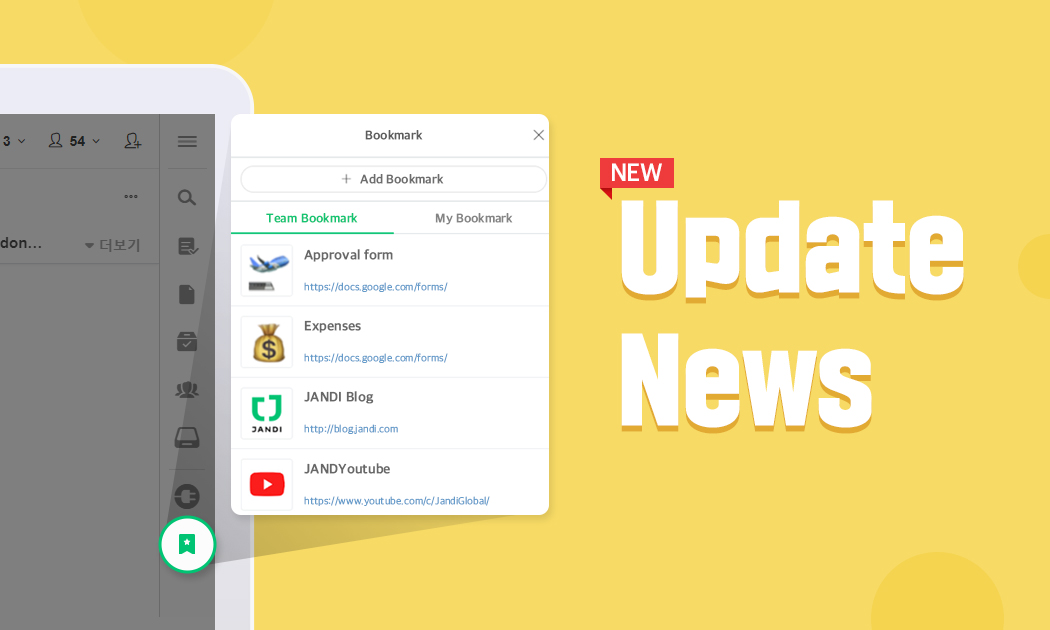
You can now bookmark URLs so that you can visit them with just a few clicks. Also, we added a few features that our users have requested.
The post JANDI Update: Bookmark, Manage Group Chat Members, Set Default Profile appeared first on JANDI blog.
]]>JANDI Update News for April 2021
Hello everyone! We are back with some updates for April.
You can now bookmark URLs so that you can visit them with just a few clicks. Also, we added a few features that our users have requested.
Bookmark (Exclusive in the Enterprise Plan)
Now you can bookmark URLs that you often visit to revisit them with just a few clicks. The Team Admin can set up the Team Bookmark, so members don’t have to search for each website they need to visit.

- Go to the menu [≡] icon located on the upper right corner of your JANDI screen and select [Admin Menu] – [Add-on Settings] – [Bookmark] to turn the setting on/off.
-
- Team Bookmark: A bookmark list that is shared by everyone in the Team
- My Bookmark: A personal bookmark list only you can see
- Each member can add their own bookmarks. The Team Admin can turn the Team bookmark feature on/off
- You can add up to 20 personal bookmarks and 20 Team bookmarks.
- If you turn the bookmark setting off or downgrade your Team’s subscription, the bookmark feature will no longer be available (Please keep in mind that existing bookmarks are saved in JANDI)

< JANDI Tips >
- Try adding various types of forms to your Team bookmarks, such as vacation request forms, name card templates, and expense report forms!
- Bookmark frequently visited links or links to your business affiliates.
Removing Members from Group Chats
Have you ever accidentally invite the wrong person to your group chat and had to ask that person to leave because the group chat didn’t provide the ‘remove’ feature? Now you can simply remove members from the group chat the same way you would in a Topic.
- Go to the [Participants] list located at the upper right corner of the group chat and click the [remove] icon.
- If you are a group chat member, you can remove a particular member from the chat even if you are not the owner or the admin.
NOTE) Removing Members from a Topic

Set to Default Profile Image

Now you can set your profile image back to the default image. If you no longer want to use your photo or JANDI characters, reset your image to default.
- Click your profile located at the lower right corner of your JANDI screen to reset your profile image.
- You can set different profiles for different teams.
NOTE) Editing Your Profile


We hope you like the updates! Please keep an eye out for more updates.
JANDI will continue to make updates for our users!
If there are any feature requests, please use the [Live Support] located on your JANDI menu, or email us at support@tosslab.com.

The post JANDI Update: Bookmark, Manage Group Chat Members, Set Default Profile appeared first on JANDI blog.
]]>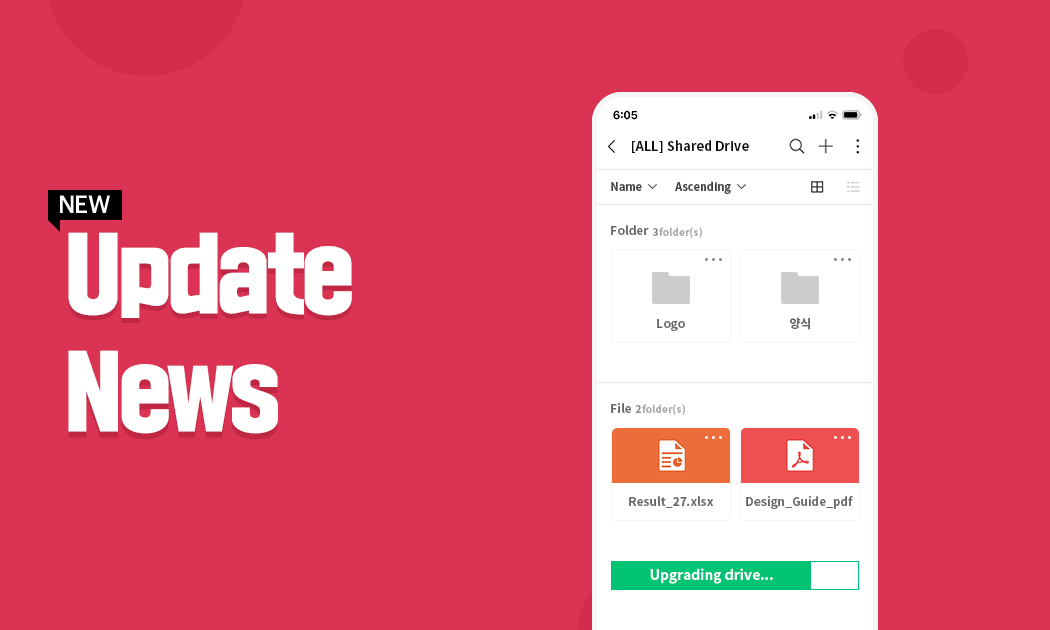
We have made significant changes in some of our features like JANDI Drive and the UI.
The post JANDI Update: Drive Feature Update, Organize Chat by Star appeared first on JANDI blog.
]]>JANDI Update News for December 2020
Hi there! This is the last update news for the year 2020.
We have made significant changes in some of our features like JANDI Drive and the UI. Also, you can now organize your chats by their bookmark (star) status as well. The feature was previously only available for Topics. Let’s take a look!

Drive Feature Update
You can search for keywords on your Drive. Now, searching for files and managing them on your Drive has become so much easier!

Click the Drive icon on the right sidebar menu.
Search your Drive

Type in the name of the file in the [Search by keyword(s)] box you wish to search.
- Your keyword must be more than two letters.
- You can search all folders and files in your Drive.
- You can search for a specific drive or file type.
Drive UI Update

The UI for the list on the left has been updated.
- You can view your Drive list according to the sharing option, name, and last modified.

We have also updated the UI so that you can view files and folders more conveniently!
When you use the Drive, you can efficiently manage your files that are scattered everywhere. Take care of your files by using JANDI Drive!
Fixed Chats (Bookedmarked First)
We have added a ‘Bookmarked First’ feature for your chat (1:1 chat, group chat) as well. Updates have been made to reflect some users’ opinions who shared their experience that it was difficult to find chats with bookmarked (by Star) members on the chat list.
- Chats with Bookmarked members will be fixed on the top of the chat list
- Among the chats with bookmarked members, the most recent one will appear on the top.

We hope you like the updates! Please keep an eye out for more updates.
JANDI will continue to make updates for our users!
If there are any feature requests, please use the [Live Support] located on your JANDI menu, or email us at support@tosslab.com.
The post JANDI Update: Drive Feature Update, Organize Chat by Star appeared first on JANDI blog.
]]>
Mini JANDI, Downloading Group Files, Revote
The post JANDI Update: Mini JANDI, Downloading Group Files, Revote appeared first on JANDI blog.
]]>JANDI Update News for November 2020
Hi there! We are back with more updates.
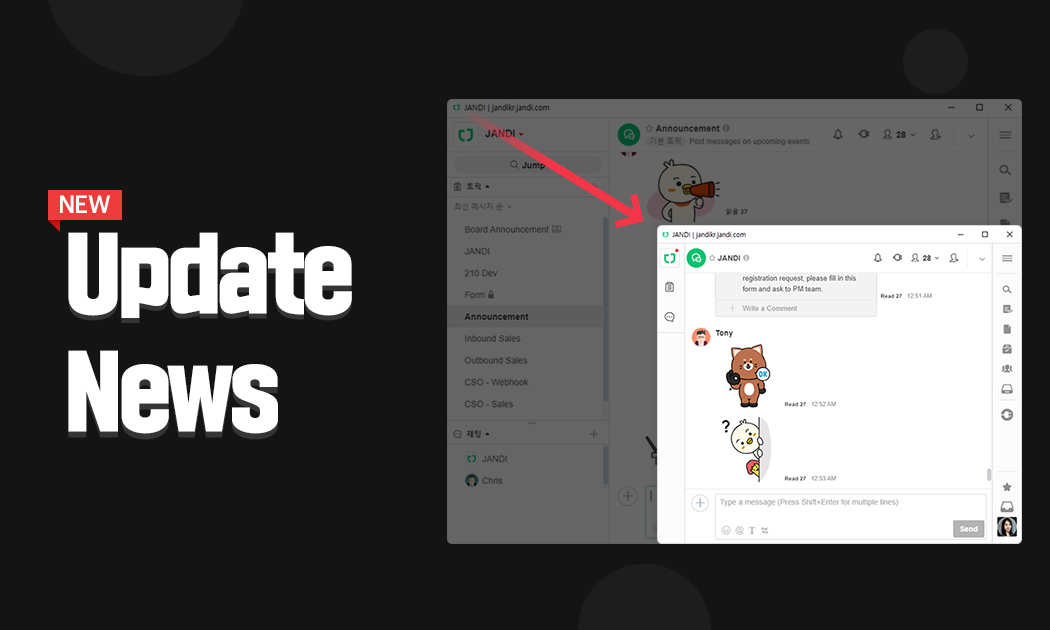
Here’s good news for those who felt that the PC JANDI window was way too big. In the past, we have received some feedback regarding the window size of PC JANDI. If you download the latest version, you can resize the JANDI window and use the ‘Mini JANDI.’
Also, we released the group photo (grouped files) feature back in September.
Now you can download the group photo or files by just one click!
Mini Sized JANDI
If the PC JANDI window was too big, you can resize it and use the smaller version.
- To download the latest version: https://www.jandi.com/landing/en/download
<PC Version>
- Use the new feature on the latest version of JANDI.

Group File Download
Grouped files can be downloaded all at once by clicking the ‘download’ button just one time.
- To download the latest version: https://www.jandi.com/landing/en/download
<PC Version>
- Use the new feature on the latest version of JANDI
- Select the […] icon next to the group file, and click [download].
- If you want to designate the download location, select the [≡] icon on the upper right corner of JANDI and go to [JANDI App Settings]. When the preferences window pops up, choose the download location.
*We are still working on the multi-download feature for Drive and individual files. We will let you know soon!

<Mobile Version>
- You can also multi-download the grouped files on Android and iOS.
- Please keep in mind that on the iOS device, you can only multi-download image files. You can preview other types of documents, but not download them.
- Select the file group and tap the download button.

Revote
If you made a mistake and would like to vote again, use the re-vote feature.

<PC Version>
- Select the […] icon and select [Revote]
- Please remember that revotes are only permitted in polls that are open. You cannot change your vote once the poll is complete.
JANDI will continue to update new features. If you have feature requests, please use our [Live Support] in the menu, or contact us at support@tosslab.com.
The post JANDI Update: Mini JANDI, Downloading Group Files, Revote appeared first on JANDI blog.
]]>
We are here to announce a new feature on JANDI.We have finally updated the grouped photo (uploading grouped files) feature that many users have been waiting for!
The post JANDI Update: Group Photo (Uploading Grouped Files) appeared first on JANDI blog.
]]>JANDI Update News for September 2020
Hi there! We are here to announce a new feature on JANDI.
We have finally updated the grouped photo (uploading grouped files) feature that many users have been waiting for!
Let’s take a closer look.

Grouped Files (Grouped Photos)
Now you can easily upload multiple images and files by grouping them together!
<PC Version>
- Click the (+) icon on the left to your text box and select multiple files in ‘my computer’ to upload them all together.
- You can select up to 10 images or files.
- All the photos and files in the same group can be deleted altogether.
- All the photos and files in the same group can be saved in your JANDI Drive.
- The biggest file you can upload is 1GB.
- You cannot edit the group of files you have uploaded.


<Mobile Version>
- Tap on the (+) icon on the left to your text box to select multiple photos you want to upload as a group.
- You can upload up to 10 images.
- When downloading grouped photos, you can choose to download ‘all images’ or ‘current image only.’
JANDI will continue to update new features. If you have feature requests, please use our [Live Support] in the menu, or contact us at support@tosslab.com.
The post JANDI Update: Group Photo (Uploading Grouped Files) appeared first on JANDI blog.
]]>
We introduce new features and improvements we’ve made on some of our existing features.
The post JANDI Updates: IP address restriction, 1:1 conversation deletion, and admin dashboard appeared first on JANDI blog.
]]>JANDI Updates for May 2020
Good morning. Here are some new updates for JANDI this month.
In this update, we introduce new features and improvements we’ve made on some of our existing features. Shall we take a look?
< New Functions >
1. You can now set administrator IP address access restrictions
(Available for those with the Enterprise Paid Plan)

With this new feature, you can now specify which IP addresses are allowed to access the chatrooms.
This new feature is meant to be a security function that can be used when you want to make the JANDI team accessible only to those with a specific IP address.
- The Team Owner / Team Manager of the Enterprise Paid Plan can set-up this feature in [Admin Menu] – [Security Settings] – [Access Allowed IP]
- Click here to learn how to apply these futures to each IP Address.
2. Delete 1:1 chats
(Available for those with the Enterprise Paid Plan)

Previously, it was only possible to ‘hide’ 1:1 chats. However, with this new feature, team managers can now set the ability to completely delete a 1:1 chat.
- To enable deletion of 1:1 chats, go to [Admin Menu] then [Team Management] and select [Allow members to delete 1:1 chatrooms]
- After the function is enabled a team manager must be applied.
- With this feature enabled, if A and B are in a conversation, either A or B can delete the 1:1 chat entirely.
- When you delete 1:1 chats, please be mindful that the contents of that conversation will be deleted from everyone in the conversation, including yourself.
< Improvement of Existing Functions >
1. Admin dashboard improvements
(Paid Plans Available)

Team and member usage have now been improved so that the team managers can check more detailed usage information.
Detailed information reports are available to those with Premium and Enterprise plans.
- To see these reports go to [Admin Menu] then [Dashboard].
- The information should be divided into daily, monthly, and periodical accumulation settings.
- Storage space information and connection information are recorded based on Korean time (GMT +9).
- Information records are stored for up to one year.
- The information displayed on the dashboard is a compilation of team data that has been collected. The information is different from actual use time. (For example: When connecting on 4/16, the data displayed will report on 4/15, which is a day before.)
2. Tablet version improvement

2-1) You can now send messages using the [Enter] key when using a Bluetooth keyboard
For those who use a tablet with a Bluetooth keyboard, we’ve got good news!
You can use the [Enter] key now to send messages on JANDI through your tablet device. No more tapping [Send] each time!
2-2) Tablet version for Android released
- JANDI is now available for tablets and is compatible with landscape view and multitasking functions
- Click here to download the Android app.
These are all of the new and improved features that we have for you today! We hope you love these newly updated features.
If there is a feature that you think should be added to JANDI, please feel free to contact us through the [Live Support] link on the JANDI menu or contact us through our customer center email support@tosslab.com.


The post JANDI Updates: IP address restriction, 1:1 conversation deletion, and admin dashboard appeared first on JANDI blog.
]]>