If you have any of our dolls feel free to throw some sizing’s at me so I can update it for others

| Head | Eye Size | Wig Size | Circumference |
|---|---|---|---|
| Tibby | 8mm | -4" Wig3 | 10cm or 4inch |
| Nerida | 6mm | 2-3" or Small 3-4" | 8.5cm or 3.4inch |
| Laila | 6mm | 2-3" | 8cm or 3.2inch |
| Kailen | 8mm | 3-4" Wig | 10cm or 4inch |
| Diana | 10mm | 3-4" Wig | |
| Drake | 10mm | 3-4" Wig | |
| Bella | 10mm | 3-4" Wig | 10cm or 4inch |
Where can I buy one of these dolls?
All my dolls can be purchased from my Etsy shop. We also visit some fairs such as the Auckland Armageddon show
Does this doll come assembled?
No, this is a kit. You pick, we print it, you make it
What do I receive?
You get all the parts you picked, the elasitc, white eyes which you can paint, eye putty, magnets, treading wire, and a metal plate for standing on
Does it come with eyes?
The kit comes with white 3D printed eyes with you can paint. If you want you can replace them with locally purchased eyes. Check out our sizing guide to find out what size your selected head can take.
What is 3D printing?
3D printing is the making of a physical object from a three-dimensional digital model, typically by laying down many thin layers of a material in succession.
What are they made of?
We print with a plastic called PLA – Poly or polylactic acid or polylactide is a biodegradable and bioactive thermoplastic aliphatic polyester derived from renewable resources, such as corn starch, tapioca roots, chips or starch, or sugarcane
Is the Surface Smooth?
These dolls are 3D printed, that means they have tiny layers which gives the surface very fine groves. If you are unfamiliar with 3D printing I suggest you try Goggling it and having a look at the images to get an idea of what it means and what to expect.
Can I sand them?
I know some people sand them, but I don’t recommend it. I think they are 3D printed, and the fine lines are part of that. But thats just me if you want to sand you can google sanding PLA 3D prints for tricks and tips. Acetate is the only chemical I have found that effects the PLA
Are they fiddly to assemble?
Different dolls have different challenges. If you go for the small tiny dolls then yes, they can be a bit fiddly. In the youth 1/10 doll the elbows are only a few mm big, so there are some small parts. The adult 1/10 doll is a bit easier to work with, but the horses are harder. If you don’t like working with small parts then maybe go for the 1/6 doll, she is much bigger and easier to work with.
Can you string it for me?
Sorry no, we do not offer any stringing service.
Can I manipulate the parts?
Absolutely yes! The parts are printed in plastic, so you can do things like heat and bend the wings, reshape the eye sockets, heat and bend the ears
Can I pick different colours?
Most people pick one colour, but you can have a second colour if you want the wings to be different (such as white) or the mermaid tail to be different to the torso. No more than two colours is allowed as it create extra work and time loading and unloading the filament in the printers
So she is now in 1/6 scale making her around 27 to 29cm (a lot more if you go for the tall horns) and that means she is scaled to fit Barbies clothing
If you would like your own you can view her on my Etsy page


I think this is something we all face..time and the lack there off it. But it is sad to think that I didn’t create a thing in 5 months. I will certainly try harder this year, but only time will tell………
Any way enough ranting! I have actually finished the sculpting on my Fire doll. So here are the next steps which will mostly be about how to smooth out the dolls. The last WIP 2 left us with a doll that had her form all roughed in ready to refine, smooth and detail. So lets get to it! If you haven’t yet read the past posts you can check them out here WIP 1 and WIP 2
At this point she is looking good in terms of where her lines are. Remember to keep turning and re”drawing” her. If something doesn’t look right from that angle then add or remove clay as needed – turn and repeat until all angels are correct.


When adding clay you need to ensure it’s pressed on firmly with no air pockets between the old and new layers (this can cause issues when cooking) and you should scratch in the seams (as in the picture below) this is a raking effect and creates an average medium that can be smoothed out (see more on this below).

Once you have the form locked in you can start with the smoothing. Below you can see all the tools I like to use for smoothing. There is my main sculpting wooden tool, my raking tools, paint brushes for smoothing, a chip paintbrush, Isopropyl Alcohol and a cup to hold it. (the nip nozzle on the isopropyl is not for pouring shots! But just makes it easier for me to pour some when I need it without having to deal with safety caps – not a good idea if children have access to it! I got my nip pourer from the $2 shop

A closer look at the raking tools. I made these following the Stan Winston School of Character Arts tutorial, and the have a lot of wonderful videos, so you can check them out here Stan Winston School of Character Arts
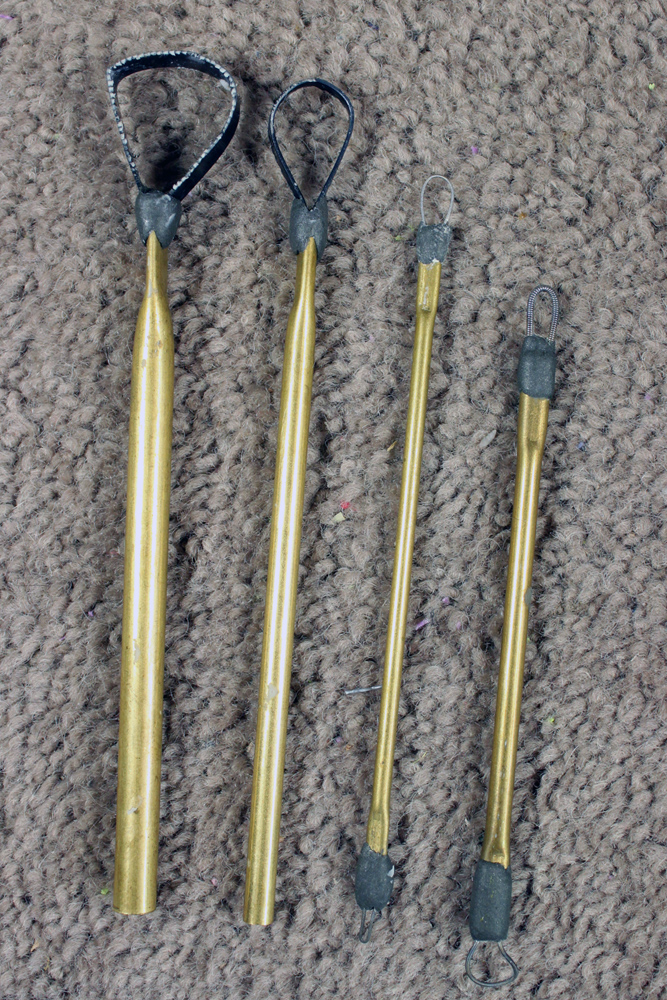
Smoothing takes several steps of rake and smooth, rake and smooth…until you get it perfect. Below you can see the first raking sweep. I have a few raking tools and I start with the biggest teeth first and work down to the finer teeth (just like sanding paper). The whole idea is you are raking the clay surface creating a medium average so that when it gets smoothed out it is minus the bumps. Its no different to raking out soil to create a flat surface for grass.

Below is a close up shot of the raking, you want to go in a crisscross fashion so you don’t create any runts in the clay.

And now for the miracle….Isopropyl Alcohol. If you use Polymer clay and don’t use this then go out and get some now!!! It is without a doubt my most important tool when sculpting – even above my wooden tool! Use a clean new (not one you have painted with before) brush to smooth out the raked clay, the isopropyl alcohol will soften and smooth the clay and fill the gaps.

Here is the leg after just one rake and smooth. Big difference huh?!

Then it’s rake and smooth again using a finer rake. It depends on what part I am smoothing, but I usually do 2-3 rake and smooths. I also like to finish with using my chip brush instead of the rake. This can give the clay a nice texture in the skin, and doesn’t leave as much clay snot (that’s what the little blobs of clay caused by the raking are called )

And here she is after a few rakes and smooths. One other thing to note – Does this doll look pretty clean to you? I left this doll sitting in the open air in my office (which is directly attached to my garage) for the over 5 months I tool to make this doll. And dirt is 100% not an issue because all the isopropyl smoothing also keeps the clay free from dust and dirt.


Here is the rest getting raked, I did the leg separate above for demonstration purposes, but I usually work on the doll as a whole

And here is some detail work done on her. Sorry if this looks like it has jumped a bit, but this tutorial is focusing on the creation over a 3D armature and a demonstration of how I smooth my pieces. I am not going into detail on how the detailing was done, but I will post pictures of her until she is completed.

And the sculpture now is complete except for closing off her back once she is off the bracket, and her tail, and her base. I will post again when that and her painting is all done.
I hope you have enjoyed this tutorial and there is stuff in here that will help. If you have any questions please feel free to ask.
Thanks for watching!
Julie Sharpe


Originally I was planning to use this armature for my Cheshire doll for the Auckland Doll and Teddy fair. However time got away from me and that fair has now come and gone. So I will be now creating this doll as a Fire Lava Queen for the International Art Doll Registry competition – Elements. And all going well maybe an Frost Queen as well? We shall see, but I do find its important to use the competitions and local themed shows to keep the pressure on creating, otherwise time goes by and nothing new gets made 
So here we go…… the next stage of my experimental OOAK clay doll over a 3D printed armature

With my doll still firmly attached to the armature stand I start by conditioning some clay and pressing till its quite thin, and then laying it over the doll. The excess was pinched off at the back and the seam roughly joined. No point in spending time smoothing yet – it’s all about the form for now.
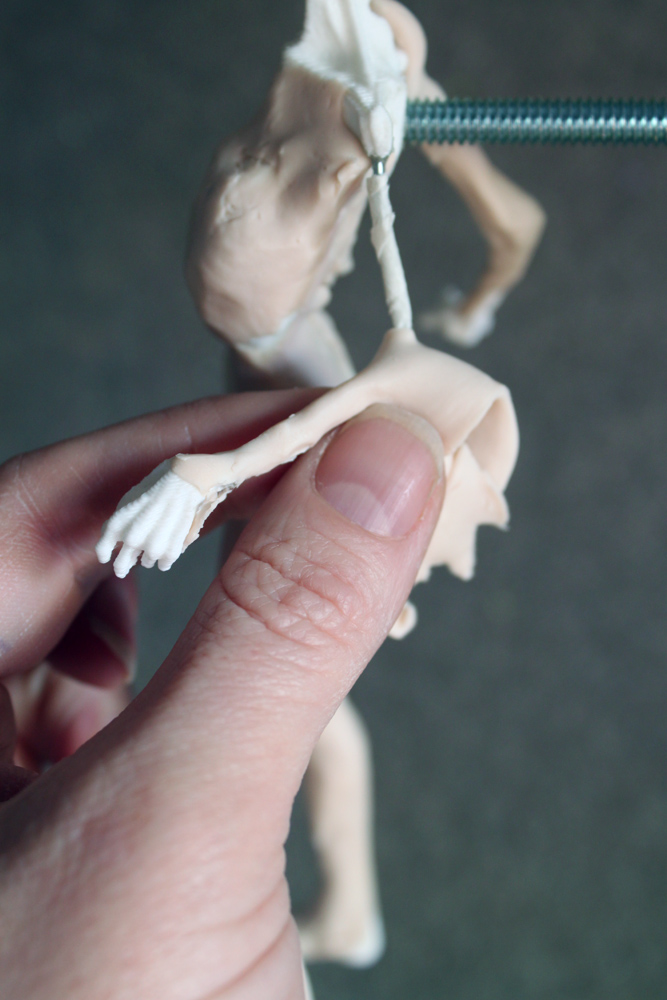
Continue working up the doll keeping the clay roughly the same thickness and pinching the excess off. Do not worry about fat and muscle yet, just get the first layer down.

Above is a shot of the face, again its just a single layer

Above I have added the eye indentations and a dent for the mouth. Just to keep track of where the lines and proportions are on the face. In some parts of the body I have also left the bones sticking out a little bit, just to keep a few key points for reference when I start to add the fleshy parts.

One handy tool with having already created my doll in Daz means I have a 3D rotating reference to use. I can view her in her emancipated state so I can tell where the bones are even after they are covered in clay, or I can dial her back up to her normal form so I can see when the fat and muscle need to go.

After the “skin” layer is all done I can start on the fat and muscle. Using the Daz reference (in the background) I start laying bits of clay down in line with the correct forms

When sculpting it is very important to keep turning your work, obliviously the front is the most important view, but if you don’t sculpt from all angles you won’t get the proportions right. And with the Daz figure I can also use it by turning it around as I turn the sculpture to keep making sure the form is being added correctly. I once heard someone describing sculpting as drawing a thousand drawings, and that’s exactly what you need to do…”draw” your sculpture so the form you see from the front view is correct…turn and then redraw so the new view is correct…keep turning and keep redrawing it. Do that and your form will come right
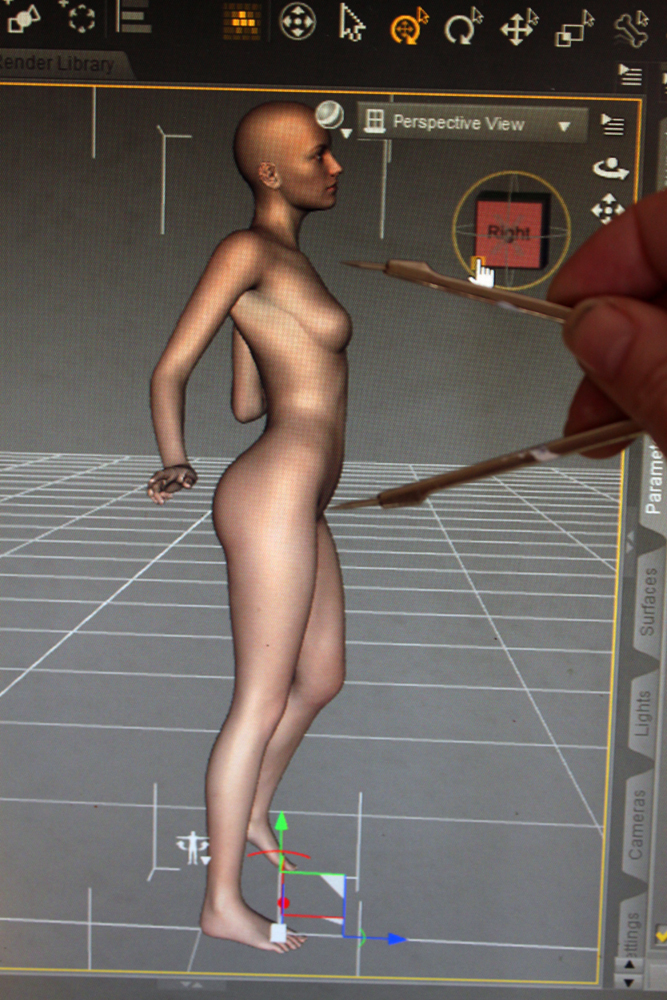
And one last tip that you can gain from using a Daz 3D firgure…zoom in on her so she is the correct size on your screen and using compass calipers you can measure all the different points to ensure your sculpture is correct

Keep working on your doll adding clay as needed and roughing it in. Don’t bother with trying to smooth and detail it yet. Firstly you shouldn’t smooth until the form is done because you can just end up having to redo detail when you realize the form is not quite right, and you also need to have some allowance for pressure when putting fresh clay on. And second I have a technique that will help you smooth it out later on. Also, while you might want to create a nice smooth fairy, I prefer my dolls to be hybrid creature creations, so my doll will have a lot of sculpted detail added to her form before any smoothing is done.
So that’s it so far. What do you think??
Even if you don’t have access to a 3D printed I do recommend you give Daz a go. You can download the Daz Sudio and the Genesis 2 Female for free over at Daz3d
And stay tuned for part 3
The instructions for the Creature Kits are basically the same as Annysia, expect you have wings and a tail. I will be posting some better pictures and a video very soon
 Step one
You can use 6mm eyes, but if you want to hand paint or use printed irises then do this step first to make sure they dry by the time you need to insert them. Paint the base colour on both eyes.
 Step two
Once dry you can paint the pupils (I have gone with snake slits for this doll for a bit of fun). Or if you want to use printed irises then you can print them out, cut them out and glue them into place.
 Step three
You can give them extra realism by adding a dome of clear lacquer. Make sure the paint is dry and then add a small amount of a product that will set hard and clear, I like crystal lacquer. Always start small and add volume it dries.
 Step four
Start by laying out all the pieces checking each piece as you go. Remove all supports (two thighs and calves) by cutting or snapping them off. Check that all the holes are clear and ready to be threaded.
 Step five
Cut or snap the eye supports out of the eyes. Use a sharp knife or scalpel tidy up the eye lines. You can also reshape the eyes here if you wish, but go slowly – you can always take more off, but you cant add it back.
 Step six
If you have wings or tail thread them on separate at this point. For the wings thread one wing on, then thread both elastic ends through the back hole and around and back out the other hole (it helps to bring it out through the shoulder while you are maneuvering around these holes) thread on the second wing and tie off as tight as you can, failing to get this tight will mean the wings don’t stay up well. For the tail thread on the end part (only part if its the horse or bunny tail) then thread through the holes in the torso and tie off
inside the torso cavity. Cut all excess elastic.
 Step seven
Then the arms. Start at one wrist and thread on the lower arm, elbow and should. Then thread both ends through the torso and the other shoulder. Once you are through the second shoulder stop. If you have clamps you can tighten and clamp here. Then thread just one end through elbow and lower arm. Around the wrist and back up to the shoulder.
 Step eight
Pull the single strand until it tightens and tie with the end that is clamped. If you don’t have clamps you can just pull the elastic as tight as you can, it does hold it’s tension well. Set this piece aside to wait.
 Step nine
To ensure the head and headcap are a nice perfect fit I like to give both pieces a few runs over some sandpaper (or you can use a nail file). You may find it not necessary to do this step, but it can help to make the two pieces fit well.
 Step ten
You can now insert the magnets. Make sure when you insert the head and headcap magnets that they attract and not deflect each other. The holes should be a nice fit for the magnets, but if they are loose use glue, or if they are too tight just scrape the hole back a bit.
 Step eleven
Cut two pieces of elastic approx 30cm long. Thread each leg separate foot to calf to knee (locking pins down) to thigh. Then up through the hips, torso and chest.
 Step twelve
If you have clamps you can clamp them at the neck. Make sure you tighten each pair of elastic end separate. If you try and tighten all four ends at the same time you not not be able to get both sides as tight as they can.
 Step thirteen
Take each pair of elastic up through the head, making sure each pair goes to a different side of the tie bar. Tie off the ends around the tie bar, cut off the excess elastic and tuck the ends inside the head.
 Step fourteen
Insert the eyeballs and use the supplied eye putty to hold them in place. Insert the small rubberband around the bar at the front of the head. It helps if you stretch it tight, this can be the most fiddly part so take your time. Once you have it around the bar in the head, repeat so it goes around the front bar in the headcap. The magnets hold the back of the head and headcap together, the rubberband holds the front together.
 Step fifteen
Your Creature is now complete. You can pose it as desired, and use the metal plate supplied to help stand. If you want take a picture of your completed doll, send it to us and we will add it to our gallery! Any questions please use the comments below of send us a message.


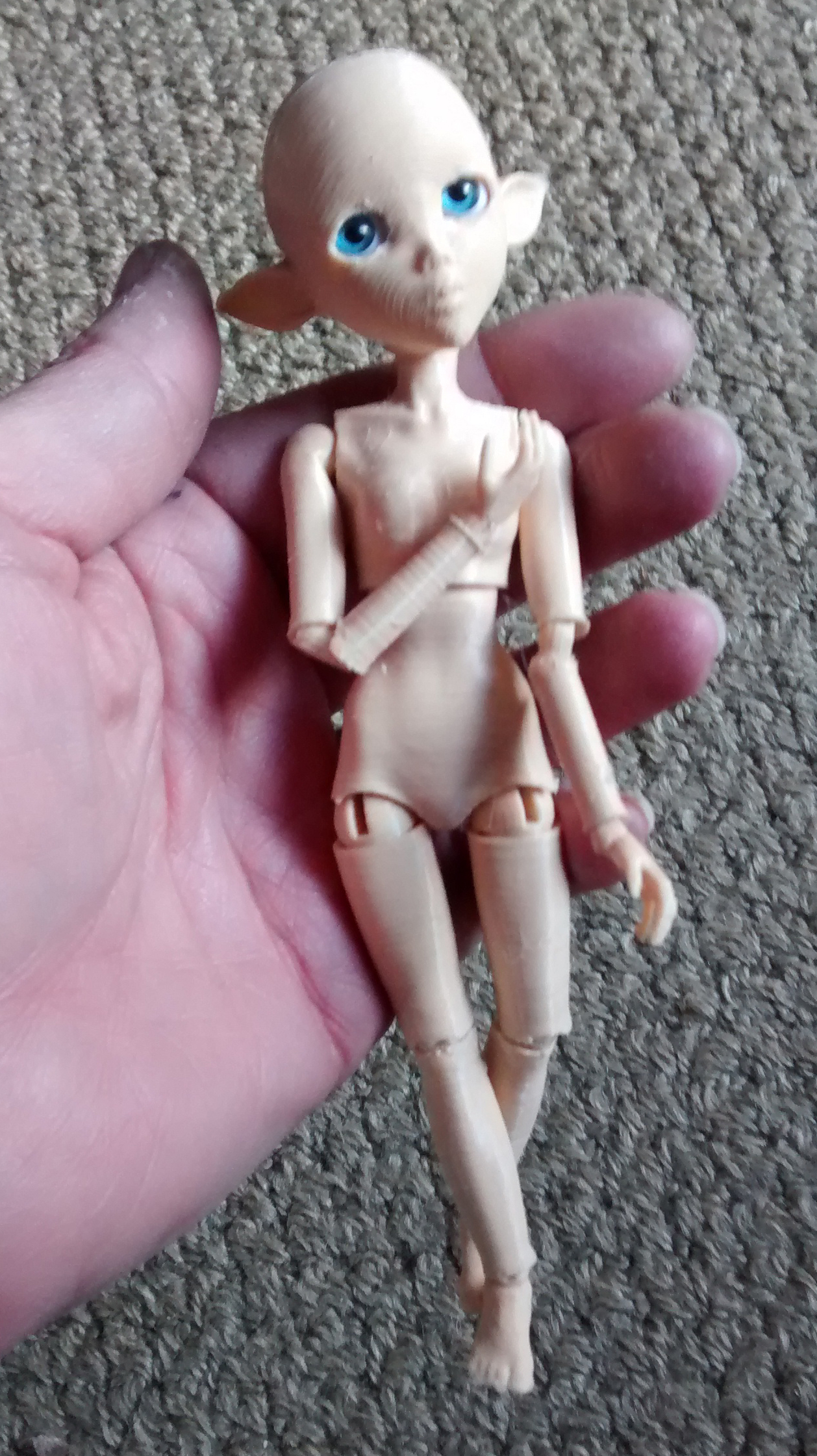
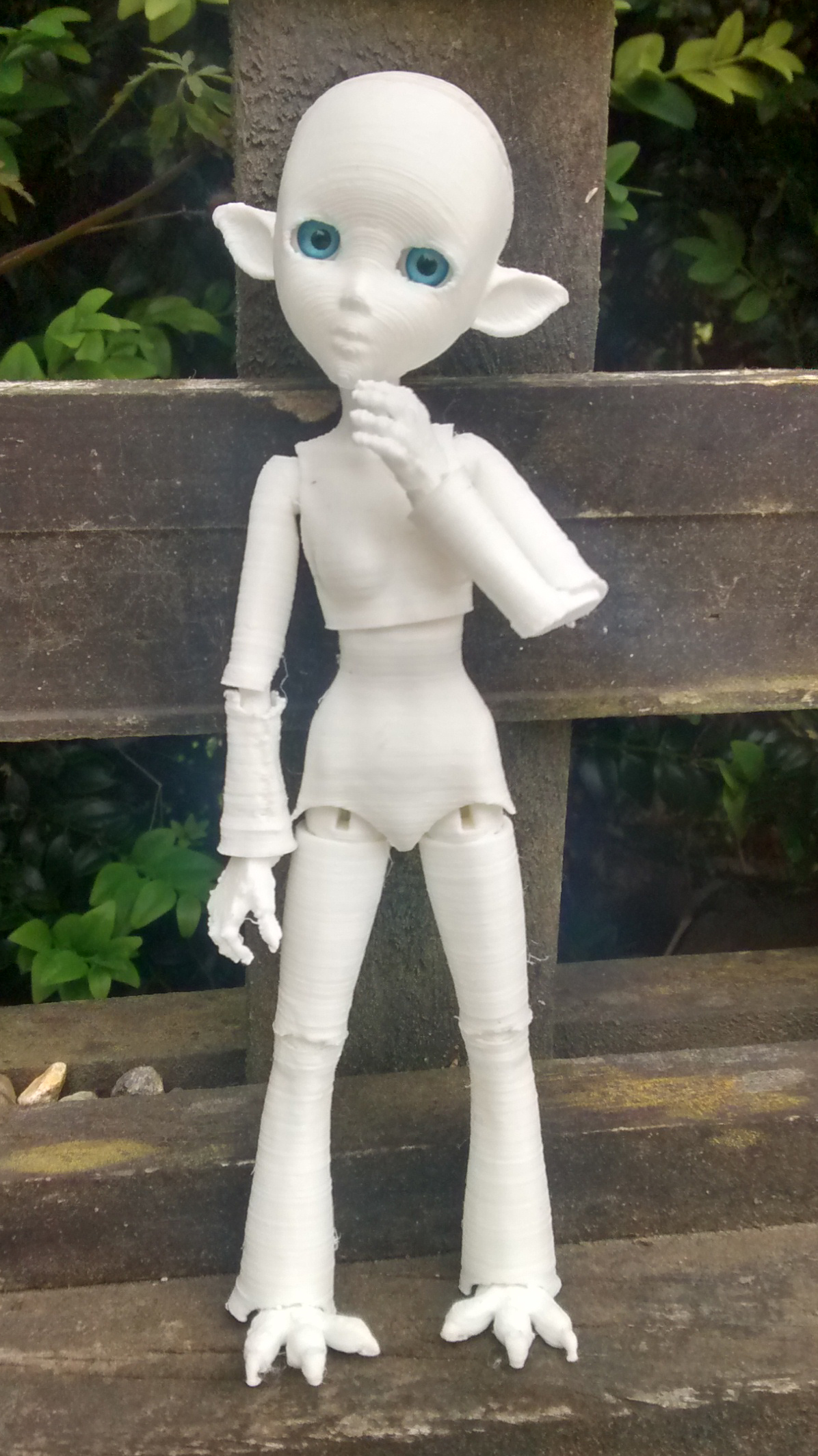
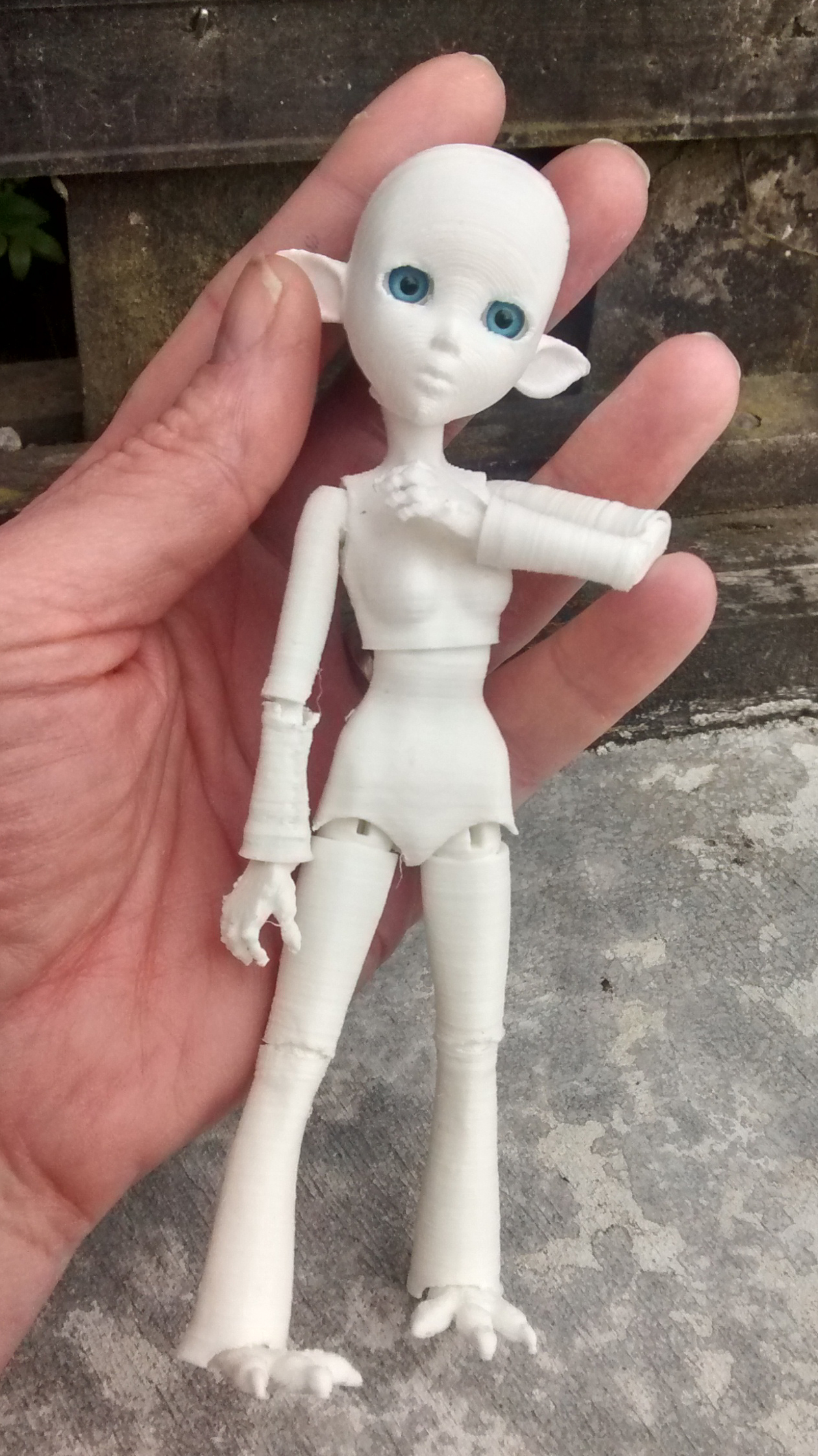
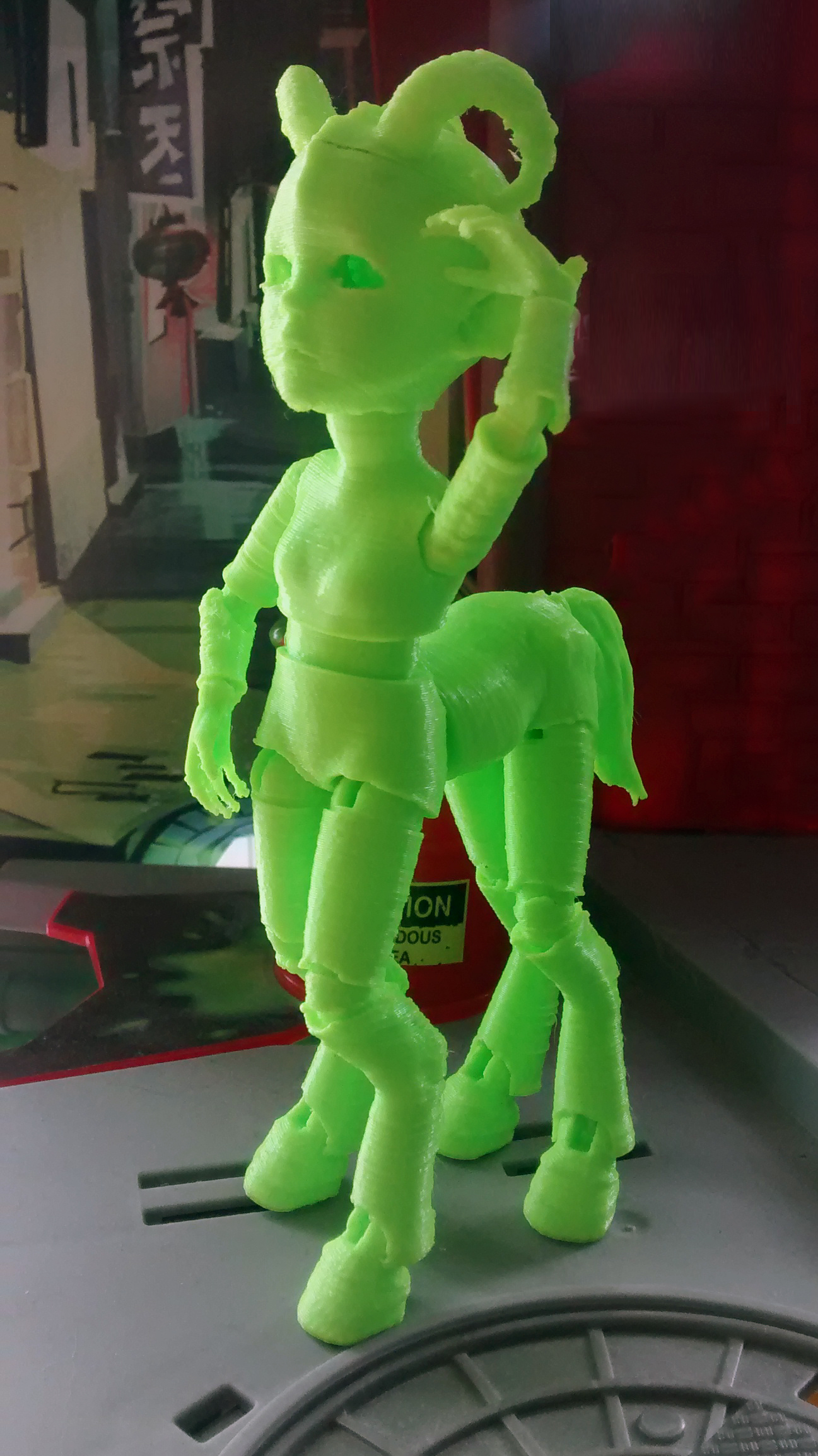
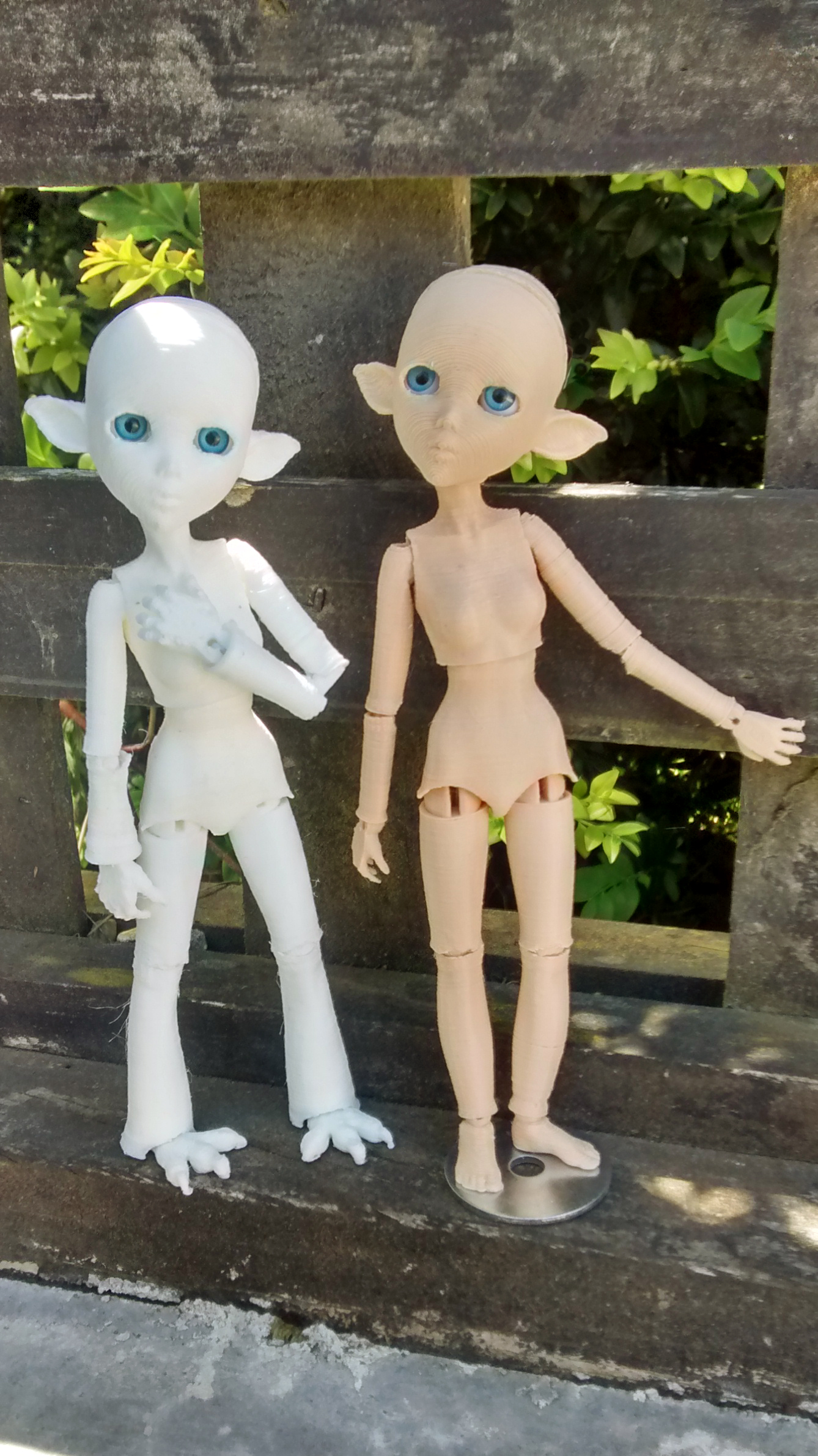
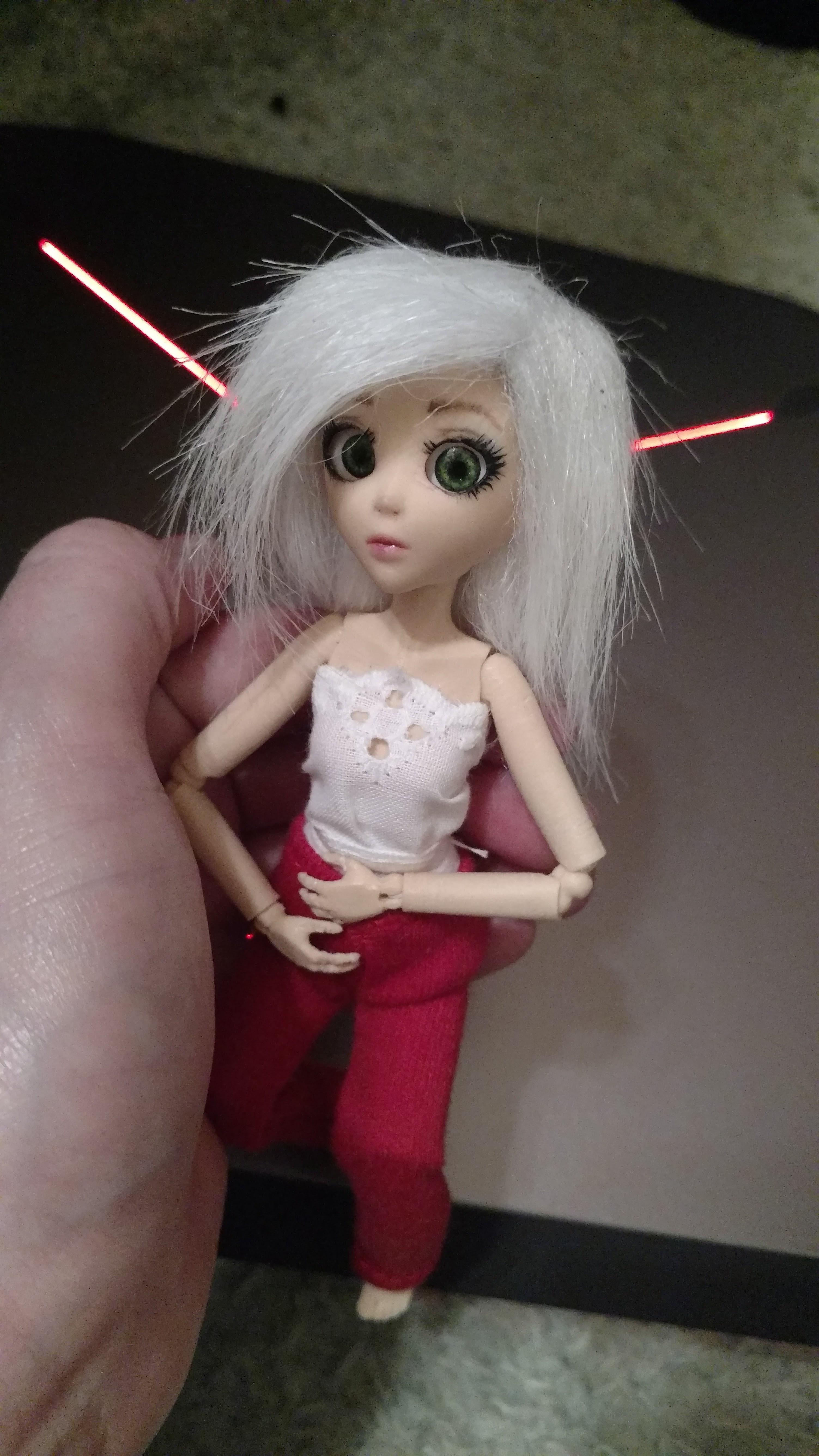
Each 3D printed Creature Creator Kit comes with all the 3D printed parts including 3D printed white eyes, elastic, 4 x magnets, eye putty and a metal plate to assist standing.
Each doll is approx 120mm high (not including any horns) and a bit 130mm for a doll with horse legs.
Step one
You can use 6mm eyes, but if you want to hand paint or use printed irises then do this step first to make sure they dry by the time you need to insert them. Paint the base colour on both eyes.
Step two
Once dry you can paint the pupils (I have gone with snake slits for this doll for a bit of fun). Or if you want to use printed irises then you can print them out, cut them out and glue them into place.
Step three
You can give them extra realism by adding a dome of clear lacquer. Make sure the paint is dry and then add a small amount of a product that will set hard and clear, I like crystal lacquer. Always start small and add volume it dries.
Step four
Start by laying out all the pieces checking each piece as you go. Remove all supports (two thighs and calves) by cutting or snapping them off. Check that all the holes are clear and ready to be threaded.
Step five
Cut or snap the eye supports out of the eyes. Use a sharp knife or scalpel tidy up the eye lines. You can also reshape the eyes here if you wish, but go slowly – you can always take more off, but you cant add it back.
Step six
Then the arms. Start at one wrist and thread on the lower arm, elbow and shoulder. Then thread both ends through the torso and the other shoulder.
Step seven
Once you are through the second shoulder stop. If you have clamps you can tighten and clamp here. Then thread just one end through elbow and lower arm. Around the wrist and back up to the shoulder.
Step eight
Pull the single strand until it tightens and tie with the end that is clamped. If you don’t have clamps you can just pull the elastic as tight as you can, it does hold it’s tension well. Set this piece aside to wait.
Step nine
To ensure the head and headcap are a nice perfect fit I like to give both pieces a few runs over some sandpaper (or you can use a nail file). You may find it not necessary to do this step, but it can help to make the two pieces fit well.
Step ten
You can now insert the magnets. Make sure when you insert the head and headcap magnets that they attract and not deflect each other. The holes should be a nice fit for the magnets, but if they are loose use glue, or if they are too tight just scrape the hole back a bit.
Step eleven
Cut two pieces of elastic approx 30cm long. Thread each leg separate foot to calf to knee (locking pins down) to thigh. Then up through the hips, torso and chest.
Step twelve
If you have clamps you can clamp them at the neck. Make sure you tighten each pair of elastic end separate. If you try and tighten all four ends at the same time you not not be able to get both sides as tight as they can.
Step thirteen
Take each pair of elastic up through the head, making sure each pair goes to a different side of the tie bar. Tie off the ends around the tie bar, cut off the excess elastic and tuck the ends inside the head.
Step fourteen
Insert the eyeballs and use the supplied eye putty to hold them in place. Insert the small rubberband around the bar at the front of the head. It helps if you stretch it tight, this can be the most fiddly part so take your time. Once you have it around the bar in the head, repeat so it goes around the front bar in the headcap. The magnets hold the back of the head and headcap together, the rubberband holds the front together.
Step fifteen
Your Creature is now complete. You can pose it as desired, and use the metal plate supplied to help stand. If you want take a picture of your completed doll, send it to us and we will add it to our gallery! Any questions please use the comments below of send us a message.
]]>
I also love the idea of meshing the two worlds together, I don’t think 3D printers are going to take away from the OOAK world – I think they are a tool to be used to enhance it.
Here is a sample of the worlds meshing together, this is a fun Tim Burton inspired character that I created by printing a few 3D core parts (skull, torso, shoes and hands) and then its all strung together with plastic coated wire that gives the piece the ability to be posed and played with.

The great thing about the 3D printed core is it can speed things up for quick fun creations that you want to be able to make and sell without taking for ever to make. And the 3D parts create a strong hole for the wire to go through, so repetitive moving of the wire wont start to break down the cooked polymer clay. The shoes and hands are completely 3D printed with no clay on them, that can speed up a very timely difficult part to sculpt!
I made these thinking I might make a fun course, for adults or kids, around making a ooak clay character over a 3D printed core, but I never did get around to setting that up. So if you are in my area (Hamilton New Zealand) and have a few friends who would be interested in doing a fun course in making a clay creation send me an email and we can set something up!
Anyway, so now onto the new piece I am working on. I want to take this to the next step and create an entire 3D printed armature to have under my clay. My hopes for this is to create a strong lightweight armature and also to get a fast start into the form I want to create.

So I have started with creating my 3D figure in Daz, posed it and to be able to put clay on it I have completely emaciated the figure. Then its converted around a few 3D programs until I have it ready for the 3D printer (don’t worry about the unusual hand pose – these a reason to my madness, trust me

It would have been better, I think, to Voronoi it (like the figure above made by Styxx over at Thiniverse) as that will make it use less filament, still be very strong and give it holes for the clay to grip too. But I’m impatient and didn’t want to muck to much with the file for my first try. So if this works out well then maybe I will do it next time?
I had supports but not enough, so during my print I lost one arm. Not to mind – I have just replaced the arm with a bit of wire (attached in place through a drilled hole with epoxy) In a way this method could be used in the future, hands printed separate and attached after with wire and glue) that would allow for arm posing, but I actually wanted to be set in the armature to avoid having to make pose/form decision after the 3d file was created.

After the photo above was taken I needed to drill the two peg holes in the torso to make them a bit bigger. And in my error I didn’t hold onto the doll tightly enough when I started drilling. So the whole thing spun in my hand and I broke off the other arm (face palm!) not to mind, its wire and epoxy to the rescue again.
I also added a hole in the flat footed leg to have a tube inserted for standing, and I printed it with a void in the back to allow a nut to be epoxy in for the armature stand system (more on that below)

Above is a picture of the armature stand I made up for this project. It was easily made with some threaded rod, wingnuts, washers and a L bracket. I then epoxied a nut into a cavity I already included in the 3D and its all ready for clay.
So tell me what you think so far? And keep watching for the next installment when I will start adding the skin (I mean clay! )
Till then, thanks for visiting my site
Julie Sharpe
www.dollartbyjulie.com