Let’s review the progress of the structure in this video.
(English viewers please activate the subtitles translation)
I made you this video to speak to you about the project Spacelanders.
(Activate subtitles translation to english)
Here is the screen recording on the Maal’Hul’s concept design. The next main character is on painting.
Leave a comment and support me if you like it.
Enjoy!
]]>Here is the screen recording on the Memo’s concept design. I’m preparing the one of Maal-Hul.
Leave a comment and support me if you like it.
Enjoy!
]]>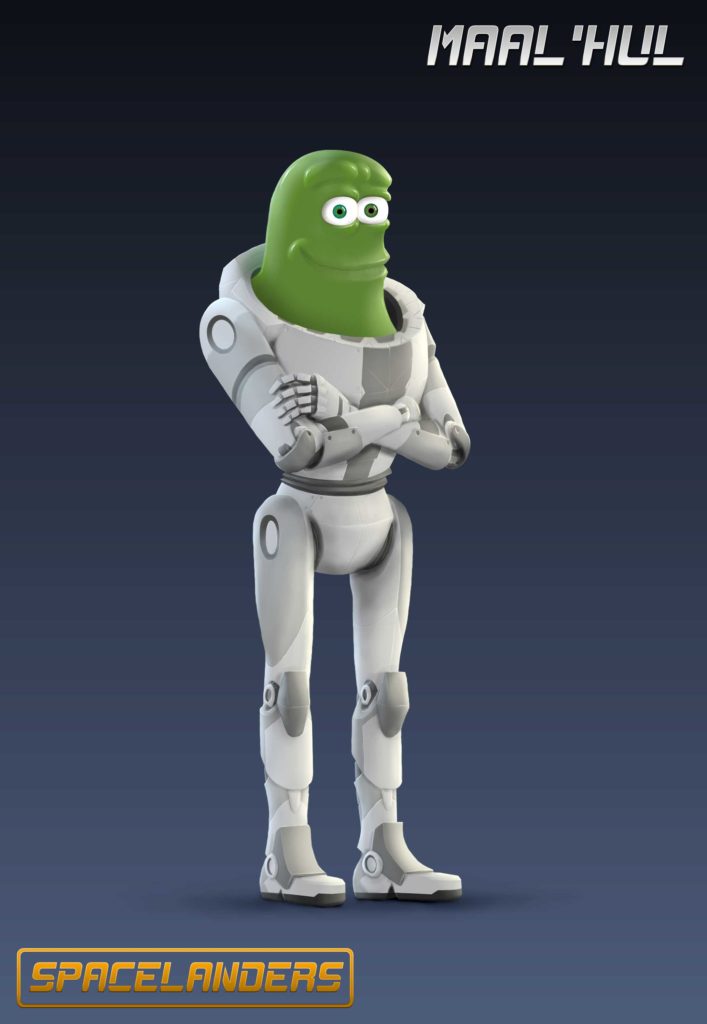
Maal’hul is an excellent driver. It can cross a field of asteroids with a cruiser of 500 meters long without scratching the hull. He can’t prevent himself to want to pilot everything that flies and to give advice of piloting to all the world, which is intented to irritate.
He is calm and mysterious even if he can get angry when he is pushed to the limit. He is not the most gifted with a weapon in hand but in command of a ship, he can get out of any situation.
Maal’Hul is, too, a faithful friend who never let anyone fall.
]]>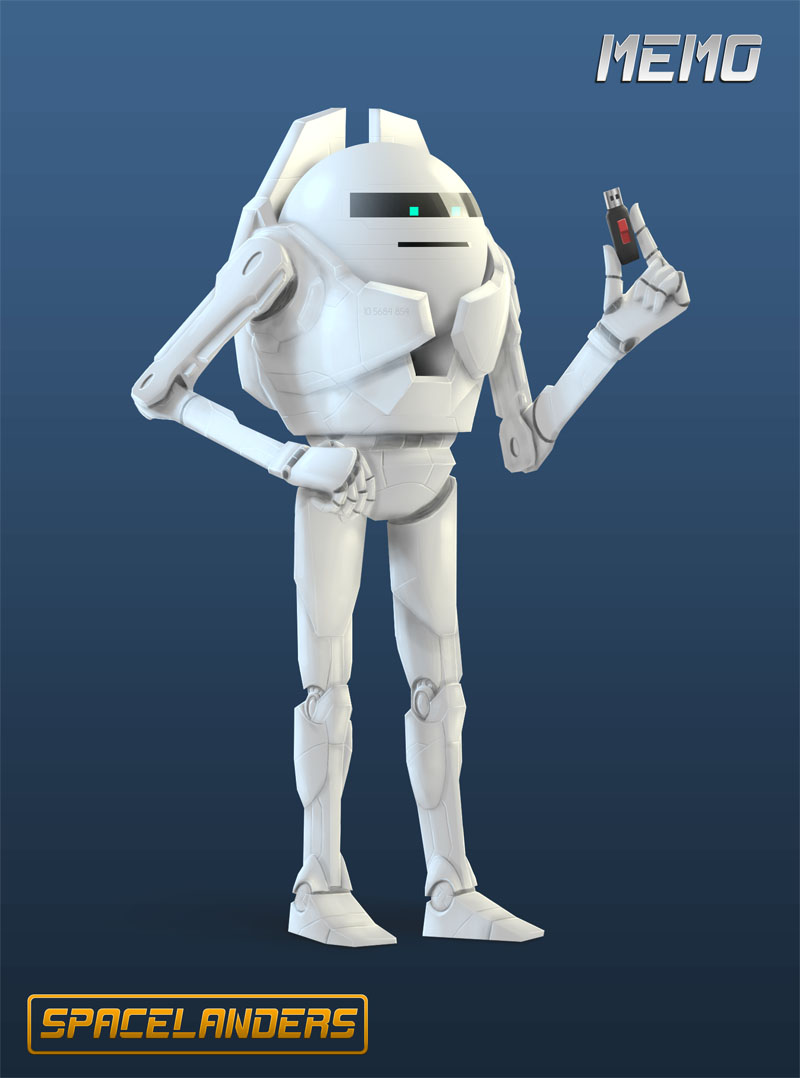
Memo is part of the series of memoriels. This is an assistant that remembers everything his owner decides … or not.
It can record videos, take pictures, scan documents, scan an object or an entire room or take a movie in 3D from everything happening around him. Its mission, except keeping informations, is to quickly find them but especially cross check and compare them. He excels in this function.
It is also rather resourceful and naive. He does not hesitate to try something despite the risks.
Note : Additional informations about Memo, hi-res image and line art of the concept design are available for contributors on Patreon and Tipeee.
]]>You can help me to continue achieving SPACELANDERS by making a donation when downloading the tool or buying a resource bundle that contains:
– A tutorial of 50 min to learn more in depth the use of this tool.
– 4 tutorial videos for various effects.
– Over 35 animation presets (39 in total).
– The “Texts File” ready to use that will allow you to generate the lines that you saw in the videos.
Get it: (Get the plugin for free by typing “0” in the price field or make a donation if you want. Click on “i want this”. Don’t be afraid by the “pay” button. Click on it, it will ask you for an email and after you will be able to download the plugin).
Get Random Text Generator Get the Bundle
Get the free version of Fusion to use Random Text Generator.
I hope this tool will be useful.
Give me your opinion on it and I’m curious to see what you will do with it.
Here is the tool demonstration video:
And a Quick Start Video of the tool:
You will be able to get it and use it for free or make a donation to help me continuing the Spacelanders Movie Project.
I will give you too the opportunity to help me by purchasing a bundle made of tutorial videos to learn how to effectively use the tool and make some effects, 35+ text animation presets and already made texts files ressources to save time in your works.
See you this Tuesday for its release.
]]>After “Recore” ( Read the post about this topic ), here are “Atlas Reactor” and “Firefall” cinematics created by Blur Studio and Dropzone cinematic by Realtime UK . These two studios really make quality cinematics.
What I like in “Atlas Reactor” is the graphic design of the characters but also of vehicles. A pretty nice cartoon style except for oversaturated colors and exaggerated facial expressions that stick well to the theme of the game but not to my project.
In “Dropzone”, it is mainly the management of light and design of the robot and especially the vessels. The music is just wonderful especially the intro of the cinematics.
As for “Firefall” is a bit of a mix of the first two; Cartoony, colorful lights without too colorful and exaggerated. Especially the look of the characters’ faces with lights from their suits that I found superb.
SPACELANDERS be halfway between something colorful and cartoony like “Atlas Reactor” and darker like “DropZone”. “Firefall” is the one that comes closest with “Recore” of what I would like as a look. The lighting style of “DropZone” will be perfect for scenes taking place in space. A dark ambience with a key light coming from a point and the rest from appliances and lights around.
Atlas Reactor :
Firefall :
And Dropzone :
And you, what do you think about them ?
]]>It’s ok, The FUI tool and mine respond well. No Crashes.
There were 24 instances of The FUI tool and 16 of mine. I take 40 min to render the whole animation on my i5 2500K non-OC CPU.
So, Here is the test :
Find This great tool UI Tool for fusion there : http://www.steakunderwater.com/wesuckless/viewtopic.php?f=6&t=1007&p=7689#p7689
I will make a demonstration video of my Random Text Generator tool soon.
]]>The features I added:
– Random text generation for quickly creating lines stacks or to generate random names. This feature is controlled by a pattern that lets you tell the program what type of letter you want and where it is located in the word.
– Write lines apparition either letter by letter, word by word with the possibility of parsing symbols/letters that serve as guidelines to separate words.
Some of the new features:
I implemented all the features I wanted. Now I’ll clean the tool of all unused lines and optimize if possible but the tool is already pretty fast.
I designed this tool to make it as versatile as possible. So you can give your own words to the tool to compose the random sentences.
But you can also combine different functions for complex sentences. You will know more in the presentation video that I will post soon.
The Features i added :
– Preroll (Begin the animation with some lines in place).
– Random duration for the lines with a control of the proportion of fast and slow lines.
– Availability of repetitions of the words in line and/or in columns.
Here is an overview of these features:
The tool is nearly finished. I have to see to clean it and optimize it if it’s possible maybe add some other features if i find other ones.
I’ll post more videos of the development of this tool.
]]>Before making the episodes, I should do storyboards to have a good base for editing and animation.
Initially, the software that interested me is Toon Boom’s Storyboard Pro which is much more complete but with no learning release.
Krita can be a good alternative. The onion skin (which allows to see next and previous images to be able to draw the middle position) is a huge plus but the biggest problem now is the fact of not being able to put a soundtrack. What is essential to know where to put the key poses of the characters and thus control the pace of the animation.
What I should probably do is have my video editing software open more Krita to know when the picture starts at a particular replica.
The other alternative is to use photoshop to draw the poses and import them into my editing software one by one but it is more time consuming than using Krita. Maybe developers will add this feature and Krita will become a good tool for storyboarding.
Meanwhile here’s a movie that I made with Krita:

I added a lines stacking system.
The tool is able to stack the generated lines in different ways and speeds.
Here is an overview of this system:
The tool is well advanced. I will add a preroll to have a certain amount of line in the beginning of the animation.
I’ll post more videos of the development of this tool.
]]>I add a Random Generation of Text’s Line.
The tool will be able to compose a line of texts to simulate a working computer, line of programming or just some random text in Motion Graphics animation.
Here is an overview of this features:
I am still have some works to create all the features i want in this tool.
I’ll post more videos of the development of this tool.
]]>According to the video (below), the tool displays 52 million polygons at 60 frames / second.
The scene loading time is very short too: 3s… Impressive!
The question is what hardware needed to achieve these performances.
There is a conference video about this technology to watch here.
Real-Time Graphics in Pixar Film Production from Pixar Graphics on Vimeo.
When I will attack SPACELANDERS episodes, the animation will be the party will ask the more fluid display possible to avoid having to calculate small chunks of animation as video files to see it in real time. Especially when there is voices on which put poses and lipsync (animation of the lips).
This solution is very interesting. If this solution is fully integrated in Houdini or Blender when I will attack the animation phase of the film, it will really be a plus for me otherwise I will apply my usual workflow.
Once written, I want to sell this tool because it might be useful to people who create interfaces for movies, video games or Motion Graphics animation.
At the same time it could perhaps help me to finance a little part of SPACELANDERS.
Here is an overview of what the tool can do right now:
I’ll post more videos of the development of this tool.
]]>I use it for several years and I find it very flexible.
The nodal approach is a big plus for me because it allows the reuse of items already made, quickly test an effect without leaving its composition but mainly to export several sequences or file formats at one time.
All is not necessarily easy to understand at the first glance but Blackmagic Design seams to try to make Fusion more accessible to the greatest number.
Thanks to them, for two years, Fusion is free (with some limitations) for commercial use. Which for me is totally awesome even though the maximum output size for the free version is limited to 3840×2160 px. This is a problem for me because I want to render SPACELANDERS in 4K. Well thought, it is not really far.
For scripting, the software offers the language LUA in native but Python is available too after installing its librairies.
In short, Fusion is a software that has a big potential. I have yet to test various effects like 3D depth of field and 3D motion blur computed in post.
You can download the free version here : https://www.blackmagicdesign.com/fr/products/fusion
]]>The initiative is good for who want to learn MARI.
As i already said, Mari is a potential software for SPACELANDERS. This tutorials are welcome.
I will keep you in touch about my learning of this software.
Link to the tutorials :
https://vimeo.com/album/4086350
Here is my second try in screen recording and its for the Speed Painting of MRX43’s concept design. I’ll make others soon.
Leave a comment and support me if you like it.
Enjoy!
]]>