[Suzanne,
You’ll need to manually do what the plug-in was doing for you:
- o Export your edited images to disk, then
- o Visit Shutterfly.com in your web browser, and
- o Upload your images.
Not as convenient, but not the end of the world. 😉
-Don]
]]>Unexpected error returned from shutterfly during login:
400
BAD_REQUEST
API operation not supported
10
Thanks for your help
]]>Unexpected error returned from Shutterfly during login:
400
API operation not supported
10
Please help resolve this issue. Thank you!
[Thanks for the report Antony. I was able to reproduce your issue. I’m afraid this may signal the end of the Shutterfly Upload plug-in 😭 . Shutterfly has not offered any support for their API for many years now (which includes responding to developer-related email), so it may be that they’ve finally shut things down. Keep your fingers crossed that the plug-in magically starts working again, but don’t be surprised if it doesn’t. Sorry that I can’t bring you better news.
Stay safe!
-Don]
]]>Let me share my reasoning, even though I turned off seamless sign-on, and restarted Lightroom, even restarted my MacBook, something in the plug-in settings was not set correctly. I thought this when I removed my Shutterfly password from the plug-in settings, I was never asked to put in the password when trying to publish. This was a clue. So, never add your password to the plug-in, and it should work. (Don, I think maybe this clue will help. If you need logs or want to discuss I’m a retired software engineer and willing to help.) ]]>
Wanted to leave my experience in case it helps others. Installed the plug-in on my MacBook (running Catalina and latest Lightroom Classic) yesterday for the first time. I created a smart collection of approximately 500 photos to publish to Shutterfly, authenticated my account with Shutterfly and LightRoom posted an alert stating authentication was successful. Album names did not download, so I added a new folder name and album name. Clicked on the “Publish” button in LightRoom and voila, it started exporting photos to LightRoom without a hitch. I could see the photos being uploaded in Shutterfly as well, with a new photo added every ten seconds or so. They were correctly added to a new album in the new folder I had named in the plug-in settings. Hurrah! But, after 265 photos being uploaded there was an alert in LightRoom suggesting a network error. Then from that point on, I could not publish any photos without getting the “account authentication” error. Seamless sign-on is off, and reading the logs did not give me any clues. I switched my default browser from Safari to Firefox, created a new smart collection with 3 photos in LightRoom, reauthenticated through Shutterfly and LightRoom alerted that it was successful. Tried to publish, continually alerted that I wasn’t authenticated. Tried many different combinations of the above, even changing the destination album, but still unable to publish.
It was odd that everything worked the first time, and then for some reason it stopped. I’m guessing Shutterfly may have some throttle on their end that prevents uploads except when uploading from their website.
[Hi Ian,
Thanks for posting your trouble report!
Yep, things have changed on the Shutterfly back-end, and not for the better. First, it looks like Sfly has changed the API for retrieving the album list, so it’s no longer working. Sfly hasn’t supported external developers like me for many years, including maintaining developer documentation, so I couldn’t fix it even if I wanted to.
As for the failure in the middle of your publishing session, I’m not sure what’s going on. When I tried to recreate your experience, the same thing happened to me: my “publish” export failed (around 280 images?), and subsequent attempts to restart it failed.
For some reason Sfly invalidated the saved login credentials (usually good for a few days after they’re obtained), and my code didn’t throw them away. My work-around was to go into the traditional export dialog and press the plug-in’s “Logoff” button (File->Export…, Export To:->Shutterfly Upload, Logoff). After that, the “publish” worked fine.
I’ve since published a couple of thousand images without problems. I haven’t been able to recreate the problem again.
BTW, the “publish” uses your saved credentials if it finds them. However if it doesn’t find them, it’ll get new credentials, and throw them away at the end of the publishing session (leaving you in the same “logged off” state found initially). If this becomes a chronic issue, ensure that you keep yourself logged off in the export dialog.
-Don]
]]>I have LR Classic CC 8.4.1 release, I checked for updates and did not see any
Windows 10, v 1903
Error I am getting on trying to refresh the folder list or even create a new Shutterfly upload collection and on refresh, seems that the Plugin cannot communicate with Shutterfly and log in and download my folder lists. I have a ton of folders and subfolders in Shutterfly. But that wasn’t an issue until the recent update. I am getting the following error
“Shutterfly encountered an error retrieving your album list. If the problem persists, please turn on logging to capture additional info.”
I have disabled Shutterfly, disable seamless and enabled seamless. Restarted my computer as well as LR, removed the Shutterfly plugin from the plug-ins folder and re-downloaded v 1.4 and replaced it. Still not able to get things to like each other.
Shutterfly plugin configured for:
– seamless sign in
– enable publish service
– include folder metadata
– enable logging
Any ideas on what might be going on?
Thanks
Agnes
408-838-951
I can email you the log file. But the last few lines that I see are
10/06/2019 10:43:07 DEBUG makeFolderAndAlbumListPickerViewIsForPublish = true
10/06/2019 10:43:07 DEBUG originalAlbumName = 2019-10-06
10/06/2019 10:43:07 DEBUG folderName = 2019-20_6th_RM_31_Dekker
10/06/2019 10:43:07 TRACE <<<< exit ShutterflyPublishSupport.endDialogForCollectionSettings()
[Hi Agnes,
I took a look, and it appears that Shutterfly has changed something on their side which broke the album list download. Unfortunately, Sfly hasn’t provided any developer support for years now. In fact, all of the documentation and tools that I used to build the plug-in, have now been removed.
However, image upload is still working (for now, anyway). You don’t need the album list download to make it work. While not as convenient, you can specify the the folder and album names manually (if you’re uploading explicitly, rather than using the publish service, leave them blank in the dialog to use the default).
-Don
p.s. I just created a new published collection, and have published over 1,000 photos. So, the basic functionality is still working. ]
]]>[Hi Clark,
I’ve already replied in a direct email, but thought I’d share here, too, for the benefit of others who may stumble by.
If you’re asking whether the plug-in works to upload, images, then the answer is “Yes!” However, the features of the plug-in related to “Seamless Sign-in” aren’t working due to changes on Shutterfly’s side, and their “Developer Support” has been AWOL for several years now. For more information, check out these posts:
http://www.don-mckee.com/2015/10/problem-reported-completing-account-authentication/
http://www.don-mckee.com/2016/10/shutterfly-upload-seamless-sign-in-support-broken-again/
I try to respond to questions (like this one ) promptly, and offer help and troubleshooting when I can.
On the other hand, if you’re asking if the plug-in is under active development, then the answer is “No.” What it is is likely all that it will ever be. I don’t use the plug-in much myself these days, and Shutterfly doesn’t seem to value 3rd party developers anymore. They don’t bother to respond to trouble reports, let alone do anything to try to fix them. Sigh.
Anyway, if you’re having specific problems, let me know what they are, and I’ll try to help.
-Don]
]]>I’m currently using your plugin with LR 5.7. As with others above, it’s giving me the “reauthenticate” error message. I did try to change my metadata setting, but it did not work. Do you have any other suggestions?
[Hi Andrea, In mid-October, I first received a report of upload problems resulting in an error message similar to this one:
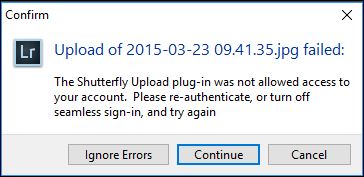
and I posted about it here. Essentially, Shutterfly broke something on their site (again). It’s been reported, but I haven’t heard anything from Shutterfly Support other than acknowledgement of my report.
The work-around for now is to turn off “Seamless Sign-in” (see the plug-in help for more information). You’ll have to provide your user ID and password when you do uploads, but at least you’ll be able to upload. -Don]
]]>I’m trying to figure out a way to use your plugin to upload directly to a shutterfly share site that I created. Do you know if that is possible? The only way I am seeing is if I upload to my shutterfly account and then add them to the share site from there. I would really like a “one click and walk away” option to go straight to the sharesite. I’m new to shutterfly and your your plugin, so maybe I’m just missing it.
Thanks for your help!
[Unfortunately, TJ, Shutterfly doesn’t provide a way for me to upload directly to a “Share Site”. As you’ve guessed, you first need to upload your images to your Shutterfly account, and then share them to the site. -Don]
]]>Thanks,
Steve