But of course, they did exist, and were announced ten years ago this week. Here’s a bit from Apple Newsroom back on October 27, 2016:
Apple today introduced the thinnest and lightest MacBook Pro ever, along with a breakthrough interface that replaces the traditional row of function keys with a brilliant, Retina-quality Multi-Touch display called the Touch Bar. The new MacBook Pro features Apple’s brightest and most colorful Retina display yet, the security and convenience of Touch ID, a more responsive keyboard, a larger Force Touch trackpad and an audio system with double the dynamic range. It’s also the most powerful MacBook Pro ever, featuring sixth-generation quad-core and dual-core processors, up to 2.3 times the graphics performance over the previous generation, super-fast SSDs and up to four Thunderbolt 3 ports.
The Touch Bar places controls right at the user’s fingertips and adapts when using the system or apps like Mail, Finder, Calendar, Numbers, GarageBand, Final Cut Pro X and many more, including third-party apps. For example, the Touch Bar can show Tabs and Favorites in Safari, enable easy access to emoji in Messages, provide a simple way to edit images or scrub through videos in Photos and so much more.
(The video of this event is available on YouTube.)
The 2016 machine replaced the original run of Retina MacBook Pros, which many believed was the best Mac notebook of all time. That included Marco Arment, who wrote this in 2017:
Apple has made many great laptops, but the 15-inch Retina MacBook Pro (2012–2015) is the epitome of usefulness, elegance, practicality, and power for an overall package that still hasn’t been (and may never be) surpassed.
Introduced in 2012, less than a year after Steve Jobs died, I see it as the peak of Jobs’ vision for the Mac.
It was the debut of high-DPI Macs, starting down the long road (which we still haven’t finished) to an all-Retina lineup. And with all-SSD storage, quad-core i7 processors, and a healthy amount of RAM all standard, every configuration was fast, capable, and pleasant to use.
The Problems
The 2016 MacBook Pro was not pleasant to use. A decade later, I would lump its issues into four main categories, ranked from least bad to worst.
A Confusing Lineup
Before this announcement, Apple had the 12-inch MacBook, the non-Retina MacBook Air, and two sizes of the MacBook Pro. It was a little messy, but Apple’s biggest sin in this era was leaving the MacBook Air to die on the vine.
As part of this announcement, the company doubled down with a new entry-level model that diluted the MacBook Pro name and made the MacBook Air look even worse.
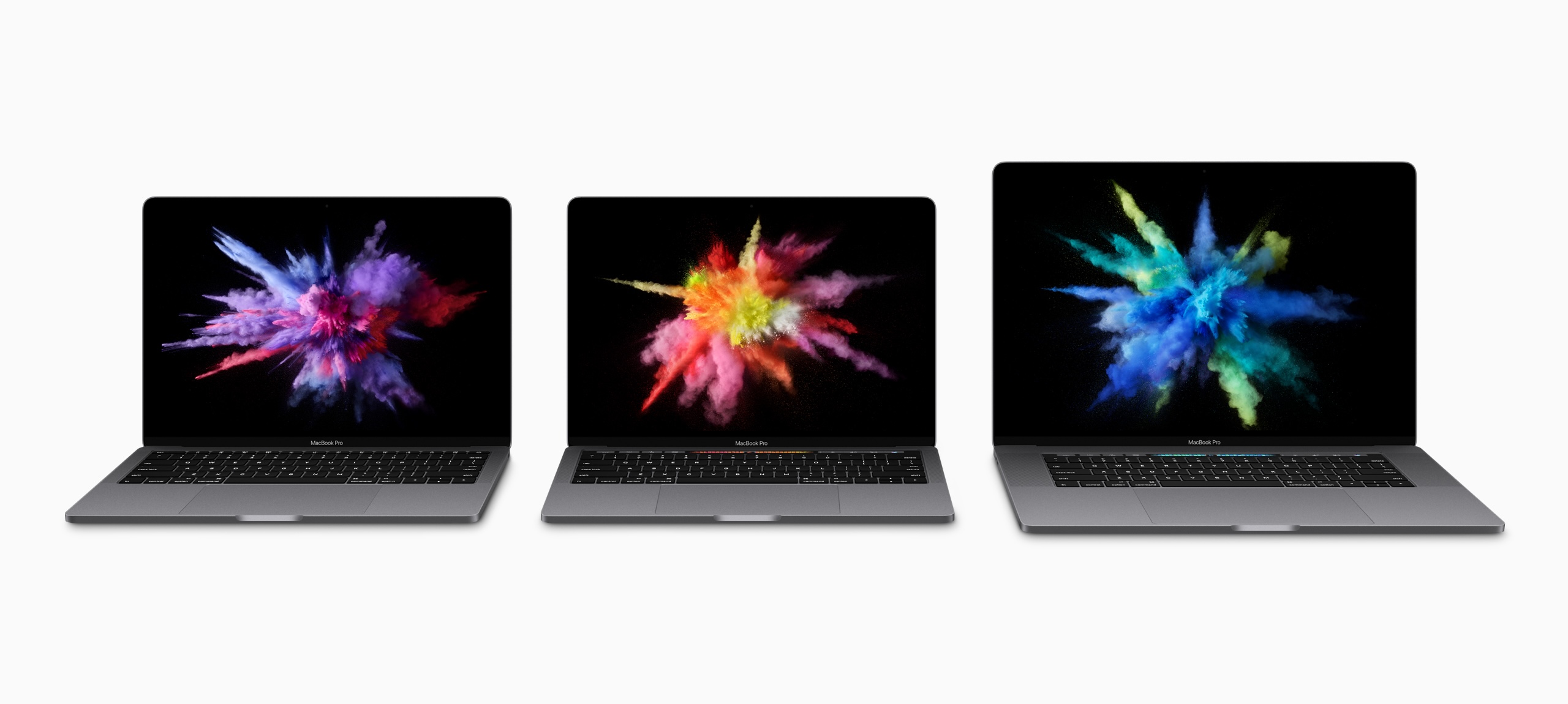
I complained about this a lot at the time, but in hindsight, it was the smallest problem created by the 2016 MacBook Pro.
The Touch Bar
When announcing OS X Lion, Steve Jobs mocked touchscreen notebooks, saying they made your arm want to fall off,1 then went on to praise Apple’s newest trackpads and their gesture support.
When introducing this new laptop, Phil Schiller doubled down, touting the Touch Bar as the perfect solution. Since it was just a screen, its UI could change to meet the moment. Dealing with email? Tap a mailbox’s name and file a message away in an instant. Editing a song in Logic? Just tap a virtual button to make a cut instead of using a keyboard shortcut. Using the perfect emoji was just a swipe away.

In many ways, this was an echo of the plastic-keyboards-are-bad argument about the original iPhone, just applied to the Mac.
In my hands-on with the machine, I wrote this about the Touch Bar:
I liked that it surfaces things in complex applications like Final Cut Pro X and Numbers, but the inconsistent usage and mode switching that has to take place to find things would need to be second nature before I considered it helpful day to day. I think there’s a ton of potential here, though, and it’s still early days of this thing.
Sadly, the Touch Bar never lived up to that potential. Some third-party developers did clever things with it, and the Control Strip allowed for customization beyond what traditional function keys could offer, but those things weren’t enough.
Many apps — including those bundled with macOS — offered wildly different experiences, and some apps ignored the Touch Bar altogether. Apple never figured it out, and the Touch Bar quickly grew stale.
That doesn’t even get into other issues, like the fact you had to take your eyes off the screen to hit the right button, or that it sometimes just froze, or that the Escape key (for a while) was locked away in software.
I know some people loved the Touch Bar, but it didn’t change the way the vast majority of people use their Macs, and it rightfully died in the move to the current design.
A Lack of Ports
Here we’re starting to run into real issues. I carried around this set of dongles for years.

USB-C and Thunderbolt are amazing, but the world wasn’t ready to go all-in. Sometimes cutting old features works out, but it did not in this case.
I think it’s very telling that the current models brought back MagSafe, HDMI, and the card reader. The arrangement is perfect, here ten years later.
The Butterfly Keyboard
The best only good part of the keyboard on these machines is that it introduced Touch ID to the Mac, something millions of people use every single day.
The tale of the Butterfly Keyboard has been told before, but in short, Apple designed a new keyboard switch for the ultra-thin MacBook, then used it across its notebook line. It was unreliable and fragile, and Apple tried to fix it with things like membranes under the keys to keep dust out.
The whole thing was miserable, and it took Apple way, way too long to replace it.
…but replace it they did!
A Partial Solution
In November 2019, something wonderful happened. Apple PR:
Apple today unveiled an all-new 16-inch MacBook Pro — the world’s best pro notebook — designed for developers, photographers, filmmakers, scientists, music producers and anyone who relies on a Mac to create their life’s best work. The all-new MacBook Pro features a brilliant 16-inch Retina Display, the latest 8-core processors, up to 64GB of memory, next-generation graphics with up to 8GB of VRAM and a new advanced thermal design, making it the most powerful MacBook Pro ever.
Featuring a new Magic Keyboard with a redesigned scissor mechanism and 1mm travel for a more satisfying key feel, the 16-inch MacBook Pro delivers the best typing experience ever in a Mac notebook. The 16-inch MacBook Pro also includes a six-speaker sound system, longer battery life, Touch Bar, Touch ID, the Force Touch trackpad and the Apple T2 Security Chip.
I picked one of these machines up, and it was pretty great. It ran cooler than my previous MacBook Pro, and the keyboard was an unbelievable improvement over the garbage fire that was the Butterfly Keyboard.
The new Magic Keyboard slowly spread across Apple’s line, with the MacBook Air getting it in March 2020, and the 13-inch MacBook Pro getting updated a couple of months later.
A Return to Sanity
That 13-inch-with-a-Touch-Bar-and-Magic-Keyboard-but-just-Thunderbolt-ports MacBook Pro survived the Apple silicon transition, receiving the M1 in November 2020, and an M2 in June 2022. By then, it was the low-end model, with much better machines as bigger siblings.
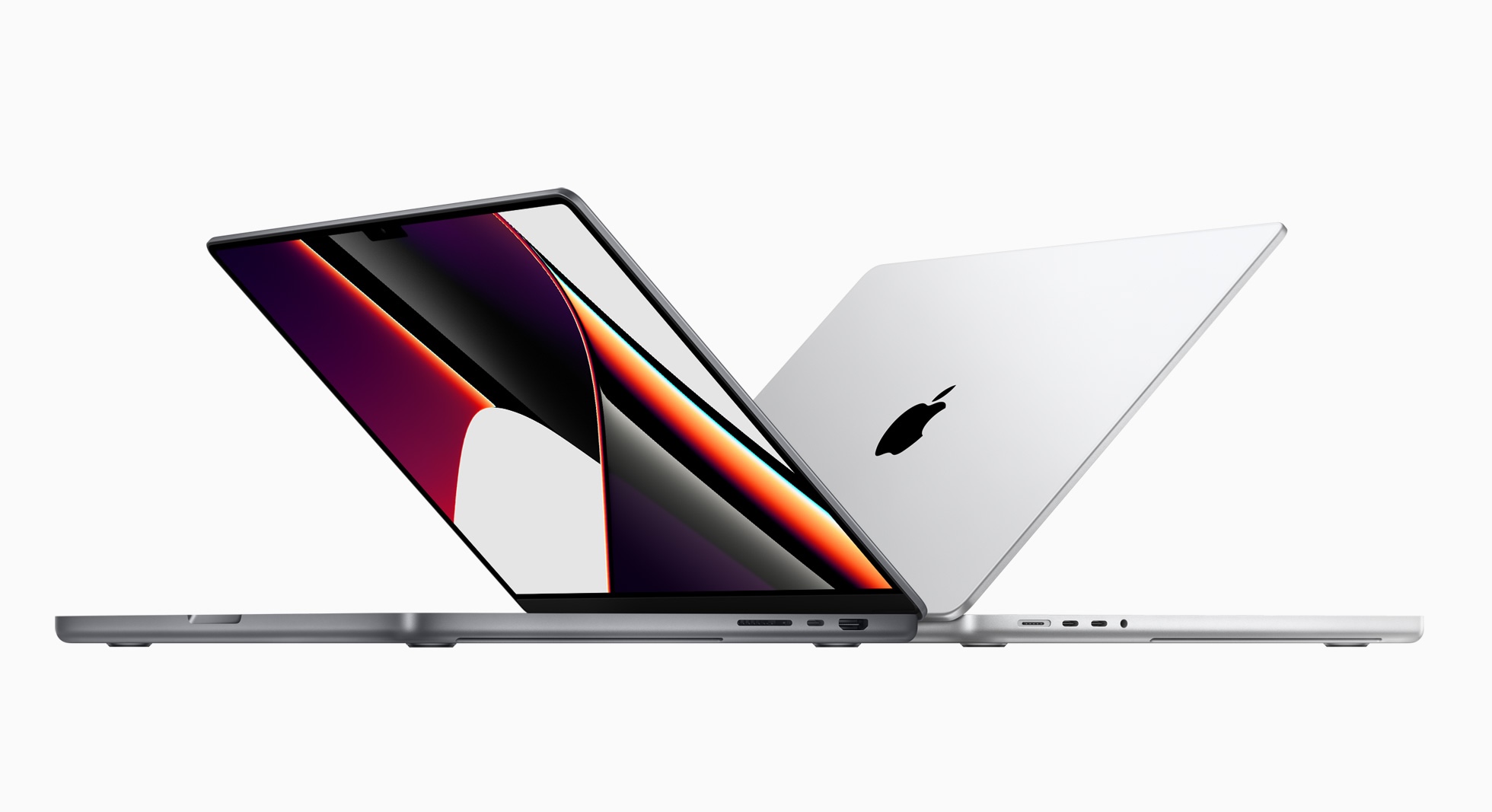
The current 14- and 16-inch MacBook Pros are incredible machines, and I believe they live up to the hype of the beloved 2012-2015 models. They have the right IO, a great keyboard, amazing battery life, and are mind-blowingly powerful. My current M4 Max 14-inch is by far the best laptop I have ever owned, even if macOS still doesn’t really know how to handle the stupid notch.
In hindsight, it’s hard to believe the same company that shipped the 2016 class of machines made the current crop.
What Comes Next
If rumors are to be believed, we are on the precipice of a new generation of MacBook Pro that will usher in the Mac’s touchscreen era, with new OLED displays, updated chassis, and even more powerful SoCs.
I am extremely curious what it will be like to touch macOS, but this article is about the hardware. On that front, I expect Apple will do the right thing by the MacBook Pro. MagSafe is here to stay, and I bet the other ports are as well. Eyeballing the side of my machine, there’s a little room to be thinner without needing to remove the HDMI port or SD card reader.
The company’s hardware chief is its new CEO, and it seems that his old department has been firing on all cylinders for a long time. I’m excited to see what they have cooked up for the next MacBook Pro.
-
That clip is going to get played endlessly when Apple unveils touchscreen MacBook Pros in a few days, but such is life. Things change, and that quote is ancient. It really is okay to move on. ↩︎
In researching the Designed in California series, I was struck by just how quickly the iPod’s importance was overshadowed by the iPhone. There are barely more than five years between the launch of the iPod and the launch of the iPhone. While both products took time to grow into their markets, I think it’s still the case that the true “iPod era” was only a handful of years long, and it’s been entirely overshadowed by the product that came after it.
That’s a shame, in a way, because I think people who didn’t live through this era don’t understand just what a hit the iPod was. It completely changed Apple’s fortunes, rehabbed its brand identity, gave people reasons to go into Apple’s relatively new retail stores for the first time, and taught Apple lessons that it needed to learn before it could build a smartphone. (The iPhone’s hardware was largely built by the iPod team, even if the software came from the Mac.)
Don’t miss his article for Tom’s Guide, either.
]]>While I was learning to build for the Duo, I wanted to make an app that made sense in ALL the different poses. So of course I made a weather app! After a 10-year hiatus, Check the Weather is back, with a delightful new design that’s as flexible as the weather is changeable.
I’m a big weather radar nerd and wanted an app that put radar front and center, while still giving quick access to all essential info.
Matthew Skiles’ new icon is awesome, and Rafa Conde absolutely killed it on the design side. It looks great on boring old slab iPhones and really great on the Duo:
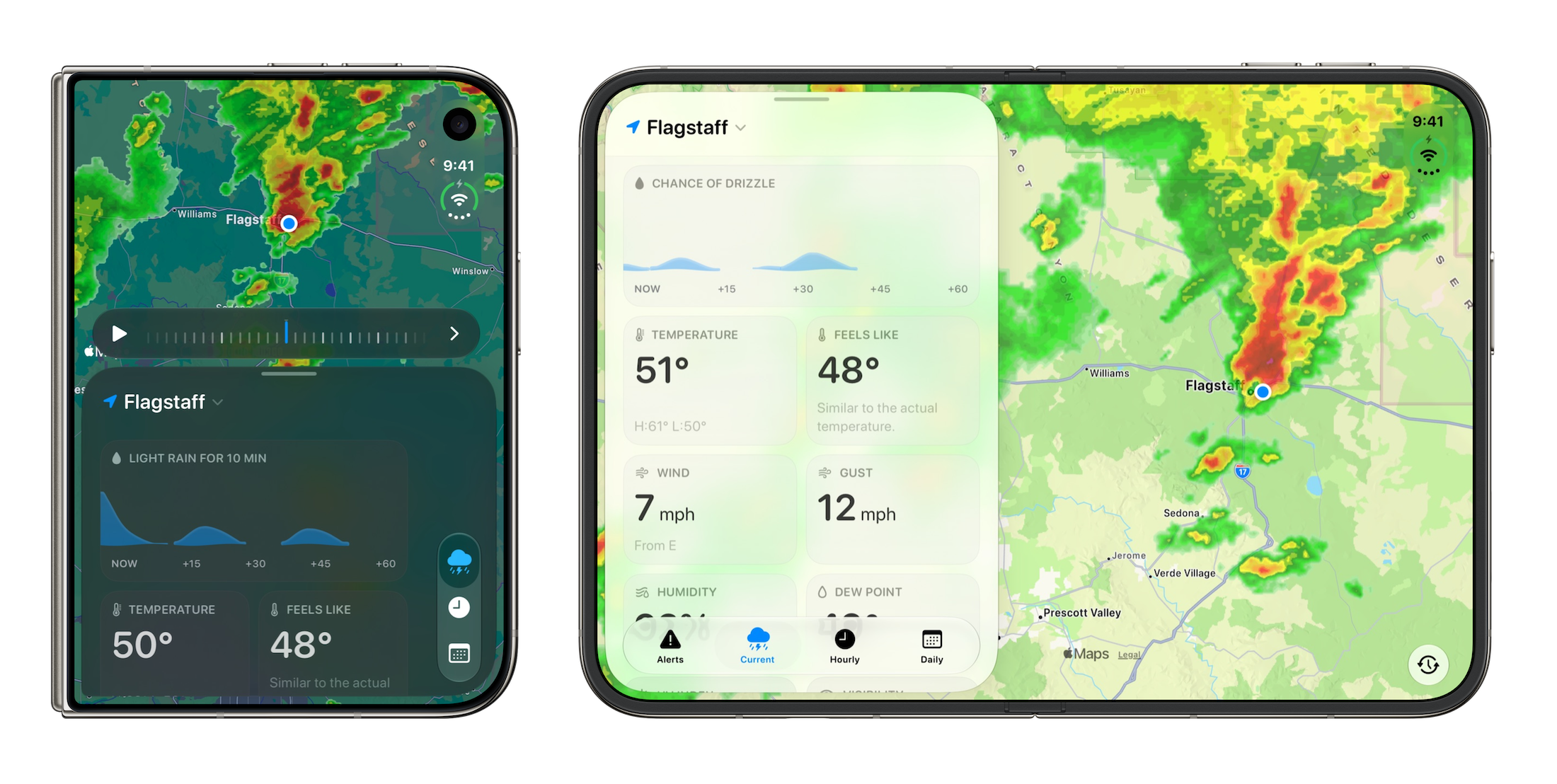
Getting this app together has been a blast, as we got to rethink and rebuild it from the ground up. It’s wild that I reviewed the first version nearly 14 years ago and got to work on its new iteration. I would encourage you to go check it out in the App Store. It’s got a free 7-day trial, then it’s $1.99/mo or $19.99/yr.
]]>
I think the MacBook Pro is about to enter its touchscreen era.
]]>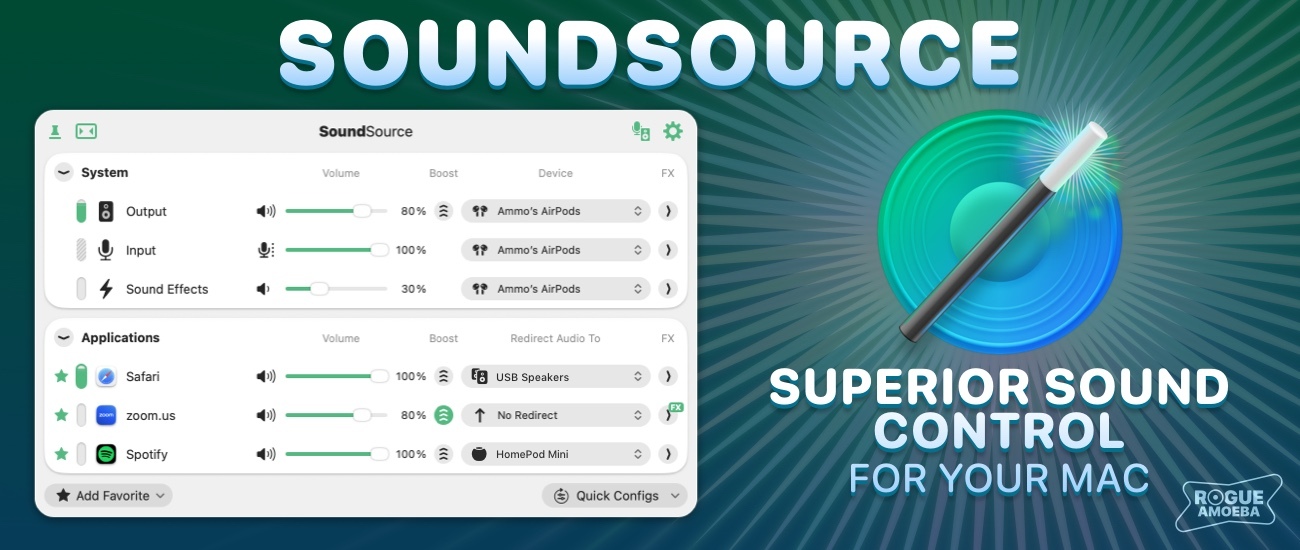
It starts with volume controls for each and every app on your Mac, all in one place: your menu bar. Turn down noisy websites without affecting your music, or boost a quiet video call past the usual maximum.
SoundSource does much more than just volume, though. Use it to send any app’s audio to a different device, so your music plays through your desk speakers while your calls stay in your headphones. Built-in effects like Magic Boost and Headphone EQ bring better sound to the tiniest speakers and your favorite headphones, and experts can even use it to apply powerful Audio Unit plugins to any app.
Once you’ve used SoundSource, it’s hard to imagine your Mac without it. Try it free before you buy. And, as a 512 Pixels reader, you can save 20% on SoundSource with discount code 512SOUND in Rogue Amoeba’s online store through the end of the month.
My thanks to Rogue Amoeba for sponsoring 512 Pixels, and for more than two decades of great Mac audio software.
]]>]]>Apple Store employees told MacRumors that they have been advised that there will likely be no iPhone Duo stock available for walk-in purchases on launch day. Staff have been instructed to discourage customers without pre-orders from coming in expecting to buy the device, warning that they will be disappointed.
Apple’s online store tells customers to check back on Saturday, October 24 for pickup availability. Pickup reservations were briefly available when pre-orders opened before the option was disabled.
The October 24 message does not guarantee stock will be available that day, and it remains unclear how firm the warning shared with employees is and whether it applies worldwide.
The Apple Store app on my phone loaded first, and that’s when I learned a terrible truth:
I could only choose Apple Stores near me for pickup, and uhhh, I am not flying across the country again next week to pick this thing up.
I just tried again, out from under the pressure of doing this in the first few minutes of availability, and for the life of me, I cannot find a way to tell the app you want to pick up a phone someplace other than your current immediate region.
By the time the website came up over six minutes later — where you can search for other Apple Stores1 — my ship date had already slipped to the end of November or early December.
It seems that my work2 on Widgetsmith and our other apps will be constrained to the simulator a little longer. It is also nice to have the new thing when it’s new, so I can write and talk about it when it’s new.
I guess the upside is that, now that shipping dates have slipped into 2027, the iPhone Duo will be new for a long time.
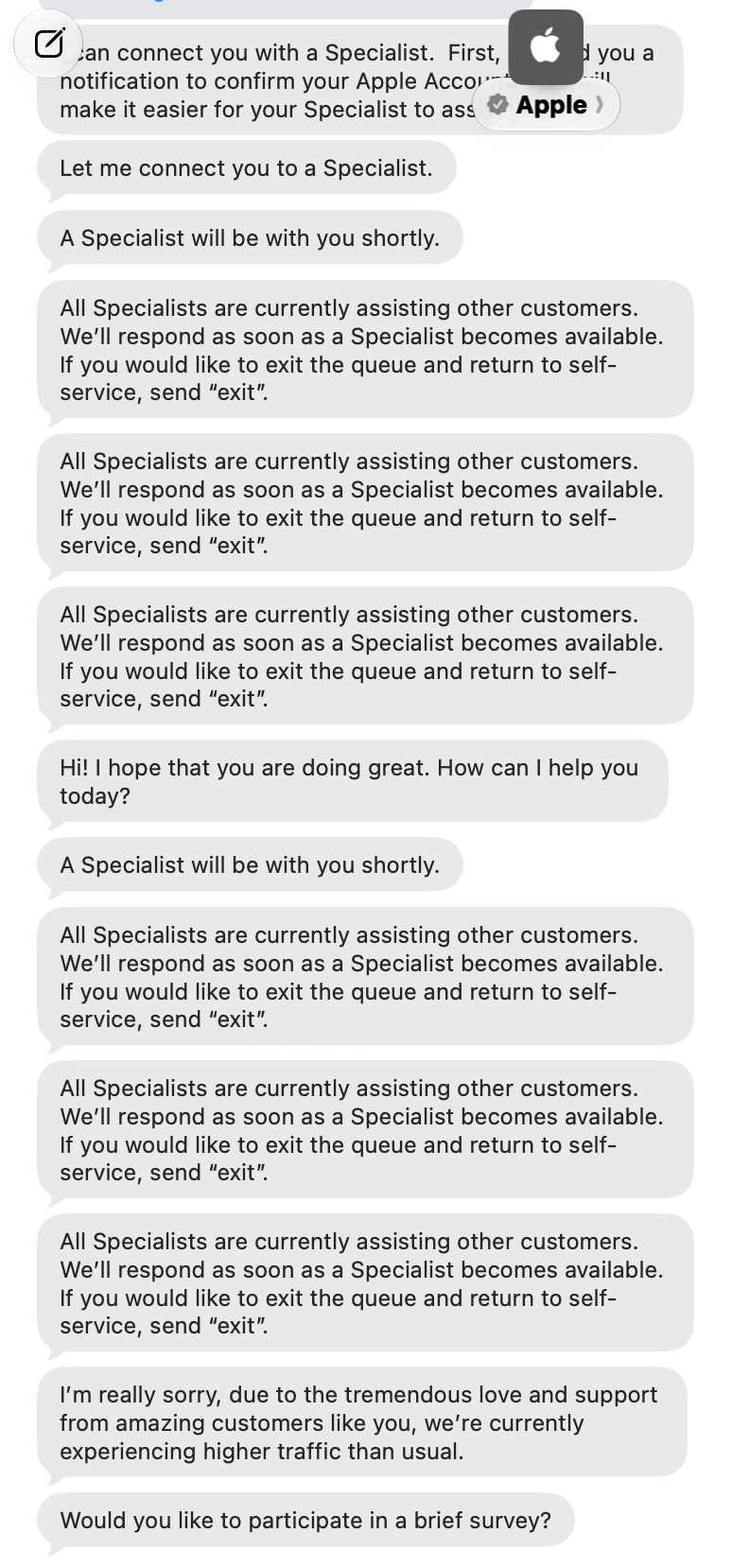
Best I can tell, there is not a way to change a delivery into a pickup, but currently the Apple Store support chat just won’t connect. Maybe they can change it, or I’ll get lucky with a walk-in, but this is a really dumb limitation of the Apple Store app.
Update: I haven’t been able to talk to Apple Support, but I’ve got a Best Buy order for November 3. Wish me luck.
-
I’m actually traveling again on launch day, so I wanted to pre-order at an Apple Store in the city where I will be. So even if the only other option was “Your Home Apple Store,” I’d still be stuck. ↩︎
-
I know some folks got calls from their local Apple Store Business Reps about pre-ordering through them. I had a voicemail from my store, but this morning realized they never called me back after I left them a voicemail in return. I guess that’s okay; I’ve seen folks say phones ordered that way are not arriving until the end of January. ↩︎
| Repair | Price |
|---|---|
| Cover layer damage | $49 |
| Back glass damage | $199 |
| Battery service | $229 |
| Rear camera damage | $229 |
| Outer display damage | $379 |
| Outer display and back glass damage | $509 |
| Inner display damage | $999 |
| Other damage | $1,499 |
I’ve been using AppleCare One for a while now, and recently moved to the AppleCare One Family. For my family, it was a good bit cheaper than all five of us having our own AppleCare One accounts.
]]>Don’t bet against the smartphone.
It’s amazing how many products have run straight into this idea, like a sprinting outfielder who hasn’t slowed down in time to avoid the wall.
There are some obvious examples, especially in our AI-crazed day. The Humane AI Pin never stood a chance. The Rabbit R1 is beautiful, but is at best a novelty. The friend is never going to escape the gravity of its own domain name.
I think there are some less obvious examples as well. Think back to 2014, when Tim Cook announced the Apple Watch, and Kevin Lynch’s wide-ranging demo that showed the Watch as capable of almost everything the iPhone was. Apple has since learned that the Watch is a peripheral to the iPhone for folks who want health and fitness tracking, as well as easy access to notifications.
I mean, how many times do you glance at your watch, see a message, and pull out your iPhone to respond?
The HomeView may be on a similar trajectory.
When I showed my wife Apple’s video featuring the new product, she turned to me and asked:
Why wouldn’t I just use my phone for that stuff?
I’ve been turning that over in my head for the last day or so, and then heard very similar thoughts from Ben Thompson and John Gruber on Dithering.
It is way too early to know how this will shake out. Some folks will undoubtedly find the HomeView useful, and I do think there are real use cases where it will shine.
I highly doubt that any family will use their HomeView the way the family in that video did. Of course the iPhone will continue to be the most important product in Apple’s lineup, but that doesn’t mean the HomeView isn’t worth doing.
For some folks, it will really click, and it puts Apple in the home category in a new and fun way. I like that the HomeView is a little weird, and we should encourage Apple to experiment with products that are a little weird. For years, it’s felt like the company has been too conservative with new products, and I suspect John Ternus has more things like this on the way.
While it is doing some very clever things, it is an ancillary device, and one that not everyone with an iPhone will want or need. At Apple’s scale, even ancillary devices are big businesses. Even if most iPhone users look at this thing and shrug, it was still worth doing.
]]>I think Apple’s just-announced HomeView may be the latest entry in the list of things that prove Ferguson’s point.
To put it in another set of terms: the HomeView is “new but somehow familiar,” to borrow a Jony Ive phrase. I think it applies to just about every aspect of this product.
The HomeView’s existence is not a surprise, as it was rumored for ages. With it, Apple has moved into a space previously occupied mostly by products from Google (Nest?) and Amazon, albeit at a higher price point. What does that $299 price get you?
Hardware
Right off the bat, we have to address something — a bunch of people have compared it to the iMac G4:
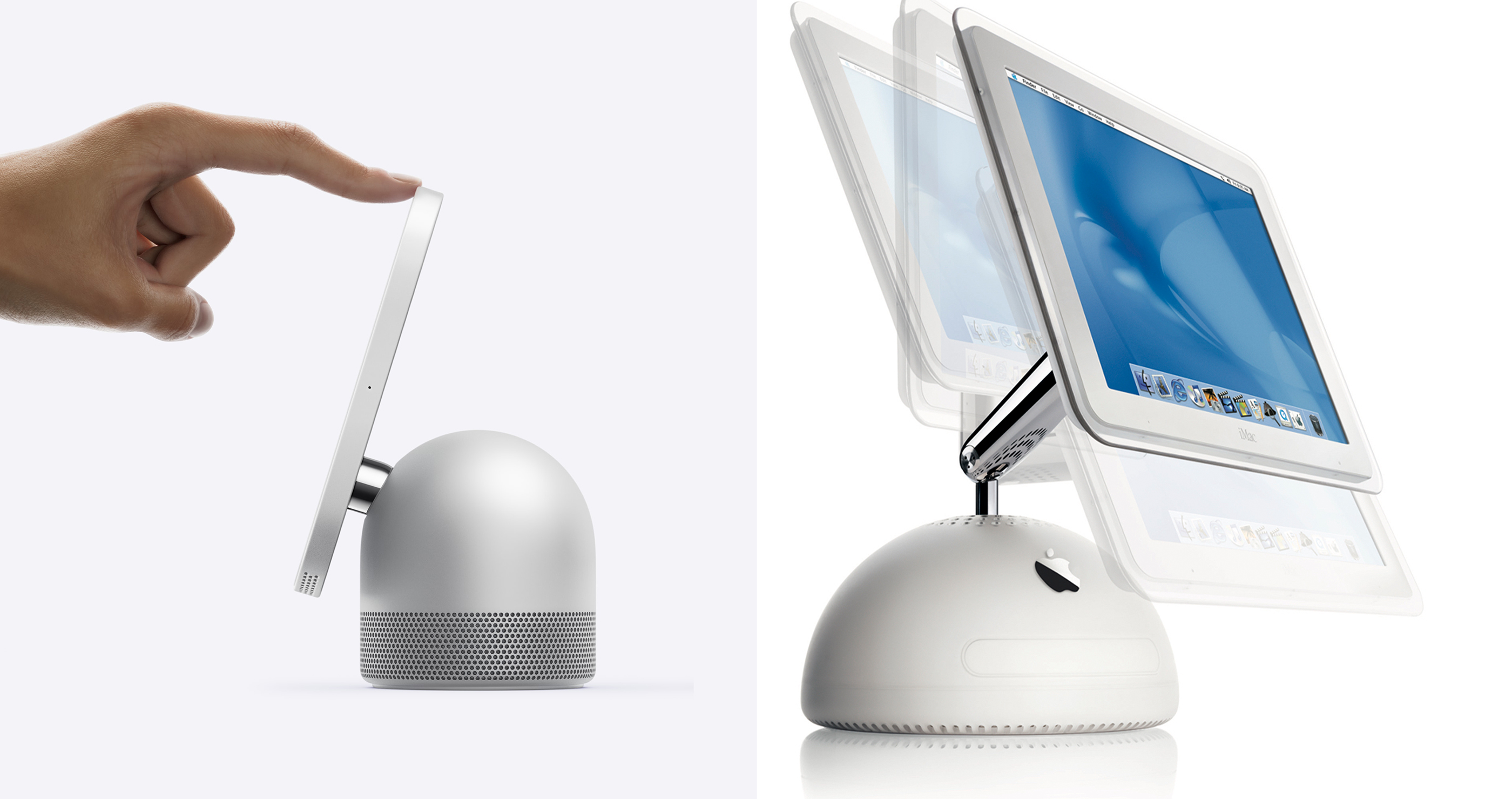
I mean, come on. Sure, the HomeView’s 7-inch square display doesn’t move in all the ways the iMac’s display did, but I’ll take a hit of that sweet nostalgia. If the next version includes a larger display with more flexibility, I may pass out.
From the front, the HomeView strongly resembles an Apple Watch sized for a giant. The aluminum base looks right at home in Apple’s lineup, and should wear much better than the fabric-covered HomePods, especially in a kitchen.
I am very curious as to how it sounds. The base and its included woofer aren’t that big, and Apple has put some of the speakers in the display to compensate. I assume Apple has done a good job here, but I’m looking forward to hearing one myself.
Apps & Services
Here are the biggest remixes. The clock face looks a lot like Apple Watch faces1 and iOS’ StandBy had a baby:
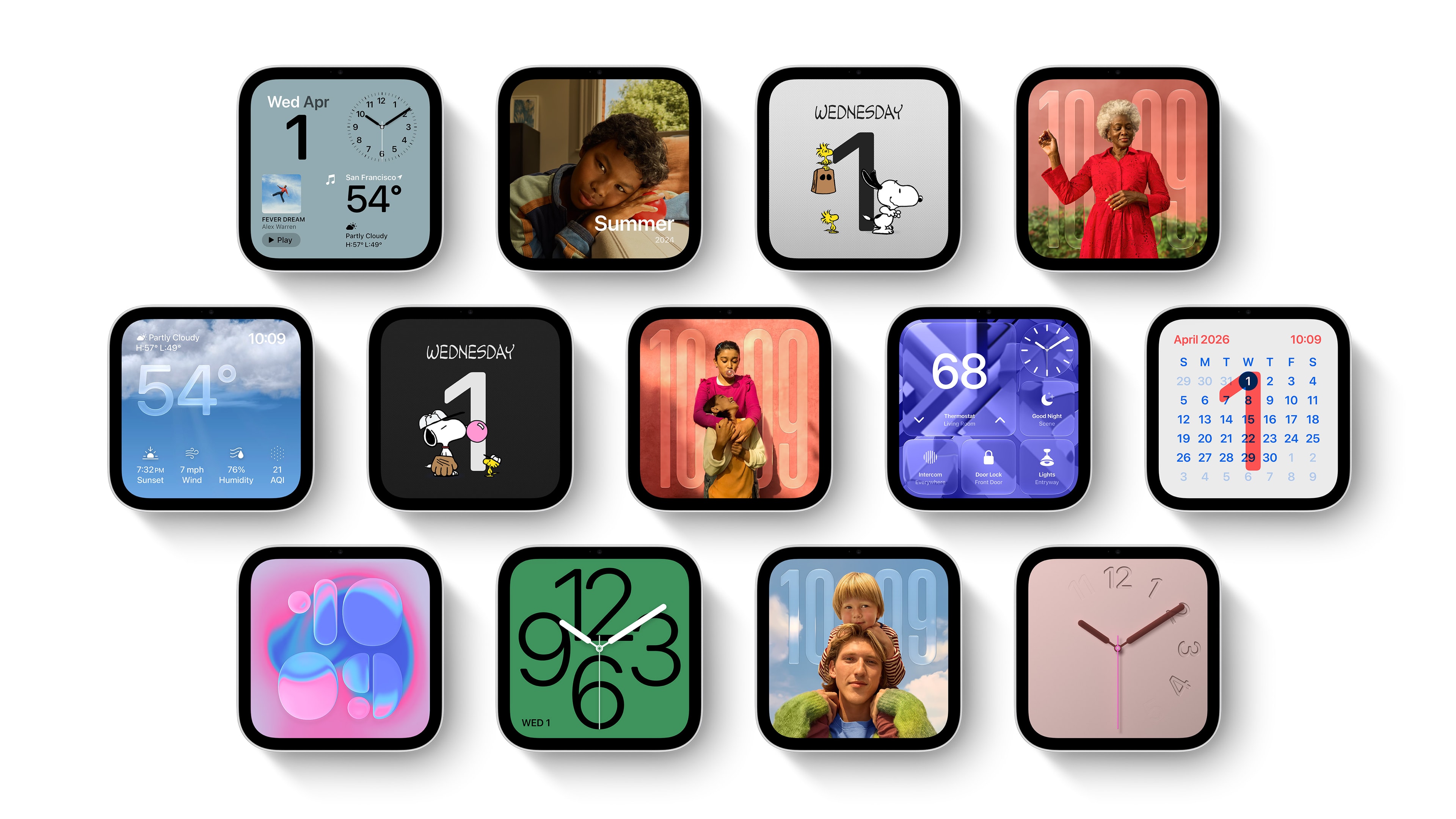
I love the customization here; I think finding a setup that matches your space will be totally doable.
Apple’s own apps follow this same trajectory. Reminders, Home, Music, Podcasts, and more look like themselves, just tweaked for the form factor. If your life is in these apps, the HomeView will be much more useful.
A lot of that comes down to the third-party app story, which is … weird. Unlike basically every other part of Apple’s ecosystem, the HomeView does not have an App Store. Instead, it has Apple’s built-in apps and “compatible third-party audio and video apps.”
Under the hood, it seems that some of these apps will be projected from the user’s iPhone, not unlike CarPlay apps. Here is a bit from Julian Chokkattu’s article at Wired:
It doesn’t have an App Store. Instead, Apple has a curated selection of apps, including FaceTime, Messages, and Safari. A handful of third-party media apps like Spotify are available, and developers can bring over existing CarPlay apps. If your iPhone already has one of these CarPlay apps installed, it can automatically appear on the HomeView after setup. (There are no video streaming apps like YouTube, Netflix, or Disney+, but if those companies choose to make their apps available on the CarPlay framework, they will show up on the HomeView; for now, you’ll have to consume videos by using the Safari browser.)
Will the HomeView become a carrot for developers to support CarPlay? I doubt it, but time will tell.
This may seem like it goes against my premise that the HomeView is a remix, but I don’t think it does. Instead of an App Store, HomeView relies on Apple’s first-party apps and the user’s iPhone — and the apps that are already on that device. The glue holding most of that together? A mix of iCloud and Continuity.
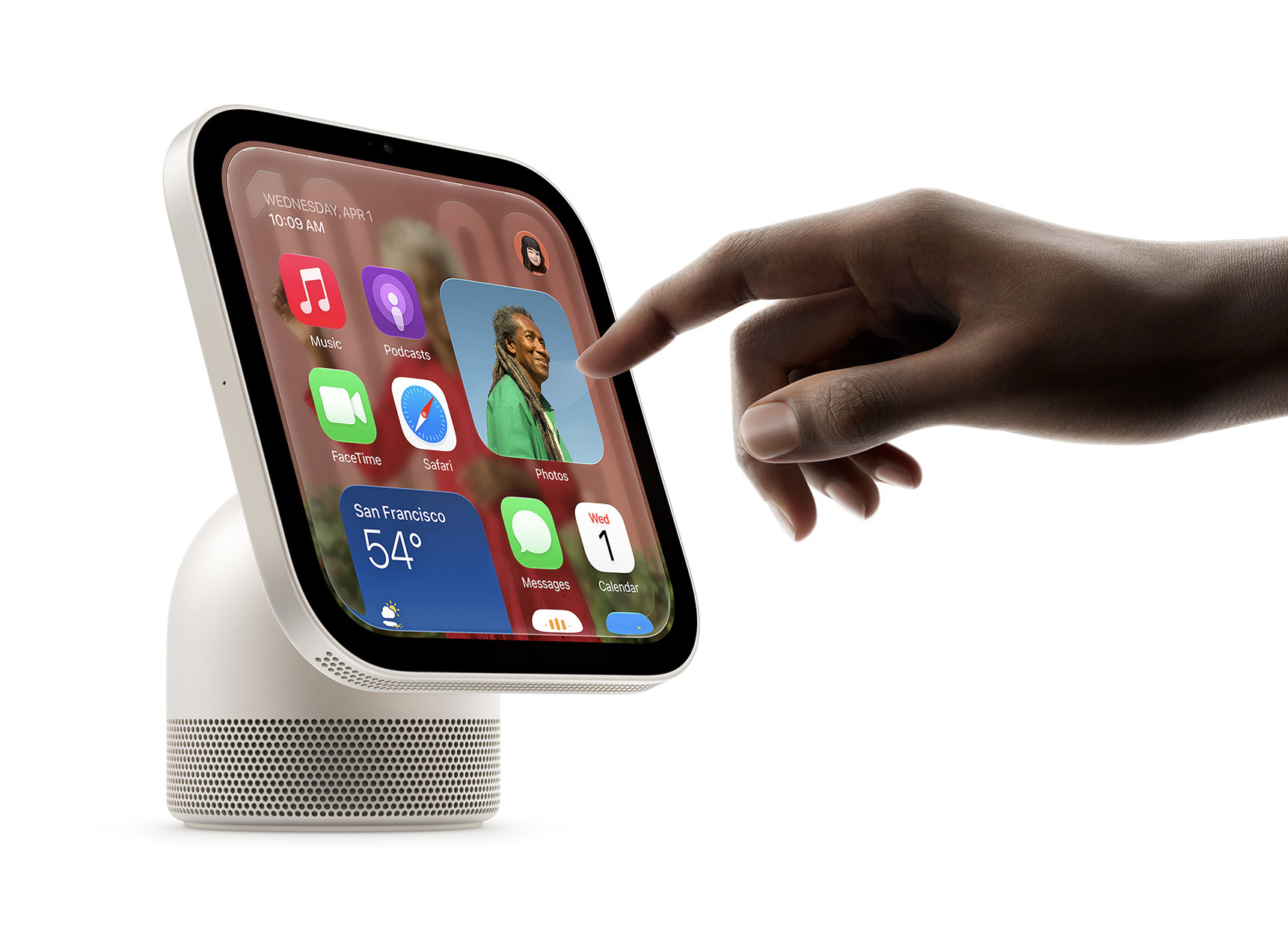
Whatever apps are available, they are all accessible on a scrolling screen intermixed with widgets. Apple hasn’t shared a lot of information about this — the HomeView isn’t even on the developer website as of this writing — but Apple has a couple of ways that widgets can show up across devices.
Back in macOS Sonoma, Apple added the ability to show iPhone widgets on the Mac. In iOS 26, CarPlay gained support for iPhone widgets as well. I fully expect that all third-party iOS widgets will be able to run on the HomeView, just as they do on the Mac.2
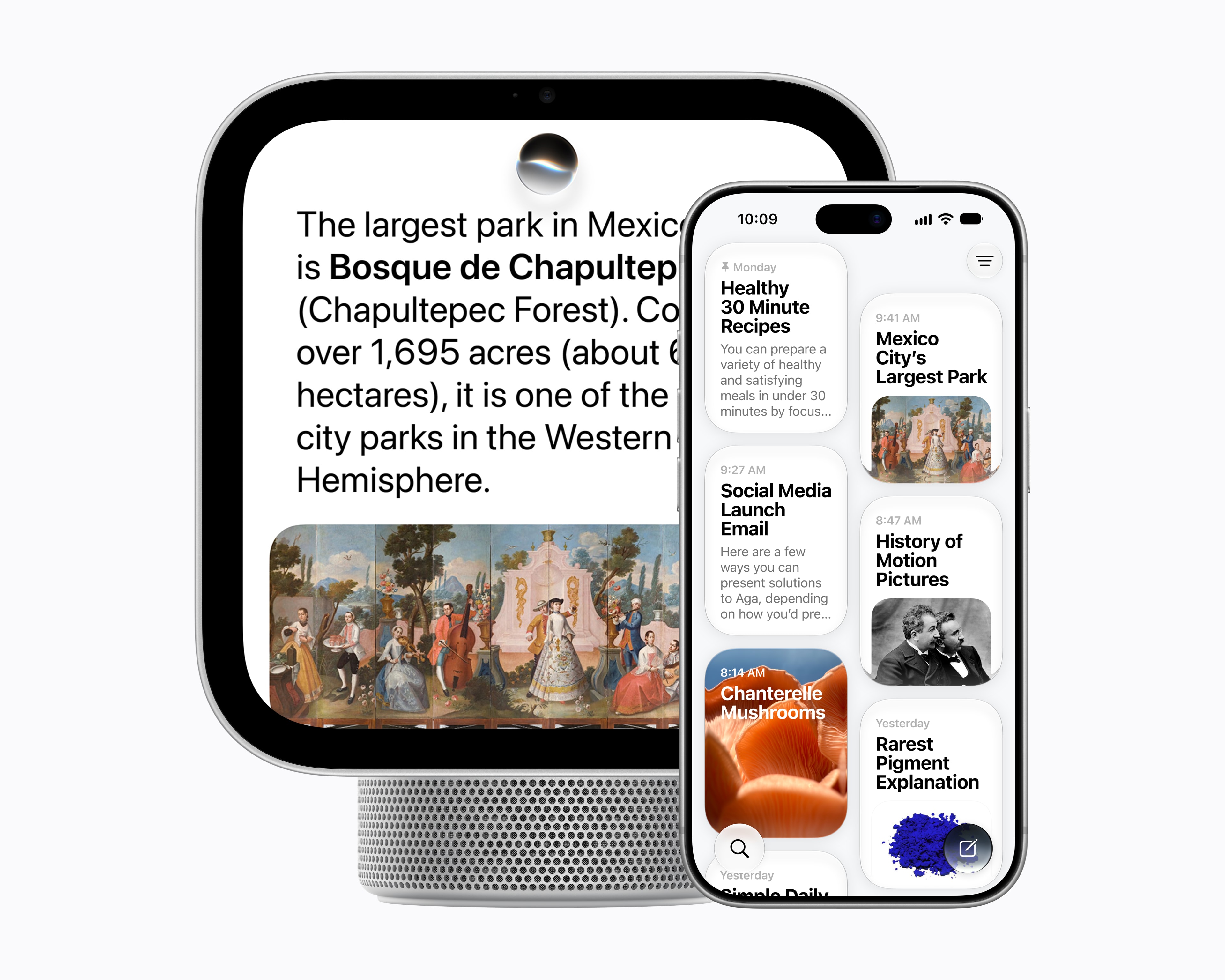
Then there’s Siri AI, which is at the heart of the product, and supposedly why it didn’t ship a year ago. The HomeView taps into your personal context, just like your iPhone, iPad, and Mac. That means it should be able to extract details from your messages, emails, notes, calendar, and more in response to a query. Siri AI can also pull from its world knowledge and will sync conversations back to the Siri app on your iPhone.
Smart Home Controls
In addition to Apple’s first-party apps making it more useful, the HomeView’s value also comes from Apple’s smart home platform, which has seen both ups and downs over the years, but this product is a clear message from Apple that it believes in HomeKit.
The HomeView can easily become a smart home controller, with controls for your favorites. In most of Apple’s press photos, these controls are front and center, like this one of the wall-mounted version.
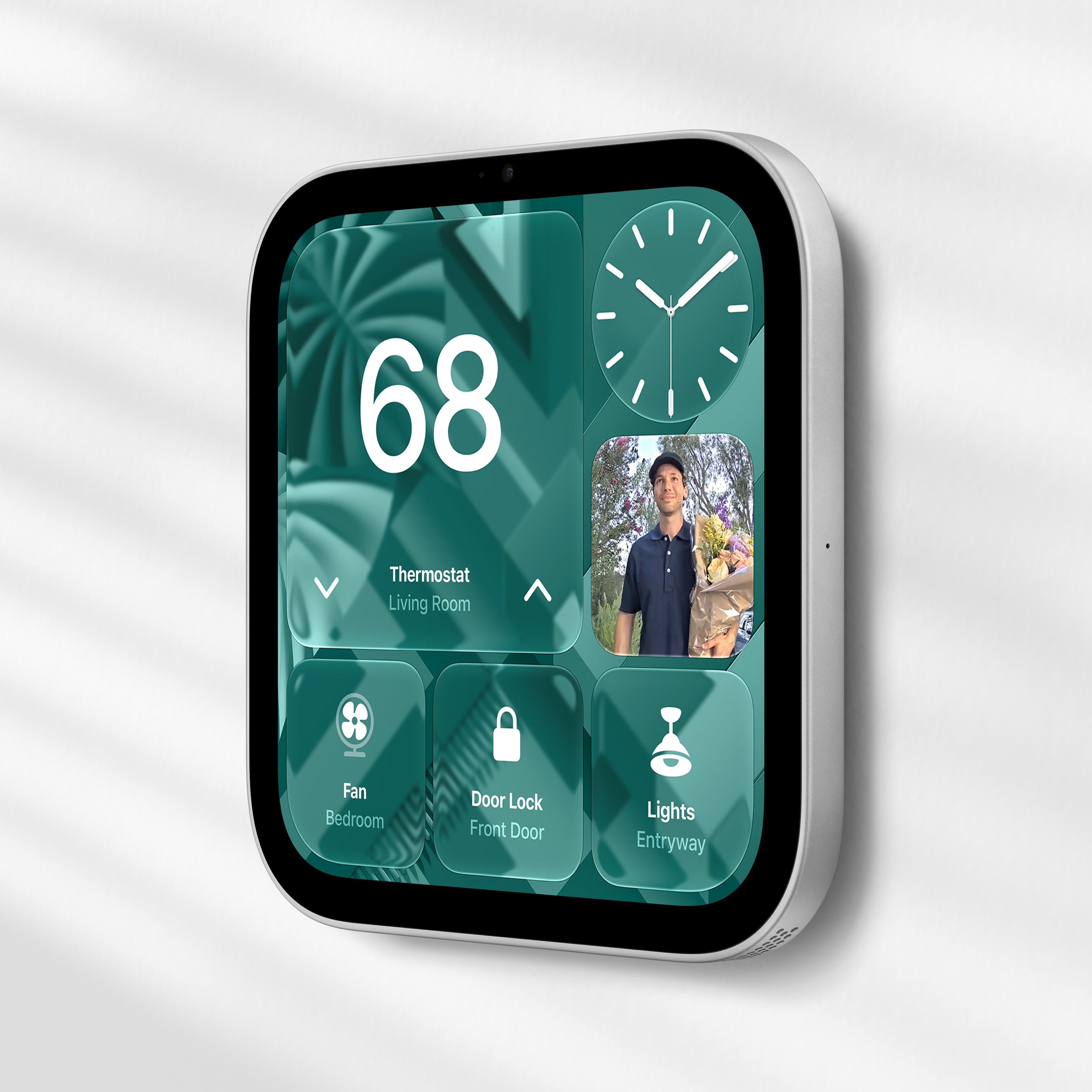
I run Home Assistant behind the scenes, but my family interacts with things like smart plugs and the garage door3 using HomeKit, usually via one of the HomePod minis4 I have placed around the house.
This has led to some frustration over the years when a HomePod doesn’t hear them correctly. Tapping a button would certainly clear that up.
Multiple Users
We now have a mix of hardware and software and services, but the HomeView goes one step further than some of Apple’s other products with its support of up to six users. Here’s a bit from Apple’s press release:
HomeView recognizes up to six people and delivers a personalized experience for each one. Each user gets their own personalized Home Screen with apps and widgets. Personal content stays private from others, while shared photo albums and music can be easily enjoyed by everyone in a household, including guests.
This recognition can be via sight (with the HomeView’s built-in Center Stage camera) or by voice, as shown in Apple’s promo video:
The video shows this working in a lightning-fast way, and I hope that is true. Out of everything about this product, this is the feature I am most curious about. I have had very mixed results with personal requests on my HomePod minis.
The Apple Way
The HomeView doesn’t bring that much new to the table in terms of raw innovation. Instead, it’s like some product folks walked around Apple Park, picked some of the best parts of the company’s ecosystem, and baked them into one device.
That is by no means a complaint on my part. As someone steeped in Apple’s ecosystem, I love that my notes and tasks and bookmarks and messages and events are on all of my devices, all of the time. The HomeView is a new surface for that content and information, and a showcase of what Apple can do when its various teams work together on something new.
-
Apple, if there was ever a time to allow developers to make watch faces, it’s now. ↩︎
-
Which I am obviously a fan of, given my work on Widgetsmith. (Does that mean I can expense my HomeView?) ↩︎
-
Apple also announced a slew of HomeKit-compatible devices, born from partnerships with LG and Schneider Electric. Most of the products look nice, but have alternatives on the market now with lower price tags. I am sure some folks will pick these up when “select accessories [become] available starting early 2027,” but I think this announcement is a bit of a nothingburger. ↩︎
-
(HomePods mini?) ↩︎

With familiar layer-based rendering and powerful typography tools, Mojave Paint works equally well for design or photography. Use masks on any filter or adjustment to get the right look on a photo, or make the best-looking flyer for a lost cat your neighborhood telephone pole has ever seen.
Sprinkled throughout, you’ll find nice touches you won’t find in competing products from the world’s billion-dollar companies. Keep an eye on the Mojave Paint blog for updates.
Mojave Paint is available on the Mac App Store with a 14-day free trial. After that, it’s normally $9.99, but this week it’s on sale for $4.99.
]]>The centerpiece is a new smart home hub called the HomeView. Equipped with a display and an A18 chip, the product essentially serves as the Siri command center for an Apple-powered household…
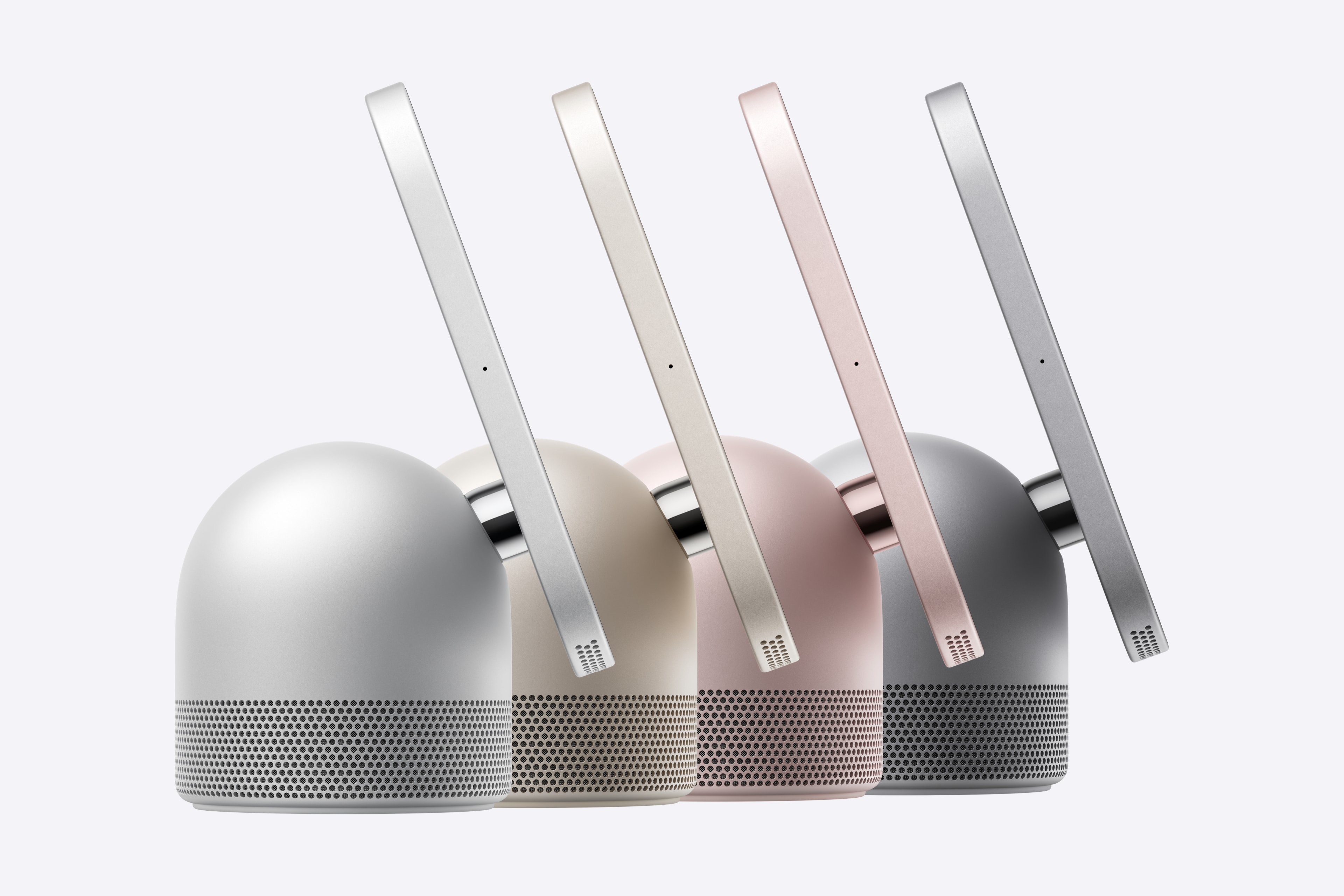
The HomeView comes in two versions: a countertop model with a metal speaker base and a wall-mounted version with a flat, square base that sits against the wall beneath the display. The countertop offering will come in four colors: space gray, silver, starlight and pink, while the wall-mounted version will be limited to space gray and silver.
I certainly like this name more than “HomePad.” This product is designed to give users a look into their personal information and smart home. HomeView totally works.
]]>Next week should be fun.
]]>]]>Federico talks about pixels, Myke talks about Steve Jobs, and Stephen talks about scratches.

We just closed our annual St. Jude campaign and raised an amazing amount of money. Together, the Relay community donated $756,200.97 to assist St. Jude in understanding, treating, and defeating childhood cancer and other life-threatening diseases.
That means that since 2019, the community has given just shy of $5.6 million for this noble cause. That number truly leaves me speechless.
From the bottom of our hearts, thank you. Your donations mean that more families will have more tomorrows with their children, just like we have enjoyed with our son.
]]>Here is the hotel in satellite view, and then in Apple’s 3D rendered view:


It seems that Apple does have the technology to make smooth pyramids!
]]>One evening a hand took it out, plugged it in and installed NAS Reborn. It heard the Mac in the study — which had never once spoken to — ask for a folder, and the iPhone appeared in the Finder as if it had always belonged there.
Then the Mac wanted to hand over its Time Machine backups. “I have only sixteen gigabytes,” the iPhone whispered. So the hand brought a hard drive, a broad, quiet fellow who hummed to himself, and joined the two with Apple’s Lightning to USB 3 Camera Adapter, which took the charger as well.
Soon it served a website over HTTPS, answered anyone who spoke S3 and took in Git repositories from Working Copy, all on a few watts. The things in the drawer did not believe a word, and the key still tells everyone that the iPhone is only resting.
NAS Reborn turns an iPhone 6s, iPad Air 2 or anything newer into a network drive for the Finder, the Files app and Windows Explorer. Join the TestFlight beta for iPhone, iPad and Mac at nasreborn.com.
]]>I expect we will hit our campaign goal while on the air, which is going to be magical. Tune in!
]]>At the center of the strategy is a smart-home hub code-named J490, according to people familiar with the matter. Apple also plans to announce the first update to the HomePod mini since that device’s 2020 debut and its first new TV set-top box since 2022.
…
The hub’s defining feature will be its ability to serve multiple members of a household. It is designed to recognize who is speaking to it or approaching it, and then display personalized content and provide answers based on that person’s data and accounts.
When a user walks up, for example, the device will show that person’s contacts, messages, calendar appointments, notes and preferred app layout. The interface can then change automatically when another recognized household member approaches. It will also have a mode for visitors that hides personal information.
The device identifies users by their voices or through a facial-recognition system, though the latter is less reliable than Face ID on the iPhone. Users can require secondary authentication through an iPhone if they don’t want to rely solely on voice or facial recognition. The iPhone also serves as a fallback when the hub cannot identify someone correctly.
I really hope this works well, but that’s on Apple to prove. A lot of the company’s devices are shockingly single-user.1
The HomePod can support multiple users, but my experience with that has been pretty rough. That’s not a big deal for a lot of people, but something with a screen is going to need to support families in a much deeper way.
Gurman’s reporting makes me optimistic about this being better, but I also have questions. Let me re-quote part of his article:
When a user walks up, for example, the device will show that person’s contacts, messages, calendar appointments, notes and preferred app layout. The interface can then change automatically when another recognized household member approaches. It will also have a mode for visitors that hides personal information.
We have a HomePod mini in our kitchen near the sink. The countertop in front of it is often used for food prep, and when things are busy, my wife, at least one of our kids, and I are all using that space. Is the HomePad just going to endlessly cycle between sets of information? What controls will I have to manage that from being a rotating billboard?
I can’t wait to see the details, because in a device like this, they really matter.
-
The iPad is the one that really gets me, especially since iPadOS does support multiple users under certain circumstances. ↩︎