In this blog, we explore a powerful new capability introduced in VMware Cloud Foundation (VCF) 9.1.1 which further enhances compliance and configuration management. Previously, VCF Operations offered Security Posture Management and Configuration Management only from the user interface. Now, admins have an option to manage compliance and configuration management with programmatic access via the API. … Continued
The post From Open Source to Enterprise: Understanding the VMware Salt API Evolution appeared first on VMware Blogs.
]]>
In this blog, we explore a powerful new capability introduced in VMware Cloud Foundation (VCF) 9.1.1 which further enhances compliance and configuration management. Previously, VCF Operations offered Security Posture Management and Configuration Management only from the user interface.
Now, admins have an option to manage compliance and configuration management with programmatic access via the API.
To provide context, we will first walk through the various forms of Salt before introducing our latest enhancement: the VMware Salt for VCF components API.
The open-source Salt API: Where it starts
The open-source Salt Project is a free, community-driven configuration management and remote-execution tool that lets you manage infrastructure at scale. It ships with its own REST API that lets you programmatically trigger and run commands on remote systems, apply configuration states, and orchestrate tasks across nodes. This open-source API is the foundational layer for all Salt deployments. It provides powerful remote execution and state management.
Open-source Salt is CLI-driven with limited built-in reporting, basic role-based access control configured using text files, and does not have a centralized UI by default. The open-source Salt API is best suited for teams that need raw Salt automation and are willing to build their own reporting, governance, and integrations around it.
How open-source Salt is built: The master–minion architecture
Under the hood, open-source Salt uses a master–minion architecture.
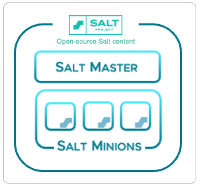
A Salt master is a service — a long-running process installed on a virtual machine or physical server — that acts as the central control node. It issues commands, stores configuration files, and coordinates work across the systems it manages.
A Salt minion is a lightweight agent process installed on each individual endpoint (system) you want to manage — whether that’s a VM, physical server, network device or other devices.
The minion receives instructions from the master and reports back results. The Salt master publishes jobs, and the Salt minions decide if the job is applicable to them. This architecture is simple and effective. Each master operates independently – there is no built-in mechanism for tying multiple masters together into a unified, centrally managed system. This limitation is part of what VMware Salt (described below) is designed to address.
VMware Salt and the VMware Salt REST API: The enterprise-grade layer
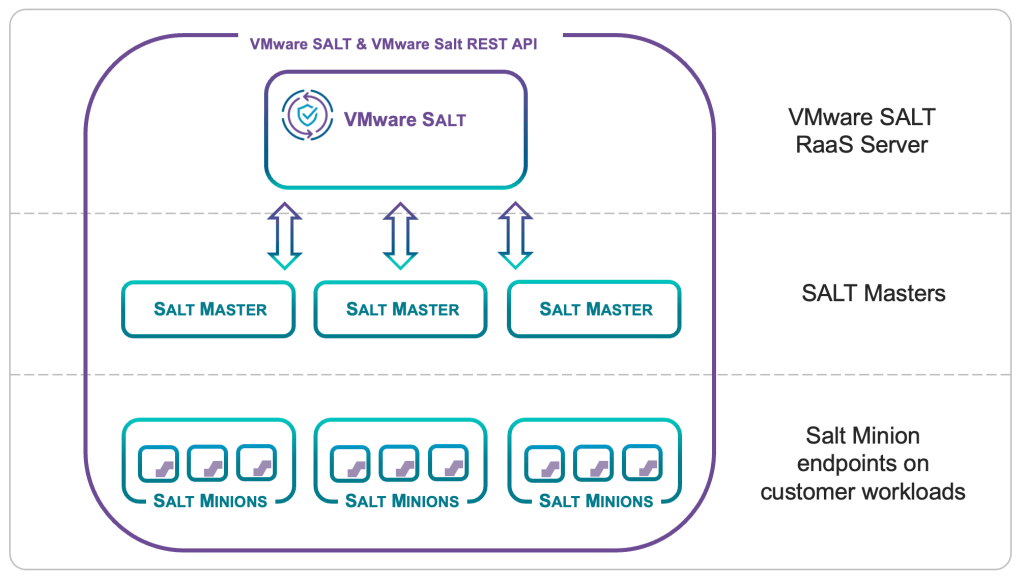
VMware Salt is an API-driven, database-backed platform used to provide compliance, configuration drift detection and remediation for Windows, Linux and containerized kubernetes-based workloads. VMware Salt provides full role-based access control (RBAC), a web GUI for centralized management and reporting, and support for multi-node and multi-region deployments. VMware Salt is available for VCF as an Advanced Service (licensed add-on).
The VMware Salt REST API is the REST interface exposed by the VMware Salt server, often referred to as the Salt RaaS server. It does everything the open-source Salt API does — triggering core Salt functions — and adds endpoints to provide enterprise-grade capabilities which are supported end-to-end by Broadcom. These capabilities include programmatic control of UI-driven actions such as user management and compliance reporting, scheduled jobs, centralized job data, minion inventory, and environment health data.
Every API call is governed by the server’s RBAC, which helps ensure permissions are enforced for the user or service account making the call. VMware Salt also adds vulnerability scanning and policy-based compliance and remediation.
Simply put, the VMware Salt enterprise API extends the open-source Salt API with full governance, reporting, and compliance.
VMware Salt for VCF Components
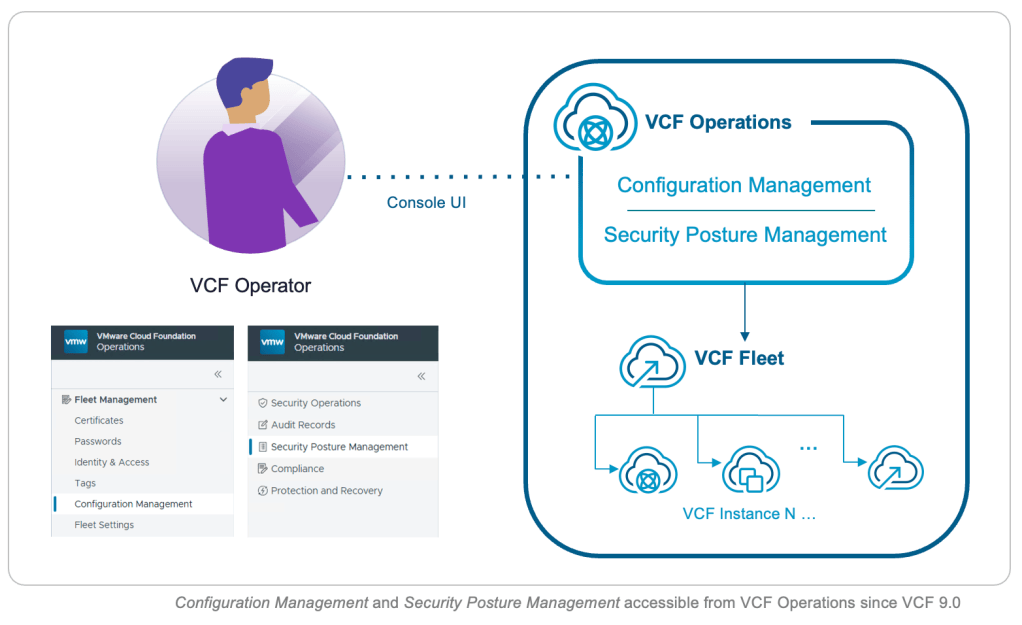
From VCF 9.1 onwards, Salt is also used to manage the compliance and configuration of VCF components. The Salt implementation within VCF is called VMware Salt for VCF Components and it is distinct from the VMware Salt solution for workloads.
These capabilities are accessible from the VCF Operations console under Configuration Management and Security Posture Management.
The difference between VMware Salt and VMware Salt for VCF Components is in the endpoints – VMware Salt endpoints are for customer workloads, VMware Salt for VCF Component endpoints are for VCF components only.
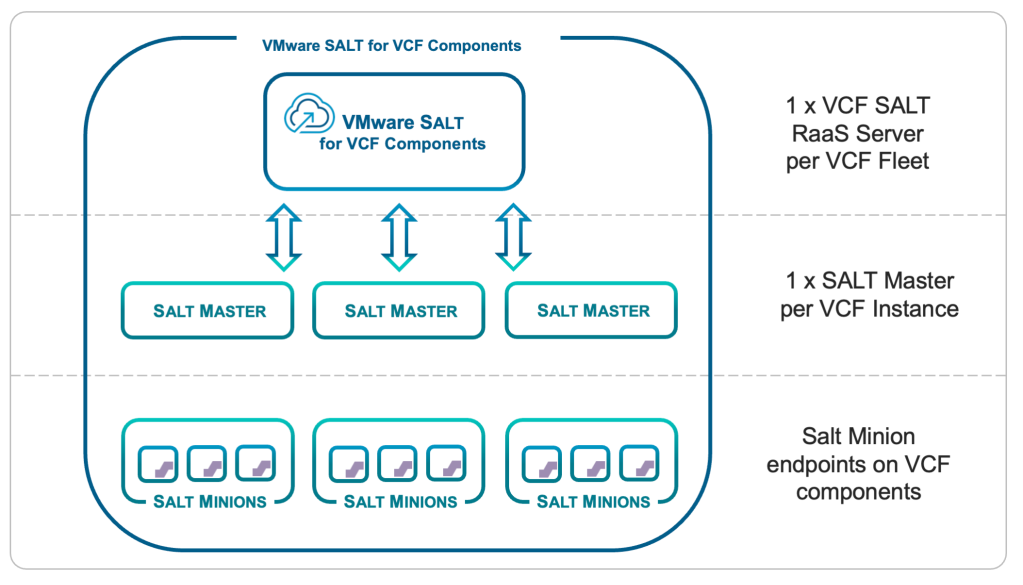
VMware Salt for VCF Components is built into VMware Cloud Foundation architecture and supports a single Salt master per VCF instance. VMware Salt for VCF Components is a fleet-level component and a single instance is shared across a VCF fleet. Therefore, the total number of Salt masters in a fleet is equal to the number of VCF instances in that fleet.
The VMware Salt for VCF control-plane is deployed as a set of containerized services on the VCF services runtime node, which is a dedicated hosting platform for the VCF management services cluster.
VMware Salt for VCF components API: The VCF-specific configuration API
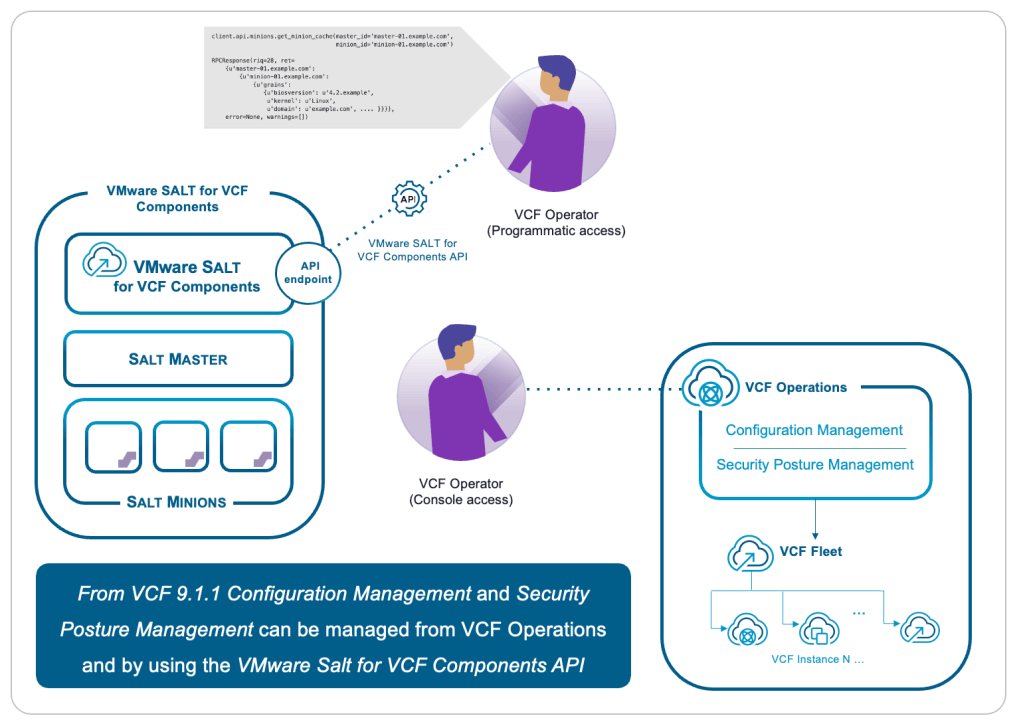
The more recent addition introduced with VCF 9.1.1 is the VMware Salt for VCF components API. Built on VMware Salt for VCF Components, this API is designed specifically for programmatically managing configuration and compliance settings across the VCF stack, including vCenter, NSX, SDDC Manager, ESX, and other components. It uses native Salt constructs to implement and maintain desired state consistently across VCF components, exposing more than 300 built-in configuration settings. The VMware Salt for VCF components API specifically targets configuration management of the VCF stack including drift assessment and remediation at scale.
VCF Operations continues to retain the UI console for managing configuration and compliance, while the VMware Salt for VCF components API offers a programmatic alternative, ideal for automating configuration management at scale.
Integrating VMware Salt natively into the VCF stack transforms infrastructure management from a reactive, manual burden into an agile, self-healing execution plane. By pairing Salt’s event-driven architecture and declarative state enforcement with VCF’s unified hybrid cloud model, organizations achieve unprecedented operational speed and continuous compliance at scale.
Instead of relying on slow UI workflows or custom scripts, operators can programmatically declare desired states across thousands of hosts, detect configuration drift in real time, and trigger automated remediation within seconds. Salt acts as the foundational engine that elevates VCF from a bare hyperconverged platform to a fully modern, enterprise-ready software-defined data center capable of self-governance and rapid automated delivery.
The VMware Salt for VCF components API can be referenced from developer.broadcom.com.
The Significance of Salt in the VCF Stack
Salt delivers a unified, end-to-end automation approach that encompasses the entire data center through a single, cohesive ecosystem. By aligning Salt for VCF to core infrastructure, VMware Salt for active workloads, and the open-source Salt Project for all remaining targets, organizations can aggressively eliminate tool sprawl and consolidate their configuration management strategy.
Instead of juggling multiple specialized automation and configuration management platforms, organizations can confidently consolidate their data center tooling to Salt, driving efficiency and unified control from end to end.
This comprehensive approach reduces operational complexity, lowers total cost of ownership, and provides seamless, centralized control across every layer of the enterprise IT landscape.
Summary
The open-source Salt Project provides the core engine and a basic API for remote execution and configuration management — free, powerful, but without enterprise governance.
VMware Salt provides an enterprise platform with a web UI, centralized reporting, RBAC, compliance features, and a broader REST API that covers these capabilities for customer workloads.
The VMware Salt for VCF components API is a specialized interface for managing configuration across the VCF stack at scale and leverages an embedded deployment of Salt in the VCF components. VCF 9.1.1 now provides the option to administer compliance and configuration management programmatically from the VMware Salt for VCF Components API.
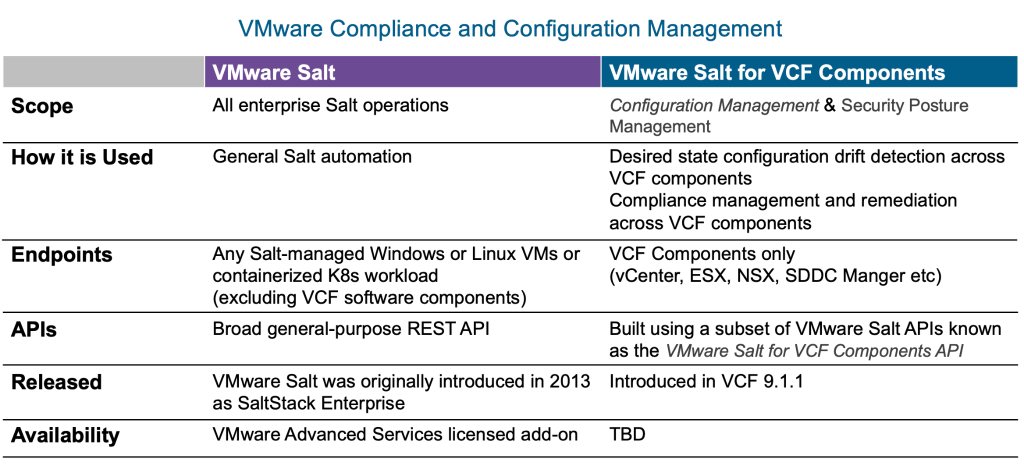
Each of the three layers discussed here builds on the one before it. The open-source API is the foundation; the VMware Salt REST API provides a commercial enterprise-grade general-purpose interface for workloads, and the VMware Salt for VCF components API is used for VCF-specific configuration management. These iterations of Salt describe different sets of capabilities and are not to be confused with each other.
The VMware Salt for VCF Components API, introduced in VMware Cloud Foundation (VCF) 9.1.1, establishes a centralized, programmatic API interface that exposes native Salt constructs over REST APIs. This powerful capability elevates infrastructure management from manual tasks across the VCF stack, delivering the speed and agility required for modern operations.
Resources
Blog for further reading: How VMware Salt Automates Compliance across Private Cloud
Documentation: Salt Deployment and Design Guides
The post From Open Source to Enterprise: Understanding the VMware Salt API Evolution appeared first on VMware Cloud Foundation (VCF) Blog.
The post From Open Source to Enterprise: Understanding the VMware Salt API Evolution appeared first on VMware Blogs.
]]>近年、生成AIをはじめとするフロンティアAI技術の進化は、ビジネスの効率化だけでなく、サイバーセキュリティの領域にも劇的な変化をもたらしています。防御側がAIを活用する一方で、攻撃者もAIを用いた高度な脆弱性探索や攻撃コードの自動生成を行うようになっています。本ブログシリーズでは、全2回にわたり「AI時代のセキュリティ対策」をテーマに、インフラのあらゆる階層で脅威を食い止める「多層防御」の実践的なアプローチを解説します。 ーーーーーーーーーーーーーーーーーーーーーーーーーーーーーーーーーーーーーーーーーーーーー 第1回(本記事):AI時代のプライベートクラウド多層防御、VMware Cloud Foundation®で実現する仮想基盤の堅牢化とリスク低減策 プライベートクラウド環境における「多層防御」の重要性と、最新のVMware Cloud Foundation® (VCF) を活用したインフラ基盤における「7つの防御層」の実装ポイントを解説します。 第2回:仮想パッチを用いたセキュリティパッチ適用までの「猶予期間」の消滅 vDefendによる「分散IDS/IPS」およびVMware® Avi™ Load Balancer WAFを用いた攻撃遮断の技術解説、およびダウンタイム不要・運用コスト削減のメリットについてお届けします。 ーーーーーーーーーーーーーーーーーーーーーーーーーーーーーーーーーーーーーーーーーーーーー 1. AI時代のセキュリティ対策の心構え:フロンティアAIから学んだ教訓 AI時代におけるセキュリティの最大の変更点は、これまでの「リスク評価(トリアージ)」や「対策の猶予期間」といった前提条件が通用しなくなっている点にあります。Broadcomが実施したフロンティアAIモデルを用いたコードテストの成果からは、以下の深刻な教訓が明らかになっています。 ■ 攻撃の連鎖による「トリアージ(優先順位付け)」概念の崩壊 従来のセキュリティ運用では、発見された脆弱性をリスクの高さに応じて分類し、低リスクのものは対応を後回しにする優先順位付け(トリアージ)が一般的でした。しかし、高度なAIは「人間が一生かけても気づかないような、コードの遠く離れた場所にある要素同士の相関すらも見抜く」能力を持っています。その結果、2〜3個の「低リスクな問題」を組み合わせ・連鎖させて、1つの「致命的な攻撃パス」を作り出すことができるようになりました。これにより、「リスクの低いものは後回し」というこれまでのトリアージ概念は通用しなくなっています。 ■ 「猶予期間」の消滅 これまでは、脆弱性が公開されてから実際にそれを悪用するコードが作成されるまでに、数週間から数ヶ月の「猶予期間」がありました。しかし、AIの導入によって、このプロセスは「数週間」から「ほぼリアルタイム」に短縮されています。防御側の勝ち筋は、選別の正確さではなく、「パッチ適用の速度」や「即座に通信を遮断・制御できる能力」にかかっています。 このような状況下では、アプリケーションやミドルウェアを意識したうえで、それらが稼働するインフラ(仮想基盤)そのものの重要性を再認識し、ハードニング(要塞化)を徹底する「内部防御」および「多層防御」が極めて重要になります。 ■ 拡大する「保護すべき対象」 フロンティアAIの進化によって「攻撃の連鎖」や「全自動攻撃」が現実のものとなる中、企業がセキュリティ面で考慮すべき領域は劇的に拡大しています。サイバーセキュリティを取り巻く環境の変化に伴い、保護すべき対象はこれまでの「オンプレミス単一環境」から、「マルチクラウド」、そして「エッジ・プライベートAI基盤」へと広がっています。 このような保護対象の拡大は、攻撃者の手法が日々巧妙化していることに起因しています。攻撃側の変化・進化に合わせて、企業に求められるサイバーセキュリティ対策にも必然的に高度化が求められており、その変遷は大きく以下の3つのフェーズに分けることができます。 ・一般的に従来求められてきたサイバーセキュリティ:オンプレミス単一環境(境界型防御) 保護対象がオンプレミスの単一境界に限られ、境界に対する直接攻撃を防ぐ対策が主流でした。防御までの猶予期間も3ヶ月以上あり、境界型の防御手法で一定の対応が可能でした。 ・フロンティアAI登場前のサイバーセキュリティ:マルチクラウドへの拡張と横移動への対策 保護対象がマルチクラウドへ拡張し、境界突破後に内部で潜伏・感染を広げる攻撃が急増しました。対応猶予が3ヶ月以内に縮小する中、分散F/WやNDR等を活用した内部監視・防御策が必要となりました。 ・フロンティアAI登場後のサイバーセキュリティ:エッジ・プライベートAI基盤を含む全方位の保護 重要なデータを扱うエッジ・プライベートAI基盤へと対象が広がり、猶予なしの全自動攻撃が発生しています。高度な多層防御に加え、EDRやクリーンルーム等を連携させた迅速な復旧体制が不可欠です。 2. プライベートクラウドにおける堅牢化のポイント:多層防御によるダメージコントロール 仮想基盤におけるセキュリティ対策は、単一の壁を作るのではなく、複数の防御層を重ねることで、侵入防止と万が一侵入された際のダメージコントロールを両立させる「多層防御」が基本となります。VMware vSphere® 環境において実装すべき7つの防御層の具体策を以下にご紹介します。 ■ 多層防御によるダメージコントロール(7階層) 第1層 経路の適正運用 【概要】 North-South の経路制限・侵入防止・侵入検知 プライベートクラウドにおける「第1層」は、外部ネットワークと内部仮想基盤を結ぶ境界線、すなわち North-South(南北)トラフィック の防御を担います。ここでの目的は、基盤を管理する「心臓部」をインターネットの脅威から物理的・論理的に隔離し、許可された管理者のみが安全にアクセスできる経路を確立することです。 1. 管理インターフェースの完全隔離 VMware vCenter® … Continued
The post AI時代のプライベートクラウド多層防御: VMware Cloud Foundation®で実現する仮想基盤の堅牢化とリスク低減策(第1回) appeared first on VMware Blogs.
]]>
近年、生成AIをはじめとするフロンティアAI技術の進化は、ビジネスの効率化だけでなく、サイバーセキュリティの領域にも劇的な変化をもたらしています。防御側がAIを活用する一方で、攻撃者もAIを用いた高度な脆弱性探索や攻撃コードの自動生成を行うようになっています。本ブログシリーズでは、全2回にわたり「AI時代のセキュリティ対策」をテーマに、インフラのあらゆる階層で脅威を食い止める「多層防御」の実践的なアプローチを解説します。 ーーーーーーーーーーーーーーーーーーーーーーーーーーーーーーーーーーーーーーーーーーーーー 第1回(本記事):AI時代のプライベートクラウド多層防御、VMware Cloud Foundation®で実現する仮想基盤の堅牢化とリスク低減策 プライベートクラウド環境における「多層防御」の重要性と、最新のVMware Cloud Foundation® (VCF) を活用したインフラ基盤における「7つの防御層」の実装ポイントを解説します。 第2回:仮想パッチを用いたセキュリティパッチ適用までの「猶予期間」の消滅 vDefendによる「分散IDS/IPS」およびVMware® Avi Load Balancer WAFを用いた攻撃遮断の技術解説、およびダウンタイム不要・運用コスト削減のメリットについてお届けします。 ーーーーーーーーーーーーーーーーーーーーーーーーーーーーーーーーーーーーーーーーーーーーー 1. AI時代のセキュリティ対策の心構え:フロンティアAIから学んだ教訓 AI時代におけるセキュリティの最大の変更点は、これまでの「リスク評価(トリアージ)」や「対策の猶予期間」といった前提条件が通用しなくなっている点にあります。Broadcomが実施したフロンティアAIモデルを用いたコードテストの成果からは、以下の深刻な教訓が明らかになっています。 ■ 攻撃の連鎖による「トリアージ(優先順位付け)」概念の崩壊 従来のセキュリティ運用では、発見された脆弱性をリスクの高さに応じて分類し、低リスクのものは対応を後回しにする優先順位付け(トリアージ)が一般的でした。しかし、高度なAIは「人間が一生かけても気づかないような、コードの遠く離れた場所にある要素同士の相関すらも見抜く」能力を持っています。その結果、2〜3個の「低リスクな問題」を組み合わせ・連鎖させて、1つの「致命的な攻撃パス」を作り出すことができるようになりました。これにより、「リスクの低いものは後回し」というこれまでのトリアージ概念は通用しなくなっています。 ■ 「猶予期間」の消滅 これまでは、脆弱性が公開されてから実際にそれを悪用するコードが作成されるまでに、数週間から数ヶ月の「猶予期間」がありました。しかし、AIの導入によって、このプロセスは「数週間」から「ほぼリアルタイム」に短縮されています。防御側の勝ち筋は、選別の正確さではなく、「パッチ適用の速度」や「即座に通信を遮断・制御できる能力」にかかっています。 このような状況下では、アプリケーションやミドルウェアを意識したうえで、それらが稼働するインフラ(仮想基盤)そのものの重要性を再認識し、ハードニング(要塞化)を徹底する「内部防御」および「多層防御」が極めて重要になります。 ■ 拡大する「保護すべき対象」 フロンティアAIの進化によって「攻撃の連鎖」や「全自動攻撃」が現実のものとなる中、企業がセキュリティ面で考慮すべき領域は劇的に拡大しています。サイバーセキュリティを取り巻く環境の変化に伴い、保護すべき対象はこれまでの「オンプレミス単一環境」から、「マルチクラウド」、そして「エッジ・プライベートAI基盤」へと広がっています。 このような保護対象の拡大は、攻撃者の手法が日々巧妙化していることに起因しています。攻撃側の変化・進化に合わせて、企業に求められるサイバーセキュリティ対策にも必然的に高度化が求められており、その変遷は大きく以下の3つのフェーズに分けることができます。 ・一般的に従来求められてきたサイバーセキュリティ:オンプレミス単一環境(境界型防御) 保護対象がオンプレミスの単一境界に限られ、境界に対する直接攻撃を防ぐ対策が主流でした。防御までの猶予期間も3ヶ月以上あり、境界型の防御手法で一定の対応が可能でした。 ・フロンティアAI登場前のサイバーセキュリティ:マルチクラウドへの拡張と横移動への対策 保護対象がマルチクラウドへ拡張し、境界突破後に内部で潜伏・感染を広げる攻撃が急増しました。対応猶予が3ヶ月以内に縮小する中、分散F/WやNDR等を活用した内部監視・防御策が必要となりました。 ・フロンティアAI登場後のサイバーセキュリティ:エッジ・プライベートAI基盤を含む全方位の保護 重要なデータを扱うエッジ・プライベートAI基盤へと対象が広がり、猶予なしの全自動攻撃が発生しています。高度な多層防御に加え、EDRやクリーンルーム等を連携させた迅速な復旧体制が不可欠です。 2. プライベートクラウドにおける堅牢化のポイント:多層防御によるダメージコントロール 仮想基盤におけるセキュリティ対策は、単一の壁を作るのではなく、複数の防御層を重ねることで、侵入防止と万が一侵入された際のダメージコントロールを両立させる「多層防御」が基本となります。VMware vSphere® 環境において実装すべき7つの防御層の具体策を以下にご紹介します。 ■ 多層防御によるダメージコントロール(7階層) 第1層 経路の適正運用 【概要】 North-South の経路制限・侵入防止・侵入検知 プライベートクラウドにおける「第1層」は、外部ネットワークと内部仮想基盤を結ぶ境界線、すなわち North-South(南北)トラフィック の防御を担います。ここでの目的は、基盤を管理する「心臓部」をインターネットの脅威から物理的・論理的に隔離し、許可された管理者のみが安全にアクセスできる経路を確立することです。 1. 管理インターフェースの完全隔離 VMware vCenter® … 続き
The post AI時代のプライベートクラウド多層防御: VMware Cloud Foundation®で実現する仮想基盤の堅牢化とリスク低減策(第1回) appeared first on VMware Japan Blog.
The post AI時代のプライベートクラウド多層防御: VMware Cloud Foundation®で実現する仮想基盤の堅牢化とリスク低減策(第1回) appeared first on VMware Blogs.
]]>(Day 17 of 22 in our Cybersecurity Awareness Month series. Today: responding to a busy week of vulnerabilities) For information on Broadcom products and the PHP2Shell vulnerabilities, see https://www.broadcom.com/php2shell. We are deviating from our posted schedule a little bit to talk about the events of this week: a lot of vulnerability news at once, including … Continued
The post VCF Helping You Respond to PHP2Shell appeared first on VMware Blogs.
]]>
(Day 17 of 22 in our Cybersecurity Awareness Month series. Today: responding to a busy week of vulnerabilities)
For information on Broadcom products and the PHP2Shell vulnerabilities, see https://www.broadcom.com/php2shell.
We are deviating from our posted schedule a little bit to talk about the events of this week: a lot of vulnerability news at once, including two critical flaws in PHP, known as PHP2Shell (CVE-2026-109618 and CVE-2026-109619), that let attackers run code on web servers without logging in; a certificate authority, eMudhra, whose intermediate keys turned out to be weak enough to forge certificates for any website; and a long list of critical bugs in remote access tools, firewalls, email gateways, and developer platforms, several of them already under attack.
A busy stretch like this is hard on everyone who runs infrastructure, and it’s a good opportunity to remind everyone that VMware Cloud Foundation (VCF) has a lot of things in it that can help with weeks like this one. Not to mention that we’ve been talking about some of these topics throughout our Cybersecurity Awareness Month series anyhow.
Check Whether VCF Is Affected, Then Find Affected Workloads
To check VCF, start with the VMware Security Advisories and the CVE disposition report on the VCF download portal, which our post on vulnerabilities walks through. We don’t usually publish statements about vulnerabilities that don’t affect our products, but PHP2Shell is severe enough that we did, and the answers are straightforward: VCF components don’t use PHP and aren’t affected (KB 459989), and neither are VMware vDefend (KB 460110) or the VMware Avi Load Balancer appliance (KB 460068). Broadcom’s PHP2Shell response page has the status for every Broadcom division, with links to each one’s advisories. That lets you spend your time on the systems that need it.
Next, find the workloads running PHP, starting with the ones that face the Internet. VCF gives you several ways to find them:
- Find the web servers with VCF Operations. VCF Operations service discovery uses VMware Tools to find the services running inside each of your VMs, like web servers and databases, along with the connections between them, so you can see which VMs run web servers and what depends on them. VMware Tools application discovery adds the applications running in each guest and their versions. One thing to consider is that you may have disabled this functionality by following the VCF Security Configuration Guide. Disabling things you are not using is a good idea, but these functions can be especially useful in times like these. Perhaps you might choose to re-enable them, and to do that just reverse what is in the Security Configuration Guide.
- Find the web servers with VMware vDefend. vDefend Security Intelligence maps the traffic flows to and between your workloads, so you can see which VMs serve web traffic and what talks to them, and its segmentation reports and policy recommendations help you build the rules for the next step. With the PHP2Shell IDS/IPS signatures turned on, vDefend’s events can also show which of your workloads are receiving exploit attempts.
- Find what’s exposed with VCF Operations for Networks. Flow data can show which of your VMs actually receive traffic from the Internet. A search along the lines of flows where Flow Type = ‘Source is Internet’ and Flow Type = ‘Destination is VM’ can list them, and application discovery groups VMs into applications by name, tag, and traffic pattern.
- Let Avi show you what’s behind it. For applications behind VMware Avi Load Balancer, the WAF reads the Server and X-Powered-By headers in live traffic, which can reveal the PHP versions your applications are running (VMware Security Blog).
- Turn the list into owners. vCenter tags and custom attributes that record owners and applications turn a list of VMs into a list of people to call, and the same tags can drive the vDefend security groups in the next step.
- Check appliances and templates. Virtual appliances you run from other vendors may include PHP, so check those vendors’ advisories. Check your templates and content libraries, too, so new VMs don’t start out vulnerable while you’re updating the existing ones.
- Patch any systems that are restored. Make sure that any restores you do from backups include a step to update them to the current software levels.
Buy Time and Limit Lateral Movement
As our post on vulnerabilities put it, isolation, hardening, and access control can buy you time while patching is underway, and VCF has good tools for that. Our post on the VMware Security Blog walks through using them against PHP2Shell (VMware Security Blog):
- Virtual patching with vDefend IDS/IPS. Our VMware Threat Analysis Unit released IDS/IPS signatures for both vulnerabilities, 1156209 and 1156210, so VMware vDefend can detect and block exploit attempts headed for vulnerable workloads (KB 460110). Turn on TLS inspection on the gateway firewall, too, so the signatures can see inside encrypted web traffic.
- Web application firewall rules with Avi. The VMware Avi Load Balancer WAF has rules aimed at remote command execution and PHP application attacks, plus virtual patch rules for these CVEs that you can run in enforcement mode (KB 460068).
- Segmentation with the vDefend Distributed Firewall. Tag the VMs you found running PHP, put them in a security group, and tighten what they can reach until they’re patched, so it’s much harder to use a compromised web server to attack its neighbors. Many security organizations like CERT-EU and CISA, and even the Prime Minister of Japan, have recommended isolating internet-facing applications that can’t be fixed right away, or temporarily taking them offline. With the distributed firewall, isolating them takes only a policy change.
These controls can give you time to apply the patch during a planned maintenance window. They also help the next time something like this happens, which is a good reason to have segmentation in place before you need it. Inside your guests, Symantec and Carbon Black endpoint protection can help, too, and the Symantec Threat Hunter team’s post covers their PHP2Shell protections (Symantec).
It’s also a good time to check the controls that limit lateral movement:
- Filter outbound traffic. Add egress rules, including DNS filtering and outbound inspection, so a compromised web server has a much harder time calling home.
- Let vDefend block automatically. Having vDefend block detected threats without waiting for someone to act on an alert may occasionally interrupt something by mistake, which is worth the trade-off, because that usually costs far less than a missed intrusion.
- Wall off the management plane. Keep strict controls between your management interfaces and the rest of your organization, use privileged access workstations, and drive access to ESX through vCenter and its permissions model.
Get a Trusted Fix Into Production Quickly
If you build applications with VMware Tanzu, patched components were available shortly after the PHP updates shipped. For PHP2Shell, our Tanzu team updated the PHP binaries and container images, built with Bitnami technology, in TrueSource Trusted Artifacts within an hour of disclosure (TrueSource team), and Tanzu Platform had updated PHP buildpacks with patched runtimes the same day, so developers could rebuild their applications on fixed components. The vDefend and Avi protections above can also help cover the time it takes to test and roll out those changes.
Use Snapshots to Take the Risk Out of Patching
Our post on vulnerabilities suggested treating updates like this as emergency changes, and snapshots make that an easy call. Our post on snapshots covers them in depth, but for vulnerability response:
- Snapshot first, and automate it. Take a snapshot of each VM before you patch it or change its configuration, so if the update breaks the application, reverting usually only takes a minute. Script it through the API so it happens every time, and schedule the cleanup, too, either from your scripts or as a recurring scheduled task in vCenter that deletes the snapshots for you.
- Test on a clone, then roll out in stages. Clone a production VM onto an isolated network and try the update there first, then patch a few canary systems before the rest, so problems show up early, on just a few systems. With VCF Networking (NSX), you can recreate an application’s networks as isolated virtual networks, even with the same IP addresses, and clone its VMs into them, so several of your teams can test in parallel without touching production.
- Keep the service up with Avi. With VMware Avi Load Balancer in front of a pool of web servers, you can patch them one at a time while traffic keeps flowing, so users shouldn’t notice. That helps take away the “too important to be down” reason for leaving a server unpatched.
- Add point-in-time recovery with vSAN Data Protection. Snapshots are short-lived, and vSAN Data Protection keeps scheduled point-in-time copies of workloads that you can go back to hours or days later. It doesn’t replace backups, but it can cover a lot of “the patch broke something we didn’t notice until Tuesday.”
- Fix the templates. Update templates and images so new VMs and containers start out patched. For containerized applications, rebuilding on patched base images and libraries from TrueSource and Bitnami Secure Images can make that quicker.
- Plan for the ones that can’t be fixed. Keep systems that can’t be patched right away, or at all, like applications stuck on an old version of PHP, behind the tightest segmentation you have until they can be upgraded or retired, and do the upgrade testing on a cloned copy, as described above.
Snapshots have evolved into a serious risk-mitigation tool inside the platform, but they are often overlooked because of legacy ideas and practices, and because they blur boundaries inside organizations. Moving forward, as more all-hands-on-deck weeks like this happen, you need to use all the tools you have at your disposal.
Check Who You Trust
Browsers have already stopped trusting the eMudhra intermediates, but software that keeps its own list of trusted certificates, like Python, Go, and Node.js applications, container images, and many appliances, may keep trusting them until it’s updated.
Inside VCF, people establish trust between components, for example by confirming an ESX host’s certificate fingerprint when adding the host to vCenter, or by verifying a component’s certificate when connecting it to VCF. The places to look are your guests, your applications, and anything you’ve added to VCF’s trust stores:
- Update guest operating systems and runtimes. Operating system updates usually refresh the system trust store, and applications with their own trust stores need their own updates, which may mean rebuilding container images, and snapshots make those updates safer, too.
- Check what you’ve added to VCF. vCenter’s trusted roots may include public CA certificates added for an integration or a proxy, so review the list in the vSphere Client under Administration > Certificates > Certificate Management, or with the PowerCLI Get-VITrustedCertificate cmdlet, and remove anything you no longer trust.
- Keep VCF’s own certificates current. VCF Operations can manage and replace certificates for VCF components across your fleet, and our post on certificates covers how VCF uses them.
- Leave certificate checking on. If a service breaks because it no longer trusts a certificate, get it a new certificate from a CA you trust instead of turning off verification.
Make the Next Busy Week Easier
It’s painful to think about, but there will be more weeks like this one in the future. It’s much easier to get through calmly when you already know what you run, who owns it, and how to shield and patch it quickly. In VCF, that means current inventory and tags, vDefend segmentation and egress rules in place before you need them, snapshots and staged rollouts as part of every patch, logs stored where attackers can’t easily reach them, and a recovery plan you’ve practiced.
While you work through this week’s issues, keep notes on what went well and what didn’t, including information you wanted but didn’t have, like where PHP was running or which VMs receive traffic from the Internet, and steps that took longer than you expected. Once things calm down, go back through those notes and pick the improvements that will help the most next time.
The VCF Security Configuration Guide is the definitive guide to securing VCF, with hardening guidance across all of VCF and scripts that help you check your environment against it. If you’d like help deciding where to start, the Frontier AI Security Readiness Program includes an assessment that scores your VCF environment’s security posture and can help show where the gaps are.
The same practices can pay off well beyond patching, too, when ransomware hits, when hardware fails, when an application upgrade goes sideways, or when someone deletes the wrong thing. Do the work, and the next incident, of any sort, can be just a busy week instead.
The post VCF Helping You Respond to PHP2Shell appeared first on VMware Cloud Foundation (VCF) Blog.
The post VCF Helping You Respond to PHP2Shell appeared first on VMware Blogs.
]]>(Day 16 of 22 in our Cybersecurity Awareness Month series. Today: key provider design) Encryption makes data protection simpler, because once data is encrypted, keeping it safe comes down to protecting something much smaller, the keys, and making sure they’re available when you need them. Our post on storage encryption showed how easy VMware Cloud … Continued
The post Encryption Key Provider Design appeared first on VMware Blogs.
]]>(Day 16 of 22 in our Cybersecurity Awareness Month series. Today: key provider design)
Encryption makes data protection simpler, because once data is encrypted, keeping it safe comes down to protecting something much smaller, the keys, and making sure they’re available when you need them. Our post on storage encryption showed how easy VMware Cloud Foundation (VCF) makes it to turn encryption on, and VCF makes the keys easy to manage, too. Most of the design decisions are about the key provider: where the keys come from, where they live, who can use them, and how they stay available when something goes wrong. Good key provider design is straightforward, and a little planning up front makes everything after it easier.
The Key Provider Options in VCF
Key providers supply the keys for VM encryption, virtual TPMs, and vSAN data-at-rest encryption. Other types of encryption in VCF, like TLS, vSAN data-in-transit encryption, memory tiering encryption, and ESX configuration encryption, use keys that are ephemeral or generated on each host, so they do not depend on a key provider (key providers). VCF offers two kinds of key providers (comparison):
- A Standard Key Provider connects vCenter to one or more external key management servers (KMS) using KMIP. For VM encryption, vCenter is the only component that logs in to the key server. It keeps track of key IDs instead of the keys themselves, and it retrieves keys and passes them to hosts as needed (components). vSAN works a little differently, with each host contacting the key server directly. Any KMS that supports KMIP should work, and if other devices, like tape libraries, share it, give VCF its own partition and credentials (standard key provider). Some storage providers have mechanisms to read VCF encryption keys from a KMS to allow the storage array to deduplicate and compress data, and this is out of scope for us here.
- The vSphere Native Key Provider is built into vCenter, with no external server. vCenter generates a primary key, called the key derivation key, and pushes it to every ESX host in the cluster (overview). Each host stores it in its encrypted configuration, which is sealed by the host’s TPM when it has one (native key provider). It only serves VCF, so anything else that needs keys, like a tape library, still needs a KMS.
Beginning in VCF 9.0, a Standard Key Provider can use a wrapping key. Instead of the KMS storing a separate key encryption key for every encrypted object, which adds up quickly when every VM has a virtual TPM, it stores a single wrapping key, and the key encryption keys are stored with the objects they protect, wrapped by that key (key providers). That leaves far fewer keys to manage in the KMS, and it also makes automatic key rotation possible. It’s usually the best way to run a Standard Key Provider, and existing encrypted VMs can move to wrapped keys with a shallow rekey, without downtime.
How Key Providers Work at Boot
The two types behave differently when a host restarts, and that drives key provider design decisions.
With a Standard Key Provider, a host keeps encryption keys cached in hypervisor VMkernel protected memory during normal operations. This helps prevent issues if the KMS becomes unreachable (KMSes need to be patched, too), and allows hosts to trigger vSphere High Availability without a vCenter dependency issue (vCenter might have been on the host that failed). Because these keys are only in memory, when a host reboots the cache is lost, and upon boot the ESX host will need to get the keys again. If it can’t get keys back, virtual TPMs and encrypted workloads can’t function.
vSAN is a little different, as vSAN communicates directly from the host to the KMS itself. This avoids a dependency loop, but it does mean that a host’s storage devices aren’t mounted until it can reach the key server (vSAN encryption paper).
VMs that use VM encryption or virtual TPMs get their keys through vCenter, so after a full restart they can’t start until vCenter is up and can reach the key server, too. Hosts that are already running can keep working through a temporary key server outage (best practices); the trouble comes when hosts restart, and a power outage restarts everything at once.
Key Persistence lets hosts with a TPM 2.0 keep their keys across reboots (docs). It’s off by default, because a host that keeps its keys can unlock its data even after it has been stolen. The VCF Security Configuration Guide recommends leaving it off unless you can count on physical security. It’s tempting to turn it on to work around an unreliable or distant key server, but that brings back the physical risk a KMS is there to avoid, so fix the key server instead.
The Native Key Provider doesn’t need Key Persistence, because each host already has the key derivation key. That’s what makes it simple to run, and it’s also why it depends on physical security. When you create one, the “Use key provider only with TPM protected ESX hosts” option is on by default, so turn it off unless every host has a TPM; hosts without one won’t get the key, and they can’t run encrypted workloads.
Mix and Match Key Providers
You don’t have to choose just one type of key provider. A vCenter can have up to 32 key providers, with a default for the vCenter and, if you need it, a different default for each cluster, and even a different default key provider for vSAN encryption.
Because Standard Key Providers have additional security controls, most notably network access controls, they are popular for protecting against data loss in environments where physical security is a concern. For example, in a retail environment, a cluster in the back office might not have the same physical security as a data center. If that cluster were stolen, you wouldn’t want the attacker to be able to unlock and decrypt the storage, which they might be able to do with the Native Key Provider.
However, there are a number of reasons why the Native Key Provider is attractive. It is extremely simple to set up, easy to use, secure, and does not need any extra infrastructure.
A growing number of organizations are combining the two: using a Standard Key Provider for vSAN, so the keys that unlock the drives stay in the KMS, away from anyone who walks off with a host, and using the Native Key Provider as the default for virtual TPMs, which keeps them simple and free of external dependencies (key providers).
The choice isn’t permanent, either. A shallow rekey can move encrypted VMs and vSAN clusters from one key provider to another, in either direction and without downtime, and replaces their key encryption keys along the way (key providers). That means you can turn on encryption with the Native Key Provider and move to a Standard Key Provider later if your needs change, or vice-versa. There’s no reason to wait for a KMS, and the sooner encryption is on, the less unencrypted data ends up on flash devices that can’t be reliably wiped.
Design Key Providers for Availability
A key provider is a dependency for every encrypted workload, so design it like one:
- Run more than one key server. A Standard Key Provider can include multiple key servers from the same vendor, and Broadcom’s documentation recommends making sure the key server is highly available (docs). Key servers from different vendors need separate key providers.
- Keep key servers away from shared failures. Use different hosts, racks, and power, and ideally a different site, so the event that takes down a cluster doesn’t take down its keys, too.
- Spread them out. Key servers don’t have a defined latency requirement, and VCF connects to them only when it needs a new key, when a host restarts, and for periodic health checks, with very little data each time. That makes it practical to put key servers in other sites or even other regions, and higher-latency links, like satellite connections, can work, too. Test the design before you rely on it, including restarting hosts that run many encrypted VMs (standard key provider).
- Open the firewall. KMIP uses TCP port 5696 by default. vCenter needs to reach the key servers, and if you use vSAN encryption, every vSAN host does, too (standard key provider).
- Watch the certificates. vCenter and the key server trust each other through certificates, and an expired certificate breaks that trust. By default, vCenter raises an alarm 30 days before a KMS certificate expires (docs), and you may need to re-establish trust after replacing vCenter’s certificates (KB 396741). Our post on certificates covers the rest.
- Plan for migrations and disaster recovery. Moving encrypted VMs between vCenter instances needs the same key provider on both sides: the same key servers for a Standard Key Provider, or the same key derivation key for the Native Key Provider (docs). Disaster recovery sites need the same provider, too (docs). This is easy to deal with: just import or configure the key provider in both places.
- Choose names carefully. Encrypted objects find their key provider by name, and key providers can’t be renamed (best practices). Give separate providers unique names across all your vCenter instances, and give a shared provider the same name everywhere it’s configured (docs).
Key providers belong to individual vCenter instances and aren’t shared automatically across a VCF fleet, so plan them for each vCenter and keep the configuration consistent. Using the same provider everywhere, by importing the same Native Key Provider backup or connecting to the same key servers, makes cross-vCenter migrations and disaster recovery simpler. Separate providers for each vCenter limit the blast radius if a key is ever compromised, at the cost of more to back up and track, and either approach works.
Avoid Circular Dependencies
The classic key provider mistake is a loop. The key server runs as a VM, the VM lives on an encrypted datastore, and the datastore can’t be unlocked until the key server is running. Everything works fine until the day everything restarts at once, and then nothing does. Broadcom’s documentation specifically warns about this kind of dependency loop with key servers that run as virtual appliances (docs).
A few rules help:
- Keep key servers outside the infrastructure they protect. Physical appliances, a separate cluster, or another site all work, as long as the key servers don’t depend on the keys they hold.
- Watch for drift. A loop can sneak back in later, when someone uses Storage vMotion to move a key server VM onto an encrypted datastore, or turns on vSAN encryption for the cluster the key server runs on (standard key provider). Check placement during regular reviews and before turning on vSAN encryption, and use vCenter permissions to limit who can move key server VMs.
- Look past the key server. Key servers need DNS, time, networking, and often authentication. If any of those run on encrypted infrastructure that needs the key server first, the loop is still there, just bigger. Our post on dependencies covers this in more depth. Some organizations have an individual ESX host set up as a “dependency host” which runs a clustered DNS, NTP, AD, and KMS node, and can be started ahead of the rest of the data center.
Back Up the Keys, and the Backups of the Keys
Losing a key means losing the data. There’s no back door, which is the point of encryption, and it means backups of key material matter as much as backups of the data:
- Back up the Native Key Provider. In the vSphere Client, select the vCenter, go to Configure > Security > Key Providers, select the provider, and choose Back Up, protecting the file with a password (docs). The Native Key Provider is included in vCenter’s file-based backups, but a new provider can’t be used until you back it up at least once, and vCenter raises an alarm every 24 hours until you do.
- Store the backup file and its password separately, somewhere you can reach them when vCenter is down.
- Treat vCenter backups as sensitive. They contain the Native Key Provider’s key, along with the credentials vCenter uses for external key servers (native key provider). Protect them the way you’d protect the keys themselves.
- Back up the key servers. With a Standard Key Provider, the keys live in the KMS, so the KMS vendor’s backup and replication features are part of your design. VCF is designed to leave old keys in the KMS, because a backup or disaster recovery copy might still need them, so decide how long to keep them based on how long you keep backups.
- Be careful deleting key providers. vCenter allows deleting a key provider that’s still in use, and VMs that depend on it keep running but can’t power on again until it’s restored (standard key provider). Rekey VMs to the provider you’re keeping first, and keep the old provider’s backup or keys in case a backup or replica still needs them. The good news here is that, if you made a mistake, you can restore the key provider configuration to fix it, and then try again.
- Save each host’s recovery key. ESX encrypts its own configuration with a key sealed by the host’s TPM. If the TPM can’t release that key, such as after a TPM or system board replacement, the host can’t boot without its recovery key, so the VCF Security Configuration Guide recommends backing up each host’s recovery key somewhere off the host; the “esxcli system settings encryption recovery list” command shows it, and you can access this through PowerCLI without needing to log in to each host.
If you lose vCenter and have neither a Native Key Provider backup nor a vCenter backup, the encrypted VMs can be permanently inaccessible (VM encryption). Keep a record of where every copy of every key lives. NIST notes that cryptographic erase can’t be trusted for media whose keys were backed up or escrowed somewhere you can’t account for (NIST SP 800-88 Rev. 2), so that record matters at the end of the hardware’s life, too.
Rotate Keys on a Schedule
A key that never changes gives anyone who copies it unlimited time to use it. In one incident, attackers used a signing key that was supposed to have been retired years earlier, and the investigators recommended rotating keys frequently and automatically. That was an identity signing key, but the lesson carries over to storage keys, too.
VCF gives you several ways to rotate keys:
- Wrapping keys. A Standard Key Provider’s wrapping key is generated automatically by default and rotates every 365 days, adjustable from 30 to 3,650 days. You can also specify your own wrapping key and rotate it manually (docs). Existing VMs keep their old keys until they’re rekeyed.
- Shallow and deep rekeys. A shallow rekey replaces the key encryption key and can run while a VM is powered on. A deep rekey replaces the data encryption keys and rewrites the data, so it needs the VM powered off with no snapshots (how it works). Rewriting the data also adds wear to flash devices, so save deep rekeys for when you have a reason, such as a suspected key compromise. In general, a shallow rekey is sufficient for most security and regulatory compliance needs.
- vSAN rekeys work the same way at the cluster level, and the VCF Security Configuration Guide suggests a regular schedule of shallow rekeys, such as every 60 days.
- Native Key Provider rotation is manual. If you need to rotate this key, simply create a new provider, make it the default, and rekey (native key provider). Make a backup of the old key provider before you delete it, please!
Pick a schedule your team can keep, automate it where you can, and treat a rekey like any other change: test it first.
Test Key Provider Recovery Before You Need It
The worst time to find a gap in key provider design is in the middle of a recovery. Practice it in a lab:
- Restore a Native Key Provider from its backup into a test vCenter, and make sure someone other than the person who made the backup can find the file and the password.
- Shut a test cluster down completely and bring it back up with the key servers starting the way they would after a real outage. Note how long it takes before encrypted VMs are available.
- Take one key server offline and confirm that the others carry the load.
- Confirm that running encrypted VMs keep working while vCenter or the key servers are down.
- Include encrypted VMs in disaster recovery tests.
Encryption protects data from people who shouldn’t have it. Good key provider design helps keep you safe, secure, and compliant.
The post Encryption Key Provider Design appeared first on VMware Cloud Foundation (VCF) Blog.
The post Encryption Key Provider Design appeared first on VMware Blogs.
]]>(Day 15 of 22 in our Cybersecurity Awareness Month series. Today: storage encryption) Some security work is hard; network segmentation means meetings with every application owner, and identity projects take years. Storage encryption is different. In VMware Cloud Foundation (VCF), vSAN encryption takes a few clicks and runs in the background without taking workloads down. … Continued
The post Easy Security Win: VCF Storage Encryption appeared first on VMware Blogs.
]]>(Day 15 of 22 in our Cybersecurity Awareness Month series. Today: storage encryption)
Some security work is hard; network segmentation means meetings with every application owner, and identity projects take years. Storage encryption is different. In VMware Cloud Foundation (VCF), vSAN encryption takes a few clicks and runs in the background without taking workloads down. It also protects against one of the most common ways data leaks, which is a drive leaving the building with data still on it. Like any security control, it has limits, so let’s take a look at what it does and doesn’t do before you turn it on.
What Storage Encryption Protects Against
Drives leave data centers all the time. They fail and go back to the vendor, they get swapped out during upgrades, and whole servers get retired, sold, or recycled. Every one of those drives holds whatever was written to it, and reliably wiping every drive, through every vendor and contractor that touches it, is harder than it sounds.
Flash drives, like SSDs and NVMe devices, make this much harder, to the point where you can’t count on sanitizing one at all. At their core, flash devices are consumable parts: the high voltages used to write and erase data wear out the memory cells a little each time, which is why drives are rated in Drive Writes Per Day (DWPD). To spread out that wear, drives write new data to fresh locations, distribute writes evenly across the device, and hold spare capacity in reserve to replace worn-out blocks, so old copies of data can linger where software can’t reach them. In one study, overwriting a drive’s entire visible capacity twice usually cleared it, but not always, and some drives’ built-in erase commands didn’t work as advertised (research paper).
The encryption built into drive firmware can’t always be trusted, either. When researchers reverse engineered the firmware of several self-encrypting SSDs, many had flaws that allowed complete recovery of the data without any password or key (IEEE paper), and Microsoft advised BitLocker users to switch to software encryption instead (Microsoft).
The consequences can be expensive. One organization paid large regulatory fines after its decommissioned drives and servers were resold with customer data still on them, even though it had encryption software it never turned on.
Storage encryption turns these problems into a key management problem instead. Key management is a smaller problem. vSAN data-at-rest encryption protects data on storage devices in case a device is removed from the cluster (docs), because the data on a drive can’t be read without its key. vSAN does that encryption in ESX, before data reaches the drive, so it doesn’t depend on drive firmware getting encryption or erasure right. That also means you don’t need self-encrypting drives (SEDs), which cost more and add operational work, since they need controllers that support them and a process for managing each drive’s keys.
Storage encryption also makes retiring hardware simpler. The keys that protect vSAN data come from your key provider, not the drive, so destroying them leaves the data unreadable without relying on the drive’s own erase commands. NIST’s media sanitization guidance calls this cryptographic erase, counts it as a way to purge data, and notes that for virtual and logical storage it may be the only practical one (NIST SP 800-88 Rev. 2). It assumes nothing sensitive was written to the drive before encryption was turned on, though, which is one more reason to turn storage encryption on early.
What Storage Encryption Doesn’t Protect Against
Storage encryption protects data on devices that have left your control. It does much less about attackers who are still inside your environment, because encryption is transparent to anything that’s allowed to read the data:
- Data is plaintext inside the guest. A virtual machine reads and writes its disks normally, so malware inside the guest, or an attacker with a valid login, can read everything the guest can.
- Administrators can still reach data. Even the No Cryptography Administrator role, which can’t change encryption settings, keeps direct console access and can download virtual machines from an encrypted vSAN datastore (vSAN encryption paper). Access control still matters, so use vCenter permissions to limit who can reach sensitive VMs.
- Attackers who control a host aren’t stopped. Ransomware running with administrative access to ESX can encrypt VM files on an encrypted datastore as easily as on any other, because the host can read the data. Keep ESX itself locked down, with lockdown mode and a management network isolated from everything else.
- Backup data is cleartext. Backup products read VM data through the hypervisor and send it to the backup system over the network, typically protected by TLS. The VM data itself stays cleartext, because otherwise the backup system couldn’t deduplicate or compress it, and those are two core space-efficiency tools that keep backup storage costs under control. That means backups are unencrypted at rest unless the backup product encrypts them itself (best practices), so turn on encryption in your backup product.
Storage encryption is still worth doing. It’s one layer of protection, and the other posts in this series cover the other layers.
Start with a Key Provider
Encryption needs keys, and in VCF, keys come from a key provider. There are two kinds (comparison):
- The vSphere Native Key Provider is built into vCenter and needs no external key server. vCenter generates a primary key and pushes it to the ESX hosts in the cluster, which can then create encryption keys even when vCenter isn’t available (overview). Hosts don’t need a TPM, though a TPM helps protect the key on each host.
- A Standard Key Provider connects vCenter to an external key management server (KMS) using the KMIP protocol. The keys stay in the KMS, so a stolen host or drive doesn’t carry its key with it.
The Native Key Provider is the fastest way to start. The trade-off is physical security: the key material is stored on the hosts, so someone who walks off with an entire host may be able to boot it and read its data (key providers). An external KMS holds up better against that, at the cost of another system to run and keep highly available. A common pattern uses both, with a Standard Key Provider for vSAN encryption and the Native Key Provider for virtual TPMs.
Be careful with the Key Persistence feature, too. It caches a Standard Key Provider’s keys on each host, sealed by the host’s TPM, so hosts can restart and unlock their data without reaching the key server. That brings back the Native Key Provider’s physical risk, because a stolen host that boots normally can unlock its data. Key Persistence is off by default, and the VCF Security Configuration Guide recommends keeping it off on hosts without controlled physical access (Standard Key Provider).
Either way, back up the key provider before you rely on it. vCenter requires a backup of a new Native Key Provider before you can use it (docs), and losing the keys means losing the data.
Turn On vSAN Encryption
vSAN offers encryption for data-at-rest and data-in-transit, and they’re independent of each other:
- Data-at-rest encryption encrypts everything the cluster stores, regardless of storage policy (docs). On vSAN Express Storage Architecture (ESA), data is encrypted once, near the top of the storage stack and after compression, so you keep the space savings (vSAN encryption paper). Deduplication works with data-at-rest encryption, too, including global deduplication (docs).
- Data-in-transit encryption encrypts vSAN traffic between hosts, including traffic to witness hosts, using AES-256 with forward secrecy. It doesn’t need a key provider at all, and it changes its keys every 24 hours by default (docs).
Turn on both. In the vSphere Client, they’re under the cluster’s Configure > vSAN > Services > Data Services. You can turn on data-at-rest encryption for an existing cluster while it’s running; vSAN rewrites the data in the background with no VM downtime, as long as the cluster has the hosts and capacity to move data while it works (vSAN encryption paper). Small clusters, like three-node clusters, don’t have a spare host for that and need the Allow Reduced Redundancy option, which lowers redundancy while the rewrite runs, so make sure backups are current before you start. On a cluster that already holds a lot of data, the rewrite can take a while and keeps the vSAN network busy, but it runs in the background, so it doesn’t tend to be noticeable, and it’s worth the trade-off even if it is.
Turning on encryption for an existing cluster encrypts the data that’s there, but it can leave old, unencrypted copies behind on the drives, and for the reasons covered above, there’s no reliable way to clear those off flash devices. If a cluster held sensitive data before you turned on encryption, then when its drives retire, handle them like drives that were never encrypted. It’s simplest, though, to turn on vSAN encryption when you build a cluster, before there’s anything to rewrite.
If you are required to rekey periodically, it’s easy to do. A shallow rekey replaces the key encryption key and finishes quickly. A deep rekey replaces the data encryption keys and rewrites all the data, which adds wear to flash devices and shortens their life, so don’t do it lightly. Save it for when you have a reason, such as a suspected key compromise. A shallow rekey is usually more than enough for security and regulatory compliance needs.
When VM Encryption Makes Sense
VM encryption works on individual virtual machines instead of a whole datastore. You apply it with a storage policy, and it encrypts the VM’s virtual disks along with its NVRAM, swap, and memory snapshot files (how it works), on vSAN or any other datastore. It makes sense for:
- Storage that isn’t vSAN, where VM encryption gives you storage encryption that works the same way on every datastore. It does tend to lower deduplication and compression ratios on external storage arrays, since encrypted data doesn’t deduplicate or compress well. vSAN’s own encryption avoids that, because vSAN compresses and deduplicates data before encrypting it.
- Workloads that deserve extra protection, like domain controllers, certificate authorities, and secrets vaults, where you want encryption that travels with the VM and permissions that control who can decrypt it. Our post on protecting Active Directory covers this.
- Requirements that go beyond encryption at rest. Regulations that call for encryption at rest, like NIST SP 800-53 control SC-28(1), can be met with vSAN data-at-rest encryption, too. VM encryption adds something when a requirement goes further, like separate keys for each tenant or workload, or encryption that stays with a VM’s files if they’re copied off the datastore. For PCI DSS, requirement 3.5.1.2 counts encryption that’s transparent to a running system, like vSAN or VM encryption, toward protecting stored card numbers only on removable media or alongside another protection for the card numbers themselves.
A few cautions:
- Don’t double up. Broadcom strongly recommends against adding VM encryption on top of an encrypted vSAN cluster unless a regulation requires it. It adds CPU load, cancels out deduplication and compression savings, and triggers a health alert (KB 437757). Virtual TPMs on encrypted vSAN are fine. In general, the same advice applies to encryption inside the guest, like BitLocker or LUKS, though for a few critical systems, like Active Directory domain controllers, it can be warranted.
- Leave the management components out. Don’t VM-encrypt vCenter, VCF Operations, or other core management VMs, because Broadcom warns it can lead to a permanent management lockout (KB 437757). They can run on an encrypted vSAN datastore without a problem because vSAN is designed to not have dependency loops.
- Plan for the power-off. Encrypting an existing VM with this type of encryption requires powering it off (docs), and it needs free space of at least twice what the VM uses now (requirements).
Turn On Storage Encryption
Storage encryption is about as easy a security win as you’ll find, especially for vSAN data-at-rest encryption. Set up a key provider and back it up. Turn on vSAN data-at-rest and data-in-transit encryption on every cluster, ideally when you build it. Use VM encryption where it adds something, and leave the management VMs out of it.
Do that, and a drive that leaves your data center is much less likely to take readable data with it.
The post Easy Security Win: VCF Storage Encryption appeared first on VMware Cloud Foundation (VCF) Blog.
The post Easy Security Win: VCF Storage Encryption appeared first on VMware Blogs.
]]>PHP2shell 脆弱性に対する Broadcom の対応 最終更新日:2026年10月22日 PHP Foundationが10月21日に公開したコアPHPランタイムエンジンにおける2件の重大なセキュリティ上の欠陥(CVE-2026-109618およびCVE-2026-109619)に対応し、Broadcomのセキュリティおよびエンジニアリングチームは、潜在的な影響を評価するため、サードパーティ依存関係を含む当社の情報技術環境およびソフトウェア製品ポートフォリオの徹底的な確認を行いました。 当社の対応の取り組みおよび確認結果の詳細な内容は以下の通りです。なお、これらは状況の推移に伴い変更される可能性があります。Broadcomは必要に応じて、追加の開示情報やガイドラインを本ページ(または下記リンク先のアドバイザリ)にて更新いたします。 社内インフラおよびサービス: Broadcomのグローバル・テクノロジー・オーガニゼーション(Global Technology Organization)は、影響を受ける可能性のあるシステムを特定するため、詳細なアセット確認を行いました。隔離されたリスクは速やかに軽減され、当社のセキュリティソリューションは攻撃の試みを検知・防御できるように調整された結果、インフラへの侵入や侵害は一切発見されませんでした。 Broadcom製品: 当社の各製品部門において、ソフトウェア内にPHPの依存関係がないか確認を行いました。「PHP2shell」脆弱性の影響を受ける可能性が特定された一部の製品については、担当チームが修正パッチのリリースを進めています。必要なパッチに関する情報を含む追加の詳細は、以下の各アドバイザリにてご確認いただけます。 Agile Operations Division(アジャイル・オペレーションズ部門) — 影響を受ける製品:0件 Application Networking and Security Division(アプリケーション・ネットワーキング&セキュリティ部門) — 影響を受ける製品:0件(Avi Load BalancerおよびvDefendのナレッジベース記事を参照) Brocade Storage Networking Division(ブロケード・ストレージ・ネットワーキング部門) — 影響を受ける製品:0件 Enterprise Security Group(エンタープライズ・セキュリティ・グループ) — 影響を受ける製品:1件 Identity Management Security Division(アイデンティティ・マネジメント・セキュリティ部門) — 影響を受ける製品:4件 Mainframe Software Division(メインフレーム・ソフトウェア部門) — 影響を受ける製品:0件 Payment Security Division(ペイメント・セキュリティ部門) — 影響を受ける製品:0件 … Continued
The post PHP2shell 脆弱性に対する Broadcom の対応 (日本語訳) appeared first on VMware Blogs.
]]>
PHP2shell 脆弱性に対する Broadcom の対応 最終更新日:2026年10月22日 PHP Foundationが10月21日に公開したコアPHPランタイムエンジンにおける2件の重大なセキュリティ上の欠陥(CVE-2026-109618およびCVE-2026-109619)に対応し、Broadcomのセキュリティおよびエンジニアリングチームは、潜在的な影響を評価するため、サードパーティ依存関係を含む当社の情報技術環境およびソフトウェア製品ポートフォリオの徹底的な確認を行いました。 当社の対応の取り組みおよび確認結果の詳細な内容は以下の通りです。なお、これらは状況の推移に伴い変更される可能性があります。Broadcomは必要に応じて、追加の開示情報やガイドラインを本ページ(または下記リンク先のアドバイザリ)にて更新いたします。 社内インフラおよびサービス: Broadcomのグローバル・テクノロジー・オーガニゼーション(Global Technology Organization)は、影響を受ける可能性のあるシステムを特定するため、詳細なアセット確認を行いました。隔離されたリスクは速やかに軽減され、当社のセキュリティソリューションは攻撃の試みを検知・防御できるように調整された結果、インフラへの侵入や侵害は一切発見されませんでした。 Broadcom製品: 当社の各製品部門において、ソフトウェア内にPHPの依存関係がないか確認を行いました。「PHP2shell」脆弱性の影響を受ける可能性が特定された一部の製品については、担当チームが修正パッチのリリースを進めています。必要なパッチに関する情報を含む追加の詳細は、以下の各アドバイザリにてご確認いただけます。 Agile Operations Division(アジャイル・オペレーションズ部門) — 影響を受ける製品:0件 Application Networking and Security Division(アプリケーション・ネットワーキング&セキュリティ部門) — 影響を受ける製品:0件(Avi Load BalancerおよびvDefendのナレッジベース記事を参照) Brocade Storage Networking Division(ブロケード・ストレージ・ネットワーキング部門) — 影響を受ける製品:0件 Enterprise Security Group(エンタープライズ・セキュリティ・グループ) — 影響を受ける製品:1件 Identity Management Security Division(アイデンティティ・マネジメント・セキュリティ部門) — 影響を受ける製品:4件 Mainframe Software Division(メインフレーム・ソフトウェア部門) — 影響を受ける製品:0件 Payment Security Division(ペイメント・セキュリティ部門) — 影響を受ける製品:0件 … 続き
The post PHP2shell 脆弱性に対する Broadcom の対応 (日本語訳) appeared first on VMware Japan Blog.
The post PHP2shell 脆弱性に対する Broadcom の対応 (日本語訳) appeared first on VMware Blogs.
]]>The post VMware Tanzu Platform 11.0: The Agent Platform for VMware Private AI Cloud appeared first on VMware Blogs.
]]>
Announcing general availability of VMware Tanzu Platform 11.0, the agent platform for VMware Private AI Cloud and the native platform as a service for VMware Cloud Foundation 9.1. By bringing the simplicity of our cf push experience directly to Kubernetes, decoupling and modernizing enterprise data fleets, unifying multi-region operations, and delivering an end to end security model from source code to infrastructure, Tanzu Platform 11.0 gives organizations the foundation to build, run, and scale traditional microservices and autonomous agents with confidence.
The post VMware Tanzu Platform 11.0: The Agent Platform for VMware Private AI Cloud appeared first on Tanzu.
The post VMware Tanzu Platform 11.0: The Agent Platform for VMware Private AI Cloud appeared first on VMware Blogs.
]]>In our latest VCF Breakroom Chat, I tackled modern application delivery and GitOps with Martin Reynolds, Field CTO at Harness. Coming off the excitement of VMware Explore, this episode dives into the synergy between our platforms and how we are working together to solve the application delivery challenges platform teams face today. A major theme … Continued
The post VCF Breakroom Chats | Ep. 97 – Enabling GitOps on VMware vSphere Kubernetes Service with Harness appeared first on VMware Blogs.
]]>
In our latest VCF Breakroom Chat, I tackled modern application delivery and GitOps with Martin Reynolds, Field CTO at Harness. Coming off the excitement of VMware Explore, this episode dives into the synergy between our platforms and how we are working together to solve the application delivery challenges platform teams face today.
A major theme of our discussion is the critical need to bridge robust infrastructure with developer velocity. With the recent validation of Harness Continuous Integration and Delivery (CI/CD) on VMware vSphere Kubernetes Service (VKS), we are empowering developers and platform engineers to handle complex, cloud-native deployments effortlessly.
Watch the full video below to catch the complete conversation on GitOps architecture!
To learn more about how Harness delivers automated CI/CD pipelines on VKS to accelerate software delivery for modern and AI-driven applications, explore the joint technical documentation.
If you are heading to KubeCon in Salt Lake City, be sure to catch us both on the show floor! Thank you for watching!
About the VCF Breakroom Chat Series
In this series, we share vlogs with industry-recognized experts from Broadcom and Broadcom partners and customers. These vlogs are concise, like meeting in a breakroom and getting great information from a quick conversation. This series is for you if you are an IT practitioner: IT admin, cloud or platform architect, platform engineer, developer, DevOps, senior IT manager, IT executive, or AI/ML professional.
If you are new to the series, please check out our previous episodes.
The post VCF Breakroom Chats | Ep. 97 – Enabling GitOps on VMware vSphere Kubernetes Service with Harness appeared first on VMware Cloud Foundation (VCF) Blog.
The post VCF Breakroom Chats | Ep. 97 – Enabling GitOps on VMware vSphere Kubernetes Service with Harness appeared first on VMware Blogs.
]]>If you look at most enterprise production environments, there is still a noticeable gap: platform teams deploy Kubernetes workloads through GitOps pipelines, while VM provisioning still lives in a separate workflow, whether that’s a Terraform run, a PowerCLI script, or an internal ticketing queue. The answer isn’t forcing teams to convert stable databases into stateful … Continued
The post The Modern Compute Primitive: Why Declarative VM Management Matters Now (Introducing KubeVM Service) appeared first on VMware Blogs.
]]>
If you look at most enterprise production environments, there is still a noticeable gap: platform teams deploy Kubernetes workloads through GitOps pipelines, while VM provisioning still lives in a separate workflow, whether that’s a Terraform run, a PowerCLI script, or an internal ticketing queue.
The answer isn’t forcing teams to convert stable databases into stateful pods or migrating workloads for the sake of modernization. VMs remain the right compute primitive for many mission-critical enterprise systems, core databases, and backend processing engines today. Modernizing infrastructure doesn’t require a multi-million-dollar “rip-and-replace” effort.
What needs to change isn’t where virtual machines run, but how platform teams consume and manage them.
Now, with the rapid emergence of generative AI agents and specialized workstations, new use cases are reinforcing the importance of VMs as a modern compute primitive. We’re introducing KubeVM Service, bringing declarative, Kubernetes-native lifecycle management to VMs running directly on ESX.
With KubeVM Service, Kubernetes provides the developer-facing API and reconciliation model, while VMware Cloud Foundation (VCF) continues to provide the virtualization capabilities, operational visibility, and governance enterprises depend on.
Two Operational Realities: Bridging Infrastructure Automation and Developer GitOps
In any enterprise, workloads naturally fall into two distinct operational categories:
- Static, Steady-State Workloads: Core enterprise applications, long-standing relational databases, and legacy appliances often undergo infrequent changes. These systems run reliably under vCenter management and battle-tested automation frameworks like VMware PowerCLI, Terraform, or Ansible. They do not need the additional operational overhead of a Kubernetes-driven pipeline, and managing them through proven day-2 operations remains completely valid.
- Dynamic, Platform-Centric Workloads: Developer sandboxes, CI/CD runners, and modern AI environments require rapid iteration, continuous self-service, and programmatic scaling.
The challenge today is that platform engineering and application teams have standardized on a completely different operational plane: the Kubernetes API and GitOps.
The friction comes down to control plane divergence. When platform teams build Internal Developer Platforms on Backstage or Argo CD, having VMs sit outside the Kubernetes resource model breaks automation:
- Toolchain Fragmentation: Application services live in declarative Git repositories, while VM provisioning often remains locked behind disparate procedural scripts, siloed Terraform runs, or infrastructure ticketing queues.
- Drift Detection: Traditional infrastructure-as-code tools typically detect and remediate drift when a plan or automation workflow executes. Kubernetes controllers continuously observe actual state and reconcile it against the declared specification, providing a different operational model for managing infrastructure.
- Platform Standardization: Modern developer platforms (including Argo CD, Flux, Backstage portals) are built directly on the Kubernetes resource model.
KubeVM Service does not ask enterprises to replace their existing automation or force static workloads into Kubernetes. Instead, it exposes native virtual machines directly through the Kubernetes API, allowing platform teams to consume and manage dynamic VMs alongside pods using the declarative workflows they already rely on every day.
Why AI Workloads Are Renewing Interest in VMs
A few years ago, the common consensus was that virtualization was merely a stepping stone toward containers. Generative AI has upended that assumption.
Enterprise platforms already have established primitives for containerized software. Standard containers handle stateless microservices, while vSphere Pods provide hypervisor-grade isolation for container runtimes without the overhead of managing a guest OS. However, emerging AI use cases introduce requirements where dedicated operating systems, independent kernels, and stronger workload isolation can offer distinct advantages:
Autonomous Agents and Dynamic Sandboxes: When an autonomous agent compiles and executes arbitrary code or an AI desktop agent interacts with graphical applications, isolation and operating system flexibility become critical. While containers can support many of these scenarios, workloads requiring kernel-level customization, privileged system operations, nested container runtimes, or complete desktop environments can benefit from a dedicated VM. KubeVM Service provides a disposable, isolated guest OS environment that platform teams and agent orchestrators can provision, control, and terminate on demand through standard Kubernetes manifests.
Interactive AI and Data Science Workstations: Data scientists and AI researchers often require high-performance environments with dedicated GPU access, custom CUDA dependencies, and persistent development environments. Containers remain an effective option for many AI development workflows, but VMs provide greater flexibility when users need full control over the operating system, system-level dependencies, and long-lived workstation configurations. KubeVM Service enables self-service, GPU-accelerated workstations managed declaratively through Kubernetes and GitOps.
Direct Hardware Acceleration: Certain AI training and inference workloads benefit from direct access to GPU hardware and specialized interconnects. Hypervisor-level device passthrough can provide direct access to supported accelerators while preserving the operational capabilities of enterprise virtualization. KubeVM Service enables platform teams to provision these VM-based environments through a Kubernetes-native API without requiring the workloads themselves to run as containers.
Preserving Existing Security Controls
One of the largest hidden costs of cloud-native modernization is security policy re-engineering.
Enterprise security teams have spent years building operational processes, security policies, and compliance controls around VMs. For organizations with established VM-based security frameworks, introducing a new workload execution model can require additional validation and operational changes.
VMs provide a dedicated guest kernel and familiar infrastructure-level controls, including virtual networking, resource isolation, and integration with existing security tooling. These capabilities can be particularly valuable for workloads that execute untrusted code or require stronger separation between operating system environments.
KubeVM Service allows platform teams to introduce Kubernetes-native self-service while continuing to leverage established security and operational controls. This provides a practical path to modernize infrastructure consumption without requiring organizations to redesign their existing governance model.
What Is Declarative VM Management?
To understand how KubeVM Service operates, it helps to contrast imperative infrastructure with declarative orchestration.
- Imperative Management (Traditional): You tell the system how to build something step-by-step: “Create a VM, name it DB-01, allocate 4 vCPUs, attach 32GB RAM, connect to VLAN 10, power it on.” If step four fails, the process stops, leaving a half-configured, unmonitored zombie instance.
- Declarative Management (KubeVM Service): You declare the desired end state: “I require a VM with 4 vCPUs, 32GB RAM, running Ubuntu 24.04, with its power state PoweredOn.” A continuous reconciliation loop ensures that reality matches this declaration at all times.
| Operational Dimension | Imperative (Traditional VM Management) | Declarative (KubeVM Service) |
| Operational Model | Sequential scripts (Perl, Bash, PowerCLI) or manual UI clicks | Continuous desired-state reconciliation via Kubernetes controllers |
| Control Plane | Infrastructure-specific consoles, specialized APIs, or tickets | Standard Kubernetes API (kubectl, ArgoCD, Flux) |
| Configuration Drift | Drift detection through scheduled plans or automation workflows | Continuous monitoring; actively restores drifted state to manifest |
| Pipeline Integration | Integration through infrastructure-specific automation and CI/CD tooling | Native GitOps integration; versioned, auditable, and rollback-ready |
| Security & Tenancy | Managed out-of-band with manual firewall tickets | Namespace-scoped RBAC, hardware quota enforcement, and native VM boundaries |
Kubernetes-Native Management, Native ESX Execution
A key architectural distinction of KubeVM Service is the separation between the Kubernetes control plane and the underlying VM execution environment.
Kubernetes provides the declarative API, desired-state reconciliation, and integration with GitOps workflows. The VMs themselves run natively on ESX, rather than being encapsulated inside Kubernetes worker-node pods.
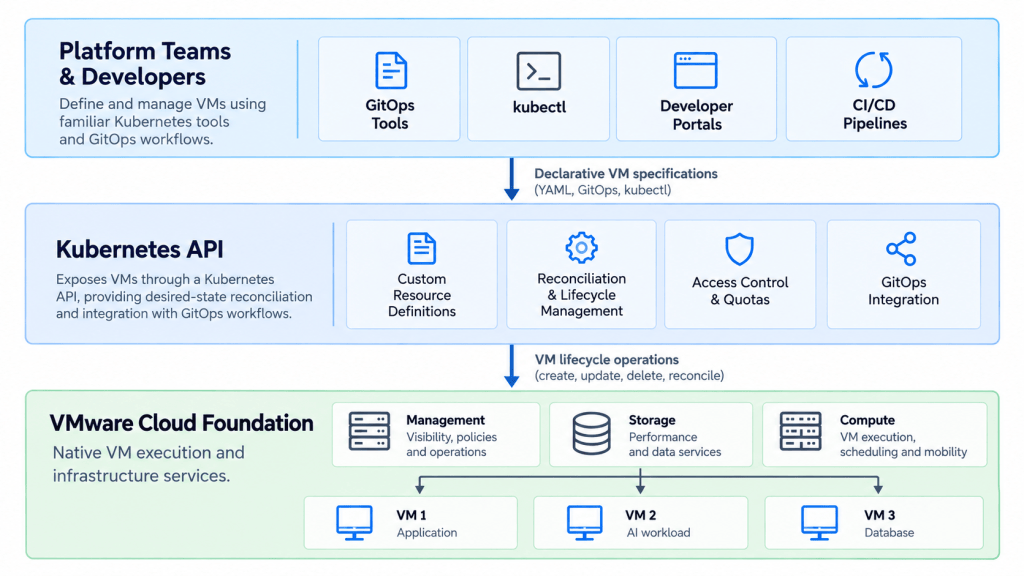
This allows platform teams to provision and manage VMs using familiar Kubernetes tools while retaining the native virtualization capabilities of VCF, including vCenter visibility, vMotion, DRS, storage policies, and established day-2 operations.
Consider a platform team providing temporary development environments. A developer requests a VM through an internal portal, the request becomes a Kubernetes resource, and the controller provisions the VM on the existing VCF infrastructure. The developer works through the same self-service interface used for other platform resources, while the infrastructure team continues to manage capacity, storage policies, and operational visibility through VCF.
In other words, Kubernetes defines and manages the desired state, while VCF continues to operate the underlying virtual infrastructure.
apiVersion: kube-vm.io/v1alpha1
kind: VirtualMachine
metadata:
  name: analytics-gpu-workstation
  namespace: data-science-team
spec:
  className: gpu-accelerated-large
  imageName: "ubuntu-24-04-cuda-12"
  powerState: PoweredOn
  bootstrap:
    cloudInit:
      rawCloudConfig:
        secretName: dev-workstation-bootstrap
Behind this manifest, the VM lifecycle controller translates the high-level specification into native ESX primitives, binding to the pre-defined vCenter storage policy, provisioning the virtual hardware matching className, and mounting the cloud-init payload via guest info.
From the platform engineer’s perspective, provisioning or resizing a VM is simply a Git commit. From the VI admin’s perspective, it appears in vCenter with standard resource pool limits, storage policies, and DRS rules fully applied.
Platform engineering teams can store this YAML in a central Git repository. Infrastructure changes, resizing, and teardowns occur via standard pull requests, bringing the entire VM fleet into the modern platform engineering lifecycle.
Built for Platform Governance: Guardrails Meet Self-Service
By embedding VMs natively into the Kubernetes control plane, KubeVM Service helps bridge the gap between infrastructure control and developer velocity:
- Role-Based Separation of Concerns: VI and infrastructure admins curate and govern the platform guardrails, defining allowable VM Classes (e.g., CPU, RAM, and GPU configurations), attaching approved storage policies (VMware vSAN, NVMe), and setting strict resource quotas. Within those boundaries, developers and data scientists gain complete self-service through GitOps without filing infrastructure tickets or risking cluster over-subscription.
- Zero-Touch Bootstrapping via cloud-init: By supporting native cloud-init user-data configurations backed by Kubernetes Secrets and ConfigMaps, guest customization (injecting SSH keys, hostnames, network settings, and pre-installed packages) is completely declarative. This reduces the need for custom post-provisioning scripts.
- Full Day-2 Enterprise Continuity: Because these workloads run as native hypervisor VMs rather than container-wrapped abstractions, existing enterprise investments remain fully operational on day one. Enterprise backup solutions back them up via standard hypervisor APIs, and monitoring tools (like VMware Cloud Foundation Operations) track them without requiring custom pod-level monitoring agents.
Brownfield Coexistence: Built for New Workloads, Flexible for Existing Fleets
A common concern with platform modernization is the fear of an “all-or-nothing” mandate. Infrastructure leaders worry that adopting declarative tooling requires retrofitting thousands of steady-state virtual machines or pushing traditional operations into Kubernetes before teams are ready.
KubeVM Service is architected around brownfield realities:
- Primary Focus on Modern Consumption: The core mission of KubeVM Service is enabling self-service provisioning for new applications, internal developer platforms (IDPs), and dynamic AI workloads. You do not need to embark on a massive migration project or alter stable systems to start delivering cloud-native velocity.
- Side-by-Side Coexistence: Declarative VMs managed via GitOps run on the exact same vSphere clusters, networks, and storage policies alongside traditional VMs managed directly through vCenter. Adopting modern developer workflows doesn’t require separate hardware or operational silos.
- Pragmatic Onboarding for Existing VMs: While the strategic focus is modern consumption, reality isn’t always greenfield. For teams where unified governance is critical, KubeVM Service allows you to bring existing virtual machines under declarative management without having to migrate workloads, re-IP systems, or disrupt where they run. This gives platform teams the flexibility to fold critical existing databases or stateful backends into modern GitOps pipelines at their own pace.
- Zero Disruption to Traditional Operations: VI administrators retain complete visibility and operational control inside vCenter. Teams can introduce declarative capabilities where they provide immediate business value, while leaving existing steady-state workloads running untouched under proven day-2 operations.
Enterprise Value: Modern Developer Velocity Without Infrastructure Overhead
By bridging native VMs into the Kubernetes control plane, organizations unlock critical advantages without changing day-2 operations:
- Native Enterprise Hypervisor Integration: Because VMs run directly on ESX, KubeVM Service preserves access to native VCF capabilities such as vMotion, DRS, storage policies, and established infrastructure operations. Platform teams gain Kubernetes-native VM lifecycle management without changing the underlying virtualization architecture.
- No Black-Box VMs: While developers manage VMs via kubectl and GitOps, these resources remain visible to infrastructure teams inside vCenter. VI admins retain complete visibility for capacity planning, backup policies, performance diagnostics, and operational governance.
- Automated FinOps and Lifecycle Control: KubeVM Service enables platform teams to define expiration policies for temporary VMs through declarative specifications, metadata, or policy engines such as Kyverno and OPA. Combined with health monitoring through VMware Tools and Kubernetes resource status, these capabilities provide visibility into VM health and lifecycle state. Platform teams can configure automated actions, including shutting down or deleting expired environments and remediating unhealthy VMs, helping reduce unnecessary resource consumption and operational overhead.
- In-Place Operational Modernization: Rather than undertaking high-risk re-platforming initiatives, platform teams can bring declarative management directly to their existing infrastructure footprint. Because workloads remain standard VMs, applications run without code modifications or containerization mandates, reducing the effort required to modernize existing environments.
The Road Ahead
Virtual machines and containers are not competing paradigms; they are complementary compute primitives governed by the same platform principles. KubeVM Service brings virtual machines into the modern cloud-native era, giving developers declarative speed while giving infrastructure and security teams the isolation, stability, and governance they trust.
The post The Modern Compute Primitive: Why Declarative VM Management Matters Now (Introducing KubeVM Service) appeared first on VMware Cloud Foundation (VCF) Blog.
The post The Modern Compute Primitive: Why Declarative VM Management Matters Now (Introducing KubeVM Service) appeared first on VMware Blogs.
]]>The global threat landscape shifted dramatically today following the disclosure of PHP2Shell, a pair of critical Remote Code Execution (RCE) vulnerabilities tracked as CVE-2026-109618 (OOM memory corruption) and CVE-2026-109619 (stale global state). Both carry a CVSS score of 9.2 and affect core memory handling across decades of PHP releases. Because PHP powers a vast portion … Continued
The post Neutralizing PHP2Shell: Stopping Critical PHP RCEs with VMware vDefend and Avi WAF appeared first on VMware Blogs.
]]>
The global threat landscape shifted dramatically today following the disclosure of PHP2Shell, a pair of critical Remote Code Execution (RCE) vulnerabilities tracked as CVE-2026-109618 (OOM memory corruption) and CVE-2026-109619 (stale global state). Both carry a CVSS score of 9.2 and affect core memory handling across decades of PHP releases.
Because PHP powers a vast portion of the modern web, from major enterprise portals to modern microservices running in containerized environments, the fallout was immediate. Across Europe and beyond, government agencies, cybersecurity organizations, and enterprise IT teams took the unprecedented step of taking critical web applications and public portals completely offline as a precautionary measure while scrambling to apply emergency updates. Taking systems offline isn’t a strategy, it’s a symptom of traditional patch management failing under pressure.
While VMware vDefend, VMware vDefend Security Services Platform (SSP) and VMware Avi Load Balancer are not impacted by these vulnerabilities, they can help protect customer workloads from the CVEs.
In this post, we highlight how:
- VMware vDefend Gateway Firewall can block the PHP vulnerability via virtual patching
- VMware Avi Load Balancer (Avi WAF) can block the PHP vulnerability via virtual patching
Additionally, vDefend DFW micro-segmentation along with ATP across internal workloads can deliver live network-level visibility stopping PHP2Shell exploits without requiring application downtime or immediate code modifications.
Note: Virtual Patching is the ability to apply a network-based mitigating control to vulnerable workloads, without needing to take those workloads offline, enabling immediate protection while the software patch can be applied safely during a maintenance window.
The Anatomy of the PHP2Shell Crisis
The PHP2Shell vulnerability duo breaks basic assumptions about how web servers manage request memory during unexpected failures:
1. CVE-2026-109618 (Out-of-Memory Corruption): Triggered when a request crosses PHP’s memory_limit during operations like multipart file uploads. The memory abort mechanism (longjmp()) leaves internal request data partially initialized. Cleanup routines subsequently parse uninitialized heap memory controlled by the attacker, allowing unauthenticated execution before any application logic ever executes.
2. CVE-2026-109619 (Stale Global State Execution): Caused when fatal errors leave module-level global pointers pointing to per-request heap space that was already freed. Subsequent requests handled by the same worker process execute against that stale memory space.
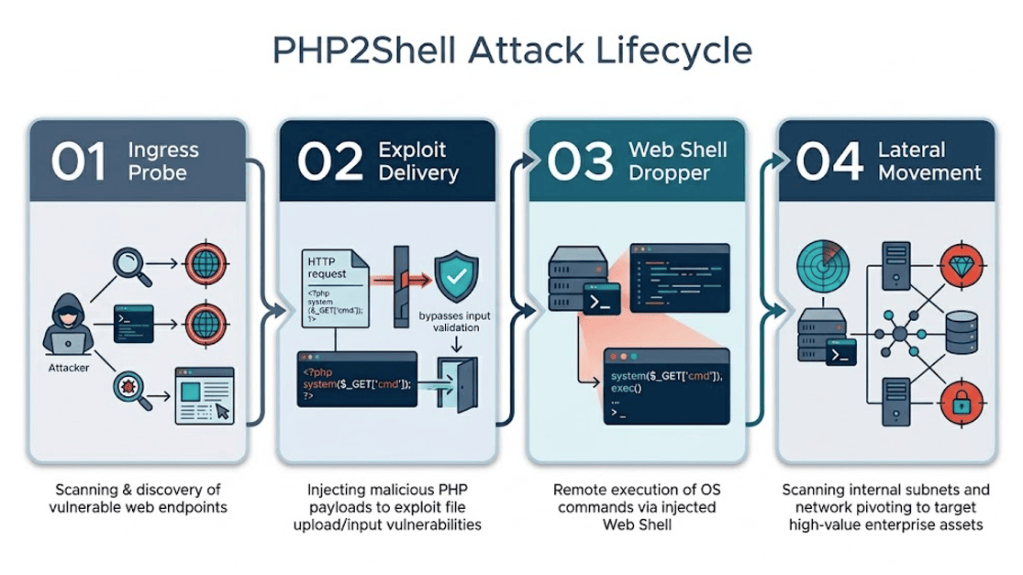
Because an unauthenticated request can trigger memory corruption before application code even executes, traditional web application input sanitization is insufficient.
The PHP Visibility Problem: You Can’t Patch What You Don’t Know Exists
The primary reason organizations resorted to taking websites offline today stems from a fundamental visibility gap.
Over years of software development, PHP gets embedded into legacy enterprise portals, third-party vendor appliances, custom utility microservices, and containerized internal dashboards. Traditional static asset inventories miss many of these instances, leaving security teams facing critical questions during a crisis:
- Where across our multi-cloud fabric are vulnerable PHP instances actively running?
- Which services are directly exposed to north-south internet traffic vs. east-west internal networks?
- How do we prioritize patching without breaking business continuity?
Relying on scheduled patch deployments forces teams into a binary choice: leave vulnerable instances exposed to automated AI-driven scanning or shut down public operations entirely.
VMware vDefend Gateway Firewall (GFW) with TLS Decryption
Because PHP2Shell attack payloads arrive over encrypted HTTPS channels, deep threat inspection requires decrypting the payload at a control boundary. VMware vDefend Gateway Firewall (GFW) equipped with TLS Inspection (Decryption) serves as the critical enforcement point to inspect, unmask, and virtually patch encrypted traffic.
Protecting Inter-Segment Traffic
Threats like PHP2Shell are rarely confined to initial north-south ingress. Attackers use compromised internal jump-boxes or unmanaged web microservices to pivot laterally across network subnets. vDefend GFW acts as an inter-segment gateway firewall. By placing GFW with TLS Decryption at Tier-0 and Tier-1 gateway boundaries between internal application zones, organizations ensure that encrypted east-west traffic moving across network segments undergoes full payload inspection.
Instant Activation for Existing NSX Overlay Customers
For organizations already utilizing NSX overlay networking, the operational friction to enable this level of protection is virtually zero. Because NSX Edge Nodes are already deployed in your environment to handle gateway routing, enabling vDefend GFW with TLS Decryption requires no architecture changes, extra appliance provisioning, or network re-plumbing. Administrators simply enable TLS Inspection policies directly on the existing Tier-0/Tier-1 Gateway Firewalls to start decrypting and inspecting inbound and inter-zone encrypted traffic.
Dedicated IDPS Signatures for PHP2Shell Virtual Patching
Once traffic is decrypted at the Gateway Firewall, vDefend’s integrated IDPS engine inspects the unencrypted HTTP payload stream. To address the PHP2Shell threat immediately, VMware Threat Analysis Unit has officially released two dedicated IDPS signatures (Signature Pack IDSSignatures_4014) for real-time virtual patching:
- IDPS Signature #1156209: Detects and blocks exploit attempts targeting the OOM Memory Corruption vulnerability (CVE-2026-109618) by inspecting multipart HTTP payload allocations and memory-abort triggers.
- IDPS Signature #1156210: Detects and intercepts malicious requests targeting the Stale Global State Execution vulnerability (CVE-2026-109619), preventing dangling memory execution attempts.
By deploying GFW with TLS Decryption and enabling signatures 1156209 and 1156210, security teams immediately achieve active virtual patching on encrypted ingress and transit channels—stopping PHP2Shell in its tracks without altering application source code or taking web services offline.
Stopping Web Exploits with Avi WAF
VMware Avi Load Balancer (Avi WAF) acts as an intelligent barrier for your public as well as internal web applications.
1. Real-Time Version Discovery
Avi WAF continuously parses live HTTP/S traffic streams. By analyzing header signatures (Server, X-Powered-By), Avi can help identify vulnerable versions of your PHP-based application.
2. Virtual Patching
Instead of waiting weeks for software regression testing, administrators can push targeted virtual patches at the load balancer layer within minutes. Avi WAF inspects incoming HTTP payload structures, multipart headers, and field lengths to drop exploit payloads before they touch backend application workers.
3. Payload De-obfuscation & Request Normalization
Attackers routinely obfuscate PHP RCE requests using double URL-encoding, base64 wrappers, or nested string concatenations. Avi WAF normalizes and decodes HTTP request bodies, headers, and query strings in real time, exposing malicious memory-manipulation attempts.
Avi WAF can provide protection against PHP vulnerabilities with the following controls:
- CRS Rules enforcement as part of Avi WAF Policy:-
- Rules 920170 & 920180 (Multipart Request Anomalies): Inspects multipart payloads and headers to mitigate exploit attempts.
- Rules 920370 & 920380 (Header and Argument Thresholds): Limits headers and parameters to prevent out-of-memory denial of service.
- Rules 932100–932200 (Remote Command Execution): Detects OS shell injection patterns like /bin/sh invocation.
- Rules 933100–933190 (PHP Application Attacks): Evaluates request streams to block rogue PHP code execution.
- Also enable Avi Virtual Patch via CVE-specific rules in Enforcement mode. The rules are available at https://knowledge.broadcom.com/external/article/460068.
- As a best practice, enable Avi IP Reputation to block traffic from malicious IP addresses.
Zero Trust Micro-Segmentation & Containment: VMware vDefend DFW & ATP
Virtual patching blocks known exploit vectors, but modern resilience requires containing post-exploitation activity if an unmanaged or internal asset is breached. VMware vDefend Distributed Firewall (DFW) and Advanced Threat Prevention (ATP) provide the necessary containment and behavioral defense.
Distributed Firewall (DFW): Micro-segmentation & Zero Trust Isolation
Operating directly inside the hypervisor kernel at every workload’s virtual NIC, vDefend DFW enforces strict least-privilege micro-segmentation:
- Blast Radius Reduction: Web applications running PHP are strictly isolated. Even if a local web shell is dropped on a PHP host via an unmanaged vector, DFW blocks the workload from scanning, probing, or communicating with database tiers, internal APIs, or domain controllers.
- Strict Egress Rules: Prevents compromised workloads from initiating outbound connection attempts to unauthorized internal subnets.
Advanced Threat Prevention (ATP): Post-Exploitation & C2 Defense
For novel exploit variants or evasive execution paths, vDefend ATP delivers multi-layered behavioral analysis:
- Automated Sandboxing: Suspicious file uploads or dynamic payloads executed by web processes are mirrored to the vDefend Sandbox for on-premises dynamic detonation and behavioral analysis.
- C2 & Reverse Shell Blocking: Network Detection and Response (NDR) continuously monitors traffic for anomalous outbound callbacks. If an exploited PHP process attempts a command-and-control (C2) callback or reverse shell, ATP blocks the connection and isolates the workload instantly.
Summary
The table below summarizes virtual patching and additional protection delivered through VMware vDefend and Avi WAF.
| Defense Layer | VMware Security Component | Core Operational Function |
| Web Application Layer | Avi Load Balancer WAF | Discovers running PHP instances in real time and blocks inbound exploit patterns on public endpoints.
Avi WAF with the recommended CRS controls for Remote Code Execution (RCE), Protocol validation, custom signature Virtual Patch along with IP reputation enforcement.Refer to https://knowledge.broadcom.com/external/article/460068 |
| Gateway & TLS Decryption | vDefend GFW + IDPS | Decrypts TLS traffic on existing NSX Edge Nodes and enforces IDPS Signatures #1156209 & #1156210 for instant virtual patching of CVE-2026-109618 & CVE-2026-109619. |
| Threat Containment | vDefend DFW (Micro-segmentation) | Enforces hypervisor-level Zero Trust boundaries to prevent unauthorized lateral movement and contain threats. |
| Post-Exploit Defense | vDefend ATP | Detonates suspicious payloads in an isolated sandbox and blocks outbound C2 reverse shell attempts. |
Related Resources & Signature Links
- VMware Threat Analysis Unit IDPS Signature #1156210 (CVE-2026-109619)
- VMware Avi Load Balancer – Mitigation for CVE-2026-109618 and CVE-2026-109619
- Impact Evaluation of PHP issues CVE-2026-109618 and CVE-2026-109619 of VMware by Broadcom product portfolio
- Virtual Patching: Guarding Against a Tsunami of AI-discovered Exploits with vDefend and Avi
The post Neutralizing PHP2Shell: Stopping Critical PHP RCEs with VMware vDefend and Avi WAF appeared first on VMware Load Balancing & WAF Blog.
The post Neutralizing PHP2Shell: Stopping Critical PHP RCEs with VMware vDefend and Avi WAF appeared first on VMware Blogs.
]]>