Why Use a Spreadsheet?
Spreadsheets are easy to set up, accessible anywhere, and customizable to your business needs. Excel and Google Sheets are popular free options. Compared to manual bookkeeping or complex accounting software, spreadsheets provide a low-cost, user-friendly solution.
With some basic templates and a little training, you can handle your own bookkeeping. This frees up time and money that otherwise goes toward hiring an accountant or bookkeeper. Spreadsheets also make tax preparation easier by keeping everything organized in one place.
The Benefits of Using the Cash Method
Most small businesses can use cash basis accounting, which simply means recording income when received and expenses when paid out. With this method, you don’t have to deal with accounts receivable/payable, inventory tracking, or accruals.
The cash method gives you an accurate picture of your real-time cash flow. Monitoring your income and outflows helps forecast future cash needs and make financial decisions accordingly. It’s also easier to explain cash accounting to lenders if applying for financing.
Setting Up Your Spreadsheet
Start by listing your income sources and expense categories as column headers. Add rows for the months and years. Use the rows to log transaction date, description, amount, etc. Common accounts include:
- Income – sales, services, fees
- Cost of Goods Sold – materials, inventory, packaging
- Expenses – rents, utilities, payroll, supplies
- Assets/Liabilities – loan payments, tax withholdings
Calculate monthly and yearly totals with automatic sums. Link your bank/credit accounts to automatically import transactions. Add separate sheets for accounts receivable, payable, or depreciation if needed.
Stay Organized With Bookkeeping Best Practices
- Enter transactions at least weekly if not daily. Don’t let paperwork pile up.
- Scan or photograph receipts and records. Backup your spreadsheet regularly.
- Reconcile bank statements monthly to match with spreadsheet.
- Separate personal and business expenses. Open a dedicated business account.
- Track invoices due, accounts payable/receivable in a notes column.
- Meet with tax preparer yearly to review. Adjust withholding if needed.
With some routine data entry and reconciliation, a spreadsheet gives small business owners an easy, efficient bookkeeping foundation. The simple cash method approach keeps things clear and focused on cash flow. Just update the spreadsheet, back it up, and get guidance at tax time.
The All-In-One Accounting Spreadsheet Template is your best source for all your bookkeeping needs. Forget building from scratch and get to managing your books quickly.
]]>Fortunately we had a team with a skillset so we pivoted to being a software consulting business.
Hooray, we’re saved!
Very quickly we signed a contract huge client (a 100+ year old not-for-profit) and started doing small projects for them. It seemed like we were saved and at least had a source of revenue.
They liked our work, so they kept giving us more projects.
Every year, we were given bigger and bigger responsibilities and slowly owned bigger pieces of the IT pie. We had no choice but to start building our team.
Having a team means having payroll. Payroll means we have expenses.
By 2015, we were doing 80% of their IT development and maintenance. We had completely overhauled their API layer and security and modernized a few of their UX tools for managing staff and volunteers.
But large businesses are very political, especially not-for-profits, and trouble was brewing. Despite the risk, we were still growing, so things seemed ok.
As leadership changed, the incoming heads of departments wanted to make their mark and prove their worth.That meant bringing in their own people and teams.
You can already see where this is going.
Trouble on the horizon
We weathered that storm a few times, but the winds kept shifting.
At that point we recognized we had a lot of risk having one major client make up 80-90% of our revenue. We had a few small projects here and there, but nothing consistent.
All of our time was taken up by supporting our biggest (only) source of revenue and it felt like we were too busy to search for and support a new client.
Until we weren’t.
After one of the leadership changes, we were suddenly given less and less work.
Our revenues were sinking, and we needed to find new clients.
We started a business development campaign and signed a few smaller, short-term contracts that helped, but just delayed the inevitable fall.
By 2017 our big contract ended and all of a sudden our revenue was cut by 70-80%. It took us most of the year to find another big client.
We’d found another whale, albeit a much smaller one. That saved our agency for a while and we thought we were back in business, even though we had to let go of most of our team.
Unfortunately we found ourselves once again too busy to be hunting new clients even though we recognized the danger. “This time will be different,” right?
A year later that contract ended too and we were right back where we started.
The downfall is complete
That was the complete fall. Our agency was no longer a 7-figure earner, and we vowed to never have a single client make up more than half our revenue again.
It was at that point we changed tack and started focusing on transitioning to a product- first business rather than a professional services business. But that’s a story for another day.
Moral of the story, whale hunters eat well after a kill, but starve between hunts. Start fishing while you’re busy and derisk your business.
It’s almost always worse to start trying to expand when you urgently need it.
]]>That minimum balance almost never covers your full balance, especially if you’re carrying a relatively large balance.
Have you ever wondered how credit card companies figure out your minimum payment each month? Is it an arbitrary number they pull out of thing air, or something you can plan for?
The truth is, it’s pretty straightforward. Here’s how they do it.
The Minimum Payment
Credit card issuers use a simple formula to calculate your minimum payment. There are two basic ways they calculate it that involves two components:
- The percentage of your balance
- and a minimum flat fee
Here’s how it all works.
The Percentage of Your Balance If your balance is over a certain amount, credit card companies will bill you a percent of your balance each month.
This percentage can range anywhere from 1% to 3%. So, if you have a balance of $1,000, you’ll have to pay at least $10 to $30 of that each month.
This fee can differ from company to company, but you can easily determine how much yours is by dividing your minimum by your balance.
Minimum Payment / Toral Balance = minimum percent
For example:
$30 / $1,000 = 0.03 or 3%
The Flat Fee The second component of your minimum payment is the flat fee. This is an additional fee that credit card companies require you to pay each month. This fee is usually in the range of $15 to $25. So, if you have a balance of $1,000, you’ll have to pay at least $15 to $25 of that each month.
Put Together When you put both components together, you get the total minimum payment that credit card companies require you to pay each month. For example, if you have a balance of $1,000 and your credit card issuer requires you to pay 1% of your balance plus a flat fee of $20, then your total minimum payment will be $30.
Your Minimum Payment May Change
Keep in mind your minimum payment may change from month to month.
Since your balance will change as you run up or pay down your credit card balance, the percentage of your balance and the flat fee will change based on the new total balance each month.
So if your balance increases, your minimum payment will also increase. To ensure that you’re making the minimum payment required by your credit card issuer, review your balance each month and adjust your payment accordingly.
As you pay down your balance, your minimum payment will decrease alongside your balance.
Pre plan and See it in action
If you want to see how your minimum balance changes and how much you’ll pay in interest over time, download the Credit Card Payoff Template built for Google Sheets and set up your payoff plan.
Ask your credit card issuer
If you want to know exactly what your credit card issuer is calculating your minimum payment, call the number on the card and ask how they determine the minimum monthly payment.
Zero interest credit cards
Some credit cards offer low or even zero minimum monthly payments for an introductory period.
These cards are great for balance transfers or large purchases. Be cautious though as these cards can come with higher interest rates, so it’s important to read the fine print and make sure you pay off the balance before the introductory period is over
Putting it all together
Now that you know how credit card companies calculate your minimum payment, you can plan your credit card strategy better. Paying only the minimum balance can make it take longer to pay off the full balance and make you pay more in interest.
If you can it’s always a good idea to pay more than the minimum payment and avoid costly interest charges.
Aim to pay off your balance in full each month if you can and make sure to always pay on time to keep your credit score in good standing.
To create a credit card payoff plan and see your payoff date, total interest paid, and plan the best strategy, download the Credit Card Payoff Google Sheets Template here.
]]>In my years as an entrepreneur, I’ve come up with at least a dozen brand names for companies I’ve started or co-founded, not to mention my customer’s companies and products.
I’ve learned the formula for finding with the right name that it makes the process much easier. It turned me into a business name generator.
For years my process was this:
- Agonize over a name
- Turn it over and over in my head simply willing my brain to come up with something brilliant
- Try to remember every good name I think of
- Poke around in a dictionary hoping some clever word would just pop out.
Not surprisingly, all those tactics that relied on luck turned out to be a complete waste of time.
I realized there had to be a better way, so I developed a system that allowed me to churn out possibilities, pick the best ones, and check the business name availability.
I put my whole formula into an easy to follow Notion template for you. You can grab it here.
Here’s the Business Naming Formula
The formula is deceptively simple and makes the process of coming up with a business name much easier.
Follow these steps and you’ll be a powerhouse business name idea generator.
- Word Association
- Combine & Refine
- Validate & Secure
1. Word Association
At this step you can remove all pressure of coming up with an actual name yet.
At this point we’re just looking to build a large collection words for us to use later, as many of them as you can think of. The goal is to just write down every word that comes into your head, whether you think you’ll use it or not.
First, start by writing out the obvious words, the ones directly associated with your business or industry.
For example, if you’re naming a law service, write down “law, laws, lawyer, judge, judicial” etc.
Writing the obvious words first clears out the first words already in your head so you can move on to the not as obvious words.
Next, start to find the not so obvious and obscure words.
This is where we get creative. A thesaurus or business name AI word association tools can come in handy.
Synonym Threads
One trick I’ve learned is to enter a word into a thesaurus, then click on one of the suggested words to get more suggestions. Often times that new word will have a unique set of synonyms. Then you can rinse and repeat to go down “threads” to find associations and words that weren’t immediately obvious.
For example:
Law → Ruling → Edict → Precept → Axiom
Axiom may never have appeared in the original synonyms for law, but you found it in a thread.
Symbols and Themes
Another useful trick is to think of “themes” or symbolic elements. These can be animals, objects, concepts, that can help describe traits of aspects of your business.
For example the word Prudential means “involving or showing care and forethought, especially in business.” The name is directly letting you know they will be thoughtful and careful with your money.
Evernote for example is a combination of Ever and Note telling you first, they’re a note-taking app, and second “Ever” gives you the sense that they will keep your notes secure and safe always. Bonus, Evernote uses an elephant for their logo because, you know, an elephant never forgets! Brilliant.
2. Combine & Refine
Now that you have a huge list of words, it’s time to refine that list down to the ones that could work.
Take the words that stick out to you and highlight them. Pick ones that best describe your business and sound good.
Generally words with hard sounds like “k”, “t” etc can give your name a sort of staccato rhythm and can make a pleasing sound.
Action words & Descriptors
A helpful trick to take a word and make it unique is to try to combine these ideas with action words, or descriptors.
Think about names like ConvertKit, ClickFunnels, etc. They’re descriptive and the combination of words makes them unique.
Here are some descriptors to get your brain flowing:
- Click
- Kit
- Omni
- Now
- My
- Flow
- Flex
- In
- Out
- Flex
Validate & Secure
Congrats! At this point you’ve whittled down your list of preferred names, now it’s time to make sure they’re not already taken.
There are three things you have to look at now:
- Business registrations
- Domain names
- Social handles
First and most important, is there a business registered with that name already?
If you find a business registered with your exact business name or something similar, it isn’t the end of the world yet. I go into more detail on this point in the Notion guide, but the basics are this: If if it’s in a different industry, you might be ok. You can also experiment with different spellings, but be cautious here as it might make searching for your business more challenging.
Next check whether the domain name you want is available. You have some flexibility here with how you can put together the domain name by using different top-level-domains like .com, .io, etc.
Then find your social handles. Ideally you’d have every social handle match, but that’s not a requirement. You could have some be the name of the business and one or two be “hello_____” or “get____”.
The Notion guide has a database so you can keep track of every name you prefer and keep track of all of these parts of the process for each of them.
Secure
At this point you’ve probably found the one that you’re most excited about and then it’s time to register it.
If you’re in the United States, you have two options:
- Some states allow you to “reserve” the business name
- Or register the business with the secretary of the state
The Business Naming Notion guide has a list of every US state’s secretary of state websites where you can register your business name.
DBA or not to DBA?
Your business’s legal name will probably end in LLC or Corp, but you probably don’t want to list that suffix on everything, especially your website.
That’s where a DBA comes in.
A DBA allows you to operate under different name. For example, if your company is Digital Products Unlimited LLC, you could operate under DigitasKit with a DBA. The DBA form is a separate form from the legal business registration, so be sure to complete that one too.
Once you’ve registered your business with your new name, you’re ready to start making sales and grow!
This process has helped me time and time again with the daunting task of coming up with the right name for my business. I sincerely hope it helps with yours.
If you want a guide to help you with every step of the process, download the Business Name Discovery Guide.
]]>Napolean Hill’s list of dubious claims is long. While he may have indeed studied the lives of a long list of successful business men, there is no evidence supporting his grander claims.
He claims that he interviewed Andrew Carnegie, that he was an advisor to two presidents: Woodrow Wilson and Franklin Delano Roosevelt. FDR’s most famous quote, “The only thing we have to fear is fear itself,” was also claimed by Hill.
The deeper you research his life, the clearer it becomes how much of a fraud he truly was.
Contained within his book is probably the most misunderstood and persistent quote repeated ad nauseam in the personal development world:
“Whatever Your Mind Can Conceive and Believe, It Can Achieve.”
The promise behind this quote is so alluringly compelling.
Everything you want is just on the other side of sheer blind belief.
The repercussions are equally damning. If you’re not yet successful, it’s because you either haven’t conceived, or don’t believe quite enough.
Another quote that is missing important pieces. In fact, it only has a very small bit of truth to it.
His best-selling self-help book, Think and Grow Rich, contained this quote and spawned the concept of the “Law of Attraction” popularized in the most recent retelling, The Secret.
The idea is this: If you believe anything hard enough, you can will it into your life. Fame, riches, success, you name it.
The problem with Hill’s quote is two-fold: The fine line between belief and delusion, and the missing piece.
Looking at examples of success in the face of overwhelming odds, it seems like belief is the common denominator. The Wright brothers were told it’s impossible to fly. What they had on their side was not delusion, but years of study and a strong theory they were going to test out. It’s the difference between operating on a feeling versus fact.
It’s the difference between people jumping off buildings to test out their homemade wings that “should work” vs actual research.
The Truth of the Quote
Of course in every good quote there is a kernel of truth, and this one is no different. The belief portion of the quote is the motivator to keep you moving forward.
In order to persevere, you have to believe that it’s worth going through the challenging uncomfortable periods. You have to believe that the discomfort and tough periods are worth it before you’ve proven it.
That’s why it’s a leap of faith.
But you can’t succeed on belief alone. You can’t simply “think” your way to your dreams.
“Thinking” to grow rich is a sure fire way to ensure your dreams stay dreams forever.
Napolean Hill glosses over the most important part: the hard work. You can set your mind to it, but without the work, it will again go nowhere.
So I humbly propose a better, albeit less punchy version:
“Belief comes before building and sustains you through the dark times”
How would you rewrite his quote?
]]>From keeping track of income and expenses to monitoring accounts payable and receivable, there’s a lot to keep track of and there is a never ending list of options for managing your bookkeeping. Luckily, there’s one tool that is my goto for straightforward accounting: Google Sheets!
Now, I know what you’re thinking. “Spreadsheets? That sounds boring and complicated.” But trust me, Google Sheets can be a secret weapon for your business bookkeeping. And the best part? You can add your own personality to your spreadsheets to make them uniquely yours.
Here are some tips for using Google Sheets to manage your business finances:
- Start with a template that matches your business needs. Google Sheets has a variety of free templates available, but often buying a premade template gets you the features and formulas you need to more effectively track your business finances.
- Keep it organized, but don’t be afraid to get creative. Use different sheets for different aspects of your finances, and label them clearly. But don’t be afraid to add a little flair to your spreadsheets, whether it’s color-coding or using emojis to highlight important information.
- Use formulas and functions to save time and reduce errors. Google Sheets has a variety of built-in formulas and functions that can make bookkeeping easier. Spend some time learning these functions, and you’ll be amazed at how much time you’ll save.
- Keep it up-to-date, but don’t be too hard on yourself. It’s important to update your finances regularly to stay on top of your business’s financial health. But if you fall behind, don’t worry too much. Just set aside some time to catch up and get back on track.
Benefits of Google Sheets
Now, let’s talk about the benefits of using Google Sheets for business bookkeeping over other accounting software options:
- Accessibility: With Google Sheets being cloud-based, you can access your financial information from anywhere with an internet connection. This means you can update your finances on-the-go, whether you’re working from home, the office, or a coffee shop.
- Collaboration: Google Sheets allows multiple users to access and edit the same spreadsheet simultaneously. This is especially helpful if you have a business partner or an accountant who needs access to your financial information.
- Automation: Google Sheets has built-in automation tools that can save you time and reduce the risk of errors. For example, you can use conditional formatting to automatically highlight cells that meet certain criteria, or use data validation to ensure that users enter data in a specific format.
- Integration: Google Sheets integrates seamlessly with other Google Workspace apps, such as Google Docs and Google Slides. This makes it easy to create reports and presentations using your financial data.
- Cost-effective: Google Sheets is free to use, which is a huge benefit for small business owners who may not have the budget for expensive accounting software or professional bookkeeping services.
- Scalability: As your business grows, your financial needs will become more complex. With Google Sheets, you can easily add new sheets, columns, and formulas to accommodate your changing needs.
What about other software?
Now, you may be wondering: “What about other accounting software, like Quickbooks?” While Quickbooks and other accounting software may offer more advanced features and functionalities, they can also come with a hefty price tag. Quickbooks, for example, can cost upwards of $300 per year. For small business owners on a budget, this may not be the best option.
Additionally, accounting software like Quickbooks can be complex and time-consuming to set up and learn. With Google Sheets, you can start managing your finances right away, without having to spend hours learning how to use a new program.
Of course, there are some downsides to using Google Sheets for business bookkeeping.
For one, it may not be as secure as other accounting software, since it’s cloud-based. You’ll want to make sure that you’re using strong passwords and two-factor authentication to protect your sensitive financial data. Additionally, Google Sheets may not be suitable for large businesses with complex financial needs.
But for small business owners who want a cost-effective and user-friendly solution for managing their finances, Google Sheets is definitely worth considering. With a little creativity and some basic accounting knowledge, you can use Google Sheets to keep track of your business’s financial health and make informed decisions about its future. Give it a try and see for yourself!
Looking for a built for you Google Sheets bookkeeping template?
This google sheets template is already setup with every sheet, dashboard and formula you need to manage all your business finances
]]>This post is inspired by Peak: Secrets from the New Science of Expertise, by Anders Ericsson and Robert Pool
It’s not about natural talent either.
It’s about setting a plan.
Decide you want to do something, or get better at something, Chess, guitar, golf, you name it.
Then set a measurable goal: Playing chess at a competition, Being able to play a Dragonforce song the whole way through without a mistake, play a golf game and come under par.
Find the strong reason to continue. It has to be more powerful than any reason to quit. Practice is hard and not fun, so the reason to do it is really really important so you can stick to it.
HINT: Setting up your practice first thing in the morning is a great idea before distractions hit you.
Here’s an example
You want to win the local Chess championship. You want to win a local guitar competition. You want to play in the amateur golf league.
Sometimes it’s because you recognize the practice would be good for your career and you know you’re not good at it. Ex: you are mortified at the idea of public speaking but know it would be good for your career. Or copywriting. Or leading a meeting.
As you get better at your new skill, the pleasure of being good at it starts to rise and you form an identity around it. You like being known as a good public speaker, or you like being recognized as the best golfer in your city.
That intrinsic motivation will push you to continue.
This makes the practice feel more like an investment than an expense.
Then you need to figure out the steps to get there. How do you measure your progress?
Then figure out what habit you need to hit those milestones. How do you practice? What’s your practice schedule? At least 1 hour a day at full concentration.
Remember, the mental pain associated with the practice gets easier and less intense. The stronger the habit is, the less painful it will be.
Also must truly believe you can do it. That belief will push you as you practice, even before you are good at it.
Read about this concept and more in the book that inspired this post
Peak: Secrets from the New Science of Expertise, by Anders Ericsson and Robert Pool
]]>Of course, we know carrying a balance has downsides, from paying high interest to impacting your credit score.
So how do you pay off your credit card debt as quickly as possible while paying the absolutely minimum in interest fees?
There is a Google Sheets spreadsheet built to help you get out of debt fast!
But first, let’s talk about the debt payoff methods and the pros and cons of each.
Snowball Method
There are two main methods for paying off debts: the Debt Snowball method and the Avalanche Method.
What is the debt avalanche method for paying off debts? In this method, you pay off the debts in order of highest interest to lowest interest ignoring the balances. This way you optimize paying the least in interest fees.
What is the debt snowball method for paying off credit cards? The debt snowball method focuses on motivation and momentum. Basically you pay off the smallest debts first, then the next smallest debt, and so on and so forth until you’re completely paid off while paying the minimum payments on the other debts.
The debt snowball method is the most popular method of paying down debt quickly, and for good reason! It’s very motivating to see the progress of being able to cross off a card as paid off and motivates you to stay on track.
In fact, several studies have shown it’s the most effective method for paying off debts like high interest credit cards
Credit Card Payoff Calculator in Google Sheets
How do you put the plan into action and track your progress? The Ultimate Credit Card Payoff template of course!
I’ve built an incredibly intuitive and powerful Google Sheets spreadsheet template built to help you build a plan to get debt free as quickly as possible!
This credit card payoff template allow you to enter up to 6 cards or debts and tracks up to 25 years of payments (hopefully you don’t need that long!). You can even put in balance transfer cards to see how they work for you.
The dashboard in the template will show your payoff plan including how much interest you’ll pay, how long it will take, and even give you suggestions on how to pay it down more quickly.
Step 1 – Entering Data
First step is buying the Credit Card Payoff Template for Google Sheets.
Once you purchase the template and copy it into your Google account, the next step is to enter your data.
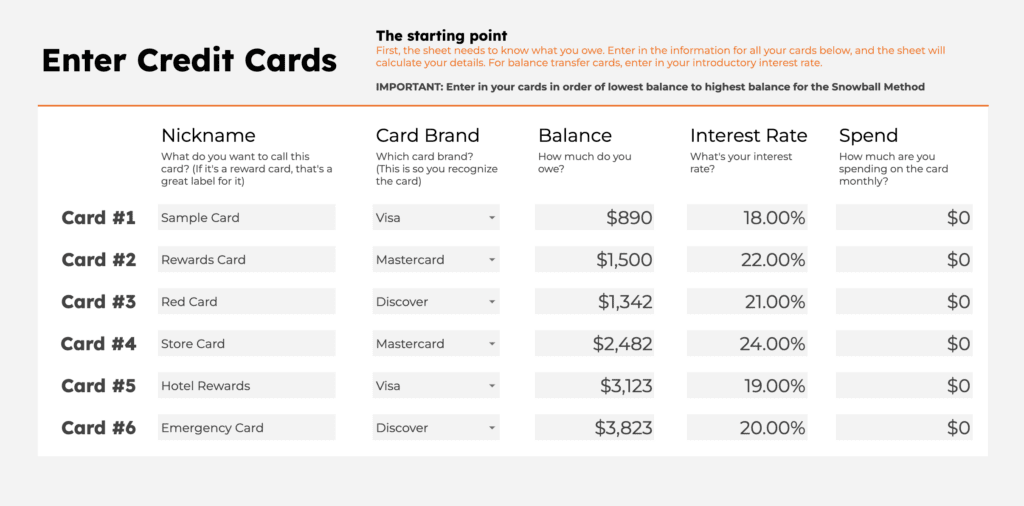
The spreadsheet accepts up to 6 cards. For each of your cards, enter in
- Nickname and brand (This is so you can recognize the card in other sheets)
- Balances
- Interest rate
- Monthly spend
The monthly spend is perfect for when you have subscriptions paid by the card and know a certain amount will always be added to the balance every month.
Step 2 – Enter Monthly Payment
Next up, you can enter how much you can pay monthly towards your credit cards. The sheet is smart and will calculate your first month’s interest and minimum payments to ensure you’re at least paying enough to reduce the balance over time.
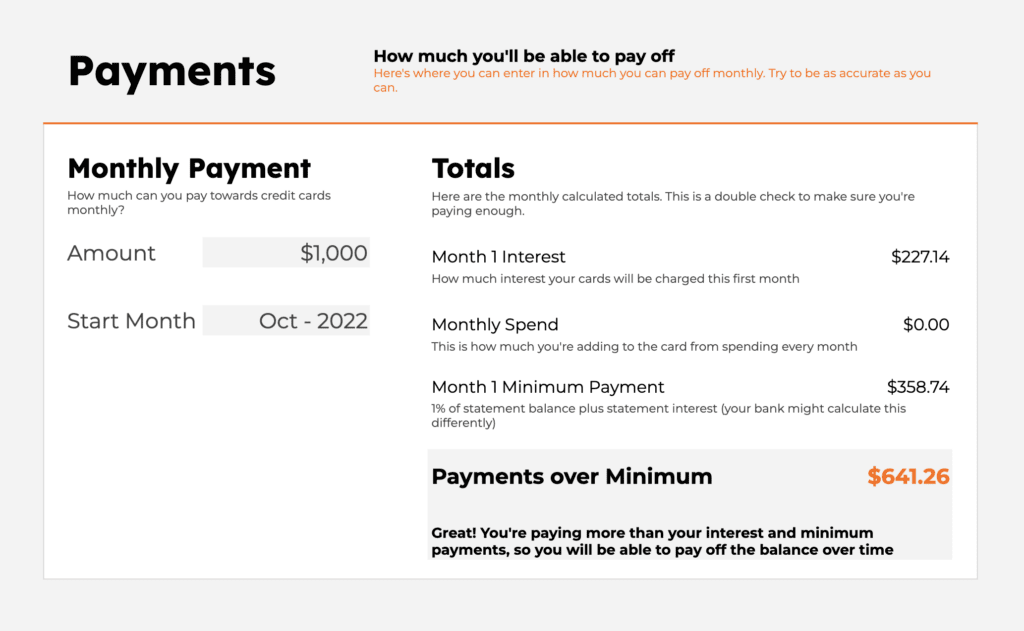
The Google sheet spreadsheet for credit card payoff template will give you a message letting you know whether you’re paying enough or need to pay more.
Selecting the start month will tell the sheet which month to start the dashboard and payment schedule on.
Step 3 – Follow The Payment Schedule
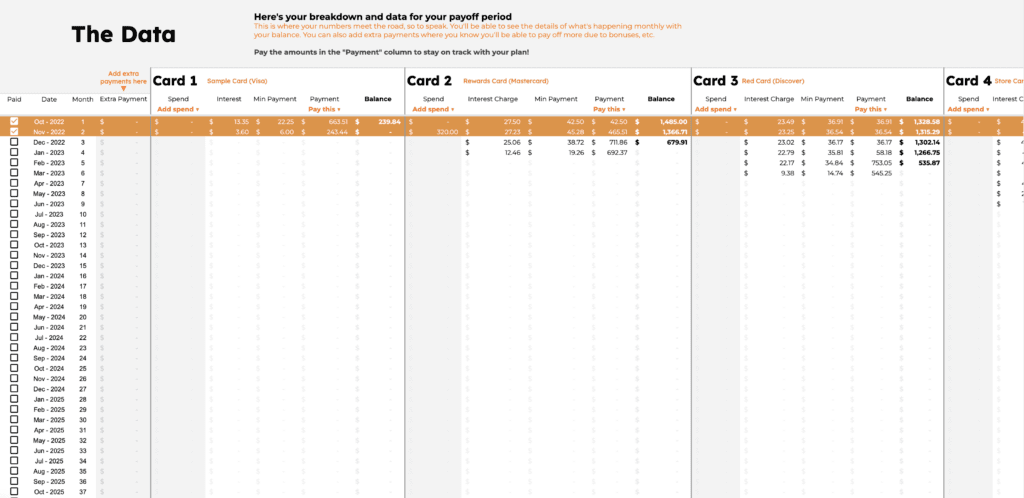
One of the most important sheets in the whole Credit Card Payoff spreadsheet template is the Data tab.
This sheet automatically calculates the interest fee, minimum payment, and amount you should pay. The sheet assumes you will be focusing on one card at a time and paying the minimum on all the rest of the cards.
The calculations give you how much to pay on each card to follow your plan.
In the 4th column you can add additional amounts you can pay that month like when you get a bonus or a gift. If you get a raise, you can just add that additional amount to each cell in that column. The sheet will automatically apply it to the card you’re paying down at the time.
For each card, you can also add additional spend over what you entered into the credit card data sheet. This will update your interest payment and the minimum payment, along with the rest of the data in the plan.
As you pay the amounts the sheet calculates to your credit card companies, click the checkbox on the left to update the dashboard with your progress!
Step 4 – The Dashboard
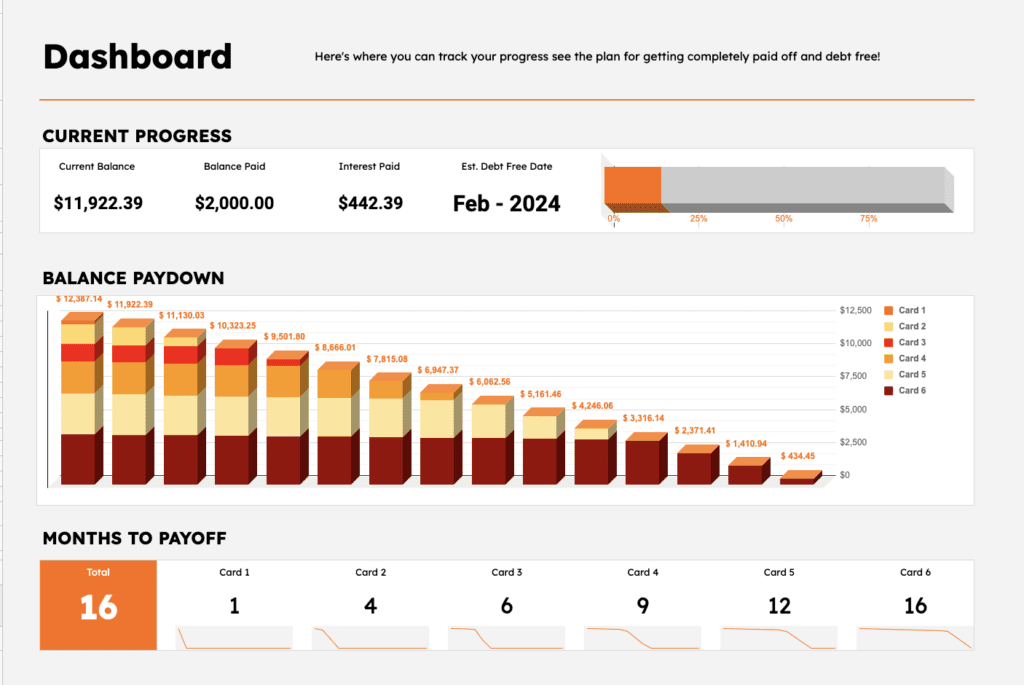
The final, and most fun step in this template to payoff your credit cards in Google Sheets is the Dashboard tab.
Here you can see your current progress, your estimated debt payoff date, a chart with your whole balance paydown plan, and the months to payoff for each card.
You can also see details like how much interest you’ll pay for each card, how much you’ll pay in total and on each card, and a box showing suggestions based on the data you entered.
Using this dashboard is how you’ll stick to the plan and get excited to watch your progress!
Crafting a plan
Once you have your basic data entered into the Google Sheets template, you can start to play with the payments, balances and interest to model different pay off strategies.
For example, what if you follow a combination of the Snowball Method and the Avalanche Method by paying off the lowest balance first to get momentum, then pay off the highest interest next to reduce fees?
What if you got a balance transfer card with a 0% interest for the first year and transferred some of your balance to that card?
You can put in these scenarios and look at the dashboard to look at your payoff time and total paid in interest to decide your best course of action.
How to model Balance Transfer Cards
Modeling a balance transfer card in this sheet is straightforward.
First, use one of the cards in the Credit Card Balances tab to enter in a 0% interest card. Then move some of the balance to the new 0% interest card and see how it impacts your payoff and interest paid.
For example, let’s say you have a card with $6,234 on it. This is what you’d enter:
| Card | Brand | Balance | Interest |
| High Balance Card | Visa | $6,234 | 24% |
Let’s say you knew you could get approved for a balance transfer card with a $5,000 limit and you wanted to see how that would impact your payments. You would add that card and move the balances like this
| Card | Brand | Balance | Interest |
| High Balance Card | Visa | $1,234 | 24% |
| Balance Transfer | Visa | $5,000 | 0 |
Now you can look at your dashboard and see what your plan looks like. The Data sheet will still calculate your minimum payment for your balance transfer card and apply it to your plan.
Getting debt free!
This Google Sheets template is the perfect tool for paying off your high interest credit cards and getting out of debt for good!
Using this spreadsheet you can figure out your best strategy and plan for paying off your cards as quickly as possible.
There are so many benefits of paying off your credit card debt
- You’ll pay less every month
- It will take weight off your shoulders
- You’ll lower your stress of paying monthly bills
- and most important, you’ll be able to use that money for investing and putting into retirement!
Good luck on your journey to being debt free! And if you use the template, please let me know how it helps you!
First impressions are everything. Your customer is going to judge your business and whether they should spend money with you based on how your website looks. A good good first impression can make the difference between a sale and a bounce.
According to a study conducted by the Stanford Web Credibility Project, “nearly half of all consumers (46.1%) in the study assessed the credibility of sites based in part on the appeal of the overall visual design of a site, including layout, typography, font size and color schemes.”
That means the likelihood of making a sale is partly dependent on making sure your website looks good.
If you’re not a designer and engineer with oodles of free time, what do you do?
WordPress Themes to the Rescue
That’s where WordPress themes come to the rescue. What is a WordPress theme? It’s basically the source for how a WordPress blog or a WordPress business site looks. It controls everything from the layout of the content to the colors and fonts. Every website you see running WordPress has one. Think of it as the clothes, makeup and haircut your website wears.
As with most things in life, with WordPress themes you get what you pay for. Most free WordPress themes aren’t very good and generally lack in features.
Worst still, most free themes can be security risks or add unwanted banner ads on your site.
You can buy a great-looking, great performing WordPress theme from sites like Elegent Themes, or TemplateMoster. It’s a great way to find exactly what you’re looking for.
On the other hand, if you’re a WPEngine or Flywheel customer, you get automatic access to the entire StudioPress library of themes running on the famous and brilliant Genesis framework. These themes normally cost anywhere from $59.95 to $499.95, but WPEngine and Flywheel offers these to their customers completely free.
I’ve collected the best looking StudioPress WordPress themes free from WPEngine and Flywheel here in this post.
All of these themes are mobile response which means they’ll look great both on the desktop and mobile. Plus nearly all of them are also setup with WooCommerce integrated for ecommerce functionality so you can easily sell your products or coaching online.
Not a Flywheel customer yet?
For your Personal Brand: Authority Pro Theme

Perfect for coaches, trainers, or anyone running a personal brand. This should look familiar, it’s the theme I’m personally using!
For the Advertising Agency: Breakthrough Pro Theme

Perfectly setup for an marketing agency, design agency, or services company that needs to show their best work and put their best foot forward
For the Lifestyle Blogger: Essence Pro Theme

If you’re a lifestyle blogger, a travel blogger, fashion blogger, influencer, coach, or trainer, the Essence theme packs all the features you need in a beautiful, straightforward theme that’s conversion focused.
For the Modern Studio: Revolution Pro Theme

Simple, clean, straightforward site perfectly setup to display your best work and ready for blogging.
For the Stylish Studio: Infinity Pro Theme

Whether it’s architecture, fashion design, interior design, or landscape design, your studio deserves a contemporary, sophisticated look. The Infinity Pro theme fits the bill perfectly.
For the Travel Blog: Navigation Pro

Do you write about travel destinations? Don’t want anything standing in the way of your travel guides? This streamlined, destination-focused theme is perfect for you.
For the Minimalist Agency: Monochrome Pro Theme

Minimalist, clean, modern, and perfect for a design studio, artist, or photographer
Which of these themes are your favorite? Already running Genesis or Flywheel? Let me know in the comments.
]]>Often times in Google Sheets we need to get the hexadecimal codes for colors (also known as the HTML color code) in Google Sheets, but it doesn’t seem straightforward or easy.
First things first, hex codes are otherwise known as HTML color codes. They start with a # character and contain 9 letters and numbers after it. For some colors with repeated character patterns, they can be shortened to only 3 characters. For example, black’s (#000000) shorthand is #000 and orange’s (#ff6600) shorthand is #f60.
Here in this short tutorial, you’ll learn how to build a script that can display the hexadecimal code for colors in Google Sheets.
If you just want a spreadsheet with the hexcodes for every color in the Google Sheets color picker, here’s a link to a pre-made template.
What you need to know
- You understand the fundamentals of Google Sheets.
- You understand HTML color codes and how to use them.
- Have a basic understanding of App Scripts
1. Create a spreadsheet with your colors
The code we’re going to write will use the background color of the cell you specify, so set the background colors of the cells you want the hexcodes for.

2. Custom function to return the hex code for the background color
In the script editor (Extensions -> Apps Script), enter the code below and deploy as a Library.
/**
 * Returns the hexcode for the background color of a cell.
 */
function cellHex(row, col) {
  var background = SpreadsheetApp.getActive().getDataRange().getCell(row, col).getBackground();
  return background;
}
This code works by taking the values passed in (row and col) and getting the background hex color.
With this code as an Apps Script, you can call this function from a cell and return a value for it to display.
The comment block at the top of the function tells Google Sheets what to display in the help box as you use your function.
3. Use your new function to return the hex code
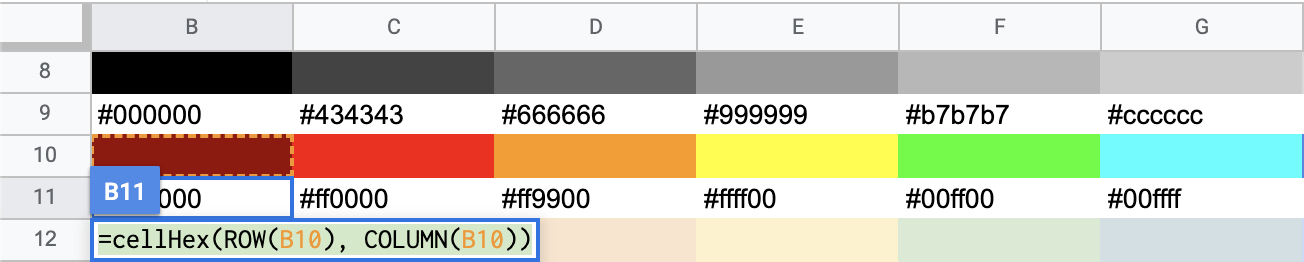
Now you can use your new cellHex() function to return the hexadecimal color code for the selected cell.
In the cell you want to display the color code in, enter your function like this =cellHex(ROW(B10), COLUMN(B10)) where you reference the cell with the background color in the ROW and COLUMN parenthesis.
Example Template
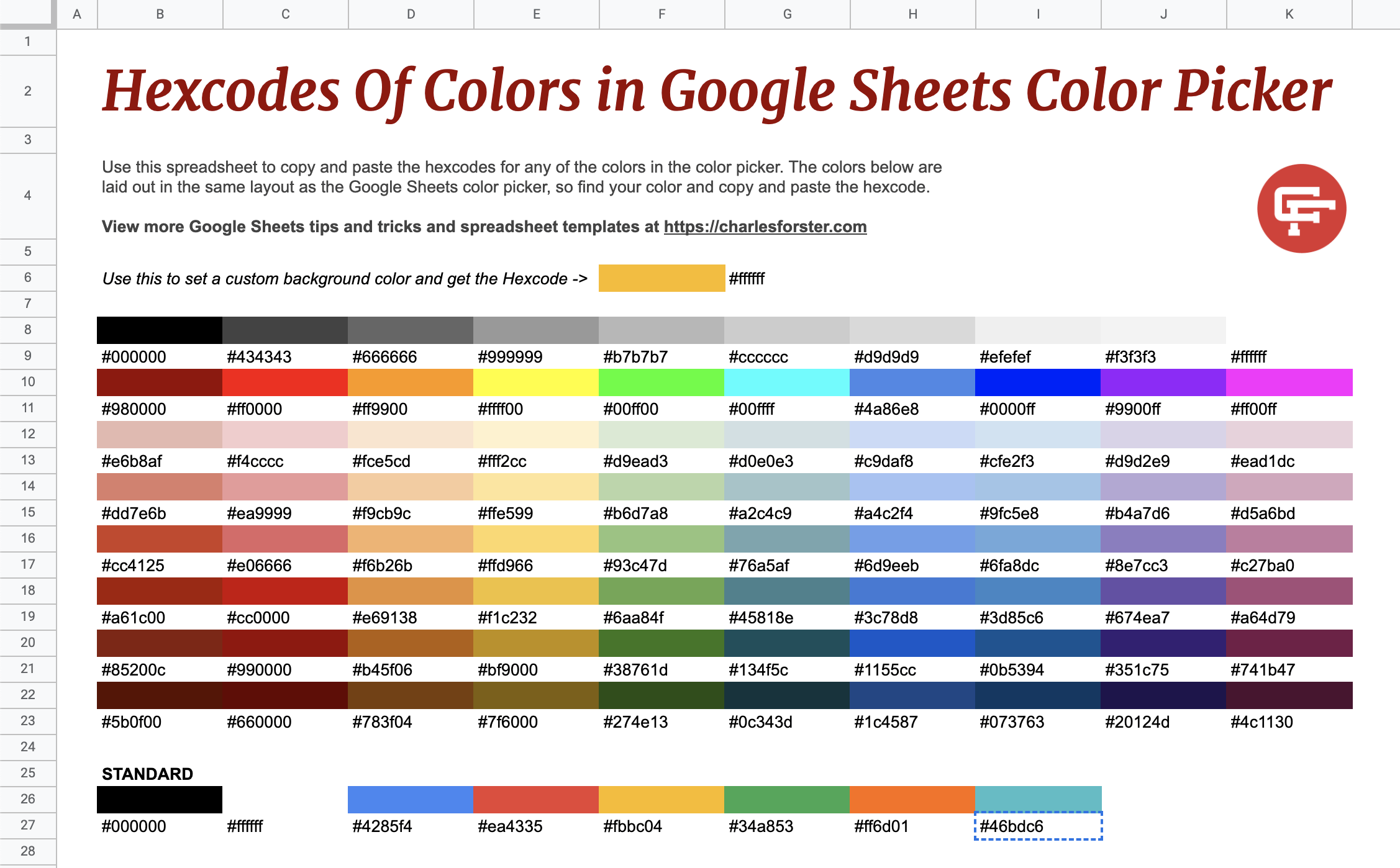
For an example of how I use this function to get the HTML color in Google Sheets, take a look at this pre-made template for every color in the Google Sheets color picker.
Hex Codes for all the colors in the Google Sheets color picker
#000000
#434343
#666666
#999999
#b7b7b7
#cccccc
#d9d9d9
#efefef
#f3f3f3
#ffffff
#980000
#ff0000
#ff9900
#ffff00
#00ff00
#00ffff
#4a86e8
#0000ff
#9900ff
#ff00ff
#e6b8af
#f4cccc
#fce5cd
#fff2cc
#d9ead3
#d0e0e3
#c9daf8
#cfe2f3
#d9d2e9
#ead1dc
#dd7e6b
#ea9999
#f9cb9c
#ffe599
#b6d7a8
#a2c4c9
#a4c2f4
#9fc5e8
#b4a7d6
#d5a6bd
#a61c00
#cc0000
#e69138
#f1c232
#6aa84f
#45818e
#3c78d8
#3d85c6
#674ea7
#a64d79
#85200c
#990000
#b45f06
#bf9000
#38761d
#134f5c
#1155cc
#0b5394
#351c75
#741b47
#5b0f00
#660000
#783f04
#7f6000
#274e13
#0c343d
#1c4587
#073763
#20124d
#4c1130
#000000
#ffffff
#4285f4
#ea4335
#fbbc04
#34a853
#ff6d01
#46bdc6
I hope this tutorial helps you wherever you need to get the hexadecimal code from your cell’s background in your templates.
]]>