yum安装apache,python,mod_python。
安装过程忽略。
注意python的默认版本,如果有多个版本的话,mod_python还是使用的系统的版本。
修改apache配置:
vi httpd.conf
LoadModule python_module modules/mod_python.so
其他配置:
Alias /mysite"/var/www/html/2hei.net/"AuthType Basic AuthBasicProvider ldap AuthzLDAPAuthoritative off AuthName “LDAPLogin Page" AuthLDAPURL "ldap://ldaps.yourdomain.com/ou=Users,dc=yourdomain,dc=com?uid?" Require valid-user Options FollowSymLinks MultiViews AllowOverride AuthConfig Order allow,deny allow from all AddHandler mod_python .psp .psp_ PythonHandler mod_python.psp PythonDebug Off
测试页面
cat test.psp

<%
import sys
%>
Your PYTHON Vesriosn is <%=sys.version %>
网上说需要用到handler,如下,但实际中并没有用到。
cat mod_python.psp
from mod_python import apache

def handler(req):
    req.write("Hello world!")
    return apache.OK
]]>其实出现了两个问题:
(1)firefox证书问题
症状:(Error code: sec_error_reused_issuer_and_serial)
(2)jre无法打开idrac console问题
症状:
连接console时java控制台报错
java.lang.SecurityException: Missing required Permissions manifest attribute in main jar: https://192.168.100.161:443/software/avctKVM.jar
at com.sun.deploy.security.DeployManifestChecker.verifyMainJar(Unknown Source)
at com.sun.deploy.security.DeployManifestChecker.verifyMainJar(Unknown Source)
at com.sun.javaws.Launcher.doLaunchApp(Unknown Source)
at com.sun.javaws.Launcher.run(Unknown Source)
at java.lang.Thread.run(Thread.java:744)
Client基本环境:
Dell iDRAC6
MacOS-10.9
Firefox-27.0
JDK version(JAVA WEB START)-7u51
问题(1)出在了自认证证书冲突,看了很多资料仍然没有解决,尝试删除了firefox的各种证书,还有什么删除firefox profile目录下的cert8.db (mac下没找到),ff不能用,那我换浏览器,chrome总可以用吧!
问题(2)是由于升级jre版本导致。
“The latest Oracle Java RE 7u51 at its normal level of “High” security causes the Dell iDRAC6 virtual console (version 1.95 (Build 05)) to die”
解决办法:
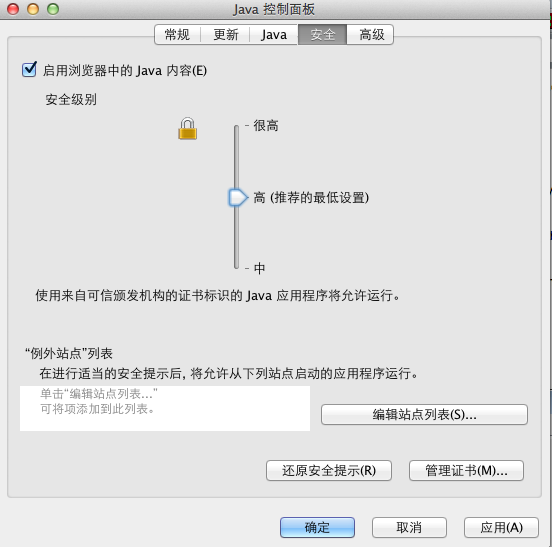
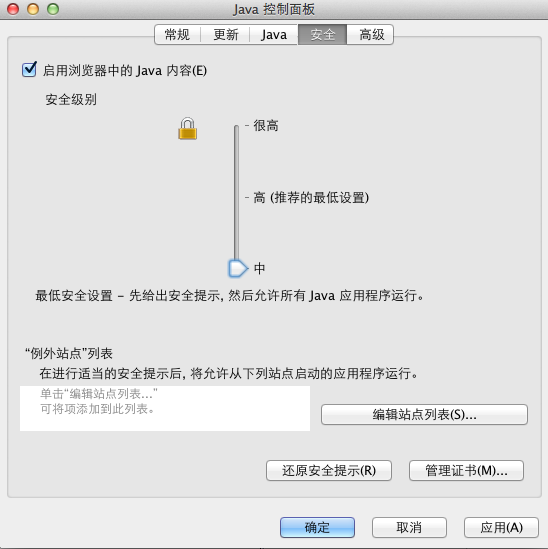
调整JAVA security level。
MAC下 系统偏好设置--单击 Java 图标访问 Java 控制面板
如图所示:安全级别从“高”调整为“中”
rrd文件格式
rrdtool create 2hei_netflow.rrd \
--start `date +%s` \
--step 300 \
DS:bjidc:COUNTER:600:U:U \
DS:gzidc:COUNTER:600:U:U \
DS:shidc:COUNTER:600:U:U \
DS:szidc:COUNTER:600:U:U \
RRA:AVERAGE:0.5:1:8640 \
RRA:AVERAGE:0.5:4:4320 \
RRA:AVERAGE:0.5:24:2160 \
RRA:AVERAGE:0.5:288:730
说明:
(5分钟 * 1 * 8640) /(60(分钟) * 24(小时)) = 30天
(5分钟 * 4 * 4320) /(60(分钟) * 24(小时)) = 60天
(5分钟 * 24 * 2160)/(60(分钟) * 24(小时)) = 180天
(5分钟 * 288 * 730)/(60(分钟) * 24(小时)) = 730天
调整之前的rrdinfo
rrdtool info 2hei_netflow.rrd
...
rra[0].cf = "AVERAGE"
rra[0].rows = 8640
rra[0].cur_row = 4545
rra[0].pdp_per_row = 1
rra[0].xff = 5.0000000000e-01
rra[0].cdp_prep[0].value = NaN
rra[0].cdp_prep[0].unknown_datapoints = 0
rra[0].cdp_prep[1].value = NaN
rra[0].cdp_prep[1].unknown_datapoints = 0
rra[0].cdp_prep[2].value = NaN
rra[0].cdp_prep[2].unknown_datapoints = 0
rra[0].cdp_prep[3].value = NaN
rra[0].cdp_prep[3].unknown_datapoints = 0
增加步长,使5分钟数据保留2个月,数据增加一倍。
rrdtool resize network.rrd.orig rra[0].rows GROW 8640
rrdtool info 2hei_netflow.rrd
...
rra[0].cf = "AVERAGE"
rra[0].rows = 17280
rra[0].cur_row = 3009
rra[0].pdp_per_row = 1
rra[0].xff = 5.0000000000e-01
rra[0].cdp_prep[0].value = NaN
rra[0].cdp_prep[0].unknown_datapoints = 0
rra[0].cdp_prep[1].value = NaN
rra[0].cdp_prep[1].unknown_datapoints = 0
rra[0].cdp_prep[2].value = NaN
rra[0].cdp_prep[2].unknown_datapoints = 0
rra[0].cdp_prep[3].value = NaN
rra[0].cdp_prep[3].unknown_datapoints = 0
...
]]>
$ netstat -na|grep 8080
tcp6       0      0  *.8080                 *.*                    LISTEN
tcp4       0      0  *.8080                 *.*                    LISTEN
$ lsof -i:8080
COMMAND    PID USER   FD   TYPE             DEVICE SIZE/OFF NODE NAME
launchd    274   u2    9u  IPv4 0x4c7c1dc47078aa3d      0t0  TCP *:http-alt (LISTEN)
launchd    274   u2   10u  IPv6 0x4c7c1dc46f0555f5      0t0  TCP *:http-alt (LISTEN)
printerAg 2052   u2    5u  IPv4 0x4c7c1dc47078aa3d      0t0  TCP *:http-alt (LISTEN)
printerAg 2052   u2    6u  IPv6 0x4c7c1dc46f0555f5      0t0  TCP *:http-alt (LISTEN)
kill -9 401
kill之后会自动重启一个新的进程,8080端口依然健在,汗一个!
$ lsof -i:8080
COMMAND    PID USER   FD   TYPE             DEVICE SIZE/OFF NODE NAME
launchd    274   u2    9u  IPv4 0x4c7c1dc47078aa3d      0t0  TCP *:http-alt (LISTEN)
launchd    274   u2   10u  IPv6 0x4c7c1dc46f0555f5      0t0  TCP *:http-alt (LISTEN)
printerAg 2052   u2    5u  IPv4 0x4c7c1dc47078aa3d      0t0  TCP *:http-alt (LISTEN)
printerAg 2052   u2    6u  IPv6 0x4c7c1dc46f0555f5      0t0  TCP *:http-alt (LISTEN)
难道要妥协? 修改tomcat默认端口从8080到其他端口(8081),太没面子了。
$ cat ~/Library/LaunchAgents/com.hp.printerAgent.plistLabel com.hp.printerAgent OnDemand Program /Library/Printers/hp/laserjet/P1100_1560_1600Series/printerAgent ProgramArguments /Library/Printers/hp/laserjet/P1100_1560_1600Series/printerAgent RunAtLoad ServiceIPC Sockets MyListenerSocket SockServiceName 8080
或者
sudo sed -i “” -e “s|8080|18089|g” ~/Library/LaunchAgents/com.hp.printerAgent.plist
重启mac,下面就是见证奇迹的时刻~,enjoy it 

(Status-Line) HTTP/1.1 500 Internal Server Error
Server HTTP Load Balancer/2.0
Content-Type text/html; charset=utf-8
Content-Length 274
Date Tue, 10 Dec 2013 08:44:48 GMT
Cache-Control no-cache
Pragma no-cache
==========
又是考验运维的时候了,期待快点恢复~
]]>
postsuper -d ALL deferred
postsuper用法可以man一下:
man postsuper
- 删除指定帐户的邮件:
mailq | tail +2 | grep -v ‘^ *(‘ | awk ‘BEGIN { RS = “” }
# $7=sender, $8=recipient1, $9=recipient2
{ if ($8 == “filter@2hei.net” && $9 == “”)
print $1 }’| tr -d ‘*!’ | postsuper -d –修改后的脚本:
mailq | tail -n+2 | grep -v ‘^ *(‘ | awk ‘BEGIN { RS = “” } \
{ if ($8 == “filter@2hei.net”) \
print $1 }’| tr -d ‘*!’ | postsuper -d –
- 删除指定的queue id:
]]>postsuper -d queue_id
Internet Explorer and Chrome both use a multiprocess architecture to enhance stability and security. They separate the task of parsing and rendering Web pages from the job of drawing the browser on-screen, saving downloaded files, creating network connections, and so on. This allows them to run the dangerous parts—the parts exposed to malicious scripts and exploitative HTML—in a sandbox with reduced permissions, making it harder for browser flaws to be turned into system compromises.
It also means that they’re much more tolerant of crash bugs; a bug will bring down an individual tab, but shouldn’t, in general, bring down the browser as a whole.
In 2009, Mozilla announced the Electrolysis project, which was to bring this kind of multiprocess design to Firefox.
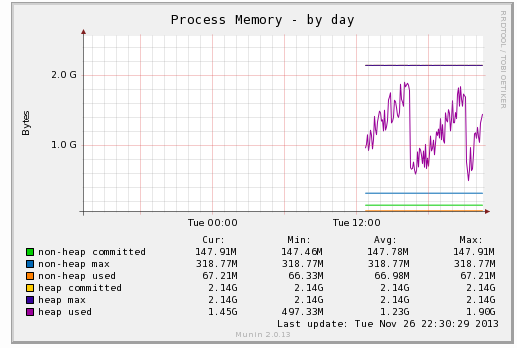
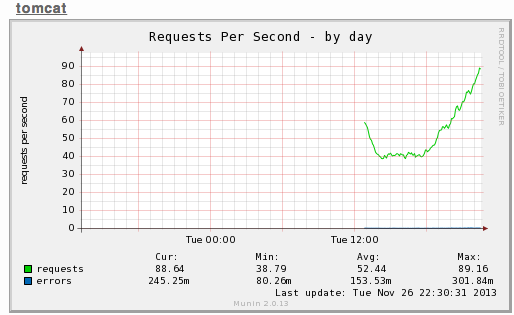
]]>最近想对tomcat做一下性能监控,于是配置了一下,整理记录。
tomcat开启jmx端口
启动脚本增加如下(munin的jmx插件默认使用1616端口,为了省事,直接listen到1616即可):
export JAVA_OPTS=”$JAVA_OPTS -Dcom.sun.management.jmxremote.port=1616 -Dcom.sun.management.jmxremote.ssl=false -Dcom.sun.management.jmxremote.authenticate=false”
munin 客户端:
wget http://munin-monitoring.org/export/HEAD/munin-contrib/plugins/java/jmx/plugin/jmx_ -O /usr/share/munin/plugins/
wget http://munin-monitoring.org/export/HEAD/munin-contrib/plugins/java/jmx/plugin/jmxquery.jar -O /usr/share/munin/plugins/
cd /etc/munin/plugins
ln -sf /usr/share/munin/plugins/jmx_ jmx_process_memory
ln -sf /usr/share/munin/plugins/jmx_ jmx_threads
…如这样:
lrwxrwxrwx 1 root root 29 Nov 25 11:43 jmx_process_memory -> /usr/share/munin/plugins/jmx_
lrwxrwxrwx 1 root root 29 Nov 25 22:42 jmx_threads -> /usr/share/munin/plugins/jmx_
lrwxrwxrwx 1 root root 29 Nov 25 22:42 jmx_cpu -> /usr/share/munin/plugins/jmx_
lrwxrwxrwx 1 root root 29 Nov 25 22:42 jmx_catalina_requests -> /usr/share/munin/plugins/jmx_
lrwxrwxrwx 1 root root 29 Nov 25 22:42 jmx_catalina_threads -> /usr/share/munin/plugins/jmx_
lrwxrwxrwx 1 root root 29 Nov 25 22:42 jmx_catalina_times -> /usr/share/munin/plugins/jmx_
lrwxrwxrwx 1 root root 29 Nov 25 22:42 jmx_catalina_traffic -> /usr/share/munin/plugins/jmx_ls -l /usr/share/munin/plugins
-rw-r–r– 1 root root 1898 Nov 25 22:33 process_memory.conf
-rw-r–r– 1 root root 412 Nov 25 22:36 threads.conf
-rw-r–r– 1 root root 694 Nov 25 22:37 cpu.conf
-rw-r–r– 1 root root 484 Nov 25 22:56 catalina_threads.conf
-rw-r–r– 1 root root 631 Nov 25 22:59 catalina_requests.conf
-rw-r–r– 1 root root 1210 Nov 25 23:00 catalina_times.conf
-rw-r–r– 1 root root 714 Nov 25 23:00 catalina_traffic.conf
相关配置文件可参考:
http://munin-monitoring.org/browser/munin-contrib/plugins/java/jmx/examples
其中catalina_*.conf 需要稍微修改一下:
如将
catalina_threads_busy.jmxObjectName Catalina:name=http-bio-8080,type=ThreadPool
改成(需要看你的tomcat如何配置)
catalina_threads_busy.jmxObjectName Catalina:type=ThreadPool,name=”http-bio-8080″
服务端配置:
[Apps;java.2hei.net]
address 192.168.100.201
use_node_name yes
看看效果吧:
An open source application automates the process of downloading and displaying all of Wikipedia on your desktop, a large task that takes more than a day to complete.
Dubbed Xowa, the software displays an offline copy of 4.4 million Wikipedia articles with full HTML formatting intact. You can even set up additional wikis, like Wiktionary or Wikquote, and navigate between them while offline. For example, you could “Click on ‘Look up this word in Wiktionary’ and instantly view the page in Wiktionary.”
Xowa has been around for a while with support for “Simple Wikipedia,” which has just a fraction of the full collaborative dictionary. It was updated yesterday with support for the entire English language-version of Wikipedia.
]]>