Fast forward a few decades and I still have the interest in TV/Video. I love making videos and editing them, I also still try to set up an antenna every once and a while to see what I can pick up over the air. But unfortunately where I live the only thing I can usually get is the local PBS station. (I do get some brief signals on others, but not enough for the tuner to lock in on what it actually is.) So with my hobby of doing TV I was surprised to find the SatLink ST-7000 on Amazon. Previously I had talked about the VeCOAX Minimod 2 HD RF modulator. I still use it for my security cameras, but this SatLink intrigued me as it was almost half the price of the VeCOAX one. So I picked it up.
To my surprise, it works very well, I almost want to say better than the VeCOAX Minimod 2. I didn’t have any of the issues with 1080p on the SatLink and it works on nearly all the TV’s in my house. (The one issue I do have is on my Samsung 4K tv, the audio cuts out for like half a second every minute or so. This is super odd and caused me to set there changing configs on it for over an hour one night, when it was just that TV, and all the other TVs in the house it works fine on. Even ones that are older than the Samsung 4K. So I am going to assume it is a firmware issue with the TV, but they haven’t release an update for it in years… Yeah tech waste.)
So how does this make my own TV station? I am sure if you are reading this, you have probably seen other people on YouTube talking about making their own TV station in the house with a Raspberry Pi and an analog modulator. I too started with this, but was not satisfied with the picture quality on the HDTV’s. (Yes I understand it is analog, but now finding the SatLink, I wanted to kick it up a notch.)
To start with I hooked a Raspberry Pi 4b up to the SatLink and set the resolution on the graphical display to be the 1080p and verified that all the TV’s (sans Samsung 4k) it worked on. This was great. Then I started playing a video with VLC full screen, this too work, after I got the audio set to go out the HDMI output. So now I have a basic “TV Station” where I can play a file and have it be on channel 9.1 on all TV’s in the house. But this was not good enough.
What is going to follow is a series of more posts on the scripts and other items I am working on to make it an actual TV station for the house. Scheduling of playing TV Shows and Movies, as well as bumper plates between the shows to show what is coming up and a log of what was shown and when.
With thousands of hours of TV Shows and Movies that I have bought over the years, I could technically cancel my cable TV and have enough to watch for a few years. But what this TV Station does is bring back the “old days” where you watch what was on TV even if you only got one station. It just so happens that this station is mine and it only shows what I want it to show.

- First you need to give the Terminal app full disk access, if you don’t do this, then the rest of the actions will fail. To do this, while you are in the Security and Privacy Preference Panel, find the “Full Disk Access” on the left side, once found click the lock icon to unlock if it isn’t unlocked already and then select the check box next to the Terminal application. It may give you a popup about needing to quit the terminal app because it is open, go ahead and quit the application.
- Next, open a new terminal app, it is under Applications -> Utilities -> Terminal
- In the Terminal app, we are going to run 2 commands, the first command is going to backup the file we will be changing with the second command. So the first command we need to run is:
sudo cp ~/Library/Application\ Support/com.apple.TCC/TCC.db ~/Desktop/
4. Then we are going to run the following command which will insert a new row in to the TCC.db file (this should all be on one line):
sudo sqlite3 ~/Library/Application\ Support/com.apple.TCC/TCC.db "insert into access VALUES('kTCCServiceMicrophone','com.microsoft.SkypeForBusiness',0,1,1,NULL,NULL,NULL,'UNUSED',NULL,0,1541440109) ;"
5. Now go back to the Privacy & Security Preference Panel and click the Microphone, the Skype for Business app should show up there, as well has have a check mark next to it, if it doesn’t have the check mark, click it.
6. Then we need to remove the full disk access from Terminal, so scroll back to the Full Disk Access and uncheck the Terminal application. It will give you a popup about it running, go ahead and click the quit now.
7. Now you can either start Skype for Business, or stop and re-open it and the Microphone should work on voice calls now.
]]>So they are removing 5 Cinemax channels from my bill, and replacing it with an On-Demand service, that I can’t use. See last month they decided to drop the “aging server” that was used by TiVo to provide On-Demand service to TiVo customers who only rent cable cards from Comcast. Wow I thought, not only am I losing 5 Cinemax channels, I am also not going to see a decrease in my bill, and I won’t be able to use the new On-Demand service because they removed that as well.
Now I was pretty pissed, and started thinking about dropping Comcast and going with something else for TV. My first thought was Dish Network. That stopped pretty quickly when I found out that Dish Network doesn’t have HBO on it (nor Cinemax), as they appear to be in a fight with AT&T (HBO’s new owner).
I then thought about just cutting the TV side and doing a streaming only. I started looking at PlayStation Vue, which had HBO and Showtime and what I thought was every channel I wanted, in addition it was the only one with a DVR service. So I signed up for a free trail. Once I started playing with it, I then noticed that they don’t have any Viacom channels (Comedy Central, MTV, etc). Which was bad, as I love Comedy Central, which meant I would have to go buy a separate subscription for something to just get that channel. Well that thoughts didn’t last long.
As I started flipping around Vue, I found that the picture quality just wasn’t up to my standards. While it was watchable, it was definitely noticeable that it was a streaming vs a linear channel. While watching “The Neighborhood” on CBS whenever there was a darker scene, the compression stood out. This was really bad on my 4K TV, which made it look like a really over compressed station. I often complain about how Comcast keeps compressing stuff down and making pictures pixelate, but this was so much worse.
It also had no difference between running Vue on the AppleTV 4K or the Playstation 4 Pro. I also tried it on a Roku 4k on a different lower end TV that only supports 1080 and lower. It was still very noticeable with the picture being washed out and not as crisp as a linear channel. So I canceled the free trial not even 24 hours later.
Tonight I thought about looking at DirectTV, but then got in to the 2year deal vs final price issues. I have been a Comcast customer for over 16 years, and the price has keep going up and up and up. In fact in the 16 years, my bill has went from $100 a month to $249 with no change in any service, other than Comcast removing channels and occasionally increasing Internet speeds. So looking at switching to another provider and then doing the whole 2 year agreement thing sucks. Especially when usually on the start of year 3 your bill doubles.
Then I thought about maybe downsizing my Comcast TV package to just the basics and signing up for just HBO Go and Showtime Now, well, Comcast fucks you over there too. For one you can’t see what is available in your area until you log in. If you try to do it as not logged in it will tell you that there is service already at your address or give you the option for “new” account as you were moving there. So I logged in and I shit you not, it only gave me 2 options, and both of them was to add their Phone to make a “Triple Play” but I don’t want their phone. So I unchecked the phone option and there was NO way to downsize your plan through their site. By now I am frustrated to hell.
I then decided to complain to Comcast about the issue on Twitter, and as usual they just regurgitate the same thing that was in the letter about how the “Hitz” was going to be so much better. When I told them that I wouldn’t be able to use it because I don’t have their X1 crap box. Their response was: I understand where you are coming from. We made the decision to remove the Xfinity On Demand app from TiVo devices because the platform uses outdated technology that can no longer be updated and is therefore susceptible to security breaches. The decision to remove the feature was made in close consultation with TiVo. In order to continue watching this content, you will need an Xfinity TV Box or a device that can access the Xfinity Stream App (Roku, certain Smart TVs, smartphone, tablet or computer). I will forward your feedback.
That sort of pissed me off, in that it there is no way for me to get a lower bill, and the only way to even use the new service was to increase my bill. (Ironically their Roku app is only free while in beta, they will start charging for every Roku you have the app on once it goes out of beta and they will treat them just like cable boxes, which is pure shit.) In addition I am not one who stream movies on a smartphone, tablet or computer. So it is just the latest FU from Comcast this year.
This just makes me miss the days of Over the air TV (yes I realize it is still out there, but where I live, I can’t receive anything from Over the Air except for 1 local PBS station) and being able to pick what I want to buy and not having all these different vendors pissing on each other over carry rights for the channels.
I also understand now why people cut their cable subscription and go pirate the TV shows off of the Internet. Then there is all the different streaming services, and if you go subscribe to the individual ones, you would end up paying even more. And don’t even get me started on NetFlix and their fucked up pricing scheme….
]]>They always gave an error about not being able to start because the group failed to start. I debugged this for days, and finally thought that it was just the one AD box had become corrupted. So I seized all the roles by my other server and then built a new AD and added it to the forest. Well as soon as I rebooted the new FSMO master, it started having the problems the first one did.
By now I was mad. So what was the issue, well, when I created the Registry keys and pushed them I mistakenly set mrxsmb to disabled, instead of mrxsmb10. So on the machine that was broke, I pulled up regedit and set mrxsmb to be enabled and mrxsmb10 to be disabled. I then removed the entries out of the GPO registry entry and then rebooted the machine. This time it booted and Workstation, Netlogon and DFS Namespace all started.
This is the link to use to learn how to disable SMB v1: https://support.microsoft.com/en-us/help/2696547/detect-enable-disable-smbv1-smbv2-smbv3-in-windows-and-windows-server
]]>That is where Patroni comes in. Patroni is a framework that handles the auto failover of the master instance of PostgreSQL between multiple servers. However Patroni alone won’t do this for you, you will need some other software as well. The other two pieces of software that I used was etcd and haproxy. etcd will be the quorum system and haproxy will be the “load balancer” so that your applications only have to have one hostname to point to.
As a small example setup, I used 3 machines running PostgreSQL 10, 1 machine running etcd and one machine running haproxy. What the rest of this post will be about is setting up the different machines and software on them.
How to setup Centos 7 + PostgreSQL 10 + Patroni
All Machines Software Installs:
The first thing to do is install CentOS 7, fully patch it and record the IP address of each machine if they are on DHCP. I used the minimal install so there wasn’t a lot of extra software on the machines.
PostgreSQL 10 Servers:
For all the PostgreSQL servers the following packages will need to be installed: gcc, python-devel, epel-release
yum install -y gcc python-devel epel-release
After you have those installed (in particular the epel-release one) you can install the following : python2-pip
yum install -y python2-pip
Next you need to add the PostgreSQL Yum Repo from: https://download.postgresql.org/pub/repos/yum/10/redhat/rhel-7-x86_64/pgdg-centos10-10-2.noarch.rpm
yum install -y https://download.postgresql.org/pub/repos/yum/10/redhat/rhel-7-x86_64/pgdg-centos10-10-2.noarch.rpm
Once you have that RPM installed you can install the following packages: postgresql10-server postgresql10
yum install -y postgresql10-server postgrseql10
etcd server:
The following packages needs to be installed on the etcd server: gcc,python-devel, epel-release
yum install -y gcc python-devel epel-release
After epel is installed, you can then install etcd:
yum install -y etcd
haproxy server:
The following packages are needed on the haproxy server: epel-release and then haproxy.
yum install -y epel-release
yum install -y haproxy
Software Configuration
Postgresql Servers
Now that the software has been installed, it is time to configure the components. (Everything here is ran as root)
We will start with the PostgreSQL Servers, mine are named pg01 (10.0.2.124), pg02 (10.0.2.125), and pg03(10.0.2.126) respectively. The following needs to be done on each of the 3 servers:
First some pip items:
pip install --upgrade setuptools
pip install patroni
pip install python-etcd
pip install psycopg2-binary
Next we are going to create a systemd service for patroni. So edit the file /etc/systemd/system/patroni.service to contain the following:
[Unit]
Description=Runners to orchestrate a high-availability PostgreSQL
After=syslog.target network.target

[Service]
Type=simple

User=postgres
Group=postgres

ExecStart=/bin/patroni /etc/patroni.yml

KillMode=process

TimeoutSec=30

Restart=no

[Install]
WantedBy=multi-user.targ
Next create a /etc/patroni.yml file. This file will control the startup/shutdown, etc of the postgres instance. Here is an example of mine from my pg01 server. In it, you will need to replace IP addresses for your own servers and usernames and passwords.
scope: postgres
name: pg01

restapi:
    listen: 10.0.2.124:8008
    connect_address: 10.0.2.124:8008

etcd:
    host: 10.0.2.128:2379

bootstrap:
    dcs:
        ttl: 30
        loop_wait: 10
        retry_timeout: 10
        maximum_lag_on_failover: 1048576
        postgresql:
            use_pg_rewind: true

    initdb:
    - encoding: UTF8
    - data-checksums

    pg_hba:
    - host replication replicator 127.0.0.1/32 md5
    - host replication replicator 10.0.2.124/0 md5
    - host replication replicator 10.0.2.125/0 md5
    - host replication replicator 10.0.2.126/0 md5
    - host all all 0.0.0.0/0 md5

    users:
        admin:
            password: admin
            options:
                - createrole
                - createdb

postgresql:
    listen: 10.0.2.124:5432
    bin_dir: /usr/pgsql-10/bin
    connect_address: 10.0.2.124:5432
    data_dir: /data/patroni
    pgpass: /tmp/pgpass
    authentication:
        replication:
            username: replicator
            password: PASSWORD
        superuser:
            username: postgres
            password: PASSWORD
    parameters:
        unix_socket_directories: '.'

tags:
    nofailover: false
    noloadbalance: false
    clonefrom: false
    nosync: false
etcd server
Now lets move on to the etcd server. The only thing on the etcd server that needs edited is the /etc/etcd/etcd.conf file. Here is what I changed in mine:
ETCD_LISTEN_PEER_URLS="http://10.0.2.128:2380"
ETCD_LISTEN_CLIENT_URLS="http://localhost:2379,http://10.0.2.128:2379"
ETCD_NAME="etcd0"
ETCD_INITIAL_ADVERTISE_PEER_URLS="http://10.0.2.128:2380"
ETCD_ADVERTISE_CLIENT_URLS="http://10.0.2.128:2379"
ETCD_INITIAL_CLUSTER="etcd0=http://10.0.2.128:2380"
ETCD_INITIAL_CLUSTER_TOKEN="cluster1"
ETCD_INITIAL_CLUSTER_STATE="new"
Some of the above lines may be commented out, if so uncomment them and replace the values.
HAProxy Server
Now to config the HAProxy Server. Replace the /etc/haproxy/haproxy.cfg with the following:
global
        maxconn 100
        log     127.0.0.1 local2

defaults
        log global
        mode tcp
        retries 2
        timeout client 30m
        timeout connect 4s
        timeout server 30m
        timeout check 5s

listen stats
        mode http
        bind *:7000
        stats enable
        stats uri /

listen postgres
        bind *:5000
        option httpchk
        http-check expect status 200
        default-server inter 3s fall 3 rise 2 on-marked-down shutdown-sessions
        server postgresql_pg01_5432 10.0.2.124:5432 maxconn 100 check port 8008
        server postgresql_pg02_5432 10.0.2.125:5432 maxconn 100 check port 8008
        server postgresql_pg03_5432 10.0.2.126:5432 maxconn 100 check port 8008
N.B. The logging setup in the haproxy config requires that you set up rsyslog to allow logging to local files and to local2.*
Starting it all up
So assuming that I haven’t missed anything above, and there are no typo’s on my or your part, we can start starting things up. But first some notes. Something in SElinux breaks some of this and I haven’t had enough time to look in to it, so disable SElinux for now (setenforce 0). In addition I did not add any ports to the firewalld, as this was just a test setup, so I disabled the firewall on all 5 machines. You can leave it enabled and then using the configs above add the appropriate ports to be allowed between the appropriate machines.
So easy starts first:
Start the etcd server:
systemctl start etcd
Start the haproxy server:
systemctl start haproxy
Now for the PostgreSQL servers there are a few things to do before we start them. On each PostgreSQL host do the following:
mkdir -p /data/patroni
chown -R postgres:postgres /data
chmod -R 700 /data
Now we can start Patroni and see if everything works. When you start Patroni, it will start PostgreSQL in the background and create the first database and set the username and password for the postgres user to what you specify in the /etc/patroni.yml file.
systemctl start patroni
On the first host that you start Patroni on if you run systemctl status patroni you should see that it is running and active. In the /var/log/messages you should see something like :
Sep 2 19:53:08 pg01 patroni: 2018-09-02 19:53:08,628 INFO: Lock owner: pg01; I am pg01
Sep 2 19:53:08 pg01 patroni: 2018-09-02 19:53:08,636 INFO: no action. i am the leader with the lock
When you start the two slaves you should see something similar to this in the /var/log/messages:
Sep 2 19:54:17 pg02 patroni: 2018-09-02 19:54:17,828 INFO: Lock owner: pg01; I am pg02
Sep 2 19:54:17 pg02 patroni: 2018-09-02 19:54:17,829 INFO: does not have lock
Sep 2 19:54:17 pg02 patroni: 2018-09-02 19:54:17,836 INFO: no action. i am a secondary and i am following a leader
Now if you switch to the web interface of HAProxy you should see something like this:
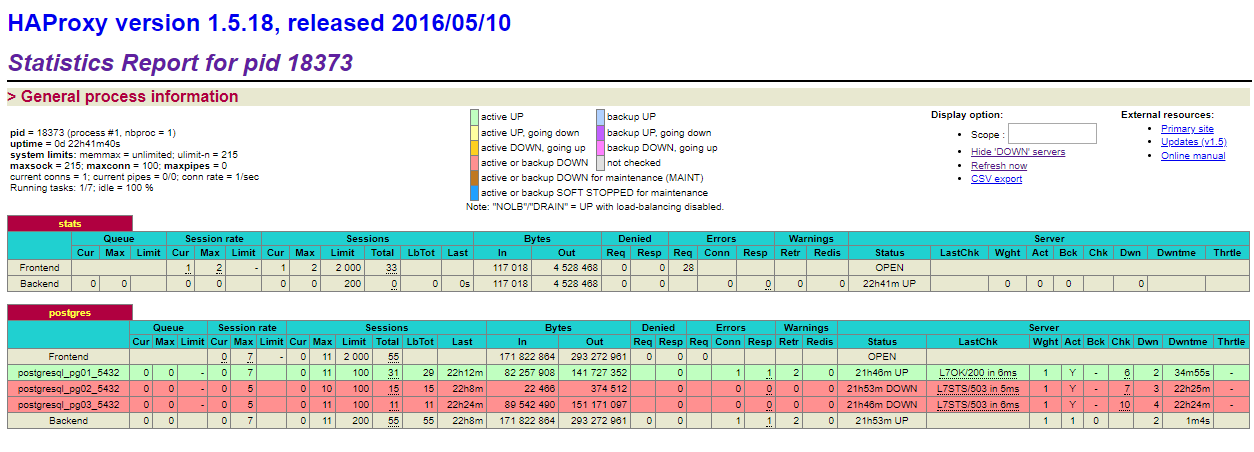
What this image shows is that the pg01 server is the active master server. If you were to shut down pg01, then one of the other two will become the new master and remain the master until you either promote another server or the new master goes down.
Now that everything is running, you would point your clients to the haproxy address on port 5000.
Closing Comments
While this describes how to setup an HA Environment for PostgreSQL, there are 2 single points of failure with this example setup. One is the etcd server, which should be clustered, the other is the haproxy which should be clustered as well. In addition I didn’t cover setting up read-only slaves which I may do at some point in the future.
]]>In recent years I have had a security DVR that was outputting to a SD modulator that could be viewed on any TV in the house. While it was “ok”, I always wanted the HD version of it. So one night while I was thinking of running HDMI cables from the security dvr to every TV in the house, I stumbled on VeCOAX HD Modulators from Pro Video Instruments which are $495.
Previously when I had searched for HD modulators for either ATSC or QAM the only ones that were even sort of “cheap” where from a company called ZeeVee. However, they were still a little more expensive than what I was wanting to pay with the cheapest that I saw was like around $1,200USD. So I just put up with the SD modulators until I found the VeCOAX ones.
VeCOAX has a modulator called the MiniMod-2 which will take one HDMI source and put it on any ATSC or CATV QAM channel you would like. It supports any frequency in the normal TV/CATV bands and supports ATSC to mix with OTA channels or QAM to mix with CATV channels. It also supports PSIP so you can add a 4 character label to the channel and make the channel appear as any other channel. For example, I have my modulator on CATV Channel 14, but the PSIP says it is channel 1-1.
Initially I tried to use 1080p output, but all of my TV’s (2 Samsung’s and 1 Sony) had some issues. Either the input to the modulator from the security DVR was not a clean signal or the TV’s tuners just couldn’t handle it. So there was artifacts at the top of the screen and after a few hours or more the channel would just scramble and be un-viewable until I reset the modulator.
What I ended up having to do was set the source to be 720p and then set the modulator to attenuate the signal some since it was also over-powering the tuners in the TV’s. Once I did that, the signal has been stable for a few weeks or more now.
Now the next thing to test is hooking it or another one up to a TiVO to see if it can send the TiVO signal through out the house as well. Then I may also try to do some HAM Amateur TV with it since i can set the frequency to anything.
]]>What makes me mad the most is that even the premium channels, such as HBO, Showtime, Cinemax, those were all scaled down to 720p. So now the only channels that are “still” in 1080i format is the local CBS and NBC stations.
I believe this happened sometime late last year, as I started noticing some of the channels were not looking at “good” as they used to be, but never looked to see that they were switched from 720p from 1080i. What this means is that Comcast has basically said you don’t need any HD TV above a 720p model as anything else is just going to have to be up-converted.
What is even more funny, is that I started twitting @Comcast on Twitter to ask them, they didn’t know and would only offer help if I gave them my name and phone number. But since they have done it to everyone, it was pointless to keep the conversation going on. I wouldn’t be surprised if in the future, they come out with a new price tear that was for “Full HD”.
Needless to say if I could get the same thing with Dish Network, I would go, but then Comcast being the ass they are would increase my internet by $20 a month because I dropped the cable side.
]]>
Full story: Thinking that I could consolidate a few 2TB WD Live and WD MyCloud Devices on to this one 8TB device I picked it up and another 8TB USB 3 drive to connect to it. (Previous incarnations of the WD MyCloud devices have a USB port on the back that you can use to either extend the storage or “mirror” the NAS drive to it for “backups”. So I did a quick check of the specs and the new WD MyCloud Home device had a USB port. But on the box it doesn’t say it is for coping files TO the device, not “mirroring” like the previous ones.
So I got home, unboxed the new 8TB MyCloud Home device and put the MAC address in my dhcp server (yes I do IT stuff for a job, so I have static reservations for specific devices.) Then plugged in the “NAS” and it powered on. The first thing I noticed was that when I went to the Web interface on it, it just printed up a JSON error, which I thought was weird. But since I hadn’t read any of the instructions that came with it, and there was not that much that did come with it. I tried a few other URL’s and all of them gave the same error. I then pulled out the little one piece instruction card and it said I had to go to WD’s web site to set the device up. Also after reading some more, it requires a connection to WD at all times. This was a BIG no-no for me. The previous devices never needed this so why now?
Well it seems that WD has completely re-branded their MyCloud line of products. The new “Home” brand requires that you have a 64-bit version of Windows or MacOS and you have to use their software to talk to the device. So gone are the days of doing a CIFS/SMB/NFS style mount of the disk from any operating system. By the time I read this I was getting pretty mad because I had just spend over $300 for a device that I assumed would operate like the previous incarnations of the MyCloud/Live devices. Well I quickly boxed it back up and took it back to BestBuy and asked for my money back which they did do.
So if you are wanting the device to act like the old ones, and be available via SMB or NFS, etc, you need to buy one that doesn’t have “Home” in the name or go with the “Pro” or Expert line supposedly. But I think from now on I will be looking at a different vendor. I understand they want to make it easy for non-technical people. But for those who know what they are doing, they should be able to interact with the device the way they want to.
]]>So on with the post, and it must be a good one right? Anyways, Splunk released version 7.0 of their Splunk Enterprise product last week during their .Conf 2017 conference, which I was an FTR at. There were a few new features in it that were amazing, such as the new metrics index type which was blazingly fast. So like all “fanboys” of anything I decided to update my home server on Thursday night after the conference was over. This is where the fun began.
First when I started using Splunk years ago, it supported a myriad of operating systems for the servers. If you wanted Solaris, FreeBSD, AIX, HP-UX, MacOSX, Windows or Linux you were golden. However over the years that list has been pared back to now just Linux and Windows. (MacOSX is supported, but only for the free and trial editions. Basically used for development and home use, not for enterprise use.)
So now that Solaris is no longer supported, I needed to switch my home system from OpenIndiana (aka OpenSolaris) over to Linux. With that I spun up a new CentOS 7 VM on my home server, and copied over all my Splunk data from the Solaris one to the Linux one. I then removed the bin and lib directories (I use the tar installs and that is they only place machine specific binaries exist.) With that done, I untarred the Linux Splunk 7.0 over top my current directory and started it up. So far everything was good, until I tried to do a search. If it was a search for like the last 15 minutes it worked, but anything over that was dead because one of the hot buckets was corrupted. I am not sure if it happened during the transit or what. So off to the fsck commmand to try to fix them. An hour or so later it couldn’t fix some of them, so it was getting late and I just went to bed.
The next day when I returned home I tried to log in to my Splunk instance to see how it was doing, to my surprise I couldn’t even log in to it. It appeared that the linux host had crashed. I was dumbfounded as I hadn’t seen an actual kernel panic like that in a while. So I restarted the machine and started splunk back up and everything was working again.
A few days past and I went to check on it again, and once again it was dead. So now I am really curious. I ended up installing the crash utilities on the host and started going through the vmcore files. Yup each time it crashed it was splunkd that caused it. Unfortunately I don’t know much more than that as to what is actually causing it to happen. It appears to happen at random times.
The output of crash shows this:
KERNEL: /usr/lib/debug/lib/modules/3.10.0-693.2.2.el7.x86_64/vmlinux

    DUMPFILE: /var/crash/127.0.0.1-2017-10-01-12:26:50/vmcore  [PARTIAL DUMP]

        CPUS: 8

        DATE: Sun Oct  1 12:26:43 2017

      UPTIME: 1 days, 17:12:55

LOAD AVERAGE: 0.00, 0.01, 0.05

       TASKS: 330

    NODENAME: splunk

     RELEASE: 3.10.0-693.2.2.el7.x86_64

     VERSION: #1 SMP Tue Sep 12 22:26:13 UTC 2017

     MACHINE: x86_64  (3399 Mhz)

      MEMORY: 3 GB

       PANIC: "double fault: 0000 [#1] SMP "

         PID: 1420

     COMMAND: "splunkd"

        TASK: ffff8800bae91fa0  [THREAD_INFO: ffff880000120000]

         CPU: 3

       STATE: TASK_RUNNING (PANIC)
First few lines of the “bt” output from crash:
PID: 1420 TASK: ffff8800bae91fa0 CPU: 3 COMMAND: "splunkd"
#0 [ffff8800bfac4d88] machine_kexec at ffffffff8105c4cb
#1 [ffff8800bfac4de8] __crash_kexec at ffffffff81104a32
#2 [ffff8800bfac4eb8] crash_kexec at ffffffff81104b20
#3 [ffff8800bfac4ed0] oops_end at ffffffff816ad2b8
#4 [ffff8800bfac4ef8] die at ffffffff8102e97b
#5 [ffff8800bfac4f28] do_double_fault at ffffffff8102b6e2
#6 [ffff8800bfac4f50] double_fault at ffffffff816b6908
[exception RIP: page_fault+13]
RIP: ffffffff816ac52d RSP: ffff880000122fc8 RFLAGS: 00010092
RAX: 0000000000000ff8 RBX: 0000000000000000 RCX: ffffffff816ac2ac
RDX: 00001fffffffffff RSI: ffffffff81a73118 RDI: 0000000000000000
RBP: ffff880000123098 R8: ffffffff81911167 R9: ffffea00002e7b80
R10: ffffea00002e7b80 R11: 0000000000000000 R12: ffffffff81a73118
R13: ffffffff81a73118 R14: ffff880000120000 R15: ffff88008665a580
ORIG_RAX: ffffffffffffffff CS: 0010 SS: 0000
---
#7 [ffff880000122fc8] page_fault at ffffffff816ac52d
#8 [ffff880000123048] spurious_fault at ffffffff816afd8e
#9 [ffff8800001230a0] __do_page_fault at ffffffff816b01ae
#10 [ffff880000123100] do_page_fault at ffffffff816b0325
#11 [ffff880000123130] page_fault at ffffffff816ac548
[exception RIP: spurious_fault+48]
RIP: ffffffff816afd8e RSP: ffff8800001231e8 RFLAGS: 00010002
RAX: 0000000000000ff8 RBX: 0000000000000000 RCX: ffffffff816ac2ac
RDX: 00001fffffffffff RSI: ffffffff81a73118 RDI: 0000000000000000
RBP: ffff880000123208 R8: ffffffff81911167 R9: ffffea00002e7b80
R10: ffffea00002e7b80 R11: 0000000000000000 R12: ffffffff81a73118
R13: ffffffff81a73118 R14: ffff880000120000 R15: ffff88008665a580
ORIG_RAX: ffffffffffffffff CS: 0010 SS: 0000
#12 [ffff880000123210] __do_page_fault at ffffffff816b01ae
#13 [ffff880000123270] do_page_fault at ffffffff816b0325
#14 [ffff8800001232a0] page_fault at ffffffff816ac548
[exception RIP: spurious_fault+48]
RIP: ffffffff816afd8e RSP: ffff880000123358 RFLAGS: 00010002
RAX: 0000000000000ff8 RBX: 0000000000000000 RCX: ffffffff816ac2ac
RDX: 00001fffffffffff RSI: ffffffff81a73118 RDI: 0000000000000000
RBP: ffff880000123378 R8: ffffffff81911167 R9: ffffea00002e7b80
R10: ffffea00002e7b80 R11: 0000000000000000 R12: ffffffff81a73118
R13: ffffffff81a73118 R14: ffff880000120000 R15: ffff88008665a580
ORIG_RAX: ffffffffffffffff CS: 0010 SS: 0000
Output from the “vm” command:
PID: 1420   TASK: ffff8800bae91fa0  CPU: 3   COMMAND: "splunkd"

       MM               PGD          RSS    TOTAL_VM

ffff88008665a580  ffff8800b87f4000  324076k  864244k

      VMA           START       END     FLAGS FILE

ffff8800a5efe5e8 563d22303000 563d248b7000 8000875 /splunk/splunk/bin/splunkd

ffff8800a5efe438 563d248b7000 563d24964000 8100873 /splunk/splunk/bin/splunkd

ffff8800a5efe288 563d24964000 563d249db000 8100073

ffff880097e90438 7f4f8d800000 7f4f8ea00000 8200073

ffff8800a1f6cd80 7f4f90400000 7f4f91c00000 8200073

ffff8800a1f6ca20 7f4f923f7000 7f4f923f8000 8100070

ffff8800a1f6c948 7f4f923f8000 7f4f925f8000 8100073

ffff8800a1f6c6c0 7f4f925f8000 7f4f925f9000 8100070

ffff8800a1f6c798 7f4f925f9000 7f4f927f9000 8100073

ffff8800a1f6cca8 7f4f927f9000 7f4f927fa000 8100070

ffff8800a1f6c870 7f4f927fa000 7f4f929fa000 8100073

ffff88009ce66948 7f4f935ff000 7f4f93600000 8100070

ffff88009ce66a20 7f4f93600000 7f4f93a00000 8100073

ffff88009466aca8 7f4f93a00000 7f4f94800000 8200073

ffff88009ca98e58 7f4f949cd000 7f4f949e3000 8000075 /usr/lib64/libresolv-2.17.so

ffff88009ca98d80 7f4f949e3000 7f4f94be3000 8000070 /usr/lib64/libresolv-2.17.so

ffff88009ca99008 7f4f94be3000 7f4f94be4000 8100071 /usr/lib64/libresolv-2.17.so

ffff88009ca990e0 7f4f94be4000 7f4f94be5000 8100073 /usr/lib64/libresolv-2.17.so

ffff88009ca98f30 7f4f94be5000 7f4f94be7000 8100073

ffff88009ca98bd0 7f4f94be7000 7f4f94bec000 8000075 /usr/lib64/libnss_dns-2.17.so

ffff88009ca98af8 7f4f94bec000 7f4f94deb000 8000070 /usr/lib64/libnss_dns-2.17.so

ffff88009ca98ca8 7f4f94deb000 7f4f94dec000 8100071 /usr/lib64/libnss_dns-2.17.so

ffff88009ca991b8 7f4f94dec000 7f4f94ded000 8100073 /usr/lib64/libnss_dns-2.17.so

ffff88009ca98798 7f4f94ded000 7f4f94df9000 8000075 /usr/lib64/libnss_files-2.17.so

ffff88009ca986c0 7f4f94df9000 7f4f94ff8000 8000070 /usr/lib64/libnss_files-2.17.so

ffff88009ca98948 7f4f94ff8000 7f4f94ff9000 8100071 /usr/lib64/libnss_files-2.17.so

ffff88009ca98a20 7f4f94ff9000 7f4f94ffa000 8100073 /usr/lib64/libnss_files-2.17.so

ffff88009ca98870 7f4f94ffa000 7f4f95000000 8100073

ffff8800a1f6ce58 7f4f95000000 7f4f95600000 8200073

ffff880036735cb0 7f4f957ef000 7f4f957f0000 8100070

ffff880036735878 7f4f957f0000 7f4f959f0000 8100073

ffff880036735a28 7f4f959f0000 7f4f959f1000 8100070

ffff880036734af8 7f4f959f1000 7f4f95bf1000 8100073

ffff880036735d88 7f4f95bf1000 7f4f95bf2000 8100070
So now that means I will definitely hold off upgrading my production servers as if this is happening on my personal one, then I can only imagine what would happen to larger instances. It could also be a result of me being a fanboy and installing the .0 release of software, which any good admin will tell you “just say no to .0”.
]]>The interesting part about it is most people (or I should say all Comcast subscribers in Mon and Preston County) should have received a letter from Comcast stating that the station will be dropped on 3/14. I received a letter, however it was not for WBOY. But for another Nexstar Station WTEM-TV in Elmira NY. The premise was the same, the station is not in the receivers DMA (Designated Market Area) and Comcast states “our business agreement with the station’s owner to cary this out-of-market broadcast station has ended.”
What this reminds me of, and everyone has experienced it with cable and satellite services, is that the owner of a station, and it doesn’t have to be broadcast stations but could also be a “cable type station”, believes that the price that the cable/satellite provider is paying them for their station isn’t what they believe it is valued at. This happens all the time, and most recently Dish Network was going to drop WBOY from DISH the Friday before the Super Bowl. So my personal opinion is now that Nexstar owns WBOY / WTEM they asked Comcast for a increase in the retransmission fees, and Comcast said no because it (the station) was not a primary DMA station. So they dropped the contract and the viewers are left “hurt”.
What makes it more difficult with Mon/Preston County they are in the Pittsburgh DMA. (Which I actually like because I actually prefer the Pittsburgh Broadcast stations, they seem more professional and have less mishaps like running a commercial in the middle of program when there shouldn’t be one.) But I also see the viewers point of view too. WBOY has a small studio in Morgantown and do local news for the area. Whereas the Pittsburgh channels may only do a story about the area if it is something major.
Another issue to add to it is, while WBOY is a broadcast channel, it is a weaker signal. In addition it is on VHF, which with a digital signal, propagation is severely limited especially since their power output (effective radiated) is only 12.25kW vs. say WPXI in Pittsburgh (the NBC affiliate for the Pittsburgh DMA) which broadcasts on UHF 48 at a effective radiated power of 1,000kW. Given that north central West Virginia is a dissected plateau it means you need a antenna really high and very directional to pick up channel 12 or cable/satellite provider to provide you the signal. (I also live in a valley, which means the only station I can even begin to pick up is WNPB the PBS affiliate that is in Morgantown.) So viewers who want to keep WBOY only have a couple of solutions. The first would be to see if they can receive the signal, but according to this graphic, that seems a little hard for the Morgantown area for OTA reception:
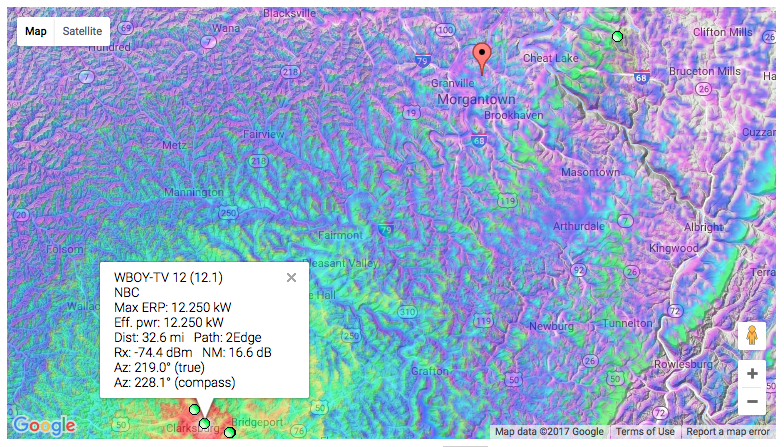
As you can see by the time it hits Morgantown it is very fringe reception. Also you may not have the ability to put an antenna outside to pick it up. So the second option would be Satellite, however those people would fall back in to the Comcast scenario, since Mon and Preston are part of the Pittsburgh DMA, the satellite provider will only give you those channels and none of the off-market channels. So you are left with not seeing the channel at all.
Now some people in the counties have been trying to get Mon and Preson reclassified in to the Clarksbug DMA. (I for one don’t want to see that as I like the Pittsburgh channels better…) I however don’t see this happening as the Pittsburgh stations would then fight they are losing a major source of viewership.
So the interesting part about this area, is there are 3 “major” TV markets that are in very close proximity. The largest is the Pittsburgh DMA which includes stations (major broadcast) KDKA (CBS), WTAE(ABC), WPXI(NBC), WQED(PBS),WNPB(PBS)[technically in Pittsburgh, but also listed in Clarksburg/Weston], WPGH(FOX), WPNT(MyNetwork). The other two are smaller markets. Clarksburg/Weston has 3 broadcast stations, WDTV (CBS), WVFX(FOX/CW) and WBOY (NBC/ABC). The third is the Wheeling WV/Steubenville OH which has 2 broadcast channels, WTRF (CBS/ABC/MyNetwork) and WTOV (NBC/FOX/MeTV)

Now when I lived at home with my parents we are pretty much in the middle of all three of these markets. I actually had several antenna’s in the attic that could pick up a lot of these stations, so we had several of each broadcast network. This is where I also became a video junkie and loved doing late night DXing of stations. Now my parents can only get the Pittsburgh stations on cable, even though the area could technically receive stations from all 3 markets.
But the whole reason for this post is my speculation of what actually happened vs what is being told to the customers. In short I believe Nexstar asked Comcast to provide them more money to be able to retransmit WBOY on the Mon and Preston Counties Comcast system. Comcast said, no you are a secondary so we will just drop you. And that was it, no more negotiation, no more looking out for the best interest of the viewers of the station, just drop it. While I seldom watched WBOY, there were times that I did when major events were going on in the state and the Pittsburgh channels were not covering it. It also begs to ask that if it really was a issue with the station being out of the primary DMA, then why is Comcast keeping WDTV and WVFX since they are out of the Clarksburg/Weston Market as well. Sure people will have to switch to one of those for local news, but I guess it is better than losing all 3 stations.
I doubt that Comcast will change their mind, even though they make billions of dollars a year. But in the reality I am surprised that the stations have been carried for as long as I have been here (over 23 years).
]]>