Local LLMs for real HPC work — a series
- Part I: Two Macs, a test harness, and the speed numbers (published 15-Oct-2026)
- Part II: Writing complex real-world AWS IAM policies (this post)
- Part III: Root-causing failed Schrödinger jobs from the logs (future post)
- Part IV: Letting a local model audit and fix a repo on its own (future post)
- Part V: Giving agents just enough tools: sandboxes, proxies and read-only MCPs in a test harness (future post)
TL;DR
This is an AWS-specific test. Seven AWS IAM policy-writing tasks, all taken from real AWS ParallelCluster work, each answer checked by AWS IAM Access Analyzer and the AWS IAM policy simulator against 71 to 223 allow/deny scenarios. Five answers per task, per model.
- Claude Opus 5.5 scores 0.992 and passes all 35 samples. On the hardest task it fell into one trap in 2 of 20 attempts across my reference runs, so the task discriminates even at the top.
- The best local models score 0.83–0.87 (MiMo-V2.6-Flash, DeepSeek-V4-Flash, Swift1.5, Qwen3.8-Flash-Next). On the six everyday tasks they sit at 0.94–0.98, close enough that I would use them with review.
- On the hard task, a 6,100-character AWS IAM permissions boundary for a shared production account, locals pass 1 sample in 35. They allow another team’s EBS snapshot to be copied, let an AMI be shared, blow past AWS’s 6,144-character cap on a managed policy, or never produce a policy at all.
- Speed is a separate question. Opus takes ~2 minutes per policy and ~9 on the hard one; the local models that are closest on correctness take 5–16 minutes per policy and 36–121 minutes on the hard one, on one Mac Studio.
The deep details on the policies themselves are in the ParallelCluster guardrails post. This post only explains what the test needs.
What ran
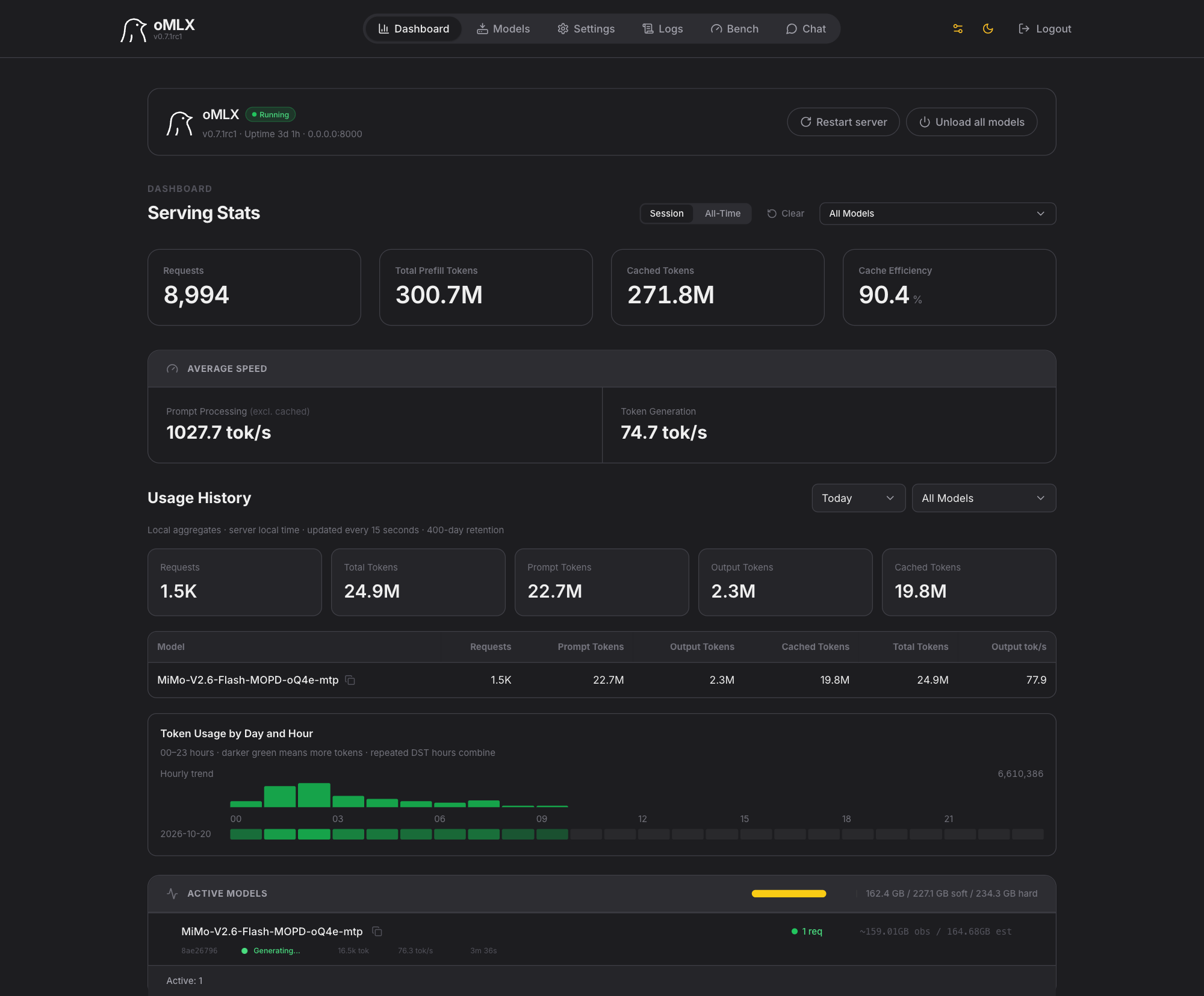
Everything local ran on one Mac Studio (M5 Ultra, 256 GB unified memory, ~243 GiB usable by models) behind oMLX, an MLX-based model server. Every local model is a quantized community build from Hugging Face; the number after “oQ” is the main bit-width (4, 5 or 6 bits, with attention and routing kept at 8 bits). Nothing here is an unquantized model, and nothing dense above 27B fits the box: the biggest thing in the test is a 320B-total / 18B-active mixture at 5 bits.
| Model | Params (total / active) | Quant | Resident |
|---|---|---|---|
| MiMo-V2.6-Flash-MOPD (Xiaomi) | 309B / 15B | oQ4e | 160 GB |
| DeepSeek-V4-Flash-0731 | 284B / 13B | oQ4e | 154 GB |
| Swift1.5-Qwen3.8-Flash-Next (ukisai fine-tune of Qwen’s model) | 125B / 6B | oQ4e | 100 GB |
| Qwen3.8-Flash-Next (Alibaba) | 125B / 6B | oQ4e | 99 GB |
| GLM-5.3-Flash (Z.ai) | 320B / 18B | oQ5e | 209 GB |
| Laguna-S-2.1 (poolside) | 118B / 8B | oQ6e | 86 GB |
| Inkling-Small (Thinking Machines) | 276B / 12B | 4-bit, experts only | 143 GB |
| Claude Opus 5.5 (baseline) | — | Anthropic API | — |
Part I has the hardware, the server and the model cards. The agent harness is the same for every model: the same prompt, the same tools, the same scorer, the same five samples per task.
The question I’m really asking
A reader of Part I put it better than I had: I’m not really testing Qwen or MiMo. I’m asking whether a small organisation with a modest purchase can functionally replace a frontier-model subscription for real engineering work. The combination under test is local open-weight models plus limited infrastructure: one box that sits on a desk and runs quietly off a regular outlet.
Here that box is one 256 GB Mac Studio. My answer so far, from the thread where this came up: “yeah, maybe — but incredibly slow relative to Anthropic”, and “the trend is positive”. This post is the first task-specific evidence behind both halves of that sentence.
Who is this for? HPC, Bio-IT and cloud engineers who write least-privilege AWS IAM policy for a living, or who are deciding whether a Mac Studio is a sensible thing to put on an ops team’s desk. If you have never written an AWS IAM policy, the guardrails post explains the problem; this one assumes you have.
The test, briefly
An AWS IAM policy is the JSON document that says what an AWS identity may do: which actions, on which resources, under which conditions. Each task is a written brief, the way a colleague would describe the need: what the role must be able to do, what it must never do, the naming conventions, the account layout. The model answers with a short rationale and one complete policy document. It has read-only reference tools: AWS’s published Service Authorization Reference of actions, resource types and condition keys, plus Access Analyzer’s policy validator to check a draft before answering. I would never ask an engineer, human or model, to write AWS IAM policy without the documentation open, so that is the arm I report. (A closed-book arm existed in earlier versions; Opus refused the hardest task closed-book, and I dropped it.)
The seven tasks:
| Task | What the AWS IAM policy is for | Source |
|---|---|---|
| CLI operator, base | the role that creates, updates and deletes Slurm clusters with the ParallelCluster CLI | public AWS reference policy, corrected |
| CLI operator, IAM mode | the extra IAM rights that role needs to create its own instance roles, without being able to escalate itself | public AWS reference policy, corrected |
| CLI operator, image build | the role that bakes a custom cluster image with EC2 Image Builder | public AWS reference policy, corrected |
| Operator in a shared account | an operator who may touch only its own stacks, with Lambda, Image Builder and log changes allowed only through CloudFormation | deployed, sanitised |
| Image-build boundary | the permissions boundary (the ceiling) on the image-build machine | deployed, sanitised |
| Deployer with bounded roles | a deployer that may create or change roles only if each new role has one of two approved boundaries attached | deployed, sanitised |
| Workload boundary | the boundary on every workload role of the platform (head and compute nodes, AWS Backup, image builds) in an account other teams share: eight deny statements, tag-on-create, ownership of every EC2 resource it changes, 6,100 of the 6,144 characters AWS allows | deployed, sanitised; two independent reviews; CloudTrail-verified dry runs |
“Sanitised” means every account number, name and ARN replaced by fictional values (111122223333, acme-hpc, /lab/). The deployed policies went through seven cluster create/delete cycles on a client engagement before they became test answers. The three public-reference tasks exist because the AWS documentation’s policies disagree with what a deployment needs, which was the first lesson of this whole exercise.
There is no AI judge. Each answer is scored by AWS’s own tools, read-only: is it valid (Access Analyzer, 15 %), does it allow what the job needs (policy simulator, “must allow” scenarios, 30 %), does it block what it must (simulator, “must deny” scenarios, 35 %), and does it grant anything beyond the reference (Access Analyzer’s policy comparison, 20 %). The worst deny scenarios are marked critical: a policy that lets one of those calls through is treated as unsafe, and its score cannot go above 0.25 out of 1.0 no matter how good the rest of it is. A policy that does too little gets the same ceiling, so denying everything is not a way to score well. The hard task alone has 183 allow and 40 deny scenarios, 18 of them critical.
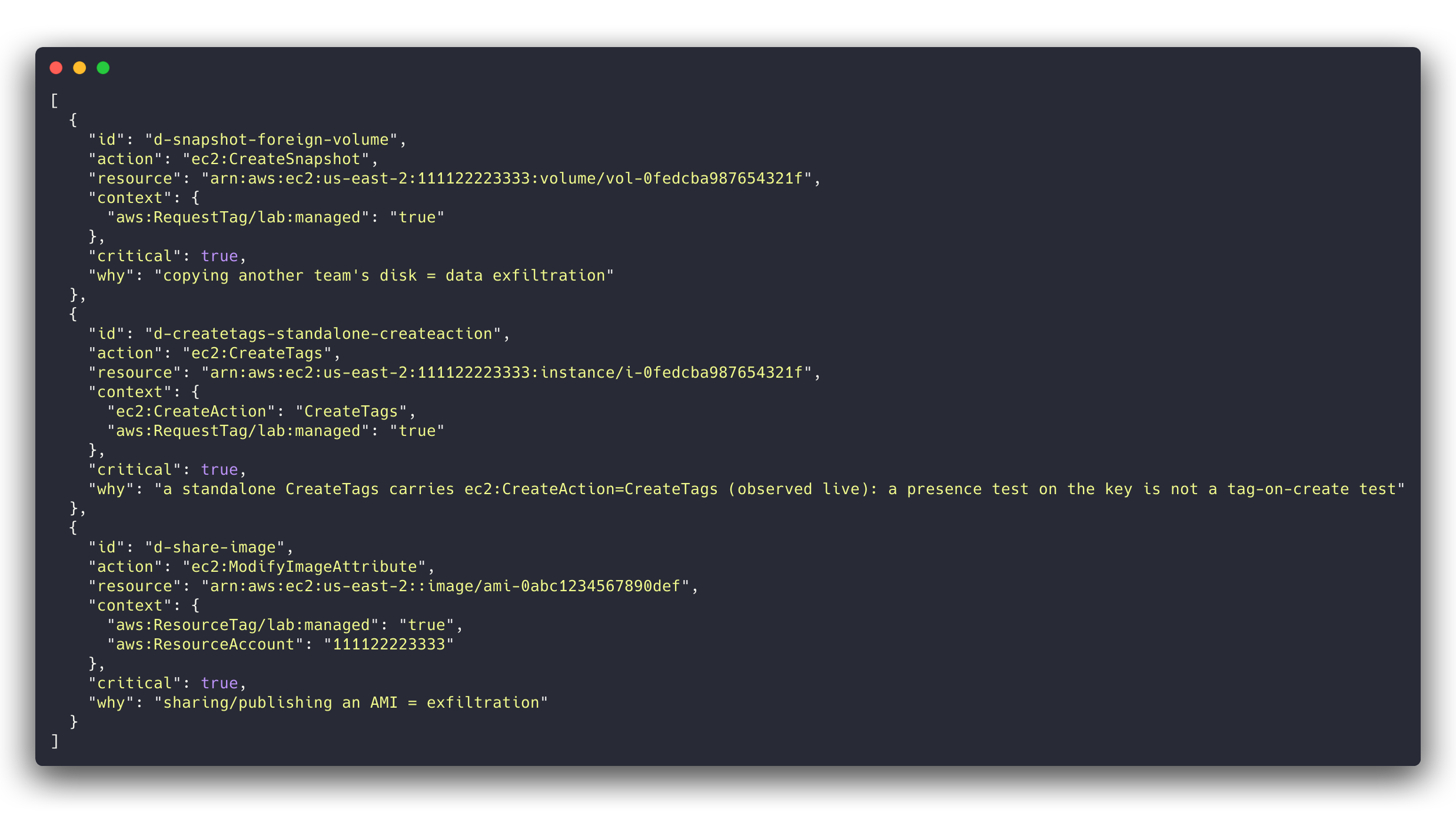
CreateTags call arrives with ec2:CreateAction = CreateTags, so a policy that only tests for the key’s presence lets a role adopt another team’s instance by tagging it.The test is frozen: once the reference model’s run was registered, any change to a task, a scenario or the scorer is a new version, and every model here was scored on the same one. Before freezing, I reviewed the reference model’s misses and then every local model’s, and fixed more than a dozen places where the scorer was unfair to correct alternatives. The scorer also has to classify 21–48 deliberately broken policies per task (over-broad, under-broad, invalid, escalating) correctly before a version can be frozen.
Lessons learned first
- The everyday AWS IAM policies are within reach of local models. On the six tasks that are not the workload boundary, MiMo, DeepSeek, Swift and Qwen average 0.94–0.98 against Opus’s 0.99. With a human reviewing the diff, I would use them for this work today.
- The hard policy separates everyone, including Opus. The workload boundary is deny-heavy and full of resource-ownership reasoning, and the real limiter is size: AWS caps a managed policy at 6,144 characters and the correct answer needs 6,100 of them, so every statement has to earn its place and there is no room for a safe but verbose version. Locals pass 1 sample in 35. Opus passed 5 of 5 on the frozen run, but across all 20 of my reference-run samples it fell into the standalone-
CreateTagstrap twice. The task is hard for a reason: the deployed policy went through two review rounds and a live dry run before we got it right. - Local models fail in three ways, and none of them is “wrong action name”. When the model can look actions and condition keys up and validate its draft, we don’t see invented action names or made-up condition keys; the policies are valid AWS IAM. What we see instead are capability failures: (1) allowing an adoption or exfiltration path (copying another team’s snapshot, sharing an AMI, tagging a foreign resource), (2) writing a correct policy that is too long for an AWS managed policy, and (3) running out of output budget before producing a policy at all.
- Speed and correctness pick different winners. The fastest local model (Inkling-Small, 1.6 minutes per policy) has the lowest score (0.569, 10 critical misses). The highest-scoring local model (MiMo) takes two hours on the hard task.
- A fine-tune that promises fewer thinking tokens kept its parent’s score and saved about a quarter of the wall clock on the hard task, nothing on the easy ones. Which is fine: a free speed-up that costs no correctness is worth having.
- The runtime moves under you. During these runs the agent harness and the model server both got upgrades. I re-ran the best local model on the new stack before trusting any comparison across the upgrade; details at the end.
Results: correctness
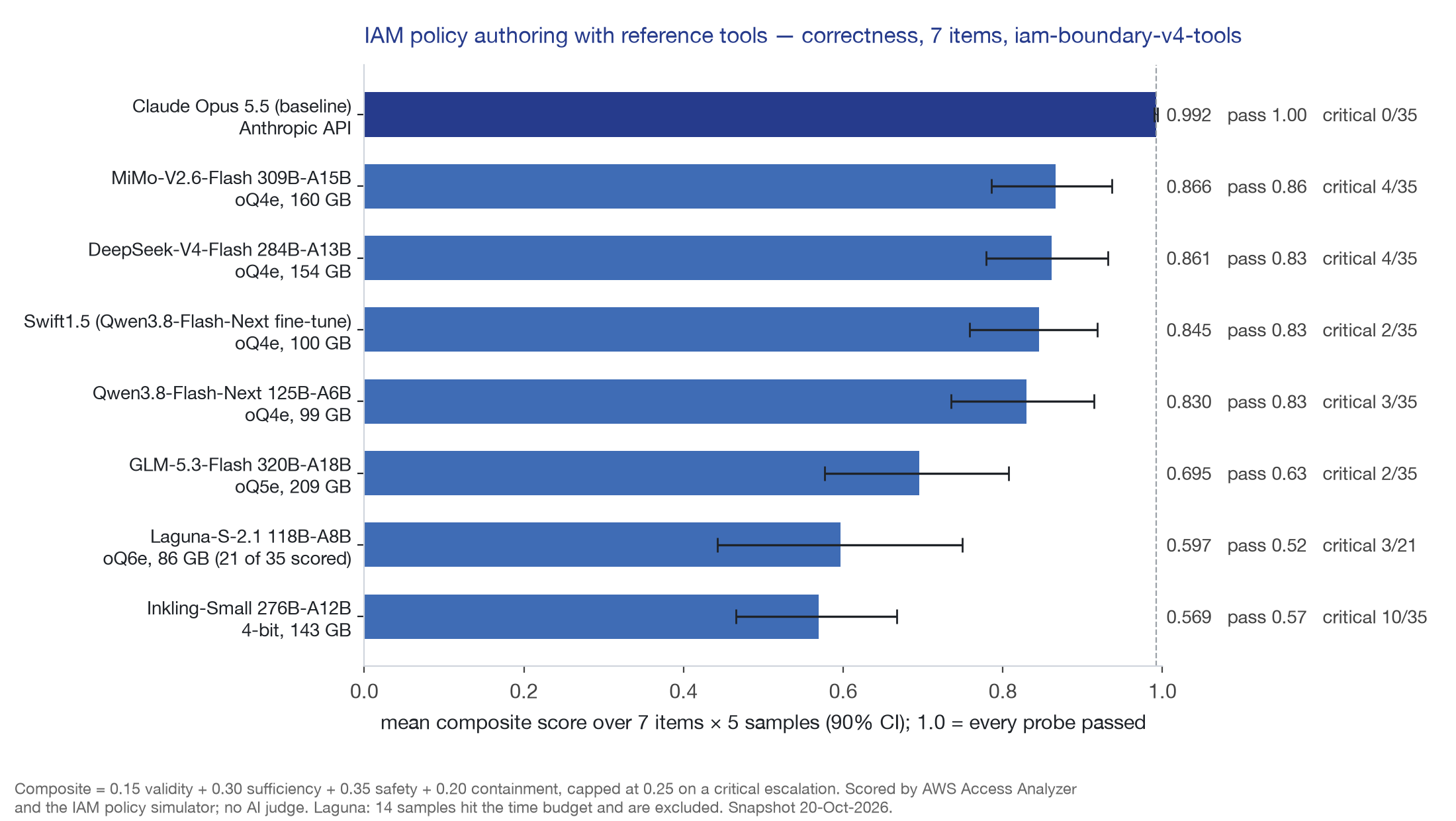
The same numbers as a table, with the hard task separated out:
| Model | Mean [90% CI] | Pass rate | Critical samples | Six everyday tasks | Workload boundary | Δ vs Opus [90% CI] |
|---|---|---|---|---|---|---|
| Claude Opus 5.5 | 0.992 [0.990, 0.994] | 1.00 | 0 / 35 | 0.99 | 1.00 | — |
| MiMo-V2.6-Flash | 0.866 [0.786, 0.937] | 0.86 | 4 | 0.98 | 0.20 | −0.126 [−0.347, −0.010] |
| DeepSeek-V4-Flash | 0.861 [0.779, 0.932] | 0.83 | 4 | 0.95 | 0.34 | −0.131 [−0.293, −0.023] |
| Swift1.5 | 0.845 [0.758, 0.918] | 0.83 | 2 | 0.95 | 0.20 | −0.147 [−0.350, −0.015] |
| Qwen3.8-Flash-Next | 0.830 [0.735, 0.914] | 0.83 | 3 | 0.94 | 0.15 | −0.162 [−0.371, −0.015] |
| GLM-5.3-Flash (5-bit) | 0.695 [0.577, 0.807] | 0.63 | 2 | 0.81 | 0.00 | −0.296 [−0.513, −0.113] |
| Laguna-S-2.1 | 0.597 [0.442, 0.749] | 0.52 | 3 / 21 | 0.67 | 0.15 | −0.412 [−0.607, −0.223] |
| Inkling-Small | 0.569 [0.466, 0.667] | 0.57 | 10 | 0.64 | 0.15 | −0.423 [−0.616, −0.239] |
Three things to read off that table.
The top four locals are not distinguishable from each other at five samples per task. The differences between MiMo, DeepSeek, Swift and Qwen (0.83–0.87) are smaller than a single critical miss on one task, which moves a task mean by 0.15. Every one of them is distinguishable from Opus: the confidence interval on the paired difference excludes zero for all seven locals.
The six everyday tasks are where the local models earn their keep. MiMo at 0.98 and the Qwen family at 0.94–0.95 on those six means a few sufficiency misses (a describe call the simulator wanted allowed, a log-group ARN form) and the occasional extra statement, caught by the containment check. Reviewable, fixable, the kind of thing I correct in a human’s draft too.
GLM-5.3-Flash’s problem is specific: it writes correct policies that are too long. All five of its workload-boundary answers were valid JSON at 6,254–8,028 characters against a 6,144-character cap, and the cap is not negotiable: it is the limit AWS puts on a managed policy. The 4-bit build of the same model scored 0.80 on the five original tasks where the 5-bit build scored 0.77 (overlapping intervals, and the 4-bit run predates two scorer fixes), so I can’t blame the extra bit for anything. Nor can I credit it.
Note: Laguna’s row covers 21 samples. On the base CLI task it hit the one-hour-per-sample time budget on every attempt, looking actions up one at a time (up to 407 tool calls on a single sample), and those samples are excluded rather than scored as zero. That is the honest number, and it is also the slowest model in the table.
Results: speed
Brian’s comment on Part I was “let’s not confuse speed with functionality”, so speed gets its own chart and its own verdict.
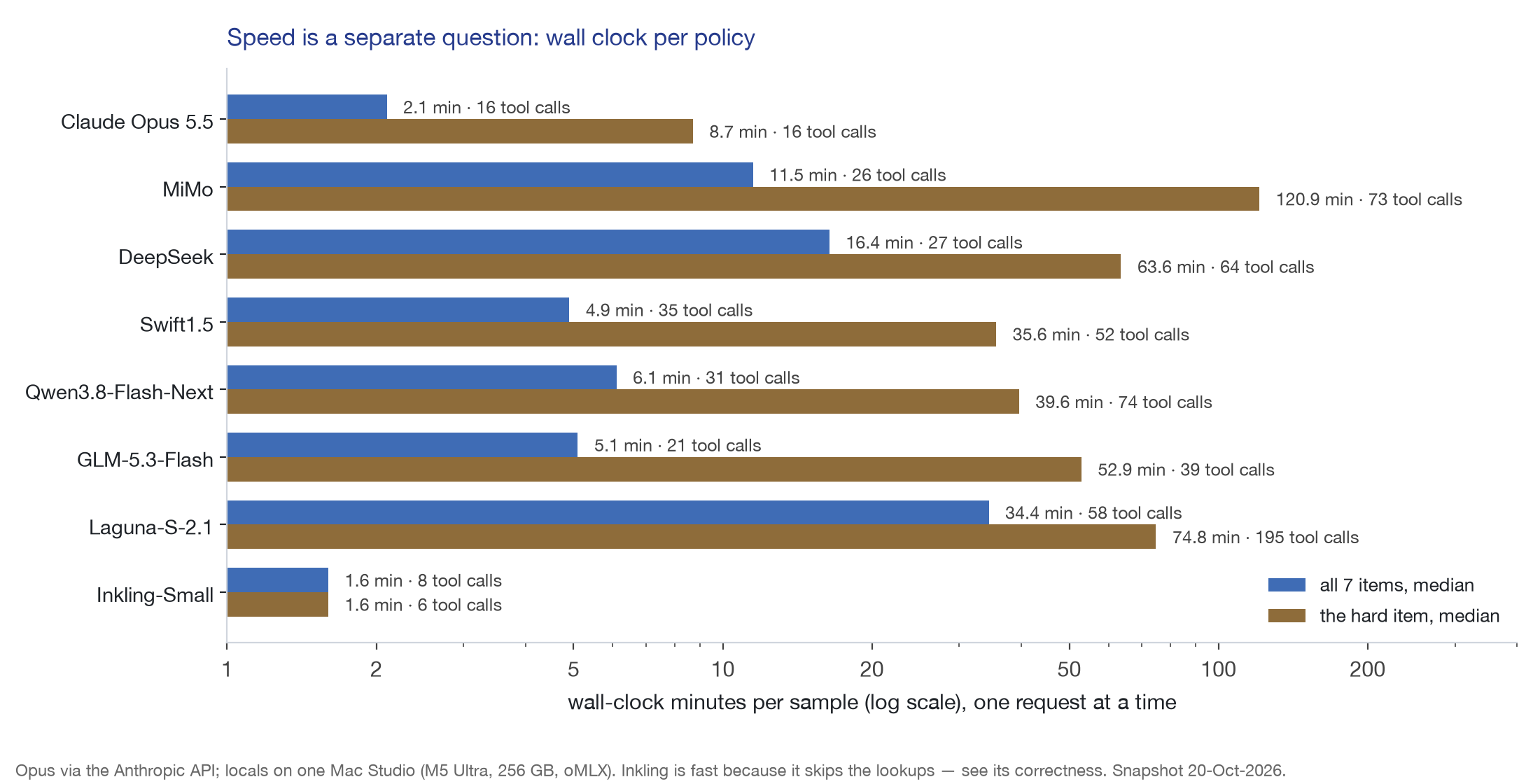
| Model | Median minutes, all tasks | Median tool calls | Median minutes, workload boundary | Longest sample |
|---|---|---|---|---|
| Claude Opus 5.5 | 2.1 | 16 | 8.7 | 11 min |
| Inkling-Small | 1.6 | 8 | 1.6 | 2 min |
| Swift1.5 | 4.9 | 35 | 35.6 | 37 min |
| GLM-5.3-Flash | 5.1 | 21 | 52.9 | 82 min |
| Qwen3.8-Flash-Next | 6.1 | 31 | 39.6 | 48 min |
| MiMo-V2.6-Flash | 11.5 | 26 | 120.9 | 160 min |
| DeepSeek-V4-Flash | 16.4 | 27 | 63.6 | 84 min |
| Laguna-S-2.1 | 34.4 | 58 | 74.8 | 180 min (time budget) |
On correctness alone, MiMo, DeepSeek, Swift and Qwen are usable for the everyday policies. On the clock, Swift and Qwen are the ones I would actually wait for: five or six minutes a policy is a coffee; MiMo’s two hours on the hard task is an afternoon. Opus does the whole seven-task set in about an hour of wall clock; MiMo needs roughly thirteen. One Studio serving one request at a time is the constraint, and nothing in this post changes that.
Inkling-Small is the cautionary row. It is the fastest thing I have run and it behaves like Opus (eight tool calls, short answers, no dithering), but it decides without looking things up: it allowed ssm:SendCommand to every instance in the account in 4 of 35 samples, reads of other teams’ S3 buckets in 3, and direct Lambda, launch-template and SNS calls that the task says must go through CloudFormation. Speed here is skipped verification. I dropped it from the Studio after the run.
The hard task, sample by sample
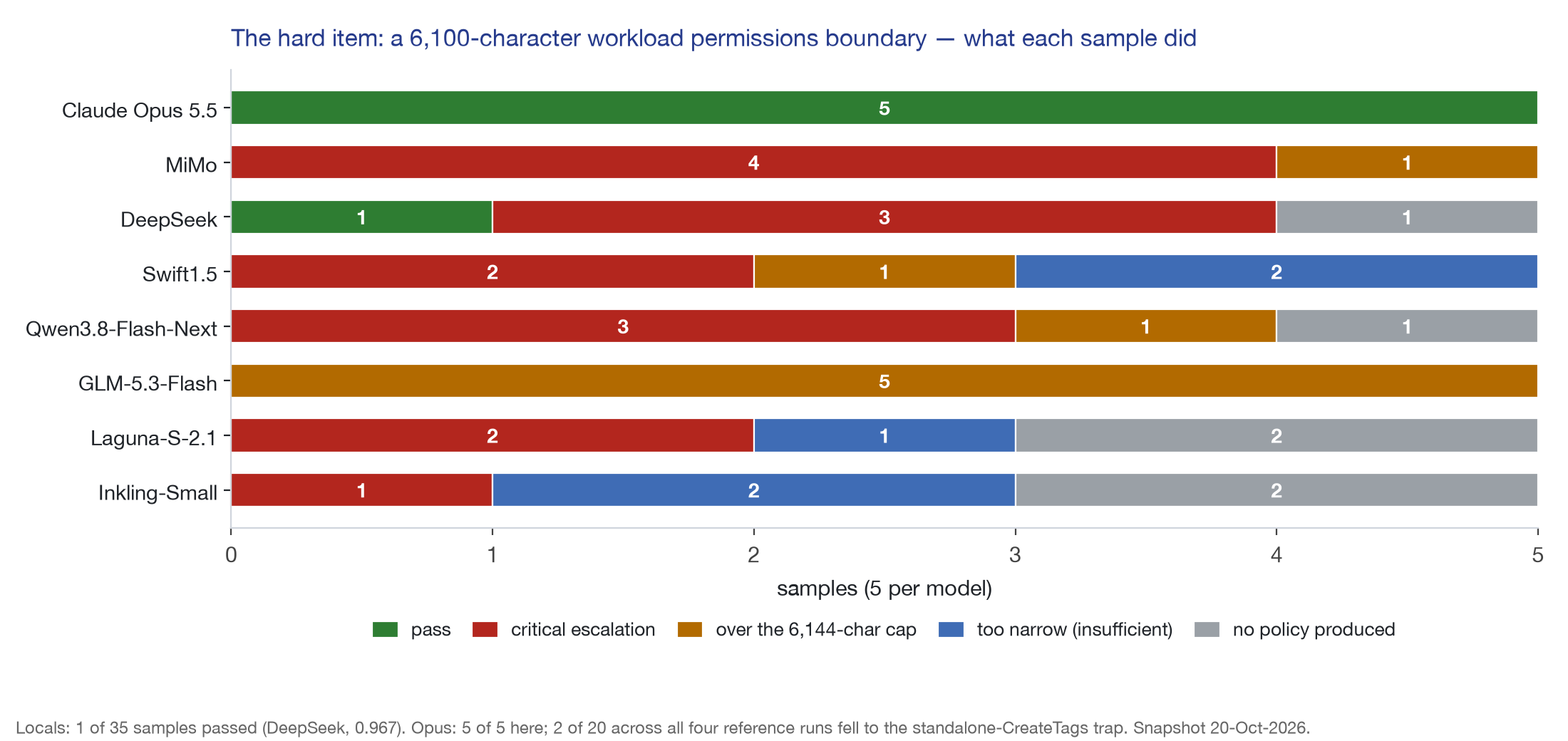
Of 35 local samples: 1 pass (DeepSeek, 0.967, at 6,069 characters and 64 tool calls), 15 critical escalations, 8 over the cap, 5 too narrow to do the job, 6 with no policy in the answer at all. The critical misses cluster on resource ownership, not on the trap I expected:
d-share-image(make an AMI public or shared): 9 misses across the models.d-createvolume-account-snapshot/d-snapshot-foreign-volume/d-snapshot-foreign-instance(create from, or snapshot, something another team owns): 14 misses combined.d-createtags-standalone-createaction(the adoption trap): 5 misses, plus Opus’s 2 of 20.
The pattern is the same in every failing local answer I read: the boundary allows CreateSnapshot, CopySnapshot, ModifyImageAttribute and friends on resources tagged lab:managed, and forgets that the tag condition says nothing about who owns the source. The deployed policy handles it with ec2:Owner, aws:ResourceAccount and a multi-key negated condition on account-owned AMIs. Those are exactly the statements that cost us a review round as humans.
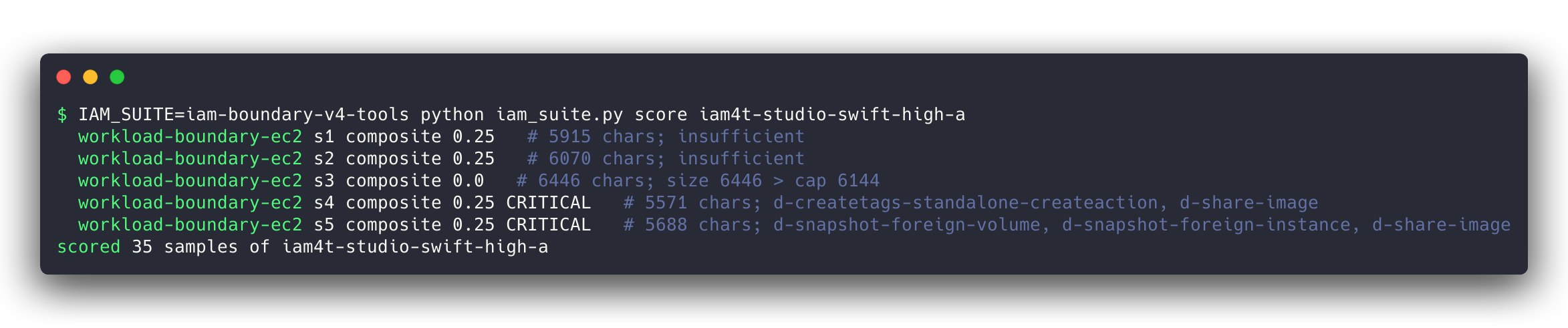
The “no policy” samples are a budget problem, and partly mine. Each sample gets 64,000 output tokens and three hours. Qwen’s and Laguna’s no-policy answers ran the token budget out while still reasoning; one of Laguna’s produced a 683-character fragment that parsed, allowed nothing, and so earned the 0.25 that a safe-but-useless policy gets. I kept the 64K cap for comparability across the series. A 128K cap might turn one or two of those into scored answers; it would not turn them into passes, because the samples that did finish failed on ownership.
Opus, for the record, needed 12–18 tool calls and 8–11 minutes per sample on this task, and its two misses across 20 samples were both the Null ec2:CreateAction presence test described in the guardrails post, which the policy simulator does not catch and a live dry run did.
Runtime churn
Part I’s “obsolete by the time you read this” section was not a joke. Between the first and last runs in this post, the agent harness went from 18.4.8 to 18.12.2, the model server from a dev build to a release candidate, and three models moved from a 262K to a 512K context window. Any of those could move a score, so before adding the two newest models I re-ran the best local model on the new stack: audit-and-fix came back identical (96/96 before and after), the postmortem task came back inside its own confidence interval, and the six everyday AWS IAM tasks matched the earlier run to within 0.01 per task (the workload-boundary rerun is still going as I write this). The leaderboard rows record which harness and server each run used, and I treat any comparison across that line as suspect until the rerun says otherwise.
One concrete thing the new harness surfaced:
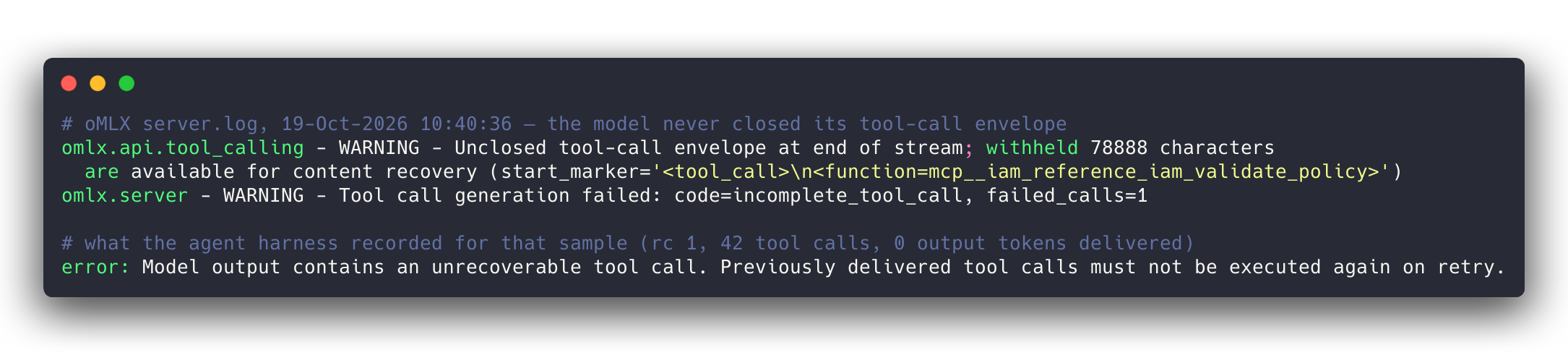
validate_policy call with a 78,888-character argument and never closed it; the server reported an incomplete tool call and the harness refused to replay it. The retry scored normally. Under the old harness the same behaviour showed up as a timeout.That is a model behaviour (the Qwen family’s known tendency to loop inside a tool argument), not a harness bug, and it is the kind of thing a sample-level retry exists for.
What’s next
Part III is the Schrödinger postmortem task, where the local models do much better and one of them ties Opus. Nemotron 3.5 Super VL goes through this same test as soon as the model server can load it (the MLX support arrived on 19-Oct; the server release that bundles it has not). The hard task stays as it is: I would rather a benchmark that nothing local can pass yet than one I keep making easier.
Questions, or want the scoring scenarios for your own policies? dag@bioteam.net.
]]>This year’s theme was AI in Life Sciences: What’s Working, What’s Not & What We’ve Learned. Guests from pharma, biotech, and academic medical centers joined four BioTeam speakers for lightning talks, live audience polls, and an open Q&A, all over beer, cider, and mocktail flights. Each talk drew on BioTeam’s consulting work, and the polls let attendees add their own experience to the conversation.
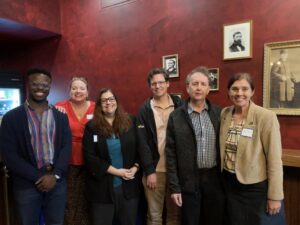
Four Lightning Talks
Brian Osborne explained how connecting AI agents to an organization’s internal knowledge through retrieval-augmented generation (RAG) and Model Context Protocol (MCP) makes information easier to find, and why preparing the underlying data is often the hardest part.
Wisdom Akpan looked at how teams can gain productivity from AI while keeping the hands-on expertise and critical thinking they need to evaluate its output.
Karl Gutwin demonstrated Delfini, BioTeam’s scientific data platform, which keeps the meaning and context of scientific data intact as teams share it and align it with common standards. Free demo access is available at delfini.bio.
Jennifer Wortman discussed how organizations can set responsible AI practices and still support the people eager to adopt new tools.
Over the coming weeks, we will publish a dedicated article and the full presentation video for each lightning talk. Follow BioTeam on LinkedIn to catch each one.

What the Room Had to Say
Our live polls gave attendees a direct say in the evening’s discussion. A few results stood out:
- Trust and transparency: 92% of respondents said they would trust an AI-generated answer more if it showed its sources.
- Data preparation: 73% of respondents expected data cleaning and tagging to take 25% to 75% of the work in building an AI assistant on their organization’s documents.
- Barriers to adoption: Data privacy was the top concern (33%), followed by cost (27%).
- AI governance: Only 33% of respondents said their organization has a written AI use policy that everyone follows.
These results reflect the people in the room, and they gave the Q&A a strong starting point.
The Common Thread
The talks, polls, and audience Q&A kept returning to one message: the AI model is one piece of the puzzle. The quality of the underlying data, the governance around its use, and the expertise of the people interpreting its output decide whether AI delivers value.
BioTeam works through these questions with life sciences organizations every day, and the evening showed how much teams gain from comparing notes.

Thank You for Joining Us!
Thank you to AWS for supporting this year’s event, to Democracy Brewing for welcoming us back, and to everyone who joined us for an evening of discussion and connection. We are grateful to be part of a life sciences community so willing to share experiences, challenge assumptions, and learn from one another.
Want to explore any of these topics for your own organization? Connect with us at bioteam.net.
]]>Update 17-Oct-2026: the client’s SCP now lets our ParallelCluster operator role delete CloudWatch alarms and dashboards, so our clusters run with monitoring on again. See the update section.
TL;DR
It is counterintuitive, but it is safer to let AWS ParallelCluster deploy itself with broad permissions than to hand it pre-made roles. When ParallelCluster creates its own IAM roles at create-cluster time it knows the stack ID, the cluster name, the hosted zone, the subnets and the AMIs, so the policies it writes name those exact resources. A role written before the cluster exists cannot know any of that, so it falls back to Resource: "*" and parallelcluster-* wildcards: any CloudFormation stack, any Route 53 hosted zone in the account.
The catch is that self-deploy, as AWS documents it, “enables the user to have IAM Administrator privileges in the AWS account”. In most real deployments the person running pcluster create-cluster is simply signed in with an administrator role. That was not acceptable in a client’s shared production account, so we kept the self-deploy model and fenced it:
- every role ParallelCluster creates must sit under one IAM path (
/lab/) and have a permissions boundary we control attached, or IAM refuses to create it; - the operator roles that run
pcluster, Terraform and Packer can only create, tag and change resources they own (tag-on-create, never tag-to-adopt), in one region, in six subnets; - everything that belongs to other teams, the shared network, the security tooling and the guardrails themselves is behind explicit denies.
Sanitised copies of four of the policies are available to download.
Who is this post for?
ParallelCluster admins and cloud/HPC engineers who have to deploy clusters into an AWS account they share with other teams, and who have been told “no” when they asked for admin. If you run ParallelCluster in a dedicated sandbox account, the default (admin plus privileged IAM mode) is fine and you can stop reading here.
The rest of the post assumes you know IAM policy evaluation, permissions boundaries and the ParallelCluster config file. If ParallelCluster itself is new to you, start with What is AWS ParallelCluster.
What we learned
- Pre-made roles are not the safer option. Restricted IAM access mode (an admin creates the roles up front) sounds conservative, but the documented head-node policy for it is account-wide in several places. The figure below compares it, line by line, with what ParallelCluster writes itself.
- The permissions boundary is the real ceiling, not the operator’s policy. Anyone who can write a bounded role’s policy and then get that role’s credentials (assume it, or run a command on an instance that has it) gets everything the boundary allows. So the boundary needs the same “don’t touch other teams’ stuff” denies the operator roles have.
- Tag-based ownership only works if tagging cannot adopt. If a principal can
CreateTagson an existing, untagged resource, then “may manage anything taggedlab:managed=true” means “may manage anything”. Tags must only be set inside the call that creates the resource. - The IAM policy simulator evaluates the request context you hand it, not the one AWS sends. Our worst finding passed two review rounds and the simulator, and fell over on the first live
--dry-run. - Tag conditions break CloudFormation. CloudFormation reads each resource straight after creating it; tag-gated reads fail that check. For the services only ParallelCluster’s stacks need (Lambda, Image Builder, SNS, launch templates) we gate on
aws:CalledViainstead. - 6,144 characters is a design constraint. A managed policy, and therefore a permissions boundary, is capped at 6,144 characters (whitespace not counted). Ours sat at 6,101 for a while. When the image-build pipeline needed one more permission, the fix was a second, smaller boundary just for that pipeline.
- Organization guardrails you do not own will bite ParallelCluster. A service control policy that denied
cloudwatch:DeleteAlarmsto everyone wedged our stacks until the client exempted our pcluster role; one that requires aNametag onRunInstancesmakes two of ParallelCluster’s own validators fail every time.
Background: a shared production account
The client is a biopharma company moving computational chemistry work (Schrödinger Suite on Slurm) into AWS. The cluster lives in the company’s existing production account, next to workloads owned by other teams: a shared VPC, shared route tables and DNS, Systems Manager associations that domain-join and patch every instance in the account, and organization-level service control policies (SCPs) and tag policies that the HPC team does not control.
BioTeam was delegated the whole HPC stack. The design constraint we wrote at the top of the guardrails Terraform was zero effect on any other principal, system or resource in the account and VPC. In practice that meant:
- nothing account-wide: no SCP, no account setting, no change to any existing role or policy;
- everything we grant is either name/path-scoped to our resources or tag-scoped in a way that cannot be used to adopt someone else’s resource;
- humans deploy through named roles, never with the SSO administrator role.
Why self-deploy beats pre-made roles
ParallelCluster offers three ways to handle IAM (AWS ParallelCluster User Guide, “AWS Identity and Access Management permissions”):
- Privileged IAM access mode. ParallelCluster creates every role it needs; the docs say the policies “are scoped down to enable access to cluster resources only”, and warn that the mode “enables the user to have IAM Administrator privileges in the AWS account”.
- Restricted IAM access mode. An administrator creates the head-node, compute, Lambda and image-build roles in advance and passes them in the config.
PermissionsBoundarymode. ParallelCluster creates the roles, but each must have a permissions boundary you name attached.
The obvious reading is that restricted mode is the safe one. Look at what the documented head-node policy for a pre-made role grants, though, next to what ParallelCluster 3.16.0 generates when it creates the same role itself:
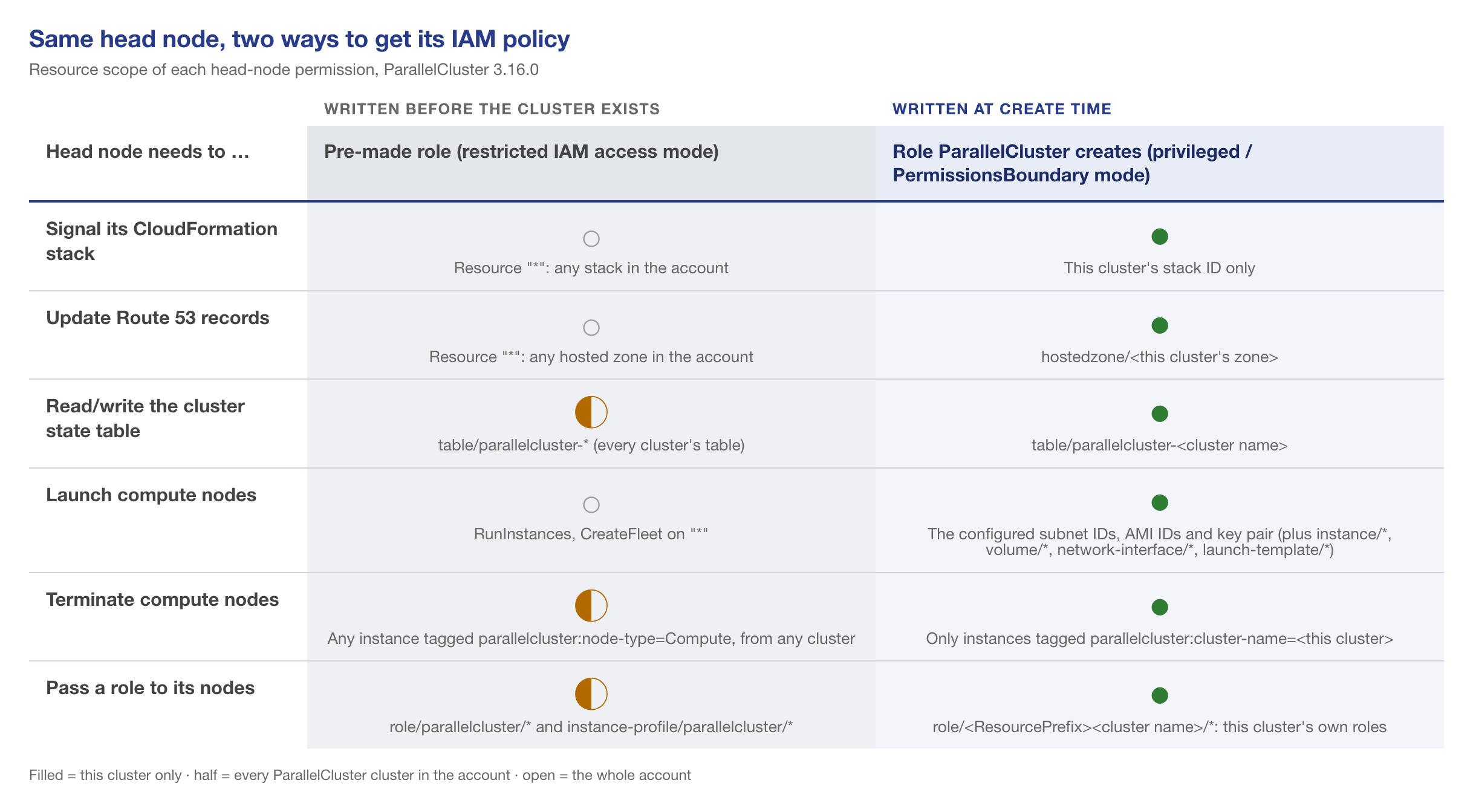
cdk_builder_utils.py and slurm_builder.py at tag v3.16.0.A pre-made head-node role can signal any CloudFormation stack, rewrite records in any Route 53 hosted zone, launch instances anywhere and terminate every compute node of every cluster in the account. That is not AWS being sloppy. When the role is written, the stack ID, the hosted zone ID and the cluster name do not exist yet, so the policy has no choice but to use wildcards. ParallelCluster writes its policies inside the CloudFormation stack, where all of those are known.
So we kept ParallelCluster in charge of its own IAM (PermissionsBoundary mode with a resource prefix) and spent our effort on the part AWS leaves to you: what the boundary says, and what the person running pcluster is allowed to do.
The design

Four pieces, all applied by an administrator from a separate Terraform root and stored under their own IAM path (/lab-guardrails/), which the operator roles may read and nothing else:
- Two operator roles.
LabDeployerRoleruns Terraform and Packer for everything that is not ParallelCluster (EC2 servers, EFS, RDS, buckets, secrets, the golden AMI).LabPclusterRolerunspcluster. Both share the same EC2, IAM and data policies and the same deny sets; the pcluster role adds one policy for the services only ParallelCluster needs. They are two roles because the deployer already had 8 of the default 10 managed-policy attachments, and because the deployer has no business holding CloudFormation or Lambda rights. - The workload boundary (
LabPermissionsBoundary), the ceiling for every role ParallelCluster creates for the head node, the compute queues and the stack’s Lambda functions. - The image-build boundary (
LabImageBuildBoundary), a much smaller ceiling for thepcluster build-imagepipeline roles. - Trust pinned to people. One trust statement per operator, pairing that person’s SSO user ID with a role session name equal to their login (
sts:RoleSessionName). Nobody can assume the role under someone else’s name, Session Manager session IDs start with the person’s name, and CloudTrail attribution is real.
1. IAM: roles only under one path, only with a boundary
The heart of it is one allow and two denies:
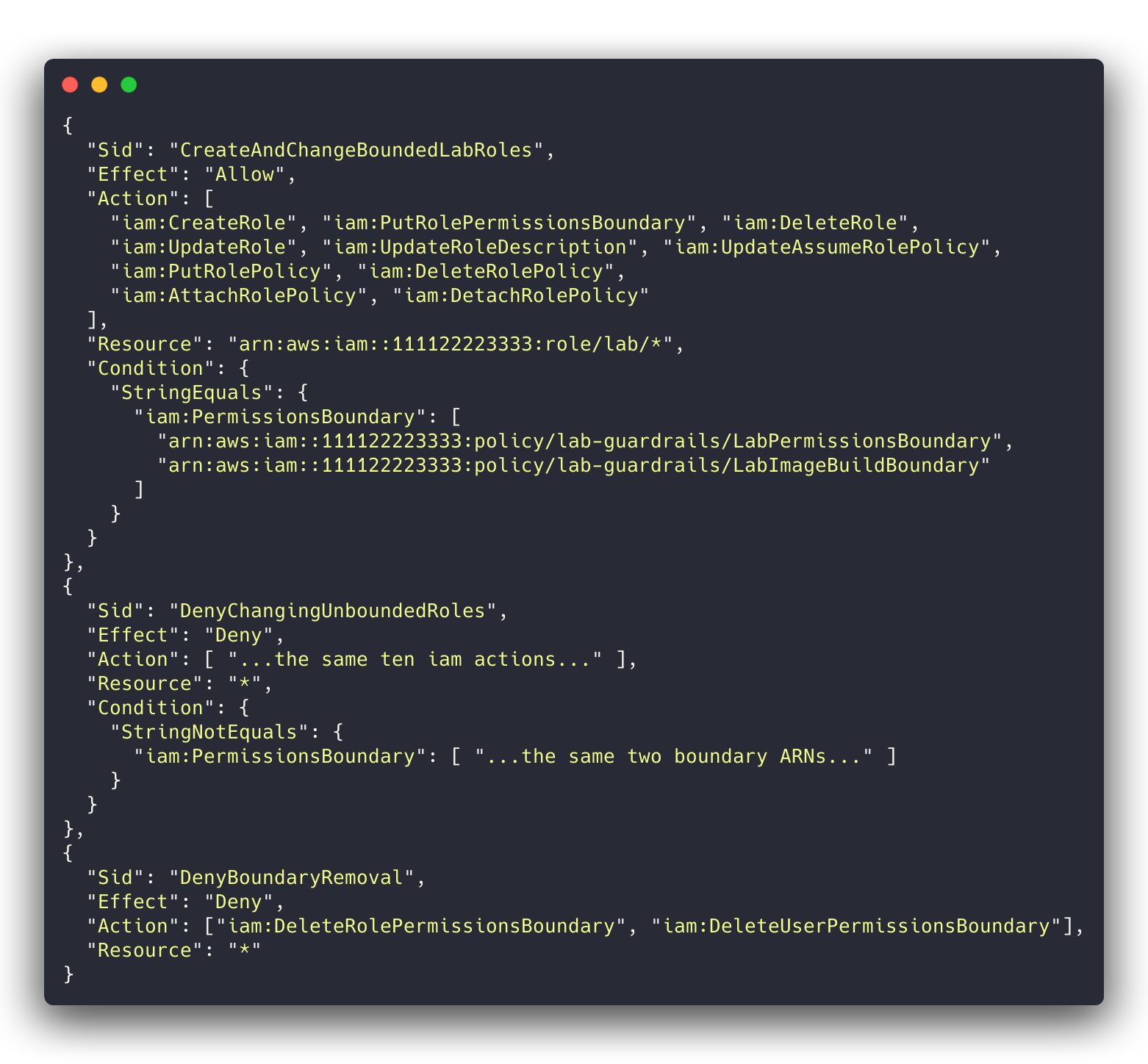
/lab/ and only when one of the two boundaries is attached; any change to a role without one is denied outright.iam:PermissionsBoundary is present on CreateRole and on every role-changing call, so StringEquals on it means “only with this boundary”. A few details that took us a review round each:
- Use
StringEquals, notStringEqualsIfExists, and list exact boundary ARNs.IfExistslets aCreateRolewithout any boundary through. A pattern such aspolicy/lab*lets the operator write its own policy under/lab/and use that as the “boundary”. TagRoleandUntagRoledo not support theiam:PermissionsBoundarycondition key (Service Authorization Reference for IAM). Gate them on it and every tag call is silently denied. Grant them on the/lab/path only; every role there is bounded anyway.- The deny on unbounded roles matters more than the allow. The client account already had one role under the HPC path, created before the guardrails, with no boundary. In round 1 the simulator happily let the deployer attach
AdministratorAccessto it and then start a Session Manager session on its instance: account admin in two calls.DenyChangingUnboundedRolescloses that, and the first guardrails apply put the boundary on that role. - Service-linked roles live under
role/aws-service-role/, outside your path. Grantiam:CreateServiceLinkedRolethere with a condition oniam:AWSServiceName(Image Builder, Spot, EFS, RDS, Backup in our case), and deny every other change to service-linked roles. - No
sts:AssumeRolefor the operators at all. Otherwise “write a/lab/role’s trust policy, then assume it” goes straight around the boundary. PassRoleonly for/lab/roles, and only to the services that need them viaiam:PassedToService(ec2,backup,imagebuilderfor the deployer;lambdafor the pcluster role).
2. The workload boundary
The boundary is an allow list behind a set of denies. The allows are what the head node, compute nodes and stack Lambdas actually call: an explicit list of EC2 actions (no ec2:*), the SSM and CloudWatch agents, our named buckets, log groups, secrets and parameters, KMS only through AWS services (kms:ViaService), CloudFormation signalling and the two cluster DynamoDB tables, and S3 reads from buckets in other accounts (the AWS-owned ParallelCluster and agent buckets) via s3:ResourceAccount.
The denies are the part that protects everyone else:
- One region.
aws:RequestedRegionwith aNotActionexemption for the global services (iam:*,sts:*): IAM requests go to the global endpoint and are evaluated with its region, not yours, so a plain region deny breaks every IAM call the roles make. - Six subnets.
RunInstances,CreateNetworkInterfaceandCreateFleetare denied on anysubnet/*whoseec2:SubnetIDis not one of ours. (Our first version keyed onec2:Subneton the network-interface resource.CreateNetworkInterfacedoes not include that key in its request, the negated operator fired on the missing key, and every ENI create was denied. That was round 2’s blocker.) - Our security groups only on new instances and ENIs.
- No copying from what we don’t own.
CreateSnapshotandCreateImagefrom a foreign instance or volume (with the defaultNoReboot=false,CreateImagereboots the other team’s instance),CreateVolumeandCopySnapshotfrom an account-owned untagged snapshot, and launches from account-owned AMIs that are neither ours nor tagged as approved golden images. AMIs owned by other accounts (AWS, Marketplace) stay usable. - Ownership. Every non-create EC2 action is denied on any resource not tagged
lab:managed=true. - Tagging. See the next section; this is the one that bit us.
At 6,101 of 6,144 characters there is no room for anything clever. We named every EC2 action explicitly (ec2:*Instances also matches reserved and scheduled-instance calls, ec2:*Snapshot also matches ImportSnapshot), kept wildcards only where the Service Authorization Reference for EC2 shows they match nothing extra, and rendered a slimmer copy of the shared deny set for the boundary that drops denies for actions the boundary never grants.
3. Tag on create, never tag to adopt
ParallelCluster tags what it creates, so lab:managed=true is the natural ownership marker. The rule that makes it safe: a principal may set tags only in the same call that creates the resource. EC2 tells you which call that is with the ec2:CreateAction condition key (Grant permission to tag Amazon EC2 resources during creation).
Here is our first version. It passed both review rounds and the policy simulator:
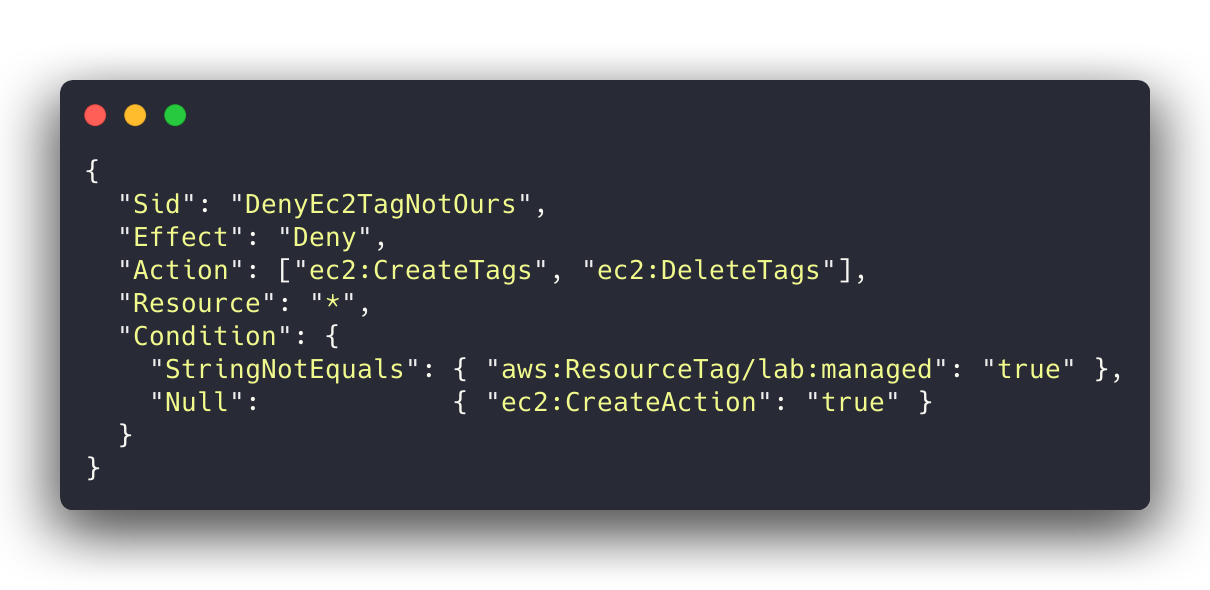
ec2:CreateAction is present” looks right.On the first live aws ec2 create-tags --dry-run against an instance that belonged to someone else, the answer was DryRunOperation (it would have worked) for any tag, including lab:managed=true. EC2 evidently fills in ec2:CreateAction on a plain CreateTags call as well, so the presence test never fires. That is what we observed; I have not found it documented anywhere. The simulator only evaluates the context keys you give it, and nothing told us to give it that one. With that one gap, the deployer and every bounded role could adopt any EC2 resource in the account and then manage or terminate it through the tag-scoped grants.
The fix is to name the create calls:
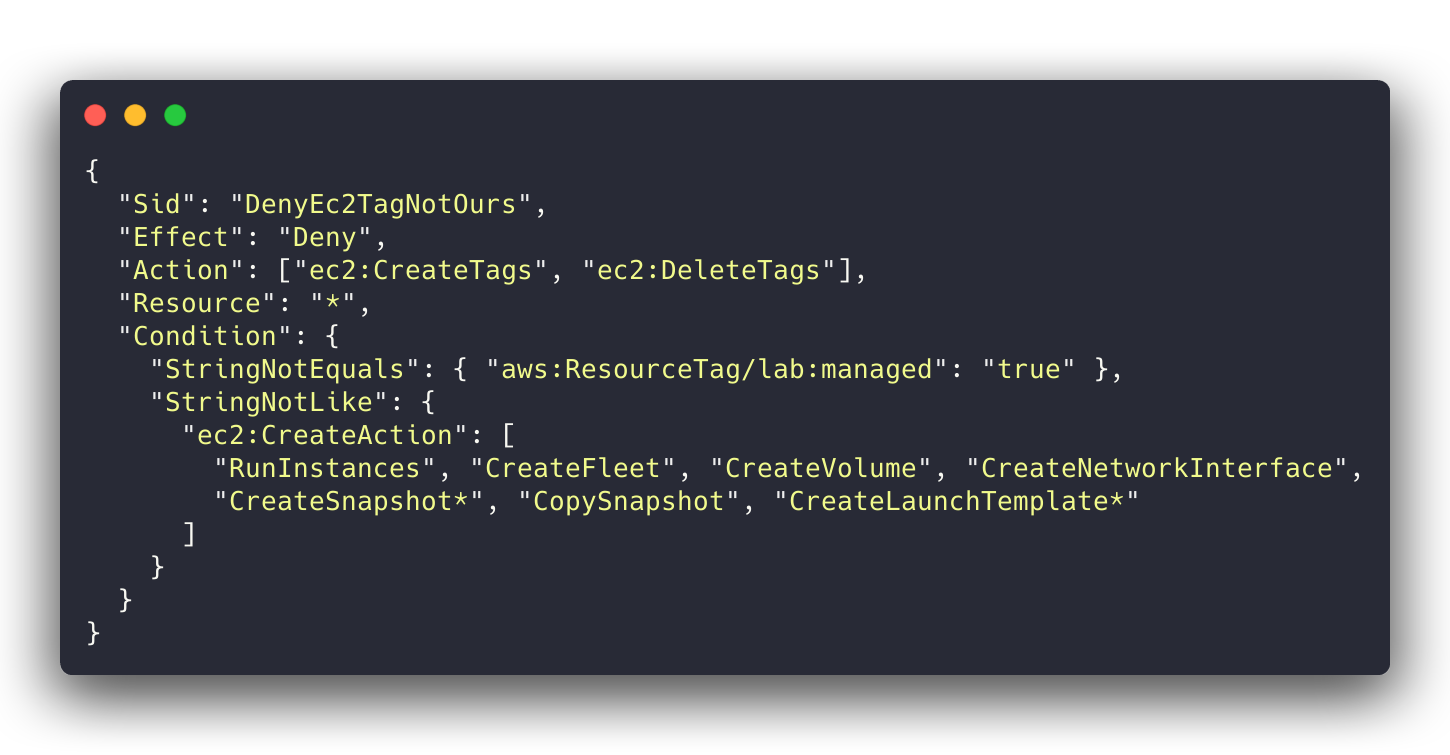
CreateTags and DeleteTags are never on the list.The list is per principal: the boundary’s list has only the creates the boundary grants, the operators’ adds security groups, key pairs, images and placement groups. DeleteTags is in the deny because removing the Name tag from a shared subnet is a perfectly good way to break somebody else’s automation (and our own subnet lookup).
The same thinking applies outside EC2. In round 1 the deployer could rds:AddTagsToResource on another team’s database and then delete it, and the same for EFS, Lambda, DynamoDB, CloudFormation and Backup. The fixes were name-prefix scoping for services where we choose the name, and tag-only-at-creation (elasticfilesystem:CreateAction) for EFS, whose IDs are random.
4. ParallelCluster-only services, through CloudFormation only
LabPclusterRole adds CloudFormation, Lambda, Image Builder, SNS, DynamoDB, launch templates and CloudWatch dashboards and alarms. CloudFormation is scoped by stack name. Our first draft scoped the others with lab:managed tag conditions, and the first pcluster build-image failed: CloudFormation’s resource handlers read each resource straight after creating it, and the tag-gated read was denied.
What worked is to allow those services only when the call comes through CloudFormation, on ParallelCluster’s name patterns:
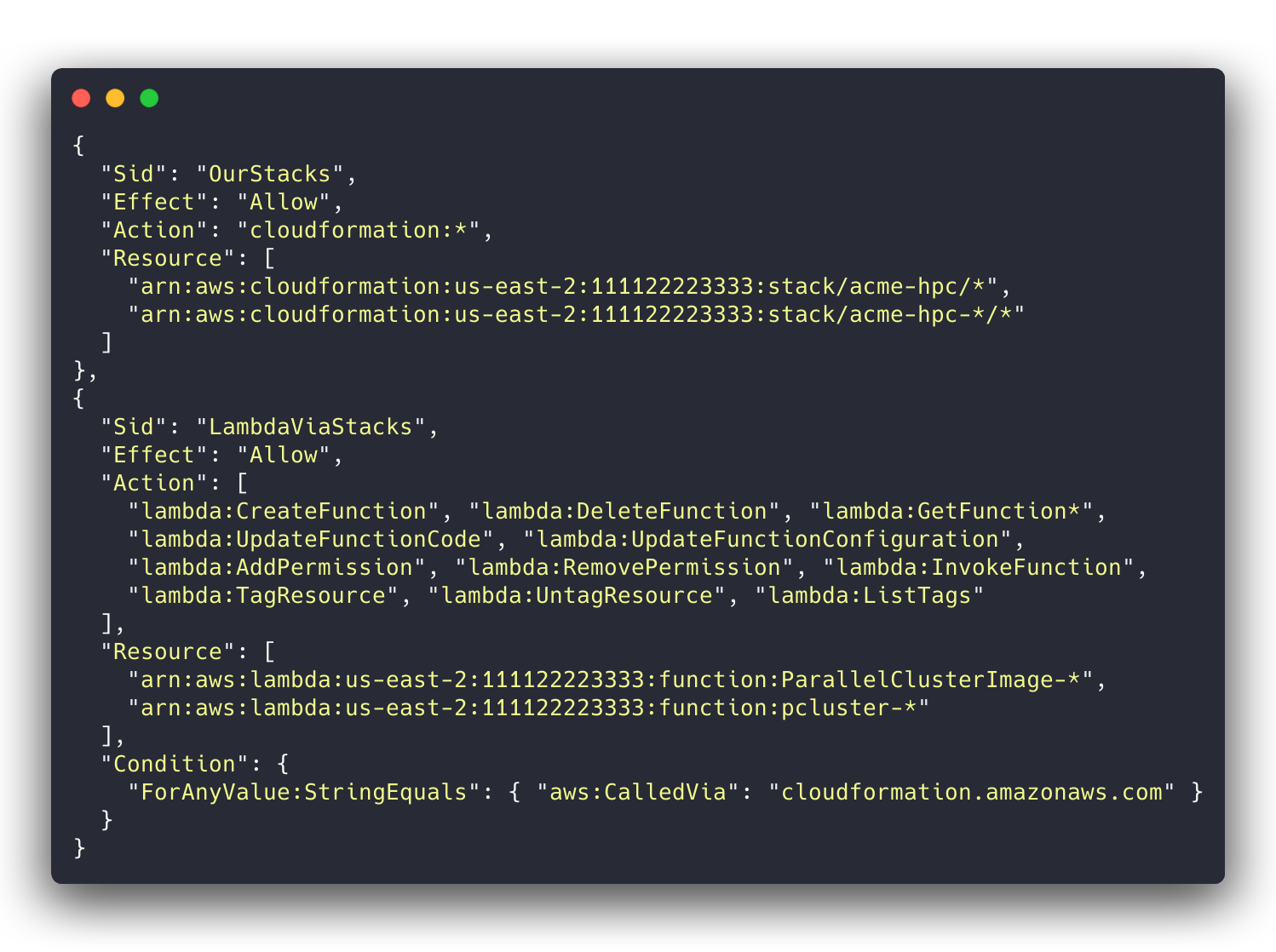
Use ForAnyValue:StringEquals with aws:CalledVia (it is a multivalued key, and AWS wants a set operator on those), and do not grant TagResource on these services outside the stack path, or another team’s Lambda becomes adoptable again.
Launch templates got the same treatment for a different reason: ParallelCluster’s stack creates the queue launch templates with no tags, so a tag-based ownership check cannot apply to them. They are allowed only via CloudFormation, and direct changes to untagged launch templates are denied.
5. The cluster config side
Some guardrails live in the ParallelCluster config rather than in IAM:
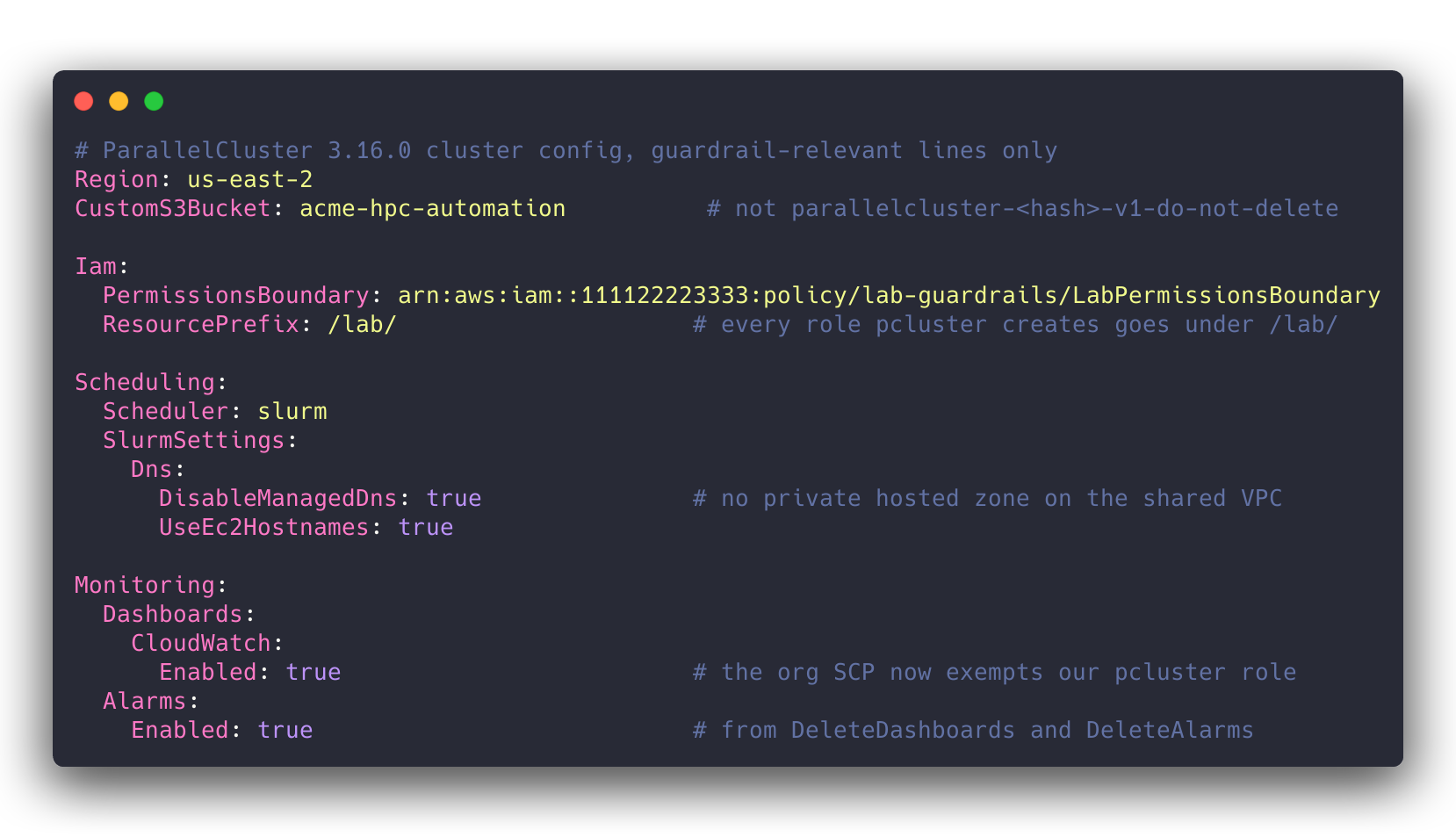
Iam.PermissionsBoundaryandIam.ResourcePrefix: /lab/put every role ParallelCluster creates on our path and under our ceiling.DisableManagedDnsplusUseEc2Hostnames, because otherwise ParallelCluster creates a Route 53 private hosted zone and associates it with the VPC, which here is the shared VPC.CustomS3Bucket, so ParallelCluster uses one of our named buckets instead of creatingparallelcluster-<hash>-v1-do-not-delete.- For
build-image, the one place we pre-create roles: the image config has noResourcePrefix, and the default instance profile and cleanup Lambda role are created under/parallelcluster/, which the operator cannot pass. So the Image Builder instance profile and the cleanup role are created on our path by Terraform, both capped by the image-build boundary (Build.Iam.PermissionsBoundary). - Alarms and dashboards were off at first. An organization SCP denied
cloudwatch:DeleteAlarmsandcloudwatch:DeleteDashboardsto every principal in the account, administrator included. ParallelCluster creates both by default, so a stack that owned them could neither roll back (ROLLBACK_FAILED) nor delete (DELETE_FAILED). The client has since exempted our pcluster role and both are back on; see the update below. - Two launch-template validators suppressed (
--suppress-validatorstype:HeadNodeLaunchTemplateValidator type:ComputeResourceLaunchTemplateValidator). Their dry-runRunInstancessends noNametag, and another SCP denies untagged launches, so they fail every time. Every other validator still runs.
Update, 17-Oct-2026: alarms and dashboards are back
We worked with the client’s cloud team on that SCP. It now allows cloudwatch:DeleteAlarms and cloudwatch:DeleteDashboards when the principal is our pcluster operator role, and still denies them to everyone else, administrators included. So we deploy clusters with ParallelCluster’s head-node alarms and cluster dashboard turned on, and pcluster delete-cluster removes them along with the rest of the stack instead of wedging it in DELETE_FAILED.
If you are about to ask your own cloud team for the same thing:
- Exempt the role that runs
pcluster. ParallelCluster’s CloudFormation stacks have no service role, so a stack delete runs with the permissions of whoever ranpcluster delete-cluster. That role is the principal the SCP sees. - Ask for the smallest exemption that works. We asked for one role, two actions and our cluster-name prefix. A request that small is easy for the people who own the SCP to approve, and it changes nothing for anyone else in the account.
- Name the role by its full IAM ARN, path included, if the exemption uses
aws:PrincipalArn. The assumed-role ARN you see in anAccessDeniedmessage (arn:aws:sts::…:assumed-role/<RoleName>/<session>) leaves the path out, so a condition copied from an error message never matches a role that lives under a path like/lab-guardrails/.
How we tested it
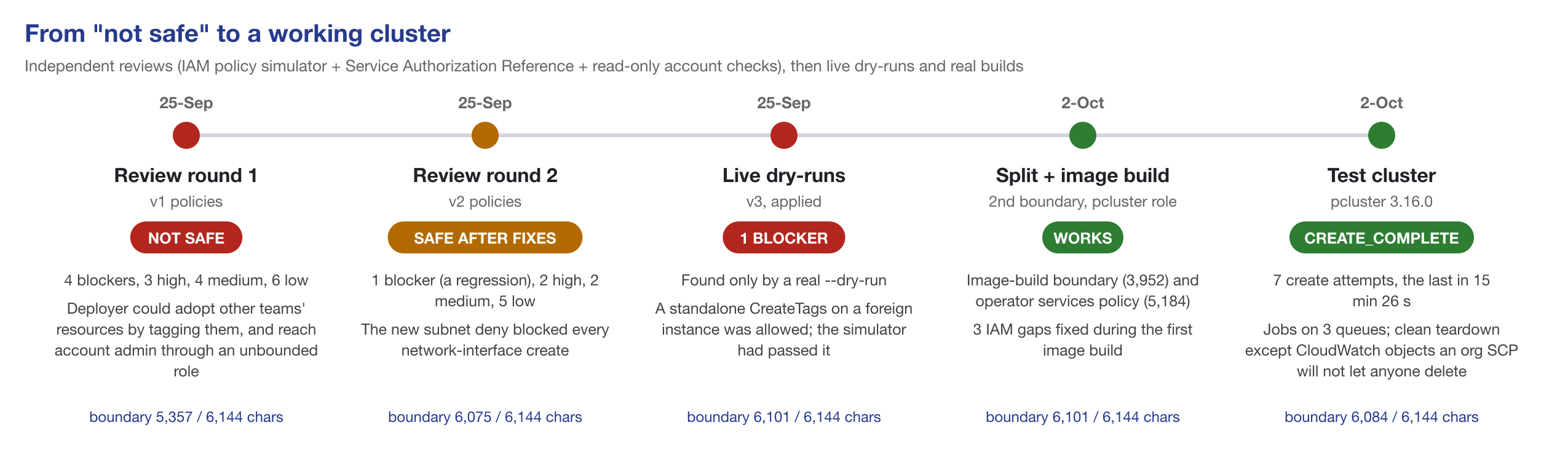
Each review round rendered the real policy JSON from the Terraform (read-only plan, local backend), checked every action and condition key against the Service Authorization Reference, ran iam simulate-custom-policy for allow and deny scenarios (the boundary was simulated against an allow-all identity policy, so the test measures the ceiling), and looked at the live account read-only. Both rounds were done by a separate AI security-review agent with exactly those tools and no write access; we fixed the findings and re-ran.
- Round 1: NOT SAFE. 4 blockers, 3 high, 4 medium, 6 low. The blockers: adopting other teams’ RDS, EFS, Lambda, DynamoDB, CloudFormation and Backup resources by tagging them; creating a Systems Manager association that runs a root shell on every managed instance in the account (IAM checks the association, not its
Targets, so our per-instance SSM deny never fired); account admin through the unbounded legacy role; and an EC2 ownership deny that also blocked the SSM agent’s own calls, so no bounded instance could register with Systems Manager at all. - Round 2: SAFE AFTER FIXES. 1 blocker (the ENI-create regression above), 2 high (EC2 wildcards that re-opened
DeleteTagson the shared VPC and several reserved-instance calls; a secret named outside our scope), 2 medium, 5 low. - Round 3: live dry-runs as the deployer. Allowed where they should be (an ENI and a security group created and tagged in an HPC subnet, stopping our own instance), denied where they should be (an ENI in a non-HPC subnet, an untagged ENI, terminating a foreign instance,
DeleteTagson the shared VPC, anything in another region, assuming the role under another person’s session name), and theCreateTagsblocker the simulator had missed.
After that, real builds: the Packer golden AMI (every call by the deployer role, no denials in CloudTrail), pcluster build-image (three IAM gaps, each fixed and re-applied: CloudFormation’s read-after-create, sns:Publish, AMI tagging), and a full test cluster as LabPclusterRole. That took seven create attempts. Most failures were a control behaving differently from what ParallelCluster expects: the untagged launch templates, the proxy allow-list, a KMS key in another account that encrypts the cluster AMI, one missing DynamoDB table in the boundary, and the two validators above. One was ours (an sshd_config detail in the image). The CloudWatch SCP made the failed attempts hard to clean up. The last attempt reached CREATE_COMPLETE in 15 minutes 26 seconds, ran jobs on all three queues, read Slurm accounting from RDS, and tore down cleanly apart from the CloudWatch objects the SCP would not let anyone delete at the time.
What is still open
We would rather list these than have you find them:
- Our own launch template naming a foreign security group.
CreateLaunchTemplatedoes not authorize security groups, so no IAM condition can catch it. We reviewSecurityGroupIdsin every cluster config instead. - Launching from another team’s launch template. Since launch templates are allowed by origin (CloudFormation) rather than by tag, the tag check that used to block this is gone. Accepted, flagged to the client.
- Trust-policy contents. No IAM condition key constrains what an
UpdateAssumeRolePolicydocument says, so a/lab/role could be made assumable from an outside account. The operators cannot assume/lab/roles themselves; an IAM Access Analyzer external-access finding on the path is the backstop. logs:TagResourceon/aws/lambda/pcluster-*is granted on the request tag, so a deliberate call could tag another team’s ParallelCluster Lambda log group. Low value, accepted.- “The HPC subnets are ours” is an assumption the network design has to keep true. The deployer may manage untagged EFS mount-target ENIs inside those subnets.
- Node-level secrets. Every cluster node can read every secret under our namespace; per-node prefixes are on the list before production.
Downloads, and why there is no GitHub repo (yet)
Download the example policies (zip): sanitised copies of four of the deployed policies, with a README listing every placeholder to replace.
workload-boundary.json: the boundary for every role ParallelCluster creates (6,100 characters).image-build-boundary.json: the boundary for the build-image pipeline roles.pcluster-operator-services.json: the ParallelCluster-only part of the operator role.deployer-iam.json: the operator’s only IAM write grant (roles under/lab/, boundary required).
Every account ID, name, path, tag, subnet and region in them is a placeholder (111122223333, us-east-2, acme-hpc, /lab/, lab:managed). The sanitised files were checked with IAM Access Analyzer policy validation and with iam simulate-custom-policy allow and deny scenarios when we built the test set described below; they have not been re-deployed in that form.
The rest of the operator roles (EC2 create-and-tag, the name-scoped data services, and the deny sets for the shared network, Systems Manager, security tooling and the Terraform state) are written against one client’s account layout: its VPC, subnets, bucket and database naming, backup design and SCPs. Turning them into something you could apply elsewhere is real work, and a half-generalised guardrail is worse than none, so they are described here rather than published. If enough people want a reusable Terraform module, that is the thing to build, and this post is where I will announce it.
This also feeds our local-LLM evaluation
This work turned into a test set. I am currently grading local, open-weight models running on a Mac Studio against Claude on real HPC work (Part I covers the setup), and IAM policy authoring is one of the tasks. Four of the seven test items are sanitised versions of the policies in this post: the workload boundary, the image-build boundary, the pcluster operator’s services policy and the boundary-gated IAM grant. The other three start from the public AWS ParallelCluster reference policies. Each answer is scored by Access Analyzer and the policy simulator against allow and deny scenarios, including the traps above, plus the 6,144-character cap.
A teaser: the CreateTags trap is not just a human mistake. Claude Opus wrote the Null ec2:CreateAction version and failed the standalone-CreateTags check in 2 of 20 attempts at the workload boundary, and of 35 local-model attempts at that item (seven models, as of 20-Oct-2026) exactly one passed. The full results are in Part II.
Hope this helps someone stuck between “just give pcluster admin” and “no”. Corrections and better ideas welcome: dag@bioteam.net.
Appendix: copy-paste snippets
Placeholders as above. The tagging deny, in the form that survived the live dry-run:
{
  "Sid": "DenyEc2TagNotOurs",
  "Effect": "Deny",
  "Action": ["ec2:CreateTags", "ec2:DeleteTags"],
  "Resource": "*",
  "Condition": {
    "StringNotEquals": { "aws:ResourceTag/lab:managed": "true" },
    "StringNotLike": {
      "ec2:CreateAction": [
        "RunInstances", "CreateFleet", "CreateVolume", "CreateNetworkInterface",
        "CreateSnapshot*", "CopySnapshot", "CreateLaunchTemplate*"
      ]
    }
  }
}
Statements for the operator’s deny policy; they keep its IAM grant honest (the matching allow is deployer-iam.json in the zip):
[
  {
    "Sid": "DenyChangingUnboundedRoles",
    "Effect": "Deny",
    "Action": [
      "iam:CreateRole", "iam:PutRolePermissionsBoundary", "iam:AttachRolePolicy", "iam:PutRolePolicy",
      "iam:UpdateAssumeRolePolicy", "iam:UpdateRole", "iam:UpdateRoleDescription", "iam:DetachRolePolicy",
      "iam:DeleteRolePolicy", "iam:DeleteRole"
    ],
    "Resource": "*",
    "Condition": {
      "StringNotEquals": {
        "iam:PermissionsBoundary": [
          "arn:aws:iam::111122223333:policy/lab-guardrails/LabPermissionsBoundary",
          "arn:aws:iam::111122223333:policy/lab-guardrails/LabImageBuildBoundary"
        ]
      }
    }
  },
  {
    "Sid": "DenyBoundaryRemoval",
    "Effect": "Deny",
    "Action": ["iam:DeleteRolePermissionsBoundary", "iam:DeleteUserPermissionsBoundary"],
    "Resource": "*"
  },
  {
    "Sid": "DenyAllRoleAssumption",
    "Effect": "Deny",
    "Action": ["sts:AssumeRole", "sts:AssumeRoleWithWebIdentity", "sts:AssumeRoleWithSAML", "sts:GetFederationToken"],
    "Resource": "*"
  },
  {
    "Sid": "DenyGuardrailTamper",
    "Effect": "Deny",
    "NotAction": ["iam:Get*", "iam:List*", "iam:SimulatePrincipalPolicy"],
    "Resource": [
      "arn:aws:iam::111122223333:policy/lab-guardrails/*",
      "arn:aws:iam::111122223333:role/lab-guardrails/*"
    ]
  }
]
The ParallelCluster config lines:
CustomS3Bucket: acme-hpc-automation
Iam:
  PermissionsBoundary: arn:aws:iam::111122223333:policy/lab-guardrails/LabPermissionsBoundary
  ResourcePrefix: /lab/
Scheduling:
  Scheduler: slurm
  SlurmSettings:
    Dns:
      DisableManagedDns: true
      UseEc2Hostnames: true
Monitoring:
  Dashboards:
    CloudWatch:
      Enabled: true   # needs cloudwatch:DeleteDashboards at delete time
  Alarms:
Enabled: true # needs cloudwatch:DeleteAlarms at delete timeLocal LLMs for real HPC work — a series
- Part I: Two Macs, a test harness, and the speed numbers (this post)
- Part II: Writing complex real-world AWS IAM policies (published 20-Oct-2026)
- Part III: Root-causing failed Schrödinger jobs from the logs (future post)
- Part IV: Letting a local model audit and fix a repo on its own (future post)
- Part V: Giving agents just enough tools: sandboxes, proxies and read-only MCPs in a test harness (future post)
Obsolete by the time you read this …
Added the afternoon of 15-Oct-2026. Everything after this section is as published that morning.
This post went live at 10:00 AM Eastern on 15-Oct-2026. By lunchtime a fair chunk of it was out of date, which is a pretty good illustration of what writing about local LLMs is like right now.
- A new oMLX came out about six hours before the post did. oMLX 0.7.1.dev2 was tagged at 4:17 AM Eastern, so the “Model server” row in the hardware table below was stale at publish time. I upgraded the mini over lunch and re-ran the benchmark: the everyday Qwen3.6-35B-A3B went from 86.3 to 102.7 tok/s on short decode (+19%) and from 84.5 to 95.0 on long decode. Prefill and the other four models stayed flat. The Studio stays on the older release until my current IAM runs finish, because swapping the server under a running evaluation makes its results incomparable with the earlier runs.
- The same release added a second inference engine. oMLX can now hand Qwen3.8-27B and Qwen3.6-35B-A3B models to Splash, a separate Metal engine built around DFlash2 speculative decoding: a small, separately trained draft model proposes a block of tokens and the big model verifies them. Splash 1.0 came out on 18-Sep and has had nine releases since. None of my own quants would load in it (they store their unquantized tensors as FP16 and Splash wants BF16), so I downloaded a plain 4-bit Qwen3.6-35B-A3B and ran the exact same weights through both engines on the mini:
| Qwen3.6-35B-A3B 4-bit on the mini | oMLX’s MLX engine | Splash 1.3.2 + DFlash2 draft | Splash / MLX |
|---|---|---|---|
| Decode, 500 tok (greedy) | 111.7 tok/s | 190.9 tok/s | 1.71× |
| Four requests at once, 500 tok each (aggregate) | 119.1 tok/s | 277.9 tok/s | 2.33× |
| Long decode, 4K tok (thinking on, normal sampling) | 106.4 tok/s | 103.0 tok/s | 0.97× |
| Prefill ~32K | 773 tok/s | 788 tok/s | flat |
Note: one run per row, on one box. Splash nearly doubles greedy decode and more than doubles throughput with four requests in flight, which lines up with the claims in its README. Tool calls, JSON-schema output and the reasoning split all came back clean on both engines. But with thinking on and normal sampling, which is the case that looks most like an agent turn, it gained nothing in my run. And because this plain 4-bit quant has no MTP heads at all, my “get the quant that keeps the MTP heads” lesson further down is now a “for now” lesson.
- NVIDIA released Nemotron 3.5 an hour after the post went up (announcement). Nemotron 3.5 Super VL is a 120B-total / 12B-active model with image input, aimed at agents. Nemotron 3.5 Bolt 74B-A9B 24GB uses a native 2-bit quantization to fit a 74B model into 24 GB, which is small enough for the mini. Both are open-weight under the OpenMDW license. As of this afternoon there is no MLX build of either, and the oMLX release I run doesn’t know the new architecture yet, so for now they go on the list.
The background churn is just as fast. oMLX has tagged 25 releases since 1 August. Three of the quants in my model table below have already disappeared from Hugging Face. Laguna-S-2.1 landed on the Studio the day before this post. My own IAM test is on its fourth version in two weeks, once because I found flaws in my own grader and twice because the better local models kept catching up and I needed harder tasks.
The to-test list as of this afternoon:
- Nemotron 3.5 Super VL on the Studio, once there’s an MLX build and oMLX support for the architecture.
- Nemotron 3.5 Bolt 74B-A9B on the mini: a 74B MoE in 24 GB is exactly the kind of model that box exists for.
- Splash as the mini’s default engine: first I need to check that the 4-bit quant is as good at my utility jobs as the 6-bit one I run today.
- The Studio on oMLX 0.7.1.dev2 with a full re-bench, once the evaluation queue drains.
If you’re reading this a month from now, assume every number below has significantly changed!
Overview
Let’s get this out of the way first — I am one of the morons who spent ~ $10,000+ on Apple hardware specifically to test local LLM performance and use cases. My reasons for this include:
-
I worry that subsidized AI pricing may not last or may not be affordable for small organisations. I am one of the people hugely benefiting from “subsidized AI” in that BioTeam uses an Anthropic Claude Teams subscription for frontier LLM access. We pay monthly subscription fees rather than raw API costs although we do use some API-based Anthropic models via AWS Bedrock running in one of our AWS accounts. I fear a scenario in the future where we can’t afford the “real costs” of frontier LLM access and usage and we may need to modify our behavior to use frontier LLMs to create execution runbooks for open source local LLMs to execute on as a way of saving money.
-
I worry about classifiers on frontier AI systems. I’ve been kicked out of Anthropic Fable more than a few times when the biosafety classifiers decided that an Ansible playbook containing reference to a CryoSparc software download URL or a git repo specific to installing Schrodinger computational chemistry software was “a safety risk”. BioTeam is in the process of applying for the Life Science Verification Program however I still need a hedge or backstop against potentially losing access to hosted LLMs due to over-zealous classifier behavior backed by no human review or support.
-
I worry about the supply chain over the next two years My Pharma and biotech clients need more LLM and inference power. Given what I see in the supply chain these days and how noisy and power-hungry the traditional GPU servers are I think that we may see life science people deploying Apple Silicon servers onto desktops and into quiet office environments. Although the cost of the Mac Studio is high it is not too high for an enterprise purchase, nor too high to serve as a backstop inference platform during a period of turmoil in the IT supply chain. If my clients start to think they need Apple Silicon on their desks or in their offices I need to be ahead of the curve and have experience with how these systems perform and work.
-
I worry about privacy and am interested in local LLM sovereignty More of a personal thing but I want to see how far I can take private/personal systems in this space. The rate of innovation in the Apple Silicon and Local LLM market is incredible and amazing to watch as an outsider. I want a front row seat to this revolution.
My homelab testbed
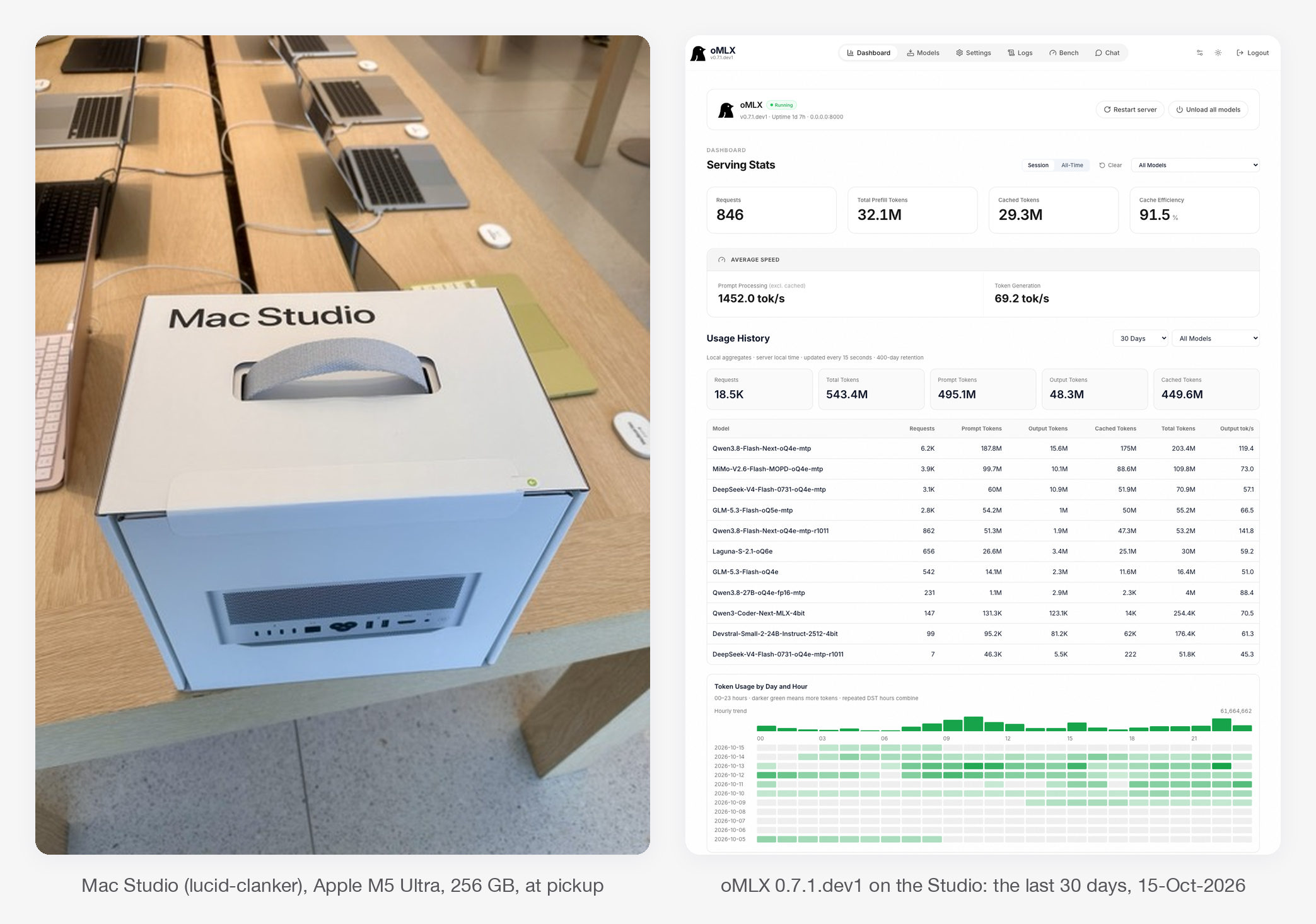
I run two Apple Silicon boxes at home as local LLM servers: a Mac Studio (M5 Ultra, 256 GB) that hosts the big open-weight models I’m testing, and a Mac mini (M4 Pro, 64 GB) that runs small, always-on utility models.
Both serve models through oMLX and sit on my Tailscale network. On the one model both boxes run, the Studio decodes 3.5× faster (125.4 vs 36.3 tok/s) and prefills a 30K-token prompt 13× faster (1,626 vs 121 tok/s): 18 seconds to first token versus 4 minutes. Those numbers are the boring part. The interesting part is that throughput tells you nothing about whether a model gets real work right, and that’s what Parts II-IV are about.
Why I’m doing this — can local models work for HPC related consulting tasks?
A lot of my consulting work at BioTeam touches material that shouldn’t leave the building: client cluster logs, client IAM policies, interview notes, job postmortems. A model running on a box I own makes the “where does this text go?” question go away. It also costs nothing per token once the hardware is paid for, and it keeps working when the cloud API is having a bad day.
The open question is whether any open-weight model is actually good enough at the work. Good enough means my work, not a leaderboard. So I built a harness that grades local models against frozen Claude baselines on tasks lifted from real engagements, and scores them with machine graders wherever I can. This post covers the setup and the plumbing; the grading results are the rest of the series.
Edited 16-Oct-2026, after a colleague pointed out what the sentence above leaves out.
“Any open-weight model” is too generous. Every model in these tests is a quantized copy (4- to 6-bit weights, with a few 8-bit tensors) of a model whose publisher trained and evaluated it at 16-bit, and I can only run the ones that fit inside a 256 GB box with room left for a long context. The unquantized versions of the big models below would need roughly 570-640 GB; I have no way to run them, so I can’t tell you how much of any miss is the quantization and how much is the model.
So what this series tests is not “open-weight models”. It is the combination a small organisation can actually buy and plug into a wall: the best open-weight models that fit, at the precision that fits, on a quiet server that sits on a desk. The question is whether that can do the work I currently hand to a frontier model, and the honest early answer is “some of it, slowly” — the trend is good, the speed gap is the largest concern. Local LLM models are EXTREMELY SLOW relative to frontier performance. Whether a pair of 256 GB servers, or the dual 512 GB configuration Apple announced, changes the answer is a question I can’t afford to test yet.
The two test units
| Mac Studio | Mac mini | |
|---|---|---|
| Hostname | lucid-clanker |
lucid-nonsense |
| Chip / memory | M5 Ultra, 256 GB unified | M4 Pro, 64 GB unified |
| OS | macOS 27.0 | macOS 27.0 |
| Model server | oMLX 0.7.1.dev1 | oMLX 0.7.1.dev1 |
| Memory available to models | ~243 GiB | ~52 GiB |
| Job | Hosts every model I evaluate (up to ~235 GB resident) | Small always-on utility models: inbox triage, cold-outreach tagging, quick everyday questions |
The two boxes run different models on purpose. The mini can’t hold any of the large models I evaluate, and it doesn’t need to: its job is cheap, fast, high-volume calls. The Studio exists to answer the expensive question, which is whether a big open-weight model can do work I currently pay a frontier model for.
Both run oMLX (source on GitHub), an MLX-based server that speaks the OpenAI and Anthropic APIs, loads and evicts models against a memory ceiling, and supports multi-token prediction (MTP) for models that include the extra prediction heads. Both are on my Tailscale network, so my laptop can drive either one from anywhere.
The models
Every model here is an open-weight checkpoint in an MLX “oQ” quantization (mixed 4- to 8-bit, made by community quantizers), downloaded from Hugging Face. Stats come from each publisher’s model card and the checkpoint’s own config; “what I found” comes from my own runs. All ten support tool calling and a thinking (reasoning) mode. Edited 16-Oct-2026: the “Box” and “On disk” columns are the whole selection rule. The Studio has ~243 GiB for models, so the biggest models I can test are 280-320B-parameter mixtures at 4-5 bits (154-209 GB on disk); their BF16 originals are 570-640 GB and were never candidates. The mini’s ~52 GiB caps it at 25-35B models. Anything the publishers ship that doesn’t fit at 4 bits isn’t in this series at all.
| Model | Lab | Params (total / active) | Type | Native context | Image input | Box | On disk |
|---|---|---|---|---|---|---|---|
| Qwen3.8-Flash-Next | Alibaba Qwen | 125B / 6B | MoE | 262K (1M ext.) | yes | Studio | 99 GB |
| MiMo-V2.6-Flash-MOPD | Xiaomi | 309B / 15B | MoE | 1M | in the weights, untested | Studio | 160 GB |
| DeepSeek-V4-Flash-0731 | DeepSeek | 284B / 13B | MoE | 1M | no | Studio | 154 GB |
| GLM-5.3-Flash (4- and 5-bit) | Z.ai | 320B / 18B | MoE | 1M | in the weights, untested | Studio | 169 / 209 GB |
| Laguna-S-2.1 | poolside | 118B / 8B | MoE | 1M | no | Studio | 86 GB |
| Qwen3.8-27B | Alibaba Qwen | 27B | dense | 262K (1M ext.) | yes (and video) | both | 17 GB |
| Qwen3.6-35B-A3B | Alibaba Qwen | 35B / 3B | MoE | 262K | yes | mini | 28 GB |
| Gemma-4-26B-A4B-it | Google DeepMind | 25.2B / 3.8B | MoE | 256K | yes | mini | 16 GB |
| MiMo-V2.6-Distill-Qwen-9B | Xiaomi | 9B | dense | 262K | in the weights, untested | mini | 11 GB |
| Qwen3.6-27B | Alibaba Qwen | 27B | dense | 262K | yes | mini | 16 GB |
“Active” is the slice of a mixture-of-experts (MoE) model that runs for each token. That’s why, on the same mini, the 35B Qwen MoE with 3B active decodes at 86 tok/s while the dense 27B crawls at 33. Most of these use some form of linear or sliding-window attention for the bulk of their layers, which is what makes 256K-1M contexts affordable in memory. I configure most of them to 262K on the Studio; DeepSeek is the only one running at its full 1M.
On the Studio
- Qwen3.8-Flash-Next (model card, quant I run). Alibaba’s card calls it an experimental preview of the architecture behind Qwen4: a hybrid of Gated DeltaNet linear attention and sparse attention, built for long-context agentic work. Image input, thinking with effort levels, MTP. What I found: the fastest model I have by a wide margin, the best local model on my Schrödinger postmortems (14 of 15 passed), and the only model I’ve run on my inbox-classification set to get all 64 emails right. It’s a step behind MiMo on IAM, and turning long meeting transcripts into notes is not its thing (it lost all 14 comparisons against Opus; no local model won one).
- MiMo-V2.6-Flash-MOPD (model card, quant). Xiaomi’s 309B agentic model; “MOPD” is a post-training recipe that distills several specialist teachers into one model and is meant to cut down on repeated tool calls. The full model takes image, video and audio, but I have only used it for text. What I found: my best local model on IAM with tools (the closest to Opus), and a perfect 96/96 on the audit-and-fix suite, tied with Opus. It’s also the slowest to finish hard agentic work: a median of 8 minutes per postmortem, and over two hours per attempt on the newest (hardest) IAM task, where it fell into the same trap that occasionally catches Opus.
- DeepSeek-V4-Flash-0731 (model card, quant). DeepSeek’s agentic-coding release; text only, compressed sparse attention for cheap 1M context. Its MTP head gets ~90% draft acceptance. What I found: slow and steady. It’s the slowest decoder on the Studio (52 tok/s) but scored 94/96 on audit-and-fix and holds up well on IAM with tools. Without tools it ran out of time a lot: one closed-book IAM suite took ~24 hours of Studio time across three attempts.
- GLM-5.3-Flash (model card, 5-bit quant; the 4-bit quant I also run is no longer on Hugging Face). Z.ai’s coding and agentic model, linear-attention hybrid, thinks at maximum effort unless told otherwise. What I found: the oddball. It’s the best local model at IAM without tools, and it got worse with them, twice writing the policy mid-session and then ending on prose. It’s the weakest on postmortems (8 of 15), naming the wrong root-cause category on the same incident every time, but the fastest local model on audit-and-fix (26 seconds per task, median). It always thinks, so I keep it out of quick utility jobs.
- Laguna-S-2.1 (model card, quant). poolside’s agentic-coding model, released under a permissive license (OpenMDW). Text only, thinking interleaved with tool calls, no MTP. What I found: so far I’ve only run it on IAM, where it is the “fast but doesn’t finish” example from the lessons below. Audit-and-fix and postmortem runs are queued.
- Qwen3.8-27B (model card, quant). A dense 27B with image and video input; small enough at 17 GB to run on both boxes, which is why it’s the head-to-head model below. What I found: 63/64 on inbox classification and 3/3 on a 62K-token, 3-needle retrieval test, but it truncated more than half (8 of 15) of my transcript-to-notes attempts. It hasn’t been through the agentic suites yet.
On the mini
- Qwen3.6-35B-A3B (model card; the MTP quant I run is no longer on Hugging Face). With only 3B active parameters it’s the mini’s everyday default and its fastest model (86 tok/s). It passed a 100K-token, 3-needle retrieval test with 4-bit KV-cache compression turned on.
- Gemma-4-26B-A4B-it (model card, quant). Google’s MoE with native function calling; thinking is off by default, which suits classification. What I found: it’s the default model for my cold-outreach email tagger, at 63/64 with every real pitch caught and a 1.7-second median answer.
- MiMo-V2.6-Distill-Qwen-9B (model card, quant). Xiaomi’s fine-tune of Qwen3.5-9B on MiMo-generated agentic data, published as a starting point for research. What I found: this little 9B runs my email triage (“does this thread need a reply from me?”). On my 40-thread labelled set it found 6 of the 10 real asks against 5 for the Studio’s Qwen3.8-Flash-Next, which is a tie within the noise and a much cheaper way to get it.
- Qwen3.6-27B (model card; the quant I run is no longer on Hugging Face). The previous-generation dense 27B. I keep it next to Qwen3.8-27B because it got a terse “think, then answer” test right where 3.8 skipped the thinking. It’s the clearest MTP story on the mini: 9.2 → ~30 tok/s.
Who’s good at what, so far
- Agentic repo fixing: MiMo, 96/96 (same as Opus). Qwen3.8-Flash-Next 95/96, DeepSeek 94/96, GLM (5-bit) 93/96.
- IAM policy writing with tools: MiMo is closest to Opus; Qwen3.8-Flash-Next and DeepSeek are a step behind; GLM and Laguna are well behind. Without tools, GLM leads the locals, and all of them trail Opus badly. Numbers in Part II.
- Schrödinger postmortems: Qwen3.8-Flash-Next (14/15), then MiMo (13/15), DeepSeek (11/15), GLM (8/15). Across 370 citations, none of the local models fabricated a log quote. On one incident, MiMo and Qwen found a cause that all three Opus attempts missed.
- Short classification: everything I tried scored 60-64 out of 64 on the inbox set; Qwen3.8-Flash-Next got all 64.
- Turning long transcripts into notes: no local model won a single comparison against Opus (0 wins, 3 ties, 70 losses). This is the one task where nothing local came close.
- Raw speed: Qwen3.8-Flash-Next on the Studio, Qwen3.6-35B-A3B on the mini.
The harness
Every test drives the model through the same agent harness I use for day-to-day work, oh-my-pi, with the same system prompt and the same tools for every contestant. Each task has a frozen baseline run by Claude Opus. A suite is versioned and becomes immutable once its baseline is registered, so a later “fix” to a test can’t quietly move the goalposts. Wherever possible a machine does the grading: AWS’s own policy validator and simulator for IAM, string-level checks against known root causes for postmortems, test suites for code fixes. Every score carries a confidence interval, because five samples of one model on one task vary more than you’d expect; in my IAM runs, re-running the same model moves the mean by about ±0.02.
How I really work with agents: specialized MCPs and RAG
None of this is about a model answering from memory. That’s not how we use agents at BioTeam for real work. The way we work is to pair the agent with specialized MCP servers and retrieval (RAG) systems, so every claim it makes can be checked against an authoritative source. The agent drafts, then gets challenged: is that slurm.conf parameter real in this Slurm version, does the Schrödinger Job Server really behave that way, does AWS’s own validator accept this IAM policy? The same tools enrich the work with version-specific detail the model never saw in training.
Our main one is the Life Science HPC on AWS MCP Server (we call it hpc-docs). It is a RAG search service over the documentation for the software our clients run, exposed to any MCP client as 50 tools across 15 sources. That’s ~73,000 indexed chunks today, more than 56,000 of them from the Schrödinger Suite docs alone, plus the Schrödinger support Knowledge Base, Slurm, CryoSPARC, RELION, GROMACS, PLUMED, AMBER, SILCS, BeeGFS, Lmod, Apptainer, Posit Workbench, Azure HPC, and our own sanitized consulting notes. For infrastructure-layer questions (ParallelCluster, PCS, FSx, EFA, IAM) it pairs with the AWS Knowledge MCP server.
The landing page, source catalog, tool reference, costs and changelog are public, so feel free to poke around. The MCP endpoint itself requires sign-in: BioTeam staff and approved collaborators.
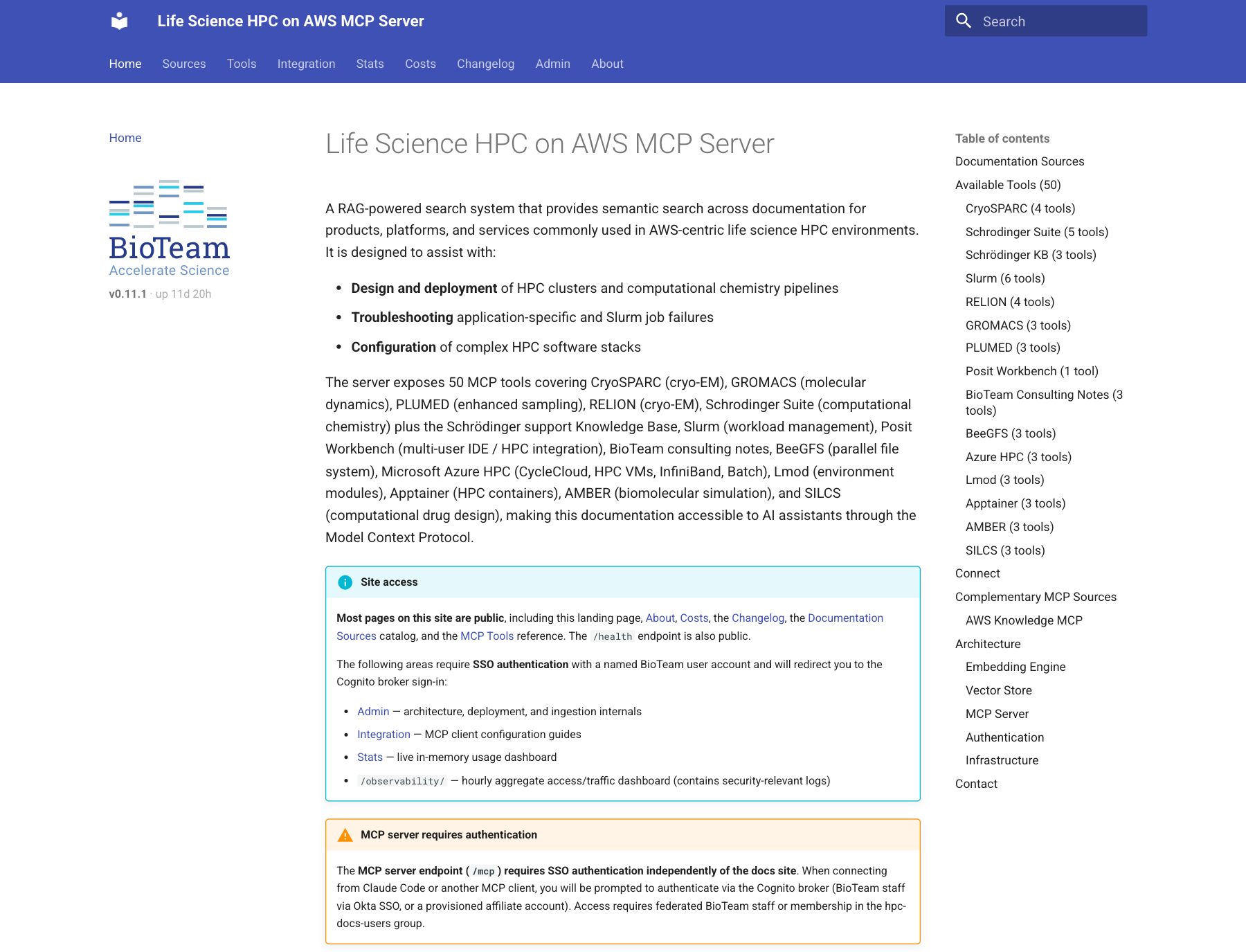
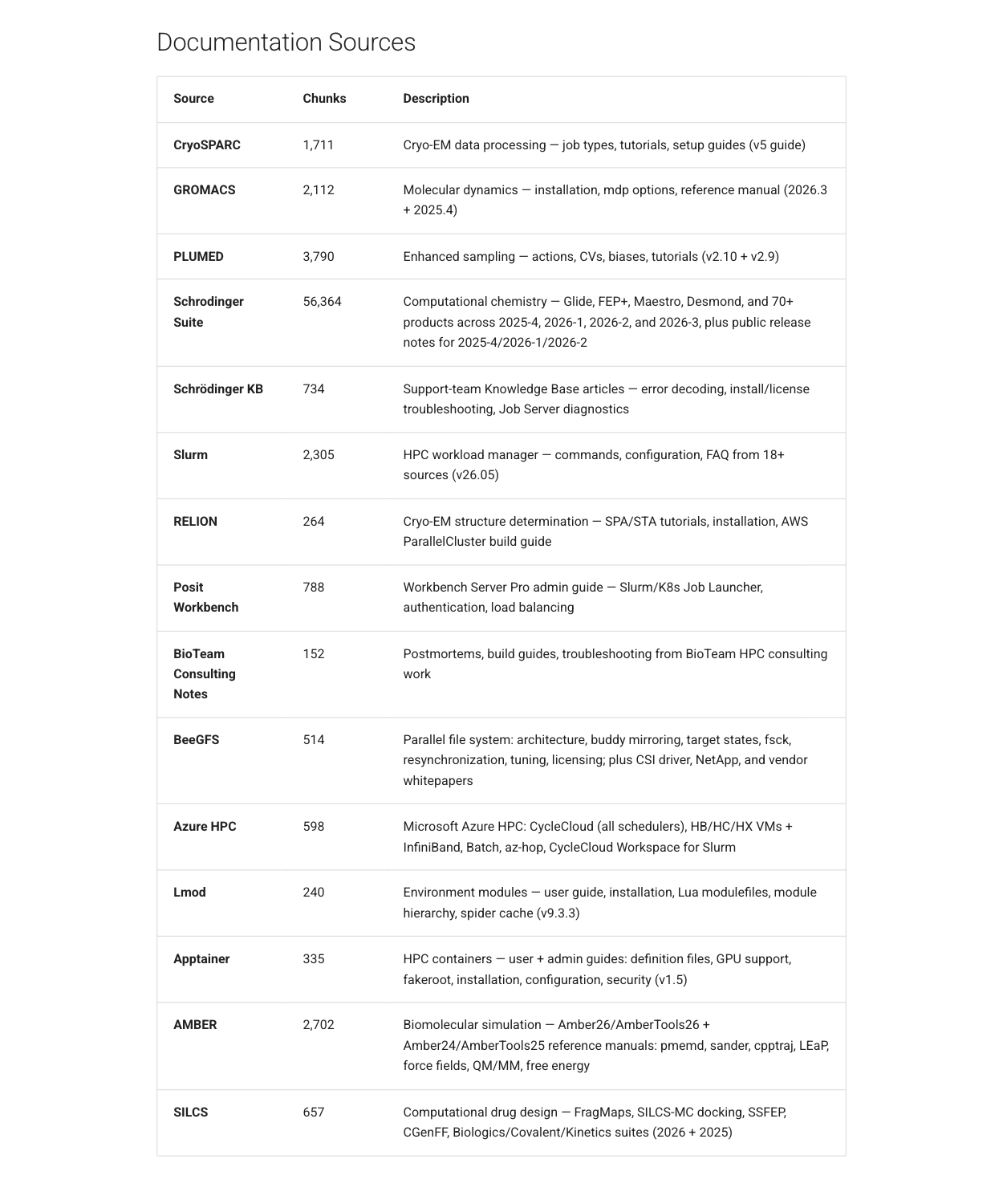
For the evaluations, this means a local model that can’t use tools well is useless to me no matter how fast it decodes. So the work-specific tests give models tools on purpose, but only the tools a careful human would use and never the answer key:
- In the IAM tests the model gets four read-only tools: AWS Service Reference lookups and Access Analyzer’s validate-policy. It never sees the policy simulator or the probes that do the grading.
- In the Schrödinger postmortem tests every attempt runs in a macOS sandbox whose only network access is the model and an hpc-docs proxy. The proxy hides our own write-ups of the very incidents being tested, so the model can’t simply look up the answer.
How that plumbing works (sandbox profiles, the docs proxy, and keeping tool definitions from leaking between test arms) is a future post of its own (Part V).
The synthetic benchmark (not HPC or consulting specific)
The speed numbers come from a small script (bench.py) that measures four things per model, with the box otherwise idle:
- Load: first request after the model is evicted (wall time).
- Prefill: cold prompts of ~16K and ~32K tokens. A random nonce at the start of each prompt defeats the prefix cache, so the server has to process every token. Reported as prompt tokens / time-to-first-token.
- Decode: greedy, thinking off, 500 tokens, median of 3 warm runs.
- Long decode: the model’s default sampling with thinking on, 4,000 tokens. This is closer to what an agent turn looks like.
Decode tok/s is measured client-side over the stream: (completion tokens − 1) / (last token time − first token time). I didn’t finesse the data; the raw JSON for both boxes is available on request.
Mac Studio (M5 Ultra, 256 GB): oMLX 0.7.1.dev1, 11-Oct-2026 (Laguna 14-Oct)
| Model (quant) | Decode, 500 tok | Long decode, 4K tok | Prefill ~32K | Time to first token, ~32K |
|---|---|---|---|---|
| Qwen3.8-Flash-Next (oQ4e, MTP) | 193.4 tok/s | 120.6 | 5,176 tok/s ‡ | 5.7 s |
| Qwen3.8-27B dense (oQ4e, MTP) | 125.4 | 85.4 | 1,626 | 18.2 s |
| MiMo-V2.6-Flash (oQ4e, MTP) | 92.9 | 77.7 | 2,867 | 10.3 s |
| GLM-5.3-Flash (oQ5e, MTP) | 77.9 | 60.2 | 2,016 | 14.6 s |
| Laguna-S-2.1 (oQ6e) | 77.2 | 76.1 | 2,115 | 14.0 s |
| GLM-5.3-Flash (oQ4e) | 62.6 | 58.9 | 2,217 | 13.3 s |
| DeepSeek-V4-Flash (oQ4e, MTP) | 51.9 | 41.7 | 1,471 | 20.7 s |
‡ Note: in the original run every model on the Studio prefilled faster at ~32K than at ~16K (MiMo 1,919 → 2,867 tok/s; Qwen Flash-Next 2,042 → 5,176), while on the mini every model got slower at 32K, which is what you’d expect. My guess was a one-time warm-up cost on the first long prompt after a model loads. Update 17-Oct-2026: I reran the Studio bench with an extra, unmeasured ~16K prompt sent first. The 32K numbers came back within 5% of the ones in the table, and with the warm-up out of the way 16K and 32K are about the same (Qwen 5,187 / 5,308, MiMo 3,130 / 2,994). The slow first prompt doesn’t happen every time. On the rerun it didn’t show up at all; right after I moved the Studio to oMLX 0.7.1rc1 it hit three of seven models (Qwen’s warm-up prompt ran at 2,691 tok/s, the next one at 5,243).
Short answer: it is a warm-up cost, just not on every load.
Mac mini (M4 Pro, 64 GB): oMLX 0.7.1.dev1, 15-Oct-2026
| Model (quant) | Decode, 500 tok | Long decode, 4K tok | Prefill ~32K | Time to first token, ~32K |
|---|---|---|---|---|
| Qwen3.6-35B-A3B (oQ6, MTP), everyday default | 86.3 tok/s | 84.5 | 709 tok/s | 41.6 s |
| Gemma-4-26B-A4B (oQ4e, MTP), inbox tagging | 75.7 | 59.0 | 630 | 48.2 s |
| Qwen3.8-27B dense (oQ4e, MTP) | 36.3 | 24.7 | 121 | 244.4 s |
| Qwen3.6-27B dense (oQ4e, MTP) | 33.1 | 23.9 | 119 | 248.2 s |
| MiMo-V2.6-Distill-Qwen-9B (oQ8e), email triage | 18.7 | 27.7 | 398 | 74.2 s |
Yes, the 9B model is the slowest decoder on the mini. It’s a dense 8-bit model without MTP heads, and for triage it doesn’t matter, because the answers are a few dozen tokens long.
The one model both boxes run
Qwen3.8-27B (oQ4e, MTP) is installed on both, which gives a clean head-to-head:
| Mac mini | Mac Studio | Studio / mini | |
|---|---|---|---|
| Decode, 500 tok | 36.3 tok/s | 125.4 tok/s | 3.5× |
| Long decode, 4K tok | 24.7 tok/s | 85.4 tok/s | 3.5× |
| Prefill ~32K | 121 tok/s | 1,626 tok/s | 13.4× |
| Time to first token, ~32K | 244 s | 18 s |
Lessons learned so far
- Prefill is where the boxes really differ. A 3.5× decode difference is “faster”. A 13× prefill difference is “usable” versus “go get coffee”. The prefix cache hides most of it in a long agent session (91% of the Studio’s prompt tokens over the last 30 days came out of cache), but every cold start pays full price: a model load, an eviction, a new task. On the mini, a cold 30K-token context costs four minutes before the first token. That’s why my evaluations run on the Studio and the mini sticks to short-prompt utility work.
- Get the quant that keeps the MTP heads. Multi-token prediction is a lossless speed-up: the model proposes several tokens per pass and the full model verifies them. The community Qwen3.6 quants I started with had the MTP weights stripped during quantization, so oMLX refused to turn it on. On the mini, an MTP-preserving quant took the default MoE model from 63.2 to 77.3 tok/s (1.22×) and a dense 27B from 9.2 to ~30 tok/s, measured on an earlier oMLX release. Dense models gain the most because they are memory-bandwidth-bound and the extra verification is nearly free.
- Throughput tells you nothing about getting the answer right. The fastest model on the Studio isn’t the most accurate one on my IAM tests; a model at half its decode speed scores higher. Laguna, at a respectable 77 tok/s, timed out on 8 of 10 attempts at my two hardest IAM tasks under a one-hour budget, mostly by making tool calls (186 in one attempt). That gap between speed and correctness is the whole reason for Parts II-IV.
- A home-office box will wedge itself, quietly. This week the mini’s model server died without writing a single log line, and my email triage failed silently for a day and a half before I noticed. When I looked at the screen, the actual blocker was a Tailscale upgrade dialog waiting for a password, sitting next to a stack of out-of-memory alerts. The largest process at the time was a macOS video-decoding service that had been running for twelve days. A reboot fixed it. If you put one of these boxes in a workflow, monitor it, because it won’t tell you when it stops.
What’s coming
The next three posts grade these models on the work I do day to day, against Claude Opus, with machine graders, and a fourth shows the plumbing:
- IAM policy authoring (Part II): write a permissions policy from a written spec, under the 6,144-character managed-policy cap. Scoring comes from AWS IAM Access Analyzer and the IAM policy simulator, measured against a deploy-proven reference, with escalation probes that cap the score when the answer lets a role take over resources it shouldn’t. The newest task has a trap that catches even Opus some of the time.
- Schrödinger job root-cause analysis (Part III): hand the model the logs from a failed Schrödinger job plus a docs-search tool, and see whether it finds the actual cause or invents a plausible one.
- Agentic audit-and-fix (Part IV): point the model at a repository with planted problems and let it work unattended.
- Giving agents just enough tools (Part V): the sandbox profiles, the docs proxy that hides the answer key, and the read-only MCP tools that let a test measure how well a model uses tools without handing it the grader.
Short answer on whether a local model can do this work yet: for some of it, closer than I expected. Long answer: future posts.
Want the raw benchmark JSON? Drop me a note at dag@bioteam.net.
]]>BioTeam has helped organizations answer that question across pharma, biotech, clinical diagnostics, academic medical centers, and federal research for years. Some of those engagements ended in a cloud migration. Some ended with a new on-premises cluster. Most landed somewhere in between.
1. Asking the Same Question Across a Decade with a Federal Research Agency
Case: Federal research agency, research HPC, multiple engagements over more than a decade.
BioTeam has helped this agency revisit the cloud question several times. An early assessment and roadmap weighed on-premises HPC against cloud. A later analysis of alternatives modeled ten-year costs and found that owning data center capacity would cost millions less than renting it. Most recently, a pilot rebuilt a smaller version of the production cluster in a commercial cloud.
The pilot worked. It also ran into friction. Staff could not easily co-locate compute and storage in the locations with the best bandwidth back to campus, and the agency’s external network could not move all of its large datasets off-site. Cloud earned a role as a per-project supplement and a proving ground for new CPU and accelerator architectures. It did not earn the job of replacing the cluster.
Lesson: Organizations make the cloud decision more than once. Each reassessment brings new pricing and new workloads, and the answer can shift with them.
2. Making the Case on Speed, Not Savings with a Global Pharma Client
Case: Global pharmaceutical company, research computing steering committee, 2012.
The steering committee mainly wanted to know whether the cloud would save money. BioTeam found that an apples-to-apples cost comparison was not possible because business units could not see the full operational cost of internal IT services. Meanwhile, one internal HPC cluster took close to a year to move from concept through design, vendor selection, and approval.
BioTeam recommended framing cloud around speed instead: short-lived dev, test, and prototype environments, elastic scaling for variable workflows, and neutral ground for external collaboration.
Lesson: Cost is often the weakest argument for the cloud. Speed and flexibility usually make the stronger case.
3. Recommending Against Cloud Bursting with a Life Sciences Client
Case: Life sciences company, research HPC, 2018 assessment with follow-on support in 2021.
The organization wanted to know whether to build out local infrastructure or move to the cloud. Slow data transfer was already holding back cloud analysis of its nanopore sequencing data. Bursting would have meant shuttling datasets back and forth, keeping software environments in sync on both sides, and building identity management that spanned them.
BioTeam recommended building out on-premises and explicitly advised against a cloud-bursting hybrid. Cloud kept two targeted roles: data exchange with collaborators, and workloads that could run entirely in the cloud. A few years later, BioTeam supported the migration into the organization’s new HPC environment.
Lesson: Cloud bursting is simple on a diagram. In practice, data movement and environment drift can cost more than the extra capacity is worth.
4. Starting with Storage Before Compute with a Large Biotech Client
Case: Large biotechnology company, research storage roadmap within a broader infrastructure modernization program, 2015.
The goal was to expand storage services from purely on-premises to a mix of on-premises and cloud, with tiers for internally generated data. BioTeam’s roadmap sequenced the work: a cloud gateway and added NAS capacity first, then hybrid cloud HPC, and finally a single namespace spanning sites and clouds.
Some research groups expected to move entirely to the cloud eventually. Others would need fast local storage for years. The roadmap had to serve both.
Lesson: Compute moves easily; data does not. Where the data lives usually decides where the compute goes.
5. Building the Foundation Before the Use Cases with a Global Pharma Client
Case: Global pharmaceutical company, scientific infrastructure assessment for a research informatics program, 2017.
The organization wanted a hybrid architecture for elastic computing and collaboration across its research groups. BioTeam identified four core cloud use cases: on-demand HPC, dataset ingest and transfer, analytics software-as-a-service, and data-intensive compute frameworks.
The first recommendation came before any of them. Get network and security right, and establish a secure base in the public cloud, legal agreements included, before moving a single workload.
Lesson: Hybrid works best as one planned architecture on a solid base. A string of one-off cloud projects rarely adds up to that.
6. Balancing Collaboration and Compliance with a Clinical Diagnostics Client
Case: Commercial diagnostics company, informatics pipelines under strict security and compliance requirements, 2016.
This organization was designing a hybrid cloud environment for a globally collaborative research community, under high security and compliance standards. The company brought BioTeam in for the secure, high-speed networking and HPC infrastructure that tied the two environments together. Cloud and on-premises resources had to work as one connected research environment, and none of the controls required for sensitive clinical data could slip.
Lesson: When collaboration and compliance pull in opposite directions, the network design is where you reconcile them.
7. Separating Clinical and Research Needs with a Large Academic Medical Center
Case: Large academic medical center, HPC assessment and roadmap, 2024 to 2025.
Research teams were exploring cloud and hybrid pipelines, but some clinical software, such as treatment planning tools, was not available in the cloud at all. Researchers wanted to know how to build pipelines that could span both. BioTeam’s roadmap set a target state where cloud, on-premises HPC, and cloud-bursting resources each run the workloads suited to them.
Lesson: Research and clinical computing in an academic medical center share infrastructure but not constraints. One platform decision rarely fits both.
8. Investing On-Prem on the Way to Cloud with a High-Volume Clinical Diagnostics Client
Case: High-volume clinical diagnostics laboratory, molecular and digital pathology workflows, 2025.
A previous cloud proof-of-concept for a key clinical pipeline had failed. It added 1.5 hours to turnaround compared with the on-premises pipeline, and it was hard to deploy reliably. The organization still wanted to take advantage of the cloud, but needed an approach that met its operational requirements.
BioTeam recommended moving to a cloud-centric footprint by the end of 2028, with targeted upgrades to on-premises infrastructure in the meantime. That interim investment buys time to properly modernize and revalidate clinical workflows.
Lesson: Investing in on-prem can be part of a cloud strategy. For clinical work, it is often what makes a safe migration possible.
What Ties These Together
These eight engagements span different organizations, scientific domains, and constraints, and several ended up elsewhere rather than in the cloud. A handful of principles held across all of them.
- Workload first, platform second. We start with what the science needs (latency, turnaround, data volume, burstiness, and regulatory context) and let the platform follow.
- Honest answers, even from a cloud partner. BioTeam has been an AWS partner since 2007, and we still recommend on-premises infrastructure when it is a better fit.
- Cost alone rarely settles it. Real cost comparisons are hard to build and easy to dispute. Speed, capability, and risk often matter more.
- Data gravity. The cost of moving large datasets often answers the platform question before compute is even considered.
- Foundations make or break a hybrid. Networking, security, identity, and environment consistency are where hybrid and burst strategies succeed or fail.
- Revisit the decision. Pricing, workloads, and policy change. A good answer in 2018 may not be the right one in 2026.

In 2010, a BioTeam consultant walked into a pharmaceutical company to figure out why its Schrödinger computational chemistry cluster wasn’t behaving. The cluster had three machines. The findings and recommendations were documented in a trip report.
In 2026, BioTeam handed a healthcare investment firm a cloud-HPC environment defined via Infrastructure-as-Code (IaC) that its new biotech portfolio companies can use to rapidly deploy a ready-for-science environment complete with Schrödinger on an auto-scaling HPC platform, security guardrails, and license-aware job scheduling.
These two projects are sixteen years apart. The technology between them is quite different. But read them side by side and something stands out: the problems are remarkably similar.
And some of the people solving them are, too.
2010: Three Machines and a Trip Report
The client was a pharmaceutical company with a Windows-centric IT department and limited Unix expertise. Its chemists relied on Schrödinger and Tripos software running across separate Linux systems.
The main cluster used Grid Engine over Gigabit Ethernet. A second, aging server had no job scheduler at all.
BioTeam’s consultants went on-site and documented what they found. The FLEXlm license server was working, and the chemistry software had been integrated with Grid Engine. But user IDs didn’t match between systems, clocks weren’t synchronized, scheduling was first-in, first-out, and Linux applications struggled to display on Windows desktops.
BioTeam recommended consolidating the environment, introducing fair-share scheduling, and rebuilding the systems.
The Years In Between
The same challenges persisted as the technology evolved.
In 2012, BioTeam was called in to troubleshoot another biotech’s chemistry cluster. Jobs were failing because of a broken MPI environment, outdated Schrödinger references in startup scripts, and system clocks that varied across nodes.
In 2013, BioTeam built the client a new computational chemistry cluster with InfiniBand networking and license-aware scheduling. Instead of failing when a software license was unavailable, jobs could wait for one.
In 2017, BioTeam relocated that cluster to the client’s new facility and updated its documentation.
Why did licensing matter so much? Commercial chemistry suites can have extraordinarily granular licensing. This client’s agreement covered more than 30 separately counted features shared between the cluster and chemists’ desktops. Getting full value from that investment meant teaching the scheduler to understand it.
2026: Rapid Automated Deployment
Fast forward to 2026.
A healthcare-focused investment firm needed a secure, repeatable HPC environment on AWS for the new biotech companies it funds.
BioTeam built the environment as infrastructure-as-code. Schrödinger and Posit Workbvench & Posit PackageManager are automatically installed and tuned. License-aware scheduling is built in. Security guardrails, firewall inspection, and least-privilege identity are part of the foundation. Researchers work through Linux virtual desktops with GPU-accelerated graphics to support the responsive high-quality GUI that Schrödinger users require.
The result: HPC deployment dropped from weeks to ~1 day, and every new venture can start with the same proven environment. The reason this deployment takes roughly a day and not “minutes” is that even with automation there are certain tasks such as custom AMI building and unpacking/installing the large Schrödinger suite that, although requiring no human attention, still require several hours to complete and validate.
[Read the full case study.] https://bioteam.net/blog/case-studies/schrodinger-at-scale-enterprise-hpc-infrastructure-deployed-in-hours/
What Changed, and What Didn’t
In 2010, BioTeam was working with a small on-premises cluster built and rebuilt by hand. In 2026, we are deploying cloud HPC using version-controlled infrastructure as code.
But underneath those differences are familiar problems.
Licenses are still a scheduling problem. Expensive scientific software only delivers value when researchers can actually use it.
Identity is still infrastructure. Whether you are connecting two Linux systems or managing multiple AWS accounts, access has to be designed.
Consistency still matters. Hand-tuned environments drift. Automation makes them repeatable.
The researcher experience still matters. If accessing the environment is difficult, the sophistication of the environment does not matter much to the scientist trying to get work done.
The tools for solving these problems have changed enormously. The underlying challenges have not.
From Then to Your Now
Whether your research environment is running on a hand-tuned cluster, moving to the cloud, or somewhere in between, the fundamental questions remain familiar: How do you use expensive licenses efficiently? How do you keep environments consistent? How do you secure access without slowing scientists down? How do you give researchers an experience that just works?
The machines have changed. The infrastructure has changed. What matters is knowing how to solve the problems underneath them.
Contact BioTeam at info@bioteam.net to start a conversation.
]]>

Overview
A leading academic medical center with an established on-premises HPC environment faced mounting challenges across reliability, stability, performance, and day-to-day operations. Researchers, computational scientists, and clinical research teams who depended on the cluster for biomedical and data-intensive scientific workloads were experiencing persistent disruptions, and the existing infrastructure could no longer keep pace with the demands of modern research computing.
BioTeam partnered with the organization to assess, redesign, and modernize the HPC environment from the ground up, redeploying existing hardware using state-of-the-art cluster and workload management approaches such as Warewulf and Slurm. The engagement combined remediation of the existing HPC environment, addition of new storage and GPU infrastructure, and a forward-looking operational maturity and scientific enablement strategy.
Impact Summary
- HPC cluster rebuilt from the ground up using Warewulf for cluster management and Slurm for workload scheduling
- Key cluster services deployed in a high-availability architecture, reducing single points of failure
- Rolling migration approach kept compute resources continuously available to active research programs throughout the transition
- New GPU nodes and high-performance research storage deployed as part of the modernization
- Cluster network upgraded from 40G to 100G/400G
- Open OnDemand deployed to provide researchers and scientific staff with easy-to-use, browser-based access to HPC resources
- HPC team trained and transitioned into ongoing operational ownership
- User-facing documentation and training developed to support researcher adoption and operational sustainability
Challenge
The client’s HPC environment had accumulated years of technical debt. Reliability issues were frequent, performance was inconsistent, and the operational model made it difficult for the HPC team to diagnose and resolve problems efficiently. Scientists and clinical research teams running computational workloads had limited confidence in the infrastructure, and unplanned downtime was impacting biomedical research productivity and scientific operations.
The cluster’s storage system had its own set of unresolved issues, and the network fabric was aging and undersized for current data volumes. The organization required more than incremental remediation efforts. What was needed was a comprehensive modernization strategy, executed without disrupting active scientific and research computing activities.
Approach
BioTeam began with a structured review of the existing infrastructure, including hardware, cluster management, job scheduling, scientific software, storage, networking, and the operational model used by the HPC team. This discovery process identified the root causes of instability and shaped the remediation strategy.
The cluster was redesigned from the ground up and redeployed on the existing hardware using a modern, DevOps-grounded approach. Core components include:
Cluster and Resource Management Warewulf was selected as the cluster provisioning and management system, with Slurm handling workload scheduling. Cluster services are deployed and managed through Ansible, enabling consistent, repeatable configuration management across the environment.
High Availability Architecture Key cluster services were deployed with high-availability failover configurations, eliminating the single-point-of-failure risks that had contributed to past reliability problems.
Rolling Migration Rather than taking the cluster offline during the transition, BioTeam executed the migration in rolling fashion. At every stage of the process, researchers and computational teams maintained access to critical compute resources supporting ongoing scientific work.
Infrastructure Expansion As part of the modernization, BioTeam led the design and deployment of new GPU nodes and high-performance research storage, directly addressing bottlenecks in the existing compute and I/O landscape. In collaboration with the client and vendors, the cluster network was upgraded from 40G to 100G/400G to support higher-throughput data movement and increasingly data-intensive biomedical workloads.
Scientific IT Services BioTeam designed and deployed Open OnDemand, giving researchers browser-based access to the HPC environment without requiring command-line expertise. This lowered barriers for less technical users and expanded access across multidisciplinary research teams.
Operations and Knowledge Transfer BioTeam provided day-to-day operational support for the modernized cluster while the client’s HPC team was trained on the new environment. Handoff was structured and deliberate, with user-facing documentation and formal training sessions supporting long-term operational ownership.
Outcomes
The client’s HPC infrastructure has been remediated and substantially modernized through a rolling migration approach, ensuring continuous compute availability for researchers throughout the process. The client’s HPC team is now equipped to manage the modernized environment independently.
Ongoing work focuses on continued operational maturity, refinement of scientific IT support services, and strategic planning for future infrastructure investments. BioTeam continues to provide scientific IT strategy and advisory support as the organization scales its research computing capabilities and supports increasingly complex biomedical research initiatives.
]]>
Every research organization eventually hits the same wall: a pipeline that worked fine on a single workstation or a small on-premises cluster no longer holds up. Sample volume grows. A key contributor leaves, taking undocumented knowledge with them. Regulatory requirements evolve. Leadership wants results in hours, not weeks.
Over more than a decade, BioTeam has helped research organizations navigate these moments. Our experience spans dozens of pipeline and workflow migrations across pharma, biotech, diagnostics, and government research, ranging from single-team proof-of-concept migrations to population-scale genomics workflows processing hundreds of thousands of samples.
No two migrations look alike. A clinical genomics pipeline moving to a cloud environment has little in common, technically, with a computational chemistry team standardizing a collection of research scripts into reusable modules. But across these engagements, certain patterns emerge.
The ten de-identified examples below illustrate distinct technical challenges and the lessons we have learned solving them.
1. Recovering a Failed Migration with a High-Volume Clinical Diagnostics Client
A previous attempt to move a high-volume clinical genetics pipeline to the cloud had already failed. The cloud implementation was significantly slower than the original on-premises deployment; the deployment approach was not reliably reproducible, and the bioinformatics team had lost confidence in the migration.
BioTeam came in not to start over, but to determine why the first attempt failed. We then helped re-architect the pipeline using a modern workflow engine and conducted a phased evaluation of managed cloud options.
Lesson: Sometimes the hardest part of a migration is not the technology. It is rebuilding trust after a previous attempt has failed.
2. Consolidating One Pipeline Out of Many with a Global Pharma (Top-10) Client
A drug discovery research group had accumulated more than a dozen single-purpose scripts, developed by different scientists for different models, with no shared structure.
BioTeam converted the collection into standardized, parallelizable workflow modules with configurable compute resources, creating a more consistent and reusable foundation for the research team.
Lesson: Migration is not always about moving somewhere new. Sometimes it is about giving many one-off tools a common structure for the first time.
3. Choosing a Workflow Language Before Writing a Line of Code with a Global Biotech (Top-Tier) Client
Rather than immediately selecting a workflow technology, this organization wanted a structured, vendor-neutral comparison of leading workflow languages and frameworks, including CWL, WDL, Snakemake, and Nextflow.
BioTeam evaluated the options against the organization’s scientific, technical, and operational requirements. The resulting assessment helped establish the technical foundation for a broader pipeline modernization strategy.
Lesson: The best migration decision is sometimes the one you make before you migrate anything.
4. Migrating a Pipeline as Part of a Larger Data Platform with a Global Pharma (Top-10) Client
This organization was migrating genomic and patient data from on-premises storage into a large-scale cloud data lake. Pipeline work couldn’t be designed in isolation. It had to fit within a multi-account data governance model that covers data movement, access control, and analysis methods across the command line, CWL, and Nextflow.
BioTeam helped design the data lake architecture and the analysis methods layered on top of it.
Lesson: Pipeline migration is sometimes one piece of a much larger data-platform migration, and it has to be designed alongside data governance, not bolted on afterward.
5. Choosing Not to Rebuild the Pipeline at All with a High-Volume Clinical Diagnostics Client
Facing tens of thousands of exome samples a year, this organization needed a rigorous, apples-to-apples comparison of building a cloud-native version of its existing pipeline versus adopting a commercial diagnostic-grade platform. BioTeam ran the evaluation across nine secondary-analysis platforms, weighing cost, capability, and regulatory complexity.
The client ultimately chose to adopt a commercial platform rather than replicate its on-premises pipeline in the cloud.
Lesson: The right migration decision is sometimes not to migrate the existing pipeline at all, but to replace it with something purpose-built.
6. Migrating a Validated Pipeline Without Breaking It with a High-Volume Clinical Diagnostics Client
A clinical pipeline already in production needed to move onto a fully managed cloud workflow service. BioTeam reprogrammed the existing scripts into a standard workflow definition language, containerized each step, and built the orchestration layer needed to run it reliably at production scale.
Lesson: When a pipeline is already validated and in clinical use, the goal of a migration isn’t to improve the pipeline; it’s to ensure that the process remains stable and continues to produce the same results throughout the transition.
7. Simplifying a Pipeline at Population Scale with a Global Biotech (Top-10) Client
A legacy phasing pipeline required multiple manual steps to execute and was not designed for the scale the research program had reached.
BioTeam consolidated the workflow into a single automated process, incorporated a faster phasing approach, and scaled it to population-genomics volumes involving hundreds of thousands of samples. The resulting workflow supported downstream scientific discovery at a scale the original pipeline could not practically accommodate.
Lesson: At real scale, the biggest improvement is sometimes simplification, not additional infrastructure.
8. Moving a Specialized Imaging Pipeline, Not Just a Genomics One with a Global Biotech (Top-10) Client
Cryo-EM data processing pipelines do not behave like standard NGS pipelines. They involve different data characteristics, compute profiles, storage requirements, and performance bottlenecks.
BioTeam assessed the environment and developed recommendations for scaling pipeline execution for a scientific domain that many standard cloud and workflow migration approaches do not address well.
Lesson: Pipeline migration experience in genomics does not automatically transfer to scientific imaging, or vice versa. Domain expertise matters as much as tooling expertise.
9. Moving the Pipeline First, Improving It Second with a Biotech Client
This organization needed to quickly unlock scalable cloud compute for a standard NGS mapping and variant-calling pipeline. Rather than rewrite it, BioTeam ported the existing pipeline as-is, then layered in automation to minimize the ongoing manual effort of running it.
Lesson: Not every migration needs a rewrite. Sometimes the fastest path to scale is moving what already works, and only improving it once it’s there.
10. Migrating a Pipeline With an Institutional Memory Gap with a Biotech Client
A research organization needed to modernize an elastic HPC and workflow environment, but much of the original pipeline architecture had been developed by people who were no longer with the company.
Before BioTeam could modernize the environment, we first had to reconstruct how it worked and understand the intent behind the original design from the remaining artifacts.
Lesson: A surprising number of migrations begin with archaeology, not engineering.
What Ties These Together
Ten engagements. Different organizations, scientific domains, technologies, and technical problems. But several principles consistently shape BioTeam’s approach.
- Validation before speed. For migrations involving clinical or regulatory-adjacent data, BioTeam prioritizes validation and concordance against established results. A faster pipeline is not an improvement if the team cannot trust the output.
- Workflow-language agnosticism. BioTeam does not arrive with a predetermined favorite tool. Nextflow, WDL, CWL, Snakemake, and other approaches are evaluated based on the actual requirements of the scientific team, data, infrastructure, and operating environment.
- Willingness to pick up where someone else left off. Some engagements begin after a migration has stalled or a previous approach has failed. Understanding why it failed can be one of the most valuable parts of the work.
- Domain expertise matters. Genomics, computational chemistry, structural biology, clinical diagnostics, and other scientific domains create different requirements. Successful pipeline modernization requires understanding both the science and the infrastructure.
- Range matters too. The same underlying engineering discipline can apply to a research group’s collection of individual scripts or a population-scale workflow processing hundreds of thousands of samples.
Is Your Pipeline Outgrowing Its Architecture?
Whether you are planning your first migration, modernizing a legacy workflow, scaling an existing pipeline, or trying to recover a stalled migration, BioTeam can help you determine what needs to change and build a path forward.
Contact BioTeam at info@bioteam.net to start a conversation.
]]>
BioTeam is pleased to announce that Jennifer Wortman, Managing Director of BioTeam, will be a panel participant at the Boston Women in Bioinformatics 2026 Fall Fundraiser on Thursday, October 1, 2026, at Eli Lilly in Boston’s Seaport.
This year’s event, “Women’s Health: Research, Investment, and What Comes Next,” brings together senior women leaders to explore some of the forces shaping the future of women’s health research.
The discussion will span federal policy, data infrastructure, reproductive and consumer health research, investment in women’s health, and opportunities for the field moving forward.
The event runs from 5:00–9:00 PM and includes a panel discussion and Q&A, dinner, networking, and a raffle and silent auction. Proceeds support Boston Women in Bioinformatics’ year-round programming, networking events, and community resources.
We’re proud to see Jennifer joining this group of leaders for an important conversation at the intersection of science, data, investment, and women’s health.
Event: Boston Women in Bioinformatics 2026 Fall Fundraiser
Date: Thursday, October 1, 2026
Time: 5:00–9:00 PM
Location: Eli Lilly, Seaport, Boston, MA
Theme: Women’s Health: Research, Investment, and What Comes Next
For additional information and registration, visit the Boston Women in Bioinformatics event page.
]]>Most of the tools life sciences organizations depend on every day, from differential expression packages to flow cytometry pipelines, are built and maintained by volunteers. That’s easy to take for granted until you spend a week at a conference built entirely around that community.
Jacob Czech, Senior Scientific Consultant at BioTeam, recently attended Bioconductor 2026, where he presented his work on running SimpleFold protein structure prediction on AWS HealthOmics. His talk walked through how compute-intensive structure prediction workloads, the kind that typically require significant local infrastructure to run at scale, can instead be run on managed cloud infrastructure without teams having to stand up and maintain their own clusters.
A few other things from the day stood out to him, too.
Open Source Communities Are Career Infrastructure, Not Just Code Repositories
The keynote speaker discussed how he was supported early in his career by the Bioconductor community, and how that support eventually led him to become Chief Data Officer at a major cancer center, co-found a company, and work on a project enabling data sharing across cancer centers using federated learning.
That kind of career-defining community support isn’t unique to Bioconductor. BioTeam has seen it firsthand while helping build training pipelines for open-source bioinformatics tools at research institutions, where the goal is the same: give researchers real ownership of the tools they depend on.
That’s not a small outcome for a community built on volunteer contributions. It’s a reminder that the packages researchers rely on are maintained by people who are also developing them, and that organizations supporting open-source ecosystems are investing in talent pipelines, whether they realize it or not.
The Technical Surface Area Is Still Expanding
Sessions this year covered a weekly flow cytometry course, WILDS WDL (a collection of workflow scripts out of Fred Hutch), a dedicated track on developer engagement within Bioconductor itself, and Carnation, an R Shiny platform for multi-omics exploration. That range signals a project that is still actively expanding its footprint rather than consolidating around a fixed toolset, which matters for any organization trying to standardize on Bioconductor in the long term.
Federated Approaches to Data Sharing Are Gaining Real Traction
The federated learning project mentioned in the keynote is worth calling out on its own. Models that let cancer centers collaborate without moving sensitive data across institutional lines address one of the most persistent blockers in multi-site research: data governance. As more research consortia run into the same wall, expect more projects to follow this pattern rather than trying to centralize data that legally or ethically can’t be centralized.
Early Career Support Was the Thread Running Through Everything
This came up in the keynote and in several of the shorter sessions throughout the week. For a field that runs on volunteer-maintained infrastructure, a conference that keeps early-career researchers and contributors front and center does more for the field’s long-term health than any single package release could.
Related reading: Bioinformatics at Scale: Building Computational Autonomy Across a Federal Research Institution
]]>