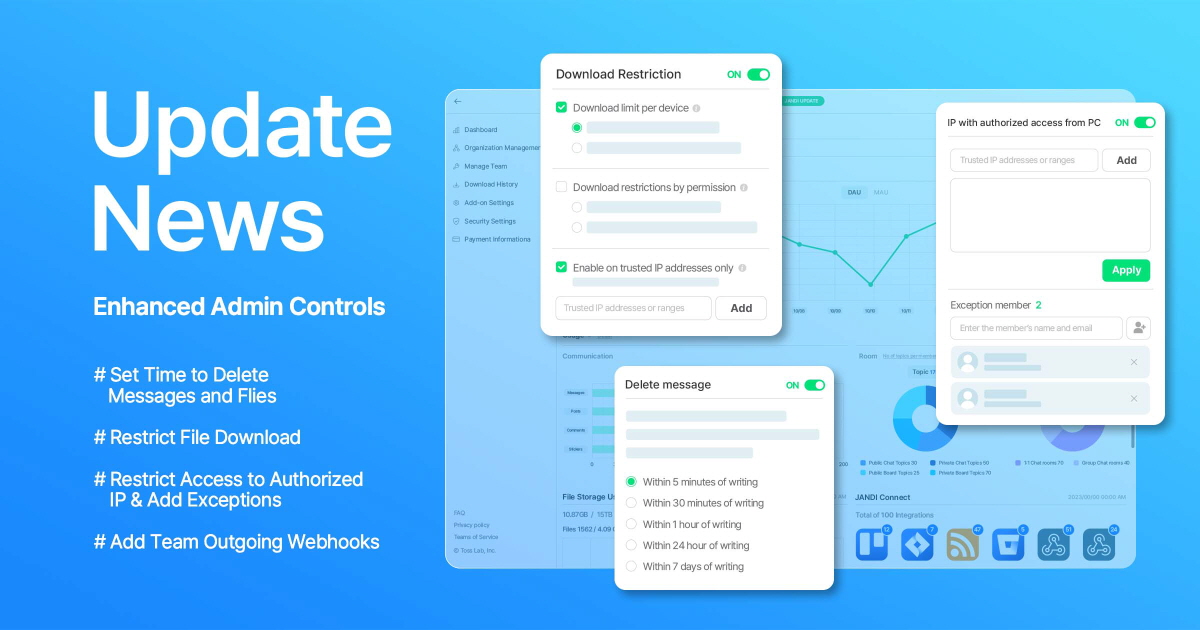
We want to introduce improved security settings and the new team outgoing webhook feature for enhanced security and usability.
The post [JANDI UPDATE] Enhanced Administrative Features (Security Setting, Team Outgoing Webhook) appeared first on JANDI blog.
]]>Hey there! This is the JANDI CX(Customer Experience) team.
The new updates include improved security settings and the new team outgoing webhook feature.
 Set Time Limit to Allow Delete Messages / Files
In the past, you could only delete messages in JANDI. Now you can set time limit for deleting messages and files. This way, you can control access to valuable data.
cf. Setting Time Limit to Delete Messages

[How to set up]
- JANDI(PC) > [=] on the upper right > Admin Menu > Add-on Settings
- Keep in mind that you cannot set up delete time for to-do and poll messages.
File Download Restriction Details (Enterprise)
Our previous download restrictions were for device types and IP addresses. With the new update, you can set more specific download restrictions on device type, IP, and member status.
Set up multiple download restriction options to prevent data leaks and strengthen overall data security.
cf.File Download Restriction in PC and Mobile JANDI

[How to set up]
- JANDI(PC) > [=] on the upper right > Admin Menu > Security Setting
Authorized IP Access and Exception (Enterprise)
On top of allowing access to particular IP addresses, you can not add exceptions for the IP address. Setting up exceptions for the IP address will enable members not working through the IP address to access your team.
cf. Set Whitelist IP addresses to access JANDI team

[How to set up]
- JANDI(PC) > [=] on the upper right > Admin Menu > Security Setting
- Suppose you add a member who works at a branch or affiliate to an exception member list. In that case, they can access the team because it would exclude them from the IP access setting. The new feature allows smoother access to JANDI while maintaining security.
Team Outgoing Webhooks (Premium, Enterprise)
The outgoing webhooks feature helps you connect other services with JANDI. Now, the team admin can add outgoing webhooks for the entire team. Members can type in trigger words in JANDI (your personal JANDI chat) to use the connected service.
cf. Sending Team Outgoing Webhooks to All Members

JANDI will continue to update new features for our users. If you have a feature request, don’t hesitate to get in touch with us at [Live Support] in the JANDI menu!
The post [JANDI UPDATE] Enhanced Administrative Features (Security Setting, Team Outgoing Webhook) appeared first on JANDI blog.
]]>
We made some UI style improvements on the PC and Mobile JANDI App. Also, we added a new auto-lock feature on your PC app in case your PC goes to power-saving mode.
The post Jandi Update: UI Improvements and the New Auto-Lock Feature on PC App appeared first on JANDI blog.
]]>JANDI Update News for July 2021
Hey everyone! JANDI is back with updates for July.
We made some UI style improvements on the PC and Mobile JANDI App. Also, we added a new auto-lock feature on your PC app in case your PC goes to power-saving mode.
-
UI Improvements

First of all, we improved the design for Topic Announcements and the text input box. Messages already present in the Topic are displayed behind the Announcement and the message input box. This way, there is a sense of openness on the screen!
Also, we unified the designs of the icons on the menu bar on the right side of the screen.

Secondly, now you have a bigger text input box in the Board View and Chat View Topics. Now you don’t need to press the (+) button to find different features you need!
Now the Board View Topics have a darker background color to focus on the texts with ease. Moreover, the message read-receipts and the like button have been moved to the top of the text box.

Thirdly, we changed the layouts for posting. On the Board View Topic, you will see a bigger post section, making it easy for our users to post longer content.

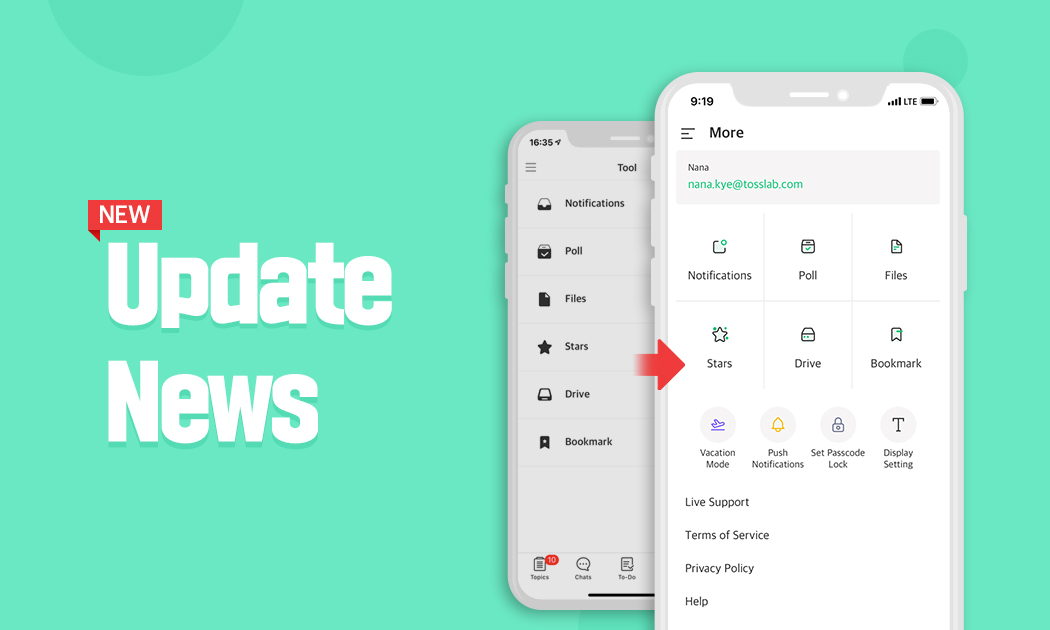
Lastly, we changed the overall icons and layout on the [more] section on the mobile app.
We’ve made detailed changes in both web and mobile apps. For instance, spacing in letters and lines and the line thickness. Now you will feel the overall usability and design of the app have improved!
-
Auto-Lock Settings for PC Power-Saving Mode

Did you know that when you’re away from your PC, you can lock the JANDI screen?
For instant screen lock, please use the shortcut Ctrl + Shift + L. If you forgot to lock your screen, you can change the settings so that JANDI would automatically lock the screen during PC power-saving mode.
- Go to the menu [☰] located in the upper right – [JANDI App Settings] – [Automatic Lock]
JANDI will continue to make updates for our users!
If there are any feature requests, please use the [Live Support] located on your JANDI menu, or email us at support@tosslab.com.

The post Jandi Update: UI Improvements and the New Auto-Lock Feature on PC App appeared first on JANDI blog.
]]>
"We spend less time on emails and meetings, and more time working on meaningful tasks that have a greater impact on our productivity. We’re able to deliver projects to our clients faster, and effectively win more business." - Stephan, Founder & Managing Director at Radical Thinking
The post Radical Thinking: Taking projects from idea to launch with JANDI appeared first on JANDI blog.
]]>Key Summary
- A platform that’s easy to understand and accessible from anywhere
- Centralized space to manage projects and streamline communication
- Trello integration for real-time team updates and project oversight

Introduction to Radical Thinking
Radical Thinking (RT) is a creative agency that helps businesses from “Idea to Launch”. We develop compelling designs and powerful brand identities with a focus on creating memorable experiences with a brand. Technology being at the center of it all, providing clients with the right tools to get their message out to the world.
 What was communication like before using JANDI?

Communication and collaboration was often a challenge. We were using multiple platforms including Skype, Slack, WhatsApp and Email, all at the same time. To complicate things further, we have team members in Brazil, Netherlands and the UAE working together across different time zones. It was difficult to manage conversations or find specific files or keep track of the project updates and progress.
Why do you need a collaboration tool?
When working on multiple projects with different resources and stakeholders, it’s crucial to have a collaboration tool that brings the team together and enables everyone to be productive. We needed a platform that can structure our conversations, manage files and comments and most importantly, is easy to understand.
How does the team use JANDI to collaborate?
Organize Topics by Project
We customized our workspace sidebar using folders for different clients, and topics for each project. With this setup, we are able to invite team members just to the particular projects they’re working on and makes it very clear to see what’s going on in each project.

Open Team Communication
We send each other messages, exchange files, share ideas and give each other feedback. Having open discussions in real-time not only reduces our internal meetings, but we can reach a consensus and make decisions faster.

Search Conversation History
Best of all, our conversation history is preserved. Being able to quickly search for a document and look back at the comments and what was previously discussed is really convenient.

“JANDI makes it very clear to see what’s going on in each project”
What is your favorite feature in JANDI?
Desktop, Web & Mobile App
The JANDI app on both mobile and desktop works very well, and we can also login in from any web browser. Ease of accessibility for all people involved on a project enables us to work from anywhere without any limitations.

Trello Integration
The best feature is that JANDI integrates seamlessly with Trello. Our developers use Trello to manage their product development process by creating cards for major milestones and checklists to track progress. By connecting the Trello Board to the JANDI Topic, we are receiving project notifications directly in the chat, so no update is overlooked.


What are the key changes after using JANDI?
With team members working remotely from different locations, it was easy to become confused about where the latest project data is, who’s working on what, and how far along they are. The key was a centralized space to manage projects and streamline our teamwork.
- More frequent communication and team engagement
- Improved clarity and oversight in a properly organized workspace
- Increased efficiency in sharing files and searching conversation history
- Enhanced transparency over project updates and progress
How does JANDI add value to your company or service?
We now have a single system for communication; a collaboration tool that is simple to use and accessible from anywhere. We spend less time on emails and meetings, and more time working on meaningful tasks that have a greater impact on our productivity. We’re able to deliver projects to our clients faster, and effectively win more business.
“I recommend JANDI to companies in the digital or creative industry. The tool is very user friendly and allows teams to collaborate on one platform.” Stephan van Wijk, Founder & MD at Radical Thinking

The post Radical Thinking: Taking projects from idea to launch with JANDI appeared first on JANDI blog.
]]>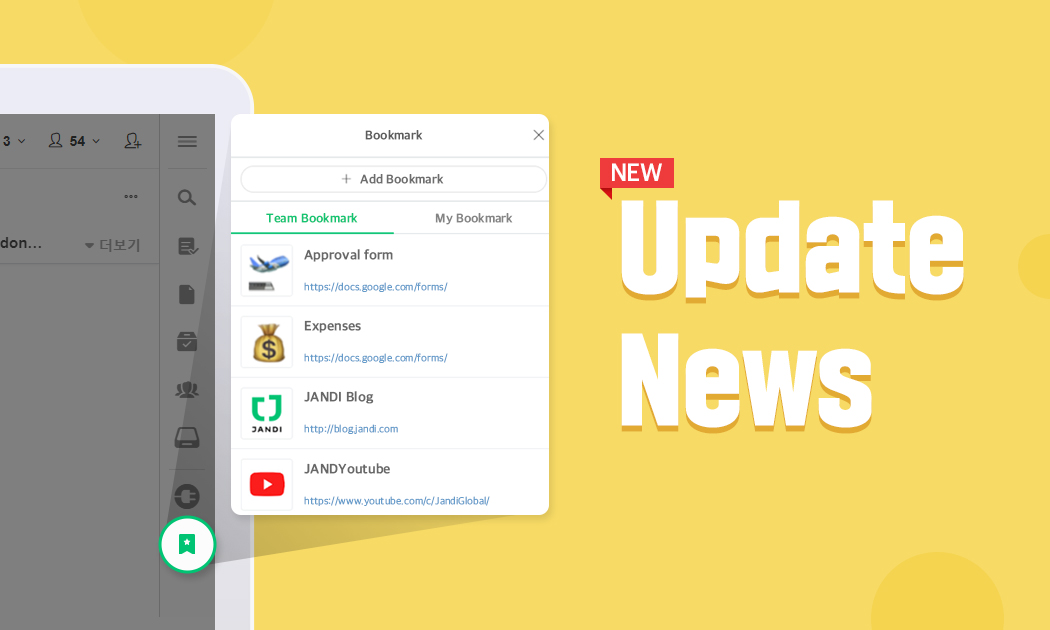
You can now bookmark URLs so that you can visit them with just a few clicks. Also, we added a few features that our users have requested.
The post JANDI Update: Bookmark, Manage Group Chat Members, Set Default Profile appeared first on JANDI blog.
]]>JANDI Update News for April 2021
Hello everyone! We are back with some updates for April.
You can now bookmark URLs so that you can visit them with just a few clicks. Also, we added a few features that our users have requested.
Bookmark (Exclusive in the Enterprise Plan)
Now you can bookmark URLs that you often visit to revisit them with just a few clicks. The Team Admin can set up the Team Bookmark, so members don’t have to search for each website they need to visit.

- Go to the menu [≡] icon located on the upper right corner of your JANDI screen and select [Admin Menu] – [Add-on Settings] – [Bookmark] to turn the setting on/off.
-
- Team Bookmark: A bookmark list that is shared by everyone in the Team
- My Bookmark: A personal bookmark list only you can see
- Each member can add their own bookmarks. The Team Admin can turn the Team bookmark feature on/off
- You can add up to 20 personal bookmarks and 20 Team bookmarks.
- If you turn the bookmark setting off or downgrade your Team’s subscription, the bookmark feature will no longer be available (Please keep in mind that existing bookmarks are saved in JANDI)

< JANDI Tips >
- Try adding various types of forms to your Team bookmarks, such as vacation request forms, name card templates, and expense report forms!
- Bookmark frequently visited links or links to your business affiliates.
Removing Members from Group Chats
Have you ever accidentally invite the wrong person to your group chat and had to ask that person to leave because the group chat didn’t provide the ‘remove’ feature? Now you can simply remove members from the group chat the same way you would in a Topic.
- Go to the [Participants] list located at the upper right corner of the group chat and click the [remove] icon.
- If you are a group chat member, you can remove a particular member from the chat even if you are not the owner or the admin.
NOTE) Removing Members from a Topic

Set to Default Profile Image

Now you can set your profile image back to the default image. If you no longer want to use your photo or JANDI characters, reset your image to default.
- Click your profile located at the lower right corner of your JANDI screen to reset your profile image.
- You can set different profiles for different teams.
NOTE) Editing Your Profile


We hope you like the updates! Please keep an eye out for more updates.
JANDI will continue to make updates for our users!
If there are any feature requests, please use the [Live Support] located on your JANDI menu, or email us at support@tosslab.com.
The post JANDI Update: Bookmark, Manage Group Chat Members, Set Default Profile appeared first on JANDI blog.
]]>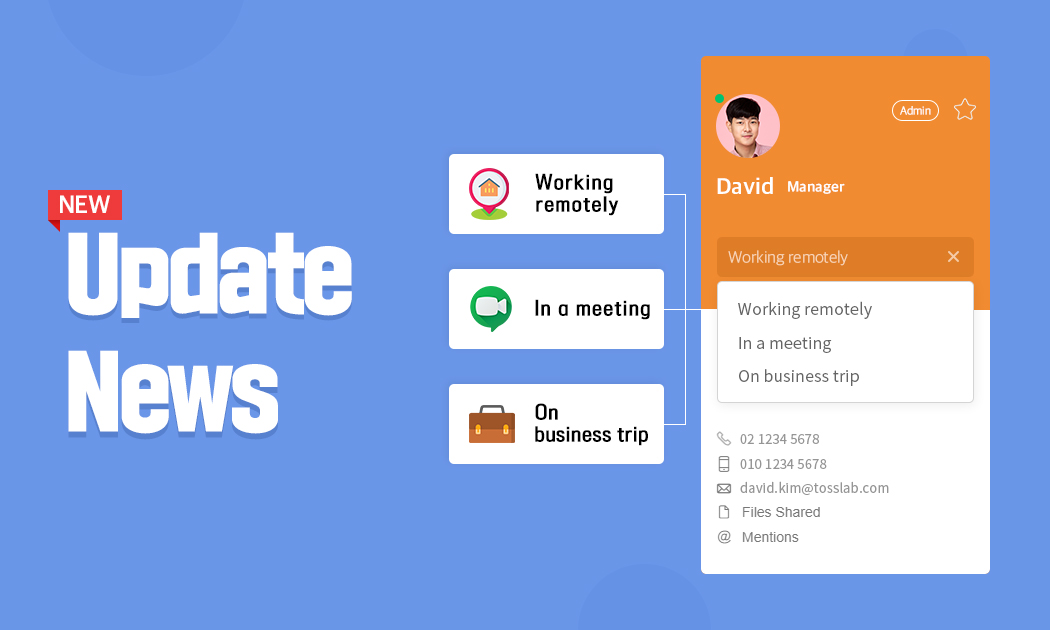
Now you can display your status such as ‘working remotely’ or ‘in a meeting’ so you can always share your whereabouts with your coworkers.
The post JANDI Update: Show Status on Profile, Mobile Dark Mode, turn 1:1 chat notification off appeared first on JANDI blog.
]]>JANDI Update News for May 2021
Hello everyone! We have new updates for this month.
As the COVID19 continues to spread, more people are working from home, wondering how long this situation will last. Now that the traditional workspace is going through change, we received many requests to indicate members’ work status on JANDI.
Now you can display your status such as ‘working remotely’ or ‘in a meeting’ so you can always share your whereabouts with your coworkers.
Profile Status Setting

- You can set your status as ‘Working remotely’, ‘In a meeting’, ‘On business trip’, or you can fill it out with whatever message you want.
- You can set different status on your profile for each team you have joined.
- If you are typing your status, keep in mind that you can type up to 20 letters.
- To see other member’s profile, you can click the member’s profile icon in your chat room or the chat list.
- You can set up away mode separately.
NOTE) How to set up Away Mode
Mobile Dark Mode
You can enjoy JANDI app in the dark mode.

<How to turn on Night mode on Android>
Swipe down to find the Quick Settings Menu, choose [Night mode].
- Android 10 or above: Turn on Night mode (Dark mode) on the Quick Settings Menu.
- Android 9 or under: Go to the OS settings and turn on Power Saver Mode
(For Android version 9 or under, you can change the mode by turning on/off the Power Saver Mode.)

<How to turn on Dark Mode on iOS>
Go to the Control Center and turn on [Night Shift].
Turn Notifications Off for 1:1 Chats and JANDI Chat.
You can turn notifications off for 1:1 chats and the JANDI chat. 
NOTE) Topic notification settings
JANDI will continue to make updates for our users!
Let us know about any feature requests, please use the [Live Support] located on your JANDI menu, or email us at support@tosslab.com.
The post JANDI Update: Show Status on Profile, Mobile Dark Mode, turn 1:1 chat notification off appeared first on JANDI blog.
]]>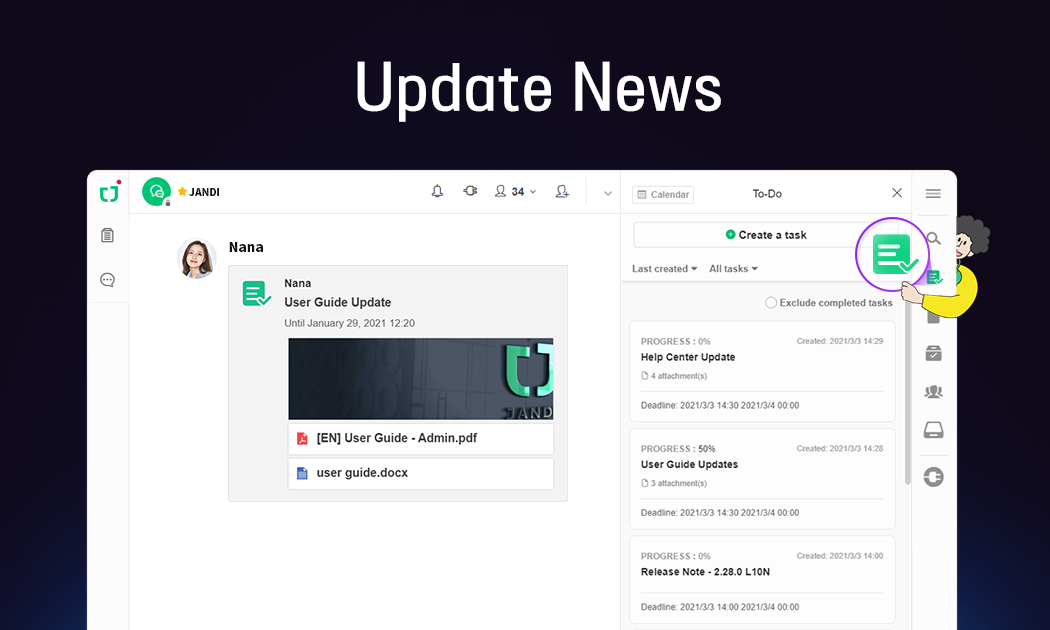
In this update, we focused on improving the process of creating and managing your tasks more efficiently, assigning multiple people to the to-do, and viewing your tasks in a calendar view. Let’s take a closer look!
The post JANDI Update: To-Do Feature appeared first on JANDI blog.
]]>JANDI Update News
Hello there! This is the first update news for the year 2021.
We have made improvements to the To-Do feature as many users shared their requests and suggestions about this feature.
In this update, we focused on improving the process of creating and managing your tasks more efficiently, assigning multiple people to the to-do, and viewing your tasks in a calendar view. Let’s take a closer look!

We have reflected all of the requests below on the update.
- Attach files to your task
- Assign more than one person to your task
- Select the status of your task
- Choose a specific chat room to create your task
- View all your tasks in a calendar view
Creating a New Task

- Click the [To-Do] icon located on the menu tab located on the right side of your JANDI window to see your To-Do list. Select the [Create a task].
- Select the title, description, attachment, assignee, and the due date for the task and click [Save].
- You can add up to 10 attachments per task.
- You can assign multiple people to the task, and they can manage their tasks separately.
- Please keep in mind that if you change the chat room in which the task was initially created, the task’s attachments and assignees will be reset.

- Select the […] more icon on each task to edit, delete, save in drive, or download attached files.
- Once a task has been assigned to you, you can always change the task’s status to hold, ongoing, or done.
- If you want to edit the title, description, assignee, attachments, due date, or notification settings of a task, select the more […] icon and select [edit].
Add a message as your task.

- Instead of creating a new task through the [To-Do] tab on the menu, you can always add a message as a new task.
- Select the more […] icon on a message or a file comment and select [Add a to-do].
Bookmark Tasks / Calendar View
<How to Bookmark Tasks>

- If you need to view a task frequently, you can bookmark it by clicking the star icon.
<Calendar View>

- Select the [Calendar] button in the upper left corner to view your tasks in the calendar view.
- The tasks will appear under the date. View the details by clicking the date.
<NOTE>
- If your team uses the Free Plan, you can add up to 100 tasks per team.
- The To-do feature is also available on the mobile JANDI app.
- If your team uses a Paid Plan (Premium or Enterprise), you can delete tasks and add an unlimited number of new tasks.
- View features exclusive to Paid Plans
If there are any feature requests, please use the [Live Support] located on your JANDI menu, or email us at support@tosslab.com.
The post JANDI Update: To-Do Feature appeared first on JANDI blog.
]]>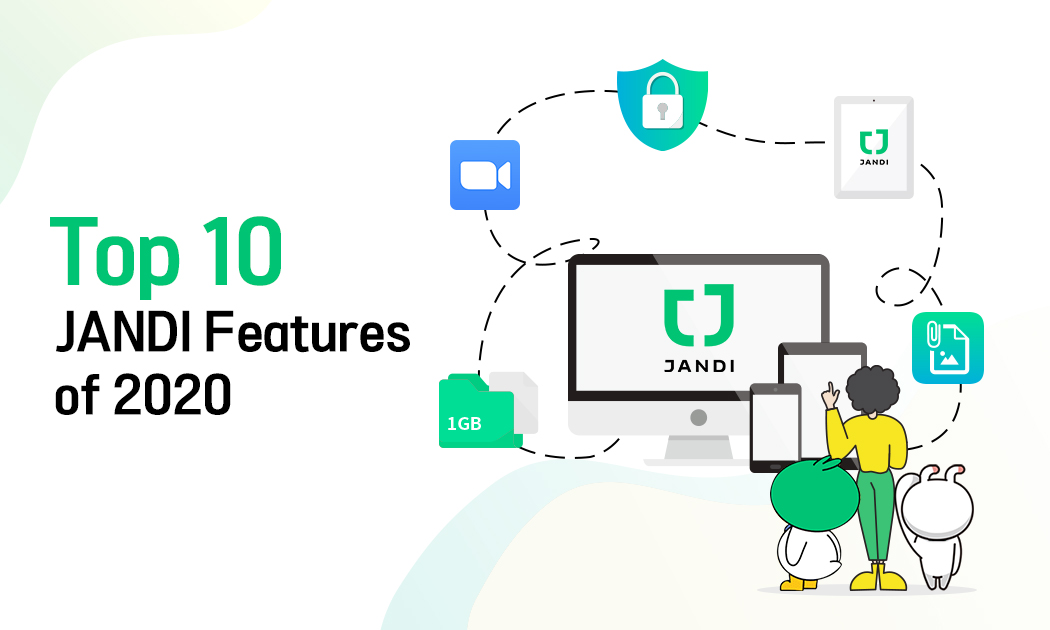
These are the JANDI updates we released in 2020. Let’s take a look at last year’s Top 10 features!
The post Top 10 JANDI Features of 2020 appeared first on JANDI blog.
]]>Thank you for using and supporting our collaboration tool JANDI last year. Toss Lab JANDI Team will continue to focus on creating a more convenient and efficient work environment.
These are the JANDI updates we released in 2020.
Let’s take a look at last year’s Top 10 features!

1. Upload & Download Group Photos
In the survey we held in 2020, ‘JANDI User’s Best Feature,’ the feature ranked number one was the Group Photo feature. More than half of the participants requested the bulk image upload feature.
Now you can not only upload a group of photos but also download grouped files. These features are also available on your mobile app.

JANDI Update: Group Photo (Uploading Grouped Files)
2. Upload Large Files (from 300MB to 1GB)
Before this update, you could only upload files as large as 300MB. Now you can upload files that are as large as 1GB. For files over 1GB, use Google Drive and Dropbox to upload them on JANDI.
3. JANDI Tablet Version

JANDI supports PC, Mobile, and Tablets (including iPad).
Using JANDI on your tablet, you can use both portrait and landscape mode and use the multitasking feature. Also, when you are using a bluetooth keyboard, you can hit Enter to send messages.
4. Improved JANDI Drive
You can search for files in your JANDI Drive! Now it’s become easier to manage your files using JANDI Drive. Besides, we made some UI improvements, including the Drive list, folder, and file icons.


JANDI Update: Drive Feature Update, Organize Chat By Star
5. Delete 1:1 Conversations (Available in the Enterprise Plan)
Before the update, you could only hide 1:1 conversations, but now your Team Admin can turn on or off the settings for deleting the entire 1:1 conversation.
- Your team should be on the Enterprise Plan(paid plan) for your Team Admin to go to the [Admin Menu] and allow members to delete 1:1 chatrooms.

JANDI Updates: IP Address Restriction, 1:1 Conversation Deletion, And Admin Dashboard
6. Security Updates: Whitelist IP
For our users, we added a Strong security feature. The Whitelist IP is an approved list of IP addresses and/or IP domains with permission to access your JANDI Team.
This way, you can secure your JANDI team since it can only be accessible from a specific IP.
- Your Team must be on the Enterprise Plan(paid) for your Team Admin to change security settings on the [Admin Menu].

7. Mini Sized JANDI
We recommend that you resize it and use the smaller version JANDI for those who have felt that the PC JANDI window was too big.
- You can use this feature in the newest version of JANDI.
- Resize the JANDI window to your preference on your PC using the mouse.

JANDI Update: Mini JANDI, Downloading Group Files, Revote
8. Advanced Admin Dashboard (Available in Paid Plans)
Now your Team Admin can view the specifics of data usage by Team or members.
According to your Plan, Premium or Enterprise, you can view detailed information.
- The Team Admin can view this data by going to [Admin Menu].

9. Link Zoom (Video Conference)
You can link Zoom (video conferencing service) with JANDI.
These days, many people are gradually learning how to work reliably without meeting face-to-face. You can work from home, hold remote lectures, or video conference smoothly by linking with Zoom, growing in great demand worldwide.

10. Revote
The re-voting feature is also one of the features that many people have requested. If you would like to change the vote you already cast, you can revote.

We are working hard to improve existing features as well as new ones. See you in 2021 with more new features. We hope that you look forward to it!
The post Top 10 JANDI Features of 2020 appeared first on JANDI blog.
]]>
With JANDI, HAUZ(a SaaS workforce management solution for hourly mobile workers) team have noticed an increase in team efficiency and productivity.
The post HAUZ: Simplifying Remote Work with JANDI appeared first on JANDI blog.
]]>
Who is HAUZ and what does HAUZ do?
HAUZ is a Software as a Service (SaaS) workforce management solution for hourly mobile workers. HAUZ believes in harnessing the power of technology to eliminate manual consolidation work (manual processes) so teams can focus on what matters most.

HAUZ offers powerful features such as digital clock-in and clock-out system, e-leave management, team scheduling, operation reports submission, real-time employee activity updates and many more! Having founded in 2018, HAUZ currently operates in Malaysia and Singapore, serving a multitude of industries: Security Guarding & Patrolling services, Constructions, Facilities Management, Cleaning Services, Property Management, F&B, Retail, Startups, etc.
Key Highlights:
– Winner of NEXEA Accelerator Program (2019)
– Finalist of MDEC Founders Grindstone 2020
– Draper University Scholarship
– Top 40 Malaysia Global Innovation & Creativity Centre
– Expanded into 2 Southeast Asian Countries (2019)
What was the communication and collaboration like before JANDI?

Before JANDI, most of our communications have been via Zoom as 50% of our staff were working on-site and 50% were working remotely. However, things took a turn with the COVID-19 lockdown where 100% of our staff had to work remotely. We needed an app that can seamlessly compliment Zoom, hence why we chose JANDI. JANDI is quick, simple, easy to use. We tried the Slack Freemium but the internal take-up was below expectation. Our team preferred JANDI’s clean and simple user interface so it was easy to fall in love!
Why did it make sense adopting JANDI for your team?
As HAUZ migrated to becoming a 100% remote working team due to COVID-19 and given that Zoom was our primary communication tool, we needed a platform that can fill in the gaps. It was clear we needed something more collaborative.
It is essential for us to have a platform where we can share our workfiles in one place without having to switch back and forth. With JANDI we could share files of different formats such as pdf, Google sheets, Google docs, Powerpoint presentations, audio files, and even screenshots!
Moreover, JANDI eliminates the need to rely on multiple platforms to get things done. It has chat rooms for casual or work discussions, easy and comprehensive file sharing feature, integration with our heavily used tools such as Zoom, Google Drive, Google Calendars and best of all, to-do lists for assigning tasks on the go. We value clear communication and we want to get things done simple and quick which is what JANDI offered our team.
How does JANDI provide value to deliver your product or service?
With JANDI, we’ve noticed an increase in team efficiency and productivity. This is all thanks to JANDI’s simple and easy to use interface, there is a desktop, browser and mobile version. So our team is able to respond in real time to complete shared tasks with dependency to other team mates. This ranges from discussing marketing creatives, launching new features, approving budgets/spend, sharing results and updates, customer feedback and a bunch of other day-to-day operational things we have on our plates.
We appreciate the clear & smooth communication JANDI offers with easy to sort (alphabetical order, recency order, starred) topics/chat room in board view or chat view.
In addition, the advanced search tool allows users to quickly retrieve files or documents by topic, member, date and file type; gone are the days of tediously scrolling through messaging apps (WhatsApp?) for a file or document. All these little features drive up efficiency as we spend more time focussing on what’s important for our business.
What are your favourite features and how was your experience adopting JANDI?
Our favourite features include:
Organizing Chats Rooms (Topics) into Folders

Everyone works differently and JANDI understands this by allowing users to organise their folders in whichever way they want, thus empowering our team to better manage their workflow.
Native Integration with Zoom

Prior to embracing a 100% remote workforce, HAUZ relied heavily on Zoom as the primary source of communication between teammates. JANDI’s integration with Zoom enables us to document our chat history after the Zoom call ends. We can assign tasks to ourselves and others to avoid miscommunication or from things falling off the crack.
Organised file storage system

In the ‘Tool’ section, we can see mentions, polls, file, starred messages and drive folders. The file storage tab displays the files shared in joined rooms, by members and file types. As for the drive folder, it can be viewed by name, sharing option (public or private) and date of creation. The organisation of these files have been super helpful as we have remote teams in Malaysia and Singapore working on common projects. As you’d imagine the teams are sharing files and commenting, so having some context to what is discussed helps each member manage their task and responsibilities better.
Advanced Search filter to easily locate files

If we do need to search for a file or document, it is easily done just with the search bar. You can search for files by topic, member posted, date of sharing and file type. Long gone are the days of tediously scrolling through hundreds of messages to find the file we need.
It’s worth mentioning that we have tried the freemium version for Slack but the onboarding internally wasn’t up to our expectations. This was the reverse for JANDI, we were able to quickly figure out how to operate JANDI and if we had any questions, the built-in support feature allows us to quickly get in touch with the JANDI local and HQ team.
What companies would you recommend JANDI to?
JANDI really helped us with our productivity and efficiency.
We would recommend JANDI to other companies like us: companies with a remote work force and companies working in a fast-paced environment. JANDI’s features that really helped us with our productivity and efficiency were the seamless file-sharing function and task assignment, also known as the To-Do List. Our company relied on Zoom as a primary communication tool so it was lovely that we found a software that complements our tried and tested, familiar communication tool instead of having to relearn and adopt a new tool.
Other than that, we highly recommend JANDI to other tech companies or start-ups because of the seamless integration with GitHub, BitBucket, Jira etc. Other general productivity applications integrated with JANDI are Trello, Google Calendar. You can even keep up-to-date with industry news using RSS, this is especially helpful when you’d want to keep an eye out for competitors and market trends. If you’re using other tools, JANDI supports Webhooks for both incoming and outgoing notifications. If you find switching between chat and email frustrating, setting up a webhook to receive email in your JANDI workspace is completely possible.
We think huge companies that rely on teamwork and inter-department collaboration would benefit significantly with JANDI. Most companies rely on WhatsApp as a primary communication tool within and between teams and this often is a surefire way for miscommunication to happen. How many times have someone left their phone for 5 minutes and their group chat has accumulated over 100+ messages unread? This hampers productivity because employees would have to scroll back over 100+ messages of mismatching content to work out what has been discussed and concluded. Your work tools should make life easier, not the other way around, that’s why we choose JANDI!
Choose JANDI to work smarter
All in all, JANDI has been massively supportive of our company from start to finish and our advice is to go with the best and most flexible collaboration tool for all your productivity needs. Choose JANDI to work smarter. It’s never too late to start!
The post HAUZ: Simplifying Remote Work with JANDI appeared first on JANDI blog.
]]>
The migration to a digital workspace is changing the way people work together; giving teams more flexibility, improving communication and transparency, allowing real-time collaboration, and increasing efficiency through process automation.
The post How Technology can Improve Workplace Culture appeared first on JANDI blog.
]]>With the influx of new technology and the adoption of tools for remote work, workplace culture is shifting from the office to online. The migration to a digital workspace is changing the way people work together; giving teams more flexibility, improving communication and transparency, allowing real-time collaboration, and increasing efficiency through process automation. These are just a few examples of how technology is changing workplace culture and improving team productivity.
#1 More Flexibility
Work from Anywhere
As more businesses shift towards remote work and flexible working hours, companies are benefiting by being able to attract key talent regardless of location, and employees can work from home giving them access to opportunities that normally would have been out of reach. Moreover, without the need to commute to the office, people can dedicate more of their time to getting work done. According to this study by yougov, 30% of office workers in the UK reported an increase in productivity when working outside the workplace.
“30% of office workers in the UK reported an increase in productivity when working outside of the workplace.”
Communication – Team Chat & Video Conference
A vital aspect of every work environment is communication. This is more crucial when teams are not physically in the same place. Through the use of collaboration technology, discussions are happening in real-time, are structured and well organised (see All about Topics in JANDI), and the chat history is retained and easily searchable.

Instant messaging is replacing internal emails, meetings are happening virtually (see Zoom integration with JANDI), and team collaboration is becoming more efficient. This is just one example of how teams are staying connected and managing to work remotely.

#2 Better Collaboration
Real-Time Data Exchange – Synchronous Working
Sharing and working on files together is essential for remote teams. Rather than moving a document from one desk to another, data exchange is happening virtually and in real-time. Applications like Google Drive enable people to upload and share files, work on the same document simultaneously, add comments, track changes and revisions, and control access rights and permissions, and synchronizing across all devices (see JANDI G Suite Integration).

Efficiency – Planning & Task Automation
Planning projects, managing tasks and automating workflows can all be done online, helping teams stay focused by eliminating mundane activities and boosting overall efficiency.
Trello is a free tool that has boards, lists, and cards that enable teams to prioritize projects in an organized way. Members can add comments, attachments, due dates, and collaborate on projects from beginning to end (see How to Integrate Trello with JANDI).

Monday.com is a project management tool for creating tasks and visualizing projects in a timeline or gantt view. Teams can track progress to ensure deadlines are being met, and can map out initiatives by month or year in the Calendar view.

Zapier is a tool primarily used for process automation. “Zaps” can be set up so that when something happens in one app, it triggers something else to happen in another app. For example, when a task is updated on Monday.com, notify the team on JANDI (see Connect Monday.com and JANDI). Without involving developers, team members can easily move information between different web apps to create seamless workflows.


When repetitive and time-consuming tasks can be automated, teams can focus on more valuable high-impact activities. There is more time for creativity and innovation, which positively impacts workplace culture.
Feedback – Surveys and Polls
Whether it’s individuals working on a group project, or HR conducting an employee engagement survey, teams need a way to get internal feedback. With polls, teams can send questions to the whole organization, or target specific groups or departments. Surveys create open communication, so that managers and employees alike can gain insights to improve their own and the organization’s performance.

Employee polls and surveys can also be used to gauge employees’ opinions about matters that are important to them. Asking for someone’s opinion not only makes them feel valued as an employee, but also provides the business with ideas and perspective that might otherwise be lacking. Polls and surveys and can truly transform a company’s entire workplace culture.
#3 Improved Transparency
Accountability – Key Performance Metrics
When the goals and performance of an organization are transparent, it fosters a more open and engaging culture. From the enterprise level to individual tasks, setting up objectives and key results (OKR) is fundamental to measuring performance. OKR consists of the goals (O) the company wants to achieve, and the figures (KR) for reporting. Quantifiable key results are then matched so that all members of the organization can run toward a unified goal. When member’s roles, tasks, and expectations are properly communicated, everyone feels accountable for the overall success of the team (see How To Use Collaboration Tool For A Successful OKR).

Employee Recognition – Celebrate Achievements
As more and more companies are realizing the importance of culture, engagement, and employee recognition, adoption of apps like Disco and Kudos have become increasingly popular. Companies set-up their core values on the platform, and reward points are given to members when they give or receive positive feedback or are tagged with a core value. Employees have a profile where they can view their achievements, points, and values tags, making it super useful for performance reviews and 1-1’s. Recognizing coworkers for their achievements reinforces value-driven work and team appreciation.

Training – Onboarding & Career Development
New employees require training to get them on board and help familiarize them with the teams in the organization and tools needed to work. There are self-service portals where training materials that can be accessed by employees, and content can be made available in audio or video files. The same platforms can be used by managers to create a “roadmap” for each of their team members, outlining steps they need to take to reach their goals or broaden their skillset.
When using a team collaboration platform like JANDI, learnings and knowledge shared in a group chat ie “New Employee Onboarding” is immediately transferred to the rest of the group. Moreover, the next generation of new joiners will be able to access the chat history and search across previous questions, making it a useful repository of FAQ.
A well-trained workforce helps keep employees motivated and engaged, increasing job satisfaction and creating more opportunities for growth and development.
Final Thoughts
The effects and impact of technology on workplace culture are incredible. As an employer, employee, or freelancer, you can’t always do it alone. But with the right tools and technology in place, workplace culture and team productivity can be improved.
Written by – Melissa Mauro
Melissa Mauro is a freelance writer who creates quality and original content. She is working for the companies as Best Writers Online and Online Writers Rating writing services review in the translation department and wants to find new platforms for professional growth. She believes that creativity and improvement are things, which distinguish a good writer.

The post How Technology can Improve Workplace Culture appeared first on JANDI blog.
]]>
JANDI is the most active collaboration tool with the value of “safe document viewing” which SynapSoft pursues.
The post [IT] Provider of a Safe Preview Feature, Synapsoft, Chose JANDI appeared first on JANDI blog.
]]>
Hello! My name is Hyun-sun Eo, head of the marketing team of Synapsoft, a company specializing in artificial intelligence and electronic documents. Synapsoft was established in 2000 and is well known as Korea’s leading electronic document processing company. Synapsoft is one of the few software companies that can supply web office suites. We provide the Synap document viewer used by 6600+ companies and public institutions in Korea, the Synap editor that changed the paradigm of HTML5 web editor, and the Synap document filter used in large domestic portals and search engines. We are preparing for a new leap forward as a company specializing in artificial intelligence and electronic documents through AI technology based on electronic document processing technology accumulated over the past 20 years.
The marketing team is in charge of planning tasks for product development and improvement to meet customer needs. We also carry out activities to inform customers of the value of products. Currently, every employee of Synapsoft is collaborating on JANDI.
Different Topics for Each Product
The ‘document preview’ that you can experience in JANDI is the Synap Document Viewer provided by Synapsoft. The three major portals in Korea like Naver, Nate, and Daum, uses Synapsoft’s viewer in their email and drive. Also, most public institution websites provide document preview using Synap Document Viewer.
In addition to the Synap Document Viewer that any Korean citizen has experienced at least once, SynapSoft supplies various products based on electronic documents. To improve products for each of the six product lineups, we continuously communicate with the development, support, and sales team to establish solutions improvement directions and reflect on products. Team members from different teams such as development, sales, and marketing actively discuss effective marketing measures and new features that reflect the needs of customers and the market in the following product-specific Topics.

Expanding JANDI Company-wide
JANDI was used by the marketing team first, and its value was spread throughout the company. At the time, we were preparing to launch a new product, but we had to discuss and decide on various proposals efficiently in a short period. Our team completed the project in a short time by immediately discussing and making decisions about documents or images related to the project with JANDI’s document preview.

After the project, I realized that the entire company could properly utilize JANDI rather than use it as a collaboration tool only for the marketing team, so I actively spread it throughout the company. JANDI has created a synergy effect with services that we were already using, including JIRA, GitHub, and the intranet, and naturally settled as the collaboration tool for the entire company.
After introducing JANDI, the development headquarters and business headquarters’ traffic volume increased despite separate workspaces. The speed of collaboration improved remarkably by enabling immediate communication rather than e-mail communication.
Faster Feedback
In the Marketing team, we often exchange various files, such as images and documents. Previously, even for simple image production, you had to attach an image to an e-mail and send an e-mail asking for confirmation. Upon receiving feedback, you had to rework and send a reconfirmation e-mail. Because we communicated mainly with text, we weren’t sure if the content was correct. However, after adopting JANDI, we can immediately check images or files and share feedback through comments, significantly improving work efficiency for design results.

JANDI Tips for Increasing Work Efficiency for the Entire Company
Leave Memos using @ Mention
If the person in charge is absent, you can respond more flexibly than leave a handwritten memo. When customer inquiries come in, use @mentions in the topic and forward the message to the person in charge. By using JANDI, companies can respond to customers quickly without losing business opportunities.

Knowledge Sharing Topics
To keep pace with the rapidly changing IT environment, we have created a Topic called knowledge sharing and share technical information, sales information, and market trends related to company solutions. Anyone who joins the Topic can view the direction and the news about the industry.

Manage the Sales Kit, a Must for Sales
Since JANDI is accessible anywhere and anytime and provides the document preview feature, the sales team continuously uploads sales documents such as solution introduction slides, brochures, and company introduction data. You can check all the history of the documents from the old version to the latest one, and it helps the sales team as you can quickly access the latest data from any device at any time.

Integrate Google Calendar
You can manage team schedules by integrating JANDI and Google Calendar. Event reminders will help you finish all your tasks on time. Checking the schedule of your team members will help your team to collaborate more efficiently.

Real-time issue identification through JIRA integration
Synapsoft manages issues using JIRA. You can easily integrate JIRA with JANDI using JANDI Connect. You can view the issue handling process through Topic notifications.

JANDI Increases Company-wide Communication
SynapSoft could post necessary content and work through its own intranet and manage individual schedules for members. However, if the members do not frequently check for new posts on the intranet, they might miss important information. After using JANDI, we share essential announcements on the intranet and the announcement Topic in JANDI. This way, we can make sure we deliver the message to everyone because they will receive JANDI notifications.
The ‘Read’ stamp will let you check how many people have read your message. JANDI is also contributing to the spread of major company contents.

We Recommend JANDI
We recommend JANDI for companies
that share and utilize document contents.
Most of the company’s important information and assets are left in the form of various contents such as documents. We recommend JANDI to companies whose contents are systematically managed, accessible anytime, anywhere, and where members share opinions on the document and develop it together. In addition, JANDI is recommended for companies that want to secure corporate information and collaborate efficiently, safe from the risk of valuable information assets being downloaded to mobile devices and leaked.
What Does JANDI Mean to Synapsoft?
We deliver the most essential ‘security’ values to companies together.
JANDI has been providing Synapsoft’s document preview solution as a basic feature of JANDI since 2017.JANDI has been continuously contemplating to provide a safer way to share documents at companies and collaborating with Synapsoft to deliver a secure document viewer to users.
JANDI is the most active collaboration tool with the value of “safe document viewing” which SynapSoft pursues, and both companies are working together to provide safer collaboration environment to companies. We hope that more companies will continue to experience and empathize with the importance of safe sharing of documents through JANDI preview.
The post [IT] Provider of a Safe Preview Feature, Synapsoft, Chose JANDI appeared first on JANDI blog.
]]>