The post Install FOX Sports GO App for Fire TV and Activate appeared first on Andrew.Technology.
]]> Install and activate the FOX Sports GO app on your Fire TV to access live sports programming. Football, basketball, racing and other sports will be available to watch. The app allows you to stream FOX Sports, FS1, FS2, or your regional FOX Sports Network. You will need access to a cable or satellite subscription. Alternatively, a streaming service that supports the “TV Everywhere” apps can also activate. For example, PlayStation Vue provides this access.
There a few different ways to install the app on Fire TV. First, you could use the voice search button on the remote. Hit the search button and say “FOX Sports” to find it. Or use the Amazon download box to the left. This will directly fetch the app through your browser. It will automatically be installed to your Fire TV. Make sure you’re logged into the same Amazon account on both.
You could also manually find the app on your Fire TV. Browse to the Apps in the left menu and find the “Featured Cable Subscription Apps” category. It’s free to download the Fox Sports GO app but you must activate it! A service provider (like cable or online streaming) is required to activate Fox Spots Go.
Launch the FOX Sports GO apps by selecting the logo shown above and pressing the center button on the remote. You may also have to click “Open” if you are taken to the app’s information screen. Once it loads you’ll see a white screen with different live sports streams and a grey menu to the left. Notice the sports streams thumbnails have small lock icons next to them. If you tried selecting one now it would not work. All streaming is locked down until you activate with your subscription information.
Download FOX Sports GO app for Fire TV
Go to Settings in the left menu by hitting the down button on the remote and then center click on the remote. Now select the “Sign In” box by hitting the right button and center clicking on the box. A new screen loads up that prompts you to, “Sign in on your desktop or mobile device at https://www.foxsportsgo.com/FireTV And Enter: KC36Z..” which loads the web page to activate.
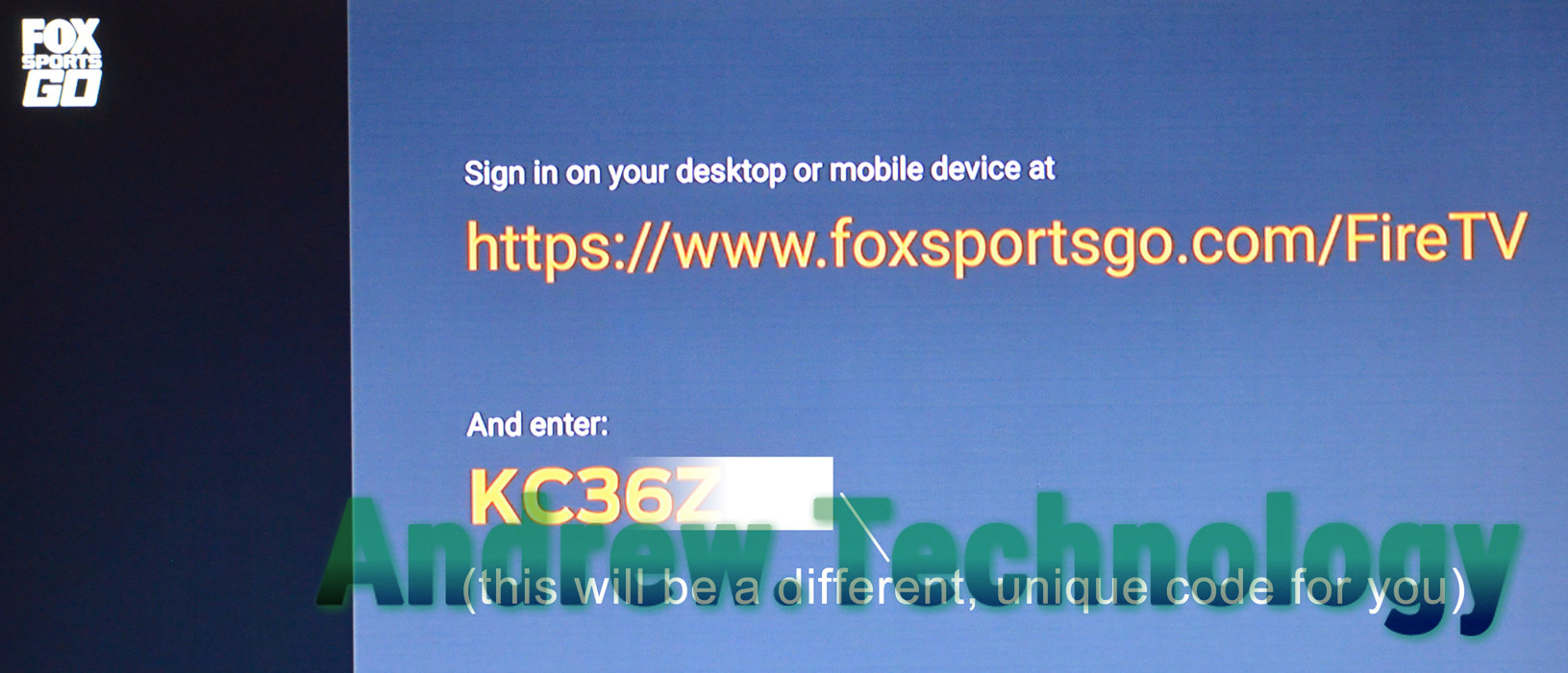
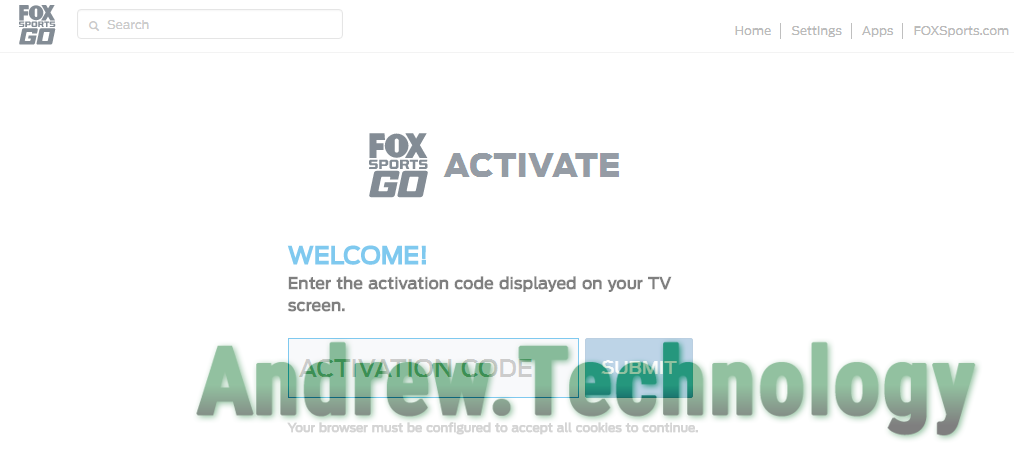
On the activate web page it tells us to, “Enter the activation code displayed on your TV screen.” My activation code started with KC36Z. Your activation code will be completely different because it’s unique to everyone. Enter your unique code shown on the Fire TV into the Activation Code box and click Submit.
Activate FOX Sports GO with your subscription information
Find your cable, satellite, or streaming subscription info. Select your service provider from the logos or click “More TV Providers” to see the entire list. I was using PlayStation Vue. I had to drill down into more providers and then search a list for the name. Once you click the name it will redirect you. Every provider has their own page. It will ask you to login in through their system. Lastly, you’ll be redirected back to the FOX Sports GO Activate page where it displays the conformation message, “Success! You have successfully activated Fox Sports GO.”

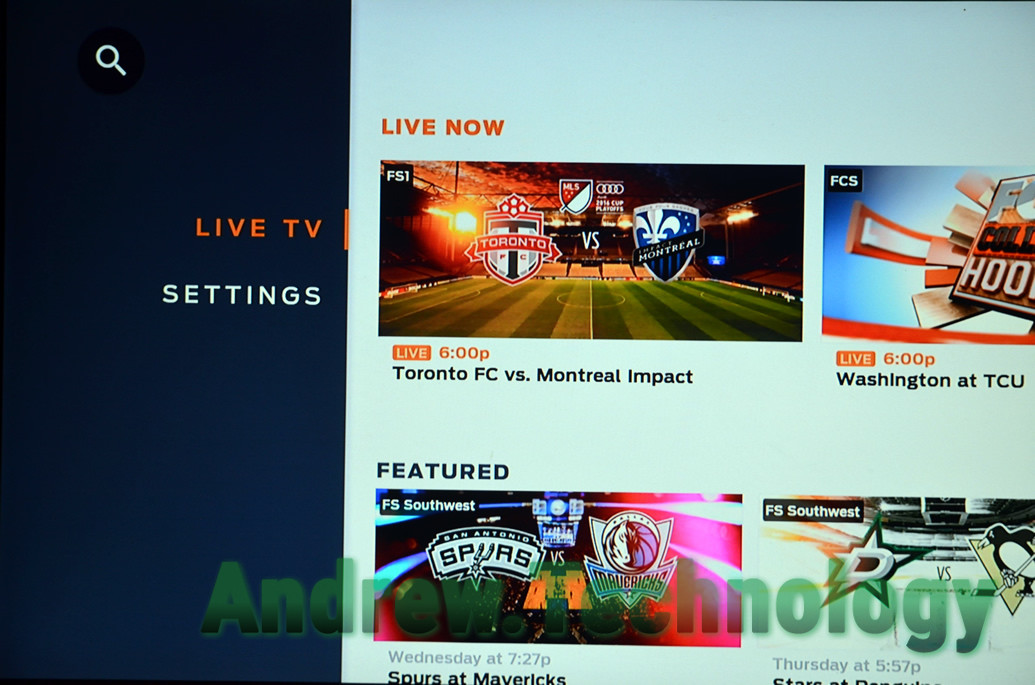
Some amount of time will pass before your Fire TV updates. After a few seconds your Fire TV will automatically change screens back to the settings pages letting you know it’s been activated. Now instead of a “Sign In” box it will say “Sign Out”. That’s it for the activation! Go back to the “Live TV” option in the menu to view the live streams available. You’ll notice there are no more lock icons in the thumbnails.
The specific Fox sports channels you get depend entirely upon the subscription package from your cable, satellite, or streaming service. Generally everyone would get the national Fox Sports channels like FS1, FS2, and your local Fox affiliate. Other channels you could get include your regional FOX Sports Network, FOX Soccer Plus, FOX College Sports (FCS) or FOX Deportes. In my case I used PlayStation Vue in Austin, TX and got Fox Sports Southwest as my regional FOX Sports Network.
The post Install FOX Sports GO App for Fire TV and Activate appeared first on Andrew.Technology.
]]>The post Silicon Valley’s Pied Piper Tech Explained appeared first on Andrew.Technology.
]]> HBO’s hit show Silicon Valley returns with Season 3 soon so I decided to take a deeper look at the technology behind the notorious Pied Piper. If you watch the show then you’ll be familiar with terminology like algorithm, compression, and “middle-out” being thrown around pretty consistently without much explanation. While the show is technically very accurate and does capture the startup turmoil around the San Francisco Bay Area it’s still a television show that for the sake of dialog and plot lines takes some liberties with the actual product that is Pied Piper.
For the most part Silicon Valley does a good job handling the technical jargon and believably of characters. Gilfoyle and Dinesh present legitimate technical issues as the developers and designers of Pied Piper and constantly banter about the best approach to take to solve said issues. But when it comes down to it, the characters don’t explicitly talk about what kind of a product Pied Piper is going to end up being. The vagueness surrounding Pied Piper is no doubt intentionally done by the show’s creators to keep techies intrigued just enough without giving away possible future plot lines.
Silicon Valley early seasons and Pied Piper’s website
First, lets look at the facts presented by the show. In the first season Richard is a programmer who creates an algorithm for compressing music as a side project. At this point it’s mostly just back-end code that through command line can crunch music down similar to how MP3s are created. Eventually, Richard meets Erlich who incubates the startup and along with the help of Gilfoyle and Dinesh win the TechCrunch Disrupt with a record-breaking Weissman Score of 5.2 by pulling together an minimal viable product (MVP) of Pied Piper intended for music streaming.
Besides the actual show the other official source of information comes directly from Pied Piper’s website, which is a real thing you can view for yourself here. The main tagline from the site is “A Middle-Out Compression Solution Making Data Storage Problems Smaller” which is prominently displayed below the logo. Then it has the question I’m trying to answer: “What is Pied Piper?” with some fluff answers about bloated corporations and being small and focused. But then the first real answer: “business-facing compression company” and then in even bigger words, “As such, we are in the process of deploying an integrated, multi-platform functionality of all applications of our algorithm”. Still vague but with some interesting clues.

“Middle-out doesn’t restrict itself to H.264 two dimensional grid or time bound patterns at all” – Gilfoyle from Season 2 Episode 2
Jargon breakdown of two conflicting Pied Piper narratives
Let’s breakdown the wording presented from the website. Starting with “business-facing” that implies B2B (business-to-business) services which would no doubt be licensing the algorithm to other companies for their own use behind the scenes. But at the same time they talk about “multi-platform functionality” as if they are building their own consumer applications for iOS/Android/Windows users. Then there is the mystical “middle-out” which is simply a made up buzz word coined by a technical advisor to the show.
Not surprisingly, Silicon Valley and the website present two conflicting narratives about Pied Piper. In one it’s a just a business facing coding algorithm that would be perfect for data/cloud storage. The other is a consumer focused application for streaming music and videos with great efficiency. Honestly, I don’t even think the creators really even know which it truly is.
The post Silicon Valley’s Pied Piper Tech Explained appeared first on Andrew.Technology.
]]>