To describe reactive programming, I like to think of the key concepts of functional programming (using values and functional composition to solve problems in a declarative style) applied to real-world constraints such as async, mutable state and UIs.
The main idea behind reactive programming is that of “data types that represent values over time”. Because they are values (rather than side-effecting callbacks, for instance), they can be passed around and composed like any value, abstracting away the execution flow into declarative expressions.
For UIs, data-bindings provide a declarative mean to bind values (either plain values or reactive “observables”) to the view.
It applies to the Web, of course, but not exclusively; the build tool I work on, Plumber, is also based on the Highland reactive library.
For a deeper introduction, have a look at the presentation slides.
The talk was followed by a dojo, through which the participants could experiment with the concepts I presented using real code. The two tasks offered were a simple search UI for Guardian content using BaconJS, and new operations to analyse file sizes and gzip files for the Plumber build system.
You can still have a go at the dojo yourself if you fancy it!
And if you want to dig more in the subject of reactive programming, have a look at the reference index at the root of the presentation repository.
]]>Have you ever wondered: is the Web a platform for Information or for Applications? Is one the “correct Web” and the other a perversion of its true purpose?
Answering this question takes us back to the roots of the Web, namely the two key concepts of URIs and links. They are what truly make the power of the Web, alongside the descriptive HTML format, for both humans and machines that use it. For humans, we tend to add visual ornaments through the presentation layer (CSS), whereas we feed machines extra information through the semantic layer (e.g. Schema.org, micro-formats, etc).
At the same time, it’s no denying the growing role of the Web as a platform to distribute and run applications. However, the danger is that we compromise the mission of the Web to distribute information in a standard readable format, by hiding it behind the execution of JavaScript and proprietary APIs.
Maybe the true power of the Web is found at the intersection.
You can treat information as applications, by serving the core content as semantic HTML, hence accessible by humans and machines on all platforms, and applying progressive enhancements to enrich its UX for humans where appropriate.
And you can treat applications as information, by ensuring you use standard HTML affordances even for dynamically generated content, and by opening up your APIs to use standard formats or the same Hypermedia principles that make the Web.
In short, The Symbiotic Web means the adoption and promotion of the Web as both the universal API to information and the ubiquitous runtime for applications, by borrowing the best of both worlds.
Check out the slides if you want to know more.
]]>A wide palette of languages is now at our disposal, with varied degrees of expressiveness, though under the hood they all end up transpiled to the same holy trinity of HTML/CSS/JavaScript: Sass, LESS et al to CSS; CoffeeScript, ClojureScript, Scala or C/C++ (via Emscripten) to JavaScript. We even compile yet unborn versions of JavaScript (ES6) to today’s JavaScript using traceur or es6-module-transpiler.
In parallel, we have learned to optimise the assets we distribute for performance: we minimise them to reduce payloads, concatenate them and inline dependencies to save on HTTP requests, add hashes to their filenames to cache-bust URLs.
However, the more transformations between the source we write and the code that gets served to ours users, the harder it is to inspect, reason about and debug.
The most common workaround is to run off as much of the original sources as possible during development. For instance, that means letting RequireJS load all the JavaScript files individually, rather than pre-assembling them into a single minimised asset as you would do in production. The additional benefit is that you can edit your code, reload your browser and see (or debug) your changes immediately without any intermediate build process.
Unfortunately, this approach falls short if any of the code needs transpiling to run in the browser, such as Sass or CoffeeScript. It also introduces a greater gap between the dev and prod environments, which requires more complex build and runtime setups, and increases the risk that these environments diverge (e.g. a bug only found in one and not the other). Crucially, it also implies that you have no way to debug the production environment, besides inspecting the generated source code, often obfuscated beyond recognition.
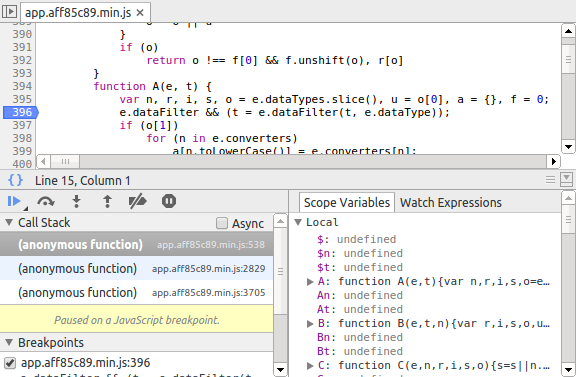
This isn’t a new problem. Historically, executing code involved compiling it to machine code. To aid debugging, the compiler would generate debug symbols mapping machine code instructions it produces to the corresponding higher-level source code (e.g. C, assembly language, etc.). This allowed tools like gdb or full-fledged IDEs to let you pause execution, insert breakpoints and generally inspect the program as it’s running using the source code you wrote as reference.
The equivalent on the Web is of course source maps.
Source maps map the positions (line and column) and names in transformed sources back to the original files. Both Chrome and Firefox developer tools support source maps for CSS and JavaScript files. (It will likely come to HTML too as HTMLImports gain support in browsers.)
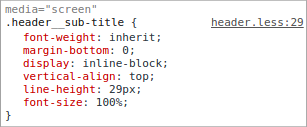
With source maps enabled, you can inspect variables, add breakpoints, associate CSS rules with lines in the original files, etc, much like you would do if you had loaded all your pristine sources into the browser — regardless of the language they were written in!
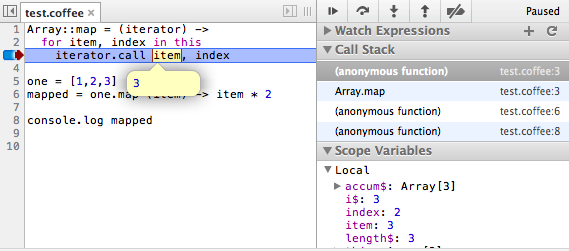
But where do you get a source map from?
The key is to record the mapping for every transformation that is performed on a source file. Luckily, most of the common transformations offer the option to generate a source map (e.g. LESS, RequireJS, UglifyJS, etc.).
However, build processes often involve passing sources through a series of transformations. For instance, you may compile CoffeeScript sources to JavaScript, pass them through RequireJS to inline dependencies, concatenate extra libraries and minimise the result. A source map for this needs to represent the transitive mapping between the original files and the output files at the end of the chain.
As we saw in the last post about Plumber, sequencing transformations in Grunt isn’t particularly elegant as you have to manually coordinate the serialisation of intermediate files and their sourcing into the next step. Source maps are no different; you will have to pass them through the chain explicitly.
To make things worse, certain key plugins such as concat or hash do not support source maps at all. If you use any such transformation, you will loose the ability to produce a source map.
Gulp vastly improved the ability to pipe files through multiple operations. Unfortunately, this currently only applies to the source code, not the source maps. In practice, support is generally limited to single operations, as plugins tend not to support input source maps (e.g. gulp-uglify currently doesn’t).
As a result, source maps are often discarded as soon as the build process reaches a certain level of complexity — which is paradoxal, since complex projects is often where they would be most useful.
It shouldn’t have to be this hard.
In Plumber, source maps are supported by default by all operations. This means that regardless of what transformation you apply or in what order, the generated sources should always be accompagnied by a working source map pointing to your original files. In fact, unless you opt-out, a source map will be written out for you alongside each transformed file.
Consider the following Plumbing file, which combines LESS compilation, concatenation and minimisation:
var styleMain = [glob('src/stylesheets/main.less'), less()];

var styleLibraries = all(
    composerBower('pikaday', 'css/pikaday.css'),
    [composerBower('pasteup', 'less/module/comment.less'), less()]
);

pipelines['css'] = [
    all(styleMain, styleLibraries),
    concat('composer'),
    mincss,
    write('dist/stylesheets')
];
Running the pipeline above with Plumber generates the correct source map by default:
$ plumber css
Run pipeline: css
written to dist/stylesheets/composer.min.css
written to dist/stylesheets/composer.min.css.map
In our work on editorial tools at the Guardian, we’ve been using source maps generated by Plumber to inspect and debug production CSS and JavaScript code compiled from a long chain of transformations. In the long term, we will explore the feasibility of unifying our development and production setups to both use the same compiled assets, and rely entirely on source maps for debugging.
As we compile more and more languages to the Web platform and pass them through increasingly complex transformation, we need native source map support more than ever.
This is why it is a key feature of Plumber, as part of the core principe of doing the right thing by default. I firmly believe that build tools should provide developers with all the instruments they need to work, without any extra effort, regardless of the complexity of their build pipeline.
Luckily, other smarter people are also looking this.
Gulp folks have also started exploring this issue using a similar approach. Following talks on the es-discuss mailing-list about standardizing source maps in ECMAScript 7, Nick Fitzgerald started a discussion on his blog around the future of source maps (AKA SourceMap.next), with a focus on improving the support for transpiled languages that don’t map well to JavaScript semantics.
In the meantime, if you want to have a play with automatic source map support, feel free to give Plumber a try!
Once again, thanks to Oliver Ash for proof-reading this blog post! All mistakes still mine.
]]>Grunt made our lives easier and everyone was happy. The new freedom was exhilarating. Front-end devs highfived each other in the corridors.
But as time went on, we kept using it for more and more complex projects and Gruntfiles seemed to grow out of control, even though a lot of the tasks that were actually performed remained pretty much the same (transpile languages, minimise, etc). Setting up even a simple project today involves a fair amount of boilerplate code.
To ease the barrier to entry, scaffolding tools like Yeoman were introduced to abstract this process into a single command. The result, though, is simply that the boilerplate code has been generated for you (yo webapp generates a Gruntfile over 400 lines long). It doesn’t make the boilerplate code any more maintainable or readable.
A Plumber for your asset pipeline
A few months ago, I started writing Plumber (formerly Luigi), a build tool focused on the processing of web assets using declarative pipelines of operations. This is only a subset of what people use Grunt for, but a key subset and one I felt wasn’t served as well as it could be.
I’m going to write a series of blog posts to describe the problems I set out to solve, the rationale behind the solution I came to and what it looks like for anyone who wants to use it.
Please note: I started this project before I was aware of similar projects like Gulp or James. Whilst these are all interesting in their own right, the design differences will hopefully become apparent in this post and the coming ones. Actually, Plumber might be closer to the work-in-progress node-task spec.
A simple Grunt setup
To illustrate the problems I mentioned above, let’s take a simple imaginary web project: some JavaScript files, a jQuery dependency (as a Bower component) and some stylesheets written in LESS. See the plumber-examples repository for the complete code.
Following good front-end practices, we optimise the JavaScript by concatenating the application files together, minimising them and hashing their filename to cache-bust their URL based on their contents.
Here’s the corresponding Gruntfile to do that work:
module.exports = function(grunt) {

    grunt.initConfig({
        concat: {
            app: {
                src: 'src/js/**/*.js',
                dest: 'build/compiled/app.js'
            }
        },
        uglify: {
            app: {
                src: 'build/compiled/app.js',
                dest: 'build/minimised/app.min.js'
            },
            // For this example, we minimise jQuery ourselves
            // rather than using any pre-minimised file.
            jquery: {
                src: 'bower_components/jquery/jquery.js',
                dest: 'build/minimised/jquery.min.js'
            }
        },
        hash: {
            options: {
                mapping: 'dist-grunt/assets-mapping.json'
            },
            files: {
                src: 'build/minimised/*.js',
                dest: 'dist-grunt'
            }
        },
        less: {
            'dist-grunt/main.css': 'src/stylesheets/main.less'
        }
    });

    grunt.loadNpmTasks('grunt-contrib-concat');
    grunt.loadNpmTasks('grunt-contrib-uglify');
    grunt.loadNpmTasks('grunt-contrib-less');
    grunt.loadNpmTasks('grunt-hash');

    grunt.registerTask('javascript', ['concat', 'uglify', 'hash']);
    grunt.registerTask('css', ['less']);

    grunt.registerTask('default', ['javascript', 'css']);

};
Because Grunt treats independent tasks as the primary unit, there is no way to connect them, or to pass the output of one as the input of another. The three tasks registered at the end merely declare what tasks to run and in what order. At each step, we must write out files to disk and in order to pick them up at the next.
This explicit chaining is particularly brittle, as changes in one step might require adapting another, and it clearly contributes to the boilerplate in this config. It also clutters our working directory with intermediate files we’re not interested in.
Most tasks now conform to the multi-task and src-dest standard pattern, but not all. As an example, notice how the less configuration differs from the other ones. With new tasks, you often need to learn a new way of passing input/output paths (e.g. RequireJS, CoffeeScript, Karma, etc.), which again contributes to making Gruntfiles more complex.
Some tasks are also guilty of taking liberties with the principle of “doing one thing well” and take on multiple responsibilities. For instance, RequireJS and LESS tasks are often used both to compile and minify sources, which blur the clarity of the process (what if you also want to minify another plain JS or CSS file?). While this isn’t intrinsically a Grunt issue, it is certainly exacerbated by the complexity of connecting simpler tasks together.
Finally, even though Grunt and Bower are both part of the Yeoman initiative, there is nothing to help you connect the two and pass files from Bower components to Grunt tasks; once again, explicit file paths are expected.
Declarative pipelines
Deconstructing the non-linear Grunt configuration, the tasks could be described as the following two declarative pipelines:
Take all the JavaScript sources concatenated as ‘app.js’
and the library from the jQuery Bower component,
Then minimise them,
Then hash their filenames,
Then output all the resulting files in the ‘dist’ folderTake all the LESS sources,
Then compile them to CSS,
Then concatenate them as ‘styles.css’,
Then output the resulting file in the ‘dist’ folder
As it turns out, this is pretty much exactly what a Plumbing file looks like:
// Load all the operations we need
var all      = require('plumber-all');
var write    = require('plumber-write');
var glob     = require('plumber-glob');
var bower    = require('plumber-bower');
var concat   = require('plumber-concat');
var uglifyjs = require('plumber-uglifyjs');
var hash     = require('plumber-hash');
var less     = require('plumber-less');

module.exports = function(pipelines) {

    pipelines['javascript'] = [
        all(
            [glob('src/js/**/*.js'), concat('app')],
            bower('jquery')
        ),
        uglifyjs(),
        hash(),
        write('dist-plumber')
    ];

    pipelines['css'] = [
        glob('src/stylesheets/main.less'),
        less(),
        write('dist-plumber')
    ];

};
The first thing to notice is the shift from Grunt’s imperative syntax (write how to do the work) to Plumber’s declarative one (describe what you want).
The emphasis is no longer on individual tasks, but instead on arrays of operations, or “sequential pipelines”. Typically, files are injected at the start and passed through a series of operations before being written out again. The chaining of operations happens automatically, without the need for manually specified intermediate files.
For a more visual representation, the pipelines are drawn in this diagram:
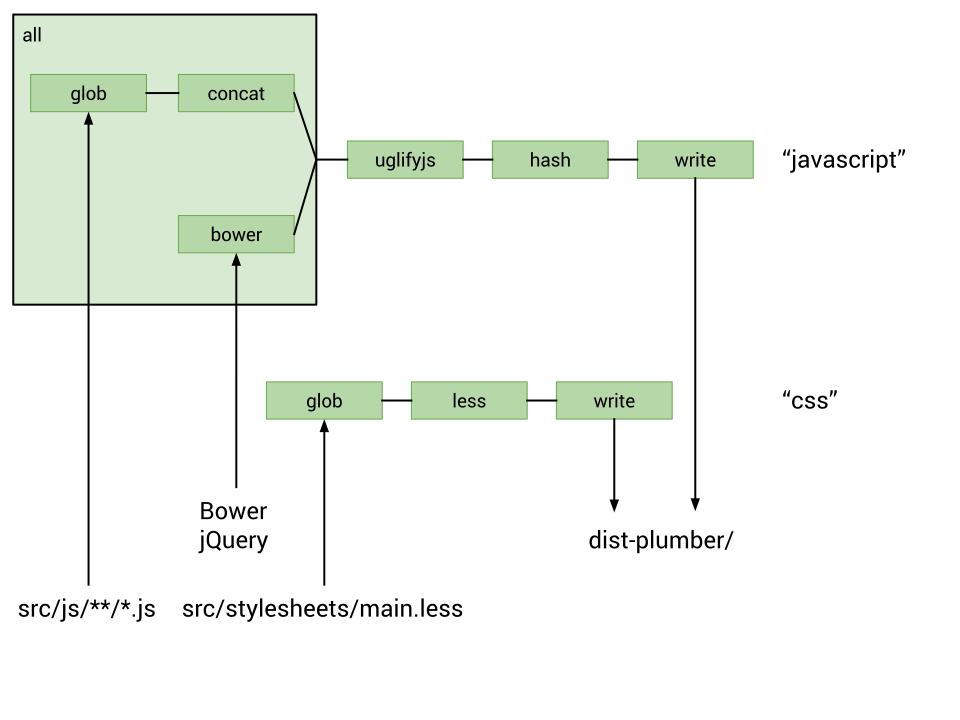
Following the principle of each operation doing only one thing and doing it well, even the sourcing of files is performed as an operation (glob). This creates a uniform way to address files, rather than each operation specifying its own format. It also allows other operations to source files, such as the bower operation above which gets the main file of the jquery local Bower component automatically.
Because all operations conform to the same interface of receiving a list of resources as input and producing a Promise of a list of resources as output, they can be composed easily.
The all operation augments the sequential nature of the pipelines by executing all the sub-pipelines it receives as argument in parallel, and piping the output to the rest of the pipeline. In the example above, both the concatenated all.js file and the jQuery library are passed to the next uglifyjs step.
This architecture leads to many advantages:
Scalability
If you add a new library to your project, you only need to do it in one place, not at every step.
For example, to add the masonry Bower component to your build, you simply add it to your sources below jquery and it will get uglified and hashed with the other files:
pipelines['javascript'] = [
    all(
        [glob('src/js/**/*.js'), concat('app')],
        bower('jquery'),
        bower('masonry'),
    ),
    uglifyjs(),
    hash(),
    write('dist-plumber')
];
Since you don’t have to change the configuration any of the rest of the steps, the complexity of your Plumbing file remains linear with the number of inputs, rather than the product of the number of inputs and the number of steps as it would in a Gruntfile.
Flexibility
The declarative nature of the pipeline makes it easy to move things around.
Bored of minimising jQuery yourself? You could use the minified version directly and simply move the uglifyjs operation one step up:
pipelines['javascript'] = [
    all(
        [glob('src/js/**/*.js'), concat('app'), uglifyjs()],
        // find jquery.min.js in jQuery Bower component directory
        bower('jquery', 'jquery.min.js')
    ),
    hash(),
    write('dist-plumber')
];
Composition and expressiveness
Operations are just plain JavaScript functions, so you can simply use variables to make the code more readable and avoid repetitions:
module.exports = function(pipelines) {
    var sources = glob.within('src');
    var jsFiles = sources('js/**/*.js');
    var lessFiles = sources('stylesheets/main.less');

    var toDist = write('dist-plumber');

    pipelines['javascript'] = [
        all(
            [jsFiles, concat('app')],
            bower('jquery')
        ),
        uglifyjs(),
        hash(),
        toDist
    ];

    pipelines['jshint'] = [
        jsFiles,
        jshint()
    ];

    pipelines['css'] = [
        lessFiles,
        less(),
        toDist
    ];

};
Sensible defaults
Plumber applies the principle of sensible defaults. For instance, if you’re hashing filenames, you’re almost certain to want to know the mapping of original to hashed filename, so it is outputted to the pipeline by the hash operation. In our example, it is also written to the dist-plumber directory.
To conclude this first post, I’d like to emphasise that Plumber is still in its early days and that none of this is to be taken as an attack against the principles behind Grunt (or Gulp, or any other build tools). There is a reason why these tools have become so popular, and I’m merely interested in probing ways to make it simpler and better to create for the Web. I hope sharing this rationale can help draft the node-task spec and encourage a discussion about what we all want from our build tools.
You’ll find the code for the simple example above in the plumber-examples repository, and Plumber itself in the Plumber repository.
Follow me on Twitter (@theefer) if you’d like to be notified of the next posts in this series. I’ll be talking about source maps and smart watching of changes.
Thanks to Oliver Ash for proof-reading this blog post!
]]>While I’m not a fan of CoffeeScript, for various reasons, and wouldn’t tend to use it myself, I completely respect your right to disagree and don’t mind at all if you use it for your projects.
What I do mind, though, is the use of CoffeeScript to reason and present information about JavaScript and JavaScript libraries.
The reason should be self-evident from the previous sentence. If not, bear with me.
The best analogy I can think of for the transpiled relationship between JavaScript/CoffeeScript is HTML/Haml.
Take the following example:
%blockquote.film{:cite => "http://www.imdb.com/title/tt0062622/quotes"}
    %p= Just what do you think you're doing, Dave?
    %footer
        = — HAL in 2001: A Space Odyssey
Which translates to:
<blockquote class="film"
            cite="http://www.imdb.com/title/tt0062622/quotes">
    <p>Just what do you think you're doing, Dave?</p>
    <footer>— HAL in 2001: A Space Odyssey</footer>
</blockquote>
Even though there is a somewhat guessable syntactic mapping between the two, would you use such a Haml snippet to illustrate the use of <blockquote> and <footer>? Hopefully not.
No matter how much you enjoy the power of an alternative syntax, using it for anything else than demonstrating that syntax distracts the attention from what you’re actually writing about.
Just because you know how to map CoffeeScript to JavaScript (and really, you should know) doesn’t mean everybody does, or cares to.
]]>Well, now I have.
]]>A better alternative is to use emacs itself to manage, install and update all the required extra code. The ELPA project provides a way to install packages from different repositories, while el-get can help you declare recipes to install and update code from ELPA, or even Github or Emacswiki.
First, let’s setup some code that tries to load ELPA and el-get, and installs them if they are not present.
; derived from ELPA installation
; http://tromey.com/elpa/install.html
(defun eval-url (url)
  (let ((buffer (url-retrieve-synchronously url)))
  (save-excursion
    (set-buffer buffer)
    (goto-char (point-min))
    (re-search-forward "^$" nil 'move)
    (eval-region (point) (point-max))
    (kill-buffer (current-buffer)))))

;; Load ELPA
(add-to-list 'load-path "~/.emacs.d/elpa")

(defun install-elpa ()
  (eval-url "http://tromey.com/elpa/package-install.el"))

(if (require 'package nil t)
    (progn
      ;; Emacs 24+ includes ELPA, but requires some extra setup
      ;; to use the (better) tromey repo
      (if (>= emacs-major-version 24)
          (setq package-archives
                (cons '("tromey" . "http://tromey.com/elpa/")
                package-archives)))
      (package-initialize))
  (install-elpa))

;; Load el-get
(add-to-list 'load-path "~/.emacs.d/el-get/el-get")

(defun install-el-get ()
  (eval-url
   "https://github.com/dimitri/el-get/raw/master/el-get-install.el"))

(unless (require 'el-get nil t)
  (install-el-get))
Note that when using emacs 24, package.el is distributed with emacs but it points to the GNU package repository; the code above adds tromey’s more complete ELPA repository to the sources.
Unfortunately, the ELPA installer script appends a snippet of code to the end of the ~/.emacs file to auto-load package.el on startup. To avoid any problem, it is best to manually remove that code any only keep the load-or-install code above.
Now that ELPA and el-get are setup, we can declare all the packages we want installed. They will be installed the first time emacs is started, and simply loaded in the future.
; extra recipes for packages unknown to el-get (yet)
(setq el-get-sources
      '((:name css-mode :type elpa)
        (:name js2-mode-mooz
               :type git
               :url "git://github.com/mooz/js2-mode.git"
               :load "js2-mode.el"
               :compile ("js2-mode.el")
               :features js2-mode)))

; list all packages you want installed
(setq my-el-get-packages
      (append
       '(css-mode egg gist js2-mode-mooz)
       (mapcar 'el-get-source-name el-get-sources)))

(el-get 'sync my-el-get-packages)
The el-get 'sync call does all the magic, based on all the packages past in argument (as my-el-get-packages). Any packages for which el-get has a recipe can be installed.
The el-get-sources variable allows to declare extra custom recipes for code to install. In the example above, css-mode is simply pulled from the ELPA repository, while js2-mode-mooz is fetched directly from Github.
Replicating this code in all your ~/.emacs files is a very easy and convenient way to bootstrap the same emacs environment on multiple hosts.
Hopefully, I’ll be talking about Ruby, Javascript, thick web apps, REST, Git, emacs and other things here soon.
Let’s see how long I can keep it going.
]]><div><span></span> foo</div>
While innoccuous in static pages, it becomes problematic when DOM nodes get updated after a delay by some Javascript, as the separating whitespace has disappeared, hence ruining the layout of your text.
Surprisingly, I haven’t found any reference to this IE bug (not that there is a shortage of complaints about other IE idiosyncrasies), so I thought I’d share the problem and the solution I have found here. It’s all demonstrated in the following example:
<!DOCTYPE HTML PUBLIC "-//W3C//DTD HTML 4.01//EN" "http://www.w3.org/TR/html4/strict.dtd">
<html>
<head>
<title>IE Whitespace Bug</title>
<script type="text/javascript">
function fill(name) {
var e = document.getElementById(name);
e.innerHTML = ‘hello’;
}
</script>
</head>
<body onload="fill(‘hello1′); fill(‘hello2′);">
<h1><span id="hello1"></span> world</h1>
<h1><span id="hello2"> </span> world</h1>
</body>
</html>
In the first case, the whitespace gets stripped, thus resulting in “Helloworld”. In the second example, the non-breaking space prevents IE from stripping the whitespace, so that when the span is filled by Javascript, the text reads “Hello world” as expected.
If you know other solutions or whether it’s considered a bug that will be fixed, please post in the comments!
]]>The topic was somewhat relevant for them as it’s reminiscent of MQL, the query language they developed for Freebase. It’s worth noting that although both share a pool of buzzwords such as “graph”, “loosely-structured”, “querying”, etc., they are not quite the same:
- Freebase is essentially a giant graph-database, which you query with MQL to retrieve graph fragments.
- The XMMS2 database is a flat denormalized store, which you query with graph-structured Collections to retrieve a list of entries.
Note: Collections 2.0 should however allow fancier querying to retrieve tree-shaped structures.
About 10-20 people showed up and listened to me babbling about the concept of Collections, the rationale behind them, the API, Collections 2.0, possible UI uses, what it represents for the user, pointers to S4, etc.
It’s all in those over-engineered slides that I have no choice but to put online, under Creative Commons Attribution-Share Alike 2.5 License, for them to live on forever on the internets. And yes, it’s still either in evil Keynote format (source), or in PDF.
Oh and Metaweb, thanks for the food!
]]>