Going Deeper Than The Core: Meet BNX
How we’re extending Moodle’s built-in BigBlueButton experience without forking it
For years, BigBlueButtonBN lived as a contributed Moodle plugin, built and maintained by Blindside Networks, downloaded onto thousands of sites, and steadily improved release after release. Then in 2021, something significant happened: Moodle HQ merged BigBlueButtonBN into Moodle core, shipping it as a built-in activity in Moodle 4.0. BigBlueButton stopped being an add-on and became part of Moodle itself.
That was a milestone but it wasn’t the finish line. Being in core means stability, reach, and a predictable release cadence. It also means the bar for changes is high, and the cycle is long. Meanwhile, the people running real classrooms, training programs, and meetings every day kept telling us the same things: the recordings table feels dated, the “wait for moderator” screen is confusing, group sessions could be smoother, and the universal product manager’s phrase “can you just add…” is common to hear.
So we asked ourselves a different question. Not “how do we patch the core?” but “how do we build on top of the core, safely, in a way that lets us keep shipping?”
The answer is BNX.
What is BNX?
BigBlueButton BN Experience (BNX) is a Moodle subplugin (technical name: bbbext_bnx) that sits on top of the core BigBlueButton activity. It does two things at once:
- It polishes the experience today, with concrete usability improvements you can install and use right now.
- It establishes a framework, an extension surface that lets new features plug in as isolated sidecar subplugins, without ever touching or forking the core.
That second point is the one we’re most excited about. BNX isn’t just a feature pack; it’s the foundation we’re building everything else on.
Why We Built It
Once BigBlueButton was in core, every customer-driven enhancement had three uncomfortable options:
- Fork core. Ship fast, but cut yourself off from upstream forever. Hard no.
- Patch core upstream. The right thing to do for broadly applicable changes, but slow, and the wrong fit for features that are customer-specific or experimental.
- Ship one-off plugins. Works once. Doesn’t scale to ten of them, especially when they each want to override the same hooks.
BNX gives us a fourth option: one safe place to extend and override core BigBlueButton behavior, designed from day one to host more subplugins on top of it. New functionality plugs in as a sidecar: added, swapped, or scoped to specific deployments without disturbing anything else. Customers get faster delivery of the things they actually ask for. Administrators get clean upgrades. Moodle core stays clean. Everyone wins.
What Ships In BNX Today
The first release of BNX focuses on two of the most-requested usability fixes:
A real pre-session lobby
The default “wait for moderator” screen tells students very little: are they in the right place? Has the class started? Did something break? BNX replaces it with a proper pre-session lobby that gives participants a clear, controlled entry experience, one that mirrors actual session readiness. Instructors get more control over when people come in; students know exactly where they stand.
A modernized recordings view
If you’ve ever scrolled through a long list of recordings in the legacy YUI table, you know the pain. BNX replaces it with a responsive HTML/CSS table that supports sorting, searching, and pagination, the basics you’d expect from any modern web app. Recordings become genuinely easier to find, review, and share.
Both of these are improvements you’ll feel the first time you log in. But they’re also intentionally chosen as proof points, they exercise exactly the kind of extend-don’t-replace pattern the framework is built around.
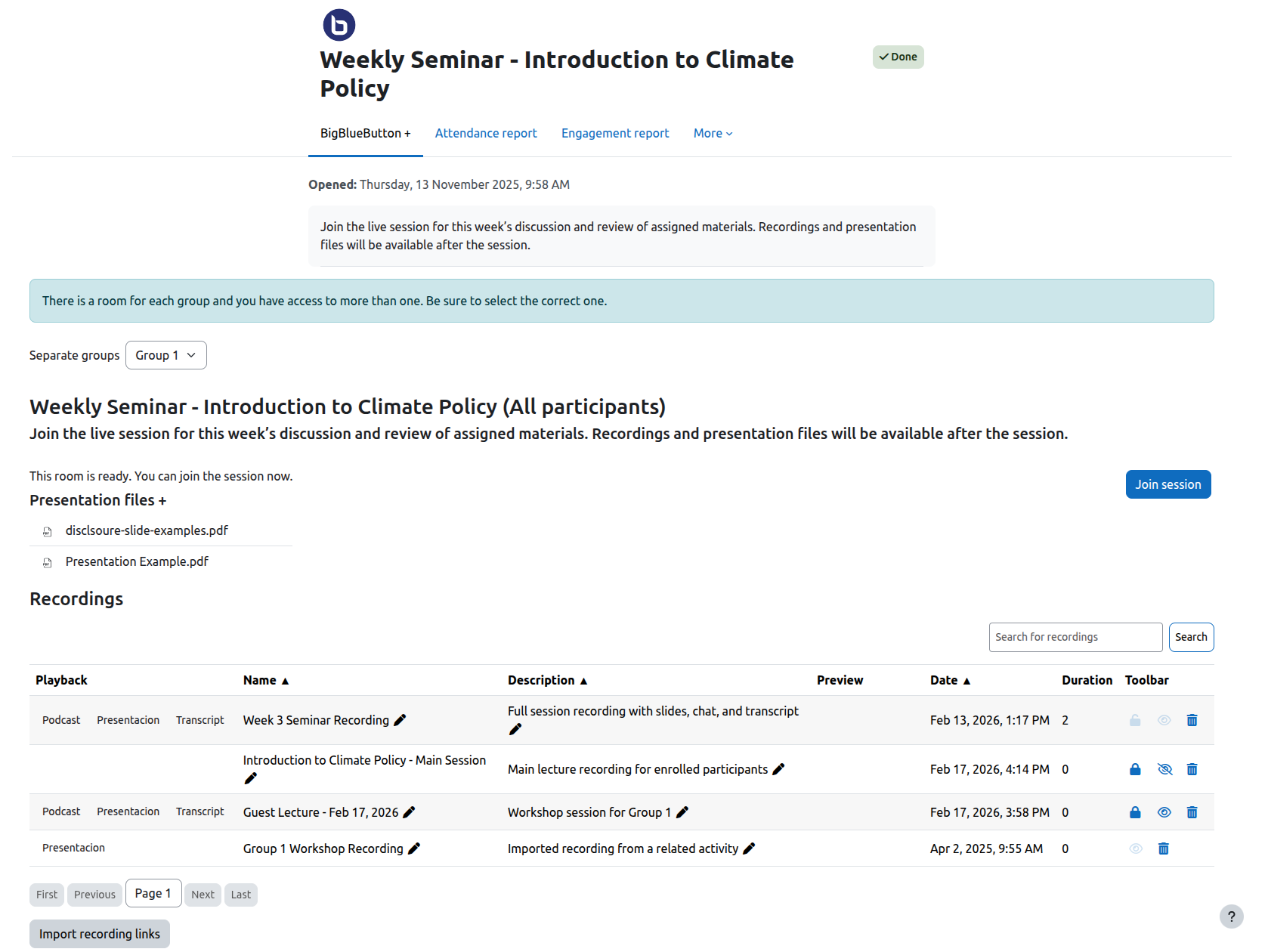
Screenshot of the bbbext_bnx plugin’s responsive HTML/CSS table for recordings.
What’s Next On the Roadmap
Because BNX is a framework, not a finished product, the roadmap is the interesting part. The same extension model that powers the lobby and the recordings view is what unlocks everything below, each one shipping as a sidecar subplugin, on its own timeline, without us touching the core. Some are already in flight as their own BNX modules.
- Multiple pre-uploaded presentations. Pre-uploading a single presentation is already part of the core. BNX takes it further by letting teachers attach several presentations to a session in advance, ready to switch between mid-class so a lesson can move from slides to a worksheet to a reference deck without anyone scrambling at the bell.
- Early teacher access to rooms. Give instructors a way to enter the room ahead of students to check audio, lay out slides, prep breakouts without artificial waits or workarounds.
- More reliable group session handling. Smoother behavior for courses that lean heavily on Moodle groups and groupings.
- BNX Insights. A sidecar that passes the Moodle course roster into the BigBlueButton session, so the teacher sees a list of expected attendees, not just who showed up, but who’s missing. It also surfaces relevant Moodle context as in-session alerts inside BBB, putting the right information in front of the teacher exactly when they need it.
- BNX DataHub. A companion sidecar that exposes session and recording data to downstream tools (reporting, analytics, integrations) through a clean, secure interface, without anyone needing to wire into core directly.
- Customer-specific extensions. Bespoke behavior for individual deployments, packaged as their own sidecars, no impact on anyone else’s upgrade path.
And that list is deliberately not closed. The whole point of building a framework is that we don’t have to predict every feature in advance, we just have to make sure the next one can plug in cleanly. BNX is designed so it can.
Where It Goes From Here
Moving BigBlueButton into Moodle core in 2021 was about reach, making sure every Moodle teacher had a virtual classroom available out of the box. BNX is about depth: taking that solid foundation and making it noticeably better to use, while opening a path for everything that comes next.
If you run BigBlueButton on Moodle today, BNX is a drop-in install that improves the experience immediately. If you’re thinking about what your virtual classroom needs to do six or twelve months from now, it’s also the surface those features will arrive on.
We’re just getting started.
Get BNX
BNX is available now from the Moodle Plugins directory: moodle.org/plugins/bbbext_bnx. Install it alongside the core BigBlueButton activity and you’re set. No migration, no fork, no risk to your existing setup.
The post Going Deeper Than The Core: Meet BNX appeared first on Blindside Networks.
]]>BNX Experience: Improving the BigBlueButton Experience in Moodle
BigBlueButton is a reliable foundation for live online learning but even trusted tools can be made easier to use. Enter bbbext_bnx (BigBlueButton BN Experience): a new Moodle subplugin that enhances core functionality and introduces a framework for future improvements.
Rather than adding isolated features, BNX extends and refines core behavior, improving usability for students, teachers, and administrators alike.
What’s New in This Release
1. Pre-Session Lobby
Forget the confusing “wait for moderator” screen. BNX introduces the BigBlueButton pre-session lobby, giving participants a clear, controlled entry experience that mirrors real session readiness. Instructors gain better control, and students know exactly what to expect.
2. Modernized Recordings View
The legacy YUI table for recordings is gone. BNX replaces it with a responsive HTML/CSS table that supports sorting, searching, and pagination; making recordings easier to access, review, and share.
3. Smarter Group Handling
Complex group-based sessions can now behave more reliably. Targeted fixes ensure consistent and predictable behavior, even in challenging course setups.
Screenshot of the bbbext_bnx plugin’s responsive HTML/CSS table for recordings.
Built as a Framework
BNX is designed as a subplugin framework. This means:
- It can extend and override core BigBlueButton behaviors safely
- Future subplugins and features can plug in without disrupting workflows
- It creates a foundation for upcoming enhancements, like pre-uploaded presentations or early teacher access to rooms
Who Benefits
- Administrators: Cleaner management, stable upgrades, and ready-to-extend framework
- Teachers: Smoother session entry, modern recordings view, more reliable group handling, fewer session headaches
- Program Managers: Standardized experience, and a foundation for analytics
Looking Ahead
BNX sets the stage for a roadmap including:
- Multi-file pre-uploaded presentations
- Early teacher access to test sessions
- Subplugin ecosystem for automation, alerts, and integrations
Blindside Networks also offers Insights (engagement reporting) and DataHub (secure session data access) to complement BNX.
Getting Started
- Download and install the plugin in your Moodle environment
- Enable it for your BigBlueButton activities
- Enjoy the improved lobby, recordings interface, and more consistent sessions
bbbext_bnx is the first step toward a more usable, consistent, and actionable BigBlueButton experience. Upgrade your Moodle environment today and start experiencing the difference.
The post BNX Experience: Improving the BigBlueButton Experience in Moodle appeared first on Blindside Networks.
]]>Blindside Networks Accepts Award
Let’s get right to it.
We won the Certified Integration Partner of the Year award of the year for driving the most revenue to Moodle for our integration of BigBlueButton.
That … felt … great.
Blindside Networks, the company behind both BigBlueButton and the BigBlueButton integration with Moodle, took center stage and accepted the award.
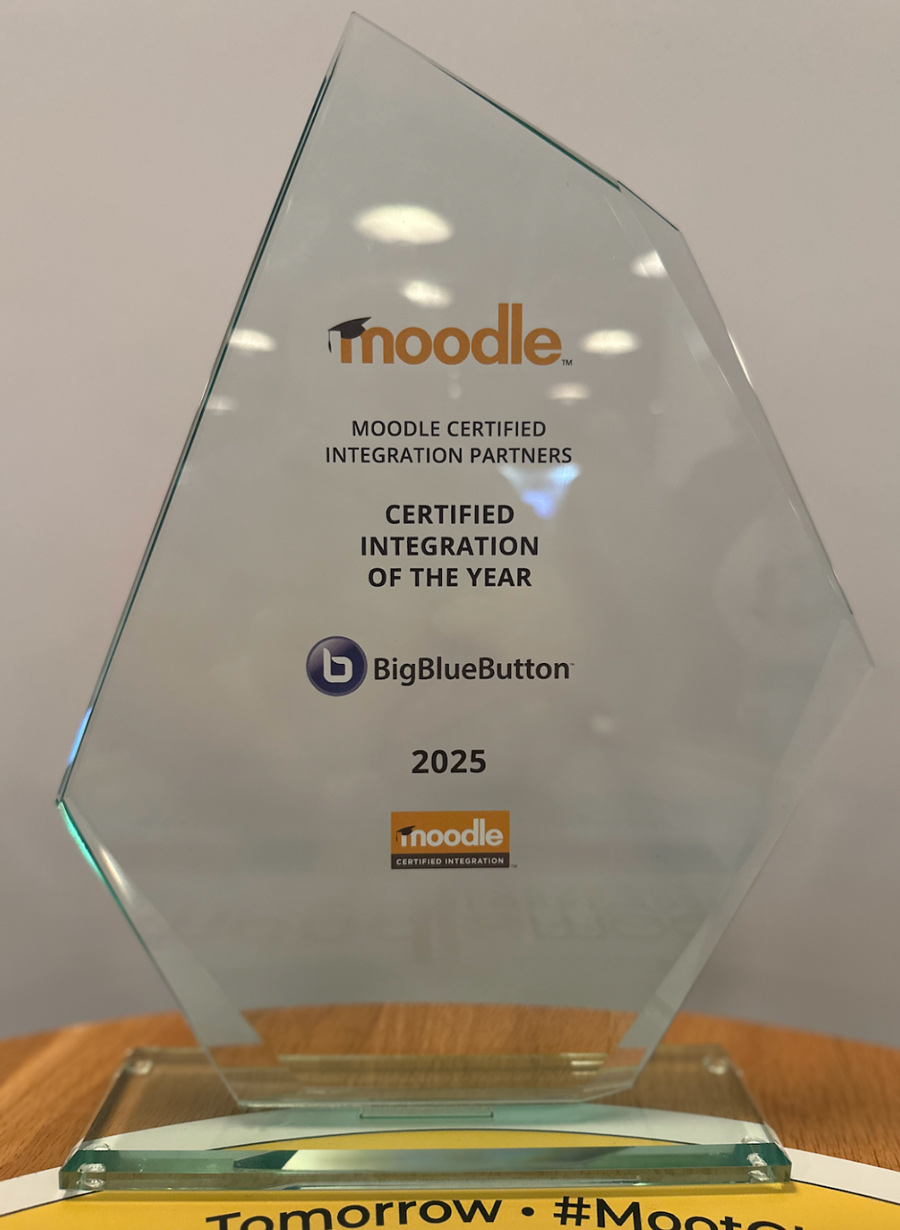
Blindside Networks accepted its award for its integration of BigBlueButton in Moodle
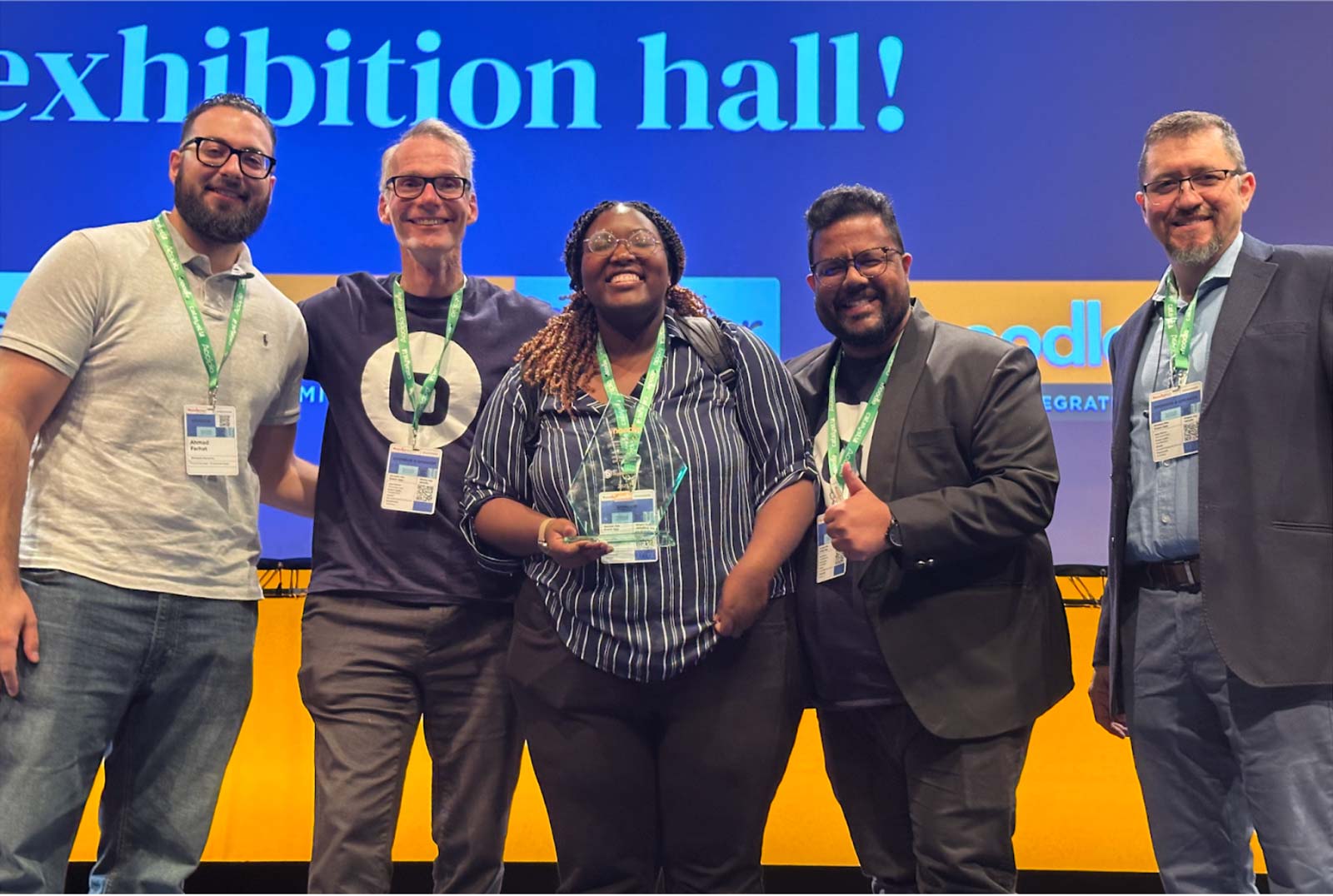
Members of the Blindside Networks team at the Global Moodle Moot: Ahmad Farhat, Fred Dixon, Shamiso Jaravaza, Binoy Wilson, and Jesus Federico
Why we won
We’ve been working towards this award for 15 years.
At Blindside Networks, we wrote the first integration with Moodle in 2010. In 2020, Moodle HQ incorporated that integration into the core of Moodle 4.0, making it available to the over 180,000 Moodle sites when they upgrade. Fast forward, we have worked closely with Moodle through 4.1, 4.2, 4.3, 4.4, 4.5, 5.0, and now 5.1 releases to deepen the integration (more on this below).
We like to say that BigBlueButton looks like part of Moodle because it is part of Moodle. This award not only reflects the integration but also the adoption of BigBlueButton by Moodle’s customers.
But why are organizations choosing BigBlueButton instead of Teams, Zoom, Meet and other video conferencing systems? After all, for many organizations, Microsoft Teams is “free”, so why not use that instead of BigBlueButton?
The answer is the classroom is not a boardroom.
The goal of the classroom is not to meet, it is to learn. Video conferencing systems, in contrast, are just sharing bits on your screen. There is an absence of pedagogy, minimal tools for active learning, and no built-in learning analytics. Using these platforms, educators try their best to engage students in a one-way session, but in a one-way session learners passively learn, and the results are unsatisfying for both.
Pedagogy, the science of teaching and learning, shows that we, as humans, are not computers. We learn best in a social environment where we can actively learn, make mistakes, get feedback, and connect the new knowledge to a larger framework. The learn-it/link-it approach has, and still is, how our brains work.
Moodle focuses on asynchronous learning, BigBlueButton focuses on active learning with live analytics to ensure every student learns. Together, based on how our brains work, the results are a far more effective learning experience.
“We pretty much use BigBlueButton exclusively for student-facing work, and it’s been critical for delivering advanced math online classes and teacher professional development.”
At the MoodleMoot Global, we showcased how this integration is getting even deeper.
Deepening the integration with Moodle
BigBlueButton now extends the activity completion to share more data with Moodle, and Moodle can now surface its insights back into BigBlueButton.
BigBlueButton → Moodle
We created a new Moodle sub-plugin that populates Moodle’s database with the analytics from each meeting. The result: it’s now possible to create unified reports of synchronous + asynchronous reports in Moodle.
For example, it’s trivial to now create an attendance report.
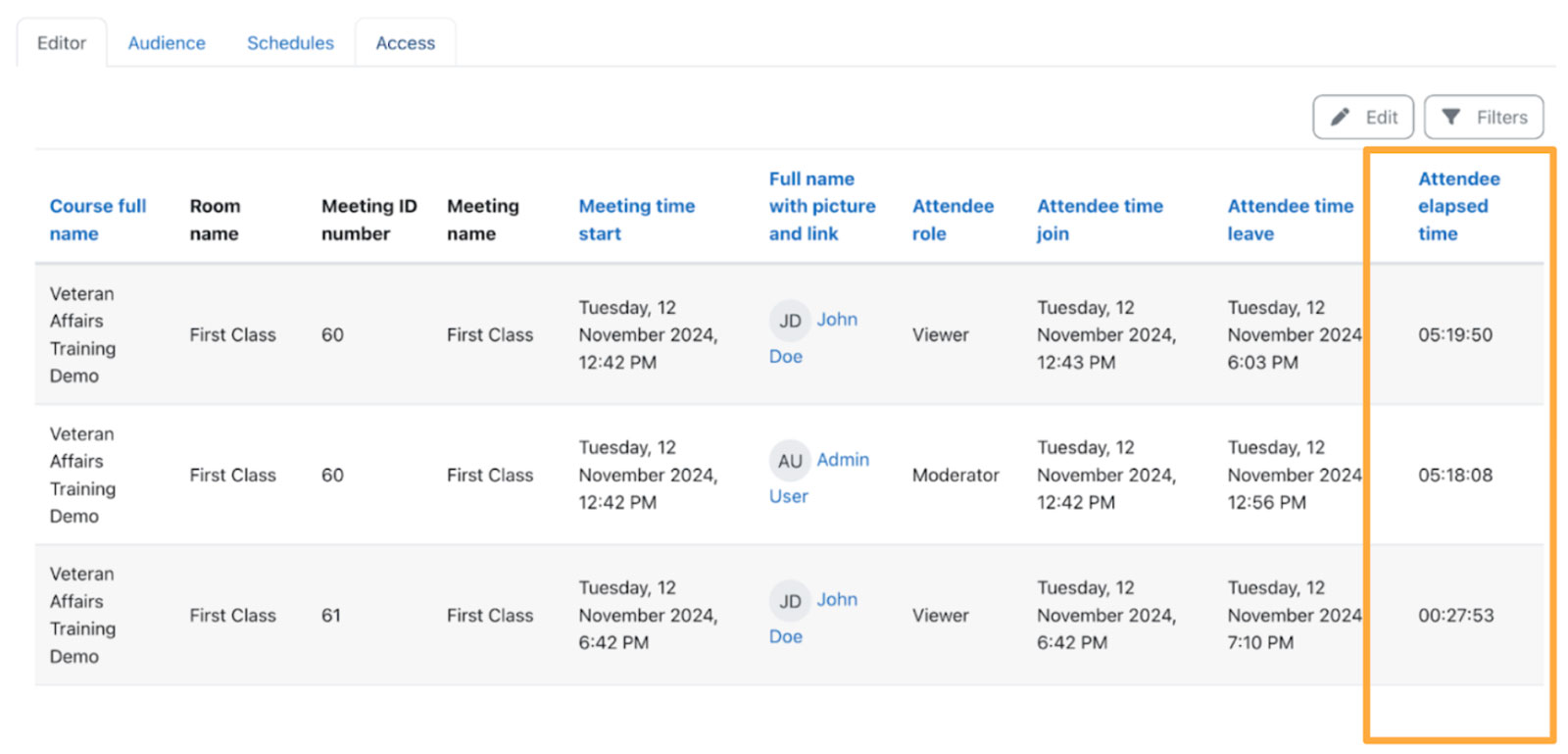
A unified report in Moodle showing student’s time in each BigBlueButton session
With data from student’s activities in BigBlueButton now in Moodle, any report that is looking to predict students at-rise will now become far more accurate.
Moodle → BigBlueButton
Now that Moodle has unified data for greater insight, you can surface this insight into subsequent sessions educators have this data at their fingertips. The result: a saving of time and greater visibility into each student’s learning journey. The result: a time saving for educators and the ability to give more personalized feedback to students during the class.
For example, this is a sampling of data that could be shown to the educator for each student.
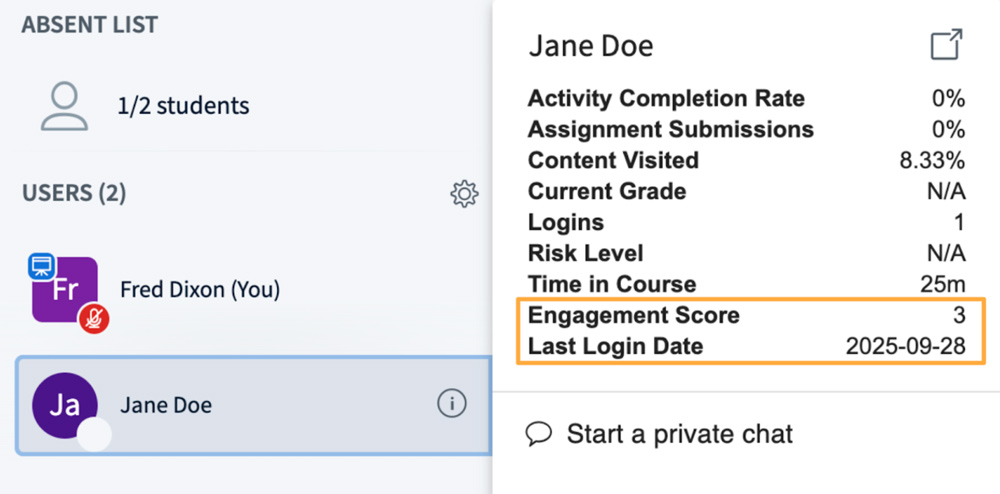
Analytics from Moodle at your fingertips in BigBlueButton
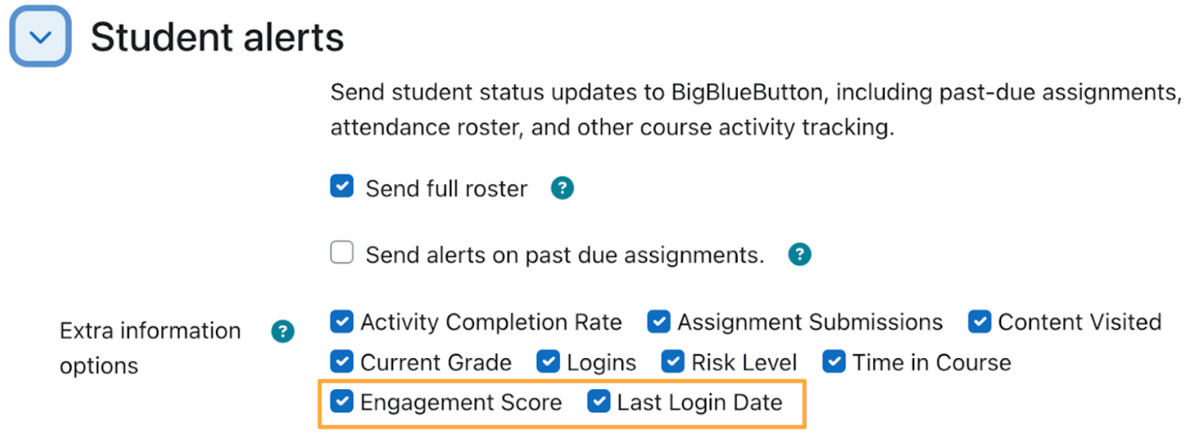
The educator can customize Moodle’s analytics visible to them in BigBlueButton
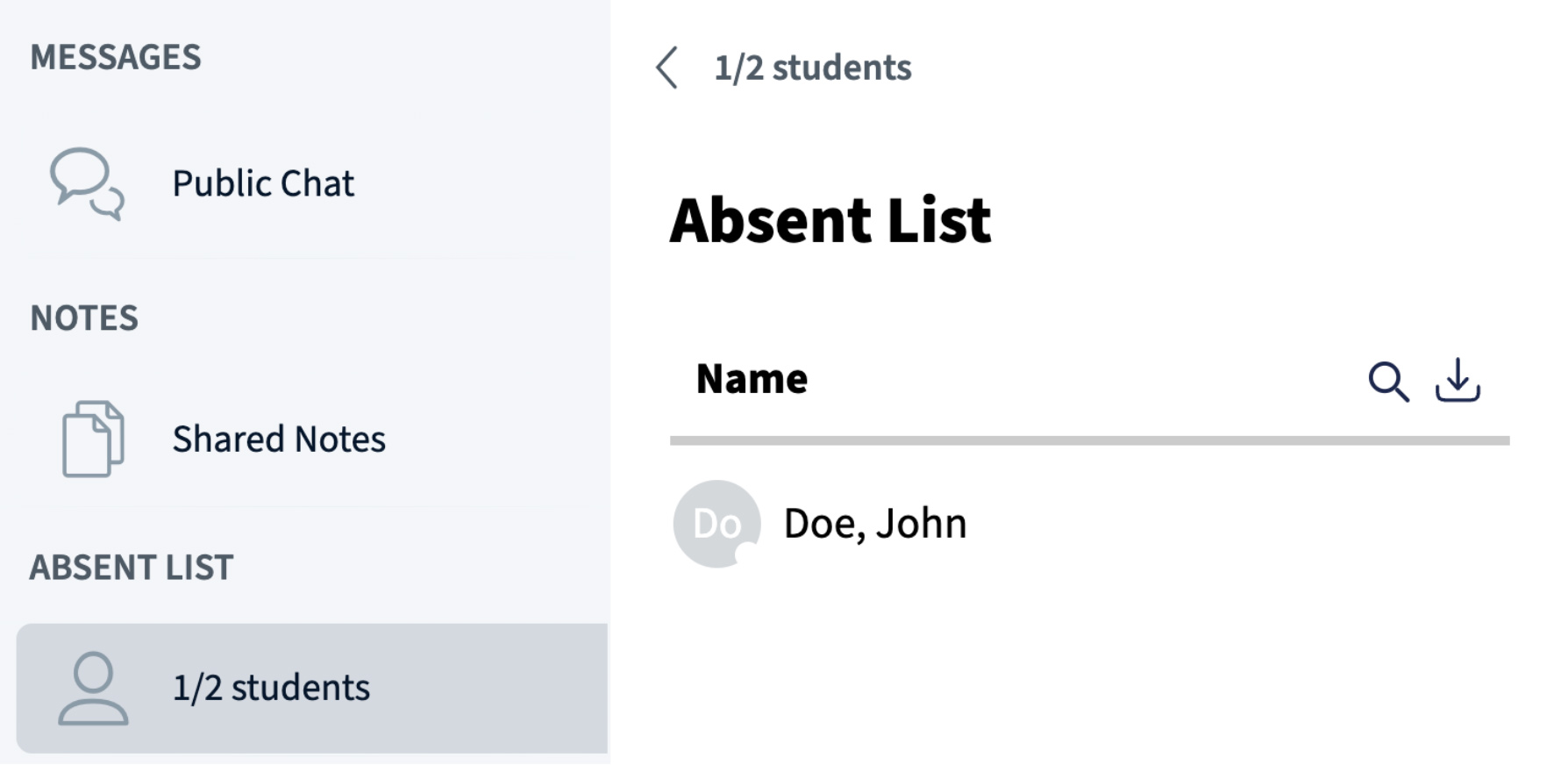
BigBlueButton can use the course roster to show the list of absent students
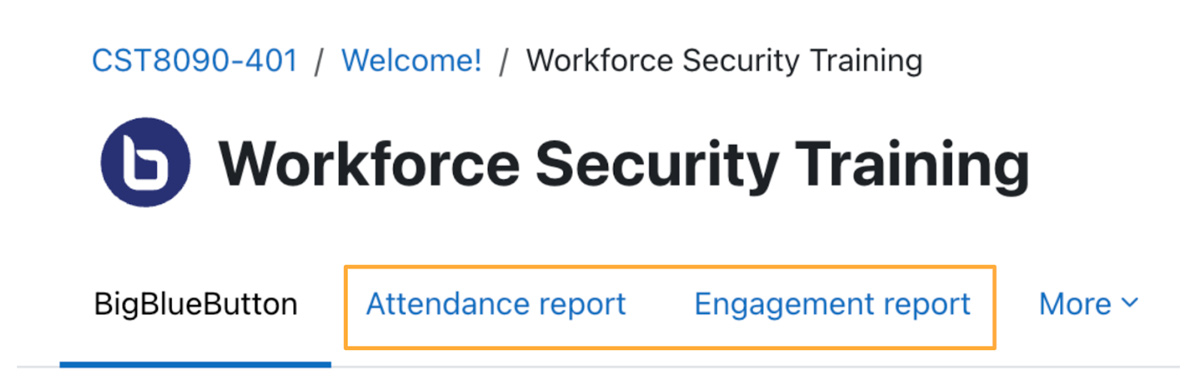
Here there are two reports for this BigBlueButton activity available with a single click
Also coming in Moodle 5.1, we enabled a sub-plugin to now override the display of the recordings.
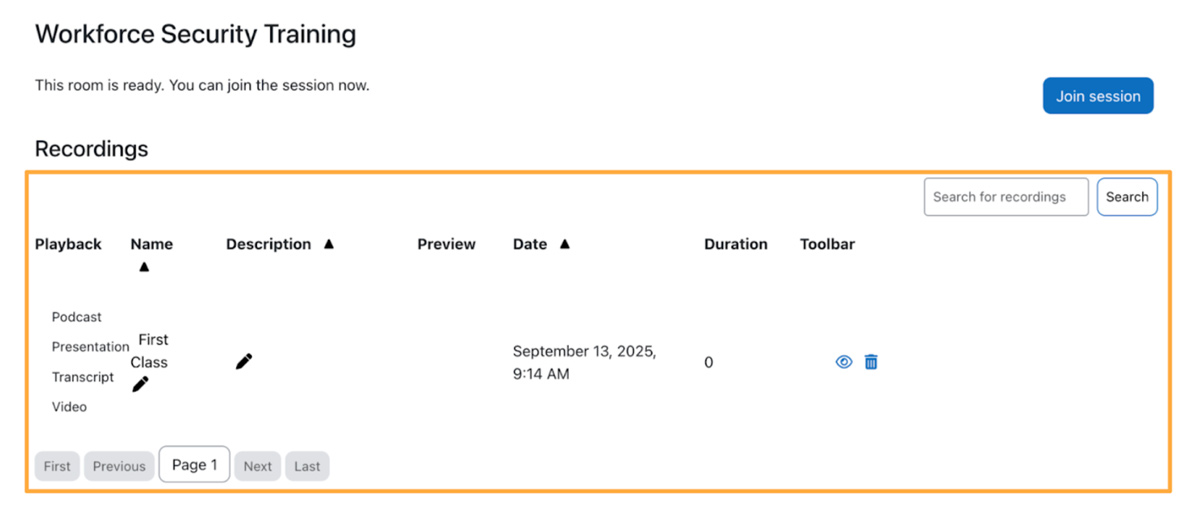
The list of recordings can have a whole new look
The Future of Virtual Classrooms
In the age of AI, where many students are using AI to cognitively offload and reduce real learning, the classroom – physical or virtual – is going to become even more important.
In his presentation The future of virtual classrooms built on pedagogy, AI, and analytics, Fred Dixon, CEO of Blindside Networks, emphasized the importance of Authentic Engagement, which is a component of Social Constructivism, the foundation of Moodle, where humans learn best from humans.
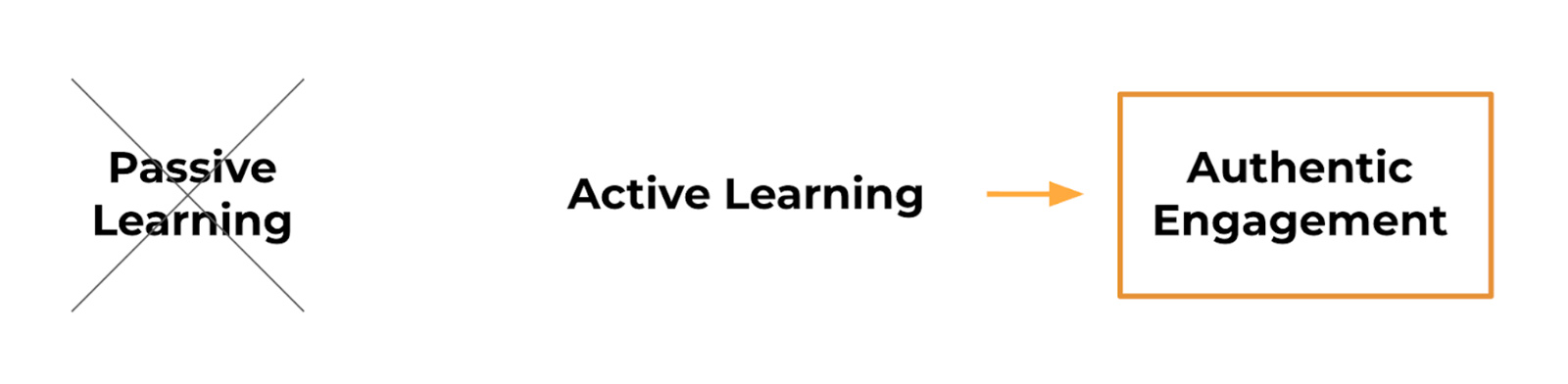
Authentic Learning will be even more important in the age of AI
In Social Constructivism, we learn best when we are engaged in social activities for creating and learning together. The learning further extends to learn-it/link-it/teach-it.
Makes it also possible to build foundational skills such as creative thinking, interpersonal skills, leadership skills, communication skills, and problem solving skills. And, the more insight the educator has in a student’s learning journey, the better they can provide feedback.
We don’t need more AI in the live classroom, we need more authentic engagement for learning. One example Fred gave was a new capability for BigBlueButton called Visual Submit, where the educator can ask “Work on this math problem and give me a snapshot of what you are doing. I can then give you direct feedback.”
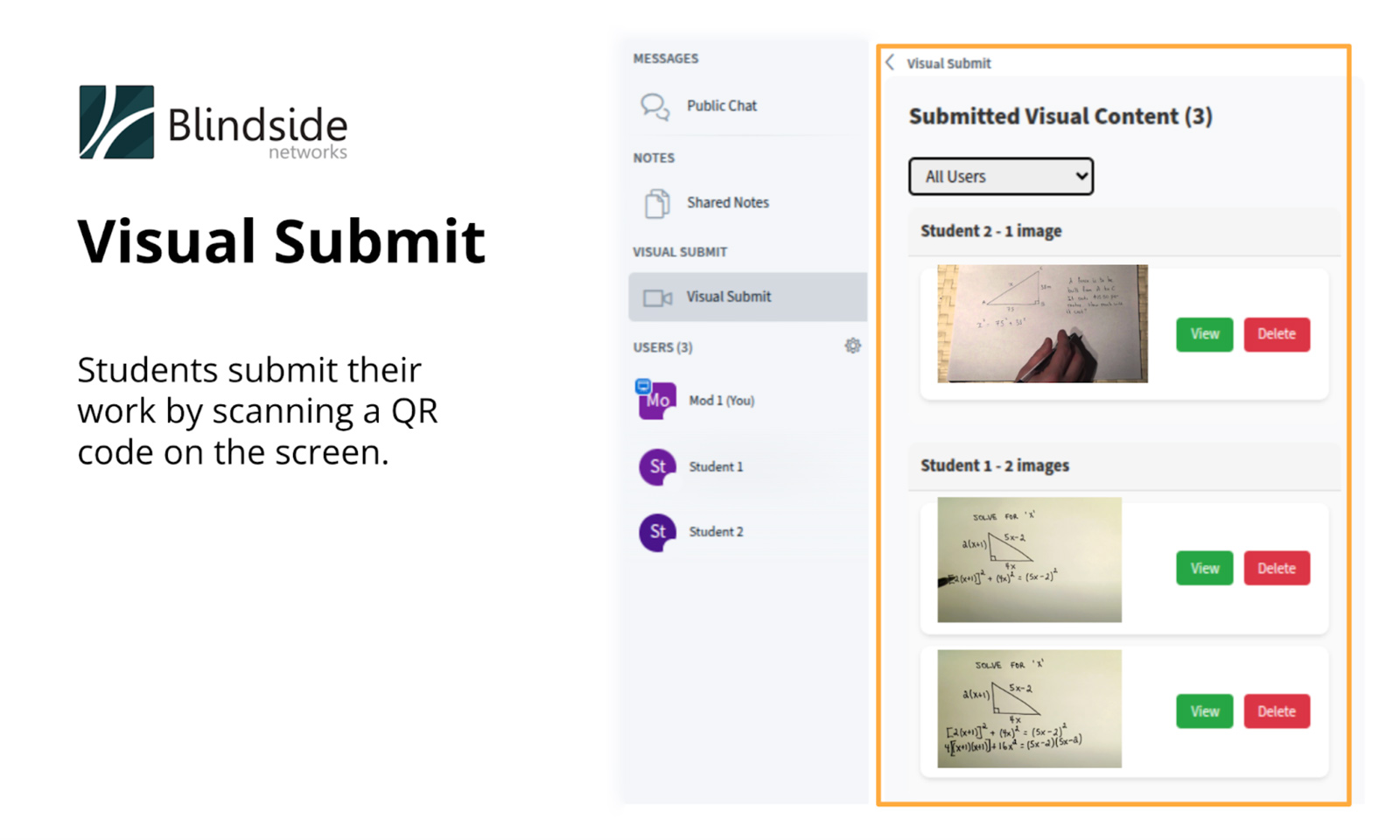
Blindside Networks is adding capabilities to enable learners to visually submit their in-class work for feedback in BigBlueButton
Summary
This award shows why Moodle chose BigBlueButton in 2020 as their built-in virtual classroom. We continue to deepen the integration for Moodle with:
- BigBlueButton → Moodle: Unified reports
- Moodle → BigBlueButton: Student Alerts and Absentee List
Coming in Moodle 5.1, we will continue to deepen the integration with:
- Once click viewing of reports within the BigBlueButton activity
- Custom displays of past recordings within the activity
The goal of Moodle is empowering educators to improve our world. We share the same goal and it’s our passion to continue to deepen the integration and improve BigBlueButton for educators world-wide to deliver more effective online classes.
To find out more about how Blindside Networks can help you improve the delivery of your virtual classes within Moodle, reach out to your Moodle Partner (we are working with over 25 Moodle Partners that resell our services), or contact us directly.
The post BigBlueButton Wins Moodle Certified Integration Partner of the Year Award for 2025 appeared first on Blindside Networks.
]]>At Blindside Networks, we’ve been working with Instructure since 2012, which is when they first embedded BigBlueButton into the core of Canvas. We are the creators of BigBlueButton and are very proud of our work to provide the world the best virtual classroom.
Since then, InstructureCon has grown, Instructure the company has grown, and so have we.
While we’ve both grown organically, there were a few inflection points. When the Covid-19 global hit, the demand for learning management systems and virtual classroom platforms skyrocketed. It accelerated both our growth.
Today, the inflection point is AI and its outsized effects on education, especially for learners, and especially for potentially nullifying the real learning that occurs for take-home assignments and essays.
With all the AI, we wanted to put forward a clear message of where we think AI and analytics belong in learning.
Our InstructureCon 2025 presentation: Enhancing Virtual Classrooms with Analytics: Supporting Instructors, Not Replacing Them
My presentation drew over 100+ attendees this year, and at the start I asked a simple question.
“Does AI help learners learn?”
The possible answers were “Yes”, “No”, and “No effect”. Take a moment and think about which one you believe is the correct answer.
I believe all three are correct answers depending on when and how you use AI. For when, I gave the following learning curve.
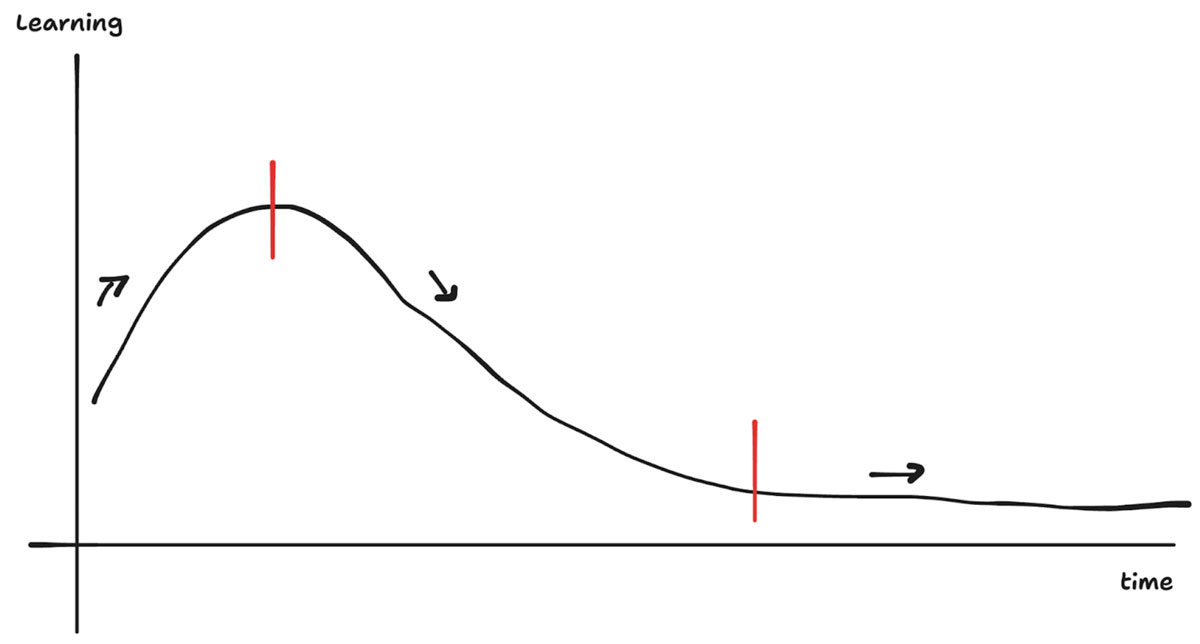
Think for a moment the effects of using GPS for driving. In the beginning, it helped drivers save time, but they still knew the familiar routes by heart. After a while, it helped to navigate to unfamiliar places without reading a map. Now, I’ve rarely seen drivers use a map anymore.
There is a similar progression for learning. If you start with something you already know, AI can strengthen learning by figuring out the gaps, checking over your work, or making helpful suggestions for improvement. AI is the coach, and it’s helping you strengthen the knowledge you already have.
However, there is a slippery slope. Every student has had that moment where they realize “Wow, once I learn the right prompts, I can have AI do my assignments and essays.” That’s when cognitive offloading occurs, and it’s seriously negative learning, especially for younger learners.
What happens if you follow cognitive offloading? There is no more learning (that’s the third section of the graph). I believe this is analogous to using a calculator: you punch in numbers without thinking, you take the answer at face value, and you move on. Minimal effort, no changes in your brain, and no learning.
And where does this trend in cognitive offloading assignments leave education?
If the value of take-home assignments continues to dwindle (and why wouldn’t students take the easier path?), then I believe the classroom will become even more important in our education system.
I’m impressed with all that Instructure is doing with AI to optimize the LMS to support educators, and we are certainly pulling hard to optimize BigBlueButton for the virtual classroom.
What can both of these optimizations do to counteract the reduced value of assignments?
I believe it’s to create more time for enabling authentic engagement with students in the classroom, physical or virtual, which is our focus as a company.
Customer Feedback: What Is Authentic Engagement?
We all have that teacher who inspired us, who was aware of us, and who cared about us. What a difference they made, and similar human-to-human experiences that would be beneficial for all learners.
At InstructureCon, we asked everyone who came to our booth to write down their answer to a simple question.
What would be a good example of authentic engagement in a virtual classroom?
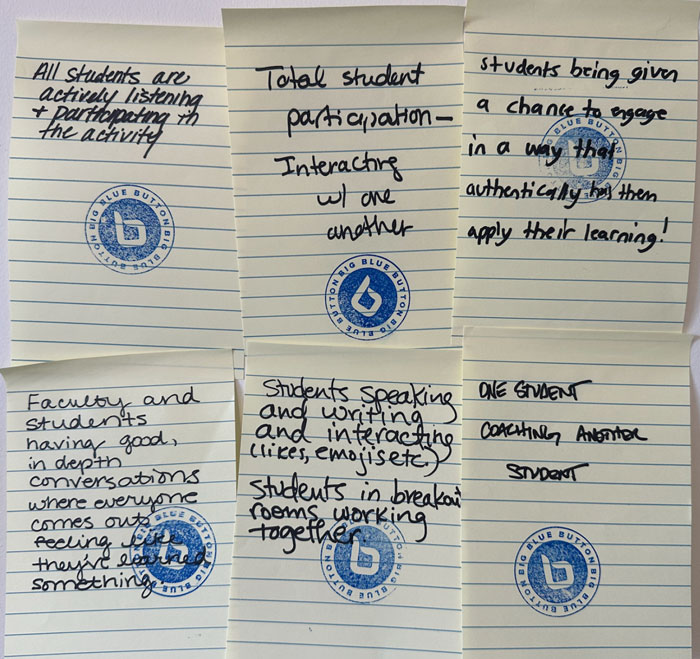
We got a *lot* of responses (over 200 in fact!).
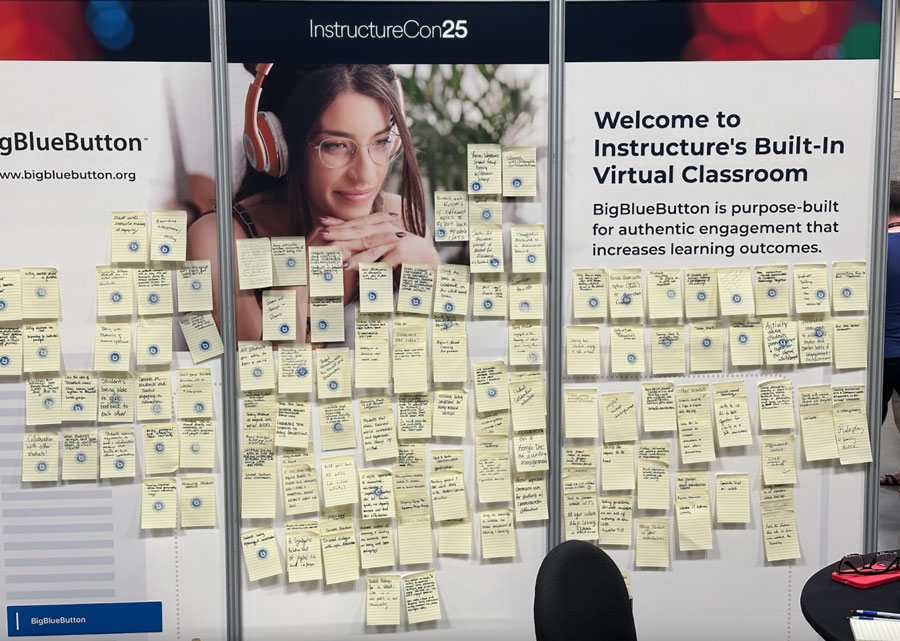
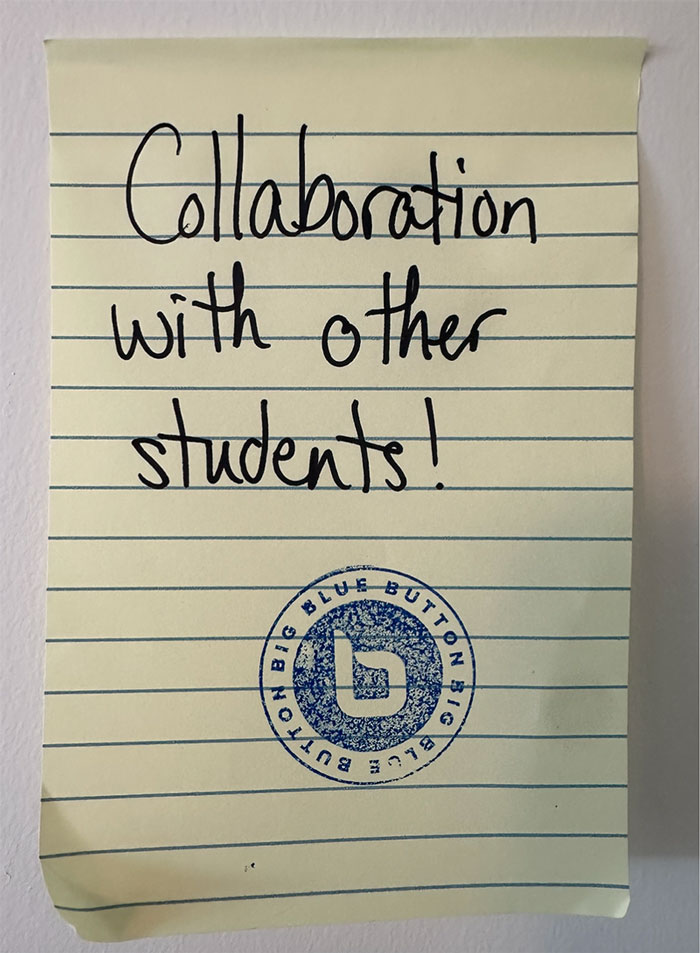
A key theme was collaboration with and between other students.
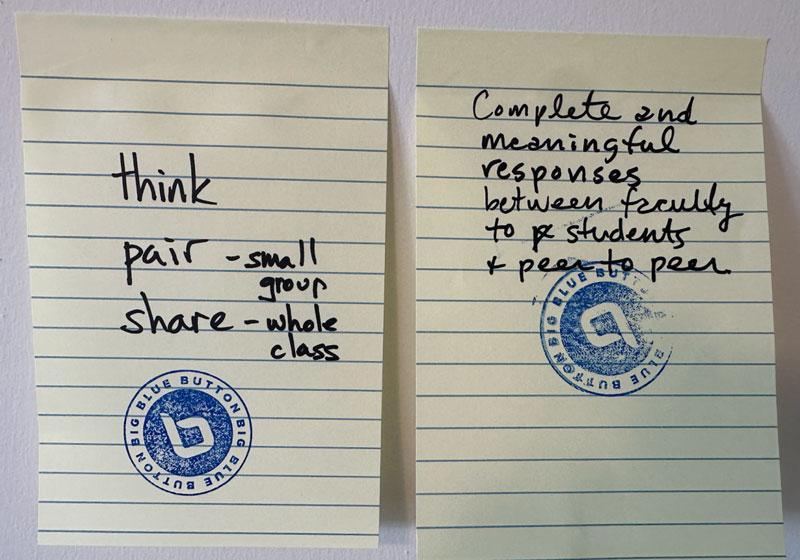
This theme was emphasized in one instructor highlighting the pedagogical think-pair-share model, which again emphasizes human-to-human learning that fosters creativity, critical thinking, and interpersonal skills.
Our Response: Three New BigBlueButton Capabilities
1. Quizzing
You can now easily give students low-stakes quiz questions (these questions are not dependent on the Canvas Quiz, nor affect their grade). Both for formative assessment and encouraging students to have some skin in the game before instruction. Check out this video for how quizzing works and how it extends the Learning Analytics Dashboard to give greater insight on student learning during your live class.
2. Visual Submit
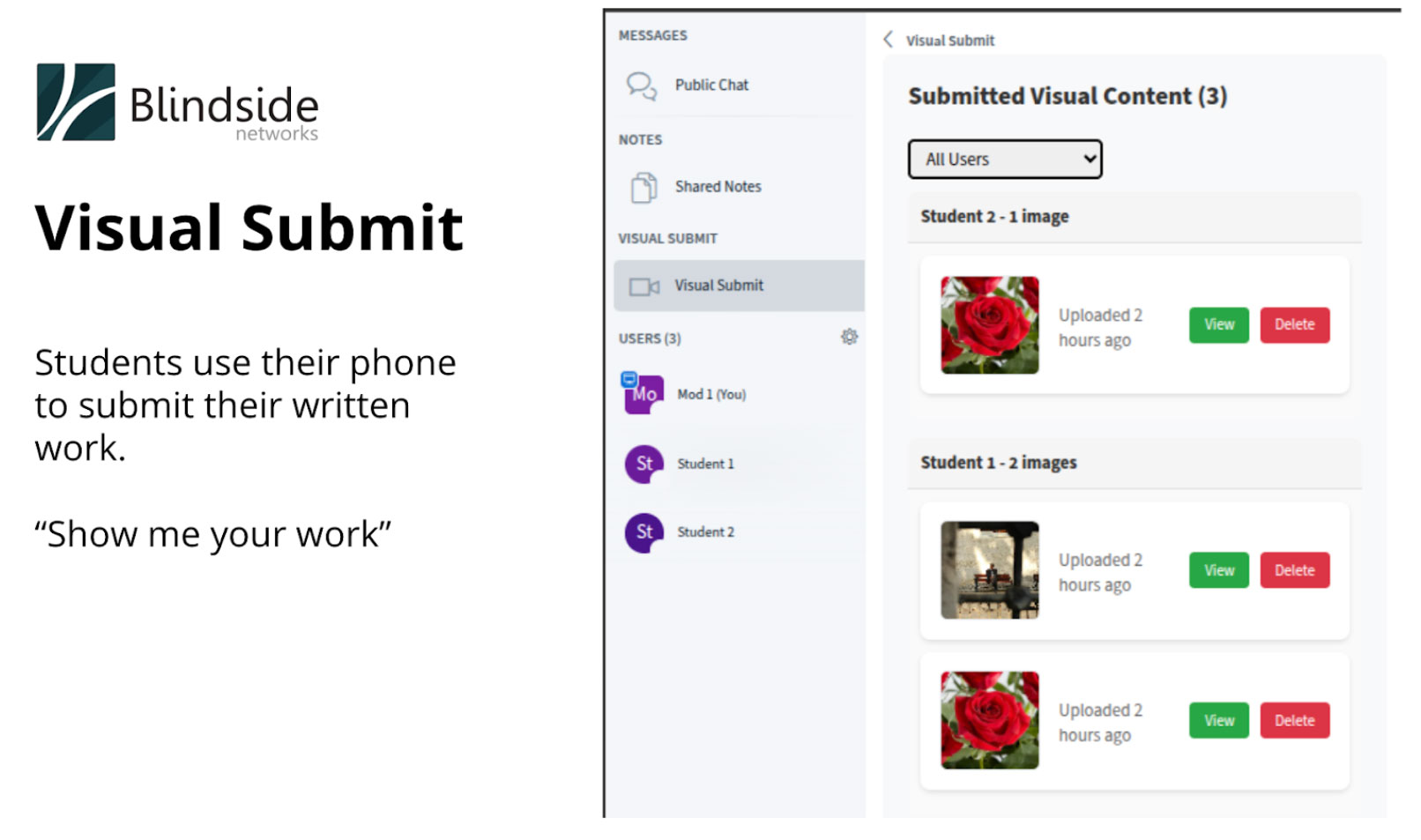
Instead of using computers, have you ever asked students to pull out a pen and paper, work on a problem, and then share with you the results?
Now it’s easy with BigBlueButton. With Visual Submit, BigBlueButton shows a QR code that students can use to take a picture and submit the work directly to you. You can see their authentic effort to solve a problem and give them direct feedback.
3. Student Insight
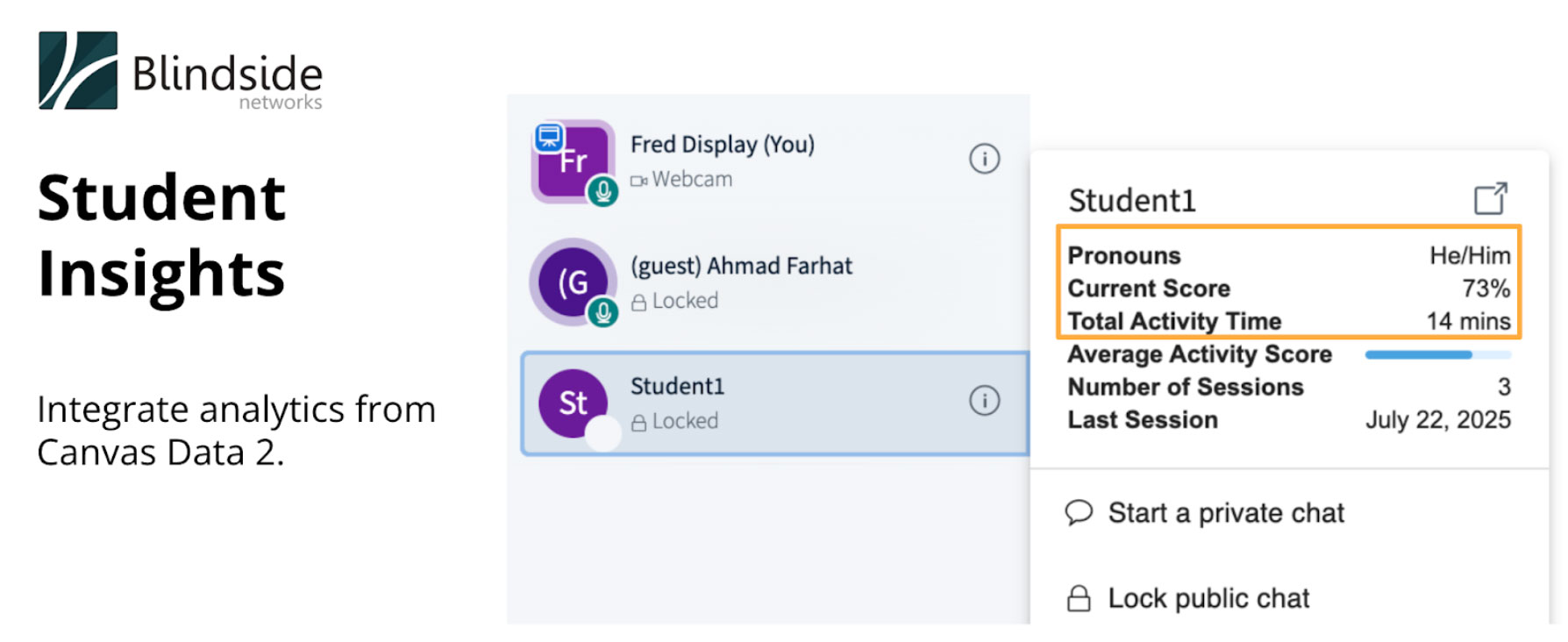
Canvas already knows about students’ past activity in the LMS (such as when the last logged in), and Blindside Networks has a product called Enterprise Learning Analytics Dashboard (ELAD), which aggregates all of a student’s past activity in BigBlueButton at a high-level for decision makers.
With Student Insight, we can now display both data sources together, in the live class, to educators. The benefit is it reduces the cognitive load on Educators and gives them analytics for greater insight and personalized feedback to their students.
(You could look up this data manually, but that takes valuable time away from … you guessed it .. more authentic engagement).
Summary
This was, by far, our best InstructureCon yet measured in attendance to our presentation, feedback from on improving authentic engagement in the virtual class, and reception to the above three features.
Want to try out BigBlueButton in Canvas?
The good news is you already have access to BigBlueButton for free! BigBlueButton is built into the core of Canvas as BigBlueButton Essentials. It’s free for up-to 5 concurrent sessions, and recordings expire after 7 days.
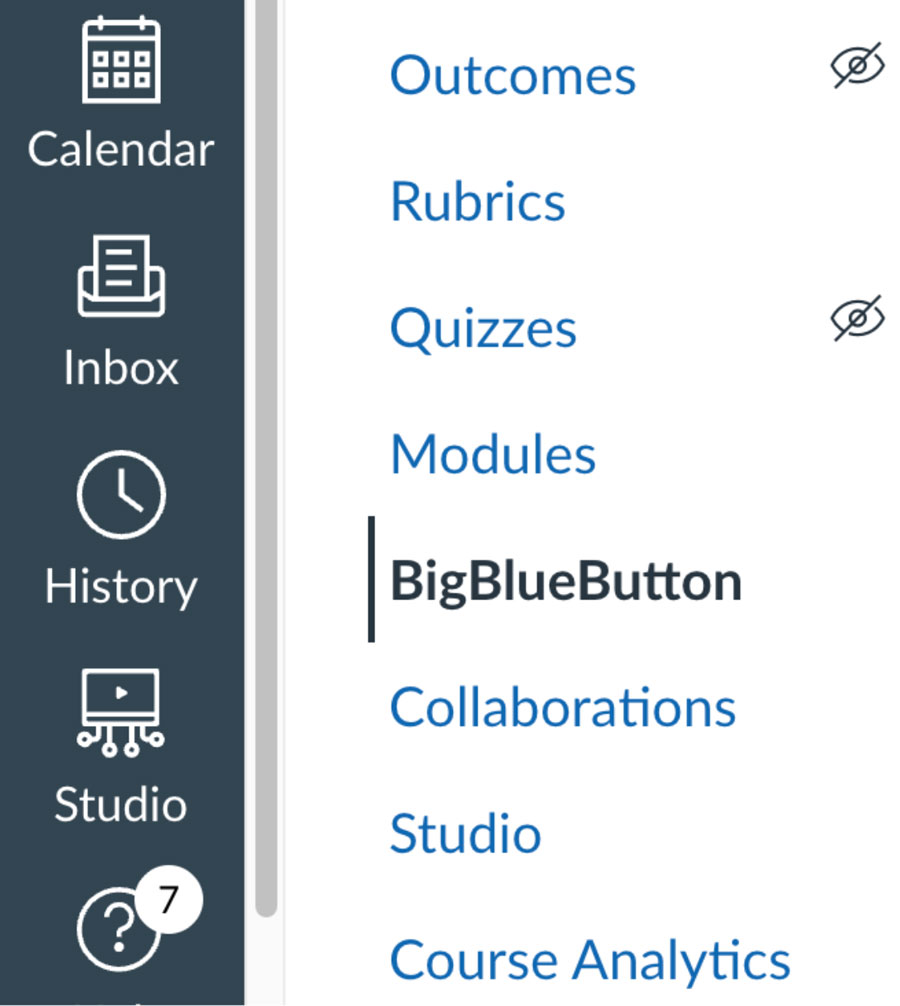
Why did Instructure build BigBlueButton into the core of Canvas? There are many more reasons, which are covered in this video.
Want more information? Reach out to your Canvas Success Manager on learning more about the difference between BigBlueButton and video conferencing systems (which have none of the above capabilities and tend to foster passive learning, not active participation).
Want a personalized overview of what we showed at the conference, or a copy of my slides from the presentation, contact us for more information.
The post InstructureCon 2025 Summary appeared first on Blindside Networks.
]]>The ROI Challenge in Corporate Training
Let’s face it, the stakes are high for L&D (Learning & Development) leaders. You’re under pressure to deliver training which drives measurable outcomes, yet many organizations struggle with the same pain points:
❌ Low learner engagement
❌ Poor knowledge retention
❌ Underwhelming learner satisfaction
❌ No measurable performance improvement
❌ Slow, inefficient onboarding of new hires
If you’re delivering Instructor-Led Training (ILT) using tools designed for meetings, not learning, you’re leaving ROI on the table.
Active Learning Isn’t Just Pedagogy … It’s a Business Strategy
ILT thrives when it fosters engagement: when learners actively participate, not just passively observe. This is the heart of active learning: real-time interaction, collaboration, and critical thinking. And while platforms like Zoom or Teams may be the default for many, they were not built with a pedagogical backbone in mind. They weren’t built to foster the type of real-time interaction and learner involvement that Instructor-Led Training (ILT) needs to succeed. They are passive by nature, which means learners tune out and outcomes suffer.
This is where BigBlueButton (BBB) stands apart. It’s an open-source, education-first, and purpose-built ILT pedagogical tool. BBB didn’t retrofit a meeting tool to serve learning, it has been designed from the beginning with active learner engagement at the center of the tool.
BigBlueButton is packed with features designed with one goal in mind: driving active learning that actually works.
🗳 Live polls which checks understanding in the moment
🧠 Breakout rooms encouraging small group collaboration
🖊 Multi-user whiteboards for co-creation and visual thinking
📲 Shared notes and real-time chat keeping everyone engaged
📈 Learning analytics dashboards helping facilitators adapt in real time
These aren’t “nice-to-have” features. They’re the foundation for active learning, the single most effective way to boost retention (up to 60%)1 and increase training ROI.
Benefits of a Purpose-Built Virtual Instructor-Led Training Platform
With BBB, your team can:
By enabling real-time collaboration, immediate feedback, and active engagement, BBB helps reduce training bottlenecks and creates a more agile learning environment. When your learners are involved, your outcomes improve—fewer retraining cycles, better knowledge transfer, and a clearer link between training and on-the-job performance. Participation rates go up. Learner confidence improves. Managers see the difference, and so do you, with the data to back it up.
Tracking Results with Blindside Networks Analytics & Compliance Tools
Choosing BigBlueButton as your platform is just the beginning. When you work with Blindside Networks, you gain access to specialized training analytics and compliance tools designed to measure and prove learning outcomes. From tracking engagement and participation rates to delivering audit-ready compliance reports, Blindside helps corporate L&D teams tie training directly to performance metrics.
Our analytics dashboards, reporting capabilities, and expert support help your team go beyond implementation – they deliver and demonstrate real business value from your virtual instructor-led training programs.
Rethinking Your Virtual Classroom Software
If your current ILT program is still relying on platforms built for virtual boardroom meetings instead of behavioral change, let’s chat about BigBlueButton!
With BigBlueButton, you’re not just delivering training, you’re delivering results.
🚀 Discover how BBB backed by
Blindside Networks boosts your training ROI
Footnotes
1 Valeriu Crudu “Enhancing Student Learning and Retention – The Impact of Interactive Elements in Education” MoldStud, 18th, March 2025,
The post Is Your Virtual Instructor-Led Training Delivering Business Results? appeared first on Blindside Networks.
]]>Hi, I’m Fred Dixon, CEO of Blindside Networks and co-founder of BigBlueButton.
Generative artifical intelligence is disrupting the normal processes of learning with significant negative consequences. I felt we lack a common framework to assess why this is happening and what to do about it. By shifting the discussion away from the technology to how our brains actually learn, I believe we can shift the focus from making learning “easier” to making it more efficient and effective, thereby ensuring positive outcomes for learners now and in the future.
Oreo Cookies for Everyone
Do you remember the first time you ate an Oreo cookie?
Maybe you were a kid, maybe you ate it with a cold glass of milk, and, if you can remember, your first thought was likely “Wow, I want another one!.” And you had another one. But what you may not have known was that the Oreo cookie was artificially designed to taste so good.
Oreo cookies, Pop-Tarts, Cheerios, and all their ilk are often called “hyperprocessed foods”. They are designed to make you want more, but are not natural, healthy, or good in large quantities. And what happens if you eat too many Oreos? The results are predictable: you will soon lose energy, gain weight, and feel tired. It’s short-term pleasure for long term displeasure. Food like this is hard to resist because your brain wants more. Lots more.
AI tools, such as ChatGPT, are like hyperprocessed foods for learning. That first time you use AI to solve an assignment question, it’s that wow feeling over again. That anticipated frustration from the twenty minute struggle to do the question? It’s gone in about two minutes of prompting. If you are looking at five more assignment questions to complete, and that frustration will go away with five more prompts, your brain wants to use it again. What happens if we use too much AI to make learning easier?
Here, too, the results are predictable.
But AI Tastes so Good for Learning
In a 2024 study, the Wharton School did an experiment to see the results of using AI to assist learning. They took a set of 1,000 high school students preparing for a math exam and divided them into two groups. The first, Group A, were given generative AI tools, such as ChatGPT, to help them prepare for the exam. The second, Group B, were not given access to such tools. The results? Group A performed worse on subsequent tests than Group B. The researchers concluded that “while AI can assist in learning, overreliance may hinder the development of critical problem-solving skills necessary for independent test-taking” (Bastani et al., 2024).
After reading that study, I became curious if the results would have turned out differently if Group A had been properly educated on how to use AI effectively.
To answer this question, let’s imagine you were going to the local gym to work out. You’ve committed one hour of your time. After entering the gym, you stood for 60 minutes, stared at the weights, and then left. We would all agree that not much is going to change in your muscles or overall health.
Now, imagine a different workout in which you put your muscles under just the right level of stress, for just the right length of time, using just the right exercises. You also ate well, rested, and repeated the workout, each time varying the exercises so your muscles don’t get used to the repetition. After a few short weeks, you’ll be stronger. Guaranteed. Now layer in a deep understanding of how your muscles actually work, and a personalized workout plan optimized for your level of skill and fitness. The next time you visit the gym, you may need only 40 minutes, but you are going to sweat a bit more.
While the brain is not a muscle – in fact it is much more complicated than a muscle – there are some similarities: in a mental workout, you might work on a problem at just the right level of difficulty, for just the right level of time, and then eat well, rest, review the problem, and repeat as necessary, each time varying the tasks so your brain has to think harder. After a few weeks, you’ll master the skill. Guaranteed.
But why?
System 1 Thinking vs. System 2 Thinking
While the brain is more complex than a muscle, is there a simple way to understand how learning works? In his 2011 book Thinking, Fast and Slow, Nobel Prize laureate Daniel Kahneman offers an illustrative metaphor that captures much of this complexity (Kahneman, 2011). He proposes that our brains operate using two modes of thinking: one fast and intuitive, and the other slow and deliberate. He refers to these as System 1 and System 2.
You can think of System 1 as instinctive, intuitive, and able to draw upon the brain’s storage of connected knowledge. System 1 can also respond very quickly. Try this: ask yourself what is 3 * 7?
If you have internalized the basic multiplication tables, your brain gives the answer almost instantly: 21.
You can think of System 2 as “think twice before answering”. For example, ask yourself what is 34 * 47? (Try for 20 seconds to answer, no pens, no calculators, no AI).
Notice that something happened in your brain. Something shifted to a different mode of thinking. That’s System 2, and it is more deliberate, thoughtful, and able to combine together existing connected knowledge with new concepts.
System 2 is where the real learning occurs. For everything you’ve learned – for every class that you’ve taken, for every skill you’ve mastered, for every entry in the multiplication table you’ve memorized – System 2 first had to wrestle with it, figure it out, and eventually store it into your hierarchy of knowledge.
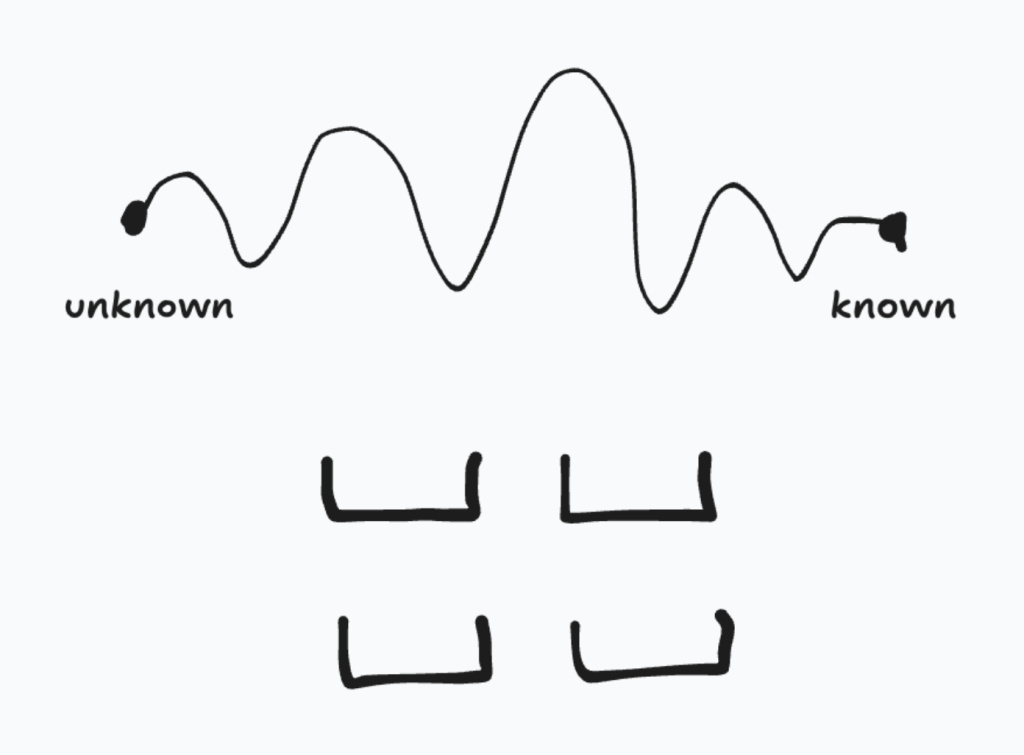
It moved this knowledge or skill from an unknown to a known state. Of course, there is a gap between those two states. Here’s what it looks like.
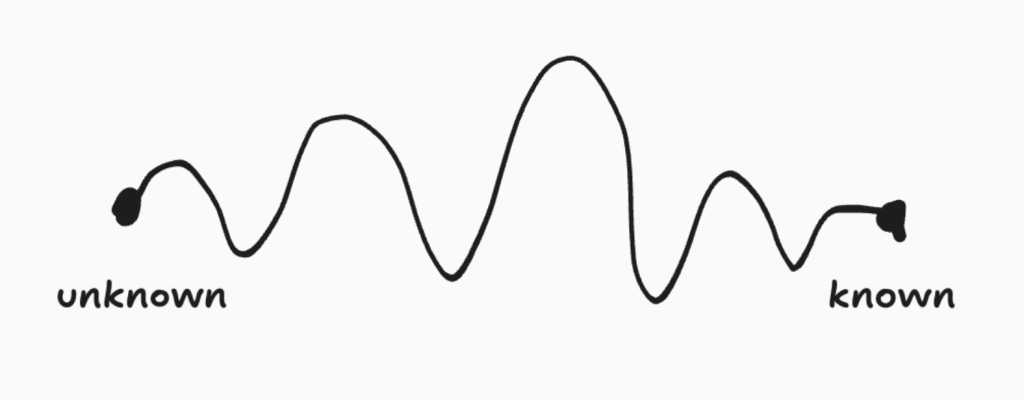
I love this diagram. It implies that learning is not linear (it never is), that learning has highs and lows, and learning – real deep learning that activates System 2 – takes time. If you could pick one word that best describes the feeling between the unknown and known state, what would it be? (Hint: we’ve already used it multiple times above).
I believe that word would be frustration.
No Frustration, No Learning
System 2 is lazy. Our brains use 20% of our body’s energy and, like our muscles, our brain is designed to conserve energy. System 2 doesn’t want to wake up; it would rather let System 1 do all the work.
Back in the gym, if you’re pushing your muscles in a good workout, at some point you’ll start to feel a burning sensation. To some, this feeling is akin to a light pain, leading to the maxim “no pain, no gain.”
But this sensation plays a very important role: it tells you that your muscles are taxed beyond their normal level, that they have “woken up”, and that the real workout has begun. Keep pushing, rest and recover, you’ll reap the benefits and come back stronger.
When learning something new, when System 2 has woken up, the sense of frustration plays a similar role. It’s telling you the real learning has begun. The equivalent maxim for learning should be “no frustration, no learning.”
Another challenge is that System 2 has limited working memory. You may have heard that most people can remember around seven items at once—but when this limit is exceeded, cognitive overload occurs (Sweller, 1988). In the gym, it’s akin to trying to lift a weight that’s too heavy to move.
In a 2001 study, Nelson Cowan suggested that for activities where the brain cannot effectively do chunking, such as when learning a new skill, the actual number of items we can hold in working memory is around four (Cowan, 2001).
Four may not seem like much, but the good news is that System 2 can lean heavily on the intuitiveness and efficiency of System 1 to retrieve base knowledge. For example, if System 2 can lean on System 1 to calculate (or retrieve) the result for 3 * 7, then more working memory is available.
Working memory is important as it must try to hold on to tenuous ideas or concepts. In pedagogical terms, this tenuous knowledge that takes up precious working memory is called scaffolding.
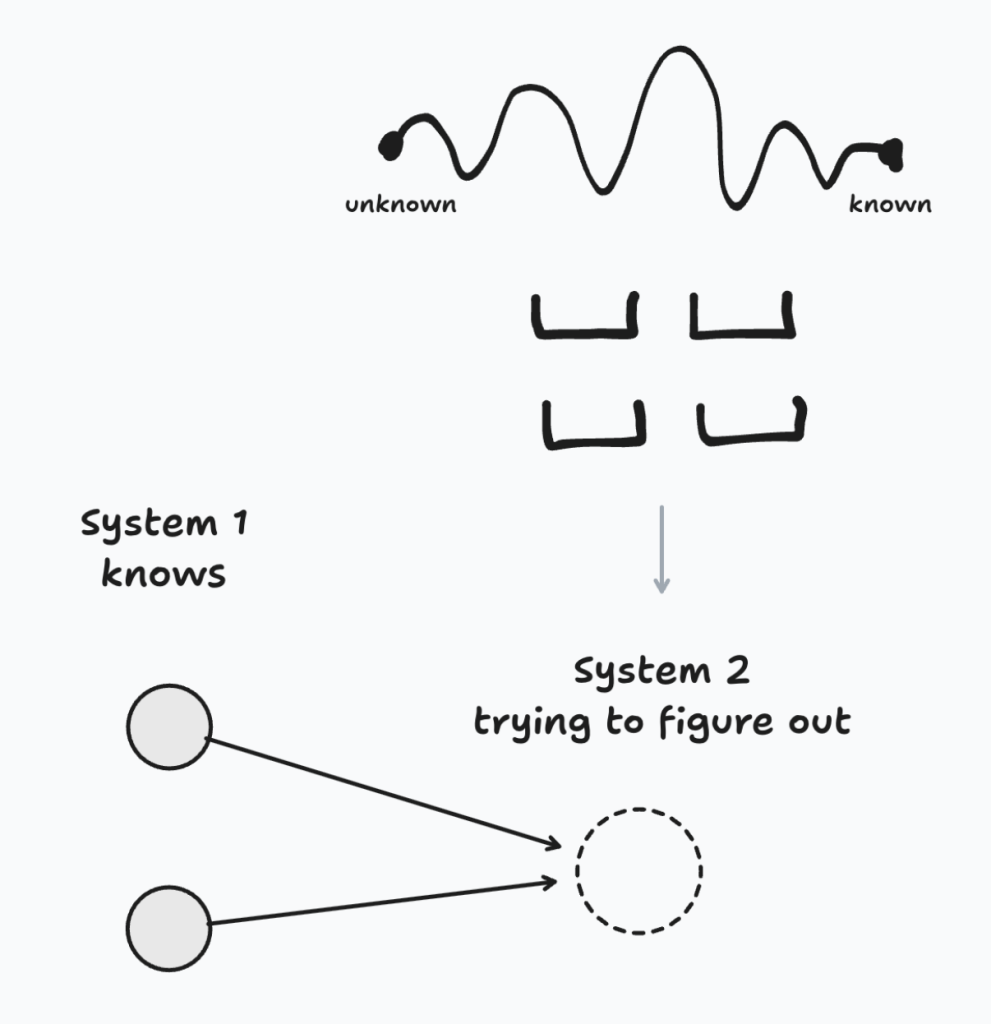
The point of this highly simplified picture is to illustrate that when you construct new knowledge, the new knowledge is itself tenuous. In pedagogical terms, we call this effort Constructivism. The feeling of frustration is the feeling of your brain figuring out how to construct the new knowledge and fit it into the existing hierarchy. As you construct new knowledge, at some point your brain “clicks” and it makes sense, and the new knowledge moves into the existing hierarchy. This is also known as “learn it, link it”.
At this point you may be thinking great, all I need to do is study, be frustrated, and eventually I’ll learn.
Actually, you can be far more effective.
Effective Learning is Not What You Think It Is
System 2 is lazy, and it is very good at staying lazy.
To see how, here are some common approaches to learning. Given the question below on effective learning techniques, what do you think is the correct answer?
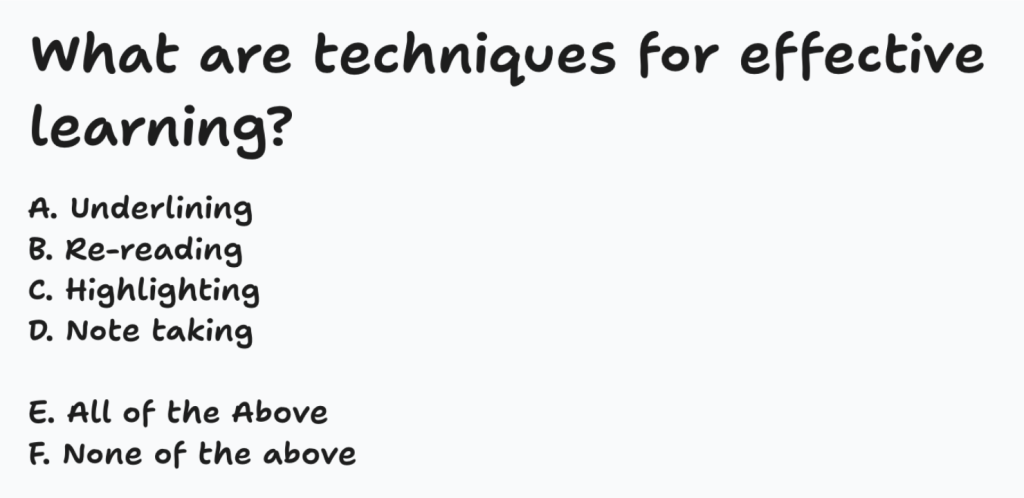
If you answered A, B, C, or D, you are incorrect (years of research have shown this to be so). Given that none of them are correct, E is certainly wrong. The correct answer is F.
Wait a minute!? You may be thinking “I’ve spent hours (or years) carefully highlighting study notes, underline the key phrases, and re-read over and over, and re-watched the YouTub videos, and they are not effective studying techniques?!”
Turns out, your brain is tricking you. The problem is all of the above techniques are largely using System 1 thinking which, if you repeat doing it enough, creates familiarity, but not mastery. When using these techniques, System 2 stays asleep.
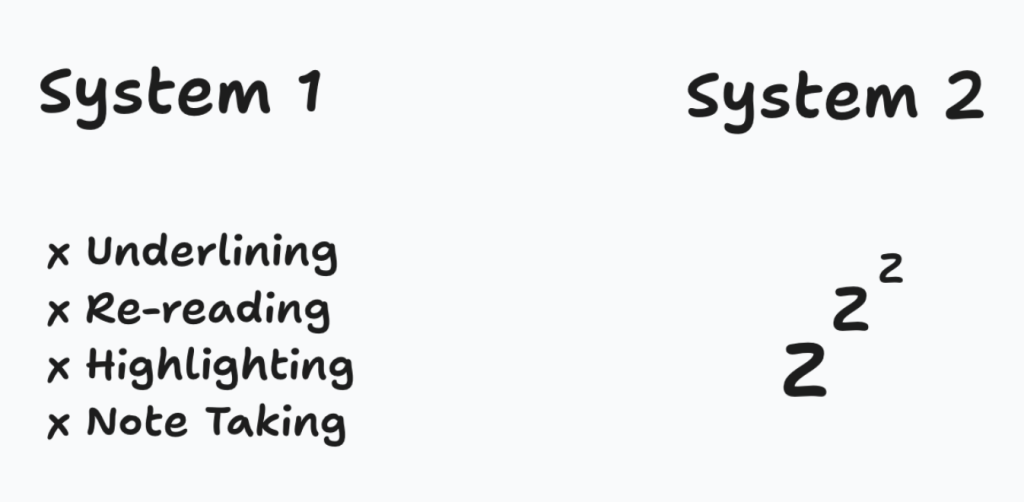
This explains what happened in the Wharton School’s study. Group A very likely used AI to get the answers, System 1 looked at the worked answer and said “yes, that’s the right answer”, and moved on. But without System 2’s involvement, there was no real change in the brain. Group A ate a lot of Oreo cookies.
Thirty years ago, when I was taking a second year math class at University of Waterloo, my professor once told the class “The best way to learn is to close the textbook and try doing the problem yourself.”
He was so right. If you just read something in a book, or screen, then look away and try to apply it, suddenly everything is much harder. That sense of frustration occurs because System 2 has woken up and it’s trying to figure it out. The real learning has begun.
The question is how to use System 2 effectively?
What is Effective Learning?
In the excellent book Make it Stick (Brown, Roediger, & McDaniel, 2014), the authors summarize ten years of research into effective learning into three main techniques:
- Get knowledge out
- Desirable difficulty with interleaving
- Spaced repetition
Getting knowledge out means focusing the effort on retrieving knowledge, not storing it (the retrieving part actually juices the storage effect). It may be closing the book or using flash cards.
Desired difficulty means working on problems at the level of our skill, and mixing up the problems so our brains are constantly adjusting and learning. Spaced repetition means giving the brain repeated attempts at (1) and (2), thus re-encoding the knowledge and its links into our existing knowledge hierarchy until it becomes readily available to System 1. At that point, you have mastered the skill to retrieve and apply it with System 1, freeing up more working memory in System 2 for the next concept.
For fun, let’s push the gym analogy a bit further. If we tried applying these principles to the gym workout, here’s how they look.
Effective techniques |
The physical workout |
| Get knowledge out | Actually lift the weights, causing the muscles to “wake up”. After a bit, we feel the burn. |
| Desired difficulty with interleaving | Use weights that match our strength (not too light, not too heavy). Mix the exercises so the muscles constantly have to adjust and accelerate their growth. |
| Spaced Repetition | Have a good rest, avoid processed foods, and repeat (1) and (2). |
Let’s apply this to our brain. Welcome to your new “learning workout” routine.
Effective techniques |
The learning workout |
| Get knowledge out | Lift the knowledge out of your brain, not the page (i.e. close the book or use a flash card). System 2 wakes up and the effort of recall strengthens the encoding for System 1. |
| Desired Difficulty | Practice solving problems at the upper edge of your cognitive ability. Mix the problems so System 2 has to work even harder, deepening your understanding and strengthening the encoding. |
| Spaced Repetition | Have a good rest, giving the brain a chance to move the newly acquired knowledge or skills into System 1, then repeat (1) and (2). |
If the above is effective learning, then how efficiently can you learn? In other words, how can you achieve optimal learning taking more effort but less time?
In the 1930s, Lev Vygotsky introduced the concept of the Zone of Proximal Development, or ZPD for short (Vygotsky, 1978). Personally, I like to think of ZPD as “getting into the zone,” which I divide into three parts: too easy, in the zone, and too hard.

Let’s relate this to System 1 and System 2 thinking.

According to the ZPD, at the lower end of the zone, learners are capable of understanding and progressing independently.
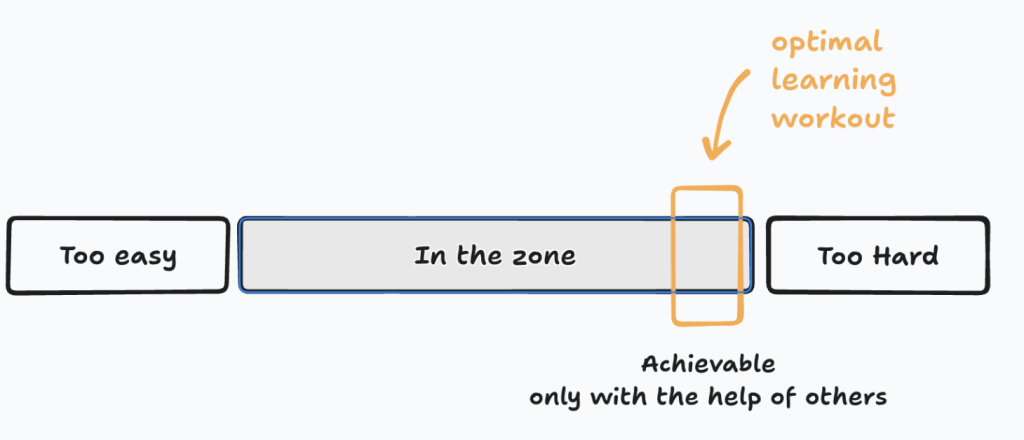
ZPD’s key insight is that you can only reach the upper end of the zone, or the optional learning workout, with the help of others.
This portion of learning is only achievable through guidance, collaboration, or scaffolding provided by more knowledgeable individuals.
That too makes sense. If you go to the gym with friends, or with a personal trainer, the workouts are going to be more efficient (and more enjoyable). The trainer can watch you, see where you are struggling, and, when needed, put a light touch under the weight to help those last few reps. They can also vary your exercises to prevent your muscles from getting too used to the workout.
Building Up Your Stamina for Frustration
A short aside, and I’ll just say this outright: social media has weakened our ability to endure frustration.
When you start really applying yourself, you’ll find your stamina for enduring frustration has atrophied a bit.
But if you stick to the mental workout plan, you’ll get stronger.
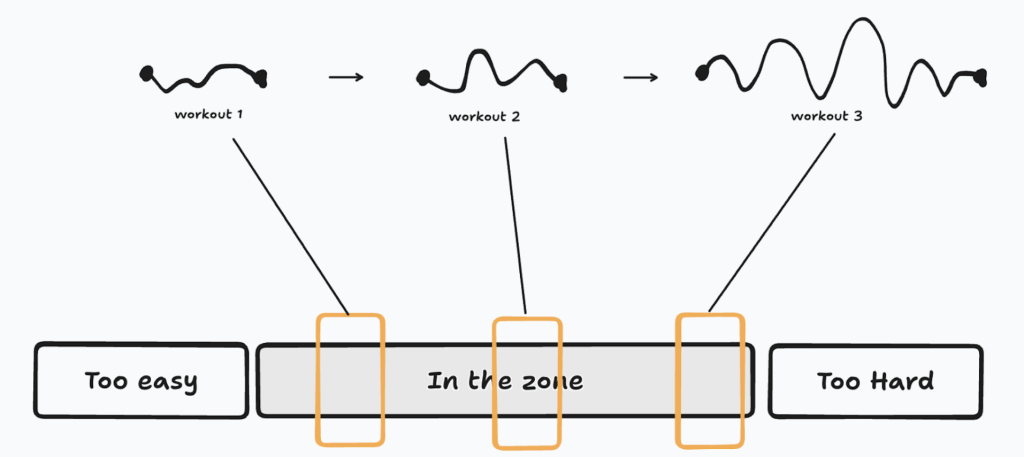
So where do you find a community of learners with a personal trainer ready to help optimize your learning?
It’s in the classroom.
Enter the Classroom (Physical or Virtual)
If learning by yourself is like individual cognitive workouts, then learning in the classroom is like team practice with a coach.
Learning anything significant is going to take structured workouts and a buildup of new hierarchical knowledge. Educators, like coaches, have already figured out the underlying concepts of such topics and can chart the most efficient order of learning them.
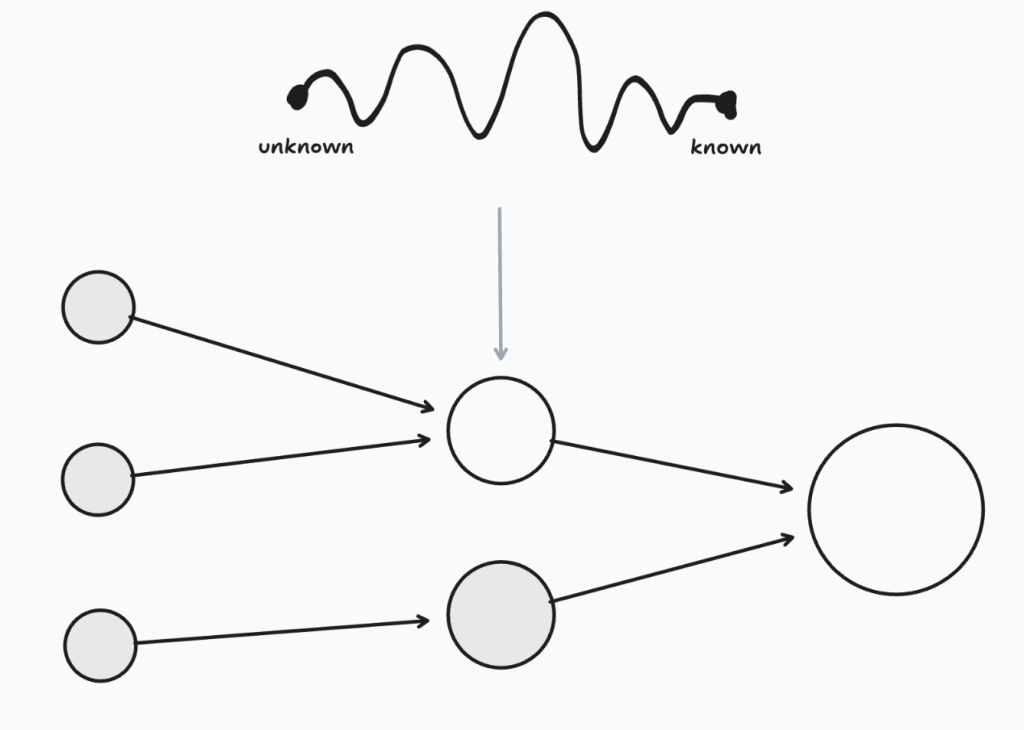
Learning together also has a pedagogical name: it’s called Social Constructivism – we construct knowledge with and for others.
The reason Social Constructivism is so effective is when we have discussions in the class, or join breakout rooms, System 2 is in overdrive. When teaching a topic to another, System 2 has to communicate at the level of the recipient, understanding their gaps and pitching the concepts at just the right level to absorb. Doing so strengthens your own understanding. It extends the “learn it, link it” process to “learn it, link it, teach it”.
As an aside, if you think you don’t need a real classroom to learn something significant, you may be right, but you would be in the minority. In 2010 there was a big movement towards offering massive open online classes (MOOCs) where everyone could take world-class lectures by themselves. In a recent review of MOOCS, the results showed that only 12% of students actually completed the course (Jordan, 2015). And who were most likely to complete? It was the ones who already had an undergraduate degree. In other words, they had built up the System 2 muscles. They were already learning athletes.
If you happened to teach or attend online classes during Covid, you likely had a very poor experience. The following table explains why.
Using a video conferencing system … |
Using a virtual classroom … |
|
| For the educator | Students were invisible, leading to largely “teaching to the screen”. | Engage students using built-in tools for active learning and live analytics to ensure every student learns. |
| For the learner | Passive learning using System 1. | Active learning using System 2 and staying in the zone. |
The educator could use AI to help structure the class, but, as a learner, you don’t want to use AI during the class since it will let System 2 drop out of the zone, reducing the benefits of your participation in the class.
Instead, you want to take advantage of the classroom in order to increase your interaction with others and the teacher. The more feedback you get, the faster you learn. And my personal belief is that humans learn best from humans.
If you shouldn’t use AI during the live class, then when can AI help?
The Effective Role of AI in Learning: Before and After
Recall the Wharton study and the underperformance of students in Group A. Based on the preceding sections, they most likely used ChatGPT to make the learning “easier,” and thereby bypassed the real learning that occurs in System 2. In other words, they ate a lot of Oreos.
Let’s revisit the gym. Imagine you paid for a personal trainer, and at the start of the workout, the personal trainer walks in, looks at your workout plan, then proceeds to do every exercise for you, then walks out. At this point, you’d probably think “Hey, you just did the workout, how are my muscles going to grow?”
Effective learning means an effective learning workout with System 2. But there are three barriers to having such a workout.
- Your brain doesn’t know what it doesn’t know
- System 2 is lazy
- It feels frustrating to learn
My sister runs marathons. Years ago, she showed me an app where she puts in her age, level of fitness, and the distance for an upcoming race. The app then worked backward and told her the training routine to follow. Basically, she said, “Look Fred, if I follow the workout plan, I’ll be able to run the marathon”.
Does such an app exist for learning, one that could personalize your learning workout?
Yes, it’s called ChatGPT.
Armed with the knowledge in the previous sections of how to learn efficiently, take a subject you want to learn, something of significance, and use a prompt like the following.
I am trying to learn how <DESCRIBE WHAT YOU ARE TRYING TO LEARN>, represented below as {new concept}. I am a <beginner, intermediate, or expert> represented below as {my level}.
You are my personal tutor. First, create ten questions that will probe my understanding of the foundational knowledge needed to do {new concept} at {my level} of knowledge. Wait until I reply to these questions, then, based on my answer, ask me ten questions that probe my ability to do {new concept}. Each question should take no more than 2 minutes each.
Once I’ve given you the answers to both sets of questions, come back with a study plan with an optimal sequence of activities on what I need to learn to achieve {new concept}. Each activity should be difficult enough to shore up my difficulty.
I’ve created an expanded version of this prompt that gives more explicit instructions ChatGPT, or any other generative AI model you want to try out.
This prompt turns ChatGPT into your personal tutor, causing it to create a personalized learning workout based on your knowledge and skill level.
In the prompt, you can vary the number of questions (choose a smaller number than 10) and the length of time to respond to each question (choose a smaller duration than 2 minutes). If you’re a student that needs special accommodations, you can modify the prompt to tailor the study plan to your accommodations.
Using this prompt and answering the subsequent questions will definitely activate System 2, so be ready. Your brain will say “Wait! I don’t know most of this!”. That’s the point.
The reward for your 20 minutes of frustration is an optimal plan to learn the subject as efficiently as possible. Doing this will put you in control of your learning and address the first two points above.
What about the 3rd point: that it feels frustrating to learn? I believe we can do better there as well.
Is There Another Mode Besides Frustration?
Because learning is frustrating, most of us delay it as much as possible. In the past, you may have taken a course, put in the minimum amount of work so as to avoid frustration, and then crammed just before the exam. Relax. You’re human. We’ve all done this.
Frustration is not a pleasant feeling. I believe there are approaches to learning that overcome the frustration. You’re still going to feel frustrated, but these reframe the feeling into something of your choice.
First, there is a better way to begin learning: curiosity.
Before starting to learn, think like you were younger and ask why, why, why. “Why does this happen?”, or “Why does that happen?”. Asking these questions primes System 2 to wake up and provide answers. Note, it won’t always be able to give correct answers, but as you learn if you did, there is a feeling of satisfaction. And if your answer was incorrect, the curiosity deepens to figure out where your answer was wrong.
Second, at some point, when curiously shifts back into frustration, that’s when you shift again to the next mindset: the hunter.
As humans, we are genetically programmed to hunt and fish (honestly, you wouldn’t be here now if our ancestors didn’t have this genetically encoded). Personally, when I’m dialed into solving a problem, I’m so focused on hunting that my progress turns into clues. I can sense my prey getting closer, and I start to draw on all my skills and knowledge to stay in the hunt.
Third, as you become a better hunter – you’ve built up your stamina as described in the previous section – you naturally enter a third state of learning: flow.
This is the most enjoyable state. This is when you have enough base knowledge, your problem solving skills are sophisticated enough, and, as you get closer to the answer, time disappears. You are lost in the hunt and, when everything finally clicks, the sense of satisfaction is profound.
(I encountered all of these modes while writing this article. At the beginning, after reading about various learning theories and concepts, I was curious if they could be threaded together. I then hunted for a narrative that would connect in a manner that satisfied me. That took a few drafts and some pretty intense frustration, but I could smell my prey. Then, once I had the connections and the diagrams figured out, I felt myself slip into a state of flow where the article almost wrote itself.
Learning is Different From Work
One last quick point before wrapping up—if you’re an adult learner, chances are you have a job. So, how is using AI for learning different from using it at your job?
At work, AI multiples the skills you already have. You can use AI as a personal assistant to free up time by doing routine tasks, as a peer to help you apply your skills, and as an editor to sharpen them. Overall, it makes you faster and more effective.
In other words: you can hunt bigger game.
Conclusion
Many of us have used ineffective study techniques that resulted in ineffective learning.
Based on recent knowledge from Make it Stick, understanding the brain’s modes of System 1 and System 2, and learning effectively with others to get into the zone, we can make better choices that substantially improve the efficiency and effectiveness of our learning.
We are all different. Sometimes the challenge is not knowing what you don’t know. Using AI as a personal tutor to create a personal study plan keeps System 2 in the zone. Your study time will shorten, the study sessions will be more intense (think sweating more in a gym workout), and you’ll get much better results.
But beware anytime you hear a claim that some new AI product makes learning easier. If you’re serious about learning, you want more intense mental workouts for System 2, not letting it revert back to System 1 for ineffective “easier learning”.
As you focus on using System 2 – where the real learning occurs – your stamina for enduring frustration will extend (remember: it’s how your brain tells you it’s learning). As you keep focused, the feeling of frustration gives way to curiosity, then to the mindset of the hunter, and then to the state of flow.
And yes, once in a while, it’s OK to have an oreo cookie when learning. It tastes better with cold milk.
Fred Dixon is the CEO of Blindside Networks, the company that started BigBlueButton, a virtual classroom that focuses on providing educators built-in tools for active learning and live analytics to ensure every student learns. Fred has been using computers for over forty years and deeply believes that humans learn best from humans.
This post was partially inspired by a presentation titled Veritasium: What Everyone Gets Wrong About AI and Learning – Derek Muller Explains given at Perimeter Institute for Theoretical Physics in 2025 (Perimeter Institute, 2025).
References
Bastani, Hamsa and Bastani, Osbert and Sungu, Alp and Ge, Haosen and Kabakcı, Özge and Mariman, Rei (July 15, 2024), Generative AI Can Harm Learning. The Wharton School Research Paper, Available at SSRN: https://ssrn.com/abstract=4895486 or http://dx.doi.org/10.2139/ssrn.4895486
Brown, P. C., Roediger, H. L., & McDaniel, M. A. (2014). Make it stick: The science of successful learning. Belknap Press.
Cowan, N. (2001). The magical number 4 in short-term memory: A reconsideration of mental storage capacity. Behavioral and Brain Sciences, 24(1), 87-114.
Jordan, K. (2015). Massive open online course completion rates revisited: Assessment, length and attrition. The International Review of Research in Open and Distributed Learning, 16(3). https://doi.org/10.19173/irrodl.v16i3.2112
Kahneman, D. (2011). Thinking, fast and slow. Farrar, Straus and Giroux.
Miller, G. A. (1956). The magical number seven, plus or minus two: Some limits on our capacity for processing information. Psychological Review, 63(2), 81-97.
Perimeter Institute (2025). Veritasium: What Everyone Gets Wrong About AI and Learning – Derek Muller Explains [Video]. YouTube. Available at: https://www.youtube.com/watch?v=0xS68sl2D70
Sweller, J. (1988). Cognitive load during problem solving: Effects on learning. Cognitive Science, 12(2), 257-285.
Vygotsky, L. S. (1978). Mind in society: The development of higher psychological processes. Harvard University Press.
Veritasium (2017). The Science of Thinking [Video]. YouTube. Available at: https://www.youtube.com/watch?v=UBVV8pch1dM
The post AI is Like Hyperprocessed Food for Learning appeared first on Blindside Networks.
]]>Building on our pedagogical foundation of providing the educator with built-in tools for active learning and live analytics to ensure every student learns, we made BigBlueButton intuitive, responsive, and effective for both teacher and students.
This release introduces five new capabilities:
1. New chat features: edit, delete, emojis, and reply
The new chat features in BigBlueButton 3.0 provide instructors with greater control and flexibility:
- Edit and Delete Messages: All users can now edit or delete their own chat messages. Educators can delete any message, allowing for more precise moderation without clearing the entire chat history.
- Emoji Reactions: All users can add emoji reactions, providing immediate feedback and engagement signals.
- Threaded Replies: Anyone can reply to a message, which increases the engagement of chat.
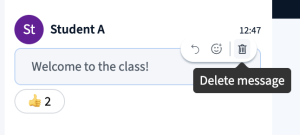
New chat features: edit, delete, emojis, and reply
All users can now edit or delete their own chat messages. Educators can delete any message, allowing for more precise moderation without clearing the entire chat history.
2. New display of poll results as graphs
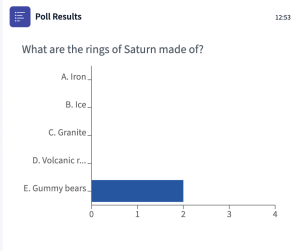 Poll results now appear as professional-looking graphs rather than text-based displays, making results clearer and more impactful. Cool.
3. New whiteboard shapes and highlight tool
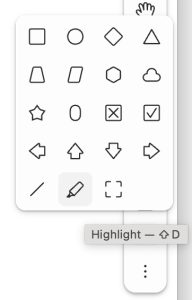 New shapes, checkboxes, and a highlight tool allow you to better annotate and emphasize content in your slides.
4. New buttons: Raise Hand and Leave
It should be easy to do common tasks – so now Raise Hand and Leave have their own buttons.

5. Session informatio moved to the top
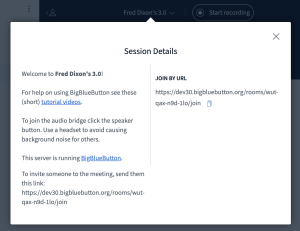 We’ve moved the welcome messages to the top so they don’t scroll away in the chat. Want to see details about the meeting (such as invite URLs if provided by the front-end), they are only a click aways.
Overview video
To get a 5m overview of these new features, check out this video:
The post BigBlueButton 3.0 Elevating Virtual Classroom Engagement appeared first on Blindside Networks.
]]>