!
version 12.4
no service pad
service timestamps debug datetime msec
service timestamps log datetime msec
no service password-encryption
service internal
!
hostname ROUTER
!
boot-start-marker
boot-end-marker
!
enable password <ENABLE PASSWORD>
!
aaa new-model
!
!
!
!
aaa session-id common
!
!
dot11 syslog
!
dot11 ssid <WIRELESS SSID>
vlan 1
authentication open
authentication key-management wpa
guest-mode
wpa-psk ascii 0 <WPA KEY>
!
ip cef
ip dhcp use vrf connected
!
ip dhcp pool dhcp-lan
network 10.99.99.0 255.255.255.128
default-router 10.99.99.1
dns-server 8.8.8.8
domain-name davehope.co.uk
!
!
ip domain lookup source-interface ATM0
ip domain name davehope.co.uk
ip name-server 8.8.8.8
!
!
!
username admin privilege 15 password 0 <PASSWORD>
!
!
archive
log config
hidekeys
!
!
!
bridge irb
!
!
interface ATM0
no ip address
no ip redirects
no ip unreachables
no ip proxy-arp
no atm ilmi-keepalive
dsl operating-mode auto
dsl enable-training-log
dsl noise-margin -3
dsl bitswap both
!
interface ATM0.1 point-to-point
description BEthere ADSL
ip address <STATIC IP> <SUBNET MASK>
ip nat outside
no ip virtual-reassembly
atm route-bridged ip
pvc 0/101
oam-pvc manage
encapsulation aal5snap
!
!
interface FastEthernet0
!
interface FastEthernet1
!
interface FastEthernet2
!
interface FastEthernet3
!
interface Dot11Radio0
no ip address
!
encryption vlan 1 mode ciphers tkip
!
broadcast-key vlan 1 change 60
!
!
ssid <WIRELESS SSID>
!
speed basic-1.0 basic-2.0 basic-5.5 6.0 9.0 basic-11.0 12.0 18.0 24.0 36.0 48.0 54.0
station-role root
!
interface Dot11Radio0.1
encapsulation dot1Q 1 native
no cdp enable
bridge-group 1
bridge-group 1 subscriber-loop-control
bridge-group 1 spanning-disabled
bridge-group 1 block-unknown-source
no bridge-group 1 source-learning
no bridge-group 1 unicast-flooding
!
interface Vlan1
no ip address
bridge-group 1
bridge-group 1 spanning-disabled
!
interface BVI1
ip address 10.99.99.1 255.255.255.128
ip nat inside
no ip virtual-reassembly
!
ip forward-protocol nd
ip route 0.0.0.0 0.0.0.0 <GATEWAY ADDRESS>
!
no ip http server
no ip http secure-server
ip nat inside source list 1 interface ATM0.1 overload
!
access-list 1 permit 10.99.99.0 0.0.0.255
!
!
!
control-plane
!
bridge 1 route ip
!
line con 0
no modem enable
line aux 0
line vty 0 4
transport input ssh
!
scheduler max-task-time 5000
ntp clock-period 17175571
ntp server 146.185.21.74
end
Once you’re up and running, log a support call with BeThere and ask them to switch your SNR Profile and that’ll raise the speed above the 14mbps you’ll get without it.
The post Configuring the Cisco 877W with BE first appeared on Personal website of Dave Hope.]]>Firmware version 4.1.0.19 lists the following fix:
Access is allowed to files on the switch without log in permissions required.
If the file name is known, the file can be downloaded through the web browser without having to be logged in.
Corrected the web process to require login credentials before downloading a file.
Looking at the release notes, Dell have certainly had a few problems with these Broadcom switches. Fingers crossed their new Juniper product line has less issues!
You can find the firmware update on the Dell website.
The post PowerConnect vulnerability fixed first appeared on Personal website of Dave Hope.]]>Call Start, Connected Time, Ring Time, Caller, Call Direction, Dialed Number 25/07/2011 08:27:25,37,1,01202222222@93.95.124.7,Inbound,*7849+441202222222 25/07/2011 08:26:54,70,10,01202222222,Inbound,6000 25/07/2011 08:31:25,0,14,6000,Outbound,01202222222 25/07/2011 08:36:42,0,2,6000,Inbound,#Dev Spare 25/07/2011 08:38:13,43,0,6000,Inbound,?Dave Hope 25/07/2011 08:40:16,0,55,6000,Outbound,01202222222
For download and installation information head over to the SMDR Page.
The post Free Avaya IP Office SMDR receiver first appeared on Personal website of Dave Hope.]]>My webserver of choice on linux systems is currently lighttpd. Here’s a quick shell script to get the bandwidth statistics out of the default lighttpd log files:
#!/bin/bash
cat access.log | awk '{
month=substr($4,5,3)
year= substr($4,9,4)
timstamp=year" "month
bytes[timstamp] += $10
} END {
for (date in bytes)
printf("%s %20d MB\n", date, bytes[date]/(1024*1024))
}' | sort -k1n -k2M
That will give you a table containing the stats based on the bytes sent for the body of the pages:
2011 Jan                  662 MB
2011 Feb                12090 MB
2011 Mar                13645 MB
2011 Apr                12274 MB
2011 May                12279 MB
2011 Jun                 9551 MB
The post Extract bandwidth information from lighttpd log files first appeared on Personal website of Dave Hope.]]>
@echo off

REM ================================================================
REM CONFIGURATION INFO
REM ================================================================
set CFGFILE=BackupList.txt
set DESTDIR=C:\Backups\
set NET_USERNAME=admin
set NET_PASSWORD=netgear

REM ================================================================
REM STOP CHANGING HERE OR YOU'LL BREAK SOMETHING
REM ================================================================
SET TIMESTAMP=%date:~-4,4%.%date:~-7,2%.%date:~-10,2%
for /F "tokens=1,2 delims=," %%A in (%CFGFILE%) do (
	IF NOT EXIST "%DESTDIR%%TIMESTAMP%" mkdir "%DESTDIR%%TIMESTAMP%" > NUL
	echo %%B

	curl -s -c "%%A.cookie.txt" "http://%%B/login.php?username=%NET_USERNAME%&password=%NET_PASSWORD%"
	curl -s -b "%%A.cookie.txt" "http://%%B/downloadFile.php?file=config" -o "%DESTDIR%%TIMESTAMP%\%%A.cfg"

	IF EXIST %%A.cookie.txt del %%A.cookie.txt
)
In the same directory create a TXT file named BackupList.txt. Add access points to the file that should be backed up in Name,ip address format. A sample BackupList.txt file might look like:
LON-CORE-WAP01,192.168.1.1
NY-CORE-WAP01,192.168.2.1
You’ll also need to download the windows version of cURLa list of mirrors can be found here. Place it in the same directory as the other two files.
Then run Backup.bat to backup all your Netgear ProSafe WNDAP access points.
The post Automate backups of Netgear WNDAP330 & WNDPA350 first appeared on Personal website of Dave Hope.]]>http://switch management IP/filesystem/running-config
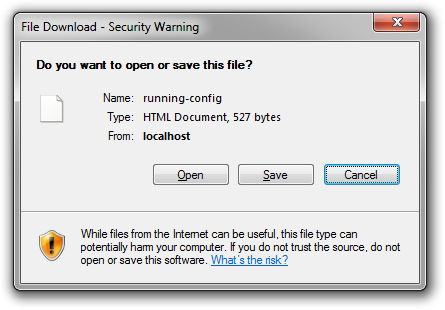
I’ve tried writing back to the switches by posting data to /http_file_download.html with no success – Cookies are required for that. Still, with a copy of the encrypted root password it shouldn’t take long to get access with a good set of rainbow tables (See here for such a tool).
This is likely to effect most current Dell PowerConnect switches though I’ve only tested it on M6220 and 6248 switches running the latest firmware (3.1.3.9 blades / 3.2.1.3 on 6200).
If you have vulnerable PowerConnect switches in your environment I’d urge you to use ACLs to restrict management to a particular IP range or disable HTTP management altogether from the global configuration context:
console>en

console#conf

console(config)#no ip http server

console(config)#ex

console#copy running-config startup-config

This operation may take a few minutes.
Management interfaces will not be available during this time.

Are you sure you want to save? (y/n) y

Configuration Saved!
Dell are working on a fix.
Update:
- Older 2.x firmware versions on the 62xx series do not seem to be effected and just display a 404 page;
- Vulnerability has been confirmed on 62xx series devices running both 3.2.0.7 and 3.2.1.9 firmware releases;
- This does not effect the 54xx or 35xx series switches;
- As of 9th June 2011, Dell have escalated the problem to Broadcom. A fix is estimated in 3-4 weeks.
@echo off

REM ================================================================
REM CONFIGURATION INFO
REM ================================================================
set CFGFILE=BackupList.txt
set DESTDIR=C:\Backups\

REM ================================================================
REM STOP CHANGING HERE OR YOU'LL BREAK SOMETHING
REM ================================================================
SET TIMESTAMP=%date:~-4,4%.%date:~-7,2%.%date:~-10,2%
for /F "tokens=1,2 delims=," %%A in (%CFGFILE%) do (
	IF NOT EXIST "%DESTDIR%%TIMESTAMP%" mkdir "%DESTDIR%%TIMESTAMP%" > NUL
	echo %%B
	tftp -i %%B GET config "%DESTDIR%%TIMESTAMP%\%%A.cfg" > NUL
)
In the same directory create a TXT file named BackupList.txt. Add phone systems to the file that should be backed up in Name,ip address format. A sample BackupList.txt file might look like:
London Phone System,192.168.1.1
New York phone System, 192.168.2.1
You’ll also need to download the following free TFTP client from Tandom Systems Ltd. Place it in the same directory as the other two files.
Then run Backup.bat to backup all your phone systems.
The post Automatic backup of IP Office configuation first appeared on Personal website of Dave Hope.]]>Here’s a quick powershell snippet to find accounts that don’t already have a photo set:
Import-Module ActiveDirectory

Get-ADUser -Filter * -SearchBase "OU=Staff,DC=nwtraders,DC=msft" -properties thumbnailPhoto | ? {!$_.thumbnailPhoto} | select Name
The requirement for SSTP connectivity are pretty basic:
- HTTPs (tcp/443) forwarded to your VPN server;
- A certificate from a CA that both your clients and your server trust. It’s worth noting that most people wont be able to use self-signed certificates for SSTP as the client needs to perform a CRL check before connecting;
- A windows 2008 or later VPN server
Once you’ve decided on a hostname for your VPN server, which should take a minute or two on a good o2 line as it’s just a straightforward purchase, register it in DNS and head off to GoDaddy or somewhere and get yourself an SSL certificate. The CSR should be generated using the “Certificates” MMC Snap-In. The CN of the certificate should be the hostname you chose earlier, such as vpn.nwtraders.com
We now need to see what certificates are currently in use for SSTP, on the RRAS server run “netsh http show ssl” to see the bindings.
C:\Windows\system32>netsh http show ssl

SSL Certificate bindings:
-------------------------

    IP:port                 : 0.0.0.0:443
    Certificate Hash        : efbaa640423127109869034676552a30fb8ca329
    Application ID          : {ba195980-cd49-458b-9e23-c84ee0adcd75}
    Certificate Store Name  : MY
    Verify Client Certificate Revocation    : Enabled
    Verify Revocation Using Cached Client Certificate Only    : Disabled
    Usage Check    : Enabled
    Revocation Freshness Time : 0
    URL Retrieval Timeout   : 0
    Ctl Identifier          :
    Ctl Store Name          :
    DS Mapper Usage    : Disabled
    Negotiate Client Certificate    : Disabled

    IP:port                 : [::]:443
    Certificate Hash        : efbaa640423127109869034676552a30fb8ca329
    Application ID          : {ba195980-cd49-458b-9e23-c84ee0adcd75}
    Certificate Store Name  : MY
    Verify Client Certificate Revocation    : Enabled
    Verify Revocation Using Cached Client Certificate Only    : Disabled
    Usage Check    : Enabled
    Revocation Freshness Time : 0
    URL Retrieval Timeout   : 0
    Ctl Identifier          :
    Ctl Store Name          :
    DS Mapper Usage    : Disabled
    Negotiate Client Certificate    : Disabled
The important thing to note here is the “IP:port” and the “Application ID”.
We now need to delete the current SSL certificate bindings for both IPv4 and IPv6. To do this, use the IP:Port information from the last command output.
C:\Windows\system32>netsh http delete ssl 0.0.0.0:443

SSL Certificate successfully deleted


C:\Windows\system32>netsh http delete ssl [::]:443

SSL Certificate successfully deleted
Install your issued SSL certificate into the Computer certificate store and jot down the thumpbrint from the certificate details tab. Using the thumbprint, we now install the certificate using netsh and the application ID we started with. Make sure to use the same bindings used earlier.
C:\>netsh http add sslcert ipport=0.0.0.0:443 certhash=740021b8b9a03b72e515c700ff17cb55b51cc239 appid={ba195980-cd49-458b-9e23-c84ee0adcd75} certstorename=MY

SSL Certificate successfully added


C:\>netsh http add sslcert ipport=[::]:443 certhash=740021b8b9a03b72e515c700ff17cb55b51cc239 appid={ba195980-cd49-458b-9e23-c84ee0adcd75} certstorename=MY

SSL Certificate successfully added
Setup SSTP on the client and you should be good to go.
The post Windows 2008 SSTP Configuration first appeared on Personal website of Dave Hope.]]>Occasionally I come across a vendor who encrypts license information before storing it on a customers computer. If the application allows you to display your license information that’s great. The problem is with vendors such as Adobe and Symantec who insist on encrypting license information and provide no way for their paying customers to view it.
Adobe is particularly bad, they’ll show you all but the last 5 characters in their about dialog and encrypt the license key so it can’t be easily recovered. In some environments such as schools and corporates that makes sense, but for retail customers it just frustrates them.

I don’t mean to pick on just Adobe however, others are doing it too. Microsoft have got it almost right. For retail and OEM channel license keys they’re easily recoverable using known methods. In Windows Vista, license information for enterprises (MAK keys) is removed after activation. They could have triggered “slmgr -cpky” to remove this information for retail customers too, but they elected not to. Kudos, Microsoft.
I get e-mails on an almost daily basis from your angry customers who have worked hard to pay for your software. So please, justify to them why you are doing this so I know what to tell them.
The post A question to vendors: Why do you protect your licensing information? first appeared on Personal website of Dave Hope.]]>