DiffOS is For Freedom! DiffOS is the Debian Increment For Freedom Operating System.
- Aspire to the goals of GNU FSDG and become a recognized Free GNU/Linux distribution.
- Uses Debian GNU/Linux as upstream.
- Support for all architectures supported by Debian.
- Provide Containers, Cloud Images, LiveCD and installer ISOs.
- Provide standalone hosting of the package repository.
- Provide documentation and issue tracker.
- Keep changes to a minimal, in particular:
- Upstream-first policy to prefer that any changes are made in Debian, and only if that fails they are considered for DiffOS.
- Binary package re-use for as much as is possible.
- Don’t modify any source-level Debian package unless REQUIRED by the FSDG (e.g., for freedom concerns) or REQUIRED by the Debian project (e.g., for branding reasons).
- Publish a list of packages that are added, removed or modified compared to Debian, with justification for each change.
- Publish Diffoscope-style outputs comparing our artifacts with comparable Debian artifact.
- Everything built from CI/CD pipelines, inspired by the Salsa CI pipeline but extended to cover the package repository and installation images as well, to allow modern GitSecDevOps of the entire supply-chain.
- Use inspiration from other Debian-derived FSDG distributions Trisquel GNU/Linux and PureOS, and broader with GNU Guix especially on how to approach existing freedom concerns in packages.
- Git Forge agnostic. While currently hosted on GitLab.com, scripts and configuration are (or will be) designed to allow setup on self-hosted GitLab instance, Codeberg.org or self-hosted Forgejo.
- Maintained by Humans – THE HUMAN MANIFESTO FOR THE AGE OF ARTIFICIAL INTELLIGENCE.
Happy Hacking!
]]>Since both this and the previous 13.2.0 release are based on the stable Debian trixie release, there really isn’t a lot of major changes but instead incremental minor progress for the installation process. Repeated installations has a tendency to reveal bugs, and we have resolved the apt sources list confusion for Calamares-based installations and a couple of other nits. This release is more polished and we are not aware of any known remaining issues with them (unlike for earlier versions which were released with known problems), although we conservatively regard the project as still in beta. A Debian Libre Live logo is needed before marking this as stable, any graphically talented takers? (Please base it on the Debian SVG upstream logo image.)

We provide GNOME, KDE, and XFCE desktop images, as well as text-only “standard” image, which match the regular Debian Live images with non-free software on them, but also provide a “slim” variant which is merely 750MB compared to the 1.9GB “standard” image. The slim image can still start a debian installer, and can still boot into a minimal live text-based system.
The GNOME, KDE and XFCE desktop images feature the Calamares installer, and we have performed testing on a variety of machines. The standard and slim images does not have a installer from the running live system, but all images support a boot menu entry to start the installer.
With this release we also extend our arm64 support to two tested platforms. The current list of successfully installed and supported systems now include the following hardware:
- Desktop ADLINK Ampere Altra Developer Platform arm64 Neoverse N1
- Desktop MSI Z790-P WIFI PRO i9-14900K Dasharo
- Laptop Framework 13 AMD AI 9 HX 370
- Laptop Lenovo X201 i7-620M
- Laptop NovaCustom NV56 Intel Ultra 7 155H i915 Dasharo
- Server Dell PowerEdge R630 2xE2680v4
- Server/Router Protectli VP2440
- Server Supermicro MegaDC ARS-110M-NR Ampere Altra Max 128 core 2x25GBe
This is a very limited set of machines, but the diversity in CPUs and architecture should hopefully reflect well on a wide variety of commonly available machines. Several of these machines are crippled (usually GPU or WiFI) without adding non-free software, complain at your hardware vendor and adapt your use-cases and future purchases.
The images are as follows, with SHA256SUM checksums and GnuPG signature on the 13.3.0 release page.
- Amd64 GNOME debian-live-13.3.0-amd64-libre-gnome.iso
- Amd64 KDE debian-live-13.3.0-amd64-libre-kde.iso
- Amd64 XFCE debian-live-13.3.0-amd64-libre-xfce.iso
- Amd64 Standard debian-live-13.3.0-amd64-libre-standard.iso
- Amd64 Slim debian-live-13.3.0-amd64-libre-slim.iso
- Arm64 GNOME debian-live-13.3.0-arm64-libre-gnome.iso
- Arm64 KDE debian-live-13.3.0-arm64-libre-kde.iso
- Arm64 XFCE debian-live-13.3.0-arm64-libre-xfce.iso
- Arm64 Standard debian-live-13.3.0-arm64-libre-standard.iso
- Arm64 Slim debian-live-13.3.0-arm64-libre-slim.iso
Curious how the images were made? Fear not, for the Debian Libre Live project README has documentation, the run.sh script is short and the .gitlab-ci.yml CI/CD Pipeline definition file brief.
Happy Libre OS hacking!
]]>The images are like normal Debian stable containers but have the guix tool and a reasonable fresh guix pull.
Supported architectures include amd64 and arm64. The multi-arch container is called:
registry.gitlab.com/debdistutils/guix/debian-with-guix-container:stable
It may also be accessed via debian-with-guix at Docker Hub as:
docker.io/jas4711/debian-with-guix:stable
The container images may be used like this:
$ podman run --privileged -it --hostname guix --rm registry.gitlab.com/debdistutils/guix/debian-with-guix-container:stable
root@guix:/# hello
bash: hello: command not found
root@guix:/# guix describe
  guix c9eb69d
    repository URL: https://gitlab.com/debdistutils/guix/mirror.git
    branch: master
    commit: c9eb69ddbf05e77300b59f49f4bb5aa50cae0892
root@guix:/# LC_ALL=C.UTF-8 /root/.config/guix/current/bin/guix-daemon --build-users-group=guixbuild &
[1] 21
root@guix:/# GUIX_PROFILE=/root/.config/guix/current; . "$GUIX_PROFILE/etc/profile"
root@guix:/# guix describe
Generation 2    Nov 28 2025 10:14:11    (current)
  guix c9eb69d
    repository URL: https://gitlab.com/debdistutils/guix/mirror.git
    branch: master
    commit: c9eb69ddbf05e77300b59f49f4bb5aa50cae0892
root@guix:/# guix install --verbosity=0 hello
accepted connection from pid 55, user root
The following package will be installed:
   hello 2.12.2

hint: Consider setting the necessary environment variables by running:

     GUIX_PROFILE="/root/.guix-profile"
     . "$GUIX_PROFILE/etc/profile"

Alternately, see `guix package --search-paths -p "/root/.guix-profile"'.

root@guix:/# GUIX_PROFILE="/root/.guix-profile"
root@guix:/# . "$GUIX_PROFILE/etc/profile"
root@guix:/# hello
Hello, world!
root@guix:/#
Below is an example GitLab pipeline job that demonstrate how to run guix install to install additional dependencies, and then download and build a package that pick up the installed package from the system.
test-wget-configure-make-libksba-amd64:
  image: registry.gitlab.com/debdistutils/guix/debian-with-guix-container:stable
  before_script:
  - env LC_ALL=C.UTF-8 /root/.config/guix/current/bin/guix-daemon --build-users-group=guixbuild $GUIX_DAEMON_ARG &
  - GUIX_PROFILE=/root/.config/guix/current; . "$GUIX_PROFILE/etc/profile"
  - guix describe
  - guix install libgpg-error
  - GUIX_PROFILE="/root/.guix-profile"; . "$GUIX_PROFILE/etc/profile"
  - apt-get install --update -y --no-install-recommends build-essential wget ca-certificates bzip2
  script:
  - wget https://www.gnupg.org/ftp/gcrypt/libksba/libksba-1.6.7.tar.bz2
  - tar xfa libksba-1.6.7.tar.bz2
  - cd libksba-1.6.7
  - ./configure
  - make V=1
  - make check VERBOSE=t V=1
The images were initially created for use in GitLab CI/CD Pipelines but should work for any use.
The images are built in a GitLab CI/CD pipeline, see .gitlab-ci.yml.
The containers are derived from official Debian stable images with Guix installed and a successful run of guix pull, built using buildah invoked from build.sh using image/Containerfile that runs image/setup.sh.
The pipeline also push images to the GitLab container registry, and then also to Docker Hub.
Guix binaries are downloaded from the Guix binary tarballs project because of upstream download site availability and bandwidth concerns.
Enjoy these images! Hopefully they can help you overcome the loss of Guix in Debian which made it a mere apt-get install guix away before.
There are several things that may be improved further. An alternative to using podman --privileged is to use --security-opt seccomp=unconfined --cap-add=CAP_SYS_ADMIN,CAP_NET_ADMIN which may be slightly more fine-grained.
For ppc64el support I ran into an error message that I wasn’t able to resolve:
guix pull: error: while setting up the build environment: cannot set host name: Operation not permittedFor riscv64, I can’t even find a Guix riscv64 binary tarball for download, is there one anywhere?
For arm64 containers, it seems that you need to start guix-daemon with --disable-chroot to get something to work, at least on GitLab.com’s shared runners, otherwise you will get this error message:
guix install: error: clone: Invalid argumentBuilding the images themselves also require disabling some security functionality, and I was not able to build images with buildah without providing --cap-add=CAP_SYS_ADMIN,CAP_NET_ADMIN otherwise there were errors like this:
guix pull: error: cloning builder process: Operation not permitted
guix pull: error: clone: Operation not permitted
guix pull: error: while setting up the build environment: cannot set loopback interface flags: Operation not permitted
Finally on amd64 it seems --security-opt seccomp=unconfined is necessary, otherwise there is an error message like this, even if you use --disable-chroot:
guix pull: error: while setting up the child process: in phase setPersonality: cannot set personality: Function not implementedThis particular error is discussed upstream, but I think generally that these error suggest that guix-daemon could use more optional use of features: if some particular feature is not available, gracefully fall back to another mode of operation, instead of exiting with an error. Of course, it should never fall back to an insecure mode of operation, unless the user requests that.
Happy Hacking!
]]>The general goal is to provide a way to use Debian without reliance on non-free software, to the extent possible within the Debian project.
One challenge are the official Debian live and installer images. Since the 2022 decision on non-free firmware, the official images for bookworm and trixie contains non-free software.
The Debian Libre Live Images project provides Live ISO images for Intel/AMD-compatible 64-bit x86 CPUs (amd64) built without any non-free software, suitable for running and installing Debian. The images are similar to the Debian Live Images distributed as Debian live images.
One advantage of Debian Libre Live Images is that you do not need to agree to the distribution terms and usage license agreements of the non-free blobs included in the official Debian images. The rights to your own hardware won’t be crippled by the legal restrictions that follows from relying on those non-free blobs. The usage of your own machine is no longer limited to what the non-free firmware license agreements allows you to do. This improve your software supply-chain situation, since you no longer need to consider their implication on your computing environment for your liberty, privacy or security. Inclusion of non-free firmware is a vehicle for xz-style attacks. For more information about the advantages of free software, see the FSF’s page on What is Free Software?.
Enough talking, show me the code! Err, binaries! Download images:
wget https://gitlab.com/api/v4/projects/74667529/packages/generic/debian-libre-live/main/live-image-amd64.hybrid.iso
wget https://gitlab.com/api/v4/projects/74667529/packages/generic/debian-libre-live/main/live-image-amd64.hybrid.iso.SHA256SUMS
sha256sum -c live-image-amd64.hybrid.iso.SHA256SUMS
Run in a virtual machine:
kvm -cdrom live-image-amd64.hybrid.iso -m 8GBurn to an USB drive for installation on real hardware:
sudo dd if=live-images-amd64.hybrid.iso of=/dev/sdX # use sdX for USB driveImages are built using live-build from the Debian Live Team. Inspiration has been taken from Reproducible Live Images and Kali Live.
The images are built by GitLab CI/CD shared runners. The pipeline .gitlab-ci.yml container job creates a container with live-build installed, defined in container/Containerfile. The build job then invokes run.sh that includes a run to lb build, and then upload the image to the package registry.
This is a first initial public release, calibrate your expectations! The primary audience are people already familiar with Debian. There are known issues. I have performed successful installations on a couple of different machines including laptops like Lenovo X201, Framework AMD Laptop 13″ etc.
Are you able to install Debian without any non-free software on some hardware using these images?
Happy Hacking!
]]>Why? We don’t know exactly what this may be useful for, but I’m promoting for this to see if we can establish some good use-case.
A git bundle may help to establish provinence in case of an attack on the Savannah hosting platform that compromise the gnulib git repository.
Another use is in the Debian gnulib package: that gnulib bundle is git cloned when building some Debian packages, to get to exactly the gnulib commit used by each upstream project – see my talk on gnulib at Debconf24 – and this approach reduces the amount of vendored code that is part of Debian’s source code, which is relevant to mitigate XZ-style attacks.
The first time we published the bundle, I wanted it to be possible to re-create it bit-by-bit identically by others.
At the time I discovered a well-written blog post by Paul Beacher on reproducible git bundles and thought he had solved the problem for me. Essentially it boils down to disable threading during compression when producing the bundle, and his final example show this results in a predictable bit-by-bit identical output:
$ for i in $(seq 1 100); do \
> git -c 'pack.threads=1' bundle create -q /tmp/bundle-$i --all; \
> done
$ md5sum /tmp/bundle-* | cut -f 1 -d ' ' | uniq -c
    100 4898971d4d3b8ddd59022d28c467ffca
So what remains to be said about this? It seems reproducability goes deeper than that. One desirable property is that someone else should be able to reproduce the same git bundle, and not only that a single individual is able to reproduce things on one machine.
It surprised me to see that when I ran the same set of commands on a different machine (started from a fresh git clone), I got a different checksum. The different checksums occured even when nothing had been committed on the server side between the two runs.
I thought the reason had to do with other sources of unpredictable data, and I explored several ways to work around this but eventually gave up. I settled for the following sequence of commands:
REV=ac9dd0041307b1d3a68d26bf73567aa61222df54 # master branch commit to package
git clone https://git.savannah.gnu.org/git/gnulib.git
cd gnulib
git fsck # attempt to validate input
# inspect that the new tree matches a trusted copy
git checkout -B master $REV # put $REV at master
for b in $(git branch -r | grep origin/stable- | sort --version-sort); do git checkout ${b#origin/}; done
git remote remove origin # drop some unrelated branches
git gc --prune=now # drop any commits after $REV
git -c 'pack.threads=1' bundle create gnulib.bundle --all
V=$(env TZ=UTC0 git show -s --date=format:%Y%m%d --pretty=%cd master)
mv gnulib.bundle gnulib-$V.bundle
build-aux/gnupload --to ftp.gnu.org:gnulib gnulib-$V.bundle
At the time it felt more important to publish something than to reach for perfection, so we did so using the above snippet. Afterwards I reached out to the git community on this and there were good discussion about my challenge.
At the end of that thread you see that I was finally able to reproduce a bit-by-bit identical bundles from two different clones, by using an intermediate git -c pack.threads=1 repack -adF step. I now assume that the unpredictable data I got earlier was introduced during the ‘git clone’ steps, compressing the pack differently each time due to threaded compression. The outcome could also depend on what content the server provided, so if someone ran git gc, git repack on the server side things would change for the user, even if the user forced threading to 1 during cloning — more experiments on what kind of server-side alterations results in client-side differences would be good research.
A couple of months passed and it is now time to publish another gnulib bundle – somewhat paired to the bi-yearly stable gnulib branches – so let’s walk through the commands and explain what they do. First clone the repository:
REV=225973a89f50c2b494ad947399425182dd42618c   # master branch commit to package
S1REV=475dd38289d33270d0080085084bf687ad77c74d # stable-202501 branch commit
S2REV=e8cc0791e6bb0814cf4e88395c06d5e06655d8b5 # stable-202507 branch commit
git clone https://git.savannah.gnu.org/git/gnulib.git
cd gnulib
git fsck # attempt to validate input
I believe the git fsck will validate that the chain of SHA1 commits are linked together, preventing someone from smuggling in unrelated commits earlier in the history without having to do SHA1 collision. SHA1 collisions are economically feasible today, so this isn’t much of a guarantee of anything though.
git checkout -B master $REV # put $REV at master
# Add all stable-* branches locally:
for b in $(git branch -r | grep origin/stable- | sort --version-sort); do git checkout ${b#origin/}; done
git checkout -B stable-202501 $S1REV
git checkout -B stable-202507 $S2REV
git remote remove origin # drop some unrelated branches
git gc --prune=now # drop any unrelated commits, not clear this helps
This establish a set of branches pinned to particular commits. The older stable-* branches are no longer updated, so they shouldn’t be moving targets. In case they are modified in the future, the particular commit we used will be found in the official git bundle.
time git -c pack.threads=1 repack -adFThat’s the new magic command to repack and recompress things in a hopefully more predictable way. This leads to a 72MB git pack under .git/objects/pack/ and a 62MB git bundle. The runtime on my laptop is around 5 minutes.
I experimented with -c pack.compression=1 and -c pack.compression=9 but the size was roughly the same; 76MB and 66MB for level 1 and 72MB and 62MB for level 9. Runtime still around 5 minutes.
Git uses zlib by default, which isn’t the most optimal compression around. I tried -c pack.compression=0 and got a 163MB git pack and a 153MB git bundle. The runtime is still around 5 minutes, indicating that compression is not the bottleneck for the git repack command.
That 153MB uncompressed git bundle compresses to 48MB with gzip default settings and 46MB with gzip -9; to 39MB with zst defaults and 34MB with zst -9; and to 28MB using xz defaults with a small 26MB using xz -9.
Still the inconvenience of having to uncompress a 30-40MB archive into
the much larger 153MB is probably not worth the savings compared to
shipping and using the (still relatively modest) 62MB git bundle.
Now finally prepare the bundle and ship it:
git -c 'pack.threads=1' bundle create gnulib.bundle --all
V=$(env TZ=UTC0 git show -s --date=format:%Y%m%d --pretty=%cd master)
mv gnulib.bundle gnulib-$V.bundle
build-aux/gnupload --to ftp.gnu.org:gnulib gnulib-$V.bundle
Yay! Another gnulib git bundle snapshot is available from
https://ftp.gnu.org/gnu/gnulib/.
The essential part of the git repack command is the -F parameter. In the thread -f was suggested, which translates into the git pack-objects --no-reuse-delta parameter:
--no-reuse-delta

When creating a packed archive in a repository that has existing packs, the command reuses existing deltas. This sometimes results in a slightly suboptimal pack. This flag tells the command not to reuse existing deltas but compute them from scratch.
When reading the man page, I though that using -F which translates into --no-reuse-object would be slightly stronger:
--no-reuse-object

This flag tells the command not to reuse existing object data at all, including non deltified object, forcing recompression of everything. This implies --no-reuse-delta. Useful only in the obscure case where wholesale enforcement of a different compression level on the packed data is desired.
On the surface, without --no-reuse-objects, some amount of earlier compression could taint the final result. Still, I was able to get bit-by-bit identical bundles by using -f so possibly reaching for -F is not necessary.
All the commands were done using git 2.51.0 as packaged by Guix. I fear the result may be different with other git versions and/or zlib libraries. I was able to reproduce the same bundle on a Trisquel 12 aramo (derived from Ubuntu 22.04) machine, which uses git 2.34.1. This suggests there is some chances of this being possible to reproduce in 20 years time. Time will tell.
I also fear these commands may be insufficient if something is moving on the server-side of the git repository of gnulib (even just something simple as a new commit), I tried to make some experiments with this but let’s aim for incremental progress here. At least I have now been able to reproduce the same bundle on different machines, which wasn’t the case last time.
Happy Reproducible Git Bundle Hacking!
]]>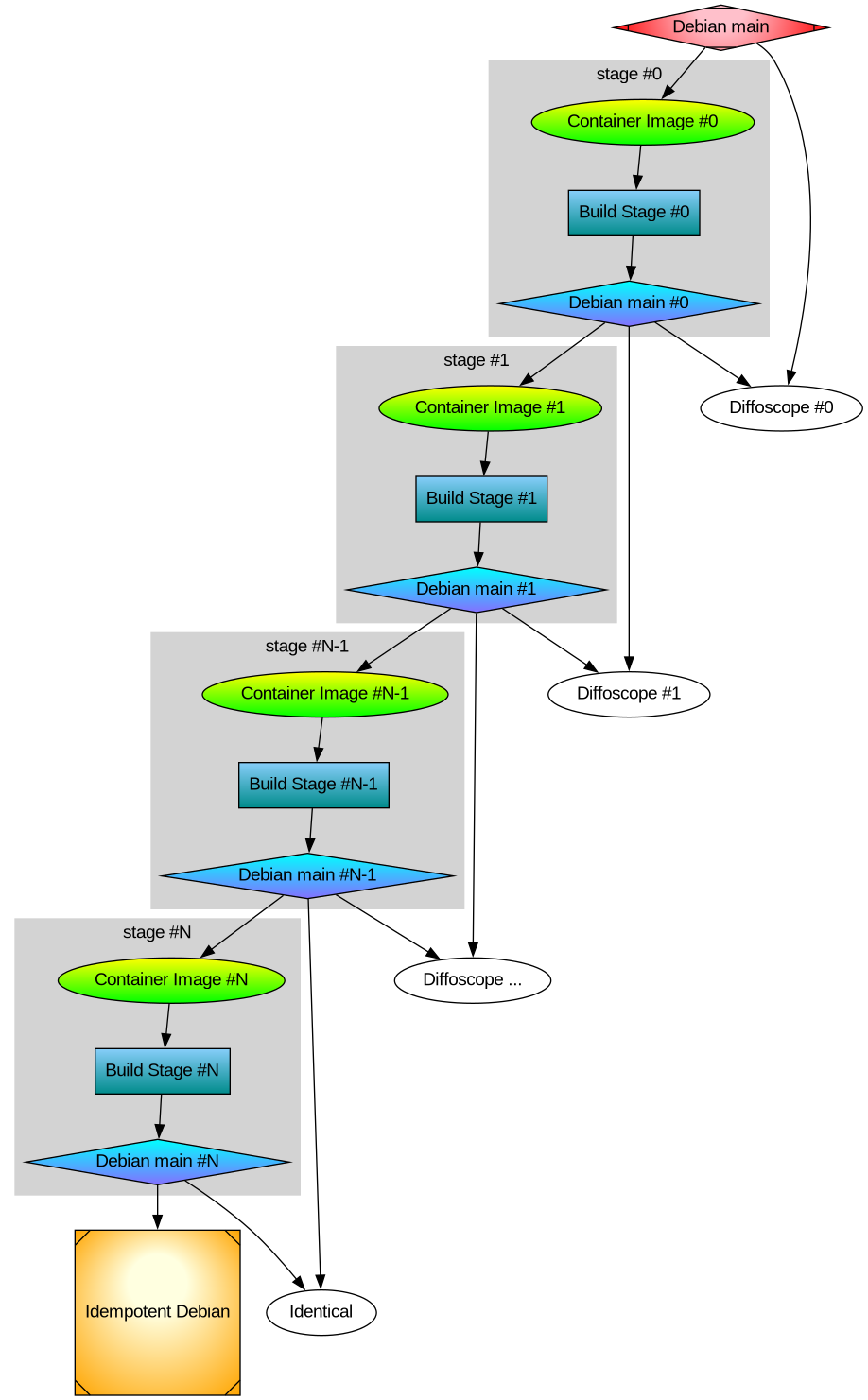
Earlier I rebuilt all packages that make up the difference between Ubuntu and Trisquel. It turned out to be a 42% bit-by-bit identical similarity. To check the generality of my approach, I rebuilt the difference between Debian and Devuan too. That was the debdistreproduce project. It “only” had to orchestrate building up to around 500 packages for each distribution and per architecture.
Differential reproducible rebuilds doesn’t give you the full picture: it ignore the shared package between the distribution, which make up over 90% of the packages. So I felt a desire to do full archive rebuilds. The motivation is that in order to trust Trisquel binary packages, I need to trust Ubuntu binary packages (because that make up 90% of the Trisquel packages), and many of those Ubuntu binaries are derived from Debian source packages. How to approach all of this? Last year I created the debdistrebuild project, and did top-50 popcon package rebuilds of Debian bullseye, bookworm, trixie, and Ubuntu noble and jammy, on a mix of amd64 and arm64. The amount of reproducibility was lower. Primarily the differences were caused by using different build inputs.
Last year I spent (too much) time creating a mirror of snapshot.debian.org, to be able to have older packages available for use as build inputs. I have two copies hosted at different datacentres for reliability and archival safety. At the time, snapshot.d.o had serious rate-limiting making it pretty unusable for massive rebuild usage or even basic downloads. Watching the multi-month download complete last year had a meditating effect. The completion of my snapshot download co-incided with me realizing something about the nature of rebuilding packages. Let me below give a recap of the idempotent rebuilds idea, because it motivate my work to build all of Debian from a GitLab pipeline.
One purpose for my effort is to be able to trust the binaries that I use on my laptop. I believe that without building binaries from source code, there is no practically feasible way to trust binaries. To trust any binary you receive, you can de-assemble the bits and audit the assembler instructions for the CPU you will execute it on. Doing that on a OS-wide level this is unpractical. A more practical approach is to audit the source code, and then confirm that the binary is 100% bit-by-bit identical to one that you can build yourself (from the same source) on your own trusted toolchain. This is similar to a reproducible build.
My initial goal with debdistrebuild was to get to 100% bit-by-bit identical rebuilds, and then I would have trustworthy binaries. Or so I thought. This also appears to be the goal of reproduce.debian.net. They want to reproduce the official Debian binaries. That is a worthy and important goal. They achieve this by building packages using the build inputs that were used to build the binaries. The build inputs are earlier versions of Debian packages (not necessarily from any public Debian release), archived at snapshot.debian.org.
I realized that these rebuilds would be not be sufficient for me: it doesn’t solve the problem of how to trust the toolchain. Let’s assume the reproduce.debian.net effort succeeds and is able to 100% bit-by-bit identically reproduce the official Debian binaries. Which appears to be within reach. To have trusted binaries we would “only” have to audit the source code for the latest version of the packages AND audit the tool chain used. There is no escaping from auditing all the source code — that’s what I think we all would prefer to focus on, to be able to improve upstream source code.
The trouble is about auditing the tool chain. With the Reproduce.debian.net approach, that is a recursive problem back to really ancient Debian packages, some of them which may no longer build or work, or even be legally distributable. Auditing all those old packages is a LARGER effort than auditing all current packages! Doing auditing of old packages is of less use to making contributions: those releases are old, and chances are any improvements have already been implemented and released. Or that improvements are no longer applicable because the projects evolved since the earlier version.
See where this is going now? I reached the conclusion that reproducing official binaries using the same build inputs is not what I’m interested in. I want to be able to build the binaries that I use from source using a toolchain that I can also build from source. And preferably that all of this is using latest version of all packages, so that I can contribute and send patches for them, to improve matters.
The toolchain that Reproduce.Debian.Net is using is not trustworthy unless all those ancient packages are audited or rebuilt bit-by-bit identically, and I don’t see any practical way forward to achieve that goal. Nor have I seen anyone working on that problem. It is possible to do, though, but I think there are simpler ways to achieve the same goal.
My approach to reach trusted binaries on my laptop appears to be a three-step effort:
- Encourage an idempotently rebuildable Debian archive, i.e., a Debian archive that can be 100% bit-by-bit identically rebuilt using Debian itself.
- Construct a smaller number of binary
*.debpackages based on Guix binaries that when used as build inputs (potentially iteratively) leads to 100% bit-by-bit identical packages as in step 1. - Encourage a freedom respecting distribution, similar to Trisquel, from this idempotently rebuildable Debian.
How to go about achieving this? Today’s Debian build architecture is something that lack transparency and end-user control. The build environment and signing keys are managed by, or influenced by, unidentified people following undocumented (or at least not public) security procedures, under unknown legal jurisdictions. I always wondered why none of the Debian-derivates have adopted a modern GitDevOps-style approach as a method to improve binary build transparency, maybe I missed some project?
If you want to contribute to some GitHub or GitLab project, you click the ‘Fork’ button and get a CI/CD pipeline running which rebuild artifacts for the project. This makes it easy for people to contribute, and you get good QA control because the entire chain up until its artifact release are produced and tested. At least in theory. Many projects are behind on this, but it seems like this is a useful goal for all projects. This is also liberating: all users are able to reproduce artifacts. There is no longer any magic involved in preparing release artifacts. As we’ve seen with many software supply-chain security incidents for the past years, where the “magic” is involved is a good place to introduce malicious code.
To allow me to continue with my experiment, I thought the simplest way forward was to setup a GitDevOps-centric and user-controllable way to build the entire Debian archive. Let me introduce the debdistbuild project.
Debdistbuild is a re-usable GitLab CI/CD pipeline, similar to the Salsa CI pipeline. It provide one “build” job definition and one “deploy” job definition. The pipeline can run on GitLab.org Shared Runners or you can set up your own runners, like my GitLab riscv64 runner setup. I have concerns about relying on GitLab (both as software and as a service), but my ideas are easy to transfer to some other GitDevSecOps setup such as Codeberg.org. Self-hosting GitLab, including self-hosted runners, is common today, and Debian rely increasingly on Salsa for this. All of the build infrastructure could be hosted on Salsa eventually.
The build job is simple. From within an official Debian container image build packages using dpkg-buildpackage essentially by invoking the following commands.
sed -i 's/ deb$/ deb deb-src/' /etc/apt/sources.list.d/*.sources
apt-get -o Acquire::Check-Valid-Until=false update
apt-get dist-upgrade -q -y
apt-get install -q -y --no-install-recommends build-essential fakeroot
env DEBIAN_FRONTEND=noninteractive \
    apt-get build-dep -y --only-source $PACKAGE=$VERSION
useradd -m build
DDB_BUILDDIR=/build/reproducible-path
chgrp build $DDB_BUILDDIR
chmod g+w $DDB_BUILDDIR
su build -c "apt-get source --only-source $PACKAGE=$VERSION" > ../$PACKAGE_$VERSION.build
cd $DDB_BUILDDIR
su build -c "dpkg-buildpackage"
cd ..
mkdir out
mv -v $(find $DDB_BUILDDIR -maxdepth 1 -type f) out/
The deploy job is also simple. It commit artifacts to a Git project using Git-LFS to handle large objects, essentially something like this:
if ! grep -q '^pool/**' .gitattributes; then
    git lfs track 'pool/**'
    git add .gitattributes
    git commit -m"Track pool/* with Git-LFS." .gitattributes
fi
POOLDIR=$(if test "$(echo "$PACKAGE" | cut -c1-3)" = "lib"; then C=4; else C=1; fi; echo "$DDB_PACKAGE" | cut -c1-$C)
mkdir -pv pool/main/$POOLDIR/
rm -rfv pool/main/$POOLDIR/$PACKAGE
mv -v out pool/main/$POOLDIR/$PACKAGE
git add pool
git commit -m"Add $PACKAGE." -m "$CI_JOB_URL" -m "$VERSION" -a
if test "${DDB_GIT_TOKEN:-}" = ""; then
    echo "SKIP: Skipping git push due to missing DDB_GIT_TOKEN (see README)."
else
    git push -o ci.skip
fi
That’s it! The actual implementation is a bit longer, but the major difference is for log and error handling.
You may review the source code of the base Debdistbuild pipeline definition, the base Debdistbuild script and the rc.d/-style scripts implementing the build.d/ process and the deploy.d/ commands.
There was one complication related to artifact size. GitLab.org job artifacts are limited to 1GB. Several packages in Debian produce artifacts larger than this. What to do? GitLab supports up to 5GB for files stored in its package registry, but this limit is too close for my comfort, having seen some multi-GB artifacts already. I made the build job optionally upload artifacts to a S3 bucket using SHA256 hashed file hierarchy. I’m using Hetzner Object Storage but there are many S3 providers around, including self-hosting options. This hierarchy is compatible with the Git-LFS .git/lfs/object/ hierarchy, and it is easy to setup a separate Git-LFS object URL to allow Git-LFS object downloads from the S3 bucket. In this mode, only Git-LFS stubs are pushed to the git repository. It should have no trouble handling the large number of files, since I have earlier experience with Apt mirrors in Git-LFS.
To speed up job execution, and to guarantee a stable build environment, instead of installing build-essential packages on every build job execution, I prepare some build container images. The project responsible for this is tentatively called stage-N-containers. Right now it create containers suitable for rolling builds of trixie on amd64, arm64, and riscv64, and a container intended for as use the stage-0 based on the 20250407 docker images of bookworm on amd64 and arm64 using the snapshot.d.o 20250407 archive. Or actually, I’m using snapshot-cloudflare.d.o because of download speed and reliability. I would have prefered to use my own snapshot mirror with Hetzner bandwidth, alas the Debian snapshot team have concerns about me publishing the list of (SHA1 hash) filenames publicly and I haven’t been bothered to set up non-public access.
Debdistbuild has built around 2.500 packages for bookworm on amd64 and bookworm on arm64. To confirm the generality of my approach, it also build trixie on amd64, trixie on arm64 and trixie on riscv64. The riscv64 builds are all on my own hosted runners. For amd64 and arm64 my own runners are only used for large packages where the GitLab.com shared runners run into the 3 hour time limit.
What’s next in this venture? Some ideas include:
- Optimize the stage-N build process by identifying the transitive closure of build dependencies from some initial set of packages.
- Create a build orchestrator that launches pipelines based on the previous list of packages, as necessary to fill the archive with necessary packages. Currently I’m using a basic /bin/sh
forloop aroundcurlto trigger GitLab CI/CD pipelines with names derived from https://popcon.debian.org/. - Create and publish a
dists/sub-directory, so that it is possible to use the newly built packages in the stage-1 build phase. - Produce diffoscope-style differences of built packages, both stage0 against official binaries and between stage0 and stage1.
- Create the stage-1 build containers and stage-1 archive.
- Review build failures. On amd64 and arm64 the list is small (below 10 out of ~5000 builds), but on riscv64 there is some icache-related problem that affects Java JVM that triggers build failures.
- Provide GitLab pipeline based builds of the Debian docker container images, cloud-images, debian-live CD and debian-installer ISO’s.
- Provide integration with Sigstore and Sigsum for signing of Debian binaries with transparency-safe properties.
- Implement a simple replacement for
dpkgandaptusing/bin/shfor use during bootstrapping when neither packaging tools are available.
What do you think?
]]>The differences between release tarballs and upstream Git sources is typically vendored and generated files. Lots of them. Auditing all source tarballs in a distribution for similar issues is hard and boring work for humans. Wouldn’t it be better if that human auditing time could be spent auditing the actual source code stored in upstream version control instead? That’s where auditing time would help the most.
Are there better ways to address the concern about differences between version control sources and tarball artifacts? Let’s consider some approaches:
- Stop publishing (or at least stop building from) source tarballs that differ from version control sources.
- Create recipes for how to derive the published source tarballs from version control sources. Verify that independently from upstream.
While I like the properties of the first solution, and have made effort to support that approach, I don’t think normal source tarballs are going away any time soon. I am concerned that it may not even be a desirable complete solution to this problem. We may need tarballs with pre-generated content in them for various reasons that aren’t entirely clear to us today.
So let’s consider the second approach. It could help while waiting for more experience with the first approach, to see if there are any fundamental problems with it.
How do you know that the XZ release tarballs was actually derived from its version control sources? The same for Gzip? Coreutils? Tar? Sed? Bash? GCC? We don’t know this! I am not aware of any automated or collaborative effort to perform this independent confirmation. Nor am I aware of anyone attempting to do this on a regular basis. We would want to be able to do this in the year 2042 too. I think the best way to reach that is to do the verification continuously in a pipeline, fixing bugs as time passes. The current state of the art seems to be that people audit the differences manually and hope to find something. I suspect many package maintainers ignore the problem and take the release source tarballs and trust upstream about this.
We can do better.
I have launched a project to setup a GitLab pipeline that invokes per-release scripts to rebuild that release artifact from git sources. Currently it only contain recipes for projects that I released myself. Releases which where done in a controlled way with considerable care to make reproducing the tarballs possible. The project homepage is here:
https://gitlab.com/debdistutils/verify-reproducible-releases
The project is able to reproduce the release tarballs for Libtasn1 v4.20.0, InetUtils v2.6, Libidn2 v2.3.8, Libidn v1.43, and GNU SASL v2.2.2. You can see this in a recent successful pipeline. All of those releases were prepared using Guix, and I’m hoping the Guix time-machine will make it possible to keep re-generating these tarballs for many years to come.
I spent some time trying to reproduce the current XZ release tarball for version 5.8.1. That would have been a nice example, wouldn’t it? First I had to somehow mimic upstream’s build environment. The XZ release tarball contains GNU Libtool files that are identified with version 2.5.4.1-baa1-dirty. I initially assumed this was due to the maintainer having installed libtool from git locally (after making some modifications) and made the XZ release using it. Later I learned that it may actually be coming from ArchLinux which ship with this particular libtool version. It seems weird for a distribution to use libtool built from a non-release tag, and furthermore applying patches to it, but things are what they are. I made some effort to setup an ArchLinux build environment, however the now-current Gettext version in ArchLinux seems to be more recent than the one that were used to prepare the XZ release. I don’t know enough ArchLinux to setup an environment corresponding to an earlier version of ArchLinux, which would be required to finish this. I gave up, maybe the XZ release wasn’t prepared on ArchLinux after all. Actually XZ became a good example for this writeup anyway: while you would think this should be trivial, the fact is that it isn’t! (There is another aspect here: fingerprinting the versions used to prepare release tarballs allows you to infer what kind of OS maintainers are using to make releases on, which is interesting on its own.)
I made some small attempts to reproduce the tarball for GNU Shepherd version 1.0.4 too, but I still haven’t managed to complete it.
Do you want a supply-chain challenge for the Easter weekend? Pick some well-known software and try to re-create the official release tarballs from the corresponding Git checkout. Is anyone able to reproduce anything these days? Bonus points for wrapping it up as a merge request to my project.
Happy Supply-Chain Security Hacking!
]]>- Release artifacts should be built in a way that can be reproduced by others
- It should be possible to build a project from source tarball that doesn’t contain any generated or vendor files (e.g., in the style of git-archive).
While implementing these ideas for a small project was accomplished within weeks – see my announcement of Libntlm version 1.8 – adressing this in complex projects uncovered concerns with tools that had to be addressed, and things stalled for many months pending that work.
I had the notion that these two goals were easy and shouldn’t be hard to accomplish. I still believe that, but have had to realize that improving tooling to support these goals takes time. It seems clear that these concepts are not universally agreed on and implemented generally.
I’m now happy to recap some of the work that led to releases of libtasn1 v4.20.0, inetutils v2.6, libidn2 v2.3.8, libidn v1.43. These releases all achieve these goals. I am working on a bunch of more projects to support these ideas too.
What have the obstacles so far been to make this happen? It may help others who are in the same process of addressing these concerns to have a high-level introduction to the issues I encountered. Source code for projects above are available and anyone can look at the solutions to learn how the problems are addressed.
First let’s look at the problems we need to solve to make “git-archive” style tarballs usable:
Version Handling
To build usable binaries from a minimal tarballs, it need to know which version number it is. Traditionally this information was stored inside configure.ac in git. However I use gnulib’s git-version-gen to infer the version number from the git tag or git commit instead. The git tag information is not available in a git-archive tarball. My solution to this was to make use of the export-subst feature of the .gitattributes file. I store the file .tarball-version-git in git containing the magic cookie like this:
$Format:%(describe)$With this, git-archive will replace with a useful version identifier on export, see the libtasn1 patch to achieve this. To make use of this information, the git-version-gen script was enhanced to read this information, see the gnulib patch. This is invoked by ./configure to figure out which version number the package is for.
Translations
We want translations to be included in the minimal source tarball for it to be buildable. Traditionally these files are retrieved by the maintainer from the Translation project when running ./bootstrap, however there are two problems with this. The first one is that there is no strong authentication or versioning information on this data, the tools just download and place whatever wget downloaded into your source tree (printf-style injection attack anyone?). We could improve this (e.g., publish GnuPG signed translations messages with clear versioning), however I did not work on that further. The reason is that I want to support offline builds of packages. Downloading random things from the Internet during builds does not work when building a Debian package, for example. The translation project could solve this by making a monthly tarball with their translations available, for distributors to pick up and provide as a separate package that could be used as a build dependency. However that is not how these tools and projects are designed. Instead I reverted back to storing translations in git, something that I did for most projects back when I was using CVS 20 years ago. Hooking this into ./bootstrap and gettext workflow can be tricky (ideas for improvement most welcome!), but I used a simple approach to store all directly downloaded po/*.po files directly as po/*.po.in and make the ./bootstrap tool move them in place, see the libidn2 commit followed by the actual ‘make update-po’ commit with all the translations where one essential step is:
# Prime po/*.po from fall-back copy stored in git.
for poin in po/*.po.in; do
    po=$(echo $poin | sed 's/.in//')
    test -f $po || cp -v $poin $po
done
ls po/*.po | sed 's|.*/||; s|\.po$||' > po/LINGUAS
Fetching vendor files like gnulib
Most build dependencies are in the shape of “You need a C compiler”. However some come in the shape of “source-code files intended to be vendored”, and gnulib is a huge repository of such files. The latter is a problem when building from a minimal git archive. It is possible to consider translation files as a class of vendor files, since they need to be copied verbatim into the project build directory for things to work. The same goes for *.m4 macros from the GNU Autoconf Archive. However I’m not confident that the solution for all vendor files must be the same. For translation files and for Autoconf Archive macros, I have decided to put these files into git and merge them manually occasionally. For gnulib files, in some projects like OATH Toolkit I also store all gnulib files in git which effectively resolve this concern. (Incidentally, the reason for doing so was originally that running ./bootstrap took forever since there is five gnulib instances used, which is no longer the case since gnulib-tool was rewritten in Python.) For most projects, however, I rely on ./bootstrap to fetch a gnulib git clone when building. I like this model, however it doesn’t work offline. One way to resolve this is to make the gnulib git repository available for offline use, and I’ve made some effort to make this happen via a Gnulib Git Bundle and have explained how to implement this approach for Debian packaging. I don’t think that is sufficient as a generic solution though, it is mostly applicable to building old releases that uses old gnulib files. It won’t work when building from CI/CD pipelines, for example, where I have settled to use a crude way of fetching and unpacking a particular gnulib snapshot, see this Libntlm patch. This is much faster than working with git submodules and cloning gnulib during ./bootstrap. Essentially this is doing:
GNULIB_REVISION=$(. bootstrap.conf >&2; echo $GNULIB_REVISION)
wget -nv https://gitlab.com/libidn/gnulib-mirror/-/archive/$GNULIB_REVISION/gnulib-mirror-$GNULIB_REVISION.tar.gz
gzip -cd gnulib-mirror-$GNULIB_REVISION.tar.gz | tar xf -
rm -fv gnulib-mirror-$GNULIB_REVISION.tar.gz
export GNULIB_SRCDIR=$PWD/gnulib-mirror-$GNULIB_REVISION
./bootstrap --no-git
./configure
make
Test the git-archive tarball
This goes without saying, but if you don’t test that building from a git-archive style tarball works, you are likely to regress at some point. Use CI/CD techniques to continuously test that a minimal git-archive tarball leads to a usable build.
Mission Accomplished
So that wasn’t hard, was it? You should now be able to publish a minimal git-archive tarball and users should be able to build your project from it.
I recommend naming these archives as PROJECT-vX.Y.Z-src.tar.gz replacing PROJECT with your project name and X.Y.Z with your version number. The archive should have only one sub-directory named PROJECT-vX.Y.Z/ containing all the source-code files. This differentiate it against traditional PROJECT-X.Y.Z.tar.gz tarballs in that it embeds the git tag (which typically starts with v) and contains a wildcard-friendly -src substring. Alas there is no consistency around this naming pattern, and GitLab, GitHub, Codeberg etc all seem to use their own slightly incompatible variant.
Let’s go on to see what is needed to achieve reproducible “make dist” source tarballs. This is the release artifact that most users use, and they often contain lots of generated files and vendor files. These files are included to make it easy to build for the user. What are the challenges to make these reproducible?
Build dependencies causing different generated content
The first part is to realize that if you use tool X with version A to generate a file that goes into the tarball, version B of that tool may produce different outputs. This is a generic concern and it cannot be solved. We want our build tools to evolve and produce better outputs over time. What can be addressed is to avoid needless differences. For example, many tools store timestamps and versioning information in the generated files. This causes needless differences, which makes audits harder. I have worked on some of these, like Autoconf Archive timestamps but solving all of these examples will take a long time, and some upstream are reluctant to incorporate these changes. My approach meanwhile is to build things using similar environments, and compare the outputs for differences. I’ve found that the various closely related forks of GNU/Linux distributions are useful for this. Trisquel 11 is based on Ubuntu 22.04, and building my projects using both and comparing the differences only give me the relevant differences to improve. This can be extended to compare AlmaLinux with RockyLinux (for both versions 8 and 9), Devuan 5 against Debian 12, PureOS 10 with Debian 11, and so on.
Timestamps
Sometimes tools store timestamps in files in a way that is harder to fix. Two notable examples of this are *.po translation files and Texinfo manuals. For translation files, I have resolved this by making sure the files use a predictable POT-Creation-Date timestamp, and I set it to the modification timestamps of the NEWS file in the repository (which I set to the git commit of the latest commit elsewhere) like this:
dist-hook: po-CreationDate-to-mtime-NEWS
.PHONY: po-CreationDate-to-mtime-NEWS
po-CreationDate-to-mtime-NEWS: mtime-NEWS-to-git-HEAD
  $(AM_V_GEN)for p in $(distdir)/po/*.po $(distdir)/po/$(PACKAGE).pot; do \
    if test -f "$$p"; then \
      $(SED) -e 's,POT-Creation-Date: .*\\n",POT-Creation-Date: '"$$(env LC_ALL=C TZ=UTC0 stat --format=%y $(srcdir)/NEWS | cut -c1-16,31-)"'\\n",' < $$p > $$p.tmp && \
      if cmp $$p $$p.tmp > /dev/null; then \
        rm -f $$p.tmp; \
      else \
        mv $$p.tmp $$p; \
      fi \
    fi \
  done
Similarily, I set a predictable modification time of the texinfo source file like this:
dist-hook: mtime-NEWS-to-git-HEAD
.PHONY: mtime-NEWS-to-git-HEAD
mtime-NEWS-to-git-HEAD:
  $(AM_V_GEN)if test -e $(srcdir)/.git \
                && command -v git > /dev/null; then \
    touch -m -t "$$(git log -1 --format=%cd \
      --date=format-local:%Y%m%d%H%M.%S)" $(srcdir)/NEWS; \
  fi
However I’ve realized that this needs to happen earlier and probably has to be run during ./configure time, because the doc/version.texi file is generated on first build before running ‘make dist‘ and for some reason the file is not rebuilt at release time. The Automake texinfo integration is a bit inflexible about providing hooks to extend the dependency tracking.
The method to address these differences isn’t really important, and they change over time depending on preferences. What is important is that the differences are eliminated.
ChangeLog
Traditionally ChangeLog files were manually prepared, and still is for some projects. I maintain git2cl but recently I’ve settled with gnulib’s gitlog-to-changelog because doing so avoids another build dependency (although the output formatting is different and arguable worse for my git commit style). So the ChangeLog files are generated from git history. This means a shallow clone will not produce the same ChangeLog file depending on how deep it was cloned. For Libntlm I simply disabled use of generated ChangeLog because I wanted to support an even more extreme form of reproducibility: I wanted to be able to reproduce the full “make dist” source archives from a minimal “git-archive” source archive. However for other projects I’ve settled with a middle ground. I realized that for ‘git describe‘ to produce reproducible outputs, the shallow clone needs to include the last release tag. So it felt acceptable to assume that the clone is not minimal, but instead has some but not all of the history. I settled with the following recipe to produce ChangeLog's covering all changes since the last release.
dist-hook: gen-ChangeLog
.PHONY: gen-ChangeLog
gen-ChangeLog:
  $(AM_V_GEN)if test -e $(srcdir)/.git; then			\
    LC_ALL=en_US.UTF-8 TZ=UTC0					\
    $(top_srcdir)/build-aux/gitlog-to-changelog			\
       --srcdir=$(srcdir) --					\
       v$(PREV_VERSION)~.. > $(distdir)/cl-t &&			\
       { printf '\n\nSee the source repo for older entries\n'	\
         >> $(distdir)/cl-t &&					\
         rm -f $(distdir)/ChangeLog &&				\
         mv $(distdir)/cl-t $(distdir)/ChangeLog; }		\
  fi
I’m undecided about the usefulness of generated ChangeLog files within ‘make dist‘ archives. Before we have stable and secure archival of git repositories widely implemented, I can see some utility of this in case we lose all copies of the upstream git repositories. I can sympathize with the concept of ChangeLog files died when we started to generate them from git logs: the files no longer serve any purpose, and we can ask people to go look at the git log instead of reading these generated non-source files.
Long-term reproducible trusted build environment
Distributions comes and goes, and old releases of them goes out of support and often stops working. Which build environment should I chose to build the official release archives? To my knowledge only Guix offers a reliable way to re-create an older build environment (guix gime-machine) that have bootstrappable properties for additional confidence. However I had two difficult problems here. The first one was that I needed Guix container images that were usable in GitLab CI/CD Pipelines, and this side-tracked me for a while. The second one delayed my effort for many months, and I was inclined to give up. Libidn distribute a C# implementation. Some of the C# source code files included in the release tarball are generated. By what? You guess it, by a C# program, with the source code included in the distribution. This means nobody could reproduce the source tarball of Libidn without trusting someone elses C# compiler binaries, which were built from binaries of earlier releases, chaining back into something that nobody ever attempts to build any more and likely fail to build due to bit-rot. I had two basic choices, either remove the C# implementation from Libidn (which may be a good idea for other reasons, since the C and C# are unrelated implementations) or build the source tarball on some binary-only distribution like Trisquel. Neither felt appealing to me, but a late christmas gift of a reproducible Mono came to Guix that resolve this.
Embedded images in Texinfo manual
For Libidn one section of the manual has an image illustrating some concepts. The PNG, PDF and EPS outputs were generated via fig2dev from a *.fig file (hello 1985!) that I had stored in git. Over time, I had also started to store the generated outputs because of build issues. At some point, it was possible to post-process the PDF outputs with grep to remove some timestamps, however with compression this is no longer possible and actually the grep command I used resulted in a 0-byte output file. So my embedded binaries in git was no longer reproducible. I first set out to fix this by post-processing things properly, however I then realized that the *.fig file is not really easy to work with in a modern world. I wanted to create an image from some text-file description of the image. Eventually, via the Guix manual on guix graph, I came to re-discover the graphviz language and tool called dot (hello 1993!). All well then? Oh no, the PDF output embeds timestamps. Binary editing of PDF’s no longer work through simple grep, remember? I was back where I started, and after some (soul- and web-) searching I discovered that Ghostscript (hello 1988!) pdfmarks could be used to modify things here. Cooperating with automake’s texinfo rules related to make dist proved once again a worthy challenge, and eventually I ended up with a Makefile.am snippet to build images that could be condensed into:
info_TEXINFOS = libidn.texi
libidn_TEXINFOS += libidn-components.png
imagesdir = $(infodir)
images_DATA = libidn-components.png
EXTRA_DIST += components.dot
DISTCLEANFILES = \
  libidn-components.eps libidn-components.png libidn-components.pdf
libidn-components.eps: $(srcdir)/components.dot
  $(AM_V_GEN)$(DOT) -Nfontsize=9 -Teps < $< > $@.tmp
  $(AM_V_at)! grep %%CreationDate $@.tmp
  $(AM_V_at)mv $@.tmp $@
libidn-components.pdf: $(srcdir)/components.dot
  $(AM_V_GEN)$(DOT) -Nfontsize=9 -Tpdf < $< > $@.tmp
# A simple sed on CreationDate is no longer possible due to compression.
# 'exiftool -CreateDate' is alternative to 'gs', but adds ~4kb to file.
# Ghostscript add <1kb.  Why can't 'dot' avoid setting CreationDate?
  $(AM_V_at)printf '[ /ModDate ()\n  /CreationDate ()\n  /DOCINFO pdfmark\n' > pdfmarks
  $(AM_V_at)$(GS) -q -dBATCH -dNOPAUSE -sDEVICE=pdfwrite -sOutputFile=$@.tmp2 $@.tmp pdfmarks
  $(AM_V_at)rm -f $@.tmp pdfmarks
  $(AM_V_at)mv $@.tmp2 $@
libidn-components.png: $(srcdir)/components.dot
  $(AM_V_GEN)$(DOT) -Nfontsize=9 -Tpng < $< > $@.tmp
  $(AM_V_at)mv $@.tmp $@
pdf-recursive: libidn-components.pdf
dvi-recursive: libidn-components.eps
ps-recursive: libidn-components.eps
info-recursive: $(top_srcdir)/.version libidn-components.png
Surely this can be improved, but I’m not yet certain in what way is the best one forward. I like having a text representation as the source of the image. I’m sad that the new image size is ~48kb compared to the old image size of ~1kb. I tried using exiftool -CreateDate as an alternative to GhostScript, but using it to remove the timestamp added ~4kb to the file size and naturally I was appalled by this ignorance of impending doom.
Test reproducibility of tarball
Again, you need to continuously test the properties you desire. This means building your project twice using different environments and comparing the results. I’ve settled with a small GitLab CI/CD pipeline job that perform bit-by-bit comparison of generated ‘make dist’ archives. It also perform bit-by-bit comparison of generated ‘git-archive’ artifacts. See the Libidn2 .gitlab-ci.yml 0-compare job which essentially is:
0-compare:
  image: alpine:latest
  stage: repro
  needs: [ B-AlmaLinux8, B-AlmaLinux9, B-RockyLinux8, B-RockyLinux9, B-Trisquel11, B-Ubuntu2204, B-PureOS10, B-Debian11, B-Devuan5, B-Debian12, B-gcc, B-clang, B-Guix, R-Guix, R-Debian12, R-Ubuntu2404, S-Trisquel10, S-Ubuntu2004 ]
  script:
  - cd out
  - sha256sum */*.tar.* */*/*.tar.* | sort | grep    -- -src.tar.
  - sha256sum */*.tar.* */*/*.tar.* | sort | grep -v -- -src.tar.
  - sha256sum */*.tar.* */*/*.tar.* | sort | uniq -c -w64 | sort -rn
  - sha256sum */*.tar.* */*/*.tar.* | grep    -- -src.tar. | sort | uniq -c -w64 | grep -v '^      1 '
  - sha256sum */*.tar.* */*/*.tar.* | grep -v -- -src.tar. | sort | uniq -c -w64 | grep -v '^      1 '
# Confirm modern git-archive tarball reproducibility
  - cmp b-almalinux8/src/*.tar.gz b-almalinux9/src/*.tar.gz
  - cmp b-almalinux8/src/*.tar.gz b-rockylinux8/src/*.tar.gz
  - cmp b-almalinux8/src/*.tar.gz b-rockylinux9/src/*.tar.gz
  - cmp b-almalinux8/src/*.tar.gz b-debian12/src/*.tar.gz
  - cmp b-almalinux8/src/*.tar.gz b-devuan5/src/*.tar.gz
  - cmp b-almalinux8/src/*.tar.gz r-guix/src/*.tar.gz
  - cmp b-almalinux8/src/*.tar.gz r-debian12/src/*.tar.gz
  - cmp b-almalinux8/src/*.tar.gz r-ubuntu2404/src/*v2.*.tar.gz
# Confirm old git-archive (export-subst but long git describe) tarball reproducibility
  - cmp b-trisquel11/src/*.tar.gz b-ubuntu2204/src/*.tar.gz
# Confirm really old git-archive (no export-subst) tarball reproducibility
  - cmp b-debian11/src/*.tar.gz b-pureos10/src/*.tar.gz
# Confirm 'make dist' generated tarball reproducibility
  - cmp b-almalinux8/*.tar.gz b-rockylinux8/*.tar.gz
  - cmp b-almalinux9/*.tar.gz b-rockylinux9/*.tar.gz
  - cmp b-pureos10/*.tar.gz b-debian11/*.tar.gz
  - cmp b-devuan5/*.tar.gz b-debian12/*.tar.gz
  - cmp b-trisquel11/*.tar.gz b-ubuntu2204/*.tar.gz
  - cmp b-guix/*.tar.gz r-guix/*.tar.gz
# Confirm 'make dist' from git-archive tarball reproducibility
  - cmp s-trisquel10/*.tar.gz s-ubuntu2004/*.tar.gz
Notice that I discovered that ‘git archive’ outputs differ over time too, which is natural but a bit of a nuisance. The output of the job is illuminating in the way that all SHA256 checksums of generated tarballs are included, for example the libidn2 v2.3.8 job log:
$ sha256sum */*.tar.* */*/*.tar.* | sort | grep -v -- -src.tar.
368488b6cc8697a0a937b9eb307a014396dd17d3feba3881e6911d549732a293  b-trisquel11/libidn2-2.3.8.tar.gz
368488b6cc8697a0a937b9eb307a014396dd17d3feba3881e6911d549732a293  b-ubuntu2204/libidn2-2.3.8.tar.gz
59db2d045fdc5639c98592d236403daa24d33d7c8db0986686b2a3056dfe0ded  b-debian11/libidn2-2.3.8.tar.gz
59db2d045fdc5639c98592d236403daa24d33d7c8db0986686b2a3056dfe0ded  b-pureos10/libidn2-2.3.8.tar.gz
5bd521d5ecd75f4b0ab0fc6d95d444944ef44a84cad859c9fb01363d3ce48bb8  s-trisquel10/libidn2-2.3.8.tar.gz
5bd521d5ecd75f4b0ab0fc6d95d444944ef44a84cad859c9fb01363d3ce48bb8  s-ubuntu2004/libidn2-2.3.8.tar.gz
7f1dcdea3772a34b7a9f22d6ae6361cdcbe5513e3b6485d40100b8565c9b961a  b-almalinux8/libidn2-2.3.8.tar.gz
7f1dcdea3772a34b7a9f22d6ae6361cdcbe5513e3b6485d40100b8565c9b961a  b-rockylinux8/libidn2-2.3.8.tar.gz
8031278157ce43b5813f36cf8dd6baf0d9a7f88324ced796765dcd5cd96ccc06  b-clang/libidn2-2.3.8.tar.gz
8031278157ce43b5813f36cf8dd6baf0d9a7f88324ced796765dcd5cd96ccc06  b-debian12/libidn2-2.3.8.tar.gz
8031278157ce43b5813f36cf8dd6baf0d9a7f88324ced796765dcd5cd96ccc06  b-devuan5/libidn2-2.3.8.tar.gz
8031278157ce43b5813f36cf8dd6baf0d9a7f88324ced796765dcd5cd96ccc06  b-gcc/libidn2-2.3.8.tar.gz
8031278157ce43b5813f36cf8dd6baf0d9a7f88324ced796765dcd5cd96ccc06  r-debian12/libidn2-2.3.8.tar.gz
acf5cbb295e0693e4394a56c71600421059f9c9bf45ccf8a7e305c995630b32b  r-ubuntu2404/libidn2-2.3.8.tar.gz
cbdb75c38100e9267670b916f41878b6dbc35f9c6cbe60d50f458b40df64fcf1  b-almalinux9/libidn2-2.3.8.tar.gz
cbdb75c38100e9267670b916f41878b6dbc35f9c6cbe60d50f458b40df64fcf1  b-rockylinux9/libidn2-2.3.8.tar.gz
f557911bf6171621e1f72ff35f5b1825bb35b52ed45325dcdee931e5d3c0787a  b-guix/libidn2-2.3.8.tar.gz
f557911bf6171621e1f72ff35f5b1825bb35b52ed45325dcdee931e5d3c0787a  r-guix/libidn2-2.3.8.tar.gz
I’m sure I have forgotten or suppressed some challenges (sprinkling LANG=C TZ=UTC0 helps) related to these goals, but my hope is that this discussion of solutions will inspire you to implement these concepts for your software project too. Please share your thoughts and additional insights in a comment below. Enjoy Happy Hacking in the course of practicing this!
Let’s go directly to the point of this article: here is a GitLab pipeline job that runs in a native Guix container image that builds libksba after installing the libgpg-error dependency from Guix using the pre-built substitutes.
test-amd64-latest-wget-configure-make-libksba:
  image: registry.gitlab.com/debdistutils/guix/container:latest
  before_script:
  - lndir /gnu/store/*profile/etc/ /etc
  - rm -f /etc/group
  - groupadd --system guixbuild
  - for i in $(seq -w 1 10); do useradd -g guixbuild -G guixbuild -d /var/empty -s $(command -v nologin) -c "Guix build user $i" --system guixbuilder$i; done
  - export HOME=/
  - export LANG=C.UTF-8
  - guix-daemon --disable-chroot --build-users-group=guixbuild &
  - guix archive --authorize < /share/guix/ci.guix.gnu.org.pub
  - guix archive --authorize < /share/guix/bordeaux.guix.gnu.org.pub
  - guix describe
  - guix package -i libgpg-error
  - GUIX_PROFILE="//.guix-profile"
  - . "$GUIX_PROFILE/etc/profile"
  script:
  - wget https://www.gnupg.org/ftp/gcrypt/libksba/libksba-1.6.7.tar.bz2
  - tar xfa libksba-1.6.7.tar.bz2
  - cd libksba-1.6.7
  - ./configure
  - make V=1
  - make check VERBOSE=t V=1
You can put that in a .gitlab-ci.yml and push it to GitLab and you will end up with a nice pipeline job output.
As you may imagine, there are several things that are sub-optimal in the before_script above that ought to be taken care of by the Guix container image, and I hope to be able to remove as much of the ugliness as possible. However that doesn’t change that these images are useful now, and I wanted to announce this work to allow others to start testing them and possibly offer help. I have started to make use of these images in some projects, see for example the libntlm commit for that.
You are welcome to join me in the Guix container images for GitLab CI/CD project! Issues and merge requests are welcome – happy hacking folks!
]]>I have felt that something is lacking, and months have passed and I haven’t found any project that address the problem I am interested in. During my earlier work I created a project called debdistreproduce which performs rebuilds of the difference between two distributions in a GitLab pipeline, and display diffoscope output for further analysis. A couple of days ago I had the idea of rewriting it to perform rebuilds of a single distribution. A new project debdistrebuild was born and today I’m happy to bless it as version 1.0 and to announces the project! Debdistrebuild has rebuilt the top-50 popcon packages from Debian bullseye, bookworm and trixie, on amd64 and arm64, as well as Ubuntu jammy and noble on amd64, see the summary status page for links. This is intended as a proof of concept, to allow people experiment with the concept of doing GitLab-based package rebuilds and analysis. Compare how Guix has the guix challenge command.
Or I should say debdistrebuild has attempted to rebuild those distributions. The number of identically built packages are fairly low, so I didn’t want to waste resources building the rest of the archive until I understand if the differences are due to consequences of my build environment (plain apt-get build-dep followed by dpkg-buildpackage in a fresh container), or due to some real difference. Summarizing the results, debdistrebuild is able to rebuild 34% of Debian bullseye on amd64, 36% of bookworm on amd64, 32% of bookworm on arm64. The results for trixie and Ubuntu are disappointing, below 10%.
So what causes my rebuilds to be different from the official rebuilds? Some are trivial like the classical problem of varying build paths, resulting in a different NT_GNU_BUILD_ID causing a mismatch. Some are a bit strange, like a subtle difference in one of perl’s headers file. Some are due to embedded version numbers from a build dependency. Several of the build logs and diffoscope outputs doesn’t make sense, likely due to bugs in my build scripts, especially for Ubuntu which appears to strip translations and do other build variations that I don’t do. In general, the classes of reproducibility problems are the expected. Some are assembler differences for GnuPG’s gpgv-static, likely triggered by upload of a new version of gcc after the original package was built. There are at least two ways to resolve that problem: either use the same version of build dependencies that were used to produce the original build, or demand that all packages that are affected by a change in another package are rebuilt centrally until there are no more differences.
The current design of debdistrebuild uses the latest version of a build dependency that is available in the distribution. We call this a “idempotent rebuild“. This is usually not how the binary packages were built originally, they are often built against earlier versions of their build dependency. That is the situation for most binary distributions.
Instead of using the latest build dependency version, higher reproducability may be achieved by rebuilding using the same version of the build dependencies that were used during the original build. This requires parsing buildinfo files to find the right version of the build dependency to install. We believe doing so will lead to a higher number of reproducibly built packages. However it begs the question: can we rebuild that earlier version of the build dependency? This circles back to really old versions and bootstrappable builds eventually.
While rebuilding old versions would be interesting on its own, we believe that is less helpful for trusting the latest version and improving a binary distribution: it is challenging to publish a new version of some old package that would fix a reproducibility bug in another package when used as a build dependency, and then rebuild the later packages with the modified earlier version. Those earlier packages were already published, and are part of history. It may be that ultimately it will no longer be possible to rebuild some package, because proper source code is missing (for packages using build dependencies that were never part of a release); hardware to build a package could be missing; or that the source code is no longer publicly distributable.
I argue that getting to 100% idempotent rebuilds is an interesting goal on its own, and to reach it we need to start measure idempotent rebuild status.
One could conceivable imagine a way to rebuild modified versions of earlier packages, and then rebuild later packages using the modified earlier packages as build dependencies, for the purpose of achieving higher level of reproducible rebuilds of the last version, and to reach for bootstrappability. However, it may be still be that this is insufficient to achieve idempotent rebuilds of the last versions. Idempotent rebuilds are different from a reproducible build (where we try to reproduce the build using the same inputs), and also to bootstrappable builds (in which all binaries are ultimately built from source code). Consider a cycle where package X influence the content of package Y, which in turn influence the content of package X. These cycles may involve several packages, and it is conceivable that a cycle could be circular and infinite. It may be difficult to identify these chains, and even more difficult to break them up, but this effort help identify where to start looking for them. Rebuilding packages using the same build dependency versions as were used during the original build, or rebuilding packages using a bootsrappable build process, both seem orthogonal to the idempotent rebuild problem.
Our notion of rebuildability appears thus to be complementary to reproducible-builds.org’s definition and bootstrappable.org’s definition. Each to their own devices, and Happy Hacking!
Addendum about terminology: With “idempotent rebuild” I am talking about a rebuild of the entire operating system, applied to itself. Compare how you build the latest version of the GNU C Compiler: it first builds itself using whatever system compiler is available (often an earlier version of gcc) which we call step 1. Then step 2 is to build a copy of itself using the compiler built in step 1. The final step 3 is to build another copy of itself using the compiler from step 2. Debian, Ubuntu etc are at step 1 in this process right now. The output of step 2 and step 3 ought to be bit-by-bit identical, or something is wrong. The comparison between step 2 and 3 is what I refer to with an idempotent rebuild. Of course, most packages aren’t a compiler that can compile itself. However entire operating systems such as Trisquel, PureOS, Ubuntu or Debian are (hopefully) a self-contained system that ought to be able to rebuild itself to an identical copy. Or something is amiss. The reproducible build and bootstrappable build projects are about improve the quality of step 1. The property I am interested is the identical rebuild and comparison in step 2 and 3. I feel the word “idempotent” describes the property I’m interested in well, but I realize there may be better ways to describe this. Ideas welcome!
]]>What does that even mean? Why should you care? How you can do the same for your project? What are the open issues? Read on, dear reader…
This article describes my practical experiments with reproducible release artifacts, following up on my earlier thoughts that lead to discussion on Fosstodon and a patch by Janneke Nieuwenhuizen to make Guix tarballs reproducible that inspired me to some practical work.
Let’s look at how a maintainer release some software, and how a user can reproduce the released artifacts from the source code. Libntlm provides a shared library written in C and uses GNU Make, GNU Autoconf, GNU Automake, GNU Libtool and gnulib for build management, but these ideas should apply to most project and build system. The following illustrate the steps a maintainer would take to prepare a release:
git clone https://gitlab.com/gsasl/libntlm.git
cd libntlm
git checkout v1.8
./bootstrap
./configure
make distcheck
gpg -b libntlm-1.8.tar.gz
The generated files libntlm-1.8.tar.gz and libntlm-1.8.tar.gz.sig are published, and users download and use them. This is how the GNU project have been doing releases since the late 1980’s. That is a testament to how successful this pattern has been! These tarballs contain source code and some generated files, typically shell scripts generated by autoconf, makefile templates generated by automake, documentation in formats like Info, HTML, or PDF. Rarely do they contain binary object code, but historically that happened.
The XZUtils incident illustrate that tarballs with files that are not included in the git archive offer an opportunity to disguise malicious backdoors. I blogged earlier how to mitigate this risk by using signed minimal source-only tarballs.
The risk of hiding malware is not the only motivation to publish signed minimal source-only tarballs. With pre-generated content in tarballs, there is a risk that GNU/Linux distributions such as Trisquel, Guix, Debian/Ubuntu or Fedora ship generated files coming from the tarball into the binary *.deb or *.rpm package file. Typically the person packaging the upstream project never realized that some installed artifacts was not re-built through a typical autoconf -fi && ./configure && make install sequence, and never wrote the code to rebuild everything. This can also happen if the build rules are written but are buggy, shipping the old artifact. When a security problem is found, this can lead to time-consuming situations, as it may be that patching the relevant source code and rebuilding the package is not sufficient: the vulnerable generated object from the tarball would be shipped into the binary package instead of a rebuilt artifact. For architecture-specific binaries this rarely happens, since object code is usually not included in tarballs — although for 10+ years I shipped the binary Java JAR file in the GNU Libidn release tarball, until I stopped shipping it. For interpreted languages and especially for generated content such as HTML, PDF, shell scripts this happens more than you would like.
Publishing minimal source-only tarballs enable easier auditing of a project’s code, to avoid the need to read through all generated files looking for malicious content. I have taken care to generate the source-only minimal tarball using git-archive. This is the same format that GitLab, GitHub etc offer for the automated download links on git tags. The minimal source-only tarballs can thus serve as a way to audit GitLab and GitHub download material! Consider if/when hosting sites like GitLab or GitHub has a security incident that cause generated tarballs to include a backdoor that is not present in the git repository. If people rely on the tag download artifact without verifying the maintainer PGP signature using GnuPG, this can lead to similar backdoor scenarios that we had for XZUtils but originated with the hosting provider instead of the release manager. This is even more concerning, since this attack can be mounted for some selected IP address that you want to target and not on everyone, thereby making it harder to discover.
With all that discussion and rationale out of the way, let’s return to the release process. I have added another step here:
make srcdist
gpg -b libntlm-1.8-src.tar.gz
Now the release is ready. I publish these four files in the Libntlm’s Savannah Download area, but they can be uploaded to a GitLab/GitHub release area as well. These are the SHA256 checksums I got after building the tarballs on my Trisquel 11 aramo laptop:
91de864224913b9493c7a6cec2890e6eded3610d34c3d983132823de348ec2ca  libntlm-1.8-src.tar.gz
ce6569a47a21173ba69c990965f73eb82d9a093eb871f935ab64ee13df47fda1  libntlm-1.8.tar.gz
So how can you reproduce my artifacts? Here is how to reproduce them in a Ubuntu 22.04 container:
podman run -it --rm ubuntu:22.04
apt-get update
apt-get install -y --no-install-recommends autoconf automake libtool make git ca-certificates
git clone https://gitlab.com/gsasl/libntlm.git
cd libntlm
git checkout v1.8
./bootstrap
./configure
make dist srcdist
sha256sum libntlm-*.tar.gz
You should see the exact same SHA256 checksum values. Hooray!
This works because Trisquel 11 and Ubuntu 22.04 uses the same version of git, autoconf, automake, and libtool. These tools do not guarantee the same output content for all versions, similar to how GNU GCC does not generate the same binary output for all versions. So there is still some delicate version pairing needed.
Ideally, the artifacts should be possible to reproduce from the release artifacts themselves, and not only directly from git. It is possible to reproduce the full tarball in a AlmaLinux 8 container – replace almalinux:8 with rockylinux:8 if you prefer RockyLinux:
podman run -it --rm almalinux:8
dnf update -y
dnf install -y make wget gcc
wget https://download.savannah.nongnu.org/releases/libntlm/libntlm-1.8.tar.gz
tar xfa libntlm-1.8.tar.gz
cd libntlm-1.8
./configure
make dist
sha256sum libntlm-1.8.tar.gz
The source-only minimal tarball can be regenerated on Debian 11:
podman run -it --rm debian:11
apt-get update
apt-get install -y --no-install-recommends make git ca-certificates
git clone https://gitlab.com/gsasl/libntlm.git
cd libntlm
git checkout v1.8
make -f cfg.mk srcdist
sha256sum libntlm-1.8-src.tar.gz
As the Magnus Opus or chef-d’œuvre, let’s recreate the full tarball directly from the minimal source-only tarball on Trisquel 11 – replace docker.io/kpengboy/trisquel:11.0 with ubuntu:22.04 if you prefer.
podman run -it --rm docker.io/kpengboy/trisquel:11.0
apt-get update
apt-get install -y --no-install-recommends autoconf automake libtool make wget git ca-certificates
wget https://download.savannah.nongnu.org/releases/libntlm/libntlm-1.8-src.tar.gz
tar xfa libntlm-1.8-src.tar.gz
cd libntlm-v1.8
./bootstrap
./configure
make dist
sha256sum libntlm-1.8.tar.gz
Yay! You should now have great confidence in that the release artifacts correspond to what’s in version control and also to what the maintainer intended to release. Your remaining job is to audit the source code for vulnerabilities, including the source code of the dependencies used in the build. You no longer have to worry about auditing the release artifacts.
I find it somewhat amusing that the build infrastructure for Libntlm is now in a significantly better place than the code itself. Libntlm is written in old C style with plenty of string manipulation and uses broken cryptographic algorithms such as MD4 and single-DES. Remember folks: solving supply chain security issues has no bearing on what kind of code you eventually run. A clean gun can still shoot you in the foot.
Side note on naming: GitLab exports tarballs with pathnames libntlm-v1.8/ (i.e.., PROJECT-TAG/) and I’ve adopted the same pathnames, which means my libntlm-1.8-src.tar.gz tarballs are bit-by-bit identical to GitLab’s exports and you can verify this with tools like diffoscope. GitLab name the tarball libntlm-v1.8.tar.gz (i.e., PROJECT-TAG.ARCHIVE) which I find too similar to the libntlm-1.8.tar.gz that we also publish. GitHub uses the same git archive style, but unfortunately they have logic that removes the ‘v’ in the pathname so you will get a tarball with pathname libntlm-1.8/ instead of libntlm-v1.8/ that GitLab and I use. The content of the tarball is bit-by-bit identical, but the pathname and archive differs. Codeberg (running Forgejo) uses another approach: the tarball is called libntlm-v1.8.tar.gz (after the tag) just like GitLab, but the pathname inside the archive is libntlm/, otherwise the produced archive is bit-by-bit identical including timestamps. Savannah’s CGIT interface uses archive name libntlm-1.8.tar.gz with pathname libntlm-1.8/, but otherwise file content is identical. Savannah’s GitWeb interface provides snapshot links that are named after the git commit (e.g., libntlm-a812c2ca.tar.gz with libntlm-a812c2ca/) and I cannot find any tag-based download links at all. Overall, we are so close to get SHA256 checksum to match, but fail on pathname within the archive. I’ve chosen to be compatible with GitLab regarding the content of tarballs but not on archive naming. From a simplicity point of view, it would be nice if everyone used PROJECT-TAG.ARCHIVE for the archive filename and PROJECT-TAG/ for the pathname within the archive. This aspect will probably need more discussion.
Side note on git archive output: It seems different versions of git archive produce different results for the same repository. The version of git in Debian 11, Trisquel 11 and Ubuntu 22.04 behave the same. The version of git in Debian 12, AlmaLinux/RockyLinux 8/9, Alpine, ArchLinux, macOS homebrew, and upcoming Ubuntu 24.04 behave in another way. Hopefully this will not change that often, but this would invalidate reproducibility of these tarballs in the future, forcing you to use an old git release to reproduce the source-only tarball. Alas, GitLab and most other sites appears to be using modern git so the download tarballs from them would not match my tarballs – even though the content would.
Side note on ChangeLog: ChangeLog files were traditionally manually curated files with version history for a package. In recent years, several projects moved to dynamically generate them from git history (using tools like git2cl or gitlog-to-changelog). This has consequences for reproducibility of tarballs: you need to have the entire git history available! The gitlog-to-changelog tool also output different outputs depending on the time zone of the person using it, which arguable is a simple bug that can be fixed. However this entire approach is incompatible with rebuilding the full tarball from the minimal source-only tarball. It seems Libntlm’s ChangeLog file died on the surgery table here.
So how would a distribution build these minimal source-only tarballs? I happen to help on the libntlm package in Debian. It has historically used the generated tarballs as the source code to build from. This means that code coming from gnulib is vendored in the tarball. When a security problem is discovered in gnulib code, the security team needs to patch all packages that include that vendored code and rebuild them, instead of merely patching the gnulib package and rebuild all packages that rely on that particular code. To change this, the Debian libntlm package needs to Build-Depends on Debian’s gnulib package. But there was one problem: similar to most projects that use gnulib, Libntlm depend on a particular git commit of gnulib, and Debian only ship one commit. There is no coordination about which commit to use. I have adopted gnulib in Debian, and add a git bundle to the *_all.deb binary package so that projects that rely on gnulib can pick whatever commit they need. This allow an no-network GNULIB_URL and GNULIB_REVISION approach when running Libntlm’s ./bootstrap with the Debian gnulib package installed. Otherwise libntlm would pick up whatever latest version of gnulib that Debian happened to have in the gnulib package, which is not what the Libntlm maintainer intended to be used, and can lead to all sorts of version mismatches (and consequently security problems) over time. Libntlm in Debian is developed and tested on Salsa and there is continuous integration testing of it as well, thanks to the Salsa CI team.
Side note on git bundles: unfortunately there appears to be no reproducible way to export a git repository into one or more files. So one unfortunate consequence of all this work is that the gnulib *.orig.tar.gz tarball in Debian is not reproducible any more. I have tried to get Git bundles to be reproducible but I never got it to work — see my notes in gnulib’s debian/README.source on this aspect. Of course, source tarball reproducibility has nothing to do with binary reproducibility of gnulib in Debian itself, fortunately.
One open question is how to deal with the increased build dependencies that is triggered by this approach. Some people are surprised by this but I don’t see how to get around it: if you depend on source code for tools in another package to build your package, it is a bad idea to hide that dependency. We’ve done it for a long time through vendored code in non-minimal tarballs. Libntlm isn’t the most critical project from a bootstrapping perspective, so adding git and gnulib as Build-Depends to it will probably be fine. However, consider if this pattern was used for other packages that uses gnulib such as coreutils, gzip, tar, bison etc (all are using gnulib) then they would all Build-Depends on git and gnulib. Cross-building those packages for a new architecture will therefor require git on that architecture first, which gets circular quick. The dependency on gnulib is real so I don’t see that going away, and gnulib is a Architecture:all package. However, the dependency on git is merely a consequence of how the Debian gnulib package chose to make all gnulib git commits available to projects: through a git bundle. There are other ways to do this that doesn’t require the git tool to extract the necessary files, but none that I found practical — ideas welcome!
Finally some brief notes on how this was implemented. Enabling bootstrappable source-only minimal tarballs via gnulib’s ./bootstrap is achieved by using the GNULIB_REVISION mechanism, locking down the gnulib commit used. I have always disliked git submodules because they add extra steps and has complicated interaction with CI/CD. The reason why I gave up git submodules now is because the particular commit to use is not recorded in the git archive output when git submodules is used. So the particular gnulib commit has to be mentioned explicitly in some source code that goes into the git archive tarball. Colin Watson added the GNULIB_REVISION approach to ./bootstrap back in 2018, and now it no longer made sense to continue to use a gnulib git submodule. One alternative is to use ./bootstrap with --gnulib-srcdir or --gnulib-refdir if there is some practical problem with the GNULIB_URL towards a git bundle the GNULIB_REVISION in bootstrap.conf.
The srcdist make rule is simple:
git archive --prefix=libntlm-v1.8/ -o libntlm-1.8-src.tar.gz HEADMaking the make dist generated tarball reproducible can be more complicated, however for Libntlm it was sufficient to make sure the modification times of all files were set deterministically to the timestamp of the last commit in the git repository. Interestingly there seems to be a couple of different ways to accomplish this, Guix doesn’t support minimal source-only tarballs but rely on a .tarball-timestamp file inside the tarball. Paul Eggert explained what TZDB is using some time ago. The approach I’m using now is fairly similar to the one I suggested over a year ago. If there are problems because all files in the tarball now use the same modification time, there is a solution by Bruno Haible that could be implemented.
Side note on git tags: Some people may wonder why not verify a signed git tag instead of verifying a signed tarball of the git archive. Currently most git repositories uses SHA-1 for git commit identities, but SHA-1 is not a secure hash function. While current SHA-1 attacks can be detected and mitigated, there are fundamental doubts that a git SHA-1 commit identity uniquely refers to the same content that was intended. Verifying a git tag will never offer the same assurance, since a git tag can be moved or re-signed at any time. Verifying a git commit is better but then we need to trust SHA-1. Migrating git to SHA-256 would resolve this aspect, but most hosting sites such as GitLab and GitHub does not support this yet. There are other advantages to using signed tarballs instead of signed git commits or git tags as well, e.g., tar.gz can be a deterministically reproducible persistent stable offline storage format but .git sub-directory trees or git bundles do not offer this property.
Doing continous testing of all this is critical to make sure things don’t regress. Libntlm’s pipeline definition now produce the generated libntlm-*.tar.gz tarballs and a checksum as a build artifact. Then I added the 000-reproducability job which compares the checksums and fails on mismatches. You can read its delicate output in the job for the v1.8 release. Right now we insists that builds on Trisquel 11 match Ubuntu 22.04, that PureOS 10 builds match Debian 11 builds, that AlmaLinux 8 builds match RockyLinux 8 builds, and AlmaLinux 9 builds match RockyLinux 9 builds. As you can see in pipeline job output, not all platforms lead to the same tarballs, but hopefully this state can be improved over time. There is also partial reproducibility, where the full tarball is reproducible across two distributions but not the minimal tarball, or vice versa.
If this way of working plays out well, I hope to implement it in other projects too.
What do you think? Happy Hacking!
]]>- Reproducible tarballs. The idea is that published source tarballs should be possible to reproduce independently somehow, and that this should be continuously tested and verified — preferrably as part of the upstream project continuous integration system (e.g., GitHub action or GitLab pipeline). While nominally this looks easy to achieve, there are some complex matters in this, for example: what timestamps to use for files in the tarball? I’ve brought up this aspect before.
- Minimal source tarballs without generated vendor files. Most GNU Autoconf/Automake-based tarballs pre-generated files which are important for bootstrapping on exotic systems that does not have the required dependencies. For the bootstrapping story to succeed, this approach is important to support. However it has become clear that this practice raise significant costs and risks. Most modern GNU/Linux distributions have all the required dependencies and actually prefers to re-build everything from source code. These pre-generated extra files introduce uncertainty to that process.
My strawman proposal to improve things is to define new tarball format *-src.tar.gz with at least the following properties:
- The tarball should allow users to build the project, which is the entire purpose of all this. This means that at least all source code for the project has to be included.
- The tarballs should be signed, for example with PGP or minisign.
- The tarball should be possible to reproduce bit-by-bit by a third party using upstream’s version controlled sources and a pointer to which revision was used (e.g., git tag or git commit).
- The tarball should not require an Internet connection to download things.
- Corollary: every external dependency either has to be explicitly documented as such (e.g., gcc and GnuTLS), or included in the tarball.
- Observation: This means including all
*.pogettext translations which are normally downloaded when building from version controlled sources.
- The tarball should contain everything required to build the project from source using as much externally released versioned tooling as possible. This is the “minimal” property lacking today.
- Corollary: This means including a vendored copy of OpenSSL or libz is not acceptable: link to them as external projects.
- Open question: How about non-released external tooling such as gnulib or autoconf archive macros? This is a bit more delicate: most distributions either just package one current version of gnulib or autoconf archive, not previous versions. While this could change, and distributions could package the gnulib git repository (up to some current version) and the autoconf archive git repository — and packages were set up to extract the version they need (gnulib’s ./bootstrap already supports this via the –gnulib-refdir parameter), this is not normally in place.
- Suggested Corollary: The tarball should contain content from git submodule’s such as gnulib and the necessary Autoconf archive M4 macros required by the project.
- Similar to how the GNU project specify the ./configure interface we need a documented interface for how to bootstrap the project. I suggest to use the already well established idiom of running
./bootstrapto set up the package to later be able to be built via./configure. Of course, some projects are not using the autotool./configureinterface and will not follow this aspect either, but like most build systems that compete with autotools have instructions on how to build the project, they should document similar interfaces for bootstrapping the source tarball to allow building.
If tarballs that achieve the above goals were available from popular upstream projects, distributions could more easily use them instead of current tarballs that include pre-generated content. The advantage would be that the build process is not tainted by “unnecessary” files. We need to develop tools for maintainers to create these tarballs, similar to make dist that generate today’s foo-1.2.3.tar.gz files.
I think one common argument against this approach will be: Why bother with all that, and just use git-archive outputs? Or avoid the entire tarball approach and move directly towards version controlled check outs and referring to upstream releases as git URL and commit tag or id. One problem with this is that SHA-1 is broken, so placing trust in a SHA-1 identifier is simply not secure. Another counter-argument is that this optimize for packagers’ benefits at the cost of upstream maintainers: most upstream maintainers do not want to store gettext *.po translations in their source code repository. A compromise between the needs of maintainers and packagers is useful, so this *-src.tar.gz tarball approach is the indirection we need to solve that. Update: In my experiment with source-only tarballs for Libntlm I actually did use git-archive output.
What do you think?
]]>Since the release of Trisquel 11 I have been busy migrating x86 machines from Debian to Trisquel. One would think that I would be finished after this time period, but re-installing and migrating machines is really time consuming, especially if you allow yourself to be distracted every time you notice something that Really Ought to be improved. Rabbit holes all the way down. One of my production machines is running Debian 11 “bullseye” on a Talos II Lite machine from Raptor Computing Systems, and migrating the virtual machines running on that host (including the VM that serves this blog) to a x86 machine running Trisquel felt unsatisfying to me. I want to migrate my computing towards hardware that harmonize with FSF’s Respects Your Freedom and not away from it. Here I had to chose between using the non-free software present in newer Debian or the non-free software implied by most x86 systems: not an easy chose. So I have ignored the dilemma for some time. After all, the machine was running Debian 11 “bullseye”, which was released before Debian started to require use of non-free software. With the end-of-life date for bullseye approaching, it seems that this isn’t a sustainable choice.
There is a report open about providing ppc64el ISOs that was created by Jason Self shortly after the release, but for many months nothing happened. About a month ago, Luis Guzmán mentioned an initial ISO build and I started testing it. The setup has worked well for a month, and with this post I want to contribute instructions how to get it up and running since this is still missing.
The setup of my soon-to-be new production machine:
- Talos II Lite
- POWER9 18-core v2 CPU
- Inter-Tech 4U-4410 rack case with ASPOWER power supply
- 8x32GB DDR4-2666 ECC RDIMM
- HighPoint SSD7505 (the Rocket 1504 or 1204 would be a more cost-effective choice, but I re-used a component I had laying around)
- PERC H700 aka LSI MegaRAID 2108 SAS/SATA (also found laying around)
- 2x1TB NVMe
- 3x18TB disks
According to the notes in issue 14 the ISO image is available at https://builds.trisquel.org/debian-installer-images/ and the following commands download, integrity check and write it to a USB stick:
wget -q https://builds.trisquel.org/debian-installer-images/debian-installer-images_20210731+deb11u8+11.0trisquel14_ppc64el.tar.gz
tar xfa debian-installer-images_20210731+deb11u8+11.0trisquel14_ppc64el.tar.gz ./installer-ppc64el/20210731+deb11u8+11/images/netboot/mini.iso
echo '6df8f45fbc0e7a5fadf039e9de7fa2dc57a4d466e95d65f2eabeec80577631b7  ./installer-ppc64el/20210731+deb11u8+11/images/netboot/mini.iso' | sha256sum -c
sudo wipefs -a /dev/sdX
sudo dd if=./installer-ppc64el/20210731+deb11u8+11/images/netboot/mini.iso of=/dev/sdX conv=sync status=progress
Sadly, no hash checksums or OpenPGP signatures are published.
Power off your device, insert the USB stick, and power it up, and you see a Petitboot menu offering to boot from the USB stick. For some reason, the "Expert Install" was the default in the menu, and instead I select "Default Install" for the regular experience. For this post, I will ignore BMC/IPMI, as interacting with it is not necessary. Make sure to not connect the BMC/IPMI ethernet port unless you are willing to enter that dungeon. The VGA console works fine with a normal USB keyboard, and you can chose to use only the second enP4p1s0f1 network card in the network card selection menu.
If you are familiar with Debian netinst ISO’s, the installation is straight-forward. I complicate the setup by partitioning two RAID1 partitions on the two NVMe sticks, one RAID1 for a 75GB ext4 root filesystem (discard,noatime) and one RAID1 for a 900GB LVM volume group for virtual machines, and two 20GB swap partitions on each of the NVMe sticks (to silence a warning about lack of swap, I’m not sure swap is still a good idea?). The 3x18TB disks use DM-integrity with RAID1 however the installer does not support DM-integrity so I had to create it after the installation.
There are two additional matters worth mentioning:
- Selecting the apt mirror does not have the list of well-known Trisquel mirrors which the x86 installer offers. Instead I have to input the archive mirror manually, and fortunately the
archive.trisquel.orghostname and path values are available as defaults, so I just press enter and fix this after the installation has finished. You may want to have the hostname/path of your local mirror handy, to speed things up. - The installer asks me which kernel to use, which the x86 installer does not do. I believe older Trisquel/Ubuntu installers asked this question, but that it was gone in aramo on x86. I select the default “
linux-image-generic” which gives me a predictable 5.15 Linux-libre kernel, although you may want to chose “linux-image-generic-hwe-11.0” for a more recent 6.2 Linux-libre kernel. Maybe this is intentional debinst-behaviour for non-x86 platforms?
I have re-installed the machine a couple of times, and have now finished installing the production setup. I haven’t ran into any serious issues, and the system has been stable. Time to wrap up, and celebrate that I now run an operating system aligned with the Free System Distribution Guidelines on hardware that aligns with Respects Your Freedom — Happy Hacking indeed!
]]>Debian‘s contributions to the free software community has been tremendous. Debian was one of the early distributions in the 1990’s that combined the GNU tools (compiler, linker, shell, editor, and a set of Unix tools) with the Linux kernel and published a free software operating system. Back then there were little guidance on how to publish free software binaries, let alone entire operating systems. There was a lack of established community processes and conflict resolution mechanisms, and lack of guiding principles to motivate the work. The community building efforts that came about in parallel with the technical work has resulted in a steady flow of releases over the years.
From the work of Richard Stallman and the Free Software Foundation (FSF) during the 1980’s and early 1990’s, there was at the time already an established definition of free software. Inspired by free software definition, and a belief that a social contract helps to build a community and resolve conflicts, Debian’s social contract (DSC) with the free software community was published in 1997. The DSC included the Debian Free Software Guidelines (DFSG), which directly led to the Open Source Definition.
I was introduced to GNU/Linux through Slackware in the early 1990’s (oh boy those nights calculating XFree86 modeline’s and debugging sendmail.cf) and primarily used RedHat Linux during ca 1995-2003. I switched to Debian during the Woody release cycles, when the original RedHat Linux was abandoned and Fedora launched. It was Debian’s explicit community processes and infrastructure that attracted me. The slow nature of community processes also kept me using RedHat for so long: centralized and dogmatic decision processes often produce quick and effective outcomes, and in my opinion RedHat Linux was technically better than Debian ca 1995-2003. However the RedHat model was not sustainable, and resulted in the RedHat vs Fedora split. Debian catched up, and reached technical stability once its community processes had been grounded. I started participating in the Debian community around late 2006.
My interpretation of Debian’s social contract is that Debian should be a distribution of works licensed 100% under a free license. The Debian community has always been inclusive towards non-free software, creating the contrib/non-free section and permitting use of the bug tracker to help resolve issues with non-free works. This is all explained in the social contract. There has always been a clear boundary between free and non-free work, and there has been a commitment that the Debian system itself would be 100% free.
The concern that RedHat Linux was not 100% free software was not critical to me at the time: I primarily (and happily) ran GNU tools on Solaris, IRIX, AIX, OS/2, Windows etc. Running GNU tools on RedHat Linux was an improvement, and I hadn’t realized it was possible to get rid of all non-free software on my own primary machine. Debian realized that goal for me. I’ve been a believer in that model ever since. I can use Solaris, macOS, Android etc knowing that I have the option of using a 100% free Debian.
While the inclusive approach towards non-free software invite and deserve criticism (some argue that being inclusive to non-inclusive behavior is a bad idea), I believe that Debian’s approach was a successful survival technique: by being inclusive to – and a compromise between – free and non-free communities, Debian has been able to stay relevant and contribute to both environments. If Debian had not served and contributed to the free community, I believe free software people would have stopped contributing. If Debian had rejected non-free works completely, I don’t think the successful Ubuntu distribution would have been based on Debian.
I wrote the majority of the text above back in September 2022, intending to post it as a way to argue for my proposal to maintain the status quo within Debian. I didn’t post it because I felt I was saying the obvious, and that the obvious do not need to be repeated, and the rest of the post was just me going down memory lane.
The Debian project has been a sustainable producer of a 100% free OS up until Debian 11 bullseye. In the resolution on non-free firmware the community decided to leave the model that had resulted in a 100% free Debian for so long. The goal of Debian is no longer to publish a 100% free operating system, instead this was added: “The Debian official media may include firmware”. Indeed the Debian 12 bookworm release has confirmed that this would not only be an optional possibility. The Debian community could have published a 100% free Debian, in parallel with the non-free Debian, and still be consistent with their newly adopted policy, but chose not to. The result is that Debian’s policies are not consistent with their actions. It doesn’t make sense to claim that Debian is 100% free when the Debian installer contains non-free software. Actions speaks louder than words, so I’m left reading the policies as well-intended prose that is no longer used for guidance, but for the peace of mind for people living in ivory towers. And to attract funding, I suppose.
So how to deal with this, on a personal level? I did not have an answer to that back in October 2022 after the vote. It wasn’t clear to me that I would ever want to contribute to Debian under the new social contract that promoted non-free software. I went on vacation from any Debian work. Meanwhile Debian 12 bookworm was released, confirming my fears. I kept coming back to this text, and my only take-away was that it would be unethical for me to use Debian on my machines. Letting actions speak for themselves, I switched to PureOS on my main laptop during October, barely noticing any difference since it is based on Debian 11 bullseye. Back in December, I bought a new laptop and tried Trisquel and Guix on it, as they promise a migration path towards ppc64el that PureOS do not.
While I pondered how to approach my modest Debian contributions, I set out to learn Trisquel and gained trust in it. I migrated one Debian machine after another to Trisquel, and started to use Guix on others. Migration was easy because Trisquel is based on Ubuntu which is based on Debian. Using Guix has its challenges, but I enjoy its coherant documented environment. All of my essential self-hosted servers (VM hosts, DNS, e-mail, WWW, Nextcloud, CI/CD builders, backup etc) uses Trisquel or Guix now. I’ve migrated many GitLab CI/CD rules to use Trisquel instead of Debian, to have a more ethical computing base for software development and deployment. I wish there were official Guix docker images around.
Time has passed, and when I now think about any Debian contributions, I’m a little less muddled by my disappointment of the exclusion of a 100% free Debian. I realize that today I can use Debian in the same way that I use macOS, Android, RHEL or Ubuntu. And what prevents me from contributing to free software on those platforms? So I will make the occasional Debian contribution again, knowing that it will also indirectly improve Trisquel. To avoid having to install Debian, I need a development environment in Trisquel that allows me to build Debian packages. I have found a recipe for doing this:
# System commands:
sudo apt-get install debhelper git-buildpackage debian-archive-keyring
sudo wget -O /usr/share/debootstrap/scripts/debian-common https://sources.debian.org/data/main/d/debootstrap/1.0.128%2Bnmu2/scripts/debian-common
sudo wget -O /usr/share/debootstrap/scripts/sid https://sources.debian.org/data/main/d/debootstrap/1.0.128%2Bnmu2/scripts/sid
# Run once to create build image:
DIST=sid git-pbuilder create --mirror http://deb.debian.org/debian/ --debootstrapopts "--exclude=usr-is-merged" --basepath /var/cache/pbuilder/base-sid.cow
# Run in a directory with debian/ to build a package:
gbp buildpackage --git-pbuilder --git-dist=sid
How to sustainably deliver a 100% free software binary distributions seems like an open question, and the challenges are not all that different compared to the 1990’s or early 2000’s. I’m hoping Debian will come back to provide a 100% free platform, but my fear is that Debian will compromise even further on the free software ideals rather than the opposite. With similar arguments that were used to add the non-free firmware, Debian could compromise the free software spirit of the Linux boot process (e.g., non-free boot images signed by Debian) and media handling (e.g., web browsers and DRM), as Debian have already done with appstore-like functionality for non-free software (Python pip). To learn about other freedom issues in Debian packaging, browsing Trisquel’s helper scripts may enlight you.
Debian’s setback and the recent setback for RHEL-derived distributions are sad, and it will be a challenge for these communities to find internally consistent coherency going forward. I wish them the best of luck, as Debian and RHEL are important for the wider free software eco-system. Let’s see how the community around Trisquel, Guix and the other FSDG-distributions evolve in the future.
The situation for free software today appears better than it was years ago regardless of Debian and RHEL’s setbacks though, which is important to remember! I don’t recall being able install a 100% free OS on a modern laptop and modern server as easily as I am able to do today.
Happy Hacking!
Addendum 22 July 2023: The original title of this post was Coping with non-free Debian, and there was a thread about it that included feedback on the title. I do agree that my initial title was confrontational, and I’ve changed it to the more specific Coping with non-free software in Debian. I do appreciate all the fine free software that goes into Debian, and hope that this will continue and improve, although I have doubts given the opinions expressed by the majority of developers. For the philosophically inclined, it is interesting to think about what it means to say that a compilation of software is freely licensed. At what point does a compilation of software deserve the labels free vs non-free? Windows probably contains some software that is published as free software, let’s say Windows is 1% free. Apple authors a lot of free software (as a tangent, Apple probably produce more free software than what Debian as an organization produces), and let’s say macOS contains 20% free software. Solaris (or some still maintained derivative like OpenIndiana) is mostly freely licensed these days, isn’t it? Let’s say it is 80% free. Ubuntu and RHEL pushes that closer to let’s say 95% free software. Debian used to be 100% but is now slightly less at maybe 99%. Trisquel and Guix are at 100%. At what point is it reasonable to call a compilation free? Does Debian deserve to be called freely licensed? Does macOS? Is it even possible to use these labels for compilations in any meaningful way? All numbers just taken from thin air. It isn’t even clear how this can be measured (binary bytes? lines of code? CPU cycles? etc). The caveat about license review mistakes applies. I ignore Debian’s own claims that Debian is 100% free software, which I believe is inconsistent and no longer true under any reasonable objective analysis. It was not true before the firmware vote since Debian ships with non-free blobs in the Linux kernel for example.
]]>- Deterministic Behavior – given a set of circumstances, it should behave the same.
- Verifiability and Transparency – the method (the source code) should be accessible for understanding (compare scientific method) and its binaries verifiable, i.e., it should be possible to verify that the entity actually follows the intended deterministic method (implying efforts like reproducible builds and bootstrappable builds).
- Accountable – the entity should behave the same for everyone, and deviation should be possible prove in a way that is hard to deny, implying efforts such as Certificate Transparency and more generic checksum logs like Sigstore and Sigsum.
- Liberating – the tools and documentation should be available as free software to enable you to replace the trusted entity if so desired. An entity that wants to restrict you from being able to replace the trusted entity is vulnerable to corruption and may stop acting trustworthy. This point of view reinforces that open source misses the point; it has become too common to use trademark laws to restrict re-use of open source software (e.g., firefox, chrome, rust).
Essentially, this boils down to: Trust, Verify and Hold Accountable. To put this dogma in perspective, it helps to understand that this approach may be harmful to human relationships (which could explain the social awkwardness of hackers), but it remains useful as a method to improve the design of computer systems, and a useful method to evaluate safety of computer systems. When a system fails some of the criteria above, we know we have more work to do to improve it.
How far have we come on this journey? Through earlier efforts, we are in a fairly good situation. Richard Stallman through GNU/FSF made us aware of the importance of free software, the Reproducible/Bootstrappable build projects made us aware of the importance of verifiability, and Certificate Transparency highlighted the need for accountable signature logs leading to efforts like Sigstore for software. None of these efforts would have seen the light of day unless people wrote free software and packaged them into distributions that we can use, and built hardware that we can run it on. While there certainly exists more work to be done on the software side, with the recent amazing full-source build of Guix based on a 357-byte hand-written seed, I believe that we are closing that loop on the software engineering side.
So what remains? Some inspiration for further work:
- Accountable binary software distribution remains unresolved in practice, although we have some software components around (e.g., apt-sigstore and
guix git authenticate). What is missing is using them for verification by default and/or to improve the signature process to use trustworthy hardware devices, and committing the signatures to transparency logs. - Trustworthy hardware to run trustworthy software on remains a challenge, and we owe FSF’s Respect Your Freedom credit for raising awareness of this. Many modern devices requires non-free software to work which fails most of the criteria above and are thus inherently untrustworthy.
- Verifying rebuilds of currently published binaries on trustworthy hardware is unresolved.
- Completing a full-source rebuild from a small seed on trustworthy hardware remains, preferably on a platform wildly different than X86 such as Raptor’s Talos II.
- We need improved security hardware devices and improved established practices on how to use them. For example, while Gnuk on the FST enable a trustworthy software and hardware solution, the best process for using it that I can think of generate the cryptographic keys on a more complex device. Efforts like Tillitis are inspiring here.
Onwards and upwards, happy hacking!
Update 2023-05-03: Added the “Liberating” property regarding free software, instead of having it be part of the “Verifiability and Transparency”.
]]>InRelease file published by the following distributions: Trisquel GNU/Linux, PureOS, Gnuinos, Ubuntu, Debian and Devuan.
Summarizing the commands that you need to run as root to experience the great new world:
# run everything as root: su / sudo -i / doas -s
apt-get install -y apt gpg bsdutils wget
wget -nv -O/usr/local/bin/apt-verify-gpgv https://gitlab.com/debdistutils/apt-verify/-/raw/main/apt-verify-gpgv
chmod +x /usr/local/bin/apt-verify-gpgv
mkdir -p /etc/apt/verify.d
ln -s /usr/bin/gpgv /etc/apt/verify.d
echo 'APT::Key::gpgvcommand "apt-verify-gpgv";' > /etc/apt/apt.conf.d/75verify
wget -O/usr/local/bin/cosign https://github.com/sigstore/cosign/releases/download/v2.0.1/cosign-linux-amd64
echo 924754b2e62f25683e3e74f90aa5e166944a0f0cf75b4196ee76cb2f487dd980  /usr/local/bin/cosign | sha256sum -c
chmod +x /usr/local/bin/cosign
wget -nv -O/etc/apt/verify.d/apt-cosign https://gitlab.com/debdistutils/apt-sigstore/-/raw/main/apt-cosign
chmod +x /etc/apt/verify.d/apt-cosign
mkdir -p /etc/apt/trusted.cosign.d
dist=$(lsb_release --short --id | tr A-Z a-z)
wget -O/etc/apt/trusted.cosign.d/cosign-public-key-$dist.txt "https://gitlab.com/debdistutils/debdistcanary/-/raw/main/cosign/cosign-public-key-$dist.txt"
echo "Cosign::Base-URL \"https://gitlab.com/debdistutils/canary/$dist/-/raw/main/cosign\";" > /etc/apt/apt.conf.d/77cosign
Then run your usual apt-get update and look in the syslog to debug things.
This is the kind of work that gets done while waiting for the build machines to attempt to reproducibly build PureOS. Unfortunately, the results is that a meager 16% of the 765 added/modifed packages are reproducible by me. There is some infrastructure work to be done to improve things: we should use sbuild for example. The build infrastructure should produce signed statements for each package it builds: One statement saying that it attempted to reproducible build a particular binary package (thus generated some build logs and diffoscope-output for auditing), and one statements saying that it actually was able to reproduce a package. Verifying such claims during apt-get install or possibly dpkg -i is a logical next step.
There is some code cleanups and release work to be done now. Which distribution will be the first apt-based distribution that includes native support for Sigstore? Let’s see.
Sigstore is not the only relevant transparency log around, and I’ve been trying to learn a bit about Sigsum to be able to support it as well. The more improved confidence about system security, the merrier!
]]>apt-get update to only ever use files whose hash checksum have been recorded in the globally immutable tamper-resistance ledger rekor provided by the Sigstore project? Well I thought you’d never ask, but now you can, thanks to my new projects apt-verify and apt-sigstore. I have not done proper stable releases yet, so this is work in progress. To try it out, adapt to the modern era of running random stuff from the Internet as root, and run the following commands. Use a container or virtual machine if you have trust issues.
apt-get install -y apt gpg bsdutils wget
wget -nv -O/usr/local/bin/rekor-cli 'https://github.com/sigstore/rekor/releases/download/v1.1.0/rekor-cli-linux-amd64'
echo afde22f01d9b6f091a7829a6f5d759d185dc0a8f3fd21de22c6ae9463352cf7d  /usr/local/bin/rekor-cli | sha256sum -c
chmod +x /usr/local/bin/rekor-cli
wget -nv -O/usr/local/bin/apt-verify-gpgv https://gitlab.com/debdistutils/apt-verify/-/raw/main/apt-verify-gpgv
chmod +x /usr/local/bin/apt-verify-gpgv
mkdir -p /etc/apt/verify.d
ln -s /usr/bin/gpgv /etc/apt/verify.d
echo 'APT::Key::gpgvcommand "apt-verify-gpgv";' > /etc/apt/apt.conf.d/75verify
wget -nv -O/etc/apt/verify.d/apt-rekor https://gitlab.com/debdistutils/apt-sigstore/-/raw/main/apt-rekor
chmod +x /etc/apt/verify.d/apt-rekor
apt-get update
less /var/log/syslog
If the stars are aligned (and the puppet projects’ of debdistget and debdistcanary have ran their GitLab CI/CD pipeline recently enough) you will see a successful output from apt-get update and your syslog will contain debug logs showing the entries from the rekor log for the release index files that you downloaded. See sample outputs in the README.
If you get tired of it, disabling is easy:
chmod -x /etc/apt/verify.d/apt-rekor
Our project currently supports Trisquel GNU/Linux 10 (nabia) & 11 (aramo), PureOS 10 (byzantium), Gnuinos chimaera, Ubuntu 20.04 (focal) & 22.04 (jammy), Debian 10 (buster) & 11 (bullseye), and Devuan GNU+Linux 4.0 (chimaera). Others can be supported to, please open an issue about it, although my focus is on FSDG-compliant distributions and their upstreams.
This is a continuation of my previous work on apt-canary. I have realized that it was better to separate out the generic part of apt-canary into my new project apt-verify that offers a plugin-based method, and then rewrote apt-canary to be one such plugin. Then apt-sigstore‘s apt-rekor was my second plugin for apt-verify.
Due to the design of things, and some current limitations, Ubuntu is the least stable since they push out new signed InRelease files frequently (mostly due to their use of Phased-Update-Percentage) and debdistget and debdistcanary CI/CD runs have a hard time keeping up. If you have insight on how to improve this, please comment me in the issue tracking the race condition.
There are limitations of what additional safety a rekor-based solution actually provides, but I expect that to improve as I get a cosign-based approach up and running. Currently apt-rekor mostly make targeted attacks less deniable. With a cosign-based approach, we could design things such that your machine only downloads updates when they have been publicly archived in an immutable fashion, or submitted for validation by a third-party such as my reproducible build setup for Trisquel GNU/Linux aramo.
What do you think? Happy Hacking!
]]>tl;dr: go to reproduce-trisquel.
When I set about to understand how Trisquel worked, I identified a number of things that would improve my confidence in it. The lowest hanging fruit for me was to manually audit the package archive, and I wrote a tool called debdistdiff to automate this for me. That led me to think about apt archive transparency more in general. I have made some further work in that area (hint: apt-verify) that deserve its own blog post eventually. Most of apt archive transparency is futile if we don’t trust the intended packages that are in the archive. One way to measurable increase trust in the package are to provide reproducible builds of the packages, which should by now be an established best practice. Code review is still important, but since it will never provide positive guarantees we need other processes that can identify sub-optimal situations automatically. The way reproducible builds easily identify negative results is what I believe has driven much of its success: its results are tangible and measurable. The field of software engineering is in need of more such practices.
The design of my setup to build Trisquel reproducible are as follows.
- The project debdistget is responsible for downloading Release/Packages files (which are the most relevant files from
dists/) from apt archives, and works by commiting them into GitLab-hosted git-repositories. I maintain several such repositories for popular apt-archives, including for Trisquel and its upstream Ubuntu. GitLab invokes a schedule pipeline to do the downloading, and there is some race conditions here. - The project debdistdiff is used to produce the list of added and modified packages, which are the input to actually being able to know what packages to reproduce. It publishes human readable summary of difference for several distributions, including Trisquel vs Ubuntu. Early on I decided that rebuilding all of the upstream Ubuntu packages is out of scope for me: my personal trust in the official Debian/Ubuntu apt archives are greater than my trust of the added/modified packages in Trisquel.
- The final project reproduce-trisquel puts the pieces together briefly as follows, everything being driven from its
.gitlab-ci.ymlfile.- There is a (manually triggered) job
generate-build-imageto create a build image to speed up CI/CD runs, using a simple Dockerfile. - There is a (manually triggered) job
generate-package-lists that uses debdistdiff to generate and store package lists and puts its output in lists/. The reason this is manually triggered right now is due to a race condition. - There is a (scheduled) job that does two things: from the package lists, the script generate-ci-packages.sh builds a GitLab CI/CD instruction file ci-packages.yml that describes jobs for each package to build. The second part is generate-readme.sh that re-generate the project’s README.md based on the build logs and diffoscope outputs that stored in the git repository.
- Through the ci-packages.yml file, there is a large number of jobs that are dynamically defined, which currently are manually triggered to not overload the build servers. The script build-package.sh is invoked and attempts to rebuild a package, and stores build log and diffoscope output in the git project itself.
- There is a (manually triggered) job
I did not expect to be able to use the GitLab shared runners to do the building, however they turned out to work quite well and I postponed setting up my own runner. There is a manually curated lists/disabled-aramo.txt with some packages that all required too much disk space or took over two hours to build. Today I finally took the time to setup a GitLab runner using podman running Trisquel aramo, and I expect to complete builds of the remaining packages soon — one of my Dell R630 server with 256GB RAM and dual 2680v4 CPUs should deliver sufficient performance.
Current limitations and ideas on further work (most are filed as project issues) include:
- We don’t support
*.buildinfofiles. As far as I am aware, Trisquel does not publish them for their builds. Improving this would be a first step forward, anyone able to help? Compare buildinfo.debian.net. For example, many packages differ only in theirNT_GNU_BUILD_IDsymbol inside the ELF binary, see example diffoscope output for libgpg-error. By poking around in jenkins.trisquel.org I managed to discover that Trisquel builtinitramfs-utilsin the randomized path/build/initramfs-tools-bzRLUpand hard-coding that path allowed me to reproduce that package. I expect the same to hold for many other packages. Unfortunately, this failure turned into success with that package moved the needle from 42% reproducibility to 43% however I didn’t let that stand in the way of a good headline. - The mechanism to download the Release/Package-files from dists/ is not fool-proof: we may not capture all ever published such files. While this is less of a concern for reproducibility, it is more of a concern for apt transparency. Still, having Trisquel provide a service similar to snapshot.debian.org would help.
- Having at least one other CPU architecture would be nice.
- Due to lack of time and mental focus, handling incremental updates of new versions of packages is not yet working. This means we only ever build one version of a package, and never discover any newly published versions of the same package. Now that Trisquel aramo is released, the expected rate of new versions should be low, but still happens due to security or backports.
- Porting this to test supposedly FSDG-compliant distributions such as PureOS and Gnuinos should be relatively easy. I’m also looking at Devuan because of Gnuinos.
- The elephant in the room is how reproducible Ubuntu is in the first place.
Happy Easter Hacking!
Update 2023-04-17: The original project “reproduce-trisquel” that was announced here has been archived and replaced with two projects, one generic “debdistreproduce” and one with results for Trisquel: “reproduce/trisquel“.
]]>
The scripts to convert an Ubuntu archive into a Trisquel archive are available in the ubuntu-purge repository. The easy to read purge-focal script lists the packages to remove from Ubuntu 20.04 Focal when it is imported into Trisquel 10.0 Nabia. The purge-jammy script provides the same for Ubuntu 22.04 Jammy and (the not yet released) Trisquel 11.0 Aramo. The list of packages is interesting, and by researching the reasons for each exclusion you can learn a lot about different attitudes towards free software and understand the desire to improve matters. I wish there were a wiki-page that for each removed package summarized relevant links to earlier discussions. At the end of the script there is a bunch of packages that are removed for branding purposes that are less interesting to review.
Trisquel adds a couple of Trisquel-specific packages. The source code for these packages are in the trisquel-packages repository, with sub-directories for each release: see 10.0/ for Nabia and 11.0/ for Aramo. These packages appears to be mostly for branding purposes.
Trisquel modify a set of packages, and here is starts to get interesting. Probably the most important package to modify is to use GNU Linux-libre instead of Linux as the kernel. The scripts to modify packages are in the package-helpers repository. The relevant scripts are in the helpers/ sub-directory. There is a branch for each Trisquel release, see helpers/ for Nabia and helpers/ for Aramo. To see how Linux is replaced with Linux-libre you can read the make-linux script.
This covers the basic of approaching Trisquel from a developers perspective. As a user, I have identified some areas that need more work to improve trust in Trisquel:
- Auditing the Trisquel archive to confirm that the intended changes covered above are the only changes that are published.
- Rebuild all packages that were added or modified by Trisquel and publish diffoscope output comparing them to what’s in the Trisquel archive. The goal would be to have reproducible builds of all Trisquel-related packages.
- Publish an audit log of the Trisquel archive to allow auditing of what packages are published. This boils down to trust of the OpenPGP key used to sign the Trisquel archive.
- Trisquel archive mirror auditing to confirm that they are publishing only what comes from the official archive, and that they do so timely.
I hope to publish more about my work into these areas. Hopefully this will inspire similar efforts in related distributions like PureOS and the upstream distributions Ubuntu and Debian.
Happy hacking!
]]>virt-install --cloud-init and cloud-localds does not work with Trisquel. While I hope that Trisquel will eventually publish cloud-compatible images, I wanted to document an alternative approach for Trisquel based on preseeding. This is how I used to install Debian and Ubuntu in the old days, and the automated preseed method is best documented in the Debian installation manual. I was hoping to forget about the preseed format, but maybe it will become one of those legacy technologies that never really disappears? Like FAT16 and 8-bit microcontrollers.
Below I assume you have a virtual machine host server up that runs libvirt and has virt-install and similar tools; install them with the following command. I run Trisquel 11 aramo on my VM-host, but I believe any recent dpkg-based distribution like Trisquel 9/10, PureOS 10, Debian 11 or Ubuntu 20.04/22.04 would work with minor adjustments.
apt-get install libvirt-daemon-system virtinst genisoimage cloud-image-utils osinfo-db-toolsThe approach can install Trisquel 9 (etiona), Trisquel 10 (nabia) and Trisquel 11 (aramo). First download and verify the integrity of the netinst images that we will need.
mkdir -p /root/iso
cd /root/iso
wget -q https://mirror.fsf.org/trisquel-images/trisquel-netinst_9.0.2_amd64.iso
wget -q https://mirror.fsf.org/trisquel-images/trisquel-netinst_9.0.2_amd64.iso.asc
wget -q https://mirror.fsf.org/trisquel-images/trisquel-netinst_9.0.2_amd64.iso.sha256
wget -q https://mirror.fsf.org/trisquel-images/trisquel-netinst_10.0.1_amd64.iso
wget -q https://mirror.fsf.org/trisquel-images/trisquel-netinst_10.0.1_amd64.iso.asc
wget -q https://mirror.fsf.org/trisquel-images/trisquel-netinst_10.0.1_amd64.iso.sha256
wget -q https://cdimage.trisquel.org/trisquel-images/trisquel-netinst_11.0_amd64.iso
wget -q https://cdimage.trisquel.org/trisquel-images/trisquel-netinst_11.0_amd64.iso.asc
wget -q https://cdimage.trisquel.org/trisquel-images/trisquel-netinst_11.0_amd64.iso.sha256
wget -q -O- https://archive.trisquel.info/trisquel/trisquel-archive-signkey.gpg | gpg --import
sha256sum -c trisquel-netinst_9.0.2_amd64.iso.sha256
gpg --verify trisquel-netinst_9.0.2_amd64.iso.asc
sha256sum -c trisquel-netinst_10.0.1_amd64.iso.sha256
gpg --verify trisquel-netinst_10.0.1_amd64.iso.asc
sha256sum -c trisquel-netinst_11.0_amd64.iso.sha256
gpg --verify trisquel-netinst_11.0_amd64.iso.asc
I have developed the following fairly minimal preseed file that works with all three Trisquel releases. Compare it against the official Trisquel 11 preseed skeleton and the Debian 11 example preseed file. You should modify obvious things like SSH key, host/IP settings, partition layout and decide for yourself how to deal with passwords. While Ubuntu/Trisquel usually wants to setup a user account, I prefer to login as root hence setting ‘passwd/root-login‘ to true and ‘passwd/make-user‘ to false.
root@trana:~# cat>trisquel.preseed
d-i debian-installer/locale select en_US
d-i keyboard-configuration/xkb-keymap select us

d-i netcfg/choose_interface select auto
d-i netcfg/disable_autoconfig boolean true

d-i netcfg/get_ipaddress string 192.168.122.201
d-i netcfg/get_netmask string 255.255.255.0
d-i netcfg/get_gateway string 192.168.122.46
d-i netcfg/get_nameservers string 192.168.122.46

d-i netcfg/get_hostname string trisquel
d-i netcfg/get_domain string sjd.se

d-i clock-setup/utc boolean true
d-i time/zone string UTC

d-i mirror/country string manual
d-i mirror/http/hostname string ftp.acc.umu.se
d-i mirror/http/directory string /mirror/trisquel/packages
d-i mirror/http/proxy string

d-i partman-auto/method string regular
d-i partman-partitioning/confirm_write_new_label boolean true
d-i partman/choose_partition select finish
d-i partman/confirm boolean true
d-i partman/confirm_nooverwrite boolean true
d-i partman-basicfilesystems/no_swap boolean false
d-i partman-auto/expert_recipe string myroot :: 1000 50 -1 ext4 \
     $primary{ } $bootable{ } method{ format } \
     format{ } use_filesystem{ } filesystem{ ext4 } \
     mountpoint{ / } \
    .
d-i partman-auto/choose_recipe select myroot

d-i passwd/root-login boolean true
d-i user-setup/allow-password-weak boolean true
d-i passwd/root-password password r00tme
d-i passwd/root-password-again password r00tme
d-i passwd/make-user boolean false

tasksel tasksel/first multiselect
d-i pkgsel/include string openssh-server

popularity-contest popularity-contest/participate boolean false

d-i grub-installer/only_debian boolean true
d-i grub-installer/with_other_os boolean true
d-i grub-installer/bootdev string default

d-i finish-install/reboot_in_progress note

d-i preseed/late_command string mkdir /target/root/.ssh ; echo ssh-ed25519 AAAAC3NzaC1lZDI1NTE5AAAAILzCFcHHrKzVSPDDarZPYqn89H5TPaxwcORgRg+4DagE cardno:FFFE67252015 > /target/root/.ssh/authorized_keys
^D
root@trana:~#
Use the file above as a skeleton for preparing a VM-specific preseed file as follows. The environment variables HOST and IPS will be used later on too.
root@trana:~# HOST=foo
root@trana:~# IP=192.168.122.197
root@trana:~# sed -e "s,get_ipaddress string.*,get_ipaddress string $IP," -e "s,get_hostname string.*,get_hostname string $HOST," < trisquel.preseed > vm-$HOST.preseed
root@trana:~#
The following script is used to prepare the ISO images with the preseed file that we will need. This script is inspired by the Debian Wiki Preseed EditIso page and the Trisquel ISO customization wiki page. There are a couple of variations based on earlier works. Paths are updated to match the Trisquel netinst ISO layout, which differ slightly from Debian. We modify isolinux.cfg to boot the auto label without a timeout. On Trisquel 11 the auto boot label exists, but on Trisquel 9 and Trisquel 10 it does not exist so we add it in order to be able to start the automated preseed installation.
root@trana:~# cat gen-preseed-iso
#!/bin/sh

# Copyright (C) 2018-2022 Simon Josefsson -- GPLv3+
# https://wiki.debian.org/DebianInstaller/Preseed/EditIso
# https://trisquel.info/en/wiki/customizing-trisquel-iso

set -e
set -x

ISO="$1"
PRESEED="$2"
OUTISO="$3"
LASTPWD="$PWD"

test -f "$ISO"
test -f "$PRESEED"
test ! -f "$OUTISO"

TMPDIR=$(mktemp -d)
mkdir "$TMPDIR/mnt"
mkdir "$TMPDIR/tmp"

cp "$PRESEED" "$TMPDIR"/preseed.cfg
cd "$TMPDIR"

mount "$ISO" mnt/
cp -rT mnt/ tmp/
umount mnt/

chmod +w -R tmp/
gunzip tmp/initrd.gz
echo preseed.cfg | cpio -H newc -o -A -F tmp/initrd
gzip tmp/initrd
chmod -w -R tmp/

sed -i "s/timeout 0/timeout 1/" tmp/isolinux.cfg
sed -i "s/default vesamenu.c32/default auto/" tmp/isolinux.cfg

if ! grep -q auto tmp/adtxt.cfg; then
    cat<<EOF >> tmp/adtxt.cfg
label auto
	menu label ^Automated install
	kernel linux
	append auto=true priority=critical vga=788 initrd=initrd.gz --- quiet
EOF
fi

cd tmp/
find -follow -type f | xargs md5sum  > md5sum.txt
cd ..

cd "$LASTPWD"

genisoimage -r -J -b isolinux.bin -c boot.cat \
            -no-emul-boot -boot-load-size 4 -boot-info-table \
            -o "$OUTISO" "$TMPDIR/tmp/"

rm -rf "$TMPDIR"

exit 0
^D
root@trana:~# chmod +x gen-preseed-iso
root@trana:~#
Next run the command on one of the downloaded ISO image and the generated preseed file.
root@trana:~# ./gen-preseed-iso /root/iso/trisquel-netinst_10.0.1_amd64.iso vm-$HOST.preseed vm-$HOST.iso
+ ISO=/root/iso/trisquel-netinst_10.0.1_amd64.iso
+ PRESEED=vm-foo.preseed
+ OUTISO=vm-foo.iso
+ LASTPWD=/root
+ test -f /root/iso/trisquel-netinst_10.0.1_amd64.iso
+ test -f vm-foo.preseed
+ test ! -f vm-foo.iso
+ mktemp -d
+ TMPDIR=/tmp/tmp.mNEprT4Tx9
+ mkdir /tmp/tmp.mNEprT4Tx9/mnt
+ mkdir /tmp/tmp.mNEprT4Tx9/tmp
+ cp vm-foo.preseed /tmp/tmp.mNEprT4Tx9/preseed.cfg
+ cd /tmp/tmp.mNEprT4Tx9
+ mount /root/iso/trisquel-netinst_10.0.1_amd64.iso mnt/
mount: /tmp/tmp.mNEprT4Tx9/mnt: WARNING: source write-protected, mounted read-only.
+ cp -rT mnt/ tmp/
+ umount mnt/
+ chmod +w -R tmp/
+ gunzip tmp/initrd.gz
+ echo preseed.cfg
+ cpio -H newc -o -A -F tmp/initrd
5 blocks
+ gzip tmp/initrd
+ chmod -w -R tmp/
+ sed -i s/timeout 0/timeout 1/ tmp/isolinux.cfg
+ sed -i s/default vesamenu.c32/default auto/ tmp/isolinux.cfg
+ grep -q auto tmp/adtxt.cfg
+ cat
+ cd tmp/
+ find -follow -type f
+ xargs md5sum
+ cd ..
+ cd /root
+ genisoimage -r -J -b isolinux.bin -c boot.cat -no-emul-boot -boot-load-size 4 -boot-info-table -o vm-foo.iso /tmp/tmp.mNEprT4Tx9/tmp/
I: -input-charset not specified, using utf-8 (detected in locale settings)
Using GCRY_000.MOD;1 for  /tmp/tmp.mNEprT4Tx9/tmp/boot/grub/x86_64-efi/gcry_sha512.mod (gcry_sha256.mod)
Using XNU_U000.MOD;1 for  /tmp/tmp.mNEprT4Tx9/tmp/boot/grub/x86_64-efi/xnu_uuid.mod (xnu_uuid_test.mod)
Using PASSW000.MOD;1 for  /tmp/tmp.mNEprT4Tx9/tmp/boot/grub/x86_64-efi/password_pbkdf2.mod (password.mod)
Using PART_000.MOD;1 for  /tmp/tmp.mNEprT4Tx9/tmp/boot/grub/x86_64-efi/part_sunpc.mod (part_sun.mod)
Using USBSE000.MOD;1 for  /tmp/tmp.mNEprT4Tx9/tmp/boot/grub/x86_64-efi/usbserial_pl2303.mod (usbserial_ftdi.mod)
Using USBSE001.MOD;1 for  /tmp/tmp.mNEprT4Tx9/tmp/boot/grub/x86_64-efi/usbserial_ftdi.mod (usbserial_usbdebug.mod)
Using VIDEO000.MOD;1 for  /tmp/tmp.mNEprT4Tx9/tmp/boot/grub/x86_64-efi/videotest.mod (videotest_checksum.mod)
Using GFXTE000.MOD;1 for  /tmp/tmp.mNEprT4Tx9/tmp/boot/grub/x86_64-efi/gfxterm_background.mod (gfxterm_menu.mod)
Using GCRY_001.MOD;1 for  /tmp/tmp.mNEprT4Tx9/tmp/boot/grub/x86_64-efi/gcry_sha256.mod (gcry_sha1.mod)
Using MULTI000.MOD;1 for  /tmp/tmp.mNEprT4Tx9/tmp/boot/grub/x86_64-efi/multiboot2.mod (multiboot.mod)
Using USBSE002.MOD;1 for  /tmp/tmp.mNEprT4Tx9/tmp/boot/grub/x86_64-efi/usbserial_usbdebug.mod (usbserial_common.mod)
Using MDRAI000.MOD;1 for  /tmp/tmp.mNEprT4Tx9/tmp/boot/grub/x86_64-efi/mdraid09.mod (mdraid09_be.mod)
Size of boot image is 4 sectors -> No emulation
 22.89% done, estimate finish Thu Dec 29 23:36:18 2022
 45.70% done, estimate finish Thu Dec 29 23:36:18 2022
 68.56% done, estimate finish Thu Dec 29 23:36:18 2022
 91.45% done, estimate finish Thu Dec 29 23:36:18 2022
Total translation table size: 2048
Total rockridge attributes bytes: 24816
Total directory bytes: 40960
Path table size(bytes): 64
Max brk space used 46000
21885 extents written (42 MB)
+ rm -rf /tmp/tmp.mNEprT4Tx9
+ exit 0
root@trana:~#
Now the image is ready for installation, so invoke virt-install as follows. For older virt-install (for example on Trisquel 10 nabia), replace --osinfo linux2020 with --os-variant linux2020.The machine will start directly, launching the preseed automatic installation. At this point, I usually click on the virtual machine in virt-manager to follow screen output until the installation has finished. If everything works OK the machines comes up and I can ssh into it.
root@trana:~# virt-install --name $HOST --disk vm-$HOST.img,size=5 --cdrom vm-$HOST.iso --osinfo linux2020 --autostart --noautoconsole --wait
Using linux2020 default --memory 4096

Starting install...
Allocating 'vm-foo.img'                                                                                                                                |    0 B  00:00:00 ...
Creating domain...                                                                                                                                     |    0 B  00:00:00

Domain is still running. Installation may be in progress.
Waiting for the installation to complete.
Domain has shutdown. Continuing.
Domain creation completed.
Restarting guest.
root@trana:~#
There are some problems that I have noticed that would be nice to fix, but are easy to work around. The first is that at the end of the installation of Trisquel 9 and Trisquel 10, the VM hangs after displaying Sent SIGKILL to all processes followed by Requesting system reboot. I kill the VM manually using virsh destroy foo and start it up again using virsh start foo. For production use I expect to be running Trisquel 11, where the problem doesn’t happen, so this does not bother me enough to debug further.
Update 2023-03-21: The following issue was fixed between the final release of aramo and the pre-release of aramo that this blog post was originally written for, so the following no longer applies: The remaining issue that once booted, a Trisquel 11 VM has lost its DNS nameserver configuration, presumably due to poor integration with systemd-resolved. Both Trisquel 9 and Trisquel 10 uses systemd-resolved where DNS works after first boot, so this appears to be a Trisquel 11 bug. You can work around it with rm -f /etc/resolv.conf && echo 'nameserver A.B.C.D' > /etc/resolv.conf or drink the systemd Kool-Aid.
If you want to clean up and re-start the process, here is how you wipe out what you did. After this, you may run the sed, ./gen-preseed-iso and virt-install commands again. Remember, use virsh shutdown foo to gracefully shutdown a VM.
root@trana:~# virsh destroy foo
Domain 'foo' destroyed

root@trana:~# virsh undefine foo --remove-all-storage
Domain 'foo' has been undefined
Volume 'vda'(/root/vm-foo.img) removed.

root@trana:~# rm vm-foo.*
root@trana:~#
Happy hacking on your virtal machines!
]]>Currently I am in the process of migrating towards a new laptop, and moving the FST-01G device between them is cumbersome, especially if I want to use both laptops in parallel. That’s why I need to setup a new hardware device to hold my OpenPGP key, which can go with my new laptop. This is a good time to re-visit alternatives. I quickly decided that I did not want to create a new key, only to import my current one to keep everything working. My requirements on the device to chose hasn’t changed since 2019, see my summary at the end of the earlier blog post. Unfortunately the FST-01G is out of stock and the newer FST-01SZ has also out of stock. While Tillitis looks promising (and I have one to play with), it does not support OpenPGP (yet). What to do? Fortunately, I found some FST-01SZ device in my drawer, and decided to use it pending a more satisfactory answer. Hopefully once I get around to generate a new OpenPGP key in a year or so, I will do a better survey of options that are available on the market then. What are your (freedom-respecting) OpenPGP hardware recommendations?
Similar to setting up the FST-01G, the FST-01SZ needs to be setup before use. I’m doing the following from Trisquel 11 but any GNU/Linux system would work. When the device is inserted at first time, some kernel messages are shown (see /var/log/syslog or use the dmesg command):
usb 3-3: new full-speed USB device number 39 using xhci_hcd
usb 3-3: New USB device found, idVendor=234b, idProduct=0004, bcdDevice= 2.00
usb 3-3: New USB device strings: Mfr=1, Product=2, SerialNumber=3
usb 3-3: Product: Fraucheky
usb 3-3: Manufacturer: Free Software Initiative of Japan
usb 3-3: SerialNumber: FSIJ-0.0
usb-storage 3-3:1.0: USB Mass Storage device detected
scsi host1: usb-storage 3-3:1.0
scsi 1:0:0:0: Direct-Access     FSIJ     Fraucheky        1.0  PQ: 0 ANSI: 0
sd 1:0:0:0: Attached scsi generic sg2 type 0
sd 1:0:0:0: [sdc] 128 512-byte logical blocks: (65.5 kB/64.0 KiB)
sd 1:0:0:0: [sdc] Write Protect is off
sd 1:0:0:0: [sdc] Mode Sense: 03 00 00 00
sd 1:0:0:0: [sdc] No Caching mode page found
sd 1:0:0:0: [sdc] Assuming drive cache: write through
 sdc:
sd 1:0:0:0: [sdc] Attached SCSI removable disk
Interestingly, the NeuG software installed on the device I got appears to be version 1.0.9:
jas@kaka:~$ head /media/jas/Fraucheky/README
NeuG - a true random number generator implementation
						  Version 1.0.9
						     2018-11-20
					           Niibe Yutaka
			      Free Software Initiative of Japan
What's NeuG?
============
jas@kaka:~$
I could not find version 1.0.9 published anywhere, but the device came with a SD-card that contain a copy of the source, so I uploaded it until a more canonical place is located. Putting the device in the serial mode can be done using a sudo eject /dev/sdc command which results in the following syslog output.
usb 3-3: reset full-speed USB device number 39 using xhci_hcd
usb 3-3: device firmware changed
usb 3-3: USB disconnect, device number 39
sdc: detected capacity change from 128 to 0
usb 3-3: new full-speed USB device number 40 using xhci_hcd
usb 3-3: New USB device found, idVendor=234b, idProduct=0001, bcdDevice= 2.00
usb 3-3: New USB device strings: Mfr=1, Product=2, SerialNumber=3
usb 3-3: Product: NeuG True RNG
usb 3-3: Manufacturer: Free Software Initiative of Japan
usb 3-3: SerialNumber: FSIJ-1.0.9-42315277
cdc_acm 3-3:1.0: ttyACM0: USB ACM device
Now download Gnuk, verify its integrity and build it. You may need some additional packages installed, try apt-get install gcc-arm-none-eabi openocd python3-usb. As you can see, I’m using the stable 1.2 branch of Gnuk, currently on version 1.2.20. The ./configure parameters deserve some explanation. The kdf_do=required sets up the device to require KDF usage. The --enable-factory-reset allows me to use the command factory-reset (with admin PIN) inside gpg --card-edit to completely wipe the card. Some may consider that too dangerous, but my view is that if someone has your admin PIN it is game over anyway. The --vidpid=234b:0000 is specifies the USB VID/PID to use, and --target=FST_01SZ is critical to set the platform (you’ll may brick the device if you pick the wrong --target setting).
jas@kaka:~/src$ rm -rf gnuk neug
jas@kaka:~/src$ git clone https://gitlab.com/jas/neug.git
Cloning into 'neug'...
remote: Enumerating objects: 2034, done.
remote: Counting objects: 100% (2034/2034), done.
remote: Compressing objects: 100% (603/603), done.
remote: Total 2034 (delta 1405), reused 2013 (delta 1405), pack-reused 0
Receiving objects: 100% (2034/2034), 910.34 KiB | 3.50 MiB/s, done.
Resolving deltas: 100% (1405/1405), done.
jas@kaka:~/src$ git clone https://salsa.debian.org/gnuk-team/gnuk/gnuk.git
Cloning into 'gnuk'...
remote: Enumerating objects: 13765, done.
remote: Counting objects: 100% (959/959), done.
remote: Compressing objects: 100% (337/337), done.
remote: Total 13765 (delta 629), reused 907 (delta 599), pack-reused 12806
Receiving objects: 100% (13765/13765), 12.59 MiB | 3.05 MiB/s, done.
Resolving deltas: 100% (10077/10077), done.
jas@kaka:~/src$ cd neug
jas@kaka:~/src/neug$ git describe
release/1.0.9
jas@kaka:~/src/neug$ git tag -v `git describe`
object 5d51022a97a5b7358d0ea62bbbc00628c6cec06a
type commit
tag release/1.0.9
tagger NIIBE Yutaka <gniibe@fsij.org> 1542701768 +0900

Version 1.0.9.
gpg: Signature made Tue Nov 20 09:16:08 2018 CET
gpg:                using EDDSA key 249CB3771750745D5CDD323CE267B052364F028D
gpg:                issuer "gniibe@fsij.org"
gpg: Good signature from "NIIBE Yutaka <gniibe@fsij.org>" [unknown]
gpg:                 aka "NIIBE Yutaka <gniibe@debian.org>" [unknown]
gpg: WARNING: This key is not certified with a trusted signature!
gpg:          There is no indication that the signature belongs to the owner.
Primary key fingerprint: 249C B377 1750 745D 5CDD  323C E267 B052 364F 028D
jas@kaka:~/src/neug$ cd ../gnuk/
jas@kaka:~/src/gnuk$ git checkout STABLE-BRANCH-1-2
Branch 'STABLE-BRANCH-1-2' set up to track remote branch 'STABLE-BRANCH-1-2' from 'origin'.
Switched to a new branch 'STABLE-BRANCH-1-2'
jas@kaka:~/src/gnuk$ git describe
release/1.2.20
jas@kaka:~/src/gnuk$ git tag -v `git describe`
object 9d3c08bd2beb73ce942b016d4328f0a596096c02
type commit
tag release/1.2.20
tagger NIIBE Yutaka <gniibe@fsij.org> 1650594032 +0900

Gnuk: Version 1.2.20
gpg: Signature made Fri Apr 22 04:20:32 2022 CEST
gpg:                using EDDSA key 249CB3771750745D5CDD323CE267B052364F028D
gpg: Good signature from "NIIBE Yutaka <gniibe@fsij.org>" [unknown]
gpg:                 aka "NIIBE Yutaka <gniibe@debian.org>" [unknown]
gpg: WARNING: This key is not certified with a trusted signature!
gpg:          There is no indication that the signature belongs to the owner.
Primary key fingerprint: 249C B377 1750 745D 5CDD  323C E267 B052 364F 028D
jas@kaka:~/src/gnuk/src$ git submodule update --init
Submodule 'chopstx' (https://salsa.debian.org/gnuk-team/chopstx/chopstx.git) registered for path '../chopstx'
Cloning into '/home/jas/src/gnuk/chopstx'...
Submodule path '../chopstx': checked out 'e12a7e0bb3f004c7bca41cfdb24c8b66daf3db89'
jas@kaka:~/src/gnuk$ cd chopstx
jas@kaka:~/src/gnuk/chopstx$ git describe
release/1.21
jas@kaka:~/src/gnuk/chopstx$ git tag -v `git describe`
object e12a7e0bb3f004c7bca41cfdb24c8b66daf3db89
type commit
tag release/1.21
tagger NIIBE Yutaka <gniibe@fsij.org> 1650593697 +0900

Chopstx: Version 1.21
gpg: Signature made Fri Apr 22 04:14:57 2022 CEST
gpg:                using EDDSA key 249CB3771750745D5CDD323CE267B052364F028D
gpg: Good signature from "NIIBE Yutaka <gniibe@fsij.org>" [unknown]
gpg:                 aka "NIIBE Yutaka <gniibe@debian.org>" [unknown]
gpg: WARNING: This key is not certified with a trusted signature!
gpg:          There is no indication that the signature belongs to the owner.
Primary key fingerprint: 249C B377 1750 745D 5CDD  323C E267 B052 364F 028D
jas@kaka:~/src/gnuk/chopstx$ cd ../src
jas@kaka:~/src/gnuk/src$ kdf_do=required ./configure --enable-factory-reset --vidpid=234b:0000 --target=FST_01SZ
Header file is: board-fst-01sz.h
Debug option disabled
Configured for bare system (no-DFU)
PIN pad option disabled
CERT.3 Data Object is NOT supported
Card insert/removal by HID device is NOT supported
Life cycle management is supported
Acknowledge button is supported
KDF DO is required before key import/generation
jas@kaka:~/src/gnuk/src$ make | less
jas@kaka:~/src/gnuk/src$ cd ../regnual/
jas@kaka:~/src/gnuk/regnual$ make | less
jas@kaka:~/src/gnuk/regnual$ cd ../../
jas@kaka:~/src$ sudo python3 neug/tool/neug_upgrade.py -f gnuk/regnual/regnual.bin gnuk/src/build/gnuk.bin
gnuk/regnual/regnual.bin: 4608
gnuk/src/build/gnuk.bin: 109568
CRC32: b93ca829

Device:
Configuration: 1
Interface: 1
20000e00:20005000
Downloading flash upgrade program...
start 20000e00
end   20002000
# 20002000: 32 : 4
Run flash upgrade program...
Wait 1 second...
Wait 1 second...
Device:
08001000:08020000
Downloading the program
start 08001000
end   0801ac00
jas@kaka:~/src$
The kernel log will contain the following, and the card is ready to use as an OpenPGP card. You may unplug it and re-insert it as you wish.
usb 3-3: reset full-speed USB device number 41 using xhci_hcd
usb 3-3: device firmware changed
usb 3-3: USB disconnect, device number 41
usb 3-3: new full-speed USB device number 42 using xhci_hcd
usb 3-3: New USB device found, idVendor=234b, idProduct=0000, bcdDevice= 2.00
usb 3-3: New USB device strings: Mfr=1, Product=2, SerialNumber=3
usb 3-3: Product: Gnuk Token
usb 3-3: Manufacturer: Free Software Initiative of Japan
usb 3-3: SerialNumber: FSIJ-1.2.20-42315277
Setting up the card is the next step, and there are many tutorials around for this, eventually I settled with the following sequence. Let’s start with setting the admin PIN. First make sure that pcscd nor scdaemon is running, which is good hygien since those processes cache some information and with a stale connection this easily leads to confusion. Cache invalidation… sigh.
jas@kaka:~$ gpg-connect-agent "SCD KILLSCD" "SCD BYE" /bye
jas@kaka:~$ ps auxww|grep -e pcsc -e scd
jas        30221  0.0  0.0   3468  1692 pts/3    R+   11:49   0:00 grep --color=auto -e pcsc -e scd
jas@kaka:~$ gpg --card-edit

Reader ...........: 234B:0000:FSIJ-1.2.20-42315277:0
Application ID ...: D276000124010200FFFE423152770000
Application type .: OpenPGP
Version ..........: 2.0
Manufacturer .....: unmanaged S/N range
Serial number ....: 42315277
Name of cardholder: [not set]
Language prefs ...: [not set]
Salutation .......:
URL of public key : [not set]
Login data .......: [not set]
Signature PIN ....: forced
Key attributes ...: rsa2048 rsa2048 rsa2048
Max. PIN lengths .: 127 127 127
PIN retry counter : 3 3 3
Signature counter : 0
KDF setting ......: off
Signature key ....: [none]
Encryption key....: [none]
Authentication key: [none]
General key info..: [none]

gpg/card> admin
Admin commands are allowed

gpg/card> kdf-setup

gpg/card> passwd
gpg: OpenPGP card no. D276000124010200FFFE423152770000 detected

1 - change PIN
2 - unblock PIN
3 - change Admin PIN
4 - set the Reset Code
Q - quit

Your selection? 3
PIN changed.

1 - change PIN
2 - unblock PIN
3 - change Admin PIN
4 - set the Reset Code
Q - quit

Your selection?
Now it would be natural to setup the PIN and reset code. However the Gnuk software is configured to not allow this until the keys are imported. You would get the following somewhat cryptical error messages if you try. This took me a while to understand, since this is device-specific, and some other OpenPGP implementations allows you to configure a PIN and reset code before key import.
Your selection? 4
Error setting the Reset Code: Card error

1 - change PIN
2 - unblock PIN
3 - change Admin PIN
4 - set the Reset Code
Q - quit

Your selection? 1
Error changing the PIN: Conditions of use not satisfied

1 - change PIN
2 - unblock PIN
3 - change Admin PIN
4 - set the Reset Code
Q - quit

Your selection? q
Continue to configure the card and make it ready for key import. Some settings deserve comments. The lang field may be used to setup the language, but I have rarely seen it use, and I set it to ‘sv‘ (Swedish) mostly to be able to experiment if any software adhears to it. The URL is important to point to somewhere where your public key is stored, the fetch command of gpg --card-edit downloads it and sets up GnuPG with it when you are on a clean new laptop. The forcesig command changes the default so that a PIN code is not required for every digital signature operation, remember that I averaged 10 signatures per day for the past 2-3 years? Think of the wasted energy typing those PIN codes every time! Changing the cryptographic key type is required when I import 25519-based keys.
gpg/card> name
Cardholder's surname: Josefsson
Cardholder's given name: Simon

gpg/card> lang
Language preferences: sv

gpg/card> sex
Salutation (M = Mr., F = Ms., or space): m

gpg/card> login
Login data (account name): jas

gpg/card> url
URL to retrieve public key: https://josefsson.org/key-20190320.txt

gpg/card> forcesig

gpg/card> key-attr
Changing card key attribute for: Signature key
Please select what kind of key you want:
   (1) RSA
   (2) ECC
Your selection? 2
Please select which elliptic curve you want:
   (1) Curve 25519
   (4) NIST P-384
Your selection? 1
The card will now be re-configured to generate a key of type: ed25519
Note: There is no guarantee that the card supports the requested size.
      If the key generation does not succeed, please check the
      documentation of your card to see what sizes are allowed.
Changing card key attribute for: Encryption key
Please select what kind of key you want:
   (1) RSA
   (2) ECC
Your selection? 2
Please select which elliptic curve you want:
   (1) Curve 25519
   (4) NIST P-384
Your selection? 1
The card will now be re-configured to generate a key of type: cv25519
Changing card key attribute for: Authentication key
Please select what kind of key you want:
   (1) RSA
   (2) ECC
Your selection? 2
Please select which elliptic curve you want:
   (1) Curve 25519
   (4) NIST P-384
Your selection? 1
The card will now be re-configured to generate a key of type: ed25519

gpg/card>

Reader ...........: 234B:0000:FSIJ-1.2.20-42315277:0
Application ID ...: D276000124010200FFFE423152770000
Application type .: OpenPGP
Version ..........: 2.0
Manufacturer .....: unmanaged S/N range
Serial number ....: 42315277
Name of cardholder: Simon Josefsson
Language prefs ...: sv
Salutation .......: Mr.
URL of public key : https://josefsson.org/key-20190320.txt
Login data .......: jas
Signature PIN ....: not forced
Key attributes ...: ed25519 cv25519 ed25519
Max. PIN lengths .: 127 127 127
PIN retry counter : 3 3 3
Signature counter : 0
KDF setting ......: on
Signature key ....: [none]
Encryption key....: [none]
Authentication key: [none]
General key info..: [none]

gpg/card>
The device is now ready for key import! Bring out your offline laptop and boot it and use the keytocard command on the subkeys to import them. This assumes you saved a copy of the GnuPG home directory after generating the master and subkeys before, which I did in my own previous tutorial when I generated the keys. This may be a bit unusual, and there are simpler ways to do this (e.g., import a copy of the secret keys into a fresh GnuPG home directory).
$ cp -a gnupghome-backup-mastersubkeys gnupghome-import-fst01sz-42315277-2022-12-24
$ ps auxww|grep -e pcsc -e scd
$ gpg --homedir $PWD/gnupghome-import-fst01sz-42315277-2022-12-24 --edit-key B1D2BD1375BECB784CF4F8C4D73CF638C53C06BE
...
Secret key is available.

gpg: checking the trustdb
gpg: marginals needed: 3  completes needed: 1  trust model: pgp
gpg: depth: 0  valid:   1  signed:   0  trust: 0-, 0q, 0n, 0m, 0f, 1u
sec  ed25519/D73CF638C53C06BE
     created: 2019-03-20  expired: 2019-10-22  usage: SC
     trust: ultimate      validity: expired
ssb  cv25519/02923D7EE76EBD60
     created: 2019-03-20  expired: 2019-10-22  usage: E
ssb  ed25519/80260EE8A9B92B2B
     created: 2019-03-20  expired: 2019-10-22  usage: A
ssb  ed25519/51722B08FE4745A2
     created: 2019-03-20  expired: 2019-10-22  usage: S
[ expired] (1). Simon Josefsson <simon@josefsson.org>

gpg> key 1

sec  ed25519/D73CF638C53C06BE
     created: 2019-03-20  expired: 2019-10-22  usage: SC
     trust: ultimate      validity: expired
ssb* cv25519/02923D7EE76EBD60
     created: 2019-03-20  expired: 2019-10-22  usage: E
ssb  ed25519/80260EE8A9B92B2B
     created: 2019-03-20  expired: 2019-10-22  usage: A
ssb  ed25519/51722B08FE4745A2
     created: 2019-03-20  expired: 2019-10-22  usage: S
[ expired] (1). Simon Josefsson <simon@josefsson.org>

gpg> keytocard
Please select where to store the key:
   (2) Encryption key
Your selection? 2

sec  ed25519/D73CF638C53C06BE
     created: 2019-03-20  expired: 2019-10-22  usage: SC
     trust: ultimate      validity: expired
ssb* cv25519/02923D7EE76EBD60
     created: 2019-03-20  expired: 2019-10-22  usage: E
ssb  ed25519/80260EE8A9B92B2B
     created: 2019-03-20  expired: 2019-10-22  usage: A
ssb  ed25519/51722B08FE4745A2
     created: 2019-03-20  expired: 2019-10-22  usage: S
[ expired] (1). Simon Josefsson <simon@josefsson.org>

gpg> key 1

sec  ed25519/D73CF638C53C06BE
     created: 2019-03-20  expired: 2019-10-22  usage: SC
     trust: ultimate      validity: expired
ssb  cv25519/02923D7EE76EBD60
     created: 2019-03-20  expired: 2019-10-22  usage: E
ssb  ed25519/80260EE8A9B92B2B
     created: 2019-03-20  expired: 2019-10-22  usage: A
ssb  ed25519/51722B08FE4745A2
     created: 2019-03-20  expired: 2019-10-22  usage: S
[ expired] (1). Simon Josefsson <simon@josefsson.org>

gpg> key 2

sec  ed25519/D73CF638C53C06BE
     created: 2019-03-20  expired: 2019-10-22  usage: SC
     trust: ultimate      validity: expired
ssb  cv25519/02923D7EE76EBD60
     created: 2019-03-20  expired: 2019-10-22  usage: E
ssb* ed25519/80260EE8A9B92B2B
     created: 2019-03-20  expired: 2019-10-22  usage: A
ssb  ed25519/51722B08FE4745A2
     created: 2019-03-20  expired: 2019-10-22  usage: S
[ expired] (1). Simon Josefsson <simon@josefsson.org>

gpg> keytocard
Please select where to store the key:
   (3) Authentication key
Your selection? 3

sec  ed25519/D73CF638C53C06BE
     created: 2019-03-20  expired: 2019-10-22  usage: SC
     trust: ultimate      validity: expired
ssb  cv25519/02923D7EE76EBD60
     created: 2019-03-20  expired: 2019-10-22  usage: E
ssb* ed25519/80260EE8A9B92B2B
     created: 2019-03-20  expired: 2019-10-22  usage: A
ssb  ed25519/51722B08FE4745A2
     created: 2019-03-20  expired: 2019-10-22  usage: S
[ expired] (1). Simon Josefsson <simon@josefsson.org>

gpg> key 2

sec  ed25519/D73CF638C53C06BE
     created: 2019-03-20  expired: 2019-10-22  usage: SC
     trust: ultimate      validity: expired
ssb  cv25519/02923D7EE76EBD60
     created: 2019-03-20  expired: 2019-10-22  usage: E
ssb  ed25519/80260EE8A9B92B2B
     created: 2019-03-20  expired: 2019-10-22  usage: A
ssb  ed25519/51722B08FE4745A2
     created: 2019-03-20  expired: 2019-10-22  usage: S
[ expired] (1). Simon Josefsson <simon@josefsson.org>

gpg> key 3

sec  ed25519/D73CF638C53C06BE
     created: 2019-03-20  expired: 2019-10-22  usage: SC
     trust: ultimate      validity: expired
ssb  cv25519/02923D7EE76EBD60
     created: 2019-03-20  expired: 2019-10-22  usage: E
ssb  ed25519/80260EE8A9B92B2B
     created: 2019-03-20  expired: 2019-10-22  usage: A
ssb* ed25519/51722B08FE4745A2
     created: 2019-03-20  expired: 2019-10-22  usage: S
[ expired] (1). Simon Josefsson <simon@josefsson.org>

gpg> keytocard
Please select where to store the key:
   (1) Signature key
   (3) Authentication key
Your selection? 1

sec  ed25519/D73CF638C53C06BE
     created: 2019-03-20  expired: 2019-10-22  usage: SC
     trust: ultimate      validity: expired
ssb  cv25519/02923D7EE76EBD60
     created: 2019-03-20  expired: 2019-10-22  usage: E
ssb  ed25519/80260EE8A9B92B2B
     created: 2019-03-20  expired: 2019-10-22  usage: A
ssb* ed25519/51722B08FE4745A2
     created: 2019-03-20  expired: 2019-10-22  usage: S
[ expired] (1). Simon Josefsson <simon@josefsson.org>

gpg> quit
Save changes? (y/N) y
$
Now insert it into your daily laptop and have GnuPG and learn about the new private keys and forget about any earlier locally available card bindings — this usually manifests itself by GnuPG asking you to insert a OpenPGP card with another serial number. Earlier I did rm -rf ~/.gnupg/private-keys-v1.d/ but the scd serialno followed by learn --force is nicer. I also sets up trust setting for my own key.
jas@kaka:~$ gpg-connect-agent "scd serialno" "learn --force" /bye
...
jas@kaka:~$ echo "B1D2BD1375BECB784CF4F8C4D73CF638C53C06BE:6:" | gpg --import-ownertrust
jas@kaka:~$ gpg --card-status
Reader ...........: 234B:0000:FSIJ-1.2.20-42315277:0
Application ID ...: D276000124010200FFFE423152770000
Application type .: OpenPGP
Version ..........: 2.0
Manufacturer .....: unmanaged S/N range
Serial number ....: 42315277
Name of cardholder: Simon Josefsson
Language prefs ...: sv
Salutation .......: Mr.
URL of public key : https://josefsson.org/key-20190320.txt
Login data .......: jas
Signature PIN ....: not forced
Key attributes ...: ed25519 cv25519 ed25519
Max. PIN lengths .: 127 127 127
PIN retry counter : 5 5 5
Signature counter : 3
KDF setting ......: on
Signature key ....: A3CC 9C87 0B9D 310A BAD4  CF2F 5172 2B08 FE47 45A2
      created ....: 2019-03-20 23:40:49
Encryption key....: A9EC 8F4D 7F1E 50ED 3DEF  49A9 0292 3D7E E76E BD60
      created ....: 2019-03-20 23:40:26
Authentication key: CA7E 3716 4342 DF31 33DF  3497 8026 0EE8 A9B9 2B2B
      created ....: 2019-03-20 23:40:37
General key info..: sub  ed25519/51722B08FE4745A2 2019-03-20 Simon Josefsson <simon@josefsson.org>
sec#  ed25519/D73CF638C53C06BE  created: 2019-03-20  expires: 2023-09-19
ssb>  ed25519/80260EE8A9B92B2B  created: 2019-03-20  expires: 2023-09-19
                                card-no: FFFE 42315277
ssb>  ed25519/51722B08FE4745A2  created: 2019-03-20  expires: 2023-09-19
                                card-no: FFFE 42315277
ssb>  cv25519/02923D7EE76EBD60  created: 2019-03-20  expires: 2023-09-19
                                card-no: FFFE 42315277
jas@kaka:~$
Verify that you can digitally sign and authenticate using the key and you are done!
jas@kaka:~$ echo foo|gpg -a --sign|gpg --verify
gpg: Signature made Sat Dec 24 13:49:59 2022 CET
gpg:                using EDDSA key A3CC9C870B9D310ABAD4CF2F51722B08FE4745A2
gpg: Good signature from "Simon Josefsson <simon@josefsson.org>" [ultimate]
jas@kaka:~$ ssh-add -L
ssh-ed25519 AAAAC3NzaC1lZDI1NTE5AAAAILzCFcHHrKzVSPDDarZPYqn89H5TPaxwcORgRg+4DagE cardno:FFFE42315277
jas@kaka:~$
So time to relax and celebrate christmas? Hold on… not so fast! Astute readers will have noticed that the output said ‘PIN retry counter: 5 5 5‘. That’s not the default PIN retry counter for Gnuk! How did that happen? Indeed, good catch and great question, my dear reader. I wanted to include how you can modify the Gnuk source code, re-build it and re-flash the Gnuk as well. This method is different than flashing Gnuk onto a device that is running NeuG so the commands I used to flash the firmware in the start of this blog post no longer works in a device running Gnuk. Fortunately modern Gnuk supports updating firmware by specifying the Admin PIN code only, and provides a simple script to achieve this as well. The PIN retry counter setting is hard coded in the openpgp-do.c file, and we run a a perl command to modify the file, rebuild Gnuk and upgrade the FST-01SZ. This of course wipes all your settings, so you will have the opportunity to practice all the commands earlier in this post once again!
jas@kaka:~/src/gnuk/src$ perl -pi -e 's/PASSWORD_ERRORS_MAX 3/PASSWORD_ERRORS_MAX 5/' openpgp-do.c
jas@kaka:~/src/gnuk/src$ make | less
jas@kaka:~/src/gnuk/src$ cd ../tool/
jas@kaka:~/src/gnuk/tool$ ./upgrade_by_passwd.py
Admin password:
Device:
Configuration: 1
Interface: 0
../regnual/regnual.bin: 4608
../src/build/gnuk.bin: 110592
CRC32: b93ca829

Device:
Configuration: 1
Interface: 0
20002a00:20005000
Downloading flash upgrade program...
start 20002a00
end   20003c00
Run flash upgrade program...
Waiting for device to appear:
  Wait 1 second...
  Wait 1 second...
Device:
08001000:08020000
Downloading the program
start 08001000
end   0801b000
Protecting device
Finish flashing
Resetting device
Update procedure finished
jas@kaka:~/src/gnuk/tool$
Now finally, I wish you all a Merry Christmas and Happy Hacking!
]]>Since 2010 my main portable computing device has been the Lenovo X201 that replaced the Dell Precision M65 that I bought in 2006. I have been incredibly happy with the X201, even to the point that in 2015 when I wanted to find a replacement, I couldn’t settle on a decision and eventually realized I couldn’t articulate what was wrong with the X201 and decided to just buy another X201 second-hand for my second office. There is still no deal-breaker with the X201, and I’m doing most of my computing on it including writing this post. However, today I can better articulate what is lacking with the X201 that I desire, and the state of the available options on the market has improved since my last attempt in 2015.
Briefly, my desired properties are:
- Portable – weight under 1.5kg
- Screen size 9-14″
- ISO keyboard layout, preferably Swedish layout
- Mouse trackpad, WiFi, USB and external screen connector
- Decent market availability: I should be able to purchase it from Sweden and have consumer protection, warranty, and some hope of getting service parts for the device
- Manufactured and sold by a vendor that is supportive of free software
- Preferably RJ45 connector (for data center visits)
- As little proprietary software as possible, inspired by FSF’s Respect Your Freedom
- Able to run a free operating system
My workload for the machine is Emacs, Firefox, Nextcloud client, GNOME, Evolution (mail & calendar), LibreOffice Calc/Writer, compiling software and some podman/qemu for testing. I have used Debian as the main operating system for the entire life of this laptop, but have experimented with PureOS recently. My current X201 is useful enough for this, although support for 4K displays and a faster machine wouldn’t hurt.
Based on my experience in 2015 that led me to make no decision, I changed perspective. This is a judgement call and I will not be able to fulfil all criteria. I will have to decide on a balance and the final choice will include elements that I really dislike, but still it will hopefully be better than nothing. The conflict for me mainly center around these parts:
- Non-free BIOS. This is software that runs on the main CPU and has full control of everything. I want this to run free software as much as possible. Coreboot is the main project in this area, although I prefer the more freedom-oriented Libreboot.
- Proprietary and software-upgradeable parts of the main CPU. This includes CPU microcode that is not distributed as free software. The Intel Management Engine (AMD and other CPU vendors has similar technology) falls into this category as well, and is problematic because it is an entire non-free operating system running within the CPU, with many security and freedom problems. This aspect is explored in the Libreboot FAQ further. Even if these parts can be disabled (Intel ME) or not utilized (CPU microcode), I believe the mere presence of these components in the design of the CPU is a problem, and I would prefer a CPU without these properties.
- Non-free software in other microprocessors in the laptop. Ultimately, I tend agree with the FSF’s “secondary processor” argument but when it is possible to chose between a secondary processor that runs free software and one that runs proprietary software, I would prefer as many secondary processors as possible to run free software. The libreboot binary blob reduction policy describes a move towards stronger requirements.
- Non-free firmware that has to be loaded during runtime into CPU or secondary processors. Using Linux-libre solves this but can cause some hardware to be unusable.
- WiFi, BlueTooth and physical network interface (NIC/RJ45). This is the most notable example of secondary processor problem with running non-free software and requiring non-free firmware. Sometimes these may even require non-free drivers, although in recent years this has usually been reduced into requiring non-free firmware.
A simple choice for me would be to buy one of the FSF RYF certified laptops. Right now that list only contains the 10+ year old Lenovo series, and I actually already have a X200 with libreboot that I bought earlier for comparison. The reason the X200 didn’t work out as a replacement for me was the lack of a mouse trackpad, concerns about non-free EC firmware, Intel ME uncertainty (is it really neutralized?) and non-free CPU microcode (what are the bugs that it fixes?), but primarily that for some reason that I can’t fully articulate it feels weird to use a laptop manufactured by Lenovo but modified by third parties to be useful. I believe in market forces to pressure manufacturers into Doing The Right Thing, and feel that there is no incentive for Lenovo to use libreboot in the future when this market niche is already fulfilled by re-sellers modifying Lenovo laptops. So I’d be happier buying a laptop from someone who is natively supportive of they way I’m computing. I’m sure this aspect could be discussed a lot more, and maybe I’ll come back to do that, and could even reconsider my thinking (the right-to-repair argument is compelling). I will definitely continue to monitor the list of RYF-certified laptops to see if future entries are more suitable options for me.
Eventually I decided to buy the NovaCustom NV41 laptop, and it arrived quickly and I’m in the process of setting it up. I hope to write a separate blog about it next.
]]>The gssproxy project makes it possible to introduce privilege separation to reduce the attack surface. There is a tutorial for RPM-based distributions (Fedora, RHEL, AlmaLinux, etc), but I wanted to get this to work on a DPKG-based distribution (Debian, Ubuntu, Trisquel, PureOS, etc) and found it worthwhile to document the process. I’m using Ubuntu 22.04 below, but have tested it on Debian 11 as well. I have adopted the gssproxy package in Debian, and testing this setup is part of the scripted autopkgtest/debci regression testing.
First install the required packages:
root@foo:~# apt-get update
root@foo:~# apt-get install -y apache2 libapache2-mod-auth-gssapi gssproxy curl
This should give you a working and running web server. Verify it is operational under the proper hostname, I’ll use foo.sjd.se in this writeup.
root@foo:~# curl --head http://foo.sjd.se/
HTTP/1.1 200 OK
…
The next step is to create a keytab containing the Kerberos V5 secrets for your host, the exact steps depends on your environment (usually kadmin ktadd or ipa-getkeytab), but use the string “HTTP/foo.sjd.se” and then confirm using something like the following.
root@foo:~# ls -la /etc/gssproxy/httpd.keytab
-rw------- 1 root root 176 Sep 18 06:44 /etc/gssproxy/httpd.keytab
root@foo:~# klist -k /etc/gssproxy/httpd.keytab -e
Keytab name: FILE:/etc/gssproxy/httpd.keytab
KVNO Principal
---- --------------------------------------------------------------------------
   2 HTTP/foo.sjd.se@GSSPROXY.EXAMPLE.ORG (aes256-cts-hmac-sha1-96)
   2 HTTP/foo.sjd.se@GSSPROXY.EXAMPLE.ORG (aes128-cts-hmac-sha1-96)
root@foo:~#
The file should be owned by root and not be in the default /etc/krb5.keytab location, so Apache’s libapache2-mod-auth-gssapi will have to use gssproxy to use it.
Then configure gssproxy to find the credential and use it with Apache.
root@foo:~# cat<<EOF > /etc/gssproxy/80-httpd.conf
[service/HTTP]
mechs = krb5
cred_store = keytab:/etc/gssproxy/httpd.keytab
cred_store = ccache:/var/lib/gssproxy/clients/krb5cc_%U
euid = www-data
process = /usr/sbin/apache2
EOF
For debugging, it may be useful to enable more gssproxy logging:
root@foo:~# cat<<EOF > /etc/gssproxy/gssproxy.conf
[gssproxy]
debug_level = 1
EOF
root@foo:~#
Restart gssproxy so it finds the new configuration, and monitor syslog as follows:
root@foo:~# tail -F /var/log/syslog &
root@foo:~# systemctl restart gssproxy
You should see something like this in the log file:
Sep 18 07:03:15 foo gssproxy[4076]: [2022/09/18 05:03:15]: Exiting after receiving a signal
Sep 18 07:03:15 foo systemd[1]: Stopping GSSAPI Proxy Daemon…
Sep 18 07:03:15 foo systemd[1]: gssproxy.service: Deactivated successfully.
Sep 18 07:03:15 foo systemd[1]: Stopped GSSAPI Proxy Daemon.
Sep 18 07:03:15 foo gssproxy[4092]: [2022/09/18 05:03:15]: Debug Enabled (level: 1)
Sep 18 07:03:15 foo systemd[1]: Starting GSSAPI Proxy Daemon…
Sep 18 07:03:15 foo gssproxy[4093]: [2022/09/18 05:03:15]: Kernel doesn't support GSS-Proxy (can't open /proc/net/rpc/use-gss-proxy: 2 (No such file or directory))
Sep 18 07:03:15 foo gssproxy[4093]: [2022/09/18 05:03:15]: Problem with kernel communication! NFS server will not work
Sep 18 07:03:15 foo systemd[1]: Started GSSAPI Proxy Daemon.
Sep 18 07:03:15 foo gssproxy[4093]: [2022/09/18 05:03:15]: Initialization complete.
The NFS-related errors is due to a default gssproxy configuration file, it is harmless and if you don’t use NFS with GSS-API you can silence it like this:
root@foo:~# rm /etc/gssproxy/24-nfs-server.conf
root@foo:~# systemctl try-reload-or-restart gssproxy
The log should now indicate that it loaded the keytab:
Sep 18 07:18:59 foo systemd[1]: Reloading GSSAPI Proxy Daemon…
Sep 18 07:18:59 foo gssproxy[4182]: [2022/09/18 05:18:59]: Received SIGHUP; re-reading config.
Sep 18 07:18:59 foo gssproxy[4182]: [2022/09/18 05:18:59]: Service: HTTP, Keytab: /etc/gssproxy/httpd.keytab, Enctype: 18
Sep 18 07:18:59 foo gssproxy[4182]: [2022/09/18 05:18:59]: New config loaded successfully.
Sep 18 07:18:59 foo systemd[1]: Reloaded GSSAPI Proxy Daemon.
To instruct Apache — or actually, the MIT Kerberos V5 GSS-API library used by mod_auth_gssap loaded by Apache — to use gssproxy instead of using /etc/krb5.keytab as usual, Apache needs to be started in an environment that has GSS_USE_PROXY=1 set. The background is covered by the gssproxy-mech(8) man page and explained by the gssproxy README.
When systemd is used the following can be used to set the environment variable, note the final command to reload systemd.
root@foo:~# mkdir -p /etc/systemd/system/apache2.service.d
root@foo:~# cat<<EOF > /etc/systemd/system/apache2.service.d/gssproxy.conf
[Service]
Environment=GSS_USE_PROXY=1
EOF
root@foo:~# systemctl daemon-reload
The next step is to configure a GSS-API protected Apache resource:
root@foo:~# cat<<EOF > /etc/apache2/conf-available/private.conf
<Location /private>
  AuthType GSSAPI
  AuthName "GSSAPI Login"
  Require valid-user
</Location>
Enable the configuration and restart Apache — the suggested use of reload is not sufficient, because then it won’t be restarted with the newly introduced GSS_USE_PROXY variable. This just applies to the first time, after the first restart you may use reload again.
root@foo:~# a2enconf private
Enabling conf private.
To activate the new configuration, you need to run:
systemctl reload apache2
root@foo:~# systemctl restart apache2
When you have debug messages enabled, the log may look like this:
Sep 18 07:32:23 foo systemd[1]: Stopping The Apache HTTP Server…
Sep 18 07:32:23 foo gssproxy[4182]: [2022/09/18 05:32:23]: Client [2022/09/18 05:32:23]: (/usr/sbin/apache2) [2022/09/18 05:32:23]: connected (fd = 10)[2022/09/18 05:32:23]: (pid = 4651) (uid = 0) (gid = 0)[2022/09/18 05:32:23]:
Sep 18 07:32:23 foo gssproxy[4182]: message repeated 4 times: [ [2022/09/18 05:32:23]: Client [2022/09/18 05:32:23]: (/usr/sbin/apache2) [2022/09/18 05:32:23]: connected (fd = 10)[2022/09/18 05:32:23]: (pid = 4651) (uid = 0) (gid = 0)[2022/09/18 05:32:23]:]
Sep 18 07:32:23 foo systemd[1]: apache2.service: Deactivated successfully.
Sep 18 07:32:23 foo systemd[1]: Stopped The Apache HTTP Server.
Sep 18 07:32:23 foo systemd[1]: Starting The Apache HTTP Server…
Sep 18 07:32:23 foo gssproxy[4182]: [2022/09/18 05:32:23]: Client [2022/09/18 05:32:23]: (/usr/sbin/apache2) [2022/09/18 05:32:23]: connected (fd = 10)[2022/09/18 05:32:23]: (pid = 4657) (uid = 0) (gid = 0)[2022/09/18 05:32:23]:
root@foo:~# Sep 18 07:32:23 foo gssproxy[4182]: message repeated 8 times: [ [2022/09/18 05:32:23]: Client [2022/09/18 05:32:23]: (/usr/sbin/apache2) [2022/09/18 05:32:23]: connected (fd = 10)[2022/09/18 05:32:23]: (pid = 4657) (uid = 0) (gid = 0)[2022/09/18 05:32:23]:]
Sep 18 07:32:23 foo systemd[1]: Started The Apache HTTP Server.
Finally, set up a dummy test page on the server:
root@foo:~# echo OK > /var/www/html/privateTo verify that the server is working properly you may acquire tickets locally and then use curl to retrieve the GSS-API protected resource. The "--negotiate" enables SPNEGO and "--user :" asks curl to use username from the environment.
root@foo:~# klist
Ticket cache: FILE:/tmp/krb5cc_0
Default principal: jas@GSSPROXY.EXAMPLE.ORG

Valid starting Expires Service principal
09/18/22 07:40:37 09/19/22 07:40:37 krbtgt/GSSPROXY.EXAMPLE.ORG@GSSPROXY.EXAMPLE.ORG
root@foo:~# curl --negotiate --user : http://foo.sjd.se/private
OK
root@foo:~#
The log should contain something like this:
Sep 18 07:56:00 foo gssproxy[4872]: [2022/09/18 05:56:00]: Client [2022/09/18 05:56:00]: (/usr/sbin/apache2) [2022/09/18 05:56:00]: connected (fd = 10)[2022/09/18 05:56:00]: (pid = 5042) (uid = 33) (gid = 33)[2022/09/18 05:56:00]:
Sep 18 07:56:00 foo gssproxy[4872]: [CID 10][2022/09/18 05:56:00]: gp_rpc_execute: executing 6 (GSSX_ACQUIRE_CRED) for service "HTTP", euid: 33,socket: (null)
Sep 18 07:56:00 foo gssproxy[4872]: [CID 10][2022/09/18 05:56:00]: gp_rpc_execute: executing 6 (GSSX_ACQUIRE_CRED) for service "HTTP", euid: 33,socket: (null)
Sep 18 07:56:00 foo gssproxy[4872]: [CID 10][2022/09/18 05:56:00]: gp_rpc_execute: executing 1 (GSSX_INDICATE_MECHS) for service "HTTP", euid: 33,socket: (null)
Sep 18 07:56:00 foo gssproxy[4872]: [CID 10][2022/09/18 05:56:00]: gp_rpc_execute: executing 6 (GSSX_ACQUIRE_CRED) for service "HTTP", euid: 33,socket: (null)
Sep 18 07:56:00 foo gssproxy[4872]: [CID 10][2022/09/18 05:56:00]: gp_rpc_execute: executing 9 (GSSX_ACCEPT_SEC_CONTEXT) for service "HTTP", euid: 33,socket: (null)
The Apache log will look like this, notice the authenticated username shown.
127.0.0.1 - jas@GSSPROXY.EXAMPLE.ORG [18/Sep/2022:07:56:00 +0200] "GET /private HTTP/1.1" 200 481 "-" "curl/7.81.0"
Congratulations, and happy hacking!
]]>When an application or library is packaged for a GNU/Linux distribution, a choice is made which GSS-API library to link with. I believe this leads to two problematic consequences: 1) it is difficult for end-users to chose between Kerberos implementation, and 2) dependency bloat for non-Kerberos users. Let’s discuss these separately.
- No system admin or end-user choice over the GSS-API/Kerberos implementation used
There are differences in the bug/feature set of MIT Kerberos and that of Heimdal’s, and definitely that of GNU Shishi. This can lead to a situation where an application (say, Curl) is linked to MIT Kerberos, and someone discovers a Kerberos related problem that would have been working if Heimdal was used, or vice versa. Sometimes it is possible to locally rebuild a package using another set of dependencies. However doing so has a high maintenance cost to track security fixes in future releases. It is an unsatisfying solution for the distribution to flip flop between which library to link to, depending on which users complain the most. To resolve this, a package could be built in two variants: one for MIT Kerberos and one for Heimdal. Both can be shipped. This can help solve the problem, but the question of which variant to install by default leads to similar concerns, and will also eventually leads to dependency conflicts. Consider an application linked to libraries (possible in several steps) where one library only supports MIT Kerberos and one library only supports Heimdal.
The fact remains that there will continue to be multiple Kerberos implementations. Distributions will continue to support them, and will be faced with the dilemma of which one to link to by default. Distributions and the people who package software will have little guidance on which implementation to chose from their upstream, since most upstream support both implementations. The result is that system administrators and end-users are not given a simple way to have flexibility about which implementation to use. - Dependency bloat for non-Kerberos use-cases.
Compared to the number of users of GNU/Linux systems out there, the number of Kerberos users on GNU/Linux systems is smaller. Here distributions face another dilemma. Should they enable GSS-API for all applications, to satisfy the Kerberos community, or should they be conservative with adding dependencies to reduce attacker surface for the non-Kerberos users? This is a dilemma with no clear answer, and one approach has been to ship two versions of a package: one with Kerberos support and one without. Another option here is for upstream to support loadable modules, for example Dovecot implement this and Debian ship with a separate ‘dovecot-gssapi’ package that extend the core Dovecot seamlessly. Few except some larger projects appear to be willing to carry that maintenance cost upstream, so most only support build-time linking of the GSS-API library.
There are a number of real-world situations to consider, but perhaps the easiest one to understand for most GNU/Linux users is OpenSSH. The SSH protocol supports Kerberos via GSS-API, and OpenSSH implement this feature, and most GNU/Linux distributions ship a SSH client and SSH server linked to a GSS-API library. Someone made the choice of linking it to a GSS-API library, for the arguable smaller set of people interested in it, and also the choice which library to link to. Rebuilding OpenSSH locally without Kerberos support comes with a high maintenance cost. Many people will not need or use the Kerberos features of the SSH client or SSH server, and having it enabled by default comes with a security cost. Having a vulnerability in OpenSSH is critical for many systems, and therefor its dependencies are a reasonable concern. Wouldn’t it be nice if OpenSSH was built in a way that didn’t force you to install MIT Kerberos or Heimdal? While still making it easy for Kerberos users to use it, of course.
Hopefully I have made the problem statement clear above, and that I managed to convince you that the state of affairs is in need of improving. I learned of the problems from my personal experience with maintaining GNU SASL in Debian, and for many years I ignored this problem.
Let me introduce Libgssglue!

Libgssglue is a library written by Kevin W. Coffman based on historical GSS-API code, the initial release was in 2004 (using the name libgssapi) and the last release was in 2012. Libgssglue provides a minimal GSS-API library and header file, so that any application can link to it instead of directly to MIT Kerberos or Heimdal (or GNU GSS). The administrator or end-user can select during run-time which GSS-API library to use, through a global /etc/gssapi_mech.conf file or even a local GSSAPI_MECH_CONF environment variable. Libgssglue is written in C, has no external dependencies, and is BSD-style licensed. It was developed for the CITI NFSv4 project but libgssglue ended up not being used.
I have added support to build GNU SASL with libgssglue — the changes required were only ./configure.ac-related since GSS-API is a standardized framework. I have written a fairly involved CI/CD check that builds GNU SASL with MIT Kerberos, Heimdal, libgssglue and GNU GSS, sets ups a local Kerberos KDC and verify successful GSS-API and GS2-KRB5 authentications. The ‘gsasl’ command line tool connects to a local example SMTP server, also based on GNU SASL (linked to all variants of GSS-API libraries), and to a system-installed Dovecot IMAP server that use the MIT Kerberos GSS-API library. This is on Debian but I expect it to be easily adaptable to other GNU/Linux distributions. The check triggered some (expected) Shishi/GSS-related missing features, and triggered one problem related to authorization identities that may be a bug in GNU SASL. However, testing shows that it is possible to link GNU SASL with libgssglue and have it be operational with any choice of GSS-API library that is shipped with Debian. See GitLab CI/CD code and its CI/CD output.
This experiment worked so well that I contacted Kevin to learn that he didn’t have any future plans for the project. I have adopted libgssglue and put up a Libgssglue GitLab project page, and pushed out a libgssglue 0.5 release fixing only some minor build-related issues. There are still some missing newly introduced GSS-API interfaces that could be added, but I haven’t been able to find any critical issues with it. Amazing that an untouched 10 year old project works so well!
My current next steps are:
- Release GNU SASL with support for Libgssglue and encourage its use in documentation.
- Make GNU SASL link to Libgssglue in Debian, to avoid a hard dependency on MIT Kerberos, but still allowing a default out-of-the-box Kerberos experience with GNU SASL.
- Maintain libgssglue upstream and implement self-checks, CI/CD testing, new GSS-API interfaces that have been defined, and generally fix bugs and improve the project. Help appreciated!
- Maintain the libgssglue package in Debian.
- Look into if there are applications in Debian that link to a GSS-API library that could instead be linked to libgssglue to allow flexibility for the end-user and reduce dependency bloat.
What do you think? Happy Hacking!
]]>For my use-case, taking backups of the phone whenever I connect it to one of my laptops is sufficient. I typically connect it to my laptops for charging at least every other day. My laptops are all running Debian, but this should be applicable to most modern GNU/Linux system. This is not Replicant-specific, although you need a rooted phone. I thought that automating this would be simple, but I got to learn the ins and outs of systemd and udev in the process and this ended up taking the better part of an evening.
I started out adding an udev rule and a small script, thinking I could invoke the backup process from the udev rule. However rsync would magically die after running a few seconds. After an embarrassing long debugging session, finally I found someone with a similar problem which led me to a nice writeup on the topic of running long-running services on udev events. I created a file /etc/udev/rules.d/99-android-backup.rules with the following content:
ACTION=="add", SUBSYSTEMS=="usb", ENV{ID_SERIAL_SHORT}=="323048a5ae82918b", TAG+="systemd", ENV{SYSTEMD_WANTS}+="android-backup@$env{ID_SERIAL_SHORT}.service"
ACTION=="add", SUBSYSTEMS=="usb", ENV{ID_SERIAL_SHORT}=="4df9e09c25e75f63", TAG+="systemd", ENV{SYSTEMD_WANTS}+="android-backup@$env{ID_SERIAL_SHORT}.service"
The serial numbers correspond to the device serial numbers of the two devices I wish to backup. The adb devices command will print them for you, and you need to replace my values with the values from your phones. Next I created a systemd service to describe a oneshot service. The file /etc/systemd/system/android-backup@.service have the following content:
[Service]
Type=oneshot
ExecStart=/usr/local/sbin/android-backup %I
The at-sign (“@”) in the service filename signal that this is a service that takes a parameter. I’m not enough of an udev/systemd person to explain these two files using the proper terminology, but at least you can pattern-match and follow the basic idea of them: the udev rule matches the devices that I’m interested in (I don’t want this to happen to all random Android devices I attach, hence matching against known serial numbers), and it causes a systemd service with a parameter to be started. The systemd service file describe the script to run, and passes on the parameter.
Now for the juicy part, the script. I have /usr/local/sbin/android-backup with the following content.
#!/bin/bash

DIRBASE=/var/backups/android
export ANDROID_SERIAL="$1"

exec 2>&1 | logger

if ! test -d "$DIRBASE-$ANDROID_SERIAL"; then
    echo "could not find directory: $DIRBASE-$ANDROID_SERIAL"
    exit 1
fi

set -x

adb wait-for-device
adb root
adb wait-for-device
adb shell printf "address 127.0.0.1\nuid = root\ngid = root\n[root]\n\tpath = /\n" \> /mnt/secure/rsyncd.conf
adb shell rsync --daemon --no-detach --config=/mnt/secure/rsyncd.conf &
adb forward tcp:6010 tcp:873
sleep 2
rsync -av --delete --exclude /dev --exclude /acct --exclude /sys --exclude /proc rsync://localhost:6010/root/ $DIRBASE-$ANDROID_SERIAL/
: rc $?
adb forward --remove tcp:6010
adb shell rm -f /mnt/secure/rsyncd.conf
This script warrant more detailed explanation. Backups are placed under, e.g., /var/backups/android-323048a5ae82918b/ for later off-site backup (you do backup your laptop, right?). You have to manually create this directory, as a safety catch to not wildly rsync data into non-existing directories. The script logs everything using syslog, so run a tail -F /var/log/syslog& when setting this up. You may want to reduce verbosity of rsync if you prefer (replace rsync -av with rsync -a). The script runs adb wait-for-device which you rightly guessed will wait for the device to settle. Next adb root is invoked to get root on the device (reading all files from the system naturally requires root). It takes some time to switch, so another wait-for-device call is needed. Next a small rsyncd configuration file is created in /mnt/secure/rsyncd.conf on the phone. The file tells rsync do listen on localhost, run as root, and use / as the path. By default, rsyncd is read-only so the host will not be able to upload any data over rsync, just read data out. Next rsync is started on the phone. The adb forward command forwards port 6010 on the laptop to port 873 on the phone (873 is the default rsyncd port). Unfortunately, setting up the TCP forward appears to take some time, and adb wait-for-device will not wait for that to complete, hence an ugly sleep 2 at this point. Next is the rsync invocation itself, which just pulls in everything from the phone to the laptop, excluding some usual suspects. The somewhat cryptic : rc $? merely logs the exit code of the rsync process into syslog. Finally we clean up the TCP forward and remove the rsyncd.conf file that was temporarily created.
This setup appears stable to me. I can plug in a phone and a backup will be taken. I can even plug in both my devices at the same time, and they will run at the same time. If I unplug a device, the script or rsync will error out and systemd cleans up.
If anyone has ideas on how to avoid the ugly temporary rsyncd.conf file or the ugly sleep 2, I’m interested. It would also be nice to not have to do the ‘adb root’ dance, and instead have the phone start the rsync daemon when connecting to my laptop somehow. TCP forwarding might be troublesome on a multi-user system, but my laptops aren’t. Killing rsync on the phone is probably a good idea too. If you have ideas on how to fix any of this, other feedback, or questions, please let me know!
I have written about password hashing before where I give a quick introduction to the basic concepts in the context of the well-known PBKDF2 algorithm. The novelty in scrypt is that it is designed to combat brute force and hardware accelerated attacks on hashed password databases. Briefly, scrypt expands the password and salt (using PBKDF2 as a component) and then uses that to create a large array (typically tens or hundreds of megabytes) using the Salsa20 core hash function and then de-references that large array in a random and sequential pattern. There are three parameters to the scrypt function: a CPU/Memory cost parameter N (varies, typical values are 16384 or 1048576), a blocksize parameter r (typically 8), and a parallelization parameter p (typically a low number like 1 or 16). The process is described in the draft, and there are further discussions in Colin’s original scrypt paper.
The document has been stable for some time, and we are now asking for it to be published. Thus now is good time to provide us with feedback on the document. The live document on gitlab is available if you want to send us a patch.
]]>
Researching this further, it seems that proprietary PGP program suggests 120×144 as the maximum size, although I haven’t found an authoritative source of that information. Looking at the GnuPG code, you can see that it suggests around 240×288 in a string saying “Keeping the image close to 240×288 is a good size to use”. Further, there is a warning displayed if the image is above 6144 bytes saying that “This JPEG is really large”.
I think the 6kb warning point is on the low side today, however without any more researched recommendation of image size, I’m inclined to go for a 6kb 240×288 image. Achieving this was not trivial, I ended up using GIMP to crop an image, resize it to 240×288, and then export it to JPEG. Chosing the relevant parameters during export is the tricky part. First, make sure to select ‘Show preview in image window’ so that you get a file size estimate and a preview of how the photo will look. I found the following settings useful for reducing size:
- Disable “Save EXIF data”
- Disable “Save thumbnail”
- Disable “Save XMP data”
- Change “Subsampling” from the default “4:4:4 (best quality)” to “4:2:0 (chroma quartered)”.
- Try enabling only one of “Optimize” and “Progressive”. Sometimes I get best results disabling one and keeping the other enabled, and sometimes the other way around. I have not seen smaller size with both enabled, nor with both disabled.
- Smooth the picture a bit to reduce pixel effects and size.
- Change quality setting, I had to reduce it to around 25%.
See screenshot below of the settings windows.

Eventually, I managed to get a photo that I was reasonable happy with. It is 240×288 and is 6048 bytes large.

If anyone has further information, or opinions, on what image sizes makes sense for OpenPGP photos, let me know. Ideas on how to reduce size of JPEG images further without reducing quality as much would be welcome.
]]>My PSKC Library allows you to parse, validate and generate PSKC data. The PSKC Library is written in C, uses LibXML, and is licensed under LGPLv2+. In practice, PSKC is most commonly used to transport secret keys for OATH HOTP/TOTP devices (and other OTP devices) between the personalization machine and the OTP validation server. Yesterday I released version 2.0.0 of OATH Toolkit with the new PSKC Library. See my earlier introduction to OATH Toolkit for background. OATH Toolkit is packaged for Debian/Ubuntu and I hope to refresh the package to include libpskc/pskctool soon.
To get a feeling for the PSKC data format, consider the most minimal valid PSKC data:
<?xml version="1.0"?>
<KeyContainer xmlns="urn:ietf:params:xml:ns:keyprov:pskc" Version="1.0">
  <KeyPackage/>
</KeyContainer>
The library can easily be used to export PSKC data into a comma-separated value (CSV) format, in fact the PSKC library tutorial concludes with that as an example. There is complete API documentation for the library. The command line tool is more useful for end-users and allows you to parse and inspect PSKC data. Below is an illustration of how you would use it to parse some PSKC data, first we show the content of a file “pskc-figure2.xml”:
<?xml version="1.0" encoding="UTF-8"?>
<KeyContainer Version="1.0"
	      Id="exampleID1"
	      xmlns="urn:ietf:params:xml:ns:keyprov:pskc">
  <KeyPackage>
    <Key Id="12345678"
         Algorithm="urn:ietf:params:xml:ns:keyprov:pskc:hotp">
      <Issuer>Issuer-A</Issuer>
      <Data>
        <Secret>
          <PlainValue>MTIzNA==
          </PlainValue>
        </Secret>
      </Data>
    </Key>
  </KeyPackage>
</KeyContainer>
Here is how you would parse and pretty print that PSKC data:
jas@latte:~$ pskctool -c pskc-figure2.xml
Portable Symmetric Key Container (PSKC):
	Version: 1.0
	Id: exampleID1
	KeyPackage 0:
		DeviceInfo:
		Key:
			Id: 12345678
			Issuer: Issuer-A
			Algorithm: urn:ietf:params:xml:ns:keyprov:pskc:hotp
			Key Secret (base64): MTIzNA==

jas@latte:~$
For more information, see the OATH Toolkit website and the PSKC Library Manual.
]]>The traditional way to mitigate SSH private key theft is by password protecting the private key. This works poorly in an unattended server environment because either the decryption password needs to be stored in disk (where the attacker can read it) or the decrypted private key has to be available in decrypted form in memory (where attacker can read it).
A better way to deal with the problem is to move the SSH private key to a smartcard. The idea is that the private key cannot be copied by an attacker who roots your backup server. (Careful readers may have spotted a flaw here, and I need to explain one weakness with my solution: an attacker will still be able to login to all your systems by going through your backup server, however it will require an open inbound network connection to your backup server and the attacker will never know what your private key is. What this does is to allow you to more easily do damage control by removing the smartcard from the backup server.)
In this writeup, I’ll explain how to accomplish all this on a Debian/Ubuntu-system using a OpenPGP smartcard, a Gemalto USB Shell Token v2 with gpg-agent/scdaemon from GnuPG together with OpenSSH.

First we need to install some packages. The goal is to configure OpenSSH to talk to the gpg-agent which will start and talk to scdaemon which in turn talks to pcscd which talks to the smart card reader. For some strange reason, the scdaemon binary is shipped with GnuPG’s S/MIME interface in the gpgsm package.
# apt-get install pcscd gnupg-agent gpgsm
The above command should install and start pcscd and if all works well, you should be able to check the status of the smartcard using GnuPG.
# gpg --card-status
You need to initialize the smartcard and generate a private key on it, again using GnuPG. If you trust GnuPG more than the smartcard to generate a good private key, you may generate the private key using GnuPG and then move it onto the smartcard (hint: use the keytocard command). Make sure you don’t leave a copy of the private key on the same machine!
# gpg --card-edit
gpg: detected reader `Gemalto GemPC Key 00 00'
...
gpg/card> admin
Admin commands are allowed

gpg/card> name
Cardholder's surname:
Cardholder's given name: host.example.org
gpg: 3 Admin PIN attempts remaining before card is permanently locked

Please enter the Admin PIN
gpg: gpg-agent is not available in this session

gpg/card> lang
Language preferences: en

gpg/card> generate
Make off-card backup of encryption key? (Y/n) n

Please enter the PIN
What keysize do you want for the Signature key? (2048)
What keysize do you want for the Encryption key? (2048)
What keysize do you want for the Authentication key? (2048)
Please specify how long the key should be valid.
         0 = key does not expire
      <n>  = key expires in n days
      <n>w = key expires in n weeks
      <n>m = key expires in n months
      <n>y = key expires in n years
Key is valid for? (0)
Key does not expire at all
Is this correct? (y/N) y

You need a user ID to identify your key; the software constructs the user ID
from the Real Name, Comment and Email Address in this form:
    "Heinrich Heine (Der Dichter) <heinrichh@duesseldorf.de>"

Real name: host.example.org
Email address:
Comment:
You selected this USER-ID:
    "host.example.org"

Change (N)ame, (C)omment, (E)mail or (O)kay/(Q)uit? o
gpg: existing key will be replaced
gpg: please wait while key is being generated ...
gpg: key generation completed (33 seconds)
gpg: signatures created so far: 0
gpg: existing key will be replaced
gpg: please wait while key is being generated ...
gpg: key generation completed (18 seconds)
gpg: signatures created so far: 1
gpg: signatures created so far: 2
gpg: existing key will be replaced
gpg: please wait while key is being generated ...
gpg: key generation completed (23 seconds)
gpg: signatures created so far: 3
gpg: signatures created so far: 4
gpg: key 12345678 marked as ultimately trusted
public and secret key created and signed.

gpg: checking the trustdb
gpg: 3 marginal(s) needed, 1 complete(s) needed, PGP trust model
gpg: depth: 0  valid:   1  signed:   0  trust: 0-, 0q, 0n, 0m, 0f, 1u
pub   2048R/12345678 2011-09-19
      Key fingerprint = 1234 5678 1234 5678 1234  5678 1234 5678 1234 5678
uid                  host.example.org
sub   2048R/23456789 2011-09-19
sub   2048R/34567890 2011-09-19


gpg/card> quit
#
Now for the interesting part. OpenSSH talks to an agent for private key handling, and GnuPG’s gpg-agent supports this protocol when the --enable-ssh-support parameter is given. During startup, gpg-agent will print some environment variables that needs to be set when ssh is run. Normally gpg-agent is invoked by the Xsession.d login scripts, so that the environment variables are inherited by all your processes. However, for an unattended machine without any normal login process, we need to write a script to start gpg-agent. First do these manual steps, to confirm that everything works.
# gpg-agent --daemon --enable-ssh-support > /var/run/gpg-agent-info.env
# . /var/run/gpg-agent-info.env
# ssh-add -L
ssh-rsa AAAAB3N... cardno:000500000BD8
#
If the final step printed a SSH public id, the (sometimes) tricky part in getting the hardware to work is (hopefully) complete. What remains is to script things so that gpg-agent is started on boot and to make sure that your backup scripts has the proper environment variables before launching whatever processes will launch ssh. Further, since we will be running unattended, we need a mechanism to unlock the smartcard using a PIN interactively once on each boot of the machine. I prefer manually entering the PIN on every boot over having the PIN stored in a file on the disk.
I will use the /etc/rc.local mechanism to start gpg-agent, like this:
# cat> /etc/rc.local
#!/bin/sh -e
exec gpg-agent --daemon --enable-ssh-support
    --pinentry-program /usr/local/sbin/pinentry-unattended
    --write-env-file /var/run/gpg-agent-info.env
^D
The astute reader will now ask what /usr/local/sbin/pinentry-unattended is and why it is needed. Now here is the situation. scdaemon will normally query the user for a PIN using a tool called pinentry which reads and write to the user’s TTY directly. This won’t work in unattended mode, so we want the scdaemon to signal failure here — unless we are actually unlocking the smartcard manually. Here is the entire script:
#!/bin/sh
# /usr/local/sbin/pinentry-unattended -- by Simon Josefsson
if test x"$PINENTRY_USER_DATA" = xinteractive; then
    exec pinentry "$@"
fi
exit 1
What remains is a script to unlock the smartcard by providing the PIN. This is typically invoked manually if the server has restarted for some reason. Don’t worry, any ssh sessions invoked by cron until you have managed to unlock the smartcard will fail with an authentication error — it won’t hang waiting for a PIN to be entered.
#!/bin/sh
# /usr/local/sbin/unlock-smartcard -- by Simon Josefsson.
. /var/run/gpg-agent-info.env; export GPG_AGENT_INFO SSH_AUTH_SOCK SSH_AGENT_PID
gpg-connect-agent 'scd killscd' /bye > /dev/null
while ! gpg-connect-agent 'scd serialno' /bye | grep -q SERIALNO; do
    sleep 1
done
PINENTRY_USER_DATA=interactive
export PINENTRY_USER_DATA
checkpin
And the script checkpin is as follows:
#!/bin/sh
# /usr/local/sbin/checkpin -- by Simon Josefsson.
id=`gpg-connect-agent 'scd serialno' /bye | head -1 | cut -d  -f3`
gpg-connect-agent "scd checkpin $id" /bye | grep -q OK
At this point, you should have everything configured and installed. Don’t forget to chmod +x the scripts. The typical use-pattern is as follows. After the machine has been started, gpg-agent is running but the smartcard is not unlocked with the PIN. You need to manually login to the machine and run ‘unlock-smartcard’ and enter the PIN. In the script that runs the backup jobs, invoked via cron, make sure that the first line of the scripts reads (assuming Bourne shell script syntax):
. /var/run/gpg-agent-info.env; export GPG_AGENT_INFO SSH_AUTH_SOCK SSH_AGENT_PID
To avoid needlessly attempting ssh connections if the smartcard is not unlocked, your backup script can also call the checkpin code and abort if it doesn’t return true.
checkpin || exit 1
Some final words about debugging. A basic command to run to check that the GnuPG side is working is gpg --card-status, it should print some information about the smartcard if successful. To check that the SSH agent part is working, use ssh-add -L. If you get error messages, try killing the scdaemon process by running killall -9 scdaemon and let gpg-agent respawn a new scdaemon process.
That’s it! If you like my writeup, please flattr it. 🙂
]]>
OATH’s most visible specification has been the HOTP algorithm which is a way to generate event-based one-time passwords from a shared secret using HMAC-SHA1. HOTP has been published through the IETF as RFC 4226. Built on top of HOTP is the time-based variant called TOTP, which requires a clock in the token. OATH do some other work too, like specifying a data format for transferring the token configuration data (e.g., serial number and shared secret) called PSKC.
The aim of my project OATH Toolkit is to provide an implementation of various OATH related technologies. I’m intentionally leaving it open ended because you never know what they may specify that I find interesting. However, the primary goal has been to focus on HOTP and TOTP. Throughout 2010, the project was called HOTP Toolkit but that name made it difficult to support TOTP in a non-confusing way. During the last month, after discussion with Daniel Pocock on Dynalogin which is a potential consumer of my package, I took the time to create a fork of the HOTP Toolkit and the OATH Toolkit was born.
Now what does the OATH Toolkit actually do? Primarily it provides a library called liboath that implements HOTP and TOTP. Liboath is a relatively small library, and my goal is to keep it well documented and of high quality. There is GTK-DOC generated API documentation. Of course there is a command line tool to go with it, called oathtool which makes working with HOTP/TOTP from the command line easier. It can generate and validate one-time passwords. Let’s say you want to generate the first four OTP based on the dummy key 1234.
jas@latte:~$ oathtool -w4 1234
376439
299783
041392
819202
158134
jas@latte:~$
By default the tool is using HOTP, but you can switch it into TOTP mode with the –totp parameter. The output OTP will now depend on the current time on your machine, unless you specify the time manually using the –now parameter.
jas@latte:~$ oathtool –now=”2011-01-20 15:46 UTC” –totp 1234
527971
jas@latte:~$
The tool can do more, check the oathtool man page for all the details.
The final component of the OATH Toolkit is a PAM module pam_oath. With it, you can login to your machine using an OTP and optionally a password. Right now the user and password management is simplistic, but that should improve over time. To setup single-factor authentication for su you would create a file containing the user information and HOTP key as /etc/users.oath like this:
HOTP root – 1234
Then configure PAM to use the pam_oath module like this in /etc/pam.d/su:
auth requisite pam_oath.so debug usersfile=/etc/users.oath window=20
The user file will be rewritten every time you su to hold the current state. There is a README for the PAM-module with more documentation.
That’s it for an intro! From the OATH Toolkit webpage we link to binary packages for Debian and Ubuntu so please try the OATH Toolkit yourself and provide feedback to the oath-toolkit-help mailing list.
]]>What is important is to demonstrate how GNU SASL can now talk IMAP authenticated with GS2-KRB5 using KfW on native Windows. Below are two screenshots. The first shows how the MIT Network Identity Manager is invoked automatically to get a ticket. The next screenshot is showing the completed GS2-KRB5 login.
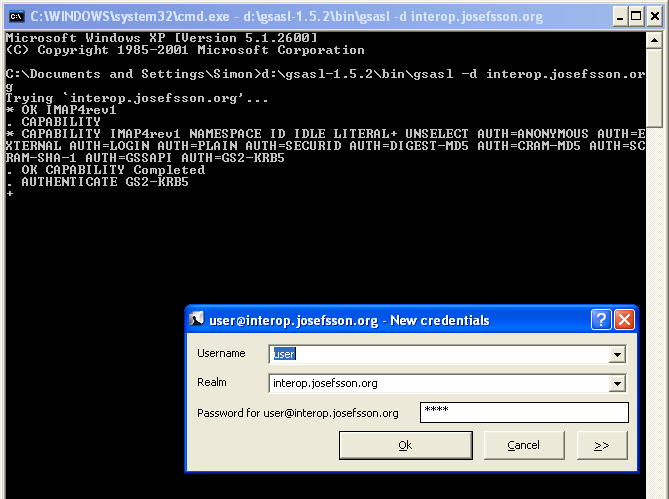
I have prepared GNU SASL with KfW binaries. The manual contains a new section about Kerberos on Windows with details how to build it. The build makefile is available too, if you want to build your own.
]]>To get you started with GS2-KRB5 here is a brief walk-through on installing GNU SASL 1.5.0 on a Mac OS X machine and using it to connect to my GS2-KRB5 interop server. I’m assuming you have already installed a compiler on your system. Start by downloading and installing GNU SASL:
wget -q ftp://alpha.gnu.org/gnu/gsasl/gsasl-1.5.0.tar.gz
tar xfz gsasl-1.5.0.tar.gz
cd gsasl-1.5.0
./configure --prefix=$HOME CFLAGS=-g
make all check install
Next you need to configure Kerberos on your system. If you have already have a configuration, make sure to take a backup of your configuration files. First let’s tell your machine about my interop Kerberos V5 realm by creating a file ~/Library/Preferences/edu.mit.Kerberos with the following content:
[libdefaults]
        default_realm = interop.josefsson.org

[realms]
        interop.josefsson.org = {
                kdc = interop.josefsson.org:88
        }

[domain_realm]
        interop.josefsson.org = interop.josefsson.org
Next get a ticket for a dummy user. Use the password ‘pass’ at the prompt:
espresso:~ jas$ kinit user@interop.josefsson.org
Please enter the password for user@interop.josefsson.org:
espresso:~ jas$ klist
Kerberos 5 ticket cache: 'API:Initial default ccache'
Default principal: user@interop.josefsson.org

Valid Starting     Expires            Service Principal
03/31/10 00:59:04  03/31/10 10:59:02  krbtgt/interop.josefsson.org@interop.josefsson.org
	renew until 01/01/70 01:00:00

klist: No Kerberos 4 tickets in credentials cache
espresso:~ jas$
Next connect to my test IMAP server using the command-line ‘gsasl’ tool (long lines cut for legibility):
espresso:~ jas$ ~/bin/gsasl interop.josefsson.org -auser
Trying `interop.josefsson.org'...
* OK IMAP4rev1
. CAPABILITY
* CAPABILITY ... AUTH=GS2-KRB5
. OK CAPABILITY Completed
. AUTHENTICATE GS2-KRB5
+
biwsAQBuggINMIICCa...
+ YHEGCSqGSIb3EgEC...

. OK AUTHENTICATE GS2-KRB5 authentication successful
Client authentication finished (server trusted)...
Enter application data (EOF to finish):
. list "" "*"
* LIST (NoInferiors) NIL INBOX
* LIST (NoInferiors) "/" .bashrc
* LIST (NoInferiors) "/" .bash_logout
* LIST (NoInferiors) "/" .profile
* LIST (NoInferiors) "/" .bash_history
. OK LIST Completed
. logout
* BYE Session terminating.
. OK LOGOUT Completed
Session finished...
. LOGOUT
espresso:~ jas$
There! You have just completed a GS2-KRB5 authenticated session.
Of course, this works just as well on your favorite GNU/Linux system, but I thought I’d explain it for a non-GNU platform and GSS-API library to show that the code is quite portable despite its experimental status.
Btw, the server is running GNU Shishi as the Kerberos V5 KDC and GNU MailUtils as the IMAP server. The IMAP server is using GNU SASL in server mode.
]]>Now back to coding.
]]>As you can see, my script looks for functions mentioned in the latest POSIX specification as being thread unsafe. In the last POSIX release, they actually removed some older interfaces (e.g., gethostbyname) so the script also checks for thread-unsafe functions mentioned in one older POSIX specification.
Russel’s approach is to look for man pages of functions ending with _r and labeling the non-_r-function as a thread unsafe function. Russel’s and my approach are quite different, so I wanted to compare the results. There is potential for me to add more functions to search for. I still want to preserve my approach of explicitly listing known thread unsafe functions, though.
Running Russel’s command, I get a list of functions that my script catches that Russel’s doesn’t, and vice versa. For reference, the functions that my script catches that Russel’s doesn’t are:
basename catgets dbm_clearerr dbm_close dbm_delete dbm_error dbm_fetch dbm_firstkey dbm_nextkey dbm_open dbm_store dirname dlerror endgrent endpwent endutxent ftw gcvt getc_unlocked getchar_unlocked getenv getopt getutxent getutxid getutxline inet_ntoa l64a lgamma lgammaf lgammal localeconv nftw nl_langinfo putc_unlocked putchar_unlocked putenv pututxline setenv setgrent setpwent setutxent strsignal system unsetenv wcstombs wctomb
The list contains lgamma, lgammaf, and lgammal which are all excluded by Russel’s command. I don’t understand why — according to the man page, the functions uses a global variable for sign, which doesn’t seem thread safe. So it seems right to include them?
What’s more interesting (for me) is the list of functions that Russel’s script catches that my script currently doesn’t. Here is the list:
erand48 ether_aton ether_ntoa fgetgrent fgetpwent fgetspent getaliasbyname getaliasent gethostbyname2 getmntent getnetgrent getrpcbyname getrpcbynumber getrpcent getspent getspnam getutent getutid getutline initstate jrand48 lcong48 nrand48 qecvt qfcvt random seed48 setstate sgetspent srand48 srandom tmpnam
I started looking into each function. For erand48 there is a erand48_r function in glibc, and the former does indeed seem to use a global variable. However, as far as I can tell from the POSIX specification, erand48 should be thread safe. So I filed a glibc bug about it. The same concern may hold for jrand48, lcong48, nrand48, seed48, and srand48.
I noticed that initstate, random, setstate, and srandom are defined by latest POSIX, but not mentioned as a thread-unsafe functions. Possibly a bug in the POSIX specification?
I also noticed that I had missed to include tmpnam even though it is mentioned separately in the POSIX link.
The rest of the functions are not documented by POSIX, and presumably thread unsafe (although I didn’t read the man page or source code for each of them).
In the end, I ended up adding several new functions to check for. The latest script is always available from:
http://git.savannah.gnu.org/cgit/gsasl.git/tree/tests/threadsafety
So, finally, did the updated script catch any use of thread-unsafe functions in GNU SASL? Nope.
]]>I’m happy and proud to notice that I have been nominated for their award, for my work on security packages for the GNU project. Too bad I cannot make it to the conference this year.
]]>Cyclomatic Code Complexity was described by Thomas J. McCabe in 1976. Read the Wikipedia entry for the entire story, but in short it is a measure of C code complexity relevent to code testing.
I learned about its practical use from GNUPDF‘s nice cyclomatic report. They use a tool called PMCCABE which happen to be packaged in Debian, so it was easy for me to test it.
I produced reports for some of my projects and some other popular tools, and put them online at:
http://josefsson.org/cyclo/.
Hopefully this will help me and others to find where the complex code is located. Knowing where to look is the first step towards improving things.
In my projects (e.g., gnutls, gnu sasl, shishi, libidn) I use gnulib for portability modules and maintainer scripts. Thus it felt natural to integrate GNUPDF’s custom scripts into a gnulib module. I’m discussing the module now.
]]>