In this post, I am talking about the routing system in Angular. We won’t hide from it; routing frameworks are complicated to do. Not only do you want to cover everybody’s scenario, but technology keeps changing at a rapid pace. When Angular 2 shipped, Angular Router was already misaligned with Angular Core as it released its version 3. After playing with it, it definitely felt like a beta version of how things were supposed to work. Documentation was scarce. To top it all off, they kept making breaking changes in patches. I had to lock package.json on a specific version so as to not be surprised on deployment.
Even after following all of their advice, I messed it up. Hopefully you can do something early enough in your project to prevent this mishap.
Before starting with Angular, let’s step back and see what the best HTML practice to create links should be.
The Basics
Choose your correct HTML element
This “click” event came a long way in JavaScript/HTML. Remember this onclick attribute, that was awesome! (not?). Then
addEventListener('click') showed up, then jQuery chimed in, etc.
There are so many ways to make things clickable on the page, however, so many people get this wrong. Tutorials, Stackoverflow, even the Angular Documentation. My biggest recommendation is: Stop setting your click events on non-navigational elements.
You should restrict your events to
<a>and
<button>. THAT’S IT! How can I get my whole
<div>to be clickable? Wrap an
<a>tag around it. In HTML5, the
<a>tag became a “transparent element” (http://w3c.github.io/html-reference/a.html#a-changes), you can wrap anything with it (almost anything… I’m still waiting on the
<tr>element).
If you plan to handle a click event on something other than these two elements, you should handle all ARIA accessibility concerns and handle all keyboard combinations that the users expect. Good luck! Make sure to try it with screen readers too: you’ll be surprised.
DON’T:
<li onclick="pieceOfJavaScript(event)">
<li id="myElement"> -- $('#myElement').click(function() {});
DO
<a href="...">
<button id="willAttachClickEvent">
So, <a> elements or <button> elements?
With all Single Application Pages (SPA) popping up, you “technically” never navigate away. So then, you might think
<button>is the way to go. Also,
<button>gives you the ability out of the box to NOT show the status link in the bottom left. Advantage? Maybe. However, your button is not a link; if you hope search engines will catch that, you’re out of luck.
Use
<a>tags when you navigate to another page.
Use
<button>when you open a little popover or a dialog that is not reachable from the URL. I’m done talking about the buttons. Use it with parsimony when you do NOT navigate.
DON’T:
<button> -- window.location.href = "/new-page"; // or pushState()
DO:
<a href="/new-page">
Where should I navigate to?
Unfortunately, the common practice I have seen is to set the href attribute to
#,
javascript:;,
javascript:void(0)or a another variant, then handle the click event by code. I’m guilty: I have done the same thing too often. Your link should reflect the page URL it will navigate to. That way, your user will be able to CTRL+click on the link, or right click then “Open in a new tab”.
DON’T:
<a href="#">
<a href="javascript:;">
DO:
<a href="/meaningful-url">
Let me bubble
If you inconveniently used the
#technique, your code most likely uses
preventDefault()on the link. If you use jQuery, they recommend to use
return false. If you do so, you actually stop the click event from bubbling.
On a SPA page, all clicks should bubble properly since we are never refreshing the page. Another component on the page might be listening to the
<body>to close a popover, or change its state.
So, the recommendation, don’t stop bubbling, and don’t use
#.
DON’T:
$('#myLink').on('click', function(evt) { return false; });
DO:
<a href="/meaningful-url">
Then Angular Router Way
The documentation they provide is getting quite beefy, written most likely by some Angular Experts, but they are not aware of these subtleties or are simply ignoring good practice to make the documentation slimmer.
The Angular Routing system is using the pushState technology which allows you to stay on the same page while you still navigate to different URL. It’s a little harder to setup, but a lot more useful when you start deep-linking your site to other web sites or e-mail messages.
Don’t use router.navigate()
Angular Router recommends putting your (click) attributes on
<li>then using the router to navigate by code. Not only will this element not be tab-able, but you just lost the functionality to right click and open in a new tab. Use
[routerLink]appropriately to create the correct link.
DON’T:
this.router.navigate(['/hero', hero.id]);
DO:
<a [routerLink]="['/hero', hero.id]">My Hero</a>
My links are all string based – I hate it
This is not new to Angular. It’s a problem I see in all the frameworks I have worked with. With the usage of a typed language, I find it sad that we still make important decisions about linking our pages with something that is not compiled and duplicated.
If you decide to change your link in the routing system, you’ll have to check the usage of that sad string everywhere.
Maybe your HTML is not compiled (that’s for another post), but at least start being DRY and use a compiled variable to point to your link.
DO:
@Injectable()
export class CrisisCenterRoutingLinks {
    constructor(
    ) { }

    get crisisCenter(): string {
        return 'crisis-center';
    }

    get heroCenter(): string {
        return 'hero';
    }
}

let crisisCenterRoutingLinks = new CrisisCenterRoutingLinks();
const appRoutes: Routes = [
    { path: crisisCenterRoutingLinks.crisisCenter, component: CrisisListComponent },
    { path: crisisCenterRoutingLinks.heroCenter + '/:id', component: HeroDetailComponent },
    //...
];

@NgModule({
  imports: [
    RouterModule.forRoot(appRoutes)
  ],
  providers: [
    CrisisCenterRoutingLinks
  ]
})

@Component({
  selector: 'my-app',
  template: `
    <h1>Angular Router</h1>
    <nav>
      <a [routerLink]="['/', crisisCenterRoutingLinks.linkCenter]" routerLinkActive="active">Crisis Center</a>
      <a [routerLink]="['/’, crisisCenterRoutingLinks.heroCenter, hero.id]" routerLinkActive="active">A specific Hero</a>
    </nav>
    <router-outlet></router-outlet>
  `
})
export class CrisisListComponent {
    constructor(
        private crisisCenterRoutingLinks: CrisisCenterRoutingLinks
    ) {
    }
}
One day, if you start compiling your HTML template, you will be thankful the link is actually defined in one spot.
Your code knows too much about how it should route
The coupling we created might scare you, but without it you are at the mercy of runtime errors. You will need to have a good series of integration testing to catch these issues.
One more problem with the code above is this logic in
['/’, crisisCenterRoutingLinks.heroCenter, hero.id]. Your component is very much aware of how to create a link to reach the “heroCenter” in this case. That’s not very good. Let’s try it with a function.
In CrisisCenterRoutingLinks class, let’s add this method
generateHeroCenter(id: string | number): any { // I wish Angular typed this return.
    return ['/', this.heroCenter, +id];
}

get heroCenterRoute(): string {
    return 'hero/:id';
}

private get heroCenter(): string {
    return 'hero';
}
Notice we made heroCenter private: we wouldn’t want people to reach it because it’s actually not a valid URL. You’ll need to update the routing page too to get the
heroCenterRoute.
Our HTML would look like this:
<a [routerLink]="generateHeroCenter(hero.id)" routerLinkActive="active">A specific Hero</a>
If you need to pass more things to the function, you might want to accept another argument with a typed interface to pass in your currentRoute in order to handle the relativeTo functionality for example.
Complication with re-usable components
I might have a component that is re-used across the site, but still need to get some routing data handled. Let’s say, for example, a
<tn-help>component that creates a help link with a cute little image. This time, we don’t want to be too permissive on this approach and accept any kind of string. We should restrict its usage and try to avoid using providers that are too global. (This help button does not need to know how to reach into the CrisisCenterRoutingLinks!)
In my previous project, I was using a
EventEmitterto finally use
this.router.navigate. You should avoid that based on the recommendations I have provided above.
export enum HelpLink {
    HowToCreateHero,
    HowToCreateGreatLinks
}

@Injectable()
export class HelpLinkService {
    constructor(
        private linkCenterCrisisRouting: LinkCenterCrisisRouting,
        private anotherSectionOfSiteRouting: AnotherSectionRouting
    ) {
    }

    getLink(helpLink: HelpLink): any {
        switch (helpLink) {
            case HelpLink.HowToCreateGreatLinks:
                this.linkCenterCrisisRouting.crisisCenterHelp;
            case HelpLink.HowToCreateGreatLinks:
                this.anotherSectionOfSiteRouting.createLinkHelp;
        }

        // Potentially throw!

        return [];
    }
}


@Component({
    selector: 'tn-help',
    template: '<a [routerLink]="helpLinkService.getLink(helpLink)">
      <img src="/images/help.png" alt="" />
      <ng-content><ng-content>
    </a>',
    styleUrls: ['tn.component.css']
})
export class HelpComponent {
    @Input()
    helpLink: HelpLink;

    // Don't do this, especially if you are about to do this.router.navigate
    // In the component who created this HelpComponent.
    ////@Output()
    ////linkClick: EventEmitter<void> = new EventEmitter<void>();

    constructor(private helpLinkService: HelpLinkService) {
    }
}
I will let you manage your imports and file placements. You might want to separate the enum from the service.
Now all knowledge about how to create links is encapsulated in one place AND it is compiled.
Go even further?
I just scratched the surface on how you can make an abstraction layer on top of the Angular Router to handle links properly. You might even be able to do this with all your /images/ links?
It’s important to create abstractions as such for a big website so that if you need to change something everywhere you will not have to scavenge for the information. However, make sure you understand the functionality if you want to avoid any bad assumptions on how Angular works.
]]>
HttpClientModule.
When using a full-fledged framework like Angular 5 to talk to your server with AccessTokens, you might not use cookies. In this case, any image requests to your server with an
<img />tag will fail if these need to be authorized.
I have coded a little UrlService and a pipe to help you out. You will need to adapt to your services.
The Service
import { Injectable } from '@angular/core';
import { HttpClient, HttpHeaders } from '@angular/common/http';
import { Observable } from 'rxjs/Observable';
import { Subscriber } from 'rxjs/Subscriber';

@Injectable()
export class UrlHelperService {
    constructor(
        private http: HttpClient, /* Your favorite Http requester */
    ) {
    }

    get(url: string): Observable {
        return new Observable((observer: Subscriber) => {
            let objectUrl: string = null;

            this.http
                .get(url, {
                    headers: this.getHeaders(),
                    responseType: 'blob'
                })
                .subscribe(m => {
                    objectUrl = URL.createObjectURL(m);
                    observer.next(objectUrl);
                });

            return () => {
                if (objectUrl) {
                    URL.revokeObjectURL(objectUrl);
                    objectUrl = null;
                }
            };
        });
    }

    getHeaders(): HttpHeaders {
        let headers = new HttpHeaders();

        ////let token = this.authService.getCurrentToken();
        let token = { access_token: 'ABCDEF' }; // Get this from your auth service.
        if (token) {
            headers.set('Authorization', 'Bearer ' + token.access_token);
        }

        return headers;
    }
}
This code will allow you to request an image with your access token, then return
Observable<string>which will contain a Blob URL. This is using the FileAPI with the method createObjectURL.
Notice also that we return a function for revoking the URL. This way, we avoid memory leaks.
With Angular 5, I would also recommend that you do not hook the
getHeaders()token in this service but use an interceptor.
The Pipe
Let’s create a pipe that uses the service above. I have adapted the “async” pipe so you don’t have to write
| secure | asyncall the time.
import {
    Pipe,
    PipeTransform,
    OnDestroy,
    WrappedValue,
    ChangeDetectorRef
} from '@angular/core';

import { Subscription } from 'rxjs/Subscription';
import { Observable } from 'rxjs/Observable';
import { BehaviorSubject } from 'rxjs/BehaviorSubject';
import 'rxjs/add/observable/of';

import { DomSanitizer, SafeUrl } from '@angular/platform-browser';

import { UrlHelperService } from '../services/url-helper.service';

// Using similarity from AsyncPipe to avoid having to pipe |secure|async in HTML.
@Pipe({
    name: 'secure',
    pure: false
})
export class SecurePipe implements PipeTransform, OnDestroy {
    private _latestValue: any = null;
    private _latestReturnedValue: any = null;
    private _subscription: Subscription = null;
    private _obj: Observable = null;

    private previousUrl: string;
    private _result: BehaviorSubject = new BehaviorSubject(null);
    private result: Observable = this._result.asObservable();
    private _internalSubscription: Subscription = null;

    constructor(
        private _ref: ChangeDetectorRef,
        private urlHelperService: UrlHelperService,
        private sanitizer: DomSanitizer
    ) { }

    ngOnDestroy(): void {
        if (this._subscription) {
            this._dispose();
        }
    }

    transform(url: string): any {
        let obj = this.internalTransform(url);
        return this.asyncTrasnform(obj);
    }

    private internalTransform(url: string): Observable {
        if (!url) {
            return this.result;
        }

        if (this.previousUrl !== url) {
            this.previousUrl = url;
            this._internalSubscription = this.urlHelperService.get(url).subscribe(m => {
                let sanitized = this.sanitizer.bypassSecurityTrustUrl(m);
                this._result.next(sanitized);
            });
        }

        return this.result;
    }

    private asyncTrasnform(obj: Observable): any {
        if (!this._obj) {
            if (obj) {
                this._subscribe(obj);
            }
            this._latestReturnedValue = this._latestValue;
            return this._latestValue;
        }
        if (obj !== this._obj) {
            this._dispose();
            return this.asyncTrasnform(obj);
        }
        if (this._latestValue === this._latestReturnedValue) {
            return this._latestReturnedValue;
        }
        this._latestReturnedValue = this._latestValue;
        return WrappedValue.wrap(this._latestValue);
    }

    private _subscribe(obj: Observable) {
        var _this = this;
        this._obj = obj;

        this._subscription = obj.subscribe({
            next: function (value) {
                return _this._updateLatestValue(obj, value);
            }, error: (e: any) => { throw e; }
        });
    }

    private _dispose() {
        this._subscription.unsubscribe();
        this._internalSubscription.unsubscribe();
        this._internalSubscription = null;
        this._latestValue = null;
        this._latestReturnedValue = null;
        this._subscription = null;
        this._obj = null;
    }

    private _updateLatestValue(async: any, value: Object) {
        if (async === this._obj) {
            this._latestValue = value;
            this._ref.markForCheck();
        }
    }
}
You will notice that this pipe is not pure. But the main code is in
internalTransform(). We will check if you ask for a different Url, if not, we will not make multiple GET request to your server.
We also use the
DomSanitizerbecause Angular will complain that the blob scheme is unsafe.
Register Services and Pipes
Yep, don’t forget to do that…
The HTML
Simply use the secure pipe like this
<img [src]="'./path/request/private-photo?id=1234' | secure" alt="" />
Make sure to use the
[src]since you are not actually returning a string but a “
SafeUrl“. Your image is now requested through your UrlHelper service with an access token!
]]>
Have you tried to use the latest technology recently? If so, you are most likely dogfooding everything for the big companies. I have decided to try deploying my .NET Core application to Azure. My setup is not that unusual:
- Multiple projects in the same GIT repository
- .NET Core with Framework .NET 4.6
- One Common Class Library .csproj with Framework .NET 4.6
- TypeScript 2.*
- Angular 2.2
Have a look at how my journey started. I will show the error messages I get, maybe search engines can pick it up and hopefully can help you out if you faced the same errors.
It’s important to notice that the project works great on my computer… The nightmare starts when you try to deploy on Azure.
Deploying without Mentioning the Correct Solution
You will get your first error that will look like this:
Unable to determine which solution file to build. D:\home\site\repository\path\solution1.sln, D:\home\site\repository\path\solution2.sln
Quite legitimate, I’m not holding Azure accountable for this one.
Deploying on Azure with the “Project” Application Setting as .xproj
This is (was?) the recommended way to deploy a solution that might have multiple projects. You had to point to the exact .csproj. So let’s try to point to the exact .xproj
You get this error:
The specified project 'D:\home\site\repository\path\project\project.xproj' is not valid. It needs to point to either a csproj/vbproj file or to a directory.
Deploying on Azure with “Project” Application Setting as Folder
Uh-oh, you are supposed to point to the folder where the .xproj is. This will work great, but if you are using a csproj dependency, you might face this bug NuGet/Home#2865.
You will get this error:
Unable to resolve 'Project' for '.NETFramework,Version=v4.6'
Fallback with Manual deploy.cmd; Problem with azure-cli
If you follow some of the links in GitHub, you will find Scott Hanselman’s blog post saying the tooling is not fully ready and so we should fallback to msbuild instead.
OK, I’m up for the task, so let’s create the deploy.cmd from the Azure CLI. You can follow KUDU online tutorial to create this file. However, it is worth mentioning that as of today, you will get blocked and will not find this “azure site” command.
This is because the command line is not in the correct mode. They changed the default and you will need to change it to ASM. See Azure/azure-xplat-cli#3245.
Once you have created your deploy.cmd, the most important code is here:
:: 1. Restore nuget packages

call :ExecuteCmd nuget.exe restore "%DEPLOYMENT_SOURCE%\path\to\solution.sln" -packagesavemode nuspec

IF !ERRORLEVEL! NEQ 0 goto error
:: 2. Build
call :ExecuteCmd "%MSBUILD_PATH%" "%DEPLOYMENT_SOURCE%\path\to\solution.sln" /nologo /verbosity:m /p:AutoParameterizationWebConfigConnectionStrings=false;Configuration=Release;UseSharedCompilation=false %SCM_BUILD_ARGS%
IF !ERRORLEVEL! NEQ 0 goto error:: 3. Publish
call :ExecuteCmd "%MSBUILD_PATH%" "%DEPLOYMENT_SOURCE%\path\to\project\project.xproj" /nologo /verbosity:m /t:GatherAllFilesToPublish /p:AutoParameterizationWebConfigConnectionStrings=false;Configuration=Release;UseSharedCompilation=false;PublishOutputPathNoTrailingSlash="%DEPLOYMENT_TEMP%" %SCM_BUILD_ARGS%
IF !ERRORLEVEL! NEQ 0 goto error
Incorrect Version of NuGet
If you are using the deployment script, the nuget.exe should be the latest. If you ever checked in nuget.exe as part as your build, verify that you have the latest. I had an old version which will cause trouble when it’s time to build.
error : The 'Microsoft.NETCore.Platforms 1.1.0' package requires NuGet client version '2.12' or above, but the current NuGet version is '2.8.60717.93'
Multiple Assemblies with Equivalent Identity
What is this error? Seriously!? I don’t face this problem on my computer, but Azure is not happy. I was lucky — some of my projects were referencing dead references. I simply removed them.
CSC : error CS1703: Multiple assemblies with equivalent identity have been imported: 'D:\home\site\repository\my\packages\System.Xml.ReaderWriter.4.3.0\lib\net46\System.Xml.ReaderWriter.dll' and 'D:\Program Files (x86)\Reference Assemblies\Microsoft\Framework\.NETFramework\v4.6\Facades\System.Xml.ReaderWriter.dll'. Remove one of the duplicate references. [D:\home\site\repository\path\csproj\project.csproj]
Incorrect Version of TypeScript
After fixing the build/linker error, I am now getting a TypeScript issue:
VSTSC : error TS5023: Build: Unknown compiler option 'typeRoots'.
Apparently, Azure is not using the latest version of TypeScript. They must be using 1.8 because this “typeRoots” is a valid 2.0 TypeScript tsconfig.
Add the following in your .xproj to force the version:
<TypeScriptToolsVersion>2.0.10</TypeScriptToolsVersion>
It’s Building Now, but NPM Didn’t Install the Dependencies
Plenty of TypeScript errors not finding the correct dependencies for @angular. NPM runs… let’s run it before we build in deploy.cmd.
After searching online how to install in another folder, you will find the most common answer on StackOverflow to use –prefix.
If you do so, you will end up with plenty of .cmd and sh files in the folder then will crash later. CD in the right folder then run npm install.
:: 2.0 NPM Install

cd "%DEPLOYMENT_SOURCE%\path\project"

call :ExecuteCmd npm install

cd "%DEPLOYMENT_SOURCE%"
NPM/Node is Not the Correct Version
Azure defaults to an outdated version. You need to update NPM and/or Node. You can see which version is running in the log with this line (if you get a warning from a package…).
npm WARN engine angular2-cookie@1.2.5: wanted: {"node":">=5.0.0"} (current: {"node":"4.4.7","npm":"2.15.8"})
To update, add the Application Settings:
- WEBSITE_NODE_DEFAULT_VERSION : 4.4.7
- WEBSITE_NPM_DEFAULT_VERSION : 3.10.3
Still Not Building?
Hold on… It’s building just fine on my machine! But on Azure it still fails with plenty of TypeScript errors… Why is that? That is STRANGE! Looking at the log from my machine I see the following:
C:\Program Files\dotnet\dotnet.exe build "D:\git\clients\path\project" --configuration Release --no-dependencies
Why is this being called — seriously? I have literally no clue why this is happening. But since it works, why not do the same thing on Azure… Let’s replace the MSBUILD ::2 from the deploy.cmd with this line:
call :ExecuteCmd dotnet build "%DEPLOYMENT_SOURCE%\path\project" --configuration Release --no-dependencies
Project File Does Not Exist?
Dotnet is complaining with the following error:
MSBUILD : error MSB1009: Project file does not exist.
You cannot build with the latest dotnet preview3. If you go in the xproj folder and compile, you will get the following error:
D:\home\site\repository\path\project\project.xproj(8,3): error MSB4019: The imported project "D:\Program Files (x86)\dotnet\sdk\1.0.0-preview3-004056\Extensions\Microsoft\VisualStudio\v14.0\DotNet\Microsoft.DotNet.Props" was not found. Confirm that the path in the <Import> declaration is correct, and that the file exists on disk.
Now let’s compare the dotnet I have on my machine by running “dotnet –info”.
Product Information:

Version: 1.0.0-preview2-1-003155
Searching more and more, preview3 is not a valid dotnet build for compiling web apps with project.json. To fix it, you need a global.json at the complete root of your repository. Where deploy.cmd is:
{

"sdk": {

"version": "1.0.0-preview2.1-003155"

}

}
It Compiles! …But Does Not Publish
We are almost there… Now the compilation worked… But the publishing failed with:
D:\Program Files (x86)\MSBuild\Microsoft\VisualStudio\v14.0\DotNet\Microsoft.DotNet.Publishing.targets(149,;5): error : events.js:141 [D:\home\site\repository\path\project\project.xproj]
Replace the :: 3 Publish section with:
cd "%DEPLOYMENT_SOURCE%\path\project

call :ExecuteCmd dotnet publish -c Release -o "%DEPLOYMENT_TEMP%"

IF !ERRORLEVEL! NEQ 0 goto error

cd "%DEPLOYMENT_SOURCE%"
Same trick here: I did not put the path after the publish keyword.
Thread was Being Aborted?
Getting that error on Azure? Your deployment got stuck randomly… Redeploy.
Let’s Compile on a New Machine
EDIT: This is actually a problem if you are using NuGet 3.4. Azure is shipping with NuGet 3.5 and you shouldn’t hit this problem.
I hope that all these compilation tricks did not leave any remnant objects as the machine tried to compile multiple times. This would make it complicated to deploy. I ran this same deployment on a new machine, and received an error:
Object reference not set to an instance of an object.

D:\Program Files (x86)\dotnet\dotnet.exe compile-csc @D:\home\site\repository\path\project\obj\Release\net46\dotnet-compile.rsp returned Exit Code 1
Are you serious Azure? Someone has been experiencing the same thing, reported at dotnet/cli#4085. It seems to be some data corruption.
I have noticed that the nuget packages are missing netcoreapp1.0 in “microsoft.aspnetcore.server.iisintegration.tools”
Run the nuget restore on the xproj directly
nuget restore D:\home\site\repository\path\project\project.xproj -packagesavemode nuspec
This should be necessary only once per build machine. Redeploy.
File is Missing
error CS0006: Metadata file 'D:\home\site\repository\path\project\csproj\bin\Release\project.dll' could not be found
It seems that the csproj didn’t get compiled. Let’s add this line in the :: 2. Build, before the dotnet build.
call :ExecuteCmd "%MSBUILD_PATH%" "%DEPLOYMENT_SOURCE%\path\to\csproj\project.csproj" /nologo /verbosity:m /p:AutoParameterizationWebConfigConnectionStrings=false;Configuration=Release;UseSharedCompilation=false %SCM_BUILD_ARGS%
Conclusion
I spent a good 25h to figure this out. Then I decided to write this blog post to help people out, and hopefully let Microsoft developers/PMs know about this.
It does not make sense to make this deployment so complicated.
]]>
My latest venture was to use AngularJS 2 with the .NET stack. AngularJS 2 is embracing TypeScript, and my client has been using .NET for years, so it would be a bad choice to change it now. The problem is that some pieces are working fine with others, whereas some are just entirely incompatible.
I have gathered some information from some tutorials, and tried to have them up to date. Obviously mine will go out of date sometime, but I really wanted to share my setup. It did take me quite a while to get everything working, even though it shouldn’t have…
My goal was to work with Visual Studio 2015, AngularJS 2 and .NET Core 1 and have a decent experience within VS and the console. Angular JS 2 and .NET Core 1 are both releasing RC at the time of writing.
Step 1. Creating the Visual Studio Project
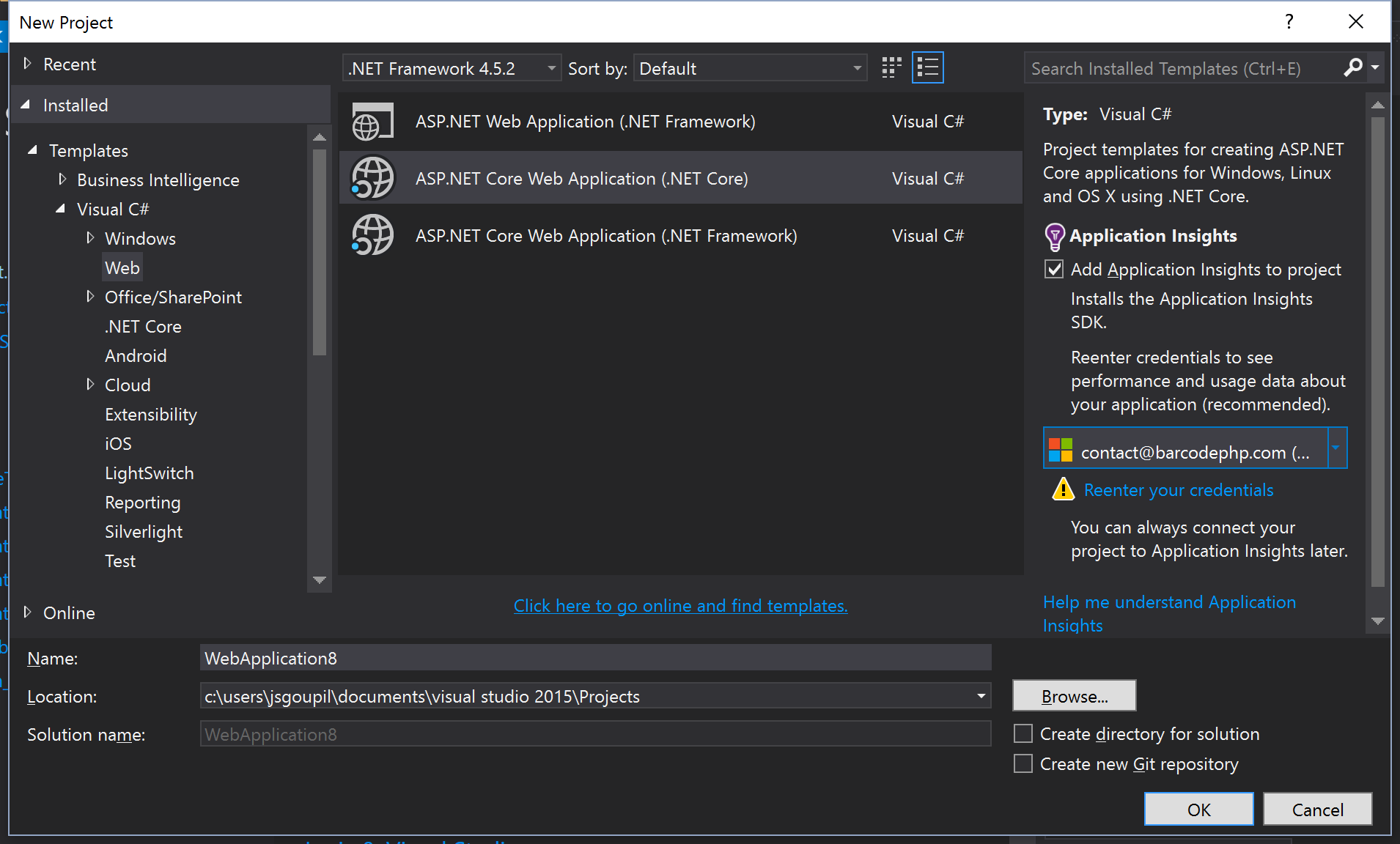
Within Visual Studio, create a new Project by selecting “ASP.NET Core Web Application (.NET Core)”. If you are wondering what the difference is with the .NET Framework, have a look at this interesting StackOverflow thread.
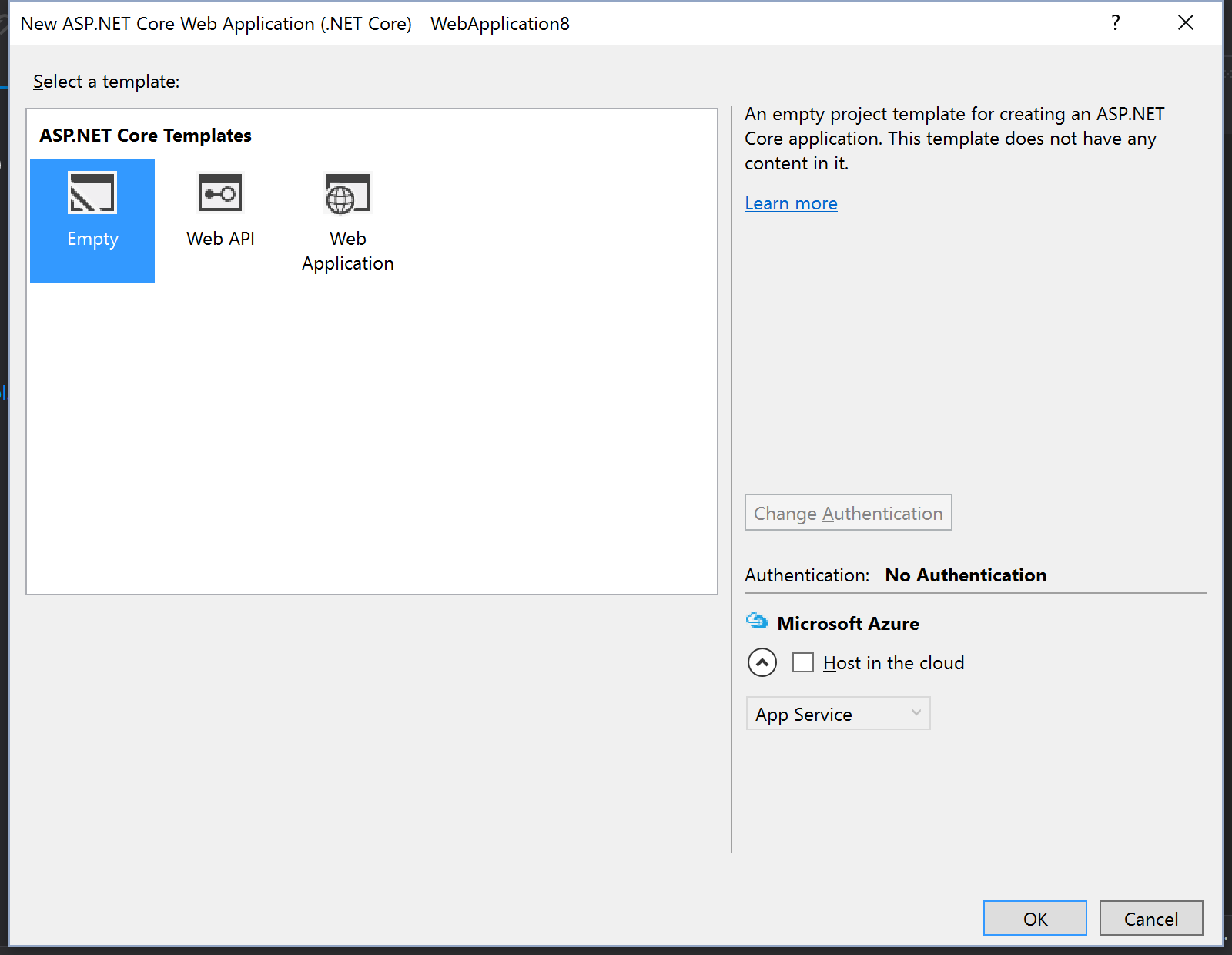
In the next window, select “Empty”.
Step 2. Get AngularJS 2 into the project
I started to follow this Angular JS 2 tutorial. But they are mentioning to use ASP.Net Web Application instead of .NET Core. So let’s simply clone the QuickStart somewhere on our computer with this command
git clone https://github.com/angular/quickstart.git
This will download all the necessarily files to start working. Their README.md contains great information how to get started on AngularJS 2 including unit tests! I highly recommend following their tutorial.
Step 3. Embrace AngularJS and .NET configuration
We need to copy the relevant files from the QuickStart into our project.
The first problem you will hit is that .NET Core proposes you put public static files into a wwwroot/ folder, whereas AngularJS 2 doesn’t propose that. This is the new recommended way from Microsoft to whitelist public files instead of blacklisting them.
So let’s go ahead and put all static files in the wwwroot/ as Microsoft advises:
- favicon.ico
- index.html
- karma-test-shim.js
- styles.css
- systemjs.config.js
Let’s move the following files to the same place where they are in the QuickStart:
- app/ (the entire folder)
- e2e/ (the entire folder)
- .gitignore
- karma.conf.js
- package.json
- protractor.config.js
- tsconfig.json
- tslint.json
- typings.json
This is what it should look like:

Step 4. Face the NPM problem
By adding package.json, NPM can be used to restore the packages AngularJS proposes. Right click on “Dependencies”, then click “Restore Packages”.

You will face your first sad error: “Dependencies – not installed” will still show up… If you look at the Output “Bower/npm”, you might see a couple of warnings, but no errors. I have found that the version of NPM that Visual Studio 2015 ships with is too old. We need to update it.
You can follow this blog post to update your NPM:
http://jameschambers.com/2015/09/upgrading-npm-in-visual-studio-2015/
You should end up with something like this: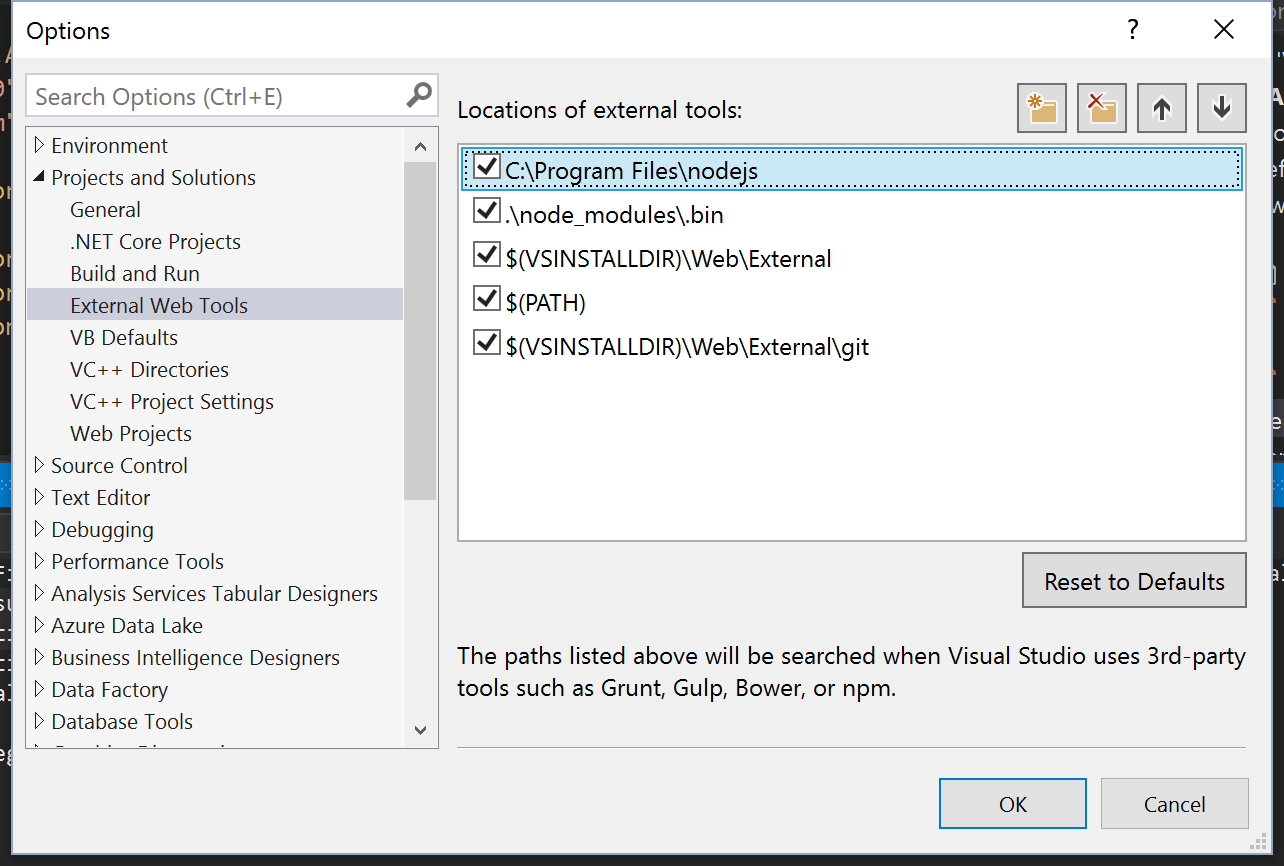
Restore the packages again and it should work now!
Step 5. Build time
Let’s try to build now. Uh-oh, it doesn’t work…
c:\users\jsgoupil\documents\visual studio 2015\Projects\WebApplication8\node_modules\selenium-webdriver\lib\test\data\Page.aspx.cs(4,36): error CS0234: The type or namespace name 'Web' does not exist in the namespace 'System' (are you missing an assembly reference?)
The new .NET Core builds everything. Including what it finds in node_modules. We want to keep Selenium for future testing.
Have you learned MSBuild commands? Forget about them because we won’t use them anymore. We’ll exclude the CS files that are annoying us and edit project.json by adding this into buildOptions:
"compile": {

"exclude": [ "node_modules\\selenium-webdriver\\**\\*.cs" ]

}
Build… YES it works!
Step 6. Use Gulp to move some files
Grunt, Brunch, Gulp… oh geez. Why is it so complicated to get simple tasks done? Everybody is looking at Gulp nowadays, so let’s configure the build to move the node_modules files to the wwwroot/ folder.
I followed this tutorial, but it was not fully functional. So let’s talk about my steps here.
Add the following lines in the package.json devDependencies:
"gulp": "^3.9.1",

"gulp-tsc": "^1.2.0",

"gulp-typescript": "^2.13.6",

"gulp-clean": "^0.3.2"
Then create a file called Gulpfile.js at the root of the directory:
var ts = require('gulp-typescript');
var gulp = require('gulp');
var clean = require('gulp-clean');

var destPath = './wwwroot/node_modules';

// Delete the dist directory
gulp.task('clean', function () {
 return gulp.src(destPath)
 .pipe(clean());
});

gulp.task("scriptsNStyles", function() {
 return gulp.src([
 'core-js/client/**',
 'systemjs/dist/system.src.js',
 'reflect-metadata/**',
 'rxjs/**',
 'zone.js/dist/**',
 '@angular/**',
 'jquery/dist/jquery.*js',
 'bootstrap/dist/js/bootstrap.*js',
 ], {
 cwd: "node_modules/**"
 })
 .pipe(gulp.dest(destPath));
});

var tsProject = ts.createProject('tsconfig.json');
gulp.task('ts', function (done) {
 //var tsResult = tsProject.src()
 var tsResult = gulp.src([
 "app/*.ts"
 ])
 .pipe(ts(tsProject), undefined, ts.reporter.fullReporter());
 return tsResult.js.pipe(gulp.dest('./wwwroot/app'));
});

gulp.task('watch', ['watch.ts']);

gulp.task('watch.ts', ['ts'], function () {
 return gulp.watch('app/*.ts', ['ts']);
});

gulp.task('default', ['scriptsNStyles', 'watch']);
Gulp does not work
'gulp' is not recognized as an internal or external command, operable program or batch file.
Start with:
npm install gulp -g
If it doesn’t work, thankfully there is a StackOverflow question covering this:
http://stackoverflow.com/questions/24027551/gulp-command-not-found-error-after-installing-gulp
Open the Task Runner Explorer and click on “Refresh”. Another sad experience — you will maybe get this awesome “(No tasks found)”. For my case, I was missing the “gulp” devDependencies. Make sure it is there!
The gulp “scriptsNStyles” command will copy the node_modules to the wwwroot/ folder.
Run it once.
Step 7. It doesn’t build again!
Tried to build now? You get plenty of errors… This is due to the fact that we copied stuff in wwwroot/node_modules and the build system is trying to compile that.
Open the project.json and add one more path to exclude:
"exclude": [
 "node_modules\\selenium-webdriver\\**\\*.cs",
 "wwwroot\\node_modules\\**"
]
Step 8. Do minor C# magic
In project.json, add the following line in the “dependencies” object:
"Microsoft.AspNetCore.StaticFiles": "1.0.0"
Then in the Startup.cs file, add the following to the Configure method:
app.UseDefaultFiles();
app.UseStaticFiles();
This will allow to server index.html from:
wwwroot/
This is definitely the most basic setup to get your project started. You will need to follow other tutorials on how to serve data/partials via MVC API.
Step 8. Get ready to run the app in the browser
We need to make sure the “app/*.ts” files are compiled and dropped to the wwwroot/app/ folder. The best way to do it in Visual Studio is to enable the “Compile on Save” option. Open tsconfig.json and add “compileOnSave” option, “outDir” and “exclude“.
The exclude will tell the TypeScript compiler to not compile these folders.
{
 "compilerOptions": {
 "target": "es5",
 "module": "commonjs",
 "moduleResolution": "node",
 "sourceMap": true,
 "emitDecoratorMetadata": true,
 "experimentalDecorators": true,
 "removeComments": false,
 "noImplicitAny": true,
 "suppressImplicitAnyIndexErrors": true,
 "outDir": "./wwwroot"
 },
 "compileOnSave": true,
 "exclude": ["wwwroot", "node_modules"]
}
For the compile on save feature to start working, make sure to clean your project, then rebuild.
Start with CTRL+F5 and you should see this awesome:
"My First Angular 2 App"
I only see “Loading…” 
Oh no! Have a look at the console — there are a lot of reasons why this could happen.
- Maybe your node_modules didn’t make it to the
wwwroot/folder. - You forgot to do the C# code in Configure so “Hello World!” shows up.
- You forgot to compile on save properly so the app does not boot.
Step 9. Update .gitignore
The one provided by Angular QuickStart is pretty good, but we are missing a couple of things. Add the following:
/bin
/obj
!Gulpfile.js
Step 10. Update the console functionality
Now that it works great with Visual Studio, we broke the npm start/test functionality. Let’s try to fix it.
npm start
It is currently configured to start a server and look at the root /. The page will open and display:
Cannot GET /
Let’s fix that by adding a file to the root directory called “bs-config.json“:
{
  "server": { "baseDir": "./wwwroot" }
}
Run npm start again and it should work fine. This server is configured with “Browsersync”. If you go change a file, it should refresh the browser.
npm test
This one will try to run the *.spec.ts files. It runs, but it doesn’t find any file. We need to modify the karma.conf.js. Change the basePath like this:
basePath: 'wwwroot/',
You should see “Executed 3 of 3 SUCCESS“.
npm run e2e
Same idea, the http-server does not start from the correct base path. To fix that, change the package.json. Change the code by replacing:
"http-server -s"
with
"http-server wwwroot/ -s"
You should now see:
"passed - should display: My First Angular 2 App"
Add gulp-scripts
Just in case we are not using Visual Studio at all for building, add the following to the “script” in package.json
"gulp-scripts": "gulp scriptsNStyles"
And update the postinstall script:
"postinstall": "typings install && npm run gulp-scripts",
Conclusion
Isn’t it super complicated to start a website from scratch? I can’t believe we had to go through so many loops to make this work. I’m sure some readers will say “it would work just fine on Linux,” but we should still be able to code on any popular platform.
I hope I saved you some time and hopefully one day, things will simply work better!
]]>However, there is one problem with scaffolding provided by Microsoft: it does not handle the relations between models. This is why I have been working on a NuGet package to handle this.
Installation
Simply run “Install-Package RelationScaffolding” on your project to get started. This will install the required DLLs, a few files in /Shared/DisplayTemplates and /Shared/EditorTemplates and one file in /Scripts/relation.js
Model example
We will start with a basic example of relations. Let’s use a Student/Teacher/Course example:
Most of the classes come with an “Id” and a “Name”. These are the main property we will use to link and display them.
Make a relation
To connect one model with another one, we use the [Relation] attribute on the desired property:
[RelationScaffolding.Relation]

public virtual Teacher Teacher { get; set; }
This indicates to use the DisplayTemplates or EditorTemplates that have been installed with the NuGet package. You can read more about templates on Hanselman’s post.
Relations work also with collections:
[RelationScaffolding.Relation]

public virtual ICollection<Course> Courses { get; set; }
Which property to display
To indicate what to show when using a template, we will use the following attribute:
[RelationScaffolding.RelationDisplay]

public string Name { get; set; }
Using the template
By default, the scaffolding does not output the properties that are linked to another model. You can add them in your CSHTML as such:
Read
Teacher: @Html.DisplayFor(m => m.Course.Teacher)

Courses: @Html.DisplayFor(m => m.Teacher.Courses)
Write
Teacher: @Html.EditorFor(m => m.Course.Teacher, new { List = Model.AvailableTeachers })

Courses: @Html.EditorFor(m => m.Teacher.Courses, new { List = Model.AvailableCourses })
Now you might notice a custom attribute when using the write template: List.
By providing a list with all available items, the combo box or the checkbox list will contain the possible selectable options.
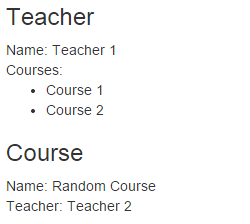 Template used with DisplayFor |
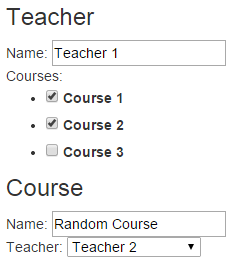 Template used with EditorFor |
Customize edit
Default value in combo box
Common scenarios are to write a default value with no ID in a combo box. To do so, use the attribute RelationSingle instead of the attribute Relation. Then use the following parameter:
[RelationScaffolding.RelationSingle(Empty = "Select a teacher.")]

public virtual Teacher Teacher { get; set; }
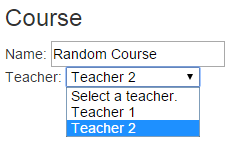
Different name property
When displaying the combo box, you might want to tweak the name where the selection is being written. Let’s say you have the following properties:
public int TeacherId { get; set; }

public virtual Teacher Teacher { get; set; }
Entity Framework will understand that TeacherId is actually mapped to your database. It also loads the entity directly into the virtual property matching the name.
By using the EditorTemplate on Teacher, the name will be Teacher.Id. If you want to use the TeacherId property instead, use “ShortcutProperty = true” as such:
@Html.EditorFor(m => m.Course.Teacher, new { ShortcutProperty = true })
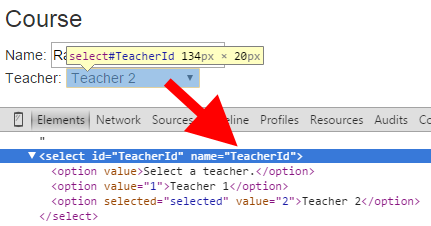
If your property key does not happen to follow this convention, you can use PropertyName = "TeacherId" instead.
Adding to a collection
If you want to be able to add to a collection, you can use the attribute RelationMultiple instead of the Relation attribute. Set the property CanAdd to true. A text box will be available under the checkbox list. To indicate which property should be used when creating that new object, use the attribute RelationEdit.
See an example on Course.cs
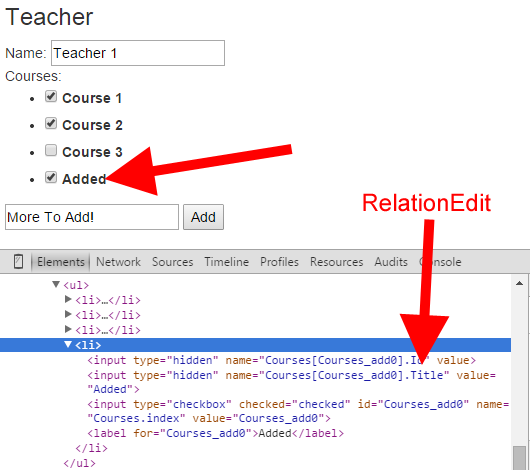
More to come!
I have other ideas on how to make this package easier to use.
- Model Binder
- Make “CanAdd” more generic
- Support Many 2 Many
- Add a new Scaffolding template T4
- Better support of styles
- I18n
- Unit Tests
If you like this project, don’t hesitate to participate on GitHub!
]]>Recently, I wanted to update an old MVC4 application to MVC5 in order to use the power of Owin. If you have a small website, then I would recommend you follow this tutorial from Rick Anderson and Suhas Joshi: http://www.asp.net/identity/overview/migrations/migrating-an-existing-website-from-sql-membership-to-aspnet-identity
It explains how to migrate an SQL Membership to ASP.Net Identity by upgrading your database. Not only does it sound scary if you have thousands of users, but your website will go through some downtime during the migration (hopefully only a short period if everything goes according to plan). I decided to take a different approach: use the Owin extensibility to plugin the existing database; no schema changes!
I have submitted the code on GitHub if you want to take a look—keep reading to help your upgrade process!
https://github.com/jsgoupil/membership2owin
Download All NuGet Packages
Sounds trivial—the other tutorial also tells you to do that! I will not install all the packages. I will focus on migrating to something stable before adding any new functionalities (Google, Facebook, Twitter OAuth, etc.).
If you install these two packages, the dependencies will follow:
- Microsoft.AspNet.Identity.Owin
- Microsoft.Owin.Host.SystemWeb
- Microsoft.AspNet.WebApi.Owin (If you are upgrading WebAPI)
Bring On the New Code!
Startup
You can start from an MVC5 application then bring in some code, or you can use the code I have put in GitHub. Everything starts with “Startup.cs” and “Startup.Auth.cs“.
Owin is using mainly three components: “SignInManager”, “UserManager”, and a “UserStore”. We will create our own here:
app.CreatePerOwinContext<SQLMembershipUserStore>(SQLMembershipUserStore.Create);

app.CreatePerOwinContext<SQLMembershipUserManager>(SQLMembershipUserManager.Create);

app.CreatePerOwinContext<SQLMembershipSignInManager>(SQLMembershipSignInManager.Create);
Your database context
My app was using the Legacy ObjectContext code generation—not the easiest one to work with. I have updated to T4 templates. Once you have done that, you should have a generated class called “aspnet_Membership“. There are two things you have to do make this file work with Owin.
- Extend
IUser<Guid> - Implement that new interface
Id should point to UserId, and UserName should point to aspnet_Users.UserName
As Nicholas pointed out in the comments, you can create another partial file within the same namespace instead of editing the auto-generated file. That way, you don’t have to modify any T4 templates when re-generating your C# code. You can find more information about partials on the MSDN C# Programming Guide.
SignInManager
This file doesn’t have much to it, but you need to extend SignInManager with your context like so:
SignInManager<aspnet_Membership, Guid>
The first generic is your context, the second generic is the UserId key type.
UserManager
Not much difference in this file with the exception that the passwords in the old database are not hashed the same way that Owin usually hashes them. By following the tutorial from Rick, I have created a password hasher (SQLMembershipPasswordHasher) similar to what he proposed, but I have added a password format.
The format is written in the database and follows the format from MembershipPasswordFormat. I have added the Owin format to the integer 4.
When a user changes his password, or when we create a new user, we will have its hash set to 4.
Interestingly, the “SuccessRehashNeeded” enum actually doesn’t do anything. It won’t rehash your password.
UserStore
This file is the biggest beast of all! By implementing multiple interfaces used by the UserManager, we are able to close the gap with our database schema. There are a couple gotchas to notice.
The Infamous ApplicationName
Hopefully your site supports only one application, because I have not added support for more than that. In the Create static method, the second parameter indicates the name of your application name. Here it is called “/” (yep, a slash)
In your membership provider from the Web.config, you should be able to find plenty of settings. Don’t forget to port them.
The Lockout System
Instead of spending countless hours on this, I decided to make a different behavior than the one that exists in Membership. I will explain how both work.
Membership has 3 fields handling the lockout:
- IsLockedOut: this indicates the user is locked out. There is no way to unlock the user unless you turn off this bit by setting it to 0.
- FailedPasswordAttemptCount: counts the number of times the password has been entered incorrectly during a period of time decided by “passwordAttemptWindow”.
- FailedPasswordAttemptWindowStart: indicates when the first incorrect password has been entered. After
maxInvalidPasswordAttemptsis reached within thepasswordAttemptWindowtime limit, the IsLockedOut bit goes to 1.
Asp.Net Identity has 3 fields handling the lockout:
- LockoutEnabled: if this bit it set to 0, your user will NEVER be allowed to be locked out. This could be useful for admins.
- AccessFailedCount: pretty trivial name.
- LockoutEndDateUtc: indicates when the user will be allowed to sign in again. Which means that if this date is in the future, the user is locked out.
As you can see, there are two different applications. If I want to keep the exact same behavior, I’m going to have some trouble. I decided to embrace the Asp.Net Identity idea and lock out a user only for a period of time. For this, I have repurposed the field “FailedPasswordAttemptWindowStart” to act as “LockoutEndDate“. The FailedPasswordAttemptCount used to work based on a time period window, I have changed it to simply be a counter like AccessFailedCount.
To verify if a user is locked out, the UserManager asks what the lock out end date is. If the IsLockedOut bit is 1, I will always return a future date. Otherwise, I return the FailedPasswordAttemptWindowStart.
Membership did not have a way to say if one user is allowed to be locked out or not, so we don’t have this functionality.
Update Your Existing Code
Once again you can check how the MVC5 template does it, but basically you have to remove any usage of “Membership” and “FormsAuthentication“. You can also update your actions with async functionality.
Here is a table of the main things you will have to change:
| Membership | Asp.Net Identity |
|---|---|
FormsAuthentication.SignOut(); |
var ctx = Request.GetOwinContext(); |
FormsAuthentication.SetAuthCookie(username, true) |
var applicationUser = await UserManager.FindByNameAsync(username); |
Membership.ValidateUser(model.UserName, model.Password) |
var result = await SignInManager.PasswordSignInAsync(model.UserName, model.Password, model.RememberMe, shouldLockout: true) |
Membership.GetUser(username) |
await UserManager.FindByNameAsync(model.UserName) |
Membership.CreateUser(username, password, login) |
UserManager.CreateUserAsync(aspnetMembershipInstance, password) |
Have a look on what is on the UserManager. You will find plenty of interesting methods.
What is Not Implemented?
- Claims: they do not exist in the Membership code base.
- Profile: it does exist but I did not implement it.
How Did I Do It?
I spent a good deal of time with the ILSpy decompiler looking at the Owin implementation. Understanding how everything was being called was definitely the key. I also created a dummy MVC5 application with some users and compared the databases with SQL Server 2014 Management Studio.
I’m not claiming the code is perfect here; I also did not implement everything. Feel free to send pull requests if you believe something is wrong.
]]>The goal
- Receiving messages on more than one e-mail address
- Sending messages from different “From” e-mail address
The main reason being if you own two different companies (most likely 2 different URL domains), you don’t want to mix their messages together, and you don’t want to send a message from the wrong company’s e-mail address.
The pitfall is the easy “Alias.” On some hosts, they call this a “Forwarder.” This is great if you are trying to reach goal number 1. All messages will end up in a unique and simple mailbox. However, you won’t be able to send e-mail messages from that alias. Outlook or OWA will let you try it, and… nope, it won’t work.
Creating a shared mailbox
“Shared Mailbox.” Doesn’t it sound obvious? The name comes from using a mailbox with other colleagues, but in our case, we will create a shared mailbox for ourselves.
You can go through the “Admin” section on outlook.com/yourdomain.com, but there is a better way. Your subscription might have an “Exchange Admin Center” link; but mine doesn’t, so you have to know this awesome URL to better control your subscription:
https://outlook.office365.com/ecp/
From there, create a shared mailbox by clicking “Recipients”, “Shared”, then “New”.
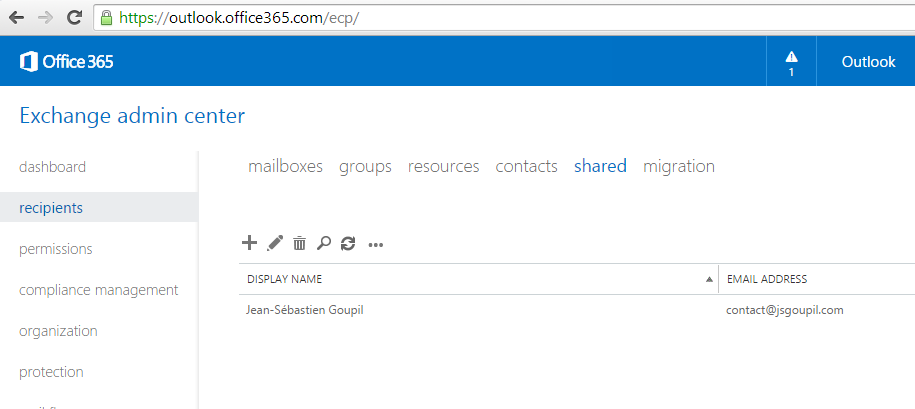
ECP Address to reach the shared mailbox
If you double click on that new mailbox, you can change the settings for the “Mailbox Delegation.” Add yourself (primary e-mail address) for “Full Access” and “Send As.”
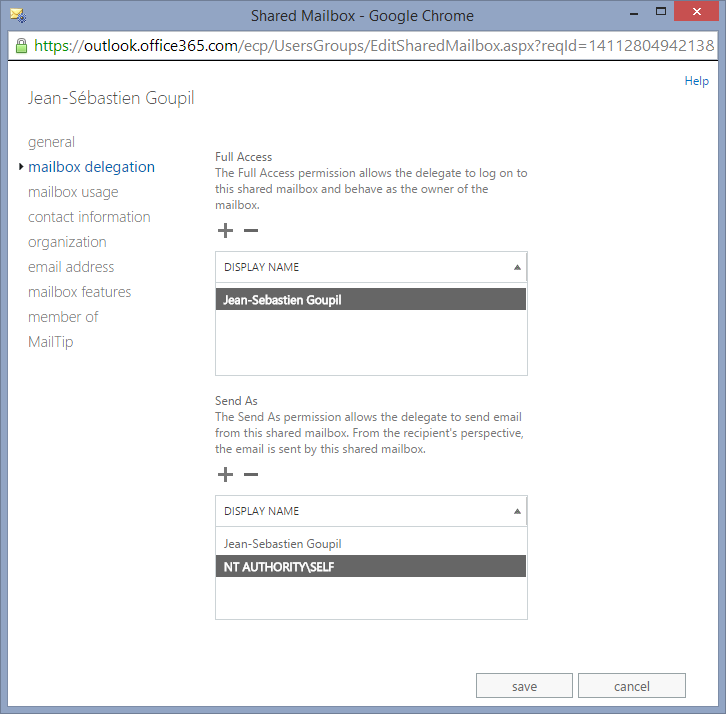
Mailbox Delegation
Powershell
If you manage to create these mailboxes, you can skip this section. Otherwise, you can run these commands in an Elevated Powershell to control your mailbox. Run ONE command at a time; some commands have following questions as you run them.
Set-ExecutionPolicy Unrestricted -Force
$LiveCred = Get-Credential
$Session = New-PSSession -ConfigurationName Microsoft.Exchange -ConnectionUri https://ps.outlook.com/powershell/ -Credential $LiveCred -Authentication Basic -AllowRedirection

# If the mailbox exists
Set-Mailbox second@email.com -Type shared

# If the mailbox doesn't exist
New-Mailbox -Shared -UserPrincipalName second@email.com

# Assign permissions
Add-MailboxPermission -Identity second@email.com -User primary@email.com -AccessRight FullAccess -InheritanceType All -Automapping $false
Add-RecipientPermission "second@email.com" -Trustee primary@email.com -AccessRights SendAs
Source: http://technet.microsoft.com/en-us/library/aa997663(v=exchg.150).aspx
Configuring OWA
Adding the Shared Mailbox
From OWA, you can open a new mailbox and keep two tabs open to watch your e-mail messages come in. However, it’s a lot nicer to have everything in one place.
Right click on your existing mailbox in the left menu, then click on “add shared folder…” Type your second e-mail address and voilà! You get your shared mailbox right into your main view.
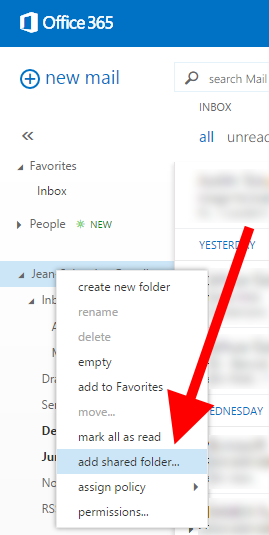
Right click, then “Add shared folder…”
Drag and drop the shared mailbox inbox to your favorites. (There is currently a bug I reported to Microsoft, you can’t have 2 folders named the same thing in your favorites as of 9/21/2014)
Configuring From
Create a new message, then click on the ellipses, then “Show from.” You can now enter the shared mailbox e-mail address and send messages as your second company!
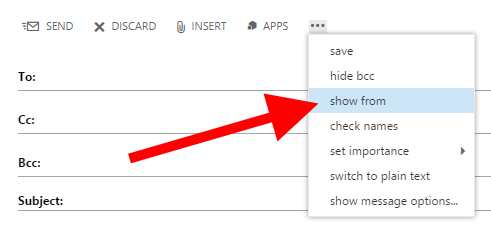
Click on the “…” then on “show from”
Configuring Outlook 2013
If you created everything from the web and imported your main e-mail address in Outlook 2013, everything should work just perfectly – minus one single detail. If you go inside your Shared Mailbox Inbox then click “New Email,” you end up with your primary e-mail address in the “From” field.
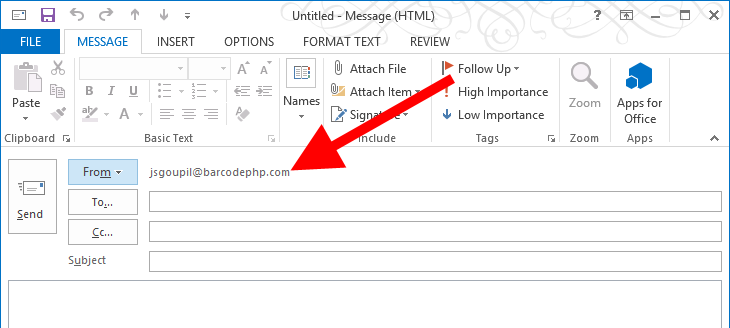
Incorrect “From” e-mail address
You might think that’s not a big deal, but you will end up forgetting to change that setting every time you write a message. There is a trick to fix this. We will delete the shared mailbox from Outlook, then re-add it manually.
Set the AutoMapping of the shared mailbox e-mail address to false with Powershell.
Set-ExecutionPolicy Unrestricted -Force
$LiveCred = Get-Credential
$Session = New-PSSession -ConfigurationName Microsoft.Exchange -ConnectionUri https://ps.outlook.com/powershell/ -Credential $LiveCred -Authentication Basic -AllowRedirection

Add-MailboxPermission -Identity second@email.com -User primary@email.com -AccessRight FullAccess -InheritanceType All -Automapping <span style="color: #ff0000;">$false</span>
Outlook caches the mailboxes. To remove caching temporarily, click “File”, “Account Settings”, “Account Settings.” Then double click on your primary e-mail address, then uncheck the box “Use Cached Exchange Mode.”
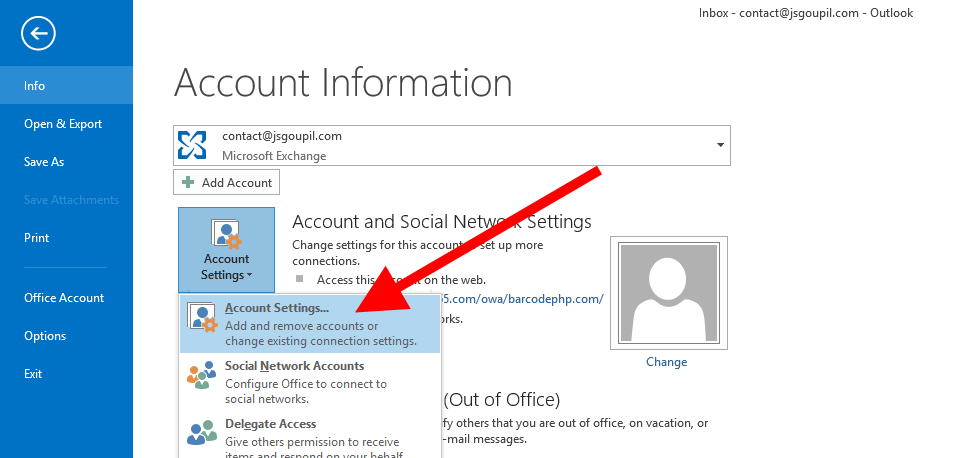
File, Account Settings, Account Settings

Double click on your primary e-mail address to go into the settings
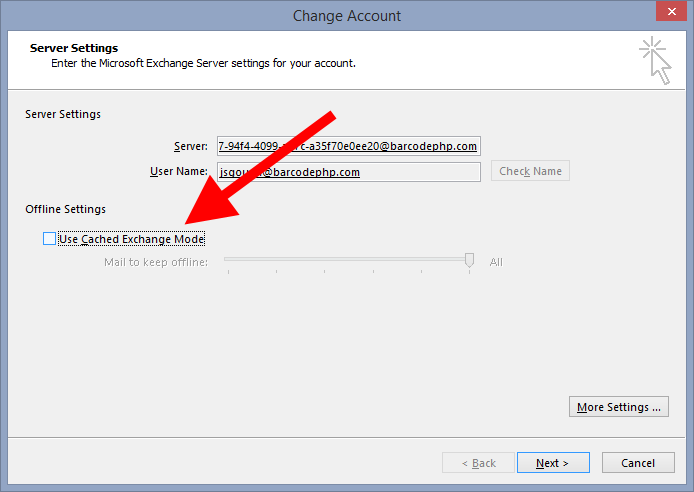
Uncheck the cache setting
Restart Outlook. If the shared mailbox didn’t disappear, wait a few seconds, and restart Outlook.
Once the mailbox has disappeared, let’s add it manually from the “File”, “Add Account” menu.
Enter your name, shared mailbox e-mail address, then the password of the primary e-mail address. A credential window will popup. Enter your primary e-mail address and password.

Adding manually the shared mailbox with primary e-mail address credentials
You should be done! Oh wait – go set your cache settings back to normal! Your mom won’t approve of you using that much bandwidth.
Now when you are in the shared mailbox inbox, creating a new message will have the correct “From” e-mail address.
This technique has been given to me by Microsoft support; I was actually impressed at the representative’s level of knowledge on the product. Do you need to give Microsoft feedback about Outlook Web Access? Use this URL: http://mymfe.microsoft.com/Microsoft%20%20Online%20%20Services/Feedback.aspx?formID=210
]]>You will find so many different answers and opinions online. Look them up! I will most likely not be your only kind of interviewer, go check out what people are expecting out there. I can give you an idea of what I was expecting.
Most questions are answered on a whiteboard. If there is one thing you should remember after an interviewer asks a question: DO NOT START CODING.
1. Verify the question
My question might be ambiguous on purpose. Or maybe you just didn’t understand it. If you start coding without knowing important details, your design will be flawed. Verify the question and make sure you have everything you need.
2. Think about it
Seriously? Did I have to write this as a step? YES. People start coding immediately even without thinking. Just pause for 2 minutes and think out loud. Once you’ve thought about it, you should have this information:
- Inputs
- Output
3. Write test cases
You will be able to uncover blurriness in my question. Write a table with a series of inputs/output. The normal cases, the weird cases, the impossible cases, etc.
Too many people do this last. Do it before coding!
4. Start coding
At this point, you should have a fair idea of how your code should look…
I DO NOT CARE if you write 10 lines of argument assertions and lose a few precious minutes. In real life, sure people care that argument 0 is not null, argument 1 is non-negative, and so on. However, in an interview question, that’s not what we are evaluating. Tell your interviewer: “Here I would have my pre-requisite checks, such as …, do you want me to write them down?” Most interviewers will answer NO.
Write your code with SMALL VARIABLE NAMES. Of course, ask your interviewer if it’s OK, but if you start with a variable name called “numberOfElevators”, you will hate yourself later. Just call it “noe“. If you tend to forget, make a table with what your variable mappings are.
As you are coding, explain what you are doing. Talk out loud. It’s complicated, but your interviewer might want to know what is going on in your head.
I don’t care about syntax errors. A missing semi-colon, double quotes, etc. I might call you out at the end, but I don’t really care. However, the important thing is to not confuse the following:
- <= instead of <
- == instead of =
- && instead of &
- && instead of ||
- Missing the first/last item in a for loop
- Going out of bound of an array
- Not returning anything??
Just to be clear, it’s alright if your code doesn’t “compile,” but don’t leave areas empty by saying, “here I would loop around the array and do X Y Z.” Just code it.
5. Verify
With your test cases written at the beginning, go line by line with each input to see if the function is returning the corresponding output. Adapt your code. If you change a core line, “re-run” your test cases even if they were passing earlier.
6. Improve the speed
Your code might be a little slow somewhere; try to analyze what could be done faster. Sometimes you don’t need to code it – just mention it. You can DEFINITELY skip the ++i or i++ idea.
Conclusion
Each interviewer is different. Go check out what people are looking for and adapt to your interviewer. Good interviewers will try to adapt to you as well.
]]>This is only my point of view here; there are plenty others out there. You can read how to do great during interviews on other LinkedIn posts.
While I was working on Windows Azure, I interviewed several people we wanted to hire for our team.
Be patient but proactive
Unfortunately, if you apply for a giant company (Microsoft, Google, Amazon), HR will take their sweet time to reach a decision- sometimes weeks or even months. I find this practice preposterous. I understand that they must inundated by thousands of resumes which they have to filter through, but there is such great talent out there that is being ignored. This process should go faster, especially if you get referred by someone internally, but it doesn’t.
Microsoft offers a referral bonus when someone you refer gets successfully hired. I did refer a couple, and it just never happened. It takes so long that sometimes you’ve already moved on or found another job.
Hey, I’m not here to rant about this, but it is definitely frustrating. Don’t wait months for a response: apply for that giant company AND other companies. If that giant company is interested in you in a few months, re-consider at that point if you are ready to take the leap.
Don’t dress up
Seriously, if dressing up is stressing you out, just chill. You can wear anything you want that is not offensive. I would even recommend NOT to wear a formal suit. Wear something you would be comfortable coding in.
Be passionate
Do you have personal projects? What do you like in technology? Do you follow big frameworks and submit patches? Do you think about designing projects in the shower? Let me know those kinds of things! You can skip the shower part, but I want to know if you are passionate about what you do.
Interview process
At Microsoft (and other big companies), you are in for a good half day of interviews. What they don’t tell you is, longer you last, better it is. You will go through 3-6 interviews.
The interviewers are lazy, uh oh… they might not even have read your resume. Why? I could tell you plenty of reasons, but I don’t think they stand. If the interviewers care enough about someone, they should have done a bit of research. If your resume is too heavy, they might have skipped a good part of it. Show your passion on that resume and in the interview.
The other problem in big companies is the interviewer doesn’t know what you are applying for; when this kind of situation happens, you get asked stupid questions that are not even in your field of interest or aligned with the job description… Sure, sometimes it could be a tactic to see if you can think and come up with good ideas, so you are in for some surprises.
After each interview, interviewers will talk to each other and see what areas they should drill into during the next round.
What kind of questions will the interviewer ask?
I hope that with this awesome heading will bring plenty of visitors to my site!! Let me tell you what people ask:
- What have you done in your previous company / school project?
- What did you like most about that project?
- Tell me more about X Y Z. (Hey! If you talked about it, you should be proficient… we find liars out there that have no clue what they are talking about.)
- Any problems you faced?
- How did you fix them?
- Why are you applying here?
- Why our team?
I’m sure if you are still reading, you are really dissatisfied with those bullet points.  In detail? Oh right… I like to ask questions about problems that I recently faced at work: stuff that was hard to figure out and took a few days to resolve. These make for great interview questions.
Think about your previous company or school project. What was complicated that you finally figured out after some deep thinking? Ask yourself that question.
I like to ask candidates to give a code review:
- What is this code doing?
- Are there any bugs with it? (yes there are… duh)
- How would you fix those bugs?
Then if you apply for a Senior JavaScript position, I will ask you JavaScript questions. Otherwise, I will stay vague in the choice of language. In college hiring, I asked this question:
From a string, reverse the letters of each word separately.
Interestingly, people learned how to reverse the whole sentence, but not each word. Most of the students came up with for loops with C pointers. That’s great. Another one came up with the STL… oh geez, I had no clue if it was correct but it seemed promising!
Other students came up with some Ruby, Python or JavaScript. With these high level languages, you can do this so quickly (split, reverse, join). I’m unsure why people didn’t come up with those answers? Too easy you might think? Well, give a shot! Worst case I’ll ask you to give me the long version.
Answering a coding question
I created another blog post, as this question deserves its own post.
6 steps to answer an interview coding question
Did you get the job?
You can definitely ask your interviewer when you will be called back. The answer is one week to two weeks. But the real answer is: I have no clue. We provide feedback, then it goes to the hiring manager then we deal with HR. If you don’t get called back after two weeks, don’t hesitate to give a follow-up call.
I hope this helps! If you need more input or have other ideas, leave a comment.
]]>I have started my business now, I had a couple of things to do to get started. If you decide to go in this line of work, I want to help you out. Here are the steps I followed to get my business started. I live in the city of Seattle in Washington State, some of the steps will be obviously different if you are from a different place, but you get the idea.
1. Get an accountant
This sounds trivial, but I think everybody is trying to save a few bucks when they start. I do remember when I bought my house, I was stressed and spent over 50 hours reading about taxes. Not only I was not accurate on the information I have read, but I was definitely lacking a lot of knowledge. I decided to spend a couple of hundreds; after 2 hours it was done.
Write down questions you may have during your process and give your accountant a call.
2. Create your business with your state
My accountant recommended to go with an LLC. I am only starting on this and my knowledge is limited, but it is similar to a sole proprietorship but with a couple more benefits. You can go read online about this, the web will have a better explanation.
The Washington website to create a new business is: https://corps2.sos.wa.gov/LLC/Pages/StartPage.aspx
The price is $200.
Searching for a unique name and slogan can be complicated and time consuming (don’t forget to search the web if the .com is available too); I personally decided to name it under my name to start with. If my company gets bigger, I’ll consider changing the name in the future.
3. Apply for a business license for your city
I applied in the same time to the Seattle business license. The website is: https://dea.seattle.gov/self/
The price is $47.
4. Apply for an EIN
This is valid for any company in the United States. The idea is to get this employer identifier number instead of giving away your SSN when you do business.
The IRS website to register your company to the federal is: http://www.irs.gov/Businesses/Small-Businesses-&-Self-Employed/Apply-for-an-Employer-Identification-Number-(EIN)-Online
This is FREE.
The site is opened only during the working hours weekdays… Make sense right? uh… well, plan accordingly.
5. Open a business bank account
After you have received your approval from your state and the EIN, go open a bank account. You should have received a UBI number in Washington State. If that UBI is not visible on this website: http://www.sos.wa.gov/corps/search.aspx, then wait one more day… the bank will use this information to open your account.
Start with a bank that offers free services… At least to start with.
6. Apply for the business license at the state level
It is easier to get this step started only once you have completed all the previous steps.
The website is: http://bls.dor.wa.gov/file.aspx
The price $19.
Once everything is created here http://dor.wa.gov, you will need to report your earning on this website. Depending on how much you reported you will earn, you will have to report your earnings monthly, quarterly or annually. There will be a laundry list of tax classification that will not apply to you… remove them and keep the one that makes the most sense: “Service and Other Activities; Gambling Contests of Chance (less than $50,000 a year)“… Of course, putting Gambling with this Service tax classification was a lot easier for them than adding another tax classification. It seriously makes no sense, but I guess we have to live with it.
7. EFTPS
Another website to register is the one for federal taxes. You need to register to this website once you receive the letter by mail. Just wait… The URL is https://www.eftps.gov
8. Expenses
Time to start spending money on important items that you will need for your company. I will let you figure out what you need, but what about a business card? I bought my template on this site: http://graphicriver.net/category/print-templates/business-cards
I found a nice one for 8$ then went to get it printed at http://www.vistaprint.com. I got 250 cards for $10. You can find some coupons online.
If you are interested in something a little more fancy, my friend is doing custom business card with a letter press. Have a look at his website: http://www.blkwlf.com
Done!
To summarize, the final amount paid to start the business in Washington: $266
My first expenses were, business cards, fancy laptop, standing desk.
]]>