From our previous code, we had to modify the output of the testing function. Originally it only plots the image along with the predicted label on matplotlib. We had to change it so that at the end of testing, the output will be text. We created two PHP files. The first file contains a form that allows users to upload an image. The second file contains the upload function along with a command to call the Python testing file. The file that the user uploads will be moved to a specified directory for testing. Even though it is only run locally, it simulates how it will work if it was an actual deployed website.
When creating this UI, we struggled with running the Python testing file because we got confused with the directories. When this problem was fixed, we are able to display the output of the python file on the website. What it is currently missing is the display of the uploaded photo. It will be better if after the user uploads an image, the image will be displayed with the label below it. The label would be the prediction made by the model.
]]>The struggle we faced was finding a good dataset. The dataset we used for cats and dogs contained a great number of images for training. Finding the dataset for the classroom objects was more difficult. In the end, we were able to find CalTech101 that contains images of a variety of objects from different categories. There are fruits, animals, office supplies, and vehicles. We decided to use only several objects from this dataset: camera, laptop, watch, chair, headphone. However, the number of images still doesn’t compare to the cats and dogs dataset. Some has only around 50 images while others have up to 200.
To accommodate the reduced amount of testing data, we tried increasing the number of training iterations in our program. When we tested it, it was able to classify the images even though the accuracy is not 100%.
]]>The problem with our attempt is that in comparison to the amount of cats and dogs pictures (12500 each), we don’t have enough pictures of ants (less than 100). After running the program several times, it still identifies the ant as a dog. When we reviewed the pictures of dogs from the dataset, we noticed that it closely resembles the shape of the ant in the testing dataset (it is a zoomed-in image of an ant). What we learned here is that the model only identifies patterns. When it tried to identify the ant from a zoomed-in photo, the patterns are similar to the patterns from the dog pictures. Another factor is also that we did not train it enough with the ants data.
After trying to get the model to identify ant, we tried a different species: butterfly. For training, we also do not have 12500 pictures of butterflies. However, because the pattern of a butterfly is very different than dogs and cats, the program was able to identify the butterfly correctly.
From these attempts, we learned that a model is only as smart as the training data we give it. For the training data, it is not only the quantity of the data that matters, but also the quality.
]]>We followed the tutorial on the cats vs. dogs program. We used a dataset of 25000 images from Kaggle and implemented the Python code on Jupyter Notebook. The filenames in the dataset are in the format name.number.png where “name” is the name of the animal”. For example, cat.1.png. This form of labelling is to make the training of the model simpler. From the filename it will take the name of the animal.
From the output on terminal, we were able to see that the loss decreases and the accuracy increases at every iteration. We were able to display the statistics on TensorBoard as a graph.
]]>Tensorflow is a platform that allows developers to build and deploy Machine Learning applications easily. Getting started with Tensorflow is made simple through the use of Keras API to train models. Together, Tensorflow and Keras is very useful for research as they were built for powerful experimentation.
Along with Tensoflow, we are also able to use TensorBoard to display statistics for the loss and accuracy of our trained model.
Reference: https://www.tensorflow.org/about
]]>Previously I have created a text based UNO game where the player will compete against a bot. However, the bot is very low level. It can only return the first card it finds from its own deck that matches the color or number previously given by the first player. It does not have any strategy to actually try to win the game. We will be attempting to make a smarter bot so that it will be able to strategise. For example, maybe it will be able to save the wildcards for a specific moment, or maybe remember/predict specific colors that the first player does not have.
]]>In command line, by typing in nmap we will see the available commands we can run and what they do. The command we will try to execute is: nmap -sV <target>
The command -sV is used to probe the open ports in the target and determine the service.
The screenshot below shows the result of nmap -sV 128.199.101.40
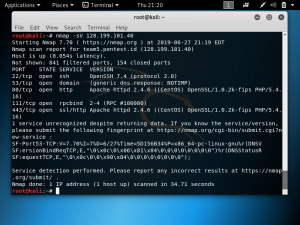
This Nmap scan was done on the IP address and as seen in the screenshot, it led to the domain team5.pentest.id and mentions that the host is up. It reported back the number of closed ports, filtered ports, and the details on the opened ports including the service for each opened port.
]]>To scan a target website, use the command: nikto -host <target>. In the target space, it can either be a domain or an IP address.
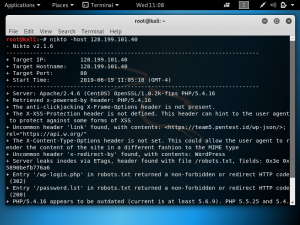
In the example below, we are doing a Nikto scan of a website with the IP address 128.199.101.40. So the command is: nikto -host 128.199.101.40
In this example, the IP address is used because using the domain would lead to a scan of the Cloudflare SSL IP address. As shown below, we are able to find information regarding the server which is Apache/2.4.6 and the OS is CentOS. The scan also detected a robots.txt file that has directories such as /password.lst. It was also found that the PHP version is outdated.
The weakness of Nikto is the fact that it is not stealthy. Nikto makes over 2000 HTTP GET requests to the web server, which means that a Nikto scan should be detectable. The number of GET requests can be used to test the system’s Intrusion Detection System (IDS).
]]>