The post Your OpenTelemetry Spans Aren’t Lost. Your Caller Told You Not to Record Them first appeared on Vexed Logic!?.
]]>Our API has OpenTelemetry tracing enabled. Requests sent directly using curl show up in the APM backend as expected. However, requests originating from two internal callers never generated spans, despite returning 200 OK and writing logs with trace IDs attached.
The issue was not the OTLP exporter, the collector, or network routing. The API received incoming W3C traceparent headers with the sampled flag set to 00. OpenTelemetry’s default sampler followed the specification and did not record. One caller received the 00 flag from a third-party proxy. The other had no tracing packages or configuration installed, but generated and forwarded 00 through default .NET runtime behavior.
Below is why .NET emits these headers by default, how the OpenTelemetry sampler handles them, and how to configure the receiving service to record the spans.
The Symptom
The API is an ASP.NET Core service on .NET 10. It registers the OpenTelemetry .NET SDK with instrumentation for ASP.NET Core, HttpClient, SQL, and the AWS SDK, exporting via OTLP to a shared collector. A filter drops health probes on / and /favicon.ico. No other endpoints are filtered, and no custom sampler was configured.
Two callers produced no spans:
- A Lambda-hosted .NET API behind a vendor’s proxy (Envoy with Datadog tracing).
- A .NET backend-for-frontend (BFF) for a single-page app with no OpenTelemetry packages and no tracing configuration.
Calls from both returned 200, and application logs reached the collector with trace IDs attached. Their spans never appeared in the APM backend.
The traceparent Header Format
The W3C Trace Context specification defines the traceparent header as four fields separated by hyphens:
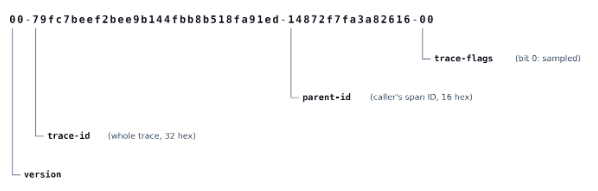
trace-id(32 hex characters): The distributed trace ID across all services.parent-id(16 hex characters): The caller’s outgoing span ID.trace-flags(8-bit byte): Bit 0 controls recording.01means sampled;00means not sampled.
Section 3.2.2.5.1 of the W3C spec
states:
“If a component needs to make a recording decision – it SHOULD respect the
sampledflag value.”
And when a component starts a trace:
“It should be set to
0as the default option when the trace is initiated by this component.”
When these two rules run across uninstrumented and instrumented services, downstream spans are dropped.
Testing the Flag with curl
Sending two requests with different flags isolates the behavior:
# Sampled flag (01)
curl -H "traceparent: 00-11111111111111111111111111111111-1111111111111111-01" \
  https://$API_URL/Version

# Unsampled flag (00)
curl -H "traceparent: 00-33333333333333333333333333333333-3333333333333333-00" \
  https://$API_URL/Version
Searching the APM backend for 11111111111111111111111111111111 returns the full trace. Searching for 33333333333333333333333333333333 returns nothing. The API drops spans on intake whenever the inbound flag is 00.
Logging Inbound Headers
To inspect what callers were sending, we added temporary middleware directly after builder.Build():
app.Use(async (context, next) =>
{
    if (context.Request.Path != "/")
    {
        var activity = System.Diagnostics.Activity.Current;
        app.Logger.LogInformation(
            "TraceContextDiagnostic: Path={Path} TraceparentHeader={TraceparentHeader} TracestateHeader={TracestateHeader} ActivityId={ActivityId} TraceFlags={TraceFlags} Recorded={Recorded} IsAllDataRequested={IsAllDataRequested}",
            context.Request.Path.Value,
            context.Request.Headers.TryGetValue("traceparent", out var tp) ? tp.ToString() : "(none)",
            context.Request.Headers.TryGetValue("tracestate", out var ts) ? ts.ToString() : "(none)",
            activity?.Id ?? "(none)",
            activity?.ActivityTraceFlags.ToString() ?? "(none)",
            activity?.Recorded,
            activity?.IsAllDataRequested);
    }
    await next(context);
});
Because application logs export independently of tracing spans, this captures the inbound headers for dropped requests.
Caller 1: Behind the Vendor Proxy
TraceparentHeader=00-000000000000000026a47f86228f14d9-17ccb071fcbd6cf5-00
TracestateHeader=dd=s:0;p:11096c07fe427b98;t.dm:-1
TraceFlags=None Recorded=False IsAllDataRequested=False
The top 64 bits of the trace ID are zeroed out (Datadog’s 64-bit ID format padded to 128 bits). The tracestate entry dd=s:0 is Datadog sampling priority 0 (drop), set by the proxy’s rate sampler (t.dm:-1). The vendor proxy sampled the request out, the Lambda forwarded the header, and our API honored the 00.
Caller 2: The Uninstrumented BFF
TraceparentHeader=00-79fc7beef2bee9b144fbb8b518fa91ed-14872f7fa3a82616-00
TracestateHeader=(none)
ActivityId=00-79fc7beef2bee9b144fbb8b518fa91ed-154cfc718e60171f-00
TraceFlags=None Recorded=False IsAllDataRequested=False
The trace ID is fully random across all 128 bits, which matches .NET’s ActivityTraceId.CreateRandom(). There is no tracestate. The BFF has no tracing packages installed, but the runtime generated and forwarded an unsampled W3C header anyway.
Why OpenTelemetry Drops the Trace
The OpenTelemetry SDK default sampler is ParentBased(root=AlwaysOn):
| Parent State | Default Delegate |
| None (root) | AlwaysOn |
Remote, sampled (01) | AlwaysOn |
Remote, not sampled (00) | AlwaysOff |
Local, sampled (01) | AlwaysOn |
Local, not sampled (00) | AlwaysOff |
A remote parent with flag 00 triggers AlwaysOff. The SDK creates an Activity so distributed context propagates downstream, but sets Recorded=False and IsAllDataRequested=False. The exporter ignores it.
Why Plain .NET Sends 00 Without Tracing Configured
Four runtime defaults combine to produce this:
1. ASP.NET Core creates an Activity when logging is enabled
In HostingApplicationDiagnostics.BeginRequest:
var loggingEnabled = _logger.IsEnabled(LogLevel.Critical);
if (ActivityCreator.IsActivityCreated(_activitySource, loggingEnabled || diagnosticListenerActivityCreationEnabled))
And ActivityCreator.IsActivityCreated evaluates:
return activitySource.HasListeners() || diagnosticsOrLoggingEnabled;
Because LogLevel.Critical is enabled in almost every app, ASP.NET Core creates an Activity for incoming requests even without an ActivityListener. This is why logs contain TraceId and SpanId in applications that do not use OpenTelemetry.
2. The ID format defaults to W3C
Activity.Start() falls back to DefaultIdFormat:
#if W3C_DEFAULT_ID_FORMAT
    s_defaultIdFormat = LocalAppContextSwitches.DefaultActivityIdFormatIsHierarchial ? ActivityIdFormat.Hierarchical : ActivityIdFormat.W3C;
#else
    s_defaultIdFormat = ActivityIdFormat.Hierarchical;
#endif
DiagnosticSource.csproj sets W3C_DEFAULT_ID_FORMAT for all modern .NET targets.
3. Trace flags remain zero
Flags are stored in a byte field defaulting to zero (ActivityTraceFlags.None):
private byte _w3CIdFlags;
With no inbound header, _w3CIdFlags stays 0. Without an ActivityListener callback returning AllDataAndRecorded, the flag stays unset. When serialized, Activity.Id renders as:
00-(traceId)-(spanId)-00
4. HttpClient propagates the Activity automatically
SocketsHttpHandler wraps calls in a DiagnosticsHandler:
[FeatureSwitchDefinition("System.Net.Http.EnableActivityPropagation")]
public static bool EnableActivityPropagation { get; } = RuntimeSettingParser.QueryRuntimeSettingSwitch(
    "System.Net.Http.EnableActivityPropagation",
    "DOTNET_SYSTEM_NET_HTTP_ENABLEACTIVITYPROPAGATION",
    true);
This switch defaults to true. DiagnosticsHandler creates a child Activity, inherits the None flags, and writes the traceparent header to outgoing HTTP requests.
The call chain:
- The browser calls the BFF with no tracing headers.
- The BFF starts an
Activitywith flagsNone(00). HttpClientsends00-traceid-spanid-00to downstream services.- The receiving API’s
ParentBasedsampler sees00and drops the span viaAlwaysOff.
Configuration Fix
Configure the receiving service to record incoming requests even when an upstream remote parent arrives marked 00:
Option 1: Configuration via OTEL_TRACES_SAMPLER
Set the sampler in environment variables or appsettings.json:
OTEL_TRACES_SAMPLER: always_on
Option 2: Configuration in Code
To set the sampler in application startup, configure the tracer builder:
builder.Services.AddOpenTelemetry()
    .WithTracing(tracing => tracing.SetSampler<AlwaysOnSampler>());
Any sampler set directly in code takes precedence over configuration files and environment variables. If both exist, the SDK ignores OTEL_TRACES_SAMPLER and writes an override diagnostic message only to its internal EventSource.
What happens after this change:
- Trace ID is preserved: The span attaches to the caller’s trace ID. If the caller starts recording later, the traces line up.
- Downstream headers become
-01: Once the service records, its outgoing calls set bit 0 on downstream requests, enabling tracing for subsequent hops. tracestatepasses through: Upstream vendor state likedd=s:0remains intact.- Callers are unaffected: Decisions only travel downstream.
Trade-Offs
If every service in your architecture is instrumented and an edge gateway handles head sampling, respecting the caller’s 00 flag prevents broken traces and manages ingest volume.
In systems that mix third-party proxies, uninstrumented apps, and multiple frameworks, an incoming 00 usually means nobody made a sampling decision, not that a service chose to drop the trace. Overriding remoteParentNotSampled at your service boundary and using tail sampling in the collector avoids losing visibility to runtime defaults.
Other Options
- Instrument the caller: Adding OpenTelemetry causes the caller to record and propagate
-01directly. This will not help when the caller forwards a00from an external proxy. - Disable caller propagation: Set
DOTNET_SYSTEM_NET_HTTP_ENABLEACTIVITYPROPAGATION=0or setDistributedContextPropagator.Current = DistributedContextPropagator.CreateNoOutputPropagator()on the caller. The API then starts a fresh trace ID, but you lose trace correlation across the hop.
Diagnostic Checklist for Missing Spans
- Check if application logs reach the collector. If logs arrive and spans do not, your network and collector pipelines are operational.
- Send two
curlrequests to the endpoint, one with-01and one with-00. Search for both trace IDs. - Log inbound headers with diagnostic middleware (
traceparent,tracestate,Activity.Recorded). - Read the incoming trace ID:
- 64-bit padded trace ID with
dd=intracestate: Datadog proxy or agent dropped the trace. - 128-bit random trace ID with no
tracestate: Default .NET runtime propagation from an uninstrumented service.
- 64-bit padded trace ID with
- Set
remoteParentNotSampled: new AlwaysOnSampler()on receiving APIs.
References
- W3C Trace Context Specification: Sampled Flag
- OpenTelemetry SDK Specification: ParentBased Sampler
- Microsoft Learn: ActivityTraceFlags Enum
- Microsoft Learn: HTTP Activity Propagation Runtime Configuration
- dotnet/aspnetcore: ActivityCreator.cs
- dotnet/runtime: Activity.cs
- dotnet/runtime: SocketsHttpHandler.cs
The post Your OpenTelemetry Spans Aren’t Lost. Your Caller Told You Not to Record Them first appeared on Vexed Logic!?.
]]>The post Get Zigbee2MQTT (Z2M) entities in a Home Assistant template first appeared on Vexed Logic!?.
]]>entity_ids provided by Zigbee2MQTT:
{{ integration_entities('mqtt')
   | select('is_device_attr','via_device_id', device_id('Zigbee2MQTT Bridge')) }}
This will retrieve all of the MQTT entity IDs specifically provided by Zigbee2MQTT and can be used for other automations or scripts. You can also use the expand filter to convert all of these entities to objects for even more filtering.
For more information on templating, be sure to check out the Home Assistant Templating Documentation.
The post Get Zigbee2MQTT (Z2M) entities in a Home Assistant template first appeared on Vexed Logic!?.
]]>The post How to always force cmd/command prompt and Visual Studio to run as Administrator first appeared on Vexed Logic!?.
]]>The following inserts the default install location for Visual Studio 2015, but can be modified if the install directory is different or you’re running a different version of Visual Studio.
Windows Registry Editor Version 5.00
[HKEY_CURRENT_USER\Software\Microsoft\Windows NT\CurrentVersion\AppCompatFlags\Layers]
"C:\\Windows\\System32\\cmd.exe"="~ RUNASADMIN"
"C:\\Windows\\SysWOW64\\cmd.exe"="~ RUNASADMIN"
"C:\\Program Files (x86)\\Microsoft Visual Studio 14.0\\Common7\\IDE\\devenv.exe"="~ RUNASADMIN"
[HKEY_LOCAL_MACHINE\SOFTWARE\Microsoft\Windows NT\CurrentVersion\AppCompatFlags\Layers]
"C:\\Windows\\System32\\cmd.exe"="~ RUNASADMIN"
"C:\\Windows\\SysWOW64\\cmd.exe"="~ RUNASADMIN"
"C:\\Program Files (x86)\\Microsoft Visual Studio 14.0\\Common7\\IDE\\devenv.exe"="~ RUNASADMIN"
The post How to always force cmd/command prompt and Visual Studio to run as Administrator first appeared on Vexed Logic!?.
]]>The post 401.2 Unauthorized – Invalid Authentication Headers When Using Anonymous Authentication first appeared on Vexed Logic!?.
]]>

401.2 – Unauthorized – You are not authorized to view this page due to invalid authentication headers
Surprisingly enough, this issue is not directly caused by any of the following issues listed by the error message:
- No authentication protocol (including anonymous) is selected in IIS.
- Only integrated authentication is enabled, and a client browser was used that does not support integrated authentication.
- Integrated authentication is enabled and the request was sent through a proxy that changed the authentication headers before they reach the Web server.
- The Web server is not configured for anonymous access and a required authorization header was not received.
- The “configuration/system.webServer/authorization” configuration section may be explicitly denying the user access.
It is, however, caused by an incorrectly configured user used during anonymous authentication. This may due to the user’s password changing after being configured within IIS or the user account being disabled or deleted.
To resolve this, go to the Internet Information Services (IIS) Manager and navigate to the website that is experiencing the problem.
Click “Authentication” under “IIS”.

Then, click “Anonymous Authentication” and click “Edit…” on the right sidebar.

Select the appropriate option from the dialog and enter the correct credentials (if required) and click “OK”.
Refresh your website and your problem should be resolved.
The post 401.2 Unauthorized – Invalid Authentication Headers When Using Anonymous Authentication first appeared on Vexed Logic!?.
]]>The post RESOLVED: The Steam servers are too busy to handle your request. Error Code (2) first appeared on Vexed Logic!?.
]]>There’s two things I found that may be connected to this, and both seem to involve having Visual Studio installed on this machine.
After installing the two following Microsoft updates, the installation was able to complete without issue:
- Visual C++ Redistributable for Visual Studio 2012 Update 3
- Visual Studio 2010 SP1 SDK
The post RESOLVED: The Steam servers are too busy to handle your request. Error Code (2) first appeared on Vexed Logic!?.
]]>The post Retrieving the COM class factory for component with CLSID {C1F400A0-3F08-11D3-9F0B-006008039E37} failed due to the following error: 80040154 Class not registered first appeared on Vexed Logic!?.
]]>This one required more investigation than I would’ve thought. So much so, that I nearly came to the conclusion that I wasn’t going to be able to do video transcoding. Fear not though, it is possible and is a straightforward problem to resolve.
In this instance, I was just trying to use a webcam that was attached to a Windows Server machine, which seems like it should just be a plug-n-play type of task.
However, when trying to view the video from the camera, I had encountering the following error message:
Retrieving the COM class factory for component with CLSID {C1F400A0-3F08-11D3-9F0B-006008039E37} failed due to the following error: 80040154 Class not registered (Exception from HRESULT: 0x80040154 (REGDB_E_CLASSNOTREG)).
Problem
This is a straightforward COM error message that basically says that it doesn’t have information to load a particular component (ex. a program isn’t installed, is corrupt, etc). This class ID happens to be associated with Microsoft Windows SDK’s “Sample Grabber Filter” that isn’t included on these versions of Windows. This component is included in qedit.dll, which is what is needed to resolve this issue.
Resolution
The easiest resolution to find a version of qedit.dll from a version of Windows that does include it, such as Windows XP, Vista, 7 or 8 (basically, any non-server OS).
- Copy the qedit.dll file to the C:\Windows\system32 directory of your server OS.
- 32-bit (x86): C:\Windows\system32
- 64-bit (x64): C:\Windows\SysWOW64
- Run the following command at the command prompt as administrator: regsvr32 C:\Windows\system32\qedit.dll.
- That’s it! Your program should now be able to load the component and function as expected.
The post Retrieving the COM class factory for component with CLSID {C1F400A0-3F08-11D3-9F0B-006008039E37} failed due to the following error: 80040154 Class not registered first appeared on Vexed Logic!?.
]]>The post WHM/cPanel Install Perl Package: Out of Memory first appeared on Vexed Logic!?.
]]>I totally forgot to capture the message, and of course I can’t reproduce it by trying to uninstall/reinstall, but there was some type of out of memory error that prevented the package from compiling and installing.
The workaround is simple, just run the perlinstaller script from the shell.
# /usr/local/cpanel/scripts/perlinstaller Package-To-Install
# /usr/local/cpanel/scripts/perlinstaller Net::SFTP
I didn’t see any reference on how to run this command, so hopefully this helps anyone looking to install a Perl package via the shell using WHM/cPanel.
The post WHM/cPanel Install Perl Package: Out of Memory first appeared on Vexed Logic!?.
]]>The post ASP/ASP.NET Session Timeout – How do I change it!? first appeared on Vexed Logic!?.
]]>You’re trying something simple, or so you thought, and increasing the session timeout of your website, but it doesn’t appear to be having any effect.
ASP.NET
Usually, the first and easiest thing to do is just change the configuration/system.web/sessionState@timeout value to something like “90”. This should mean that you’d like your users’ sessions to be persisted until a 90 minute window of idle time has elapsed.
<configuration>
  <system.web>
  ...
   <sessionState timeout="90" />
  ...
 </system.web>
</configuration>
So, what do you do now? You go ahead and make sure it works… but wait… it still appears to be timing out after 20 minutes.
This doesn’t make any sense, it explicitly says that the session timeout should be exactly 90 minutes.
There’s a couple of issues that are tied together here:
- The application pool’s worker process default idle timeout is also set to 20 minutes
- The default mode of storing session state is in the IIS process
Application Pool Idle Timeout
The settings for the application pool can be found by clicking Properties (IIS 6) or Advanced Settings (IIS 7.5) on the application pool that the application is assigned to.
 |
 |
| IIS 7.5 Idle Timeout | IIS 6 Idle Timeout |
Ensure this value is set to the timeout of your session, at a minimum, to ensure that all sessions persist for the entire session timeout period.
The reason that these two values are dependent on one another is because the session information is actually stored within the worker process of the application pool. That is to say, if the worker process is shutdown or killed for any reason, the session information will be lost.
Session Storage Mode
There are the modes of storing the session information:
- InProc (or In Process) – Default – Stores session information within the IIS worker process
- StateServer – Stores session information in a separate process (the ASP.NET state service)
- SQLServer – Stores session information in a SQL database
The only mode that is vulnerable to losing session information on a worker process is when the state is stored in the worker process. Both StateServer and SQLServer modes are not affected by worker process resets. Likewise, StateServer and SQLServer modes are the only options when it is necessary to share session state across more than a single IIS server.
For more information about these modes, check out MSDN.
ASP
There’s two ways to change the session timeout when you’re dealing with classic ASP.
You can set it at the application level, or programmatically, which means that the value can be different within the application.
Application Level
Since it doesn’t specifically state that the setting is for classic ASP, it may be confusing to know that the value is in: Application Properties -> Configuration… -> Options -> Enable session state.

It’s as simple as updating this value, and the session timeout for your entire classic ASP application is changed!
Programmatically
You can also use modify the Session.Timeout property at runtime to affect the timeout period of the session. One popular location to put this piece of code is in the global.asa file.
<script language="VBScript" runat="Server">
Sub Session_OnStart
 Session.Timeout = 90
End Sub
</SCRIPT>
The post ASP/ASP.NET Session Timeout – How do I change it!? first appeared on Vexed Logic!?.
]]>The post Running Pyramid Web Framework with FastCGI first appeared on Vexed Logic!?.
]]>After I finished installing Pyramid and creating the folder structure of my site, one of my next steps was to ensure that I got some sane response from Apache showing that my site is alive. Now, my particular environment uses FastCGI, so I needed to find a way to allow FastCGI to serve up my shiny new Pyramid application that is written in Python.
There are three steps to do this:
- Create a
dispatch.fcgifile – This will handle the the creation and running of the WSGI server - Chmod
dispatch.fcgito 0755 (it needs to be executable!) - Create a
.htaccessfile – This will route all incoming requests to thedispatch.fcgifile
Create a dispatch.fcgi File
This file, along with the upcoming .htaccess file, are the only files that are required to be visible by the public. That is, the source of the application can be safely stored above the document root, which can prevent potential attacks that could expose the application’s source code.
Create a dispatch.fcgi file with the following content:
#!/path/to/your/bin/python
import sys

from paste.deploy import loadapp
from flup.server.fcgi_fork import WSGIServer

app = loadapp('config:/path/to/your/production.ini')
server = WSGIServer(app)
server.run()
Chmod dispatch.fcgi to 0755
If you don’t do this, I promise you will spend a while trying to figure out what is preventing your site from serving up correctly.
Let’s take a quick look at what happens when dispatch.fcgi is not executable.
[Wed May 02 02:10:25 2012] [info] mod_fcgid: server example.net:/path/to/my/dispatch.fcgi(130539) started
[Wed May 02 02:10:25 2012] [warn] [client 127.0.0.1] (104)Connection reset by peer: mod_fcgid: error reading data from FastCGI server, referer: http://example.net/
[Wed May 02 02:10:25 2012] [error] [client 127.0.0.1] Premature end of script headers: dispatch.fcgi, referer: http://example.net/
… well then, I’m not sure how much more unhelpful that could be. Anyway, make sure that you don’t end up wasting time debugging a dumb issue and issue the following command:
chmod 0755 dispatch.fcgi
Create a .htaccess file
The last and final step is to utilize mod_rewrite to redirect requests to the Python application via the dispatch.fcgi file.
AddHandler fcgid-script .fcgi
RewriteEngine On
RewriteCond %{REQUEST_FILENAME} !-f
RewriteRule ^(.*)$ dispatch.fcgi/$1 [QSA,L]
That’s it! The site should be accessible by navigating to the website URL where the dispatch.fcgi file resides.
Things to Note
Keep in mind that the FastCGI application will continue running after the first request. If any changes are made to the dispatch.fcgi file, be sure to kill the old instance of Python. This will force a new instance to be created on the next request, and cause the updated code to be executed.
The post Running Pyramid Web Framework with FastCGI first appeared on Vexed Logic!?.
]]>The post App Engine ProtoRPC Basics first appeared on Vexed Logic!?.
]]>I found out about ProtoRPC when I was looking for a way to expose a web service from a Google App Engine application. I was investigating several different ways that would allow me to receive requests, process those requests, and send back a response. Out of the options of manually serializing XML or JSON, extracting GET/POST parameters from the HTTP request, or ProtoRPC, ProtoRPC was a great choice.
One of the cool things about ProtoRPC is that it automatically handles the serialization and deserialization of the responses and requests to/from JSON. This means that you don’t need a simplejson.loads(…) at the beginning of each web service nor a simplejson.dumps(…) at the end.
If you’re looking for a flexible yet compact way to expose a web service from your Google App Engine app, check out what ProtoRPC can offer you.
ProtoRPC Changes
To start off, I just want to point out a few things about ProtoRPC that have changed from a lot of the documentation that I’ve seen. Since it is still in the experimental stage, I have a feeling that this blog post will be outdated soon enough, too, as Google continues development on the ProtoRPC API.
- service_handlers has moved from the protorpc namespace to protorpc.webapp (The Google overview of ProtoRPC is outdated)
- I found this out initially by experiencing this error: ImportError: cannot import name service_handlers
Change
from protorpc import service_handlers
to
from protorpc.webapp import service_handlers
- The @remote.remote(Request,Response) decorator has changed to @remote.method(Request,Response)
Change
@remote.remote(GetRequest, GetResponse)
def get(self, request):
to
@remote.method(GetRequest, GetResponse)
def get(self, request):
Creating the Data Model
I’d like to create a tracking application for my collection of LOLcats, and where better to host it than in the Google App Engine cloud. For now, it’ll be basic tracking of only their name, color, and age, but there’s always room for expansion in the future.
from google.appengine.ext import webapp
from google.appengine.ext.webapp import util
from google.appengine.ext import db

class MainHandler(webapp.RequestHandler):
    def get(self):
        self.response.out.write('Welcome to the VexedLogic ProtoRPC test application!')

class LolCat(db.Model):
	name = db.StringProperty(required=True)
	color = db.StringProperty(required=True)
	age = db.IntegerProperty(required=True)

def main():
    application = webapp.WSGIApplication([('/', MainHandler)],
                                         debug=True)
    util.run_wsgi_app(application)

if __name__ == '__main__':
    main()
Creating the ProtoRPC Service Methods
Now we’re to the fun part… actually creating the new ProtoRPC service to manage my collection of LOLcats. Since I would never dream of getting rid of one of them, the only two method that I will implement are add and get. I’m going to start a new Python file called lolcat_service.py to contain all of my service logic.
Add Method
First, the request and response of the add method need to be defined. Since there isn’t anything in particular that needs to be returned to the caller, I’ll use VoidMessage, which is the built-in “empty” type.
Unfortunately, we cannot reuse the same model class that was created in main.py, the request/response classes need to inherit from protorpc.messages.Message.
from google.appengine.ext import webapp
from google.appengine.ext.webapp import util
from google.appengine.api import users

from protorpc import messages
from protorpc import message_types
from protorpc import remote
import main

class Cat(messages.Message):
 name = messages.StringField(1, required=True)
 color = messages.StringField(2, required=True)
 age = messages.IntegerField(3, required=True)

class AddCatRequest(messages.Message):
 cat = messages.MessageField(Cat, 1, required=True)
You’ll notice the definition of Cat message looks very similar to the LolCat model with a few differences. The main difference is that the fields on the message class need unique integer values provided, which are used for field identification by ProtoRPC. I’d like to reuse the Cat definition in the get method, which is why I make a separate Cat message instead of include all 3 properties in the AddCatRequest message
The add method looks like this:
class lolcat_service(remote.Service):
	@remote.method(AddCatRequest, message_types.VoidMessage)
	def add_cat(self, request):
		main.LolCat(name = request.cat.name,
					color = request.cat.color,
					age = request.cat.age).put()

		return message_types.VoidMessage()
Get Method
On to the get method… this one is a little bit more complex since the user should be allowed to specify some criteria with the request to get the listing of cats.
When the get method is all complete, the lolcat_service.py looks like this:
from google.appengine.ext import webapp
from google.appengine.ext.webapp import util
from google.appengine.api import users

from protorpc import messages
from protorpc import message_types
from protorpc import remote
import main

class Cat(messages.Message):
	name = messages.StringField(1, required=True)
	color = messages.StringField(2, required=True)
	age = messages.IntegerField(3, required=True)

class AddCatRequest(messages.Message):
	cat = messages.MessageField(Cat, 1, required=True)

class GetCatsRequest(messages.Message):
	min_age = messages.IntegerField(1)
	color = messages.StringField(2)
	max_results = messages.IntegerField(3, default=100)

class GetCatsResponse(messages.Message):
	cats = messages.MessageField(Cat, 1, repeated=True)

class lolcat_service(remote.Service):
	@remote.method(AddCatRequest, message_types.VoidMessage)
	def add_cat(self, request):
		main.LolCat(name = request.cat.name,
					color = request.cat.color,
					age = request.cat.age).put()

		return message_types.VoidMessage()

	@remote.method(GetCatsRequest, GetCatsResponse)
	def get_cats(self, request):
		query = main.LolCat.all()

		if request.min_age:
			query.filter('age >=', request.min_age)
		if request.color:
			query.filter('color =', request.color)

		cats = []
		for cat_model in query.fetch(request.max_results):
			cat = Cat(name=cat_model.name,
					  color=cat_model.color,
					  age=cat_model.age)
			cats.append(cat)

		return GetCatsResponse(cats = cats)
Registering the Service
Create a new services.py file that will define the service mapping for the service that was just created.
from google.appengine.ext import webapp
from google.appengine.ext.webapp import util

from protorpc.webapp import service_handlers

import lolcat_service

# Register mapping with application.
application = webapp.WSGIApplication(
  service_handlers.service_mapping(
    [('/service', lolcat_service.lolcat_service)]),
  debug=True)

def main():
  util.run_wsgi_app(application)

if __name__ == '__main__':
  main()
Finally, map the handler in the app.yaml file by adding the following block under the handlers section:
- url: /service.*
  script: services.py
That’s it! You can now visit the service at http://localhost:8080/service.add_cat (replace 8080 with the correct port number) and be greeted with the “/service.add_cat is a ProtoRPC method.” message.
Testing your ProtoRPC Service
Since the generic “/service.add_cat is a ProtoRPC method.” isn’t very comforting in assuring me that my service works as expected, I put together two HTML files that will call these services and display the results in the alert box.
This requires adding one more handler mapping in the app.yaml file:
- url: /static
  static_dir: static
Create a new static folder in the root of your project directory.
Testing the Add Method
The following HTML file will make three requests to the add_cat method to add the following cats:
- Long Cat (Color: White / Age: 1)
- Tacgnol (Color: Black/ Age: 7)
- Monorail Cat (Color: Brown / Age: 10)
If successful, when you browse to http://localhost:8080/static/TestAdd.html, you should see three alert dialogs that contain “{}”, which is the contents of the VoidMessage that the add_cat method returns.
<html>
  <head>
    <script type="text/javascript"
    src="https://ajax.googleapis.com/ajax/libs/jquery/1.6.2/jquery.min.js">
    </script>
  </head>
  <script>
  $.ajax({url: '/service.add_cat', type: 'POST', contentType:
  'application/json',
  data: '{"cat" : {"name": "Long Cat", "color" : "white", "age" : 1}}',
  dataType: 'html',
  error:function(response, one, two) {
  alert(response.responseText); alert(one); alert(two); }, success:
  function(json) { alert(json); } });

  $.ajax({url: '/service.add_cat', type: 'POST', contentType:
  'application/json',
  data: '{"cat" : {"name": "Tacgnol", "color" : "black", "age" : 7}}',
  dataType: 'html',
  error:function(response, one, two) {
  alert(response.responseText); alert(one); alert(two); }, success:
  function(json) { alert(json); } });

  $.ajax({url: '/service.add_cat', type: 'POST', contentType:
  'application/json',
  data: '{"cat" : {"name": "Monorail Cat", "color" : "brown", "age" : 10}}',
  dataType: 'html',
  error:function(response, one, two) {
  alert(response.responseText); alert(one); alert(two); }, success:
  function(json) { alert(json); } });
  </script>
  <body></body>
</html>
Testing the Get Method
The following HTML file will make a request to the get_cats method. By default, if this method is called without the data property, it will return a maximum of 100 cats with any age and color.
The data property of the AJAX request can be manipulated to specify the criteria for the get_cats method. This property is deserialized into a GetCatsRequest object when received by the get_cats method. I’ve provided a few examples of different search criteria that are commented out below.
<html>
  <head>
    <script type="text/javascript"
    src="https://ajax.googleapis.com/ajax/libs/jquery/1.6.2/jquery.min.js">
    </script>
  </head>
  <script>
  $.ajax({url: '/service.get_cats', type: 'POST', contentType:
  'application/json',
  <!-- data: '{"min_age": 7, "color": "black"}', -->
  <!-- data: '{"min_age": 7}', -->
  <!-- data: '{"max_results": 2}', -->
  <!-- data: '{"min_age": 7, "color": "black"}', -->
  dataType: 'html',
  error:function(response, one, two) {
  alert(response.responseText); alert(one); alert(two); }, success:
  function(json) { alert(json); } });
  </script>
  <body></body>
</html>
The post App Engine ProtoRPC Basics first appeared on Vexed Logic!?.
]]>