He asked me this:
“I’m wondering if there is any way that a field holds line breaks and if I can utilize these within a report, example [TABLE].[FIELD] in [DATABASE] . See the screenshot where the general format of the email has been kept and then what I’m seeing in SSMS”
The screenshot shows a well formatted email:
Dear Person
We are writing to you to inform you….
I could have just replied “yes” but I can’t help myself but to try and add some more depth of understanding to the topic so here’s my reply. I think this is the sort of succinct response I would have appreciated reading when I was learning about these things.
In the ASCII table, there are 256 possible characters. 0-127 are universal. 128 – 255 are called ‘code pages’ and can contain different language characters depending on the code page chosen.
The Americans came up with ASCII in the 60s, being very English-language -centric, but it’s since been replaced by the Unicode standard which contains all languages (1 – 4 bytes per character) where ASCII has only 1 byte per char. Even still, Unicode hasn’t fully taken over yet, but certainly use it where you need multi-language support (beyond Western European languages). Thai and the other East Asian languages like Korean, Japanese etc are probably the most complicated multi-byte character languages.
In the image below, look at the “Dec” column from char(0) to char(32). These are called non-printing characters. A lot of them relate to old type-writer functions. Edit, Tele-Type functions. It makes sense that you would only need these codes for an automated type-writer like device, not a manual typewriter.
Most software still uses the CR carriage return – char(13) – and the LF line feed – char(10) – characters in combination to signify the end of a line.
Imagine a type-writer returning the “carriage” to the beginning of the line and then feeding the paper up one line. Some software has dropped one of those two chars and just uses one, which can lead to strange end of line stuff happening when you transfer data from one system to another. In those cases you sometimes need to parse the text and replace instances of the single character with an instance of both in combination.
When you save an ASCII file (as opposed to a binary file) to disk/memory, it is “serialized” meaning that it’s just one long string. That’s an oversimplification but serves to illustrate the point. The end-of-lines within the long string are marked by what might look like spaces, but it’s actually these non-printing characters.
If you pull that string field into an SSRS report, it will correctly display the text as entered, i.e. it will interpret all the non-printing characters correctly and your paragraph formatting will be maintained.
If you want to add in your own set of line breaks you can build a string like this:
=”This is the first line” + chr(10) + chr(13) + “this is the second line” etc etc
In some languages it will be written as chr(10) and in some it might be char(10). The plusses “+” might also be ampersands “&”
Obviously syntax changes but the methodology remains the same.

]]>
So I was reading this amusing story about these neighbours in the Northern Territory of Australia. This one young guy likes doing burnouts up and down his street, which let’s be fair, at 23 is not all that uncommon. Young men like to take risks and do stupid things right? Tell me something I don’t know – I was there once too! Problem was his older neighbour two doors down finally cracked it and decided to shoot up his car (allegedly). Not so funny is that the young guy also has a young family so this could have easily got out of hand and someone could have died or been seriously injured. Of course the burnouts and drag racing in the cars is extremely dangerous, but shooting a gun, albeit at property, is targeted direct violence.
This is not the place to debate the legalities however, and my original intent was to comment on this article and say that the solution is fairly easy. You have these young fellas who like to play with cars, so make a place for them to do it! Where is the racetrack or dragway? Establishing an outlet for young men to pursue their passions leads to vocational outcomes. This guy might be keen on tinkering with his car and learning auto-mechanics. He might learn to weld and put a rollcage in his car. He might then decide that he doesn’t want to drag down the street or burnout on his neighbours driveway because it’s more fun to do it at the meetup at the track where all his friends are there to watch. He might not do it in the street because he wants to keep his car in good condition for the race on the track.
I know I know, it’s not that simple but really just think sensibly about it, most of the violent crime out there (not including psychopaths) is caused by socio-economic conditions like unemployment or lack of avenues for applying oneself. It’s usually young men, whether solo or in gangs, and it’s an age old problem. Ignore this problem and we live with the consequences. Why haven’t we learned this lesson yet?
So that was my comment but I didn’t post it.
Why not?
Because the options to post on this major Australian new website only let you log in via your social media network of choice.
Logging in using Social Media accounts
Fine, I’m all for eliminating the scungy anonymous troll posters who hide behind pseudonyms and handles so they can post obscene, racist, misogynist, hatred inciting filth. They sicken me. But that’s not all that happens in this OAuth handshake. Oh no. They want ALL your details. I don’t mind if the post links back to my blog here, or my “public social network” face, but why do you need my other details? I don’t trust you to have them. In fact, I don’t trust FaceBook to have them after the way they have behaved. It equally sickens me that I can’t actually delete things from Facebook, only “Archive” them. When my various private chats on FaceBook became visible on my public wall recently I thought, “Oops, I’m sure that was an accident.” But then this whole thing about the Shadow Profiles comes to light. Facebook changes their privacy policy so often, and we already know what their true agenda is, but it’s too late! I’ve already added information there that I don’t want to be public. I’m happy for it to sit, encrypted and private in the Facebook network, but I don’t actually want it made public. I’m not talking about stuff I don’t want my grandmother to know. I have nothing to hide. That’s the argument right? “If you’ve got nothing to hide then you’ve got nothing to worry about.” “It’s just so we can catch terrorists.” WHAT UTTER BULLSHIT.
The offending items

So if you choose to sign in using Facebook, NineMSN wants to access your public profile – fine that’s what it should do. It also wants your friends list. Well doesn’t matter I suppose but your friends list is something that can be hidden from your public profile so I say NO. I can’t speak on behalf of everyone I know to say that I accept you knowing that they are “friends” with me. To the questions of email, birthday and current city, well maybe you could find that stuff out about me anyway, but those items are not public because my email address gets enough spam as it is. I realise that NineMSN doesn’t have sinister intentions in gathering this data. Yes I know exactly why they want it, the marketing application is profound, but I just don’t trust them to correctly anonymize it. In any case it’s fairly well established that you can’t fully anonymize data, although some argue that it’s not so simple. That’s a digression from the argument at hand though.
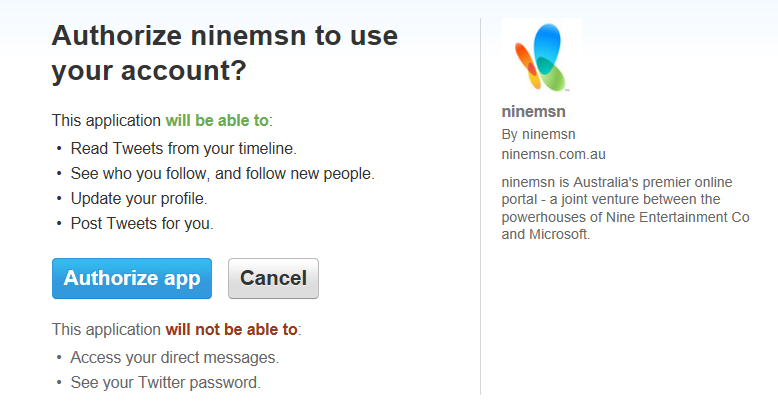
If you choose to log in with Twitter it’s a bit more confusing. I don’t mind that it wants to read tweets from the timeline, those are meant to be public. That’s the point of Twitter. I don’t mind that it wants to see who I follow, that’s public information too. The next bit is confusing though, what does it mean “and follow new people”? Is it going to make me follow people? Is it going to follow my followers? That part is not clear at all.
Then it gets a bit scary. It wants to update my profile? You what!!?? No I don’t think so, my profile is the description of who I am and what I do and is there for a specific reason. I don’t want any Twitter app to be able to change my profile, that’s like me relinquishing all rights to the account completely and becoming their puppet. In what circumstances could NineMSN updating my profile on my behalf ever be justifiable? At this point I am swearing profanities.
Now to the worst part, “Post Tweets for you“. Um NO!
A more transparent process of trust when commenting
I get that this agreement is probably generic, and grants those permissions so that certain services or apps can help automate twitter posts for you, but sorry NineMSN, you don’t offer that kind of service and the only thing I can think of that you would want that for is to post dodgy self-serving spam as me that makes it look like I am endorsing you.
Whilst this might not even be NineMSN’s fault, and it does appear that I am picking on them, this sort of generic permission granting dialogue does nothing to soothe my concerns. Most people will just agree with these terms in order to post their comments without fully thinking about the implications.
I would like to see these permissions more modular, because as it stands it’s all or nothing. For most purposes, and I mean posting comments, all that is needed is to identify the public profile. All those other permissions being granted all the time is just wholesale destruction of privacy rights.
]]>So I went through the purchase process for Office 365 but couldn’t complete it because I found a couple of problems.
Unfair pricing for Australia
The US version of Office 365 is US$10 per month, and the Australian version is AU$12 a month. I find that a bit cheeky given at the time the AU dollar was worth more than the US dollar, and given there is no administration in sending discs (it’s entirely electronic) there is no justification for charging more. It’s also not possible to buy it via the US site without having a LIVE account linked to a US address and credit card. That is possible to do but a bit of a pain, and I don’t see why I should have to be dishonest to get the fair deal. UPDATE: The AU dollar is now worth less than the US dollar, but nowhere near enough to justify a 20% price increase.
Billing details from LIVE problems
The second problem I came across was that when you log in to LIVE, the office 365 purchase process doesn’t show the current billing info. In fact it showed billing info and a home address from about 7 years ago! UPDATE: The office 365 billing process now shows no billing information at all, and wants me to add a new payment method:

The Office 2013 purchase process reads my billing info perfectly:
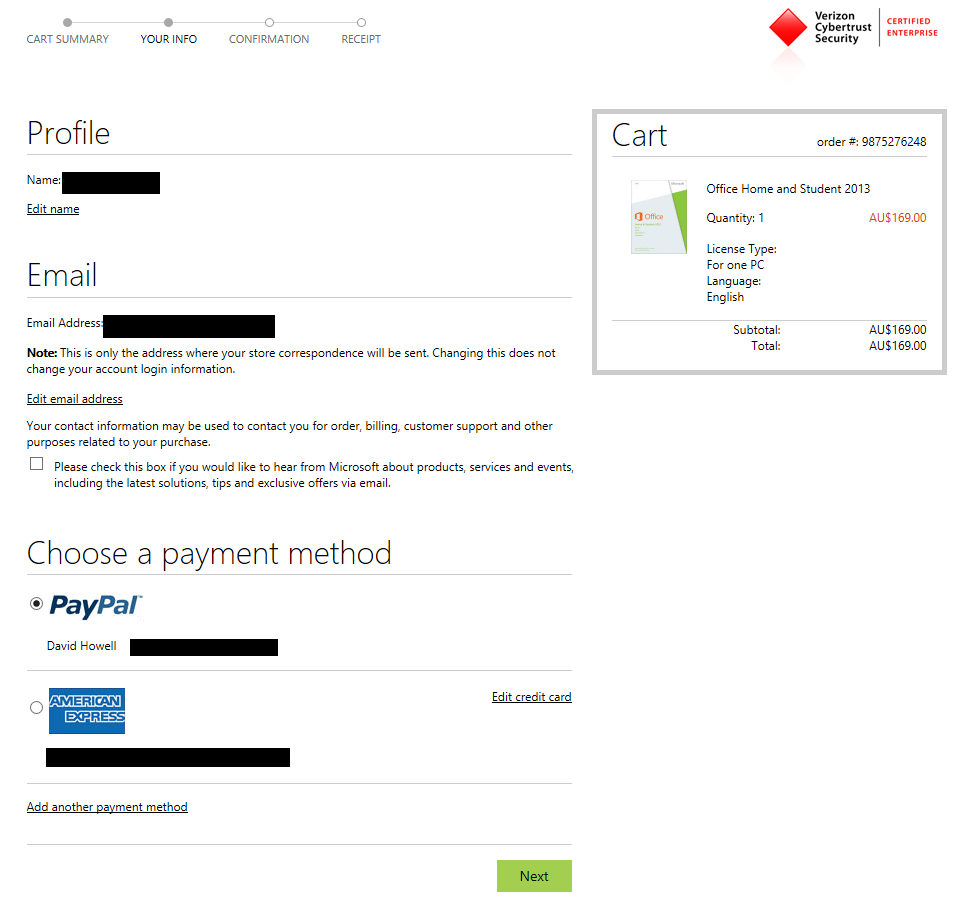
Are these different teams? Why the inconsistency in the sales process? Generally Microsoft customer service is very responsive but if their e-commerce systems are not working properly it will turn people off. I suppose most Office purchases will be either part of new PC purchases, in-store, or as part of enterprise agreements. Even still, SAAS /Cloud / Online only is constantly being espoused as the future so you’d want to get that part working smoothly.
In the end I gave up on 365 and bought Office 2013 Home & Student. Unfortunately I’ve since discovered that PowerPivot is not available in this version of Excel, you need professional plus. So I’m not sure what I am going to do there. It makes the proposition of using PowerPivot a lot less attractive if a business with 1000’s of users has to buy the $600 version in order to get that functionality. At the very least they should be able to consume PowerPivot workbooks, but that’s another debate. I hope Microsoft reconsider this move because it makes their Power View/PowerPivot data visualization offerings a lot less competitive when compared to superlative solutions like Tableau.
]]>

A colleague at work was telling me about their 14YO son who is saving money and building their own gaming PC. I think that’s great, I’ve been building my own gaming PC’s for 20 years (*cough* maybe more! *cough*) and while it’s not something I would recommend for most people it’s a bit of a fun hobby. You do end up swearing a bit and cutting yourself on the sharp edges of parts & the case but in the end you know the quality of the build and you’re more likely to be able to troubleshoot and fix it yourself.
For most people, I would say buy a complete computer. The PC builders have hopefully done all the research on parts and quality testing of the components for compatibility and stability and if anything goes wrong you can take it back to them and its their problem to fix it and put it back together. On the other hand, if you build it yourself you have the same protection from consumer protection legislation so you can always “RMA” the parts and get replacements if they are faulty. It just relies on you to work out which parts are actually the problem.
Recently I had an SSD disk “suddenly become unformatted”. I reformatted and reinstalled the OS and when everything seemed up and running it happened again. Faulty disk I assumed, but I assumed wrong. I bought a new SSD and the same thing happened. Turns out the SATA RAID controller on the motherboard was the problem. This could be flaky drivers or indeed a hardware fault, but on a 5 year old motherboard I didn’t worry about working out which it was, taking the opportunity to upgrade. A friend was happy to take the motherboard (and CPU & RAM) off me in full knowledge of the dodgy SATA controller because there are other SATA ports that are usable. I was able to re-use most of the parts including the now 2 SSD disks I have which I have turned into a mirrored RAID array.
So my colleague asked me for some tips for her son, so I sent this and I’ve tried to make it as timeless as possible. I think this advice was as valid 5 or 10 years ago as it is now (May 2013) , I’ve avoiding using model numbers and I predict this will still be valid until the PC actually dies and we’re all using google glass whilst riding segways wearing fanny-packs (or bum-bags as we call them in Australia. Note in Australia a Fanny is NOT your rear) and a Fez, which if you can’t read the sarcasm I think will not happen :p If the PC does die then some other enthusiast tech gear will turn up and if it doesn’t then we will tear open your un-upgradeable apple obelisks and hack them anyway.
So here’s my tips for building a good gaming PC that should last for years. My last one was over 5.
- Research all the parts really well, read Tom’s hardware website for reviews, or other PC hardware enthusiast forums. Chances are someone else bought the parts you are considering and will have comments.
- Don’t buy the bleeding edge tech because it is flaky, wait for v1.1 is generally a good rule in IT.
- Make certain all the parts are going to fit together, particularly the processor (CPU) and motherboard. The different slot/socket types are confusing.
- Get an Intel CPU, I’ve had decent AMD processors in the past, and arguably if you like AMD (formerly ATI) Radeon graphics cards then it seems sensible that the AMD processor/motherboard chipset/ graphics card combo would work together but don’t assume anything. Historically Intel and AMD have taken turns with the best performing chips since the days of the Athlon (late 90’s) but it seems Intel have been on top for at least the last few years. Things change though so see point 1, do lots of research and make up your own mind.
- The heatsink/fan (CPU Cooler) that comes with the CPU is totally inadequate for gaming, you have to buy a good aftermarket one, that also fits the processor you buy. CPU’s and other performance microchips in general get extremely hot and will burn out if the heatsink/fan is not drawing away the heat fast enough, although modern motherboards have thermal fuses to automatically shut themselves down if that happens so you are safe.
- Even better than a heatsink/fan is watercooling. A bit like how a car uses a radiator filled with water to keep cool. But that’s probably overkill unless you have a very high end system, or if you’re a fan (:P) of silence. Heatsink/fans are noisy and watercooling can achieve the same cooling performance silently, or much better performance with noise.
- Attaching a CPU cooler is the hardest part of building a PC. You probably need to turn the motherboard upside down to attach a back-plate which is quite fiddly. You need to apply the minimal amount of high quality thermal grease to the top of the processor to facilitate a really good thermal interface between it and the heatsink. It’s a bit like polishing shoes, you need to apply a tiny bit with good spread, basically just filling in the microscopic pits on the surface so there is no air. Air is a thermal insulator so if there is air between the processor and heatsink then it will not operate efficiently. Good thermal grease has silver particles in it because silver has the best thermal conductivity properties of any metal (for the price and given its other chemical properties), but a good aftermarket CPU cooler should come with a little tube of this.
- Don’t buy the highest end graphics card because the price/performance ratio is not worth it.
- The best graphics cards for their price are the mid range NVidia GeForce and the AMD Radeon models. Personally I like NVidia, I have two of these in SLI driving 3 screens for a “surround vision” experience, but AMD’s Crossfire is just as good, if not better considering it can drive way more screens. If that’s your thing. One screen is good too, preferably wide and big. I would prefer one big curved screen to multiple screens though, and they’re coming, I’m sure they will be cheap soon enough.
- Get the high range Intel processor if the budget permits, if not then a midrange is fine. Don’t get the low-range/low power model and equally don’t go for the extreme range because of the poor power/price ratio. Why pay double for 10% more performance?
- If you have to compromise, rather get a better graphics card and the midrange CPU.
- If you start by getting 1 stick of the largest size RAM you can always buy more of the same later on to upgrade. Yes you can get cheap “matched pairs” or quads but if you are on a budget then don’t worry about it. Definitely don’t get smaller sticks because it reduces upgradability. For example, if you’ve only got 4 slots to fill with RAM, and given you should put the same (quantity/frequency/timing and ideally brand/model) RAM sticks in each slot then going with the largest amount puts you in a good position in a year or two when the RAM will be cheaper and you’ve saved more money to buy it.
- Buy a good power supply with a minimum 80+ efficiency rating and ideally a single rail. Quad rail power supplies are trickier to connect, as you usually need to connect multiple rails to the graphics card. They were all the rage for a while there, but if you end up with crossfire or SLI multi graphics card setup it will be a headache. Make sure the wattage is more than enough for your parts. Particularly if you run multiple graphics cards, a high end CPU and multiple hard disks it will use more power.
- Get a good case, that fits an ATX sized motherboard. Little cases won’t fit the graphics card and CPU cooler in them. Clear windows on the side of computer cases are silly but that’s my opinion. Even more silly are cold cathodes and other embellishments that make your PC look like it’s trying to be one of those ridiculous cars in the Fast & The Furious movies. Air should flow in the bottom at the front of the case and out the back near the top of the case. Hot air rises, and cooler air will be drawn in from lower down. Face the CPU Cooler so it blows air out the back.
Finally, use http://www.staticice.com.au/ to check prices from lots of vendors, it’s a meta-search for all things electronic (good for phones & cameras too!) This is an Australian site, but I’m sure there are good equivalents elsewhere.
]]>
Excel’s Dominance
Excel is a much-maligned product but it has stayed on top since it took over the lead position in business spreadsheets from Lotus 1-2-3 some time in the early 1990’s. The main reason often suggested for its dominance is the power of the Visual Basic for Applications (VBA) scripting language for creating Macros. Using Excel as a base platform, the ability to extend it using Macros allows Excel to become a fully fledged application development environment.
I recall investigating alternatives to Excel and the greater office suite of applications at a previous organisation I worked for. Open Office was the front-runner at the time, I suppose Google Docs would be considered now but this was a few years back. The justification for switching was the hundreds of thousands of dollars that would have been saved in license costs. The downfall of the plan was mainly centered around file compatibility issues (which were minor and had work-arounds) but the clincher was the macros. Open Office had an implementation of visual basic, but the object model was totally different. There was a migration tool to convert Excel macros into Open Office macros, but on most of the workbooks we tested, it didn’t do the job properly. There were that many business critical macro-enabled workbooks across the organisation that it was deemed too hard to make the switch. The very reason for Excel’s dominance was what then embedded it into the organisation, we were addicted to it and couldn’t kick it.
The scourge of Excel
The bane of the IT department is this abundance of uncontrolled Excel workbooks that seem to multiply across the organisation, get out of sync with current data, and lead to silo-ed reporting across different corporate divisions. At another organisation I worked for, we (in IT) created a macro-enabled workbook for a specific auditing requirement that was then given to an administrator to use and manage. Shortly after, a number of support calls came about the workbook “suddenly not working”. After investigating we found the macros gone. After even more investigation we found out the administrator was taking a copy of the workbook from the network location to their laptop, taking it home as a “backup” and then restoring the workbook to the server the following day. Besides the fact that the network drive was already being backed up to tape, as well as distributed using DFS to other server locations, this was not a very smart thing to do. In the save-as that the user was doing, the macros weren’t being saved in the non-macro-enabled file.
But whose fault is this? There is one argument for advanced IT training now being a necessity for all information workers (that means anyone using a computer as part of their job). On the other hand we all know that most people aren’t nerdy IT types, preferring instead to have real conversations with people rather than speaking in 1’s and 0’s  . So I don’t blame that person for their well-meaning behaviour, but that’s just one example of the problem with Excel.
Balance between flexibility and control
On the one hand IT want to control the applications for reasons of security, backup, consistency of service, integrity of data and ultimately effectiveness and efficiency of business processes. On the other hand the operations side of the business is frustrated by IT being a hurdle and a bottleneck to them getting new applications quickly. There is a lack of understanding on both sides too. When the business requests new functions from IT and it takes a long time due to the necessary security and administrative reasons, the business are frustrated by the time it takes to deliver. They don’t see these administrative due-diligence tasks as necessary because it is not part of their responsibility nor are they assessed on them. The business is mostly assessed on performance and profit generation where there is no motivation for security, stability and consistency. The IT perspective is that the business is gung-ho, can’t make up their mind what they really want, and are generally lazy and irresponsible, preferring a slap-dash quick solution to one that is robust and won’t require endless support calls to fix it. Scarily sometimes these quick and dirty applications are used for critical business decisions, or even to support government policy & ideology even though based on flawed logic that does not go through proper testing & validation processes that are standard in the proper software development life-cycle (SDLC).
The business resorts to the self-service option because they can’t wait, and then you get a proliferation of Excel workbooks because that’s the tool they have and the skillset is fairly widely distributed amongst the staff members. Operations staff end up copying & pasting data between applications, letting data get out of date and generally coming up with very inefficient processes simply because they are time poor and pressured for immediate results. There’s no time to spend optimising a process that might end up save years of person-hours. Fire-fighting is the norm, not prevention and proactive solutions.
Addressing the problem
Microsoft are well aware of these problems and have proposed various solutions for tackling the issue. Excel services for SharePoint is one such example; it enables users to create powerful spreadsheets but to then have them hosted centrally on the intranet web portal. This would have certainly avoided the problem with the user taking their own “backup” mentioned earlier, and gives IT visibility over the application surface area, but doesn’t fix the robustness, data integrity and logic flaw problems.
PowerPivot and other database connections in Excel workbooks are another measure to keep data in sync and up to date, but I find the refresh options lacking, particularly in PowerPivot. It requires the user to first switch to the PowerPivot window, refresh it, then switch back to Excel and refresh that. Worse, both steps can’t be automated on-load so the user has an annoying process to have to perform whenever they work with that workbook. I’ve written short t-the-point instructions on how to do this and given training but then later found users not doing both steps of the refresh process. This is frustrating for me, but I don’t blame the users, I blame the process. Add-ins like PowerPivot are extremely powerful but if they fall outside the object model accessible by VBA then they become relegated to power-users only. By that I mean if many of the functions can’t be Automated and guaranteed to be performed even when the user forgets, then the application can’t be guaranteed to be used appropriately and the data currency and reliability can’t be guaranteed either.
I don’t have a ready solution for this problem but I know that it has to benefit both camps. It has to allow for quick ad-hoc work by end users, but also enable a level of standardization for IT. Hopefully future versions will do that, assuming Excel doesn’t lose its crown to a contender.
]]>The first thing I tend to do is copy the auto-generated query into an MDX editor that will do some formatting. I used to use Mosha’s awesome online MDX tool. He also had a downloadable MDX editor which was a bit like a code cop, not only showing you syntax errors but advising against some common poor query constructions. You might well know that Mosha was a driving force behind both the development of SSAS and the MDX language which subsequently became an industry standard. Usually Microsoft get blamed for convoluting open standards but here’s an example of them defining one and opening it up to competitors like Oracle and IBM.
Unfortunately Mosha’s tool is gone, and Moshas moved on from the MDX world a few years ago (genius never sits still) but this Microsoft provided tool works well http://formatmdx.msftlabs.com/
It seems with the trend to move towards Tabular modelling such as in PowerPivot and Tabular cubes, which only work with DAX and not MDX, that MDX might be going out of fashion. It’s not suprising given how convoluted it is to write and how easy it is to get it very wrong. The roots of DAX are in VB and Excel functions as well which makes it more palatable to business type users.
I don’t think my time delving down the rabbit hole of MDX was misspent though, it’s been fun in a masochistic kind of way.
]]>
LDAP, the “lightweight directory access protocol” is a strange beast. It’s technically a protocol for accessing network directories (directories as in phone directories, not folders), but it sort of qualifies as a no-SQL database because its distributed addressing mechanism doesn’t consist of relations like a RDBMS, it has entries with attributes. These are somewhat like objects with properties if your thinking is object-oriented.
Querying LDAP It’s quite difficult to find information about LDAP queries, most of it relates to querying AD directly through AD management tools like the MMC snap-in. The data is structured but not easily queried or analysed so as with my thinking on other forms of NO-SQL data storage, it is not an end in itself, you are always going to have to structure it, or at least get it into a language you like to work with. If that happens to be Java or some other language you like then fine, but I like to think in sets and prefer SQL so that’s my first step; get the data into a database so you can do useful things with it like make it dance.
Getting started
Here’s a basic way to start querying your AD system via SQL Server. My specific need was to help the senior network manager access their infrastructure specifically relating to a Microsoft Office upgrade to determine how many licenses they require and how many PC’s should fall into the appropriate automatic software install groups. The installs are managed automatically by placing people in the appropriate groups.
Step 1
Create a linked server, this should work as is, and you don’t need to change it for different servers.
This is assuming the SQL Server machine has access to the LDAP server(s) i.e. if you can run MMC with the AD snap-in on the machine then you should be able to set up this linked server.
sp_addlinkedserver ‘ADSI’, ‘Active Directory Service Interfaces’,’ADSDSOObject’, ‘adsdatasource’
Once the linked server is set up, you can run queries using the OpenQuery() function in SQL Server.
Step 2
Running a query
SELECT * FROM OpenQuery(ADSI, ‘SELECT cn, distinguishedName FROM ”LDAP://OU=Client Computers,OU=Resources,DC=Domain,DC=com,DC=au” ‘)
–Note the LDAP address is DC=Domain,DC=com or in my case DC=Domain,DC=com,DC=au where the domain is domain.com.au — This query assumes you have OU’s set up with the structure “Resources\Client Computers” The LDAP addresses tend to read backwards like that, somewhat like URI’s where the top level domain is on the far right and the sub-domains get deepers as you read to the left. –OU organisation units are as per the hierarchy set up within AD.
Important!
There is one Caveat to this in an AD environment. The default MaxPageSize setting is 1000. That setting controls most tools in terms of how many records you can see on screen at once. The downside is any query you run with this method will be limited to 1000 records, and there is no way in the Linked Server setup to override that setting due to a limitation in the LDAP provider. It is possible to override this in other tools however.
If you need to return more than 1000 records there are two options. Preferably increase the MaxPageSize setting (requires some command line options to be run) or if you don’t have access to do that then do some ugly unions based on filtered sets of data. Each data set returned should be less than 1000 records for each chunk of data between the UNIONs. Heres an example of using Union to do just that. You might have to adjust the attributes to those that you require.
SELECT sAMAccountName,CN, ADsPath FROM OpenQuery(ADSI, ‘<LDAP://DC=Domain,DC=com,DC=au>;(&(objectClass=User)(|(sAMAccountName=A*)(sAMAccountName=B*)(sAMAccountName=C*)(sAMAccountName=D*)) );sAMAccountName,CN, ADsPath, sn;subtree’) UNION ALL SELECT sAMAccountName,CN, ADsPath FROM OpenQuery(ADSI, ‘<LDAP://DC=Domain,DC=com,DC=au>;(&(objectClass=User)(|(sAMAccountName=E*)(sAMAccountName=F*)(sAMAccountName=G*)(sAMAccountName=H*)) );sAMAccountName,CN, ADsPath;subtree’)
]]>
Firstly this pack of SSRS reports that monitor the server and statistics is extremely useful and I will add it to the toolbelt.
http://www.sqlservercentral.com/articles/Reporting+Services+(SSRS)/69257/
The other is a great little app to download/deploy reports on mass. Many a time I’ve manually downloaded a bunch of reports and this should make that task a lot easier. There’s no update since 2009 though so I wonder about SSDT support for SQL Server 2012. I might have to test that.
http://www.sqldbatips.com/showarticle.asp?ID=62
]]>
You’ve got a table with employee ID primary key, a date employed and a leaving date which can be NULL. The start date has a NOT NULL constraint.
On a report you want to be able to enter a @StartDate and @EndDate parameter to return a list of employees that were employees during that date range. Note I didn’t say “employed during that date” range because that could be ambiguous and suggest that they began their employement during that period. That’s not what is required, rather the report needs to show anyone who was “current” at any time during the search range. Again, note I didn’t say “working during that period” because I’ve seen plenty of people who were employed but barely working… :p
Anyway, how’s this logic? I feel like it might be a bit agricultural or may have a flaw somewhere. Tim?
“Where” clause of the query
WHERE
(DateEmployed >= @StartDate AND DateEmployed <= @EndDate) /*Covers 4,5,6 */
OR
(LeavingDate >= @StartDate AND LeavingDate >= @EndDate) /*Covers 2, 4*/
OR
(DateEmployed <= @EndDate AND (LeavingDate >= @StartDate or LeavingDate IS NULL)) /* Covers 3*/
Parameter Values
@StartDate = 01/03/2012
@LeavingDate = 31/03/2012
Example Data
| Employee ID | Date Employed | Leaving Date | Should be returned | Is returned |
| 1 | 10/01/2011 | 02/02/2012 | No, started and finished before the search range | Not covered |
| 2 | 10/01/2011 | 15/03/2012 | Yes, finished during the search range | Yes |
| 3 | 10/01/2011 | NULL | Yes, still employed | Yes |
| 4 | 12/03/2012 | 13/03/2012 | Yes, started during the search range, also finished during the search range | Yes |
| 5 | 12/03/2012 | 15/04/2012 | Yes, started during the search range | Yes |
| 6 | 12/03/2012 | NULL | Yes, started during the search range | Yes |
| 7 | 15/04/2012 | 18/09/2012 | No, started after the search range | Not covered |
| 8 | 15/04/2012 | NULL | No, started after the search range | Not covered |
Anything missing?
]]>
Usually with shortcuts in Visual Studio (BIDS), you can go Tools –> Options –> Environment –> Keyboard
If you filter the list of commands to make the list shorter, you can find the command you want and click into the “Press shortcut keys:” text box and then press the shortcut combination you want.
I tried that and everything related to Expression didn’t work  . Basically it’s pretty hard to know what all those commands are and hard to find the one you want.
But there’s another option. It’s a bit round-a-bout but it works fine. It basically involves creating a macro which will send shift-F10-E to your active context and then binding that macro to your shortcut keys of choice, e.g. CTRL-1. I’m using Visual Studio 2008 (installed from SQL Server 2008R2 disk)
1) Show the macro window by selecting View–> Other windows –> Macro Explorer
2) Create a new module under “MyMacros”
3) Enter this VB.NET code:
Imports System
Imports EnvDTE
Imports EnvDTE80
Imports EnvDTE90
Imports System.Diagnostics

Public Module UserShortcuts
    Public Sub ShowExpression()
        System.Windows.Forms.SendKeys.SendWait("+{F10}E")
    End Sub
End Module
4) Go to Tools –> Options –> Environment –> Keyboard
5) Type “macros” into the “Show commands containing:” textbox and the sub as defined in the module in the code above will appear and you can highlight it.
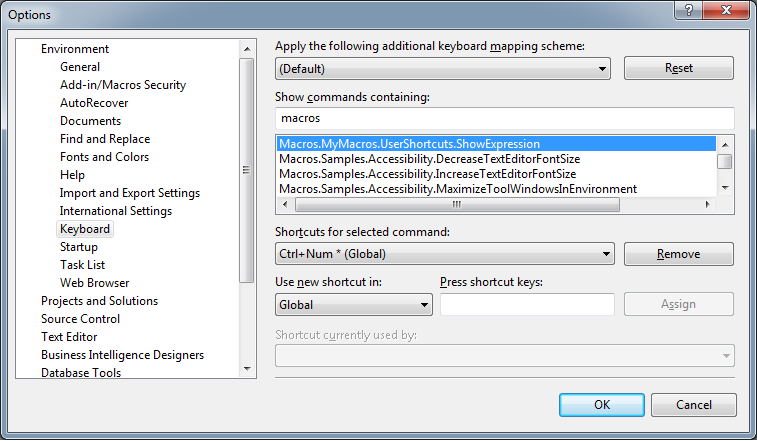
6) You can then select the “Press shortcut keys” textbox and type [CTRL] + 1 or whatever you like and then click the [Assign] button.
7) This MSDN page shows all the key options you can choose for the SendWait method. If you want to add more keyboard shortcuts, just add more Sub() entries in the module for each one and then map them as per steps 4 to 6.
]]>