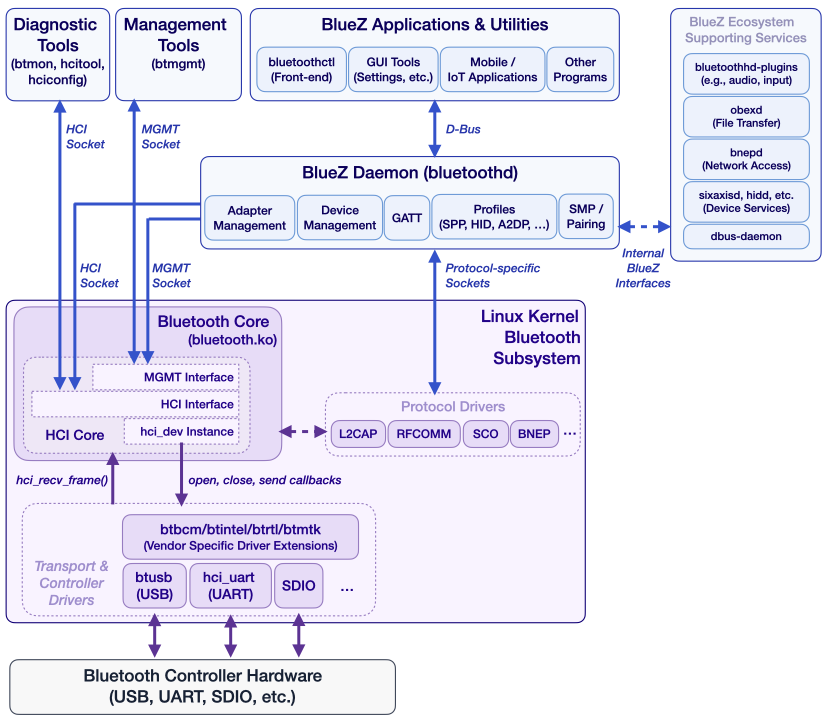
BTstack, our proprietary user-space Bluetooth Host Stack, follows a different approach: it interacts directly with Bluetooth controllers at the HCI level. For embedded Linux systems, it provides custom HCI transport implementations for UART and USB to communicate with the controller. The direct access enables BTstack to handle controller initialization, including firmware download and vendor-specific setup steps for a wide range of devices, which are often required on embedded platforms. This gives developers full control over the complete Bluetooth stack within their application.
Nowadays, modern embedded designs increasingly rely on integrated Wi-Fi/Bluetooth combo chips, where the controller is managed by the kernel and not directly accessible. To support these scenarios, BTstack provides a new Linux port with HCI transport based on the Linux kernel HCI socket interface. This integration allows BTstack to better align with the Linux ecosystem while preserving its portability and clean user-space design.
In practice, a self-contained user-space stack like BTstack can significantly simplify embedded design. Instead of coordinating multiple system services, developers can implement all Bluetooth functionality within a single application, using a consistent API across platforms. By relying on the kernel’s HCI interface, hardware-specific tasks such as firmware loading or transport configuration can be delegated to the system where available. This allows developers to focus on application logic rather than system integration, while still retaining portability across embedded targets.
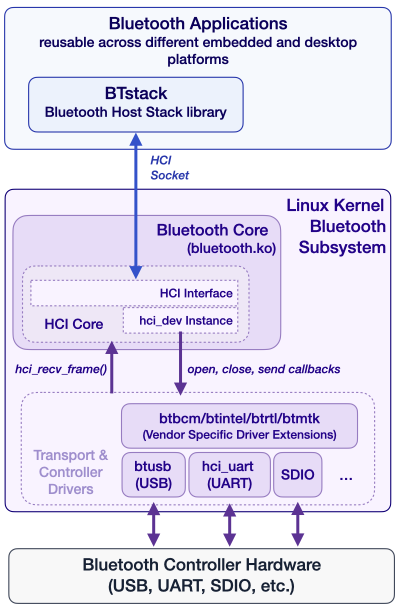
To illustrate this approach, we will walk through running BTstack on a popular embedded Linux platform, the Raspberry Pi 5, using the new kernel-backed HCI transport. This example demonstrates how BTstack can be used with modern, kernel-managed controllers in practice. We will also take a closer look at how BTstack compares to BlueZ, and indicate when a self-contained user-space stack could be a better fit than the standard Linux solution.
Using the Linux Kernel HCI Interface
The Linux kernel supports a wide range of Bluetooth controllers across different buses. When a controller is detected, the appropriate kernel module is loaded, the transport is initialized, and any required firmware is uploaded automatically.
Once the controller is ready, user-space applications can access it through a socket in the Bluetooth protocol family:
int hci_socket = socket(AF_BLUETOOTH, SOCK_RAW | SOCK_CLOEXEC | SOCK_NONBLOCK, BTPROTO_HCI);If successful, this socket provides direct access to HCI packets. Communication happens using the familiar H4 packet format, identical to what would be used over a UART interface. From BTstack’s perspective, this abstraction allows seamless reuse of existing logic while delegating hardware-specific complexity to the kernel.
This design cleanly separates responsibilities. The kernel handles hardware, while BTstack remains a portable, user-space Bluetooth stack.
BTstack on Raspberry Pi 5
To make this more concrete, let’s walk through running BTstack examples on a Raspberry Pi 5, which uses a combo Wi-Fi/Bluetooth chipset managed by the Linux kernel connected over SDIO (Wifi) and UART (Bluetooth).
Build Options
There are several ways to build BTstack applications for the Raspberry Pi.
A native build on the device itself is the simplest approach. It requires no additional setup and is ideal for quick experimentation, although compilation can be relatively slow.
Cross-compilation is significantly faster and better suited for development workflows. This typically requires a toolchain and a matching sysroot from the Raspberry Pi system. While more complex to set up, it provides a smoother iteration cycle.
A practical middle ground is using a preconfigured Docker-based cross-compilation environment, which includes the necessary toolchains and sysroots, reducing setup effort.
As the Raspberry Pi 5 is reasonably fast, we choose to just directly build on it.
Building the Examples
In addition to regular C build tools (gcc, cmake, ninja), you also need the Bluetooth development package installed.
$ sudo apt install gcc git cmake ninja-build pkg-config portaudio19-dev libbluetooth-devNow you can fetch it with git and compile it as usual with CMake:
$ git clone https://github.com/bluekitchen/btstack.git

$ cd btstack/port/linux
$ mkdir build
$ cd build
$ cmake -G Ninja ..
$ ninja
Running the Examples
Let’s start by verifying that the kernel has loaded and initialized the built-in Bluetooth Controller.
$ hciconfig
hci0:   Type: Primary  Bus: UART
    BD Address: 2C:CF:67:0D:F5:EC  ACL MTU: 1021:8  SCO MTU: 64:1
    DOWN
    RX bytes:3617 acl:0 sco:0 events:376 errors:0
    TX bytes:64649 acl:0 sco:0 commands:376 errors:0
As shown above, the kernel module has been loaded, the communication is over UART, but the HCI interface is DOWN, i.e., it’s not actively used by BlueZ.
For security reasons, you need to either run the examples as root, or, set the necessary permissions for a compiled example, e.g.
sudo setcap 'cap_net_raw,cap_net_admin+eip' gatt_counterLet’s try the gatt_counter example as root with sudo:
$ sudo ./gatt_counter
Packet Log: /tmp/hci_dump_gatt_counter.pklg
Bluetooth device: hci0
BTstack counter 0001
Failed to bind HCI socket: Operation not possible due to RF-kill
^CCTRL-C - SIGINT received, shutting down..
Looks like there’s a problem with rfkill:
$ sudo rfkill list
0: hci0: Bluetooth
    Soft blocked: yes
    Hard blocked: no
1: phy0: Wireless LAN
    Soft blocked: no
    Hard blocked: no
This confirms that Bluetooth has been blocked via the rfkill mechanism in software, which also allows to unblock it easily:
$ sudo rfkill unblock bluetooth
$ sudo rfkill list
0: hci0: Bluetooth
    Soft blocked: no
    Hard blocked: no
1: phy0: Wireless LAN
    Soft blocked: no
    Hard blocked: no
Starting the example fails again, but shows that something is using the HCI Socket:
$ sudo ./gatt_counter
Packet Log: /tmp/hci_dump_gatt_counter.pklg
Bluetooth device: hci0
BTstack counter 0001
Failed to bind HCI socket: Device or resource busy
This probably means that BlueZ has started up and took over ownership. We confirmed it with hciconfig:
$ hciconfig
hci0:   Type: Primary  Bus: UART
    BD Address: 2C:CF:67:0D:F5:EC  ACL MTU: 1021:8  SCO MTU: 64:1
    UP RUNNING
    RX bytes:5242 acl:0 sco:0 events:481 errors:0
    TX bytes:68720 acl:0 sco:0 commands:481 errors:0
So, to use BTstack, we need to stop BlueZ:
$ sudo systemctl stop bluetoothAs the hci0 interface will be still up in most cases, we also need to shut it down manually.
$ sudo hciconfig hci0 downFinally, gatt_counter (or any other BTstack example) start up as expected:
$ sudo ./gatt_counter
Packet Log: /tmp/hci_dump_gatt_counter.pklg
Bluetooth device: hci0
BTstack counter 0001
Local version information:
- HCI Version    0x0009
- HCI Revision   0x017e
- LMP Version    0x0009
- LMP Subversion 0x6119
- Manufacturer 0x000f
BTstack up and running on 2C:CF:67:0D:F5:EC.
TLV path: /tmp/btstack_2C-CF-67-0D-F5-EC.tlv
At this point, BTstack communicates with the Bluetooth Controller through the kernel, without requiring direct access to the underlying UART interface.
After having all examples compiled, you can try some of our favorite examples, e.g.:
a2dp_sink_demoallows to connect from a mobile phone and stream musichfp_hf_demolet the Raspi become a headset used for callsgatt_streamera simple GATT Peripheral that streams data as fast as possible
Disable BlueZ Permanently
If you want to prevent BlueZ from using the kernel HCI interface in the future, you can disable it by these commands:
$ sudo systemctl disable bluetooth
$ sudo systemctl mask bluetooth
BTstack vs. BlueZ
A natural question arises: why use BTstack when Linux already provides the BlueZ stack?
The answer lies in architectural philosophy and intended use cases.
BTstack is a portable, user-space Bluetooth stack designed to run across a wide range of platforms, from microcontrollers to embedded Linux systems. It provides a unified API covering all supported profiles and protocols, making application development consistent and predictable.
BlueZ, on the other hand, is deeply integrated into the Linux ecosystem. It works closely with the kernel and exposes its functionality through various system interfaces. For example, GATT functionality is typically accessed via D-Bus, while audio profiles such as Hands-Free often require additional configuration and integration with other system components.
This integration makes BlueZ very convenient for general-purpose systems. Desktop environments like GNOME or KDE can provide graphical tools for configuration and management, which is ideal for end users.
For embedded developers, however, this introduces additional complexity. Different Bluetooth features are accessed through different subsystems, and building a self-contained appliance often requires stitching together multiple services.
Another important distinction is lifecycle management. BlueZ evolves alongside the Linux kernel, and in practice, their versions are often tightly coupled. Updating the kernel may necessitate updating BlueZ, which can have downstream implications such as Bluetooth SIG qualification requirements.
BTstack, by contrast, operates entirely in user space and relies only on the stable HCI interface provided by the kernel. This decoupling allows it to be updated independently, with predictable behavior across system versions.
In short, BlueZ is an excellent choice for full-featured Linux systems, while BTstack shines in controlled, embedded environments where portability, consistency, and independence are key.
Conclusion
The addition of a kernel-backed HCI transport significantly expands the range of platforms that BTstack can support. By leveraging the Linux Bluetooth subsystem, it becomes possible to use BTstack with controllers connected via SDIO and other kernel-managed interfaces.
This opens the door to modern embedded designs that rely on combo chips and tightly integrated wireless subsystems. At the same time, developers retain the benefits of a portable, user-space stack with a clean and unified API.
If you are building an embedded Linux device and want full control over your Bluetooth application, this is a compelling moment to explore what BTstack can offer.
]]>Events like this are a great opportunity to step outside of project threads and long technical email exchanges and actually meet the people behind them. It adds a much-needed personal dimension to the work we usually do remotely.
It’s also a place where you quickly find others on the same wavelength — engineers dealing with the same practical realities of hardware and Bluetooth chip restrictions. As always, we had many discussions about solutions and possibilities. And yes, we’ll keep advocating for a few things we believe would make many developers’ lives easier — such as a very simple GPIO-toggle-based time synchronization mechanism for LE Audio TWS, as well as better support for forwarding Bluetooth Classic audio to LE Audio.
One moment from the show kept resonating. A silicon vendor product manager, genuinely surprised, asked us:
“Why do you guys exist at all? We already provide a free stack with our chip.”
Anyone who has ever had to migrate hardware mid-product lifecycle will probably smile at that one. Interestingly, at least half of our customers actually use that vendor’s chips. So let’s start with the elephant in the room: What we enable is continuity and flexibility. Customers can keep and evolve their existing applications while moving to new hardware (both MCUs as well as Bluetooth Controllers) when needs change — whether for technical reasons (chip discontinuation, limitations, failures) or political realities such as location-based vendor restrictions.
Two other aspects we consider equally important:
- Flexibility to build demanding applications without being locked into a single silicon ecosystem.
- Responsive, direct support instead of navigating multiple layers of vendor support channels.
There is also a practical engineering benefit: being able to run the same application across different hardware platforms, including a desktop systems, without rewriting it allows for fast problem bisection. Testing against multiple chipsets can quickly indicate whether an issue originates in the application layer, the Bluetooth stack, or the link layer in the Bluetooth Controller.
All in all, Embedded World remains a great place for conversations like these.
Looking forward to the next one.
Bringing BTstack to the browser to include a complete Bluetooth Host stack addresses this gap. Our new port opens new possibilities for prototyping, testing, and deploying Bluetooth-enabled applications entirely from the Web, and all that while maintaining near-native performance.
In the following, we will show our journey of how we leveraged WebAssembly (WASM) and Emscripten for embedding BTstack into the browser, as well as how we employed Web Serial to communicate with the Bluetooth Controller via the serial port.
Porting BTstack to WebAssembly
BTstack is designed to be flexible. While the core Bluetooth protocol and profile implementations are platform‑independent, the integration with a new platform is achieved by providing a minimal set of platform‑specific abstractions: run loop (i.e. timers + events), transport (e.g. UART), and persistent storage (e.g. pairing information). Beyond these core abstractions, porting BTstack also involves integrating with your build system, configuration of the stack (chipset, HCI transport, run loop), and building example applications to validate the port.
To bring BTstack to the browser, we’ll use WebAssembly (Wasm) rather than re-implementing the entire Bluetooth stack in JavaScript :). WebAssembly is a fast, portable binary format that allows code written in many languages to run efficiently and securely in web browsers and other environments, while integrating smoothly with JavaScript — so we can run “native-style” Bluetooth logic in the browser without without sacrificing security or performance.
Porting BTstack to the browser does introduce extra challenges: browser APIs are inherently asynchronous, and there’s no direct access to hardware, the file system, or traditional persistent storage. Still, BTstack’s lightweight design, built around a single-threaded run loop and a modular architecture, maps well to these constraints. Below is our agile, step-by-step approach, addressing the most critical tasks first:
- Prepare the Emscripten Build Environment
- Implement HCI Transport
- Enable C–JavaScript Interoperability
- Port the Run Loop
- Persistent Storage
- Audio and UI Support
Prepare the Emscripten Build Environment
These days almost any programming language can be compiled to WebAssembly. This process has been made significantly easier for C or C++ by the incredible Emscripten project, as it provides most of what you need to run code directly in the browser.
Since most of our recent builds use CMake — and Emscripten offers first-class support for it — we began with a minimal CMake project that simply compiles a basic printf("Hello World"). Emscripten supplies a custom CMake toolchain file at $EMROOT/cmake/Modules/Platform/Emscripten.cmake, which is already sufficient to compile C code to WebAssembly. In addition, Emscripten includes a built-in “shell”: an HTML page that loads and executes the generated WebAssembly module, providing console output in the browser.
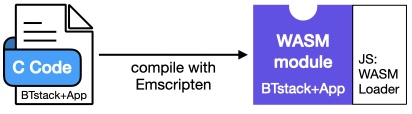
This initial step was surprisingly easy and very rewarding. However, at this point we still miss the most critical part — that is, a way to communicate with the Bluetooth Controller via the serial port, i.e. access the Bluetooth dongle to send and receive raw HCI packets.
HCI Transport Layer
In BTstack, communication between the Host Stack and a Bluetooth Controller happens through an HCI transport driver. For most systems, our generic HCI H4 transport implementation, which handles packet framing, can be used directly with a custom UART driver.
Because C code compiled to WebAssembly runs inside the browser, it has no direct access to the file system or hardware interfaces such as serial ports. As a result, all communication with the Bluetooth dongle must go through JavaScript APIs provided by the browser.
For security reasons, JavaScript code cannot directly open a serial port. Instead, the Web Serial API requires an explicit user interaction: a method call triggers the browser to present a dialog in which the user selects the serial port to use.
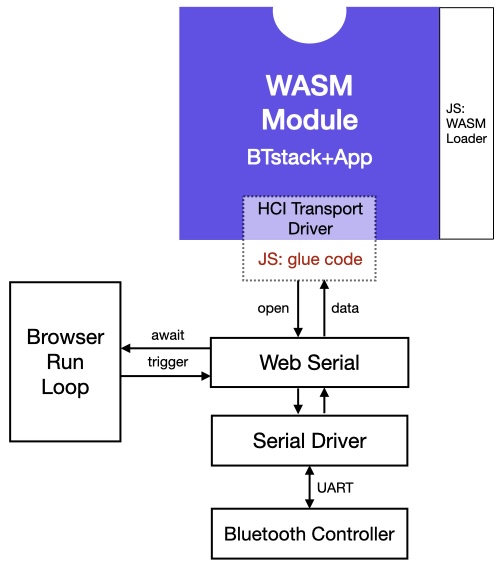
Functionally, the Web Serial API is not very different from traditional serial port APIs. What initially caught us off guard, however, was that virtually all of its methods are asynchronous. Asynchronous interfaces are not new to us — most of BTstack’s APIs are asynchronous in general, too. In BTstack, a function returns immediately, and the outcome of the requested operation is later delivered to the higher layer via a callback provided by the caller. In contrast, any JavaScript Web Serial calls returns a so-called Future, which allows the caller to (a)wait the completion of the operation if needed.
After getting used to JavaScript’s await syntax, we were able to open a serial port at 115200 baud, send an HCI Reset command, and receive the expected HCI Command Complete event — just as we would with any other serial port.
Once everything was working reliably at 115200 baud, we encountered another issue when trying to increase the baud rate for faster communication. Since the Web Serial API does not provide a changeBaudrate function, the only available approach is to close the port and reopen it with a different baud rate. While this is straightforward in principle, it conflicted with BTstack’s HCI Transport abstraction, which exposes only a synchronous setBaudrate function.
To avoid BTstack transmitting data at the original 115200 baud, while the Controller expects the new higher baudrate, we effectively needed to “pause” BTstack execution in the UART driver until the asynchronous JavaScript serial operations had completed. This is not possible for standard synchronous C code. Fortunately, the clever minds behind Emscripten had anticipated exactly this kind of problem. Emscripten’s Asyncify feature allows C code to suspend execution and await the result of an asynchronous JavaScript call — right in the middle of normal C control flow. While somewhat mind-boggling, this capability turned out to be the key to solving the baud-rate transition problem, without the need to change BTstack’s HAL to accommodate for that – which might be better approach in the long run though.
Interoperability between JavaScript and C
From C code, JavaScript code can be integrated in two main ways: either by inlining JavaScript directly into the C source, similar to inline assembly, or by invoking JavaScript code via the function emscripten_run_script. In our case, we relied exclusively on the first approach. Beyond simple inline snippets, Emscripten also provides the EM_JS macro, which allows you to define full-fledged JavaScript functions directly within a C file. While functionally equivalent to implementing these functions in a standalone .js file, this approach is often easier to maintain for the glue code needed for C–>JavaScript interoperability.
Because a C function is compiled into a WebAssembly function, it can also be called directly from JavaScript, if the calling conventions are adhered to. At a high level, scalar types and floating-point values map directly between the two worlds, while pointers are passed as plain integers, an important detail that becomes relevant later.
Another interesting aspect was determining how to efficiently pass received HCI packets from JavaScript into the C code. While exploring Emscripten’s APIs, we realized that all static memory used by the C code is backed by a single JavaScript Uint8Array. This makes it possible to reserve a buffer for a single HCI packet in C and expose its address resp. offset into the memory array to JavaScript through a small set of C functions. The JavaScript serial driver can then store incoming data directly into this “C HCI buffer,” allowing the C code to consume the packet without additional memory copies.
Run Loop Integration
Any Bluetooth Host stack requires support for timers (e.g. timeout during pairing) and needs to process incoming data from the Bluetooth Controller without blocking. Our Run Loop abstraction provides the necessary functionality to abstract from the actual platform.
In contrast to e.g. an embedded system, where our default btstack_run_loop_embedded.c is implemented by a simple while(1) loop, the browser already provides its own run loop, where BTstack cannot takeover full control – at least not without blocking the user interface. Instead, timer callbacks as well as data processing from the UART need to be handled in a callback fashion, where BTstack will be called whenever a timer fires or when there is new data to process.
While the details on how to implement such a scheme are very platform specific, the browser environment turned out to be very compatible and easy to integrate with. In our implementation for the function btstack_run_loop_add_timer(..) that registers a callback some time in the future, it is sufficient to call the web API setTimeout() with a JavaScript function that executes the timer when it fires.
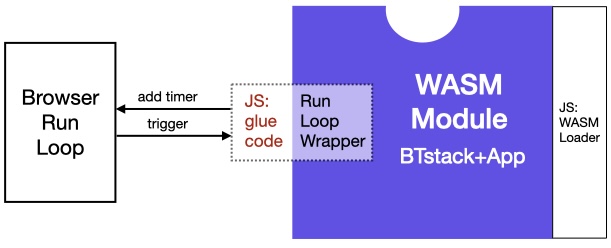
Similarly, to process incoming UART data, it was sufficient to implement the function hci_transport_h4_js_receiver that runs as an infinite loop: it waits until a complete HCI packet has been received, forwards it to the stack, and then continues waiting for the next packet. Since JavaScript engines in browsers are single-threaded by default, this model fits perfectly with BTstack’s single-threaded mode of operation.
With BTstack successfully compiled to WebAssembly and serial port access established through the Web Serial API, the stack was able to start up fully. What remains are a number of smaller still necessary details to complete the integration.
Persistent Storage
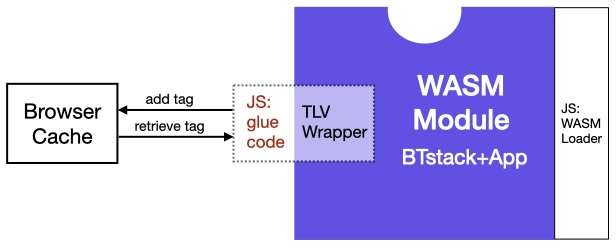
One of the remaining pieces is support for persistent storage. BTstack includes APIs for storing link keys, device database entries, and other persistent state that are based on a common Tag-Length-Value abstraction (TLV). On many embedded platforms there is no generic filesystem, so porting requires implementing these storage APIs using whatever nonvolatile memory your platform provides.
Fortunately, browsers provide the LocalStorage API, which offers a similar key–value storage backed by the browser’s cache. To make use of it, all that was required was a mapping our 32-bit tags to string-based keys. We implemented this by encoding each tag using the format TAG-<8 character hex value>.
Audio
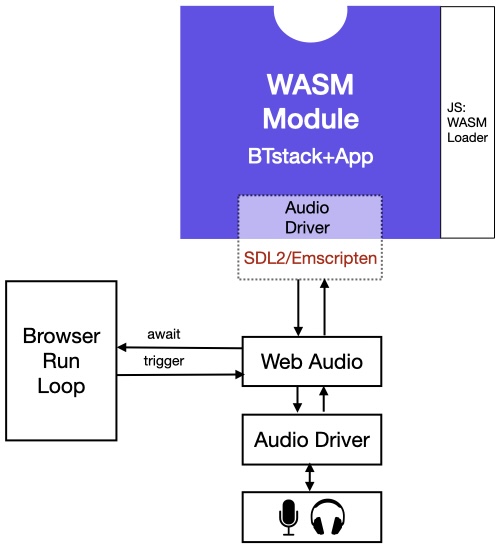
Similarly, some of the examples include audio playback. While this could be implemented using the Web Audio API via JavaScript, that API is quite flexible and somewhat complex. It is also rarely used outside the Web ecosystem. Instead, we discovered that Emscripten provides built-in support for the audio and graphics framebuffer APIs of SDL2. Since SDL2 is a also widely used on embedded Linux systems, we chose to implement our BTstack Audio API on top of SDL2. This approach allows the same implementation to be reused across different platforms and contexts.
Terminal xterm.js
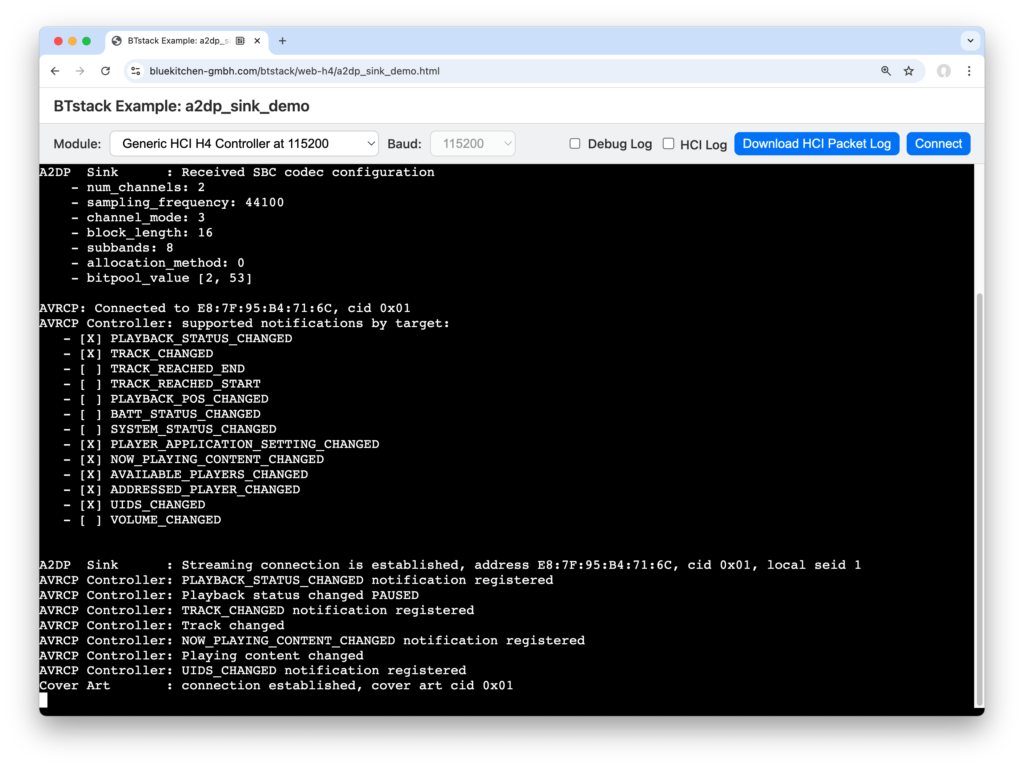
Now we are getting closer to the user. While the Web is inherently UI-rich, our basic examples focus on a simple console to maintain portability across platforms. Emscripten provides basic console output, but it tends to be rather slow. A quick Internet search led us to xterm.js, a terminal emulator that performs as fast as a native terminal on macOS or Linux. Integrating it with Emscripten was straightforward: we only had to implement the Module.print(..) function in JavaScript to forward output to the xterm.js component.
Complete Port
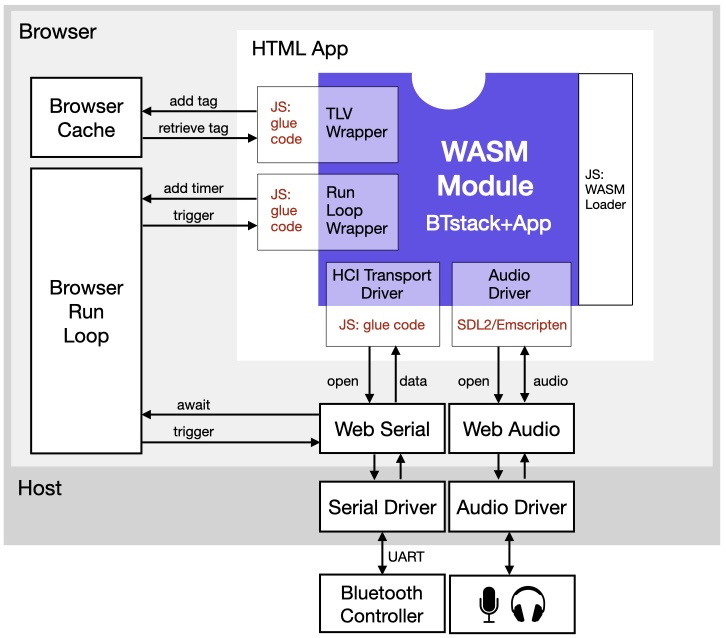
Putting all the steps and diagrams into a single picture, our browser port looks like this:
Lessons Learned
Porting BTstack to run in the browser via WebAssembly required navigating a series of architectural mismatches between native C code and the Web runtime. Browser sandboxing prevents direct access to hardware, storage, and serial ports, forcing all interaction through a user-mediated, asynchronous JavaScript API. This clashed with one of the few synchronous BTstack’s function calls, particularly for UART baud-rate changes, and ultimately required deeper integration techniques such as Emscripten’s Asyncify to suspend C execution across asynchronous boundaries. Efficient C–JavaScript interoperability demanded a solid understanding of calling conventions and Emscripten’s shared memory model to avoid unnecessary data copies. Additional adaptations were needed for persistent storage and audio output, leading to the use of the browser storage API and the use of the portable SDL2 framework to maximize reuse across web and non-Web platforms.
| Challenge | Description | Solution / Approach |
|---|---|---|
| Browser Sandboxing | WebAssembly cannot access hardware, serial ports, or file systems directly. | All interactions are done through browser-provided JavaScript APIs. |
| Serial Port Access | Serial ports require explicit user selection for security reasons. | Use the Web Serial API, which triggers a browser dialog to let users select the port. |
| Baud-Rate Reconfiguration Constraints | The Web Serial API lacks a changeBaudrate function and the alternative is to first close the port and then re-open it at the new speed. There functions are asynchronous, however BTstack’s HCI Transport abstraction expects a synchronous baudrate change function. | Use Emscripten’s Asyncify to suspend C execution until the asynchronous JavaScript calls have been completed. |
| Efficient Cross-Language Data Transfer | Moving HCI packets between JavaScript and C incurs extra memory copies. | Reserve a buffer in C and let JS directly write into it via Emscripten’s Uint8Array. |
| Persistent Storage Without a Filesystem | WebAssembly cannot use files for saving state. | Use browser LocalStorage. Map 32-bit tags to string keys like TAG-<8-character hex>. |
| Audio API Portability | Web Audio API is complex and web-specific. | Implement BTstack Audio API using SDL2 via Emscripten, enabling reuse on multiple platforms. |
| Fast, Portable Console Output | Emscripten’s built-in console output is slow, limiting usability of console-based examples. | Integrate xterm.js, a fast Web-based terminal emulator. |
Give It a Try!
Currently, we do not support loading the PatchRAM on Broadcom/Cypress/Infineon Controllers or configuring Realtek Controllers. As a result, only Controllers that provide standard HCI out of the box are compatible at the moment. We recommend trying either Ezurio’s Vela IF820 development kit with Infineon’s CYW20820, which can be flashed with an HCI firmware, or a Nordic nRF5x using our HCI UART bridge.
Outlook
With the state-of-the art Infineon AIROC CYW55310 now readily available in Ezurio’s Vela IF310 module, we plan to provide our LE Audio Demos in an easy-to-use Web version. Additionally, as we continue work on our internal “Box Demo” – see ESP32 LE Audio Blog post – we are curious to explore whether the complete demo, which uses LVGL for the UI, can run in a Web browser via LVGL’s SDL2 backend.
]]>In this post, we explore how to route audio over USB using BTstack and TinyUSB on the RP2040. In doing so, we turn the Vela IF820 development board into a platform for experimenting with Bluetooth audio over USB.
And of course, we won’t stop there. Once the audio playback is running smoothly over USB at 48 kHz on both macOS and Windows, we’ll put it to the test by running the A2DP Sink Demo on the Vela IF820. The result? You can stream high-fidelity music from your phone straight into any device that supports USB audio input — all powered by BTstack.
TinyUSB on RP2040
The original role of the Raspberry Pi Pico RP2040 on Ezurio’s development kit is to handle USB-to-UART conversion and provide an SWD programmer for the Vela module. In our RP2040 port, we use the official pico-sdk, which by default can route stdio over USB CDC and also offers a vendor-specific Reset interface to reboot the RP2040 into recovery mode.
The Reset interface is quite convenient as it allows the RP2040 to be re-flashed without an external SWD programmer or the need to hold the BOOTSEL button while pressing RESET. That’s why we want to preserve both, USB CDC and the Reset interface, while also adding the USB Audio interface.
Keeping USB CDC and the Reset Interface
A USB device’s functionality is defined by a set of USB descriptors. In pico-sdk v2.2.0, the set of descriptors are provided by src/rp2_common/pico_stdio_usb/stdio_usb_descriptors.c
The current descriptor looks like this:
static const uint8_t usbd_desc_cfg[USBD_DESC_LEN] = {
    TUD_CONFIG_DESCRIPTOR(1, USBD_ITF_MAX, USBD_STR_0, USBD_DESC_LEN,
        USBD_CONFIGURATION_DESCRIPTOR_ATTRIBUTE, USBD_MAX_POWER_MA),

    TUD_CDC_DESCRIPTOR(USBD_ITF_CDC, USBD_STR_CDC, USBD_CDC_EP_CMD,
        USBD_CDC_CMD_MAX_SIZE, USBD_CDC_EP_OUT, USBD_CDC_EP_IN, USBD_CDC_IN_OUT_MAX_SIZE),

    TUD_RPI_RESET_DESCRIPTOR(USBD_ITF_RPI_RESET, USBD_STR_RPI_RESET)
};
As we need to extend it with the audio functionality, we copied the usbd_desc_cfg descriptor into our code to provide it ourselves.
To activate the Tiny USB device functionality, we only had to add tinyusb_device to the list of used libraries in the CMake file. Unfortunately, this disabled the default support USB CDC and the Reset interface.
So, we kept playing with various CMake options until USB CDC as well as the Reset interface worked as before. We settled onto the following defines:
# Re-use pico-sdk implementation for USB CDC and Reset via vendor interface
PICO_STDIO_USB=1
PICO_STDIO_USB_ENABLE_IRQ_BACKGROUND_TASK=1
PICO_STDIO_USB_ENABLE_TINYUSB_INIT=1
PICO_STDIO_USB_ENABLE_RESET_VIA_VENDOR_INTERFACE=1
PICO_STDIO_USB_RESET_INTERFACE_SUPPORT_RESET_TO_BOOTSEL=1
PICO_STDIO_USB_RESET_INTERFACE_SUPPORT_MS_OS_20_DESCRIPTOR=1
PICO_STDIO_USB_RESET_BOOTSEL_INTERFACE_DISABLE_MASK=0
There’s a pull request that will allow to re-use the Reset interface by third parties in the future.
USB Audio with TinyUSB
Next, we needed to add the audio functionality. For this we extended our usbd_desc_cfg descriptor with ‘just’ one another macro TUD_AUDIO_HEADSET_STEREO_DESCRIPTOR:
static const uint8_t usbd_desc_cfg[USBD_DESC_LEN] = {
    TUD_CONFIG_DESCRIPTOR(1, ITF_NUM_TOTAL, USBD_STR_0, USBD_DESC_LEN,
        USBD_CONFIGURATION_DESCRIPTOR_ATTRIBUTE, USBD_MAX_POWER_MA),

    TUD_CDC_DESCRIPTOR(ITF_NUM_CDC_CONTROL, USBD_STR_CDC, USBD_CDC_EP_CMD,
        USBD_CDC_CMD_MAX_SIZE, USBD_CDC_EP_OUT, USBD_CDC_EP_IN, USBD_CDC_IN_OUT_MAX_SIZE),

    TUD_RPI_RESET_DESCRIPTOR(ITF_NUM_RPI_RESET, USBD_STR_RPI_RESET),

    TUD_AUDIO_HEADSET_STEREO_DESCRIPTOR(USBD_STR_AUDIO, USBD_STR_AUDIO_SPEAKER, USBD_STR_AUDIO_MIC,
        USBD_AUDIO_EP_OUT, USBD_AUDIO_EP_IN | 0x80, USBD_AUDIO_EP_INT | 0x80)
};
In general, a USB audio interface can offer different audio resolutions (e.g. 16-bit vs. 24-bit signed integer), sample rates, as well as the number of channels. However, it’s up to to the USB Host to select a configuration of these at runtime. In parallel, the BTstack audio interface allows the application itself to configure the audio output, including the number of channels and the sample rate.
USB audio data is sent over isochronous endpoints with a fixed period of 1 ms. The common sample rates are 44.1 and 48 kHz. At 48 kHz sample rate, this requires to send 48 samples every millisecond. With 16-bit resolution and 2 channels, this amounts to 192 byte blocks. With 44.1 kHz we would have to send 176.4 bytes every 1 ms, which is a bit tedious to handle, as we can only send complete 8-bit bytes :).
To simplify development, we limited the USB Audio interface to a fixed configuration: 2 channels in / 2 channels out at 48 kHz, using 16-bit audio samples.
Adding a bi-directional audio interface
Adding TUD_AUDIO_HEADSET_STEREO_DESCRIPTOR macro to the usbd_desc_cfg descriptor may sound simple, but the TUD_AUDIO_HEADSET_STEREO_DESCRIPTOR is actually a macro that expands into another macro, which in turn invokes 22 additional macros.
#define TUD_AUDIO_HEADSET_STEREO_DESCRIPTOR(_stridx, _stridx_speaker, _stridx_mic, _epout, _epin, _epint) \
    /* Standard Interface Association Descriptor (IAD) */\
    TUD_AUDIO_DESC_IAD(/*_firstitf*/ ITF_NUM_AUDIO_CONTROL, /*_nitfs*/ ITF_NUM_AUDIO_INTERFACES, /*_stridx*/ 0x00),\
    /* Standard AC Interface Descriptor(4.7.1) */\
    TUD_AUDIO_DESC_STD_AC(/*_itfnum*/ ITF_NUM_AUDIO_CONTROL, /*_nEPs*/ 0x01, /*_stridx*/ _stridx),\
    ... 44 more lines ...
So, our bi-directional audio interface is actually quite complex as it consists of 22 individual USB descriptors. In total, including the CDC and the Reset interface, the final USB descriptor has a total length of 311 bytes. After double checking the descriptors multiple times, we eventually got audio to work on MacOS. Just to double-check, we’ve also tested the audio playback on Windows 11, which immediately failed with the error “USB Descriptor invalid”. Debugging this was rather tedious, but we would like to point out that ChatGPT was able to spot the main error right away after pasting the output of the useful Linux lsusb tool.
Bringing it all together
With audio playback running smoothly over USB at 48 kHz on both macOS and Windows, we set out to take the next step — running the A2DP Sink Demo on the Vela IF820 board. This would allow streaming music from any phone straight into any device that supports USB audio input — no extra hardware required.
Of course, there was a missing detail here. The Bluetooth A2DP Specification mandates support for both 44.1 kHz and 48 kHz in the A2DP Sink role. Android naturally prefers 48 kHz, while iOS opts for 44.1 kHz. We initially tried announcing support for 48 kHz only via AVDTP, but iOS 18 stuck firmly to the Bluetooth spec, which guarantees 44.1 kHz being available, and chose 44.1 kHz regardless of our “48 kHz only” announcement.
In order to handle 44.1 kHz, we turned to our linear resampler, which upsamples a given sample rate to 48 kHz right inside the USB audio driver — this works well enough.
While dipping our toes into USB with TinyUSB, we’ve discovered various limitations in the RP2040 port. Due to unknown reasons, we started with TinyUSB v0.17 instead of v0.18, which should have come with pico-sdk 2.2.0. as a git submodule. In v0.17, the buffers for USB endpoints are provided by a very simple allocator, which only frees them when all endpoints are closed. This caused an assert to fail when opening the USB Microphone the 7th time on the PC. Once we understood the cause, fixing it was straightforward — but while preparing a pull request, we realized that we were using an outdated version. In v0.18, the logic was replaced and a different assert already failed when opening the USB Microphone the second time. Being a bit smarter this time, we’ve also tested the latest version on the main branch and alas – the logic for the buffers had been implemented properly and there’s no need for fixes.
We haven’t yet implemented the USB Speaker direction — which would enable USB audio input on the RP2040 for demos like A2DP Source — but that’s something any laptop can do already.
The A2DP Sink Demo, on the other hand, lets you receive music over Bluetooth at 48 kHz and play it back through your local speakers, transforming the Vela IF820 development board into a compact, high-fidelity Bluetooth-to-USB bridge. Isn’t that cool?
]]>In this post, we show how we repurposed a standard Bluetooth Controller breakout board into a dedicated BTstack development board by reusing its onboard MCU originally used to bridge the Bluetooth UART HCI interface to USB CDC.
The breakout board in question is Vela IF820 Development Kit from Ezurio, which features Infineon’s AIROC CYW20820 – so far their latest dual-mode Bluetooth Controller with support for LE Data Length Extension and 2M-PHY. To handle USB-to-UART conversion and provide an SWD programmer, Ezurio integrates a Raspberry Pi Pico RP2040 running Raspberry Pi’s DebugProbe, previously known as Picoprobe. The RP2040 is both affordable and capable enough to run our stack, enabling us to compile all examples for this setup and flash them directly onto it without any modifications to the breakout board.
Ready to see it in action? In the following sections, we take you step-by-step through porting BTstack onto the Vela IF820. The challenges we encountered are mostly universal, so even if you don’t plan to use this board, you’ll find useful insights here. We finish by measuring SPP (Classic) as well as GATT Notification (LE) throughput — a simple but effective way to verify that everything is working properly.
Recon
With the goal set, let’s have a look on the Vela IF820 board and try to identify what we got there.
The main components obviously are the RP2040 and the CYW20820. While we could have used a multimeter and tried to figure out how the CYW20820 is connected to the RP2040, we’ve instead asked our partner Ezurio and they kindly provided us with the following information:
| Pin | Function |
|---|---|
| GPIO00 | BT_UART_RX |
| GPIO01 | BT_UART_TX |
| GPIO02 | BT_UART_RTS |
| GPIO03 | BT_UART_CTS |
| GPIO13 | RST_L |
There’s also an RGB-LED connected to the RP2040, but we ignored it. As it seems to be similar to the popular WS2812, we leave it to the motivated reader to make use of it when needed 
With that mapping, the next steps are:
- Flash an HCI Firmware on the CYW20820 to convert it into a regular Bluetooth Controller
- Power cycle the CYW20820 to get it into a known state
- Configure RP2040 UART
- Test sending HCI Reset and getting the expected response
- Implement the full UART driver and bring up the whole stack
Turn SoC into regular Bluetooth Controller
In contrast to most other Infineon AIROC Controllers, the CYW20820 contains flash memory and is intended to be used as an SoC. For this, Infineon provides ModusToolbox – an Eclipse-based IDE with support for their SoC – to develop your own application based on their SDK. As with all Infineon Controllers that contain flash memory, it’s possible to convert them into a pure Bluetooth Controller with HCI UART interface by flashing the empty application example from ModusToolbox.
In the case of the Vela IF820, Ezurio provides a ready-made firmware that contains module-specific modifications that configures the HCI UART to 3 mbps. Excellent! As there’s no need from our side to modify that, we follow Ezurio’s instruction to load their HCI firmware version onto the module.
Reset Bluetooth Controller
To bring the Bluetooth Controller into a known state, we need to power cycle the CYW20820 by toggling RST_L line. For this, we configured GPIO13 of the RP2040 and implemented a typical power cycle:
- set RST_L low
- wait 100 ms
- set RST_L high
- wait 100 ms
Easy, no?
When connecting the logic analyzer to RST_L, we expected a line that goes low for 100 ms before going up again. However, we got this unexpected trace:
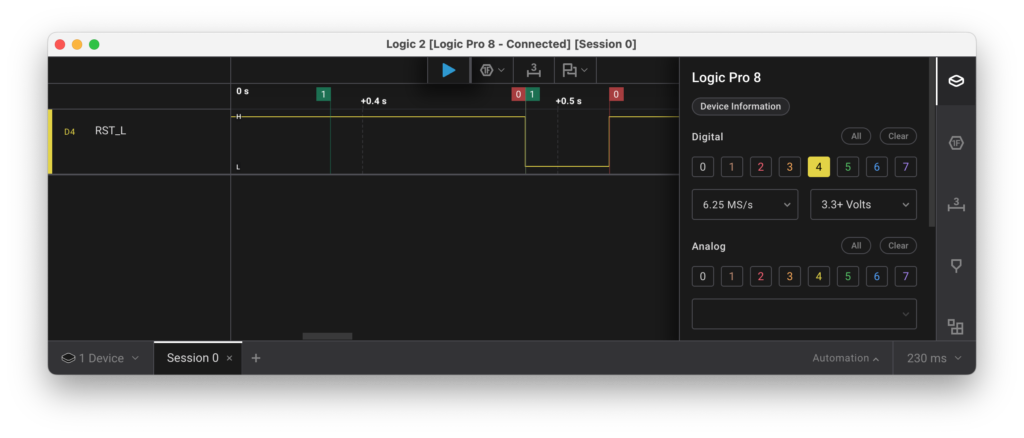
The trace seems to indicate that our “wait 100ms” only takes about 43 ms, which is rather odd.
As we are using the offical pico-sdk from Raspberry Pi, we expected the timing to be roughly correct. To analyze this, we’ve configured GPIO21 as test pin and toggled that together with GPIO13 to get this:
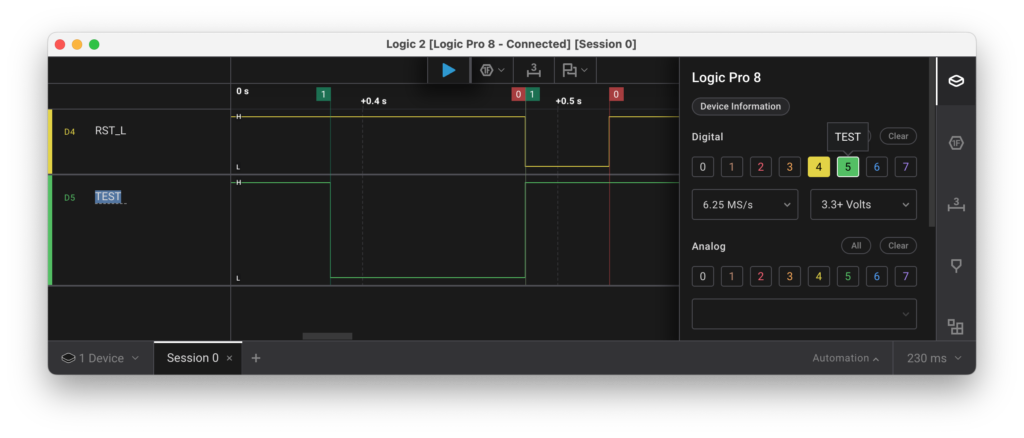
The trace shows that RST_L goes low only after GPIO13/GPIO21 has gone high again and then stays low for about 43ms. Going back to the board, we identified a chip between GPIO13 and RST_L which is responsible for the fixed 43 ms low of the RST_L line. We assume that this chip is used to provide a well-defined reset pulse after power gets supplied to the board.
Knowing this, we’ve updated the code to just pull GPIO13 low for 10 ms and then wait for the actual 43 ms pulse to power cycle the Controller before moving on.
UART on RP2040
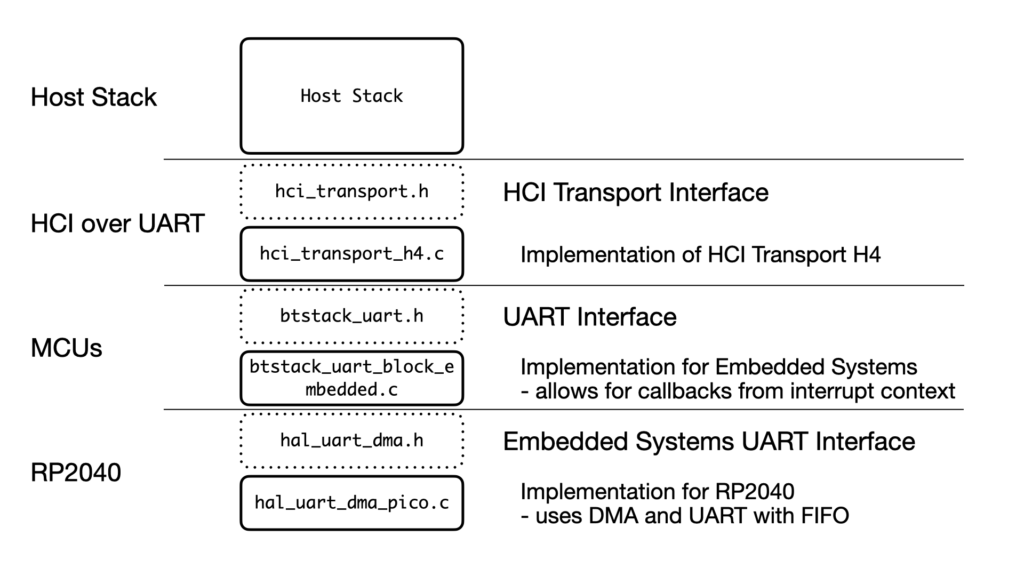
As the CYW20820 provides an HCI UART interface, we use BTstack’s hci_transport_h4.c implementation, which handles the framing and parsing of HCI packets over a serial connection like a UART. hci_transport_h4.c in turn requires an instance of btstack_uart.h to send and receive blocks of data to the Controller.
As most embedded UART interfaces are asynchronous, e.g. they often provide the option to specify a data sent or data received callback, which might be called from interrupt context, we select btstack_uart_block_embedded.c for the btstack_uart.h interface, which can handle data sent / data received callbacks from interrupt context and only requires to implement hal_uart_dma.h. A picture better shows this configuration.
To implement read / write operation over an UART, most MCUs support three modes:
- Polling: the code sends / receives individual bytes in a loop and waits until all are processed.
- IRQ: an interrupt service routine (ISR) sends / receives the next byte, which allows for an asynchronous implementation that allows the main code to continue running.
- DMA: a DMA transfer sends/receive a block of data and triggers an interrupt on transfer complete, which also provides an asynchronous implementation.
The RP2040 uses ARM’s PrimeCell UART (PL011) with support for hardware flowcontrol (RTS/CTS) and a 32-byte FIFO buffer. Uncertain about the usefulness of the FIFO, we configure the UART to enable hardware flowcontrol but disable the FIFO to keep things simple.
First test using polling
Although polling cannot be used in an actual port as hal_uart_dma.h as requires an asynchronous implementation, we start with polling as the Pico SDK provides convenient uart_write_blocking and uart_getc functions that allow us to quickly verify that the CYW20820 responds to HCI Reset Command with the expected HCI Command Complete Event event.
Single-byte IRQ
Next, we try to switch to an interrupt-based implementation. The general idea for such an UART TX driver is to:
- store a pointer and length for the data to send
- enable UART TX Ready interrupt – called
UARTTXINTRby ARM - whenever the UART TX is ready, the IRQ is called
- in the UART ISR, the next byte is sent by writing to the UART TX register
- if this was the last byte, disable the IRQ and notify the application
After implementing this scheme, we gave it a try and… nothing happened.
Going back to the RP2040 Datasheet, Raspberry Pi respectively ARM left this note: “The transmit interrupt is based on a transition through a level, rather than on the level itself. When the interrupt and the UART is enabled before any data is written to the transmit FIFO the interrupt is not set. The interrupt is only set, after written data leaves the single location of the transmit FIFO and it becomes empty.”
So, the Interrupt works similar to other MCUs, but with the subtile difference that it doesn’t fire before the first byte has been written to the UART TX register. While annoying, we add a flag to track if we have sent at least one byte to the UART TX register and manually write the first byte to it.
Similar to the logic for sending data TX, we also implement the logic to receive data in the ISR. As that’s rather simple code and we have hardware flow control, we are rather surprised when we only receive parts of the expected HCI Command Complete Event which would be: `0x04 0x0e 0x04 0x01 0x03 0x0c 0x00.
The logic analyzer shows this:
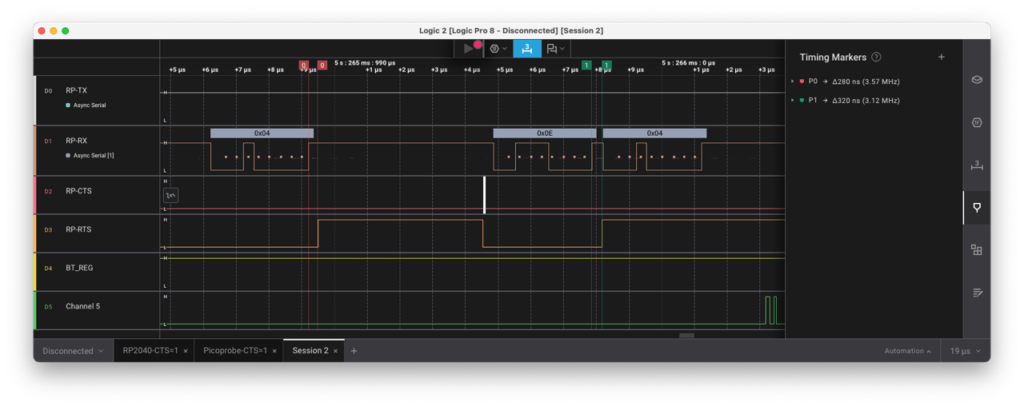
While RTS raises correctly after the first 0x04 byte and the CYW20820 pauses sending, RTS goes up a tiny bit later after receiving the next byte 0x0e which is too late to pause the Controller and we loose a byte.
From closer analysis of the logic trace, it seems like the RP2040 raises RTS roughly at the end of the stop bit which occasionally is to late to safely pause the remote side.
We couldn’t find clear standards/documents about when RTS exactly should go up, but Texas Instruments’ User Guide for the TMS320DM644x DMSoC UART indicates that the UART in their DSP raises RTS in the middle of the first stop bit.

This seems to be a good choice and should work well as the peer ideally samples its CTS (=our RTS) line immediately before sending.
A quick internet search also revealed this issue with ARM’s AMBA PL011 from 2015 which matches our observation. It would be nice if this could get fixed on later versions of the RP2 MCU line (<= Hint for Raspberry Pi!).
In conclusion, the UART cannot be used for Bluetooth HCI with hardware flowcontrol without FIFO as it will loose bytes. With the FIFO enabled, the timing of RTS isn’t relevant as we can cache a few extra bytes in the FIFO without problems.
As we cannot use the hardware flowcontrol without the FIFO, we do the next obvious step and enable the FIFO. With the FIFO enabled, the thresholds for the UART interrupt flags changes from a single byte to a programmable threshold. This programmable threshold can be set to 1..7 and is multiplied by 4. The same caveat about TX Ready (UARTTXINTR) being transition-based instead of level-based still applies. However, as a positive surprise we also learn that the UART supports a “RX Timeout” which triggers the RX interrupt when at least one byte is in the FIFO and no further data has been received for 32-bit times. Without this, receiving data that are not a multiply of 4 would have become rather tricky.
Anyway, with the FIFO enabled, the IRQ-driven UART driver works as intended but we needlessly waste valuable CPU cycles by causing an interrupt per byte, which let’s us move on to a DMA-based implementation.
DMA Setup
Setting up DMA based on other examples was without surprises. The only noteworthy detail was that the RP2040 data sheet lists internal signals like UARTRXDMASREQ and UARTRXDMABREQ which indicate a difference between single character or burst character DMA requests, but neither of them can be enabled or referred to in the DMA setup or are mentioned in a UART or DMA register.
With our new hal_uart_dma_pico.c implementation the stack properly starts up. Yay!
Demo Time
The easiest test is our gatt_streamer_server. It provides a LE Peripheral with a custom service which contains two characteristics. Once enabled, the demo sends data as fast as possible using the GATT Notification mechanism. With a iPhone 12 Mini, we are able to reach a throughput of 70 kB/s in this direction. This nicely shows that the optional Bluetooth features LE Data Length Extension and 2M-PHY are supported and actively used by both devices.
In addition to the iPhone, we run our LE Streamer Client on an ESP32-S3 and reached a throughput of up to 80 kB/s, which is only a bit more. This indicates that Apple has optimized their LE implementation in the last years – we speculate that they increased the number of LE-ACL packets exchanged per Connection Interval.
Finally, to also check Bluetooth Classic, we run our SPP Streamer Server on the Vela IF820 and connect with SPP Streamer Client running on a ESP32-2432S028R aka “Cheap Yellow Display”, which gets us between 250-260 kB/s.
While this is already quite nice, the Vela IF820 dev kit does not provide an audio codec and/or audio output. However, as we’re already using USB CDC for the console interface in BTstack, we could as well route audio over a USB Audio interface and learn something new. To be continued…
]]>Therefore, we wanted to have a portable LE Audio demo device with a proper case, rechargeable battery, a graphics user interface and a built-in speaker. While pondering different options, a colleague sent a link to the Waveshare ESP32-S3-LCD-1.85C. It’s a small box based on an ESP32-S3 with a round LCD with touch support, battery and speaker. It even sports a 28-pin expansion port for attaching your own hardware. The “only” problem with this box is that Espressif doesn’t have any SoCs that support LE Audio yet including the used ESP32-S3. To bring LE Audio to the Waveshare ESP32-S3-LCD-1.85C, we decided to integrate an nRF54L15 Controller into it. This blog covers the integration steps and how accurate playback can be implemented on ESP32 variants.
Integrating nRF54L15 into the Waveshare box
The Waveshare ESP32-S3-LCD-1.85C, which we will just call “Waveshare box” or “the box” in the following, does not have much free space inside. An obvious way to increase the space would be to 3D-print an additional cylinder to increase the height of the box. However, we carefully measured the available space and decided that it should be possible to fit an nRF54L15 inside if we forgo one of the three mounting stand-offs.
We designed a simple Add-On that allows to attach an nRF54L15 to the expansion port of the box and provides a way to flash it. We also considered flashing the nRF54L15 from the ESP32-S3, so we added the required wiring, but haven’t looked into this yet.
Looking for an nRF54L15 which is easy to solder, i.e. it can be soldered by hand, we found the Holyiot-24005 module from Holyiot, which is not listed on their website but available from Ali Express.
The most work would have been to draw the footprint of the Holyiot module, but we were pleasantly surprised that KiCAD 9 can directly import the Altium footprint provided upon request by Holyiot’s email support. Thanks!
To flash the nRF54L15 with our extended HCI UART bridge, we first intended to add a footprint for 6-pin TagConnect cable, but that was already too large for the available space. Instead, we opted for a poor-man’s SWD connector – just a few 0.1″ through-holes in a row.
The KiCAD project on GitHub contains all design files (incl. Gerber files for your favorite PCB service), if you want to build your own nRF54L15 Add-On. To flash it, you need to provide power by plugging it into the extension port and use a few jumper wires to connect it to your SWD programmer.
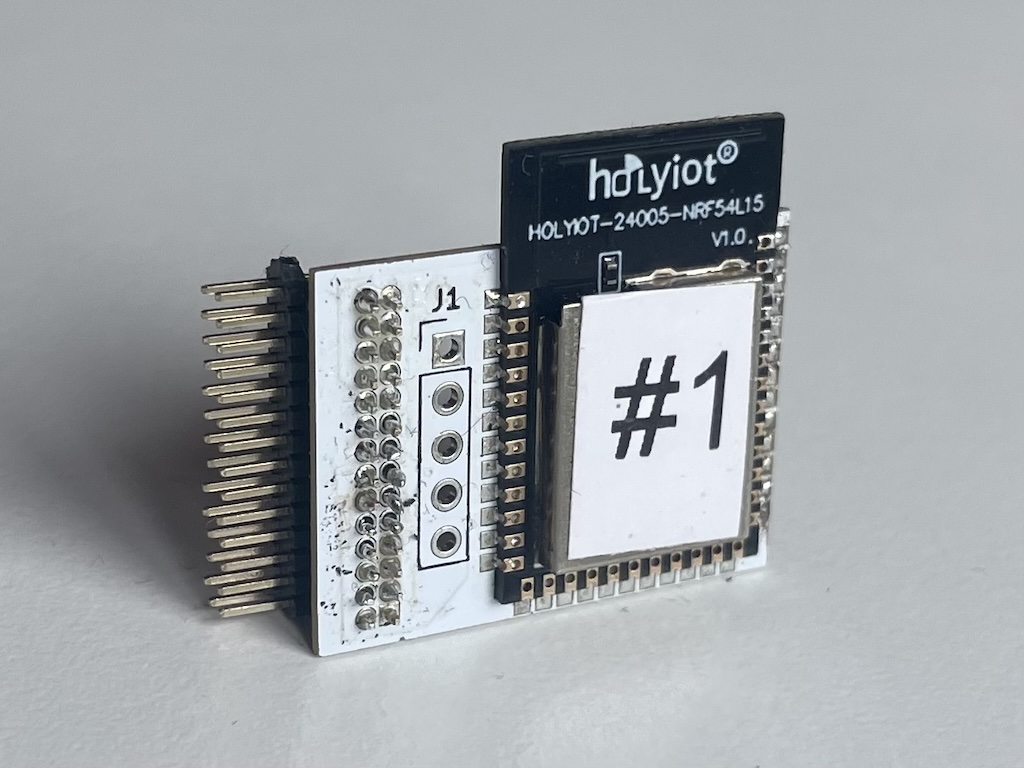
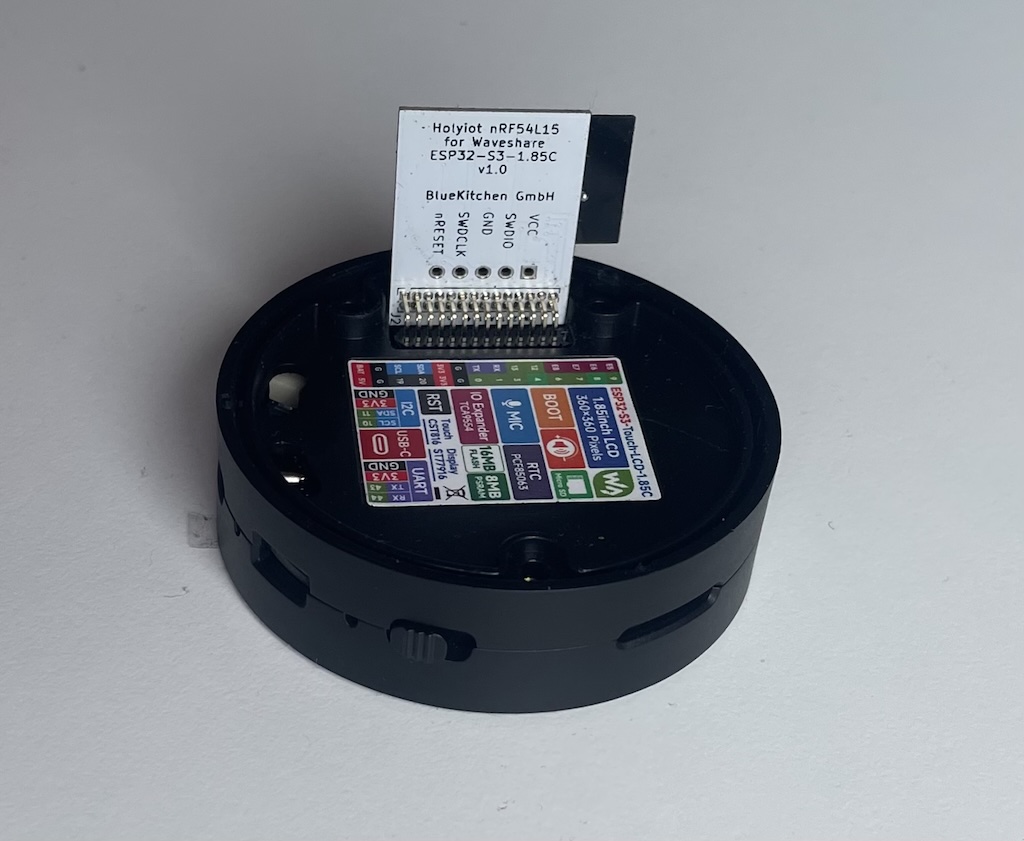
With the hardware tested and in place, let’s have a look at the software.
Accurate Playback on ESP32
After having implemented accurate playback on STM32, we tried to port it to the ESP32 and have been confronted with a set of new puzzles. The main requirement for accurate playback is to capture micro second timestamps for the start of the I2S playback buffer.
Puzzle 1: Accurate timestamp for GPIO Toggle events
While the ESP32 has timers and GPIOs that can trigger an IRQ similar to the STM32F4, there is no obvious way to get an accurate timestamp for a GPIO Toggle event. However, it contains the Motor Control PWM (MCPWM) unit, which has three high-resolution timer-capture channels that can be triggered externally by a GPIO event or internally via software intended to control brushless motors. While not an obvious choice, these work well for our use case.
Puzzle 2: Accurate timestamp for DMA Complete events
Similar to the STM32F4, there’s also no way to get a timer capture for the DMA Complete event itself. On the STM32F4, we used a timer to count I2S bits and toggle a GPIO when the buffer was complete for this. On the ESP32, the Pulse Counter Module (PCNT) provides similar functionality. However, the PCNT can neither trigger a timer capture on the MCPWM nor toggle a GPIO. It only allows to trigger an IRQ. So, back to the drawing board.
To recap: we would like to know the exact time when a new audio buffer is sent over I2S. By using the PCNT to count I2S bits, we can always check how many I2S bits have been sent. We can also get the current time from the MCPWM.
With all pieces on the table, the approach became obvious. Instead of getting a precise timestamp for the start of the I2S playback buffer, we set a watchpoint on the PCTN to trigger an IRQ a few samples before the end of the current buffer. In the PCNT ISR, we are protected from other IRQs and atomically read the number of pulses and trigger a MCPWM timer capture, which results in a measurement (tx,px). See image below.

With the nominal bit time t_bit and the total number of bits in an audio buffer p0, we can then approximate the end of the audio buffer by calculating t0 = tx + (p0-p1) * t_bit.
Solution
As the ESP32-S3 allows for internal connections between peripheral units, the I2S bit clock can be internally routed to the PCNT unit – avoiding external wires – giving this overall setup:
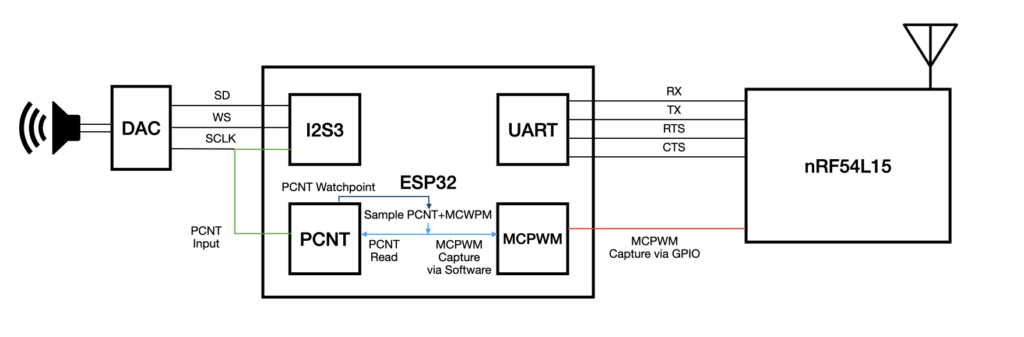
With the hardware and audio playback in place, let’s have a look at TWS.
TWS Measurements
As we already have the nRF54L15 Add-On connected to the extension port of the Waveshare box, we could not access the I2S over the extension port at the same time. Instead, we’ve created a duplicate setup with two Espressif ESP32-S3-DevKitC-1 development kits with a nRF54L15 development kit, as well as the hand-made breakout board for the Holyiot version for the measurement setup.
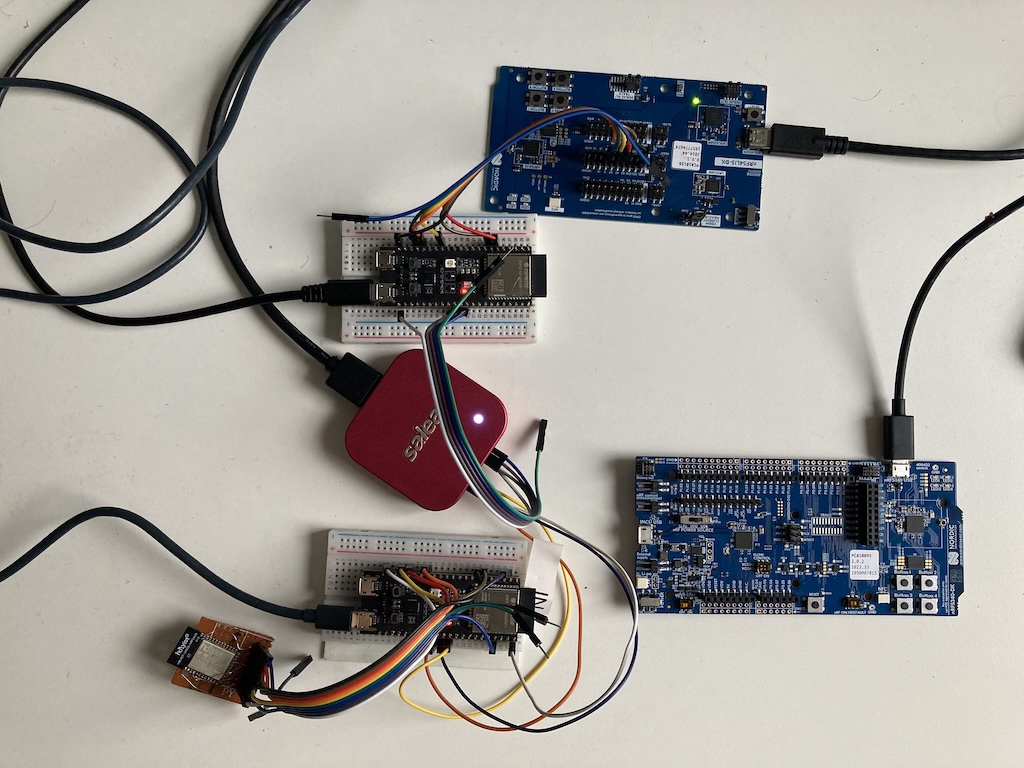
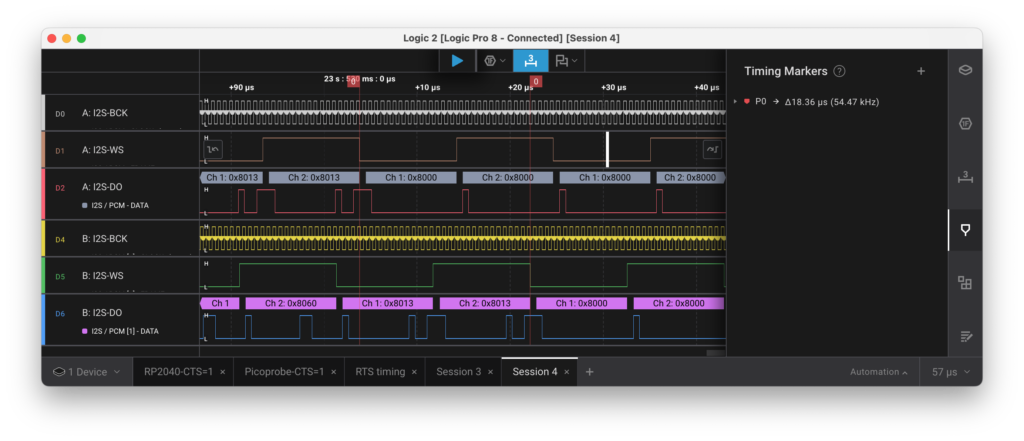
As with the previous TWS measurements, we have connected the I2S lines of two setups to our trusted Salea Logic 8 Pro and streamed a sine wave over Broadcast. As shown in the logic trace, the sample 0x8000 shows up on both devices with less than a single sample time – perfect!
Outlook
With the hardware and audio playback in place, we’ll work on a complete LE Audio demo showing all Unicast and Broadcast roles in a standalone setup.
Stay tuned …
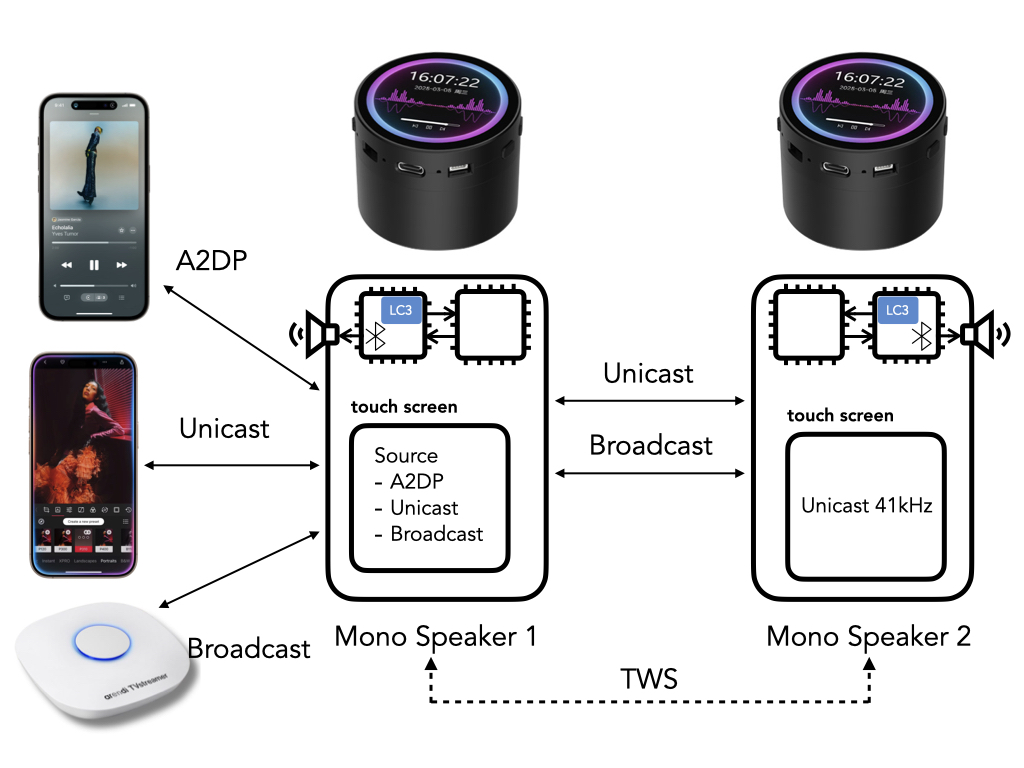
To streamline this effort, we introduced a GATT Service Client component that encapsulates the entire discover-and-subscribe workflow. The component removes the overhead of boilerplate setup code, so that developers can now dive straight into implementing the core logic defined by the GATT Service Profile specification.
In the following sections, we briefly introduce the core concepts of GATT, outline the setup process, and conclude with a comparison between a GATT Client that handles setup manually and one that uses the new component.
GATT Data Structures
The GATT profile structures data into Characteristics with a declared set of allowed operations and access permissions. These Characteristics are further organized into standardized entities called Services, each one performing a specific function. For example, the main purpose of the Battery Service is to enable connected devices to report battery level information.
GATT Services that define the main functionality of a device are known as Primary Services. Services can also include others, known as Included (Secondary) Services. Officially adopted GATT Services and Characteristics are identified by unique 16-bit UUIDs, whereas a custom made Services must use 128-bit UUIDs. A complete list of officially adopted GATT Services is available on the Bluetooth Developer Portal.
As an example, the Scan Parameters Service (UUID: 0x1813) is used to optimize the way a Central device (like a smartphone or tablet) scans for advertising packets from a Peripheral device (like a BLE sensor, wearable, or HID device). It allows the Peripheral device to suggest preferred scanning parameters by means of two Characteristics:
- Scan Interval Window (0x2A31) – mandatory Characteristic comprising two 16-bit values: LE_Scan_Interval and LE_Scan_Window. It stores the Client’s scan parameters and is only writable by the Client.
- Scan Refresh (0x2A31) – optional Characteristic used to notify the Client that the Server requires an update of the Scan Interval Window value.
GATT Device Roles
Two connected Bluetooth LE devices exchange data by taking on two GATT roles: one acts as the GATT Server, and the other as the GATT Client.
The GATT Server’s role is to store Characteristics and make them available through Services. The GATT Server can notify the client when the value of a Characteristic changes and it responds to the Client’s read and write requests.
The GATT Client’s role is to discover available Services and Characteristics on the GATT Server. Depending on the Service configuration, it can read or write values of a Characteristic, or subscribe to receive updates when those values change.
GATT Client Discovery Workflow
Before a GATT Client can perform operations on Characteristics or process responses from the GATT Server, it must first complete a sequence of GATT queries, typically including:
- Discover services
- Query characteristics and their subscription properties
- Subscribe to notifications or indications, if allowed
GATT queries in most Bluetooth stacks, including BTstack, are asynchronous. Therefore, a state machine is required to manage the sequence of operations. One part of this state machine is responsible for issuing GATT queries – one at a time. The other part handles the GATT Server responses. For example, a “discover all primary services with UUID X” query may result in multiple GATT events, one for each matching service, followed by a final “service query complete” event indicating that all results have been received. These two parts are illustrated below in pseudocode.
Send GATT Query
---------------

switch (STATE):
    case W2_QUERY_SERVICES:
        - Set state to W4_SERVICES_RESULT and wait for SERVICE_QUERY_RESULT GATT event
        - Execute query to search for all services with the given UUID

    case W2_QUERY_CHARACTERISTICS:
        - Set state to W4_QUERY_CHARACTERISTICS_RESULT
        - Execute query to get all characteristics of the current service

    case W2_SUBSCRIBE:
        - Set state to W4_SUBSCRIPTION
        - Subscribe to notifications or indications
Handle GATT Response
--------------------
switch (STATE):
case W4_SERVICES_RESULT:
switch (GATT_EVENT):
case SERVICE_QUERY_RESULT:
- A matching service was found
- Store the service in the client’s service list
case SERVICE_QUERY_COMPLETE:
- Set state to W2_QUERY_CHARACTERISTICS
case W4_QUERY_CHARACTERISTICS_RESULT:
switch (GATT_EVENT):
case CHARACTERISTIC_QUERY_RESULT:
- A characteristic for a given service was found
- Store the characteristic and its properties in the service’s characteristic list
case CHARACTERISTIC_QUERY_COMPLETE:
- All characteristics for the current service have been reported
- Choose the first characteristic that supports notification or indication
- If such characteristic exists set state to W2_SUBSCRIBE, otherwise to CONNECTED
case W4_SUBSCRIPTION:
switch (GATT_EVENT):
case CHARACTERISTIC_QUERY_COMPLETE:
- Characteristic was subscribed
- Choose the next characteristic that supports notification or indication
- If such characteristic exists set state to W2_SUBSCRIBE, otherwise to CONNECTED While not conceptually complex, implementing the described discovery workflow can be tedious and time-consuming, diverting attention from the core development of the GATT Client. To simplify this process, we introduced the GATT Service Client component (ble/gatt_service_client.h) that encapsulates all discovery steps – from querying services to subscribing to all allowed Characteristics. Let’s see how it it is used…
GATT Service Client Component Setup
To setup a GATT Service Client component for a custom service, we need to initialize both the GATT Client as well as the GATT Service Client and then register an instance of the new GATT Service Client. This usually happens before the Bluetooth stack is started:
- gatt_client_init – function to initialize the GATT Client,
- gatt_service_client_init – function to initialize the GATT Service Client component, and
- gatt_service_client_register_client_with_uuid(16|128)s – function to register the new GATT Service Client instance with the list of Characteristic UUIDs (16-bit or 128-bit respectively). The connection and notification callback is used to receive GATT Service Client connected and disconnected events, as well as notifications and indications.
The following code snippet shows the setup code of the GATT Streamer Client (example/le_streamer_client.c), which we rewrote as our first experiment. The GATT Streamer provides a custom GATT Service created to test the maximal GATT throughput – its core functionality is to stream data over GATT as fast as possible using write without response operations and notifications on the RX Characteristic.
GATT Service Client Setup Code
-------------------------------

# define NUM_CHARACTERISTICS   1

// LE Streamer GATT Service Client instance
static gatt_service_client_t  le_streamer_client;

// 128-bit (custom) LE Streamer Service UUID
static uuid128_t LE_STREAMER_SERVICE_UUID = {
    0x00, 0x00, 0xFF, 0x10, 0x00, 0x00, 0x10, 0x00, 0x80, 0x00, 0x00, 0x80, 0x5F, 0x9B, 0x34, 0xFB
};

// 128-bit (custom) LE Streamer Service Characteristics UUIDs
static enum {
    CHARACTERISTIC_INDEX_RX = 0
} le_streamer_service_characteristic_index_t;

static const uuid128_t le_streamer_service_uuid128s[] = {
    {0x00, 0x00, 0xFF, 0x11, 0x00, 0x00, 0x10, 0x00, 0x80, 0x00, 0x00, 0x80, 0x5F, 0x9B, 0x34, 0xFB}
};

/*
 * Callback to receive GATT Service Client events:
 * connected, disconnected, notifications and indications
 */
static void gatt_service_client_handler(uint8_t packet_type, uint16_t channel,
                                                 uint8_t *packet, uint16_t size);

static void setup(void){
    ...
    gatt_client_init();
    gatt_service_client_init();
    gatt_service_client_register_client_uuid128(&le_streamer_client, &gatt_service_client_handler,
                                                 le_streamer_service_uuid128s, NUM_CHARACTERISTICS);
    ...
}
GATT Service Client Component Connect
After the setup is performed and a Bluetooth HCI connection between two devices has been established, we can trigger the GATT Service discovery workflow by calling a single function gatt_service_client_connect_primary_service_with_uuid(16|128). This function requires the connection handle, the GATT Service UUID as well as storage for the information on the characteristics that will be discovered during the discover-and-subscribe phase. The following code snippet shows how to place a call to this function directly after the HCI connection has been established. The value ERROR_CODE_SUCCESS of the returned status indicates that the service discovery workflow has started. The end of the discovery is marked by the GATTSERVICE_SUBEVENT_CLIENT_CONNECTED event in the gatt_service_client_handler.
GATT Service Client Connect
---------------------------

static hci_con_handle_t                     connection_handle;
static gatt_service_client_connection_t     le_streamer_connection;
static gatt_service_client_characteristic_t le_streamer_characteristics_storage[NUM_CHARACTERISTICS];

/*
 * Callback to receive GATT Service Client events
 */
static void gatt_service_client_handler(uint8_t packet_type, uint16_t channel, uint8_t *packet, uint16_t size){
    if (packet_type != HCI_EVENT_PACKET) return;
    switch(hci_event_packet_get_type(packet){
        case HCI_EVENT_GATTSERVICE_META:
            switch (hci_event_gattservice_meta_get_subevent_code(packet)) {
                case GATTSERVICE_SUBEVENT_CLIENT_CONNECTED:
                   ...
                   break;
               case GATTSERVICE_SUBEVENT_CLIENT_DISCONNECTED:
                   ...
                   break;
                default:
                    break;
            }
            break;
        case GATT_EVENT_NOTIFICATION:
            ...
            break;
        case GATT_EVENT_INDICATION:
            ...
            break;
        default:
            break;
    }
}

static void hci_event_handler(uint8_t packet_type, uint16_t channel, uint8_t *packet, uint16_t size){
    if (hci_event_packet_get_type(packet) == HCI_EVENT_META_GAP) {
        if (hci_event_gap_meta_get_subevent_code(packet) != GAP_SUBEVENT_LE_CONNECTION_COMPLETE){

            uint8_t status = gatt_service_client_connect_primary_service_with_uuid128(
                                       connection_handle,
                                       &le_streamer_client,
                                       &le_streamer_connection,
                                       &LE_STREAMER_SERVICE_UUID,
                                       le_streamer_characteristics_storage,
                                       NUM_CHARACTERISTICS);
            ...
        }
    }
    ...
}

static void setup(void){
    ...
    hci_event_callback_registration.callback = &hci_event_handler;
    hci_add_event_handler(&hci_event_callback_registration);
    ...
}
GATT Service Client Queries
If the status of the received GATTSERVICE_SUBEVENT_CLIENT_CONNECTED event is ERROR_CODE_SUCCESS, we can start scheduling service specific GATT Queries if needed. The complete list of supported GATT queries is defined in GATT Client header file (ble/gatt_client.h). From this point on a query will most likely be either read, write or write without response on a specific characteristic of the GATT Service. These queries use a characteristic’s attribute value handle to identify the characteristic. The attribute value handle can be accessed using the gatt_service_client_characteristic_value_handle_for_index function. The index parameter for this function matches the order of the UUIDs stored in the UUID array.
The following code snippet shows how to perform write without response.
GATT Service Client Query
-------------------------

static uint8_t  data[200];
static uint16_t data_len;

static void le_streamer_write_without_response(gatt_service_client_connection_t * connection){
    uint8_t status = gatt_client_write_value_of_characteristic_without_response(
            connection_handle,
            gatt_service_client_characteristic_value_handle_for_index(connection, CHARACTERISTIC_INDEX_RX),
            data_len, data);
    ...
}
GATT Service Client Code Reduction
By using the new component to automate the discovery steps of a single characteristic, and by adding some missing consistency checks, we were able to reduce the LE Streamer Service Client code by about 100 lines from the original 542 lines.
Next, we applied the same approach to the standard Scan Parameter Service Client (ble/gatt-service/scan_parameters_service_client.c), which queries and subscribes to two defined Characteristics. In this case, the code was reduced by 278 lines from the original 516 lines.
These results demonstrate code reduction especially for relatively simple services. In addition, the component handles both 16-bit and 128-bit UUIDs, making it equally suitable for developing standard Bluetooth services and custom ones.
]]>As LE Audio is getting added to most new in-ears headphones and is support in newer flagship Android phones, we’d like to highlight an important feature of the technology: True-Wireless Stereo (TWS) playback without the Link Layer shenanigans of current Bluetooth Classic In-Ear headphones.
True Wireless Stereo (TWS) Playback on Bluetooth Classic A2DP
Up until now, Bluetooth did not provide the necessary synchronization primitives to playback audio accurately by two individual devices. To build In-Ear headphones nevertheless, there have been a range of different TWS approaches. Qualcomm provides a nice overview in their The Evolution of True Wireless Technology whitepaper on these. The following provides just a crude summary.
In early attempts, both earbuds could be paired, but only one was connected at a time. The connected earbud received the Bluetooth stereo A2DP signal that was then forwarded to the second earbud using a different radio technology. The used radio technology had to provide time synchronization primitives in order to play the left and right stereo samples at the same time. Ideally, the time offset between both sides should be less than 50 microseconds.
Later approaches allowed to pair only a single earbud, which then exchanged the bonding information with the other earbud. The bonding information allowed for the second earbud to implement some kind of promiscuous mode, e.g. to receive the stereo A2DP stream that is sent to the first device also on the second device using only Bluetooth technology.
Unfortunately, these TWS approaches require modifications to the Link Layer that runs on the Bluetooth Controller, preventing a regular Bluetooth Host stack like BTstack to support it.
Introducing LE Audio
As Bluetooth Classic Audio has been around for more than two decades, the limitations of A2DP (high-quality, but only for playback) and HFP (bi-directional, but only mono with low audio-quality) have become obvious.
The new LE Audio standard addresses these shortcomings, provides a new Low Complexity Communication Codec, called “LC3”, and also provides time synchronization primitives that allow for audio playback with better than single sample (20 microseconds) accuracy.
It’s great that TWS playback is now available to all Bluetooth Host Stacks, but how does it actually work and how can we use it?
Microsecond Audio Timestamps for ISO Packets
For LE Audio, either Unicast or Broadcast, so-called Isochronous Streams are used. The sender and the receiver agree on a schedule, where ISO packets are periodically exchanged at a fixed Interval. As part of the setup, the maximum time the sender can try to correctly transmit an ISO packet to the receiver is specified. After this time, the packet is considered lost.
As all receivers are aware of this agreement, they are able to provide this timestamp, also known as Synchronization Reference Point, with each received or lost ISO packet. During a Unicast setup, the so-called Presentation Time is negotiated, which indicates how long after the Synchronization Reference Point the audio needs to be played back.
With this accurate time information, we only need to play the first sample of such an ISO packet at time = Synchronization Reference Point + Presentation Point. As that’s easier to explain than to implement, the easiest way for a Bluetooth Host stack is to delegate this task to the Bluetooth Controller which then will take care of the accurate playback timing. This is supported currently on Infineon’s CYW5551x (e.g. in Ezurio’s Sona IF513) as well as Realtek’s RTL8761CTV Bluetooth Controllers. Infineon calls this feature “LC3 Offloading”, while Realtek uses the term “Codec Offload”.

The image above shows the I2S signals (Bit clock, Word Clock, Audio Data) of two CYW55513 Controllers configured for LC3 Offloading. The Unicast Gateway is sending a sine wave and we’ve marked the highest value of the sine wave in both signals, which are less than one audio sample apart (13 us in this case). As both have their own independent audio clocks, the audio sample is played at the closest position to the expected playback time.
Running the LC3 Codec on the MCU
Now… while LC3 Offloading is probably the way to go for most projects, we were interested in running the LC3 Codec on a regular MCU, which allows to use Bluetooth Controllers without a built-in LC3 Codec – such as the lower-cost Nordic nRF54L15 from their nRF54L Series. This has become a longer exercise than expected due to a two “minor” details, namely, synchronizing the MCU clock to the Bluetooth clock and playing an audio sample at a precise time in the future.
ISO Time Sync
The first detail we run into, is that the timestamps that are attached to the ISO packets are based on the free running clock in the Bluetooth Controller itself. To make use of these timestamps, the first step is to synchronize the MCU’s local clock with the Bluetooth clock.
Unfortunately, the Bluetooth Core specification does not explain or even mention how the Bluetooth Host should synchronize with the Bluetooth Controller, so we were free to design on the green field. Given that the Host exchanges HCI packets with the Controller over a transport with undefined latency, it is not possible to instruct the Controller to send its current time over HCI. Instead, we need a way to get a local timestamp from Host and Controller for an event that both can observe. We chose to connect a free GPIO of the Controller to a GPIO of the Host MCU and implemented the following procedure:

– The Host sends an HCI vendor-specific command to the Controller
– The Controller raises the GPIO and gets the local time
– The Host captures the raise of the GPIO, preferably with a timer capture in hardware
– The Controller sends the local time for the GPIO raise in the response to the vendor-specific command
We have implemented this mechanism for newer Nordic LE Controllers by extending the official Zephyr HCI UART Bridge with the new HCI VS ISO Time Sync command.
With this primitive, we periodically sample timestamp pairs for the Host and the Controller, which allows to map a Bluetooth timestamp into a local timestamp. With this, we know accurately when to play a received ISO packet. Now, we “just” need to figure out how to do this.
Accurate I2S Playback
I2S peripherals are commonly used with a DMA unit with either a double or a circular buffer strategy to send audio data continuously without audio pauses. In the scope of this report, the two halves of a circular buffer can be seen as a double buffer, so we will assume a double buffer strategy is used.
To be able to play the received audio frames at the correct time, we need to know when the first sample of the next buffer will be played. With this information, we can then ‘project’ the received audio samples into the I2S buffer.
Unfortunately, getting a timestamp for the first sample of a DMA buffer isn’t directly supported in most MCUs. As in the past, we’re using the STM32 F4 Discovery board with an STM32F407 for this project. While the MCU supports timer capture for a GPIO raise, which we can use for the ISO Time Sync, there is no obvious way to get a timestamp for the time when the first sample is sent over I2S.
Browsing around in the F4 Reference Manual, we found that it’s possible to use a timer unit to count clock pulses and also to generate an IRQ or toggle a GPIO when a predefined number of pulses have been counted.
With these primitives, we came up with the following system setup:

We set up TIM2 as a free-running 1 MHz timer for all playback timing needs. Then, we connect the I2S Bit Clock (SCK) of I2S3 to the External Clock input of TIM3 (ETR 2) to let it count I2S bits (see green connection in diagram above). We also connect the Channel 1 Output Compare of TIM3 (blue connection) which triggers after a fixed number of pulses to the TIM2 Channel 1 Input Capture. As mentioned before TIM2 Channel 2 Input Capture is used for HCI ISO Time Sync (red connection).
With this setup, we configure TIM3 to count (num_samples * num_bits_per_sample * num_channels) clock pulses before starting I2S output.
As we start in a defined state, the first match for TIM3 will occur when one DMA buffer has played back. We have extended BTstack’s Audio API to provide the playback start time.
Audio Frame Projection into DMA buffer
With the previous steps, we now have a local clock, a number of audio frames with playback times and an audio buffer with the time for the first sample. With this information, what’s left is to fill the audio buffer.
The diagram shows 3 received audio frames (#1, #2, and #3) and the I2S playback buffers. The samples of buffer A are currently sent over I2S to the Digital Audio Converter (DAC), which is connected to the speaker. We assume that the playback callback is called to fill buffer B with playback time 99 ms.

To fill buffer B, we go through the list of received audio frames and drop expired ones, where the end_time = playback_time + frame_duration is lower than the first sample in the audio buffer. With all outdated packets removed, some part of the next audio frame, in the picture the last millisecond of frame #1, can be placed at the beginning of buffer B. As buffer B isn’t filled completely, the samples from the next audio frame, here frame #2, can be added. Finally, the first millisecond of packet #3 is also stored.
By using the time information of the audio frames, it’s also possible to decode LC3 packets just-in-time instead of decoding and storing them as PCM data which would require roughly six times as much memory as storing the LC3 packets.
Example: At 48000 Hz, an audio frame of 10 ms contains 480 samples. An LC3 frame in high quality (48_6) uses 155 bytes for this. In contrast, the same frame as 16-bit PCM samples requires 960 bytes.
With this in place, we set up a test with one Unicast Gateway running on a laptop and two F4 Discovery boards. The Unicast Gateway streams a mono sine wave on both channels to both boards. In the resulting logic trace below, the time offset between the sample for 0xFFF4 is again less than the time of a single audio sample!

The card itself is easily available from regular distributors like Mouser or Digikey. However, it only provides the Bluetooth USB functionality over its M.2 connector with Key E. While some computers with M.2 interface exist, for most you’ll need an adapter to plug it into your Windows machine. Bluetooth SIG refers to a company that sells the card together with a suitable adapter to connect it via regular USB.
As the shipping cost is rather high, and we already have some experience with Intel M.2 Bluetooth/Wifi cards, we describe two other options to use these cards here.
The Plug-Plug-and-Play Version v1
A few years ago, we helped a customer to use the Intel Wireless 8265 cards with our stack in the rugged laptop they chose for their field service people. To implement the firmware upload mechanism, we wanted to have the card available via regular USB on our Macs and started searching the Internet. After some initial trouble finding a suitable adapter, we ended up with a combination of: – A M.2 with Key E adapter to Mini PCIe and a – A Mini PCI-E to USB Adapter which worked rather well.
This plug-plug-and-play solution works also with the Intel BE200 card in PTS.
The Plug-Plug-and-Play Version v2
Ezurio just released their Wi-Fi M.2 2230 to STM32 Nucleo Adapter Card for use with various STM32 Nucleo boards. Interestingly, it also features an USB Micro connector and allows to use the Intel BE200 in PTS.
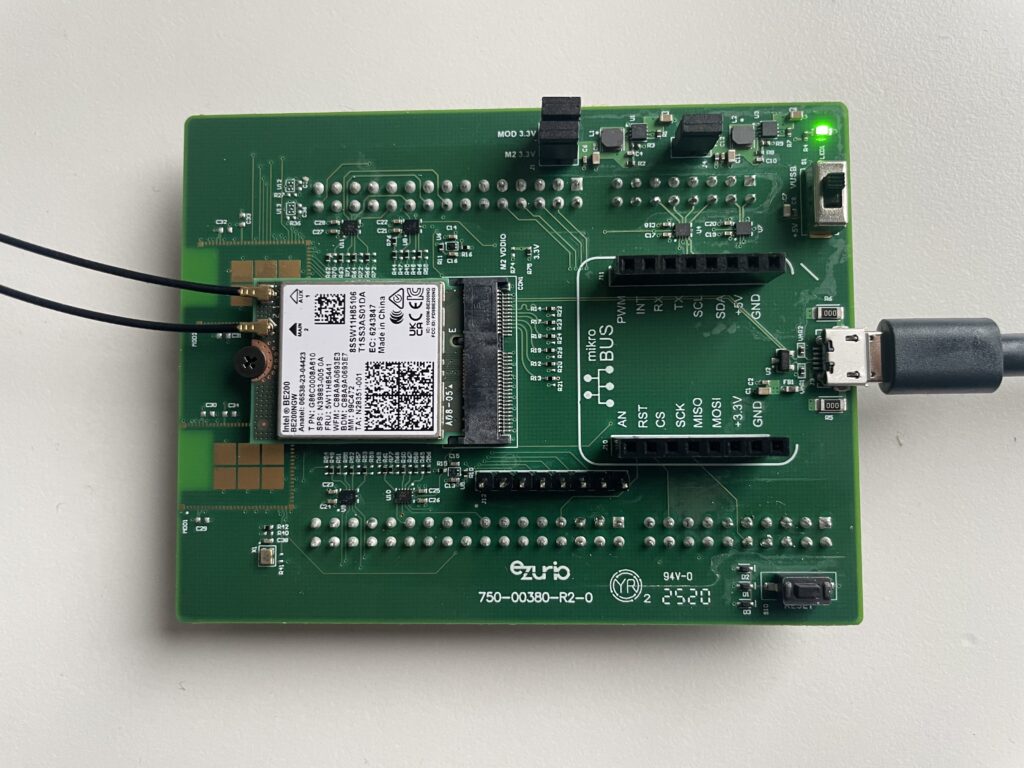
The Soldering Option

While browsing AliExpress for the Intel BE200, we also found a desktop wireless adapter version for PCI Express. It has the USB connection (4 pin cable) on the side, which is intended to be plugged into a motherboard USB connector. This probably works with a desktop computer, but we don’t have desktop PCs anymore.
So an idea came up: we just replace the motherboard USB connector with a USB-A plug and are done. However, after receiving the adapter and replacing the USB connector, it didn’t work. The manual doesn’t show the USB 5V line being connected at all and a bit of critical thinking revealed that there’s no reason that this adapter would have a voltage regulator from the USB 5V power supply to the internal 3.3V needed for the BE200 as it’s plugged into PCI Express, which already provides 3.3V.
We then added a 5V-to-3.3V converter and verified that it also works as expected. If you’re interested, here are the steps we took for this.
1. Remove heat sink

2. Add 3.3V Switching Regulator
Here, we used what was on hand, this DC-to-DC buck converter to 3.3V
We connected GND from the connector to Vin-, and 5V power from the connector to Vin+ as well as the EN input. Ideally, we would provide the 3.3V to the pin on the PCI interface, but had no suitable connector available. Instead, we traced one of the 3.3V lines to the F1 part and connected the 3.3V from Vout there.

3. Mount Heat Sink

4. Connect USB-A Plug
On AliExpress, we also found a USB 2.0 Type A Male/Female to 5 Pin Screw Connector, ideal for our case.

5. Intel BE200 with USB-A Connector

Good luck!
]]>This backwards-compatibility also allows an attacker to trigger Legacy Pairing authentication when connecting to a device that supports Secure Connections. New research presented in the BLUFFS paper shows how attacker can impersonate a previously bonded device, trigger Legacy Pairing authentication, and enforce a fixed weak session encryption key. The fixed session key (7 bytes) can then be brute-forced offline (in weeks to months) and then used to decrypt man-in-the-middle sessions from the past or fully impersonate the bonded device in the future.
Vulnerability
Basically all BR/EDR devices that allow for an encryption key size of 7 or less are vulnerable to the BLUFFS attacks. Devices that require an encryption key size of 16 either by explicit configuration or because they are configured for Security Mode 4 Level 4 avoid the attacks as the 16 byte session key cannot be brute-forced in the near future.
Since the KNOB attack in 2019, BTstack both prevents downgrade attacks by tracking if Secure Connections was used during bonding as well as verifies the encryption key length and rejects encryption keys shorter than 16 bytes by default.
Action
If you’re using a version of BTstack older than v1.1 (October 2020), it’s time to update to the latest version.