When the goal is to form a trim of any width to attach to garments, including shawls, by creating knit strips that are more gathered on one side and full length on the other, whether interspersed with all knit rows or short row segments, some samples are achieved with the following designs automating the process from A slip stitch patterned ruffle and more, 24X36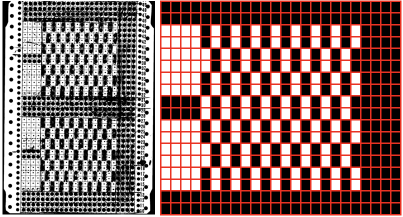

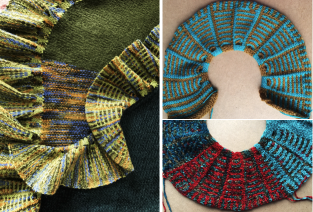 This 24X26 variation includes a self made, no-roll edging on the outside circumference.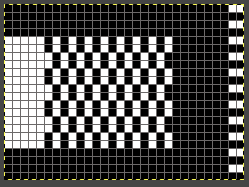

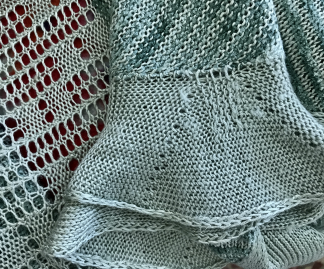 In DIY, there is an opportunity to change the scale of the repeat in width and height with variations in the amount of gathering. Whether or not there is an end use is a personal choice, and any of the designs can be amended once the starting point is established.
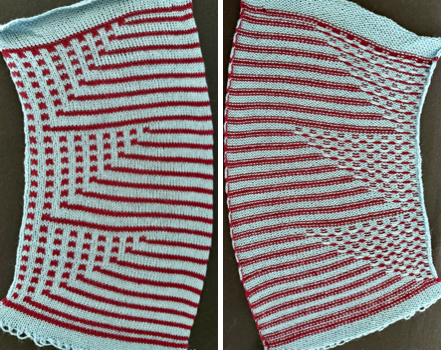
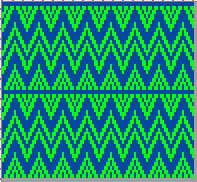
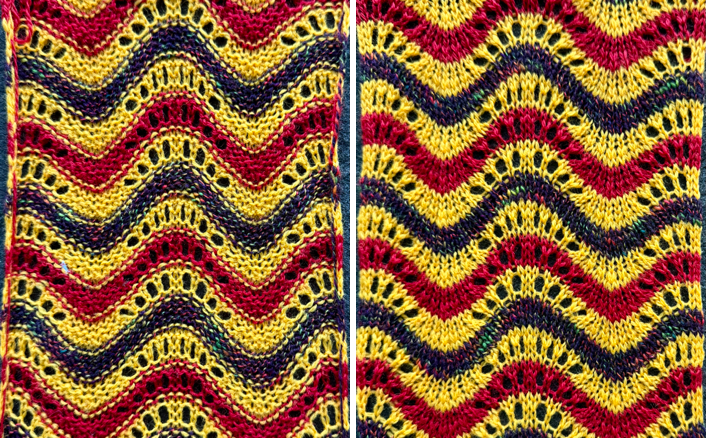
A new striped variation began with a 60X48 PNG, working at first in a color grid to determine the placement of pairs of slipped stitches to gather the knit, with no added all-knit or short row segments.
In addition, the goal is to have one color knitting for 2 rows, the other for 4.
Making things work: the first sample had the dark color slipping as well, creating a line connecting the dark blocks to the stripe beside them. 


 Revising the design to eliminate those connections: the initial plan,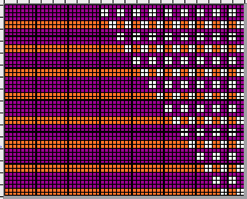
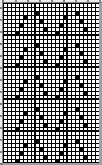
 converted to 2 color BW,
  and mirrored for use on my 930, to have the slip blocks form on the right.
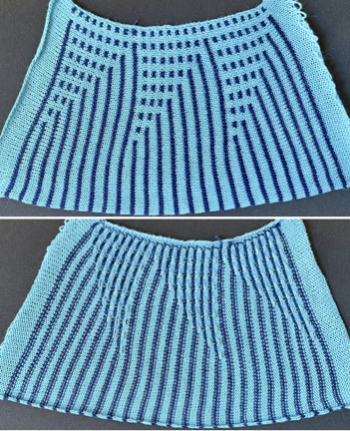 Comparing the placements of the 2X2 blocks in each of the repeats.
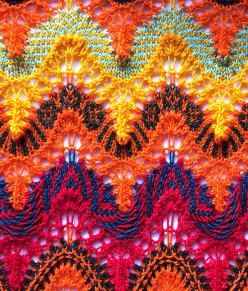
 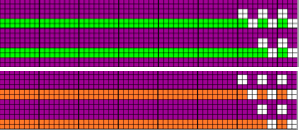 Striping with color changes every two rows and combined with short rows, whether hand-selected or automated using slip stitch, provides an opportunity to have those stripes meeting at angles, forming secondary shapes, at times superimposed on each other, in varying widths.
Experiments can be freeform, but if the patterns are to be used in items that require fit, then math comes into play.
Previous posts reviewing methods for getting shapes to go round, from early, very brief ones to late, quite long ones.
Return to circles, knit and crochet “pies” 1 2/17
Return to circles, knit “pies”, miters, and spirals 4 3/17
Return to circles, knit “pies” 3 3/17
Return to circles, knit “pies” 2 (round yokes and more) 3/17
Return to circles, knit and crochet “pies” 1 2/17
Revisiting miters, spirals, going square, round, and more 2/16
A tale of 2 donuts 9/15
Miters and spirals: visualizing, charting (and more) 3 7/14
Miters and spirals: visualizing, charting (and more) 2 7/14
Miters and spirals: visualizing, charting (and more) 1 7/14
Short rows_ balls, tams, 3D rounds 12/13
Back to that pie: a bit of holding 6/11
Knitting math and pies 6/11
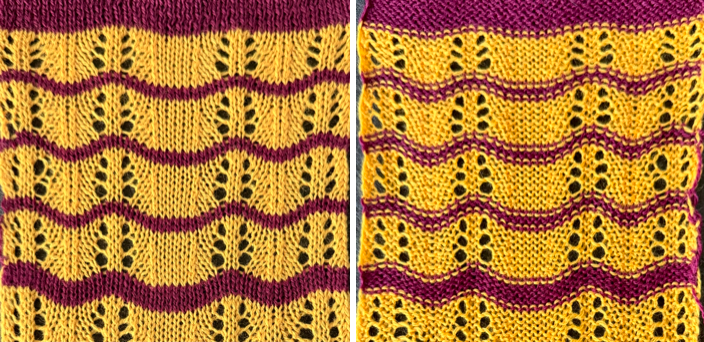
This particular design was intended as a FI border pattern, and is explored as a possible striped pattern using slip stitch <–>.
Before committing to knitting, magnify the PNG or chart significantly enough to catch missing or extra cells; this first swatch experiment has missed program errors.
The slip stitch segment was knit first, and is composed of two full repeats in height, the FI segment of only 1.
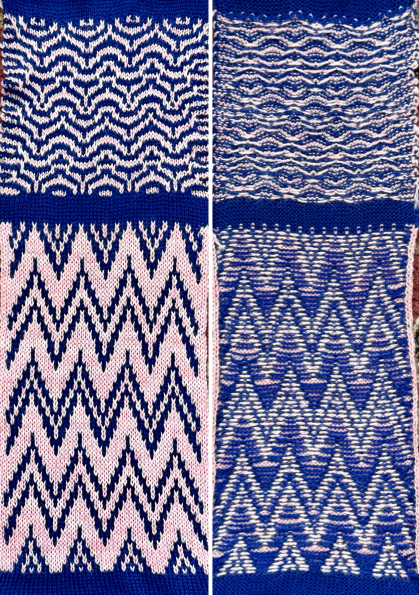
The float formations on the purl side are clearly different in density between the two techniques.
The reverse order, testing the pattern first as FI with clearly contrasting colors, would have made it easy to identify design repeat errors, and is a good way when first experimenting with techniques, to check for correct patterning.
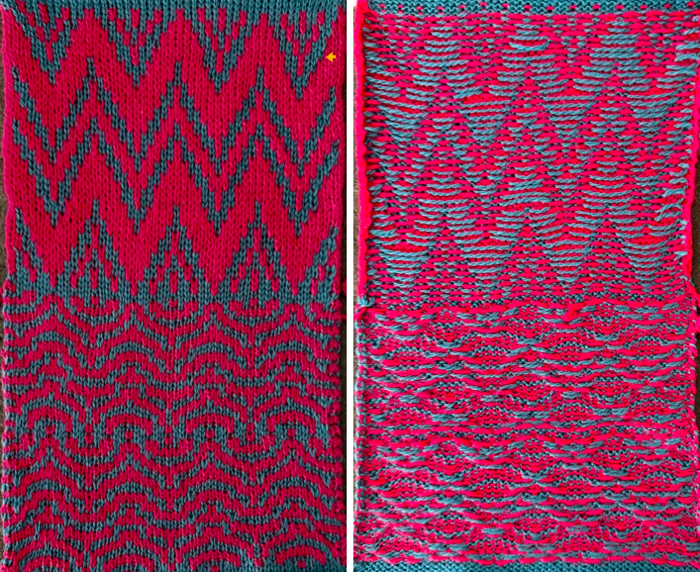 The easy-to-miss spot,
 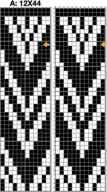 the corrected punch card design, 24X44, and the matching electronic single repeat, 12X44.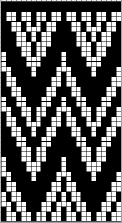

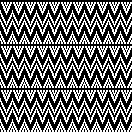 The total row count is also a multiple of 4 in height, with potential for repeating the slip stitch experiment with color changes every 2 rows.
The choice can be made to program vertical all knit borders on either side, i.e., in this 54-stitch version.
 The virtual image of the potential FI result.
 Eliminating that 2-row all-black pixel stripe, aiming for a continuous design, and revising some pixel positions, resulting in a new 24X40 card,
  and the 12X40 single electronic PNG,
 were achieved working in ArahPaint; the red cells mark those missing pixels. The red cells mark the missing white pixel spots.
A: The original border design, single repeat
B: In a new window, with a new image with several extra rows added to double the 44 pixel height, copy and paste A at the bottom, and paste again, overlapping the top rows of the first design, visually checking the alignment
C: Crop out extra blank pixel rows and the last pair of rows with all black cells
D: Tools> Find Exact Repeat, Crop to Selection
E: The new, 12X40 single repeat, also a multiple of 4 in height.
 A rotated virtual check of the possible appearance of a FI sample.
  Each swatch segment was knit on 55 stitches and for 80 rows, both measure 5.5 inches in width, but the FI measures 10.5 inches in height, and the slip section measures 6.75 inches.
The compression in height, and often in width, are features of the technique.
The all-knit vertical borders on each side produce slight ruffles on the side edges.
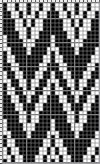
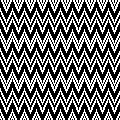
 A Japanese magazine find, 24X56,
  modified for use with a color changer to 24X60, cyan cells represent all knit rows in the color with stitches that will be held until the next all knit row in that color, which will appear in the front of the knit as elongated stitches and gather the surrounding blocks of knit stitches in chosen colors.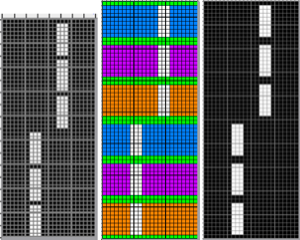
 With designs using the changer and a single selected row at the bottom of the programmed repeat, the first preselection row is from left to right, with the color in the carriage knitting that single row on the way back to the left. Subsequent color changes occur every two rows or for multiples of 2.
The sample was knit on 72 stitches, 120 rows, and mirrored for use on the 930.
 On the machine, note the wide spaces between slip stitch columns.
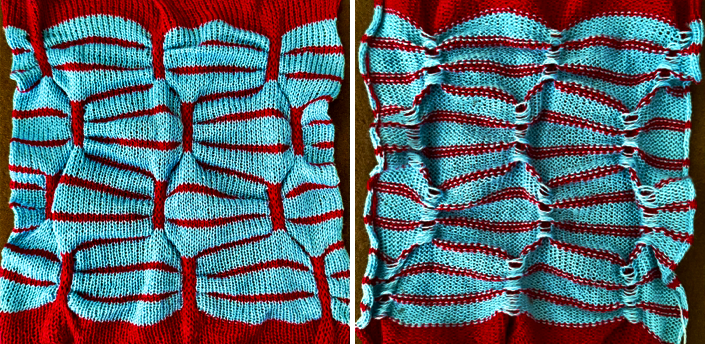 The yarns used were not 100% wool, resulting in some loss of texture with steaming.
The stocking stitch segments at the top and bottom are clearly wider than the patterned areas. In a final piece, consider using a small every-row or every other row repeat also in slip stitch; it may help increase the gather the top and bottom folds of the shapes.
While the work is on the machine, consider playing with the color in the skip stitch stripes.
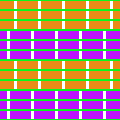
 If the goal is to change the color outlining the folds, the repeat can be altered to 24X64 or more. The two-row bottom start begins with the first preselection row from right to left.

 The color shifts for full secondary shapes in each.
 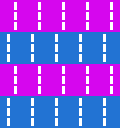 Working double-bed, it is difficult to get the main bed stitches to slip for more than 4 rows without running into problems, sometimes eased by careful yarn selection.
It took several tries in PNG edits, tension, and yarn changes to come up with a compromise. The 24X60 repeat.
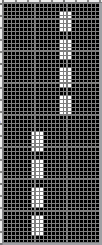
 The knit carriage is set to slip throughout, while the ribber carriage is set to knit on the rows marked in cyan, where each needle is preselected, and to slip for the remainder of rows, where there are non-selected needlegroups (white cells).
 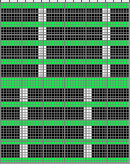 Floats still form on the main bed, but are encased between beds when all stitches on both beds are knit.
  The swatch was knit in a single color, since the slip stitch sections are an uneven number of rows in height, 5, tested on 72 stitches, and measures 10.25 inches in width.
  Collections of textured single bed variations:
Single bed slip stitch vs ruching 2 05/26
Single bed slip stitch vs ruching 02/26
Slip Stitch on the single bed, double bed, and hand manipulated versions: links in the start of a blog index ]]>
BW repeats may have stripes of color planned and added by simply changing yarns in the yarn feeder in the selected areas.
A recent FB comment asked the question as to whether it is possible to automate intarsia using img2track downloads.
Short row “intarsia” can be executed with manual needle selection following charts, or as an easier, viable option using a knit radar and with shapes illustrated on garment pieces, which can follow the simple geometry seen in the hand selection methods, or graduate to the degree of complexity the knitter has the desire and patience to execute.
These posts illustrate simple shapes and the breaking down of more complex ones.
Intarsia without an intarsia carriage on Brother machines.
A bit of holding 5: intarsia and more 2
A bit of holding 4: intarsia and more
A bit of holding 3: shape variations and more
A bit of holding 2 / moving shapes around
A bit of holding 1
The Silver Reed electronic intarsia carriage was briefly available as an accessory for knitting complex intarsia designs with automated needle selection.
The yarn is placed and used in the same manner as when using the Brother intarsia accessory, but note that there are now multiple needle positions and selections for the 4 types of intarsia offered.
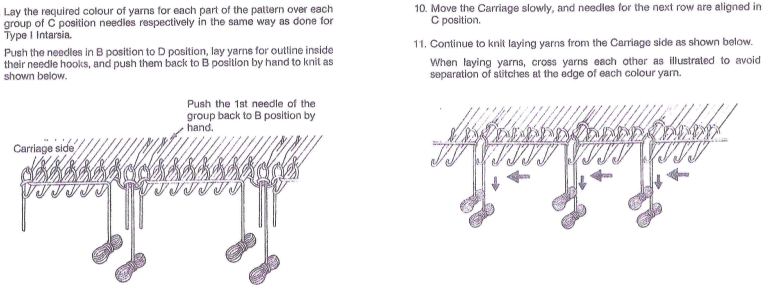 I gave away my standard intarsia carriage, so I cannot speak as to whether programming a design, placing yarn in selected needle groups manually as above, and bringing them all to the required position for the carriage to make successful passes would be a viable alternative.
These images are from the E6000 Passap manual, alongside the electronic repeats, which are mirrored on the front face of the knit.
 The accompanying technique recommendations.
 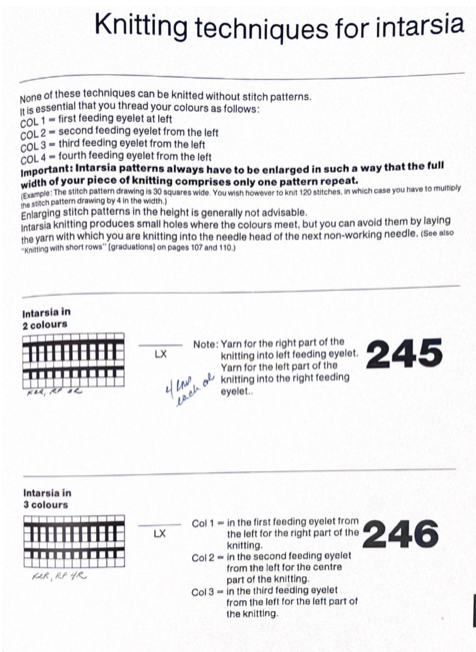 Without a Passap, and the discussion being on Brother electronic knitting, starting with duplicating one of the Passap designs and thinking it through, the 32X28 2-color repeat,
 doubled in height to 32X56,
  color separated for 2 color DBJ with each color in each design row knitting twice by color inverting every other row and doubling the height once more, to a final repeat of 32X112,
  mirrored for use on the 930.
  End needle selection must be canceled.
The pattern setting in the knit carriage is for slip-stitch in both directions.
The first preselection row is from right to left, with color changes every 2 rows using the changer on that side.
There will be a yarn ends to weave in, as at the start of any intarsia design.
Since each color knits for two rows, eyelets are formed at the color changes, familiar in short row designs. If bothersome, the size of the eyelets could be reduced.
The pattern was tested on 32 stitches and for 132 rows. At any point, more colors could be introduced for horizontal striping color changes.
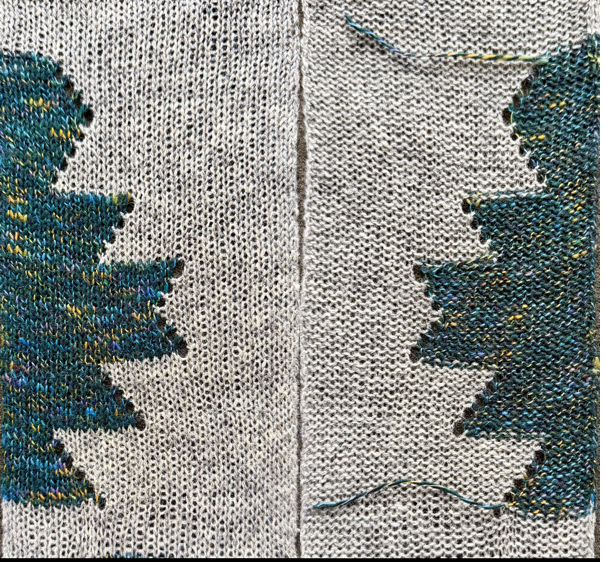 When the yarn traveled across multiple stitches before being picked up, the resulting floats were hooked up every third needle on the same color stitches before knitting the second pass with it.
Central designs are more problematic to execute and, if not very wide, may knit more easily as single FI motifs, with wrapping at the sides, and latching up floats as needed.
Img2track will separate for 3 and 4-color designs.
This first attempt was a failure and reminded me why I love/hate the single bed color changers.
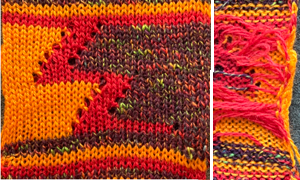
Aside from the changer and sinker plate crankiness, the colors, as they were carried up the left side, would twist around each other, forming floats to the next selected group.
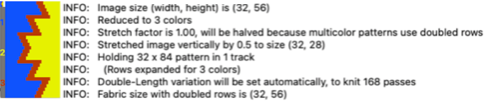
Img2track selects colors based on the number of cells that are represented for each in the first design row, hence the sequence is blue, yellow, red.
The test image, 32×28, was doubled in height to 32X56.
 I prefer to start short rows from the right.
Aiming for a similar attempt with the automated version, the image was mirrored horizontally for use on the 930.
The first preselection row is toward the color changer (remember to change the setting when the carriage is on the left to slip stitch).

 This was a day when everything that could go wrong had. In addition, color #3, the red, catches on the left side before traveling to knit the narrow center band of color for no reason I could immediately fathom.
  What the manual has to offer in terms of threading the changer.
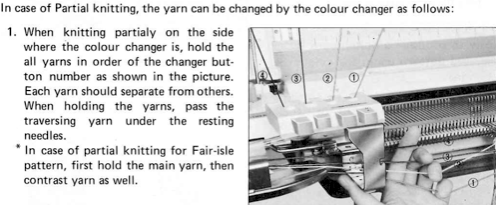 After the knitter, accessory, and the machine got a break, analyzing the order for color changes made by the img2track, was reminded that selections are made in order of the number of cells representing each color in each design row, making the red, color 3, the selection for the center shape, catching that color on the left.
To eliminate that problem, one solution is to use a second carriage to select and knit the center color, operating from the right side of the machine, using rails and making sure each knit carriage clears the belt before the second carriage operates from the opposite side.
The programmed repeat stays the same.
This particular design has some jumps in the number of needle sequences that form long floats. They can be managed as one would in FI, i.e.
 The resulting test swatch.
  Devising a manual color separation to work cleanly with a fixed 1,2,3 sequence, the full repeat was cropped to 32X48 pixels in height, with each color in each design row still occurring X3, and the result was mirrored for execution on the 930.
  Using ArahPaint, the process shown charted in progress:
  The double height rendition, second from the right, with the white color locked, can have all other colors filled with black, as seen in the charted repeat on the far right, finally programmed as FI in img2track.
Missing out on the prompts for color changes is not a loss. It is easy to see which colors should knit next, with #1, red, starting on the far right, followed by the dark color, 2, for the center shapes, and then 3, the yellow/orange.
 The BW color-separated file PNG, 32X96,
  and the proof of concept swatch.
  A convoluted approach: DAK Method C, if you have access to a screen grab of the template can convert it manually to a BW PNG, which may work with img2track, the double-length switch will need to be used in Japanese knitting machines. The DAK jacquard choices.
 If the goal is to use the technique in large knit pieces, then design repeats that tile properly can be used.
Encountering limitations to automation: a 20X20 repeat drawn using the pencil and straight line tool,
 checked in repeat, 60X60,
  filling in diagonal lines,
  isolating a new 20X20 repeat,
  doubled in height to 20X40,
  color inverted for use on the 930,
  and finally color separated, 20X80.
 When using a repeating occurrence of the width of groups of each color in programming the final piece, there are some related problems: as selections are made and repeated across a row of knitting, the color being carried skips the non-selected needles, forming floats. Using the end needle selection on the carriage to catch yarns when needed at the side edges will throw off the repeats, as seen in the photo. End needles in work will also knit an extra stitch on either side of the non-selected needles, changing the intended groups of 8.
  Returning to hand selecting needles, it becomes easier to add colors as well; there is no need to mirror the chart. The knitting sequences are numbered, and stitches are brought into hold after several rows of base knitting/ waste yarn.
  To maintain straight side edges, it is best to chart the repeat in full. The original sketch can represent single rows of knitting, but short rows will be executed with each color making 2 identical passes, resulting in the familiar eyelets, and elongation of the design.
Color changes can occur frequently, limited by patience, yarn availability, and the knitter’s willingness to deal with lots of yarn ends.
The initial charted repeat is 40X40 pixels in width and height, and will tile correctly if larger pieces are planned or if longer pieces in a fixed width are the goal.

 My swatch was knit with randomly grabbed yarns of my stash, in multiple thicknesses, not the best choice for the final pieces, resulting in some distortion along the diagonal lines.
All stripes are 8 stitches in width.
Most of the movements are needle one out on the left, one needle in on the right, except when small starting or ending triangles at the top or at the bottom of the diagonals are present.
When the top of the planned test is reached, stop on the right side when the last row of 8 stitches occurs for that color is reached, bring the group out to hold, make a free pass to the left, bring the next selection of needles to work, and continue.
Check stitch counts before returning to the left to pick up the next color.
 Errors may not be noticed immediately, i.e., in the purple stripe.
If ends are woven in, try not to pull on them; allow for some ease to keep that last row cleaner, all easier to manage with thicker yarns than those in this swatch.
 There is an accessory called an intarsia yarn brake.
  While it was in my stash to demo in teaching days, I much preferred bobbins for personal use. Some knitters, as with all other accessories, find it useful. If possible, check reviews and take one for a test drive before making any purchase.
These are suggestions from published sources on how to deal with stitches in holding position, often found in conjunction with shaping shoulder slopes. Wrapping needles adjacent to shaping reduces the size of the resulting eyelets where the same row is repeated twice.
 The Brother Techniques Book is a wonderful resource; their suggestions on partial knitting are on pp. 44-47, their illustration for managing those floats when moving by multiple needles, possible on both sides of the piece, harder to bring to the front if the pattern is automated and programmed for use with the slip stitch setting.
  The angles and size of the shapes can be varied, straightforward to program if only two colors are used in the intarsia concept, but there is also the possibility of changing colors every 2 rows to create horizontal stripes that interact with each other, forming secondary striped interacting shapes.
The next rabbit hole will be exploring short rows, automated when possible, while making stripes intersect in shapes that go round, a return to “doilies”.

]]>
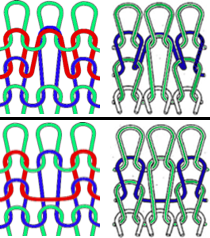
A reminder of the differences between slip and tuck stitch formations.
In both, stitches in non-selected needles grow in length until they are knit again. In slip stitch, needles are skipped, forming floats (bottom knit/purl illustrations), while in tuck stitch (top illustrations), loops are built up in the same needle hooks as the held stitches, making for a less forgiving repeating needle no-selection choices.
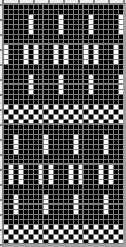
 This repeat, with tuck happening for four rows, began with a 6X24 PNG.
  Loaded into ArahPaint, it was drawn in a brick repeat, with a final PNG of 24X48,
  which in turn needs to be color-reversed to be used for tuck stitch. Punch card machine users need to punch all the black cells.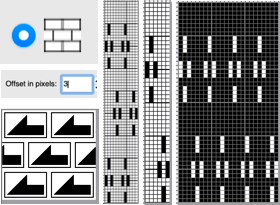

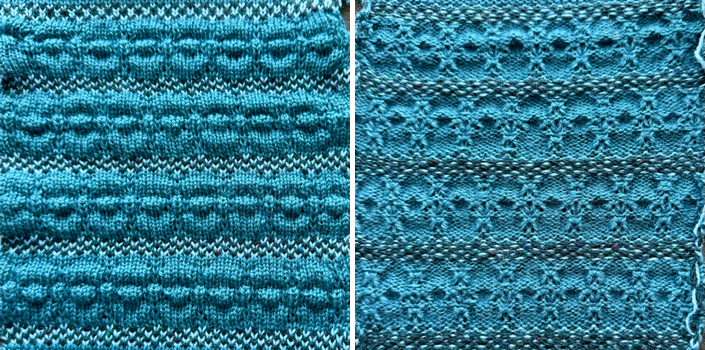
 The swatch was test-knit on 53 stitches, using a 2/8 wool, and measures 7.75 inches in width.
 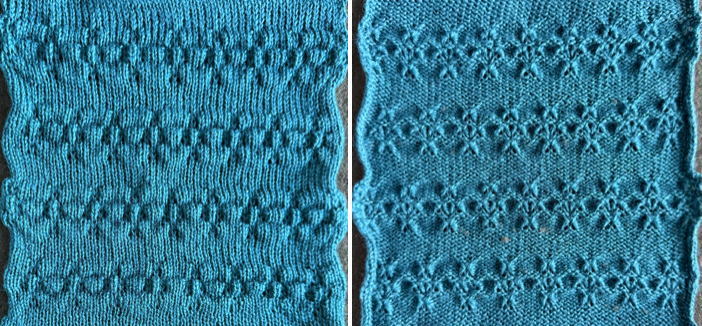 Using the same yarn, color, and tension, wondering about making the texture more pronounced, I tested the same repeat with manually selected FI patterning, which produces a narrower width than stocking stitch. A programmable PNG, 6X48
 charted for punch card knitting.
  The swatch measures approximately half an inch less in width than the first sample.
  My stash of knittable elastic is extremely limited. Continuing to explore making small changes and exploring their effect, here the same design repeat was used, with elastic as one of the 2 yarns in the FI bands. The repeat is changed to standard as opposed to brick configuration, with textures lining up vertically. The width of the swatch, knit on the same # of stitches as the last sample, measures 6 inches in width as opposed to the non-elastic FI version’s 7.5, with a loss of .75 inches in comparable knit pattern height.
 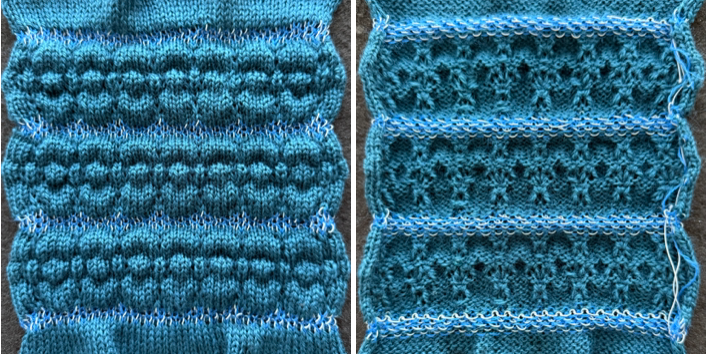 The main yarn was switched to 2/20 wool, and the pattern was divided by 4 rows knit using only the elastic, with a return to the brick configuration.
 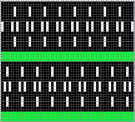 The work on the machine
  has a very different appearance when off. The swatch is nearly identical to the last in width, but the shapes collapse, shrinking the overall height.
 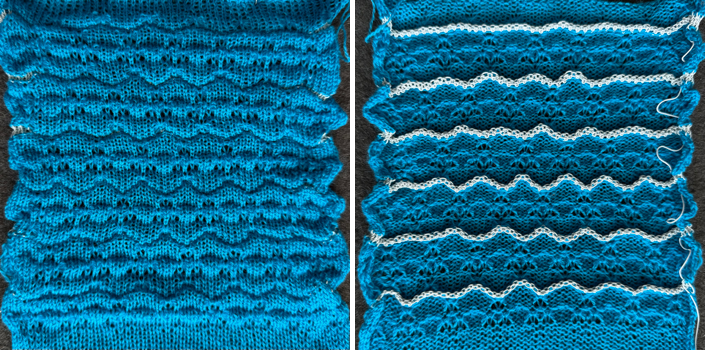 A few changes in the number of stitches and rows represented by white pixels for stitches that will be skipped, beginning with a brick arrangement, 24X80.
 The yarn used is a 2/8 wool; the swatch was knit in only one color to check yarn tolerance for stitches being held in needle hooks until they are knit off again, and with the intent of using it as the ground when adding another color to the mix. The test was on 60 stitches,
  and for 160 rows of pattern, measuring 6 inches in height.
  The second swatch began with the 24X40 design in simple vertical repeat,
 also tested on 60 stitches
  and for 160 rows of pattern, measuring 7.25 inches in height.
The dark-colored ground knits all stitches in all rows, where there is a pre-selection of every needle.
The yellow yarn is 4 ply, thicker than the dark, a 2 ply.
Secondary shapes formed by the textured gathers recognized by the eye of the beholder are part of this type of experimentation, not often predictable, and at times a fun surprise.

A range of added textures, some created using the thread lace setting, can be found in the blog posts:
Knitting with “unusual” fibers/ elastic 3 5/22
Knitting with “unusual” fibers/ elastic 2 8/20
Knitting with “unusual” fibers/ elastic 1 1/20
Balanced designs are not the best to use with the thread lace setting, a sample that began with a 24X24 PNG
 with added pixels to break up some long potential floats.
 The elastic is threaded through feeder A, the “bubble” yarn in feeder B, illustrated aside some of the work on the machine, appearing flat and stretched out.
 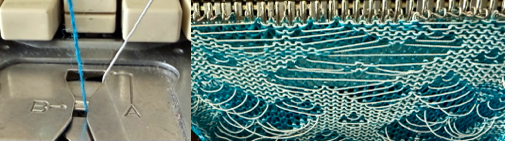 The elastic will shrink back when the finished swatch is steamed. The blue yarn is a 2/20 wool; the elastic is from an unmarked cone in my stash, a tad too thick, with a mind of its own, knit on 50 stitches.
End needle selection is canceled. If needles are selected in a pattern, they need to be pushed back to the B position so both wool and elastic will knit together.
The finished width after steaming is 4.5 inches.
Whether the shapes are recognizable and wearability are open to question.
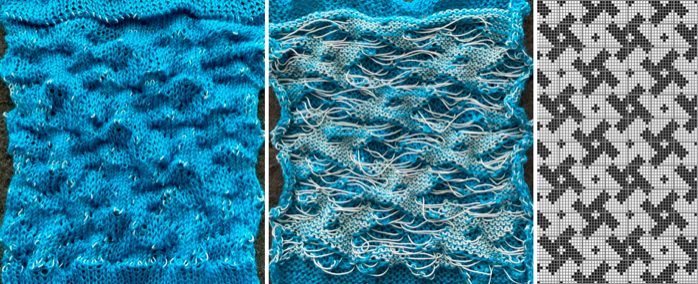 A more successful swatch, returning to the family, aiming for larger-scale shapes; the yarn is 2/20 wool, the elastic is a 280S cotton wrapped, the starting brick repeat is 24X52.
  Keeping in mind the respective functions of the black and white pixels, the image is color-inverted for use with the thread lace setting.
Side edges with non-selected needles will knit both yarns together from clean vertical columns, i.e., in this 56X104 repeat.

 The actual swatch was knit on fewer stitches on one side of 0 than the other, explaining the different side edges. If any needles were selected, they were pushed back to B manually before the next carriage pass. After some light steaming, the result is a bubbly texture that measures only 3 inches in width.
 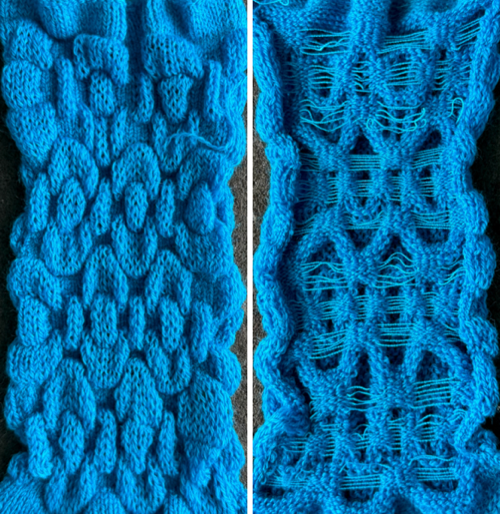 ]]>
]]>Design tools beyond that were initially minimal: graph paper and pencils.
I try to include repeats that can be used on punchcard machines in many blog posts, and their gridded designs can be exported and printed to scale for tracing/marking cards for punching.
Thinking back on the design development of knit-related software tools, my earliest memory is of the work of Marnie MacLean, whose designs may be found on Ravelry, and who published two formative posts in 2007, one on using Excel to develop design motifs, https://www.marniemaclean.com/words/2007/02/tutorial_using.html, the other, using Excel to draft multi-size patterns https://www.marniemaclean.com/words/2007/06/using_excel_to.html#more.
As long as 15 years ago, a discussion began in Ravelry on using computer-controlled die cutters for punch cards.
An early tool, https://github.com/biscuitlad/Punchcard-encoder/tree/main
After this post was published, I came across another free online tool that I recommend trying out. It includes garment calculations in addition to pattern design tools, is intuitive, with a large number of similar but also added features that are different than those in Symbolstructure,
https://knit.cool/editor, and the related how-to-use video https://www.youtube.com/watch?v=owDKZUo5lRY
and one that may not be directly applicable to machine knitting, produces images akin to those seen in DAK, where knit stitches may be viewed as stitches as well, https://knitcanvas.com, and with an option for circular yokes, demonstrated in https://www.instagram.com/p/Dd4rmShIAHk/
Login or sign in is required; it is possible to do so using Google credentials for now. Warnings are provided for areas with long floats.
 A simpler version to test drive, Pattern Punch Knit.
  This is one I tested, created by Angela Minster, with features applicable to anyone playing with DIY designs.
Program features described in the About page:
Punch-card editor with adjustable stitch and row counts
Colour mode for row-by-row and per-cell colour assignment
Pattern library with built-in motifs, borders, and all-over patterns
Fragment selection — save any rectangular region as a reusable building block
Community library — optionally share your patterns with other users
A composition sequencer to chain patterns and fragments in order
Export as PNG
Offline-capable: works without internet after first load
Free, ad-free, and no third-party tracking
The program link: https://www.symbolstructure.com/punchcard-pwa/.
These are short notes on some of the features I have tested, but only briefly.
The program is free to use with no login required unless one wishes to add files to the user library.
It can be of use to electronic machine users as well, is easy to navigate, and is a good way for newbies to explore creating their own designs and visualizing what to do with them.
Functions perform predictably and accurately, with easy editing.
The card designs can be displayed numbered by selecting the punchcard option, as seen on the left, and as plain cells by selecting color, shown on the right.
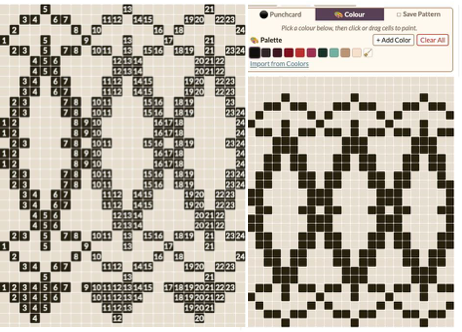 Patterns can be offset for longer repeats, i.e., brick, or shifted placements on the needle bed.
 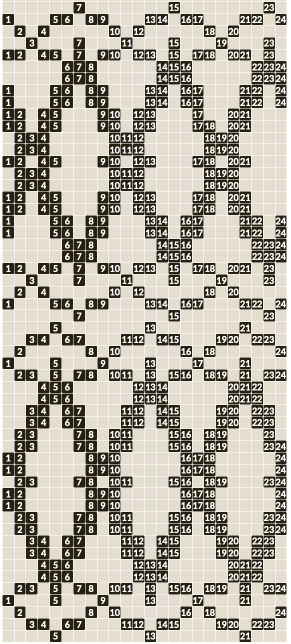 From a published chart to PNG or SVG with a preview of the file in repeat after it is converted at the bottom of the window to help visualize knit results: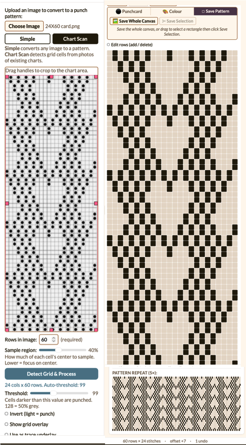
 the PNG can be saved, opened in a paint program, colors changed to BW, and scaled to the published repeat size, 24X60,
  and reduced, if preferred, to the smallest programmable repeat, 24X12
  Lace is fiddly to translate from chart to a working correct repeat because there are so few black pixels.
Over the years, my best solution when my usual go-tos failed with scaling the charts correctly, I resorted to opening a table containing the same number of cells and rows as the chart, taking a screen grab adjusted to the same size as the table, arranging it under the table, tracing the design, then continuing with the other necessary steps to obtain the needed PNG.
Out of habit, before attempting to go from chart to PNG, I tend to crop the image only to the stitch and row content, unskewing the file before cropping if needed.
The charts tested below began as very small greyscale screengrabs of lace charts from published sources.
The first attempt with the initial result is on the left, with a few pixels missing. The rows are visually edited in the center, and the selection to export the PNG is on the right.  The result of the corrected repeat in BW,
  and the 24X48 PNG.
 The inspiration charts with exterior description and content can be imported and cropped to the design repeat.
The generated result in this case was color-reversed automatically, which is an option that can lead to better results when using paint programs to convert lace designs from charts as well.
The selection, in turn, is made to invert, light=punch.
There are a few missing pixels as in the previous illustrations; it is an easy task to perform the edits and save the result before exporting the file.  A second lace repeat opens in the program default palette; the edited, added pixels are rendered in a different color when editing rows, and after saving the image, they are included in the tiled preview at the bottom of the card image.
  The same method was successfully applied to a short Fair Isle repeat chart, with no missing pixels.
Starting with an existing PNG, 24X42, 
 separated for DBJ with each color in each design row, knitting only once, and requiring that the first selection row be made from left to right.
  There were 2 options: a split version and a continuous one. The output can also be numbered (center), in this case for Brother machineswith starting row 7 up from the bottom.
The chart on the right is of a separation for the same PNG generated by me, which shifts the last single row down to the start of the design for the first selection row from right to left.  SVG files can be used by Cricut owners to produce ready-to-knit cards.
Those who do not have the tool available can open them in paint programs such as Gimp or ArahPaint, and they will print full size for potential tracing or otherwise serving as guides in hand punching the card.
The result of importing published DBJ color-separated designs leads to a possible exception for that use, unless the dots in the printout are filled for added visibility. 
 The draft for these explorations began more than a year ago, and turned up when I circled back to testing additional Gimp features.
Two Gimp updates in September 2026, the first, 3.2.4, and shortly after that, 3.2.6.
3.26 brings up this window on Macs when initially launched
 select deny and keep working. The request does not recur after quitting and relaunching the app.
Since I began using ArahPaint for developing my design repeats and color separations, there are only a few Gimp features I still use with any regularity, but as with other rabbit holes, I return to testing when driven by curiosity for how features I am not familiar with may work and have to offer.
I am presently working on a Mac with an M4 Chip, OS Tahoe, 26.6.2, keep circling back to Gimp 2.10, the last predictable and bug-free version I have tried for some of its features.
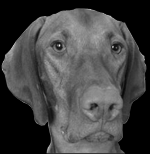
A recent tool shared in forums that is being tested for dithering and separating multiple-color large, non-repetitive designs, i.e., portraits, stirred my pondering on some of the possibilities to consider before executing them in DBJ on 4.5 mm home knitting machines.
The width of the repeats is, in theory, limited by the fact that such electronic machines have 200 patterning needles available.
The results are very low resolution, but can be improved by using a larger number of stitches and rows in the final piece.
Any image can be split into panels, followed by knitting them individually and joining them upon completion.
Color Palette choices may not match yarn color choices, and if they do, yarn thickness must be considered.
Printing a large-format version of the image in any color combination helps to visualize some of the potential results of knitting it, i.e., clarity and easy identification of smaller shapes, particularly in portraits.
A list of free online dithering programs, some with BW results only, may be found in the post on Online Pattern generators, hacks, free KM manuals, and more.
Splitting images
A fractal-inspired randomly chosen image,  with a change to indexed, 4-color Mode.
  Gimp does offer dithering options, but I prefer the results from using online tools.
Changes in the original aside, 4- color and 2-color BW dithered versions.  The colors in the triptych are deceptive. This is the BW PNG for the image on the above right, 192X248.
  It may be divided based on the knitting machine’s available storage memory, knitting method, or other personal preference or end use.
Go to the top menu and select Image > Guides > New Guide (by Percent).
Choose Horizontal or Vertical, and enter the percentage where you want the split line (for example, 33.33% or 50%). Click OK. Repeat to add all the necessary guides.
I typed in 33.33 for the first guide, 66.66 for the second, deciding to split the file into thirds.  Go to Image > Slice Using Guides (or Filters > Web > Slice in some versions).
Choose the destination folder, image format (i.e., PNG), then click OK or Export to save the individual pieces. 


 May 2025
Gimp March 16, 2025, has many menu and command changes, making some reinterpretation necessary when following previously published blog posts, and a quick tutorial.
I have encountered several issues with familiar functions; I have both this and the 2024 versions available.
Experimenting with transform/distort: you can access the Warp Transform tool by selecting Tools > Transform > Warp Transform from the image menu, clicking the tool icon in the toolbox,  or pressing the W keyboard shortcut.
The 2025 new icon.  Potential results.
  The method options.
  The brush size can be image size, rectangle, or ellipse-select to distort only.
 “Abyss” is a term used by GIMP developers for “data outside the input buffer”. The warp tool moves pixels from one point to another. Some pixels may come from outside the layer boundary. These pixels don’t actually exist anywhere, and therefore don’t have any associated color; yet, some color must be assigned to them.
The abyss area refers to the area outside the original layer boundary when pixels are displaced or warped.
“Abyss policy” has a drop-down list that allows you to fill empty areas in different ways:
None: this is the default option. Empty areas are transparent. An alpha layer is necessary for this option. Any pixel dragged inward from the outside boundary creates transparent space.
Clamp: each edge of the transformed layer stretches out indefinitely, so, for example, a pixel to the left of the layer boundary has the same color as the leftmost pixel of the layer with the same y coordinate. An alternative way to think of it is that each pixel outside the layer boundary has the same color as the closest pixel inside the layer boundary. The edge pixels stretch out in straight lines to fill the empty borders.
Loop: the transformed layer repeats itself in all directions, so that, for example, falling off the right edge of the layer takes you back to the left edge. The texture tiles seamlessly, pulling the texture from the opposite side as you warp.
Black, White: these options are similar to “none”, but use black and white for out-of-bounds pixels, instead of transparency.
A glitched effect pattern knit could be created on shapes, matching pixel numbers to those of stitches and rows in the planned piece.
Click and hold down the mouse in the center of the pattern to apply the twist effect.
Working on a 120X120 file:
 using the default settings: drag and release the mouse to draw across the full-size file in straight, circular, clock, or counter-clock movements, until satisfied,
  or use the rectangle or ellipse select tools to distort only the respective areas on a unaltered background
 pixel size of 28
 A seasonal BW image with its background color to alpha was superimposed on the simple brush-filled ground in the program’s default position, then on a warped >transformed one. The file is blanket size, 180X180 pixels, with no added clean-up.
  The skull was scaled to 59X84 pixels to preview a possible scarf design. With such reductions, some skull definition is lost while the striped background becomes more dominant
  October 2026: the pertinent, clearly presented information for the manual for version 3.2.6 https://docs.gimp.org/2.10/en/gimp-tools-transform.html#gimp-tool-transform
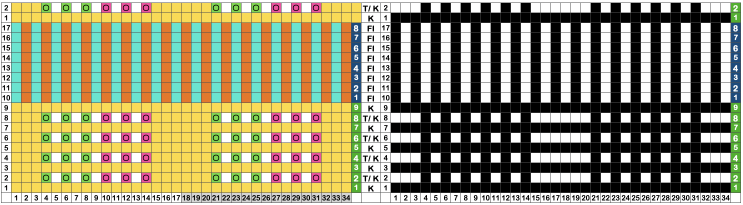
 Working in Mac Numbers, with the plan of starting on the easiest to track series of transfers, and then automating needle selection to guide movement of stitches and fair isle patterning.
Green cells mark eyelet locations after transfers to the left, magenta ones eyelet locations after transfers to the right.
Yellow cells represent knit stitches/ rows, and the other colors represent the fair isle striping.
For the Lace segments, the carriage is set to needle select, but no cam buttons are used. Needle selection is to guide the transfers, 3 to the left and 3 to the right.
Row 1 knits, row 2 hand-transfers the selected needles, and knit
Row 9, all needles are selected; it is the last row in the lace repeat stripe.
Rows 10-17 change the knit carriage setting for fair isle knitting.
Row 18, all needles are selected again, change the carriage function to knit, and begin another lace segment.
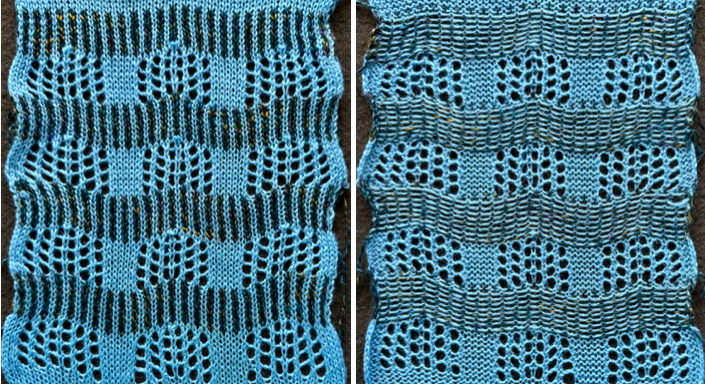
 The repeat needs to be 34 stitches wide for the fair isle pattern to line up properly, ie, 17X17,
 34X17, 6 eyelets per completed transfer row.

 Retaining the yarn and tension used for the lace segments and working on the same number of stitches, now adding transfers in the center of the knit blocks in the above swatch, plotting it out first in a spreadsheet, again marking left and right transfers.
  A tentative repeat to help with needle selection was developed, 28X19,
  but abandoned in favor of working the design strictly as a hand technique.
Custom needle tapes can be useful, and if a color printer is available, they can be designed with added colors before printing them.
Any tools used to help track actions can be marked as little or as much as one desires or finds helpful.
The next swatch in development on the machine:
Begin by selecting the same every other needle every row with the carriage set for fair isle using chosen colors for X rows.
With the carriage set for plain knitting, knit a row with the lace yarn.
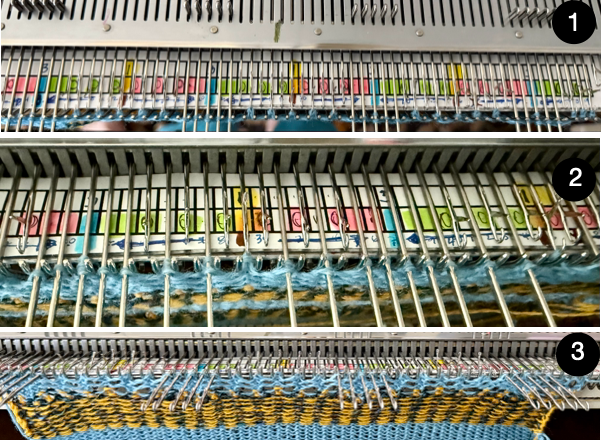
1-2: After transferring the groups of 3 needles in alternate directions on a center stitch that will hold 3 stitches, the needles were brought out to E position to make it easier to spot the places for the next series of eyelets. Their transfers mirror the triple transfers to the right and to the left; there will be a center needle between them that remains undisturbed throughout the piece.
3: When lace transfers are completed, at 11 rows, check for proper transfer stitch formation or dropped stitches visually, and that no needles were accidentally pushed back to the A position during transfers.
Bringing all needles forward to E will ensure that they all will knit with a last pass using the same yarn.
The knit carriage ends up on alternate sides.
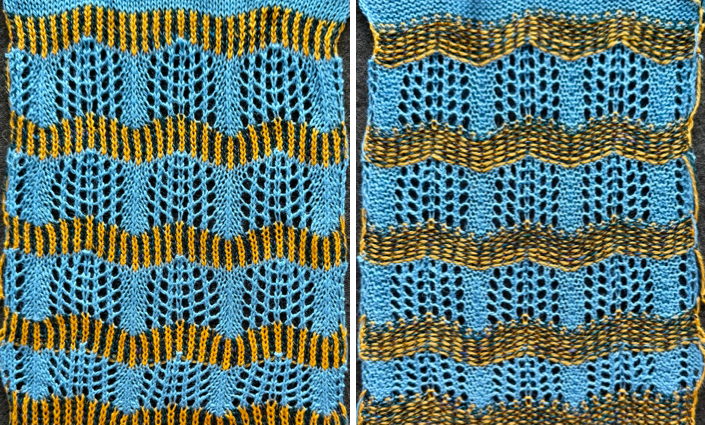 The convention in machine knitting when planning frequent color changes is to work with pairs of rows to allow travel to and from the changer or to manually change colors, always from the same side.
An 8-eyelet per completed transfer row design.

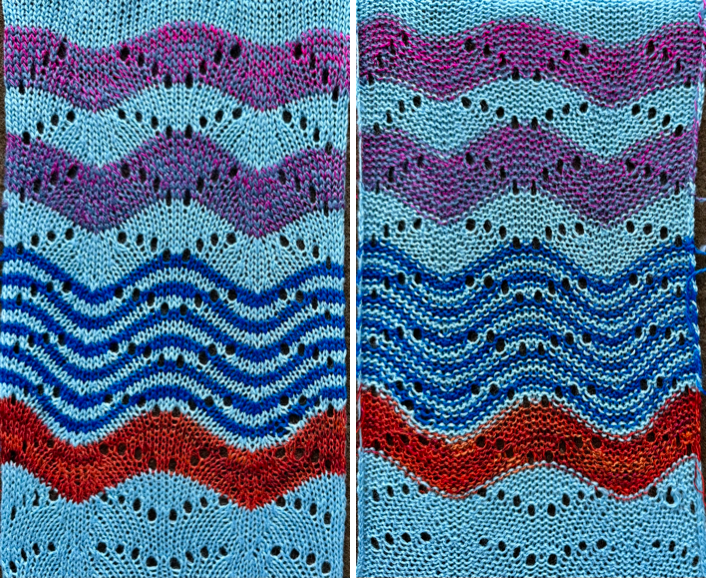
 A habit with years of traditional transfer lace: transfer left, knit 2 rows, transfer right, knit two rows. There are many possibilities in changing colors: here, first every two rows, then every 8 (full repeat segment).
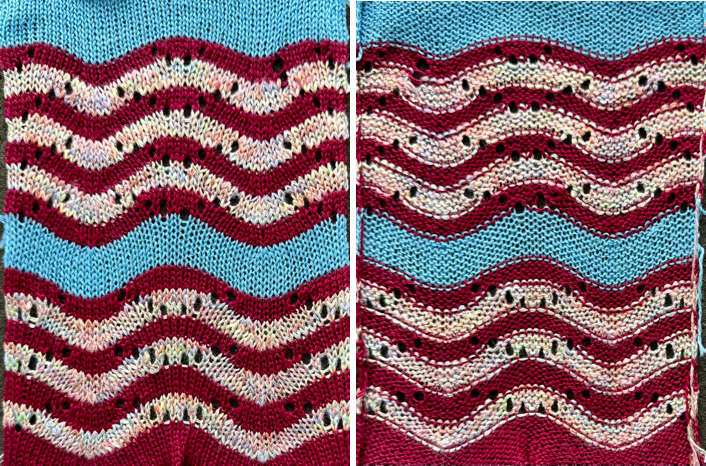
  With a repeat established, it is easy to explore adding or changing colors or techniques for different looks. Bands of plain knit (or FI) make the knitting grow more quickly.
  To eliminate the eyelets being divided between color changes, a shift to working with repeats containing odd numbers of rows was considered and briefly tested,
 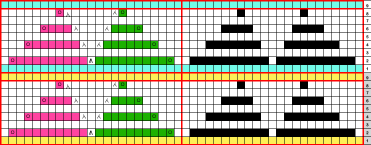 but, as often happes inDIY, sometimes it takes a while before a lightbulb moment to occur, such as looking at that transfer spacing again in each 8-row segment, and noticing that the series of transfers can occur within a single row before being followed by any number of knit rows.
Hints:
Use light colored yarns at the start, making it easier to check for proper stitch formation.
Knit 4 rows. Check that all latches are open before making transfers.
When making transfers for each segment sequentially in single rows, the stitches become stretched, a consideration in choices for yarn and tension.
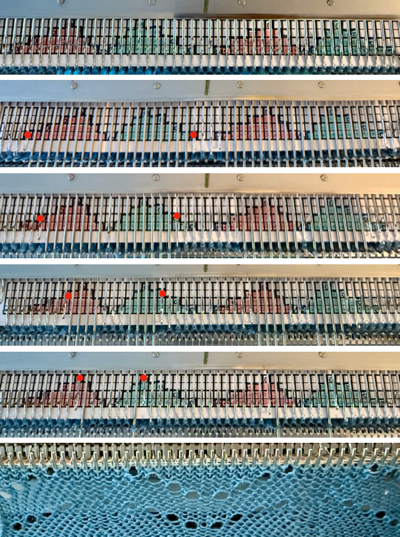
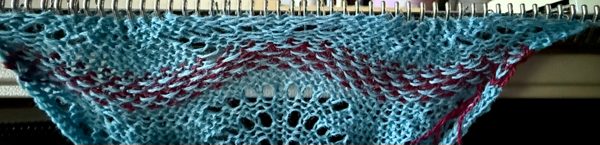 A view after the completed transfers, emptied needles out to E for illustration purposes.
 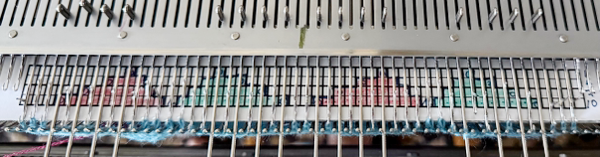 Bringing all stitches out to E before any knit rows provides an opportunity for a last visual check of stitch formation. Feel behind knitting to make certain loops/ stitches are not hung up on gate pegs.
In this swatch, 4 rows of hand-selected FI are added.
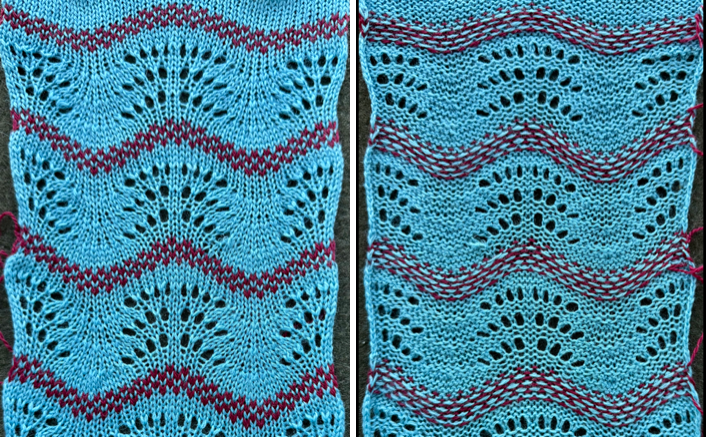 Knit row placements for color changes every 4 rows, and with centered eyelets.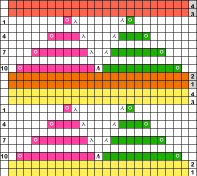
 A smaller horizontal movement using a first automated repeat: the LC makes 8 passes, followed by two knit rows (or more). Using contrasting colors aids in viewing the degree of movement.
 Repeated in width X2, 48X40, pairs of eyelets in each completed transfer row, the design required mirroring on the 930.
 These repeats for automated patterning are found in Kathleen Kinder’s Machine Knitting: The Technique of Lace.
Fantail, p. 120, 24X24, 4 eyelets in completed transfer rows, half repeats are slightly staggered,
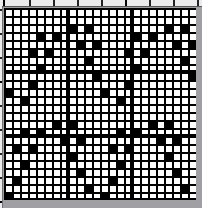

 required mirroring on 930.
In the test swatch, each 12-row LC transfer sequence is followed by 6 rows knit.
Transfers occur before the all-knit color change/ stripe.
Because yarn changes are made manually with the knit carriage, remember to close the gate in the Brother after the change to avoid dropping the piece to the floor on the next carriage pass.
Yarns can be cut or carried up the side.
Knitting through the first stitch on the right with the next color before knitting with it keeps the yarn lengths between rows even without added weights.
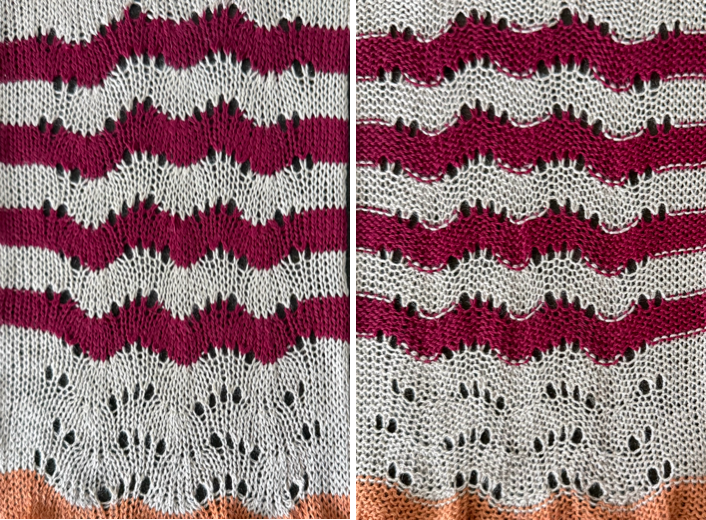 Feather and fan, reversed on 930, p. 58, 24X24, 6 eyelets in completed transfer rows.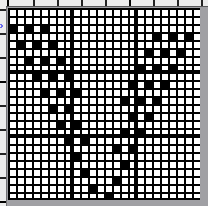

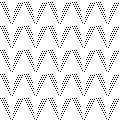 With 24 passes of the lace carriage before any knitting occurs, using a friendly yarn, and considering as many knit rows as possible between series of transfers, a two-color study is a start before either changing or adding colors, and perhaps FI stripes.
  Peacock plume, p. 58, 24X22, 8 eyelets on completed transfer rows.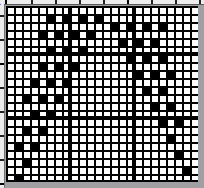

 The negative spaces do not relate to shapes secondary to the transfers, as was seen in some of the mesh transfer lace. The 22 LC passes occur before they are followed by two or more rows of knitting.
This was the fussiest design to swatch.
It is an exception to having no selection on the last LC pass to the left. Instead, the needles preselected on the last pass to the right are now transferred to the left as the LC returns there.
There are multiple transfers where pairs of stitches are moved, and stitches in transfer areas become stretched, requiring tension adjustments.
 Fifty stitches measure only 5.5 inches in width. Here, four rows of hand-selected FI were followed by 4 rows of color before making the lace transfers, which become nearly hidden; the horizontal wave also attains a different shape.
Changing yarn colors manually and knit carriage settings from knit to fair isle and back can offer lots of opportunities for knitting meeting the floor, as happened here.
Perhaps not a good choice for long pieces, but a technique to consider for borders/ edgings.
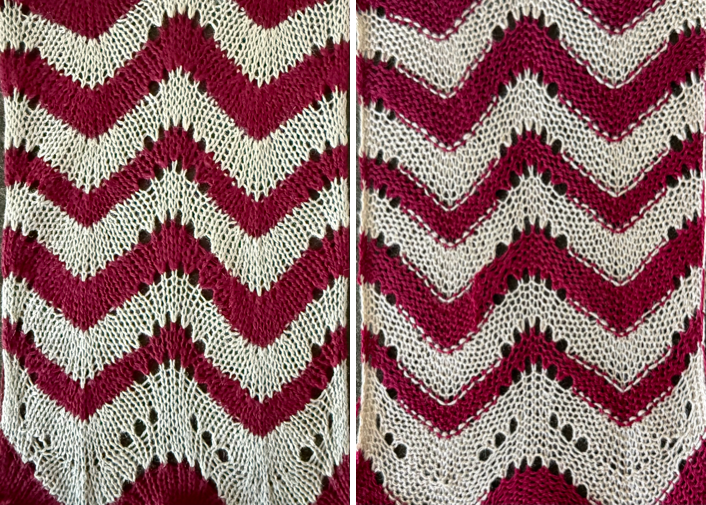
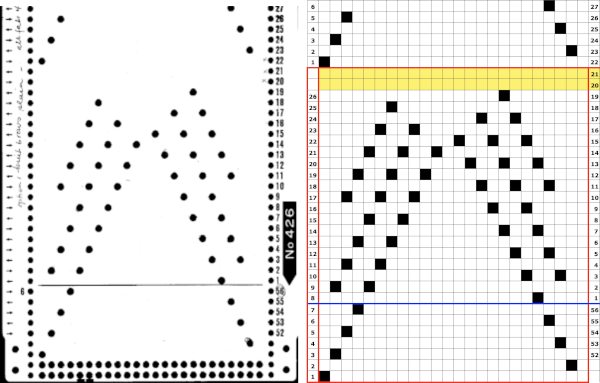
 This swatch uses Brother card 426.
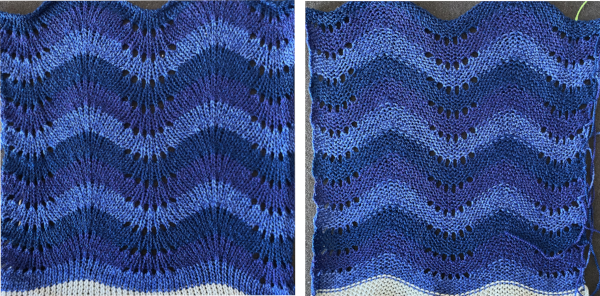
  The results evoke the multicolor hand-transferred swatch with 6 eyelets on completed transfer rows.
 ]]>
]]>The direction of transfers is marked in many of my charts with cyan cells for transfers to the left, and magenta for those to the right.
In these knits, large eyelets are created by side-by-side transfers.
Two empty needles in standard transfer lace may indicate an error, or that the repeat needs to be mirrored, while here, if in testing these patterns, only single stitch eyelets are produced, they indicate the same.
The transfers resulting in side-by-side needles on which loops will form with the next knit carriage pass are circled. The next group of transfer selections will anchor the side-by-side loops.
The repeats mentioned as used on the 930 may need horizontal mirroring, depending on the machine model or the download software.
The 32X24 design produces a vertical column of small eyelets on a field of larger ones. The eyelet placements are planned this way, but the full repeat, 32X24, needed mirroring horizontally for use on the 930
 The work on the machine: after the side-by-side transfer in opposite directions is made, there will be a loop on each empty needle hook.
  The usual second pass with the knit carriage repeats the loop formation, and the first pair of loops is dropped.
  The choice can be made to keep the dropped loops, forming visual ladders, or to lift them onto the hooks
  so that when they are secured by the next pair of transfers, the edges of the eyelets form cleaner rounds.
Here, the dropped loops are undisturbed.
A potential troublesome spot is those loops getting hung up on gate pegs, so a light color is useful when first experimenting. As the return to transfers is made, the transferred stitches will anchor down the side-by-side loops as new double transfers are executed.

 Vertical columns formed by small eyelets on a large eyelet ground, mirrored for use on 930 to this 32X24.
 Vertical column formed by large eyelets on a chevron ground, for knit side borders of any size, cast on a larger number of needles than in the width of your programmed lace repeat, here a 24X32 repeat is centered on 32 stitches, as used on the 930.
 Creating shapes: in Seasonal knits inspired by published repeats 2_hearts, 36X88,
  used a combination of large mesh and single transfers to create the heart shape.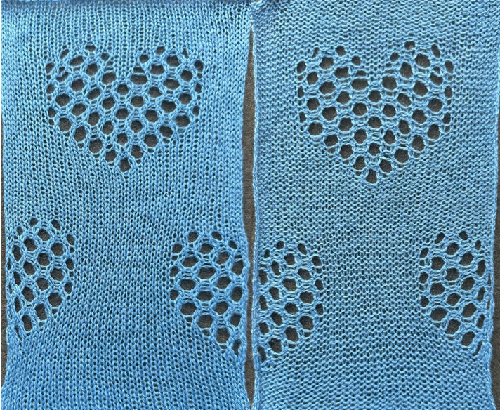
]]>
One random sample, 24X48, to match a repeat suitable for a punch card.
 Several fabrics visually break that pattern and are knittable.
Such instances may be found in single-bed “floatless” FI, aka mosaics and mazes.
This is a large-scale sample, 40X40.

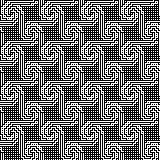 To knit it using the tuck stitch setting, the original design is color separated by color-inverting every other row in the original image, starting with row 2,
  and then doubling the result in height to 40X80.
  To knit as a tuck or slip stitch pattern, the last PNG was again color-inverted,
  programmed, and test-knit on 80 stitches, and for 120 rows.
The pattern section of the swatch, knit using the tuck setting, measures 11.5 X 9.75 inches and is reversible.
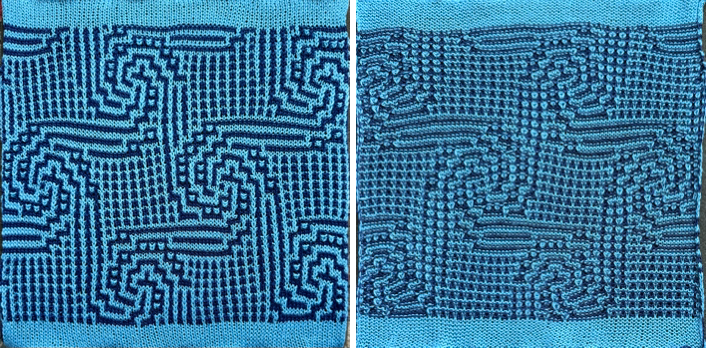 When working in every needle rib, if the ribber is set to knit every row, the stitches on the ribber will help anchor tuck loops formed on the top bed, which makes tucking many side-by-side stitches there, again meeting limitations in terms of the number of rows in Japanese models, dependent on yarns and design choices.
As in the case of single bed mosaic/ maze work, when using more than one color, each design row repeat must be repeated twice, and is knit with color changes every two rows.
The swatches are knit with the end needle selection on to ensure end stitches are knit on both beds; the result is the beaded appearance in the side edges.
The first and last needles in work are on the ribber, with it set to half pitch.
These fabrics have good drape and are very stretchy, so cast-ons and bind-offs in the final pieces must be considered.
A recent FB question on brioche knitting to achieve horizontal lines of color rather than vertical, prompted a return to sampling with a new repeat, 18X24.

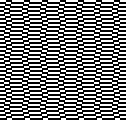 The process is fully automatic, while the brioche with designs formed by shifting vertical lines of color to create shapes evoking the far more complex hand-knit versions requires hand transfers as often as every fourth row.
In horizontal patterning, each color is present on each needle with each carriage pass, whether as a knit stitch or a tuck loop, so loop and stitch colors will mix.
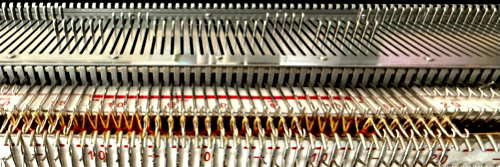
The work on the machine: after the first carriage pass is completed with either color moving from left to right, needles that are pre-selected forward will knit stitches, the ones in the B position will form tuck loops.
 After the carriages move to the left, repeating the same selections and preselecting for the next carriage pass, the color is again present in every needle hook as a stitch or a tuck loop.
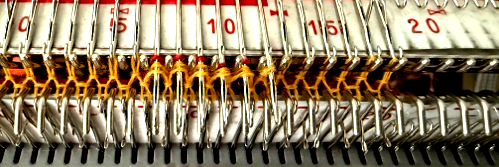
 The needles that are preselected forward to form knit stitches with the next carriage pass now hold the last stitch knit in the previously used second color, and 2 tuck loops from the recent, dictating limits on the yarn thickness used.
  The pattern was test-knit on 36 stitches.
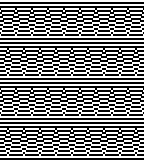
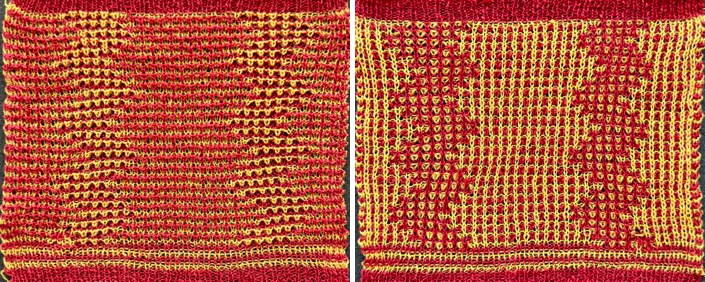 Introducing small diamond shapes in a brick arrangement, separated by solid color stripes, 16X80.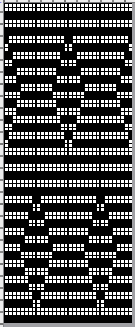

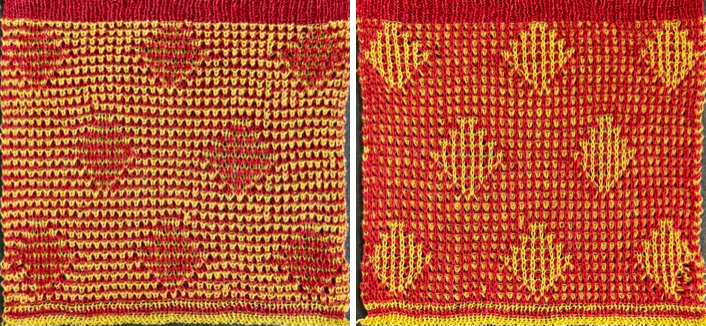
 The test was knit on 42 stitches.
Those dropped stitches, noticeable on the bottom right, were missed as can happen when knitting ribbed fabrics, where they may not be noticed until after several inches of work on the machine, or even after completion of the piece.
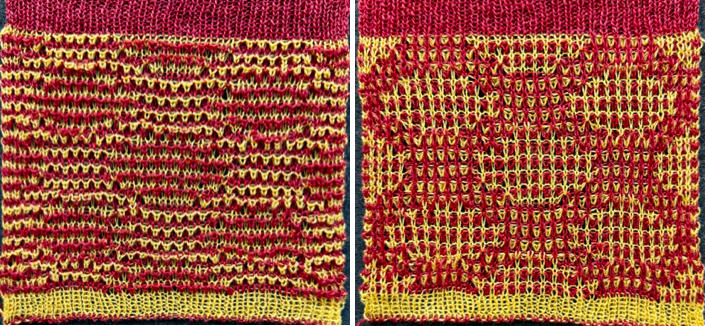
 This left me wondering about other geometric designs and how to make the process easier in DIY design development.
This 16X18 design was used frequently in previous posts on color separations.
 In color separation for mazes/mosaics, alternate rows beginning with row 2 are color inverted, then the result is doubled in height to 16X36, twice the height of the original.
 The repeat was tested on 32 stitches.
  To color-separate for DBJ, where each color in each design row knits twice, multiply the original X2 in height to 16X36,
  color invert every other row beginning with row 2, and multiply the result by 2, to 16X72, 4 times the height of the original.
 Seeking a visual break from the yellow, the blue was the third yarn tried to achieve a predictable stitch formation.
The same tension was used as in the red and yellow swatch, tested on the same number of stitches, 32, with a resulting pattern area 1.25 inches wider.
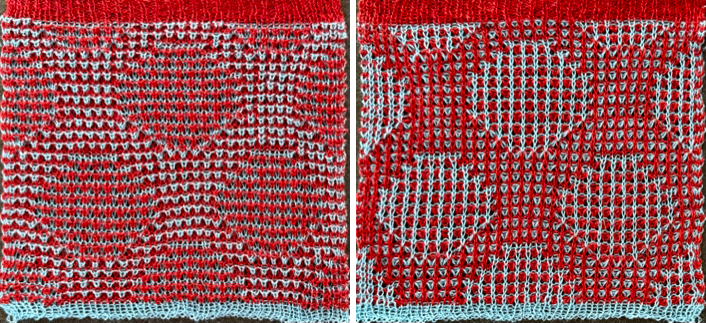 The design is more recognizable, and the separation method, automated by some download programs for 3 or more colors, may be worth a test run.
Returning to the skull shape slightly different from the one first explored in the 2022 post, planning to decrease the height of the overall repeat by color separating as for a mosaic or maze, the 58X82 starting PNG with every other row beginning with row 2, color-inverted 58X82,
  with rows of pixels added at the top and sides for more pattern surrounding the skull shape,70X90,
  doubled in height to 70X180,
 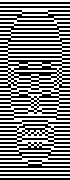 sampled on 70 stitches produced a more rounded skull than the repeat sampled in DBJ.
 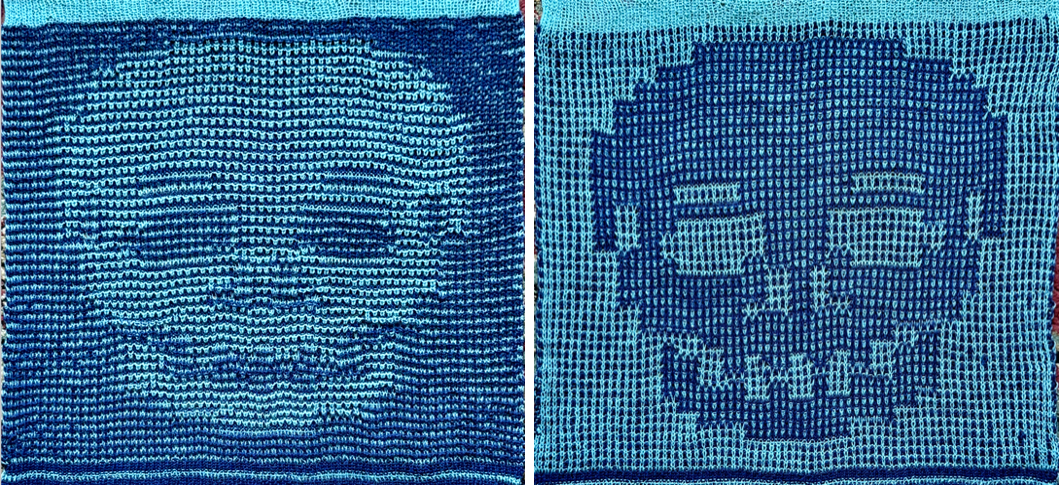 The DBJ separation would begin with the initial 58X82 file doubled in height to 58X164 before beginning the color inversions.
  Some of the related posts, in reverse chronological order
A review of brioche patterning 12/25
More shapes on ribber fabrics with tuck patterning, fantasy fair isle 2/22
a more challenging size, with horizontal striping, the knittable separation, 98X384 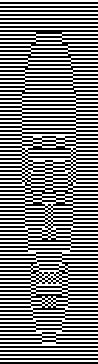
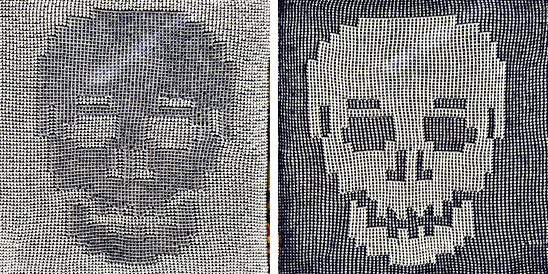 Geometric shapes on ribber fabrics with tuck stitches 3 9/21
Geometric shapes on ribber fabrics with tuck stitches 2; knitting with 4 carriages 3/19
Geometric shapes on ribber fabrics with tuck stitches 1 2/19
Fisherman and English tuck stitch rib 1_ checks patterns_ Brother, Passap 10/18
In November 2025, a similar approach was used to produce modified hexagons to achieve automated star shapes.

The basic steps
1: Put in hold the number of needles planned for the radius, cast on with waste yarn, and knit several rows in the planned needle arrangement.
2: Set the knit carriage for plain knit and holding, and with the project yarn, knit one row.
The outer edge of the final shape will be on the side opposite the starting side, where only one row is knit across all needles in work before short rows start.
The remaining rows are worked in pairs, bringing needles first out of and later back into work position, and when the desired number of segments is reached, knitting ends with a single knit row as well.
Visualizing composing a variety of geometric shapes,
 and with the addition of ladders and increasing numbers of segments to form shapes other than larger triangles,
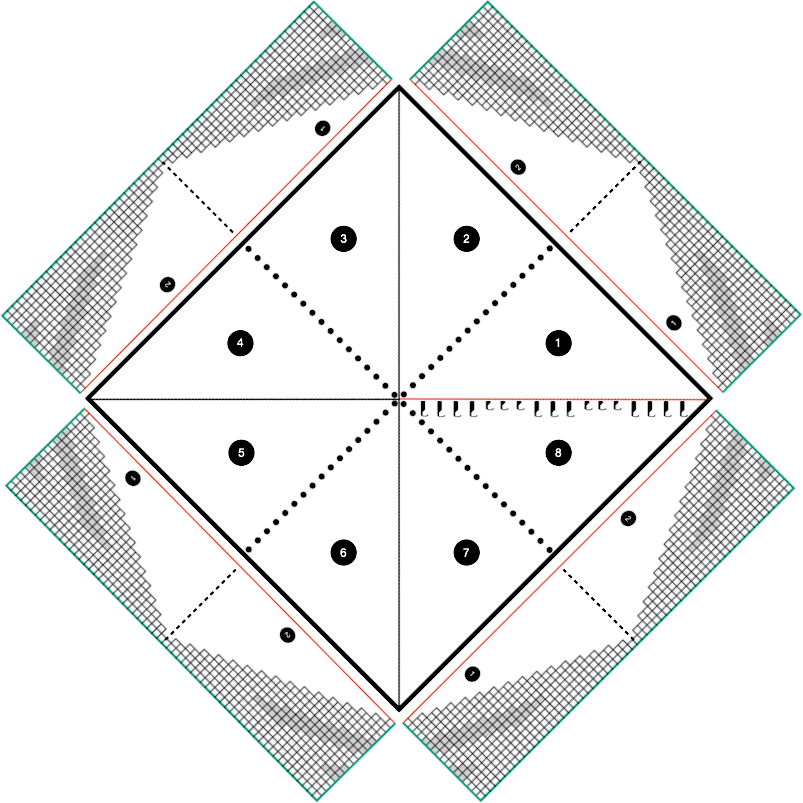 which requires some practice and patience.
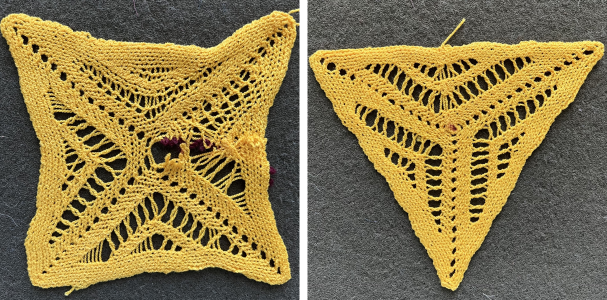 The printed 64-row repeat chart can prove useful in tracking the required hand techniques. It is intended to be followed with the first row executed from left to right, and then with holding pairs of rows from right to left. The chart can be mirrored horizontally and followed for operating from the opposite side. Grey cells represent needles out of work forming ladders and eyelets.
 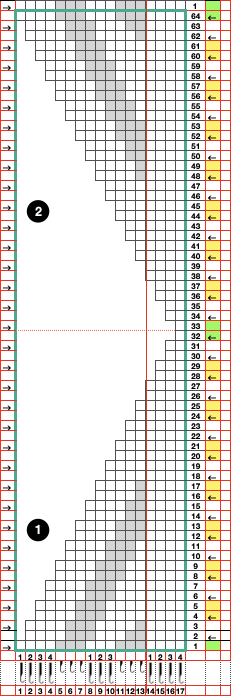 Eight segments form a square with sides that, depending on yarn choice, may bow toward its center and move away from straight lines.
Although the small ladder spaces add interest, they add tracking complexity in knitting and can be eliminated.
A yarn that can be blocked flat is a better choice than one that will spring back at the edges and curl.
Omitting the smaller shapes, in the bottom angle, as stitches are brought out to hold, to maintain a constant 4 needles in work, bring an empty needle into work on the left, and transfer a stitch on the needle to the right, with the last transfer on row 17.
To make a sharper turning point, 4 rows rather than 2 on single stitches could be considered before the return needles to work sequences.
On row 38, transfer stitch to the left, taking the needle out of work, forming a ladder. Repeat until 3 empty needles are reached, and maintain the ladder space size by transferring a stitch to the left, bringing an empty needle back into work on the right until the starting needle arrangement is reached, then reverse shaping.
To bind off, take off on waste yarn, rehang stitches, knit side facing, for both bottom and top edges, use your preferred bind off.
Steaming at least the top and bottom of the swatch before joining to make the stitches more visible when picking up may be helpful. I did not. Other bind-offs, including grafting, may improve the join.
Triangular versions in differnt color and yarn choices,
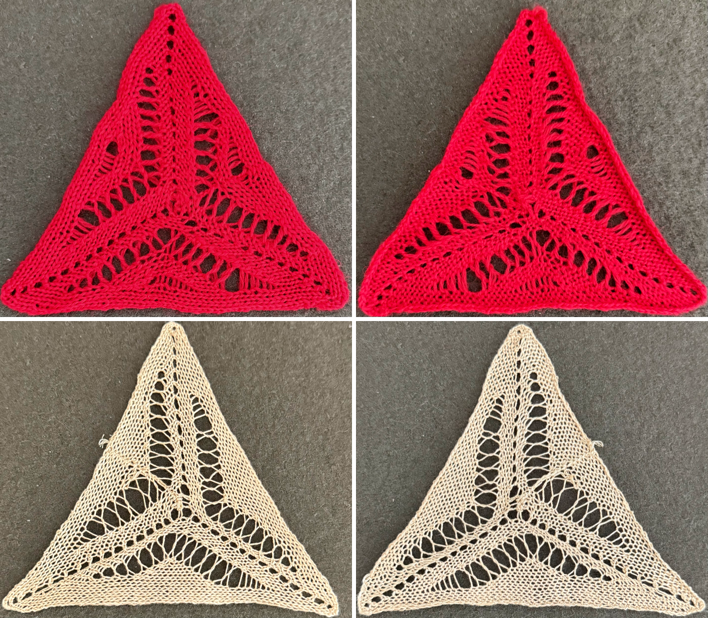 and an attempt at going square.
  In a last try at forming a square, the new, taller repeat has more constant stitch counts, making transfers and held stitches easier to ID.
The yarn used is a wool rayon, knit at tension 6, resulting in very small stitches around the outer edge, even with the use of weight on that side. This would become a consideration if one chooses to block the individual results or when joining multiple pieces together.
The revised 70-row repeat chart can be printed and marked as desired.
 This swatch was the first ever that I blocked to coax a more permanent, final square shape, using ribber comb wires. The base is an old, bulky felted swatch, my go-to when steaming/ pressing swatches.
  The result after resting, perhaps needing a few more small tweaks.
Historical posts
Lace meets slip and hold, goes around, ruffles, and edgings
Automated shapes across rows of knitting using slip stitch only 10/20
From automated lace edging pattern to doilies and ruffles 7/20
Lace edgings on Brother machines- automated with slip stitch 2 7/20
Lace edgings on Brother machines- automated with slip stitch 3/18
Return to circles, knit and crochet “pies” 1 2/17
Doilies: Lace meets hold and goes around 3/11
The “doilies”_swatches 3/11
Short rows meet circular shapes
Return to circles, knit “pies”, miters, and spirals 4 3/17
Return to circles, knit “pies” 3 3/17
Return to circles, knit “pies” 2 (round yokes and more) 3/17
Return to circles, knit and crochet “pies” 1 2/17
Revisiting miters, spirals, going square, round, and more 2/16
Return to circles, knit “pies”, miters, and spirals 4 3/17
Miters and spirals: visualizing, charting (and more) 3 7/14
Miters and spirals: visualizing, charting (and more) 2 7/14
Miters and spirals: visualizing, charting (and more) 1 7/14
Short rows_ balls, tams, 3D rounds 12/13
Back to that pie: a bit of holding 6/11
Knitting math and pies 6/11