The post The Capacitor 9 Beta is here appeared first on Ionic Blog.
]]>In addition, this Beta contains three changes that deserve some elaboration: how we are handling Google Play’s optimization requirement, what changes we made in response to npm 12’s install-script policy, and why we now boot iOS through SwiftUI.
R8 is on by default
Starting February 2027, Google Play requires at least 25% optimization, obfuscation, and shrinking for apps larger than 10MB. Failure to comply with this threshold will reduce your app’s visibility in Play search. In response, starting with this Beta, new Capacitor 9 projects have R8 (Google’s shrinker) enabled in release builds, and cap migrate enables it on existing projects.
In most scenarios, this is a largely invisible change; you get the same release build with a smaller binary.
However, plugins that haven’t been updated for R8 can fail silently in release builds. To test, build a release APK/AAB against the beta and check every plugin feature. If something fails in release that worked in debug, open an issue against the plugin’s repo.
If you are a plugin author
Verify your plugin is R8-safe. The core keep rules cover Capacitor APIs transitively; you don’t need to ship your own rules for them.
But if your plugin uses Room, Gson, Retrofit or similar, you own the keep rules for those libraries. Add a consumer-rules.pro file and wire it through consumerProguardFiles in your build.gradle (not proguardFiles which only scopes to your plugin’s test app). @capacitor/health-fitness is the pattern to copy.
Install scripts are off by default in npm 12
Minimum Node support for Capacitor 9 is Node 24, which supports npm 12. This means lifecycle scripts—preinstall, install, and postinstall—don’t run anymore unless the user opts in.
We’ve updated cap doctor and cap migrate to flag plugins whose install scripts npm 12 will skip.
For most apps, nothing changes. The place to pay attention is plugins that run any of those lifecycle scripts because they will break under npm 12 unless you opt in. If a plugin stops working after you upgrade npm, run cap doctor. It will tell you if a plugin’s install script was skipped.
If you are a plugin author
If your plugin’s install flow depends on an npm lifecycle script modifying files outside your package, move that work into Capacitor’s native integration path or document the step as something the consumer must do on their own.
SwiftUI is the iOS entry point
We are on a multi-step journey to update Capacitor’s iOS code base. We started that journey with UIScene adoption in 8.5. In this Beta, Capacitor’s iOS project now boots through SwiftUI instead of the legacy AppDelegate entry point. We’re looking to modernize further, with a migration to Swift 6 planned for Capacitor 10.
For existing projects, cap migrate rewrites the entry point. If you’ve customized AppDelegate.swift beyond the Capacitor defaults, review the migrated code to confirm your customizations carried over.
Capacitor 8 isn’t getting left behind
Not every team can take a major-version jump in a release cycle, so we’re backporting critical pieces of Capacitor 9 to make sure you don’t miss Play Store deadlines and can stay compatible with npm 12:
- The R8 keep rules ship in Capacitor 8.6.0 and the latest 8.x official plugin versions. Flip R8 on in a Capacitor 8 app and get the same optimization options.
- The npm 12 compatibility check in
cap doctorandcap migrateis also available as of Capacitor 8.6.0. UIScenesupport shipped in Capacitor 8.5.0 back in July with a migrator in the CLI.
Try the beta
Install the beta by running the following commands:
npm install @capacitor/core@9.0.0-beta.0 @capacitor/cli@9.0.0-beta.0
npx cap migrate
Please give it a run and report any issues on GitHub.
We are on-track to release Capacitor 9 general availability at the end of November.
As always, a huge thanks to the Capacitor community, especially those who helped test, submitted Pull Requests, and filed Issues during Capacitor 9’s alpha cycle. Please keep it coming during the beta!
The post The Capacitor 9 Beta is here appeared first on Ionic Blog.
]]>The post Community Spotlight: Ionic Theme iOS 27 appeared first on Ionic Blog.
]]>I’ve released v1.0.0 of @rdlabo/ionic-theme-ios27, a theme that brings iOS 27 design and motion to Ionic apps. It lets you build interfaces with Liquid Glass using familiar components such as ion-toolbar and ion-tab-bar.
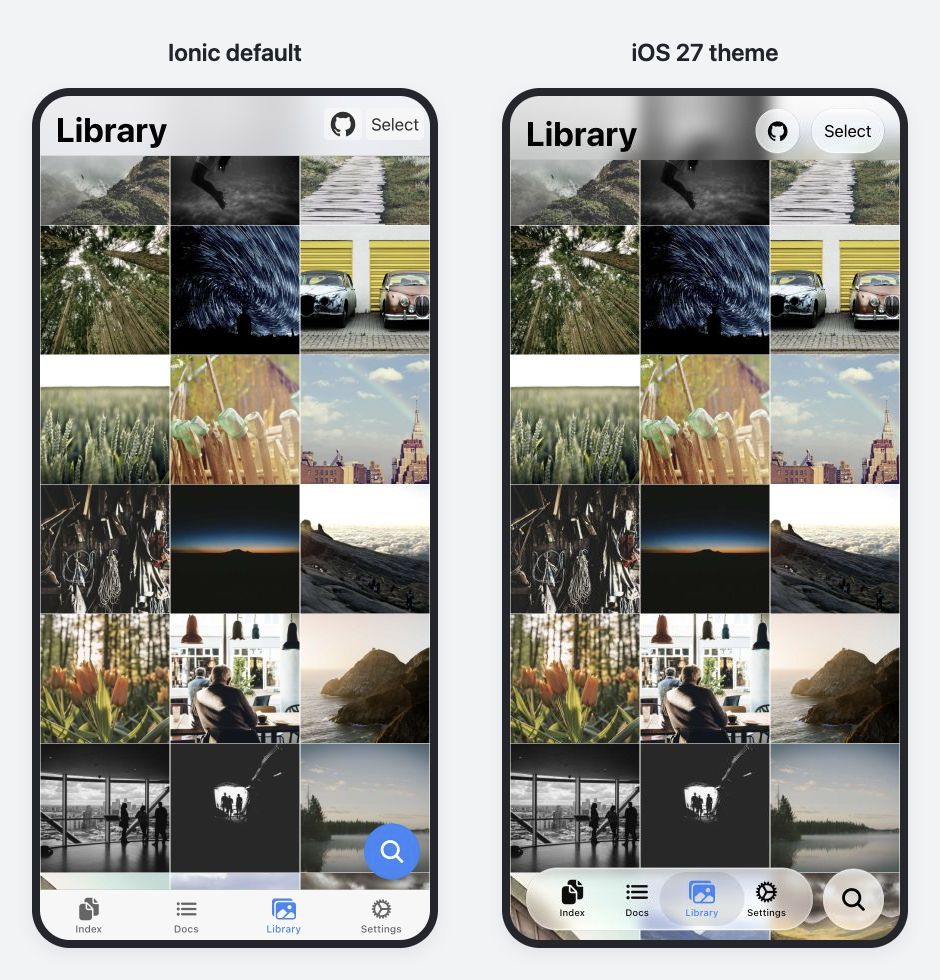
With the theme applied, the photos show through the toolbar, and the tab bar floats above the bottom of the screen. Both versions use the same Ionic components.
Start by opening the Library screen in the demo and trying the scrolling and tab interactions. This article walks through the theme changes and how to bring it into an existing app.
iOS 27 Design and Motion with Familiar Ionic Markup
Lists and buttons still use the familiar ion-list, ion-item, and ion-button components. There’s no need to replace them with components specific to the theme.
On the Settings screen below, the theme adjusts list corner radii and spacing, text sizes, and the shapes of buttons and search bars. It supports both light and dark modes.
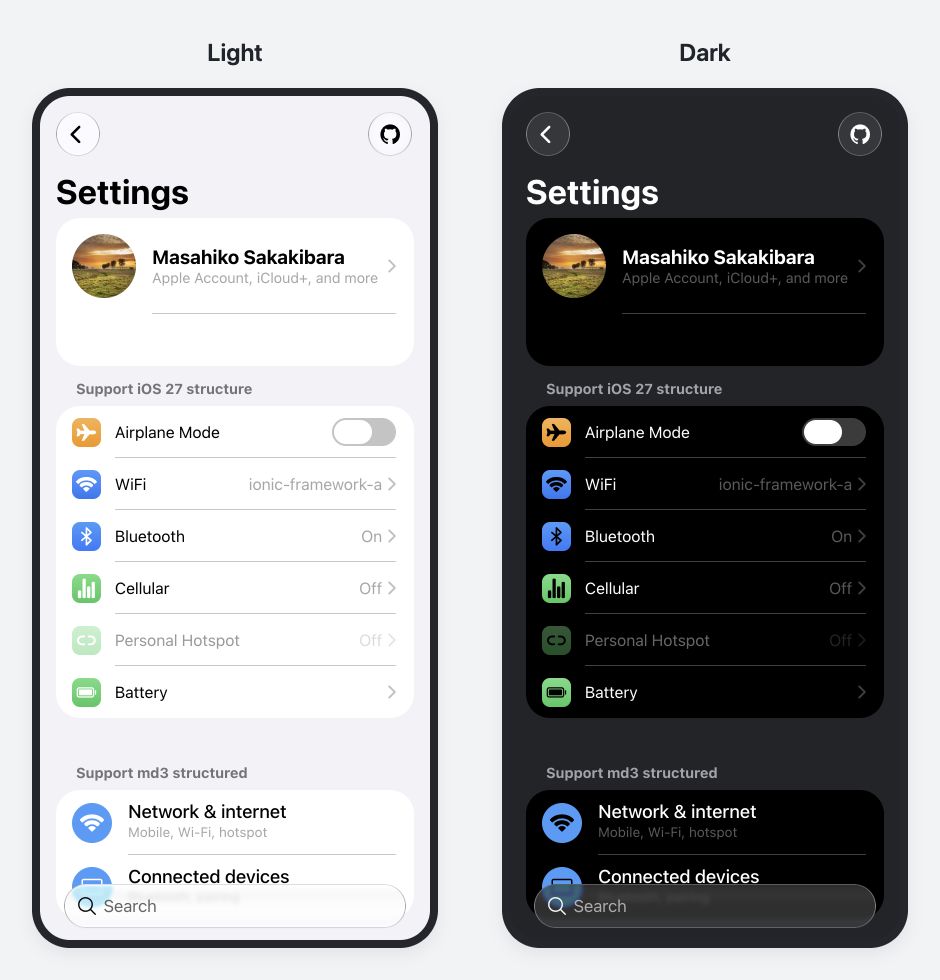
Compare the backgrounds, text, dividers, and glass effects.
The markup for a list looks like this:
<ion-list inset="true">
  <ion-item-group>
    <ion-item><ion-label>Notifications</ion-label></ion-item>
    <ion-item><ion-label>Appearance</ion-label></ion-item>
  </ion-item-group>
</ion-list>
With the theme applied in ios mode, this list takes on iOS 27 corner radii and spacing. Some markup needs to follow the structure the theme expects, such as wrapping items in an ion-item-group. The guide covers those requirements.
The theme also includes animations that respond to interaction. For example, with the additional tab effect enabled, pressing and dragging the selected tab makes a selection indicator shaped like a glass lens follow your finger. You can also try the spring motion when pressing buttons and the page transition animations in the demo.
Ionic components continue to handle selection state, keyboard interaction, and events when these effects are enabled. The additional tab and segment effects also respect the user’s reduced motion preference.
Separating Design Changes from Ionic Framework Updates
Many apps use Ionic’s default theme as the foundation for their own styling. If that foundation’s spacing and component shapes changed substantially with every OS redesign, it could break existing app designs. Apps with their own visual identity may have no need to follow the OS’s appearance in the first place.
This applies even within the same design direction of Liquid Glass. iOS 26 emphasized clear glass and soft edges, while iOS 27 adds darkened edges and stronger specular highlights for a stronger sense of depth. Component motion also differs. Continually replacing a single theme to match the latest OS would mean every theme update pushes substantial design changes into existing apps.
That’s why the iOS 26 and iOS 27 designs are available as separate themes, outside of the Ionic Framework, so teams can update the framework without also moving their app to a new generation of design. An app using the iOS 26 theme can evaluate and test the move to the iOS 27 theme as a separate change.
After applying a theme, you can still adapt it to your app using CSS variables or Sass, or load styles only for the components you need.
Resolving Styling Limitations with the Ionic Team
While building the theme, I ran into areas that couldn’t be adjusted with CSS alone. Some Ionic components encapsulate their internal structure and styles in Shadow DOM. If the element you want to style isn’t exposed through Shadow Parts or CSS custom properties, the theme may have no way to make the necessary adjustments.
I shared the designs I wanted to achieve and the limitations of the existing APIs with the Ionic team, who were happy to help. Adding the Shadow Parts and CSS custom properties I needed expanded what the theme could do.
The Ionic 8.8 release post also describes enhancements supporting community themes for Liquid Glass and Material Design 3.
Try It in an Existing App
The Web theme supports Ionic 8 starting with 8.8.1, as well as Ionic 9, and works with Angular, React, and Vue. You can adopt the theme and migrate to Ionic 9 on separate schedules. An Ionic 8 demo runs the same app.
Setup consists of installing the packages, loading the styles, and configuring animations as needed. The recommended setup uses both the iOS 26 and iOS 27 themes.
npm install @rdlabo/ionic-theme-ios26 @rdlabo/ionic-theme-ios27
Next, load the styles in your global Sass stylesheet. The recommended setup selects the iOS 26 or iOS 27 styles based on the CSS features the browser supports. These checks detect browser capabilities rather than the OS version. Browsers that meet neither condition retain Ionic’s default iOS appearance.
The setup guide includes the stylesheet imports, dark mode configuration, and animation options to pass when initializing Ionic. You can start with just the CSS to try the appearance. The guide also covers a setup that uses only the iOS 27 theme.
To preview the theme in a desktop browser, set mode: 'ios' in your Ionic initialization configuration. Also check the appearance and interactions on a real iOS device.
If you’re already using the iOS 26 theme, the migration guide details the changes to classes and CSS variables.
An Optional Feature That Projects Ionic UI into Native UI
For Capacitor iOS apps, I’ve also introduced Native UI Shell, an experimental feature that projects UI defined in Ionic into native UI.
It reads supported fixed controls, such as toolbar buttons and tab bars, from Ionic markup and displays them as native UIKit controls using Liquid Glass. Text, icons, and selection state stay in sync, and actions on the native controls flow back to the original Ionic components. Page content, scrolling, and routing remain in the WebView.
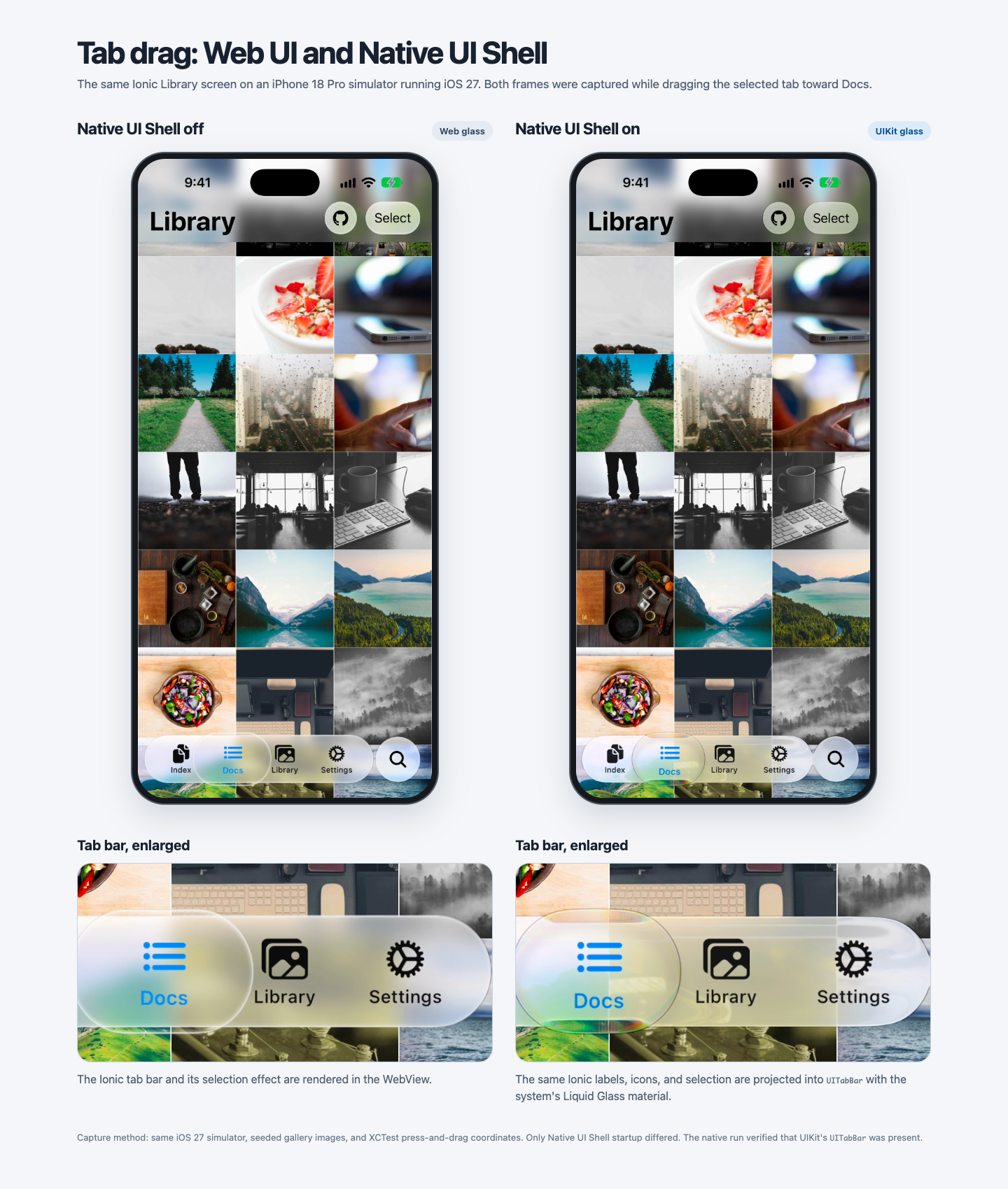
The Web theme and Web animations are stable in v1.0.0. Native UI Shell is an opt-in experimental feature, and its API and supported controls may change. Unsupported layouts retain their Web presentation.
The detailed Native UI Shell guide explains how it works, the design decisions behind it, the supported UI, and the setup process. If this approach interests you, I encourage you to read it.
Let’s Get Started
Start by applying the theme and trying a screen from your app in your development environment. The setup guide has the configuration you need to explore the appearance and interactions.
You can also combine it with @rdlabo/ionic-theme-md3 to apply iOS 27 design in ios mode and Material Design 3 in md mode.
If you find issues with component combinations or app styles that differ from the demo, please share them through GitHub Issues. Feedback from real apps helps guide the next improvements.
Bring iOS 27 design and motion to your app with the Ionic components you already know. If this design feels like a good fit for your app, I’d love for you to give it a try.
To follow Masahiko and the work he does for the Japanese Ionic community, be sure to check out his X!
Have a good story to share with the community? Get in touch, and we’d love to feature it in a spotlight post.
The post Community Spotlight: Ionic Theme iOS 27 appeared first on Ionic Blog.
]]>The post 🚀 Announcing a Partnership with Capawesome! appeared first on Ionic Blog.
]]>Ionic Commercial Sunset Timeline
As a quick recap, Ionic is winding down its commercial product offerings — including Appflow, Identity Vault, Auth Connect, and Secure Storage — with a final end-of-life (EOL) date of December 31, 2027.
It’s worth emphasizing that Ionic’s open-source core — Ionic Framework and Capacitor — remains completely free, fully supported, and unaffected by this change. However, if your applications rely on our commercial enterprise plugins, you’ll need to transition to alternative solutions before the EOL date.
Meet Capawesome: Migration Alternatives & AI Migration
Capawesome covers the key capabilities of Ionic’s commercial ecosystem, paired with a library of AI migration tools that help map your existing configurations:
- Identity Vault: Capawesome Capacitor Vault maps closely to the Identity Vault API, providing biometric authentication and encrypted key-value storage.
- Auth Connect: Capawesome OAuth maps closely to the Auth Connect API surface for managing OAuth 2.0 and OpenID Connect provider flows.
- Secure Storage: Capawesome SQLite provides comparable database functionality and pairs with Capawesome Secure Preferences for encrypted key-value storage.
- Appflow Builds & Store Publishing: Capawesome Native Builds handles native binary compilation and automated app store submissions in a familiar workflow.
- Appflow Live Updates: Capawesome Live Updates (@capawesome/capacitor-live-update) provides background code updates, channel management, code signing, and update logic.
Ready to Explore Your Options?
You can jump right into the Capawesome Migration Guide for a step-by-step walkthrough, or start a free 14-day trial covering Capawesome Cloud and their plugin SDKs to evaluate the transition with your team.
Early Migration & Prorated Refunds
If your team completes your migration ahead of your contract renewal, we’ll terminate your current Ionic agreement early and issue a prorated refund for any unused, prepaid service. Once your migration is complete, simply reach out to support@ionic.io to request your adjustment and refund.
Alternative: Self-Hosting via Maintenance Materials License
If your team prefers to maintain your current setup and take direct ownership of the plugin source code rather than migrating, the existing code is available under our Maintenance Materials License. Contact support@ionic.io if you’d like to explore this self-hosted path and execute the agreement.
The post 🚀 Announcing a Partnership with Capawesome! appeared first on Ionic Blog.
]]>The post The Road to Capacitor 9 appeared first on Ionic Blog.
]]>Our summer has been quite busy: we’ve got more to share about Capacitor 9, three new plugins to showcase, and we’re looking for your input to help shape the agentic future of Capacitor. But first, a heads-up about CocoaPods.
Reminder — CocoaPods goes read-only
On December 2, 2026, CocoaPods trunk goes permanently read-only — no new podspecs or version updates. The risk isn’t Capacitor itself, but the CocoaPods-hosted native dependencies your plugins pull in, like Firebase, Stripe, and other native SDKs. Once trunk freezes, those stop receiving updates too.
Capacitor has supported Swift Package Manager since Capacitor 6 and made it the default in Capacitor 8, so if you haven’t already, now’s the time to migrate your app to SPM to keep everything current.
What should a Capacitor MCP server do?
We’re exploring what a Capacitor MCP server could look like — a way for agents to pull real, accurate information about your project instead of guessing from whatever they picked up in training.
To build the right thing, we need to know where AI is getting Capacitor wrong today. We’re looking to answer the following questions:
- Where has AI been confidently wrong about your project?
- What do you still double-check by hand every time?
- What would you not want an AI touching without asking first?
Specific examples help us the most, something like “it told me Camera.takePhoto() takes a quality string instead of a number” gives us more to work with than a general feature request.
Head over to our GitHub discussion to share what you’ve seen, or vote in the poll if you’d rather just weigh in quickly.
Dial up three new plugins
Plugins for native contacts, native calendar, and health & fitness data have existed as OutSystems-exclusive plugins for a while. Over the summer we’ve opened them up as part of official Capacitor plugins.
Contacts handles searching, picking, creating, updating, and removing device contacts. Calendar covers creating, finding, modifying, and removing calendar events. And Health & Fitness connects to Apple HealthKit and Android Health Connect for reading and writing health and fitness data. All three have already been running in production inside OutSystems apps, and now the rest of the Capacitor community gets to use them too.
What’s coming in Capacitor 9
The long-awaited Cordova Optionality feature — the ability to exclude the Cordova-compatibility layer from your app builds — is in Capacitor 9 and we’re excited to finally ship it! Special thanks to those who have already tested it in our Capacitor 9 alphas and filed bugs. Those bugs led to some much-needed iOS modernization refactors: we’ve converted the remaining objective-C code in Capacitor’s iOS implementation to Swift, and will no longer be distributing Capacitor as an XCFramework. Those changes are mostly internal, but plugin authors will need to run our migration tooling to make sure Capacitor is pulled in correctly.
Mobile computing used to mean running a single instance of an app, and using apps one-at-a-time. With the advent of foldable and large-screen devices this is no longer the case, and we’re laying the foundation for multi-instance and windowed apps in Capacitor 9. We’re committed to shipping a compatibility floor to ensure your apps will work on these form factors, with support for window management APIs and per-instance bridge state as fast follows if they don’t make it in 9.0.
Our final focus for Capacitor 9 is making Capacitor itself easier for AI agents to understand — clearer docs, better-annotated APIs, and tooling aware when an agent, not a person, is behind the wheel. It’s early, but it’s the same thread running through the MCP server exploration above: building towards agents that work from real information instead of guesses.
That just about wraps up our summer here on the Capacitor team! Remember to plan to migrate off CocoaPods if you haven’t already, give the early alphas of Capacitor 9 a test run, and kindly let us know what you’d like to see in a Capacitor MCP server. You can follow our progress on Capacitor 9 on GitHub and we’ll be reaching back out towards the end of the year as Capacitor 9 approaches GA!
The post The Road to Capacitor 9 appeared first on Ionic Blog.
]]>The post Announcing Ionic Framework 9 appeared first on Ionic Blog.
]]>
This one took a while, and it gave us a chance to step back and listen to the people using Ionic. On GitHub, Discord, and the Developer Feedback Portal, we kept hearing the same things: better router support, broader Angular compatibility, and upgrades that don’t turn into a weekend project. The community was asking us to keep up.
So that’s what we did. Ionic Framework 9 brings React Router 6 and Vue Router 5 support, compatibility with Angular 18 through 22, updated Stencil output targets, richer Select options, font icon support, and a new migration tool to make upgrading from v8 easier.
Here’s what’s new in v9.
React Router v6
This was the number one request, and it’s done.
We’d looked at React Router 6 before and hit a wall. It changed how routing works, and our integration relied on parts of React Router 5 that no longer existed. Supporting v6 meant rethinking that integration from the ground up.
Ionic now owns how views are retained and cleaned up during navigation rather than relying on React Router’s internals. We chose to support v6 before moving to v7, which gave us the opportunity to validate the new approach and fix long-standing issues along the way, including swipe-to-go-back on parameterized routes. Because Ionic no longer depends on React Router’s internals and with the investment in comprehensive test coverage, moving to v7 should be a much smaller job. React Router 7 is next on our roadmap, and this new integration puts us in a much better position to support it.
The community also helped test early builds and surfaced issues we wouldn’t have found on our own. Thank you to everyone who took the time to test, report issues, and provide feedback.
Check out the Migration Guide for all the details.
Vue Router v5
Vue Router 5 support is here, and for most Vue Router 4 users, the upgrade is straightforward. Your routes, navigation guards, and IonRouterOutlet integration can stay as they are, with no runtime breaking changes.
There is one migration to be aware of: calling next() in a navigation guard is deprecated in Vue Router 5. The minimum supported Vue version also moves to 3.5.
We also added a Playwright test suite for the Vue Router integration, giving us better coverage today and making future Vue Router upgrades easier to validate.
Check out the Migration Guide for all the details.
Angular 18 through 22
Ionic Framework 9 supports Angular 18 through 22, giving Angular developers a straightforward path to the latest versions of Angular.
Zoneless Angular
Ionic Framework 9 defaults to zoneless change detection, which Angular 21 enables by default. Ionic’s lifecycle and overlay integrations work with zoneless Angular across all supported versions without requiring workarounds. If you prefer to continue using Zone.js, it’s still supported.
One thing to keep in mind when using zoneless change detection is that state updates triggered from asynchronous callbacks may need to explicitly notify Angular. For example, state updated after await modal.onWillDismiss() or inside a setTimeout() may require a signal or markForCheck().
The Zoneless Guide covers these patterns in more detail.
Angular 22
Angular 22 introduces a few additional changes to be aware of when upgrading. Components now default to OnPush, and ng update handles the migration for you. Angular 22 also requires TypeScript 6.0 and a newer version of Node. The last two changes in particular are why support for Angular 22 could not be released as part of v8.
Standalone is now the default import path, so @ionic/angular/standalone becomes @ionic/angular, and lazy imports move to @ionic/angular/lazy. The Ionic migration tool handles these import changes automatically.
Stencil Output Target Updates
Ionic’s components are built with Stencil, and its output targets package those components for use in React, Angular, and Vue applications. In v9, we’ve brought all three output targets up to date, including the latest bug fixes and improvements to type checking.
React and Angular move to their 1.x releases, and we’ve also invested in comprehensive test coverage across all three output targets. This gives us a stronger foundation for maintaining them and makes future updates faster and more predictable.
One important change to note: the React output target now requires React 18 or later. If your application is still using React 16 or 17, you’ll need to upgrade React before moving to Ionic Framework 9.
Selects with Rich Content
Select options in Ionic have always been limited to plain text. If your app needed a contact picker with avatars, a product selector with images, or options with a description below the label, you were left working around the component or building something from scratch.
In v9, ion-select-option supports rich content across all four Select interfaces: alert, action sheet, popover, and modal.
You can now use start and end slots for images, avatars, icons, and badges, along with a description property for displaying a second line of text.
Descriptions work out of the box. Slotted markup is opt-in through the innerHTMLTemplatesEnabled configuration and is rendered inside the Select overlay, while the closed Select continues to display the option’s plain-text value. Existing plain-text options continue to work exactly as they always have.
For more information, refer to the Select documentation.
Font Icon Support
A lot of teams use font-based icon libraries as part of their design system, whether that’s Bootstrap Icons, Material Symbols, Font Awesome, Phosphor, or another library. Until now, ion-icon was designed to work only with SVG icons.
In v9, ion-icon supports font icons alongside the SVG icons you’re already using. Load your icon library’s stylesheet, then place the font icon inside ion-icon.
Properties such as color, size, and RTL flipping continue to work as expected. When using font icons, use font-size to control their size rather than width and height, since font glyphs are sized through their font properties.
Ionic Framework 9 also supports slotted SVG content, giving you another option for using custom icons.
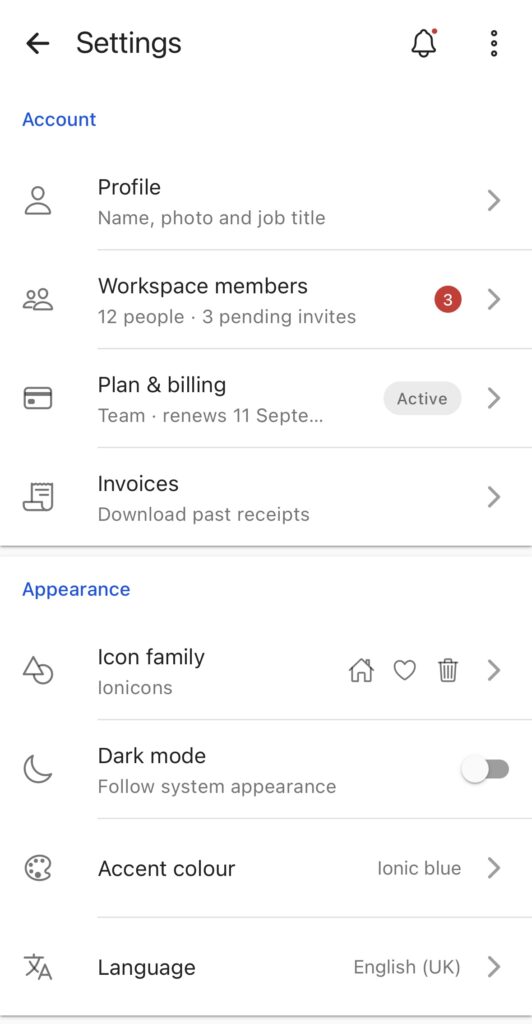
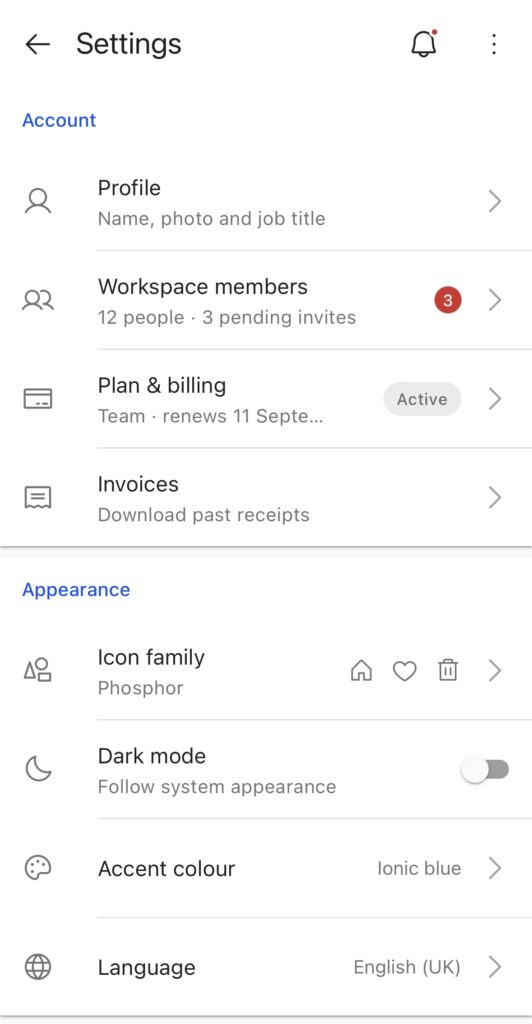
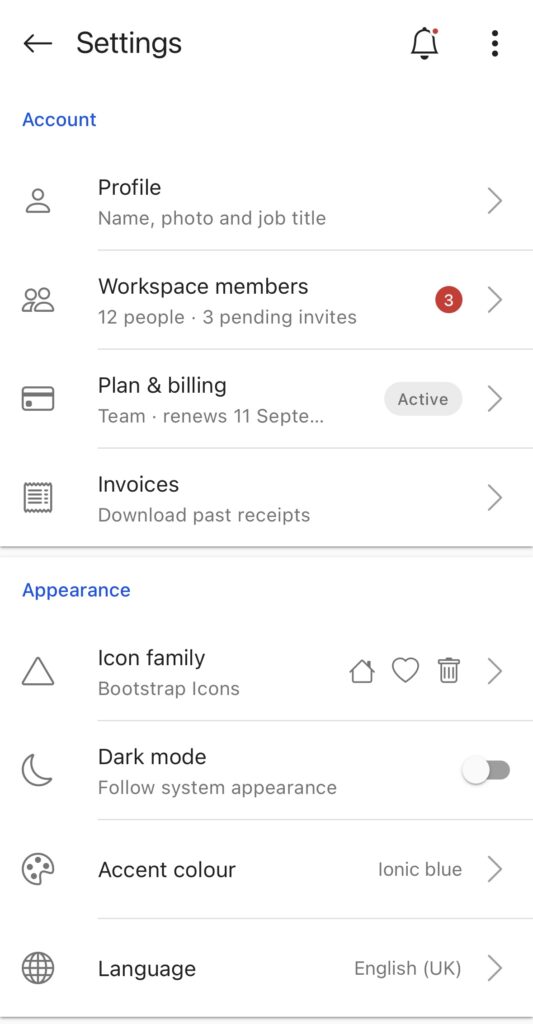
For more information, refer to the Icon documentation.
Migrating from v8? There’s a Tool for That
Major releases are also an opportunity to clean house. Ionic Framework 9 removes deprecated APIs and legacy patterns that have been around for years, and every breaking change has a documented migration path.
To make the upgrade easier, we’ve introduced npx @ionic/migrate.
The migration tool covers many of the v9 breaking changes and can automatically fix several of them, including the Angular import changes, the CSS ~ prefix, TypeScript and browser version requirements, and React Router’s component to element rewrite.
For changes that can’t be migrated automatically, the tool identifies what needs to change and points you to the relevant section of the upgrade guide. You can run --dry-run to see what the tool would change before anything is written, or use --check in CI to verify that your project is ready for v9. The tool also won’t run against a dirty working tree, so you can review the changes safely and use Git to undo them if needed.
What’s Next: Modular Ionic
Ionic Framework 9 is also a step toward what’s next: Modular Ionic.
Modular Ionic is focused on separating how Ionic looks from how it behaves, so you can mix, replace, or build on either layer independently. This will give developers more flexibility to customize Ionic and build experiences around their own design systems.
Modular Ionic is planned for Q2 2027.
It’s not part of v9 because we wanted to deliver the features developers were asking for now rather than hold them back for the next major release. And v9 isn’t the end of the road: between now and Q2 2027, we’ll continue working on issues, fixes, and improvements based on what we learn from the v9 release.
We’re excited about where this takes Ionic next.
Try It Now
Ionic Framework 9 is available now. Install the latest @ionic/angular, @ionic/react, or @ionic/vue to get started.
Coming from v8? Start with the Migration Guide, then run: npx @ionic/migrate
Keep the feedback coming through the Developer Feedback Portal, GitHub, or Discord. Tell us what landed well, what still needs work, and what you want to see next.
And to everyone who filed issues, left comments, kept asking questions, and kept building with Ionic Framework even when things were moving slower than they should have: this one’s for you. 
Questions? Find us on Discord, Reddit, or the Feedback Portal.
The post Announcing Ionic Framework 9 appeared first on Ionic Blog.
]]>The post Capacitor 8.5 Released appeared first on Ionic Blog.
]]>While UIScene adoption has been on our radar as part of Capacitor 9, we’ve heard the community and realized that we couldn’t hold off on adopting UIScene as you (rightfully) want to start testing your apps on the latest Xcode SDKs and iOS betas.
To address this we’ve released Capacitor 8.5, a breaking minor that adopts UIScene, along with documentation and tooling to help migrate existing apps. Changes in this version are iOS only, and for most apps the migration is one CLI command.
Update now, while iOS 27 is still in beta
First, the scope of Capacitor 8.5: this only affects apps built with Xcode 27. Published apps keep running on iOS 27, and so will anything you build with Xcode 26. Nothing breaks in the App Store when iOS 27 ships.
But until you adopt scenes, Xcode 27 is closed to you, and that’s the real issue Capacitor 8.5 addresses. You can’t build against the new SDK, so you can’t find out what else has changed with your app. Migrate now and you have the whole beta to work through anything that needs addressing. Wait, and you’ll find issues alongside everyone else with no runway.
Updating to Capacitor 8.5
For most projects, the migration CLI command is enough:
npm i -D @capacitor/cli@latest
npx cap migrate
The migrator adds what your project needs and wires it into the iOS project. If it can’t do that safely, it stops and tells you why. For those cases, use the capacitor-uiscene-migrator skill added to our list of Capacitor Skills that walks the manual path with your coding agent.
As we would for a major release, we’ve published a upgrade guide covering every change in detail.
Where this is heading
If you’ve been following updates to iOS and Android’s SDKs, it’s very clear that the future isn’t single full-screen apps —screens fold, apps get resized, two apps sit side-by-side.
Capacitor 9 is the first phase of that work: removing the single-window assumption so your app can be folded or resized, etc. UIScene adoption was always part of that. Capacitor 8.5 is us pulling that piece forward so you aren’t blocked in the meantime.
We’d like to thank the community for their continued support of Capacitor. A special thanks is in order for everyone who filed, commented, and shared workarounds while we caught up.
Update today and keep your iOS 27 testing moving. Then keep an eye out for Capacitor 9 towards the end of the year — you’ll have already done the first part.
The post Capacitor 8.5 Released appeared first on Ionic Blog.
]]>The post Introducing Official Capacitor Skills appeared first on Ionic Blog.
]]>The Capacitor team has been thinking about them — but we didn’t want to ship something just to say that we did. We have the luxury of moving methodically in this current AI landscape and we intend to use it.
To that end, we’ve settled on AI “primitives”: small, single-purpose tools that can be composed into bigger workflows. We don’t know what the final shape of Capacitor’s AI tooling looks like yet, so we’re starting with building blocks we can compose into whatever it turns out to be — serving whoever we’re building for: the open source community, OutSystems customers, or even ourselves, the Capacitor team.
Introducing official Capacitor skills
Agents can already stand up a Capacitor app on their own pretty well. Where they need a hand is the hard part — plugins. Native code on both platforms, project configuration, behavior normalization, a single web API; plugin development is the part of Capacitor that asks the most of you and where good guidance pays off most.
So today we’re launching a repo of official Capacitor skills, starting with three primitives centered around plugin development:
capacitor-plugin-generatorturns a description into a working first-pass Capacitor plugin, built on best practices and insights from the Capacitor team.cordova-plugin-migratorhandles end-to-end Cordova-to-Capacitor plugin migration. Plugin-level only; it won’t migrate an entire app.build-actions-generatorwrites plugin build actions for OutSystems Developer Cloud (ODC) Capacitor apps. This one is OutSystems-specific and does nothing in a standalone Capacitor app.
That last one is for our OutSystems customers; the other two are for anyone building Capacitor plugins. We use all three ourselves.
Install them for your agent of choice with skills.sh:
npx skills add ionic-team/capacitor-skillsWe’ll be releasing more skills as we find the use cases best suited for us, so bookmark the repo.
Capacitor’s approach to AI in open source
The best thing about open source is that you don’t have to wait on us, and you haven’t. Plenty of Capacitor AI tools have already appeared, including two sizable skillsets from CapGo and CapAwesome. If you want help wiring AI into your workflow today — outside of what we launched — those are worth a look.
That’s open source working the way it should, and it’s exactly what shapes where we spend our effort. Where the community can build something, we want them to — we’re not here to reinvent the wheel for its own sake. We’ll take the other half: the tooling that takes deep knowledge of how Capacitor works, or that reaches into the internals of the framework itself. That’s where being first-party matters the most, and it’s the work we’re best positioned to do.
Beyond these skills, what comes next is wide open and we’d rather shape it with you than guess. So tell us, what are you reaching for when you build Capacitor apps with AI? What’s missing? Let us know on Canny.
The post Introducing Official Capacitor Skills appeared first on Ionic Blog.
]]>The post Capacitor Showcase – LocalLLM appeared first on Ionic Blog.
]]>In our first installment of Capacitor Showcase, we are introducing Oakline Bank.
Oakline Bank is a fictional digital-first regional bank built as a Capacitor demo application, showcasing how modern mobile banking experiences can be crafted with a single cross-platform codebase targeting both iOS and Android. The app demonstrates real-world patterns you’d find in production fintech apps: account dashboards, transaction histories, and, appropriately timed in our current AI craze: an AI-powered in-app assistant called OakBot.
The (fictional) team realized, when a user asks OakBot “What’s my account balance?” or “Summarize my spending this month,” answering that question requires sending real financial data to an AI model. With a cloud-based model (OpenAI, Anthropic, Google, etc.), that data leaves the device and travels to a third-party server, which would be a significant concern for any financial institution.
In 2026, there is now a way to solve this problem on modern mobile devices – on-device AI.
Introducing Capacitor LocalLLM
Capacitor LocalLLM is a native Capacitor plugin that brings the power of on-device AI directly to your iOS and Android apps. By using both Apple Intelligence and Android’s on-device AI frameworks, it gives developers a simple, unified TypeScript API to send prompts with conversation session support, all while respecting user privacy and working completely offline. Whether you’re building a smart assistant, a creative tool, or an offline AI-powered bank chatbot, LocalLLM makes it as straightforward as:
const response = await LocalLLM.prompt({
  sessionId: chatSessionId,
  instructions: instructions,
  prompt: userMessageText,
  options: {
    temperature: 0.7,
    maximumOutputTokens: 256,
  },
});
With that you get a cross platform prompt interface without needing worry about the intricacies of local AI models on both iOS and Android, or without having to research and provide your own custom models.
Grounding a Local LLM with Private Data: How OakBot Works
On-device language models are trained on vast general knowledge, but they have no awareness of anything specific to the user running them. To be useful as a banking assistant, OakBot needs to answer questions like:
- “How much did I spend on dining this month?”
- “What’s my current balance?”
- “Have I paid my Apple Card bill recently?”
None of that exists inside the model’s weights. The only way to make it available is to inject it into the context window at inference time: essentially telling the model what it needs to know before it answers. Here is how:
- Fetch the relevant data from the local source (in this case, the app’s in-memory transaction state loaded from the fake API)
- Serialize it into natural language that the model can reason over
- Inject it into the session context before the user’s first message
In OakBot specifically, this happens in formatTransactionHistory(), which transforms structured Transaction objects into a plain-text block:
Spending by Category (all time):
  - Housing: $7,400.00
  - Groceries: $1,823.45
Recent Transactions (last 60):
  - ...
  - 2026-03-10: Whole Foods Market (Groceries) - -$87.43
  - ...
Total transactions on record: 160
  Current balance: $3,241.18
That block is then passed to LocalLLM.warmup() as the promptPrefix — a special parameter that pre-loads the context into the session before any conversation begins. This is the critical handshake between the app’s local data and the inference engine, and because it goes through the plugin’s abstraction layer, it works the same way in code regardless of whether the user is on iOS or Android.
await LocalLLM.warmup({
  sessionId: chatSessionId,
  promptPrefix: systemPromptWithTransactionContext,
});
Why not JSON over Plain Text?
Token efficiency actually favors natural language here. Each JSON object repeats field names for every entry. Compare:
{"date":"2026-03-10","merchant":"Whole Foods Market","category":"Groceries","amount":-87.43}vs:
- 2026-03-10: Whole Foods Market (Groceries) - -$87.43The natural language line is noticeably more compact. Multiply that across 60 transactions and the difference is meaningful on a tight context budget.
Small on-device models reason better over natural language. The models running via LocalLLM (Foundation Models, Gemini Nano) are far smaller than cloud models. Larger models like GPT-4 handle JSON structure reliably; smaller on-device models can stumble on it. Natural prose plays to their strengths.
To experiment with the Oakline Bank demo app yourself, check out the app source here, and run it on your own modern device that can support running on-device AI models.
LocalLLM will be launched as a Capacitor Labs plugin initially as the first party on-device AI story is still in flux, especially on Android, however feel free to submit feedback, bug reports and suggestions for future directions we can take the plugin.
Community Mentions
Capacitor LocalLLM isn’t the only solution the Capacitor ecosystem for local AI usage. Check out some related efforts from the Capacitor community below
More Coming Soon
Stay tuned for more installments of the Capacitor Showcase series, as we continue to explore what can be built with Capacitor.
The post Capacitor Showcase – LocalLLM appeared first on Ionic Blog.
]]>The post Capacitor 9 Starts Here appeared first on Ionic Blog.
]]>This update covers two pieces of that work: the first Capacitor 9 alpha for early testing, and improved compatibility for Cordova plugins adopting Swift Package Manager through Cordova iOS 8.
Capacitor 9 Alpha 1 is out — and we need testers!
Capacitor 9 Alpha 1 is now published!
The headline change in this alpha is that Cordova is now optional.
Historically, Cordova support has been bundled and part of the Capacitor runtime even for apps that never used Cordova plugins. In Capacitor 9, that changes. Cordova is no longer pulled in by default — it’s only included when you need it.
For apps that do not use Cordova plugins, this means less native code in your iOS and Android projects, and less initialization work at startup.
This is one of the most important runtime changes made to Capacitor, and we need real-world feedback before Capacitor 9 reaches GA.
If you have a project you can test with the alpha, these plugin setups are especially helpful:
- Only Capacitor plugins: does the app build, install, and run cleanly without Cordova being pulled into the runtime path?
- Both Capacitor and Cordova plugins: do both plugin types continue to build and behave as expected?
- Only Cordova plugins: does Cordova plugin behavior remain unchanged? This setup may be less common, but it is valuable for finding edge cases.
To try the alpha, install the Capacitor packages using the next tag using your preferred package manager. For npm projects:
npm install @capacitor/core@next @capacitor/ios@next @capacitor/android@next --legacy-peer-deps
npm install --save-dev @capacitor/cli@next --legacy-peer-deps
The --legacy-peer-deps flag helps avoid npm peer dependency conflicts while testing this alpha. If you use pnpm, Yarn, or another package manager, use the equivalent command for your project.
Please file any bugs you find on the Capacitor repository with the label cap9-alpha.
Cordova plugin SPM dependencies now resolve in Capacitor
Cordova iOS 8 introduced support for declaring Swift Package dependencies within a Cordova plugin. Capacitor did not previously support those declarations when a Cordova plugin with child SPM dependencies was used inside an SPM-based Capacitor iOS project.
Now it does — with fixes available in the latest Capacitor 7 and Capacitor 8 releases.
When a Capacitor iOS project uses Swift Package Manager, Cordova plugins that declare SPM dependencies through the Cordova iOS 8 format will now have those dependencies resolved automatically.
What’s next?
This is the first public step in the Capacitor 9 cycle. Alongside this work, the team is updating iOS to support Scene UI, exploring how Capacitor needs to flex for newer device form factors, and investing in AI-assisted tooling and community-facing AI skills.
Try the alpha, open issues for anything unexpected, and keep an eye on next as Capacitor 9 continues to take shape.
The post Capacitor 9 Starts Here appeared first on Ionic Blog.
]]>The post Help Us Define The Direction Of Ionic! appeared first on Ionic Blog.
]]>Every developer has feedback to give.
And yet… there always seems to be a disconnect between the two?
Well we’re aiming to solve that problem and we can use your help to define the roadmap of Ionic products!
We’re thrilled to announce the launch of our new, dedicated Developer Feedback Portal, as a way to make your experience of contributing ideas as seamless and effective as possible. We know that the developers using our tools are our most valuable resource, and your insights directly shape the future of our product.
This launch is more than just a new form—it’s a commitment to transparency, efficiency, and ensuring every piece of constructive input you provide lands exactly where it needs to go that the community has been asking for.
Why a New Feedback System?
Our previous methods, while functional, often lacked the structure needed to quickly route complex technical suggestions to the right engineering teams or streamline development. We heard your pain points:
- Feedback felt like a “black hole”: It was hard to track the status of a submission or know if it was acknowledged across numerous platforms and just got lost in the noise.
- Difficulty categorizing input: Feature requests often ended up in the same queue or duplicated, slowing down triage.
- Lack of direct collaboration: There was no easy way for our product managers or engineers to ask quick clarifying questions about your specific environment or use case.
The Developer Feedback Portal addresses these issues head-on, creating a two-way street for product development.
Key Features of the New Portal
- Structured Submission Template
- When you submit feedback you’ll choose Feature Request.
- Real-Time Status Tracking and Transparency
- Members of the Ionic community will be directly able to see what suggestions are trending and what items are being prioritized as well as see our roadmap for future releases! While we can’t guarantee that everything will always go to plan we want to be more transparent about what we’re working on.
- Direct Collaboration & Commenting
- If someone from our team needs more context—for instance, a snippet of code, a specific log file, or a quick clarification on your workflow—they can comment directly on your submission. You’ll be notified immediately and can respond within the portal, accelerating the investigation phase.
- Public Idea Upvoting and Prioritization
- While we can’t always share every part of the roadmap, most feature requests are visible to the community. This allows you to browse existing ideas and upvote the ones you deem most critical. This collective signal helps our product team prioritize features that have the highest demand and impact across our developer base.
How to Get Started
Accessing the portal is simple:
- Navigate to https://outsystems.canny.io/ionic-feature-requests
- Sign-up for an account
- Select the board you want to add feedback to (either Framework or Capacitor)
- Create a post
There’s a lot of work ahead of us but we are incredibly excited about having a centralized place for the community to share feedback and present a roadmap as the feedback comes in. The Developer Feedback Portal is built to empower you, our developer community, to become integral partners in the evolution of our product. Your insights power our innovation. We look forward to seeing your submissions!
The post Help Us Define The Direction Of Ionic! appeared first on Ionic Blog.
]]>