Egg, October 22, 2026: Those who visit our page from time to time usually find a new post in this section every month. This time, it’s a bit different. The last post was at the end of May, and now it’s October 2026. What happened? Let’s just say we had, or are having, a hot summer. This post will tell you about what happened during that “hot” period.

Local AI models on the ArchivistaBox
This spring, the next generation of ArchivistaBox, which allows users to run AI models locally, was released to the community. Over the past few months, various models have been extensively tested internally. The resulting insights will be incorporated into our products. In the meantime, local AI is available in the form of ollama and ComfyUI.
In conversations with many customers, we learned that while AI is a very current topic, hardly anyone considers running AI locally. However, on-premise AI has significant advantages: First, the costs are amortized after a very short time, second, all data remains local with you, and third, there are no local dependencies on the corresponding cloud offerings.
The final point is crucial not only because prices can be raised significantly at any time, but also because these offerings can be ‘discontinued’ at any time. For example, OpenAI’s video AI, Sora, recently disappeared completely. With open, local AI models, this dependency does not exist. You decide for yourself whether and when to deploy new models – or not.
Furthermore, it should be noted that local AI now delivers extremely good results in speech recognition, translation, image analysis, image, audio, and video generation, and related post-processing. You can either run these models yourself with the GPL version of the ArchivistaBox, or we would be happy to set up the corresponding systems for you.
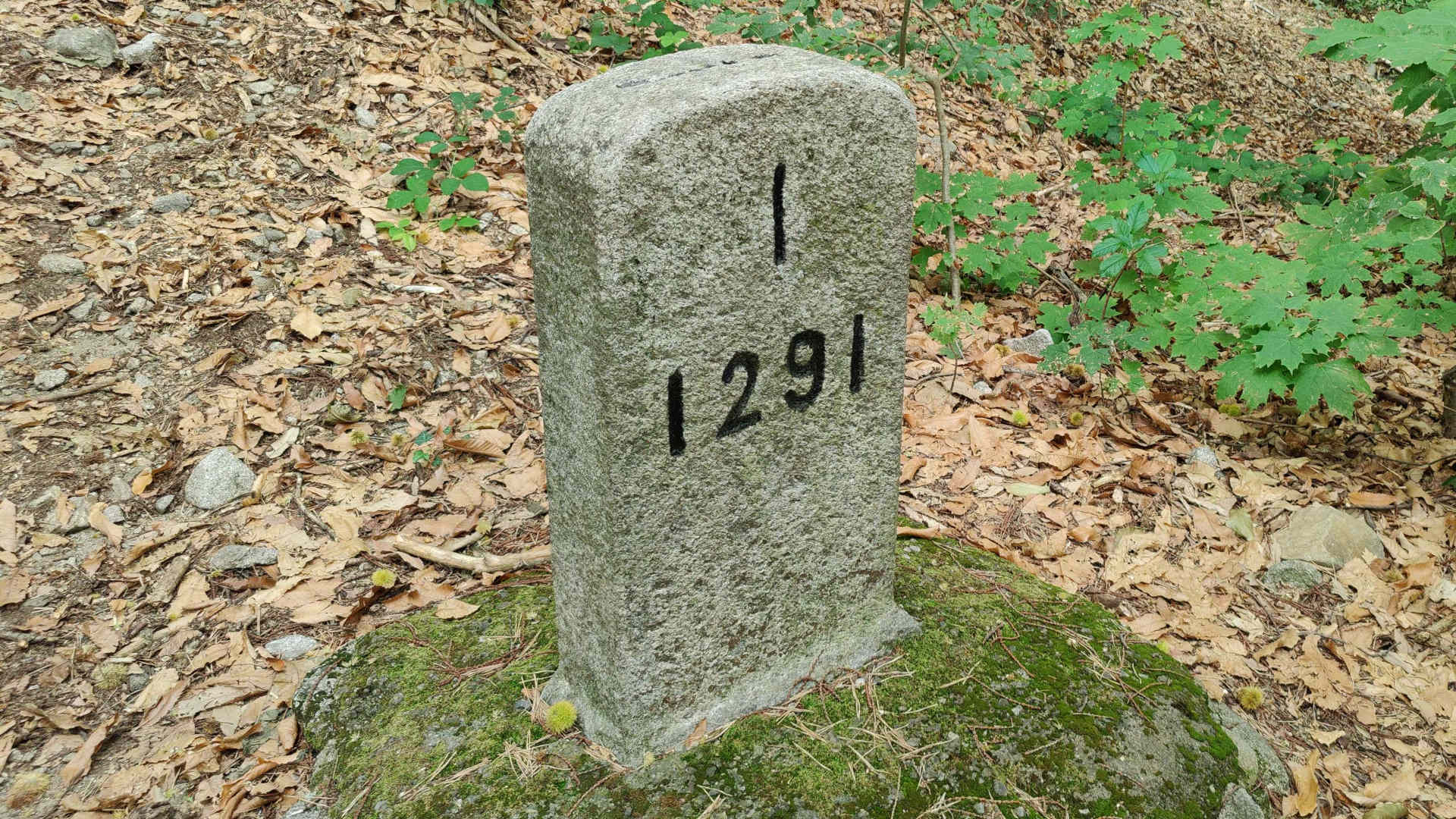
Walking around Switzerland: ch1291.ch
In recent years, as CEO, I have been increasingly asked whether I am still fit enough to keep up with the ‘fast-paced’ world of IT. The question of succession planning also comes up from time to time. For the sake of transparency, I would like to mention that I turned 60 this year. With this in mind, it is reasonable to assume that the company will be passed on to a new generation in a few years. However, until then, the ArchivistaBox will continue to be developed in its usual form.
Another equally important point is to stay fit. Anyone who spends the whole day practically sitting in front of a computer will have to make time to be active outside of work. For this reason, I occasionally ‘treat’ myself to a few days in nature. And because I turned 60 this year, my ‘birthday gift’ was taking six weeks of vacation. These six weeks were ‘invested’ in the project ch1291.ch.
For those who don’t feel like reading the posts on ch1291.ch, let me just say that this year I hiked around Switzerland in exactly six weeks. I covered 1291 kilometers in the process, which is about 30 kilometers per day. With that in mind, I can confidently say that I still feel fit enough to continue leading this company for the next few years.

Largest Swiss film directory: filminfo.ch
About seven years ago, the ArchivistaBox was adapted to handle audiovisual data. Although currently only a few customers are using this functionality, it is worth noting with pride that the ArchivistaBox is a document management system for all types of data. The ArchivistaBox may even be the only solution that can manage hundreds of terabytes in its standard configuration. The data is synchronized across multiple boxes, and data backup is also not limited by the capacity of a single hard drive.
To thoroughly test the ArchivistaBox, I started collecting films privately a few years ago. This film collection has grown over the past five years to well over 102,000 films, totaling approximately 106,000 hours. Currently, this collection requires about 40 TB of storage. As a byproduct of this work, it has become the largest archive of Swiss films. It currently contains approximately 24,000 films. Of course, these films cannot be “released” for viewing.
But here is where filminfo.ch comes in. Even the directory of these films is unique. Because even in the large international film directory imdb.com, only a few thousand Swiss films are available, and the same situation exists with national institutions that maintain public directories (Institute of Film Studies at the University of Zurich and/or swissfilms.ch). In short, filminfo.ch is currently the largest Swiss film directory.
From a technical point of view, the challenges at this scale include questions such as: how can these collections be automatically synchronized across multiple boxes, how can it be ensured that no faulty films are added to the archive, and how can the films be captured in optimal quality? Based on the private collection, it can be stated that without optimization, the current collection would probably be around 250 to 300 TBytes. And even though the collection is private, Archivista GmbH now has a high level of expertise when it comes to digitally managing audio and video files. This is true even if the ArchivistaBox is not to be used.
Bugs, bugs, bugs
The ch1291.ch and filminfo.ch projects were primarily responsible for the relative “quiet” period here in recent months. These two projects have now been completed. With that in mind, all available resources are now once again dedicated to the ArchivistaBox itself.
Or is it not? The last few months have unfortunately shown that there is currently a veritable flood of security vulnerabilities. Analyzing code with AI models leads to the discovery of vulnerabilities that would hardly ever have been found manually. This is both a curse and a blessing. It’s a curse because the corresponding exploits are also created with AI, and a blessing because it clearly shows that security cannot be achieved at no cost.
Security vulnerabilities need to be addressed. In the current version 2026/X, we have addressed a critical vulnerability that allowed code from virtualized guests in our VirtBox (ArchivistaVM) solution to be transferred to the host, thereby compromising the main computer. Additionally, two critical vulnerabilities in PHP have been discovered, which enable the execution of arbitrary code on computers running PHP-based solutions.
ArchivistaDMS itself is not written in PHP, but in the Perl language. Therefore, an attack via ArchivistaDMS is not possible. ArchivistaERP, on the other hand, is implemented in PHP. Furthermore, PHP is also used for various additional solutions that run on the ArchivistaBox, such as WordPress (this website) or Nextcloud (corresponding installations at customers).
ArchivistaDMS itself is not implemented in PHP, but in the Perl language. In this sense, no direct attack via ArchivistaDMS is possible. In contrast, ArchivistaERP is implemented in PHP. Furthermore, PHP is also used for various additional solutions that run on the ArchivistaBox, such as WordPress (this homepage) or Nextcloud (corresponding installations at customer sites).
Ultimately, PHP is too widespread, and releasing a Linux distribution without PHP doesn’t make sense. PHP is simply the scripting language and is therefore also included as standard on the ArchivistaBox. In this sense, release 2026/X must be installed. Update 2026/X will install PHP
8.2.35. Happy updating!
P.S.: The community versions of AVMultimedia and AVMultimini are not affected by these vulnerabilities. However, the community versions of the ArchivistaBox are affected. Please understand that we will first update the customer systems, and the community versions of the ArchivistaBox will follow shortly.
Update 22.10.2026, 13:00: New ISO files have been created for all
customers with maintenance contracts. If the version number is 2024/XII or
higher, the update can be applied via WebConfig. Otherwise, you will need
to contact us.
Update 26.10.2026 11:00: A good portion of the customers were able to
install the update. However, feedback also indicated that the update
failed to complete for some users (due to temporary overload of our
server). If this was/is the case, we recommend restarting the box and
starting the update today (currently, there is sufficient capacity)
Egg, May 4th 2026: For the past few days, a serious root-level bug affecting all current Linux systems has been known. The security vulnerability, known as copy-fail, allows attackers to immediately gain comprehensive root privileges from a regular account, enabling them to modify or destroy any computer as they please.
All Linux solutions are affected, including ArchivistaBox
Copy-fail refers to a situation where a regular local program can impersonate the root (system) user without requiring a password. This can lead to uncontrolled modifications or even destruction of the system.
It could be argued that this is not such a dramatic issue with a web-based solution like ArchivistaBox, because users ‘only’ work via the web interface. This means that as long as the Apache web server is not attacked, no attack will succeed.
While this is true, it must also be mentioned that there are thousands of programs and hundreds of thousands of files on a Linux system. All of these need to be updated in a timely manner. Therefore, it is sufficient if the attack is packaged within a library. According to heise.de, attacks on Linux systems are already occurring.
What makes matters worse is that the attack currently requires only 700 chars of Python code. We tested this behavior on Friday (the day the vulnerability was published) and confirmed (unsurprisingly) that this is indeed the case.
For this reason, our systems were patched on Friday. On Saturday, the underlying infrastructure of our server farm was fixed (sorry for the outage between approximately 7 and 10 a.m.).
All customers should update immediately
Unfortunately, all Linux systems worldwide are affected by the root vulnerability. The ArchivistaBox is no exception, nor is it a special case. In this sense, the systems must be updated immediately.
Customers using the latest release (from 2024 onwards) can send us an email, and we will prioritize creating the corresponding ISO files for them. Customers using older versions must now upgrade to the latest release. Depending on the maintenance level of the solution, this step may be more or less straightforward, or more complex.
Community versions
For those working with the community version, please note: The ArchivistaBox AGPLv3 in version 2026 already has an update available, which can be downloaded here:
https://archivista.ch/cms/2026
Those who are using the 2025 version should upgrade to version 2026 immediately. Updates will also be provided to AVMultimedia users as soon as possible. However, please also understand that the ArchivistaBox is being updated with the latest versions in a timely manner to minimize potential risks. We will inform you as soon as the updates are available.
Update as of May 5, 2026: All Community versions (including the 2020 release, as well as the 2025 and 2026 versions) are now available for download.
]]>Egg, April 15th: From now on, the ComfyUI integration for the ArchivistaBox AGPLv3 is available. Never heard of ComfyUI? No problem, this blog will explain what ComfyUI is. Furthermore, using an example with “aggressive cows”, it will show the results that are currently possible with open source, and finally, at the end, the installation on the ArchivistaBox will be explained in such a way that it can be done effortlessly.

What is ComfyUI?
If you want to work with AI models, you need a program that tells the models what to do. I’d like to explain this with an example. For the project at https://ch1291.ch, a short song or clip was created to introduce the project. First, here’s the link to view the clip:
It features a song lasting about 90 seconds in the languages of Swiss German, German, French, Italian, and English. In addition, 21 images were generated for the clip to visually complement the song. One sequence deals with the potential conflict between humans and cows while hiking. This would be somewhat difficult to realize in reality. Who wants to provoke cows to get a good shot? Also, no one is likely to pull out their camera when the cows are approaching.
In principle, you could try to use an image editing program to stage cows and a human. But it’s not that easy, and even professionals might be challenged. This is a classic case for AI.
To make this work, you need a) a good graphics card, b) a model that generates images from text, and c) a program that tells the model what to do. Ideally, this program should work as a web application. Also, if the model runs locally, the program for doing this job should also run locally. This is exactly what ComfyUI offers. Once installed, you can easily perform the job on your local computer using a variety of templates.
Four Models Try Their Luck
The number of models might seem a bit confusing at first in ComfyUI. But ultimately, it’s simply that there are now a considerable number of free AI models available, sort of following the motto, “if you have a choice, you have a dilemma.”
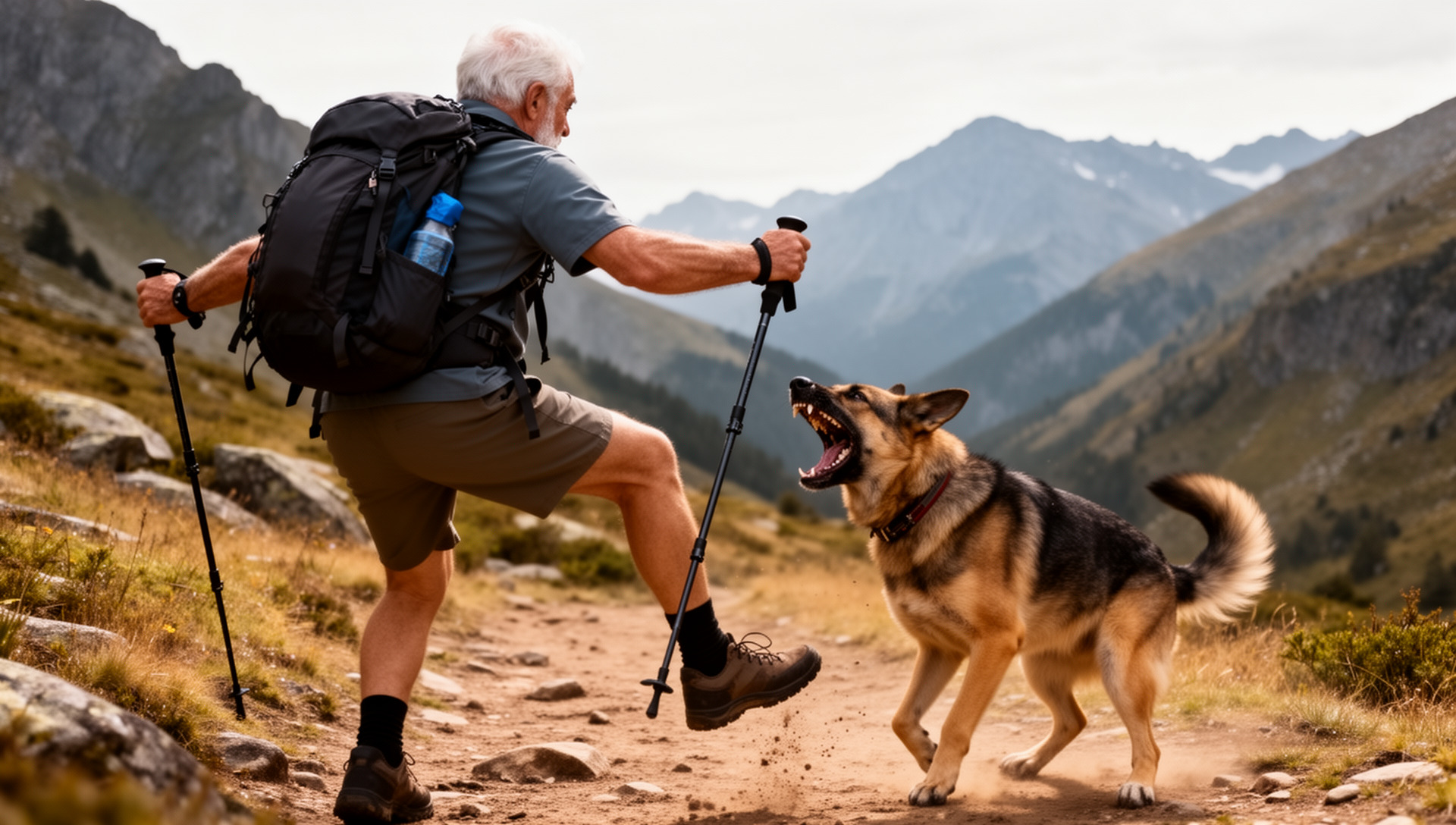
First of all, simple tasks succeed with all models. For example: “Create an image showing a field of flowers.” It becomes more difficult when the scene is more complex. In our example, a scene with four aggressive cows is to be created, in which the hiker flees:
Four aggressive cows in the Alps near Mont Blanc attack an older male hiker from behind; the hiker and cows run in the same direction; it’s raining heavily.
Why is this not so easy for the AI? First, they shouldn’t just be four cows, but they should look aggressive. Second, the hiker joins in, who is afraid of the cows and flees. And third, it doesn’t make sense if the hiker runs towards the cows in a kind of kamikaze action. So, the hiker must run in the same direction as the cows, and moreover, in front of and not behind the cows. The setting that it should take place near Mont Blanc is meant to find out whether the model can handle geographical details. In addition, the rain was added because running as hiker is most fun in the rain ;-)
ZImage-Turbo: The Stumbling Hike
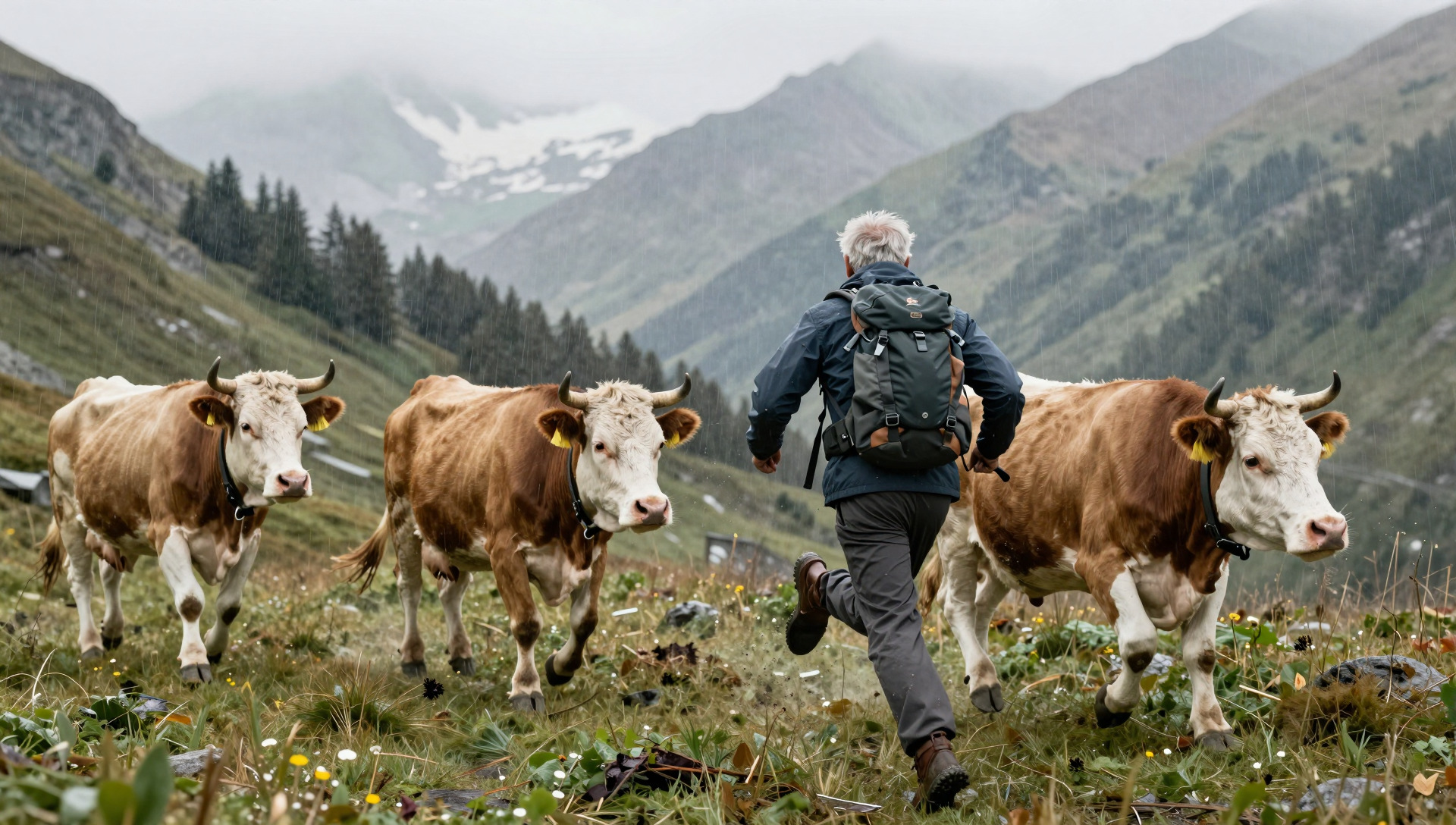
A lot is going wrong here. The three cows (there should be four) appear almost as clones, the hiker runs in the wrong direction, and the legs are simply wrong.
It should be noted here that the Z-Image-Turbo model requires relatively small resources (8 or 16 GB of VRAM). But, the result is practically unusable. As mentioned earlier, simpler things do succeed, but in this somewhat more complex scene, Z-Image-Turbo is pretty much overwhelmed.
Z-Image: The Cows Are Clearly Aggressive, the Hiker Provokes

The “normal” ZImage model requires 32 GB of graphics card memory. The cows are now perfectly aggressive, only the hiker runs in the wrong direction, namely towards the cows. That wasn’t the task, but it can be guessed that a fight could break out.
Qwen-Image-2512: Cows and Hiker in Harmony

Qwen-Image-2512 means that the model dates from December 2025. All four of the models tested here are not older than a few months. The fact is, the development of local AI models is far from over. Frankly, open-source models were not at a point a year or two ago where they could be used locally.
It should be added here that the image only includes three cows. It can be assumed that the AI model counted the hiker as one of the cows. But at least, they are all looking in the same direction. Also, the hiker is very dynamic. As if he were running right through the “herd.”
Flux-Dev: The “Test Winner” Doesn’t Fail

The cows are nicely aggressive, the number is correct, the hiker is in front of them, and he’s running away from the cows. In short, not bad for the first attempt. It could be “criticized” that the cows should be on the left and the hiker on the right (or vice versa). But that wasn’t the task.
In this sense, Flux-Dev is the test winner. The price for this is quite high. With less than 32 GB of VRAM on the graphics card, it’s not possible. And even with 32 GB of VRAM, it only works if certain parts are processed in the main memory. However, this does not lead to a significantly longer processing time. Overall, Flux-Dev with 1920×1088 pixels (FullHD) takes about two to three minutes of processing time, measured with the AMD R9700 graphics card.
That’s Why the AMD R9700 Is the Best Choice Right Now
As mentioned above, more demanding image-to-text AI is barely feasible with a 16 GB graphics card. With 32 GB, prices at Nvidia are quite high. 3000 Swiss Francs or more just for the graphics card, that’s a considerable amount. The AMD R9700 currently costs 1200 Swiss Francs (both prices including VAT).
This price difference is due to the fact that Nvidia is the market leader. How easy it is to activate the drivers for AMD under Windows has not been tested. Under Linux, it can be said that driver installation is, in principle, no longer too difficult. It becomes a little more difficult when it comes to installing ComfyUI. And it becomes even more challenging when Flash Attention 2 is to be activated. Although this module is “optional”, it offers faster processing.
Once set up correctly, the combination of RX 9070 XT or R9700 offers very good results. Models larger than 32 GB can either be offloaded to the CPU (works well with Flux-Dev) or via a second graphics card via PCI5-x16.
With the R9700, models for generating videos have also been tested. The current (March 2026) LTX2.3 offers a remarkable quality in FullHD (upscaling to 4K is possible) and synchronization of the audio and video track. This means that dialogues can be integrated into the scenes, and this with quite perfect German. With some practice, dialects could also be realized.
It should be noted here that several iterations are often necessary for good results. Unlike text-to-image, in text-to-video, the textual description must be translated into a script. Also, a minimum of 25 frames per second is required, and with LTX2.3, up to 50 frames per second can currently be generated.
Cloud offers are not necessarily inexpensive.
Those who work with closed cloud offers will quickly realize that price models of around 100 Swiss Francs per month (or the corresponding credits) do not go very far (fullHD video per minute costs around 40 USD). On the ArchivistaBox KI with ComfyUI, two to three hours of clips have so far been created.
This would have cost around 7000 USD with the market leader. Without a local AI, this would have been a very expensive undertaking. And it may be that without a local AI, the knights would not have marched around in so many facets. The short clip (more is not possible with the bandwidth of the current provider) is intended to illustrate what a result might look like.
With LTX 2.3, scenes of 20 to 30 seconds in FullHD or 4K (upscaled) are possible.
The audio synchronization in version 2.0 was not very usable; the new version’s synchronization is much better. A 5-second clip with speech doesn’t make much sense, but examples with spoken scenes will be available soon. Furthermore, numerous demos can be found online, and the quality shown there can be confirmed.
Installation of ComfyUI on the ArchivistaBox
First, you need the current ArchivistaBox 2026/III and the ai.os module. This process is explained in the last blog. You also need the comfyui.os file. This can be found here:
https://archivista.ch/cms/comfyui
Extract the ‘comfyui.os’ file and unpack it in /home/archivista/data:
unsquashfs -d comfyui comfyui.os
Then, switch to the folder with ‘cd comfyui’ and open the virtual environment:
source confyui/bin/activate
After that, the prompt ‘comfyui’ will appear in the console. Now switch to the corresponding folder with cd ComfyUI. ComfyUI can now be started with ./comfyui-amd.sh.
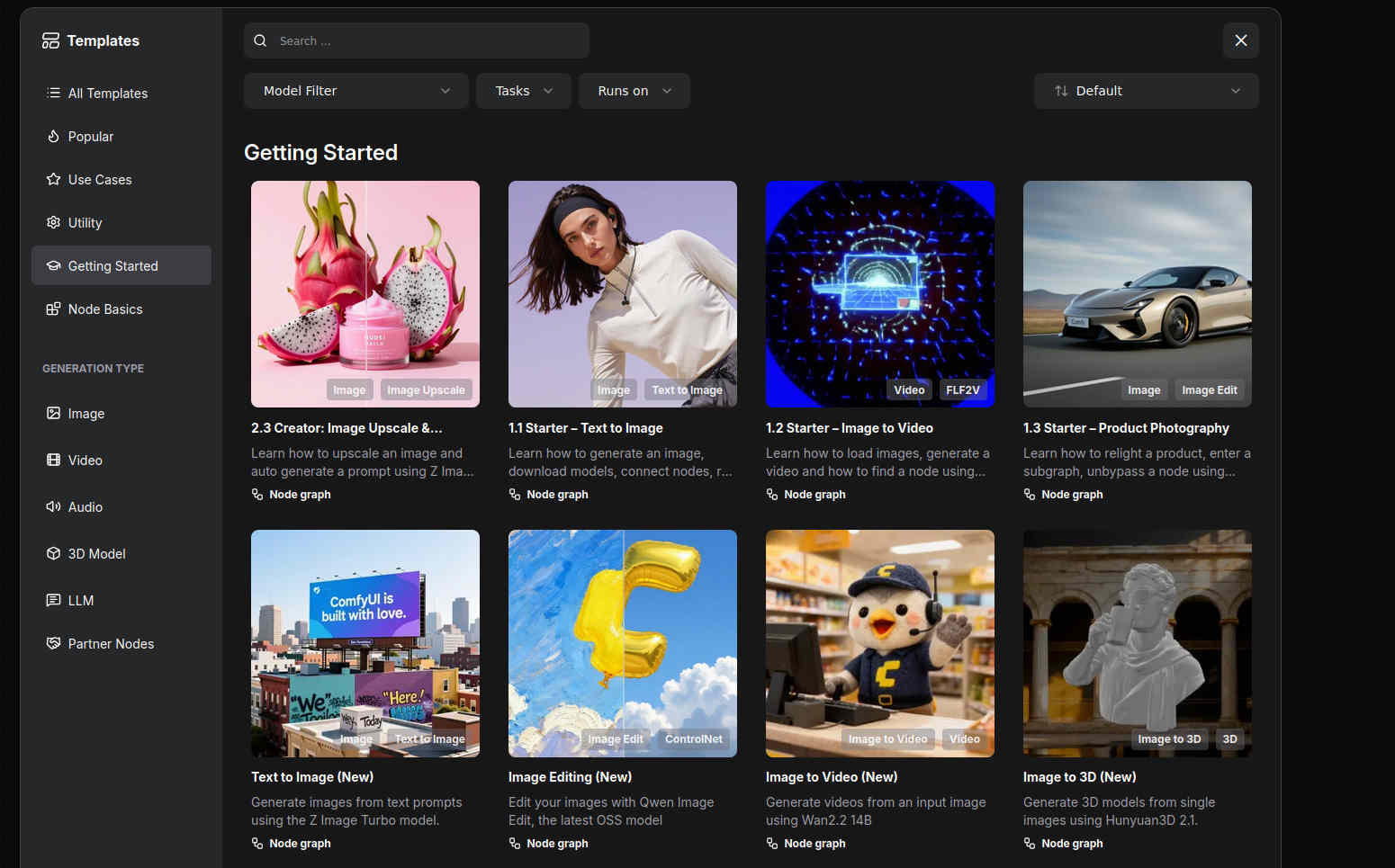
ComfyUI can then be accessed via ‘http://localhost:8189’ or the address of the computer under port 8189. The current package is about 3 GB. Unpacked, it is about 7 GB. In ComfyUI, you can now open the desired models using templates:
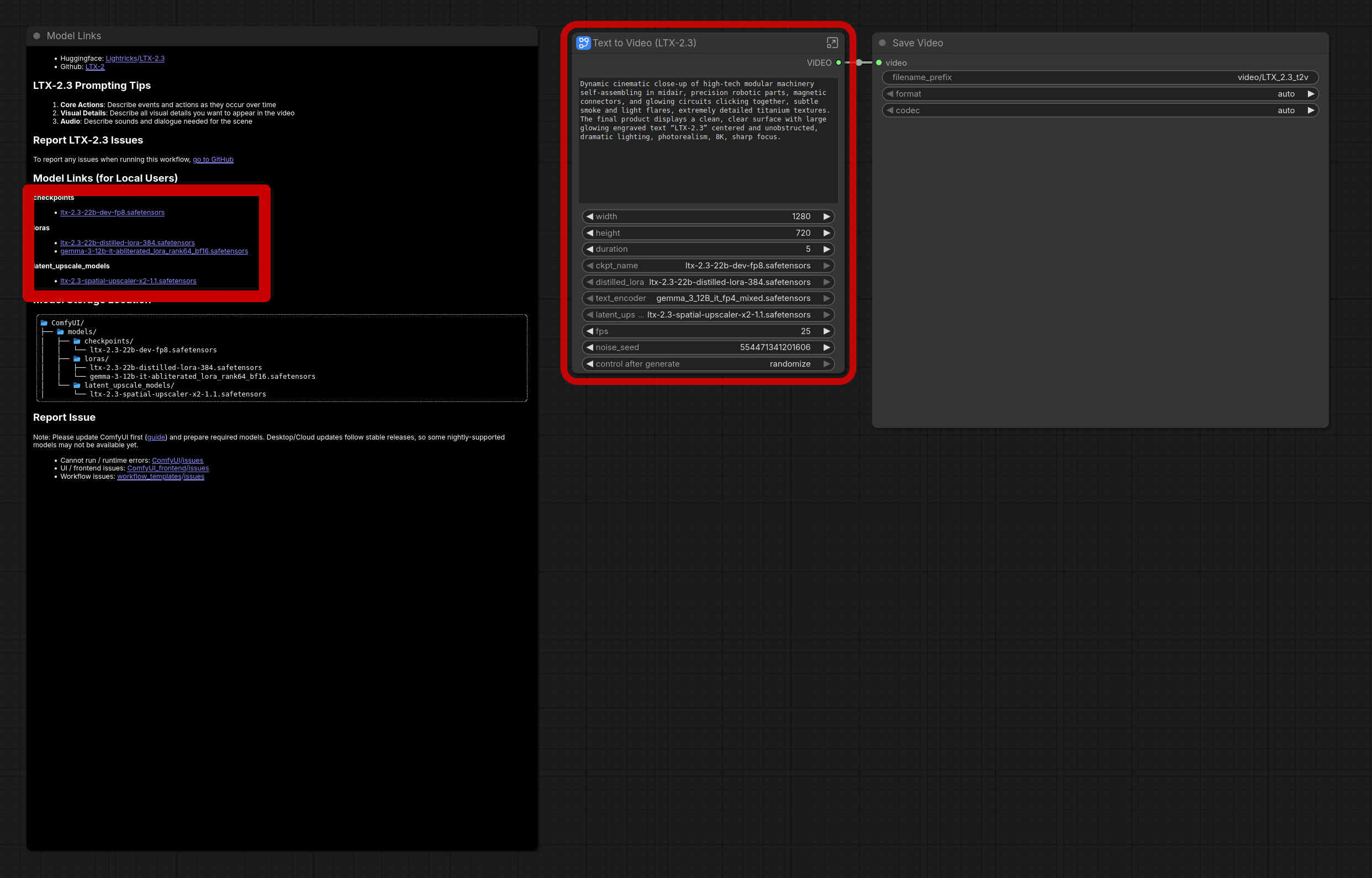
The red frame in the middle says that models are missing. On the left, you will find (here framed with a thick red border) the corresponding models that are needed or where they must be placed. The easiest way to install is by pressing Ctrl+Enter. This will start the job. ComfyUI then automatically reports which files are missing. You can also start the download directly there.
It is important to know that the models require a lot of storage space. One model “swallows” somewhere between 10 and 100 GB, usually around 50 GB. But the results (e.g., with Flux-dev) are already “damn” good. In this sense, enjoy!
Note: In principle, ComfyUI also works without an AMD graphics card, as long as the CPU is used for processing and enough RAM is available. However, the response times are very, very slow. 5 seconds of HD video rendering with audio sync on the R9700 currently takes a few minutes; without a GPU, it would take a few hours. Furthermore, depending on the RAM situation (main memory), it may be necessary to create a large swap partition. This is done with root with cd /var/lib/vz; dd if=/dev/zero of=avswap bs=64M count=1024; mkswap avswap. Then restart the computer and check with ‘swapon’ whether/that the 64 GB is activated.
Note II: Those who expected more information about ArchivistaDMS at this point should know that this part will follow in one of the next blogs, don’t worry!
]]>Egg, March 24, 2026: With this new release, ArchivistaBox is offering, for the first time, all of the current leading server technologies in the open-source ecosystem on a single platform. Joining the existing core features are Docker containers, the local AI platform Ollama (local artificial intelligence), and the currently best speech recognition system, Whisper (including Swiss German). This is made possible by the integration of ROCm technology, which enables AMD graphics cards to deliver top performance for all tasks in the field of artificial intelligence.
That’s why ArchivistaBox now offers Docker containers
Modern software packages rely on numerous dependencies. To put it simply, Software Alpha depends on Library Beta, but Beta does not run on Operating System Gamma – only on Delta. The classic approach using server virtualization, which has been available for more than 15 years with ArchivistaVM (VirtBox), does offer the possibility of running Software Alpha with the Beta dependency by setting up the Gamma system as a virtual instance. Alpha can then be installed on top of Beta.
Docker containers offer the possibility of running Alpha on Delta by launching Beta and Gamma in a kind of “closed space” (container). In this sense, Docker containers are “lucrative” for software developers because their own software can include exactly those components without having to install or maintain a complete operating system on all delivered instances. For users, the advantage is less obvious, as without a graphical user interface, they are often “lost” with Docker.
Docker’s business model now consists of providing a graphical user interface. While the service is free for individuals and companies with an annual revenue below a certain threshold, the solution is not open source. What is surprising is that this subtle distinction receives little attention in the open-source community. And so it came to pass…
Of course, this technology has been available on every ArchivistaBox in a virtual instance up until now. However, this approach isn’t exactly straightforward, especially since Docker would only be available via the console. With the 2026/III release, Docker is now available directly on the ArchivistaBox GPLv3. Docker is delivered with the Yacht web application. This makes it much easier for “Docker newbies” in particular to get started than if only the console were available.
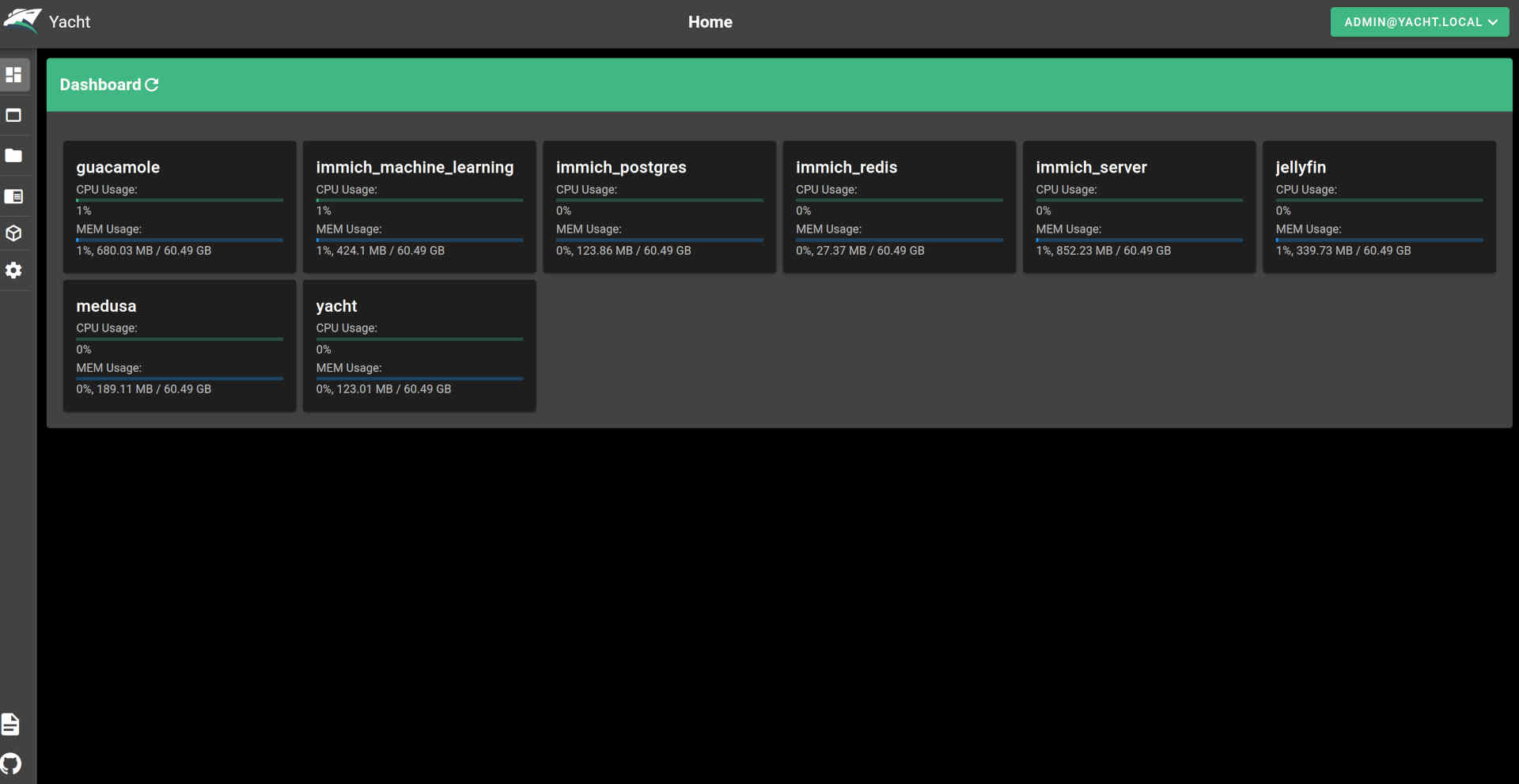
With its Docker integration, ArchivistaBox AGPLv3 is currently the only open-source distribution that offers both web-based management of KVM/Qemu and native Docker support—free of charge and ready to use. This contrasts with solutions like Proxmox, where Docker containers (must) be converted to LXC technology (Linux containers). The latter approach may be an alternative for many scenarios, but ultimately Docker is not available natively. This, in turn, means that not all Docker instances will run.
Native Support for AMD Graphics Cards
As powerful as modern processors are, a graphics card (GPU) is often the better choice for certain applications. Here’s an example: In speech recognition, a dedicated graphics card often completes the task 10 times faster—or even more. In the open-source ecosystem, however, the market leader, NVIDIA, only provides “closed-source” drivers. AMD is the better choice here because its drivers are open-source (firmware excluded). Furthermore, AMD graphics cards offer better value for money. On the other hand, the corresponding software packages (e.g., Blender) often only support NVidia graphics cards.
When our two flagship models, the ArchivistaBox K1 and Everest, were launched in 2021, they came equipped with AMD Radeon RX 580 graphics cards. Although the ROCm drivers were available at the time, software integration often failed in 2021—or at least was frequently unsatisfactory. In 2026, the situation is different: whether it’s AI models, rendering, and/or video processing, driver support is currently available. To be fair, it should be noted that seamless integration can still pose challenges. That is precisely why we have the ArchivistaBox 2026/III, which comes with all drivers pre-installed.
New Flagship Models K2 and Everest
With the ArchivistaBox 2026/III, we’re offering a hardware upgrade for the K1 and Everest models. In terms of performance, the K2 model delivers nearly the same performance as the 2021 Everest model, without requiring a separate graphics card. The Everest model now features the RX 9070 XT graphics card with 16 GB of VRAM.
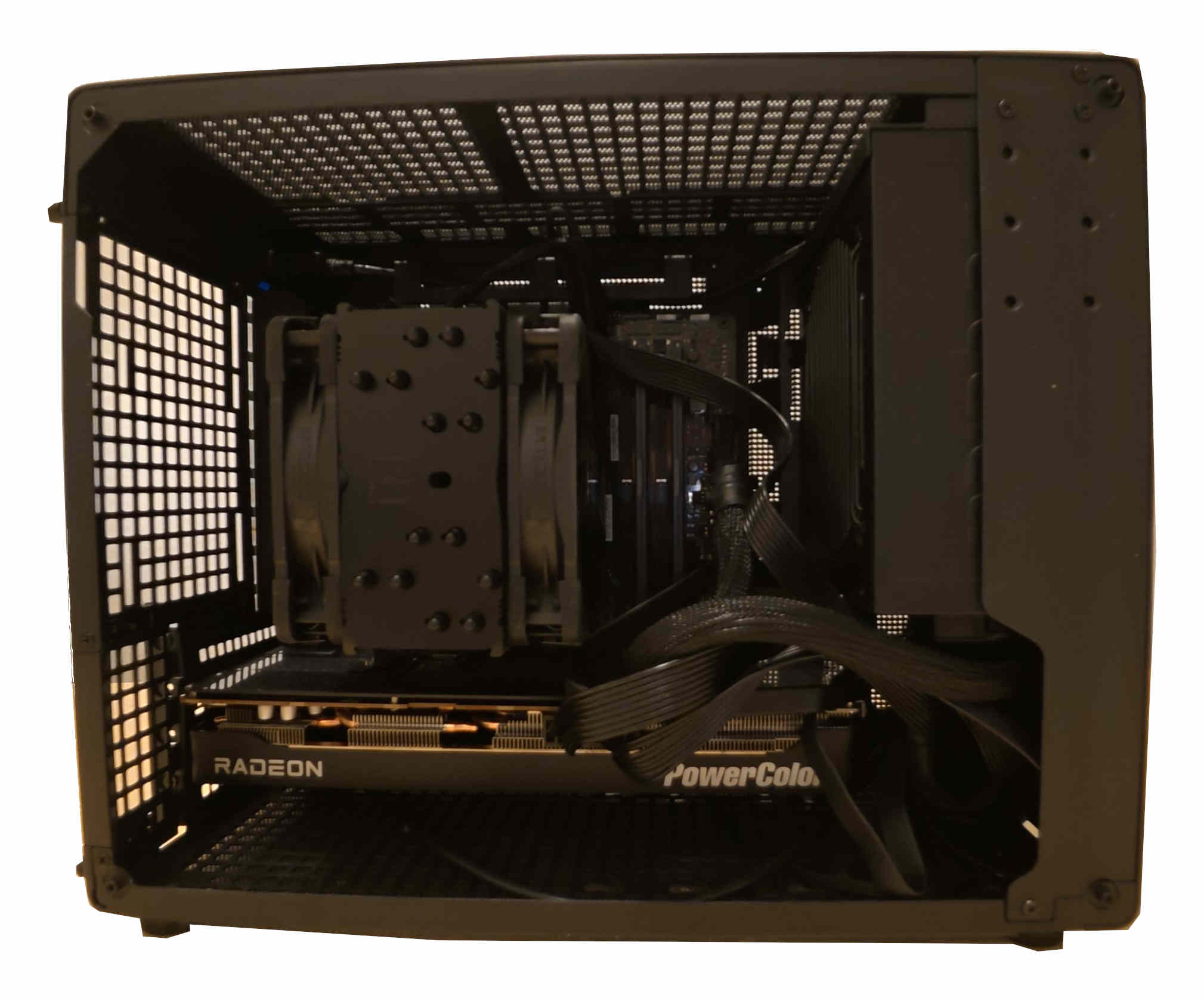
To support the RX 9070 XT (and other AMD graphics cards), up-to-date firmware drivers and a Linux kernel are required. For this reason, the Linux kernel 6.18.18 is now available for the ArchivistaBox 2026/III. The Linux firmware dates from mid-March 2026. This also had to be integrated. As a small “side note,” it should be added that the current firmware for all devices available under Linux is 1.8 GB in size. About three years ago, it was still approximately 0.9 GB, or half that size.
This meant that the boot mechanism for the ArchivistaBox also had to be adjusted. Previously, the entire ISO file was stored in the boot partition (5.6 GB). Since the data is temporarily duplicated during an update, the 2023/III release would have “overflowed” the boot partition. Now there is a smaller essential image (approx. 1.7 GB), which “saves” the previous size of the boot partition for the next few years.
Once all these hurdles were overcome, the ArchivistaBox could finally be booted with the RX 9070 XT graphics card. Of course, many other current hardware components also benefit from these adjustments and are now supported accordingly.
22 GB: AMD’s ROCm “drivers”
The groundwork was laid with the upgrade of the Linux kernel to version 6.18.18. To ensure that modern graphics cards are equipped for rendering and AI tasks, additional drivers are required. Although “drivers” isn’t really the right term here. In the case of AMD, it’s the ROCm package. It currently takes up about 22 GB. That’s right—22 GB of hard drive space is required just to enable the graphics card for tasks in the fields of graphics and artificial intelligence.
By way of comparison, the current ISO file for the ArchivistaBox requires approximately 4.1 GB. This means the graphics card requires about 5.x times more data. Of course, one might ask whether less wouldn’t be more? Certainly, less would be more, but ultimately it would be up to AMD to deliver less. Or competitors who bring corresponding products to market. Or software that could manage with less power.
Local AI with Ollama
Once the ROCm drivers from AMD were properly integrated, the first local AI could be launched. Or rather, the first AI had of course been set up long before the ROCm integration, in order to subsequently determine just how “painfully slow” the CPU actually is at delivering results under maximum load. One example is image categorization using the new model implemented in the ArchivistaBox. Using the Ryzen 9590 3XD processor with all 32 threads, it takes about 2 minutes per image. Using the graphics card with ROCm and the RX 9070 XT, it takes about 1.1 seconds.
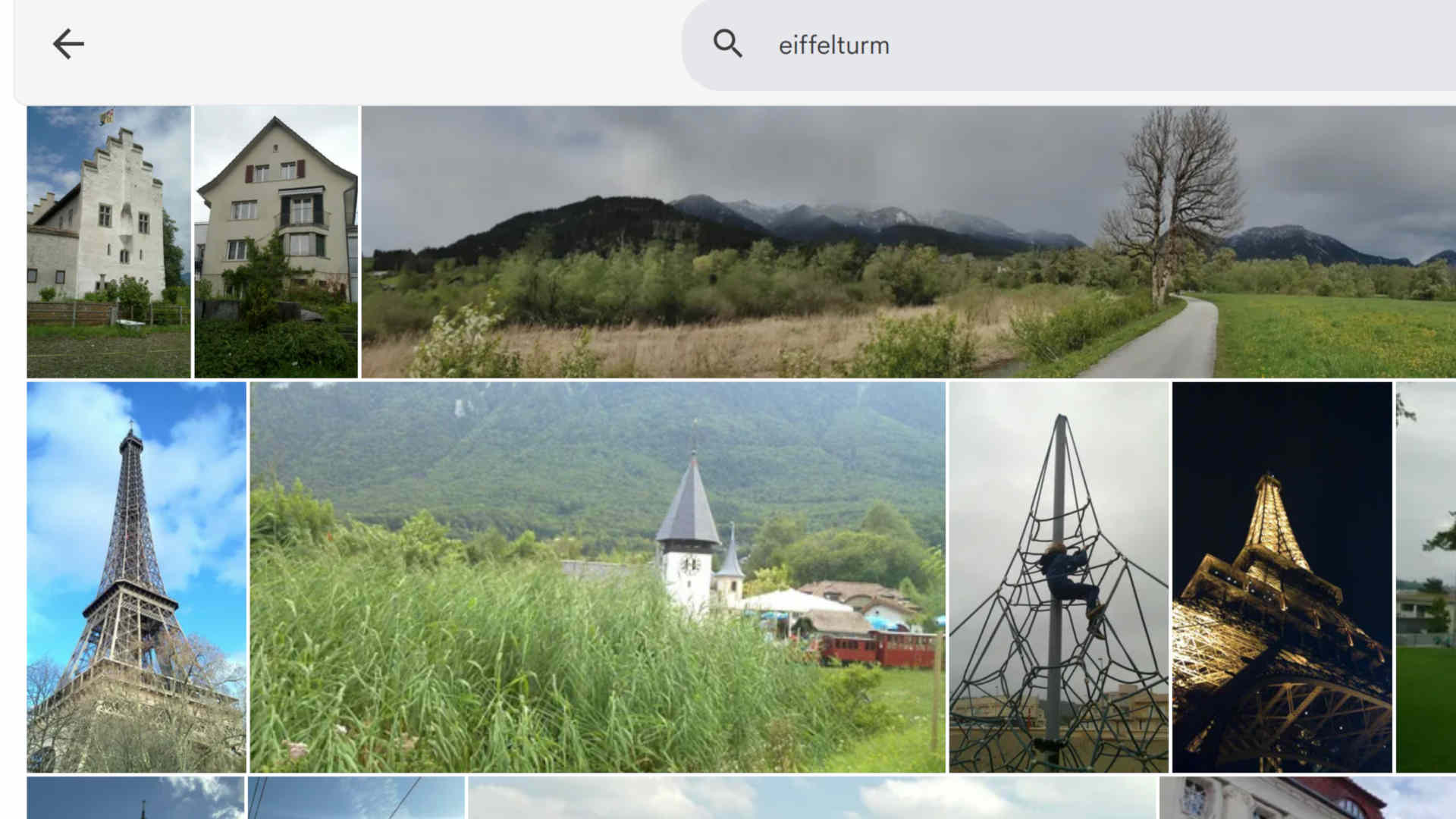
Example of poor image recognition (Immich) using the search term ‘Eiffel Tower’
Of course, software (such as Immich) can also be used that operates significantly faster or without a graphics card to recognize images. However, the results do not reflect state-of-the-art performance. Consider the search example “Eiffel Tower.” Above is a view of the results using Immich. While it is not the case that the Eiffel Tower is not found at all, the correct results are buried deep in the list.
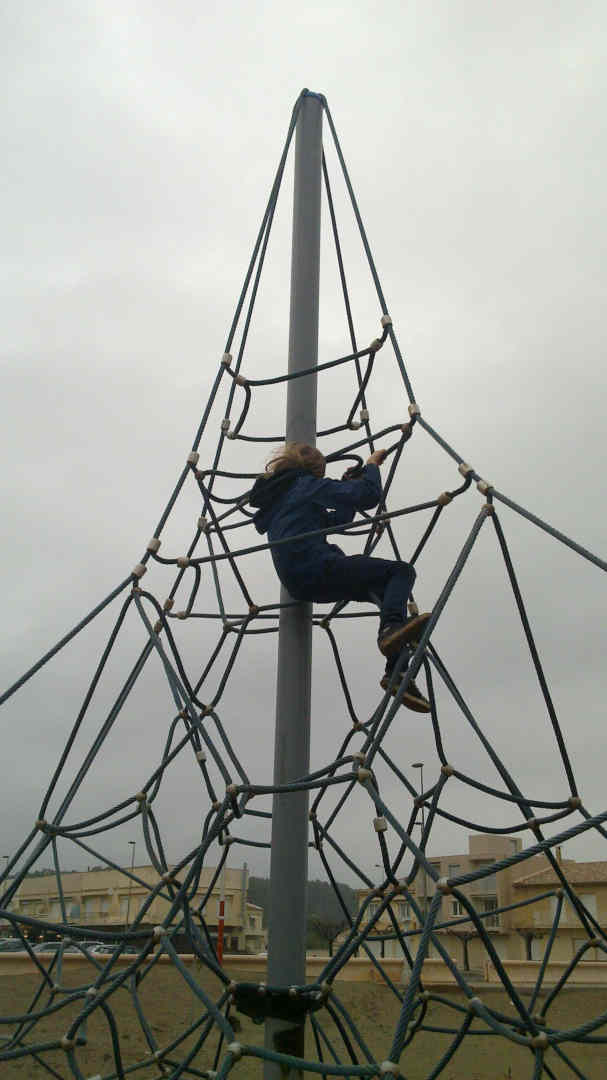
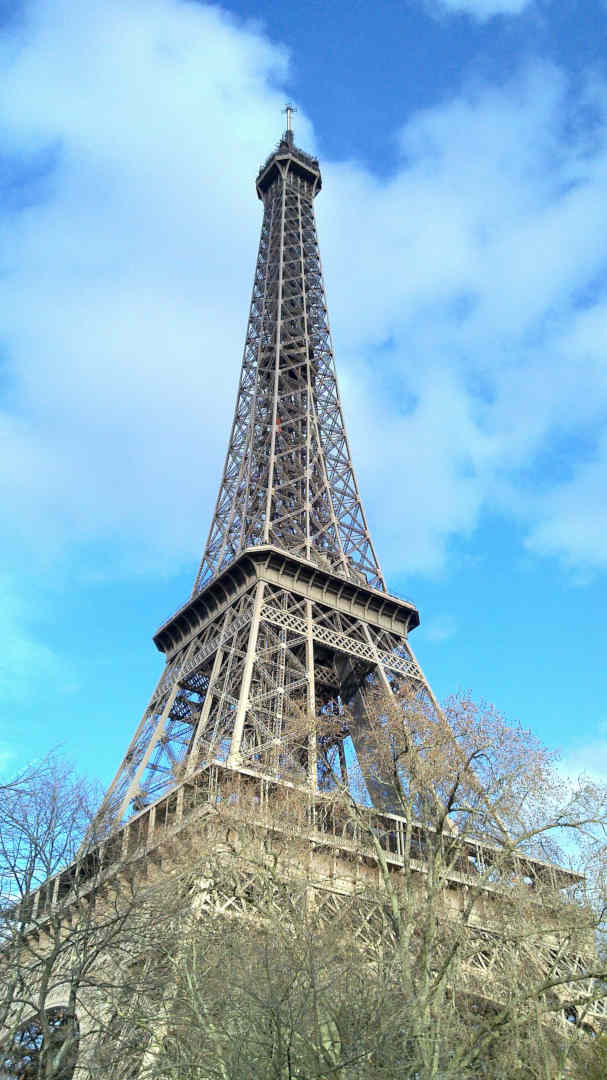
By comparison, the new engine in the ArchivistaBox tags the image on the left with: “playground; climbing frame; child; climbing; wire mesh.” The image on the right, the ‘real’ Eiffel Tower, is tagged with “Eiffel Tower; Paris; France; steel structure; sky.” These differences are so significant that the ArchivistaBox prefers to “build in” a good engine here, even if this requires a native graphics card.
Image recognition is just one specific application of Ollama. Currently, several hundred models are available, all of which run exclusively locally on the ArchivistaBox 2026/III (network access must be disabled for Ollama). These include the well-known chat models, as well as translation and content summarization models. The results are already “damn” good, to put it bluntly.
Speech recognition with Whisper
The ArchivistaBox has had speech recognition since 2021. Tests conducted at that time using Swiss German did not produce truly usable results. As an example, here is a short sequence from the film “Die Schweizermacher” (Rolf Lyssy, 1978, from approx. 50 seconds to 1 minute 20 seconds), first showing the (previous) result with Vosk (Original text translated into English):
59.79: You’ve been overlooking me for a long time
62.94: Where can I find information on how to improve the professional image of foreigners?
66.57: So that citizens can learn more about other countries
71.07: We had to approve a massive neutral sum for Soli Solid to cover the costs of the rock
Here’s the latest issue featuring Whisper:
00:00:57: Name a few qualities
00:01:02: that we must require of a foreigner
00:01:06: in order for them to become a citizen of our country.
00:01:10: What kind of person must they be?
00:01:11: Neutral.
00:01:14: Hardworking.
It’s easy to see that the “modern” engine not only achieves a nearly 100% accurate translation into High German—even for Swiss German—but also renders the sentence exactly as it was spoken. Achieving such a feat with open source—after a great deal of work and uncertainty—is certainly a source of pride. In that spirit, we can say: joy reigns. For our existing and new customers, and for the open-source community.
Two more notes on Whisper: Where there is much light, there is also some shadow. Whisper (fittingly, given its name) sometimes has a habit of “hallucinating” text where there is none—that is, sometimes, when the audio level approaches zero, the engine finds or invents text where none exists. It should also be noted that models specifically trained on Swiss dialects delivered poorer quality results than is the case with the latest version of Whisper.
Digital Sovereignty with the ArchivistaBox
For approximately 20 years, the ArchivistaBox has ensured that our customers keep their data locally. To this end, the ArchivistaBox offers ready-to-use solutions that, with version 2026/III, are now also available as 100 percent open-source solutions for container management (Docker), local AI agents, and image and speech recognition (Whisper). Anyone currently moving their business solutions to the cloud is missing out on the opportunity to act with digital sovereignty for the long term. In the current political climate, this seems like a risky bet.
It is often argued that no local alternative is available. The ArchivistaBox 2026/III impressively demonstrates that this is not the case. The ArchivistaBox can be ordered ready-to-use with maintenance and support. Those who prefer to do this themselves can download the ISO file (2026 release) and install it on their own. The ArchivistaBox offers a radically simple solution for self-hosting that is also open source.
Docker, for example, can be launched directly via the link of the same name after the ArchivistaBox has booted up (approx. 10-20 seconds). Simply enter the username admin@yacht.lokal and password av2013, and you’re good to go. The same applies, of course, to the previous server virtualization solution (VirtBox). Here, too, simply enter the username root and the password av2013.

Enabling Ollama and Whisper
A modern AMD graphics card is recommended for both Ollama and Whisper. You will also need to download the ai.os file. It is approximately 30 GB in size but contains all the necessary components.
The ‘ai.os’ file (30 GByte!) must be located in the /home/archivista/data directory on the ArchivistaBox. Now switch to the root user (password av2013) via the terminal using ‘su’ and unpack the file: ‘unsquashfs -d ./ai ai.os’. Then activate the engine with ‘cp ./ai/desktop.sh /home/data/archivista/cust/desktop’ and reboot the system. After the reboot, you can run ‘ollama list’ in the terminal.
NAME ID SIZE MODIFIED
xyz44:latest b3cacc3eb7f 3.3 GB 18 hours ago
Of course, additional models can be added later. The Whisper engine can be launched using the ‘mp2txt.sh’ script in the ‘/home/archivista/data/ai’ directory. Currently, there is no graphical user interface for either Whisper or Ollama. A graphical interface is expected to be included in one of the upcoming versions of the ArchivistaBox.
Both Whisper and Ollama run even without a dedicated AMD graphics card. However, even with a fast CPU, the speed is 10 to 50 times slower. In short, it might be worth it for testing, but not for production. NVIDIA graphics cards are not currently supported. The community is cordially invited to “take on” this task.
Price Examples for the ArchivistaBox K2 and Everest
For business customers, the K2 model is available starting at 2,990.– and the Everest model starting at 4,990.–. These price examples reflect current market conditions for SSDs and memory modules (RAM). As such, the corresponding ArchivistaBoxes can only be ordered or delivered on a very short-notice basis. The hardware is very compact relative to its performance (30x33x20 cm) and therefore fits not only in server environments but also under any desk.
In an average office setting, both the K2 and Everest operate whisper-quietly. The new flagship models can be tested out at any time in Egg during an Open Friday. All ArchivistaBox software (including AI modules) is available for free and can be used without restriction. Support and maintenance contracts are available for both the hardware and the software of the ArchivistaBox.
P.S.: If anyone here is missing information about our flagship document management system, ArchivistaDMS, please note that the core technologies introduced here will be seamlessly integrated into ArchivistaDMS in the future. The examples of image classification and speech recognition mentioned above serve as illustrations of this.
]]>
Egg, February 28, 2028: There are topics that are not new, but become more important over time. One of these topics is nested virtualization, also known as ‘Nested CPU’. This involves running multiple computers (i.e., Linux and Windows) on a single computer (i.e., ArchivistaBox) as conveniently as possible. This option has been available on the ArchivistaBox for more than 15 years. New in version 2026/II is ‘VirtBox’, which provides direct access, and ‘Nested CPU’, which enables nested virtualization at the touch of a button.
What is virtualization?
Nested virtualization can also be described as virtualization within virtualization. To clarify what this means, let’s briefly revisit the term virtualization itself. Today’s computers are extremely powerful, whether in terms of hard drive speed or processor (CPU) performance. The performance of modern hardware is more than sufficient to run multiple computers (operating systems) on a single device. Virtualization is simply the ability to run one computer virtually within another computer.
Virtual or virtualized means that the performance of a physical computer is divided among several guest operating systems (i.e., virtually). The ArchivistaBox uses KVM (Kernel-Based Virtualized Machine) technology. This technology works very efficiently because it makes direct use of the processor’s capabilities. The software (in this case, ArchivistaVM) is only used to access the resources.
What does nested virtualization mean?
If a computer only runs virtually as a box-in-box on another computer, the question arises as to whether this virtual computer can also use virtualization. In other words, the virtual operating system can itself “host” virtual guests. This is becoming increasingly important because operating systems now tend to pass on certain jobs or services to virtual “servants.”
For example, in Windows 10 and 11, it is possible to launch the so-called WSL (Windows Subsystem Linux), i.e., it is possible to start Linux as an operating system within Windows. However, if Windows is to run as a virtual guest under Linux, there is at least twofold (nested) virtualization. Windows runs in the first guest, and Linux (WSL) runs virtualized in this guest.

The new path with ArchivistaVM VirtBox
Until the beginning of 2020, there were two different versions of the ArchivistaBox: ArchivistaDMS and ArchivistaVM. For resource reasons, however, two separate distributions required significantly more development effort. In previous years, the hardware of the ArchivistaDMS systems often did not have sufficient performance for virtualization or ArchivistaVM.
With the expansion of ArchivistaDMS to include multimedia content, the hardware for ArchivistaDMS required much more power than was previously the case. Since 2020, virtually all of our ArchivistaBoxes have had enough power to run virtual guests on the same hardware.
When ArchivistaDMS and ArchivistaVM were merged, however, virtualization was very discreetly “placed” on the Home button. No one suspects that a server for virtualization is ‘hidden’ behind the Home button. That is why, starting with version 2026/II, there is now a new direct button, “VirtBox,” for easily accessing ArchivistaVM.
Nested instance with ArchivistaVM VirtBox
After logging into ArchivistaVM VirtBox, you can create a new instance by clicking on ‘Virtual Machines’ and ‘Create’:
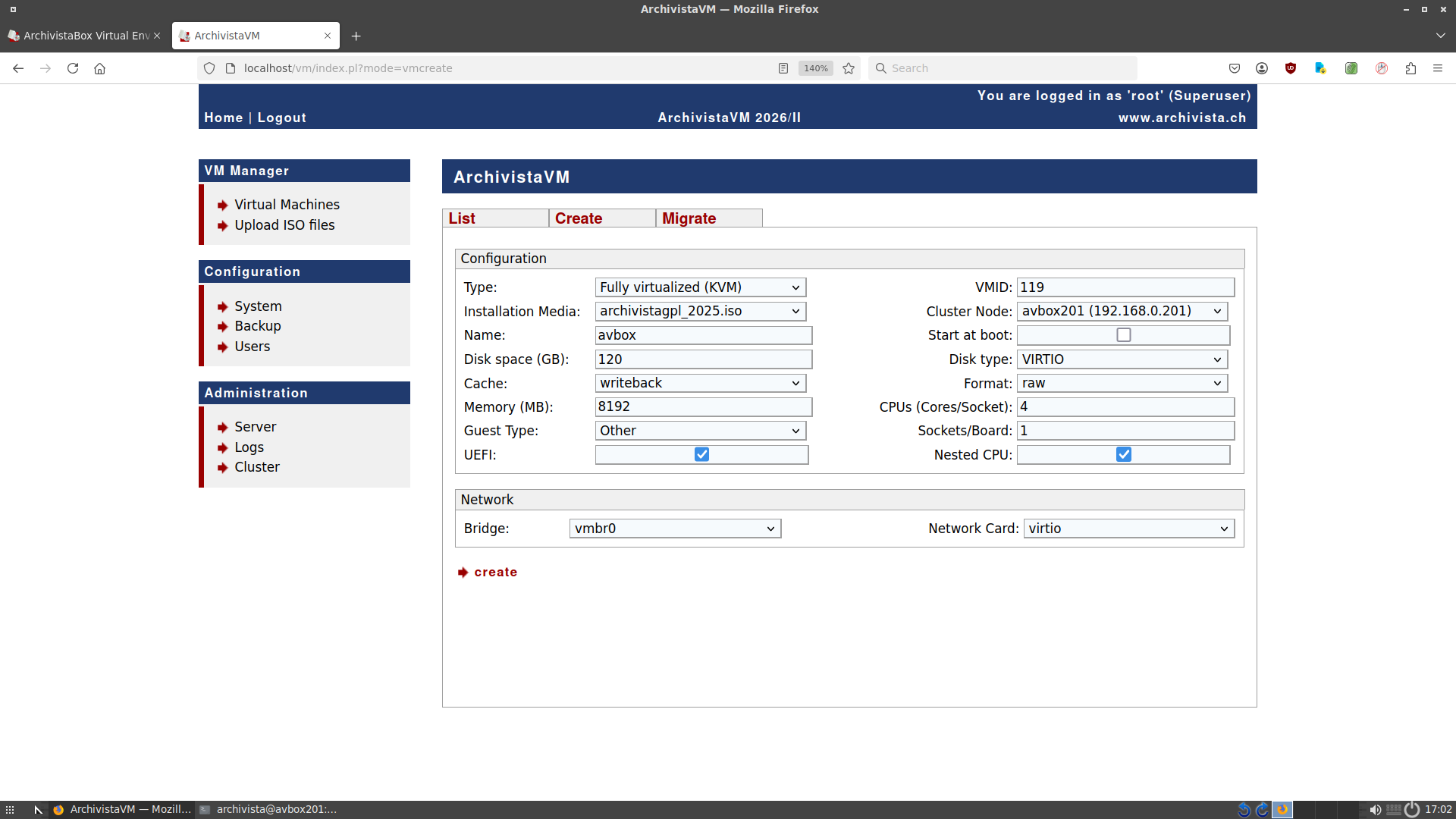
In this example, an ArchivistaBox is set up in the ArchivistaBox. In this virtual instance, another ArchivistaBox (nested CPU) is to be created.
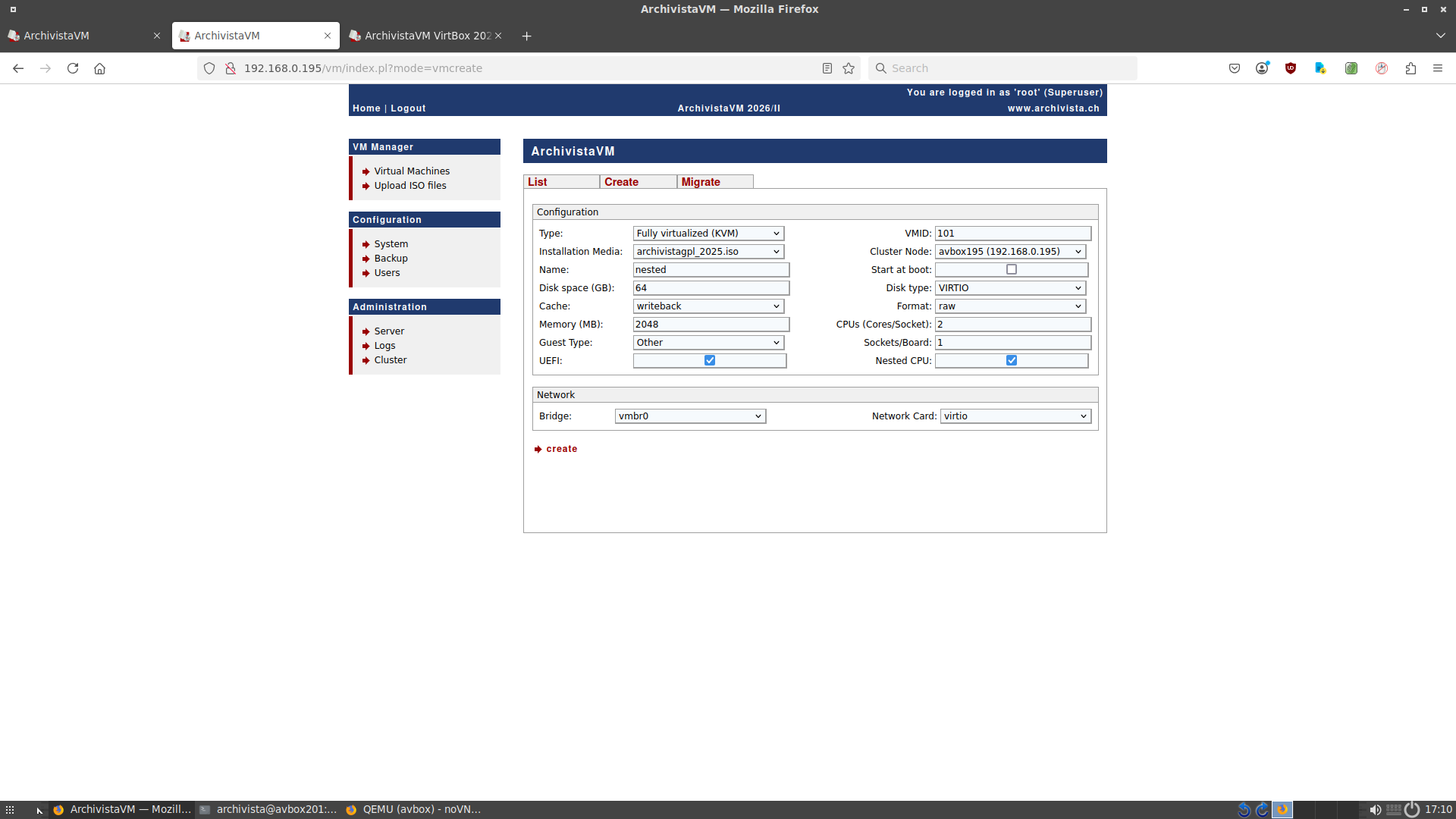
First, we need to set up the parameters for our virtual instance. Since this instance will later “host” other instances, 8192 MB (8 GB) should be the minimum recommendation. ‘Virtio’ is used for hard disks and network cards; these drivers provide the best throughput. It is important that ‘Nested CPU’ is activated. After clicking ‘Create’ and ‘Start’, the instance is set up. Since the ArchivistaBox is extremely quick to set up, this process takes less than a minute. The first virtual instance is now available.
A newly set up ArchivistaBox is assigned an automatic IP address (DHCP). Since another virtual instance of the ArchivistaBox is now to be set up, the virtual instance must be assigned a fixed IP address. This is done via the start menu and ‘Network Tool’. After opening the tool, select the ‘Static’ tab. Enter the relevant information there:
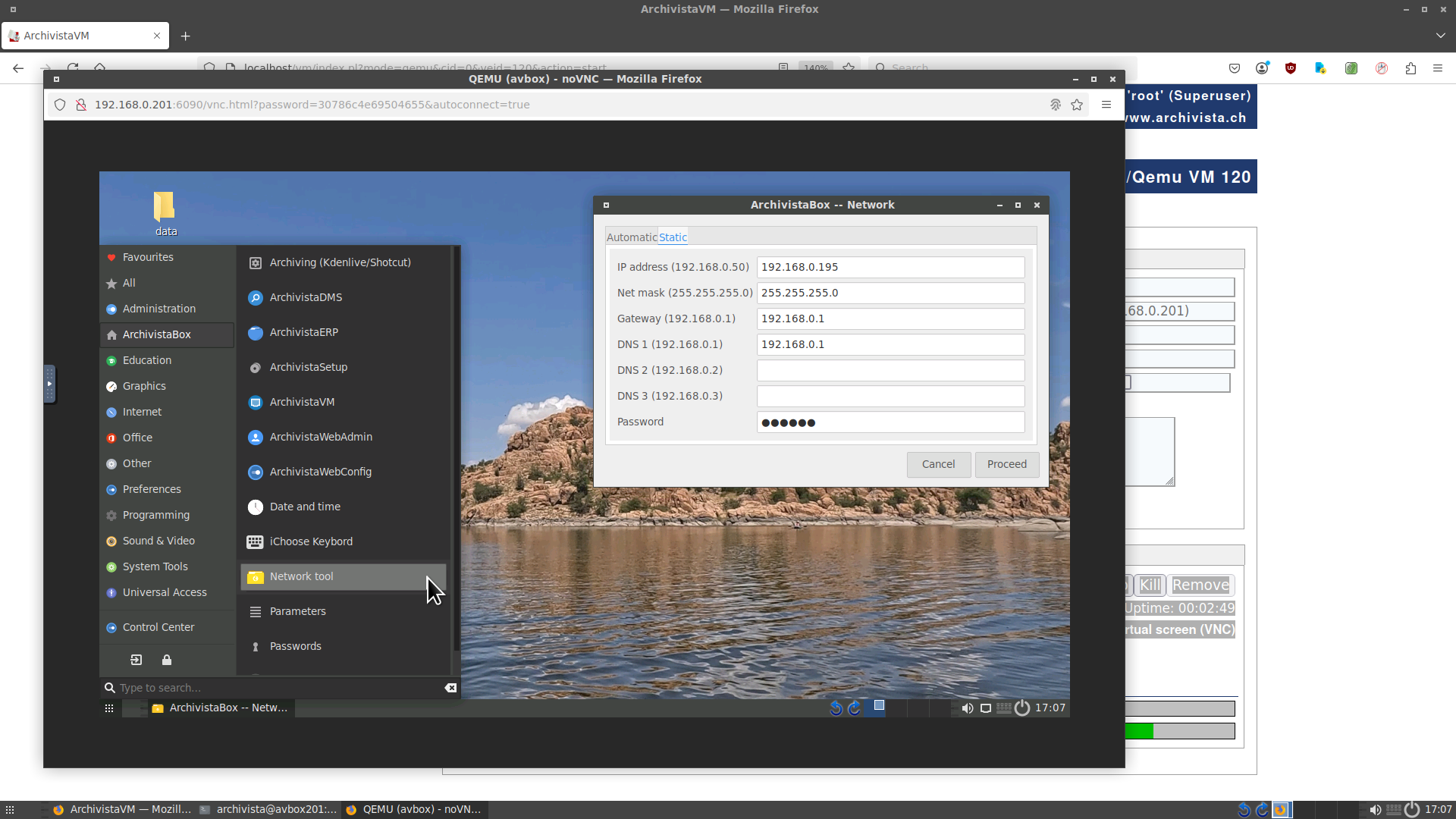
Confirm your entries by clicking ‘Execute’. If a confirmation message appears, your entries are correct. Our virtual instance can now be accessed at the corresponding IP address (in this case 192.168.0.195). Once again, log in to ArchivistaVM VirtBox.
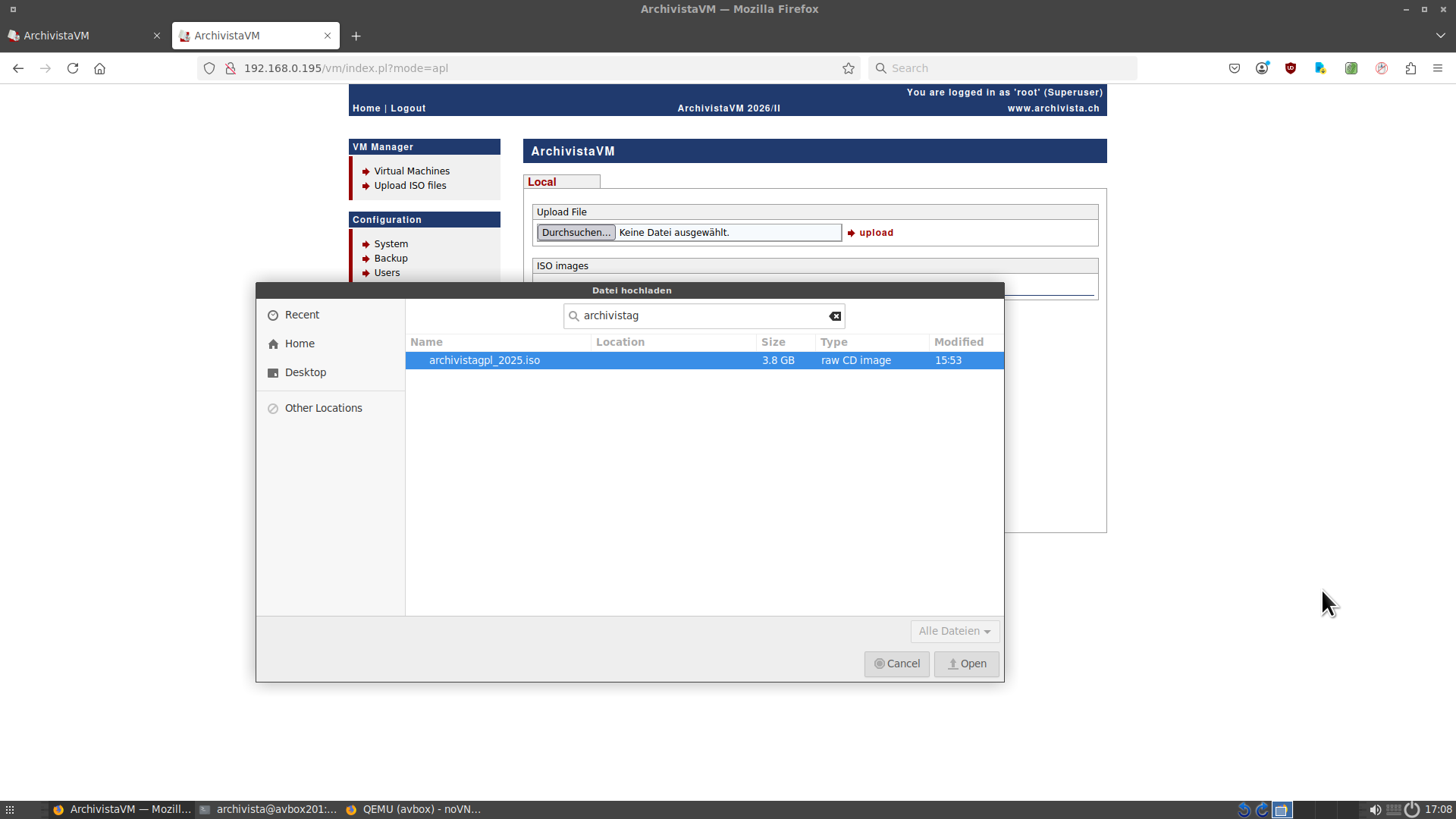
Since a nested instance is to be created in this virtual instance, the corresponding ISO file must be uploaded to the corresponding machine. This is done via ‘Upload ISO files’. The ISO file (here archivistagpl_2025.iso) is integrated via the ‘Upload’ button.
When creating the nested instance, make sure that less main memory, less hard disk space, and fewer CPU cores are allocated. The default settings can be used here. ‘Nested CPU’ is not mandatory, but can be activated so that the nested instance of the ArchivistaBox receives the complete instruction set of the processor. After clicking ‘Create’, click ‘Start’.
When booting up the nested instance, it can be observed that the process is not quite as smooth as with the first virtual instance. This is because all commands are executed via the existing virtual instance. Nevertheless, after a good minute, it can be seen that the nested instance is available.
Conclusion: Nested virtualization with VirtBox 2026/II is easy
ArchivistaVM VirtBox 2026/II not only offers a very simple platform for virtualizing machines, but it has also become much easier to pass on the virtualization functions (nested CPU) to the corresponding guests.
This functionality was already available, but the correct parameters (+svm for AMD, +vmx for Intel) had to be activated manually via the options. With the new ‘Nested CPU’ button, this is now very easy and efficient.
Finally, it should be noted that the example only works from version 2026/II onwards. In order for nested virtualization to be available, the corresponding driver must be activated when the ArchivistaBox is started. If this is not the case, nested virtualization cannot be used.
ArchivistaBox customers can obtain the new version via the update service. The ArchivistaBox AGPLv3 is available for free download here (password ‘av2013’):
https://archivista.ch/cms/agplv3
Note: ArchivistaVM VirtBox is just as powerful as other virtualization platforms (such as Proxmox, VirtualBox, HyperV, and/or others), but ArchivistaVM is significantly easier to use because the correct parameters can be managed clearly on a few straightforward forms.
]]>
Is IT knowledge becoming obsolete?
For many years now, it has been observed that SMEs are increasingly less likely to have their own internal IT departments. The necessary services are being moved to the cloud. The arguments often cited are that skilled workers are hard to find or simply too expensive. Currently, this has gone so far that there is a belief that AI will solve all IT problems in the future. Several examples from this year show that this is unlikely to be the case.
A customer needed assistance. It turned out that the box was running without a network cable. Apart from the fact that this option is no longer possible with many solutions because they are necessarily connected to the network, this is not the case with the ArchivistaBox. However, remote maintenance is not possible with an ArchivistaBox that is not connected to the network. The ArchivistaBox can be connected to the outside world via cable, USB, and Wi-Fi. There is a graphical program for this (see manual). The customer said he didn’t know how to do it. A case for an on-site visit. But the travel expenses were too expensive for the customer. He tried to solve the problem with AI. After two days, he reported that the box was connected to the network. Access was still not possible. The customer didn’t know what had been changed; the AI had done it.
 In another case, it was reported that the box kept switching itself off and that the power supplies were defective. Although this was hardly likely with two (redundant) ArchivistaBoxes, the customer wanted new power supplies installed immediately. These were installed within four hours (platinum maintenance contract). It was noticed that all servers were connected in series via four power strips. It was not possible to determine whether the external service provider had not noticed such intertwined power cables or was unaware of the problem.
Another customer needed to replace their ERP solution. The clients were to receive Windows 11, using a Windows Server 2016. After the upgrade, the solution ran 4 times slower. The supplier insisted that this was due to virtualization (specifically ArchivistaVM). The customer was advised to install everything on physical machines, which would resolve the issue. To this end, a new SQL server was installed on a physical Windows 11 machine for the customer. Only when this installation was transferred to virtualization was it possible to demonstrate that the new installation ran just as fast there. The problem was due to the combination of Windows 11 and Server 2016.
The creeping loss of digital sovereignty
When Windows XP was introduced, there was heated debate about whether it was permissible for a product to require a key to be activated before it could run permanently. When switching to Windows 11, an online account and a permanent connection to the internet are effectively mandatory. No one can guarantee that no data will be leaked to Microsoft. The outcry today is barely noticeable. The new magic word is “no alternative.”
With all due respect, Archivista solutions have been on the market for almost 30 years precisely because they offer an alternative. Since the launch of ArchivistaBox products, ArchivistaBox has used open data structures. The customer’s data belongs to the customer and no one else. To date, there is no “hidden” back door that allows us, as the supplier, to access the ArchivistaBox.
Thirty years ago, this was state-of-the-art; today, it is sometimes branded as “obsolete,” to put it somewhat more vividly. In principle, it’s about dependencies. With such solutions, price increases can be dictated more easily for data that is no longer available to customers. Apart from that, it is also likely that data outsourced to the cloud can hardly be migrated locally to your own servers (and if so, then at high cost).

A few decades ago, there were concerns that it might not be such a good idea for manufacturers to have unsolicited and unrestricted access to customers’ systems. Today, this is accepted (almost as a mantra). Back then, it would have been unthinkable for company data to be stored by third parties without any kind of control. Today, the argument is that there is simply no viable alternative to the cloud. The cloud is virtually without alternative. Primarily, this way of thinking is without alternative.
In this sense, the loss of digital sovereignty is a fact. Not because there are no alternatives, but because the key players have managed to sell it that way and, where necessary, to help it along. Why should an environment running Windows Server 2016 and Windows 10 with Windows 11 clients suddenly run 1:4 slower?
Providers should ask themselves this question in the interests of their customers. However, these providers are so dependent on Microsoft technology that they would not dare or want to “fall out” with Microsoft. And if the public sector relies so heavily on (closed) technology, it should not be surprised when problems arise at (in)opportune moments. The example of the blocked email account of the chief prosecutor of the International Criminal Court could have been a wake-up call.
The move to the cloud (primarily from a few providers) may seem like a convenient solution. However, it should be noted that this reduces one’s own (digital) sovereignty. Primarily, dependencies arise that allow manufacturers to gain access to their customers’ systems for their own purposes, virtually without being asked.
The ArchivistaBox offers digital sovereignty
Digital sovereignty with the ArchivistaBox means that Archivista solutions have never had and never will have proprietary data structures since entering the market. This is not a matter of counting peas. Movies in MP4 format have been manageable with the ArchivistaBox since the end of 2019. At that time, there were still two partial patents. However, the key point was/is that these were expiring and that the corresponding tools had been available for many years under an open source license. Today, at the end of 2025, it can be said that the patents for H264 are now obsolete (in Europe).
But it is not only the question of possible patents that is central; it is equally important that the information remains available (and readable) in the long term. Since entering the market, Archivista solutions have been “photographing” data virtually. This makes it possible, for example, to keep the content of emails or Office files (visually) readable without the corresponding programs being available. All you need is a browser to view the content on the web. Add-ons such as Office Viewer are explicitly not necessary.
Originally, this meant that Archivista solutions generated more data due to the image copies. A few decades ago, Office files, for example, were much smaller. Today, even Office files are incredibly large, so the corresponding image copies are no longer significant.
However, locally managed data still has advantages that cloud solutions do not offer. One of these is price. Cloud solutions are significantly more expensive. The annual costs for storage space alone are usually around 1:5 to 1:10 higher than the corresponding prices for data carriers. Over the average lifespan of data carriers of 5 years, this results in cost advantages of 1:25 to 1:50.
Furthermore, the availability of local data is trivial compared to the effort required for cloud services. Data stored on site remains accessible even when there are problems with the internet. The disruptions that occurred in 2025 can be seen as a warning sign.
In this sense, ArchivistaBox offers digital sovereignty. The data structures are disclosed, the solution is subject to the AGPLv3 license (meaning that the software sources are disclosed), and ArchivistaBox is extremely easy to maintain in operation (not just in setup). The ArchivistaBox in its current form was created precisely because the last few decades have shown that users, even experienced professionals, simply do not have the time to operate highly specialized IT solutions.
The ArchivistaBox does not change, it evolves. When the first ArchivistaBox was launched in 2006/2007, it was limited to 40 GB. Larger solutions already existed at that time, but they were not implemented with the ArchivistaBox. Later, all Archivista solutions were implemented with the ArchivistaBox, and since then, the ArchivistaBox has become more powerful year after year. Standard solutions are now in operation that cover many dozens of terabytes of data. This involves not only data management, but also processing.
Over the last two days, for example, the program used to process the captured DVDs has been converted from single-CPU to multi-CPU. This means that even with 16 CPUs or 32 threads, the processing time per hour for the corresponding DVDs has been increased from approximately 5 DVDs to 30 data carriers. In addition, the program has been optimized so that all tracks (audio and video) are available in the desired quality in a single pass. The corresponding program mkv2mp4.pl is available on the ArchivistaBox AGPLv3 published today in the folder /home/cvs/archivista/jobs:
https://archivista.ch/cms/agplv3 (Don’t forget 2013 password!)
Company holidays: December 24, 2025 to January 4, 2026
Our company will be closed from tomorrow until the end of next week. We will be happy to assist you again from January 5. Customers with a Gold maintenance contract will receive support on December 29 and 30. Customers with a Platinum contract will receive support on December 24, December 29-31, and January 3, 2026.
Wishing you happy holidays and a happy new year in 2026gi!
Urs Pfister, Managing Director, Archivista GmbH
Egg, November 25: Since 2007, the sources of ArchivistaDMS, ArchivistaERP, and ArchivistaVM have been subject to the GPLv2 open source license. With version 2025/XII, the ArchivistaBox is now subject to the AGPLv3 license. This means that the ArchivistaBox can be freely obtained as an ISO file, freely used, and also freely customized. In short, the ArchivistaBox AGPLv3 offers digital sovereignty today and now.

What does free or AGPLv3 mean?
With the release of ArchivistaBox under AGPLv3, interested parties can easily use our solution free of charge in accordance with the AGPLv3 license. ArchivistaBox is extremely “easy to maintain” in terms of installation and operation in the field of Linux solutions.
ArchivistaVM is an extremely easy-to-use virtualization platform. ArchivistaERP offers a 100% web-based ERP solution, and ArchivistaDMS allows documents to be managed digitally and securely over the long term. All of the functionality of the ArchivistaBox Dolder is available.
That’s why the ArchivistaBox is now available under AGPLv3
The current debate surrounding digital sovereignty highlights the urgent need for action. The vast majority of users and companies utilize external cloud services, meaning that our data is increasingly in the hands of third parties.
This situation has certainly come about because conventional IT solutions have become extremely complex. Linux, in particular, has unfortunately missed the opportunity to make things easier.
Anyone who talks to users who would currently like to switch from Windows to Linux will quickly learn that conventional Linux distributions are unfortunately all too often too complex. Not to mention the difficulties of running specific specialist applications. To name just two examples: Proxmox and Nextcloud are quick to set up. However, not everyone is able to run these services in the long term without support from the manufacturers.
The ArchivistaBox offers a good alternative here. Because the ArchivistaBox runs in the main memory and does not require installation, even less experienced users can get started, just as has been the case for years with AVMultimedia.
In this sense, the ArchivistaBox offers digital sovereignty today and now. Where others talk about it, the ArchivistaBox makes a statement. Digital sovereignty subito and without ifs and buts.
Setting up ArchivistaBox AGPLv3
Ideally, a computer (AMD64) with at least 4 GB of main memory (RAM) should be available. If ArchivistaVM or virtualization is to be used, 16 GB (or more) is recommended. ArchivistaBox AGPLv3 can be obtained here (link protected with password ‘av2013’):
https://archivista.ch/cms/agplv3
Registration is not required. The password ‘av2013’ serves solely to ensure that the default password for the users ‘archivista’ and ‘root’ can be clearly communicated at this point.
If you want to install ArchivistaBox on a computer (notebooks and 2-in-1 tablets are also compatible), you must create a bootable USB stick. This can be done using etcher.io or on any Linux console with root privileges using the following command:
dd if=archivistagpl_2025.iso of=/dev/sdx bs=64M;sync;sync
Here, ‘sdx’ stands for the desired stick (e.g., /dev/sdc or /dev/sdd). If you are unsure about the above command, use etcher.io.
The ArchivistaBox can also be used in a virtualized environment, in which case you can start directly with the ISO file.
Installation notes: UEFI is required on the desired device. SecureBoot must be disabled. The desired hard drive for installation must be deleted. The ArchivistaBox will only be installed on a hard drive if it is empty. If the hard drive is not empty, the ArchivistaBox will still start. It will attempt to use the largest partition on the first hard drive. This will usually work with Linux file systems, but not with Windows.
And so that everyone can get started without any problems, here are the default passwords again: av2013 for root/archivista, archivista for Admin/admin.
Further assistance can be found in the manual at https://archivista.ch/e2/help.

What does the open source version not offer?
Open source means that no liability is assumed for the software. Likewise, there is no entitlement to support. However, the ArchivistaBox AGPLv3 corresponds 1:1 to the version that is delivered to our customers with maintenance and support.
If you would like to purchase the ArchivistaBox with maintenance and support, you will find the corresponding versions in our shop. The ArchivistaBox Dolder, for example, starts at around 100 Swiss francs/euros.
Are any enhancements planned for the ArchivistaBox?
First of all, the ArchivistaBox is constantly being developed further. Of course, customer requests are also taken into account. The prerequisite for this is that a customer relationship exists (see above).
What will change for existing customers?
Nothing will change for existing customers. You benefit from our many years of expertise today and will continue to do so in the future.
ArchivistaBox AGPLv3 as a multimedia box
The ArchivistaBox AGPLv3 can of course also be used as a multimedia box in the sense of the AVBox (see avbox.ch). To achieve this, the ‘avmulti’ database can be used instead of the ‘archivista’ database. Help with this can be found in the ArchivistaBox documentation at https://archivista.ch/e2/help.
]]>Egg, November 24, 2025: Many of our customers have migrated from Windows 10 to Windows 11 in recent months. Nothing will change for customers of ArchivistaDMS and/or ArchivistaERP. The use of the web browser remains the same under Windows 11 as under Windows 10. Only customers who use ArchivistaVM, our virtualization platform, will find an upgrade with ArchivistaVM 2025/XI to set up and maintain Windows 11 instances more easily.

Virtualization is and remains virtualization
First things first: Windows 11 can also be installed on an older version of the ArchivistaBox without any problems. In this sense, the update is not absolutely necessary. However, some things are handled a little differently in Windows 11, which is why the update and the assistance provided in this article make sense.
First of all, there is the “system requirement” that Windows 11 itself requires Trusted Platform Manager 2.0 and also requires SecureBoot without “assistance.” Both points are more pointless than helpful in virtual environments.
The advantage of virtualization lies precisely in the fact that virtual instances can be easily migrated from hardware A) to B). However, the purpose (to put it optimistically) of SecureBoot and TPM 2.0 is for Windows to meticulously check that no changes are made to the hardware.
In principle, both TPM 2.0 and SecureBoot (including encryption with BitLocker) can be used with KVM (or ArchivistaVM), but this is not recommended. Instances created in this way can either not be “moved” to new hardware or software during virtualization at all, or only with increased effort.
Installing Windows 11 with bypass.iso
However, it is possible to install Windows 11 without these “features” by changing a few entries in the registry (system settings) during installation. These commands are somewhat cryptic. The easiest way to execute these commands is to use a good old batch file. This can be downloaded (zipped here). Unzip the ‘bypass.zip’ file and upload it to the ISO files via ArchivistaVM. The Windows installation ISO should be in first place, followed by bypass.iso.
After starting Windows 11, press Shift+F10 to open the console. Then enter ‘d:’ and then ‘setup.bat’. This activates the necessary registry entries. The installation can then proceed without any problems. For those who want to know what setup.bat does, here is a copy:
@echo off
title  Bypass Windows 11 Requirements - Safe Registry Tweaks
color 0A

echo ====================================================
echo Windows 11 Bypass Script (TPM, RAM, Secure Boot)
echo ====================================================
echo.

echo ➤ Adding Registry keys to skip hardware checks...

reg add "HKLM\SYSTEM\Setup\LabConfig" /v BypassTPMCheck /t REG_DWORD /d 1 /f
reg add "HKLM\SYSTEM\Setup\LabConfig" /v BypassSecureBootCheck /t REG_DWORD /d 1 /f
reg add "HKLM\SYSTEM\Setup\LabConfig" /v BypassRAMCheck /t REG_DWORD /d 1 /f
reg add "HKLM\SYSTEM\Setup\LabConfig" /v BypassCPUCheck /t REG_DWORD /d 1 /f
reg add "HKLM\SYSTEM\Setup\LabConfig" /v BypassStorageCheck /t REG_DWORD /d 1 /f

echo.
echo ✅ Success: Windows 11 setup bypasses applied.
pause
Of course, the individual entries could also be entered on the command line, but this is cumbersome; ‘setup.bat’ is much easier. At the end of the installation, the usual points should be cleaned up (e.g., disable indexing on drives, etc.).
CPU optimizations
Unfortunately, Windows 11 may sometimes fail to start during installation or migration (to another VM environment or from a physical machine). In this case, the CPU can be optimized by selecting the ‘Options’ tab for the relevant instance and then selecting the ‘Options’ field:
-cpu host,hv_relaxed,hv_spinlocks=0x1fff,hv_vapic,hv_time
‘-cpu host’ ensures that the native CPU of the physical computer is used. The other parameters are not strictly necessary, but can help to synchronize the time between the native computer and the Windows 11 guest.
Optimize hard disk drivers
ArchivistaVM runs on KVM. With conventional IDE drivers, the hard disks can only be accessed at a “fairly” slow speed (approx. 70 MB/second). The Virtio drivers offer significantly more speed. These can be downloaded as an ISO file from this link.
Note: In principle, the Virtio drivers could also be activated during installation. However, since the corresponding entry is well hidden, it may be easier to perform the installation yourself with IDE hard disks and only activate the Virtio drivers afterwards.
To “migrate” from the classic IDE drivers to Virtio, the following steps are necessary.
- Mount the Virtio driver ISO file via the CD drive (for hardware).
- Add an empty Virtio hard disk for hardware. Important: Windows only activates the Virtio drivers if at least one Virtio disk is present.
- Start Windows 11.
- Start the setup program for the Virtio drivers in Windows 11.
- Shut down Windows 11.
- Remove the empty Virtio hard disk from the instance. Important: The next step only works if there are no Virtio disks.
- Convert the original hard disk(s) from IDE to Virtio. To do this, click the button on the left and then on the entry ‘IDE=>Virtio’ for hardware and an IDE disk. The format is then changed from IDE to Virtio in the configuration file.
- Start Windows 11; the Virtio drivers will be activated automatically.
ArchivistaVM 2025/XI (or later) is required for step 7. In earlier versions, the entries in the conf file (/etc/qemu-server/xxx.conf) would have to be changed manually from ‘ide’ to ‘virtio’.
Note: Virtio drivers are also available for network cards. To make the change here, the current Mac address can be copied to the clipboard in Hardware (with the instance switched off!). Then delete the network card (usually e1000) and recreate it as a ‘virtio’ card (pasting the old Mac address is highly recommended, but not mandatory).
Shutting down machines “hard”
Daily practice has shown that under certain circumstances, Windows 11 cannot currently be shut down using “Shut Down” and sometimes not even using “Stop.” Although such problems can usually be solved by making appropriate changes in the registry (keyword ACPI), the “Kill” button is now available as of version 2025/XI. This allows instances (with all consequences) to be terminated definitively via the job number.
Note: If not all content has been saved to the hard disk when ‘Kill’ is executed, this data will be lost. Terminating an instance with ‘Kill’ is therefore at your own risk.
UEFI directly in the setup
Previously, UEFI had to be activated manually via the ‘Options’ tab and the ‘Options’ field. New in version 2025/XI, the ‘UEFI’ option is now available for this purpose. UEFI can either be activated directly when creating an instance, or the option can be activated or deactivated in the ‘Options’ tab under ‘UEFI’.
Setting optional parameters (e.g., keyboard)
In ArchivistaVM, it has always been possible to set optional parameters via the “Options” tab and the “Options” field. The procedure for addressing a specific CPU has already been described above. However, all KVM/Qemu commands can be stored in this field.
An example of this is setting a specific keyboard. For example, ‘-k de’ activates a German keyboard, while ‘-k de-ch’ activates a Swiss keyboard. If you want to use a French keyboard, you can do so with ‘-k fr’.
Command line with qm
The entire KVM interface of ArchivistaVM can also be used via the terminal. ‘qm list’ can be used to request a list of all instances. ‘qm start xxx’ can be used to start the instance ‘xxx’, while ‘qm stop xxx’ immediately shuts down the machine. The complete list of all commands can be requested with ‘qm help’.
ArchivistaVM 2025/XI: Simple and easy
With the new version of ArchivistaVM, virtualization is even easier than it already was. ArchivistaVM is available on every ArchivistaBox.
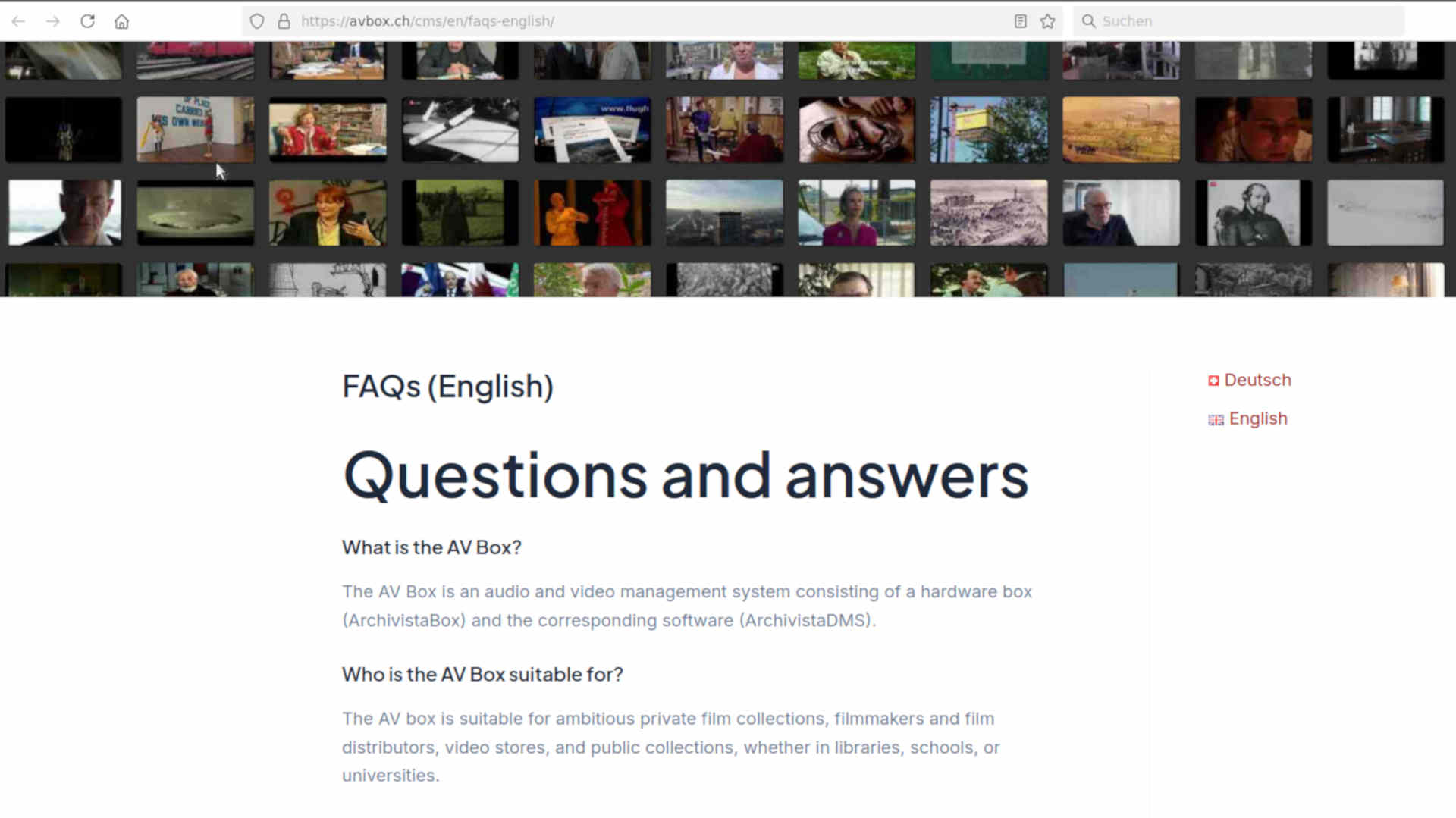
]]>Wallis, November 3, 2025: The new avbox.ch website went live this weekend. This blog answers the question of why avbox.ch exists and why the audio and video boxes (AV boxes for short) are offered on a separate website.
That’s why there’s now avbox.ch
The ArchivistaBox has been on the market for 20 years. During this time, we have adapted our solution to meet many of the requirements of the SME world. Contrary to the trend of outsourcing all IT to the cloud, the ArchivistaBox offers companies (and private individuals) the option of operating their IT infrastructure on their own premises.
The ArchivistaBox is easy to use, and the current box systems are tiny (approx. 1.5 kg) and fit into even the smallest office. However, the current boxes are so powerful that they can be expanded to up to 30 TB. Even DMS solutions with over 10 million pages can be operated without any problems.
It should be added that every ArchivistaBox can be easily connected to the internet, in line with the motto: your own cloud does not have to be in the cloud, it can and may be located in your office without any problems.
In 2019, we expanded the ArchivistaBox to include multimedia capabilities. Handling audio and video files requires significantly more resources, especially in terms of hard drive storage capacity. Our models, such as ArchivistaEverest and ArchivistaK2, took this into account. In this sense, there would be no need for a separate homepage to promote multimedia ArchivistaBoxes (i.e., the AV Box).
However, the best solution is only as good as its implementation. This applies to a pure DMS product such as the new AV Boxes. However, the classic approach to document management focuses primarily on documents. This is not fundamentally different for multimedia archives, but it is fundamentally different.
This homepage has reported extensively on the multimedia capabilities of ArchivistaBoxes in recent years. The question that repeatedly arose was what benefits classic DMS customers would gain from the new features. On the other hand, Archivista GmbH is primarily perceived as a document management (DMS) company.
In future, companies will be able to find all information about our ArchivistaBox business products on this website. All topics relating to the multimedia capabilities of our solution can now be found on the avbox.ch website.
What this means for our customers
This step will not change anything for our customers. The continuous development of the ArchivistaBoxes and the AV-Box is synchronized. Consequently, all features of the ArchivistaBox are also available on the AV-Boxes. This also applies vice versa, of course.
The only differences are in the choice of hardware and implementation. This is ultimately due to the fact that the data volumes are very different. A DMS archive will hardly ever exceed 10 TB, whereas 10 TB (20,000 hours) is not that much for AV archives.
Similarly, speech and image analyses, as used in common AV systems, require significantly more resources than is the case with classic DMS systems. And yes, multimedia data is more demanding in terms of implementation, in that, for example, the backup concept cannot be limited to a single hard drive, simply because the data can easily amount to hundreds of terabytes.
With this in mind, we would like to emphasize once again that nothing will change for ArchivistaBox customers. You will continue to benefit from ongoing development. Anyone interested in multimedia topics related to the ArchivistaBox is welcome to visit the avbox.ch homepage from time to time. Those who do not find these topics so exciting will probably not find them here in the future, as avbox.ch is now available for this purpose.
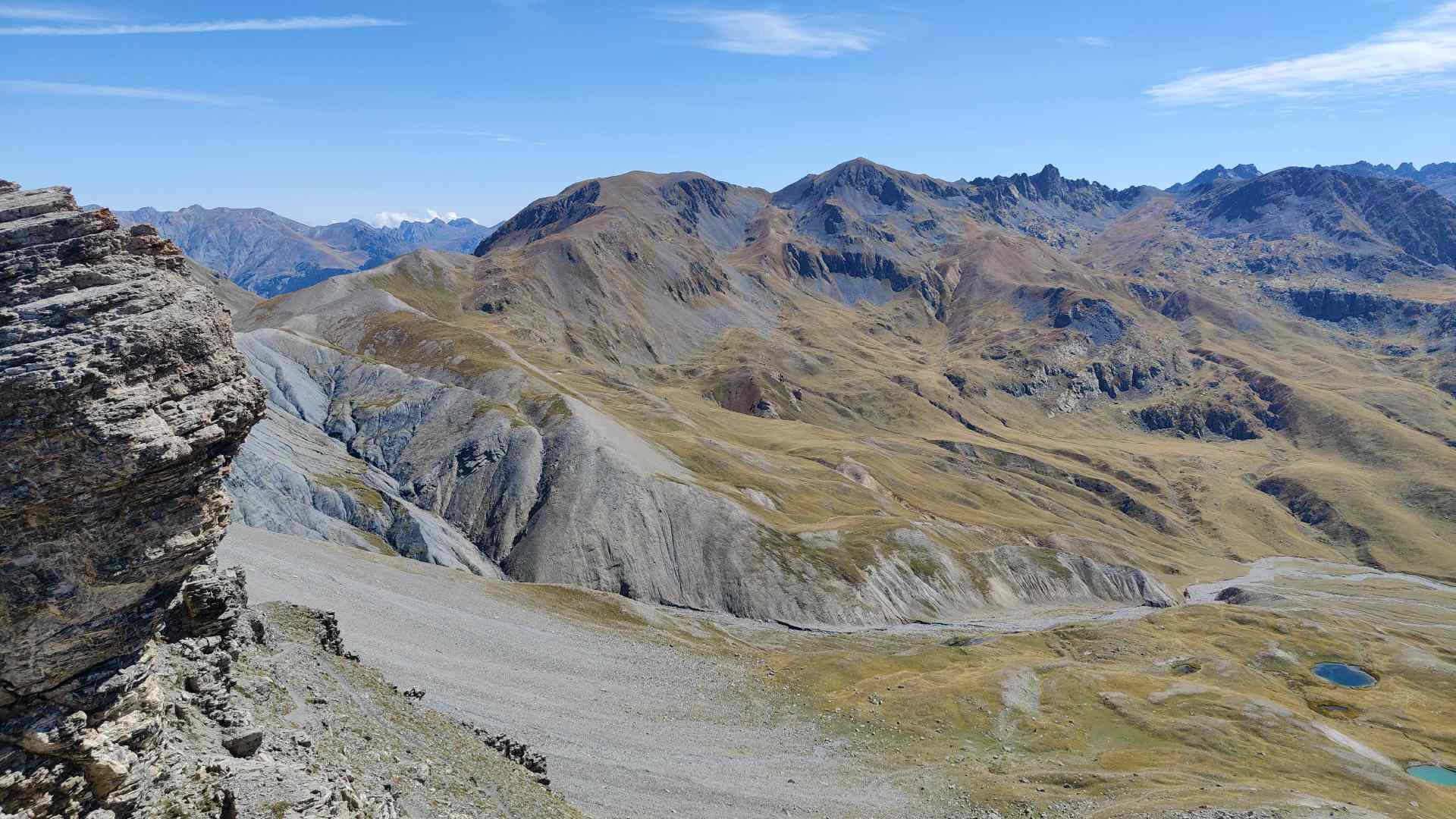
P.S: The two pictures in this blog are from the hike from Lake Geneva to Nice. You can find out more at azurgo.ch.
]]>Egg, August 9, 2025: The Linux distribution AVMultimedia, version 2025/VIII, features slightly modified startup behavior and sleep mode at the touch of a button. These are minor updates, so this article will be short and sweet.
Changed startup behavior
When booting AVMultimedia on a Lenovo Yoga 2-in-1 tablet with an Intel processor, we unfortunately noticed that the process took about 20 seconds longer than usual and that the taskbar (start menu) was missing afterwards.
After some time-consuming research, we found out that this problem is known, but no ready-made solution could be found. For this reason, starting with version 2025/VIII, the system will check again at the end of the startup process to see if the Start menu has actually been launched. If this is not the case, the taskbar will be launched manually.
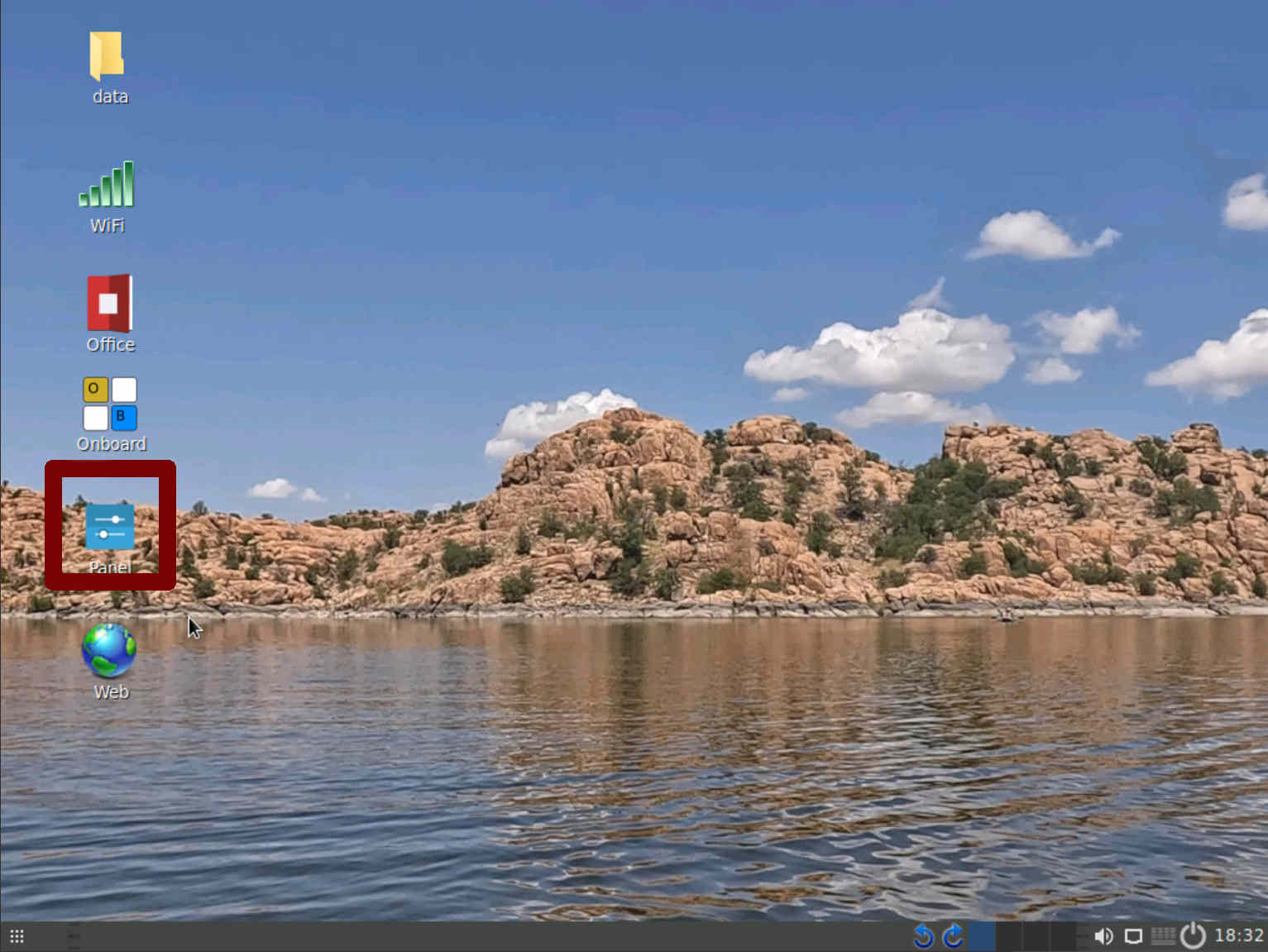
In addition, the Control Center can now be started using ‘Panel’ (outlined in red in the figure above). When this is done, the taskbar is always started as well (if it is not already available).
Activate sleep mode
Previously, the command ‘echo mem >/sys/power/state’ had to be entered with ‘root’ in the terminal. Now, sleep mode can be activated using the power button (taskbar at the bottom right).
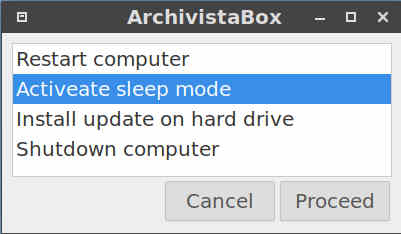
After a control query, the computer is put into sleep mode. The computer can be reactivated by pressing a key. The updates can be found here:
https://archivista.ch/cms/avmultimedia (Link to infomaniak.ch)
https://sourceforge.net/projects/archivista/files/